add AUDI Q5 2021 Owner´s Manual
[x] Cancel search | Manufacturer: AUDI, Model Year: 2021, Model line: Q5, Model: AUDI Q5 2021Pages: 332, PDF Size: 118.86 MB
Page 3 of 332
80B012721BA
Foreword
Thank you for choosing an Audi - we value your trust in us.
Your new Audi will allow you to experience the best in groundbreaking technology and premium quality
equipment that a vehicle has to offer. Audi recommends that you read your Owner's Manual thoroughly
so that you quickly become acquainted with your Audi and make use of all of its features.
In addition to explaining how the different features work, there are many useful tips and information
concerning your safety, how to care for your vehicle, and how to maintain your vehicle's value. Audi also
gives you useful tips and information on how to drive your vehicle more efficiently and in an environ-
mentally-friendly manner.
Audi hopes you enjoy driving your vehicle and wishes you safe and pleasant motoring.
ZA\ warNiNc
Operating, servicing and maintaining a passenger vehicle or
off-highway motor vehicle can expose you to chemicals includ-
ing engine exhaust, carbon monoxide, phthalates, and lead,
which are known to the State of California to cause cancer and
birth defects or other reproductive harm. To minimize expo-
sure, avoid breathing exhaust, do not idle the engine except as
necessary, service your vehicle in a well-ventilated area and
wear gloves or wash your hands frequently when servicing
your vehicle. For more information go to www.P65Warnings.
ca.gov/passenger-vehicle.
Page 4 of 332
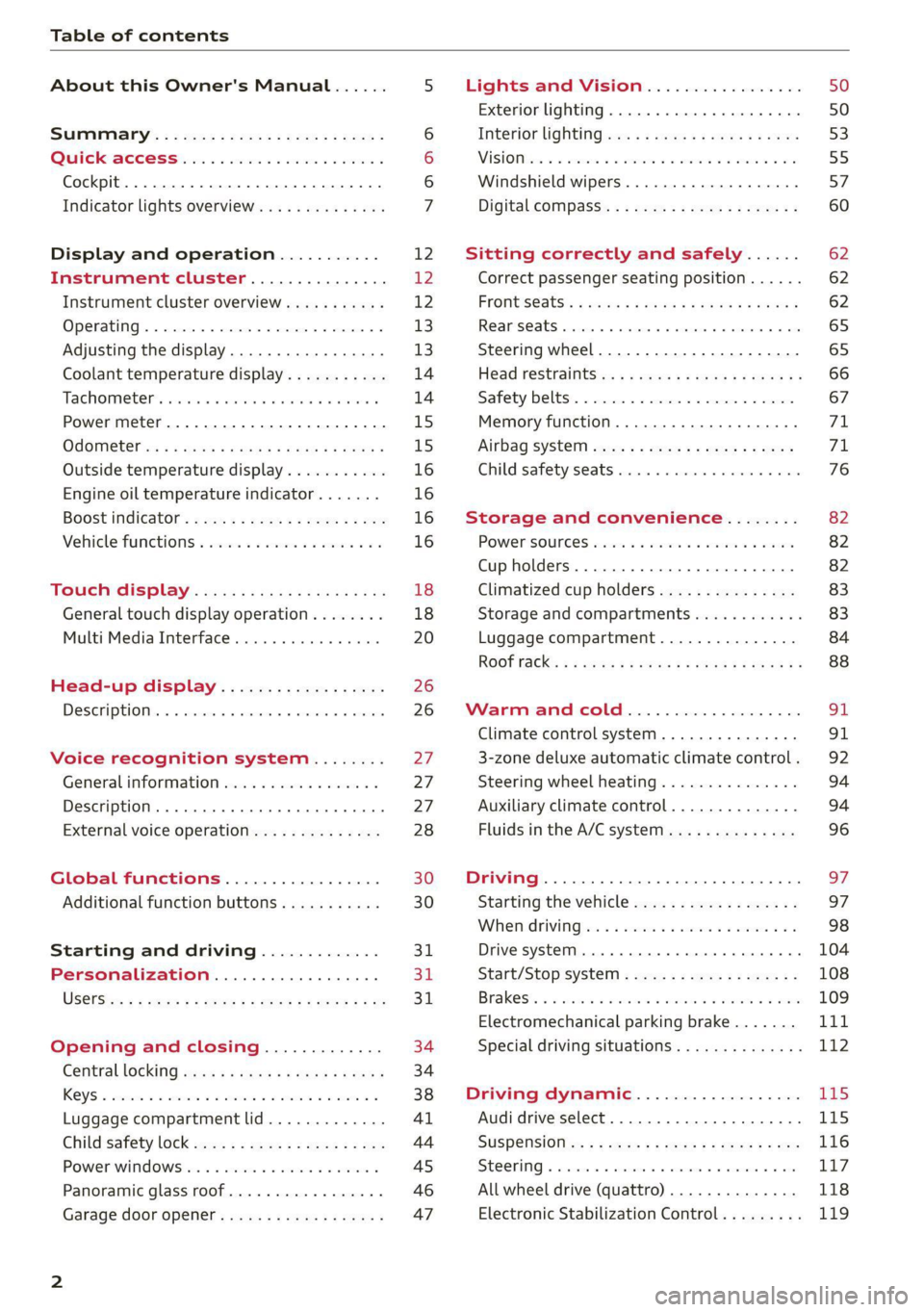
Table of contents
About this Owner's Manual......
SUMIMAry: < = exe : eens: Seen cs sens
QutckeaeCe ssh: «i esis se ois a eaves @
Cockpit. ...... 0... eee eee eee eee
Indicator lights overview...........4..
Display and operation...........
Instrument cluster...............
Instrument cluster overview...........
Operating. ecccuse w+ were oo wens oo ayes 9 ¥
Adjusting the display.................
Coolant temperature display...........
Tachometer’ series i ewe so snes ¥ & ome
Power meter...............0 00000005
QUOOMEtEr as + 2 ame < gas = papas s ¥ HERS &
Outside temperature display...........
Engine oil temperature indicator.......
Boost indicator’: 2 2c« «= sesa ¢ x sews «x 2x8
Vehicle functions « seis ss emis ee mes ee
Touch display.....................
General touch display operation........
Multi Media Interface................
Head-up display..................
DeSeriptioni: << sone so sisi © » axsinne oo sxe
Voice recognition system........
General information.................
Description ...... 0... ccc eee ee eee
External voice operation..............
Global functions.................
Additional function buttons...........
Starting and driving.............
Personalization..................
Luggage compartment lid.............
Child'safety lock ses < « se0% cs eee se oes
Power windows: ss sew. «sass as eaves a
Panoramic glass roof.................
Garage door opener..........--..00-5
NOD
OO
12 12 12
13
13
14 14
15
15
16
16
16
16
18 18
20
26
26
27 27 27 28 30 30
31 3h 31
34
34
38
41
44
45
46
Lights and Vision.................
Exterior lighting...............0000ee
Windshield wipers................05-
Digital compass’ « < sces ss sees sz wees ae
Sitting correctly and safely......
Correct passenger seating position......
Frontis@ats's « sais « ¢ sine « » saree yo eae a
ReAarSeats verse a coecns oo area oo semen nw aie
Steering wheel.............2.200005.
Head restraintsts: « » gare x 2 oawa ys qe a 5
Safety belts..............00..00000.
Memory function............2..00 eee
Airbag
syst@m aces ss cece se ees ee ees
Child safety seats cic «4 wessn « women © vane
Storage and convenience........
POWer SOURCES sisson «+ women « ¥ oes 3 6 eos
Cup holders........ 00... e cece eee
Climatized cup holders...............
Storage and compartments............
Luggage compartment...............
ROOF PACK: « « ewws 4s ewes 4s nees ¥ e reese gs
WV erence Chl ieee. & socsese 5 & newer 3 0 we
Climate control system............00.
3-zone deluxe automatic climate control .
Steering wheel heating...............
Auxiliary climate control..............
Fluids in the A/C system..............
Driving........... 0... cece eee
Starting the vehicle..................
Whe nid rivitngnes ss sons 6 x tana © 8 cuere a 6
Drive systeM.... 2... eee eee eee
Start/Stop system..........2--00000-
Electromechanical parking brake.......
Special driving situations..............
Driving dynamic..................
Audi drive select..........0.-..000005
SUSPENSION is: + & eas » s eews 6 y Gews Fo HEE
SEONG « csevaiss 5 + sevens = anecome © u enecans + © ox
All wheel drive (quattro) ..............
Electronic Stabilization Control.........
62
62
62
65 65
66 67
71 71
76
82
82
82
83
83
84
88
91
91
92
94
94
96
Page 5 of 332
80B012721BA
Table of contents
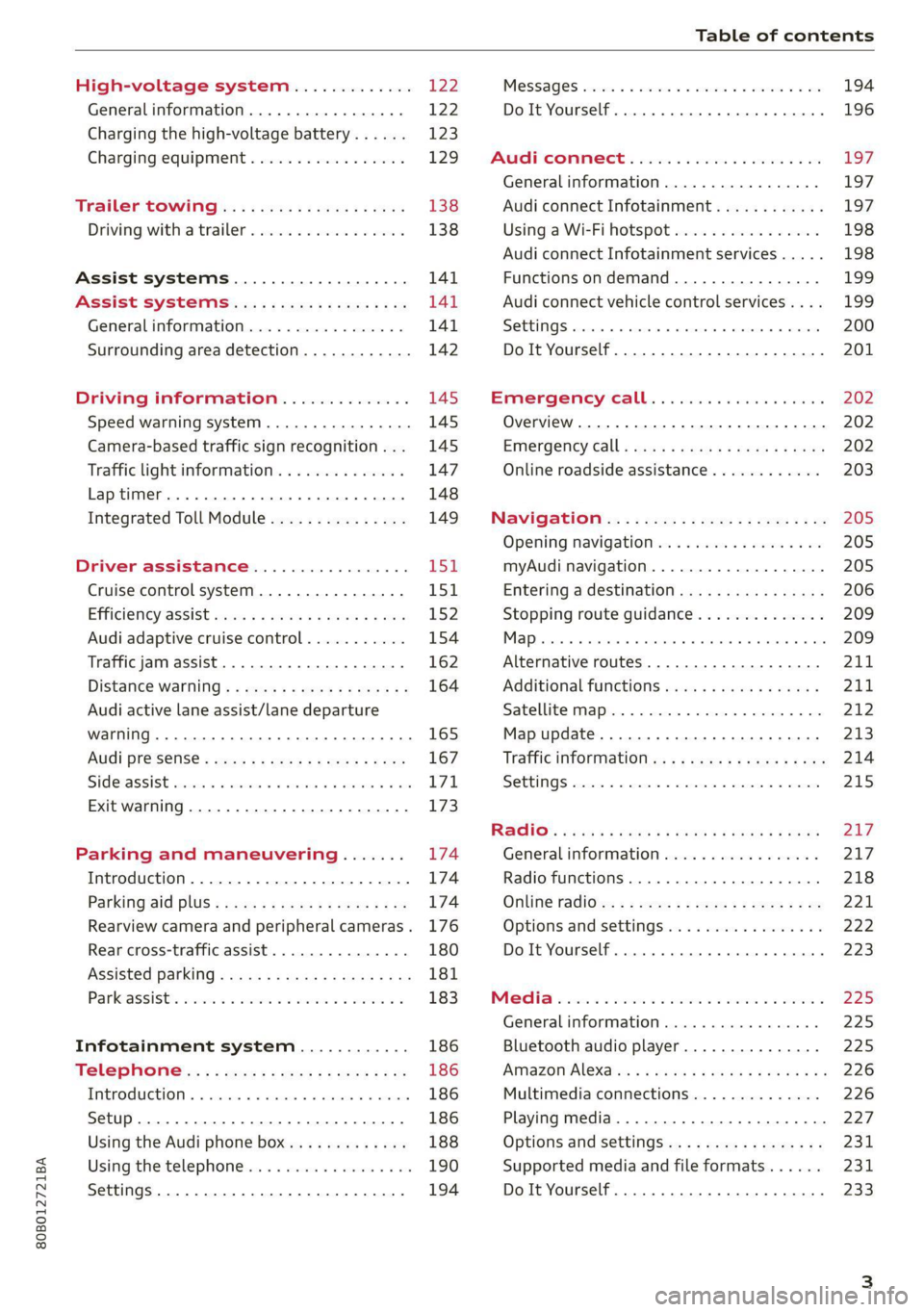
High-voltage system............. 122
Generalinformation................. 122
Charging the high-voltage battery...... 123
Charging equipment................. 129
Trailer ROwilne is «i wows «seas gs eeees 138
Driving witha trailer................. 138
Assist systems................... 141
ASSIST SYSTCINIS§ 65 6 i onws 5 can so oe 141
General information................. 141
Surrounding area detection............ 142
Driving information.............. 145
Speed warning system................ 145
Camera-based traffic sign recognition... 145
Traffic light information.............. 147
Laptimer..... 0.2... cee eee eee eee 148
Integrated Toll Module............... 149
DriVeEraSSISTAMGES .. 6. cies me oon 151
Cruise control system.............0-. 151
Efficiency @SSISl cass ¢ & news ¢ v wees as nwa 152
Audi adaptive cruise control........... 154
Traffic jam assist... 6.0.0... cee eee ee 162
Distance warning ..............00.08. 164
Audi active lane assist/lane departure
WarNing .... 22... eee ec 165
Audi presense...........--.0 eee eee 167
SIGEASSISE vce ow sani © seunie wv ree 6 8 ae T71,
Exit warning .................0.0000. 173
Parking and maneuvering....... 174
Introduction. ............ 2. eee eee eee 174
Parking aid DlUS ¢ cows ss news se mews sane 174
Rearview camera and peripheral cameras. 176
Rear cross-traffic assist............... 180
Assisted parking..............000e00- 181
Parkeassistts ew 2 omnom 2 2 anwon w 2 avons 6 ¢ 183
Infotainment system............ 186
Telephone..................-0-055 186
TEROGUCLION « « sccoane a woness o 0 varaim + vi nee 186
Setup ..... 0... cee eee ee eee eee 186
Using the Audi phone box............. 188
Using the telephone..........0.0. 000 190
Settings...............0 0000000000. 194
MeSSaQeS essscns sa cavswce ww amuses vo someone vw oe 194
Do It Yourself... 2... eee eee eee 196
AUP CONNECE « 6:65. 6 ev ee ews se os 197
General information................. 197
Audi connect Infotainment............ 197
Using a Wi-Fi hotspot................ 198
Audi connect Infotainment services..... 198
Functions on demand................ 199
Audi connect vehicle control services.... 199
SOTUIAGS cecssin « ws oseuwnn & prresenwin m iovewene @ n sexe 200
Do It Yourself. ...... 0.0... eee eee 201
EMErGéency CALL. . « ccc cs ses een 202
Overview... .... 2... eee eee ee 202
Emergency Call + wsws < nau 9 = seep 2 aOR 202
Online roadside assistance............ 203
Navigation’... « : ssc: <: soos ss eins ees 205
Opening navigation.................. 205
myAudi navigation.................0. 205
Entering adestination................ 206
Stopping route guidance.............. 209
1) on 209
Alternative routes.............2.-04. 211
Additional functions...............-. 211
Satellite map............... 0. eee 212
Map update................0.000 005 213
Traffic information...............0005 214
SettINGS cee: oo weaves © crerenee © wveeee = ese 215
Raqio:: « esc ss news se eee se eee 2 x BOS 217
General
information................. 217
Radio functions...............00000) 218
Online radio's: ss sees se eees a eee ve oe 221
Options and settingsion ss mew s 6 sows a vs 222
Do It Yourself. ........ cece eee eee 223
Mela wise: 2 2 were se were se mere se ween 2 225
Generalinformation................. 225
Bluetooth audio player............... 225
AiMaZOniAleXaion « = wisee 5 ¢ wavs a wove 4 @ 226
Multimedia connections.............. 226
Playing media...............2.20000- 227
Options and settings................. 231
Supported media and file formats...... 231
Do It Yourself. ......... 0.0... e eee eee 233
Page 6 of 332
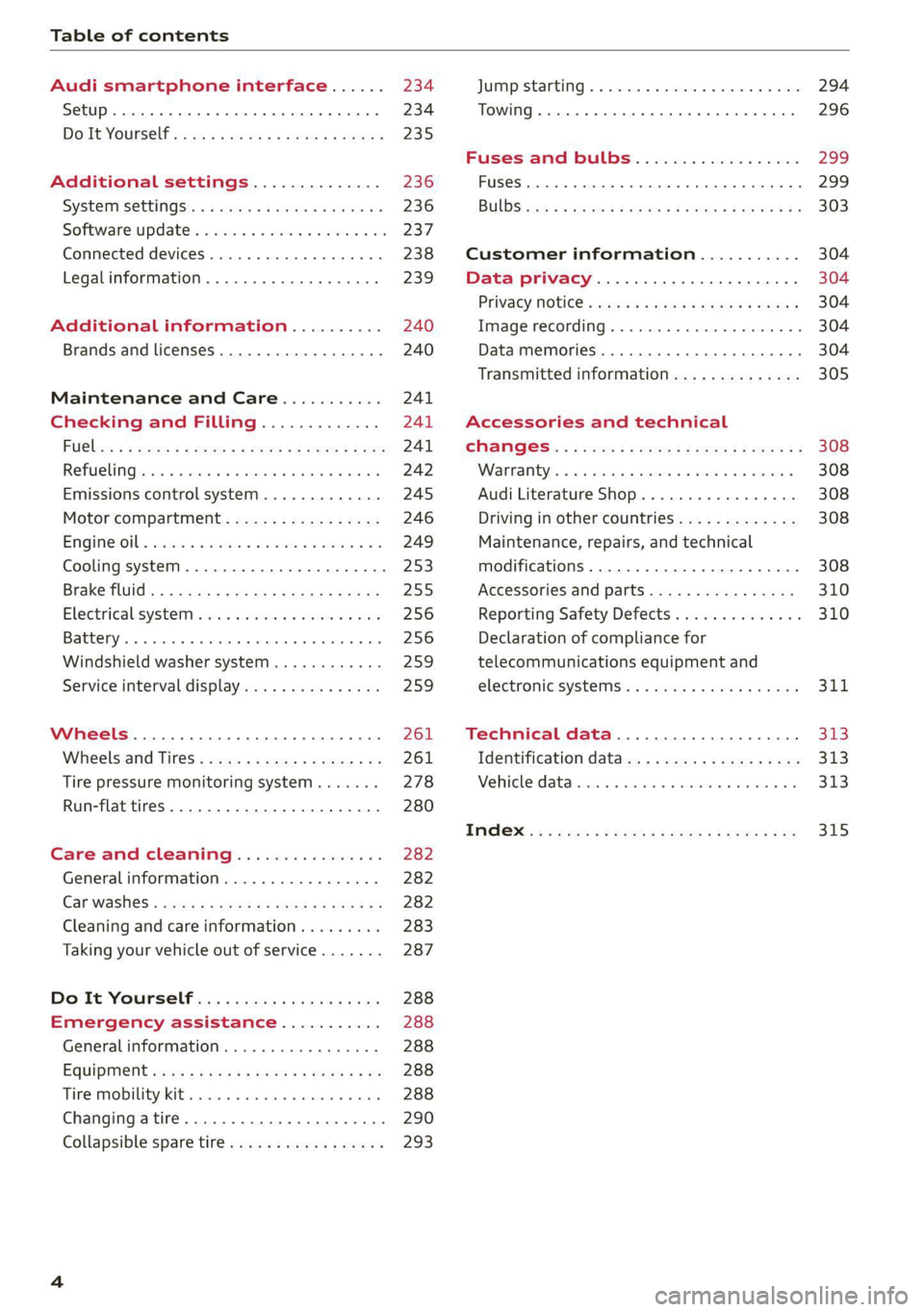
Table of contents
Audi smartphone interface...... 234
Setup... eee eee eee eee 234
DOIt YOURSELT sce 5 s woes se meee 5 2 ee 235
Additional settings.............. 236
System Settings: : s eens s i vows ve sews es 236
Software update...............2..-0. 237
Connected devices.............000005 238
Legalinformation................... 239
Additional information.......... 240
Brands and licenses..............0005 240
Maintenance and Care........... 241
Checking and Filling............. 241
FUGles « = seam = = sews ez nes eg eee Eee 241
RefaelinGuecs « sess oo wea 2 wen 2 wenn 242
Emissions control system............. 245
Motor compartment................. 246
Engine@iOiles esive s+ wacom ov soe 3 v ema ¥ vs 249
Cooling systeM............0 0.002 253
Brake fluid): < s asws s ¢ qa > § eee + tf eee 255
Electrical:system iiss ee sccwe owe 2 x ere 256
Battery... .. eee eee eee eee 256
Windshield washer system...........- 259
Service interval display............... 259
Wheels............. 6.0. c eee eee 261
Wheels and Tires...........--0000005 261
Tire pressure monitoring system....... 278
Run-flat tires... 2.2... eee eee eee 280
Care and cleaning................ 282
Generalinformation................. 282
Car washes « swas 5 ¢ sams se pean co eee Gs 282
Cleaning and care information......... 283
Taking your vehicle out of service....... 287
Do'lt Yourself sos so isis é genes scene 288
Emergency assistance........... 288
Generalinformation................. 288
EQUIPMENE wees + « wees = nae go wees 8 2 ee 288
Tire MOBILE KEE scccee x © creases we © anairers 6% cenie 288
Changingatire...................000- 290
Collapsible spare tire.............000. 293
JUIMIPFSTANEING 5 x exces 6 w erates @ a cawcens vw ae 294
TOWING... cece ete 296
Fuses and bulbs.................. 299
Fuses... 0... eee ee eee eee 299
BUILDS: sss s = wavs & & ees 5 2 ctetDs sb eG ee 303
Customer information........... 304
Data privacy................000 eee 304
Privacy NOLICE « naw, 2 w aay ¥ Kaew + Meee © 304
Timage reGOrding). « « canew + sect ws caver a os 304
Data memories............00.00e eee 304
Transmitted information.............. 305
Accessories and technical
CINERGSS:. « » sem: : x ews ce ee be ee ee 308
Warranty’ « = eon x 2 manors 6 o ois wv ee 6 308
Audi Literature Shop.............000- 308
Driving in other countries............. 308
Maintenance, repairs, and technical
modifications..................00008 308
Accessories and parts..............-. 310
Reporting Safety Defects.............. 310
Declaration of compliance for
telecommunications equipment and
electroniesystems's « «cows se mean 2 news 314,
Technical data.................... 373
Identification data................... 313
Vehicle datatics ss saves o srewa sv awe 0 ve 313
TAAGK es = see « = wee « = owe Be nee eg oe 315
Page 7 of 332
80B012721BA
About this Owner's Manual
In this manual, Audi provides important informa-
tion, tips, suggestions, and warnings for using
your vehicle. “Audi” refers to AUDI AG, the re-
spective importer in a country, as well as joint
ventures.
It has always been Audi's policy to continuously
improve its products. Audi reserves the right to
make changes in design and specifications, and
to make additions or improvements in its prod-
ucts without incurring any obligation to install
them on products previously manufactured. This
owner's manual is based on the current data
available when it was printed. Text, illustrations,
and specifications in this owner's manual are
based on the most current information available
at the time of printing, and shall not constitute a
basis for liability claims.
KEEP THIS GUIDE
Keep this manual and any other applicable docu-
ments in your vehicle at all times. This is espe-
cially important if you loan your vehicle to others
or sell it.
This owner's manual describes the equipment
range for all model versions of this vehicle at the
time of printing. Individual equipment options
described may only be available at a later date or
may only be offered in certain countries.
Some sections in this manual do not apply to all
vehicles. When this is the case, the beginning of
the section indicates the validity, for example
“Applies to: vehicles with speed warning sys-
tem”. Optional or vehicle-specific equipment is
ugn also identified with an asterisk “*”.
The illustrations in this manual are a guide.
Some of the details in your vehicle may differ
from the illustration.
All directions, such as “Left”, “right”, “front” and
“rear”, are based on the vehicle's direction of
travel.
* — Optional equipment or vehicle-specific equip-
ment
b> The section continues on the next page.
=> A\ Cross reference to a “WARNING” within a
section. If a page number is indicated, the
WARNING is located outside of the section.
IN WARNING
Text with this symbol contains information
about safety and how to reduce the risk of se-
rious personal injury or death.
C) Note
Text with this symbol contains information
about reducing the risk of damage to your ve-
hicle.
(@) For the sake of the environment
Text with this symbol contains information on
protecting the environment.
G) Tips
Text with this symbol contains additional use-
ful information.
Page 8 of 332
Quick access
Quick access
Cockpit
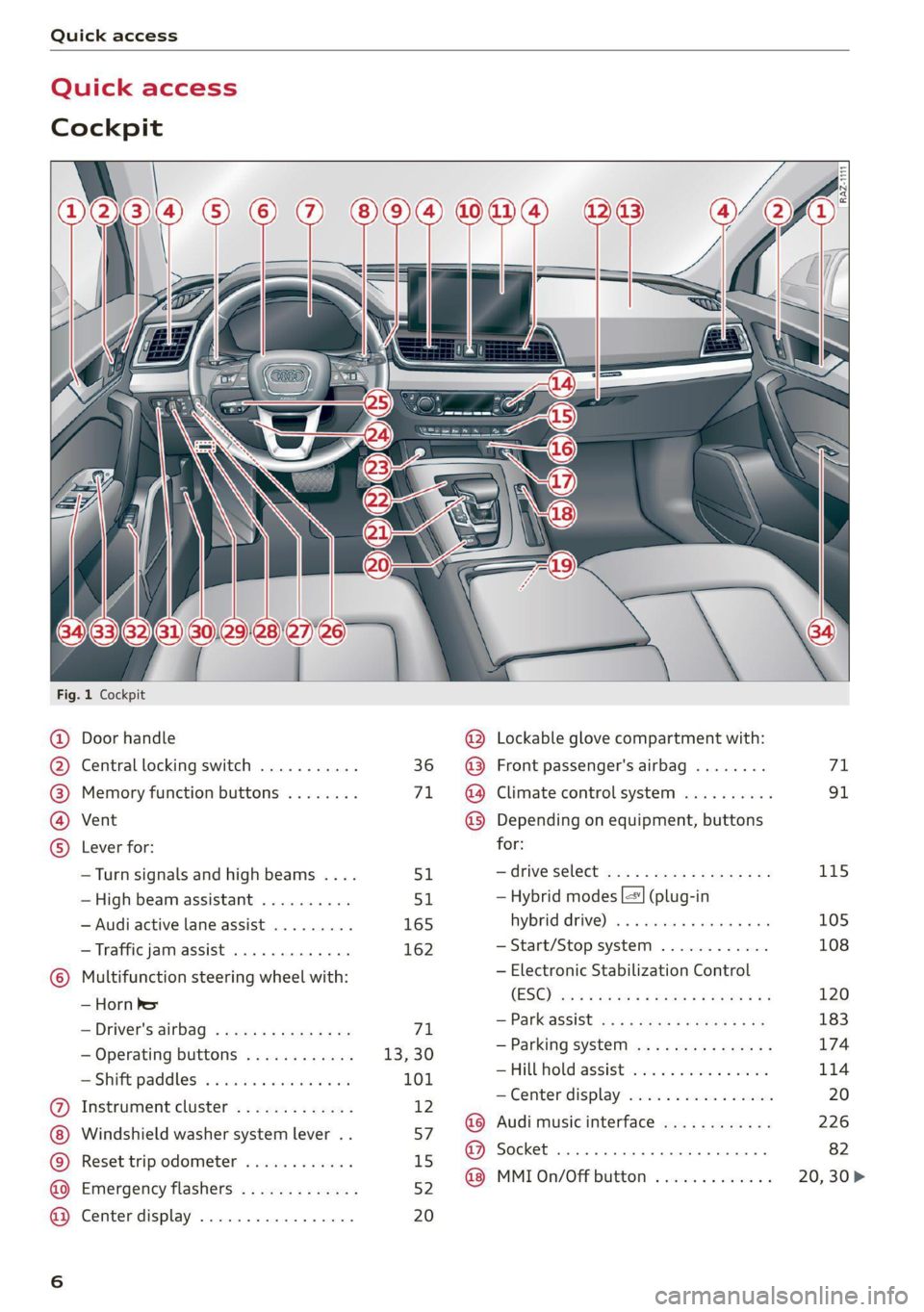
Fig. 1 Cockpit
@ @ @ @ ©
©
OOOO
Door handle
Central locking switch ...........
Memory function buttons ........
Vent
Lever for:
—Turn signals and high beams ....
—High beam assistant ..........
— Audi active lane assist .........
— Traffic jam assist .............
Multifunction steering wheel with:
— Horn be
— Driver's airbag ...............
— Operating buttons ............
= Shift paddles: « « coi e ewes sv ove
Instrument cluster .............
Windshield washer system lever ..
Reset trip odometer ............
Emergency flashers .............
Center display .................
51
165 162
71
13,30
101
12
57
15
52
20
@ Lockable glove compartment with:
@ Front passenger's airbag ........
@ Climate control system ..........
@ Depending on equipment, buttons
for:
—drive select ...............0..
— Hybrid modes |=] (plug-in
hybrid drive) ss i scsi ov sven 6 oa
— Start/Stop system ............
— Electronic Stabilization Control
(ESO) ca ss wuss 5 4 Hema a i eos a ee
— Parkeassist ws 3 ¢ avo » x eeay a y me
— Parking system ...............
Hill Hold assist ves: es sseose. 2 animes
—Center display .............00.
@ Audi music interface ............
@ Socket ......... 0... c eee eee
@ MMI On/Off button .............
115 105 108 120
183
174
114
Page 14 of 332
Instrument cluster
Belo
6/24/2019
6/24/2019
C100 T 0,0 mi
LOT SAF ela
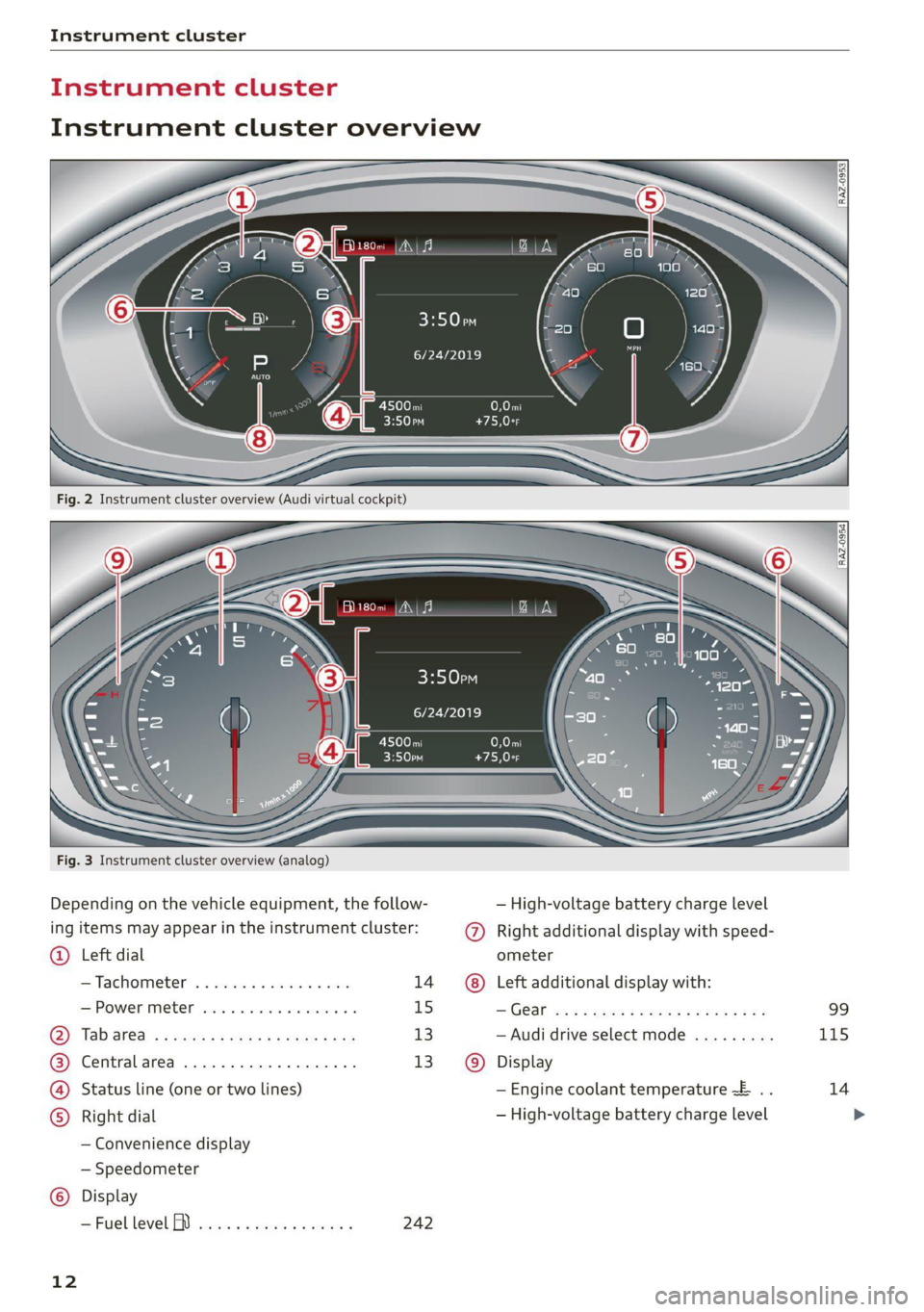
Fig. 3 Instrument cluster overview (analog)
Depending on the vehicle equipment, the follow- — High-voltage battery charge level
ing items may appear in the instrument cluster: @) Right additional display with speed-
@® Left dial ometer
—Tachometer ........ 000.000 14 Left additional display with:
HSPOWERIMEER secur 2s essa oo awacnn @ 6 15 —'G@al a: = s qos os eee es eee er es 99
Tab
ara. « < sexes < + sgeps = ¢ eau 9 eee 13 — Audi drive select mode ......... 115
Central area ...............000. 13 Display
Status line (one or two lines) — Engine coolant temperature ~E .. 14
Right dial — High-voltage battery charge level
— Convenience display
— Speedometer
Display
—Fuellevel Y ............0.005 242
12
Page 16 of 332
Instrument cluster
Switching the view
Applies to: Audi virtual cockpit
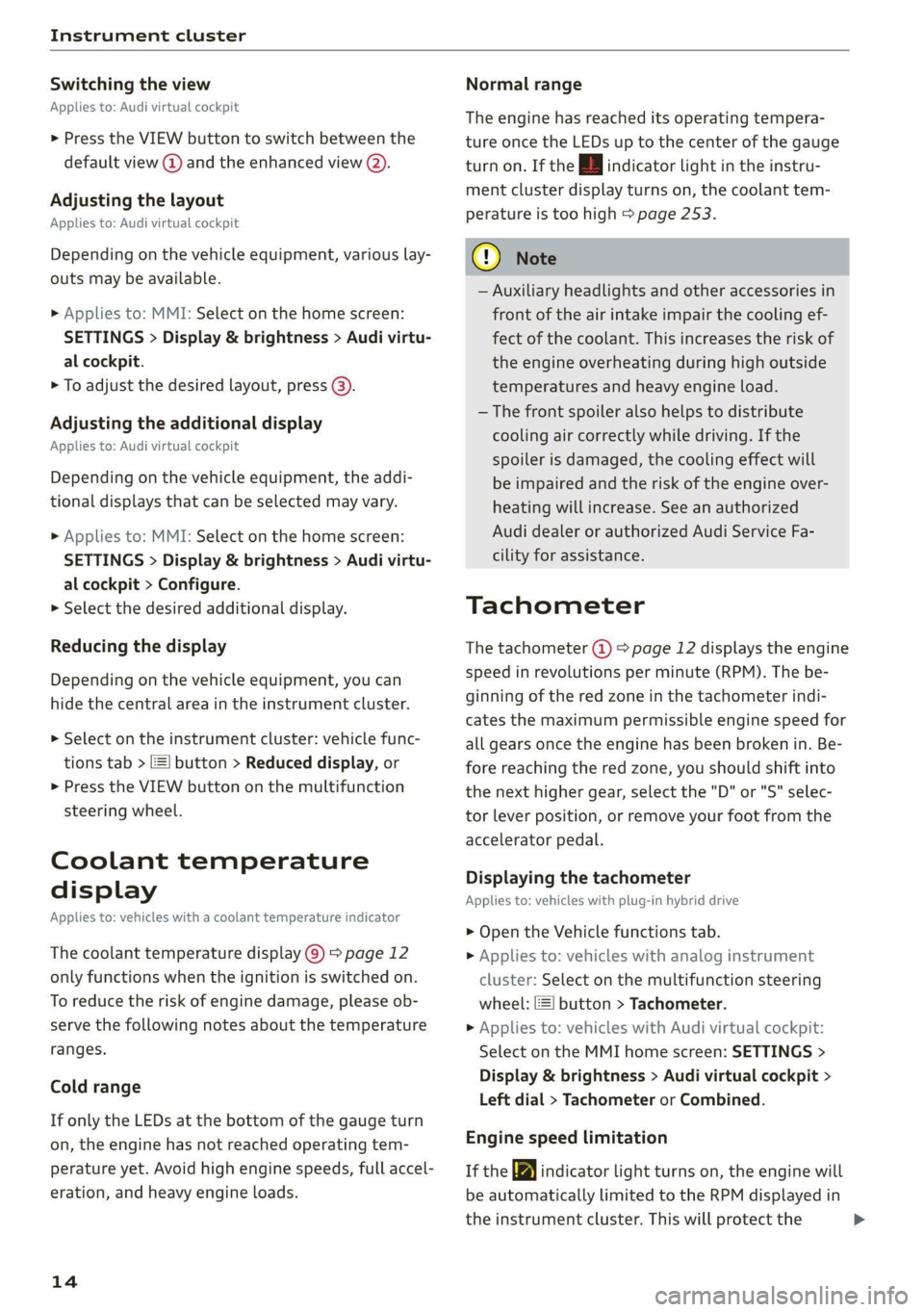
> Press the VIEW button to switch between the
default view @) and the enhanced view (2).
Adjusting the layout
Applies to: Audi virtual cockpit
Depending on the vehicle equipment, various lay-
outs may be available.
» Applies to: MMI: Select on the home screen:
SETTINGS > Display & brightness > Audi virtu-
al cockpit.
> To adjust the desired layout, press @).
Adjusting the additional display
Applies to: Audi virtual cockpit
Depending on the vehicle equipment, the addi-
tional displays that can be selected may vary.
> Applies to: MMI: Select on the home screen:
SETTINGS > Display & brightness > Audi virtu-
al cockpit > Configure.
> Select the desired additional display.
Reducing the display
Depending on the vehicle equipment, you can
hide the central area in the instrument cluster.
> Select on the instrument cluster: vehicle func-
tions tab > E=] button > Reduced display, or
> Press the VIEW button on the multifunction
steering wheel.
Coolant temperature
display
Applies to: vehicles with a coolant temperature indicator
The coolant temperature display @) > page 12
only functions when the ignition is switched on.
To reduce the risk of engine damage, please ob-
serve the following notes about the temperature
ranges.
Cold range
If only the LEDs at the bottom of the gauge turn
on, the engine has not reached operating tem-
perature yet. Avoid high engine speeds, full accel-
eration, and heavy engine loads.
14
Normal range
The engine has reached its operating tempera-
ture once the LEDs up to the center of the gauge
turn on. If the | indicator light in the instru-
ment cluster display turns on, the coolant tem-
perature is too high > page 253.
@) Note
— Auxiliary headlights and other accessories in
front of the air intake impair the cooling ef-
fect of the coolant. This increases the risk of
the engine overheating during high outside
temperatures and heavy engine load.
—The front spoiler also helps to distribute
cooling air correctly while driving. If the
spoiler is damaged, the cooling effect will
be impaired and the risk of the engine over-
heating will increase. See an authorized
Audi dealer or authorized Audi Service Fa-
cility for assistance.
Tachometer
The tachometer (@) 9 page 12 displays the engine
speed in revolutions per minute (RPM). The be-
ginning of the red zone in the tachometer indi-
cates the maximum permissible engine speed for
all gears once the engine has been broken in. Be-
fore reaching the red zone, you should shift into
the next higher gear, select the "D" or "S" selec-
tor lever position, or remove your foot from the
accelerator pedal.
Displaying the tachometer
Applies to: vehicles with plug-in hybrid drive
> Open the Vehicle functions tab.
> Applies to: vehicles with analog instrument
cluster: Select on the multifunction steering
wheel: [=] button > Tachometer.
> Applies to: vehicles with Audi virtual cockpit:
Select on the MMI home screen: SETTINGS >
Display & brightness > Audi virtual cockpit >
Left dial > Tachometer or Combined.
Engine speed limitation
If the BB indicator light turns on, the engine will
be automatically limited to the RPM displayed in
the instrument cluster. This will protect the >
Page 18 of 332
Instrument cluster
The trip odometer and odometer are displayed in
the status bar @) > page 12.
The trip odometer shows the distance driven
since it was last reset. It can be used to measure
short distances. The odometer shows the total
distance that the vehicle has been driven.
Resetting the trip odometer
> To reset the trip odometer to zero, press the re-
set button @.
@) Tips
Distances are displayed in mi (miles) or km
(kilometers).
Outside temperature
display
The outside temperature is displayed in the sta-
tus bar @) > page 12.
If your vehicle is stationary or if you are driving at
very low speeds, the temperature displayed in
the instrument cluster may be slightly higher
than the actual temperature outside due to heat
radiating from the motor.
At temperatures below 41 °F (+5 °C), a snowflake
symbol appears in front of the temperature dis-
play > A.
Z\ WARNING
Do not assume the roads are free of ice based
on the outside temperature display. Be aware
that there may be ice on roads even when the
outside temperature is around 41 °F (+5 °C)
and that ice can increase the risk of accidents.
Engine oil temperature
indicator
Applies to: vehicles with engine oil temperature indicator
Depending on the vehicle equipment, the engine
oil temperature 7 may be indicated by a bar in
the instrument cluster.
» Applies to: vehicles with Audi virtual cockpit:
Open the vehicle functions tab and switch to
the enhanced view > page 13.
16
> Applies to: vehicles with analog instrument
cluster: Open the lap timer > page 148.
When engine oil temperatures are low, the dis-
play --- °F (--- °C) appears in the instrument clus-
ter. The engine has reached its operating temper-
ature when the engine oil temperature is be-
tween 176 °F (80 °C) and 248 °F (120 °C) under
normal driving conditions. The engine oil temper-
ature may be higher if there is heavy engine load
and high temperatures outside. This is not a
cause for concern as long as the E or = indica-
tor lights do not turn on.
Boost indicator
Applies to: vehicles with boost indicator
Depending on vehicle equipment, the current en-
gine load (meaning the current boost pressure)
may be indicated by a bar in the instrument clus-
ter.
> Applies to: vehicles with Audi virtual cockpit:
Open the vehicle functions tab and switch to
the enhanced view > page 13.
> Applies to: vehicles with analog instrument
cluster: Open the lap timer > page 148.
Vehicle functions
Overview
The trip computer is displayed in the first tab of
the driver information system. Additional vehicle
functions can be accessed depending on the vehi-
cle equipment.
> Press the [=] button on the multifunction steer-
ing wheel.
— On-board computer > page 17
— Energy flow > page 106
— Tachometer > page 14
—Lap times > page 148
— Lap statistics > page 148
— Reduced display > page 14
Page 20 of 332
Touch display
Touch displa > Press and hold an item until the associated op-
tions are displayed.
General touch display
operation Teen LCR ite
Applies to: touch display
Applies to: touch display
The center display is a touchscreen. Operation is
very similar to operating a smartphone.
@) Tips
Certain gestures are not available in every
menu.
Fig. 12 Touch display: pressing and pulling
>)
Applies to: touch display : Moving an item
You can position some items at any location on
the screen.
>» Press and hold an item, and then use your fin-
ger to pull it to the desired location.
inching fingers together and ling a
Applies to: touch display
Fig. 10 Touch display: pressing
Selecting a function or button
> Press the desired function or button.
Applies to: touch dis play
Fig. 13 Touch display: pinching fingers together and pull-
ing them apart
Zooming in and out on an item
> To increase the size of an item, touch it with
two fingers and pull your fingers apart.
> To decrease the size of an item, touch it with
two fingers and pull your fingers together.
Fig. 11 Touch display: pressing and holding
Accessing options
For some items, you can access additional op-
tions that are not directly visible.
18