mmi AUDI Q7 2009 Owner´s Manual
[x] Cancel search | Manufacturer: AUDI, Model Year: 2009, Model line: Q7, Model: AUDI Q7 2009Pages: 426, PDF Size: 97.13 MB
Page 86 of 426
Clea r vis io n
Service position
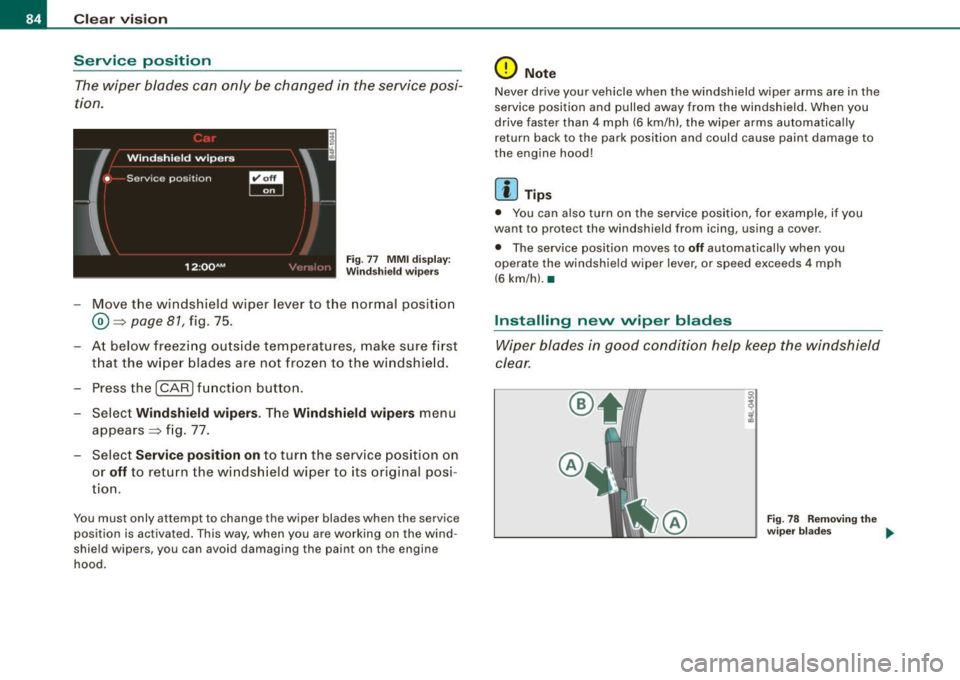
The wiper blades can only be changed in the service posi
tion.
Fig. 77 MMI d isp lay:
Winds hiel d wipers
- Move the windshield w iper lever to the normal posit ion
® =>page 81, fig. 75 .
- At below freezing outside temperatures, make sure first that the w iper blades are not frozen to the windshie ld .
- Press the !CAR) fu nction button .
- Select
Wind sh ield wipers . The Wind shield wipe rs menu
appears => fig . 77.
Select
Servi ce position on to turn the service position on
or
off to return the windshield wiper to its original posi
tion.
You must only attempt to change the wiper blades when the service
position is activated. This way , when you are working on the wind
shield wipers, you can avoid damaging the paint on the engine
hood.
0 Not e
Never drive your vehicle when the windshield wiper arms are in the
service position and pulled away from the windshield . When you
drive fas ter than 4 mph (6 km/h), the wiper arms automatically
return back to th e park position and could cause paint damage to
the eng ine hood!
[ i ] Tip s
• You can also turn on the service position, for example, if you
want to protect the windshi eld from icing, using a cover .
• The service position moves to
off automatically when you
operate the windshi eld wiper lever , or speed exceeds 4 mph
(6 km/h). •
Installing nevv wiper blades
Wiper blades in good condition help keep the windshield
clear.
®
Fig. 78 Remo ving the
wiper b lades ....
Page 89 of 426

Applies to vehicles : wit h automat ically di mmi ng in side mirr or
Automatically dimming inside mirror
The automatic dimming function can be turned on and off
if required.
Disabling auto dimming
Fi g. 8 1 In side r ear
v iew mirror
- Press butto n @ ~ fig. 8 1 briefly, -th e gree n indicator
light @ goes out .
A ctivating /re activ ating auto dimming
- Press button@
briefly, -the green indicato r light @
goes on.
Automa tic dimming func tio n
The automatic dimming function is activated every time the ignition
is turned on . The green indicator light is lit to indicate auto dimming
is active.
When dim ming is activated, the inside m irror will darken
automati
cally
in response to the amount of light striking the mirror (such as
headlights from rearwa rd approaching vehicles). Even in dimm ing
mode, the mirror surface turns bright when :
• the interior light is switched on
• reverse gear is engaged .
Controls and equip
ment
Cl ea r vision
& WARNING
The glas s of the in side re ar vie w mirror i s layered and cont ain s an
electrolyte to a chieve it s properties. Be aware of liquid electrolyte
leaking from a bro ken mirror gl ass. Thi s liquid can cause irrit ation
to skin , eyes , and re spir atory sy ste m . If you get el ectrolyte in your
e ye s or on your skin , immed iatel y rinse w ith plenty of w ater.
If irri
t a tion per sists, s eek medical attention .
0 Note
Liquid electrolyte leaked from a broken mirror glass wil l damage any
p lastic surfaces it comes in contact with . C lean up sp illed e lectrolyte
immediately with clear water and a sponge .
[ i ] Tip s
• If you sw it c h off the automati c di m mi ng function on the in side
mirror , autom atic dimming of the out side mirrors* will likewise be
dis abled .
• Check to make sure there are no objects preven ting light from
reaching the inside mirror.
• Do not attach any stickers to the windshie ld in front of the light
sensor*, as this would interfere with the automatic operation of the
headlig hts and the automatic d imming of the inside mirror.
• Be aware that automatic dimming of the inside mirror can only
operate properly if the rear window sun b lind* is retracted. •
I • •
Page 91 of 426

farther away than when seen in a flat mirror. If you use this mirror to
estimate distances of fol lowing ve hicles when chang ing lanes, you
cou ld estimate incorrect ly and cause an accident .
• I f the mirro r housing is moved uninten tio nal ly ( for example,
while parking your vehicle), then you must first fo ld the mirror elec
tr ically. D o not readj ust the mirro r ho us ing manua lly . You could
damage the motor which contro ls the mirror .
• I f you take the veh ic le to an automatic car wash, y ou mus t fold
the exterior mirrors flat to prevent damaging them . Power folding
ex terior mirr ors* must no t be folded in or out by hand . Use the
power function!
[ i ] Tips
If there shou ld be a malfunction in the electrica l system, you can
sti ll adj ust the outside mi rrors by pressing the edge of the mirro r.•
Appl ie s to v ehicl es: with au tomat ic d imm ing for outs id e m irro rs
Automatic dimming for outside mirrors
The outside mirrors are dimmed together with the automatic
dimming o f the inside mir ror . When the ignition is switched on, the
mirrors dar ken au tomat ical ly dependin g on the light strik ing them
(e .g. head lights from the rear).
When t he in ter ior lig hting is switched on and when reverse gear is
engaged, the m irrors are switched back to the ir original brightness
(n ot di mmed).
& WARNING
The glass of the inside rear view mirror is layered and contain s an
ele ctrolyte to a chieve its propert ies . Be aware of liquid ele ctrolyte
leaking from a broken mirror gla ss. This liquid can cau se irritation
to skin , eyes , and re spiratory system . If you get elect rolyte in your
Controls and equip
ment
Cl ea r vision
& WARNING (continued )
eyes or on your s kin , immed iately rinse with plenty of water . If irri
tation per sists , seek medical attent ion .
0 Note
Electrolyte leak ing fro m a broken mirror g lass attacks the vehic le
paint and plastic surfaces . C lean up spilled electro lyte immediately
with c lear water and a sponge .
[ i ] Tips
• If automatic dimming for the inside mirror i s swit ched off, the
o uts ide mirror s are also not dimmed automatically .
• Automatic di mming for the mirr or only opera tes prop erly if the
sunshade * for the rear window is retracted, or the light striking the
inside mirror is not h inde red by o ther o bjec ts. •
Digital compass
Ap plies t o vehicles : with d ig ita l com pass
Activating or deactivating the compass
The direction is displayed on the interior rear vie w mirror.
I • •
Fig . 8 3 Inside re ar
view mirror : digital
co mp ass ac tivat ed
Page 99 of 426
Seat memory
Applies to vehicles: w ith seat memory
Driver's seat memory
The seat adjustment settings for two drivers con be stored
using the memory buttons in the driver's door.
Fig . 90 Driver's door :
Seat memory
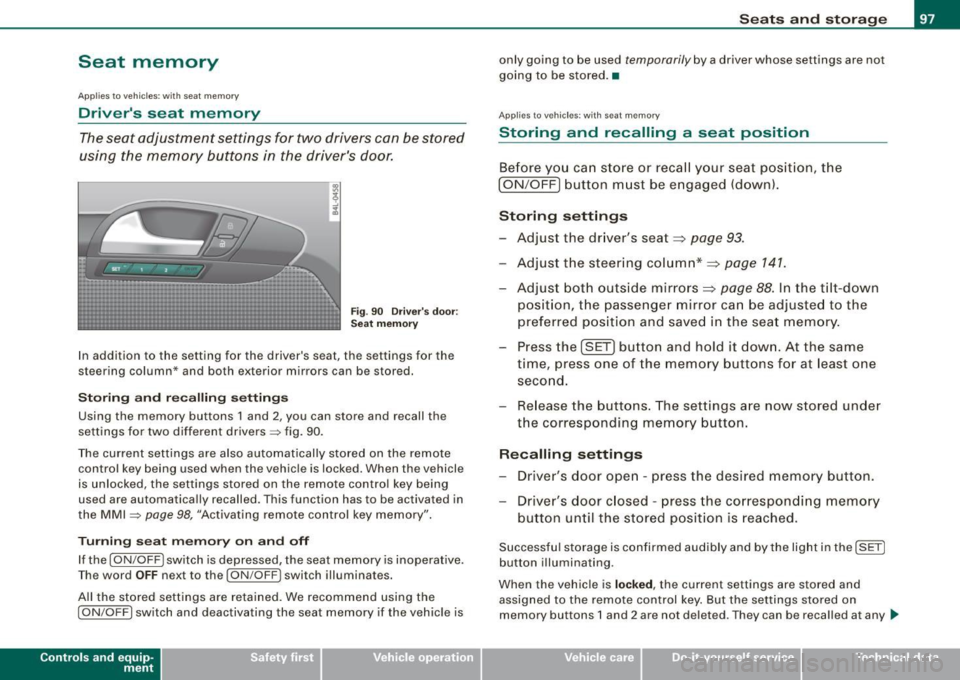
In addition to the setting for the driver's seat, the settings for the
steering column* and both exterior mirrors can be stored.
Storing and recalling settings
Using the memory buttons 1 and 2, you can store and recall the
settings for two different drivers=> fig. 90.
The current settings are also automatically stored on the remote control key being used when the vehicle is locked. When the vehicle
is unlocked, the settings stored on the remote control key being
used are automatically recalled. This function has to be activated in
the MMI =>
page 98, "Activating remote control key memory".
Turning seat memory on and off
If the [ ON/OFF ! switch is depressed, the seat memory is inoperative.
Th e word OFF next to the [ON/OFF) switch illuminates.
All the stored settings are retained. We recommend using the
I ON/OFF] switch and deactivating the seat memory if the vehicle is
Con tro ls and eq uip
ment
Seats and storage
only going to be used temporarily by a driver whose settings are not
going to be stored. •
Applies to veh icles: w ith seat memory
Storing and recalling a seat position
Before you can store or recall your seat position, the
I ON/OFF] button must be engaged (down).
Storing settings
- Adjust the driver's seat~
page 93.
-Adjust the steering column*~ page 141.
Adjust both outside mirrors~ page 88. In the tilt-down
position, the passenger mirror can be adjusted to the
preferred position and saved in the seat memory.
- Press the
!SET) button and hold it down. At the same
time, press one of the memory buttons for at least one
second.
- Release the buttons. The settings are now stored under
the corresponding memory button.
Recalling settings
- Driver's door open -press the desired memory button.
- Driver's door closed -press the corresponding memory
button until the stored position is reached.
Successful storage is confirmed audibly and by the light in the [ SET]
button illuminating.
When the vehicle is
locked , the current settings are stored and
assigned to the remote control key. But the settings stored on
memory buttons 1 and 2 are not deleted. They can be recalled at any
~
Vehicle care I I irechnical data
Page 100 of 426
Seats and storage
time. When the vehicle is unlocked , the settings stored on the
remote control key are restored.
If your vehicle is driven by other persons using your remote control
key, you should save your individual seat position on one of the
memory buttons. You can recall your settings again simply and
conveniently by pressing the corresponding memory button. When
the vehicle is locked, these settings are automatically re-assigned to
the remote control key and stored.
& WARNING
• For safety reasons , the seat setting can only be recalled when
the vehicle is stationary -otherwise you risk having an accident.
• In an emergency, the recall operation can be stopped by
pressing the [
ON/OFF l button or by briefly pressing any given
memory button. •
Applies to vehic les: w ith seat memory
Activating remote control key memory
To be able to recall the stored settings with the remote
control key, the function has to be activated in the MM/.
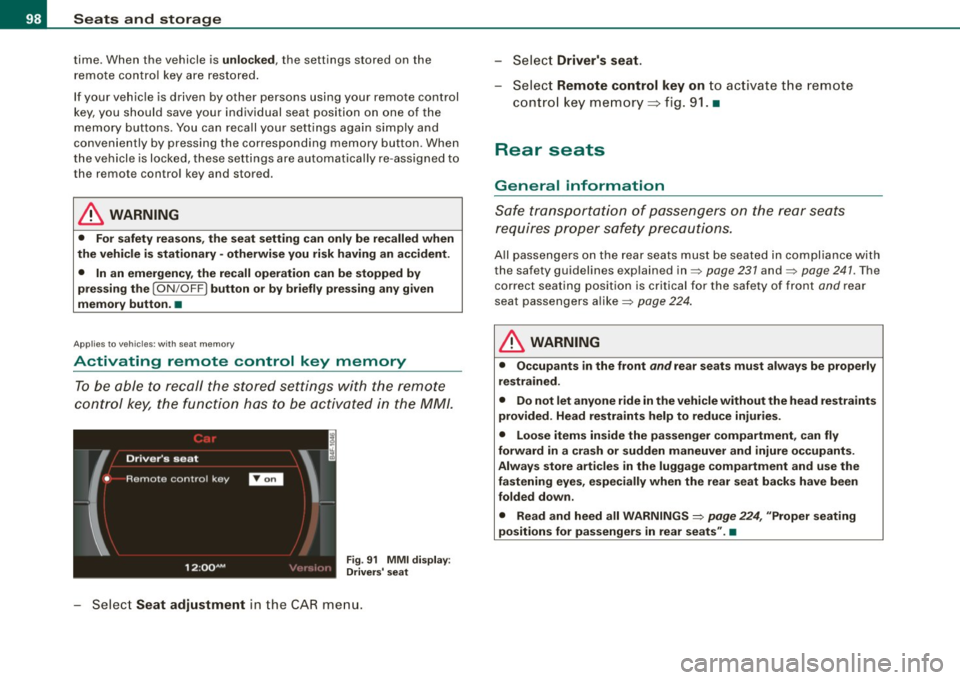
Fig. 91 MMI display :
Drivers' seat
Select Seat adjustment in the CAR menu. -
Select
Driver's seat.
-Select Remote control key on to activate the remote
control key memory=> fig. 91. •
Rear seats
General information
Safe transportation of passengers on the rear seats
requires proper safety precautions.
All passengers on the rear seats must be seated in compliance with
the safety guidelines explained in=> page 231 and=> page 241. The
correct seating position is critical for the safety of front and rear
seat passengers alike=> page 224.
& WARNING
• Occupants in the front and rear seats must always be properly
restrained.
• Do not let anyone ride in the vehicle without the head restraints
provided. Head restraints help to reduce injuries.
• Loose items inside the passenger compartment, can fly
forward in a crash or sudden maneuver and injure occupants.
Always store articles in the luggage compartment and use the
fastening eyes, especially when the rear seat backs have been
folded down .
• Read and heed all WARNINGS =>
page 224, "Proper seating
positions for passengers in rear seats" .•
Page 127 of 426

Warm and cold -___________________ __:_:__: ___ _____,J
Controls
This overview will help you to familiarize yourself with the
air conditioning controls.
-
~ udi _cd _c !! anger
.. ECON 01'4/0FF
Fig. 135 Air conditioning control elements
-
The left display indicates the temperature selected for the driver's
side, the right display indicates the temperature selected for the
passenger's side .
If the settings for seat heating*, air distribution , or the air condi
tioning fan ar e changed, the relevant indicator w ill appear br iefly on
the MMI Display.
Each function is turned on or off by briefly pressing the corre
sponding button. The indicator light in the button illuminates when
the function is active .
Controls and equip
ment Button(s)
!
ECON ON /OFF]
!AUTO] Control knob
G)
[SETUP]
Residual heat Function
Page
Switch climate control on => page 726
and off,
switch cooling system on
and off
Automatic mode
Temperature selection
Seat heating*
Air distribution
Blower
Defrost
Manual recirculation
Heated rear window
Basic settings
=> page 126
=> page 127
=> page 136
=> page 127
=> page 128
=> page 727
=> page 128
=> page 129
=> page 134
With the ignition turned off, you can activate the residual heat func
tion by pressing the !E CON ON /OFF] but ton . The residual heat from
the coolant can be used to heat the vehicle interior. The residual
hea t function is turned off au tomatically after 30 minutes.
Synchronizing climate control
By pressing and holding th e control knob on the driver's side, the
temperature setting on the driver's side can be switched to the
passenger's side , and vice versa. The new temperature is shown in
the display.
Synchronizing four-zone automatic comfort air
conditioning*
By pressing and holding the control knob on the driver's side, the
temperature setting on the driver's side can be switched to the
~
Vehicle care I I Technical data
Page 133 of 426

Warm and cold -
-------------------'
- To adjust the direction o f the airflow from the o utlet,
move the tab in the cen ter of the o utlet in the desired
direction . The direction of the air delivered from the
vents can be adjusted hor izontally and vertically .
The air outlets are actuated either automatically or manually
depending on the operating mode selected . Heated or unheated
fresh air, or cooled air flows from the vents .
The air outlets to heat the rear footwell are located under the front seats.
[ i ) Tip s
If the climate control system is operating in cooling mode, air flows
primarily from the outlets in the center console and in the door
pillars . To achieve adequate cooling, you should never close the
out lets completely .•
Using climate control economically
Using the climate controls prudently can help save fuel.
When you use the a ir conditioner, engine power is reduced
and fuel consumption increases. To save fuel, you should
use the air conditioner only when necessary . A lso please
note the follow ing po ints:
- If you want to save fuel, activate ECON.
- If yo u are g oing to dr ive wit h the w indows or Panorami c
sliding sunroof* open, use ECON .
- If the ve hicle is e xtremely ho t due to the heat of t he s un,
br iefly open doors and windows .
Contro ls and eq uip
ment
ffi For the sake of th e environm ent
By reducing the amount of fue l you use, you also reduce the amount
of pollutants emitted into the air. •
Rear Air Conditioning
Applies to vehicles: w ith four- zone aut oma tic com fort air co ndit ionin g
Rear air conditioning -controls
This overview is to assist you in familiarizing yourself with
the rear air conditioning controls.
Fi g. 14 0 Rear air
c ond ition in g co ntro ls
The left disp lay indicates the temperature selected for the rear left
passenger, the right display indicates the temperature se lected for
the rear right passenger. If the sett ings for seat heating*, air distri
bution or the air conditioning fan are changed, the relevant indi
cator will appear briefly on the MMI Display.
Each function is turned on or off by briefly p ressing the corre
sponding button. T he indicator light in the button illuminates when
t he function is active. .,
Vehicle care I I Technical data
Page 137 of 426

Warm and cold -
-------------------'
concentrations of pollutants, the air conditioning system is
switched automatically to recirculation mode and the supply of
outside air is blocked. As soon as the concentration of pollutants in
the outside air drops , fresh air is supplied to the vehicle interior
again.
In the event that the windows fog up during automatic air recircula
tion, you must press the® button immediately.
Under certain operating conditions, automatic air recirculation is
switched off automatically . With outside temperatures below about
+10 °C, automatic air recirculation is limited to 30 seconds . With
outside temperatures below about -1 °C and in the ECON mode,
automatic air recirculation is limited to 15 seconds. •
Synchronization
One climate control setting for the driver and front
passenger seats.
With synchronization active, the driver's settings are adopted for
the passenger or vice versa. All the other settings that were made are transferred to the other seat. This includes all the clima te control
settings, except for the Seat heating *.
If a different setting is selected at a "synchronized seat", synchroni
z ation is cancelled. •
Applies to vehicles: with four-zone automatic comfort ai r cond itioning
Synchronization
One climate control setting for all seats.
With synchronization active, the driver's settings are adopted for
the front passenger and the rear left and right seats . All the other
settings that were made are transferred to the other seats. This
includes all the climate control settings, except for the Seat
heating*.
Con tro ls and eq uip
ment
If a different setting is selected at a "synchronized seat", synchroni
zation is cancelled. •
Applies to vehicles : wit h fo ur-zone autom atic comfort air co ndi tioning
Rear operation
Using the "Rear operation" function, settings can be made
in the center console control element for the rear left and
right sides of the vehicle.
Fig. 143 MMI Display:
Rear operation
Fig . 144 MMI Display:
Temperature setting
for rear left side
Press the [SETUP) button in the controls to access the
menu.
~
Vehicle care I I Technical data
Page 138 of 426
• .___w_ a_ rm __ a_ n_ d_ c_o _l_d ________________________________________________ _
-Selec t the R ear opera tion => page 135, fig. 143 fu nction
us ing the (driver or front passenger) cont ro l knob on the
air conditioning contro l eleme nt in the ce nter console
=> page 125 , fig. 135 to adjust the rear a ir condit ion ing .
Set ting the temperature
If you turn the contro l knob on the middle console driver side
control element ~
page 125, fig. 135 to the left, the temperature in
t he rear on the left side is decreased . If you turn the control knob to
the right, the temperature in the rear on the left side is increased
~ page 135, fig . 144.
If you turn the control knob on the midd le console front passenger
side control e lement to the left, the temperature in the rear on the
right side is decreased. If you turn the control knob to the right, the
temperature in the rear on the right s ide is inc reased.
Air di str ibu tion (!)
If you press the Dis tribution (fl control button and then turn the
control knob on the driver or front passenger side, you can set the
desired air distribution for the rear left or right side .
Blowe r [8e ]
If you press the Bl ow er [8e ] control button and then turn the control
knob on the driver or front passenger side, you can set the desired
fan speed for the rear left or right side .
Seat heating Q)
If you press the Seat heat. (i) control button and then turn the
control knob on the driver or front passenger side, you can set the
des ired temperature for the rear left or righ t side ~
page 137. •
Heated Seats
A pplies to veh icles : with e lect ric a lly heate d s eats
Heated front seats Q)
The seat cushion and the seat back of the front seats can
be heated electrically.
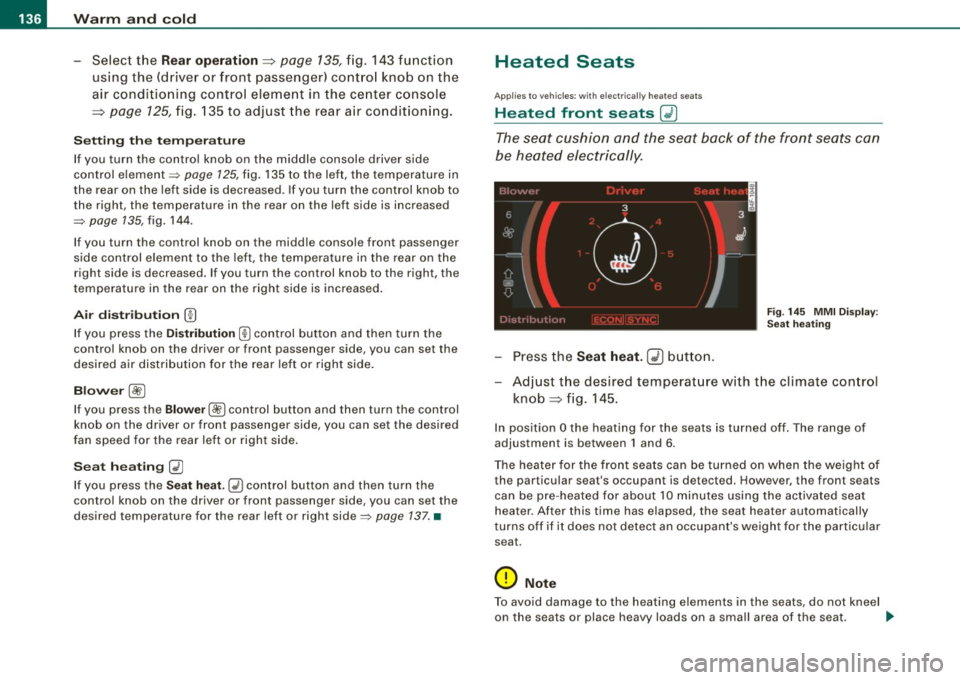
Fi g. 14 5 MMI Di spl ay:
Se at h eatin g
Press the Seat h eat . GD butto n.
Adjust t he desired temperature with the climate con trol
knob => fig . 145.
In pos ition O the heating for the seats is turned off . The range of
adjustment is between 1 and 6 .
The heater for the front seats can be turned on when the weight of the par ticular seat's occupant is detec ted. How eve r, the front s eats
can be pre -heated for about 10 minutes using the activated seat
hea ter . After this time has elapsed , the seat hea ter automatically
t urns off if i t does not detec t an occupant's weight for the particular
sea t.
0 Note
To avoid damage to the heating elements in the seats, do not kneel
on the seats or place heavy loads on a small area of the seat . _..
Page 161 of 426
_____________________________________________ A_ d_a ...: pc.. t _i_ v _e_ C_ ru_ is_ e_ C_ o_n_ t_ r_ o _ l __ lfflll
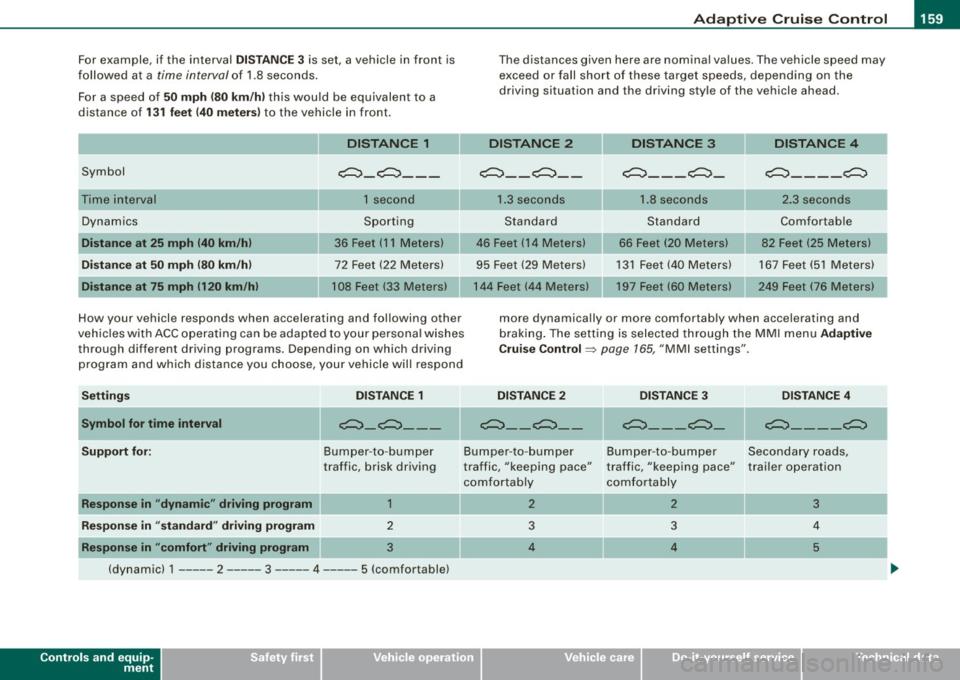
For example, if the interval DI STA NCE 3 is set, a vehicle in front is
followed at a
time interval of 1.8 seconds.
For a speed of
50 mph (80 km /h ) this wou ld be equivalent to a
distance of
1 3 1 fe et (40 meter s) to the vehicle in front.
Symbol Dynamics
D is ta nce at 25 mph (40 km /h )
Di stance at 50 mph (80 km /h )
D is ta nce at 75 mph (120 km /hi DISTANCE 1
c:::,_c:::, ___
1 second
Sporting
36 Feet (11 Meters)
72 Feet (22 Meters)
108 Feet
133 Meters)
How your vehicle r esponds when accelerating and fol lowing other
vehicles with ACC operating can be adapted to your personal wishes through different driving programs. Depending on which driving
program and which d istance you choose, your vehicle will respond
Setting s DISTANCE 1
Symbol for time interval
c:::,_c:::, ___
The distances given here are nominal va lues . The vehicle speed may
exceed or fall short of these target speeds, depending on the
driving situation and the driving style of the vehicle ahead .
DISTANCE 2 DISTANCE3 DISTANCE 4
~ __ c:::, __ c:::, ___ c:::,_ c:::, ____ c:::,
1
.3 seconds 1.8 seconds 2.3 seconds
Standard Standard Comfortable
46 Feet ( 14 Meters) 66 Feet (20 Meters) 82 Feet (25 Meters)
95 Feet (29 Meters) 131 Feet (40 Meters) 167 Feet (51 Meters)
144 Feet (44 Mete rs) 197 Feet (60 Meters) 249 Feet (76 Meters)
more dynamically or more comfortably when accelerating and
braking . The setting is selected through the MMI menu
Ad aptiv e
Crui se Co ntr ol=>
page 165 , "MMI settings" .
DISTANCE 2 DISTANCE 3 DIS TA NC E 4
~--~-- ~---~-~----~
Supp ort for: Bumper-to -bumper Bumper-to-bumper Bumper-to -bumper Secondary roads,
traffic, brisk driving
R espon se in "dynam ic " driving program 1
Respon se in "stand ard " driving progr am 2
Respon se in "comf ort " driving program 3
(dynamic) 1 ----- 2 ----- 3 - ---- 4 --- -- 5 (comfortable)
Controls and equip
ment
tra ffic, "keeping pace"
comfortably
2
3
4 traffic, "keeping pace" trailer operation
comfortably
2
3
3 4
4 5
I • •