mmi AUDI Q7 2009 Owner´s Manual
[x] Cancel search | Manufacturer: AUDI, Model Year: 2009, Model line: Q7, Model: AUDI Q7 2009Pages: 426, PDF Size: 97.13 MB
Page 207 of 426

____________________________________________ A_d_ v_ a_n_ c_ e_d _ P_a_ r_ k_ i_ n ..::g==-- S_ y=- s_t _e _m __ flll
& WARNING (continued )
Be especially careful to check for small children and animals
before backing up . Small children and animals will not always be
shown in the rear-view display .
• The Audi parking system is not a substitute for being careful
and alert when backing up . Be especially careful during parking
and similar maneuvers . Always watch where you are driving and
make sure that nothing is in the way .
• Do not allow yourself to be distracted from traffic by the rear
v iew camera pictures.
• When maneuvering or parking , do not only use the MMI Display
for or ientation . Certa in objects -depending on the screen resolu
tion -may not , or not entirely , be di splayed; for example trailer
hitches , chains , narrow posts , or fences .
• Only use the rear -view camera for aid if it shows a good, clear
picture . The image may be obscured , for example , by the sun
shining into the lens, dirt on the lens , or as the result of a defect ·
danger of accident!
• If the image is hazy when the MMI Display is switched on or the
area behind the vehicle is not visible (for example , as the result of
a dirty or defective lens ), the rear -view camera must not be used
for aid in maneuvering -danger of ac cident!
• The rear -view camera generates two -dimensional images . For
this reason, please note that recesses in the ground and
protruding parts on another vehicle , or protruding objects fixed to
the ground , will be more difficult or impossible to recognize on the
MMI Display, due to the missing spacial depth.
• If the position and the installation angle of the camera has
changed , for example, after a rear end collision, do not continue to
use the system for safety reasons . Have it checked by an autho
rized Audi dealer or qualified workshop .
• Only use the rear-v iew camera when the rear lid is fully closed.
Make sure that objects mounted on the rear are not obscuring the
camera v iew .
Controls and equip
ment
& WARNING (continued )
• Remove ice, preferably with de-icing spray .
0 Note
• Never use warm or hot water to remove snow or ice from the
rear -view camera lens -danger of crack format ion on t he lens!
• Whe n cleani ng t he le ns, neve r use care p ro d uc ts wi th a n abr a
s ive effect.
[ i ] Tips
The positio ns of t he orientation lines/ surfaces are disp laced up or
down if the par king p rocess is car ried out with the rear -view camera
i n Adap tive A ir Suspen sio n*:::::>
page 21 dy namic, o ffro ad , or lift
mode. Therefo re, the accuracy is reduced. •
I • •
Page 208 of 426
1111 ...... _A_ d_ a --=- p_t_ i_v _e_ A_ ir_ S_u_ s__,_ p_e_ n_ s_io _ n _____________________________________________ _
Adaptive Air Suspension
Air suspension and damping
Applies to vehicles: with Adaptive A ir Suspens ion
Description
Air suspension and damping can be regulated as desired
by driver, and they adapt automatically to the driving situ
ation at the time.
Adaptive Air Suspension is an electronica lly contro lled springing
and damping system. This chassis system makes it easier on the
driver by adapting to the particular situation through imperceptible
control processes.
The
Adaptive Air Suspension component regulates ground clear
ance depending on vehic le speed and driver inpu t. It functions inde
pendently from the load condition. Accelerating to a speed above a
predetermined limit will make the vehic le lower itself . On the other
hand, driving more slowly results in the vehicle raising again at
specific speeds.
The
damping component provides individual control of the
damping forces. For example, with damping characteristics set to
provide greater comfort, damping is set somewhat harder for a brief
period only as required, for example, when going around a curve or
when braking.
Settings
Adaptive Air Suspension prov ides the driver with the opportunity to
set the chassis characteristics a lso to their individual preference.
With the driving modes
comfort, automatic and dynamic the driver
has three chassis settings available, ranging from comfort to sporty.
The
offroad mode can be selected for driving on poor qua lity
stretches of road. In addition, lift provides a fifth mode, which can
be selected when exceptionally high ground clearance is needed
=> page 207, "Chassis controls". The modes are set in
MMI:::::,
page 208.
& WARNING
The height of the parked vehicle can change due to temperature
fluctuations or changes in load.
0 Note
• Whenever you park your vehicle, always make sure there is
adequate clearance above and below the vehic le. The height of the
parked vehicle can change as the result of temperature fluctuations,
changes in load condition and changes in the driving mode (ground
clearance!.
• If the vehicle is being transported (e.g. by tow truck, train, ship,
etc.), mount the tie -down chains/cables over the running surface
(circumference) of the tires . Never secure the veh icle by the axle, the
suspension struts or the front or rear towline eye. For technical
reasons, the pressure in the suspension struts may change during
the transport, which could result in the vehic le no longer being
secured properly.
• If you are going to tow a trailer with a trailer hitch that was
not
installed according to factory specifications, you must activate the
trailer operation mode manually:::::,
page 211.
[ i ] Tips
• Before you can raise your vehic le using the vehicle jack (for
example, when changing a flat tire) or a vehicle lift, you must acti
vate the jacking mode:::::,
page 210.
• On some models, the vehicle can reach its maximum speed only
in the
automatic and dynamic modes. •
Page 209 of 426
____________________________________________ A_ d_a--' p=-- t_iv _e_ A_ ir_ S_u_ s-=- p_e _ n_ s _ io_ n __ lll
Ap plies to vehicl es: with Adap tive Air Su sp ension
Chassis controls
Fi ve differen t driving modes can be set by the driver.
The automatic contro l processes are speed -and time -dependent.
For example, it is not possible to raise the suspension to a high level
above certain speeds.
When a speed of about 75 mph (120 km/hl is exceeded for more than 30 seconds, the vehicle is automatically lowered to
low level when
in com fort and automatic mode . Ground clearance is about 0 .6 inch
(15 mm) less, compared to the
normal level.
When a speed of about 100 mph (160 km/h) is exceeded for more
than 20 seconds, the vehicle is automatically lowered to
highway
/eve/when in automatic and dynamic mode. Ground clearance is
about 1.4 inches (35 mm) less, compared to the
normal level. Road
holding is optimized as a resu lt of the lower center of gravity, and
fue l consumpt ion is reduced as a result of reduced wind resistance .
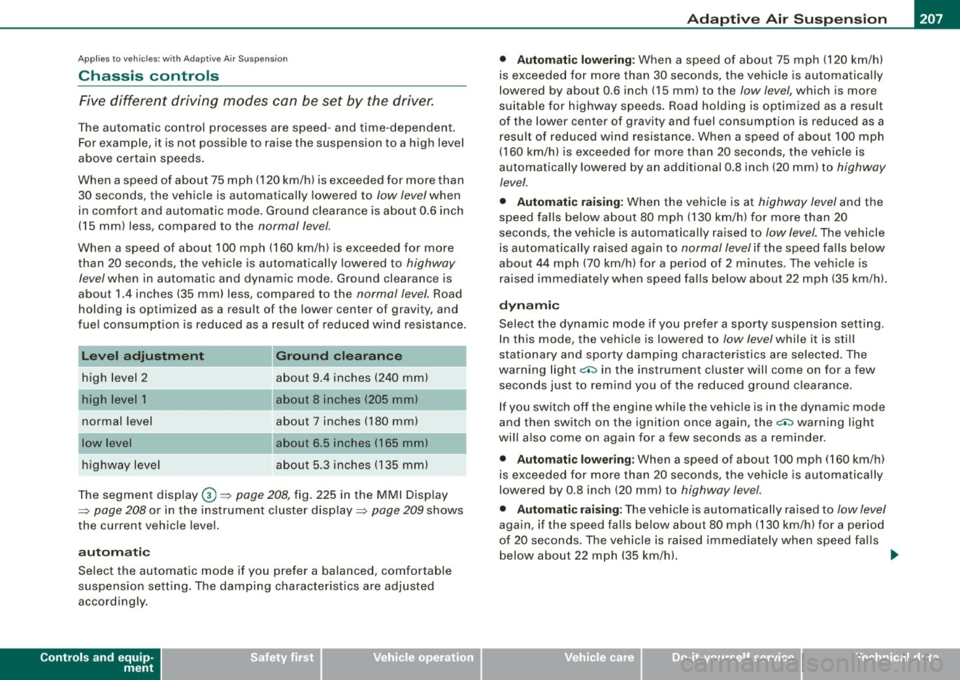
Level adjustment
high level 2
normal level
highway level
Ground clearance
about 9 .4 inches (240 mml
a bout 8 inches (205 mm)
about 7 inches (180 mm)
about 6.5 inches ( 165 mml
a bou t 5.3 inches (135 mm)
The segment display
G) ~ page 208, fig. 225 in the MMI Display
~ page 208 or in the instrument cluster display~ page 209 shows
the current vehicle level.
a ut omati c
Select the automatic mode if you prefer a ba lanced, comfortable
suspension se tt ing. The damp ing characteristics are adjusted
accordingly.
Controls and equip
ment •
Aut omatic l ower ing :
When a speed of about 75 mph (120 km/h)
is exceeded for more than 30 seconds, the vehicle is automatica lly
lowered by about 0 .6 inch (15 mm) to the
low level, which is more
suitable for highway speeds . Road holding is opt im ized as a result
of the lower center of gravity and fuel consumption is reduced as a
result of reduced wind resistance. When a speed of about 100 mph
(160 km/h) is exceeded for more than 20 seconds, the vehicle is
automatically lowered by an additional 0 .8 inch (20 mm) to
highway
level.
• Automatic rai sing: When the vehicle is at highway level and the
speed fa lls be low about 80 mph (130 km/h) for more than 20
seconds, the vehic le is automatica lly raised to
low level. The vehicle
is automatically raised again to
normal level if the speed fa lls be low
about 44 mph (70 km/h) for a period of 2 minutes. The vehicle is
ra ised immediate ly when speed fa lls below about 22 mph (35 km/h).
dynamic
Select the dynamic mode if you prefer a sporty suspension sett ing.
I n this mode, the vehic le is lowered to
/ow level while it is sti ll
stationary and sporty damping characteristics are selected . The
warning light~ in the instrument cluster will come on for a few
seconds jus t to remi nd you of the reduced ground clearance .
I f you switch off the engine while the vehicle is in the dynamic mode
and then switch on the ignition once again, the~ warning light
wi ll also come on again for a few seconds as a reminder.
• Automatic lowering : When a speed of about 100 mph (160 km/h)
is exceeded for more than 20 seconds, the ve hicle is auto matica lly
lowered by 0.8 inch (20 mm) to
highway level.
• Automatic rai sing: The vehic le is automatically raised to low level
again, if the speed falls below about 80 mph (130 km/h) for a period
o f 20 secon ds. The ve hicle is ra ised i mmediately whe n speed falls
below about 22 mph (35 km/h). .,_
I • •
Page 210 of 426
IIIII..__A_ d_ a--=- p_t _iv _ e_ A_ i _r_ S _ u_ s_ p ,.._ e_ n_ s _ io_ n _____________________________________________ _
comfort
Select the comfort mode if you desire a suspension setting with a
special emphasis on comfort . Damping characteristics with a clear
emphasis on comfort are selected in this mode .
• Automatic lowering: When a speed of about 75 mph (120 km/h)
is exceeded for more than 30 seconds , the vehicle is automatically
lowered by 0.6 inch (15 mm) to /ow level.
• Automatic raising: The vehicle is automatically raised to normal
level again, if the speed falls below about 44 mph (70 km/h) for a
period of 2 minutes . The vehicl e is raised immediately when speed
falls below about 22 mph (35 km/h).
offroad
Select the offroad mode when you have to travel over poor quality
sections of road (e.g . trails). In this mode, th e vehicle is rais ed to
high level 1, and damping characteristics for poor road stretches are
selected. When switching to offroad mode, th e Adaptive Air Suspen
sion indicator appears automatically in the instrument cluster
display => page 209 .
• Automatic lowering: When a speed of about 62 mph (100 km/h)
is exceeded , the vehicle is lowered by 1 inch (25 mm) to normal level.
• Automatic raising: The vehicle is ra ised to high level 1 again
when the speed falls below about 43 mph (70 km/h).
lift
Select the lift mode when exceptionally high ground clearance is
needed at a reduced speed. In this mode, the vehicle is raised to
high level 2 . When switching to lift mode, the Adaptive Air Suspen
sion indicator appears automatically in the instrument cluster
display=> page 209.
The lift mode can be activated only a t spe eds b elow 12 mph (20
km/h). When a speed of about 25 mph (40 km/h) is exceeded, the
system automatically leaves lift mode and the offroad mode is acti
vated. The instrument cluster display automatically switches the
display to Adaptive Air Suspension to indicate reduced ground
clearance.
[ i] Tips
Please note that driving at high speeds on paved roads while in
offroad mode for extended periods of time leads to increased tire
wear. •
App lies to vehicles : with Adap tive Air Su spens io n
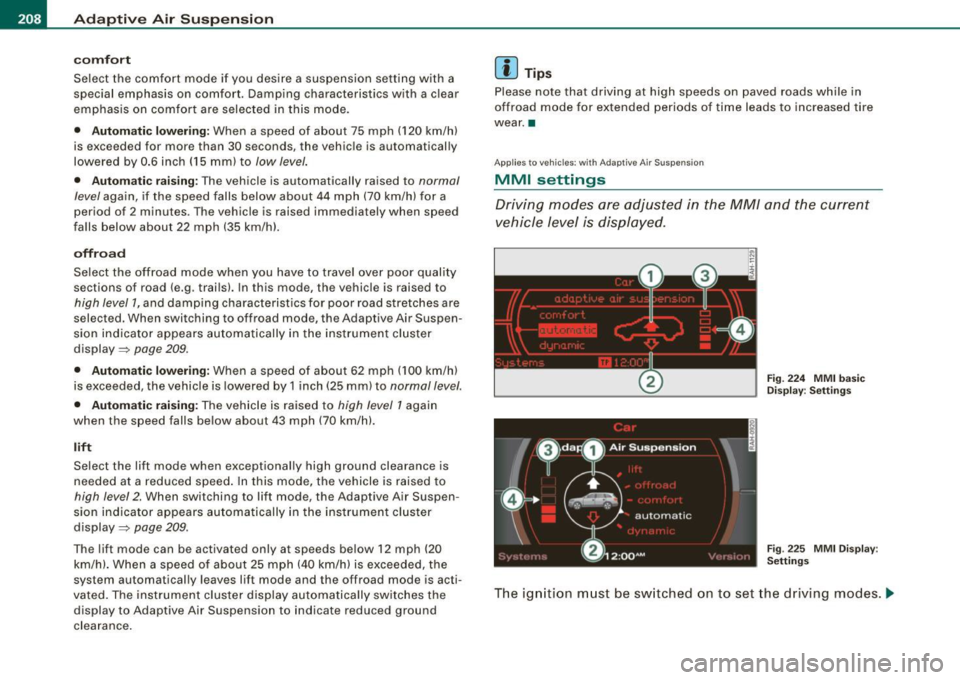
MMI settings
Driving modes ore adjusted in the MM/ and the current
vehicle level is displayed.
Fig. 224 MMI basic
Display : Settings
Fig . 225 MMI Display :
Settings
The ignition must be switched on to set the driving modes . .,,,
Page 211 of 426
______________________________________________ A_ d_a ""' p'-- t_iv _ e_ A_ i_r _S_ u_s _,p_ e _ n_s_ i_ o _ n _ ___.9I
- Press the I CARI f unction button . The main menu
Adaptive Air Su spe nsion appears~
page 208, fig. 224 or
~ page 208, fig . 225 .
Select the desired mode by rotating and pressing the
control knob .
Rai sing and l owerin g
If arrow
G) is white :::::, page 208, fig. 225, the vehicle is raised.
If arrow @ is
white, the vehicle is lowered .
The respective arrow stays on until the !eve.I change is complete.
The time used for a level change can vary, depending on the current
driving conditions.
Di sp la yin g th e ve hicle l eve l
The current vehicle level is shown with segments filled out in the
segment display@. If only the bottom segment is filled out, the
vehicle is at highway level. If all segments are filled out, the vehicle
is at high level 2 and has the greatest amount of ground clearance
poss ible.
While the vehic le is being raised or lowered, the target level is indi
cated by an arrow © next to the corresponding segmen t. The arrow
disappears again when the vehic le is at the target level.
Limita tion s to MMI setting s
Please note that not every driving mode can be selected in every
driving si tuation. For example, it is not possib le to switch to "lift"
mode at speeds above 12 mph (20 km/h). This mode is then shown
greyed out in the MMI Display.
The vehicle can on ly be lowered when all of the vehicle's doors are
closed. If one door is open, a ll driving modes whose level setting is
below the current vehicle leve l appear greyed out in the MMI
Display. If a door is opened while the vehicle is being lowered, the
lowering process is interrupted until all doors are closed again .
Contro ls and eq uip
ment
I f the system is temporarily unavailable due to, for instance, an
empty compressed air tank, the driving modes that cannot be se t
appear
greyed out in the MM I Display. As soon as the system is avai l
able again, the driving modes can once more be selected in the
display.
[ i ] Tips
• For additiona l information on the driving modes:::::, page 207,
"Chassis controls".
• When the compressed air tank is empty, the compressor can be
sw itched on by starting the engine. The Adaptive Air Suspension is
once again availab le, after waiting a few minutes. •
Applies to veh icles: with Adapt ive A ir Suspens ion
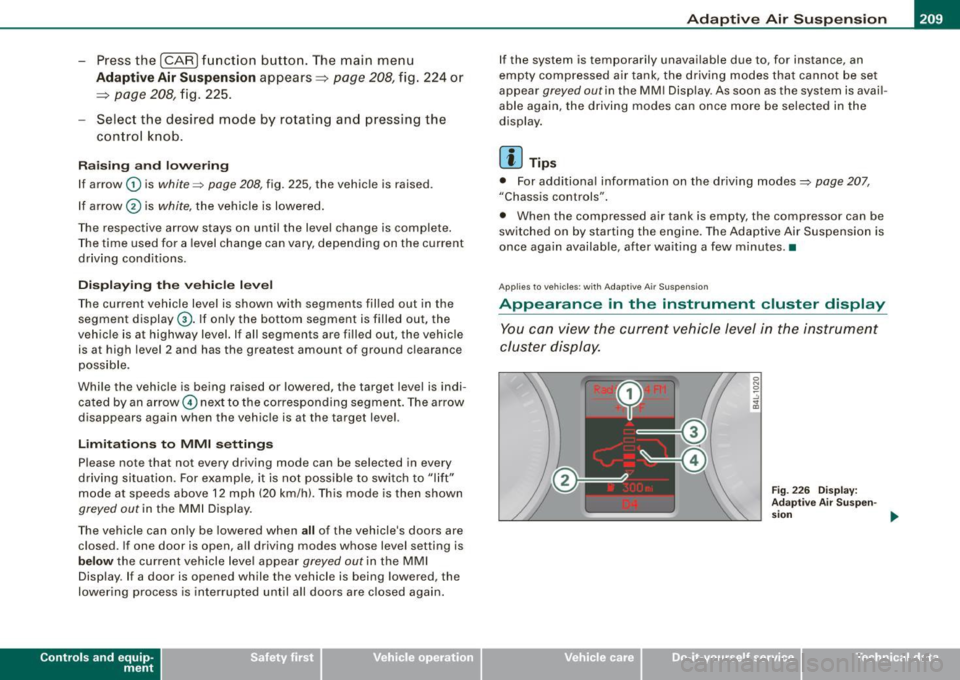
Appearance in the instrument cluster display
You can view the current vehicle level in the instrument
cluster display.
Fig . 2 26 D ispla y:
A dap tive Air Sus pen-
s ion
~
Vehicle care I I irechnical data
Page 212 of 426
llffl..__A_ d_ a--=- p_t _iv _ e_ A_ i_ r _ S_ u_ s....; p=--- e_n_ s_ io_ n _____________________________________________ _
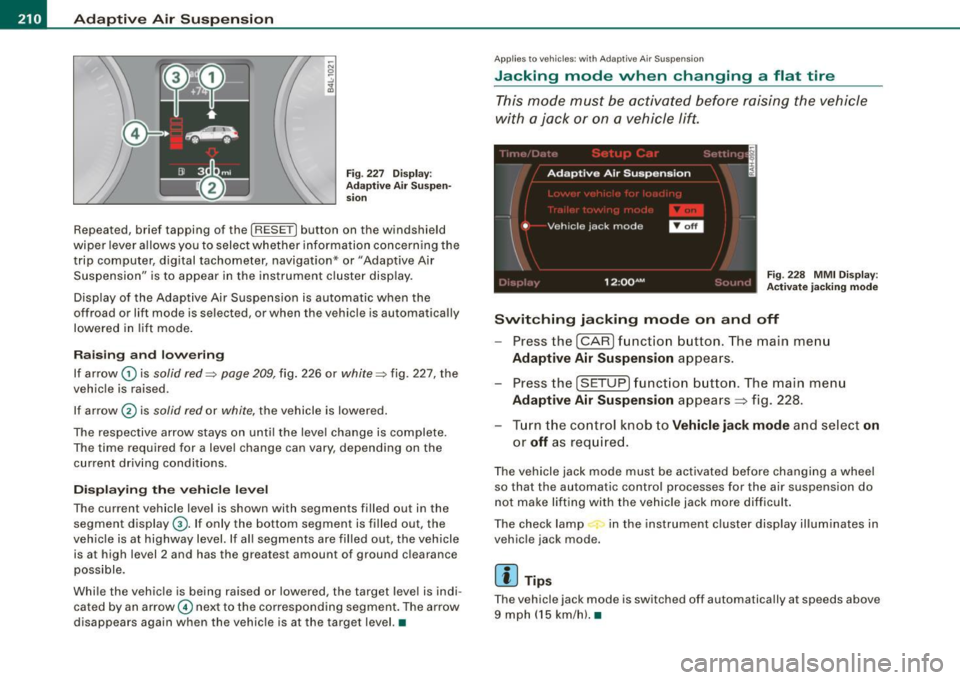
Fig . 227 D isp lay:
Ad apti ve Air Suspen
s io n
Repeated, brief tapping of the [R ESET] button on the windshield
wiper lever allows you to select whether information concerning the
trip computer, digital tachometer , navigation* or "Adaptive Air
Suspension" is to appear in the instrument c lu ste r disp lay.
Disp lay of the Adapt ive Air Suspension is automatic when the
off road or lift mode is sel ected, or when the v ehicle is automatically
lowered in lif t mode .
Raising and low ering
If arrow G) is solid red=> page 209, fig. 226 or white => fig. 227, the
vehic le is raised .
If ar row
0 is solid red or white, the vehicle is lowered .
The respective arrow stays on unti l the leve l change is complete.
The time required for a leve l change can vary, depend ing on the
current driv ing cond it ions .
Displ aying the vehicle level
The current vehicle level is shown with segments filled out in the
segment display@. If only the bottom segment is filled out, the
veh ic le is at highway level. If al l segments are filled out, the vehicle
is at high level 2 and has the grea test amount of ground c learance
possible .
Whi le the veh icle is being raised or lowered, the target level is indi
cated by an arrow© nex t to the co rresponding segment . The arrow
d isappears again when the vehic le is at the targe t level. •
Applies to vehi cle s: wi th A daptive Air S uspens ion
Jacking mode when changing a flat tire
T his mode must be activated before raising the vehicle
with a jack or on a vehicle lift.
Fig . 228 MMI Di splay:
A ctivat e jacking mod e
Switching jacking mode on and off
Press the (CAR ) funct ion b utton. The main me nu
Adaptive Air Suspension appears.
Press the (SETUP ) funct ion b utton. The main menu
Adaptive Air Suspension appea rs ~ fig . 228.
- Tur n the control k nob to
Vehicle jack mode and select on
or off as req uired.
The vehicle jack mode must be activated before changing a wheel
so that the au tomatic control processes for the air suspens ion do
not make lifting with the vehic le jack m ore diff icult .
The check lamp in the instrument c luster display illum inates in
vehic le jack mode.
[ i ] Tip s
The vehicl e jack mode is sw itched off automa tically at sp eeds above
9 mph ( 15 km/h). •
Page 213 of 426
___________________________________________ ___:A~d~ a~p~t~iv~ e=-.:A~ir~ S~u~ s ~p~ e~n~ s~io~n ~_ffllll
Applies to vehicles : w it h towi ng h itch and Adapt ive Air Su spens io n
Towing a trailer
Automatic lowering is not desirable when towing a trailer.
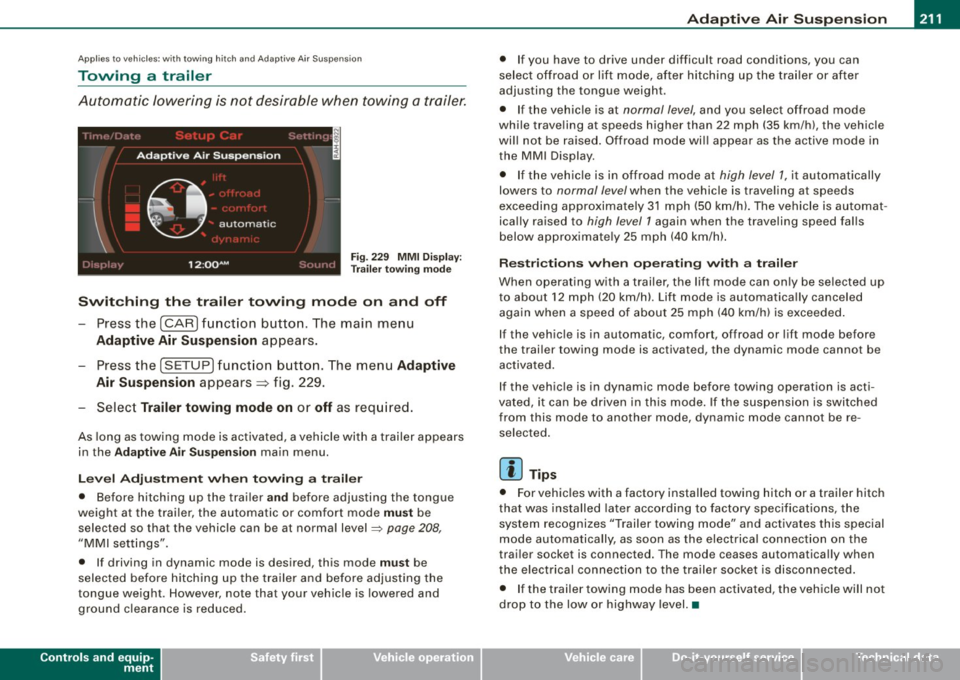
Fig . 22 9 MMI D isplay:
T rai le r t ow ing mode
Swi tching th e trail er towing mode on and off
Press the (CARI function button. The main menu
Adaptive Air Su spension appears .
-Press the (SETUP I funct ion button. The menu Adaptiv e
Air Susp ension
appears~ fig. 229.
- Select
Trailer towing mod e on or off as req uired .
As long as towing mode is activated, a vehicle with a trailer appears
in the
Ad apti ve Air Sus pension main menu.
Le ve l Ad jus tm ent w hen t owing a tra ile r
• Before hitching up the trai ler a nd before adjusting the tongue
weight at the trai ler, the automatic or comfort mode
mu st be
selected so that the vehicle can be at normal level
=> page 208 ,
"MMI settings".
• If driving in dynamic mode is desired, this mode
mus t be
selected before hitching up the trailer and before adjusting the
tongue weight . However , note that your vehicle is lowered and
ground clearance is reduced.
Controls and equip
ment
• If you have to drive under difficult road conditions, you can
se lect offroad or lift mode, af ter hitching up the trai ler or after
adjusting the tongue weigh t.
• If the vehic le is at
normal level, and you select offroad mode
while trave ling a t speeds higher than 22 mph (35 km /h) , t he vehicle
wi ll not be raised . Offroad mode wi ll appear as the active mode in
the MMI Display .
• If the vehic le is in offroad mode at
high level 1 , it automatically
lowers to
normal level when the vehicle is trave ling a t speeds
exceeding approxima tely 31 mph (50 km/h). The vehicle is automat
ica lly raised to
high level 1 again when the t raveling speed falls
below approximate ly 25 mph (40 km/h).
R es tric tions when ope ra ti ng w ith a tra iler
When opera ting with a trailer, the lift mode can on ly be se lected up
to about 12 mph (20 km/h). Lift mode is au tomatica lly canceled
again when a speed of about 25 mph (40 km/h) is exceeded .
If the vehicle is in automatic, comfort, offroad or lift mode before
the trai ler towing mode is act iv a te d , the dynamic mod e cannot b e
activated.
If the vehicle is in dynamic mode before tow ing operation is acti
vated, it can be driven in this mode. If the suspension is switched
from this mode to another mode , dynamic mode canno t be re
selected .
[ i ] Tips
• For vehicles with a factory installed towing hitch or a trailer hitch
that was installed later acco rding to factory specificat ions , the
system recognizes "Trailer towing mode" and activates this special
mode automatically, as soon as the electrica l connection on the
trai le r sock et is connected. The mode c eases au tomat ica lly wh en
the electrical connection to the trailer socket is disconnected.
• I f the trailer tow ing mode has been activated, the vehicle w ill not
drop to the low or highway level. •
I • •
Page 214 of 426
-Adaptiv
e Air Suspension "----=-------=--------------
Ap plies to vehicles : wi th Ad aptiv e Air Suspe nsi on
Cargo mode
Th e rear of the vehicle can be lowered to make it easier to
load.
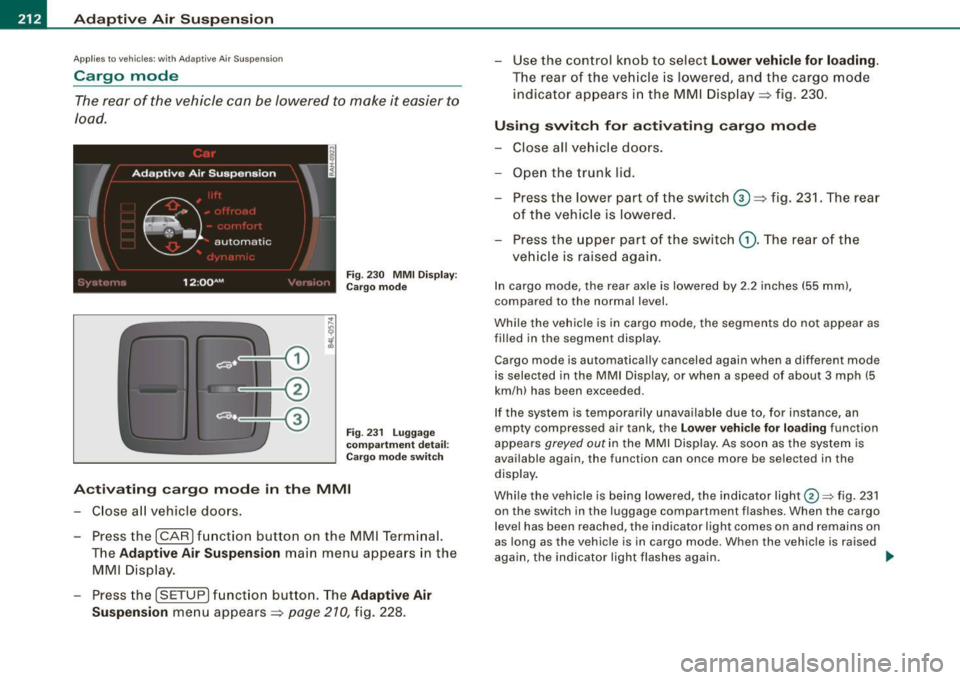
Fig . 23 0 MMI Disp lay:
C ar go mod e
F ig. 23 1 Lugga ge
c omp artmen t detai l:
Cargo m ode sw itch
A ctivating cargo mode in the MMI
- Close a ll vehicle doors .
- Press the !CAR) fun ction button on the MM I Term inal.
T he
Adaptive A ir Suspension main menu appea rs in the
MMI Disp lay.
- Press the !SETUP) f unct ion button . The
Adaptive Air
Suspension
men u appears => page 210, fig. 228. - Use the con
trol knob t o select
Lower vehicle for loading.
The rear o f th e veh icle is lower ed, and the cargo mode
indicator appears i n th e MMI Disp lay => fig. 230 .
Using swit ch for a ctiv ating cargo mode
- Close all vehicle doors .
- Open the trunk lid.
- Press the low er par t of th e switch
G) => fig. 231. The r ear
of the veh ic le is lowered.
- Press the upper p art of the switch
(D . The rear of t he
veh icle is raised again.
In cargo mode, the rear axle is lowered by 2 .2 inches (55 mm) ,
compared to the normal level.
Whi le the vehicle is in cargo mode, the segments do not appear as
filled in the segmen t display .
Cargo mode is automatically canceled again when a different mode
is selected in the MMI Display, or when a speed of about 3 mph (5
km/h) has been exceeded.
If the system is te mpo rarily unavailable due to, for instance, an
empty compressed air tank , the
Lo w er vehi cle fo r loading function
appears
greyed out in the MMI Display . As soon as the sys tem is
available again, the function can once more be se lected in the
display .
Whi le the vehicle is being lowered, the indicator light@=> fig . 231
on the switch in the luggage compartment f lashes. When the cargo
l evel has been reached, the indicator light comes on and remains on
as long as the vehicle is in cargo mode . When the vehicle is raised
aga in, the indicator light flashes again.
~
Page 217 of 426
HomeLink® -_______________ ___.
Applies to vehicles: with Homelin k® un iversal remote contro l
Programming the Homelink ® transmitter
The transmitter is programmed in two phases. For rolling
code transmitters, a third phase is also necessary.
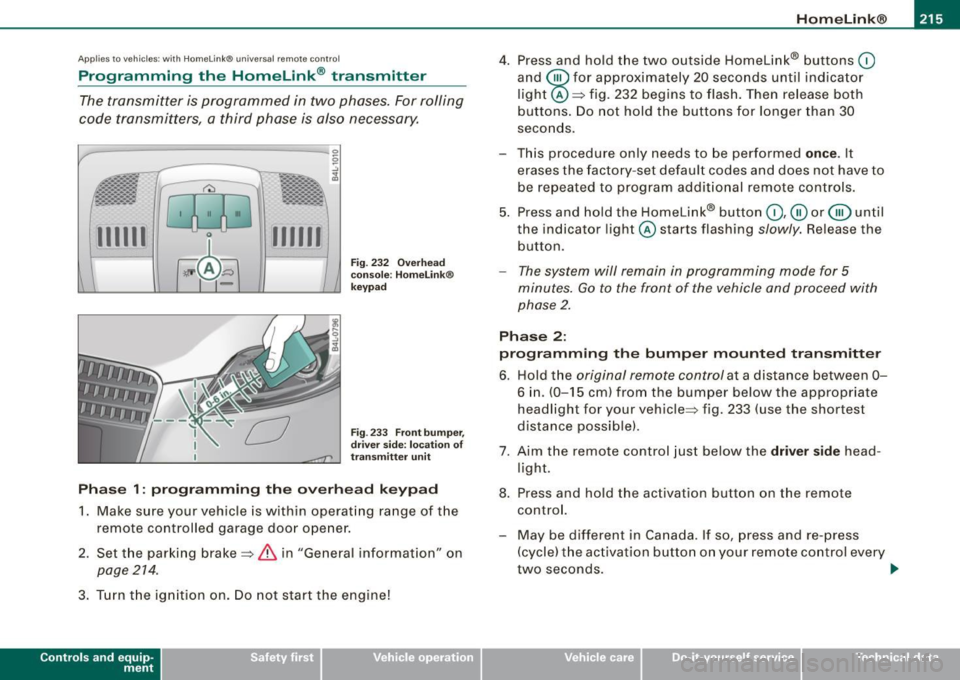
111111 111111
-
Fig . 232 Overhead
console : Homelink®
keypad
Fig . 233 Front bumper,
driver side: location of
transmitter unit
Phase 1: programming the overhead keypad
1. Make sure your vehicle is with in operating range of the
remote controlled garage door opener.
2. Set the parking brake=>
& in "General informat ion" on
page 214 .
3. Turn the ignition on . Do not start the engine!
Contro ls and eq uip
ment
4. Press and hold the two outside Homelink® buttons 0
and @for approximately 20 seconds until indicator
light @=> fig. 232 begins to flash. Then release both
buttons. Do not hold the buttons for longer than 30
seconds.
- This procedure only needs to be performed
once . It
erases the factory-set default codes and does not have to
be repeated to program additional remote controls.
5. Press and hold the Homelink® button
0,@ or @ until
the indicator light @starts flashing
slowly. Release the
button.
- The system will remain in programming mode for 5
minutes.
Go to the front of the vehicle and proceed with
phase 2.
Phase 2:
programming the bumper mounted transmitter
6. Hold the original remote control at a distance between 0-
6 in . (0-15 cm) from the bumper below the appropriate
headlight for your vehicle => fig . 233 (use the shortest
distance possible).
7. Aim the remote control just below the driver side head
light.
8. Press and hold the activation button on the remote control.
- May be different in Canada. If so, press and re-press
(cycle) the activation button on your remote control every
two seconds. .,_
Vehicle care I I irechnical data
Page 218 of 426
ll9..__H_ o_m_ e_ L_ i_ n _k_ @_R __________________________________________________ _
9. The emergency flashers will flash three times (after
about 15-60 seconds) when the programming is
successful. Release the button on the remote control.
- To program more devices, repeat steps 4 to 9.
10. Press and hold the trained Homelink® button and
observe the indicator light@=> page 215, fig. 232.
- If the indicator light is solid/continuous, programming is
complete and your device should activate when you press and release the trained Homelink® button.
- If the indicator light blinks rapidly for 2 seconds and is
then a solid/continuous light, proceed with phase 3 to program a rolling code device.
Phase 3: rolling code programming
- A second person on a ladder who can safely reach the
garage door opener motor is recommended.
11. Locate the "learn" button on the garage door opener
motor (refer to the operating instructions for the opener,
as the location of this button may vary by manufacturer).
12. Press and release the learn button on the garage door
opener motor.
- Note: once the button is pressed, there are 30 seconds in
which to initiate the next step.
13. On the Homelink® keypad inside the vehicle, firmly
press and hold the Homelink® button previously
programmed in phases 1 and 2 for two seconds and
release. Repeat this sequence
twice .
- Some vehicles may require the press/hold/release
sequence up to three times to complete the training
process.
- Homelink® should now activate your rolling code
equipped device.
If the 5 minute time limit is exceeded, the emergency flashers will
flash one time
to indicate that the process has been terminated. In
this case, repeat steps 4 through 9.
If the emergency flashers do not flash
three times (after about 15-
60 seconds), programming was not successful. In this case, repeat
steps 4 through 9 .
Remote control units for garage door openers in Canada are set to
stop transmitting radio frequency signals after two seconds. This
time may not b e sufficient for the Homelink® system to learn the
radio frequency signal. Perform all other steps as described
above. •
Applies to v ehi cles: with Horn e link ® uni versa l re mo te contro l
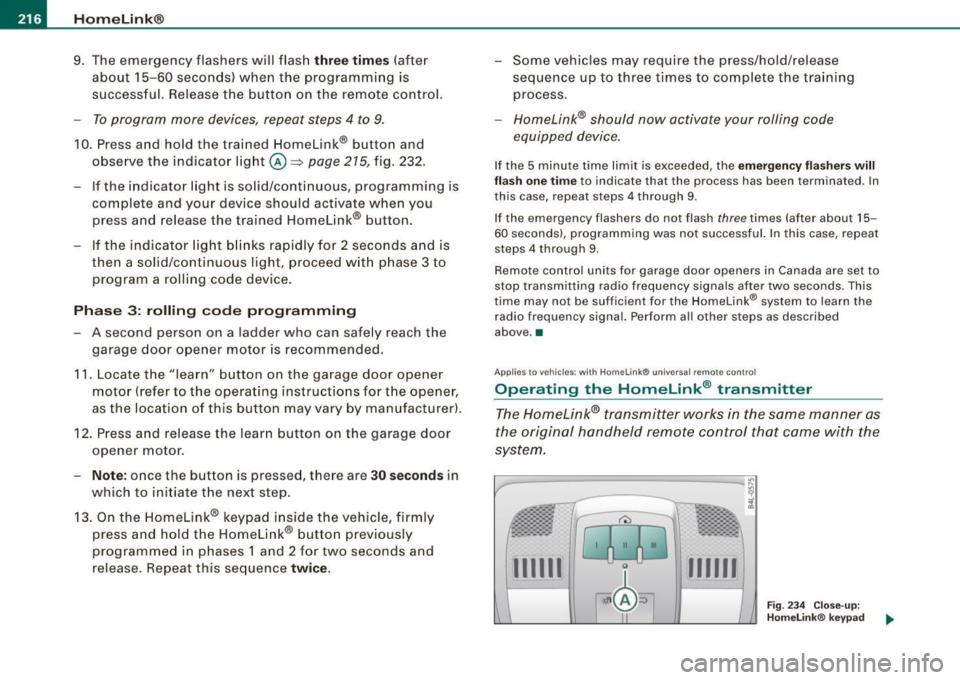
Operating the HomeLink ® transmitter
The Homelink® transmitter works in the same manner as
the original handheld remote control that came with the
system.
-----------------:c
i
Gl0 0
l
·~ ± b ~ / Fig. 234 Close-up:
Homelink® keypad
...._...._ __ __,..._......__......__...._ ........ ___ ___.__..
111111 111111