mmi AUDI Q7 2009 Owner´s Manual
[x] Cancel search | Manufacturer: AUDI, Model Year: 2009, Model line: Q7, Model: AUDI Q7 2009Pages: 426, PDF Size: 97.13 MB
Page 219 of 426
___________________________________________________ H_ o_m....:..: e:..; L::. i;,,;. n.;,,; k;,,;. ®.:. R __ III
- Press the appropriate programmed button G),@ or @
to activate the desired remote control function~
& in
"General information" on
page 214. •
Applies t o ve hicl es: wit h Hom elin k® universal re mote co nt ro l
Reprogramming a single button
A Homelink ® button can be reprogrammed individually
without affecting the other button a/locations.
Programming the overhead keypad
- Press the appropriate Homelink® button unt il the indi
cator light begins flashing slowly.
Programming the bumper mounted transmitter
1. Hold the original remote control at a distance between 0-
5 in. (0-13 cm) from the bumper below the appropriate
headlight for your vehicle (use the sho rtest distance
possible) .
2. Aim the remote control just below the
driver side head
light.
3. Press and hold the activation button on the remote control.
4. The emergency flashers will flash
three times (after
about
15-60 seconds) when the programm ing is
successful. Now release the button on the remote
control.
- If the device ut ilizes a rolling code, please follow phase 3
of ~
page 215, "Programming the Homelink® trans
mitter" for rolling code programming.
Controls and equip
ment This procedure
will cause
the existing programming on the
Homelink ® button to be erased! •
App lies t o ve hicles : with Homeli nk® universa l re m ote contro l
Erasing the programming of the Homelink ®
transmitter
When you erase the programming , the programming on
all three of the transmitter channels with be lost!
- Perform steps 1 to 4 as descr ibed on~ page 215, "Phase
1: programm ing the overhead keypad ".
When completed , the Homelin k® system will be in the program
ming mode and is then ready to learn the cod es for remote
controlled devices.
(I) Tips
• Programmed buttons cannot be erased individually.
• For security reasons you ar e advis ed to erase the programming
of the Homelink ® system befo re you sell your vehicle. •
I • •
Page 298 of 426
llffl __ ln_ t _e_ ll-'"ig ...,_ e_ n_t _t_ e_ c_ h _ n_o _ l_o _,.g= y,_ __________________________________________ _
Vehicle stands for an extended period
If you do not drive your vehicle over a period of several days or
weeks, electrical components are gradually cut back or switched off.
This reduces energy consumption and maintains starting capability
over a longer period.
Take into consideration that when you unlock your vehicle, some
convenience functions, such as the remote key or power seat
adjustment, may not be available. The convenience functions will be
available again when you turn on the ignition and start the engine.
With the engine turned off
If you listen to the radio, for example, with the engine turned off or
use other MMI functions, the battery is being discharged.
If starting capability is jeopardized due to energy consumption, the
following warning appears in the MMI display:
Please start engine, otherwise system will switch off in
3 minutes.
The warning indicates that the system will be turned off automati
cally after 3 minutes. If you wish to continue using the functions,
you have to start the engine.
With the engine running
Although electrical energy is generated when the vehicle is being
driven, the battery can become discharged. This happens mostly
when little energy is being generated and a great deal consumed and the battery's state of charge is not optimal.
To bring the energy balance back into equilibrium, consumers
which require especially large amounts of energy are temporarily
cut back or switched off. Heating systems in particular require a
great deal of energy. If you notice, for example, that the heated
seats* or the heated rear window are not heating, they have been
temporarily cut back or switched off. These systems will be available
again as soon as the energy balance has been restored.
You will also notice that engine idle speed has been increased
slightly. This is normal and not a cause for concern. By increasing engine idle speed the additional energy required is generated and
the battery is charged. •
Driver notification in the instrument cluster
display
If battery power drops into the range where it can limit the ability of
the engine to start, this is shown in the instrument cluster display
with the following driver message:
C Low battery charge: battery will be charged while driving
This notification reminds you that the starting capability of the
engine may be limited. As soon as you start driving again, the
battery will be recharged and the notification will go out.
Driver notification appears and goes out again
If this driver notification appears after the ignition is turned on or
while driving and it goes out again after a while, the battery has
been adequately recharged.
Driver notification appears and does not go out again
If this driver notification appears after the ignition is turned on or
while driving and does not go out again, the battery's state of
charge is not in the optimal range. Starting ability is restricted. Have
the battery checked as soon as possible by an authorized Audi dealer or qualified workshop. •
Page 321 of 426
_____________________________________________ C_ l_ e _a_ n_ in_ g_a _ n_d_ p_ r_ o_ t _e_ c_t _io _ n __ lftlll
•
Any damage to the undercoating caused by road hazards should be
repa ired promptly.
& WARNING
Too mu ch undercoating in the wro ng pl ace s can cause a fir e.
• Do not appl y ad ditional und ercoating or ru stproofing on or
n ea r the e xhaus t man ifold , ex haust pipe s, catalyt ic c onverter or
heat shields . While d riving , the s ub stan ce used for undercoating
c ould overheat and cau se a fire.
• Alw ays read and heed all WARNINGS and other informat ion
=> pag e 312 . •
Care of interior
MMI display
- C lean the M MI display with a soft c lean cloth and an LCD
cleaner.
The MM I display can be cleaned with a professional ly available "LCD
cleaner". The clot h should be s lightly dampened with the c leaning
fluid to clean the display.
0 Note
T o avoid scratching the MMI display, you should never c lean it dry. •
MMI terminal
- First clean the MMI terminal with a brush to remove dust
from the housing . T
hen w ipe the MM I terminal wit h a clean, so ft, s light ly
dam p cloth.
The M MI termina l shou ld be c leaned w ith a brush first so that no
dirt is trapped between the buttons and the housing. We recom
mend giving the MMI terminal a fina l w ipe with a c loth moistened
with water and dish washing detergent.
0 Note
To prevent damage, make sure that no fluid ever gets into the MMI
terminal. •
Aluminum trim
Use only neutral -pH produc ts to remove spots and deposits from
aluminum surfaces. Chrome care products and alkaline cleaners
wi ll attack aluminum surfaces and can damage them over time.
& WARNING
Al way s read and h eed all WARNINGS and oth er information
=> page 31 2. •
Fabrics and fabric coverings
Fabrics and fabric coverings (e.g . seats, door trim panels, etc.)
shou ld be c leaned at regular inte rvals with a vacuum cleaner . This
removes surface dirt particles which could become embedded in
the fabric th rough use. Steam cleaners shou ld not be used, because
the steam tends to push the dirt deeper into the fabric and lock it
there .
~
Vehicle care I t •
Page 386 of 426
11111 Fuses and bulbs ..._ ____ .;__...;_;,;_ _______________________________ _
No. Equipment Amps
6 Automatic transmission
5/20
7 Electronic Stabilization Program (ESP) 5
8 Shift gate automatic transmission
5
9 Advanced Parking System 5
10 Airbag 5
1 1 Heated rear seats 5
12 Air-conditioning
5
Fuse holder (red)
1 Not used
2 Not used
3 Not used
4 MMI Display 5
5 Telephone, telematics, cell phone package
5
6 MMI, antenna amplifier
15
front light unit 5/7,5
7 Panoramic sliding sunroof segment 1 20
8 Panoramic sliding sunroof segment 2 20
9 Panoramic sliding sunroof sunblind 20
10 CD player, DVD drive
5
11 Window regulators (right side of vehicle) 35
12 Rear air-conditioning controls 10
•
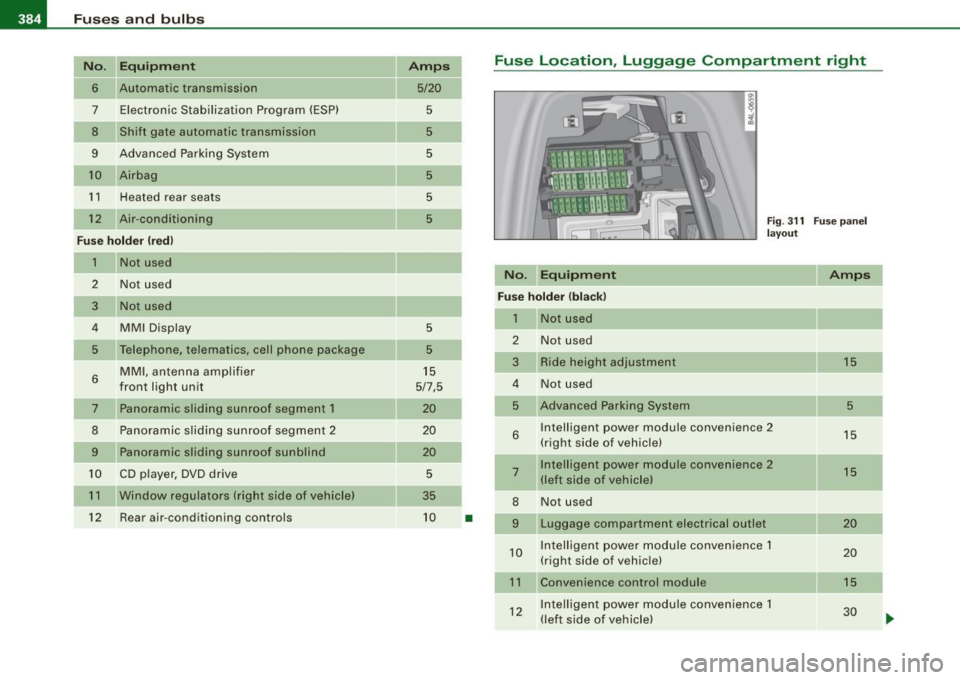
Fuse Location, Luggage Compartment right
No. Equipment
Fig. 311 Fuse panel
layout
Amps
Fuse holder (black)
1 Not used
2 Not used
3 Ride height adjustment
15
4 Not used
5 Advanced Parking System 5
6 Intelligent power module convenience 2
15
(right side of vehicle)
7 Intelligent power module convenience 2
15
(left side of vehicle)
8 Not used
9 Luggage compartment electrical outlet 20
10 Intelligent
power module convenience 1
20
(right side of vehicle)
11 Convenience control module 15
12 Intelligent power module convenience 1
30
(left side of vehicle)
Page 399 of 426
_________________________________________________ G_ e_ n_ e_r _a _l_ i_n _f_o _ r_ m_ a_ t _i _o _ n __ ll'II
v e hic le identificatio n number of your vehic le (p erforation) as well as
th e G ro ss V ehic le We ight Rat ing (GVWR) an d the Gro ss A xle We ig ht
R ating (GAWRl .
The high voltage warning label is located on the lock carrier.
The spark ignition system complies with the Canadian standard ICES-002 . •
Displaying Vehicle Identification
Number in the MMI
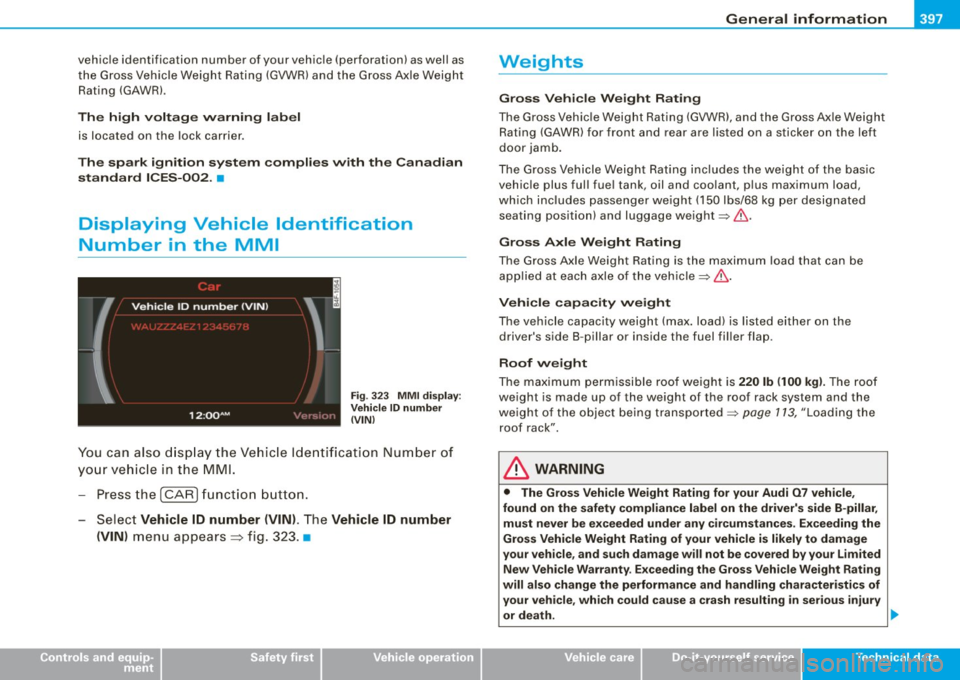
Fig . 323 MMI di splay :
Vehicle ID number
(VIN)
Y ou can also display t he Vehi cle Id ent ifi catio n Num ber of
y o ur vehi cle in the MM I.
- Pre ss th e
(CA RI fun ctio n bu tton.
- Selec t
Vehicle ID number (VIN) . The Vehicle ID number
(VIN)
m enu appea rs=> fig. 3 23 . •
Controls and equip
ment Safety first Vehicle operation
Weights
Gross Vehicle Weight Rating
The G ross Ve hicle We ight Rating (GVWR), a nd the Gross A xle Weight
R ating (GAW R) for front and rear are l isted on a stic ker on the left
doo r jamb .
T he G ross Ve hicle We igh t R ating includes t he weight o f the bas ic
vehic le plus full fue l tank , oil and coo lant, p lus maximum load,
w hi ch includes passe nger we ight (1 50 lbs/68 kg per des ignat ed
seat ing position) and luggage weight:::::,&.
Gross Axle Weight Rating
The Gross Axle Weight Rating is the maximum load that can be
ap plied at each axl e of the vehicle:::::, .&,.
Vehicle capacity weight
The vehic le capacity weig ht (max. load) is list ed e ither on the
driver's side B -pillar or ins ide the fuel fi ller flap.
Roof weight
The maxi mum pe rm is s ible roof we ig ht i s 220 lb (100 kg ). The ro of
we ight is made up of th e wei ght of t he roof rack system an d the
we igh t of t he o bjec t being tra nspo rted :::::, page 1 13, "Lo adi ng the
roo f rack".
& WARNING
• The Gross Vehi cle Weight Rating for your Audi 07 vehi cle ,
found on the safety compliance label on the driver's side B -pillar ,
must never be exceeded under any circumstances . Exceeding the
Gross Vehicle Weight Rating of your vehicle is likely to damage
your vehicle , and such damage will not be covered by your Limited
New Vehicle Warranty . Exceeding the Gross Vehicle Weight Rating
will also change the performance and handling characteristics of
your veh icle , which could cause a crash resulting in serious injury
or death. .,_
Vehicle care Do-it-yourself service Tec hn ica l da ta
Page 410 of 426
lffll __ A_ l..:,. p _ h_ a_ b_e _t_ic_ a_l _in_ d_e_ x ____________________________________________ _
A
Accessories . . . . . . . . . . . . . . . . . . . . . . . . 403
Adaptive Air Suspension .... ... .. .... 206
Cargo mode in the MMI ....... .... 212
Controls . . . . . . . . . . . . . . . . . . . . . . . . 207
Description ... ...... ............ 206
High level . . . . . . . . . . . . . . . . . . . . . . . 207
Highway level . . . . . . . . . . . . . . . . . . . 207
Instrument cluster display .. .... ... 209
Jacking mode when changing a flat tire . 210
Low level ... ... ... .... ..... .. ... 207
Normal level . . . . . . . . . . . . . . . . . . . . 207
Segment display . . . . . . . . . . . . . . . . . 208
Setting the driving modes ......... 208
Trailer towing mode ... .... .... ... 211
Using sw itch for cargo mode .. .... 212
Warning/indicator lights . .......... 21
Adaptive Cruise Control .. .... ..... ... 152
Changing speed ................. 156
Driver information ............... 160
Driver intervention prompt ........ 164
Driving in traffic 154
Driving program .. .... .... .... ... 165
Error messages . . . . . . . . . . . . . . . . . . 163
Open road . . . . . . . . . . . . . . . . . . . . . . 154
Override . . . . . . . . . . . . . . . . . . . . . . . . 154
Request for driver to assume control 154
Save speed . . . . . . . . . . . . . . . . . . . . . . 156
Setting distance . . . . . . . . . . . . . . . . . 158
Setting time interval .............. 158
Settings ........................ 165
Specia l driving situations ......... 165 Status
messages . ....... ... .. ... . 163
Switching on and off .. ........... 155
System limits .. .................. 165
Temporarily turning off ......... .. 157
warn ing/indicator lights ........... 161
Adaptive Light .... ...... ...... ... ... . 76
defective ......................... 37
Adding Engine coolant ... ....... .... .... . 339
Engine oil ... .. .. . ... ....... .... . 336
Windshield washer fluid ...... .... . 346
Additiona l accessories .......... .... . 403
Additives Engine oil ....................... 336
Adjusting Instrument cluster i llumination . .... . 17
Steering column electrically ....... 141
Steering column manually ......... 140
Adjusting front seats .... .... .... . ... . 92
Advanced Parking System with rear view
camera
Adjusting the chimes -option 1 . ... 201
Adjusting the chimes -option 2 .... 202
front and back with visual display and
rear -view camera . . . . . . . . . . . . . . . 191
General information ......... ..... 191
Notes on distance information ... .. 200
Parking next to obstac les . . . . . . . . . . 199
Rear-view camera -parking mode 1 196
Rear -view camera -parking mode 2 . 198
Rear -view camera (Rear View) ... ... 194
Rear -view camera coverage area . . . . 195
Rear -view camera tips ............ 204 Special parking
situations ... .. .. .. 199
Switching the rear-view camera on and
off .... . ... .... .... ... .. .... ... 203
switching the visua l display on and off ..
203
System error message ............ 204
Towing hitch ...... .... ...... .... 201
Air conditioning
See Climate controls 123
Air distribution Climate controls ... ....... .... ... 127
Four -zone automatic comfort air
conditioning ................... 133
Air pol lutants fi lter
Climate controls ................. 123
Airbag Warning/indicator lights . ...... .... . 19
Airbag system .... .... .... ... ... 241, 258
Advanced Airbag System ...... .... 245
Advanced Airbag System components . ..
248
Care ........................ .... 255
Child restraints .................. 265
Children ... .... .... ... ...... ... . 264
Components (front airbags) . ....... 248
Danger of fitting a chi ld safety seat on the
front passenger seat . . . . . . . . . . . . 243
Disposal ............. ....... .... 255
Front airbags .. ........ ...... 245, 246
How do the front airbags work? . ... 250
How many airbags does my vehicle have? 248
How the Advanced Airbag System compo -
nents work together . ........ .... 249
Page 413 of 426

______________________________________________ A_ l_,_ p _h_ a_ b_e _t_ic _ a _ l _in _ d_e _ x __ _
Child safety lock
rear doors (powe r) .. ... .. ... ... .... 61
Child safety seats . ................. . 268
Convertible locking retractor .... ... 273
Danger of using child restraints in the front seat ...... .... .... ...... .. 243
How do I properly install a child safety
s e at in my vehicle? .. .... ... .... . 266
Installing .. .. .... ... ..... ...... .. 273
LATCH system ...... .. ... .. .. ... . 281
Safety instructions .. ... ....... ... 266
Cigar ette light er ... ... ... .. ... .... .. 117
Cleaning Alcantara (synthetic suede) ... .. ... 323
Engine compartment .. ...... .... . 324
Fabrics and fabric coverings ....... 319
Ins trument pane l ...... ........... 320
Int erior ... ....... .... .... ... .... 319
L eather .... .... ......... ........ 322
MMI display ..... .. ... ... .... .... 319
MMI terminal ...... ....... .... ... 319
Plastic and vinyl ......... .... ..... 316
Plas tic parts .. .. .... .... ... .. ... . 320
Safety belts .. .... ....... .... .... 323
Trim strips ... .... .... ... .... .... 315
trim strips .. ...... .... ..... ...... 316
Cleaning and pro tection .. .... ... ... .. 312
Climate control ..... .... .... ....... . 123
Synchronizing .. ...... ...... ..... 125
Warm and cold .. .... .... .... .... . 123
Climate controls Air distribution ... .... .... .... .... 127
Air outlets .... ... .... .... .... .... 130
Air outlets (rear) .... ........... ... 130
Controls and equip
ment Safety first
Air recirculation
...... .... .... .... 128 Starting engine ....... .. .. ... .... 144
AUTO (standard set ting) .. .... ..... 126 STOP button .. .. ... ... .... ..... .. 145
Basic settings .... .... ... .... ..... 134 Switching engine off ... ... ... ... .. 145
Blower ...... ... .... .... .... ..... 128 Switching on ignition ... .. .... .... 144
Controls . .... .... .... .... ... .... 125 Unlocking vehicle ...... ... .... .... . 62
Defrosting/defogging ...... ....... 127
Convertible child seats
Description .. ...... ... .... .... ... 123
How do I properly install a convertib le
ECON mode .... . .. .. ..... ... .... 126 child seat in my vehic le? ...... ... 269
ECON operation ........... ....... 134 Safety instructions ........ ........ 269
Energy manageme int .. .... .... .... 123
Convertible locking retractor
Heated seats, fron t .... ... ..... ... 136
Activating ........ .... ... .... .... 275
Key coded setting ........ ........ 123
Deactivating ... ... .... .... .... ... 276
Recirculation mode (automatic) ... .. 134
Using to secure a chi ld safety seat . 273,
Recommended settings .. ... .... .. 123 275
Residual heat ................... . 126
Coolant system ....... ... ........... 337
Setting the temper .ature .. ... ... .. . 127
Cooling box in glove compartment .... . 120
SETUP ...... ... .. .... .... .... ... 134
Synchronization ... .... .... .... ... 135 Cooling System
Expansion tank ... ..... .. .... .... . 338
Turning on and off ......... ... .... 126
Using climate control economically . 131 Cornering
light ....................... 76
Cruise control
Clock ......... .... . ...... ........ ... 14
Changing speed ............ .. .... 150
Closing Presetting your speed ........ ..... 150
Panoramic sliding sunroof .......... 68
Switching off ..... ... .... .... .... 150
Coat hooks ... .. .... .... ........ .... 121
Switching on ... .... ... ..... ... ... 149
Cold tire inflation pressur e ..... ... ... 351
Warning/indicator lights ........ .... 22
Compass mirror ........... ......... .. 89
See also Adaptive Cruise Control . ... 152
Compliance ......... ...... ... .. .... 404 Cruising range ......... ....... .. ..... 40
Consumer Information ........... 229, 401 Cupholder ........... ....... 103,114,115
Contacting NHTSA ... .... ... .... .... 229
Convenience key ..... ...... .... ... ... 61
D
Driver messages ... ... .... .. .. ... 146
Locking vehicle ... .... .... .... ..... 63
START button .................... 144 Damping
See Adaptive Air
Suspension .... ... 206
Vehicle operation Vehicle care Do-it-yourself service Technical data
Page 417 of 426
______________________________________________ A_ l_,_ p _h_ a_ b_e _t_i c_ a _ l _in _ d_e _ x __ ffllll
How many airbags does my vehicle have? ..
248
How often should I check my tire pressures? 354
How safety be lt pretensioners work .... 239
Hydroplaning .... .... ....... .. .. .... 358
I
Ignition key .... .... .... .... ... .... . 142
Ignition lock .. .... ...... .... ... .... . 142
Malfunction .. ... .... ...... .... 34, 38
Ignition lock positions ... .... ...... .. 142
Immobilizer . .... .... .... ... .... .... . 15
Important things to do be fore d riving .. 221
Improper ly worn safety belts ..... ... .. 239
I ndicator lights ..... ... .. ........... . 17
Airbag system . ........ ...... 252, 253
PASSENGER A IR BAG OFF ... .. ... .. 253
Infant seats . .... ... .... .... .... .... 268
How do I properly install an infant seat in
my vehicle? .... ..... .... ..... .. 268
Safety instructions ... .... ... .... . 268
I nflatable spare tire ...... ... ... .... .. 372
I nflating .... . ... ... . .. .. .. .... .. 378
Inside rear view m irror . ...... ... ... 86, 87
Ins ta lling child sa fe ty sea ts
Safety belts ....... ......... ..... 273
I nstrument cluster i lluminat ion ... ..... . 17
I nstruments and controls .... .... .... .. 13
General il lustration ... .... ....... .. 11
Int erior lights .... .... .... ... .... ..... 78
Rear . ....... ... .... .... ....... 78, 79
Controls and equip
ment Safety first
I
ntermittent wiping LATCH ...... .... ... . ... ... . .. .. .. . . 278
Rain sensor ... ...... .... ... .. .... . 81 Descrip tion ... ... ... ... .. .... .... 278
Guidance fix tures for lower anchorages .
J 279
Installing a child restraint ...... .... 281
Jack .... .... .... ...... ..... ..... .. . 370
Location . .... .... .... ... .... .... 278
Jumper cab les . ...... .... ... .... .... 388 Mounting and releasing the anchorage
Jump -starting ... ...... ... .. .... .... 387 hook .
..... .. ... .... ... .... .. .. 282
Lateral angle .. ... ...... .... ..... .. . 302
K Leather ...... .... .... ... .. .. ... .. .. 321
Cleaning .. .... .... ... ........ ... 322
Key .... .... .... .... ... ...... ....... 48
Level adjustment
Battery rep lacement .. .... .... .... . 50
See Adaptive Air Suspension ... .. .. 206
Coded settings . ... .... .... ... .... 123
Lifting jack ... .... .... ... .... .... ... 376
Convenience opening a nd closing of
windows ... .... .. .. ..... .. . .... . 66
Emergency key ...... ........ ..... . 48
Key replacement . .... .... .... .... . 48
Master key ... ....... .... .... .... . 48
Valet key ... .. .... .... .... ... .... . 48
Key coded settings Climate controls ... .... ..... .. .... 123 Lifting vehicle .
....... ... .. .. .... ... 392
Light Exterior light ing in the mirror housing 76
leaving home ..... .... ... .... .... . 76
See also Background lighting ...... .. 79
Light sensor defective ....... ... .. ..... 36
Lighting
Key less entry remote control ... .. .... .. 49
Kick -down
See Background lighting ... .... .... . 79
Ligh ting in the mirror hous ing ..... ... .. 76
tiptronic® .... .... .... .... .... ... 187 Lights
.. .. .. .... .... .... ... .... .... . 73
Coming home . .... .... ...... .... .. 74
L
Daytime running lights ............. 74
Emergency flashers ... .... .... ... .. 76
L ane assist Exterior lights ..
... .... ... ..... .... 74
Activating and deact ivating 171 Front fog l
ights ... .... .... .... ... .. 75
Description ... .. .. .... .... .... ... 1 71 Headlights ..
...... .... .. . .. .. .... . 73
Instrument cluster indicator light . .. 171 H
igh beam .... .... ... .. .. .... . 73, 77
MMI settings ... .. .... .... .... ... 172 High beam warning/indicator light
... 22
Notes on instrument c luster disp lay . 171 Leaving h
ome ...... ... .. .. ... .. .. . 7 4
Vehicle operation Vehicle care Do-it-yourself service Technical data
Page 418 of 426
lffll __ A_l.:. p _h_ a_ b_e _t _ic _ a_l _in _ d_e _x ____________________________________________ _
Rear fog lights ... .. ... ... .... ... .. 75
Side marker lights . . . . . . . . . . . . . . . . . 73
Turn signals ... ... ..... ... ....... . 77
Xenon headlights ...... .. .... .... . 73
Loading the luggage compartment .... 227
Loadi ng the roof rack ... .. .... ...... . 113
Locking Power locking switch . . . . . . . . . . . . . . 55
Rear lid/trunk lid .. .... .... ...... .. 57
Remote control key . . . . . . . . . . . . . . . . 53
Using the key ... .. .... .... ...... .. 54
Lower anchorage locator button .. .... 278
Lower universa l anchorage bars (Canada) ..
278
Lower universa l anchorages (Canada} .. 278
Luggage Stowing . . . . . . . . . . . . . . . . . . . . . . . . 227
Luggage compartment ... .... ...... . 104
Cargo net ............... ........ 107
Expanding ...................... 104
Retractable cover . . . . . . . . . . . . . . . . 108
Sk i sack . . . . . . . . . . . . . . . . . . . . . . . . 111
Tie -down rings (adjustab le} . . . . . . . . 106
See also Loading the luggage
compartment ... ...... ........ . 227
luggage compartment Tie -down rings .. ...... .......... 105
Lumbar support .. .... .... ..... .. .... 95
M
Maintenance . ..... ... .... ... .... ... 401
Malfunction Indicator Lamp (MIU .. . 20, 29 Master
key ... .... ..... .. ..... .. . .... 49
Battery replacement . . . . . . . . . . . . . . . 50
Check light .......... ...... .... ... 50
Mi leage
Average .. .... ... .... .... .... .... 40
Instantaneous .... .... .... .... .... 40
Mirrors Activating the digital compass ... .. . 89
Adjusting the anti-g lare .. .... ... 86, 87
Automatic dimm ing for the outside
mirrors .. ..... ... .... .... .... ... 89
Automatical ly dimming inside mirror. 87
Inside day -night mirror ....... ...... 86
Interior mirror ....... ...... .... 86, 87
Outside mirrors ............ ....... 88
Recalling position of outside mirrors . 97
Storing position of outside mirrors .. 97
Monitoring the Advanced Airbag System 252
N
Natural leath er ...... ..... .. .... .... 321
New tires and wheels .... .... ..... ... 359
NHTSA Contacting .... .... .... .... .... .. 229
Number of seats . .... ... .... .... .... 231
0
Occupant seating positions ... .. .... .. 222
Octane rating ...................... 325
Odometer . . . . . . . . . . . . . . . . . . . . . . . . . . . 15
Offroad mode . . . . . . . . . . . . . . . . . . . . . . 288 Oil
See Engine oil .
.... .... ... .... ... 333
Older children and safety belts .... .... 272
On-Board Diagnostic System (080)
Data Link Connector (DLC) ..... .... . 29
Electronic speed limiter ........... . 29
Malfunction Indicator Lamp (MIU .... 29
Open door or rear lid warning .. .... .... 27
open sky system
See Panoramic sliding sunroof .. .... 67
Operate your vehic le economically and mini-
mize pollution ... .... .... ... .... 299
Optional equipment Marked with an asterisk .. ...... ..... 6
Outlets . . . . . . . . . . . . . . . . . . . . . . . . . . . . 118
Outside air pollution How to prevent from entering the vehic le
128
Outside mirrors ......... ........ ..... 88
Outside temperature display ... .... .... 26
Owner's manual How the Owner's Manual is organized . 6
p
Paint
Touch -up 316
Paint No. . . ......... ... ....... ..... 396
Panoramic sliding sunroof .... .... .... 67
Closing .. ... .. .... .... ...... ... .. 68
closing ..... ...... ....... ... ... .. 68
Convenience closing ... .... .... ... . 69
Emergency operation . . . . . . . . 70, 7 1, 72
Page 419 of 426

______________________________________________ A_ l_,_ p _h_ a_ b_e _t_ic _ a _ l _in _ d_e _ x __ ffllll
s liding open ..... ........ ...... ... 68
Sunshade ... .... .... ....... .... .. 69
tilting .... .... .... .... ... .... .... . 68
Parking ............................ 147
Automatic transmission ... ... .... . 184
Caution when parking near a parking bar -
rier or curb ...... .... ........... 147
Low bumper cover, spoi lers and
suspension .... .... .... ...... .. 147
Parking brake ..... ...... .... ..... .. . 147
Parking ...... .... .... ... .... .... 147
Warning/indicator lights .. .... .... .. 23
Parking on a decline (downhill) .. ...... 147
Parking on an incline (uphill) .. ... .... . 147
Parts replacement ... .... .... ...... .. 403
PASSENGER AIR BAG OFF light ... .. ... 253
Passenger's seat ..... .... ... .... .. 93, 96
Passive safety system .. .............. 220
Pedals ... ......... ... ........ .... .. 226
Perimeter lighting ... .... .... .... .... . 76
Physical principles of a frontal collision 232
Polishing ...... .... .... .... ... .... . 315
Po llen filter
Climate controls ...... ....... .... . 123
Power locking switch ... .... .... .... .. 55
Power locking system ... .... .... .... .. 52
Convenience close/open feature .... . 66
Locking and unlocking the vehicle from inside . ... .. .... .... ............ 55
Opening and c losing the windows ... 66
Rear lid/trunk lid .... .... .......... 57
Remote control key ................ 49
Se lective unlock feature ............ 55
Controls and equip
ment Safety first
Settings ...
... .... ........ .. . .. .. . 55
Unlocking and locking vehicle ... ... . 53
Power outlets ........... ............ 118
Power seat
Contro ls ... .. .... ........ ....... . 93
Seat adjustment ..... ....... .. .... . 94
Power steering ......... .... .... ... .. 293
Power window switches .... ....... .... 64
In the driver's door .. ......... .... . 65
In the front passenger 's door ... .... . 66
Reactivating the system .. .... .... .. 67
Pregnant women Special considerations when wearing a safety belt ....... .... ....... ... 237
Programming the Homelink® universal re-
mote control .... .... .... .... ... 214
Proper occupant seatiing positions .. ... 222
Proper safety belt position ...... .. .... 236
Proper seating position
Front passenger ... .... .... .... ... 223
Occupants .... .... .... ... .... .... 222
Rear passengers .. ... .... .... .... 224
Protective tray 109
a
Quartz clock .... .... ... .... .... .... .. 14
quattro®
See All Wheel Drive ............... 294
Question What happens to unbelted occupants? .
233
Why safety belts? . .... .... .... .... 23 1
R
Radiator fan .... .... .... .... .... .... 340
Rain sensor ...... .... ..... .. .... ... . 81
Rain sensor defective . .... ... .... .... . 36
Reading lights
Front ... ... ........ ... .... .... ... 78
Rear . .... ..... .. .... .... .... ... .. 79
Rear ashtray ... .. .... .... ... ... ... .. 116
Rear fog lights .. .... ........ .... .... . 75
Rear lid
Automatic operation .... ..... ...... 58
Emergency unlocking . .... ... .... .. 60
Opening and closing ... ... .... ..... 57
Valet key function .... .... .... ... .. 51
Rear light
Defective . ........ .... .... ...... ..
27
Rear operation
Four -zone automatic comfort air
conditioning ... .. ....... .... .... 135
Rear seats Adjusting seat .................... 99
Entry assist ... .... .... ... .... ..... 99
Fo lding seat back up and down . .... 100
Rear view
See Rear-view camera ............. 191
Rear view mirror Inside rear view mirror ..... .... . 86, 87
Rear window defogger ... .... ... .... . 129
Rear -view camera .. ... .. .... .... 191, 194
Parking mode 1 .... .... ........ .. 196
Parking mode 2 .... ...... .... .... 198
Red symbols ...... ....... .... ... ..... 31
Vehicle operation Vehicle care Do-it-yourself service Technical data