brake AUDI Q7 2009 Owner´s Manual
[x] Cancel search | Manufacturer: AUDI, Model Year: 2009, Model line: Q7, Model: AUDI Q7 2009Pages: 426, PDF Size: 97.13 MB
Page 172 of 426
• .___A_ d_a_ p:- t_iv _ e_ C_ r_u _is _ e_C_ o_ n_ t_ r_ o_ l --------------------------------------------
- Select Audi braking guard. The Audi braking guard menu
appears.
Select
Early warning on to switch the acoustic and visual
warning on or
off to switch the system off.
[ i] Tips
When handing over the keys to another person, the previous
settings are adopted if the Audi braking guard is activated
=> page 53. •
Applies to vehicles: with Adaptive Cruise Contro l
Driver's information in the instrument cluster
display
braking guard brake jolt
This message appears when the Audi braking guard applies the
brakes during a second stage (acute) warning.
braking guard off
This message appears when the system has been deactivated via
the MMI. This message also appears briefly at each beginning of a
trip if the system is switched off.
This message also appears when the system is not available
because of a malfunction or if ESP is switched to the Offroad
mode :::>
page 288. The system can no longer warn of an impending
collision. •
Page 186 of 426

• ..__A_ u_t _o _m_ a_ t_ i_c _ t _r_ a_ n_ s_m _ is_ s_ io_ n ___________________________________________ _
Automatic transmission
tiptronic® (6-speed automatic
transmission)
General information
Your vehic le is equipped with an e lectronica lly controlled automatic
transmission. Upshifting and downshifting takes place
automati
cally.
The transmission is also equipped with tiptronic®. It allows the driver to shift gears
manually if desired => page 188. •
Driving the automatic transmission
Start ing th e engin e
- T he selector lever must be in
N or P.
Start in g off
- Press and hold the bra ke pedal.
Fi g. 197 Sh ift gate o n
t h e ce nter c onsole :
selec tor le v er wit h
re lease butto n
- Press and hold the release button in the se lector lever
hand le and move the selector lever from
P or N to D and
release the button
=:> & .
- Wait br iefly u ntil the transm ission has shifted (you will
feel a sligh t movement).
- Remove your foot from t he brake pedal and accelerate .
Rocking back and forth to be com e unstu ck
- Sh ift only between
D and R when the ve hicle is at a fu ll
stop and the engine is running at idle speed.
Stopping
- Press and h old the brake pedal unti l the vehicle has come
to a comp lete stop.
Keep the brake pedal depressed so that the vehic le
cannot ro ll forward or backward while it is idling =:>& .
- Once stopped,
do not depress the acce lerator pedal to
rev up the engine=:>&.
Par king
- Press and h old the brake pedal unti l the vehicle has come
to a comp lete stop.
- Set the parking brake firmly=:>
page 147, "Parking" .
- Press and hold the release button in the selector lever
handle, m ove the selector lever i nto
P and then let go of
the release button =:> & . ._
Page 187 of 426

_______________________________________________ A-- u_t :..:o _ m_ a-- ti _c __ t_r _a _n_ s-- m.,;,,;_: is:..s::.. i :..:o:.. n ---""
T he selector lever must be in Nor P. If one of the driving positions
is engaged a safety switch w ill preven t the eng ine from being
started. See also=>
page 143.
Before you move the selector lever from the P position, you must
a lways apply the brake pedal before and while depressing the
button in the hand le of the se lector lever .
_& WARNING
• Unintended v ehicle movement c an cause serious injury .
- When the selector lever i s in a driving po sition , the vehicle
ma y creep, even at idle speed . Therefore do not release the
parking brake or foot brake until you are ready to move ,
be cau se power is tran smitted to the wheel s as soon as a
driving po sition i s engaged.
- Do not accelerate while selecting a driving pos ition . At this
time the engine must be at idle speed so that undue stress is
not placed on the clut che s in the t ransmi ssion .
-Remember : - even when stopped briefly with the automatic
transmi ssion in "D ", "S " or "R ", eng ine power is being trans
mitted to the wheels. Your vehicle could "creep " forward or
b ac kwa rd . When stopped , keep the brake pedal fully depre ssed
and u se the parking brake if nece ssary to keep the veh icle from
rolling .
• If the selector lever i s unintentionally moved into N while you
are dr iving , take your foot off the ac cele rator pedal and wait for
the engine to return to idle speed before selecting a driving posi
tion .
• Never shift into "R " or "P " when the vehicle i s in motion .
• Never get out of the driver 's seat when the engine is running .
• If you mu st get out of the vehi cle , move the selector le ver
s ecurel y into the P po sition and apply the park ing brake firmly.
• If the engine must rem ain runn ing , neve r have any dr iving p osi
tion engaged when che cking under the hood . M ake sure the
s elector le ver ha s securel y engaged and i s loc ked in "P " with the
Controls and equip
ment
& W ARNING (continued )
park ing brake firmly set=> page 324 , "Engine compartment ".
Otherwi se , any increa se in engine speed may set the vehi cle in
motion , even with the parking b rake appl ied . •
Selector lever positions
T his secti on describes t he select or lever positions an d
driving ranges.
F ig . 198 D ispla y in th e
instrument clu ste r:
sele ctor lev er in pos i
ti on D
The instrument cluster display shows the current selector lever
position and current gear .
P -Park
In this selector lever pos it ion the transmission is mechanica lly
locked . Engage
P on ly when the vehicle is completely stopped=> &
in "Driving the automatic transm ission" on page 184 .
To shift in or out of position P, you must first press and hold the
brake peda l
and then press the re lease bu tton in t he se lecto r leve r
handle while moving the selector lever to or from
P . You can shift
out of this position only with the ignit ion on.
R -Re ver se
The transmission wi ll au tomatically select the lowest gear ratio
when you shift into reverse .
I • •
Page 188 of 426
• ..__A_ u_ t _o_ m_ a_ t_ i_ c _ t_r _a _n_ s_ m_ is_ s_io _ n ________________________________________________ _
Select R only when the vehicle is at a full stop and the engine is
running at idle speed=>
& in "Driving the automatic transmission"
on
page 184.
Before you move the selector lever to R, press both the button in the
handle of the selector lever
and the brake pedal at the same time.
When the ignition is on, the backup lights illuminate when the
selector lever is moved into R.
N -Neutral
The transmission is in neutral in this position. Shift to this position
for standing with the brakes applied =>
page 186 .
When the vehicle is stationary or at speeds below 3 mph (5 km/h),
you must always apply the footbrake before and while moving the
lever out of
N.
D -Normal position for driving forward
Position Dis for normal city and highway driving. It ranges from zero
to top speed and all gears shift automatically, depending on engine
load, driving speed and automatically selected shift programs.
When the vehicle is stationary or at speeds below 3 mph (5 km/h),
you must always apply the foot brake before and while moving the lever to
D out of N.
In certain circumstances it may be advantageous to temporarily
switch to the manual shift program to manually select gear ratios to
match specific driving conditions=>
page 788.
S -Sport position
Select this position for sportier performance. In this position, the
transmission will not upshift as soon, allowing the vehicle to use the
increased power available at higher engine speeds to achieve live
lier acceleration.
When the vehicle is stationary or at speeds below 3 mph (5 km/h),
you must always apply the foot brake before and while moving the lever to
S out of N.
& WARNING
Read and follow all WARNINGS => & in "Driving the automatic
transmission" on
page 184.
0 Note
Coasting downhill with the transmission in N and the engine not
running will result in damage to the automatic transmission and
possibly the catalytic converter. •
Automatic Shift Lock (ASL)
The Automatic Shift Lock safeguards you against acciden
tally shifting into a forward or the reverse gear and
causing the vehicle to move unintentionally.
Fig. 199 Shift gate:
selector lever lock
positions and interlock
button highlighted
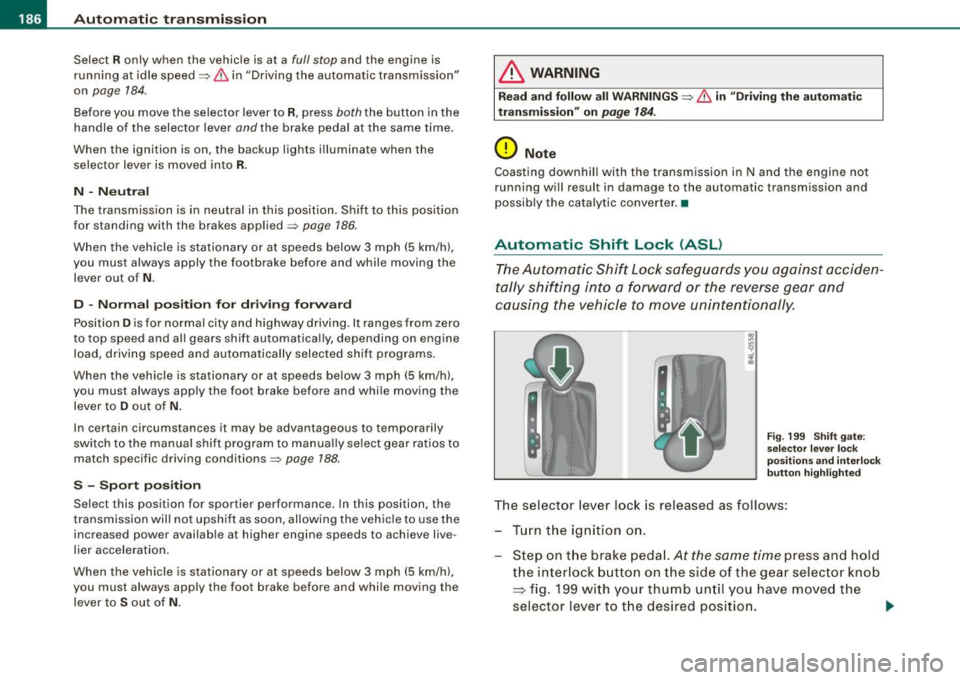
The selector lever lock is released as follows:
- Turn the ignition on.
Step on the brake pedal.
At the same time press and hold
the interlock button on the side of the gear selector knob
=> fig. 199 with your thumb until you have moved the
selector lever to the desired position.
~
Page 189 of 426
_______________________________________________ A_ u_t _o _ m_ a_ t _i_ c_ t_r _a _n _ s_ m __ is_s_ i _o _ n __ !II
Autom ati c selec to r l eve r lock
The se lector lever is locked in the P and N positions when the igni
tion is turned on. To move the lever from these positions the driver
must depress the brake pedal. As a reminder to the driver, the
follow ing warning appears in the instrument cluster disp lay when
the selector is in
P and N:
When stationary app ly foot brake while s electing gear
A time delay e lement prevents the selector lever from locking when
it is moved through the
N position (going from R to Dl. The locking
e lement will lock the selector lever if the lever is left in N (Neutral)
for more than approximately 1 second, without the brake peda l
being pressed.
At speeds above about 3 mph (5 km/h) the Automatic Shift Lock is
automatically deactivated in the
N posi tion .
Interl ock button
The lock button on the selector lever prevents the lever from being
accidentally shifted into certain positions. Pressing this button
deactivates the selector leve r lock. Dependi ng on the direction of
the shift, the selector lever locks at different positions. The positions
are highligh ted in the illus trati on =>
page 186, fig . 199.
Igniti on k ey saf ety in te rlo ck
The key canno t be removed from the ignition un less the selector
lever is in the
P park position. When the ignition key is removed, the
selector lever wil l be l ocked in the
P posi tion .•
Kick -down
T he kick-down feature allows the vehicle to genera te
maximum accelera tion.
When you press the acce lerator pedal beyond the resistance point
that is reached at ful l throttle, the transmission wi ll select a lower
gear ratio based on vehic le speed and engine RPM . The engine RPM
wil l be control led to produce maximum vehic le acceleration as long
Controls and equip
ment
as you continue to press the acce lerator pedal beyond this resis
t ance poin t.
& WARNING
Be careful when u sing the ki ck -down feature on slippery road s.
Rapid acceleration ma y cause the vehicle to skid . •
Dynamic shift program (DSP)
T he aut omatic tr ans mission is electro nically c ontrolle d.
The transmission is se lf adapting and will automaticall y select the
b est shi ft program su ited to the driving conditio ns and driving style.
The transmission will select one of the
e conomy programs when
you drive at a s teady speed or a g radually changing speed without
heavy acceleration. This achieves optimum fuel efficiency, with ear ly
upshifting and delayed downshifting .
The trans mission will au tomatically select the
sporty shift progra ms
when you drive at higher speeds, or with heavy acce leration and
frequent ly cha nging speeds . Upshifts ar e delayed t o make f ull use
of engine power . Downshifting takes place at higher engine speeds
than in t he ec onomy p rograms .
The selection of the most su itable shift program is a continuous,
automatic process . The driver can a lso make the transmission
sw itch to a sporty progra m by
quickly pressing down the gas peda l.
This causes the transmission to shift down to a lower gear to
achiev e rapid acc elerati on, e.g . fo r q uickly pass ing another vehicle .
You do not need to press the gas pedal into the kick-down range.
After the transm ission has upshifted, the original progra m is
selected according to your driving sty le.
An additiona l shift program allows the automatic transmission to
select the proper gear fo r uph ill and downhi ll gradients.
This keeps the transmission from shifting up and down unneces sari ly on hi lls. The transmissio n will shift down t o a lowe r gear when _,.
I • •
Page 190 of 426
111..__A_ u_ t _o_ m_ a_ t_ i_ c _ t_r _a _n_ s_ m_ is_ s_i o _ n ________________________________________________ _
the driver presses the brake pedal on a downhill gradient. This
makes use of the braking effect of the engine without the need to
shift down manually. •
Manual shift program
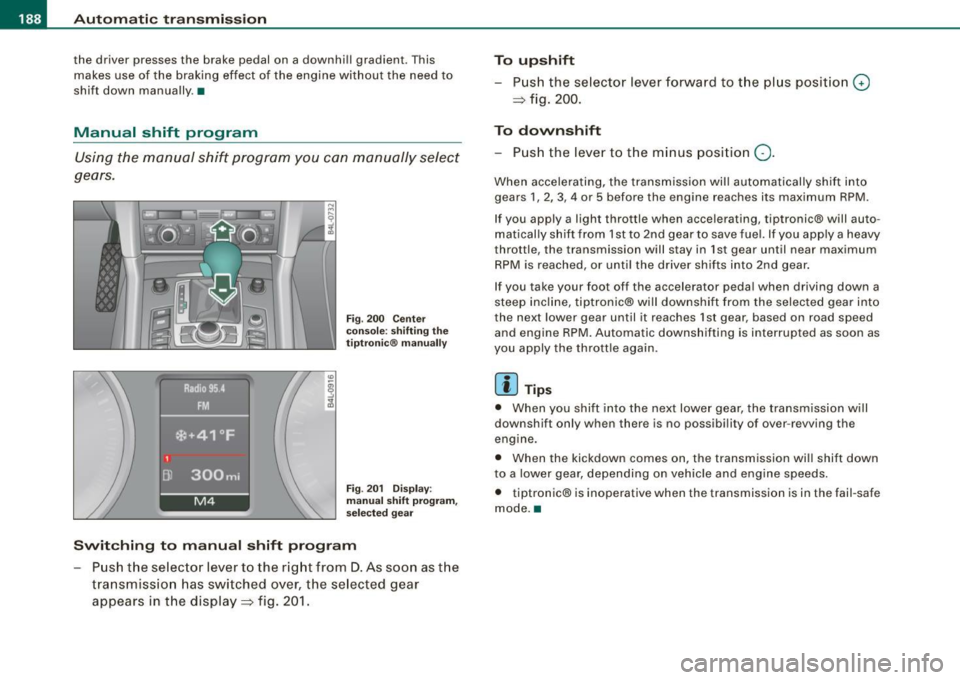
Using the manual shift program you can manually select
gears.
Fi g. 200 Ce nter
co nso le: s hiftin g the
tiptr onic® ma nually
Fi g. 20 1 Disp lay:
man ual s hift progr am ,
selected gear
Swit ching to manual shift program
Push the selector lever to the right from D. As soon as the
transmissio n has switched over, the selected gear
appears in the display => fig. 201.
To upshift
Push the selector lever forward to the plus position 0
=> fig. 200.
To downshift
- Push the lever to the minus position Q.
When accelerating, the transmission will automatically shift into
gears 1 , 2, 3, 4 or 5 before the engine reaches its maximum RPM .
If you apply a light throttle when accelerating, tiptronic® will auto
matically sh ift from 1st to 2nd gear to save fue l. If you app ly a heavy
throttle, the transmission will stay in 1st gear until near maximum
RPM is reached, or unti l the driver shifts into 2nd gear .
If you take your foot off the accelerator peda l when driving down a
steep incline, tiptronic® wi ll downshift from the selected gear into
the next lower gear until it reaches 1st gear, based on road speed
and engine RPM. Automatic downshifting is interrupted as soon as
you apply the thrott le again .
[ i ] Tips
• When you shi ft into the next lower gear, the transmission will
downshift only when there is no possibi lity of over -revving the
engine.
• When the kickdown comes on, the transmission wil l shift down
to a lower gear, depending on vehicle and eng ine speeds.
• tiptronic® is inoperative when the transmission is in the fail-safe
mode. a
Page 216 of 426

111....__H_ o_ m _ e _L_i _ n _k _® ____________________________________________________ _
Homelink®
Universal remote control
Applies to vehic les: w ith Home link ® universal remote cont ro l
General information
The HomeLink® fe ature can le arn up to th ree r adio
fre quency codes for m ost c urrent transmitters used for
operating garage doors, es tate gates , home or outdoor
ligh ting sy stems, and other devices .
You m ust first pro gram the H omel in k® trans mitter befor e you can
use the system=>
page 215, "Programm ing th e Homelink® trans
m itter".
In order to pro gram t he Homelink® transmitter fo r devices utilizing
ro lling code, a second person on a ladder who can safe ly reach the
ga rage door o pene r m oto r is rec omm ended . It is also necessa ry to
locate the "learn" button on your garage door opener motor. Refer
to t he op era ting instructions for the opene r, as the loca tion and
co lor of this button may vary by manufacturer .
Y ou can still use the o rigina l remote c ontrol fo r th e dev ice at any
time.
& WARNING
• Never use the Homelinkl1JI transmitter with any garage door
opener that does have not the safety stop and reverse feature as
requ ired by federal safety standards . This in cludes any garage
door opener model manufactured before April 1, 1982.
• A garage door opener which cannot detect an object , signaling
the door to stop and reverse does not meet current federal safety
standards . Using a garage door opener without these features
increases risk of serious injury or death .
& WARNING (continued)
• For safety reasons never release the parking brake or start the
engine while anyone is standing in front of the vehicle.
• A garage door or an estate gate may sometimes be set in
motion when the Homelink ® remote control is being
programmed . If the devi ce is repeatedly activated , this can over
strain motor and damage its electrical components -an over
heated motor is a fire hazard!
• To avoid possible injuries or property damage , please always
make absolutely certain that no persons or objects are located
in
the range of motion of any equipment being operated.
[ i ] Tips
• I f you wou ld l ik e mor e infor mation o n Hom elink®, w here to
purchase the Homelink ® compatib le products, or wou ld li k e to
pu rchase the Homeli nk® Home Ligh ting Package, please call t oll
free: 1 -8 0 0 -355 -3515.
• F or Dec lara tion of Compliance to U nite d Sta tes FCC an d Indu stry
C anada regulations=>
page 404 . •
Page 217 of 426
HomeLink® -_______________ ___.
Applies to vehicles: with Homelin k® un iversal remote contro l
Programming the Homelink ® transmitter
The transmitter is programmed in two phases. For rolling
code transmitters, a third phase is also necessary.
111111 111111
-
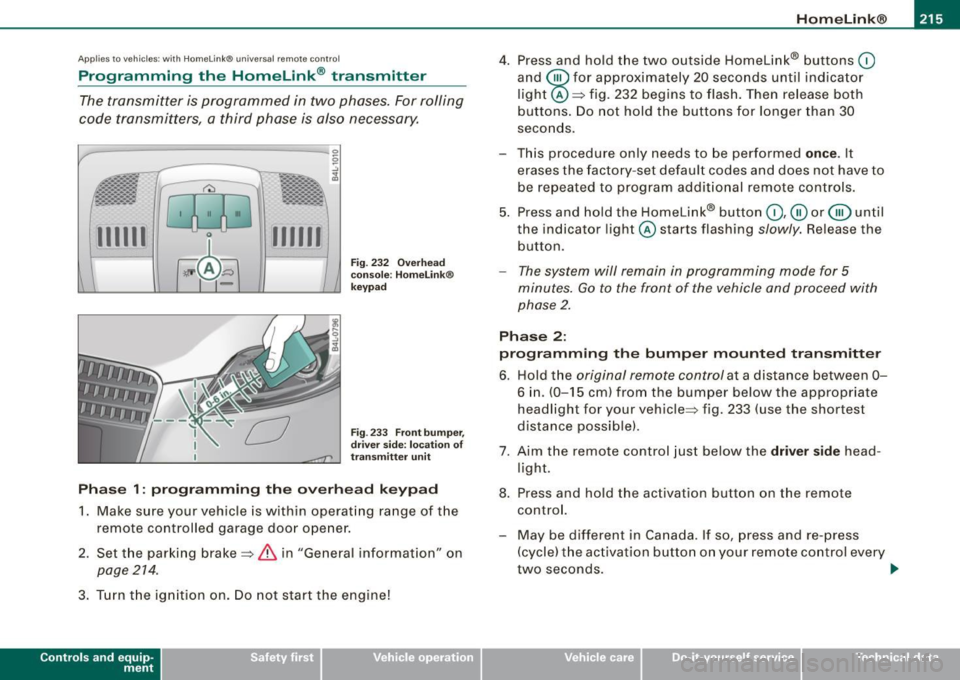
Fig . 232 Overhead
console : Homelink®
keypad
Fig . 233 Front bumper,
driver side: location of
transmitter unit
Phase 1: programming the overhead keypad
1. Make sure your vehicle is with in operating range of the
remote controlled garage door opener.
2. Set the parking brake=>
& in "General informat ion" on
page 214 .
3. Turn the ignition on . Do not start the engine!
Contro ls and eq uip
ment
4. Press and hold the two outside Homelink® buttons 0
and @for approximately 20 seconds until indicator
light @=> fig. 232 begins to flash. Then release both
buttons. Do not hold the buttons for longer than 30
seconds.
- This procedure only needs to be performed
once . It
erases the factory-set default codes and does not have to
be repeated to program additional remote controls.
5. Press and hold the Homelink® button
0,@ or @ until
the indicator light @starts flashing
slowly. Release the
button.
- The system will remain in programming mode for 5
minutes.
Go to the front of the vehicle and proceed with
phase 2.
Phase 2:
programming the bumper mounted transmitter
6. Hold the original remote control at a distance between 0-
6 in . (0-15 cm) from the bumper below the appropriate
headlight for your vehicle => fig . 233 (use the shortest
distance possible).
7. Aim the remote control just below the driver side head
light.
8. Press and hold the activation button on the remote control.
- May be different in Canada. If so, press and re-press
(cycle) the activation button on your remote control every
two seconds. .,_
Vehicle care I I irechnical data
Page 228 of 426
-L..___.:D=-:.. r.:....iv .:....i:..:. n..:.: g;a...: S=-= a:..:.f -=e :..:..IY !,__ ________________________________________________ _
examples will make you more aware of seating positions that are
dangerous.
Therefore, whenever the vehicle is moving:
• never stand up in the vehicle
• never stand on the seats
• never kneel on the seats
• never ride with the seatback reclined
• never lie down on the rear seat
• never lean up against the instrument panel
• never sit on the edge of the seat
• never sit sideways
• never lean out the window
• never put your feet out the window
• never put your feet on the instrument panel
• never rest your feet on the seat cushion or back of the seat
• never ride in the footwell
• never ride in the cargo area
& WARNING
Improper seating positions increase the risk of serious personal
injury and death whenever a vehicle is being used.
• Always make sure that all vehicle occupants stay in a proper
seating position and are properly restrained whenever the vehicle
is being used. •
Pedal area
Pedals
The pedals must always be free to move and must never
be interfered with by a floor mat or any other object.
Make sure that all pedals move freely without interference and that
nothing prevents them from returning to their original positions.
Only use floor mats that leave the pedal area free and can be
secured with floor mat fasteners.
If a brake circuit fails, increased brake pedal travel is required to
bring the vehicle to a full stop.
& WARNING
Pedals that cannot move freely can cause loss of vehicle control
and increase the risk of serious injury.
• Never place any objects in the driver's footwell. An object could
get into the pedal area and interfere with pedal function. In case
of sudden braking or an accident, you would not be able to brake
or accelerate!
• Always make sure that nothing can fall or move into the
driver's footwell. •
Floor mats on the dr iver side
Always use floor mats that can be securely attached to
the floor mat fasteners and do not interfere with the free
movement of the pedals.
-Make sure that the floor mats are properly secured and
cannot move and interfere with the pedals~
&- .,
Page 229 of 426
Use only floor mats that leave the pedal a rea unobstructed and that
are firmly secured so that they cannot slip out of position. You can
ob tain sui table floor mats from your au thorized Audi dealer.
Floor mat fasteners are installed in your Audi.
Floor mats used in your vehicle must be attached to these fasteners .
Properly securing the floor mats will prevent them from sliding into
positions that could interfere with the pedals or impair safe opera
tion of your vehicle in other ways .
& WARNING
Pedals that cannot move freely can result in a loss of vehicle
control and increase the risk of serious personal injury.
• Always make sure that floor mats are properly secured.
• Never place or install floor mats or other floor coverings in the
vehicle that cannot be properly secured in place to prevent them
from slipping and interfering with the pedals or the ability to
control the vehicle .
• Never place or install floor mats or other floor coverings on top
of already installed floor mats. Additional floor mats and other
coverings will reduce the size of the pedal area and interfere with
the pedals.
• Always properly reinstall and secure floor mats that have been
taken out for cleaning.
• Always make sure that objects cannot fall into the driver foot·
well while the vehicle is moving. Objects can become trapped
under the brake pedal and accelerator pedal causing a loss of
vehicle control. •
Safety first
Driving Safely
Stowing luggage
Loading the luggage compartment
All luggage and other objects must be properly stowed
and secured in the luggage compartment.
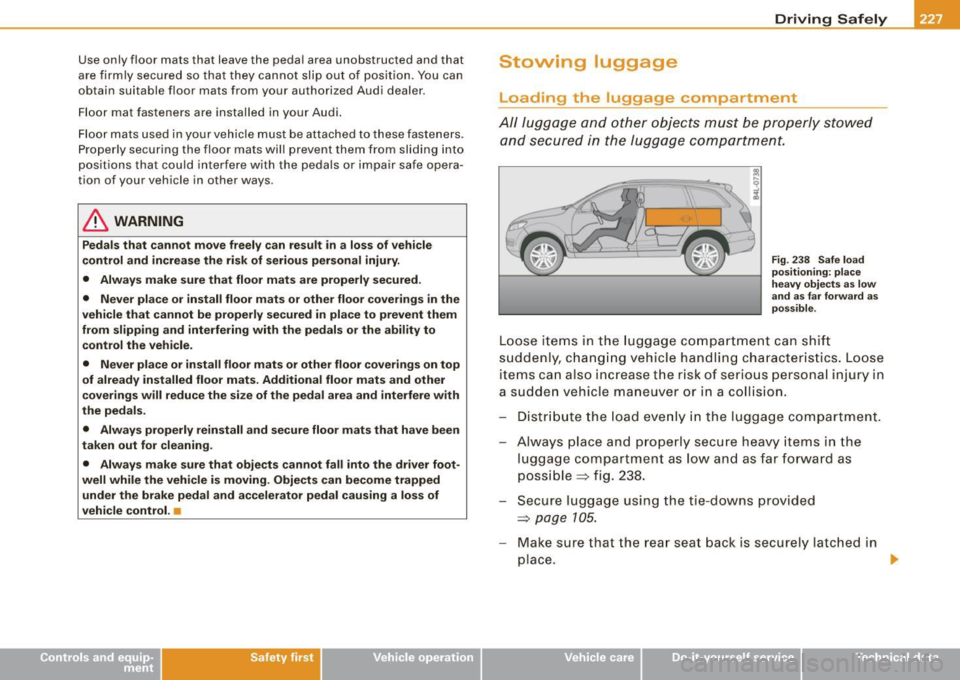
Fig. 238 Safe load
positioning: place
heavy objects as low
and as far forward as
possible .
Loose items in the luggage compartment can shift
suddenly, changing vehicle handling characteristics. Loose
items can also increase the risk of serious personal injury in
a sudden vehicle maneuver or in a collision.
- Distribute the load evenly in the luggage compartment.
- Always place and properly secure heavy items in the
luggage compartment as low and as far forward as
possible :::::> fig. 238.
- Secure luggage using the tie -downs provided
:::::>
page 105 .
-Make sure that the rear seat back is securely latched in
place.
ti,
Vehicle care I I irechnical data