ignition AUDI Q7 2011 Owner´s Manual
[x] Cancel search | Manufacturer: AUDI, Model Year: 2011, Model line: Q7, Model: AUDI Q7 2011Pages: 392, PDF Size: 93.29 MB
Page 132 of 392

IIIJL--_O=-:.. n.:.....: t;,:.h .:...:e~ r...::o =-- a=-.:. d;__ ________________________________________________ _
The glow plug indicator light w ill only ill uminate for approximately 1
se cond when the engine is w arm o r the ou tside temperature is hig her
than 46
°F (8 °() . That means you can sta rt the eng ine immediately .
& WARNING
Never allow the engine to run in confined spaces · danger of
asphyxiation.
0 Note
• Avoid high eng ine rpm, full th rottle and heavy engine loads until
the engine has reached operat ing temperature - ot herw ise you risk
eng ine damage.
• The engine cannot be started by push ing or tow ing the veh icle .
dr iving right away . In this way you avoid unnecessary emissio ns .
[ i J Tips
If you open the driver 's door when the ignition is switched on, a
buz zer sounds and the message
Ignition i s on appea rs in the instru
ment cluste r display . Please switch the ignition off .•
A ppli es to veh icles: w ith Conve nienc e key
Switching engine off with the !STO P] button
- Bring your vehic le to a comp lete stop.
Fig . 1 27 Co nveni ence
key : ENGI NE STOP
bu tt o n
- Move t he selector lever to the P or N pos ition .
- Presst he(STOP]butt on =:> fig .12 7 .
Pressi ng the !STOP I bu tton on ce sw itches off the engine and the igni
tion. If yo u press the
I STOP ) button aga in for more than 1 second,
t he steeri ng is locked, provided th at the sele cto r lever is in the P posi
tion =>& .
Emergency OFF function
If necessary, the eng ine can be switched off with the se lector leve r in
t he R, Do r S posi tions. To do so, step o n the brake pedal and press
and hold the !STOP] button (veh icle speed must be less than 6 mph
/ 10 km/h.
& WARNING
• Never turn off the engin e until the vehicle has come to a
complete stop.
• The brake booster and servotronic only work when the engine
is runn ing. With the ignition turned off , you h ave to apply more
ai,,,
Page 133 of 392

On the road -
----------------
& WARNING (co ntinued )
force when steering or braking. Since you cannot stee r and stop
normally, thi s can le ad to accident s and serious injuries .
• For safety rea sons , you should always park your vehicle with
the selector lever in P . Otherwise, the vehicle could inad vertently
roll away.
• After the engine has been switched off, the radiator fan can
continue to run fo r up to 10 minutes · even with the ignition
switched off . It can also switch on again after some time if the
coolant temperature r ises as the result of a heat buildup or if the
engine i s hot and the engine compartment is additionally heated
by the sun 's rays .
0 Note
If the engine has bee n under heavy load for an exte nded period, hea t
builds up in the engine comp art me nt aft e r t he eng ine is swit ched off
- there is a r isk of damaging the eng ine . Allow the engine to run at id le
for about 2 m inutes befo re switching it off. •
Appli es to ve hicles : w ith Con venience key
Driver messages in the instrument cluster
display
If a f unc tio n is no t pr ese nt, a driver mess age ap pea rs .
No key identified
This message appears w hen the ISTART I butt on is presse d if there is
no maste r key ins ide the vehicle o r if the system does not recog nize
it . F or examp le, the master key can not be recognized if it is covere d
by an ob ject (e .g . a luminum brief case) which
scr eens the ra dio
signal. Electron ic devices such
as cell p hones can a lso interfere w it h
the rad io s ignal.
Controls and equip
ment Safety first Press brake pedal to start engine
Thi
s message appea rs i f yo u press the I ST ART I button to start the
eng ine a nd do no t dep ress t he b rake pedal. The engine can o nly be
sta rted if t he b rake pedal is dep ressed.
Engage Nor P to start engine
Thi s message appea rs w hen the engine is started i f the selec to r lever
for the automatic transmission is not in the P o r N pos it ion . T he
engine can only be starte d wit h the selector i n these pos itio ns.
Key not in veh icle
Thi s mess age appea rs along w it h t he sym bol if th e mas te r k ey is
removed from the vehicle with t he eng ine runn ing. It is intended to
remind yo u (e .g . when cha nging drive rs) not to cont inue the journey
without the maste r key .
If the master key is no longer in the vehicle, yo u cannot switch off the
ignition after stop ping the engi ne and you also ca n no t sta rt th e
eng ine again . Moreover, you cannot lock the veh icle from the outs ide
with the key.
Shift to P otherwise vehicle can roll away. Doors do not lock if you
are not in P.
Th is message appears for safety reasons along with a warning buzze r
if the se lec tor lever f or the au toma tic tran smis sio n is no t in t he P
position when the ignition is switched off with t he
!STOP] butto n and
t he d river's door is opened. Move the sele ctor lever to the P posit io n,
otherwise the vehicle is not secured aga ins t rolling away . You also
cannot loc k the vehi cle using the locking button on the doo r handle
or us ing t he remote key .
To engage steering lock, press and hold STOP button
Th is message appea rs fo r safety reasons if the eng ine and the ign ition
h ave been swi tched o ff by pres sing t he
IS T OP I butt on once, a nd th en
t he d river's door is ope ned. In t his instance, the s teer ing is no t
locke d. The steer in g is locke d:
• If you press the
I ST O P] but ton again for mo re t han 1 second. .,,
Vehicle care Technical data
Page 134 of 392
Ill On the road ..___ ______________ _
• If you close the driver's door and lock your vehicle from the
outs ide. •
Parking brake
Op eration
The parking brake replaces the handbrake.
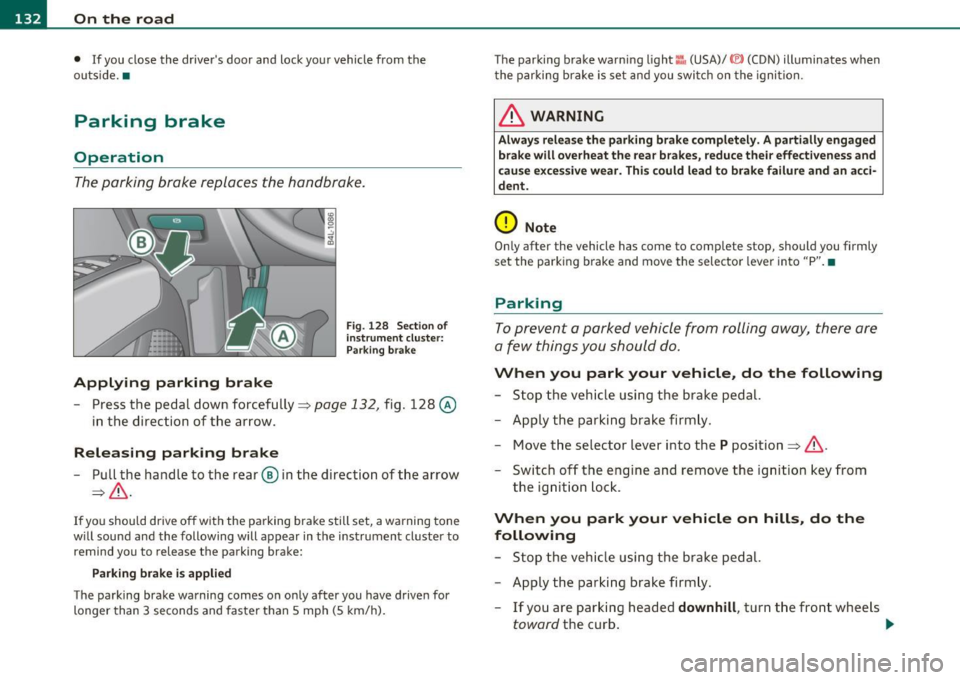
Applying parking brake
Fig. 128 Sect ion of
instrument cluster: Par king brake
- Press the pedal down forcefully~ page 132, fig. 128 @
in the d irection of the arrow.
Releasing parking brake
-Pull the handle to the rear ® in the direction of the arrow
~& -
If you should drive off with the parking brake still set, a warning tone
w ill sou nd and the following will appear in the instrument cluster to
remind you to release the parking brake:
Parking brake i s applied
The parking brake warning comes on only after you have driven for
longer than 3 seconds and faster than 5 mph (5 km/h). The parking brake warn
ing light ::, (USA)/ © (CON) illuminates when
the parking brake is set and you switch on the ignition.
& WARNING
Always release the parking brake completely. A partially engaged
brake will overheat the rear brakes, reduce their effectiveness and
c ause excessive wear. This could lead to brake failure and an acci
dent.
0 Note
Only after the vehicle has come to complete stop, should you firmly
set the parking brake and move the selector leve r into "P". •
Parking
To prevent a parked vehicle from rolling away, there are
a few things you should do.
When you park your vehicle, do the following
-Stop the vehicle using the brake pedal.
- Apply the parking brake firmly.
- Move the selector lever into the
P position =;,& .
- Switch off the engine and remove the ignition key from
the ignition lock .
When you park your vehicle on hills, do the
following
- Stop the vehicle using the brake pedal.
- Apply the parking brake firmly.
- If you are parking headed
downhill , turn the front wheels
toward the curb . .,_
Page 135 of 392

On the road -
----------------
- If you are parki ng h eaded uphill, turn t he fro nt w heel s
away from t he curb.
- Move th e se lector lever i nto t he
P posit ion.
- Swi tc h off the eng ine and rem ove t he ignit ion key from
t h e ign ition loc k.
& WARNING
This is how you can reduce the risk of injury when leaving your
vehicle.
• Never park the vehicle where it can come in contact with dry
grass, spilled fuel or any other flammable material s.
• When parking on hills, always turn the wheel s so that the front
wheel s will fir st roll into the curb, if the vehicle should start to
roll.
• Never allow anyone -especially small children -to remain
in
the vehicle when it is loc ked. Locked doors make it more difficult
for res cuer s to ac ce ss the pa ssenger compartment in the event of
an emergency. Danger to life!
• Never leave children un supervised in the vehicle . Children
could release the parking brake or move the gearshift lever out of
gear . The vehicle could start to roll away and cause an accident.
• No matter what the season is , the temperature in a parked
vehicle can reach dangerou s levels.
0 Note
• Please exer cise care w hen you par k your vehicle in pa rking areas
with park ing barriers or c urbs. Pa rking barriers and c urbs vary in
heig ht and co uld dam age yo ur bumpe r and related co mponen ts as
the front of your vehicle moves over a barrier or curb that is too h igh,
as yo u p ark or as you back out of a par king s pot. I n or der to be sure
that no such damage can occur, you may wish to stop short of havi ng
t he front t ires of your car touch the park ing barrier or c urb.
Controls and equip
ment Safety first
•
Please also exerc ise exceptiona l care w hen you dr ive up or dow n
stee p ramps or dr ive ove r cur bs or o ther obs ta cl es, for w hich t he
vehicle is not des igned, beca use components of the vehicle close to
the groun d, such as bumper covers, spoilers and s uspension and
ex haust system componen ts, may become damaged .•
Starting on hills
H ill Hold makes it easier to s tart on hills .
The system is activated when the brake peda l is depressed
for a few
seconds .
Fo r t his, t he vehicle mus t be st anding in uphill driving direc
tion.
After releas ing t he brake pedal, the brake power is he ld for a
brief
moment to prevent the vehicle from rolling back when sta rt ing . At
this time, you can easi ly begin to move your vehicle .
& WARNING
• If you did not begin moving immediately after relea sing the
brake pedal, under certain circumstances, the vehicl e would begin
to roll backward. Depress the brake pedal immediately or engage
the parking brake .
• Should the engine stall, depre ss the brake pedal immediately
or engage the parking brake.
• In order to prevent the vehicle from rolling back unintention
ally when starting in stop-and-go traffic , keep the brake pedal
depre ssed for a few se cond s before driving off .
• When you leave the vehicle -even if only briefly -, sw itch off
the ignition and make sure to remove the ignition key . Also
engage the parking brake to prevent your vehicle from rolling
unintentionally . This particularly applies if children are left in the
veh icle -danger of accident! •
Vehicle care Technical data
Page 137 of 392

On the road -________________ lff'II
Change speed in increments of 1 mph (1 km/h) by lightly pressing the
lever. If you keep the lever pressed down, you w ill alter your speed in
5 mph (10 km/h) increments.
You can also press the accelerator pedal down to increase your speed,
e .g . if you want to pass someone. The speed you saved earlier will
resume as soon as you release the accelerator pedal.
If, however, you exceed your saved speed by 5 mph (10 km/h) for
longer than 5 minutes, the cruise control will turn off temporarily .
The symbo l will go out but the saved speed will be retained. •
Presetting your speed
You can preset your desired speed while the vehicle is not
moving.
- Turn on the ignition.
- Pull lever into position
(D => page 134, fig. 129.
- Press the lever in the 0 or O direction to increase or
decrease your speed .
- Re lease the lever to save that speed .
This function makes it possible, for example, to save the speed you
want befo re driving on the h ighway . Once on the h ighway, act ivate
the cruise control by pulling the lever toward
(D. •
Switching the system off
Temporary deactivation
- Press the brake pedal, or
- Press the lever into position@ (not clicked into place)
=> page 134, fig. 129, or
Controls and equip
ment Safety first
-
Drive for longer than 5 m inutes at more than 5 mph
(10 km/h) above the stored speed.
Sw itching off completely
- Press lever into position@ (clicked into place), or
- Switch the ignition off.
The system retains the saved speed if you deactivate the cruise
cont rol tempo rar ily. To resume the saved speed, release the brake
pedal and pull the lever to position
(D.
Switching the ignition off e rases the saved speed.
& WARNING
You sho uld onl y retu rn to the saved sp ee d if it i s not t oo fast f or
the cu rrent tr affic condition s -ris k of an accident! •
Vehicle care Technical data
Page 142 of 392

IIIJL......:.A:::::: d:.::a :.!p:.. t.::: i:...: v :...: e::...: C:.: r:..: u::.:.: i s:.: e::...: C:.. o::.:.. n:..:t :.:. r_:o :.: l:..._ ________________________________________ _
Applies to veh icles : w ith Adaptive C ru ise Contro l
How is the speed stored?
Fig. 1 34 Co ntro l
lever : Sto ring spee d
With the sys tem sw itch ed on the speed is stored as follows:
- Drive at the speed you want .
- Press the [SET ] button =>
page 140, fig. 134 to store the
desired speed.
After the ! SET I button is released , the current speed is stored and
maintained . If you are dr iv ing at a speed below 20 mph (30 km/h),
t he min imum speed setting of 20 mph (30 km/h) wi ll be set.
The saved speed is now shown in the LED display in the speedometer
by one or two illumina ted red lig ht diodes ~
page 145. At the sam e
time, the saved speed is also shown for a short time in the Informa·
tion line~
page 147 .
[ i J Tip s
Fo r safety re asons, the stored speed is eras ed wh en the ignition o r
the ACC is turned off .•
App lies to veh icles : w ith Adaptive C ruise Control
Changing stored speed
The speed can be changed without touching the acceler
ator or brake pedal.
Incre asing speed
....
"' M ~ w .,
"'
Fig . 1 3S Contro l
l eve r: C hangi ng spee d
Press the lever briefly upwards 0 => fig. 135. USA
models : the speed increases by about 2 .5 mph . Canada
models : speed will increase by one mark on the speedom
eter scale .
- Press the lever upwards
0 and hold it. As long as you hold
the control switch down, the light diode display in the
speedometer LED display in the speedometer moves
forward and the speed is increased .
Reducing spe ed
- Press the lever briefly downwards Q. USA models : the
speed decreases by 2 .5 mph . Canada models: speed will
decrease by one mark on the speedometer scale . _,,.
Page 166 of 392
1111....__A_ u_ t_o _m_ a_ t_ic _ t_ r_ a_ n_s _m_ i _s_ s_ i_ o_ n ____________________________________________ _
Before you move the selector lever from t he P position, yo u must
a lw ays app ly the b rake ped al befo re and while dep ress ing the bu tton
in the handle of the selector lever.
& WARNING
• Unintended vehicle movement can cause serious injury.
- When the selector lever is in a driving position, the vehicle
may creep, even at idle speed. Therefore do not release the
parking brake o r foot brake until you are ready to move ,
because power is transmitted to the wheel s as soon as a driving
position i s engaged.
- Do not accelerate while selecting a driving position. At this
time the engine must be at idle speed so that undue stre ss is
not placed on the clutches in the tran smission.
- Remember: -even when stopped briefly with the automatic
tran smission in "D ", "S" or "R ", engine power is being trans
mitted to the wheels. Your vehicle could "creep" forward or
backward. When stopped, keep the brake pedal fully
depressed and use the parking brake if necessary to keep the
vehicle from rolling .
• If the selector lever is unintentionally moved into N while you
are driving, take your foot off the acc elerator pedal and wait for
the eng ine to return to idle speed before selecting a driv ing posi
tion .
• Never shift into "R " or "P" when the vehicle is in motion.
• Never get out of th e driver's seat when the engine is running .
• If you must get out of the vehicle, move the selector lever
securely into the P pos ition and apply the parking brake firmly.
• If the engine must remain running, never have any driving
position engaged when checking under the hood . Ma ke sure the
s elector lever ha s securely engaged and is locked in "P" with the
parking brake firmly set=> page
290, "Engi ne compartment".
Otherwise, any increa se in engine speed may set the vehicle in
motion, even with the parking brake applied. •
Selector lever positions
This s ectio n de scri bes the selector leve r posi tio ns and
driving ranges.
"' ....
"' 0 ..:, ;g
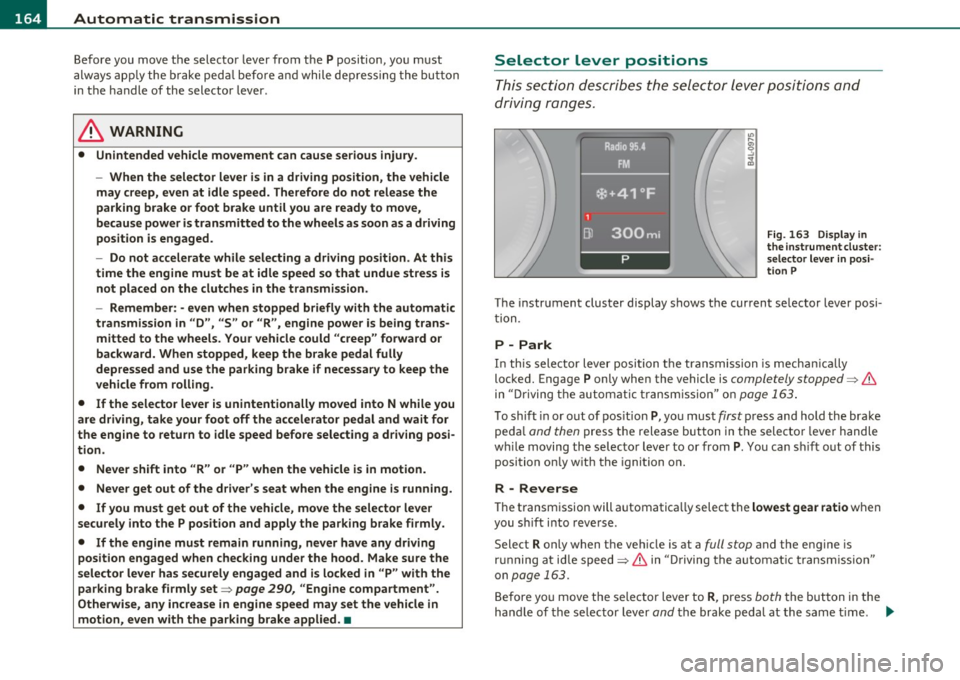
Fig. 16 3 Displ ay in
the i nstrument cluster :
s electo r le v e r in posi
ti on P
The instrument cluster display shows the current se lector lever posi
t ion.
P -Park
In th is sele ctor lever posi tion t he transmi ssion is mecha nica lly
locked. Engage
P only when the vehicle is completely stopped=> &
in "Driving t he automa tic tr ansm ission" o n page 163 .
To shift in or out of pos ition P , yo u must first press and hold the bra ke
peda l
and then press t he release button in t he selecto r leve r handle
w hile moving the selecto r lever to or from
P. You ca n shi ft o ut of this
position on ly w ith the ignition o n.
R -Reverse
Th e transm ission will automatica lly select the lowest gea r ratio when
you sh ift i nto reve rse .
Select
R only when the veh icle is at a full stop and the engine is
r un ning a t id le speed=>
& in "D riving the a utomat ic tr ansm issio n"
on
page 163.
B efore yo u move the se lector lever to R , press both the but ton in the
hand le of the se lector lever
and t he brake peda l at the same t ime. ~
Page 167 of 392

______________________________________________ A_ u_ t.:.. o_;__ m_ a_ t_;__ ic.......; t_r_a _ n_:.. s_m _:_: i.:: s ..:s:....: i..:o :....: n_;____,J-
When the ignition is on, the backup lights illuminate when the
selector lever is moved into
R.
N -Neutral
The transmission is in neutral in th is posi tion . Sh ift to this posit ion
for standing with the brakes applied~
page 165.
When the vehicle is stationary or at speeds below 3 mph (5 km/h),
you must always apply the footbrake before and wh ile moving the
lever out of
N .
D -Normal position for driving forward
Position D is for normal city and highway driving. It ranges from zero
to top speed and all gears shift automatically, depending on engine
load, driving speed and automatically selected shift programs.
When the vehicle is stat ionary or at speeds below 3 mph (5 km/h),
you must always app ly the foot brake before and while moving the
lever to
D out of N.
In certain circumstances it may be advantageous to temporarily
switch to the manual shift program to manua lly select gear rat ios to
match specific driving conditions~
page 167.
S -Sport position
Select this position for sportier performance. In this position, the
transmission will not upshift as soon, allowing the vehicle to use the
increased power available at higher engine speeds to ach ieve livelier
acceleration.
When the vehicle is stat ionary or at speeds below 3 mph (5 km/h),
you must always apply the foot brake before and while moving the
lever to
S out of N.
& WARNING
Read and follow all WARNINGS ~ & in "Driving the automatic
transmission " on page
163 .
Contro ls a nd e quip
m en t Vehicle
OP-eration
0 Note
Coasting downh ill with the transmission in N and the engine not
running will result in damage to the automatic transmission and
poss ibly the catalytic converter .•
Automatic Shift Lock (ASL)
The Automatic Shift Lock safeguards you against acci
dentally shifting into a forward or the reverse gear and
causing the vehicle to move unintentionally .
Fig. 164 Shift gate:
selector lever lock posi
tions and interlock
button highlighted
The selector lever lock is released as follows:
- Turn the ignition on.
- Step on the brake pedal.
At the same time press and hold
the interlock button on the side of the gear selector knob
=> fig . 164 with your thumb un til you have moved the
selector lever to the desired position.
Automatic selector lever lock
The selector lever is locked in the P and N positions when the ignition
is turned on. To move the lever from these positions the driver must
depress the brake pedal. As a reminder to the driver, the following
~
Vehicle care Do-it-yourselt service iTechnical data
Page 168 of 392

lffll.___A_ u_ t_o _m_ a_ t_ic _ t_ r_ a_ n_s _m_ i _s_ s_ i_ o_ n ____________________________________________ _
warning appears in the instrument cluster display when the selector
is in
P and N:
When stationary apply foot brake while selecting gear
A time delay element prevents the selector lever from locking when
it is moved through the
N position (going from R to D). The locking
element will lock the selector lever if the lever is left in N (Neutral) for
more than approximately 1 second, without the brake pedal be ing
pressed.
At speeds above about 3 mph (5 km/h) the Automatic Shift Lock is
automatically deactivated in the
N position.
Interlock button
The lock button on the selector lever prevents the lever from being
accidentally shifted into certain positions. Pressing this button deac
tivates the selector lever lock. Depending on the direction of the
shift, the selector lever locks at different positions. The positions are
high light ed in the illustrat ion~
page 165, fig. 164.
Ignition key safety interlock
The key cannot be removed from the ignition unless the selector lever
is in the
P park position. When the ignition key is removed, the
selector lever w ill be locked in the
P pos it ion .•
Kick-down
The kick-down feature allows the vehicle to generate
maximum acceleration.
When you press the accelerator pedal beyond the resistance point
that is reached at full throttle, the transmission will select a lower
gear rat io based on vehicle speed and engine RPM . The engine RPM
will be contro lled to produce maximum vehicle acceleration as long
as you continue to press the accelerator pedal beyond th is resistance
point .
& WARNING
Be careful when using the kick-down feature on slippery roads.
Rapid acceleration may cause the vehicle to skid. •
Dynamic shift program (DSP)
The automatic transmission is electronically controlled.
The transmission is self adapting and will automatically select the
best sh ift program suited to the dr iving cond it ions and dr iving style .
The transmission will select one of the
economy programs when you
dr ive at a steady speed or a gradua lly changing speed w ithout heavy
acceleration. This achieves optimum fuel efficiency, with early
upshifting and delayed downshifting.
The transm ission will automatically select the
sporty shift programs
when you drive at higher speeds, or w ith heavy acceleration and
frequently changing speeds. Upshifts a re delayed to make full use of
engine power. Downshifting takes place at higher engine speeds than
in the economy programs.
The selection of the most suitable shift program is a continuous, automatic process. The driver can also make the transmission switch
to a sporty program by
quickly pressing down the gas pedal.
Thi s causes the transmission to shift down to a lower gear to achieve
rapid accelerat ion, e .g . for quickly passing another vehicle . You do
not need to press the gas pedal into the kick-down range. After the
transmission has upshifted, the orig inal program is selected
according to your driving sty le.
An additional shift program allows the automatic transmission to
select the proper gear for uph ill and downh ill grad ients.
Thi s keeps the transmission from shifting up and down unnecessarily
on hills. The transmission will shift down to a lowe r gear when the
driver presses the brake pedal on a downhill gradient. This makes use .,_
Page 175 of 392
Parking system -
----------------=-------'
Applies to veh icles : w ith par king system advanced
Switching on and off
Th e rear view camera switches on automatically together
with the acoustic and visual park assist when you put the
vehicle in reverse.
Switching on
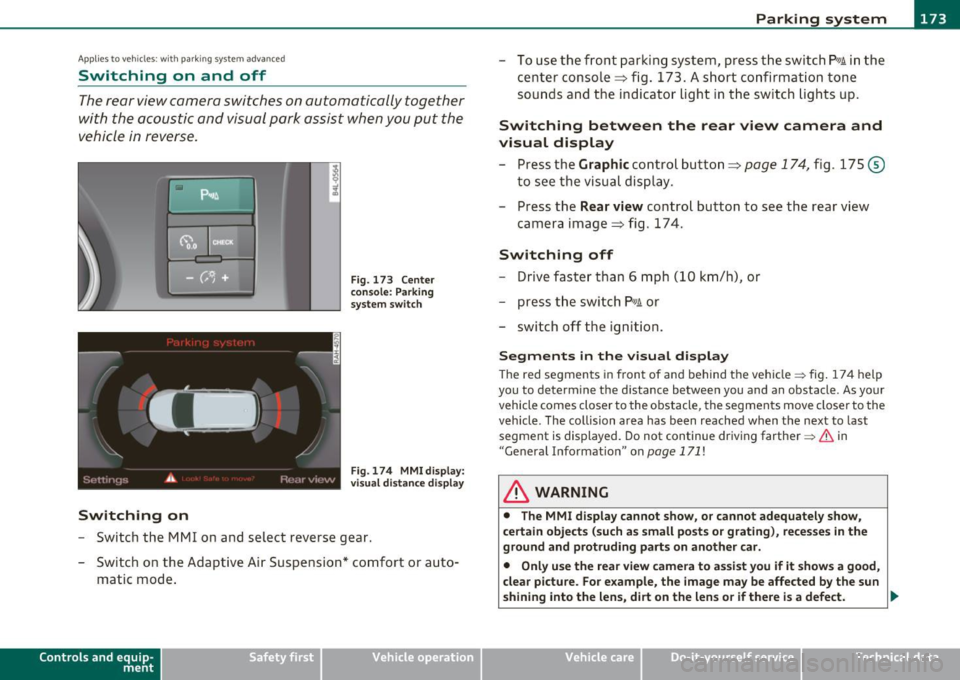
F ig. 173 Cente r
c on sole: Pa rki ng
sys tem swi tch
Fig . 174 MMI display:
v is ual d istance disp la y
- Switch the MMI on and select reverse gear.
- Switch on the Adaptive Air Suspension * comfort or auto-
matic mode .
Contro ls a nd e quip
m en t Vehicle
OP-eration
-To use the front parking system , press the switch P11.1A in the
center console ~ fig . 173 . A short confirmat ion tone
sou nds an d the indicator light in the sw itch lights up.
Switching between the rear view camera and
visual display
- Press the Graphic control button~ page 174, fig. 175 @
to see the visual dis pla y.
- P ress the
Rear view control button to see the rear view
camera image~ fig . 174.
Switching off
Drive faster than 6 mph ( 10 km/h), or
- press th e swi tch
P111 A or
- switch off the ignition .
Segments in the visual display
The red segments i n front of and behind the vehicle=> fig . 174 help
you to determine the distan ce between you and an obstacle . As your
vehicle comes closer to the obstacle, the segm ents move closer to the
veh icle . The co llision area has been reached when t he next to last
segmen t is displayed . Do not cont inue dr iv ing farthe r=>
& in
"Ge neral Information " on
page 171 !
& WARNING
• The MMI display cannot show , or cannot adequately show ,
c ertain objects (such a s small posts or grating ), reces ses in the
ground and protruding parts on another car.
• Onl y use the rear view camera to a ssist you if it show s a good ,
clear picture. For e xample, the image may be affected by the sun
shining into the lens , dirt on the len s or if there is a defect. .,_
Vehicle care Do-it-yourselt service Technical data