ignition AUDI Q7 2011 Owner´s Manual
[x] Cancel search | Manufacturer: AUDI, Model Year: 2011, Model line: Q7, Model: AUDI Q7 2011Pages: 392, PDF Size: 93.29 MB
Page 43 of 392

Ignition Lock malfunction
If the ~ symbol in the display comes on, there is a malfunc
tion in the electronic ignition lock. An addi tional driver
message can be displayed by pressing the
[CHECK] button :
Ignition lock defecti ve
- Drive to an authorized Audi dealer or qualified workshop
at your earliest convenience to have the malfunction
corrected .•
Windshield wipers faulty ~
0 W ind shi eld wi per d efe cti ve
When this symbol illum inates, it means that the electronics for
the windshield wipers are defective . Please go to an authorized Audi
deale r o r qualified workshop to have the w indshield w ipe r system
repaired. •
Controls and equip
ment Safety first
Dri
ver information display
Vehicle care Technical data
Page 44 of 392
Opening and closing
Opening and closing
Keys
Key set
C !
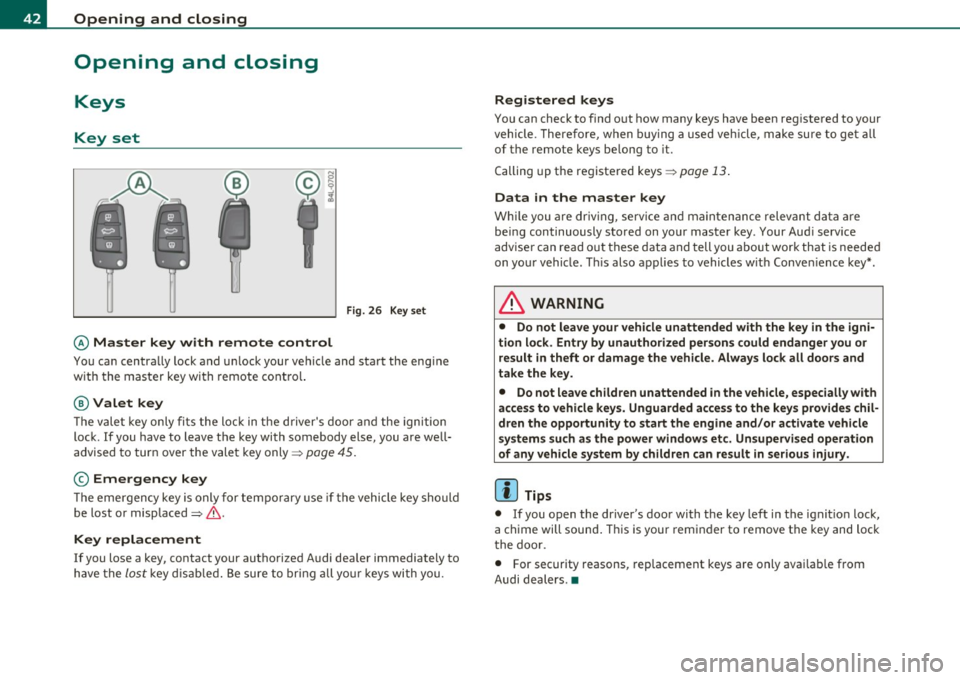
Fig. 26 Key set
© Master key with remote control
You can centra lly lock and u nlock your vehicle and sta rt the eng ine
w ith the mas ter key w ith remote cont ro l.
@ Valet key
The vale t k ey o nly fi ts the l ock in the d river' s door and t he ignition
lock . If you have to leave t he key with somebody else, you are well
advise d to tur n over the vale t key only =>
page 45.
© Emergency key
T he e mergen cy key is only for te mpora ry use if t he vehicle key sho uld
be lost or misplaced=> &.
Key replacement
If you lose a key, contact your autho rize d Audi dea ler immediately to
h ave the
lo st key d is abl ed. Be sure to bring a ll your keys wi th you.
Registered keys
You can check to find o ut how many keys have b een reg iste red to your
veh icle . T here fore, w hen buying a used ve hicle, make su re to get all
of the remote keys be long to it .
C alling up the re giste red keys =>
pag e 13 .
Data in the master key
W hile you a re driv in g, se rv ic e and maintenance relev ant da ta ar e
b ein g continuously s to red on yo ur mas ter key . Your Aud i serv ice
a dvise r ca n re ad out th ese d ata and tell you a bout work th at is neede d
on yo ur vehicle. T his also a pplies to vehicles w it h Conv enience key *.
& WARNING
• Do not leave your vehicle unattended with the key in the igni
tion lo ck. Entry by unauthorized persons could endanger you or
result in theft or damage the vehicle. Always lock alt doors and
take the key.
• Do not leave children unattended in the vehicle, especially with
access to vehicle key s. Unguarded access to the keys provides chil
dren the opportunity to start the engine and/or activate vehicle
systems such as the power windows etc. Unsupervised operation
of any vehicle system by children can result in serious injury .
(I] Tips
• If you o pen the dr iver 's doo r wi th the key left in the ig niti on loc k,
a c hime will sound . T hi s is your remin der to remove t he key and loc k
t he doo r.
• For security reasons, rep lacement keys a re o nly ava ilab le from
Audi dealers .•
Page 45 of 392
Master key with remote control
The remote control allows you to lock or unlock the
vehicle electronically .
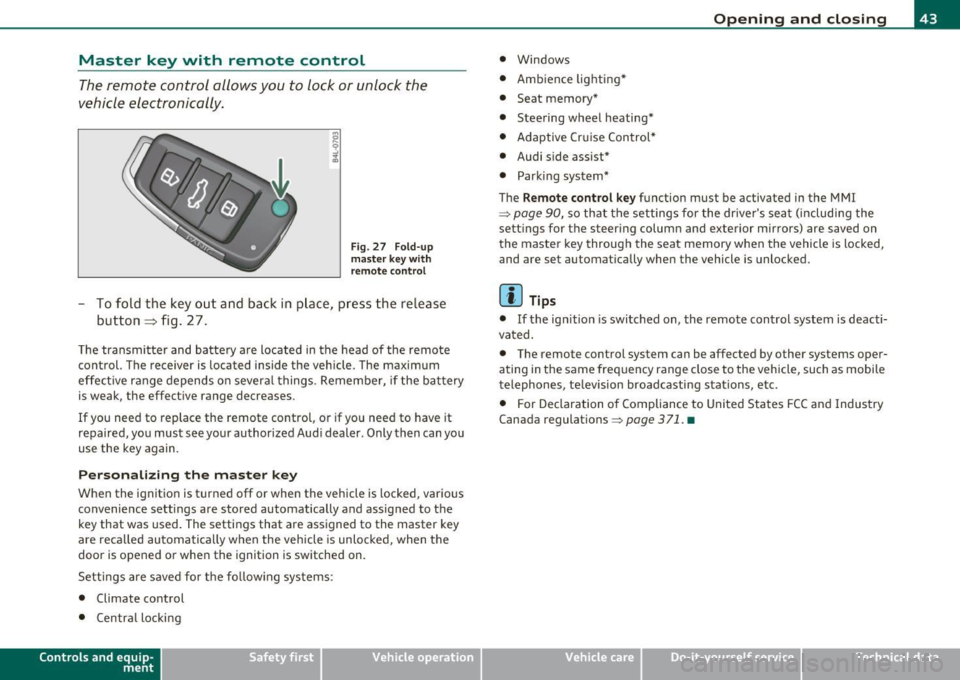
Fig. 27 F old-u p
ma ster key w ith
re mote co ntrol
- To fold the key out and ba ck in pl ace, pre ss the re lease
button => fig . 27 .
The transmi tter and batte ry a re located in the head of the remote
control. The receiver is located inside the veh icle. The maximum
effe ct ive range depends o n severa l things . Remember, if the ba ttery
is weak, the effect ive range decreases .
If you need to replace the remote control, or if you need to have it
repaired, yo u must see your author ized Aud i dealer. Only then can yo u
use the key again.
Personalizing the ma ster key
When the ignition is turned off or when the vehicle is locked, vario us
convenience sett ings are stored automatically and assigned to the
key that was used. The settings that are ass igned to the master key
are reca lled automatica lly when the vehicle is unlocked , when the
door is opened or whe n the ignition is switched on.
Setti ngs are saved for the fo llow ing sys tems :
• Climate control
• Centra l loc king
Con tro ls a nd e quip
m en t Vehicle
OP-eration
Opening and closing
• Windows
• Amb ien ce lig hti ng*
• Seat memory*
• Steering wheel heating*
• Adaptive Cr uise Control*
• Audi side assist*
• Parking sys tem*
The
Remo te control ke y function must be activated in the MM I
~ page 90, so that the settings for the driver's sea t (includi ng the
sett ings for the steer ing column and exterior mirrors) are saved on
the master key through the seat memory when the vehicle is locked,
and are set automat ically when the vehicle is unlocked.
[ i ] Tips
• If the ign ition is switched on, the remote control system is deacti
vated .
• The remote control system can be affected by other systems oper
ating in the same frequency range close to the vehicle, such as mobi le
telephones, television broadcasting stations, etc.
• For Declaration o f Compliance to United Sta tes FCC and Industry
Canada regulations ~
page 371 . •
Vehicle care Do-it-yourselt service iTechnical data
Page 47 of 392

- Place the cov er w ith t he new battery on t he k ey bas e and
press bot h parts together .
For the sake of the environment
Dispose of dead batter ies proper ly so as not to po llute the envi ron
ment.
(I) Tips
Th e replaceme nt ba ttery mus t be the same spec ifica tion as the
orig inal. •
Electronic immobilizer
The immo bili zer helps t o prevent unauth ori zed use of
your v ehicl e.
A compu ter chip ins ide you r key au toma tically deac tiva tes the elec
tr on ic immob ilizer whe n you inse rt the key in the ignition lock, o r on
vehicles with Convenience key *, when the key is inside the ve hicle.
W hen you remove the key from the ignition lock, or on vehicles with
Conven ience key, when you remove the key from the vehicle, the elec
tr on ic immo biliz er is a utomat ic al ly activa ted once aga in.
& WARNING
Always take the key with you when you leave the vehicle . The key
can di sarm the elect ronic engine immobilizer and permit an unau
thor ized per son to start the engine and enable operation of the
vehicle systems such a s power w indow or Panoramic sliding
s unroof* leading to serious personal injur y.
Controls and equip
ment Safety first
Opening and closing
(I) Tips
• Th
e vehicle ca nnot be started if an unauthori zed key is u sed. The
vehicle may not start if anothe r rad io device such as a key for another
vehicle o r a tra nsponder is loca ted o n the key r ing.
• For Declaration of Compliance to United States FCC an d Industry
Canada regulations=:>
page 371. •
Valet key function
The valet key function prevents unauthorized persons
from opening the glove compartment.
Fig . 30 Ce nter
con sole: button for
v alet ke y fu nctio n
Activating and deactivating the function
- Ins ert th e master key into the ig nition lock a nd swi tch on
t he ign it ion .
- P ress the
[V AL ET] butto n~ fig . 30 to activate/ deacti
vate the fu nct ion as desire d. The ind icator light in the
bu tto n illumina tes whe n the f unct ion is ac tiv e.
- Remove t he m aster key f rom t he ign it ion lock.
- Hand ove r onl y the
valet key~ page 42, fig. 26 to t he
person w ho will ta ke charge of the veh icle.
Vehicle care Technical data
Page 48 of 392

Opening and closing
When the function is switched on, the buttons for opening the rear lid
and glove compartment have no function. The vehicle can be driven
and locked and unlocked with the master key.
[I] Tips
Be sure to activate the function before handing over the valet key to
someone e lse . The valet key only fits the lock in the driver's door and
the ignition lock.•
Power locking system
General description
The power locking system locks or unlocks all doors and
the rear lid simultaneously.
Th e power locking system in your veh icle incorporates the following
functions :
• Central locking f unction
• Selective unlock feature =>
page 49
• Remote contro l feature=> page 43
• Convenience key*=> page 55
• Anti-theft alarm system=> page 57
All the doors and the rear lid are locked by the central locking system
when you lock the vehicle. You can set whether generally only the driver 's door or all doors and the rear lid should be unlocked when you
open the vehicle in the MMI menu
Central locking to suit your indi
vidual desires=>
page 49.
Unlocking the vehicle
You can unlock the vehicle from outside either by using the remote
control
or by insert ing and turning the key in the driver's door lock.
When you
unlock your vehicle: •
The anti-theft alarm system is deact ivated briefly .
• Th e vehicle inter ior lights illuminate for approximately 30
seconds.
• All turn signal lights will flash twice when the car is un locked .
• After unlocking the vehicle, you have 60 seconds to open a door or
the rear lid. After 60 seconds, the veh icle automatically locks and the
anti-theft alarm system activates again.
Th e rear lid can be locked or unlocked e ither by using the remote
control
or by insert ing and turning the key in the driver's door lock .
Unlocking the vehicle with the remote contro l will on ly
unlock the
rear lid, to
open it, the lid handle needs to be pressed .
Locking the vehicle
You can lock the vehicle from outside either by using the remote
control
or by insert ing and turning the key in the drivers's door lock.
When you
lock the vehicle:
• All doors and the rear lid are locked.
• All turn signal lights will flash once when the car is locked.
• Th e anti-theft alarm system is activated. The horn of the anti
theft alarm system will sound and the anti-theft alarm system readi
ness light, located in the upper part of the driver 's door panel, will
start to blink.
• Th e vehicle inter ior lights turn off.
Unlocking and locking with Convenience key*
On vehicles which are equipped with the Convenience key* authoriza
tion system, the doors are unlocked
without a key by means of a prox
im ity sensor in the door handle. The doors are sim ilarly locked
without a key using the locking button. Each door has a prox imity
sensor and a lo cking butto n.
Automatic locking
Th e automat ic locking feature locks all the vehicle doors and the rear
lid when you drive faster than 9 mph (15 km/h). This function can be
turned on and off in the MMI
Central locking Menu => page 49. ~
Page 49 of 392
You can unlock the vehicle from the inside by :
• removing the key from the ignition switch (the vehicle will auto
matically unlock itself) or
• pressing the unlock part of the power lock switch@ or
• pulling the door handle (twice to open the rear doors).
& WARNING
• When you lock your vehicle from outside , nobody -especially
children -should remain inside the vehicle. Remember, when you
lock the vehicle from the outside the windows cannot be opened
from the inside.
• When you leave the vehicle, always remove the ignition key
and take it with you. This will prevent passengers (children, for
example) from accidentally being locked in the vehicle should
they accidentally press the power locking switch in the front
doors.
• Do not leave children inside the vehicle unsupervised . In an
emergency it would be impossible to open the doors from the
out side without the key.
(I) Tips
• In the event of a crash w ith airbag deployment all locked doors
will be automatically unlocked to give access to the vehicle occupants
from the outside.
• If the power locking system should malfunction, you can lock each
door ind ividually us ing the veh icle key =>
page SO.
• If the power locking system should fail, you can still open the fuel
t ank flap in an emergency=>
page 296.
• You are well advised not to keep valuables inside an unattended
vehicle, visible or not. Even a proper ly locked veh icle cannot provide
the security of a safe. •
Contro ls a nd e quip
m en t Vehicle
OP-eration
Opening and closing
Unlocking and Locking the vehicle with the
remote control
How the remote control works.
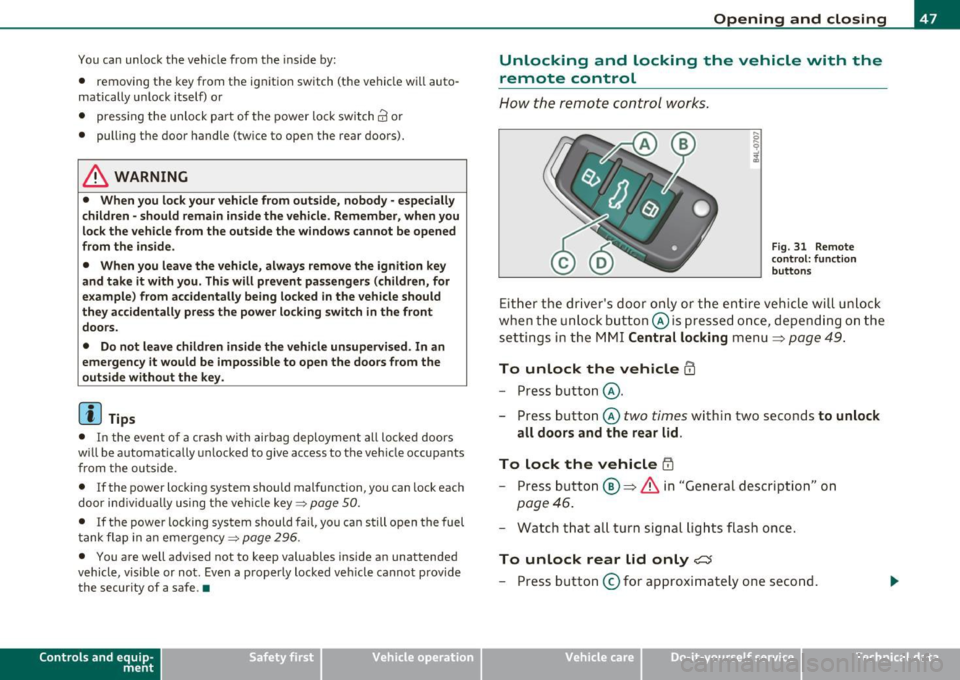
Fig. 31 Remote
con trol: function
buttons
Either the driver's door only or the entire vehicle will unlock
when the unlock button @is pressed once, depending on the
settings in the MMI Central locking menu
=> page 49.
To unlock the vehicle CD
- Press button @.
- Press button @
two times within two seconds to unlock
all doors and the rear lid.
To lock the vehicle i'.D
- Press button ®=> & in "General description" on
page 46.
- Watch that all turn signal lights flash once.
To unlock rear lid only <::::::5
-Press button @for approximately one second.
Vehicle care Do-it-yourselt service Technical data
Page 54 of 392
Open ing and closing
(I) Tip s
• If the rear lid is open or not properly closed when the ignition is
turned on, the door and rear lid warning ~
page 24 appears in the
instrument cluster display.
• Should you not be able to open the rear lid as described, make sure
the valet key function is not activated~
page 45. •
App lies to veh icles: with automatic rear lid /trunk lid ope rat ion
Automatic rear lid/trunk lid operation
The trunk lid can be opened and closed automatically.
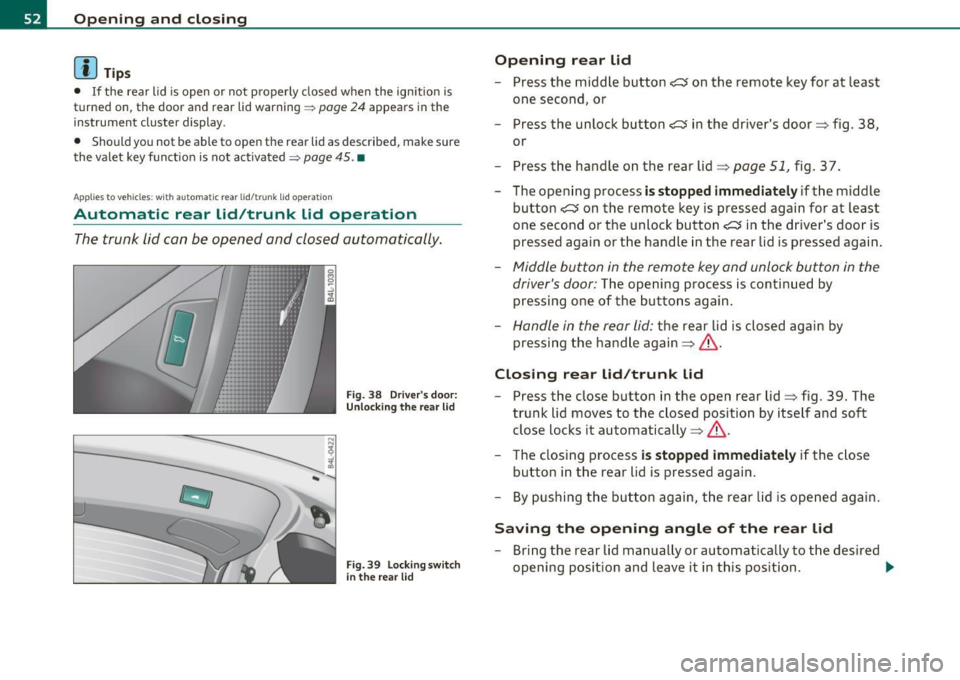
F ig. 38 Drive r's door:
Unlocki ng the re ar lid
F ig. 39 Lock ing sw itch
i n t he rear lid
Op ening rear lid
- Press the middle button e:> on the remote key for at least
one second, or
- Press the unlock button
e:> in the driver's door=> fig . 38 ,
or
- Press the handle on the rear lid=>
page 51, fig. 37.
- The opening process
is stopped immediate ly if the middle
button
e:> on the remote key is pressed again for at least
one second or the unlock button
e:> in the driver's door is
pressed again or the handle in the rear lid is pressed again .
-Middle button in the remote key and unlock button in the
driver's door:
The opening process is continued by
pressing one of the buttons again .
Handle in the rear lid: the rear lid is closed again by
pressing the hand le again =>& .
Closing rear lid /trunk lid
Press the close button in the open rear lid=> fig . 39. The
trunk lid moves to the closed position by itself and soft
close locks it automatically =>& .
- The closing process
i s stopped immediately if the close
button in the rear lid is pressed again.
- By pushing the button again, the rear lid is opened again.
Saving the opening angle of the rear lid
- Bring the rear lid manually or automatically to the desired
opening position and leave it in this position. ..,_
Page 57 of 392
If the child safety lock has been activated on the left and on the right
side, t he rear cont rols are locke d on veh icles wi th re ar a ir-c ondi
tioning* . Dashes" ---" are shown in the displays for the rear climate
controls, and t he rear ai r-conditioning can only be operate d from the
cl imate contro ls in the cabin=>
page 118 .
[I) Tips
• In order to activate t he child safety lock on the left and the r ight
side, yo u have to press the two safety b uttons in success ion.
• Make certain that the c heck light comes on in t he correspondi ng
safety switch when the c hild safety loc k is activated. •
Convenience key
App lies to vehicl es: w ith Conven ience key
Description
A ccess and vehicl e opera tion based on: Mas ter key
remains in driver 's pocket.
Th e Conve nience key vehicle a uth o rization syste m allows keyless
unlocking, lock ing and start ing of the vehicle. You only have to car ry
th e master key on your perso n.
It makes no d ifference whether the master key is i n your jacke t pocke t
or in your br ief case . As soon as you approach yo ur vehicle, the Conve
nie nce key recog nizes the reques t fo r access, checks for author izat io n
and enab les the fo llow ing functions:
• Unlo cking the vehicle =>
page 56.
• Loc king the vehicle => page 56.
• Switching on ignition and start ing the eng ine by press ing the
[ S T AR T] button; the master key does not have to be in t he ign it ion
switch=>
page 129 .
Controls and equip
ment Safety first
Opening and closing
& WARNING
•
When you lock your vehicle from outside, nobody -especially
children - should remain in side the vehicle . Remember, when you
lock the vehicle from the outside the windows cannot be opened
from the inside .
• When you leave the vehicle, always remove the ignition key
and take it with you. This will prevent pa ssenger s (children, for
example ) from accidentally being locked in the vehicle should
they accidentally press the power locking switch in the front
doors .
• Do not leave children in side the vehicle unsupervised. In an
emergency it would be impossible to open the doors from the
outside w ithout the key .
[ i ] Tips
• In order for the Convenience key to function , you must a lways
carry the master key with yo u.
• In order to be able to unloc k or loc k the vehicle, the a utho rized
master key must be within a range of about S feet (1.5 meters) from
the door o r the rear lid.
• Of course, you can still unlock and lock your veh icle using the
buttons on the master key . T he se lecto r lever must be in the P posi
tion .
• F or Declar ation o f Compliance to Uni ted St ates FCC a nd I ndu stry
Canada regulations=>
page 3 71 . •
Vehicle care Technical data
Page 59 of 392
& WARNING
• Wh en you lock your vehicle from outs ide , nobody - especially
c hildren - should remain in side the vehicle . Remember , when you
lo ck the vehicle from the outside the windows cannot b e opened
from the inside .
• When you lea ve the vehicle, always remove the ignit ion key
and take it with you. This will prevent pa ssenger s (c hildren, for
e xample ) from a ccidentally be ing locked in the vehicle should
they accidentally pres s the power locking switch in the front
doors .
• Do not leave children inside the vehicle unsuperv ised . In an
e mergency it would be impossible to open the door s from the
outside without the key.
[I] Tips
It is not possible to re -open the door fo r a b rief period directly after
clos ing it . This a llows you to ensure that the doors are p roper ly
loc ked .•
Anti-theft alarm system
The an ti-theft alarm triggers an al arm if any one
attempts to break into the vehicle .
The a nti-theft alarm system trigge rs an a udible a larm and t urns o n
th e emergen cy flas her if an unau thori zed inte rfe rence wi th t he
vehicle is sensed by the system.
How is the anti-theft alarm system sw itched on?
T he anti-theft alarm system is switched on when you lock the vehicle.
Th e system is activa ted app rox ima tely 30 seconds after the vehicle is
locked. The indicator light on top o f the doo r trim start flashing
r a pidly fo r 30 seconds and then blink s low ly .
Controls and equip
ment Safety first
Opening and closing
How is the anti-theft alarm system switched off?
Th
e an ti- the ft alarm system is switche d off on ly when yo u unlock your
veh icle . If you do not o pen a door wit hin 60 seconds after you have
unlocked wit h the remote control , the vehicle will lock itself again
automa tically .
When will the anti-theft alarm system be
triggered?
When the vehicle is locked, the a larm system monitors and protects
the following parts of the veh icle:
• engine compartment
• lu ggage compa rtment
• doors
• ignition
Whe n the system is activated, the alarm will be triggered if one of the
doors, the engine hood or the rear lid are opened, or if the ignition is
t ur ne d on . The anti-t heft a la rm system will a lso go off when the
ba ttery is d isco nnected.
You can also trigger the alarm by pressing the PANIC button on your remote con trol. This will alert o ther peop le in case of eme rge ncy.
Press the
PANIC butto n aga in to turn off the a larm .
How is the anti-theft alarm switched off when
triggered?
Th e alarm sys tem is swi tched off whe n yo u un lo ck the veh icle o r whe n
the ignit ion is sw itched on . The a larm will also switch itself off when
i t comes to the end o f its cy cl e.
Emergency flasher and horn
Th e emerge ncy fl ashe r will blink briefly and the hor n sounds whe n
the doo rs, engine hood and rear lid a re prope rly closed.
If the eme rgency flashers do not blink, o r th e horn does no t soun d,
check the doo rs, eng ine hood and rear lid to make s ure they a re prop
er ly closed.
If you close a door, the hood o r the rear lid with the anti -
Vehicle care Technical data
Page 60 of 392
![AUDI Q7 2011 Owner´s Manual Opening and closing
theft alarm switched on, the emergency flashers will blink and the ....
horn will so und only after you have closed the doo r o r li d.
[ i ] Tips
For the](/img/6/40276/w960_40276-59.png "AUDI Q7 2011 Owner´s Manual Opening and closing
theft alarm switched on, the emergency flashers will blink and the ....
horn will so und only after you have closed the doo r o r li d.
[ i ] Tips
For the")
Opening and closing
theft alarm switched on, the emergency flashers will blink and the ....
horn will so und only after you have closed the doo r o r li d.
[ i ] Tips
For the anti -t h eft a larm system to function p rope rly, ma ke sure all
vehicle doors a nd windows are closed before leaving the vehicle .•
Power windows
Controls
Switches for front door windows
@ operates the window in the driver's door.
F ig. 45 D rive r's doo r:
power wind ow
switche s
® operates the window in the front passenger 's door .
Switches for rear w indows
© operates the left rear window .
® operates the right rear window .
Safety switch
© Safety switch for rear w indow operat io n.
& WARNING
• Do not leav e children unatt ended in the vehicle , especially with
a cces s to vehicle key s. Un supervi sed use of the keys can re sult in
starting of the engine and use of vehicle sy stems such as power
window s, etc . which could result in seriou s injury .
• Remember -you can still open or close the power windows for
about ten minutes after the ignition is switched off . Only when
e ith er of the front doors are opened are the power windows
s witched off.
• Be careful when clos ing th e window s. Check to see that no one
is in the way, or serious injury could re sult !
• Always remo ve the ign ition key whenever you leave your
vehicle.
• If you lock your vehicle f rom the outside, no one, especially
children, should remain in the vehicle.
• Do not st ick anything on the windows o r the windshield that
may interfere with the driver 's field of vi sion .
[I] Tips
In a ddit ion to the sw itches in t he driver's doo r there is a separate
switch in eac h door for the power window in that door=>
page 59,
fig. 46. a
Switches in the driver 's door
The driver can operate all windows.
If the respective sw itch is pus hed or pu lled the w indow will
open or close . T he power window switches have a
two-posi-
tion function : ..,