lock AUDI Q7 2011 Owner´s Manual
[x] Cancel search | Manufacturer: AUDI, Model Year: 2011, Model line: Q7, Model: AUDI Q7 2011Pages: 392, PDF Size: 93.29 MB
Page 157 of 392

Audi side assist Ill
----------------
Deactivating
-Pre ss th e b utton again . Th e ind icator light on the button
goes o ut.
The system works at speeds faster than 19 mph (30 km/h) .
& WARNING
• Improper reliance on the side assist system can cause collisions
and seriou s per sonal injury:
- Never rely only on side assist when changing lanes.
- Alway s check rear view mirrors to make sure that it is safe to
change lanes.
• Side assist cannot detect all vehicles under all condition s
danger of accident!
• Side a ssist cannot detect vehicle s in time to alert you when
they approach from behind at very high speed , or fall drop bac;k
very quickly .
• The radar sensor's
vision can be reduced o r entirely blocked by
rain, snow, and heavy spray . Thi s can result in side a ssist not
adequately detecting vehicles o r, in some cases , not detecting
them at all. Always keep an eye on the direction you are traveling
and the relevant area around the vehicle.
• Plea se note that side assi st indi cates there are approaching
veh icles, or vehicles in your blind spot, only after your vehicle has
reached a driving speed of at lea st 19 mph (30 km/h).
• Side assist signal does not work around tight corners (turning
radius le ss than 328 feet, or 100 m ).
• Side assist is no replacement for the driver's full attention. The
driver alone is respon sible for lane changes and similar driving
maneuvers. Always keep an eye on the direction you are traveling
and the relevant area around the vehicle .
Controls and equip
ment Safety first
0 Note
• T
o ens ure t hat you do not adve rsely affec t side assist, do not blo ck
the area on the rear bumper where the radar sensors are located with
foreign obje cts (s uch as stickers or bicy cle ra cks).
• Make s ure that the s ignal light on the outside mirror is not
blo cked by st ickers or o ther ite ms.
W Tips
• Side assist a utoma tically deact iva tes if it de tects that the rada r
sensors are blocked =>
page 161. The indicator light on the button
goe s out.
• Th e area on the bumpe r w here the ra dar sensors are located must
c o nsistent ly remain free of snow, i ce, a nd heavy soiling so tha t side
assist can funct ion p roper ly. Follow the add itiona l notes on
=>
page 162.
• F or vehicles with a factory installed towing hitc h* or a tra ile r
hi tc h* that was i nstalled late r according to f actory specifications,
side ass ist is automat ically deact ivated as soon as the electrical
c o nne ct io n to the tra ile r electr ical socket is made =>
page 161.
• For vehicles with a trai le r h itch that was not installed accor ding to
fac tory spe cifica tions, sw itch off the s ide ass ist whe n tow ing a tra iler.
• Additiona l t int ing on the front si de windows can make it ha rder to
se e and co rrectly unde rs tand t he signa l light o n the outs ide m irro r.
• For Declaration of Compliance to United States FCC an d Industry
Canada regulations=>
page 371 . •
Vehicle care Technical data
Page 163 of 392

___________________________________________________ A_ u_ d_ i _s _ i_d _ e_ a_ s_s _i _ s _t __ _
App lies to vehicles : with sid e assist
Lane width
Fig. 160 Lanes of a
normal width are
in
detection area
Fig. 161 Narrow
lanes: Side assist may
detect vehicles two
lanes away
Side assist's detection area is designed to cover lanes of standard
width to the left and right of your travel lane, depending on whether
you drive in the center of your lane or closer to the edge.
If you drive in narrow lanes, side assist's detection area may also
include other lanes - especially if you tend to drive on the edge of your
lane => fig . 161. Under these conditions, vehicles can also be
detected that are two lanes away, and side assist then could switch
between the informational and warning stage signals.
When driving in very wide lanes, vehicles in the adjacent lane may not
be detected because they are not inside the detection area .•
Controls and equip
ment Safety first
Notes
Ap
plies to veh icles: with s ide ass ist
Messages in instrument cluster display
If side assist turns off automatically, the indicator light on the button
will go out and you will see a message in the instrument cluster
display :
Audi side assist not available: sensors blocked
The side assist sensors are built into the rear bumper on the left and
right (not visible on the outside)=>
page 154, fig. 152. To ensure
that you do not adversely affect the way side assist functions, foreign
objects (such as stickers or bicycle racks) should not be attached to
the area on the rear bumper where the sensors are located. If side
assist functions are adversely affected, you will see this message in
the instrument cluster display . Remove anything that may be
blocking the sensors.
If no vehicle is detected for a longer period of time while driving, side
assist will also switch off automatically.
Audi side assist currently not available
If there is a temporary problem (such as the vehicle's battery charge
being low), side assist cannot be activated temporarily .
Audi side assist: system fault
Have the system checked by an authorized Audi dealer or qualified
workshop.
Audi side assist not available when towing
The radar sensor's view is limited when towing a trailer. For vehicles
with a factory installed towing hitch or a trailer hitch that was
installed later according to factory specifications, side assist is auto
matically deactivated as soon as the electrical connection to the
trailer's electrical socket is made, and this status message appears in
the instrument cluster display . Deactivation cannot be guaranteed .,,_
Vehicle care Technical data
Page 164 of 392

1111....__A_ u_ d_ i_s_ i_d _e_ a_ s_ s_ is_t _______________________________________________ _
when usin g a retrofitted tow ing hitc h that was not installed
acc ording to factory speci ficati ons. •
Applies to vehicles: w ith sid e assis t
Safety tips
T he s ide assist detect ion may be limited w hen driving aro und narrow
st reet corners, on hilly st ree ts, and un der poo r wea the r condit ions.
It is possible that the radar sensors may also detect o ther objects,
such as high or staggered g ua rdrails .
S ide assi st does not me asure actual lane wid th. The sy stem assume s
a fixed lane w idt h. Detection in the left and right lanes is based on
t his assumed lane wid th. W hen drivi ng o n nar row ro ads o r whe n
dr iving to the left o r right of the center of a travel lane, it is possib le
that vehicles will be detected that are
not i n the lane next to the lane
you a re us ing.
& WARNING
• Improper reliance on the side assist system can cause collisions
and serious personal injury:
-Never rely only on side assist when changing lanes.
- Always che ck rear view mirrors to make sure that it is safe to
change lanes.
• Side as sist cannot detect all vehicles under all conditions
danger of accident!
• Side assi st cannot detect vehicle s in time to alert you when
they approach from behind at very high speed, or fall drop back
very quickly.
• The radar sensor's
vision can be reduced or entirely blocked by
rain , snow , and heavy spray. This can result in side assi st not
adequately detecting vehicles or , in some cases, not detecting
them at all. Alway s keep an eye on the direction you are traveling
and the relevant area around the vehicle .
& WARNING (co ntinued )
• Please note that side assist indicates there are approaching
vehicles, or vehicles in your blind spot, only after your vehicle has reached a driving speed of at least 19 mph (30 km/h).
• Side assist signal does not work around tight corners (turning
radius less than 328 feet , or 100 m).
• Side assist is no replacement for the driver's full attention. The
driver alone i s responsible for lane changes and similar driving
maneuvers . Always keep an eye on the direction you are traveling
and the relevant area around the vehicle.
0 Note
T o ensure that s ide ass ist is not a dversely affected, yo u should not
bloc k the ar ea on the rear bumper w he re the radar sensors are
locate d w it h foreign objects (such as w it h sticke rs or b icycle racks).
[ i ] Tips
If the positions o f the radar sensors have been c hanged as a result of
a r ear end -colli sion, fo r instan ce, h ave side assis t che cked b y an
author ized Audi dea ler for safety reasons. •
Page 166 of 392
1111....__A_ u_ t_o _m_ a_ t_ic _ t_ r_ a_ n_s _m_ i _s_ s_ i_ o_ n ____________________________________________ _
Before you move the selector lever from t he P position, yo u must
a lw ays app ly the b rake ped al befo re and while dep ress ing the bu tton
in the handle of the selector lever.
& WARNING
• Unintended vehicle movement can cause serious injury.
- When the selector lever is in a driving position, the vehicle
may creep, even at idle speed. Therefore do not release the
parking brake o r foot brake until you are ready to move ,
because power is transmitted to the wheel s as soon as a driving
position i s engaged.
- Do not accelerate while selecting a driving position. At this
time the engine must be at idle speed so that undue stre ss is
not placed on the clutches in the tran smission.
- Remember: -even when stopped briefly with the automatic
tran smission in "D ", "S" or "R ", engine power is being trans
mitted to the wheels. Your vehicle could "creep" forward or
backward. When stopped, keep the brake pedal fully
depressed and use the parking brake if necessary to keep the
vehicle from rolling .
• If the selector lever is unintentionally moved into N while you
are driving, take your foot off the acc elerator pedal and wait for
the eng ine to return to idle speed before selecting a driv ing posi
tion .
• Never shift into "R " or "P" when the vehicle is in motion.
• Never get out of th e driver's seat when the engine is running .
• If you must get out of the vehicle, move the selector lever
securely into the P pos ition and apply the parking brake firmly.
• If the engine must remain running, never have any driving
position engaged when checking under the hood . Ma ke sure the
s elector lever ha s securely engaged and is locked in "P" with the
parking brake firmly set=> page
290, "Engi ne compartment".
Otherwise, any increa se in engine speed may set the vehicle in
motion, even with the parking brake applied. •
Selector lever positions
This s ectio n de scri bes the selector leve r posi tio ns and
driving ranges.
"' ....
"' 0 ..:, ;g
Fig. 16 3 Displ ay in
the i nstrument cluster :
s electo r le v e r in posi
ti on P
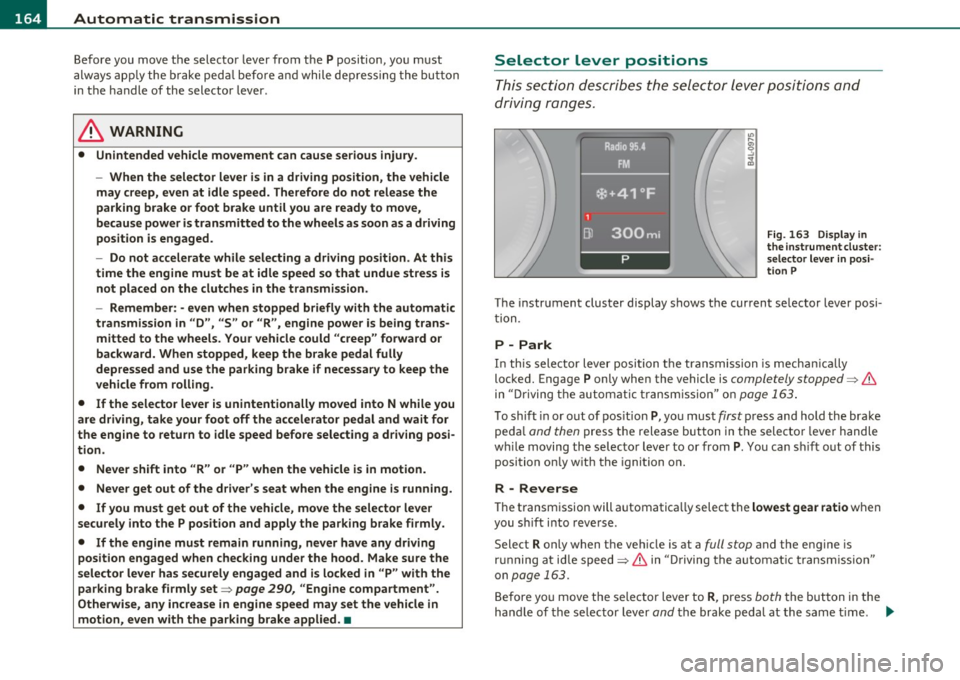
The instrument cluster display shows the current se lector lever posi
t ion.
P -Park
In th is sele ctor lever posi tion t he transmi ssion is mecha nica lly
locked. Engage
P only when the vehicle is completely stopped=> &
in "Driving t he automa tic tr ansm ission" o n page 163 .
To shift in or out of pos ition P , yo u must first press and hold the bra ke
peda l
and then press t he release button in t he selecto r leve r handle
w hile moving the selecto r lever to or from
P. You ca n shi ft o ut of this
position on ly w ith the ignition o n.
R -Reverse
Th e transm ission will automatica lly select the lowest gea r ratio when
you sh ift i nto reve rse .
Select
R only when the veh icle is at a full stop and the engine is
r un ning a t id le speed=>
& in "D riving the a utomat ic tr ansm issio n"
on
page 163.
B efore yo u move the se lector lever to R , press both the but ton in the
hand le of the se lector lever
and t he brake peda l at the same t ime. ~
Page 167 of 392

______________________________________________ A_ u_ t.:.. o_;__ m_ a_ t_;__ ic.......; t_r_a _ n_:.. s_m _:_: i.:: s ..:s:....: i..:o :....: n_;____,J-
When the ignition is on, the backup lights illuminate when the
selector lever is moved into
R.
N -Neutral
The transmission is in neutral in th is posi tion . Sh ift to this posit ion
for standing with the brakes applied~
page 165.
When the vehicle is stationary or at speeds below 3 mph (5 km/h),
you must always apply the footbrake before and wh ile moving the
lever out of
N .
D -Normal position for driving forward
Position D is for normal city and highway driving. It ranges from zero
to top speed and all gears shift automatically, depending on engine
load, driving speed and automatically selected shift programs.
When the vehicle is stat ionary or at speeds below 3 mph (5 km/h),
you must always app ly the foot brake before and while moving the
lever to
D out of N.
In certain circumstances it may be advantageous to temporarily
switch to the manual shift program to manua lly select gear rat ios to
match specific driving conditions~
page 167.
S -Sport position
Select this position for sportier performance. In this position, the
transmission will not upshift as soon, allowing the vehicle to use the
increased power available at higher engine speeds to ach ieve livelier
acceleration.
When the vehicle is stat ionary or at speeds below 3 mph (5 km/h),
you must always apply the foot brake before and while moving the
lever to
S out of N.
& WARNING
Read and follow all WARNINGS ~ & in "Driving the automatic
transmission " on page
163 .
Contro ls a nd e quip
m en t Vehicle
OP-eration
0 Note
Coasting downh ill with the transmission in N and the engine not
running will result in damage to the automatic transmission and
poss ibly the catalytic converter .•
Automatic Shift Lock (ASL)
The Automatic Shift Lock safeguards you against acci
dentally shifting into a forward or the reverse gear and
causing the vehicle to move unintentionally .
Fig. 164 Shift gate:
selector lever lock posi
tions and interlock
button highlighted
The selector lever lock is released as follows:
- Turn the ignition on.
- Step on the brake pedal.
At the same time press and hold
the interlock button on the side of the gear selector knob
=> fig . 164 with your thumb un til you have moved the
selector lever to the desired position.
Automatic selector lever lock
The selector lever is locked in the P and N positions when the ignition
is turned on. To move the lever from these positions the driver must
depress the brake pedal. As a reminder to the driver, the following
~
Vehicle care Do-it-yourselt service iTechnical data
Page 168 of 392

lffll.___A_ u_ t_o _m_ a_ t_ic _ t_ r_ a_ n_s _m_ i _s_ s_ i_ o_ n ____________________________________________ _
warning appears in the instrument cluster display when the selector
is in
P and N:
When stationary apply foot brake while selecting gear
A time delay element prevents the selector lever from locking when
it is moved through the
N position (going from R to D). The locking
element will lock the selector lever if the lever is left in N (Neutral) for
more than approximately 1 second, without the brake pedal be ing
pressed.
At speeds above about 3 mph (5 km/h) the Automatic Shift Lock is
automatically deactivated in the
N position.
Interlock button
The lock button on the selector lever prevents the lever from being
accidentally shifted into certain positions. Pressing this button deac
tivates the selector lever lock. Depending on the direction of the
shift, the selector lever locks at different positions. The positions are
high light ed in the illustrat ion~
page 165, fig. 164.
Ignition key safety interlock
The key cannot be removed from the ignition unless the selector lever
is in the
P park position. When the ignition key is removed, the
selector lever w ill be locked in the
P pos it ion .•
Kick-down
The kick-down feature allows the vehicle to generate
maximum acceleration.
When you press the accelerator pedal beyond the resistance point
that is reached at full throttle, the transmission will select a lower
gear rat io based on vehicle speed and engine RPM . The engine RPM
will be contro lled to produce maximum vehicle acceleration as long
as you continue to press the accelerator pedal beyond th is resistance
point .
& WARNING
Be careful when using the kick-down feature on slippery roads.
Rapid acceleration may cause the vehicle to skid. •
Dynamic shift program (DSP)
The automatic transmission is electronically controlled.
The transmission is self adapting and will automatically select the
best sh ift program suited to the dr iving cond it ions and dr iving style .
The transmission will select one of the
economy programs when you
dr ive at a steady speed or a gradua lly changing speed w ithout heavy
acceleration. This achieves optimum fuel efficiency, with early
upshifting and delayed downshifting.
The transm ission will automatically select the
sporty shift programs
when you drive at higher speeds, or w ith heavy acceleration and
frequently changing speeds. Upshifts a re delayed to make full use of
engine power. Downshifting takes place at higher engine speeds than
in the economy programs.
The selection of the most suitable shift program is a continuous, automatic process. The driver can also make the transmission switch
to a sporty program by
quickly pressing down the gas pedal.
Thi s causes the transmission to shift down to a lower gear to achieve
rapid accelerat ion, e .g . for quickly passing another vehicle . You do
not need to press the gas pedal into the kick-down range. After the
transmission has upshifted, the orig inal program is selected
according to your driving sty le.
An additional shift program allows the automatic transmission to
select the proper gear for uph ill and downh ill grad ients.
Thi s keeps the transmission from shifting up and down unnecessarily
on hills. The transmission will shift down to a lowe r gear when the
driver presses the brake pedal on a downhill gradient. This makes use .,_
Page 171 of 392
______________________________________________ A_ u_ t_ o _ m_ a_ t_ ic_ t_r_a _ n_ s_m_ i_ s _s_ i_ o _ n __ _
-Now press the inter lock an d mov e the sel ector lever to the
N pos ition.
Th e se lecto r leve r ca n only be moved from the P position if the ign i
tion key is in the lock and the ign it ion is turned on. If the vehicle has
t o be pushed or towed if the power supp ly fai ls (e .g. battery is
discharged), the selector lever must be moved to the
N position using
t he emergency lock ing devi ce. •
Controls and equip
ment Safety first
Vehicle care Technical data
Page 176 of 392

llffl..__P_ a_r _k _i_n -=g ::...._ s..:y ;... s_ t_ e_ m ________________________________________________ _
& WARNING (continued)
• Use the rear view camera only with the rear lid completely
closed. Make sure any objects you may have mounted on the rear
lid do not block the rear view camera.
[ i ) Tips
• The sensors must be kept clean and free of snow and ice for the
park assist to operate.
• The visual display is shown in the illustration of the rear view
camera . This display shows where the sensors have detected an
obstacle.
• You can change the volume and pitch of the signals as well as the
display =>
page 176.
• Please follow the instructions for towing a trailer=> page 177 .
• What appears in the display is time-delayed. •
Applies to veh icles: wit h pa rking sy ste m adv anc ed
Reverse Parking
Parking mode 1 can be used when parking in a garage or
into a parking space.
Fig.175 MMidisplay:
aiming at a parking
spot Fig. 176
MMI display:
aligning the vehicle
-Switch the MMI on and select reverse gear.
- Turn the steering wheel until the orange orientation lines
(D appear in the parking spot=> fig. 175. Use the mark
ings @to help you estimate the distance from an
obstacle. Each marking represents 3
ft (1 meter) . The blue
area represents an extension of the vehicle's outline by
approximately 16 ft (5 meters) to the rear.
- While driving in reverse gear, adjust the steering wheel
angle to fit the parking space with the aid of the orange
orientation lines=>
0. ® marks the rear bumper. Stop
the vehicle when the red orientation line© borders an
object=> &.
& WARNING
• The rear view camera does not show the entire area behind the
vehicle =>
page 171, fig. 171. Watch out especially for small chil·
dren and animals . The rear view camera cannot always detect
them, posing risk of an accident!
• Please note that objects not touching the ground can appear to
be further away than they really are (for example, the bumper of
a parked vehicle, a trailer hitch, or the rear of a truck). In this case, .,
Page 194 of 392
• ....__D_ r_iv _i_ n_, g=-- S_ a _ f_e _,Ly _ ______________________________________________ _
Proper occupant seating positions
Proper seating position for the driver
The proper driver seating position is important for safe,
relaxed driving.
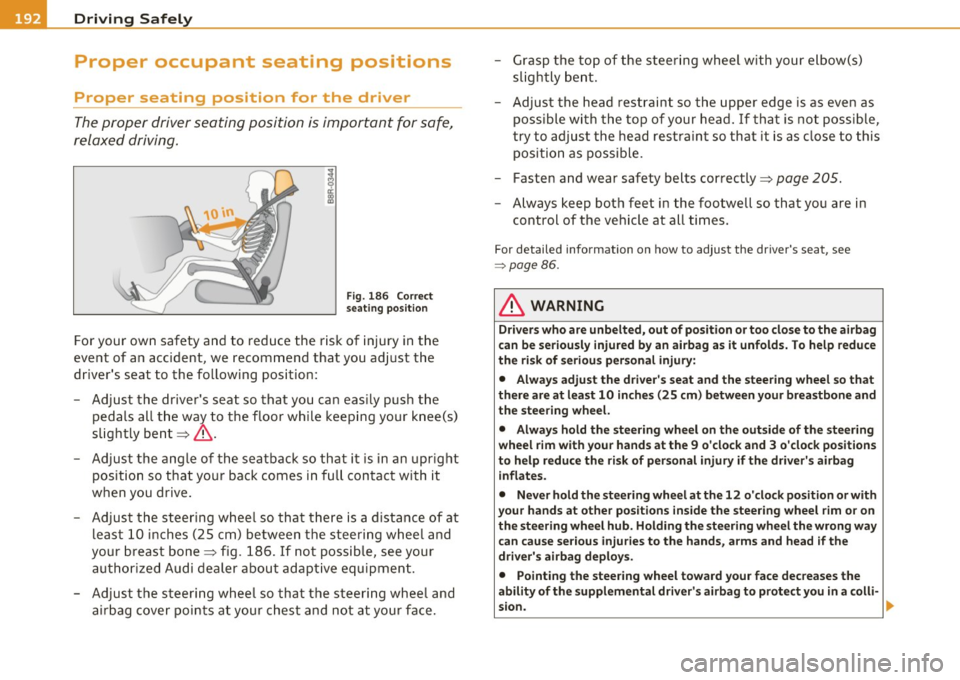
Fig. 186 Correct
seating position
For your own safety and to reduce the risk of injury in the
event of an accident, we recommend that you adjust the
driver's seat to the following position:
- Adjust the driver's seat so that you can easily push the
pedals all the way to the floor while keeping your knee(s)
slightly bent~&.
- Adjust the angle of the seatback so that it is in an upright
position so that your back comes in full contact with it
when you drive.
- Adjust the steering wheel so that there is a distance of at least 10 inches (25 cm) between the steering wheel and
your breast bone~ fig. 186. If not possible, see your
authorized Audi dealer about adaptive equipment.
- Adjust the steering wheel so that the steering wheel and airbag cover points at your chest and not at your face. -
Grasp the top of the steering wheel with your elbow(s)
slightly bent.
- Adjust the head restraint so the upper edge is as even as
possible with the top of your head. If that is not possible,
try to adjust the head restraint so that it is as close to this
position as possible.
- Fasten and wear safety belts correctly~
page 205.
-Always keep both feet in the footwell so that you are in
control of the vehicle at all times.
For detailed information on how to adjust the driver's seat, see
=> page 86.
& WARNING
Drivers who are unbelted, out of position or too close to the airbag
can be seriously injured by an airbag as it unfolds. To help reduce
the risk of serious personal injury:
• Always adjust the driver's seat and the steering wheel so that
there are at least 10 inches (25 cm) between your breastbone and
the steering wheel.
• Always hold the steering wheel on the outside of the steering
wheel rim with your hands at the 9 o'clock and 3 o'clock positions
to help reduce the risk of personal injury if the driver's airbag
inflates.
• Never hold the steering wheel at the 12 o'clock position or with
your hands at other positions inside the steering wheel rim or on
the steering wheel hub. Holding the steering wheel the wrong way
can cause serious injuries to the hands , arms and head if the
driver's airbag deploys.
• Pointing the steering wheel toward your face decreases the
ability of the supplemental driver's airbag to protect you in a colli-
sion.
~
Page 200 of 392
• ....__D_ r_iv _i_ n_, g=-- S_ a _ f_e _,Ly _ ______________________________________________ _
& WARNING (conti nu ed )
• Pleas e obse rve information on s afe driving => page 190.
& WARNING
To help prevent poi sonous exhau st ga s from being drawn into the
vehicle, always keep the rear lid closed while driving.
• Never transport object s larger than tho se fitting completely
into the luggage area because the rear lid cannot be fully closed.
• If you ab solutely must drive with the rear lid open, observe the
following notes to reduce the ris k of po isoning:
- Close all windows,
- Close the Pano ramic sliding sunroof*,
- Open all air outlets in the instrument panel,
- Swit ch off the air recirculation,
- Set the fresh air fan to the h ighest speed.
& WARNING
Alway s make sure that the doors, all windows, the Panorami c
sliding sunroof* and the rear lid are secur ely closed and locked to
reduce the risk of injury when the vehicle is not being used.
• After closing the rear lid, always make sure that it is properly
clo sed and locked .
• Never leave your vehicle unattended especially with the rear lid
left open . A child could crawl into th e vehicle through the luggage
compartment and close the rear lid becoming trapped and unable
to get out . Being trapped in a vehicle can lead to serious personal
injury.
• Never let children play in or around the vehicle.
• Never let passengers ride in the luggage compartment. Vehicle
occupants must alway s be properly restrained in one of the
vehicle 's seating positions.
W Tips
• Air circulation helps to reduce window fogging. Sta le air escapes
to the outside th rough vents in the trim panel. Be sure to keep these
slo ts free and open.
• Th e tire pressure m ust correspond to the load . The tire pressure is
shown o n th e t ire pressu re label. The tire pressure label is located o n
the driver's side 8-pillar . The tire p ress ure label lists the recom
me nded co ld tire inflation pressures fo r th e ve hicle at its max imum
capacity weight and the tires that were on your vehicle at t he time it
was manufactured. For recommended t ire pressu re s for normal loa d
conditions, p lease see chapter=>
page 322. •
Tie-downs
The lug gage c omp artm ent is equ ipped with fo ur tie
do wns to secur e luggag e and oth er items .
Use the t ie-downs to sec ure yo ur cargo properly => page 197,
"Load ing the l uggage comp artmen t".
In a co llision , the laws of physics mean that even smaller items that
are loose in the vehicle will become heavy m issi les t hat can ca use
ser ious injury. Items in the vehicle possess energy which va ry with
veh icle speed and the weight of the item . Vehicle speed is the most
sign ifi cant factor .
For example, in a frontal coll is ion at a speed of 30 mp h (48 km/h),
the forces a cting on a 1 0-lb (4.5 kg) o bje ct are about 20 times the
normal weight of the item. This means that the weight of the item
wou ld sudden ly be abo ut 200 l bs. (9 0 kg). You can imagine the inju
r ies that a 200 lbs. (90 kg) item flying freely through the passenger
compar tment cou ld cause in a collision like this .
liJ,