ECO mode AUDI Q7 2017 Owner´s Manual
[x] Cancel search | Manufacturer: AUDI, Model Year: 2017, Model line: Q7, Model: AUDI Q7 2017Pages: 402, PDF Size: 100.39 MB
Page 78 of 402
Warm and cold
~~ Cooling mod e*
The maximum coo ling mode can be switched
sw itched on and off using the
~f.!i button. The ai r
is not coo led and humidity is not removed when
coo ling mode is switched off . This can cause fog
on the windows. Cooling mode switches off auto matically when the outs ide temperature is be low
zero. When the cooling mode is switched on,~
the vehicle inter ior is cooled and dehumidified as
qu ickly as possible .
~ Recirculation mode
In recirculation mode, the a ir inside the vehicle is
circu lated and filtered. This prevents the unfil
tered a ir outside the vehicle from entering the
veh icle interior . Switch ing recirculation mode on
when dr iv ing th rough a tunnel or when s itting in
traffic is recommended
~ _&. .
Using the button, recirculation mode is switched
on and off using the
o's) button . You can also
sw itch the recircu lation mode off by pressing the
knob @or the off us ing the
J% butto n.
AUTO Autom ati c mode
Automatic mode ma inta ins a constant tempera
ture ins ide the vehicle . Air temperature, airflow
and a ir distribution are cont rolled automatically .
You can switc h automatic mode on or off by
p ressing the knob @.
Temperature
You can adjust the temperature between 60° F
( + 16°()
and 84°F (+28°() by turn ing the knob
@ . If outs ide of this range,
LO or HI wi ll appear
i n the climate control system d isplay. At bot h of
these sett ings, the cl imate contro l system runs
con tinuously at maximum cool ing or heat ing
power. There is no tempe rature regulat ion .
86'~ Blower
You can adjust the vo lume of air generated by the
b lower to yo ur preference usi ng the rocker
sw itches @. The blower should always ru n at a
low se tt ing to prevent the win dows from fogg ing
and to ens ure a continuous exchange of air ins ide
the vehicle . To have the b lower regu lated auto
mat ica lly, press the knob @.
76
Air distribution
You can use the rocker sw itches @to adjus t the
vents where the air w ill flow o ut o f. Press the
rocker switches @repeatedly unti l the desired
air distribution setting is disp layed in the climate
contro l system controls . To have the air d istribu
tion regulated automatically, press the knob @.
J 3!J Seat heating /ventilation*
If you press the JI 3M button, the seat heating/
ventilation is switches on at the highest level (3) .
The LEDs ind icate th e temperatu re level. To re
duce the temperature, press the button aga in. To
switch the seat heating/ventilat ion off, press the
button repeatedly unti l the L ED turns off .
® MAX Defogging
The windshield and side windows are defrosted
or cleared of condensat ion as quick ly as poss ible.
The maximum amount of air f lows mainly from
the vents below the windsh ield. Recirculation
mode switches off . The temperature should be
set at
+72°F (+22°() or hig her . The temperature
i s controlled automat ica lly .
Defrost is sw itched on and off®
MAX button.
You can also switch the funct ion off by pressing
the knob @.
Applies to vehicles with windsh ield defogger: the
winds hield defogger switches on automatically
whe n outside temperatures are low . If you would
lik e to sw itch the winds hield defroster on ma n
u ally, press the
:fx button . T he L ED in the button
blinks.
QW REAR Rear window defogger
Press the button~ to switch the rear wi ndow de
fogger on .
It only operates when t he engine is
r un ning .
It sw itches off automatically after 10 to
20 minutes, depending on the outs ide tempera
ture .
To keep the rea r window defogger o n cont inuous
ly, press and hold the
QiP R EA R button longer
t h an th ree seconds. This is stored unt il the igni
tion is swi tched off.
Page 81 of 402
u co ...... N r-... N ...... 0
0
:E: '
General information
Breaking in
A new vehicle must be broken in for the first
1,000 mi les (1,500 km). Do not dr ive at speeds
that will exceed 2/3 of the maximum permitted
engine speed (RPM) for the first 600 miles
(1,000 km), and avoid full acceleration during
this period . You may gradually start increasing
the RPM and the speed between 600 miles
(1,000 km) and 1,000 miles (1,500 km) .
During the first hours of use, the engine has a
higher internal friction than later on when all
moving parts have settled into p lace with each
other.
How the vehicle is driven during the first 1,000
miles (1,500 km) also affects the engine quality.
Drive at moderate engine speeds after the initia l
break-in period, particularly when running a cold
engine . This will reduce eng ine wear and improve
the m ileage .
Do not drive at too low of an engine speed (RPM) .
Shift down if the engine stops running "smooth ly". Extremely high eng ine speeds are automati
cally reduced.
Reducing the risk of vehicle damage
([) Note
When driving on poor roads, by curbs and on
steep ramps , make su re that low-hang ing
components such as the spoiler and exhaust
system do not come into contact with these
or they could be damaged. This especially ap
plies to vehicles with low ground clearance
and vehicles that are heavily loaded.
Driving through water on roads
Note the following to reduce the risk of vehicle
damage when driv ing through water, for example
on flooded roads :
- The water must not be any higher than the bot
tom of the vehicle body.
D riving
- Do not drive faster than walking speed.
A WARNING
After driv ing through water or mud, the effec
tiveness of the brakes may be reduced due to moisture on the brake rotors and brake pads.
A few careful brake applications should dry
off the brakes and restore the full braking ef
fect .
(D Note
- Vehicle components such as the engine,
transmission, suspens ion or electrical sys-
tem can be severely damaged by driving
through water.
- Always switch the Start/Stop system" off
when driving through water¢
page 84.
(D Tips
-Determine the depth before driving through
water.
- Do not stop the vehicle, drive in reverse or
switch the engine off when driving through
water.
- Keep in mind that oncoming vehicles may
create waves that raise the water level and
make it too deep for your vehicle to drive
through safely.
- Avoid driv ing through salt water, because
this can cause corrosion.
Economical and environmentally-friendly
driving
T he amount o f fuel consumpt ion, the environ
mental impact and the wear to the engine,
brakes and tires depends mostly on your driving
style. With an ant icipatory and economic driving
style, fuel consumption can be reduced by ap proximately 10-15%. The following tips will help
you conserve the environment and your money at the same time.
Anticipatory driving
A vehicle uses the most fuel when accelerating.
When you drive with anticipation, you do not
need to brake as often and so you accelerate less.
When possible, let your vehicle coast with a gear ..,.
79
Page 86 of 402
Driving
Ple ase pre ss brake pedal
This message appears if you do not press the
brake pedal whe n starting the eng ine.
Ill Rem ote control key : key not recognized . Is
the key still in th e ve hicle ?
This indicator light turns on and th is message ap
pears if the ignit ion key was removed from the
ve hicle when the engine was running . If the igni
tion key is no longe r in the veh icle, you cannot
sw itch on the ignit ion or sta rt the engine once
you stop it. You also cannot loc k the vehicle from
the o uts ide.
Shift to P, otherwi se vehicl e can roll awa y.
D oor s do not lo ck if gea rshift i s not in P
This message appears for safety reasons if the
selecto r lever is in the N position whe n you
sw itch the ignition off . Move the selector lever to
the P pos ition. Otherwise the vehicle is not pro
tected from rolling and it cannot be locked.
II Rem ote control key : hold b ack of k ey
again st th e designat ed are a. S ee owner' s m an
ual
If the indicator light turns on and th is message
appears, there is a malfunction
c::> page 84.
S hift to P before le aving ca r, otherw ise vehicle
can r oll away
This message appears if the driver's door is
opened while the ignition is switched on and the
transmission has not been shifted to the P posi
tion . Shift the transmission into the P position
and turn off the ignition if you are leav ing the ve
h icle. Otherwise the veh icle could roll. Also see
c::> page 86 .
84
Starting the engine when there is a
malfunction
It may not be possible to start the engine under
certain cir cumstances, for example if the battery
in the vehicle key is drained, if interference is af
fected the key or if there is a system malfunc
tion.
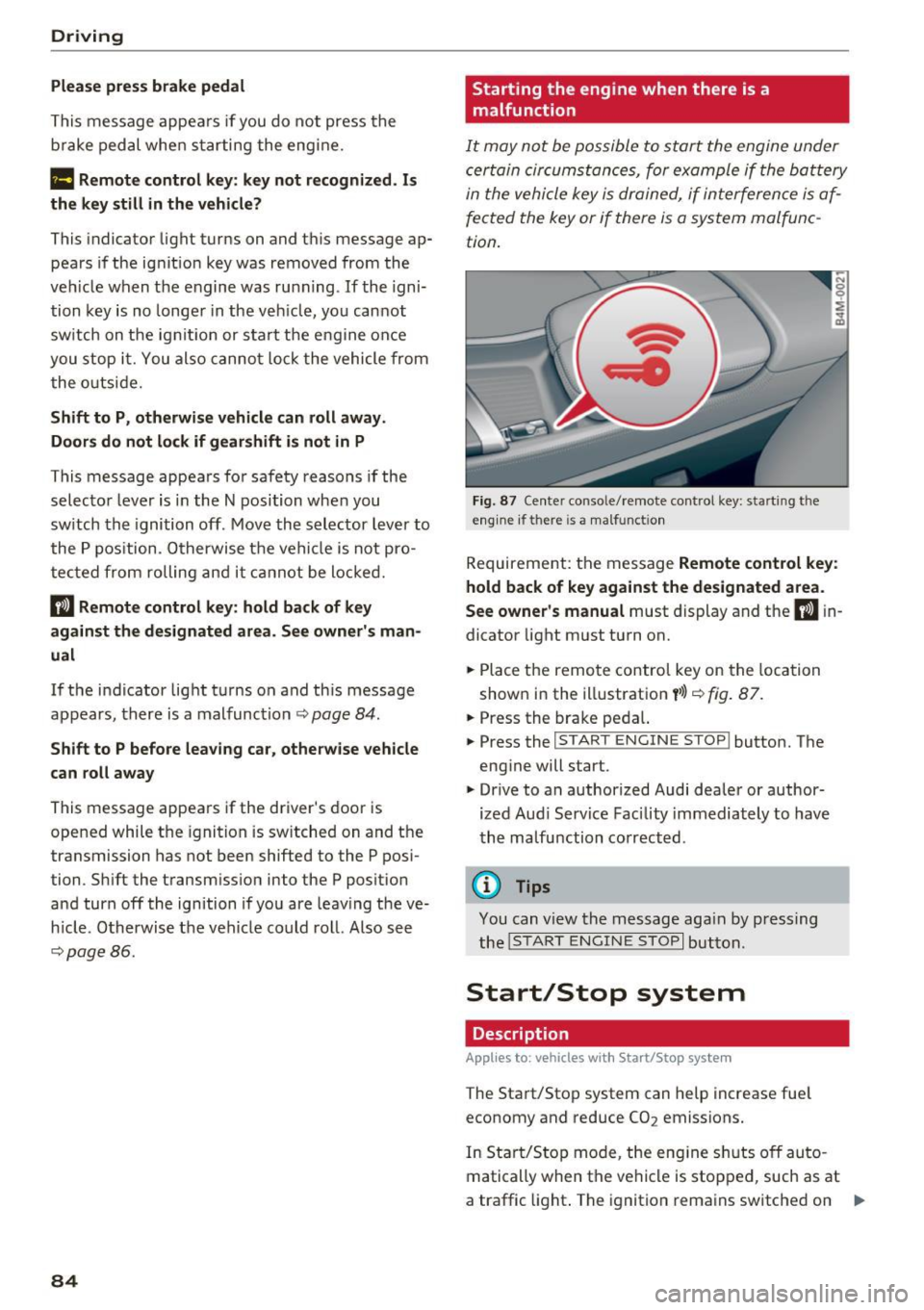
F ig. 87 Ce nte r conso le/ remote control key: start ing t he
eng ine if there is a ma lfunct ion
Requireme nt: the message Remote control ke y:
hold back of ke y aga in st the des ignated area.
S ee own er's manual
must display and the II in
dicator light must turn on.
.,. Place the remo te control key on the loca tion
shown in the illustration
y >l} c::> fig . 87.
.,. Press the brake pedal.
... Press the
!START ENGINE STOP ! button. The
engine will start.
.,. Drive to an authorized Audi dealer or author
ized Aud i Serv ice Facility immediately to have
the ma lfunction corrected .
@ Tips
You can view the message aga in by press ing
the
I S TAR T ENGI NE STOP I button.
Start/Stop system
Description
Applies to: vehicles with Start/Stop system
The Start/Stop system can help increase fue l
economy and reduce CO2 emissions.
In Sta rt/Stop mode, the eng ine s huts off auto
matically when the vehicle is stopped, such as at
a traffic light . The ignition remains switched on .,.
Page 87 of 402
u (0 ...... N r--. N ...... 0
0
:E
automatically when needed.
The Start/Stop system is automatically activ ated
as soon as the igni tion is switched on .
Basic requirements for Start /Stop mode
- The driver's door must be closed.
- The driver 's sea t belt much be fas tened .
- The hood must be closed .
- The vehicle must have driven faster than 2 mph
(3 km/h) since the last time it stopped.
- A trailer must not be hitched to the vehicle .
I f you leave the vehicle during a stop phase, the
e ngine can be restarted withi n app rox imately 30
seconds if the following requirements are met:
- The driver's door must be closed, the dr iver
must be wear ing the safety belt and the brake
peda l mus t be p ressed . Or:
- The driver's door must be closed, the bra ke
pedal mus t be pressed and a gear m ust be se
lected .
(D Note
Always sw itch the Start/Stop system off when
driving through water~
page 84.
@ Tips
The engine stops shortly before the vehicle
comes to a stop
1>.
Stopping /starting the engine
Applies to: vehicles with Start/Stop system
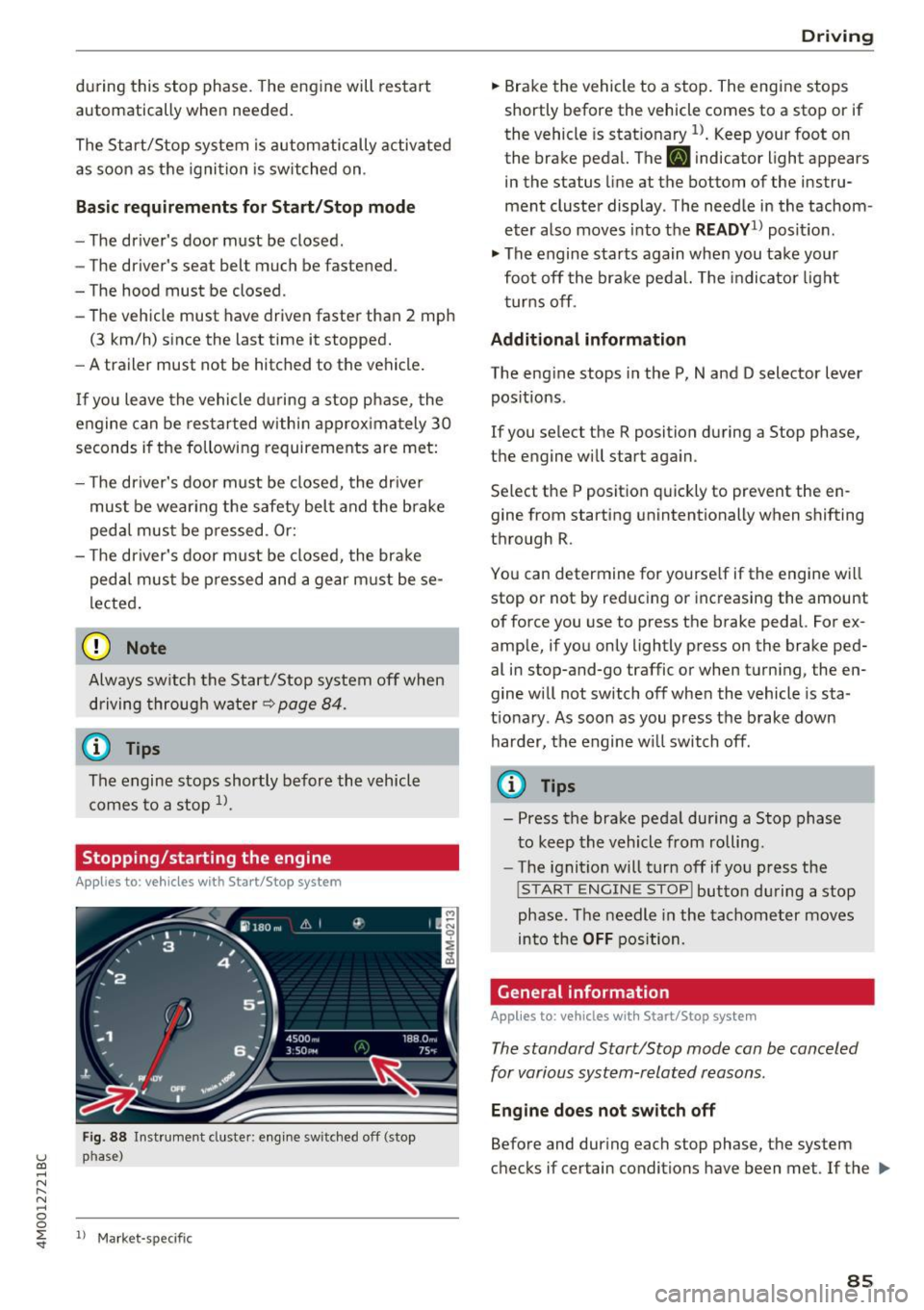
Fig . 88 Inst rument cluste r: engine sw itched off (stop
p h ase )
ll Mark et-sp ecific
D rivi ng
.,. Brake the vehicle to a stop. The engine stops
shortly before the vehicle comes to a stop or if
the vehicle is stat ionary
l) . Keep your foot on
the brake pedal. The
[I] indicator light appears
in the status line at the bottom of the instru
ment cluster display . T he need le in the tachom
eter also moves into the
READY1l posit io n .
.,. The engine starts again when you take your
foot off the brake pedal. The indicator light
t urns off .
Additional inform ation
The eng ine stops in the P, N and D selector lever
positions .
If you select the R position during a Stop phase,
the engine will star t again .
Se lect the P position quickly to prevent the en
gine from sta rting unintentionally when shifting
through R .
You can determ ine for yourse lf if the eng ine will
stop or not by reducing or increasing the amount
of force you use to press the brake pedal. For ex
ample, if you only lightly pre ss on the brake ped
al in stop-and-go traffic or when turn ing, the en
gine w ill not switch off when the vehicle is sta
t ionary . As soon as you press the brake down
harder, the engine w ill switch off .
(D Tips
- Press the brake peda l during a Stop phase
to keep the vehicle from rolling.
- The ignition will turn off if you press the
!S TART ENGINE STOPI button during a stop
phase . The needle in the tachometer moves
into the
OFF position.
Gene ral information
Applies to: vehicles with Start/Stop system
The standard Start/Stop mode can be canceled
for various system-related reasons .
Engine doe s not switch off
Before and during each stop phase, the system
checks if certain conditions have been met . If the
liJl,,
8 5
Page 88 of 402
Driving
[jj indicator light appears in the instrument clus
ter disp lay, the engine will not be stopped, for
examp le in the follow ing s ituations:
- T he eng ine has not reached the minimum re
quired temperature for Start/Stop mode .
- The inter io r temperature selected by the cli-
mate contro l system has not been reached.
- The outs ide temperature is ext remely high/low.
- The w indshield is being defrosted .
- The vehicle battery charge level is too low .
- The steering wheel is turned at a sharp angle or
is mov ing.
- After engaging the reverse gear .
- On sharp inclines.
-At high a ltitudes.
Engine automaticall y restarts
The standard Start/Stop mode will be cance led
during a stop phase in the fo llow ing s ituations.
The engine resta rts wit hout any action by the
d river.
- The vehicle rolls, for examp le while on a s lope.
- The inter ior temperature differs from the tem-
perature se lected in the A/C system.
- The w indshield is being defrosted.
- The brake pedal is pressed several times in a
row.
- The vehicle battery charge level is too low.
- Power consumption is high.
The engine can tu rn off again when the condi
tions for Start/Stop mode are met .
Ignition is switched off automatically
To prevent the veh icle bat tery from d rain ing, the
ign it ion wi ll switch off a utomat ica lly under the
following conditions:
- The Sta rt/Stop system has stopped the eng ine .
- The vehicle is stationary.
- You left the vehicle and the eng ine was not re-
started within approximate ly 30 seconds.
I f this happens, you wi ll see the message
Igni
tion turn s off automaticall y in the instrument
cluster and the activated low beams are replaced
by the parking lig ht. The parking lights will
sw itch off after approx imately 30 minutes or
when you lock the vehicle.
86
The ignition also sw itches o ff when you lock the
vehicle from the outside during a stop phase.
If t he Start/Stop system has not tu rned off the
engine or if yo u have switched the S tart/Stop sys
tem off manually, the ignition wi ll not be auto
matically switched off and the engine will contin
u e to run
Q .&. .
_& WARNING
To reduce the risk of poisoning, never allow
the engine to run in confined spaces.
(D Tips
- If you leave the ve hicle with the D/S or R se
lector lever position engaged, the parking
brake is automatically set.
- If you select the D or N selector lever posi
t ion after sh ifting into reverse, the vehicle
must be driven faster than 6 mph (10 km/h)
in order fo r the engine to switch off again .
Manually switching the Start/Stop system
off /on
Applies to: vehicles with Start/Stop system
If you do not wish to use the system, you can
switch it off manually.
-- -- - --=-
,__ -~-----__ ...
~. ~- • - ,,,.. ~ .. 'l> '* A ·- -- ~ -
Fig . 89 Ce nter console: Start/Sto p system button
-
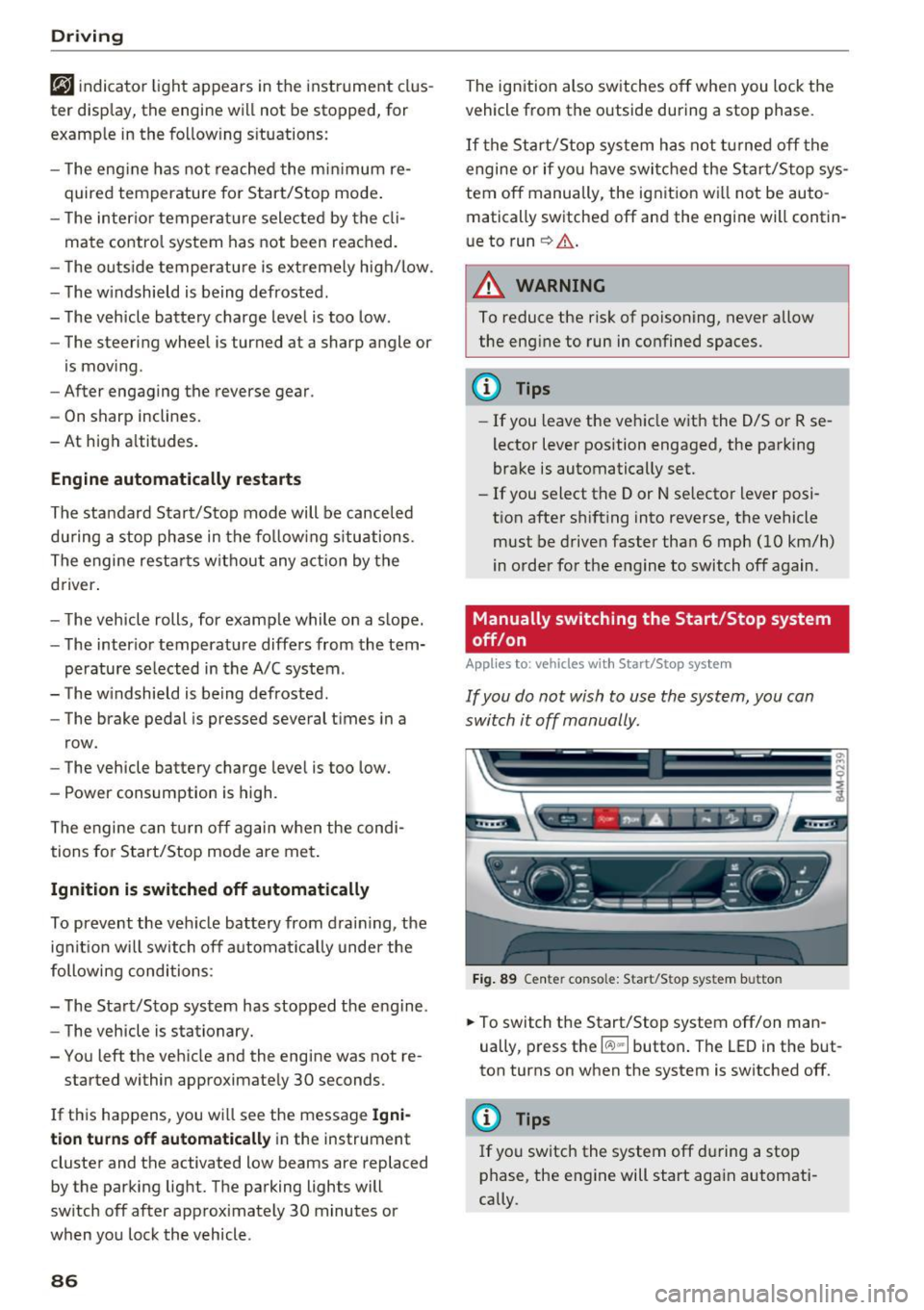
.,. To switch the Start/Stop system off/on man
ually, press t he
l(:.l) .. I button . The LED in the but
ton turns on when the system is switched off.
@ Tips
If you switch the system off du ring a stop
phase, the engine will start aga in automati
cally.
Page 93 of 402
u (0 ...... N r--. N ...... 0
0
:E
disp layed. The accuracy depends on the driv ing
situation and is normally around 1
°. T he side
ways angle of your vehicle should not exceed the
yellow range in the gauge. If it reaches the red range, there is a risk that the vehicle might tip
c::, A .
Dis playing the til t angle di splay
.. Select in the Infotainment system: IMENUI but-
ton
>V ehicle > Lift / Offro ad or Allro ad *.
Showing the additional display
To change the contents shown in the rig ht area of
the screen, select in the Infota inment system:
right control button
> Additiona l d isplay.
Angle :
this displays the c urren t steering wheel
angle and the maxim um angle that was reached
during a drive . These values are reset when the
ignition is switched off .
Posit ion : disp lays the height, direction and geo
coordinates of the current vehicle pos ition.
Off : only the air suspension display remains o n.
& WARNING
- Do no t exceed the yellow range in the
gauge . Your vehicle can tip, which i ncreases
the risk of an acc ident.
- Under some circumsta nces, the vehicle can
tip over or til t sideways even if the sideways
angle is low . The angle display does not re
place the driver's attention. To reduce the
risk of an accident, make sure the vehicle
does not t ip , especia lly when you are driving
at h igh speeds.
Automatic transmission
Introduction
The automat ic transmission is controlle d elec
tronica lly . Power is transfe rred using a torque
converte r.
When a
m oderate driving styl e is used , the
transmission selects the most economical driving mode. The t ransmission upshifts at a lower RPM
D rivi ng
and downs hifts at a higher RPM to improve fue l
efficiency.
T he tra nsmission switches to a sporty mode after
a kick-down or when the driver uses a
s porty
dri ving style
characterized by quick acce lerator
peda l movements, heavy acceleration, frequent
changes in speed and t raveling at the maximum
speed .
If desired, the driver can also se lect the gears
manually ( tiptronic mode ) c::, page 94.
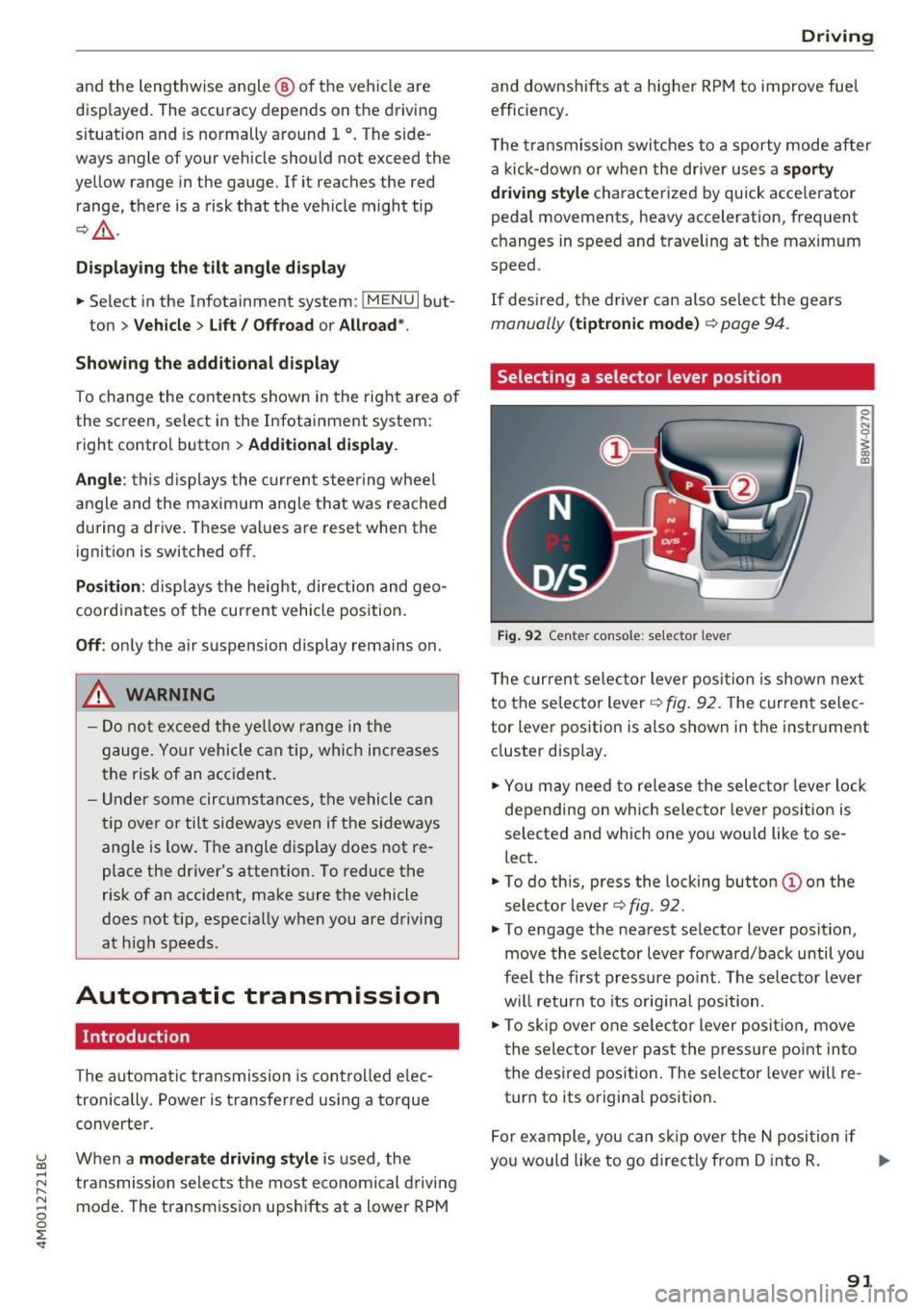
Selecting a selector lever position
Fig . 92 Cen te r conso le: se lecto r lever
0 ,.._ N 0
~ a, m
T he curren t se lector lever posi tion is show n next
to the se lector lever
c::, fig. 92. The curren t se lec
tor lever position is a lso shown in t he instrument
cluster disp lay.
.. You may need to release the selector lever lock
depending on wh ich selecto r lever pos it ion is
selected and which one you wou ld like to se
lect .
.. To do th is, press the locking button(!) on the
selector lever
<=> fig . 92.
.. To engage the nearest selector lever position,
move the selector lever forward/back until you
fee l the first pressure po int. The selec to r lever
w ill return to its orig inal position .
.. To skip over one selec tor lever posit io n, move
the selector lever past the pressure point into
the desired position. The selector lever will re
turn to its origina l position .
F or ex ample , you can s kip over the N position if
yo u wou ld like to go d irectly from D into R . ..,.
91
Page 94 of 402
Driving
Sel ector l ev e r lo ck
The se lector lever lock prevents you from se lect
ing a position unintentionally, causing the vehicle
to ro ll. When engaging some selector lever posi
tions, you must press th e locking button
CD on
the selecto r lever and/or press the brake pedal
¢fig. 92.
You must press the brake pedal to engage a se
lector lever position when the engine is running
and the vehicle is stationary.
You do not have to press the brake peda l if you
shift from a drive gear (D/S) to reverse gear
(R)
w ithin one second. This allows you to "rock" the
veh icle to free it when it is stuck .
P - Park
This se lector lever posi tion p revents the vehi cle
from rolling . Only shift into park when the vehi
cle is stationary ¢.&. . To select the P se lector lev
er position, press th e P button @on the selector
lever ¢
fig. 92. P appears next to the selector lev
er.
You can on ly shift out of park when the engine is
r u nning and you are pr ess ing the brake p edal. To
release the parking lock, press the brake peda l,
press the locking button
CD on the selector lever
and select the desired pos it ion ¢
fig. 92 .
P engag es automatically if you switch the engine
off while the selector lever is in D, E, S, R or man
ual mode.
If you switch the engine off when the N se lector
lever position is select ed, the transmission re
mains in N for approximately
30 minutes and
then Pis engaged. The vehicle is not secured
from rolling in the N selector lever position, so
you need to set the parking brake<®>¢
page 87.
You must use the parking lock emergency release
before towing the vehicle¢
page 96.
R- Reve rse
The reverse gear is engaged in this pos ition . On ly
select reverse gear when the vehicle is stationary
and the engine is running at idle speed¢.&. . To
engage the R selector lever pos ition, press the
92
brake peda l, press the locking button CD on the
se lector lever and select the R position ¢
fig. 92.
A confirm ation tone will sound when the reverse
gear is engaged.
N -Neutral (idle )
The transmission is in idle in th is position. To en
gage the
N selector lever position, press the lock
i ng button
CD on the selector lever and sh ift into
the
N pos ition ¢ fig. 92 .
If you switch the eng ine off when the N selector
l ever posit io n is selected, the transm iss ion re
mai ns in
N for approx imately 30 minutes and
then Pis engaged.
You cannot se lect the
N pos ition when the igni
tion is switched off . When dr iv ing through an au
tomat ic car wash, fi rst select the
N position and
then turn the eng ine off.
For safety reasons , the veh icle cannot be locked
when the t ransmiss ion is in the
N pos it ion .
D/S - Driving forward
When the transm ission is in the D/S posit ion, it
can be operated either in the normal D mode or
i n the S sport mode . Move the selector lever back
to engage the S sport mode. You ca n only select
the S selector lever position when the Dor E pos i
tion is se lected. To select the Dor E position
again w hen S is engaged, move the selector lever
ba ck ¢ .&. . To sh ift from N to D when traveling at
speeds below 1 mph (2 km/h), press the brake pedal and shift into the D position¢.&. .
In the
n o rmal mode D, the transmission auto
matically selects the suitable gear ratio. It de
pends on engine load, vehicle speed and driving
style.
Se lec t the
sport mode S for spo rty d riving. The
vehicle makes f ull use of the engine 's power.
Shifting may become noticeable when accelerat
ing .
The S se lec to r lever posit io n engages automat i
ca lly when you select
Dynamic mode in d rive se -
l ect* . .,.
Page 100 of 402
Trailer towing
Trailer towing
Driving with a trailer
General information
Your Audi was designed primarily for passenger
transportation.
If you plan to tow a trailer, please remember that
the additional load will affect durability, economy and performance.
Trailer towing not on ly places more stress on the
ve hicle, it also ca lls for more concentration from
the dr iver.
F or this reason, always follow the operating and
driving instructions provided and use common
sense.
@ Note
If you are going to tow a trailer, you must ac
tivate the tra ile r operation mode
¢page 100.
Technical requirements
Traile r hitch
Use a weight-carrying hitch conforming to the
gross trai ler weight. The hitch must be suitab le
for your ve hicle and tra iler and must be mounted
securely on the vehicle 's chassis at a
technically
sound
locat ion . Use on ly a trailer hitch with a re
movable ba ll mount . Always chec k w it h t he t rail
er hitch man ufactur er to make s ure t hat you a re
using the co rrect hi tc h.
Do not use a bumper hitch.
The hitch m ust be installed i n such a way that it
does not interfere with the impact -absorbing
bumper sys tem . N o mod ificat ions should be
made to the vehicle exhaust and b rake systems .
Fr om t ime to t ime, che ck t hat all hitch mo unti ng
bol ts rem ain securely faste ned.
W hen you are not tow ing a tra iler, remove the
tra ile r hitc h ba ll mount . This prevents the hitch
from ca using damage shou ld your veh icle be
s truck from behind¢ &..
98
Trailer brakes
If your trailer is equipped wi th a bra king sys tem,
c h ec k t o be sure that it con forms to all regu la
tions.
The trailer hydrau lic br ake system mus t not be
directly connecte d to the vehicle's hydr auli c
brake system ¢&. .
Safety chains
Always use safety chains between your vehicle
and t he tra ile r.
Trailer lights
Trailer lights must meet all regulations. Be sure
to check w ith your author ized Audi dealer for cor
r ect wir ing , sw itches and relays .
Mirrors
If you are unab le to see the traffic behind you us
i ng the regular outs ide mirrors, then you
must in
stall extended mirro rs. It is important that you
always have clear vision to the rear.
A WARNING
-
- After remov ing the tra iler hitch, do not
sto re it in your vehicle . In case of sud den
braking , th e hitch co uld fl y forwar d and i n
jure you o r yo ur passenge rs.
- I f a tra ile r has e lectr ica l brakes p lease no te
t h at the se brakes are not ac tivated by the
fact ory-fi tted contro l uni t - r isk of accident!
- N ever i nst all a "we igh t distribut ing" or
"lo ad equ alizing" trailer hi tch o n yo ur veh i
cle. The vehicle was not desig ned fo r these
kinds of trailer hitches. The hitch attach
ment can fai l, ca us ing the tra iler to tear
loose from the vehicle .
- The Gross Veh icle Weight Rating for your
veh icle, found on the safety compliance la
be l on the driver's s ide B -pillar, m ust never
be exceeded under any circumstances. Ex
ceed ing the Gross Vehicle Weight Rati ng of
your veh icle is likely to damage yo ur vehicle,
and such damage will not be covered by
your Limi te d N ew Vehicle War ranty. Exceed
ing the G ros s Ve hicl e W eight Ratin g will al-
so ch ange the pe rform ance and ha ndling .,._
Page 101 of 402
u co ...... N r-... N ...... 0
0
:E: '
cause a crash resulting in serious injury or
death.
Operating instructions
Trailer towing weights
The maximum permissible unbraked trailer
weight is 1,650 lbs (750 kg) .
The maximum permissible braked trailer weight
is:
- Q7 2.0: 5,500 lbs (2,500 kg)
- Q7 3 .0: 7,700 lbs (3,500 kg)
These specifications apply when driving on roads having an incline of less than 12% .
Permissible tongue load
For best vehicle handling under these changed
conditions, adjust the trailer load so that the
tongue load is at the maximum allowable or
slightly lower . You can get an approximation of
the tongue load with a bathroom scale or you can
measure the load at a trucking company or
weighing station.
The maximum permissible load on the ball hitch may not exceed:
- Q7 2.0: 550 lbs (250 kg)
- Q7 3 .0: 770 lbs (350 kg)
It is recommended to use the maximum permis
sible load. Please also observe the information
¢page 343, ¢page 347.
Trailer load distribution
Be sure the load in the trailer is held securely in
place to prevent it from shifting forward, back
ward or sideways.
Never allow a passenger to ride in a trailer¢.&.
in Messages on page 100.
Ball mount
The trailer hitch may only be used with suitable ball mount and ball. Installation of the hitch ball
must be carried out in accordance with the manu
facturer's instructions .
Trailer towing
Engine cooling system
Towing a trailer makes the engine work harder. It
is important that the cooling system's perform
ance is up to the additional load. Make sure that
the cooling system has enough fluid.
Tire pressure
When towing a trailer, inflate the tires of your
vehicle to the tire pressure listed under "Full
load" on the label <:!;>
page 343. Inflate trailer
tires to trailer and tire manufacturers' specifica
tions.
Lights
The headlight settings should be checked with
the trailer attached before driving off. Check to
make sure both vehicle and trailer lights are
working properly.
Safety chains
Be sure trailer safety chains are properly connect
ed from the trailer to the hitch on the vehicle .
Leave enough slack in the chains to permit turn
ing corners. When you install safety chains, make
sure they will not drag on the road when you are
driving.
The chains should cross under the trailer tongue
to prevent it from dropping in case of separation
from the hitch.
Setting drive select(air suspension)*
Make sure the vehicle is on a level surface before
hitching the trailer and before adjusting the
tongue weight. The driving mode must be in
Au
to or Comfort ¢page 134, ¢ (D
If you would like to drive in the Dynamic driving
mode, then you must select this mode before
hitching the trailer and before adjusting the
tongue weight. Please note that your vehicle will
lower and the ground clearance is reduced.
If you have to drive through difficult road condi
tions, you can raise the vehicle again after hitch
ing the trailer or after adjusting the tongue
weight
¢ page 136.
(D Note
Vehicles with air suspension*:
99
Page 102 of 402
Trailer towing
- Changes in temperature or load can affect
the height of the vehicle .
- Always se lect
Auto or Comfort mode. Ot h
erwise, the tongue load specified for your
vehicle will no longer be applicable.
Messages
Driving with a trailer requires extra caution .
Weight distribution
Towing a loaded trailer with an empty car res ults
i n a hig hly unstable dist ribution of weight. If this
cannot be avo ided, drive at ve ry low speeds o nly
to avoid the risk of lo sing s teeri ng con trol.
A "balanced" rig is eas ie r to operate and cont rol.
T his means that the tow veh icle should be loaded
to the exte nt poss ible a nd permiss ible , while
keep ing the tra ile r as lig ht as possib le unde r th e
circumstances . Whenever possible, transfer
some cargo to the l uggage compa rtment of the
tow vehicle whi le observ ing tongue load req uire
ments and ve hicle loading considerat ions.
Speed
T he higher the spee d, the more d ifficult i t be
comes for the drive r to co ntro l the rig. Do not
drive at the maximum permissible speed. Reduce
your speed even more if load, weather or w ind
conditions a re unfavorable -part icularly when
going downhill.
Re du ce veh icle spee d
immediately if the trai le r
shows the s lightest sign o f swaying.
Do not try
to stop the sway ing by accele rating .
Observe speed lim its. In some areas, speeds for
ve hicles towing trai lers are lower than for reg ular
veh icles.
A lways app ly b rakes early. When dr iv ing down
hi ll, shift into a lower gear to use the engine
braking effect to slow the veh icle. Use of the
brakes a lone can cause them to ove rheat and fail.
Air suspension*
If you are connecting a trailer to a fa cto ry -ins tal
led trai ler hitch, trai ler mode a utomat ic all y
switches on in the ai r suspensio n. This will limit
the reg ulation by the a ir s usp ension whi le dr iv -
100
ing . If you want to swi tch off tra iler mode wh ile
driving, for example when using a bicycle rack system, se lect in the Infota inment system :
IM ENUI button> Vehicle > left control button>
Vehicle settings > Air suspension: trailer .
If the vehicle has a retrofitte d tra iler hitc h, the
trailer mo de might not switch on automatically .
In this case, switch the tra iler mode on before
hitc hing the tra iler and switch it off after un
hitc hing the tra ile r.
Coolant tempe rature
The coo lant tempe rat ure gauge c:::> page 11 m ust
be obse rved caref ully. The coolant temperature
can increase if you drive o n long inclines in a low
gear at high eng ine speeds. Reduce your speed
i mmediately if the LEDs in the top part of the d is
play turn on .
Fo r more information about indicator lights, re
fer to.
c:;, page 26.
A WARNING
Anyone not prope rly res trained in a moving
v e hicle is a t a much greater risk in an acci
d ent. Never l et anyon e ride in your car who is
n ot prope rly we aring the rest rain ts provide d
by Au di.
Trailer towing
information
' Important to know
-
You r vehicle handles d ifferently when towing a
t railer becau se o f th e ad dit iona l we igh t and dif
f erent we igh t d istribu tion. S afety, per forman ce
and eco nomy will g reatly depend on how caref ul
l y you load your trai ler and operate yo ur rig .
B efo re yo u ac tually tow yo ur trailer, pra ct ice
tu rning, s to p ping and b acking up in an are a away
from traffic. Keep pra ct icing u nti l yo u h ave be
come comp lete ly familiar w ith the way yo ur vehi
cle-tra ile r combination behaves and responds .
Bac king up is diff icul t and requ ires pra ctice.
Backing up w ith a trailer genera lly req uires steer
ing action opposite to that when backing up your
vehicle witho ut a t railer .