lights AUDI Q7 2017 Owner´s Manual
[x] Cancel search | Manufacturer: AUDI, Model Year: 2017, Model line: Q7, Model: AUDI Q7 2017Pages: 402, PDF Size: 100.39 MB
Page 60 of 402
Lights and Vision
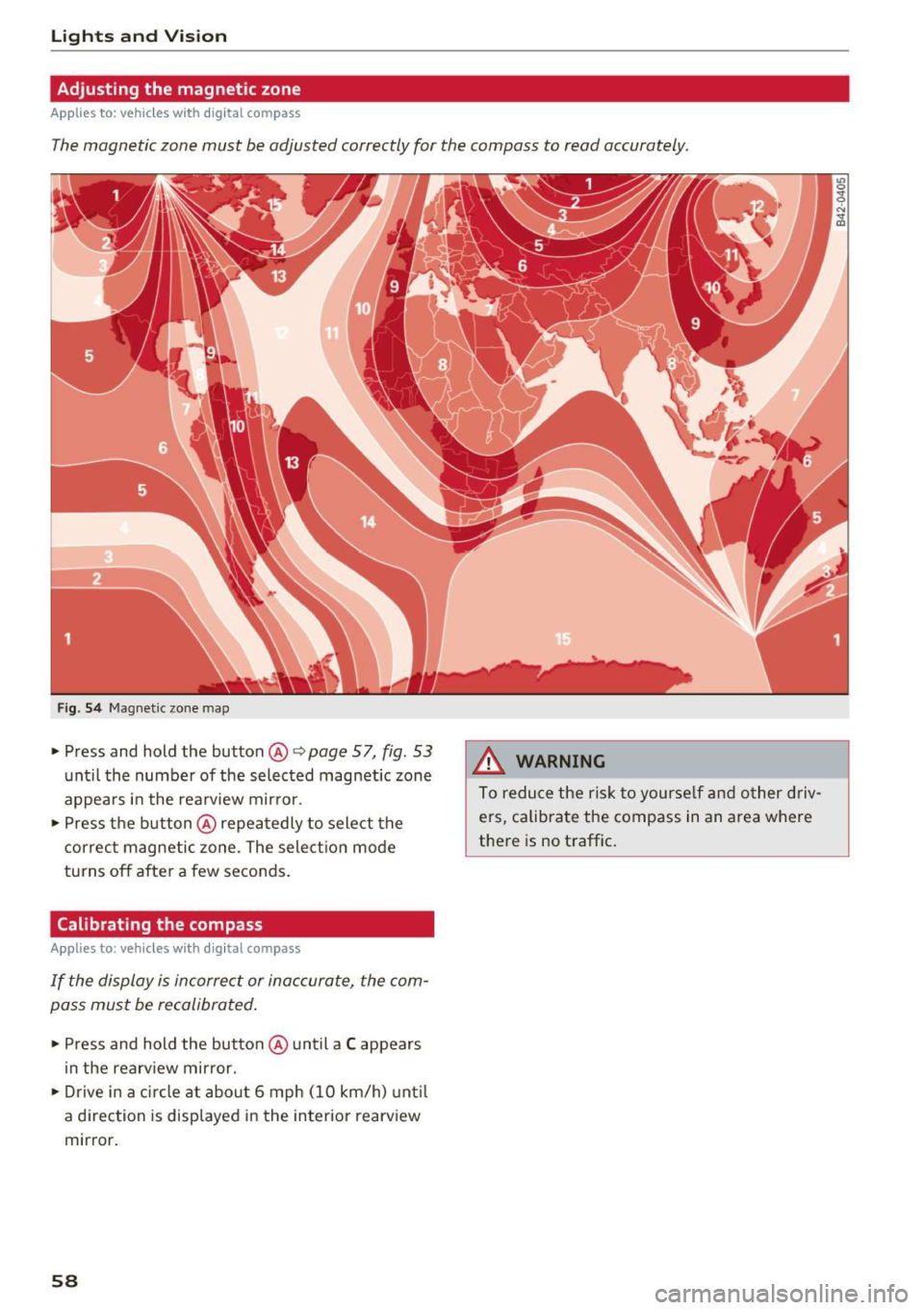
Adjusting the magnetic zone
Applies to: ve hicles w ith d ig ital compass
The magnetic zone must be adjusted correctly for the compass to read accurately.
Fig. 54 Magnetic zone map
• Press and hold the button@~ page 57, fig. 53
unt il the number of the selected magnetic zone
appears in the rea rview mir ror .
• Press the b utton @repeatedly to select the
correc t magnetic zone . The sele ct ion mode
turns off after a few seconds .
Calibrating the compass
App lies to: ve hicles with d ig ital compass
If the display is incorrect or inaccurate, the com
pass must be recalibrated .
• Press and hold the button @ until a C appears
in the rearv iew mirror.
• Drive in a circle at about 6 mph ( 10 km/h) unt il
a d irec tion is displayed i n the in terior rearv iew
mirror .
58
A WARNING
To reduce the ris k to yourse lf and o ther driv·
e rs, calibra te the compass in an area where
there is no traffic .
Page 61 of 402
u (0 ...... N r--. N ...... 0
0
:E
General information
A WARNING
See¢ page 256, Driving safety for important
information, tips, suggestions and warnings
that you should read and follow for your own
safety and the safety of your passengers.
Front seats
Power seat adjustment
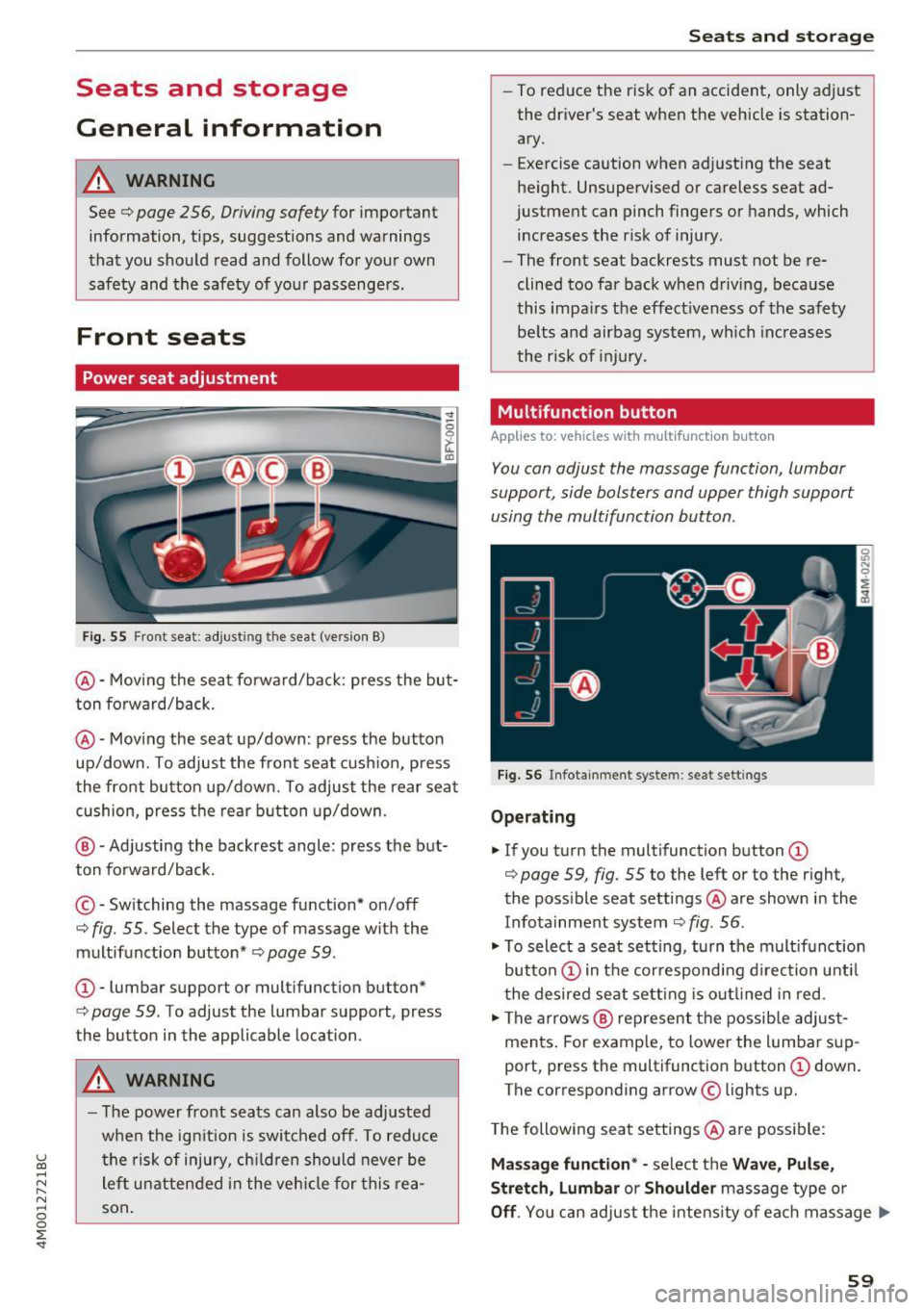
Fig. 55 Fro nt seat: adjus ting the seat (ver sion B)
@ -Moving the seat forward/back: press the but
ton forward/back.
@ -Moving the seat up/down : press the button
up/down. To adjust the front seat cushion, press
the front button up/down. To adjust the rear seat cushion, press the rear button up/down .
@ -Adjusting the backrest angle : press the but
ton forward/back.
© -Switching the massage fun ction* on/off
c::> fig. 55. Select the type of massage with the
multifunction button*
c::> page 59 .
CD-lumbar support or multifunction but ton*
c:> page 59 . To adjust the lumbar support , press
the button in the applicable location .
A WARNING
- The power front seats can also be adjusted
when the ignition is switched off. To reduce
the risk of injury, children should never be
left unattended in the vehicle for this rea
son.
Seats and storage
- To reduce the risk of an accident, only adjust
the driver's seat when the vehicle is station
ary.
- E xercise caution when adjusting the seat
height. Unsupervised or careless seat ad
justment can pinch fingers or hands, which
increases the risk of injury .
- The front seat backrests must not be re
clined too far back when driving, because
this impairs the effectiveness of the safety
belts and airbag system, which increases
the risk of injury.
Multifunction button
Applies to : vehicles wi th mult if un ction b utto n
You can adjust the massage function, lumbar
support, side bolsters and upper thigh support
using the multifunction button .
Fig. 56 Infotainment syste m : seat sett ings
Operating
"'If you turn the multifunction button CD
c::> page 59, fig. 55 to the left or to the right,
the possible seat settings @ are shown in the
Infotainment system
c::> fig . 56 .
.,. To select a seat setting, turn the multifunction
button
CD in the corresponding direction until
the desired seat setting is outlined in red.
.,. The arrows @ represent the possible adjust
ments. For example, to lower the lumbar sup
port, press the multifunction button
CD down.
T he corresponding arrow © lights up.
The following seat settings @ are possible:
Massage function* -select the Wave, Pulse,
Stretch, Lumbar or Shoulder massage type or
Off. You can adjust the intensity of each massage ..,.
59
Page 82 of 402
Driving
engaged, for examp le when you notice that the
next traffic light is red . This produces an engine
braking effect, wh ich helps to protect the brakes
and tires and reduces the emissions and fuel con
sumpt ion to zero (fuel shut-off during decelera
tion) .
Shift efficientl y
Upshifting earlier is an effective way to save fuel.
Staying in a gear too long uses fue l unnecessari
ly .
Press down on the acce lerator peda l slowly and
avoid "k ick -down".
Avoid full acceleration
You sho uld rarely t ravel a t the maximum vehicle
speed. High speeds cause a disp ropor tionately
h igh increase in fuel consumption, emissions and
traffic noise . Driving more slowly saves fue l.
Reduce idling time
The Start/Stop system* helps to reduce the id ling
time automatically. In vehicles wi tho ut the Start/
Stop system*, it is efficient to switch the engine
off when stopped at rai lroad crossings and long
red lights . Stopping the engine for 30 -40 sec
onds already saves more fuel than the amount of
extra fuel needed to restart the eng ine.
I t takes a very long time in idle to wa rm the en
gine up to operating temperature . Wear and
emissions are especially high in the wa rm -up
phase. Therefore, yo u should begin driving im
mediately after starting the engine. Avoid high
RPMs while do ing th is .
Have ma intenance performed regularly
By having maintenance performed regu larly on
your veh icle, you can help to reduce f uel con
sumpt ion before yo u even start to dr ive. The
maintenance condition of your vehicle not only
affects traffic safety and long -term value but a l
so impacts f uel consumption . A poorly main
tained engine can lead to f uel consumpt ion that
is 10% higher tha n normal.
80
Avoid short trips
The eng ine and exh aust clean ing syste m mus t
r each their op tima l operating temperatu re to ef
fectively reduce consumption and emissions.
A cold engine uses a d isp roportion ately high
amoun t of fue l. The e ngine re aches opera ting
temperat ure and cons umption norma lizes on ly
after approximate ly 2.S mi les ( 4 km).
Check the tire pressure
To save fue l, ma ke sure the t ires are always in
flated to the corre ct press ure
~ page 343. The
f uel consumpt ion c an increase by S% if the p res
s ur e is only 0 .S bar too low. Due to the inc reased
rol ling resistance, low tire pressures w ill also
l ead to greater tire wear and will affect driving
behavior.
Do not drive on winter tires year -round, as this
will consume up to 10% more f ue l.
Eliminate unnecessary weight
Since eve ry po und of ext ra weight increases f uel
consump tion, a quick inspect io n of the luggage
compartment may be wo rth it to avoid unneces
sary weight .
When not be ing used, a roof ra ck sho uld be re
moved to decrease the w ind resis tance of the ve
hicle . This will save yo u approx ima tely 12% fue l
at speeds from 62 -7S mph (100 -120 km/h) .
Save energy
The engine d rives the generator, which generates
electri city; the f uel consumpt ion also increases
with t he deman d for e lec tricity . T he refore, sw itch
electrica l eq uipment o ff when you no longe r
need it . Examples of eq uipment that uses a lot of
energy are air blowers at a high setting, the rear
window defogger and seat heating* .
CJ) Note
Do not leave engine idling unattended after
starting. If warning lights s hould come on to
i ndicate imprope r operation, they would go
unheeded. Extended idling also prod uces
h eat, which could result in overheating or
other damage to the vehicle or othe r proper
ty .
Page 85 of 402
u co ...... N r-... N ...... 0
0
:E: '
See the information in r:!:> page 84, Start/Stop
system.
A WARNING , ~
To reduce the risk of poisoning, never allow
the engine to run in confined spaces.
-
@ Note
Avoid high engine speed, full throttle, and
heavy engine load if the engine has not
reached operating temperature yet. You could
damage the engine.
@ For the sake of the environment
Do not let the engine run while parked to
warm up. Begin driving immediately. This re
duces unnecessary emissions.
(D Tips
-Some noise after starting the engine is nor
mal and is no cause for concern.
- If you leave the vehicle with the ignition
switched on, the ignition will switch off af
ter a certain amount of time. Make sure that
electrical equipment such as the exterior
lights are switched off.
Starting the engine
.,. Bring the vehicle to a full stop.
.,. Press the
I STAR T ENGINE STOPI button
r::!:> page 82, fig . 86 .
Emergency off function*
If it is absolutely necessary, the engine can also
be turned off while driving at speeds starting at
4 mph (7 km/h) . To switch the engine off, press
the
! START ENGINE STOPI button twice in a row
briefly or press and hold for longer than two sec
onds.
A WARNING
- Never turn off the engine before the vehicle
has come to a complete stop. The full func
tion of the brake booster and the power
steering is not guaranteed. You must use
Driving
more force to turn or brake. Because you
cannot steer and brake as you usually
would, this could lead to accidents and seri ous injuries .
- Always take the key with you whenever you
leave your vehicle. Otherwise, the engine
could be started or electrical equipment
such as the power windows could be operat
ed. This can lead to serious injury.
- For safety reasons, always park the vehicle with the selector lever in the P position .
Otherwise, there is the risk that the vehicle
could roll unintentionally .
(D Note
If the engine has been under heavy load for
an extended period of time, heat builds up in
the engine compartment after the engine is
switched off and there is a risk of damaging
the engine. For this reason, let the engine run
for at idle for approximately two minutes be
fore shutting it off.
(D Tips
For up to 10 minutes after stopping the en
gine, the radiator fan may turn on again auto
matically or it may continue to run (even if
the ignition is switched off) for the following reasons :
- The coolant temperature is increasing due
to trapped heat .
- If the engine is warm and the engine com
partment also heats up from strong sun
light.
- Applies to: vehicles with diesel particulate
filter: The emissions control system is heat
ed through the regeneration process, even if
the engine has not reached its operating
temperature yet .
Messages
Engine running. Warning! Turn off ignition be
fore leaving vehicle
This message appears and a warning tone sounds if you open the driver's door when the engine is
running . .,._
83
Page 88 of 402
Driving
[jj indicator light appears in the instrument clus
ter disp lay, the engine will not be stopped, for
examp le in the follow ing s ituations:
- T he eng ine has not reached the minimum re
quired temperature for Start/Stop mode .
- The inter io r temperature selected by the cli-
mate contro l system has not been reached.
- The outs ide temperature is ext remely high/low.
- The w indshield is being defrosted .
- The vehicle battery charge level is too low .
- The steering wheel is turned at a sharp angle or
is mov ing.
- After engaging the reverse gear .
- On sharp inclines.
-At high a ltitudes.
Engine automaticall y restarts
The standard Start/Stop mode will be cance led
during a stop phase in the fo llow ing s ituations.
The engine resta rts wit hout any action by the
d river.
- The vehicle rolls, for examp le while on a s lope.
- The inter ior temperature differs from the tem-
perature se lected in the A/C system.
- The w indshield is being defrosted.
- The brake pedal is pressed several times in a
row.
- The vehicle battery charge level is too low.
- Power consumption is high.
The engine can tu rn off again when the condi
tions for Start/Stop mode are met .
Ignition is switched off automatically
To prevent the veh icle bat tery from d rain ing, the
ign it ion wi ll switch off a utomat ica lly under the
following conditions:
- The Sta rt/Stop system has stopped the eng ine .
- The vehicle is stationary.
- You left the vehicle and the eng ine was not re-
started within approximate ly 30 seconds.
I f this happens, you wi ll see the message
Igni
tion turn s off automaticall y in the instrument
cluster and the activated low beams are replaced
by the parking lig ht. The parking lights will
sw itch off after approx imately 30 minutes or
when you lock the vehicle.
86
The ignition also sw itches o ff when you lock the
vehicle from the outside during a stop phase.
If t he Start/Stop system has not tu rned off the
engine or if yo u have switched the S tart/Stop sys
tem off manually, the ignition wi ll not be auto
matically switched off and the engine will contin
u e to run
Q .&. .
_& WARNING
To reduce the risk of poisoning, never allow
the engine to run in confined spaces.
(D Tips
- If you leave the ve hicle with the D/S or R se
lector lever position engaged, the parking
brake is automatically set.
- If you select the D or N selector lever posi
t ion after sh ifting into reverse, the vehicle
must be driven faster than 6 mph (10 km/h)
in order fo r the engine to switch off again .
Manually switching the Start/Stop system
off /on
Applies to: vehicles with Start/Stop system
If you do not wish to use the system, you can
switch it off manually.
-- -- - --=-
,__ -~-----__ ...
~. ~- • - ,,,.. ~ .. 'l> '* A ·- -- ~ -
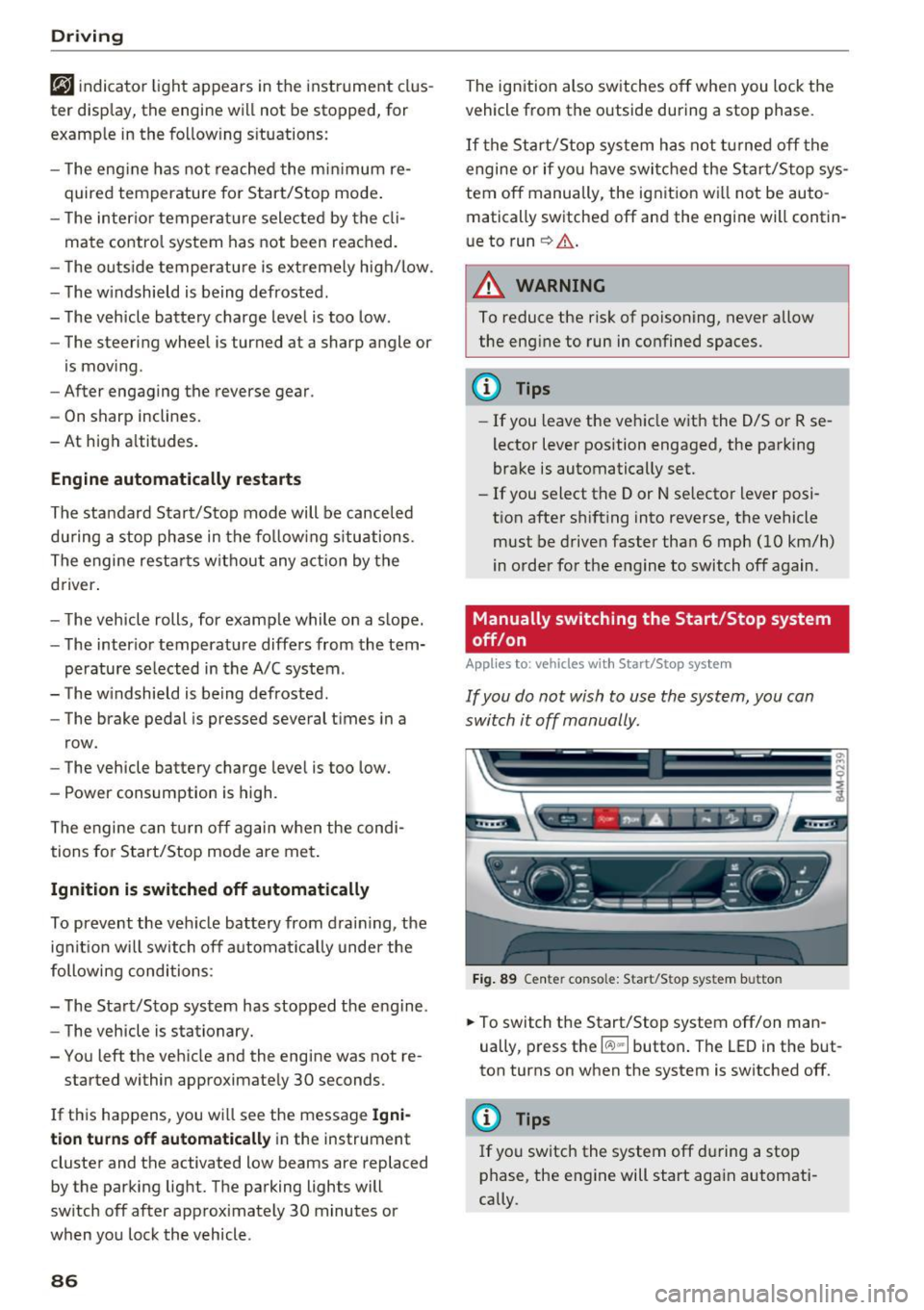
Fig . 89 Ce nter console: Start/Sto p system button
-
.,. To switch the Start/Stop system off/on man
ually, press t he
l(:.l) .. I button . The LED in the but
ton turns on when the system is switched off.
@ Tips
If you switch the system off du ring a stop
phase, the engine will start aga in automati
cally.
Page 91 of 402

u co ...... N r-... N ...... 0
0
:E: '
-If you do not begin driving immediately or
the engine stalls after releasing the brake pedal, your vehicle may begin to roll back
ward . Press the brake pedal or set the park
ing brake immed iately.
- The intelligent technology of hill hold assist
cannot overcome the lim itations imposed by
natural physical laws. The increased comfort
offered by hill hold ass ist should not cause
you to take safety risks .
- Hi ll hold assist cannot hold the veh icle in
place on all hills (for example, if the ground
is slippery or icy).
- To reduce the risk of an accident, always
make sure the vehicle is situated safely
wh ile stat ionary.
Off road driving
General information
The electronic stabilization contro l (ESC) func
tions were enhanced for driving offroad. Offroad
mode can be activated when driving in situat ions
where slippage or a differential lock function is
necessary
Q page 149. The hill descent ass ist is
a lso available, which automatically brakes the ve
hicle and maintains a constant speed as a result
~page 150. In addition, your Audi prov ides con
tinuous all wheel drive.
H owever , your Aud i is not a purely offroad vehi
cle . Your vehicle was not designed to d rive unde r
extreme ope rating conditions such as driving in
an expedition style.
Only drive in terrain that is suitable for the vehi
cle and your driving ability . Never take any un
necessary risks!
Before driving offroad
- Check the eng ine oil level, the tire pressure, the
coolant level and the fluid level in the washer
fluid reservoir .
- Store pieces of luggage and other objects in the
luggage compartment and secure them from
s li ding out of place.
Driving
After driving offroad
-After driving offroad, remove branches and
other debris from the radiator grille, under
body, and wheels . Look especially for foreign
objects (such as stones) that may be stuck in
the tire tread.
- Clean the vehicle body and underbody and in
spect the vehicle for possible damage.
- Clean the windows, headlights, tail lights and
the license plate if they are dirty.
- Per form a brake test (especially after driving
through water).
_& WARNING
- Be especially cautious and aware when driv
ing under difficu lt cond it ions and when off
road. Veh icle damage and injuries may occur
when dr iv ing at excessively high speeds or
with incorrect driving maneuvers.
- Always adjust your speed and driving style
to the roads, terrain, traffic and weather
conditions . Drive especially slowly if there is
low visibility when offroad.
- Please note that the wheels can sp in more
and the vehicle can swerve when in offroad
mode, espec ially when the road is slippery
or has loose surface material.
- Driving stability is reduced when in offroad
mode.
@ For the sake of the environment
Avoid harming the environment and show
consideration for nature .
(D Tips
Only drive where it is permitted and always
stay on the prov ided roads and paths .
Explanation of technical terms
The following data is based on idea l conditions .
T he values may vary depending on the load,
ground composition and the environment. The
driver is therefore responsible for deciding
whether a vehicle can hand le a specific situation
¢ £ . ~
89
Page 100 of 402
Trailer towing
Trailer towing
Driving with a trailer
General information
Your Audi was designed primarily for passenger
transportation.
If you plan to tow a trailer, please remember that
the additional load will affect durability, economy and performance.
Trailer towing not on ly places more stress on the
ve hicle, it also ca lls for more concentration from
the dr iver.
F or this reason, always follow the operating and
driving instructions provided and use common
sense.
@ Note
If you are going to tow a trailer, you must ac
tivate the tra ile r operation mode
¢page 100.
Technical requirements
Traile r hitch
Use a weight-carrying hitch conforming to the
gross trai ler weight. The hitch must be suitab le
for your ve hicle and tra iler and must be mounted
securely on the vehicle 's chassis at a
technically
sound
locat ion . Use on ly a trailer hitch with a re
movable ba ll mount . Always chec k w it h t he t rail
er hitch man ufactur er to make s ure t hat you a re
using the co rrect hi tc h.
Do not use a bumper hitch.
The hitch m ust be installed i n such a way that it
does not interfere with the impact -absorbing
bumper sys tem . N o mod ificat ions should be
made to the vehicle exhaust and b rake systems .
Fr om t ime to t ime, che ck t hat all hitch mo unti ng
bol ts rem ain securely faste ned.
W hen you are not tow ing a tra iler, remove the
tra ile r hitc h ba ll mount . This prevents the hitch
from ca using damage shou ld your veh icle be
s truck from behind¢ &..
98
Trailer brakes
If your trailer is equipped wi th a bra king sys tem,
c h ec k t o be sure that it con forms to all regu la
tions.
The trailer hydrau lic br ake system mus t not be
directly connecte d to the vehicle's hydr auli c
brake system ¢&. .
Safety chains
Always use safety chains between your vehicle
and t he tra ile r.
Trailer lights
Trailer lights must meet all regulations. Be sure
to check w ith your author ized Audi dealer for cor
r ect wir ing , sw itches and relays .
Mirrors
If you are unab le to see the traffic behind you us
i ng the regular outs ide mirrors, then you
must in
stall extended mirro rs. It is important that you
always have clear vision to the rear.
A WARNING
-
- After remov ing the tra iler hitch, do not
sto re it in your vehicle . In case of sud den
braking , th e hitch co uld fl y forwar d and i n
jure you o r yo ur passenge rs.
- I f a tra ile r has e lectr ica l brakes p lease no te
t h at the se brakes are not ac tivated by the
fact ory-fi tted contro l uni t - r isk of accident!
- N ever i nst all a "we igh t distribut ing" or
"lo ad equ alizing" trailer hi tch o n yo ur veh i
cle. The vehicle was not desig ned fo r these
kinds of trailer hitches. The hitch attach
ment can fai l, ca us ing the tra iler to tear
loose from the vehicle .
- The Gross Veh icle Weight Rating for your
veh icle, found on the safety compliance la
be l on the driver's s ide B -pillar, m ust never
be exceeded under any circumstances. Ex
ceed ing the Gross Vehicle Weight Rati ng of
your veh icle is likely to damage yo ur vehicle,
and such damage will not be covered by
your Limi te d N ew Vehicle War ranty. Exceed
ing the G ros s Ve hicl e W eight Ratin g will al-
so ch ange the pe rform ance and ha ndling .,._
Page 101 of 402
u co ...... N r-... N ...... 0
0
:E: '
cause a crash resulting in serious injury or
death.
Operating instructions
Trailer towing weights
The maximum permissible unbraked trailer
weight is 1,650 lbs (750 kg) .
The maximum permissible braked trailer weight
is:
- Q7 2.0: 5,500 lbs (2,500 kg)
- Q7 3 .0: 7,700 lbs (3,500 kg)
These specifications apply when driving on roads having an incline of less than 12% .
Permissible tongue load
For best vehicle handling under these changed
conditions, adjust the trailer load so that the
tongue load is at the maximum allowable or
slightly lower . You can get an approximation of
the tongue load with a bathroom scale or you can
measure the load at a trucking company or
weighing station.
The maximum permissible load on the ball hitch may not exceed:
- Q7 2.0: 550 lbs (250 kg)
- Q7 3 .0: 770 lbs (350 kg)
It is recommended to use the maximum permis
sible load. Please also observe the information
¢page 343, ¢page 347.
Trailer load distribution
Be sure the load in the trailer is held securely in
place to prevent it from shifting forward, back
ward or sideways.
Never allow a passenger to ride in a trailer¢.&.
in Messages on page 100.
Ball mount
The trailer hitch may only be used with suitable ball mount and ball. Installation of the hitch ball
must be carried out in accordance with the manu
facturer's instructions .
Trailer towing
Engine cooling system
Towing a trailer makes the engine work harder. It
is important that the cooling system's perform
ance is up to the additional load. Make sure that
the cooling system has enough fluid.
Tire pressure
When towing a trailer, inflate the tires of your
vehicle to the tire pressure listed under "Full
load" on the label <:!;>
page 343. Inflate trailer
tires to trailer and tire manufacturers' specifica
tions.
Lights
The headlight settings should be checked with
the trailer attached before driving off. Check to
make sure both vehicle and trailer lights are
working properly.
Safety chains
Be sure trailer safety chains are properly connect
ed from the trailer to the hitch on the vehicle .
Leave enough slack in the chains to permit turn
ing corners. When you install safety chains, make
sure they will not drag on the road when you are
driving.
The chains should cross under the trailer tongue
to prevent it from dropping in case of separation
from the hitch.
Setting drive select(air suspension)*
Make sure the vehicle is on a level surface before
hitching the trailer and before adjusting the
tongue weight. The driving mode must be in
Au
to or Comfort ¢page 134, ¢ (D
If you would like to drive in the Dynamic driving
mode, then you must select this mode before
hitching the trailer and before adjusting the
tongue weight. Please note that your vehicle will
lower and the ground clearance is reduced.
If you have to drive through difficult road condi
tions, you can raise the vehicle again after hitch
ing the trailer or after adjusting the tongue
weight
¢ page 136.
(D Note
Vehicles with air suspension*:
99
Page 102 of 402
Trailer towing
- Changes in temperature or load can affect
the height of the vehicle .
- Always se lect
Auto or Comfort mode. Ot h
erwise, the tongue load specified for your
vehicle will no longer be applicable.
Messages
Driving with a trailer requires extra caution .
Weight distribution
Towing a loaded trailer with an empty car res ults
i n a hig hly unstable dist ribution of weight. If this
cannot be avo ided, drive at ve ry low speeds o nly
to avoid the risk of lo sing s teeri ng con trol.
A "balanced" rig is eas ie r to operate and cont rol.
T his means that the tow veh icle should be loaded
to the exte nt poss ible a nd permiss ible , while
keep ing the tra ile r as lig ht as possib le unde r th e
circumstances . Whenever possible, transfer
some cargo to the l uggage compa rtment of the
tow vehicle whi le observ ing tongue load req uire
ments and ve hicle loading considerat ions.
Speed
T he higher the spee d, the more d ifficult i t be
comes for the drive r to co ntro l the rig. Do not
drive at the maximum permissible speed. Reduce
your speed even more if load, weather or w ind
conditions a re unfavorable -part icularly when
going downhill.
Re du ce veh icle spee d
immediately if the trai le r
shows the s lightest sign o f swaying.
Do not try
to stop the sway ing by accele rating .
Observe speed lim its. In some areas, speeds for
ve hicles towing trai lers are lower than for reg ular
veh icles.
A lways app ly b rakes early. When dr iv ing down
hi ll, shift into a lower gear to use the engine
braking effect to slow the veh icle. Use of the
brakes a lone can cause them to ove rheat and fail.
Air suspension*
If you are connecting a trailer to a fa cto ry -ins tal
led trai ler hitch, trai ler mode a utomat ic all y
switches on in the ai r suspensio n. This will limit
the reg ulation by the a ir s usp ension whi le dr iv -
100
ing . If you want to swi tch off tra iler mode wh ile
driving, for example when using a bicycle rack system, se lect in the Infota inment system :
IM ENUI button> Vehicle > left control button>
Vehicle settings > Air suspension: trailer .
If the vehicle has a retrofitte d tra iler hitc h, the
trailer mo de might not switch on automatically .
In this case, switch the tra iler mode on before
hitc hing the tra iler and switch it off after un
hitc hing the tra ile r.
Coolant tempe rature
The coo lant tempe rat ure gauge c:::> page 11 m ust
be obse rved caref ully. The coolant temperature
can increase if you drive o n long inclines in a low
gear at high eng ine speeds. Reduce your speed
i mmediately if the LEDs in the top part of the d is
play turn on .
Fo r more information about indicator lights, re
fer to.
c:;, page 26.
A WARNING
Anyone not prope rly res trained in a moving
v e hicle is a t a much greater risk in an acci
d ent. Never l et anyon e ride in your car who is
n ot prope rly we aring the rest rain ts provide d
by Au di.
Trailer towing
information
' Important to know
-
You r vehicle handles d ifferently when towing a
t railer becau se o f th e ad dit iona l we igh t and dif
f erent we igh t d istribu tion. S afety, per forman ce
and eco nomy will g reatly depend on how caref ul
l y you load your trai ler and operate yo ur rig .
B efo re yo u ac tually tow yo ur trailer, pra ct ice
tu rning, s to p ping and b acking up in an are a away
from traffic. Keep pra ct icing u nti l yo u h ave be
come comp lete ly familiar w ith the way yo ur vehi
cle-tra ile r combination behaves and responds .
Bac king up is diff icul t and requ ires pra ctice.
Backing up w ith a trailer genera lly req uires steer
ing action opposite to that when backing up your
vehicle witho ut a t railer .
Page 105 of 402

u co ...... N r-... N ...... 0
0
:E: '
your speed and the distance between your
vehicle and other vehicles.
- For safety reasons, cruise control should not
be used in the city, in stop-and-go traffic, on
winding roads and when road conditions are poor (such as ice, fog, gravel, heavy rain and
hydroplaning), because th is increases the
risk of an accident.
- Switch the cruise control off temporar ily
when driving in turn ing lanes, h ighway exits
o r in construction zones.
- Please note that unconsciously "resting"
your foot on the accelerator pedal prevents the cruise control from b raking. This is be
ca use p ressing the acce le ra to r peda l ove r
rides the cruise contro l system.
- If a brake system ma lf u nction such as over
heating occurs when the c ruise contro l sys
tem is switched on, the braking function in
the system may be switched off . The rest of
the cruise control system functions remain act ive as long as the
@;\l)Mj (USA models) /
Bl (Canada models) indicator light is on.
Before driving downhill a long distance on a
steep hill, decrease your speed and select a
lower gear. Th is makes use of the eng ine
braking effect and relieves the brakes.
(D} Tips
The brake lights turn on when the brakes are app lied a utomat ically.
Changing the speed
Applies to: vehicles with cruise control system
.,. To increase/decrease the speed in 1 mph (1
km/h) increments, br iefly
tap the lever toward
0 10 ¢ page 102, fig. 96 to the first level.
.,. To inc rease/decrease the speed in 5 mph (10
km/h) i ncrements, br iefly
tap the lever toward
0 10 to t he second level.
.,. To increase or decrease the speed quickly,
hold
the lever toward 0 10 to the first or second
level until the desired speed is reached .
Ass ista nce sys te m s
Overriding the speed
Applies to: vehicles with cruise control system
You can press the acce le rato r pedal to increase
you r speed, for ex ample if you want to pass
someone . The speed you set ear lier will resume
as soon as you release the acce lerator pedal.
However, if you are exceeding the stored speed
by a considerable amount fo r a long time, the
c ruise contro l system will tempora rily switch off.
The
1Q;jl )~ij (USA mode ls) 1111 (Canada mode ls) in
dicator light in the instrument cluster turns
off
and the stored speed is maintained.
Preselecting a speed
Applies to: vehicles with cruise control system
You can pre-select your desired speed when the
vehicle is stationary.
.,. Switch the ignit ion on.
.,. Pull the lever into position
(D ¢ page 102,
fig.
96.
.,. To increase or decrease the speed, tap the lever
toward
0 10 .
This function makes it possible, fo r example, to
save the speed you want before driving on the
highway. Once you are on the expressway, acti
vate the cruise control system by pulling the lev er into position
(D .
Switching off
Applies to: vehicles with cruise control system
Deact ivating temporarily
.,. Press the brake pedal, or
.,. Press the lever toward @(not locked into
p lace)
¢ page 102, fig . 96.
Switching off completely
.,. Press the lever into position @(clicked into
place), or
.,. Switch the ignit ion off .
The speed you stored will be maintained if the cruise contro l has been switched off temporarily .
To resume the stored speed, release the brake pedal and pull the lever to position
(D . .,.
103