turn signal AUDI Q7 2017 Owner´s Manual
[x] Cancel search | Manufacturer: AUDI, Model Year: 2017, Model line: Q7, Model: AUDI Q7 2017Pages: 402, PDF Size: 100.39 MB
Page 24 of 402
Cockpit over view
Indicator lights
Description
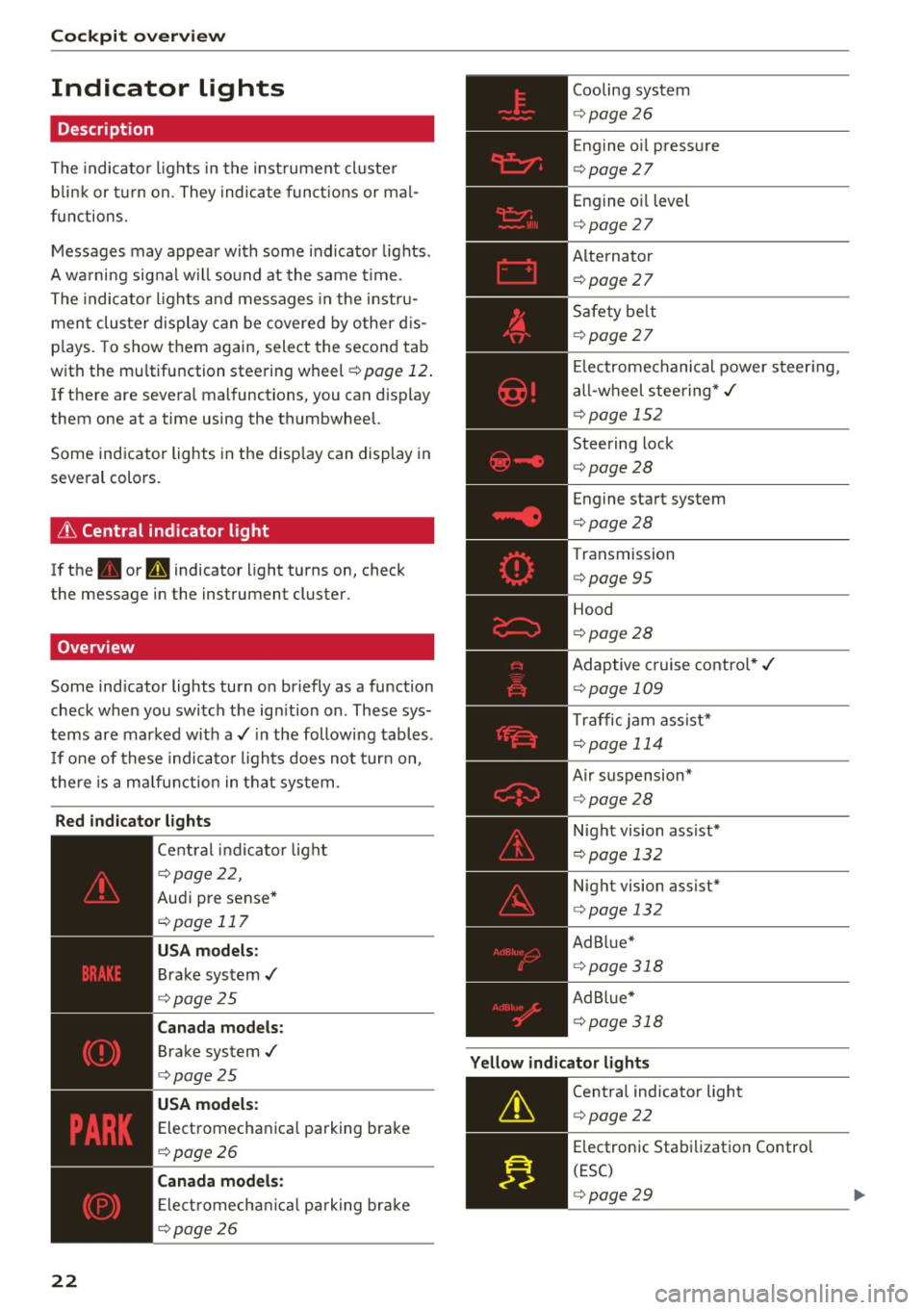
The indicato r lights in the inst rument cluste r
b link or t urn on. They indicate funct ions or ma l
functions .
Messages may appear with some indicator lights .
A wa rni ng signal w ill sound at the same time.
The indica to r lights and messages in the instru
ment cluster display can be covered by other d is
p lays. To show them again, select the second tab
with the mu ltifunction steering wheel
¢ page 12 .
If there are several malfunctions, you can display
them one at a time using the thumbwheel.
Some ind icator lights in the disp lay can display in
several colors .
& Central indicator light
If the . or Q indicator light turns on, check
the message in the instrument cluster .
Overview
Some indicator lights turn on briefly as a function
check when you switch the ign ition on . These sys
tems are marked with a./ in the following tables .
I f one of these indicato r lights does not turn on,
there is a malfunction in that system .
Red indicator lights
22
--------------
Central indicator light
r=;, page 2 2,
Aud i pre sense*
r=;, page 117
USA models :
Brake system ,/
r=;, page 25
Canada models:
Brake system .I
r=;, page 25
USA models :
Electromechanica l parking brake
r=;, page 26
C anada models:
Ele ct romecha nical park ing brake
r=;, page 26
Cooling system
r=;, page 26
Engine o il pressure
r=;, page 27
Engine oil level
¢ page 27
Alterna tor
¢ page 27
Safety be lt
¢ page 27
El ectromechanical power steer ing,
a ll-wheel steering* ,/
¢page 152
Steering lock
¢page 28
Engine start system
r=;, page 28
Transmission
¢ page 95
Hood
¢page 28
Adaptive cruise contro l* ,/
r=;, page 109
Traffic jam ass ist*
¢ page 114
Air suspension*
r=;, page 28
Night vision assist*
r=;, page 132
Night vision assist*
r=;, page 132
Ad B lue*
r=;, page 318
Ad Bl ue*
¢ page 318
Yellow indicator lights
--------------
Centra l indicator light
r=;, page 22
Electronic Stabilization Contro l
(ESC)
¢ page 29
Page 26 of 402
Cockpit over view
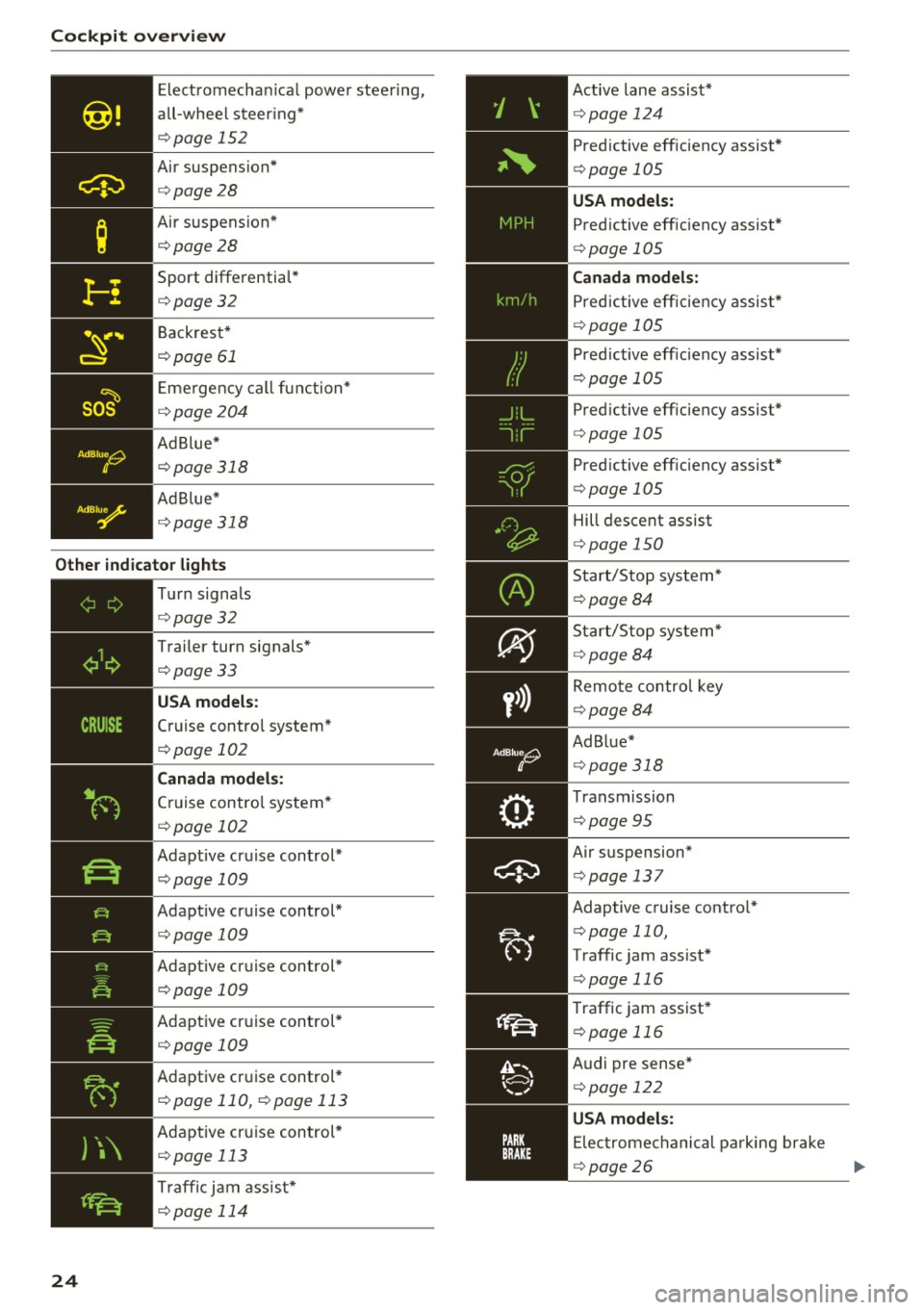
Electromechan ica l power stee ring,
all-wheel steer ing*
<=:> page 152
Air suspension*
c::>page28
Air suspension*
c::>page28
Sport differentia l*
c::> page32
Backrest*
c::> page 61
Eme rgency call function*
c::> page204
Ad B lue*
c::> page 318
Ad Blue *
c::> page 318
Other indicator lights
)\
24
- -------------Tu rn signa ls
<=:> page 32
Trailer turn signals*
c::>page33
USA models :
Cruise control system*
<=:>page 102
Canada mod els:
Cruise control system*
<=:> page 102
Adapt ive cruise control*
<=:> page 109
Adapt ive cruise control*
<=:> page 109
Adapt ive cruise control*
<=:>page 109
Adaptive cruise control*
<=:>page 109
Adaptive cr uise control *
c::> page 110, c::> page 113
Adaptive cruise control *
c::> page 113
Traffi c jam assist*
c::> page 114
Active lane assist*
c::> page 124
Predictive eff iciency assist*
<=:> page 105
USA models:
Predictive efficiency assist *
<=:>page 105
Canad a model s:
Predictive eff ic iency assis t*
<=:> page 105
Predictive eff iciency assist*
¢ page 105
Pred ictive eff iciency assist*
c::> page 105
Predictive eff iciency assist*
<=:> page 105
Hill descent assist
c::>page 150
Start/Stop system*
c::>page 84
Start/Stop system*
~page 84
Remote control key
c::> page 84
Ad Blue*
c::> page 318
Transmission
c::> page 95
Air suspension*
c::> page 13 7
Adaptive cruise contro l*
c::> page 110,
Traffic jam assist*
¢ page 116
Traffic jam assist*
c::> page 116
Audi pre sense*
<=:> page 122
USA mode ls:
Elec tromechanical parking brake
c::> page 26
Page 34 of 402
Cockpit over view
There is a malfunction in the headlights or the
light switch. Drive to an authorized Audi dealer or
author ized Audi Service Facility immed iate ly to
have the ma lfunction corrected.
.,&. WARNING
- light bu lbs are under pressure and can ex
plode when bulbs are replaced, which in
creases the risk of injury .
- With HID headlights (xenon headlights), the
high -voltage component must be handled
correctly . Othe rw ise, there is a risk of fata l
mJury.
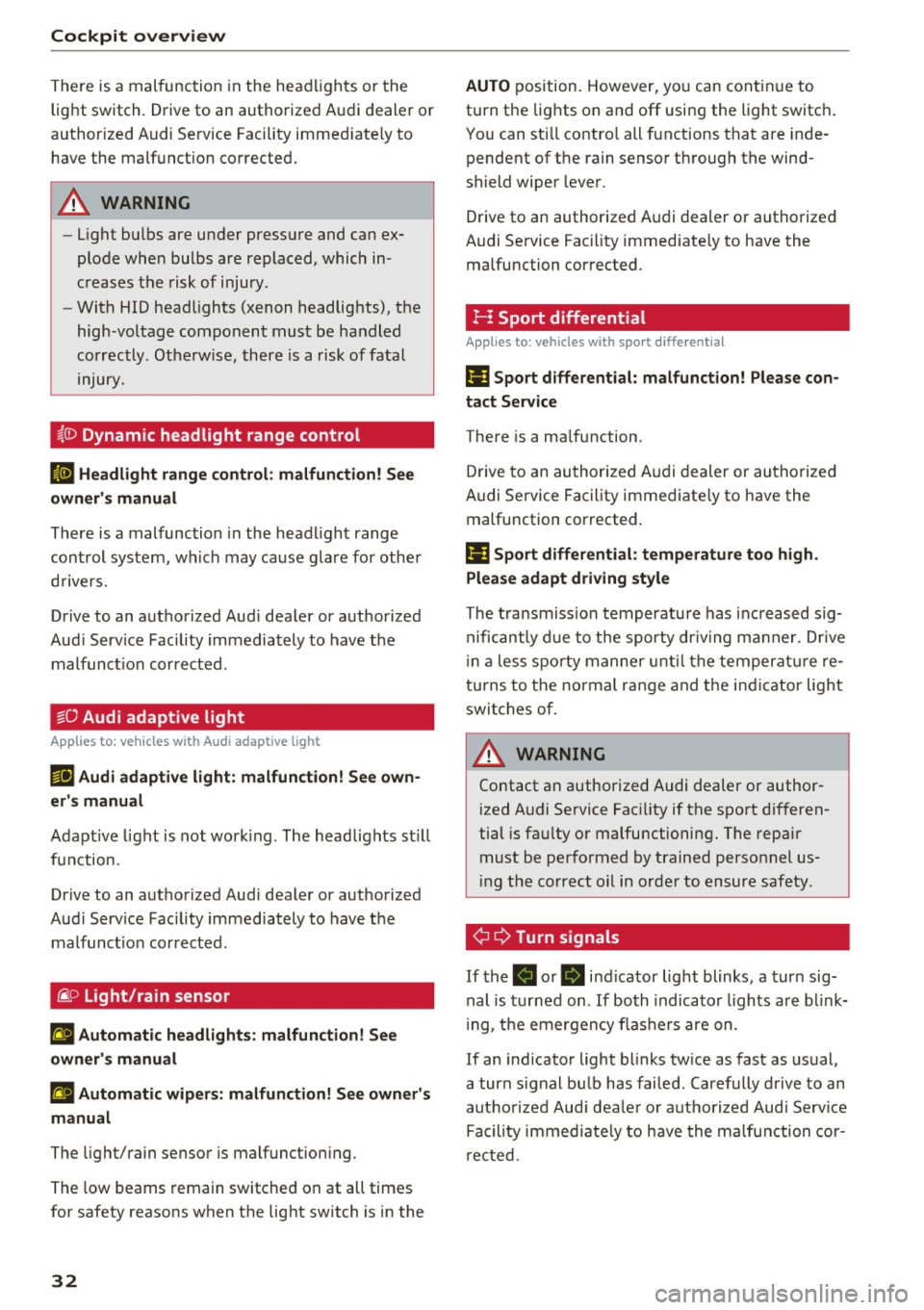
~!D
Dynamic headlight range control
II Headlight range control : malfun ction! See
owner 's manual
There is a malfunction in the headl ight range
control system, which may ca use g la re fo r othe r
d rivers.
Drive to an autho rized Aud i dea ler or authorized
Aud i Serv ice Facility immediately to have t he
malfunct io n corrected.
§0 Audi adaptive light
Applies to: veh icles with Audi adapt ive light
m;J Audi adaptive light: malfunction! See own
er' s manual
Adapt ive light is not wor king . The headlights st ill
fu nction.
Drive to an a uthorized Aud i dea ler or aut horized
Aud i Serv ice Facility immediately to have t he
malfunct io n corrected.
@.D Light/rain sensor
ral Automatic headlights : malfunction! See
owner 's manual
£I Automatic wipers: malfunction! See owner's
manual
The light/rain sensor is malfunct ion ing .
The low beams remain switched on at all times
for safety reasons when the lig ht switch is in the
32
AUTO position. However, yo u can cont in u e to
turn the lights on and off using the light switch .
Yo u can sti ll contro l all functions that are inde
pendent of the rain senso r th rough the wind
shield wiper leve r .
Drive to an authorized A udi deal er or authorized
Audi Se rvice Fac ility immed iate ly to have the
malfunction corrected .
I-I Sport differential
Applies to: vehicles with sport different ia l
Ill Sport d ifferential: malfunct ion! Please con
tact Service
T here is a ma lfunction.
Drive to an au thorized A udi dealer or au thorized
Audi Service Facility immediate ly to have the
malfunction corrected.
Ill Sport differential: temperatur e too high.
Please adapt driving style
The transmission temperatu re has inc reased sig
nificantly d ue to t he sporty dr iv ing manner. Drive
i n a less spo rty manne r unt il the temperat ure re
turns to t he norma l ran ge and t he i ndicator lig ht
switches of .
.,&. WARNING
Contact an author ized Audi dealer or author
ized A udi Service Fac ility if the spo rt differen
tial is fa ulty or malfunctioning. The repair
must be performed by trained perso nnel us
ing the correct oil in order to ensure safety .
¢¢Turn signals
If the . or B in dicator lig ht blinks , a tur n sig
nal is t urned on .
If both indica to r li ghts are bl ink
i ng, t he emergency flashers are on .
If an ind icator light blinks tw ice as fast as us ual,
a turn signal bu lb has fai led. Care fully drive to an
a uth orized Aud i dea le r o r auth orized Aud i Serv ice
Fa cil ity immed iate ly to have the malfunction cor
r ec ted .
Page 35 of 402

u co ...... N r--... N ...... 0
0
:E: '
Applies to: ve hicles wit h tra iler hitc h
The turn s ignals a re a ctivated in tra ile r mode if
the . indicator lig ht blinks.
If a turn signal on the trailer or on the veh icle
fa ils wh ile i n tra ile r mode, the indicator light w ill
not blink tw ice as fas t to indicate this .
Cockpit o verview
33
Page 36 of 402
Opening and closing
Opening and closing
Central locking
Description
You can lock and unlock the vehicle centrally . You
have the following options:
- Remote control key <=>
page 3 7,
- Sensors in the door handles" <=>
page 37,
-Lock cylinder on the driver's door <=> page 39,
or
- Interior central locking switch <=>
page 38.
Turn signals
The turn s ignals flash tw ice when you unlock the
vehicle and flash once when you lock the vehicle.
If they do not flash, then one of the doors , the
rear lid or the hood is not closed.
Automatic locking (Auto Lock)
The Auto Lock funct ion locks all doors and the
luggage compartment lid once the speed has ex
ceeded approximately 9 mph (15 km/h).
The vehicle can be unlocked if the opening func
tion in the centra l locking system sw itch is used
or one of the door handles is pulled.
In the event of a crash with a irbag deployment,
the doors will a lso automat ica lly unlock to allow
access to the veh icle.
Selective door unlocking
The doors and luggage compartment lid will lock
when they close . You can set in the Infotainment
system whether
only the dr iver's door or the en
tire vehicle should be unlocked when unlocking
<=>page 39.
Unintentionally locking yourself out
Only lock your vehicle when all of the doors and
the luggage compartment l id are closed and the
remote control key is not in the vehicle . This
he lps to prevent you from locking yourse lf out
accidentally .
The follow ing cond itions prevent you from lock
ing your remote control key in the vehicle :
34
-If the driver's door is open, the vehicle cannot
be locked by pressing the
!'.rl button on the re
mote contro l key or by touching the locking
sensor* on a door .
- If the most recently used convenience key* is
detected in the luggage compartment, the lug
gage compartment lid automatica lly unlocks
again after closing it.
- If the convenience key* that was last used is de
tected ins ide the vehicle, then the vehicle will
not be able to lock from the outside .
Closing aid on the door s*
The vehicle doors are equipped with closing aids.
When closing a door, yo u only have to let it fall
lightly into the latch. It then closes automatically
<=> &. .
A WARNING
-
-When you lock your vehicle from outs ide,
nobody - especially children -sho uld rema in
inside the vehicle. Remember, when you
loc k the vehicle from the outside the win
dows cannot be opened from the inside.
- When you leave the vehicle, always take the
ign it ion key with yo u. This will prevent pas
sengers (ch ildren, for examp le) from acci
dentally being locked in the vehicle shou ld
they accidentally press the power locking
switch in the doors.
- Do not leave children inside the vehicle un
supervised. In an emergency it would be im
possible to open the doors from the outside
w ithout the key.
- Applies to vehicles with power side door
closer*:
- When closing a door, make sure nothing
can interfere with the door. Th is could
cause serious personal inj ury.
- You can stop the door from closing at any
time by pulling on the inside or outside
door handle.
(D Tips
-Do not leave valuables unattended in the ve
hicle. A locked vehicle is not a safe!
Page 42 of 402
Opening and clo sin g
.. Insert the key in the inside slot and turn it all
the way to the right (right door) o r left (left
door).
A WARNING
Read and following all WARNINGS c::> & in De
scription on page
34.
Anti-theft alarm system
If the anti-theft alarm system detects a vehicle break- in, a udio and v isua l wa rning signals are
tr iggered . The anti-theft alarm system is act ivat
ed when the vehicle is locked as usua l.
It
switches off when the veh icle is unlocked.
I f th e alarm is tr iggered, it w ill shut off automat
ically after a certain amount of time. Switch the
ign it ion on or press the m button on the remo te
con trol key to turn off the alarm.
Luggage compartment
lid
Automatic luggage compartment lid
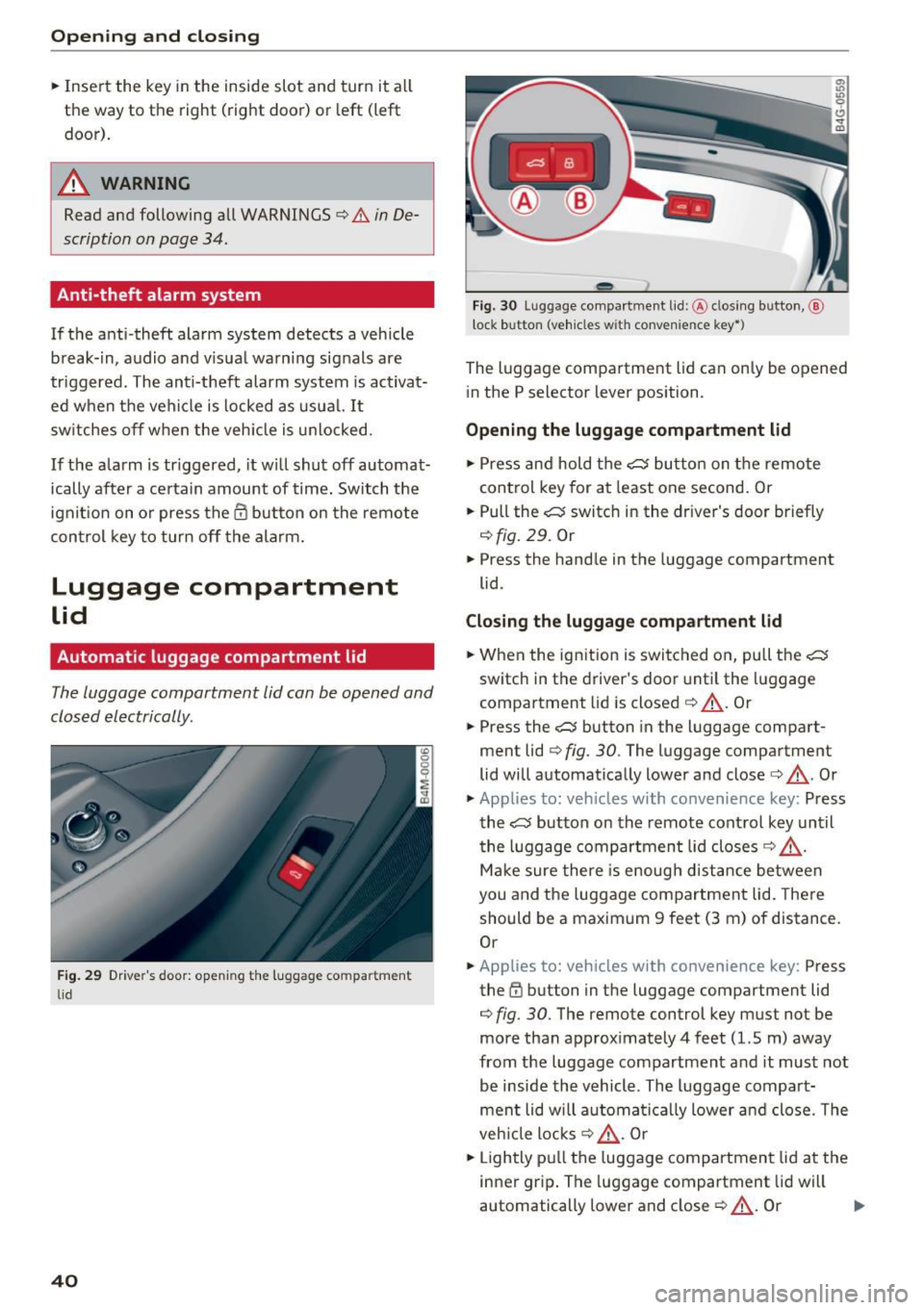
The luggage compartment lid can be opened and
closed electrically .
Fig. 29 Drive r's door: open ing the luggage co m partment
l id
40
- - --
' .;::s lil
--
F ig. 30 Luggage compa rtment lid :@ clos ing button, @
l ock button (veh icles w it h convenie nce key*)
The luggage compa rtment lid can on ly be opened
i n the P selector lever position.
Opening the luggage compartment lid
.. Press and hold the c::5 bu tto n on t he remote
control key for at least one second. Or
.. Pull the
c::5 switch in the dr iver's door briefly
c::>fig. 29 . Or
.. Press the hand le in the luggage compartment
lid .
Closing the luggage compartment lid
.. When the ign ition is switc hed on, pull the c:s
switch in the driver's doo r until the l uggage
compartment lid is closed
c::> &_ . Or
.. Press the
c::5 button in the luggage compart
ment lid
c::> fig . 30. The luggage compartment
lid will automat ically lower and close
c::> &_ . Or
.. Applies to: veh icles with co nvenience key: Press
the
c::5 button on the remote control key unt il
t he luggage compartment lid closes
c::> &_ .
Mak e sure there is e nough distance between
you and the luggage compartment lid. There
should be a maximum 9 feet (3 m) of dis tance .
Or
.. App lies to: veh icles with convenience key: Press
the ~ button in the luggage compartment lid
c::> fig. 30 . The remote control key must not be
more than approx imately 4 feet (1.5 m) away
from the luggage compartment and it must not
be inside the vehicle. The l uggage compa rt
men t lid will a utoma tica lly lower a nd close. The
veh icle locks
c::> &_ . Or
.. Lightly p ull the luggage compartment lid at the
inner grip . The luggage compartment lid wi ll
automatically lower and close
c::> &_ . Or .,,.
Page 51 of 402
u (0 ...... N r--. N ...... 0
0
:E
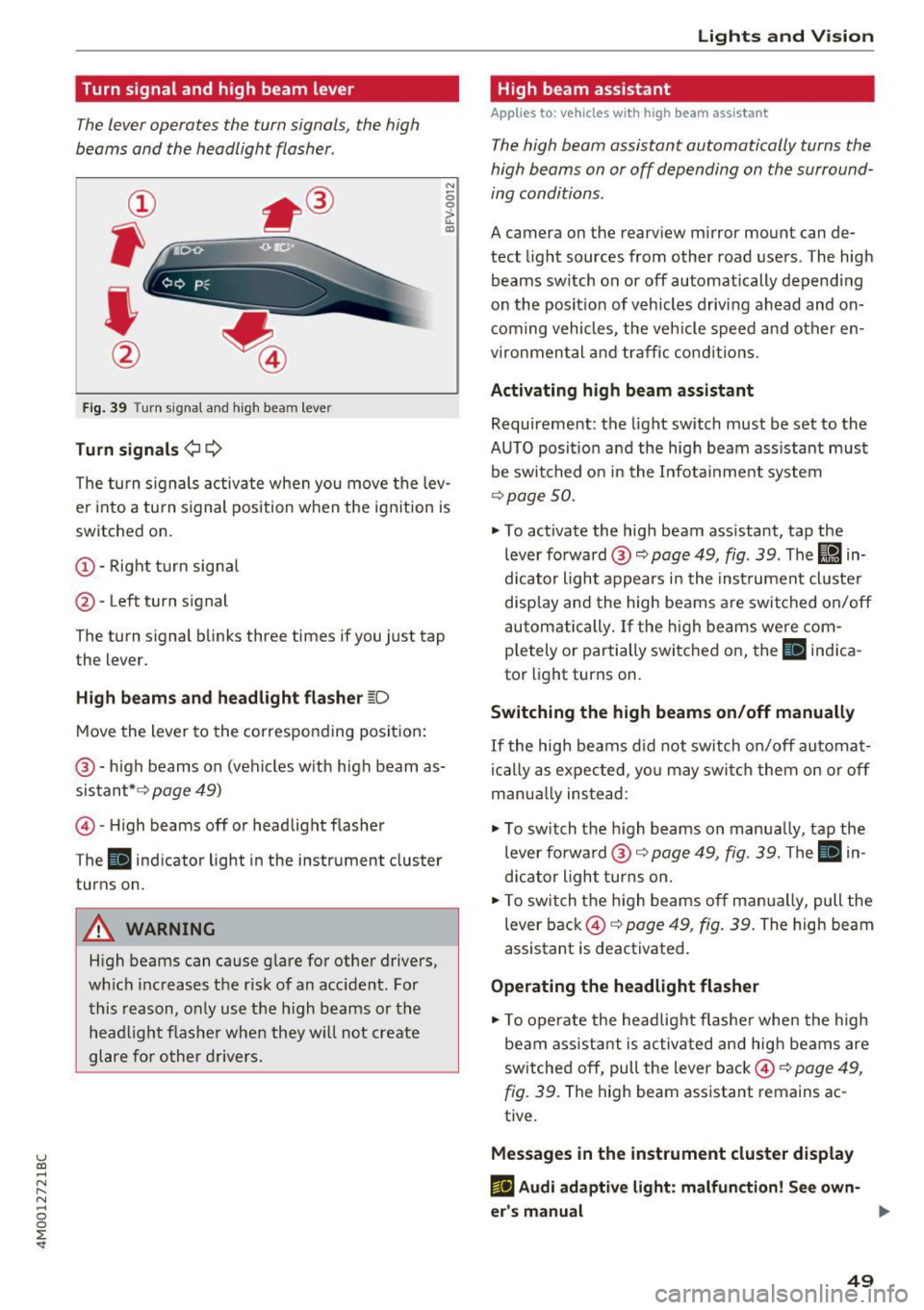
The lever operates the turn signals, the high
beams and the headlight flasher .
Fig. 39 Turn signal and high beam lever
Turn signals ¢¢
N
0 0
> u. C0
The turn signals activate when you move the lev
e r i nto a turn s ignal position when the ign ition is
switched on.
(D -Right turn signa l
@-Left turn signal
The turn s ignal blinks three times if you just tap
the lever.
High beams and headlight flasher ~D
Move the lever to the corresponding position:
@ -high beams on (vehicles w ith high beam as
sistant* ¢
page 49)
© -High beams off or headlight flasher
The
II ind icator light in the instrument cluster
turns on.
A WARNING
H igh beams can cause glare for other drivers,
which increases the risk of an acc ident. For
this reason, only use the h igh beams or the
head light flasher when they w ill not create
glare for other drivers.
Lights and V ision
High beam assistant
App lies to : vehicles wi th high beam assistant
The high beam assistant automatically turns the
high beams on or off depending on the surround
ing conditions .
A camera on the rearview mirror mount can de
tect light sources from other road users . The high
beams sw itch on or off automatically depending
on the posit io n of vehicles driving ahead and on
coming vehicles, the vehicle speed and other en
vironmental and traffic conditions.
Activating high beam assistant
Requirement: the light sw itch must be set to the
AUTO posit ion and the high beam ass istant must
be switched on in the Infota inment system
¢p age 50.
.,. To act ivate the high beam ass istant, tap the
lever forward @¢
page 49, fig . 39 . The lj!a in
d icator light appears in the instrument cluster
disp lay and the high beams a re switched on/off
automatically. If the high beams were com
p letely or partially switched on, the
II indica
to r light turns on.
Switching the high beams on/off manually
If the high beams did not switch on/off automat
ically as expected, yo u may swi tch them on or off
man ua lly ins tead:
.,. To switch the h igh beams on manua lly, tap the
lever forwa rd @ ¢
page 49, fig. 39. The II in
dicator light turns on.
.,. To switch the high beams off manually, pull the
lever back@¢
page 49, fig. 39. The high beam
assistant is deactivated .
Operating the headlight flasher
.,. To operate the headlight flasher when the high
beam ass istant is activated and high beams are
sw itched off, pull the lever back©¢
page 49,
fig. 39.
The high beam assistant remains ac
tive .
Messages in the instrument cluster display
ml Audi adaptive light: malfun ction! See own-
er's manual ..,.
49
Page 66 of 402
Sea ts and stor age
_& WARNING
- Always read and follow the applicable warn
ings
q pag e 259, Proper adjustm ent of
head restraints .
-Only remove the head restraints for the sec
ond row seats when it is necessary for in
sta lling a child safety seat~
page 295,
Child safety.
Install the head rest rai nt again
immediately once the child s afety seat is re
moved. Driv ing with the head res traints re
moved or not in the upright position in
creases the risk of serious injury .
Memory function
Description
Applies to: veh icles with memory function
Using the memory funct ion , you can qu ickly and
easi ly store a pe rsonal seat profile for the driver
and fron t passenger and recall the settings. The
memory function is controlled by t he remo te
control key and the memory buttons in the driv
er's/front passenger's* door .
The drive r's seat profile is stored aga in and as
signed to the remo te control key each time the
ve hicl e is locked. When you open the door, the
seat profi le is automatica lly recalled.
If two peo
p le use the ve hicle, it is recommended that each
person a lways uses their "own" remote contro l
key.
Two seat profiles can be stored each using the memory buttons . Once they are stored, these
seat profiles can be selected at any time.
The fo llowing settings are stored:
Remote Memory button
control
key
Driver Dri ver Front pas-
senger
Seat X X X
Steering
X X wheel*
Both exte rior
X X mirrors
*
64
Remote control key
Applies to: vehicles with memory function
The driver 's seat profile can be assigned to the
remote control key when the vehicle is locked .
.. Select in the Infotainment system: IMENUj but
ton
> Ve hicle > left control button > Vehicle
se tting s > Se ats > Driver 's seat> S tore se t
t ing s on remo te control k ey.
@ Tips
If you do not wish to have the seat profile for
another driver ass igned to the remote control
key, switch the memory f unction off in the In
fotainment system.
Memory buttons
Applies to: vehicles with memory funct ion
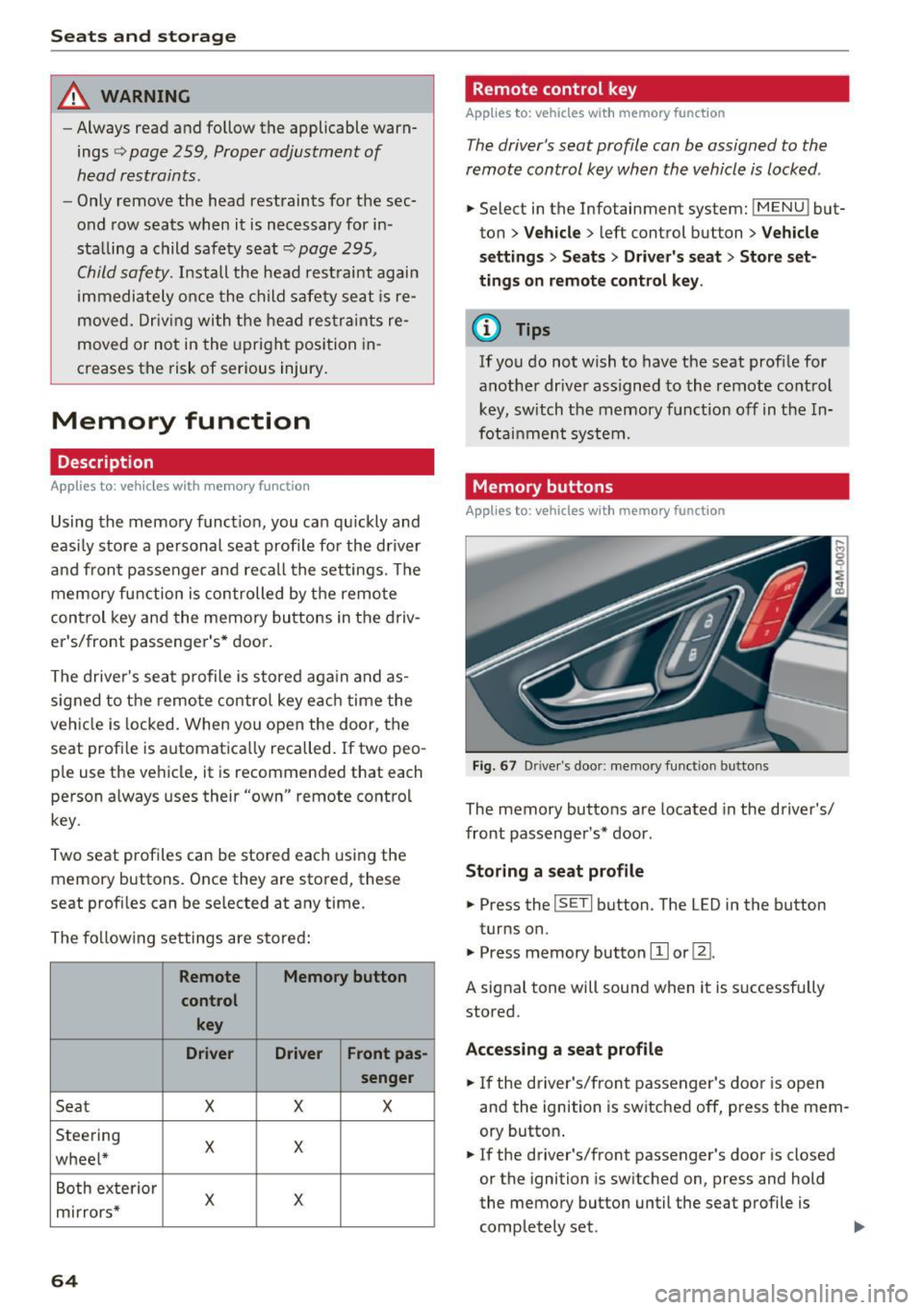
Fig . 67 D rive r's doo r: memory function b utto ns
The memory buttons are located in the driver's/
front passenger's * door .
Storing a sea t p rofile
.. Press the ISETI button . The LED in the button
turns on.
"' Press memory button
[I] or ~-
A signal tone will sound when it is s uccessfully
stored.
Acc essing a s eat profil e
"' If the driver's/front passenger's door is open
and the ignition is switched off, press the mem
ory button .
.. If the driver's/front passenger's door is closed
or the ignition is sw itched on, press and hold
the memory button until the seat profile is comp letely set. .,..
Page 90 of 402
Driving
"'Turn the engine off¢.&, .
"'Turn the steering wheel when parking on in
clines so that the wheels will roll into the curb
if the vehicle starts moving .
A WARNING
-Do not press the accelerator pedal inadver
tently if a gear is selected when the vehicle is stationary and the engine is running . Oth
erwise, the vehicle will start to move imme
diately and this could result in an accident.
- Emergency braking should only be used in
an emergency, when the normal brake pedal
has failed or the brake pedal is obstructed .
During emergency braking, your vehicle will
brake similar to heavy braking. ESC and the
associated components (ABS, ASR, EDL)
cannot overcome the laws of physics.
Around curves and when road or weather conditions are bad, a full brake application
can cause the vehicle to skid or the rear end
to swerve, which increases the risk of an ac
cident.
- If the power supply fails, you cannot set the
parking brake if it is released. In this case ,
park the vehicle on level ground and secure
it by placing the selector lever in the P posi
tion. See an authorized Audi dealer or au
thorized Audi Service Facility for assistance.
- Always take the vehicle key with you when
leaving your vehicle, even if for a short peri
od of time. This applies particularly when
children remain in the vehicle. Otherwise,
children could start the engine, release the
parking brake or operate electrical equip
ment such as power windows, which in
creases the risk of an accident .
- No one, especially children, should remain
in the vehicle when it is locked . Locked
doors make it more difficult for emergency
workers to get into the vehicle, which puts lives at risk .
{D) Tips
When stopping at a traffic signal or stopping
in city traffic, you can set the parking brake
manually. The vehicle does not have to be
held with the brake pedal. The parking brake
88
eliminates the tendency to creep when a se
lector lever position is engaged. As soon as
you press the accelerator pedal, the parking
brake releases automatically and your vehicle
starts to move¢
page 88.
(D Tips
-Occasional noises when the parking brake is
set and released are normal and are not a
cause for concern.
- The parking brake goes through a self-test cycle at regular intervals when the vehicle is
stopped . Any noises associated with this are
normal.
- If there is a power failure, the parking brake
will not set if it is released, and it will not release if it is set ¢& . See an authorized
Audi dealer or authorized Audi Service Fa
cility for assistance.
Starting to drive
Various convenience and safety functions may be
available when the vehicle begins driving, de
pending on vehicle equipment.
Starting on hills with the parking brake set
Requirement: the driver's door must be closed .
"'To start driving comfortably when on a hill, set
the parking brake and begin driving as usual.
The braking force of the parking brake does not release automatically until the wheels build up
enough driving force .
Starting on hills with hill hold assist
Hill hold assist makes it easier to start on hills.
Requirement: the driver's door must be closed
and the engine must be running.
"'To activate hill hold assist , press and hold the
brake pedal for several seconds. The vehicle
must be in an uphill direction of travel.
After releasing the brake pedal , the braking pow
er is maintained for a brief moment¢
A to pre
vent the vehicle from rolling back when starting.
During this time, you can easily begin to move
your vehicle.
111>
Page 125 of 402
u co ...... N r-... N ...... 0
0
:E: '
Description
Applies to: vehicles wit h Aud i act ive lane ass ist
Active lane ass ist (lane departure warning) de
tects lane marker lines within the limits of the
system using a camera in the w indshield .
If you
are approaching a detected lane marker line and
it appears likely that you will leave the lane, the
system wi ll warn you with corrective steering .
You can override this steering at any time . If you
pass over a line, the steering wheel will vibrate
lightly . In order for this warning vibration to oc
cur, it must f irst be sw itched on in the Infotain
ment system. Active lane assist is ready for oper
ation when the lane marker line is detected on at
l east one side of the vehicle.
The system is designed for driv ing on express
ways and highways and therefore only activates
at speeds above approximately 40 mph (65 km/
h).
Applies to: vehicles with side assist: if you acti
vate a turn s ignal when active lane assist is ready
and it classifies a lane change as critical because
of vehicles traveling alongside you or approach
ing you, there w ill be not iceable cor rect ive steer
ing short ly before you leave the lane . This will at
tempt to keep your vehicle in the lane .
Applies to: vehicles without side assist: the ready
system does not warn yo u if you activate a tu rn
signal befo re crossing the lane marker line. In
this case, it assumes that you are changing lanes
intentiona lly .
Applies to: vehicles with adaptive cruise control:
there is no corrective steering or warnings if the
system recogn izes a distinct passing maneuver.
If the conditions are met, traffic jam assist
switches on at speeds under approximately
40 mph (65 km/h)
¢ page 114.
A WARNING
- The system warns the driver that the veh icle
is leav ing the lane using corrective steer ing.
T he driver is always responsib le for keep ing
the vehicle within the lane.
A ss ista nce sys te m s
-The system can assist the driver in keeping
the vehicle in the lane, but it does not drive
by itself. Always keep your hands on the
steer ing wheel.
- Corrective steering may not occur in certain
situations, such as during heavy braking.
- There may be cases where the camera does not recognize all lane marker lines. Correc
tive steering can only take place on the s ide
of the vehicle where lane marker lines are
detected .
- Other road structures or objects could poss i
b ly be identified unintentionally as lane
marker lines. As a result, corrective steering
may be unexpected or may not occur.
- The camera view can be restricted, for ex
ample by vehicles driving ahead or by ra in,
snow, heavy spray or light shining into the
camera. Th is can result in active lane ass ist
not detecting the lane marker lines or de
tecting them incorrectly.
- I n certain situations where visibility is low,
the vehicle may switch from an "early" to
"late" steering correction .
- Under certain conditions such as r uts in the
road, an inclined roadway or crosswinds, the
corrective steer ing alone may not be enough
to keep the vehicle in the middle of the lane.
- For safety reasons, active lane assist must
not be used when there are poor road and/
or weather conditions such as slippery
roads, fog, gravel, heavy rain, snow and the
potential for hydroplaning. Using active lane
assist under these condit ions may increase
the risk of a crash.
123