brake light AUDI Q7 2017 Owner´s Manual
[x] Cancel search | Manufacturer: AUDI, Model Year: 2017, Model line: Q7, Model: AUDI Q7 2017Pages: 402, PDF Size: 100.39 MB
Page 120 of 402
Ass is tan ce sys tems
-Due to the interlinking of various vehicle sys
tems, critica l driving situations can be detected
by
pr e se nse basic and measures for preventa
tive occupant protection are can be initiated.
- The
pre sen se fro nt system uses the data from
the adapt ive cruise control* radar sensors and
the camera to calculate the probability of a col lis ion. Within the limits of the system, an im
pending collision with vehicles can be detected
i n both urban and rural speed ranges. In this
case, the system warns the dr iver visually,
acoustically and with a jerk on the brakes if nec
essary.
If needed, it can initiate a pa rtial or fu ll
deceleration to reduce the co llision speed or to
avoid the collision under certain circumstances .
In conjunction with pre sense basic/rear, the
front safety belts are also reversibly tensioned
when needed. The pre sense front is also active
when adapt ive cruise control* is switched off.
- Pre se nse re ar contains pre sense basic func
tions. It uses the data from the side assist" ra
dar sensors and calculates within the limits of
the system the probab ility of a rear end coll i
s ion with the vehicle behind you . Pre sense rear
is also active when s ide assist* is swit ched off.
- Within the limits of the system,
pre sense city
uses the camera data and ca n detect a n im
pending coll ision with veh icles and pedest rians.
In this case, the system warns the driver vis ual
ly, acoustically and with a jerk on the brakes if
necessary. If needed, it can initiate a fu ll decel
eration to reduce the co llision speed or to avoid
the coll is ion under certain circumstances. In
conjunction w ith pre sense bas ic/rear, the front
safety belts are also revers ibly tensioned when
needed .
.8. WARNING
Read the general informat ion in~ .& in Gen
eral information on page 108, ~.& in Gener
al information on page 127.
- Certain pre sense functions switch off when
driving in reverse.
1> Th is is not availab le in some co untr ies.
118
- The p re sense f unct ions may not be availa
ble if there is a malfunction in the ESC sys
tem o r the a irbag control module .
- Note that the reversible belt tensioner on
the front passenger's side deactivates when
the front passenger's airbag is deactivated.
- Switch the pre sense off when you are not
using public streets or when load ing the ve
hicle onto a vehicle carrier, tra in, sh ip or
other type of transportat ion. This can pre
vent an undesired intervention from the pre
sense system.
Audi pre sense basic
Description
App lies to : vehicles wi th Aud i pr e se nse basic
The pre sense basic functions are activated at a
speed of approximately 20 mph (30 km/h) or
higher.
The following functions can be triggered under
certain conditions within the limits of the sys
tem:
- Tensioning of the safety belts (for examp le,
during heavy braking): the front safety belts
have reversib le be lt tensioners . If a collision
does not occur, the safety belts loosen slightly
and are ready to trigger aga in.
- Closing the windows and sunroof*.
-Activating the emergency flashers
1> .
The message A udi pre sen se. ~ page 119,
fig. 115
will warn you abou t the danger.
Audi drive select*: the tr igger times are adjusted
depending on the mode selected .
Audi pre sense front
Description
Applies to: vehicles wi th Audi ada ptive c ruise con trol
Within the limits of the system, pre sense front
can warn you of impend ing collisions and init iate
the corresponding braking maneuvers or the sup- porting measures when avoid ing a coll is ion. .,.
Page 121 of 402
u co ...... N r-... N ...... 0
0
:E: '
gerous situation as critical if a vehicle driving
ahead brakes sudden ly, if your own vehicle is ap
proaching a significantly s lower vehicle at high
speed or when there is an oncoming vehicle dur
ing a turning maneuver .
If detection is not possible, then pre sense front
does not react.
Warnings
App lies to: veh icles with Audi adaptive cruise contro l
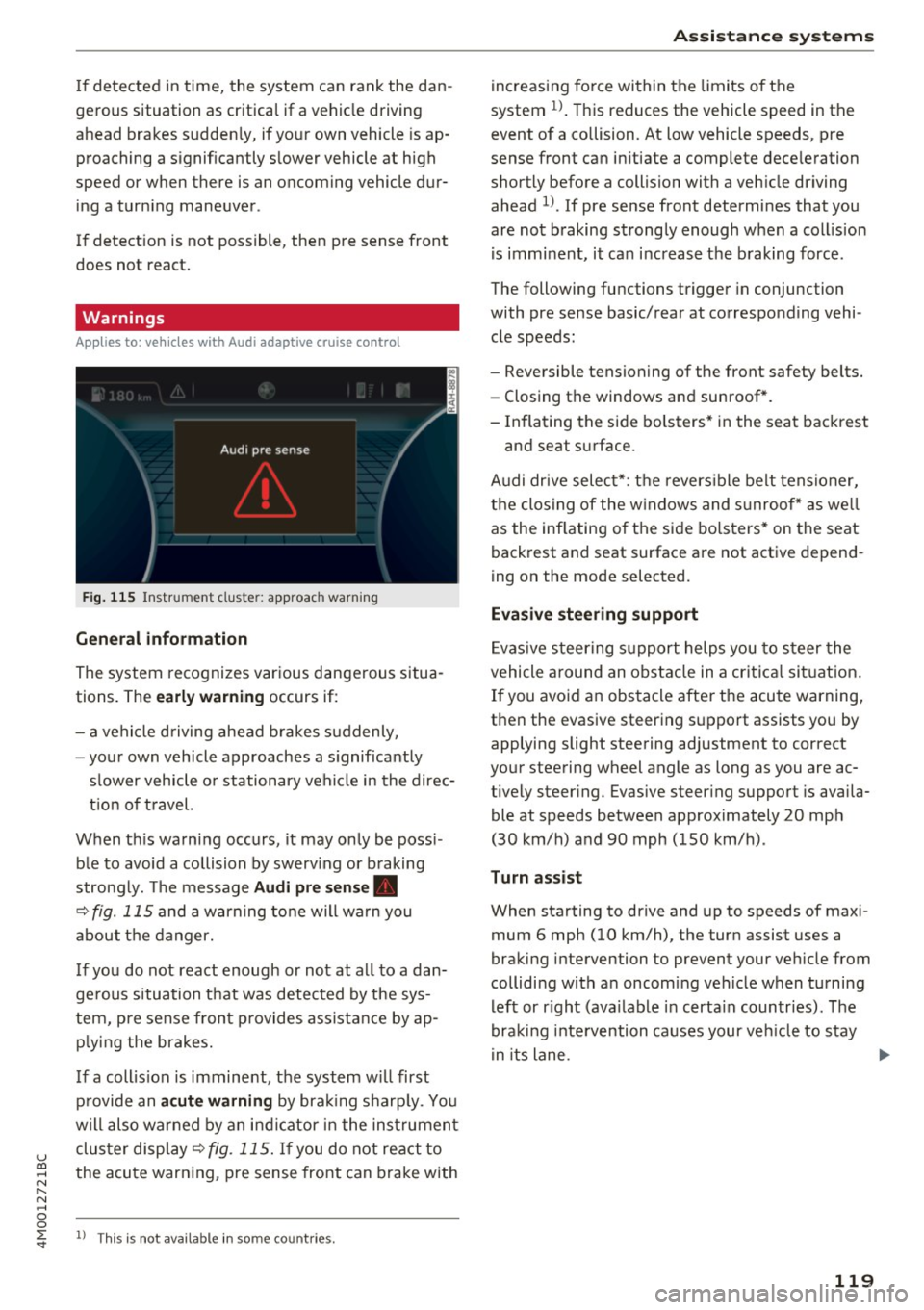
Fig. 115 In strument clus te r: approac h warning
General information
The system recognizes various dangerous situa
tions. The
early warning occurs if:
- a vehicle driving ahead brakes suddenly,
- your own vehicle approaches a s ignificantly
s lower vehicle o r stationary vehicle in the direc
tion of travel.
When this warning occurs, it may only be poss i
ble to avoid a collision by swerv ing or b raking
strong ly. Th e message
Audi pre sense .
¢ fig. 115 and a warning tone will warn you
about the danger.
If you do not react enough or not at all to a dan
ge rous situation that was detected by the sys
tem, pre sense front provides assistance by ap
p ly ing the brakes.
If a collis ion is imminent, the system w ill first
provide an
acute warning by braking sharp ly. You
will also warned by an ind icator in the instrument
cluster display¢
fig. 115. If you do not react to
the acute warning, pre sense front can brake with
l) This is not availa ble in so m e co untries.
Assistance systems
increasing force within the limits of the
system
1l . This reduces the vehicle speed in the
event of a collision. At low vehicle speeds, pre
sense front can in itiate a complete deceleration
shortly before a collision with a veh icle driving
ahead
l ). If pre sense front determines that you
are not braking strongly enough when a collis ion
is imminent, it can increase the braking force .
The following functions trigger in conjunc tion
with pre sense basic/rear at corresponding vehi
cle speeds :
- Reversible tensioning of the front safety belts. - Closing the windows and sunroof*.
- Inflating the side bolsters* in the seat backrest
and seat surface.
Audi dr ive select*: the reversible belt tensioner,
the closing of the windows and s unroof* as we ll
as the inflating of the side bolsters* on the seat
backrest and seat surface are not active depend
ing on the mode selected.
Evasive steering support
Evasiv e steering support helps you to steer the
vehicle around an obstacle in a critical situation.
If you avoid an obstacle after the acute warning,
then the evasive steering support assists you by applying slight steering adjustment to correct
your steering wheel angle as long as you are ac
t ively steer ing. Evasive steer ing support is availa
ble at speeds between approximately 20 mph
(30 km/h) and 90 mph (150 km/h) .
Turn assist
When starting to drive and up to speeds of maxi
mum 6 mph (10 km/h), the turn assist uses a
braking intervention to prevent your ve hicle from
colliding w ith an oncoming vehicle when turning
left or r ight (ava ilable in certa in countries). The
braking intervention causes your vehicle to stay
i n its lane . ..,.
119
Page 123 of 402

u co ...... N r-... N ...... 0
0
:E: '
Description
Appl ies to: ve hicles with Audi pre sense c ity
W ith in the limits of the system, pre sense c ity
can warn you of impending coll is ions w ith
vehicles and pedestrians and initiate the applica
b le braking maneuver if needed. Pre sense city is
active at speeds of approximately 6 mph (10 km/ h) and higher.
A pedestrian warning can occur at speeds up to
50 mph (85 km/h), and vehicle warnings can oc
cur at speeds up to 155 mph (250 km/h). A pre
sense city braking maneuver is possible at speeds
up to SO mph (85 km/h).
Warnings
A ppl ies to: ve hicles with Audi pre sense c ity
The system recognizes various dangerous situa
tions . The
early warning occurs if:
- a vehicle driving ahead brakes suddenly,
- your own vehicle approaches a significantly
slower vehicle or stationary vehicle in the direc
tion of travel.
- a pedestrian is standing in the lane or is moving
into the lane.
When this warning occurs, it may only be possi ble to avoid a collision by swerving or braking
strong ly. The message
Audi pre sense.
¢ page 119, fig. 115 and a warning tone will
warn you about the danger .
Additionally, a jerk on the brakes may occur as an
acute warning when there is an impending colli
sion. If you do not react to the acute warning, pre
sense city can brake to the point of complete de
celeration within the limits of the system. This reduces the vehicle speed in the event of a colli
sion. The message
Audi pre sense. also ap
pea rs .
The following functions are triggered in conjunc
tion with pre sense basic/rear:
- Revers ible tensioning of the front safety belts .
- Closing the windows and sunroof*.
- Inflating the side bolste rs* in the seat backrest
and seat surface.
Assistance systems
Audi drive select*: the function is not active de
pending on the mode selected .
A WARNING
--Pre sense city cannot overcome the laws of
physics. It is a system designed to assist and it cannot prevent a collision in every circum
stance . The dr iver must always intervene.
The driver is always responsible for braking
at the correct time. Do not let the increased
safety provided tempt you into taking risks.
This could increase your risk of a coll is ion.
- The system can dep loy incorrectly due to
system-specific limits.
- To reduce the r isk of an accident, please
note that the camera does not always detect
eve ry object.
- Pre sense city does not react to animals,
crossing or oncoming veh icles, objects such
as bars, railin gs or railcars, and objects that
are difficult to detect¢.&.
in General infor
mation on page 108.
- In trailer mode, the braking behavior of the
trai ler can be d ifferent than usual during au
tomatic braking.
A_ WARNING
Pre sense city may be restricted or not availa
ble in the following example situations:
- in heavy fog, rain, spray or snow
- when there are visua l obst ruct ions, such as
g la re, reflections or variations in light
- when it is dark
- if the camera window or the windshield is
dirty, iced over, damaged or covered
- when dr iv ing on snow, ice or loose ground
- in curves
- if the ESC was restricted or switched
off
- when towing a trailer
-when the driver's seat belt is unfastened
- up to ten seconds after switching on the ig-
nition
(D Note
Impacts or damage to the camera mount on
the w indshield can displace the sensor. Pre
sense city can be impaired by this. Have an
121
Page 133 of 402

@ Tips
-You can cancel the automatic brake activa
tion w ith increasing bra king fo rce if you ap
ply the brakes yourse lf or accelerate cons id
erab ly.
- In some situations, rea r cross-traffic assist
may warn yo u even if there is no cross traffic
i n a cr itical a rea , for examp le w hen back ing
i nto a parki ng space or ma neuver ing.
- The rea r cross-traffic ass ist also switches off
whe n you switch off the ESC.
- The rea r cross traffic assist switches on and
off thro ugh the pa rking aid
qpag e 138.
- The system is not available when towin g a
trailer.
Messages
A ppl ies to: ve hicles with Audi side assist
A message appears in the inst rument cluste r dis
p lay if the s ide ass ist swi tches off autom atically .
@j Audi side assist: malfunction! Please contact
Service
@j Audi side assist and exit warning : malfunc
tion! Please contact Service
The system ca nnot gu ara nt ee th at i t w ill detec t
ve hicl es co rrectly and it has switched off. The
sensors have been moved o r are faulty . Have t he
system checked by an a uthorized Audi dealer or
author ized Audi Se rvice Facility s oon.
@j Audi side assist: currently unavailable. Sen
sor vision restricted due to surroundings . See
owner 's manual
@j Audi side assist and exit warning : currently
unavailable. Sensor vision restricted due to sur
roundings
The rad ar senso r vis io n i s im paire d. T he ar ea in
fr on t of the senso rs must no t be covered by bik e
r ac ks, st ic kers, leaves, snow or any other o bjects.
C lea n the area i n front of the senso rs, if necessa
ry
¢ page 127, fig. 122.
~ @j Audi side assist: currently unavailable. See ......
~ owner 's manual
N ...... 0
0
:E: '
@j Audi side assist and exit warning: currently
unavailable. See owner's manual
S id e assi st cann ot be sw itche d on a t this tim e be
cau se the re is a m alfu nct ion ( for e xample, the
ba tte ry c harge leve l may be to o low) .
@j Audi side assist: unavailable in towing mode
@j Audi side assist and exit warning: currently
unavailable. Towing mode
S ide assist switches off automatically when the
electrical connecto r in t he factory-installed trail
er hitch is connected . There is no guarantee the
system will sw itch o ff when us ing a ret rofi tted
t rail er h itch . Do not u se side assist and the ex it
warni ng w hen tow ing a tra ile r.
[II Rear parking aid : obstacle detection restrict
ed
The rear c ross-traffic ass ist is not available. E i
t h er the ESC is sw itched off, or the rada r senso rs
may be cove re d by a b ike rack, stic ke rs, leaves,
snow o r other objects . Swi tc h the ESC on, or
cle an the area in fron t of th e senso rs if necessa ry
~ page 127, fig. 122. If thi s m essage co ntin ue s
to be displayed, dr ive imme dia tely to an author
i z ed Audi deal er or author ized Audi Service Facili
ty to have the ma lf u nction re paire d.
Night vision assist
Description
App lies to : vehicles wit h night vision assist
The night vision assist can detect, highlight and,
if necessary , warn about pedestrians and large
wild animals .
Nigh t vision assist he lps yo u when it is dark by
u sing an infra red came ra to monit or the a rea in
front of your ve hicle , w ith in the limits of the sys
tem .
It can disp lay objec ts up to a dis tance of ap
prox ima tely 1 000 feet (300 m) . T he thermal im
age dete cted by the came ra is show n in t he in
s tru me nt clus ter di sp lay . W arm a reas appea r
lig hter a nd co ld ar eas ap pea r dar ker.
131
Page 150 of 402
Intelligent Technology
Intelligent Technology
Electronic stabilization
control (ESC)
Description
Elect ronic stabilization control (ESC) supports
driver safety.
It red uces the risk of slipping and
improves driving stability. ESC detects crit ica l sit
uations such as when the vehicle is oversteering
and understeering or the wheels are spinning.
The vehicle is stabilized by applying the brakes or reducing eng ine torq ue. When the ESC engages,
the
DJ ind icator light blinks in the instrument
cluste r.
The fo llow ing systems are integrated in the ESC:
Ant i-loc k bra king system (ABS)
ABS prevents the whee ls from locking when brak
ing. The vehicle can sti ll be steered even during
hard brak ing. Apply steady pressure to the brake
pedal. Do not pump the pedal. A puls ing in the
brake pedal indicates that the system is acting to
stabilize the vehicle .
Brake assist system
The brake assist system can decrease brak ing dis
tance . It increases braking power when the driver
presses the brake pedal quick ly in emergency sit
uations . You must press and hold the b rake pedal
until the dangerous situat io n is over . In veh icles
with adapt ive cr uise control*, the bra ke assist
sys tem is more sensitive if the d ista nce detec ted
t o the vehicle dr iv ing ahead is too small.
O n ve hicles w ith act ivated and funct io ni ng night
vision assist*, the brake ass ist system ca n re
spond more sens it ively if there is a warning.
Anti-Slip Regulation (ASR )
ASR reduces eng ine power when the drive wheels
begin spinning a nd adap ts the force to the road
conditions . This makes it easie r to start, acceler
ate and dr ive up h ills.
Electron ic differential lock (EDL )
EDL applies the brakes to a wheel that starts
spinning and transfers the drive power to the
148
other driving whee ls. This function is not avai la
ble at higher speeds.
In extreme cases , ED L automat ica lly swi tches off
to keep t he b rake on the braked wheel from over
heating. The veh icle is still working correct ly. ED L
will switch on again automatically when condi
tions have returned to normal.
Steering recommendat ion
The ESC he lps to stabilize the vehicle by chang ing
t h e s teer ing torque.
Select ive wheel torque control
Se lective wheel to rque cont rol is used when d riv
i ng on curves. Braking is targeted toward the
whee ls on the inside of the curve as needed . T his
a ll ows mo re precise dr iving in cu rves .
Automatic post -collision braking system
The "automat ic post -collis io n braking system"
can help to reduce the risk of sliding and of addi
tiona l co llisions after an acc ident. If the a irbag
contro l modu le detects a collision, the veh icle is
braked by the ESC.
The veh icle does not brake automatically if:
- the driver presses the accelerator pedal, or
- the ESC, the brake system or the veh icle elect ri-
cal system are not functioning.
A WARNING
- The ESC and its integrated systems cannot
overcome the lim its imposed by natura l
phys ical laws . This is espec ially important
on s lippery or wet roads . If the systems be
gi n ac ting to stabilize yo ur vehicle, you
should immediately a lter your speed to
match the road and traffic conditions. Do
not let the inc reased safety provided tempt
you into taking risks. This could increase
your r isk of a coll is ion.
- Please note the risk of a collision increases
when driving fast, especially through curves
and on slippery or wet roads, and when dr iv
ing too close to objects ahead. The ESC and
its integrated systems cannot always pre
vent co llisions -there is st ill a risk of acci
dents!
Page 152 of 402
Intelligent Technology
_&. WARNING
You should only switch offroad mode on or
switch ESC/ ASR off if your driving abilities
and the traff ic conditions perm it. There is a
r isk of slid ing.
- The stabilization function is limited when
offroad mode is switched on. The driving
wheels co uld spin and the vehicle could
swerve , especially on slick or slippery road
surfaces.
- T here is no vehicle stab ilizat ion when ESC/
ASR are switched off .
Hill descent assist
Hill descent assist makes it possible to drive
down a hill at a constant speed.
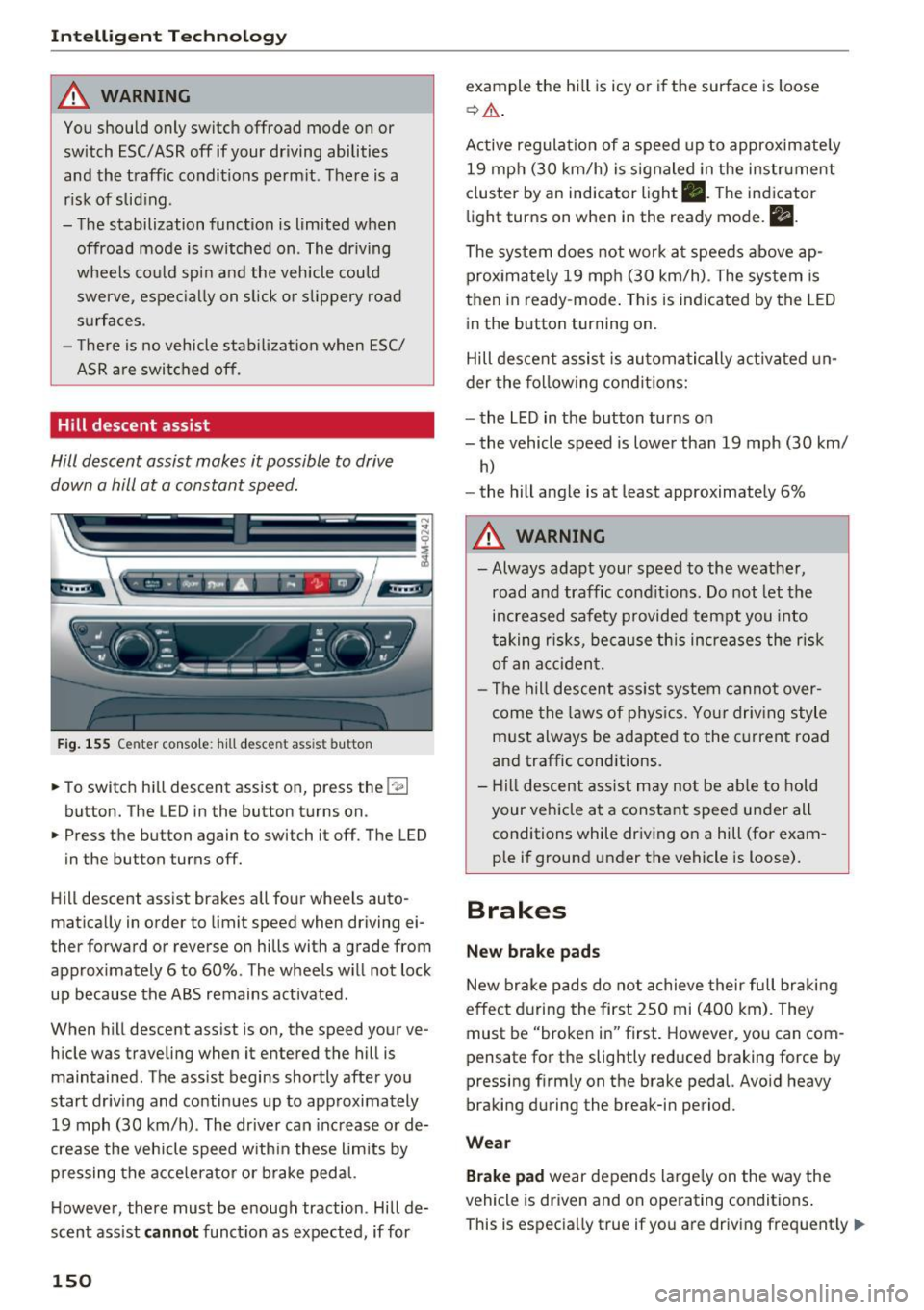
Fig. 155 Center console: hill descent ass ist button
.. To switch hill descent assist on, press the 1-
.. Press the button again to switch it off. The LED
in the button turns off.
Hill descent assist brakes all four wheels auto
matically in order to limit speed when driving ei
ther forward or reverse on hills with a grade from approximately 6 to 60%. The wheels w ill not lock
up because the ABS remains activated.
When hill descent assist is on, the speed your ve
hicle was traveling when it entered the hill is maintained. The assist begins shortly after you
start driv ing and continues up to approximately
19 mph (30 km/h). The driver can increase or de
crease the vehicle speed w ith in these limits by
pressing the accelerato r or brake pedal.
H owever, there must be enough traction. Hill de
scent assist
cannot function as expected, if for
150
example the hill is icy or if the surface is loose
~ & .
Active regulat ion of a speed up to approximately
19 mph (30 km/h) is signaled in the instrument
cluster by an indicator light •. T he indicator
light turns on when in the ready mode.
II.
The system does not work at speeds above ap
proximately 19 mph (30 km/h). The system is
then in ready-mode . This is indicated by the LED
in the button turning on.
Hill descent assist is automatically activated un
der the following conditions:
- the LED in the button turns on
- the vehicle speed is lower than 19 mph (30 km/
h)
-the hill angle is at least approximately 6%
_&. WARNING
-
- Always adapt your speed to the weather,
road and traffic conditions. Do not let the
increased safety provided tempt you into
taking risks, because this increases the risk
of an accident.
- The hill descent assist system cannot over
come the laws of phys ics. Your driving style
must always be adapted to the current road
and traffic cond itions .
- Hill descent assist may not be able to hold
your vehicle at a constant speed under all
conditions while driving on a hill (for exam
ple if ground under the vehicle is loose).
Brakes
New brake pads
New brake pads do not achieve their full braking
effect during the first 250 mi (400 km). They
must be "broken in" first. However, you can com
pensate for the slightly reduced braking force by
pressing f irmly on the brake pedal. Avo id heavy
braking during the break-in period.
Wear
Brake pad wear depends largely on the way the
vehicle is driven and on operating conditions .
This is especially true if you are driv ing frequent ly
IJ,,
Page 153 of 402
u co ...... N r-... N ...... 0
0
:E: '
style.
Operating noise
Noises may occur when bra king depend ing o n the
speed, b raking force and ou ts ide cond itions su ch
as tempe rature and humidity.
W et conditions or road salt
In ce rtain s ituat ions, for example after dr iving
through water, in heavy ra in or afte r washing
your car, the bra king effect may be reduced due
to moisture or ice on t he b rake ro to rs and br ake
pads . The br akes mus t be "dried" f irs t with a few
careful brake applications .
At highe r speeds and with the windsh ie ld w ipers
turned o n, the br ake p ads press against the br ake
r otors for a short amoun t of time . This action,
which is not felt by the driver, happens at regular intervals and ens ures a better reaction time for
the brakes in wet weather.
The braking effe ct can also be reduced if you are
d riving on salted roads and you do not apply t he
brakes for long periods of time . The layer of salt
on the bra ke rotors and pads must be worn off
f irst when the brakes are app lied.
Cor rosion
L eaving the vehicle par ked for long pe riods of
time, low mi leage and avoiding heavy braking
can cont ribute to corrosion on the brake rotors
and to dirty brake pads.
If you usually avo id heavy b raking or if there is
corrosion present, occasional heavy braking at h igh speeds is recommended to clean the brake
rotors and pads¢
A.
Brake system malfunct ion
If yo u no tic e th at the brake peda l travel has sud
denly
increased, then a brake c ircuit in the dual
circuit brake system may have malfunctioned. Drive to an aut ho rized Aud i dea le r or a uth orized
Aud i Service Facility immediately to have the
problem corrected. On the way there, drive with
reduced speed and keep in mi nd that you w ill
need a longer dista nce to stop and you w ill need
to p ress the b rake pedal harde r.
Intellig ent Technology
Low brake fluid level
When the br ake fluid level is low, malfu nctions in
the brake system may occur . The brake fluid level
is electronically monitored .
Brake booster
The brake booster ampl ifies t he p ress ure you ap
ply to the brake pedal.
A WARNING
- Onl y ap ply the bra kes for the purpose o f
cleaning the brake sys tem when road and
traffic conditions permit. You must not en
danger other roa d users . This increases the
risk of an accident.
-
- Never let the ve hicle roll while the engine is
stopped because this increases the risk of an
accident.
(D Note
- Never let the brakes "rub" by pressing the
peda l lightly when braking is not actually
necessary. This causes the b rakes to over
heat and increases braking distance and
causes wear.
- Before driving downhill a long distance on a
steep hill, decrease your speed and select a
lower gear . This makes use of the engi ne
bra king effec t and relieves the brakes. If
you need to bra ke ad ditio na lly, bra ke in in
t erva ls and not continuously.
(D Tips
- If the brake boos ter is not work ing , you
must press t he b rake peda l w ith much more
force than normal.
- If you retrofit your vehicle with a front s po il
er, wheel covers or sim ila r i tems, make su re
t ha t the air flow to the fro nt wheels is n ot
i nt errup ted. Otherwise t he b rake system
c an become too hot .
151
Page 357 of 402

u co ...... N r--... N ...... 0
0
:E: '
- To reduce the risk of cuts, protect yourself
from sharp metal components when wash
ing the underbody or the inside of the wheel
housings .
- After washing the vehicle, the brak ing effect
may be delayed due to mo isture on the
brake rotors or ice in the w inter . This in
creases the risk of an acc ident. The brakes
must be d ried fi rst w ith a few careful b rake
applications.
(D Note
- If you wash t he vehicle in an automatic car
wash, yo u m ust fold the exte rior m irrors in
to reduce the risk of damage to the mirrors.
Power folding exte rior m irrors* must on ly
be fo lded in a nd out using the power folding
fu nct ion.
- To reduce the risk of damage to the rims
and tires, compare the width between the
whee ls on your vehi cle w it h t he dis tan ce be
tween the g uide rai ls in the car wash.
- To reduce t he risk of damage, compare the
height and width o f you r vehicle wi th the
Ca re and cleaning
height and w idth of the inside of the car
was h.
- T o red uce the risk of pa int damage, do not
was h the vehicle in d irect sun light .
- T o red uce the risk of d am age to the s urf ace,
do not use insect removing sponges, k itche n
sponges or similar items .
- Mat te finish painted veh icle components:
- To reduce the risk of damage to the sur-
face, do not use polishing agents or hard
wax .
- Never use protective wax. It can destroy
the matte finish effect .
- Do not place any stickers or magnetic
signs on vehicle parts painted with matte
finish paint . The paint cou ld be damaged
when the stickers or magne ts are re
moved .
@ For the sake of the environment
Only wash t he vehicle in facilities s pec ially de
s ign ed for that pu rpose . This will reduce the
r isk of dirty wate r contaminated with oil from
ente ring the sewe r sys tem.
Cleaning and care information
W hen cleani ng and ca ring for individua l vehicle
components, refer to the follow ing tables . The
i n formation contained there is simply recom
mendations. For quest ions or for components t
h at are not liste d, co n su lt an autho riz ed Au di
dealer or authorized A udi Se rvice Fac ility . Also
fo llow the information found in ¢ .&. .
Exterior cleaning
Component Situation Solution
Windshield wiper
Deposits c:> page 56, Cleaning the wiper blades
blades
Headlights /
Deposi ts So
ft spo nge wi th a mild so ap sol ution3>
tail lights
S ensors /
Deposits Sensors: soft cloth w it h solvent-free cleaning solut ion
camera lenses Camera le nses: soft clot h w ith alcohol-free cleaning solu-
tion
Snow/ice H
and br ush/solvent-free de-icing spray
Wheels Road salt Water
Brake dust Acid-free special cleaning solution
355
Page 371 of 402
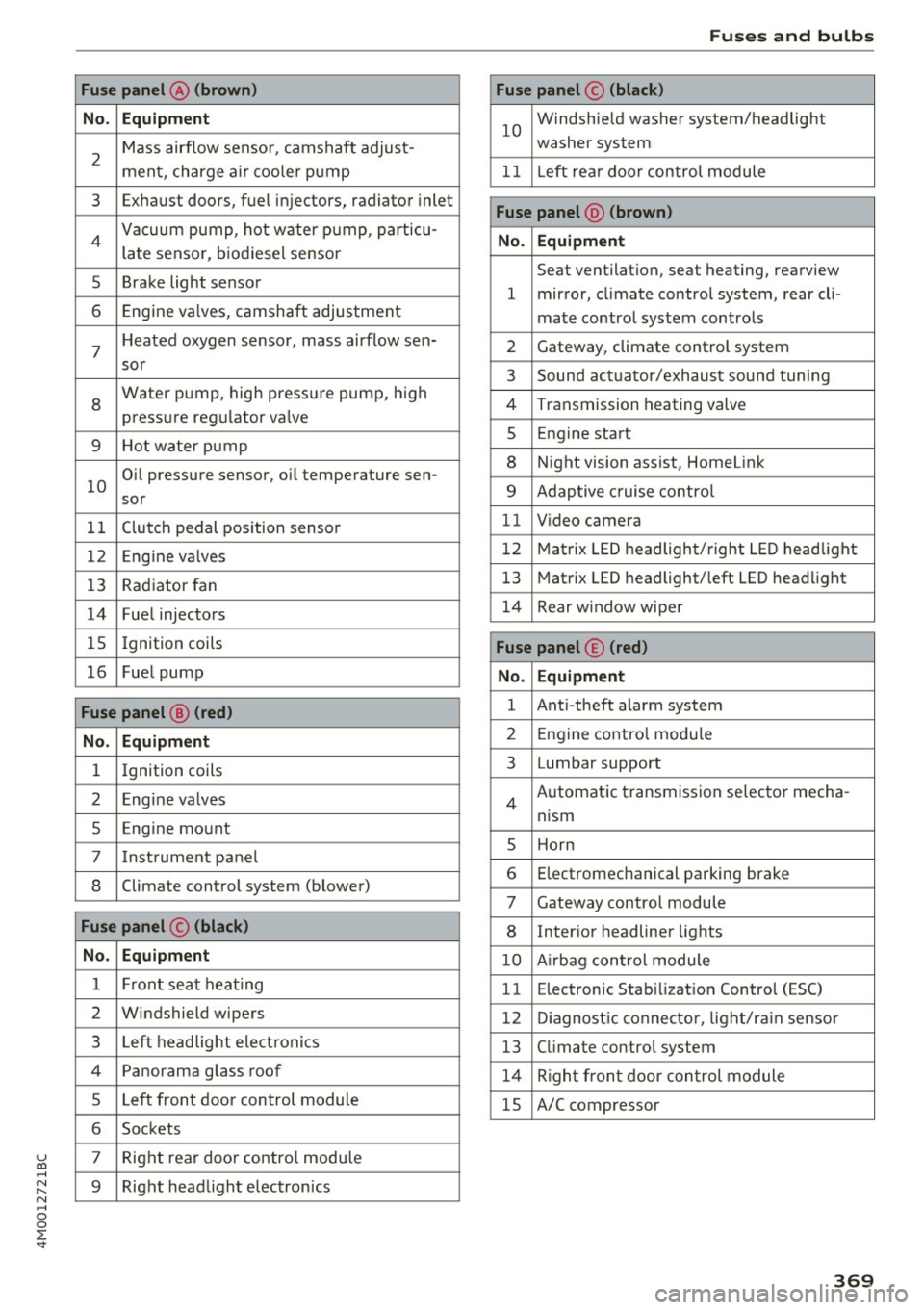
u co ...... N r-... N ...... 0
0
:E: '
No . Equipment
2
Mass airflow sensor, camshaft adjust-
ment, charge air cooler pump
3 Exhaust doors, fuel injectors, radiator inlet
4 Vacuum pump, hot water pump, particu-
late sensor, biodiesel sensor
5 Brake light sensor
6 Engine va lves, camshaft adjustment
7
Heated oxygen sensor, mass airflow sen-
sor
8
Water pump, high pressure pump, high
pressure regulator va lve
9 Hot water pump
10
Oil pressure sensor, oil temperature sen-
sor
11 Clutch pedal position sensor
12 Engine valves
13 Radiator fan
14 Fuel injectors
15 Ignition coils
16 Fuel pump
Fuse panel @ (red)
No . Equipment
1 Ignition coils
2 Eng ine va lves
5 Engine mount
7 I nstrument pane l
8 Climate control system (blower)
Fuse panel © (black)
No. Equipment
1 Front seat heating
2 Windshield wipers
3 Left headlight electronics
4 Panorama glass roof
5 Left front door control module
6 Sockets
7 Right rear door contro l module
9 Right headlight electronics
Fuses and bulbs
Fuse panel© (black)
10
Windshie ld washer system/headlight
washer system
11 Left rear doo r contro l module
Fuse panel @ (brown)
No . Equipment
Seat ventilation, seat heating, rearview
1 mirror, cl imate control system, rear cli-
mate control system controls
2 Gateway, climate control system
3 Sound actuator/exhaust sound tuning
4 Transmission heating valve
s Engine start
8 Night vision assist, HomeLink
9 Adaptive cruise contro l
11 Video camera
12 Matrix LED headlight/right LED headlight
13 Matrix LED headlight/left LED headlight
14 Rear window wipe r
Fuse panel© (red)
No. Equipment
1 Anti-theft alarm system
2 Engine control module
3 Lumbar support
Automatic transmission selector mecha-
4
nism
s Horn
6 Electromechanical parking brake
7 Gateway control module
8 Inter ior headliner lights
10 A irbag control module
11 Electronic Stabilization Control (ESC)
12 Diagnostic connector, light/ra in sensor
13 Climate control system
14 Right front door control module
15 A/C compressor
369
Page 375 of 402
u (0 ...... N r--. N ...... 0
0
:E
The discharged battery must be properly con
nected to the vehicle's electrical system .
When jump starting or charg ing the battery,
never connect the negative ground cable to
the battery negative post because the battery
manager system must be able to detect the
battery's state of charge. Always connect the
negative ground cable to the negative ground
post of the battery manager control unit.
Using the jump start
cable
Both jump start cables must be connected in the
correct order!
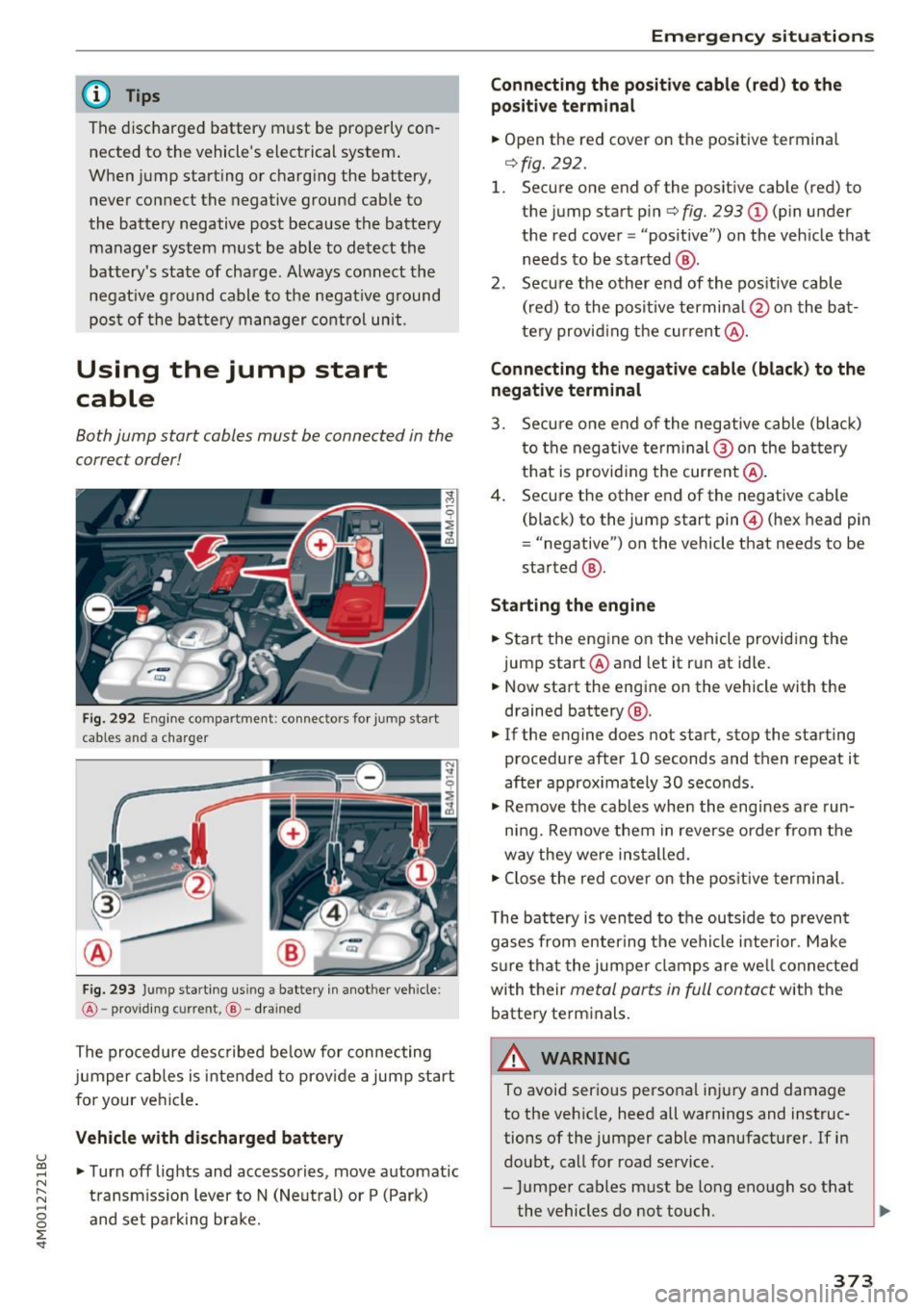
Fig. 292 Engine compartment: connect ors for jump start
cables and a charger
Fig. 293 Ju mp starting us ing a battery in another vehicle:
@ -providing current, @-drained
The procedure described below for connecting
jumper cables is intended to prov ide a jump start
for your vehicle .
Vehicle with discharged battery
•Turnoff lights and accessories, move automatic
transmission lever to N (Neutral) or P (Park)
and set parking brake.
Emergency situations
Connecting the positive cable (red) to the
positive terminal
• Open the red cover on the positive terminal
r=>fig. 292 .
1. Secure one end of the positive cable (red) to
the jump start pin
r=> fig. 293 (D (pin under
the red cover = "posit ive") on the vehicle that
needs to be started @.
2. Secure the other end of the positive cable
(red) to the positive termina l@ on the bat
tery provid ing the current @.
Connecting the negative cable (black) to the
negative terminal
3. Secure one end of the negative cable (black)
to the nega tive term inal @ on the battery
that is providing the current @.
4. Secure the other end of the negative cable
(black) to the jump start pin@ (hex head pin
= "negative") on the vehicle that needs to be
started @.
Starting the engine
• Start the engine on the vehicle providing the
jump start @and let it run at idle.
• Now start the engine on the vehicle with the
drained battery @.
• If the engine does not start, stop the starting
procedure after 10 seconds and then repeat it
after approx imately 30 seconds.
• Remove the cables when the engines are run
ning. Remove them in reverse order from the
way they were installed.
• Close the red cover on the positive terminal.
T he battery is vented to the outside to prevent
gases from enter ing the vehicle interior . Make
sure that the jumper clamps are well connected
with their
metal parts in full contact with the
battery terminals.
_& WARNING
-To avoid serious personal injury and damage to the vehicle, heed all warnings and instruc
tions of the jumper cable manufacturer. If in
doubt, call for road service.
- Jumper cables must be long enough so that
the vehicles do not touch . ..,_
373