service AUDI Q7 2017 Owner´s Manual
[x] Cancel search | Manufacturer: AUDI, Model Year: 2017, Model line: Q7, Model: AUDI Q7 2017Pages: 402, PDF Size: 100.39 MB
Page 187 of 402
u co ...... N r-... N ...... 0
0
:E: '
the cell phone used. For more information
on supported cell phones, vis it
www.audiusa.com/bluetooth or contact an
authorized Audi dea ler or authorized Audi
Service Fac ility.
- Please note that only the directory from the
primary phone* is always d isplayed.
- The contacts from the cell phone may not
be transferred in alphabet ica l order. If there
are too many entries, contacts w ith differ
ent first letters may be missing in the MMI.
- The contacts in the local MMI memory are
always vis ible and can be accessed by other
users .
Free text search for a contact
Appl ies to: ve hicles with telep hone
~ Se lect : I MENU I button > Telephone > left con
t rol button >
Directory.
~ T o limit the search, enter the initials of the con
tact being searched with each initial separated
by a space in the input field. Enter additional
letters if necessary.
~ Se lect and confirm a contact from the directo
ry . The phone numbers for the selected contact
are displayed .
~ To make the call, select and confirm a phone
number .
- You can scroll through long l ists quickly by
turning the contro l knob quickly. The scroll
i ng speed depends on the number of list en
tries.
- Additional informat ion on free text searches
can be found under
¢page 165.
Telephone
Showing contact details*
Applies to : vehicles wi th telepho ne
You can show contact details depending on the
vehicle equipment.
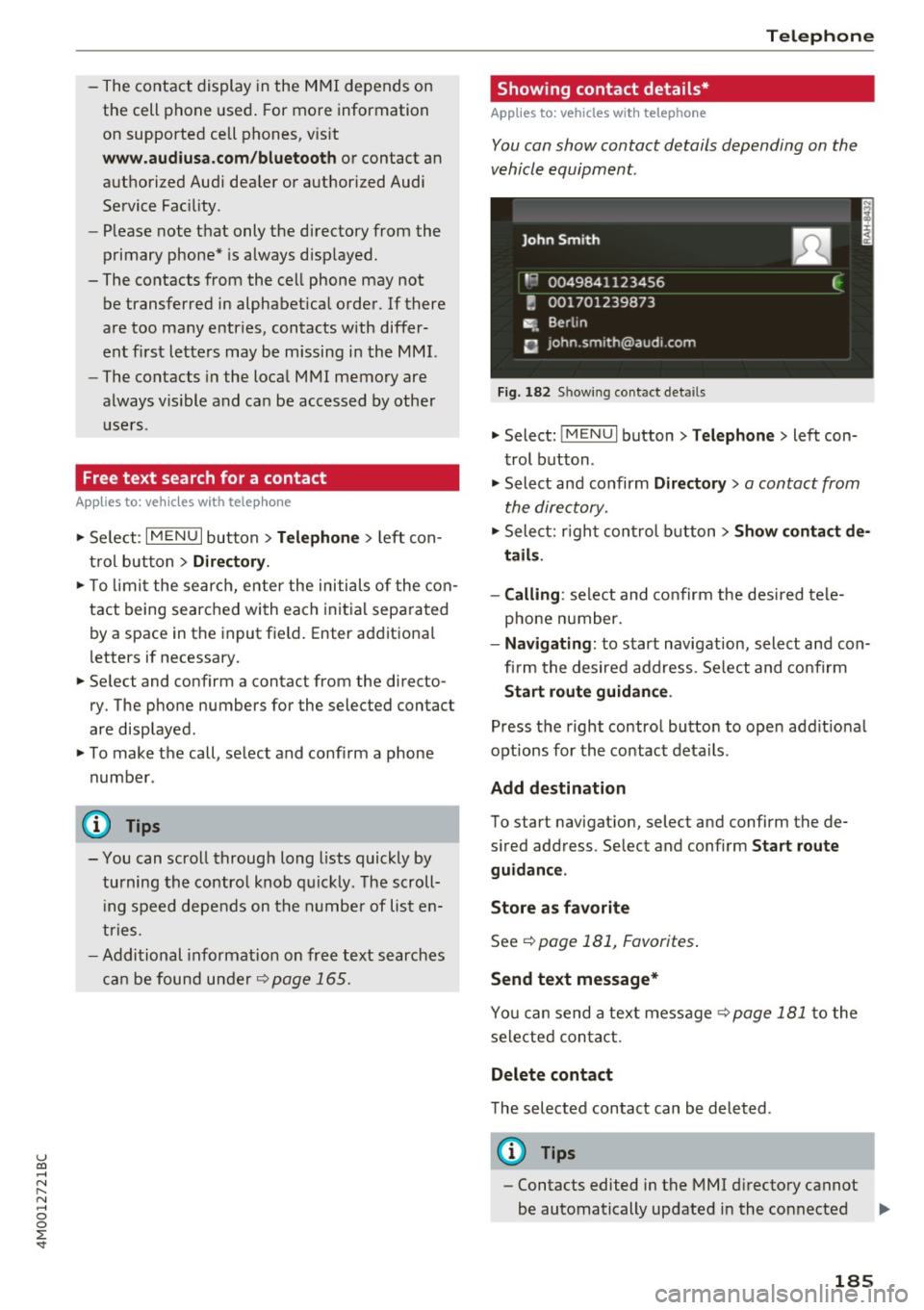
Fig. 182 Sh owing contact details
~ Select: !MENUI button> Telephone> left con
trol button .
~ Select and confirm Directory > a contact from
the directory.
~ Select: righ t control button > Show contact de
tails .
- Calling :
select and confirm the desired tele
phone number.
- Navigating : to start navigat ion, select and con
fi rm the desired address. Se lect and confirm
Start route guidance .
Press the right control button to open add it ional
options for the contact details.
Add destination
To start navigat ion, select and confirm the de
s ired address. Select and confirm
Start route
guidance .
Store as favorite
See¢ page 181, Favorites.
Send text message*
You can send a text message ¢ page 181 to the
selected contact.
Delete contact
The selected contact can be deleted .
(D Tips
-Contacts edited in the MMI directory cannot
be automatically updated in the connected ..,.
185
Page 190 of 402
Telephone
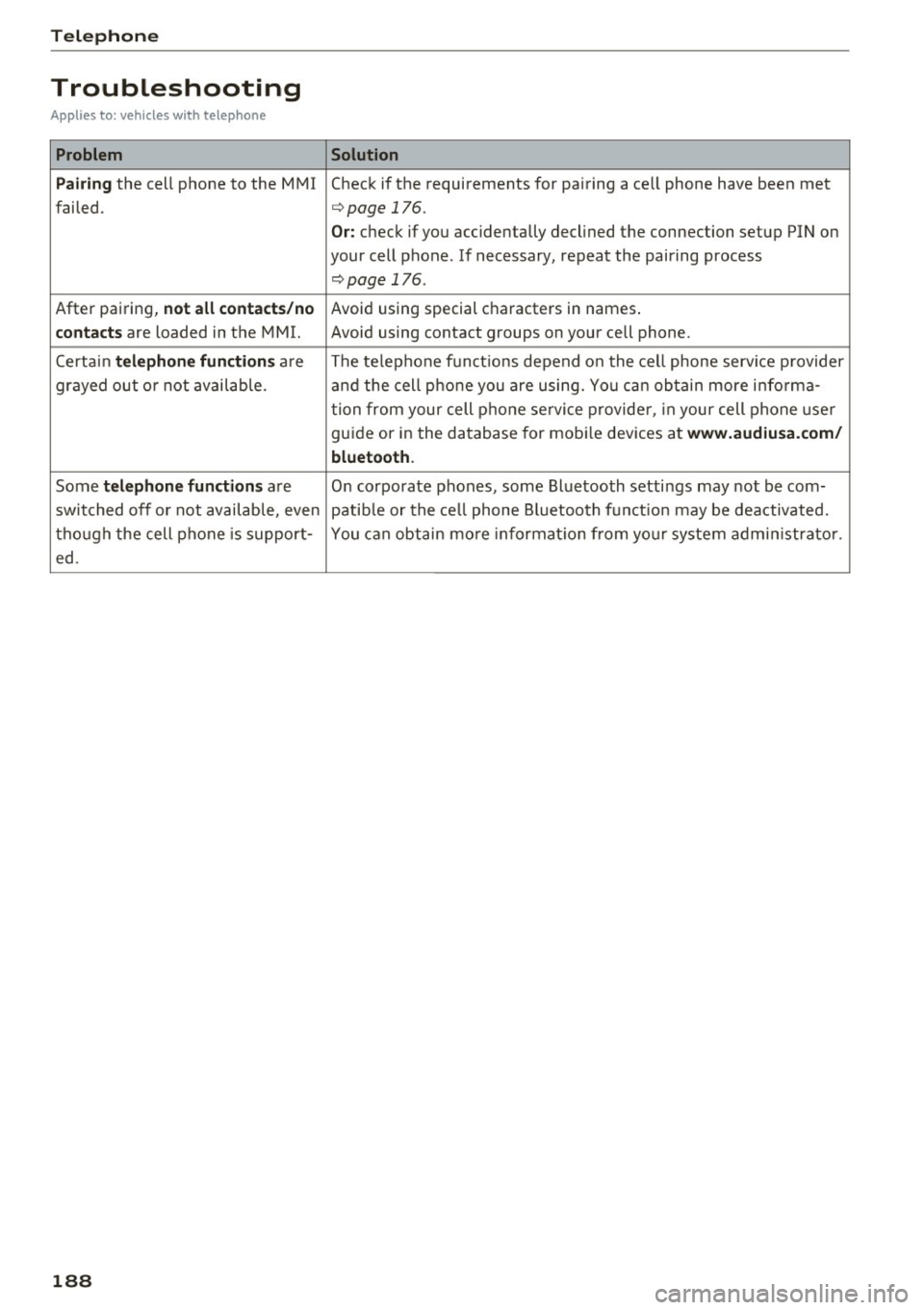
Troubleshooting
Applies to: vehicles with telephone
Problem Solution
P ai ring
the cell phone to the MMI Check if the requirements for pairing a ce ll phone have been met
failed.
¢ page 176.
Or: check if you accidentally declined the connection setup PIN on
your cell phone . If necessary, repeat the pairing process
¢ page 176.
After pairing, not a ll cont act s/ no Avoid using sped.al characters in names .
co ntac ts are loaded in the MMI. Avoid using contact groups on your cell phone .
Certain
t e le ph one func tion s are The te lephone funct ions depend on the cell phone service provider
grayed out o r not availab le. and the cell phone you are using. You can obtain more i nfo rma-
tion from your cell phone se rvice provider, in your cell phone user
gu ide or in the database for mob ile dev ices at
www .audiusa. com /
bluetoo th .
Some te le phone functi ons are O n corporate phones, some Bluetooth settings may not be com-
switched off o r not available, even patib le or the ce ll phone Bluetooth funct ion may be deactivated.
though the cell phone is support- You can obtain more informat io n from you r system admin istrato r.
ed .
188
Page 191 of 402
u co ...... N r-... N ...... 0
0
:E: '
Introduction
A ppl ies to veh icles wi th A ud i co nn ect (I nfotainment)
With Audi connect Infotainment services, on line
information is transmitted directly to the vehicle
and then integrated .
A WARNING
To reduce the risk of an accident, only use
Audi connect Infotainment services when
road and traffic conditions permit. Always
read and follow the notes in~
page 156,
Traffic safety information.
Setup
Requirements for Audi connect
(Infotainment)
Appl ies to v ehicles with A ud i con nect (Infotainmen t)
-
The data connection for Audi connect Infota in
ment se rvices is made through an embedded SIM
card (eSIM card) that is equipped in the vehicle.
The fol low ing requirements must be met to use
the embedded SIM card:
- You have already reg istered at
www.audiusa.com /myaudi and ass igned ave
hicle.
- You have also already logged in to your myAudi account under
Audi connect plan for the em
bedded SIM card and accepted the terms of use
given there. For additiona l information, contact
an authorized Aud i dea ler or authorized Audi
Service Facility.
Then your Audi connect Infota inment serv ices are
activated and can be used in your veh icle.
(D Tips
-After the free subscription has ended or the
data volume has been used up, data packets
can be purchased for the use of Audi con
nect Infotainment services. You can find ad
ditional information about fees and pur
chasing at
www.audiusa.com/myaudi.
Audi connect (Infotainment)
-Read this chapter before operating
~ page 196, Audi connect (Infotainment)
general information.
Configuration through myAudi
Audi connect (Infotainment) configuration
Appl ies to v ehicles w it h Au di connec t (Info ta inm ent)
Some Audi connect Infotainment services must
be configured through your personal myAud i ac
count before using them for the first time.
- If you do not have a personal myAudi account
yet, you can register on line at
www.audiusa.com/myaudi.
- Add your vehicle to your myAudi account.
- Activate/config ure the A udi connect (Infotain-
ment) services you would like for your veh icle in
your myAudi account.
- For some Audi connect Infotainment services,
you may also have to enter your myAudi user
data or your myAudi PIN when accessing serv
ices in the MMI to connect your veh icle to
myAudi .
For detailed information on configuration, visit
www.audiusa.com/myaudi.
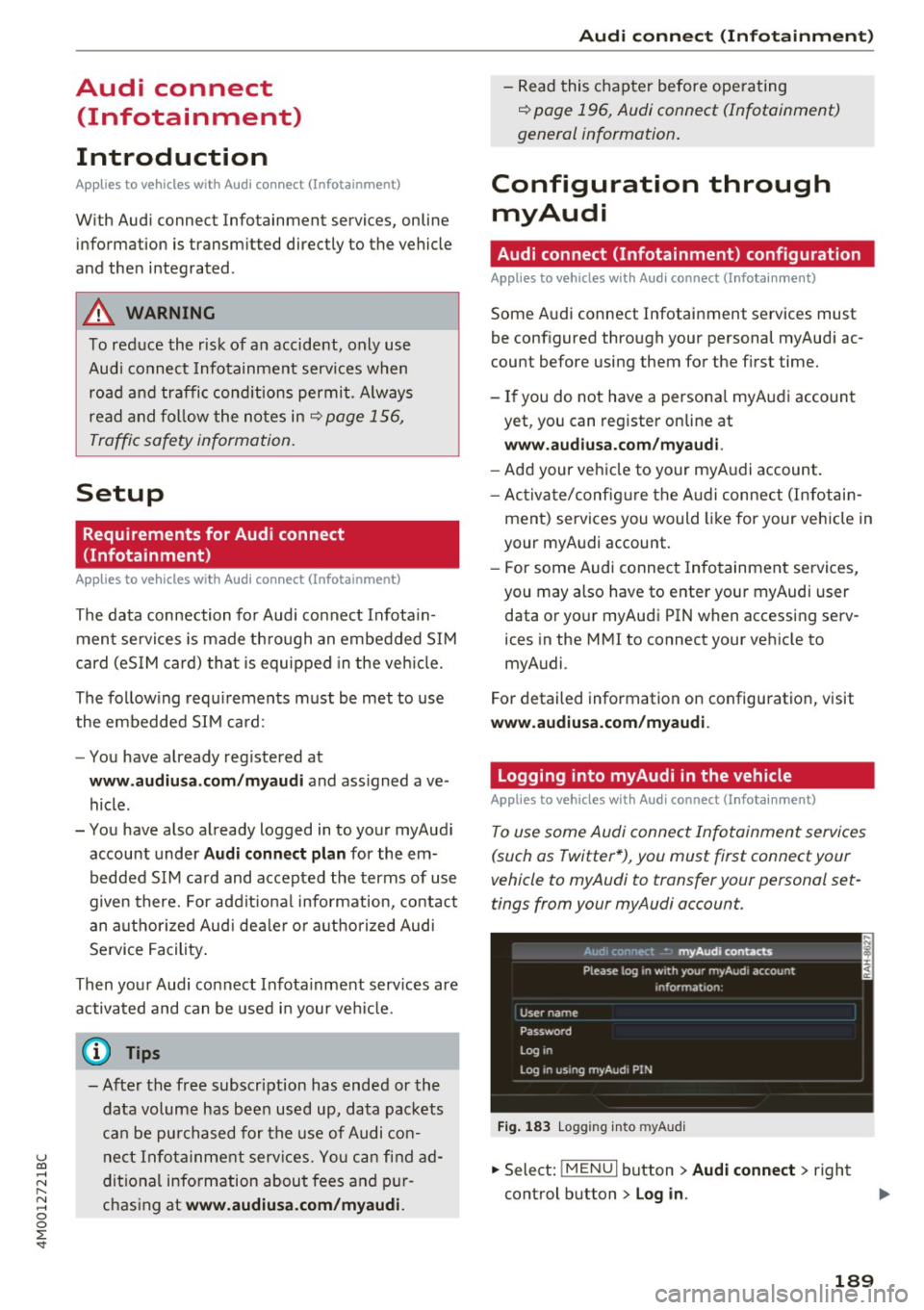
Logging into myAudi in the vehicle
App lies to vehicles w it h Au di connect (I nfota inment)
To use some Audi connect Infotainment services
(such as Twitter*), you must first connect your
vehicle to myAudi to transfer your personal set
tings from your myAudi account.
Fig. 183 L ogg ing into myAudi
.,. Select: !MENUI button> Audi connect> right
control button >
Log in .
189
Page 192 of 402
Audi connect (Infotainment)
~ Enter your myAudi user data. Or: enter your
eight-digit myAudi PIN .
~ Confirm your entry with OK.
Then you can open your persona l settings from
your myAudi account in your vehicle.
(D Tips
You can receive your myAudi P IN if you have
set up a myAudi account. For additional infor
mation, see
www.audiusa .com/myaudi .
Opening Audi connect
(Infotainment)
A pp lies to veh icles with Audi co nnect (Infotainment)
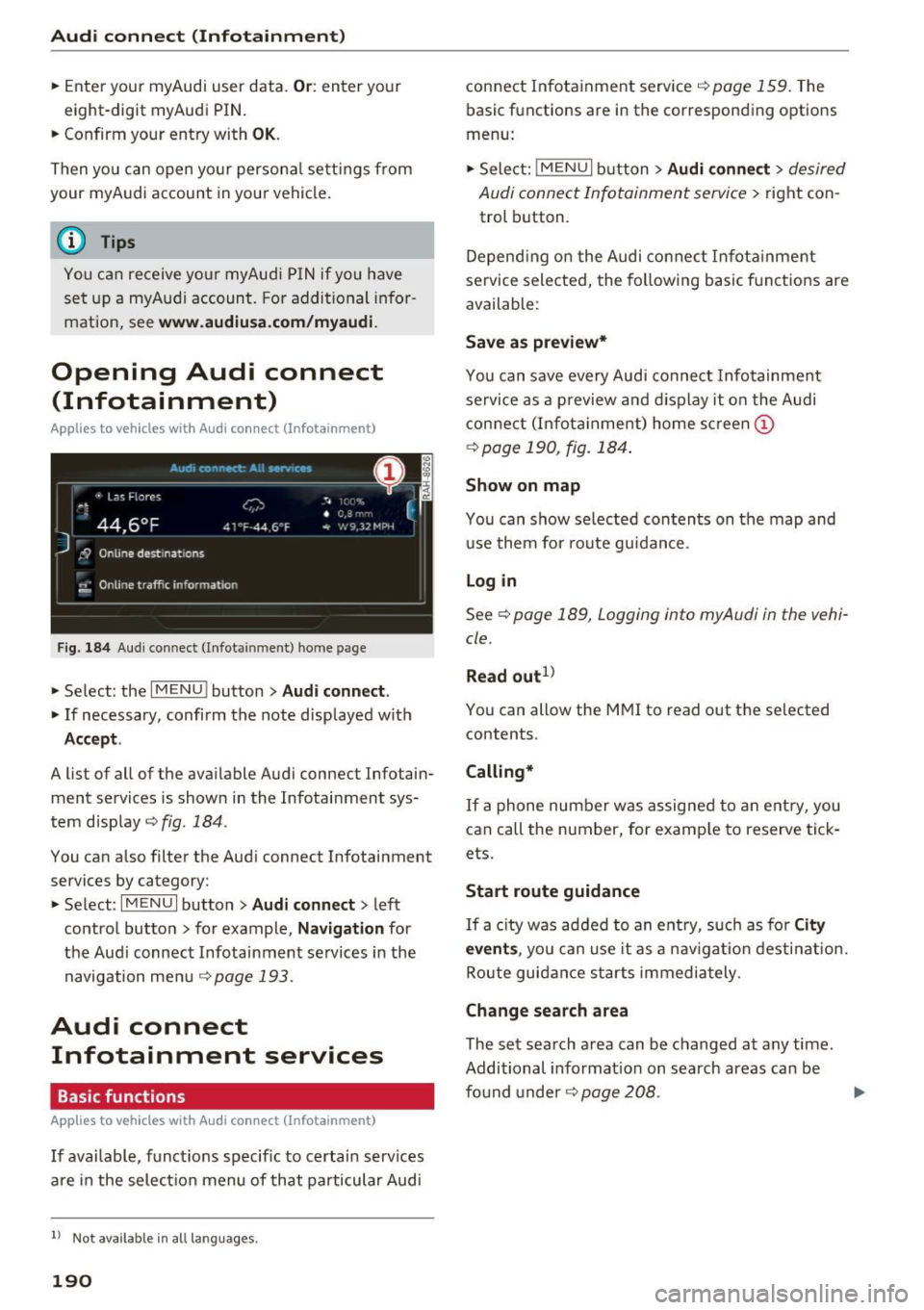
Fig. 184 Aud i connect ( Infotainmen t) ho me page
~ Select: the IMENU ! button> Audi connect .
~ If necessary, confirm the note displayed with
Accept.
A list of all of the available Audi connect Infotain
ment services is shown in the Infotainment sys
tem display
~ fig. 184.
You can also filter the Audi connect Infotainment
services by category:
~ Select: I M ENU I button > Audi connect > left
contro l button> for example,
Navigation for
the Aud i connect Infotainment services in the
navigation menu¢
page 193.
Audi connect
Infotainment services
Basic functions
Applies to veh icles with Audi co nnect (Infotainment)
If available, funct ions specific to certain services
are in the selection menu of that particular Audi
l) Not available in all languages.
190
connect Infotainment service¢ page 159. The
basic functions are in the corresponding options
menu:
~ Select: ! MENUI button> Audi connect> desired
Audi connect Infotainment service>
right con
trol button .
Depending on the Audi connect Infotainment
service selected, the following basic functions are
available :
Save as preview*
You can save every Audi connect Infotainment
service as a preview and display it on the Audi
connect (Infotainment) home screen
(D
¢ page 190, fig. 184 .
Show on map
You can show selected contents on the map and
use them for route guidance.
Log in
See¢ page 189, Logging into myAudi in the vehi
cle .
Read out
1>
You can allow the MMI to read out the selected
contents .
Calling*
If a phone number was assigned to an entry, you
can call the number, for examp le to reserve tick
ets.
Start route guidance
If a city was added to an entry, such as for City
events,
you can use it as a nav igation destination.
Route guidance starts immediately.
Change search area
The set search area can be changed at any time.
Additional information on search areas can be
fo und under ¢
page 208 . ..,.
Page 193 of 402
u (0 ...... N r--. N ......
Closing Audi connect Infotainment services
Regardless of the function selected, you can
close an Audi connect Infotainment service at any
time and return to the home screen
r=:>page 190,
fig. 184.
Parking information
Applies to vehicles with Audi connect (Infotainment)
Information on parking locations and fees in the
selected search area (for example
Nearby ).
~ Select and confirm Parking information .
You can use the right control button to sort the
parking locations
By distance or By availability.
Travel information
Applies to vehicles with Audi connect (Infotainment)
Information on attractions in the selected search
area.
~ Select and confirm Travel information .
~ Select and confirm an attraction to display the
details .
Fuel prices
Applies to vehicles with Audi connect (Infotainment)
Information on gas stations with the lowest fuel
prices for your vehicle in the selected search area.
~ Select and confirm Fuel prices.
You can use the right control button to sort the
fuel prices
By price or By distance .
g 1l Service in prepara tio n at the tim e of printing. Can add la t-
~ e r or is only available in certa in regio ns.
Audi connect (Infotainment)
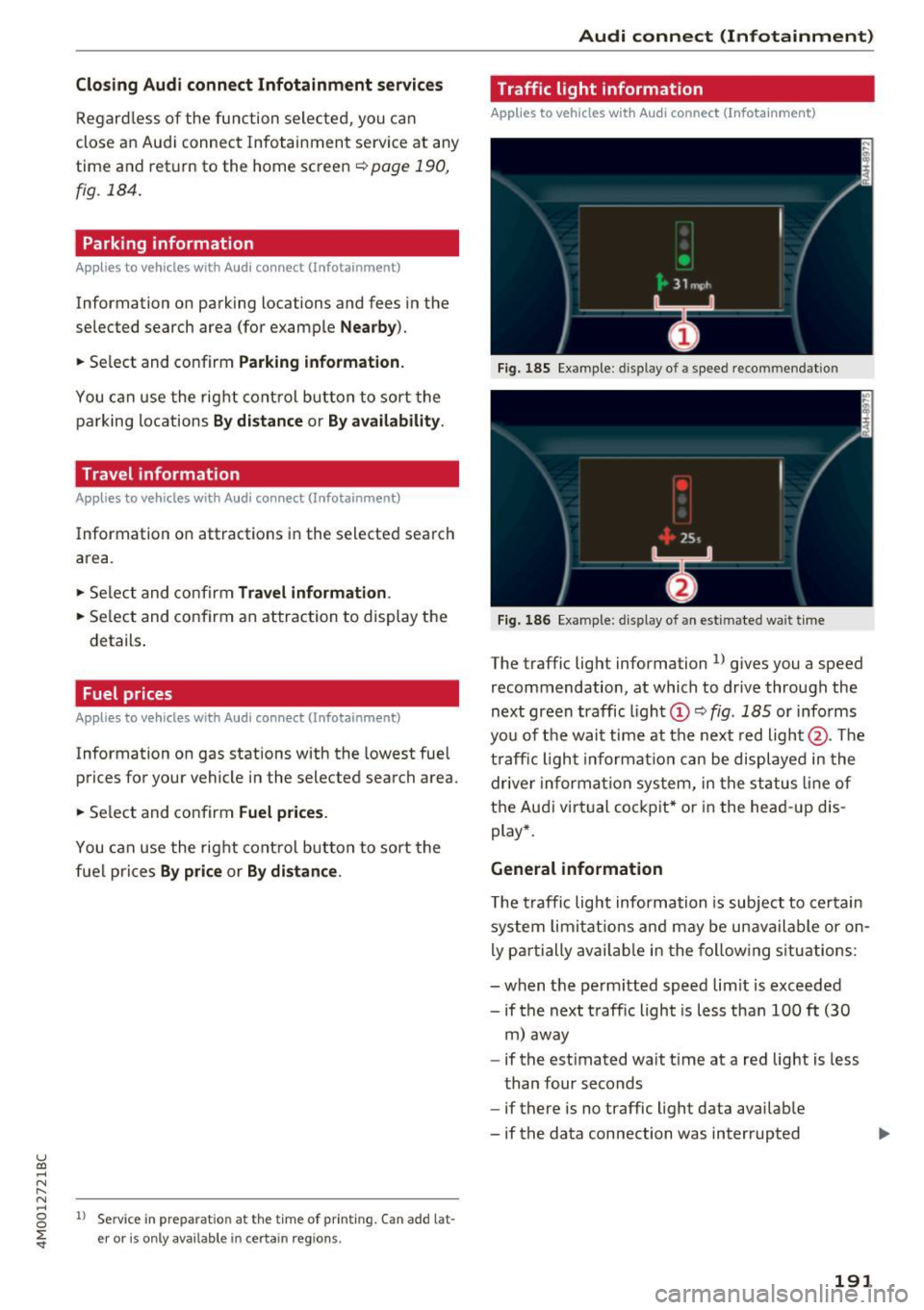
Traffic light information
Applies to vehicles w ith Audi connect (Infota inment)
Fig. 185 Examp le : display of a speed recommendat ion
Fig . 186 Example: display of an estimated wa it time
The traffic light information ll gives you a speed
recommendation, at which to drive through the
next green traffic light
(Dr=:> fig. 185 or informs
you of the wait time at the next red light @. The
traffic light information can be displayed in the
driver information system, in the status line of
the Audi virt ual cockpit* or in the head -up dis
play*.
General information
The traffic light information is subject to certain
system limitat ions and may be unavailable or on
ly partially available in the following situations:
- when the perm itted speed lim it is exceeded
- if the next traffic light is less than 100
ft (30
m) away
- if the estimated wait t ime at a red light is less
than four seconds
- if there is no traffic light data available
- if the data connection was interrupted
191
Page 196 of 402

Audi connect (Infotainment)
The fo llow ing A udi connect In fota inment serv ices
are curre ntly availab le:
- Naviga tio n wi th
online map view a nd Street
View ¢
page 217.
-Point of Interest (POI) online search with
voice recognition
( such as res taur ant s): plan
r ou te g uida nce using t he M MI con trol panel
¢
page 209 and the voice recognition system
¢ page 169.
- Set up dest ina tions in you r M MI using yo ur
myAudi account or onl ine map view
¢ page 217.
-Online traffic information : receive up-to-the
minute t raffic info rmation about accidents,
r oad construction and other incidents
¢ page 221.
-Map update : import navigat ion map updates
directly to yo ur vehicle using a n SD ca rd o r as
an on line update¢
page 219.
@ Tips
-Fo r the map update Au di c onnect Infotain
ment se rvice via SD car d, check the current
software vers ion in your vehicle and then
check
www.audiusa.com/myaudi to see if a
newe r ve rsion is ava ilable. You can a lso have
th e ne w naviga tion da ta insta lled by an A ud i
d eale r, w hich can be done for an addition al
c har ge.
- Y ou can a lso fin d ad dit io na l informat ion
a bout th e
map update onlin e at
www.audiusa.com /myaudi .
Audi connect (Infotainment) on the phone
Applies to vehicles with Audi connect (Infotainment)
~ Se lect: I M ENU I but ton > Audi connect > left
contro l button >
Communication .
The fo llow ing A udi con nect Info tainment services
a re curre ntly availab le:
- Stor ing contacts on yo ur compute r us ing yo ur
myAudi A ccount and loadi ng the contacts into
t he MM I direct ory
¢ page 186.
194
Audi connect (Infotainment) in Media
menu
Applies to vehicles with Audi connect (Infotainment)
~ Sele ct: !ME NUI button> Audi connect > righ t
control button >
Entertainment.
- Online media and Internet radio :
offers access
t o di fferen t on line me dia services as well as In
ternet radio and ope ration th ro u gh t he M MI us
ing the
Audi MMI connect app ¢ page 233 .
Applies to: vehicles with Wi·Fi audio player
-Wi-F i audio player : you can access the med ia
center throug h a Wi-Fi connecte d media player
(su ch as a s martphone)
¢ page 232.
.8, WARNING
It is only s afe to u se ta ble ts, l ap to p s, mo bile
d evi ces and other simi la r devices whe n the ve
hicl e is sta tionary beca use , like a ll loose ob
jects, they co uld be thrown a roun d the inside
of the vehicle in a cras h and cause serious in
ju ries. Store these types of devices sec urely
while driv ing.
(D Note
A lways fo llow the information fo und in ¢ 0 in
Wi -Fi hotspot on page 195.
@ Tips
- Also see t he cha pter¢ page 196, Audi con
nect (Infotainment) general information .
- For more in fo rmat ion on t he Wi-Fi a udi o
player and su pported devices, contact an
authorized A udi dealer or aut ho rize d Au di
Service Facility.
Additional options
Applies to vehicles with Audi connect (Infotainment)
~ Select: ! ME NUI button> Aud i connect > right
cont rol button.
The following options are available in the Aud i
connect In fota inment serv ices overview :
Log in*
See c:::> page 189, Logging into myAudi in the vehi -
de. ~
Page 197 of 402

u co ...... N r-... N ...... 0
0
:E: '
See ¢ page 250.
Licen se sub scr ipt ion
The val idity and expirat ion date of your licenses
are displayed . When the function is switched on
~, the message
Warning befor e subscription
e xpire s
will display to warn you that your license
is about to expire.
Refre sh
The content of the selected Audi connect Info
tainment service o r the entire Audi connect (Info
tainment) list is updated.
Wi-Fi hotspot
A ppl ies to: ve hicles with Wi -F i h otspot
You can use the MMI as a Wi-Fi hotspot to con
nect up to eight Wi-Fi devices to the Internet.
While driving, restricted use of unsecured, light,
small wireless devices is only possible from the
rear of the vehicle.
Requirement: the ignition must be switched on.
.,. Se lect :
I MENU I button >Telep ho ne> right con-
trol button
> Wi -Fi settin gs.
The follow ing settings can be selected:
Wi-F i
The MMI Wi-Fi hotspot is deactivated at the fac
tory. Switch the Wi-Fi hotspot to
Hot spo t before
establishing a connection between your vehicle
and your Wi -F i dev ice.
- On: the MMI Wi-Fi hotspot is active and visib le
to other devices . You can connect your Wi-Fi
device to the MMI and use the Internet connec
tion if necessary .
-Off: the MMI Wi-Fi hotspot is deactivated. An
Internet connection for Wi-Fi devices is not
poss ible.
A WARNING
- To reduce the risk of an accident, use the
Audi connect Infotainment serv ices w ith a
Wi -Fi hotspot on ly in the rea r seat when the
-
Audi c onn ect ( Inf ota inm ent )
vehicle is in motion, or only when the vehi
cle is stat ionary.
- It is only safe to use tablets, laptops, mo
bile devices and other similar devices when
the vehicle is stationary because, like all
loose objects, they could be thrown around
the inside of the vehicle in a crash and cause
serio us injuries . Store these types of devices
securely while driving.
- Do not use any wireless dev ices on the front
seats within range of the airbags while dr iv
ing. Also read the warnings in the chapte r
¢ page 2 77, Front airbags.
-As the driver, do not allow usage of the W i
F i hotspot to distract you from driv ing, as
this cou ld increase the r isk of an accident.
(D Note
- Under some conditions, certain mobile devi
ces and ope rating systems may automati
cally sw itch from your vehicle's Wi-Fi hot
spot to the device's mobi le da ta connection.
In that event, standard text and data usage
rates would apply whi le the device's mobile
data connection is in use . Please refer to
documentation provided by your mobile de
vice's manufacture and your data carrier for
details , related terms and privacy state
ment.
- You are responsib le for all precautions tak
en for data protect ion, anti-virus protection
and protection against loss of data on mo
bile devices that are used to access the In
ternet through the Wi-Fi hotspot.
(D Tips
- In vehicles w ithout Audi connect (Infota in
ment)*, the use of the Wi-Fi hotspot is only
possible fo r the W i- Fi aud io player*. A data
c onnect io n to the Inte rnet cannot be es tab
lished.
- For add itiona l information about the Audi
connect Info tainment services, visit
www .audiusa.com /myaudi .
195
Page 198 of 402
Audi connect (Infotainment)
Configuring the data
connection
Applies to veh icles with Audi co nnect (Infotainment)
The data connection for Audi connect Infotain
ment services is pre-configured at the factory .
However, if a configuration should be necessary,
you can adjust the following settings.
.,. Select : I MENU I button> right control button>
Connection manager.
.,. Select : right control button > Online settings>
Data connection settings.
Using the Data connection settings menu, you
can set when an Internet connection should be
made . T he Internet connection disconnects auto
matica lly once the requested Audi connect Info
tainment service no longer requires any data.
The follow ing settings can be selected:
Audi connect (MMI)
With the Audi connect (MMI) func tion, you can
Allow or Deny the use of Audi connect Infotain
ment services if the connection is set to No re
quest or With request.
Wi-Fi devices*
Using the Wi-Fi devices function, you can Allow
or Deny a connection to the Internet.
A WARNING
-As the driver, do not allow usage of the Wi
Fi hotspot to distract you from driving, as
this could increase the risk of an accident .
-It is only safe to use tablets, laptops, mo
bile devices and other similar devices when
the vehicle is stationary because, like all
loose objects, they could be thrown around
the ins ide of the vehicle in a crash and cause
serious injuries . Store these types of devices
securely whi le driving.
- Do not use any wireless devices on the front
seats within range of the airbags while driv
ing. Also read the warnings in the chapter
<=> page 2 77, Front airbags.
196
(D Note
A lways follow the information found in¢(!) in
Wi-Fi hotspot on page 195.
Audi connect (Infotainment) general
information
Audi connect Infotainment services
Applies to vehicles w it h Aud i connect (I nfotainment)
(D Tips
- You can only use services supported by Aud i
connect (Infotainment) if you have the op
tional MMI Navigation plus equipment with
MMI touch* and Audi connect (Infotain
ment).
- Use of the L TE* mobile network standard is
not available in every country. Contact an
authorized Audi dealer or authorized Audi
Service Facility or your cell phone service
provider for additiona l information.
- Usage of Audi connect Infotainment serv
ices depends on the avai lability of services
through third party providers.
- Audi connect Infotainment services are only
available within the cell phone network cov
erage from your cell phone service provider.
- Audi connect Infotainment services are
available in the USA . Audi connect Infotain
ment services are currently not availab le in
Canada or in Mexico.
- Also read the information in the chapter
q page 176, Telephone.
-Availability, scope, providers, screen display
and costs of services may vary depending on
the country, model, model year, end device
and rates . For additional information, v is it
www.audiusa.com .
-An initial registration/activation on the
myAudi platform at
www.audiusa.com/
myaudi
is required to use individual serv
ices. You can contact an authorized Audi
dealer or Aud i connect (Infotainment) cus
tomer service at (877) SOS-AUDI (2834) to
Page 199 of 402
u co ...... N r-... N ...... 0
0
:E: '
ing your usage and any costs that may re
su lt.
- The Audi connect Infotainment services are
a Wi-Fi/Internet-based system. If the sys
tem does not function correctly even
though all of the requirements are met,
please try again later or contact Audi con
nect customer serv ice at 877-505-AUDI
(2834).
- For detailed information on Audi connect
(Infotainment) and the Terms of Use, refer
to
www. audiusa.co m .
Data protection
Appl ies to vehicles w it h A ud i con nect (Infota inme nt)
@ Tips
- You can find add itiona l information in your
MM I in the options menu for the selected
Audi connect Infotainment service and also
on line at
w ww. aud iu sa. com .
- Your privacy is important to us.
= AUDI AG collects, processes, shares and
transmits your persona l information in ac
cordance with legal regulations in order to
ensure proper function and availability of
the individual Audi connect Infotainment
services. You can view the complete, current
and valid Audi connect data protection poli
cy in your MMI. The myAudi platform is
available for to you to activate additional
Audi connect Infotainment services and to
transfer data to your veh icle, among other
se rvices. A one-time registration is required
to establish a connection to your vehicle .
For this purpose, AUDI AG collects, process
es, transmits and uses your required per
sona l information as required for you to use
the services provided by AUDI AG. Your in
formation is not distributed to third parties. Using your cell phone with your myAudi
Audi c onn ect ( Inf ota inm ent )
platform allows you to transmit data for
your Audi connect Infotainment services
functions to your vehicle and you can allow specific vehicle data to be transmitted from
your vehicle.
- By activating special information services that are part of your Aud i connect portfol io,
you can use these functions directly in your
vehicle by entering data to confirm your
identity (to use social networks, for exam
ple). To do this, the identification informa
tion you provided is forwarded with the re
quest to the respect ive se rvice provide r.
Then you can access your persona l content
using a secure connection . This content is
displayed in the vehicle for your use . Your
personal content is not stored w ith in Audi
AG. The necessary connection information is processed and used for prov iding serv ices
and the proper funct ion of the services in
accordance w ith applicab le legal guidelines.
- You can find additional information in your MMI in the options menu for the selected
Audi connect Infotainment service and a lso
online at
www .audiu sa. co m.
-By p roviding Aud i connect Infotainment
serv ices, Audi of America is authorized to
co llect, p rocess, transmi t and transfer info r
mation about you and your vehicle. Addi
tional information can also be found in yo ur
MMI in the options menu for the selected
Audi connect Infotainment service .
- Informat ion on o ur data protection meas
ures in conjunction with the mobile Audi
connect (Infotainment) app lication can be
found in the applicat ion 's privacy policy. For
add itiona l information about the
www .audiusa .com /myau di website or oth
er applications, websites o r on l ine services
connected to Audi, v is it
www .a udiu sa .com /
privacy .
197
Page 200 of 402
Audi connect (Infotainment)
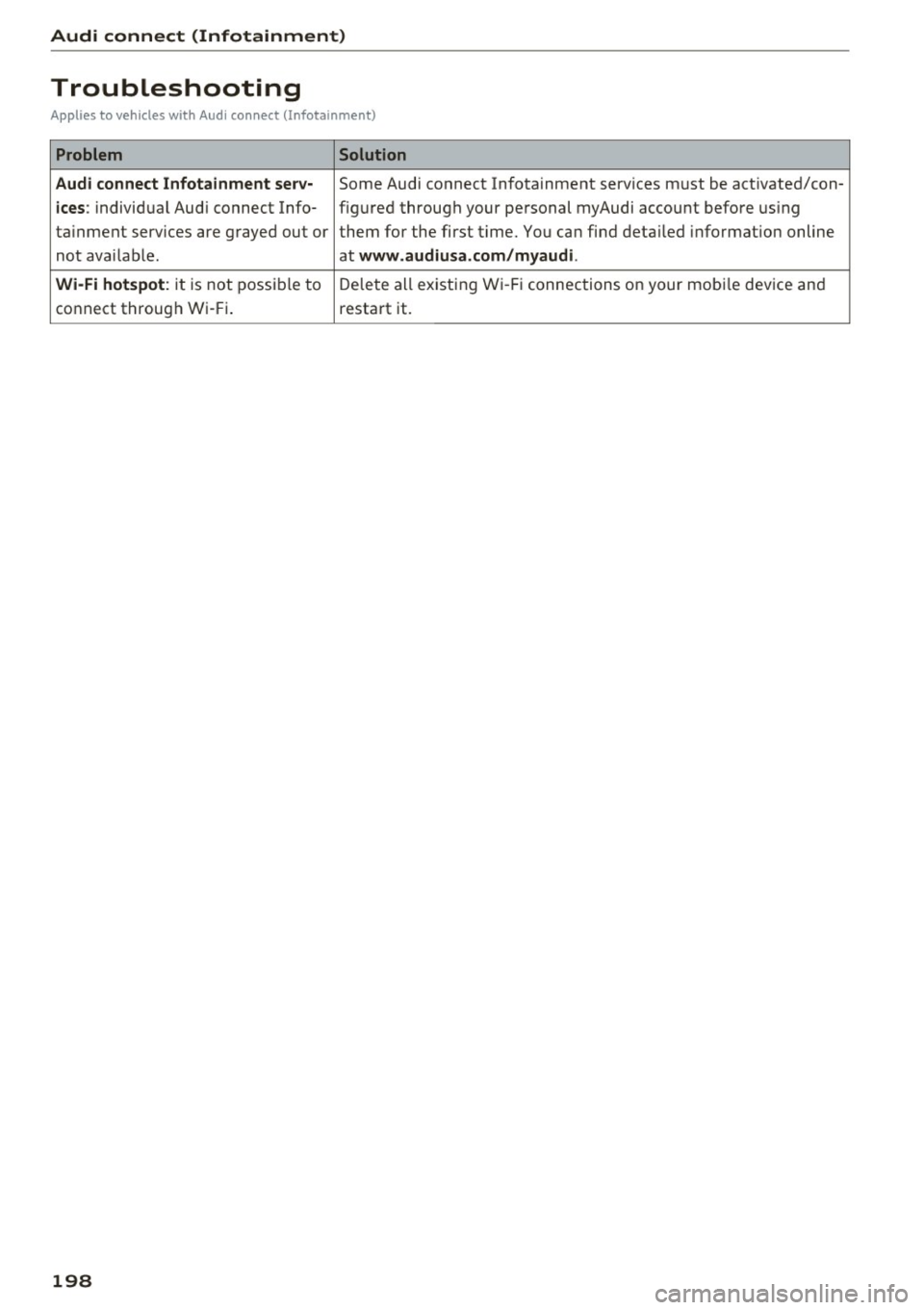
Troubleshooting
Applies to vehicles with Audi connect (Infota inment)
Problem Solution
Audi connect Infotainment serv·
Some Audi conn,ect Infotainment services must be activated/con-
ices: individual Audi connect Info- figured through your personal myAudi account before using
tainment services are grayed out or them for the first time. You can find detailed information on line
not available. at
www.audiusa.com/myaudi.
Wi-Fi hotspot:
it is not possible to Delete all existing Wi-Fi connections on your mobi le device and
connect through Wi-Fi. restart it.
198