service AUDI Q7 2018 Owner´s Manual
[x] Cancel search | Manufacturer: AUDI, Model Year: 2018, Model line: Q7, Model: AUDI Q7 2018Pages: 398, PDF Size: 185.58 MB
Page 92 of 398
Driving Transmission malfunction
• Transmi ssion: malfunction! Please stop ve
hicle and shift to P
Do not cont inue d rivi ng. Selec t the "P" selector
lever position and co ntact an authorized Au di
de aler or auth o riz e d Aud i Serv ice Facili ty fo r as
si st ance.
[O] Selector lever: malfunction! You can contin
ue driving . Please contact Service
There is a system malfunct io n in the t ransm is
sion . Drive to an author ized A udi dealer or au
thor ized A udi Se rvice Fac il ity immed iate ly to have
t he ma lfunction co rrecte d.
[O] P button: malfunction! Auto P when engine
off . Please contact Service
There is a malfunction in the "P " button on t he
selecto r leve r. The transmission a utomat ically
e ngages "P" when you switch off the eng ine.
Dr ive to an a utho rized Aud i dea le r or a uthorized
Aud i Serv ice Facility immedia tely to have t he
malfunc tion corrected.
[O] Selector lever: malfunction! Gear change on
ly possible using both paddle levers. Please con
tact Service
There is a system malfunct io n in the t ransm is
sion. You can conti nue d riving w ith rest ricted
f un ction . The selecto r leve r is not working . Gears
can only be se lec ted by tapping bo th sh ift pad
d les a t the sam e time w hen t he v ehicl e is station
a ry ~
page 8 9, fig . 87. Pa y a tten tio n t o th ese
lec ted t rans mi ssion positio n in t he ins tru ment
cluste r display. The par king lock eng ages au to
mat ica lly w hen you t urn off the engine . Drive to
an author ized A udi dealer or authorized A udi
Serv ice Facility immediately to have the mal func
tion cor rected.
[O] Transmission: Please press brake pedal and
select gear again
Pr es s t he bra ke peda l and se lec t the des ired se
lec to r l eve r pos it io n ag ain. Y ou ca n then con tinue
d riving .
[O] Transmis sion: too hot. Please adapt driving
style
90
T he transmission tem peratu re has inc reased sig
nificantly . Drive very cautio usly o r ta ke a break
from driving until the temperature ret urns to t he
no rma l range and t he indicato r light turns off.
[O] Transmission: malfunction! You can contin
ue driving. See owner's manual
T he re is a s ystem malfunc tion in the tran smi s
s io n. You m ay con tinu e dr ivin g. Drive to an au
t h ori ze d Aud i dea le r o r a uthorized Audi Se rvice
Fac ility soon to have the malf unct io n correcte d.
[il Transmission : malfunction! You can contin
ue driving in D until engine is off
There is a syst em malfunc tion in th e transmis
s io n. The trans missio n is swi tching to eme rge ncy
mo de.
If yo u tu rn th e e ngine off, you w ill not be
a ble to se le ct any o the r se le ct or lever posi tio ns
a ft er sta rting t he engine aga in . D rive to an a u
t h orized Audi dea le r or a uthorized Audi Se rvice
Facility immed iate ly to have the ma lfunction cor
r ected .
[O] Transmission: malfunction! You can contin
ue driving with limited function. Please contact
Service
T he re is a sys tem m alf unc tion in the tran smis
s io n. The transmission is switc hing to eme rgency
mode. This mode only s hifts into ce rtain gears or
will no longer shift at a ll. The eng ine may sta ll.
D rive to an author ized A udi dealer or autho rized
Audi Se rvice Facility immed iate ly to have the
malfunction corrected .
[O] Transmission: malfunction! You can contin
ue driving w ith limited function. No reverse
gear
There is a system malfunction in the tra nsmis
s io n. The transmission is switc hing to eme rge ncy
mode. Th is mode only s hifts int o ce rtain gears or
will no longer sh ift at a ll. The eng ine may sta ll.
Yo u cannot engage the reve rse gear. Dr ive to a n
a uth orize d Aud i dea le r o r auth orized Aud i Serv ice
Fac il ity i mmed iat ely to hav e the ma lfunction cor
r ec ted .
[O] Danger of rolling away! P not possible.
Please apply parking brake
Page 93 of 398

-The parking lock was released using the emer
gency release
¢ page 91. Or
- The parking lock can no longer be engaged.
Drive to an authorized Audi dealer or author
ized Audi Service Facility immediately to have
the malfunction corrected .
[il Move selector lever to automatic position
There is a malfunction in the tiptronic mode . End
tiptron ic mode by pushing the selector lever to
the left into the "D/S" position.
Parking lock emergency release
The parking lock must be released with the
emergency release when driving through moun tains/maneuvering.
Fig. 88 Drive r's side footwell : releas ing th e parking lock
us ing the eme rgency re lease
The emergency release is located under the floor
mat on the driver 's side .
Releasing the parking lock using the
emergency release
"'To prevent the vehicle from rolling unintent ion
ally, set the parking brake(®)¢
page Bl or
press the brake pedal.
"' There are two slits on the cover. Position the
screwdriver from the vehicle tool kit in one of
the slits on the cover and pry the cover off.
"' Insert the socket wrench (from the vehicle tool
k it) into the opening
c:> fig . 88.
"'T urn the socket wrench all the way clockw ise @
and press it downward @unti l it locks into
place.
~ "'L eave the socket wrench inserted c:> .&_ . ...... N r--.
~ Resetting the parking lock
0
0
~ "'Press the brake pedal and start the engine .
Driving
"' Keep the brake pedal pressed and engage the
following selector lever positions one after the
other: "N" , "D" and back to "N".
"' Turn the engine off again.
"' Grasp the socket wrench with both hands and
pull it up and out carefully to remove
c:>(D .
"'Install the cover .
When the parking lock emergency release is
used, the
[il indicator light and the "N " selector
lever posit ion turn on in the instrument cluster.
The message
Danger of rolling away! P not pos
sible. Please apply parking brake
also appears.
_& WARNING
-Only activate the emergency release while
on a level surface or a slight slope.
- The parking lock may only be released using
the eme rgency release if the parking brake
is set . If it is not functioning, secure the ve
hicle from rolling using the brake pedal or
other suitable means, such as blocking a
front and a rear wheel. An unsecured vehicle
may roll away, which increases the risk of an
accident.
- To reduce the r isk of an accident, you must
not drive when the emergency release is ac
tivated .
@ Note
-Read and follow the important instructions
about tow ing
<=> page 371.
-The risk of damage increases if you do not
remove the socket wrench carefully when
resetting the parking lock.
91
Page 95 of 398
Cl a:, ...... N
" N ...... 0
0
::r '
The maximum permitt ed tongue weight of the
trailer drawbar on the trailer hitch ball head may
not be exceeded .
If the tongue we ight is too low, this affects the
trailer's handling . For driv in g safety, we recom
mend to always utilize the maximum permitted
tongue weight, but not exceed it. You can reach
it, for example , by distributing the cargo in the
trailer correctly.
You can determine the tongue weight, for exam
ple, with a bathroom scale or a public weigh sta
tion .
The permitted tongue weight of your veh icle can
be found in the vehicle documentation or in
¢page 376.
Load distribution
Poor cargo load and distribution can negatively
i mpact ve hicle handl ing.
- Store objects preferably in the vehicle luggage
compartment . The vehicle shou ld always carry
the heaviest possible load and the trailer
shou ld have the lightest possible load.
- Distribute the load in the tra iler so that the
heavy objects are as close to the axle as possi
ble.
- Secure objects from slid ing out of p lace.
- Utilize the maximum permitted tongue weight
if possible .
Tires
Set the tire pressure on your vehicle for a "full
load"; see the t ire pressure sticker¢
page 340.
If necessary, also adjust the tire pressure on the
trailer according to the manufacturer's recom
mendation .
The tire pressure must be increased an addi tional
3 PS I (0 .2 bar) for towing loads over 6,600 lbs
(3,000 kg) .
W inter tires shou ld be mounted on the vehicle
and on the trailer during winter temperatures .
Trailer towing
Outside mirrors
If you cannot see the traffic behind the trailer
with the standard exterior mirrors, then you
must attach additional exterior mirrors. Adjust
them so you have a sufficient visibility behind
you.
Exterior lighting
Follow the legal regu lations rega rding the light
ing equipment on your trailer. Contact an author
ized Audi dea ler or authorized Audi Service Facili
ty for more information.
Before starting to drive , check all lighting eq uip
ment on the hitched trailer.
T he headl ight range cont rol adj usts automat ica l
ly to the light range of the headlights .
Safety chains
Make sure the safety chains are correctly applied
when pulling a trailer . The cha ins should hang
enough so that the trailer can drive around
curves . Howeve r, they must not touch the
ground.
Air suspension
Applies to: vehicles with air suspension
The air suspens ion must be at the standard vehi
cle he ight before you set the tongue weight on
the tra iler and hitch the trailer¢@ ,
¢page 130,
Raising/lowering the vehicle.
For vehicles with a factory-installed trailer hitch,
the a ir suspension trailer mode w ill automatically
switch on if you connect the trailer cable to the
socket.
For vehicles with a retrofitted trailer hitch, you
must sw itch on the a ir suspension trailer mode
manua lly . Select in the Infotainment system:
IMENU I button> Vehicle > left control button>
Vehicle settings > Air suspension: trailer. Switch
it off again after towing a trailer.
You can also sw itch off trailer mode manually
wh ile dr iving, for example, whe n using a bicycle
rack system. ..,.
93
Page 106 of 398
Assistance systems
-When approaching stationary obstacles
such as stopped traffic, adaptive cruise con
trol will respond with limited function.
- Adaptive cruise control does not respond to
people, animals, or cross ing or oncoming
objects.
- The function of the radar sensors can be af
fected by reflective objects such as guard
rails, the entrance to a tunnel, heavy rain or
ice.
(D Note
The sensors can be displaced by impacts or
damage to the bumper, wheel housing and
underbody . Th is can impair the adaptive
cruise control. Have an authorized Audi dealer
or authorized Audi Service Facility check their
function.
@ Tips
For an explanation on conformity with the
FCC regulations in the United States and the
Industry Canada regulations, see
¢page 380.
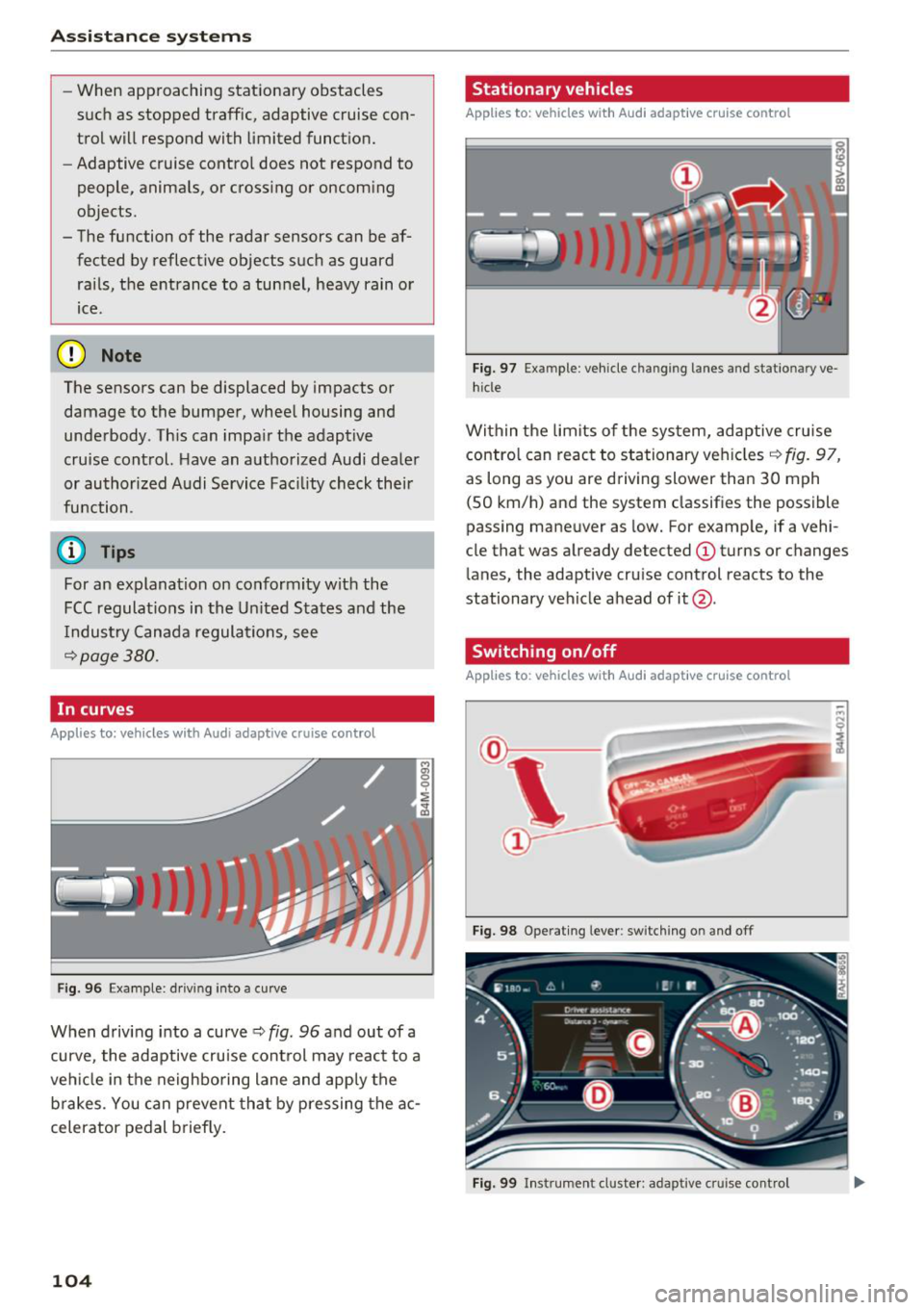
In curves
A pp lies to: ve hicles w ith Audi adaptive cruise co ntrol
Fig . 96 Exam ple: driving into a curve
When driving into a curve ¢ fig. 96 and out of a
curve, the adaptive cruise control may react to a
vehicle in the neighboring lane and apply the
brakes. You can prevent that by pressing the ac
celerator pedal briefly.
104
Stationary vehicles
App lies to : vehicles wit h Audi adap tive cruise control
))
Fig . 97 Exa mple : ve hicl e ch an gi ng la nes a nd statio nary ve
hicle
Within the limits of the system, adaptive cruise control can react to stationary vehicles ¢
fig. 97,
as long as you are driving slower than 30 mph
(SO km/h) and the system classifies the possible
passing maneuver as low. For example, if a vehi
cle that was already detected
(D turns or changes
lane s, the adaptive cruise control reacts to the
stationary vehicle ahead of it@ .
Switching on/off
App lies to: vehicles wit h Audi ada ptive c ru ise contro l
Fig. 98 Operating lever: switching on and off
Fig. 99 In strumen t cluster: adapt ive cru ise control
Page 113 of 398
Cl a:, ...... N
" N ...... 0
0
::r '
for safe operation. The systems cannot be switch
ed on.
Ill AC C with traffic jam a ssis t: only availabl e in
D, Sor M
Select the "D/S " or " M" selector leve r pos it ion.
Ill A CC w ith tr affic j am ass is t: currentl y un
available . Parking brake applied
The systems sw itch off if you set the parking
brake . The systems are available again after you
release the parking brake .
llJ ACC with traffic jam a ssist: currentl y un·
av ailable. Stabili zation cont rol (E SC) input
This message appears if the electronic stab iliza
tion contro l (ESC) is taking action to stabilize the
ve hicle . The systems switch off in this scenario .
Ill ACC with traffic jam a ssis t: manu al control!
This message appea rs if the veh icle rolls back
when sta rting on a slight incl ine, even t hough the
systems are active . P ress t he b rake peda l to pre
ve nt the vehicle from rolling or sta rting to move.
IIJ ACC w ith tr affic jam a ssis t: curr entl y un
availabl e. Downhill a ssis t activated
You cannot activate the system when hill hold as
sist is act ive .
II!! ACC with traffic jam assist: manual control!
This message appears if the driver does not take
over steering after mu ltip le driver intervention
requests and the system switches off . The vehicle
brakes unt il it is stationary .
ii Traffic jam a ssis t : una vailable. S ee o wner' s
manual
The system can no longer ensure that t he ve hicle
w ill stay in the lane and sw itches off. Have yo ur
vehicle checked by an a uth orized Audi dea ler or
authorized Audi Service Facility if the ma lfunc
tion is continuous .
14§ Traffic jam assis t : Plea se take over steering!
This message appea rs as soon as the system
stops detecting steer ing activ ity when the system
limits are rea ched. Always keep yo ur hands on
Ass istance systems
the steering whee l so you can be ready to steer at
any time.
14§ Traffic jam a ssis t : currentl y unavailable .
Pl ea se f asten se at belt
T he system switches off when the drive r's safety
belt is unfastened.
Ill AC C: eff iciency assist not available in thi s
countr y
The adaptation to speed lim its and routes ahead
is not available in this country .
IIJ ACC: predictive control currentl y una vaila
ble . See owne r's m anual
T he ad aptation to speed lim its and routes ahead
swi tches off at speed limits under 20 mph
(30 km/h) .
T he message ca n also appear if the adaptation to
speed limi ts and routes a head has a temporary
f ailure . Have your vehicle checked by an autho r
ized Audi dea ler or authorized Audi Service Facili
ty if the malfunction is continuous .
Distance warning : malfunction! Please contact
S erv ice
T he system cannot gua rantee that it will detect
vehicles correct ly and it has switc hed off. The ra
dar sensors have shifted or are fa ulty . Drive to an
authorized Aud i dea ler o r authorized Audi Serv ice
Facility immediate ly to have the ma lfunction cor
rected .
Distance warning : currentl y unavailable . Sen sor
view re stricted due to surrounding s. See own
e r' s manual
T his message appears if the rada r senso r view is
obstructed, for examp le by leaves, snow, heavy
spray or dirt. Clean the sensors
¢ page 103,
fig . 95 .
Distance warning : curr entl y unavailable . See
owner' s manual
This message appears if the system has a tempo
r a ry fa il ur e. If this occurs m ultip le t imes, drive to
an a uth orized Aud i dea le r o r auth orized Aud i
Se rvice Facility immed iate ly to have the ma lfunc -
t ion corrected .
liJ,,
111
Page 116 of 398

Ass is tanc e system s
your steering whee l ang le as long as you are ac
tively steering . Evasive steering support is availa
b le at speeds between approximate ly 20 mph
(30 km/h) and 90 mph (150 km/h).
Tu rn as sist
When start ing to drive and up to speeds of maxi
mum
6 mph (10 km/h), the turn assist uses a
braking intervention to prevent your vehicle from
colliding with an oncoming vehicle when turning
left or right (available in certain countries). The
braking in tervent ion causes your vehicle to stay
in its lane .
A WARNING
-Pre sense front cannot overcome the laws of
physics. It is a system des igned to assist a nd
i t cannot prevent a collision in every c ircum
sta nce. The d rive r must a lways i nte rvene.
T he driver is always responsib le for b raking
at the correct time. Do not let the increased
safety provided tempt you into taking risks .
This cou ld increase your risk of a collision.
- The system can deploy incorrectly due to
system -specific limits .
- Please note that the sensors and the camera
do not always detect all objects or lane
markings. This increases the risk of an acci
dent.
- Pre sense front does not react to people, an
ima ls or ob jects that are crossing the veh i
cle's path or that are diff icu lt to detect¢
&
in General information on page 103.
-Reflective objects suc h as guard rails or the
entrance to a tunnel, heavy rain and ice can
affect the function of the radar sensors and
the system's ability to detect a coll is ion risk.
@ Note
The sensors can be displaced by impacts or
damage to the bumper, whee l housing and
underbody . Pre sense fro nt can be impa ired
by this. Have an autho rized Aud i dea le r or a u
thorized A ud i Service Fac ility check the ir func
tion.
l) Th is is not available in so m e co un tri es.
114
(D Tips
- You can cancel the braking with increasing
force that is initiated by t he system by brak
ing yourself, by acce lerating not iceably or
by swerving.
- Keep in mind that pre sense front can brake unexpectedly. Always secure any cargo or
objects that you are transporting to reduce
the risk of damage or injury .
- Specific pre sense front functions switch
off
when the ESC is restricted or sw itched off
¢ page 143 or the hi ll hold assist is switch
ed on
¢ page 144.
Audi pre sense rear
App lies to : vehicles wi th Audi side ass ist
If the risk of a co llision with a vehicle ahead is de
tec ted, the fo llow ing f unct ions can be t rigge red:
- Reversible tens ion ing of the front safety belts
at the corresponding speeds.
- Clos ing the windows and sunroof* .
- Inflating the side bo lsters* i n the seat backrest
and seat surface .
- Activat ing the emergency flashers with in-
creased frequency
ll .
The message Audi pre sense. ¢ page 113,
fig. 108
will warn you about the danger.
Audi drive select* : the function is not act ive de
pending on the mode selected .
A WARNING
-To reduce the risk of an accident, please
note that the s ide assist* radar sensors do
not a lways detect every object.
-
- Pre sense rear does not react to people, ani
mals or objects that a re c ross ing t he vehi
cle's path or that are d ifficult to detect.
- Reflective objects such as guard ra ils, heavy
rain and ice can impair the function of the
radar sensors and the ability to detect a col-
lision risk .
~
Page 117 of 398
Cl a:, ...... N
" N ...... 0
0
::r '
The radar sensors can be displaced by impacts
or damage to the bumper, wheel housing and
underbody. Pre sense rear can be impaired by
this. Have an authorized Audi dealer or au
thorized Audi Service Facility check their func
tion.
(D Tips
- The pre sense rear functions switch off
when towing a trailer.
- The pre sense rear functions may also
switch off if there is a malfunction in the
side assist* system.
Audi pre sense city
Applies to: vehicles with Audi pre sense city
Description
Within the limits of the system, pre sense city
can warn you of impending collisions with
vehicles and pedestrians and initiate the applica
ble braking maneuver if needed. Pre sense city is
active at speeds of approximately 6 mph (10 km/
h) and higher.
A pedestrian warning can occur at speeds up to
SO mph (85 km/h), and vehicle warnings can oc
cur at speeds up to 155 mph (250 km/h). A pre
sense city braking maneuver is possible at speeds up to SO mph (85 km/h).
Warnings
The system recognizes various dangerous situa
tions. The
early warning occurs if:
- a vehicle driving ahead brakes suddenly,
- your own vehicle approaches a significantly
slower vehicle or stationary vehicle in the direc
tion of travel.
- a pedestrian is standing in the lane or is moving
into the lane .
When this warning occurs, it may only be possi ble to avoid a collision by swerving or braking
strongly. The message
Audi pre sense.
r:=;, page 113, fig. 108 and a warning tone will
warn you about the danger .
Assistance systems
Additionally, a jerk on the brakes may occur as an
acute warning when there is an impending colli
sion. If you do not react to the acute warning, pre
sense city can brake to the point of complete de
celeration within the limits of the system. This
reduces the vehicle speed in the event of a colli
sion. The message
Audi pre sense. also ap
pears.
The following functions are triggered in conjunc
tion with pre sense basic/rear:
- Reversible tensioning of the front safety belts.
- Closing the windows and sunroof*.
- Inflating the side bolsters* in the seat backrest
and seat surface.
Audi drive select*: the function is not active de pending on the mode selected.
_&. WARNING
- Pre sense city cannot overcome the laws of
physics.
It is a system designed to assist and
it cannot prevent a collision in every circum
stance. The driver must always intervene.
The driver is always responsible for braking
at the correct time. Do not let the increased
safety provided tempt you into taking risks .
This could increase your risk of a collision.
- The system can deploy incorrectly due to
system-specific limits .
- To reduce the risk of an accident, please
note that the camera does not always detect
every object.
- Pre sense city does not react to animals,
crossing or oncoming vehicles, objects such
as bars, railings or railcars, and objects that
are difficult to detect
r:=;, _& in General infor
mation on page 103.
- In trailer mode, the braking behavior of the
trailer can be different than usual during au
tomatic braking.
_&. WARNING
Pre sense city may be restricted or not availa
ble in the following example situations:
- in heavy fog, rain, spray or snow
- when there are visual obstructions, such as
glare, reflections or variations in light
115
Page 118 of 398

Ass is tanc e system s
-when it is dark
- if the camera window or the windshie ld is
dirty, iced over, damaged or covered
- when driving on snow, ice or loose gro und
- i n cu rves
- if t he ESC was restr icted o r switched off
- when tow ing a tra ile r
- when the driver's seat belt is unfastened
- up to ten seconds after sw itching on the ig-
nition
@ Note
Impacts or damage to the camera mount on
the windshield can disp lace the sensor . Pre
sense city can be impa ired by this. Have an au
thorized Audi dealer or authorized Aud i Serv
ice Facility check the ir funct ion.
(D Tips
- You can cancel the system braking interven
tion if you accelerate considerably or swerve
away .
- Keep in m ind that pre sense city can brake
unexpected ly. Always secure any cargo or
objects that you are transport ing to reduce
the r isk of damage or injur y.
- Specific pre sense city funct ions sw itch off
when the ESC is limited o r switched off
~ page 143 or the hill desce nt assist is
switched on
~ page 144 .
-When there is a malfunct ion in the camera,
the pre sense city funct ions also sw itc h off.
Settings in the Infotainment system
Applies to: vehicles with Aud i pre sense
.,. Se lect in the Infota inment system: IMENU I but
t on
> Vehicle > left contro l bu tton > Driv er a s
si stance
> Audi pre s ense .
Turn on/ off Audi pre s ense -
the pre sense fu nc
tions c an be t urned o n and off.
If t he system is switched off, it switches o n aga in
automatically once the ignition is sw itched on
again.
116
Prewarning -the early warning can be sw itched
off or the pre sense city/front warning point can
be set
( Early /Medium /Late) .
Set the warn ing t ime for the early wa rning to
Earl y at first . If this causes undesi red ear ly warn
ings to appear, then set the warning time to
Me
dium .
The Late warning time should on ly be set
i n spec ial circumstances, for examp le, when driv
i ng with a very dynamic style.
(D Tips
Your settings are automatically stored and as
signed to the remote contro l key being used.
Messages
Applies to: vehicles with Audi pre sense
IIJ Audi pre se n se: mal function! Pl ease con tac t
Service
This message appears when the pre sense func
tion is affected . For example, th is cou ld be
caused by a faulty sensor. Drive to an authorized
Audi dealer or author ized Audi Service Fac il ity im
med iate ly to have the ma lfu nction corrected .
II] Audi pre sense: currently limited . Sensor
v iew lim ited due to surroundings. See owner 's
manual
This message appears if the radar sensor and camera view is obstructed, for example by leaves,
snow, heavy spray or dirt . If necessary, clean the
sensors and the area around the camera
~ page 103, fig . 95 or ~page 121, fig . 115 .
II] Audi pre sense: currently limited . Trailer
towing mod e
For vehicles with a trai ler hitch installed at the
factory, the pre sense rear functions switc h off
when the electrical connector at the socket is
plugged in . There is no guarantee the functions
will switc h off when us ing a retrofitted trailer
hitc h.
II] Audi pre sense: currently restricted
This message appears if the ESC is restricted or
switched off, for example. .,,.
Page 119 of 398
Cl a:, ,-I N
" N ,-I 0
0
::r '
er 's manual
This message appea rs whe n there is a tempora ry
fa il ur e in a subsys tem, such as the ESC. If th is
message appears repeated ly, dr ive to an aut hor
ized A udi dealer or authorized Audi Service Facili
ty to have the malfunction cor rected.
II Audi pre sens e: emergency braking sy ste m
off
This message appea rs if the pre sense f unct ions
are switched off th rough the Info tainment sys
tem or if the system is not ready .
Audi active Lane assist
Description
Applies to: ve hicles with Audi active lane assist
Active lane ass ist (lane departure warning) de
tects lane marker lines with in the l imits of the
system using a camera in the w indshield . If you
a re approac hing a detected lane ma rke r line and
it appea rs like ly that you will leave the lane, t he
system w ill wa rn yo u w it h correct ive steer ing .
You can override this steering at any time. If you pass over a line , the steering whee l wi ll vibrate
lightly. In order for this warn ing vibration to oc
cur, it must first be sw itched on in the Infotain
ment system. Active lane assist is ready for oper
ation when the lane marker line is detected on at least one side of the vehicle .
The system is designed for driv ing on express
ways and highways and therefore only activates
at speeds above approximately 40 mph (65 km/
h).
Applies to: vehicles w ith side assist: if you acti
vate a turn s ignal when active lane ass ist is ready
and it class if ies a lane change as critical because
of vehicles traveling alongside you or approach i ng you, there w ill be not iceable correct ive steer
in g short ly before you leave t he la n e. This will at
temp t to keep your veh icle in t he la n e.
Appl ies to: veh icles w ithout s ide ass ist : the ready
sys tem does not wa rn yo u if you activate a tu rn
sig nal befo re cr oss ing t he lane ma rker line. In
A ss istance systems
thi s case, it assumes that you are chang ing lanes
intentionally .
Applies to: vehicles wi th adaptive c ruise co ntro l:
there is no correct ive s teer ing or warn ings if th e
system recogni zes a dist inct passing maneuver .
If the conditions are met, traffic jam assist
switches on at speeds under app roximately
40 mp h (65 km/h)
q page 109.
A WARNING ,--
-The system warns the driver t hat the vehicle
is leaving the lane using cor rective steering.
The drive r is always responsible fo r keeping
the vehicle within the lane.
- The system can assist the dr iver in keeping
the vehicle in the lane, but it does not dr ive
by itself. A lways keep your hands o n the
s teer ing whee l.
- Cor rect ive stee ring may not occur in certain
si tua tions, such as d uring heavy b raking.
- There may be cases whe re the camera does
not recogni ze all la n e m ar ker lines. Correc
tive stee ring can only take pla ce on the s ide
of the vehi cle where lane marker lines are
detected.
- Othe r road st ru ct ures o r obje cts could poss i
b ly be identifie d uni nten tionally as lane
marker lines . As a res ult, co rrective steerin g
may be unexpected o r may not occ ur.
- T he camera v iew c an be restricte d, for ex
ample by vehi cles dr iving ahea d or by ra in,
snow, heavy spray or lig ht shini ng into the
camera. Th is can result in active lane ass ist
not detecting the lane marker lines or de
tect ing t hem inco rrectly .
- In ce rtain s ituations w he re visibility is low,
the vehicle may switch from an "early" to
"late" steering correct ion.
- Under certain condit ions such as r uts in the
road, a n inclined roadway or crosswinds, the
correct ive steer ing alone may not be enough
to kee p the vehicle in the m iddle of the lane .
- For safety reasons, act ive lane assist must
not be used when there are poor road and/
or weather condit ions such as slippe ry
ro ads, fog, gravel, heavy rain, s now and t he
117
Page 121 of 398
a
Display in the instrument cluster
Applies to: ve hicles with Audi active lane assist
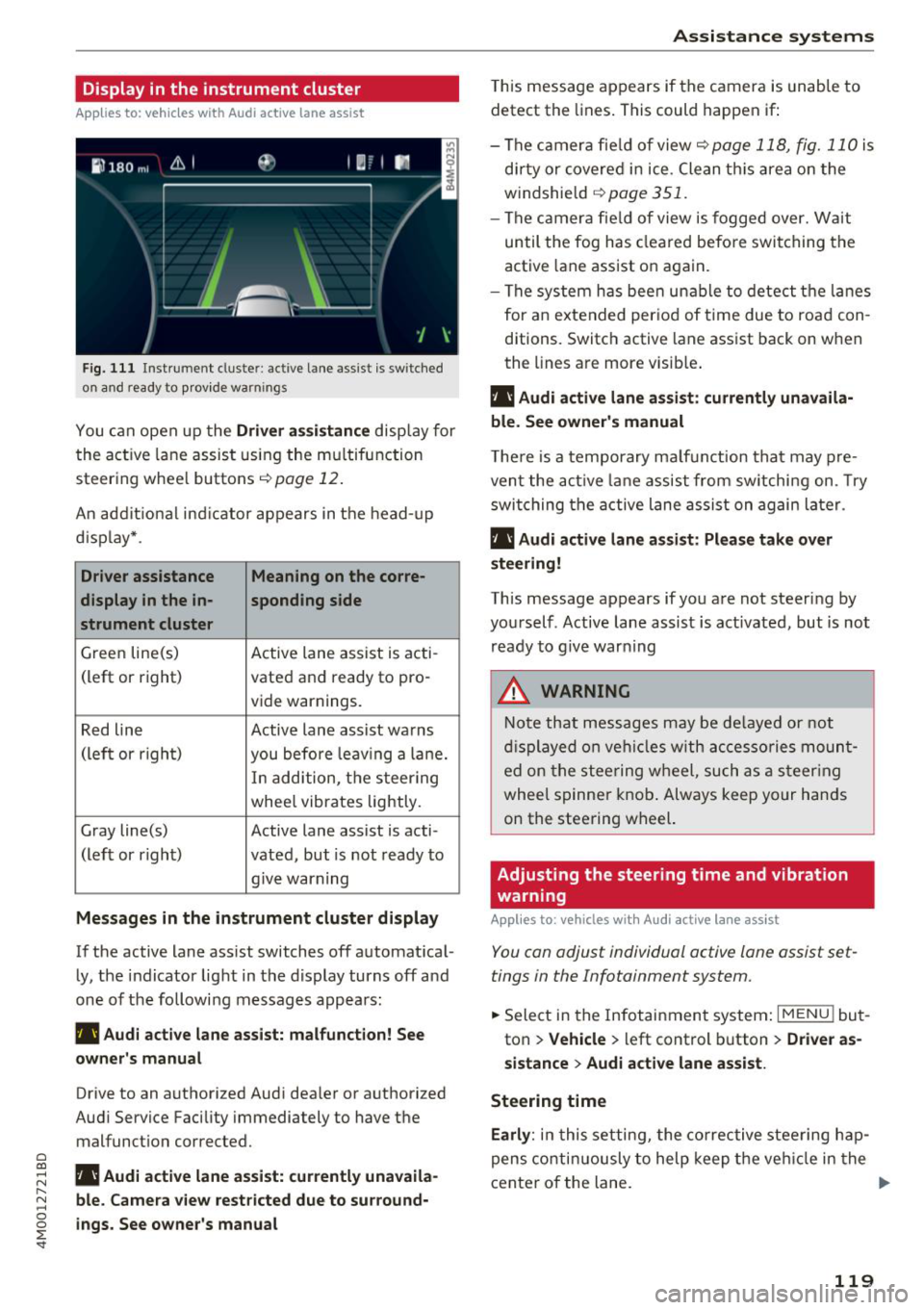
Fig. 1 11 Instrument cluster: active lane ass ist is switched
on a nd ready to provid e warn ings
You can open up the Driver a ssis tanc e display for
the act ive lane assist us ing the mu ltifunction
steer ing whee l buttons
c;,page 12 .
An addit ional ind icator appears in the head-up
d isp lay* .
Driver assistance Meaning on the corre-
display in the in -sponding side
s t rument cluster
Green line(s) Active lane assist is acti-
(left or right) vated and ready to pro-
vide warnings.
Red line Active lane assist warns
(left or righ t)
you before leav ing a la ne.
In add ition, t he steering
whee l vibrates lightly.
Gray line(s) Active lane assist is acti-
(left or r ight) vated, but is not ready to
. . give warning
Messages in the instrument cluster display
If the active lane ass ist switches off automat ical
ly, the indicator light in the display turns off and
one of the followi ng messages appears :
rl1 Audi acti ve lane assist: m alfunction! See
owner 's manual
Drive to an authorized Aud i dea ler or authorized
Aud i Service Facility immediately to have the
malfunct ion corrected.
~ rl1 Aud i a ctive lane assist: currently unavaila
r---N ble. Came ra vie w restricted due to su rround-~ 0 ~ ings. See owne r's manual
'
T his message appears if the camera is unable to
detect the lines . This could happen if:
- The camera fie ld of view
c;, page 118, fig. 110 is
di rty or covered in ice . Clean th is area on the
windshield
c;, page 351.
- The c amera fie ld of view is fogged over. Wait
until the fog has cleared befo re switching the
active lane assist on again.
- The system has bee n unable to detect t he la nes
for an e xtended per iod of time due to road con
ditions. Switch active lane assist back on when
the lines are more visib le .
rl1 Audi active lane a ssist : currently unavaila
ble. See owner's manual
T he re is a temporary ma lf u nction tha t may p re
vent the act ive lane assist from sw itchi ng on. Try
swi tching the active lane assist on again later.
rl1 Audi active lane a ssist : Pl ease take over
steering!
This message appears if you are not steering by
you rself . Active lane assist is activated, but is not
ready to g ive warning
A WARNING
N ote that messages may be de layed or not
d isplayed o n ve hicl es w ith ac cessories moun t
ed on the stee ring w heel, such as a steer ing
wheel spinne r knob . Always keep your hands
on the steering wheel.
Adjusting the steering time and vibration
warning
App lies to : vehicles with Audi active la ne ass ist
You can adjust individual active lane assist set
tings in the Infotainment system.
-
.. Select in the Infotainment system: I MENU ! but
ton
> Vehicle > left control b utton > Dri ver as
si stance
> Audi a ctive l ane assist.
Steering time Earl y:
in t his setting, the corrective stee ring hap
pens contin uously to help keep the veh icle in the
center of the lane. ..,_
119