seats AUDI Q7 2020 Owner´s Manual
[x] Cancel search | Manufacturer: AUDI, Model Year: 2020, Model line: Q7, Model: AUDI Q7 2020Pages: 316, PDF Size: 113.87 MB
Page 84 of 316
Stowing and using
porcelain). You could be injured by them in
the event of an accident.
@) Note
Beverage containers in the cup holders should
always
have a lid. Otherwise, the liquid inside
could spill and cause damage to vehicle
equipment.
Storage and
compartments
Pelee leer lel
Depending on the vehicle equipment, there may
be a variety of storage areas, compartments, and
retainers at various locations in the vehicle.
— Glove compartment: the glove compartment
can be locked using the mechanical key
> page 34.
— Storage compartments in the door trim panel
— Storage compartment in the front center con-
sole
— Nets on the back of the front seats
— Garment hooks in the rear
— Garment hooks above the rear doors
— Bag hooks in the luggage compartment
— Net in luggage compartment
Z\ WARNING
—To reduce the risk of injury, make sure all
storage compartments are always closed
while driving.
— Loose objects can be thrown around the ve-
hicle interior during sudden driving or brak-
ing maneuvers, which increases the risk of
an accident. Store objects securely while
driving.
— Only use the storage compartments in the
door trim panels to store small objects that
will not stick out of the compartment and
impair the function of the side airbags.
— Only lightweight clothing should be hung
from the garment hooks in the vehicle. Do
not use clothes hangers to hang clothing.
The pockets of the clothing must not con-
tain any heavy, breakable, or sharp-edged
82
objects. This could impair the effectiveness
of the side curtain airbags.
— Make sure your view toward the rear is not
blocked, for example by hanging clothing or
objects in the vehicle.
Luggage compartment
General information
All pieces of luggage or objects must be securely
fastened in the luggage compartment. Note the
following to maintain good vehicle handling:
> Distribute the load evenly in the luggage com-
partment.
> Stow heavy luggage as far forward in the lug-
gage compartment as possible.
» Use non-elastic cords attached to the tie-downs
to secure objects.
Z\ WARNING
— The luggage compartment cover is not a
surface for storing objects. Objects placed
on the cover increase the risk of injury to all
vehicle occupants during sudden driving or
braking maneuvers or in the event of an ac-
cident.
— Loose objects can be thrown around the ve-
hicle interior during sudden driving or brak-
ing maneuvers, which increases the risk of
an accident. Always stow objects securely in
the luggage compartment and secure them
at the tie-downs. Use straps suitable for
heavy objects.
— If pieces of luggage or objects are secured
to the tie-downs with unsuitable or dam-
aged straps, this can increase the risk of in-
jury during braking maneuvers or accidents.
— When transporting heavy objects, the vehi-
cle characteristics will change due to the
shift in the center of gravity, which increases
the risk of an accident. You may need to
adapt your driving style and speed to the
current conditions.
— The cargo net is only strong enough to se-
cure light objects. Heavy objects are not ade-
quately secured. Attempting to secure heavy
objects increases the risk of injury.
Page 85 of 316
4M1012721BA
Stowing and using
— Never exceed the permitted axle and load
and vehicle weight > page 298.
— Never secure a child safety seat to the tie-
downs.
— Never leave your vehicle unattended, espe-
cially if the luggage compartment lid is
open. Children could enter the luggage com-
partment and close the luggage compart-
ment lid from the inside. This creates the
risk of fatal injury, since the children would
be locked in and may not be able to escape
by themselves.
— Do not allow children to play in or on the ve-
hicle. Close and lock the luggage compart-
ment lid as well as all other doors when you
leave the vehicle.
— Never transport passengers in the luggage
compartment. Every passenger must be cor-
rectly secured with the safety belts in the
vehicle > page 66.
— Be careful when releasing the backrest and
folding
it forward. To reduce the risk of be-
ing pinched, pay attention and check when
folding backrests forward.
— The backrest must be securely latched so
objects cannot slide forward out of the lug-
gage compartment during sudden braking.
— The backrest must be latched securely to en-
sure that the safety belt is protecting the
center seating position.
— Always pull forward on the backrest to make
sure it is check if it is correctly locked in
place.
— Applies to: vehicles with third row seats: To
reduce the risk of injury, the backrest on the
second row seats must be in the upright po-
sition and locked in place if there are pas-
sengers riding in the third row.
— Applies to: vehicles with third row seats:
When there are passengers riding in the
third row seats, remove the adjustable tie-
downs* and place the rail covers on the rails
to
reduce the risk of injuries.
CG) Note
—To reduce the risk of damage, move the rear
head restraints down > page 65 before fold-
ing the rear backrests forward.
— When folding the backrest forward, make
sure the outer safety belts are in the belt
guide recess so that they do not get pinched
in the backrest lock and damaged. Other ob-
jects should be removed from the rear
bench seat to protect the backrest from
damage.
— If you move the front seat back when the
rear seat backrest is folded forward, you
could damage the head restraints on the
rear seat.
— Make sure that the heating grid strips for
the rear window defogger are not damaged
by abrasive objects.
— Let the luggage compartment cover roll up
slowly to reduce the risk of damage.
@) Tips
— The tire pressure must be adapted to the
load > page 256.
— You can purchase straps at specialty stores.
83
Page 87 of 316
4M1012721BA
Stowing and using
— The vehicle will not lower when the ignition
is switched off if the compressed air reser-
voir is empty. The button LED blinks three
times.
— If the compressed air reservoir is empty, it is
refilled while driving at speeds above
25 mph (40 km/h).
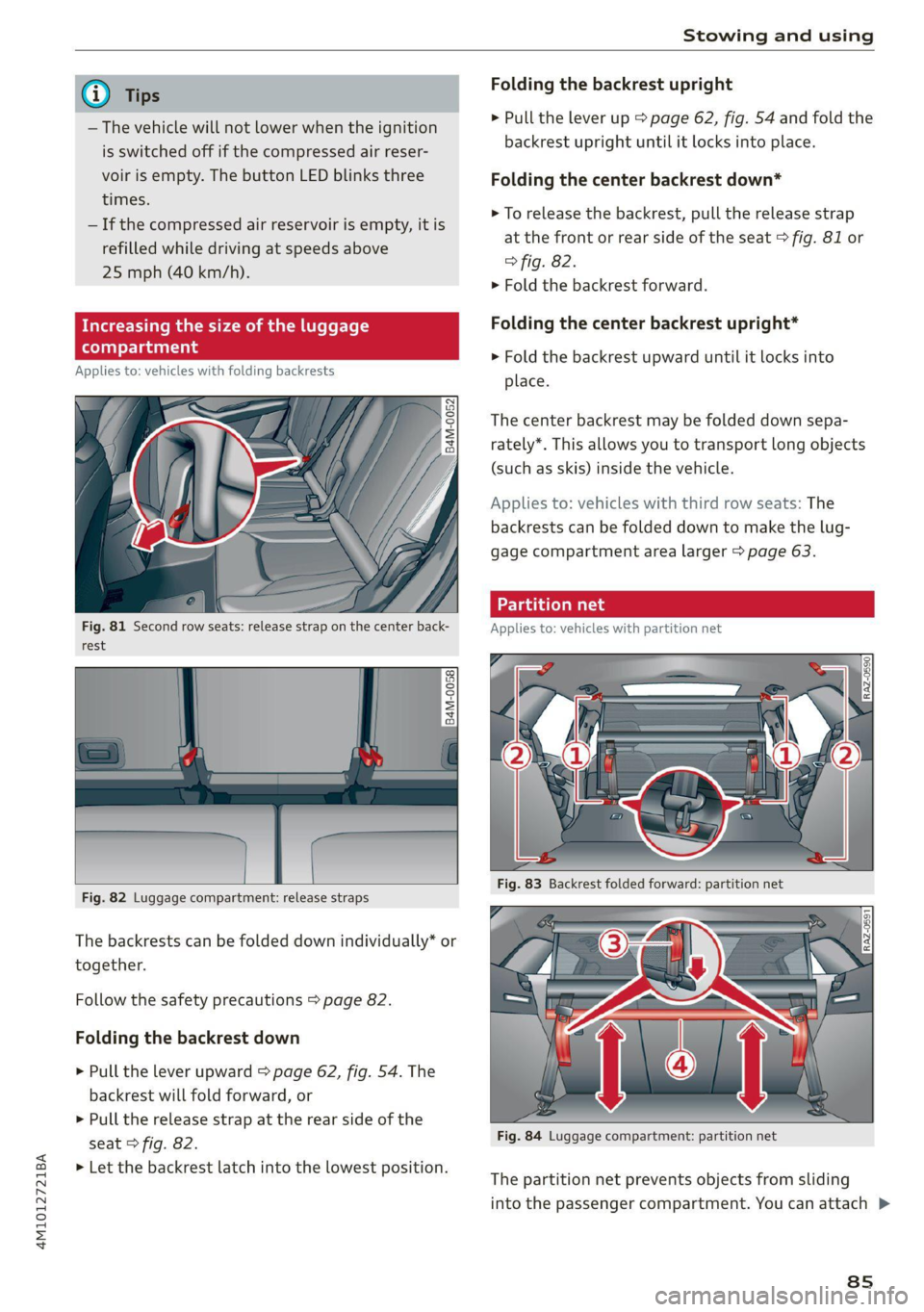
Applies to: vehicles with folding backrests
Fig. 81 Second row seats: release strap on the center back-
rest
Fig. 82 Luggage compartment: release straps
The backrests can be folded down individually* or
together. Follow
the safety precautions > page 82.
Folding the backrest down
> Pull the lever upward > page 62, fig. 54. The
backrest will fold forward, or
> Pull the release strap at the rear side of the
seat > fig. 82.
> Let the backrest latch into the lowest position.
Folding the backrest upright
> Pull the lever up > page 62, fig. 54 and fold the
backrest upright until it locks into place.
Folding the center backrest down*
> To release the backrest, pull the release strap
at the front or rear side of the seat > fig. 81 or
> fig. 82.
> Fold the backrest forward.
Folding the center backrest upright*
> Fold the backrest upward until it locks into
place.
The center backrest may be folded down sepa-
rately*. This allows you to transport long objects
(such as skis) inside the vehicle.
Applies to: vehicles with third row seats: The
backrests can be folded down to make the lug-
gage compartment area larger > page 63.
Fig. 84 Luggage compartment: partition net
The partition net prevents objects from sliding
into the passenger compartment. You can attach >
8s
Page 88 of 316
Stowing and using
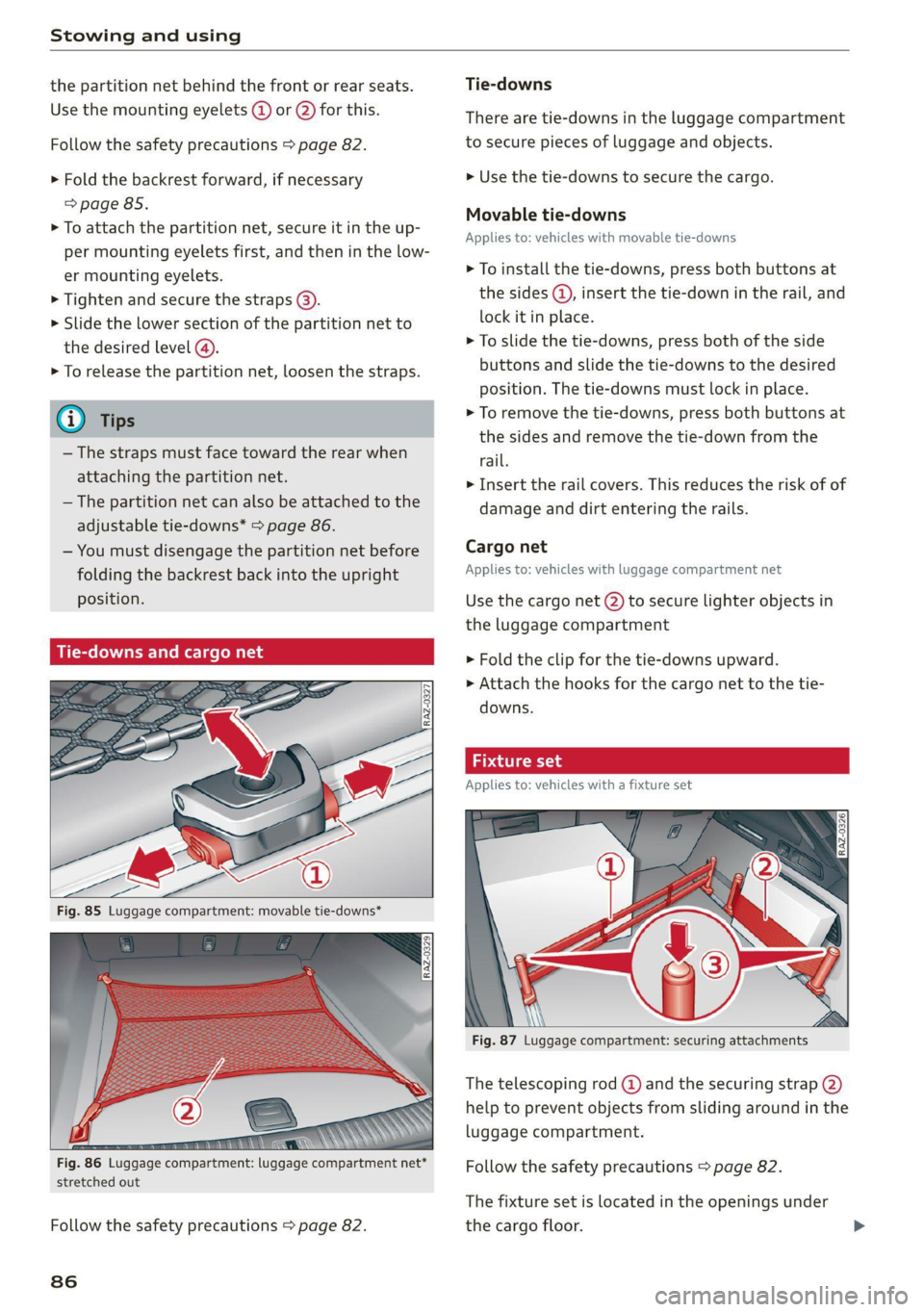
the partition net behind the front or rear seats.
Use the mounting eyelets @ or @) for this.
Follow the safety precautions > page 82.
> Fold the backrest forward, if necessary
=> page 85.
> To attach the partition net, secure it in the up-
per mounting eyelets first, and then in the low-
er mounting eyelets.
> Tighten and secure the straps ().
> Slide the lower section of the partition net to
the desired level @).
> To release the partition net, loosen the straps.
— The straps must face toward the rear when
attaching the partition net.
— The partition net can also be attached to the
adjustable tie-downs* > page 86.
— You must disengage the partition net before
folding the backrest back into the upright
position.
downs and ¢
Fig. 85 Luggage compartment: movable tie-downs*
: seen \
Fig. 86 Luggage compartment: luggage compartment net*
stretched out
Follow the safety precautions > page 82.
86
Tie-downs
There are tie-downs in the luggage compartment
to secure pieces of luggage and objects.
>» Use the tie-downs to secure the cargo.
Movable tie-downs
Applies to: vehicles with movable tie-downs
> To install the tie-downs, press both buttons at
the sides (@, insert the tie-down in the rail, and
lock it in place.
> To slide the tie-downs, press both of the side
buttons and slide the tie-downs to the desired
position. The tie-downs must lock in place.
> To remove the tie-downs, press both buttons at
the sides and remove the tie-down from the
rail.
> Insert the rail covers. This reduces the risk of of
damage and dirt entering the rails.
Cargo net
Applies to: vehicles with luggage compartment net
Use the cargo net (2) to secure lighter objects in
the luggage compartment
» Fold the clip for the tie-downs upward.
» Attach the hooks for the cargo net to the tie-
downs.
ture set
Applies to: vehicles with a fixture set
Fig. 87 Luggage compartment: securing attachments
The telescoping rod @) and the securing strap (2)
help to prevent objects from sliding around in the
luggage compartment.
Follow the safety precautions > page 82.
The fixture set is located in the openings under
the cargo floor.
Page 91 of 316
4M1012721BA
Warm and cold
Warm and cold
Climate control system
One of the following options may be available,
depending on vehicle equipment:
— A deluxe automatic climate control system with
3 zones where the temperature, air distribu-
tion, and air supply can be set separately on the
left front side, the right front side, and in the
rear
— A deluxe automatic climate control system with
4 zones to individually adjust the temperature,
air distribution, and amount of ventilation at all
of the seats
The climate control system warms, cools, dehu-
midifies, and filters the air in the vehicle interior.
It is the most effective when the windows and
panoramic glass roof* are closed. If there is a
build-up of heat inside the vehicle, ventilation
can help to speed up the cooling process.
The climate control system automatically main-
tains a temperature once it has been set. In all
heating mode functions except defrost, the blow-
er only switches to a higher speed once the en-
gine coolant has reached a certain temperature.
@ For the sake of the environment
Energy can be saved by switching off the A/C
mode.
@) Tips
—To prevent interference with the heating or
cooling output and to prevent the windows
from fogging over, the air intake in front of
the windshield must be free of ice, snow,
and leaves.
— Condensation from the cooling system can
drip and form a puddle of water under the
vehicle. This is normal and does not mean
there is a leak.
— The energy management system may tem-
porarily switch off certain functions, such as
the seat heating” or rear window defogger.
These systems are available again as soon as
the energy supply has been restored.
— Certain settings are stored automatically in
the active personal profile.
zB BI
2 19
Ig e
AUTO AUTO
Vel “ rae
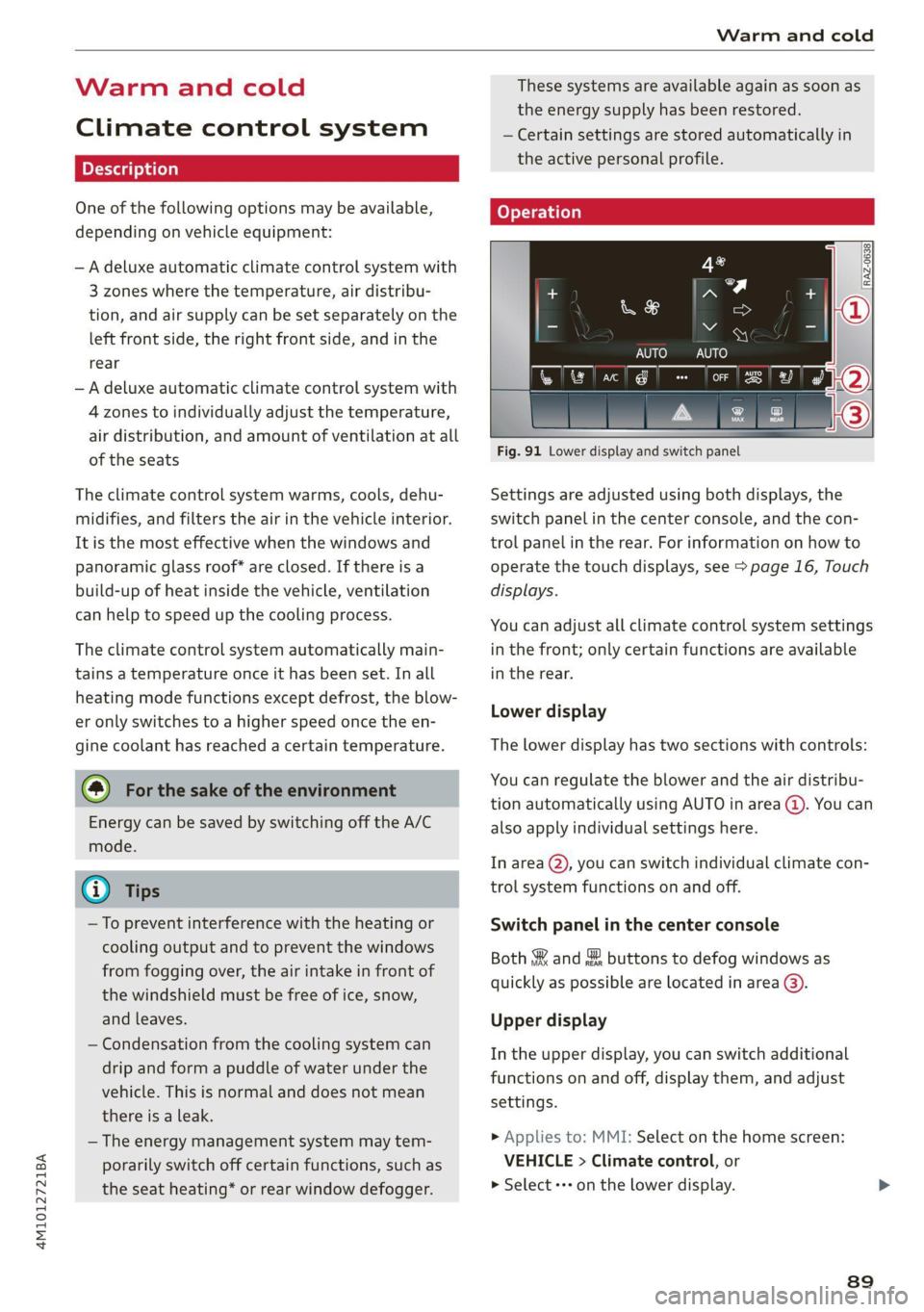
Fig. 91 Lower display and switch panel
Settings are adjusted using both displays, the
switch panel in the center console, and the con-
trol panel in the rear. For information on how to
operate the touch displays, see > page 16, Touch
displays.
You can adjust all climate control system settings
in the front; only certain functions are available
in the rear.
Lower display
The lower display has two sections with controls:
You can regulate the blower and the air distribu-
tion automatically using AUTO in area (@). You can
also apply individual settings here.
In area @ you can switch individual climate con-
trol system functions on and off.
Switch panel in the center console
Both §& and & buttons to defog windows as
quickly as possible are located in area @).
Upper display
In the upper display, you can switch additional
functions on and off, display them, and adjust
settings.
> Applies to: MMI: Select on the home screen:
VEHICLE > Climate control, or
> Select «++ on the lower display.
89
Page 93 of 316
4M1012721BA
Warm and cold
Applies to: vehicles with 4-zone automatic cli-
mate control: You can press J in the rear control
panel multiple times to adjust the air distribution
based on the direction of the arrow.
® Defrosting
The windshield and side windows are defrosted
or cleared of condensation as quickly as possible.
Align the outer air vents with the side windows.
The maximum amount of air flows mainly from
the vents below the windshield. The windshield
defogger* is also switched on at low outside tem-
peratures. The ® button will flash. Recirculation
mode switches off. The temperature should be
set at +72°F (22°C) or higher. Depending on the
outside temperature, the A/C cooling mode may
automatically switch on.
& Rear window defogger
The rear window defogger only operates when
the engine is running. It switches off automati-
cally after 10 to 20 minutes, depending on the
outside temperature.
To prevent the rear window defogger from
switching off automatically, press and hold the
& button for more than three seconds. This is
stored until the ignition is switched off.
AUTO
<>/&S Recirculation mode
In recirculation mode, the air inside the vehicle is
circulated and filtered. This prevents the unfil-
tered air outside the vehicle from entering the
vehicle interior > A\.
Pressing the <> button switches recirculation
mode on or off manually.
‘AUTO
When switched on, automatic recirculation
controls the recirculation mode automatically.
You must press the {% button if fog forms on the
windows.
« Seat heating
Applies to: vehicles with heated seats
The seat heating temperature can be set at mul-
tiple levels. Press «/ once to switch on the highest
level. Press «) again to decrease the temperature
one level at a time. The seat heating is switched
off if the button is not illuminated.
*) Seat ventilation
Applies to: vehicles with seat ventilation
The seat ventilation intensity can be set to multi-
ple levels. Press ©) once to switch on the highest
level. Press 2) again to decrease the intensity one
level at a time. The seat ventilation is switched
off if the button is not illuminated.
@ Child safety lock*
If 8 turns on in the control panel in the rear*, the
child safety lock is active and operation is blocked
=> page 40.
Ionizer
Applies to: vehicles with ionizer
Hazardous particles and germs in the air may be
reduced through ionization. This helps to im-
prove the air quality for individuals in the passen-
ger compartment.
&* Fragrance
Applies to: vehicles with fragrance function
The fragrance function will dispense a scent in
the vehicle interior. It is dispensed through the
front outer vents. This will produce a pleasant
scent. The fragrance is time-delayed, especially
at low or high temperatures. You can adjust the
fragrance function > page 92.
Residual heat
The residual heat from the coolant is used to
heat the vehicle interior. To use this function,
press and hold the & button for more than two
seconds while the ignition is switched off. The
function switches off automatically after about
15 minutes.
ZX WARNING
— You should not use the recirculation mode
for an extended period of time, because no
fresh air is drawn in and the windows can
fog when cooling mode is switched off. This
increases the risk of an accident.
— Individuals with reduced sensitivity to pain
or temperature could develop burns when
using the seat heating* function. To reduce
the risk of injury, these individuals should
not use seat heating*.
91
Page 94 of 316
Warm and cold
@) Note
To reduce the risk of damage to the seat heat-
ing* elements, do not kneel on the seats or
place heavy pressure on one area of the seat.
@ Tips
— If the front passenger's seat heating” is
turned on, it will not turn on again automat-
ically if more than 10 minutes have passed
between switching the ignition off and on
again.
— Only use the fragrance function* in modera-
tion and take any other passengers and ani-
mals into consideration when using the
function. An overlap of different scents or
odors could cause discomfort. If there is
discomfort, reduce the intensity or switch
the fragrance function* off. Only use fra-
grances that are approved by Audi.
Adjusting the vents
You can open and close the vents using the
thumbwheels. The levers adjust the direction of
the airflow from the vents.
Add
nal settings
You can adjust additional settings.
» Applies to: MMI: Select on the home screen:
VEHICLE > Climate control > ©.
Fragrance
Applies to: vehicles with fragrance function
Using Fragrance selection, you can select the fra-
grance and see the fill level of the fragrance.
You can select the strength of the scent with Fra-
grance level.
Footwell temperature*
You can adjust the footwell temperature for the
driver and front passenger.
92
Steering wheel heating
Scale Rie mela
Applies to: vehicles with steering wheel heating
> Press @ to switch steering wheel heating on or
off.
You can also operate the steering wheel heating
using the multifunction steering wheel
= page 27.
G) Tips
The steering wheel heating setting will be au-
tomatically stored in the active personal pro-
file.
Applies to: vehicles with steering wheel heating
@ Steering wheel heating: on / Steering wheel
heating: off
This message appears if you have switched the
steering wheel heating on or off.
Steering wheel heating: malfunction! See own-
er's manual
If this message appears, there is a malfunction.
Drive immediately to an authorized Audi dealer
or authorized Audi Service Facility to have the
malfunction repaired.
Fluids in the A/C system
Refrigerant in the A/C system
The sticker in the engine compartment provides
information about the type and amount of refrig-
erant used in the vehicle’s A/C system. The stick-
er is located in the front section of the engine
compartment or at the front or back of the hood.
Symbol | Meaning
Warning: the A/C system must only
be serviced by qualified technicians. A
Refrigerant type
Lubricant type >
we
ott
Page 148 of 316

Driver assistance
weather conditions may be too poor or the cam-
era may be covered. Clean the area in front of the
camera > page 120 and try to turn on the sys-
tems again later.
If the malfunction remains, drive to an author-
ized Audi dealer or authorized Audi Service Facili-
ty immediately to have the malfunction correct-
ed.
Audi pre sense
Applies to: vehicles with Audi pre sense
Within the limits of the system, the Audi pre
sense functions can initiate measures in certain
driving situations to protect the vehicle occu-
pants and other road users. Depending on the ve-
hicle equipment, various Audi pre sense systems
may
be installed:
— Audi pre sense basic can react during emergen-
cy and dangerous braking maneuvers and un-
stable driving situations (such as oversteering
or understeering).
— Audi pre sense front) can detect an impending
frontal impact and react with warnings, braking
interventions, and preemptive safety measures
for the vehicle occupants.
— Audi pre sense rear monitors the rear traffic
behind your vehicle and can react to an impend-
ing rear impact.
— Audi pre sense side can detect an impending
side impact from cross-traffic and vehicles com-
ing from the side, and can initiate preemptive
safety measures.
— The swerve assist can assist during an evasive
maneuver recognized as critical with steering
movement and by braking individual wheels in-
dividually.
— The turn assist can detect vehicles in the oppo-
site lane and react with braking maneuvers.
D_ This is not available in some countries.
146
Audi pre sense preemptive safety measures
Applies to: vehicles with Audi pre sense
Depending on the vehicle speed and the vehicle
equipment, the following functions may be initi-
ated in certain situations:
— Visual and audio warnings
— Activation of the emergency flashers)
— Reversible tensioning of safety belts
— Closing the windows and panoramic glass roof
— Adjusting the seats
— Other preemptive safety measures by individual
systems
ZA\ WARNING
Follow the safety precautions and note the
limits of the assist systems, sensors, and
cameras > page 118.
(i) Tips
— Depending on the risk situation that is de-
tected and the selected Audi drive select*
mode, not all preemptive safety measures
may be initiated under certain circumstan-
ces. Certain functions can be adjusted or
skipped if necessary.
— Audi pre sense may be restricted or unavail-
able under certain circumstances, for exam-
ple if:
— There are passengers with unfastened
safety belts
— It has only been several seconds since the
ignition was switched on The ndicator
light turns on.
— When driving in reverse
— There is an airbag control module mal-
function
— System functions may not be available if
the ESC is limited or switched off, or if
there is a malfunction.
Page 251 of 316
4M1012721BA
Wheels
Glossary of tire and loading
terminology
Accessory weight
means the combined weight (in
excess of those standard items
which may be replaced) of auto-
matic transmission, power steer-
ing, power brakes, power win-
dows, power seats, radio, and
heater, to the extent that these
items are available as factory-in-
stalled equipment (whether in-
stalled or not).
Aspect ratio
means the ratio of the height to
the width of the tire in percent.
Numbers of 55 or lower indicate a
low sidewall for improved steer-
ing response and better overall
handling on dry pavement.
Bead
means the part of the tire that is
made of steel wires, wrapped or
reinforced by ply cords and that is
shaped to fit the rim.
Bead separation
means a breakdown of the bond
between components in the bead.
Cord
means the strands forming the
plies in the tire.
Cold tire inflation pressure
means the tire pressure recom-
mended by the vehicle manufac-
turer for a tire of a designated
size that has not been driven for
more than a couple of miles (kilo-
meters) at low speeds in the three
hour period before the tire pres-
sure is measured or adjusted.
Curb weight
means the weight of a motor ve-
hicle with standard equipment in-
cluding the maximum capacity of
fuel, oil, and coolant, air condi-
tioning and additional weight of
optional equipment.
Extra load tire
means a tire designed to operate
at higher loads and at higher in-
flation pressures than the corre-
sponding standard tire. Extra load
tires may be identified as “XL”,
“xL’, “EXTRA LOAD”, or “RF” on
the sidewall.
249
Page 301 of 316
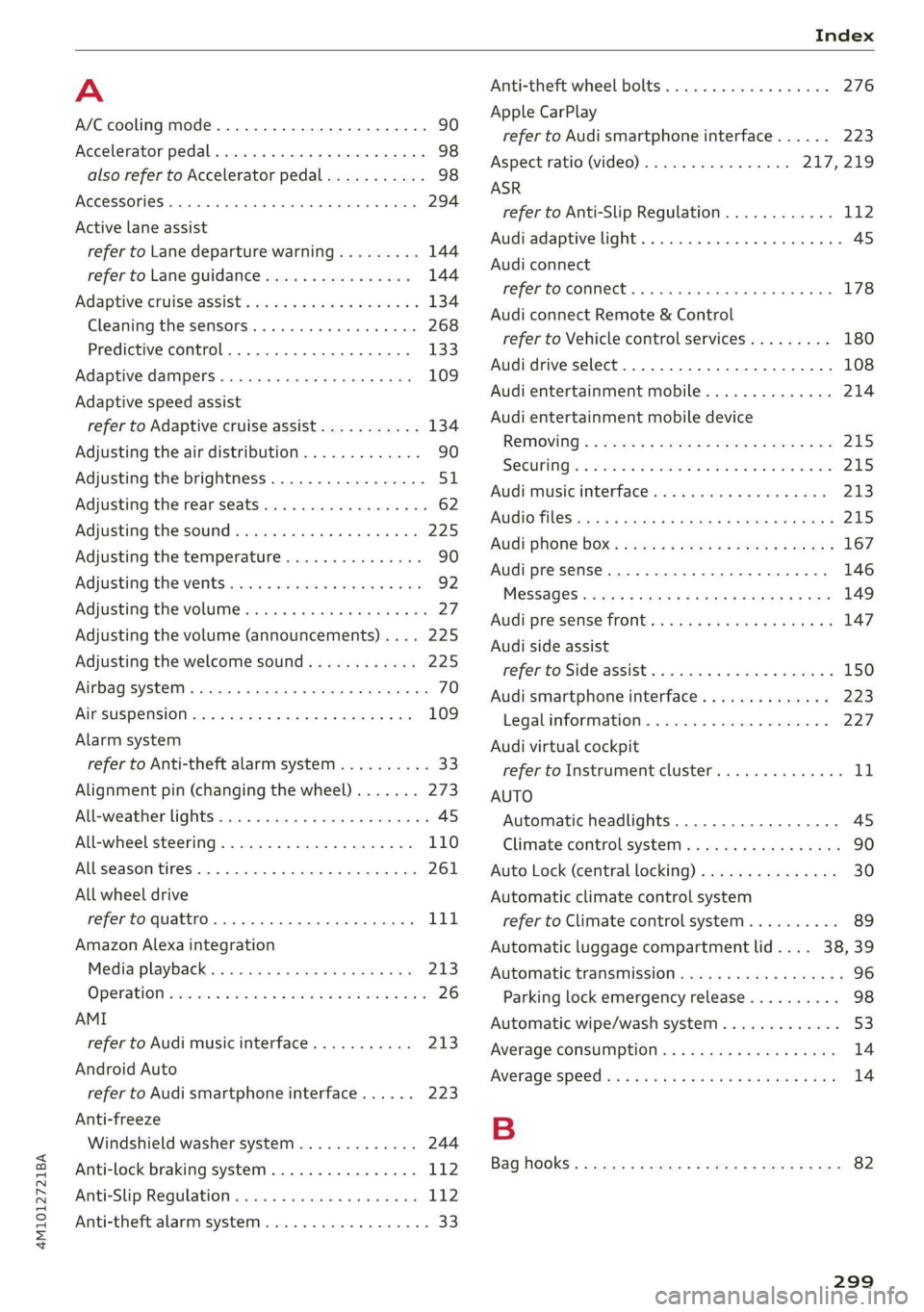
4M1012721BA
A
A/C cooling mode............. ee eee eee ee 90
Accelerator pedal.............--00000005 98
also refer to Accelerator pedal........... 98
ACCeSSOFICS . 6... eee 294
Active lane assist
refer to Lane departure warning......... 144
refer to Lane guidance................ 144
Adaptive cruise assist..............-000. 134
Cleaning the sensors...........00 ee eee 268
Predictive control.................... 133
Adaptive dampers...........--0000-00- 109
Adaptive speed assist
refer to Adaptive cruise assist........... 134
Adjusting the air distribution............. 90
Adjusting the brightness................. 51
Adjusting the rear seats.................. 62
Adjusting the sound..............-.0005 225
Adjusting the temperature............... 90
Adjusting the vents .......... 00 cece sees 92
Adjusting the volume..............00-005 27
Adjusting the volume (announcements).... 225
Adjusting the welcome sound............ 225
Airbag system... 2... 2. eee eee 70
Air suspension..............00.00-0008 109
Alarm system
refer to Anti-theft alarm system.......... 33
Alignment pin (changing the wheel)....... 273
All-weather lights...............-.00000. 45
All-wheel steering.............--000005 110
ALSeaSOMtineSien. is 5: suse 6 samme «0 imevsnee ow we 261
All wheel drive
refer to quattro... . 2... cece eee eee 111
Amazon Alexa integration
Media playback............. eee veee 213
QPeration » wee 2 + ane = + case o vere & 8 eae 26
AMI
refer to Audi music interface........... 213
Android Auto
refer to Audi smartphone interface...... 223
Anti-freeze
Windshield washer system............. 244
Anti-lock braking system.............0-- 112
Anti-Slip Regulation.................0.. 112
Anti-theft alarm system ...........-..00-- 33
Anti-theft wheel bolts...............0..5 276
Apple CarPlay
refer to Audi smartphone interface...... 223
Aspect ratio (video) ..............0. 217,219
ASR
refer to Anti-Slip Regulation............ 112
Audi adaptive light...............-.00005 45
Audi connect
refer to connect..........0e cece eee 178
Audi connect Remote & Control
refer to Vehicle control services......... 180
Audi drive select....................005 108
Audi entertainment mobile.............. 214
Audi entertainment mobile device
REMOVING < : wage x 2 een g 5 ees 5s eee gs: 215
SQCULING’s « « onan 2 2 wes 2 ere = een a @ aHe 215
Audi music interface..............00005 213
AUdiO TINGS ese: = & eaups 3 & eaogs & & Hees 3 t RES 2 215
AUdi phone BOX: wows yz wenn ¢ 2 wees © cree F 167
Audi presense...........0-.. cee eee eee 146
MeSSAQES cui 5 ¢ ais + ¥ caer ¥ o pew 8 e eee 149
Audi pre sense front......... 0c eee eens 147
Audi side assist
refer to Side assist. «noi... 2 seen ee eee ee 150
Audi smartphone interface.............. 223
Legalinfonmation:s. « svscon 0 seon oo ae © 2 227
Audi virtual cockpit
refer to Instrument cluster.............. 11
AUTO
Automatic headlights.................. 4S
Climate control system..............0-5 90
Auto Lock (central locking) ..............- 30
Automatic climate control system
refer to Climate control system.......... 89
Automatic luggage compartment lid.... 38,39
Automatic transmission...............005 96
Parking lock emergency release.......... 98
Automatic wipe/wash system............. 53
Average CONSUMPTION ws ccioes s neem os weer 14
Average speed i «i sins seer ws ee nates oo eee 14
B
Bag hOOks:. = sews =z wens 2 ¢ sees ex oes be ee 82
299