display AUDI Q7 2021 Owner´s Manual
[x] Cancel search | Manufacturer: AUDI, Model Year: 2021, Model line: Q7, Model: AUDI Q7 2021Pages: 332, PDF Size: 117.99 MB
Page 279 of 332
4M1012721BC
Wheels
tests, and does not include acceleration, cor-
nering, hydroplaning or peak traction charac-
teristics.
ZA WARNING
The temperature grade for this tire is estab-
lished for a tire that is properly inflated and
not overloaded. Excessive speed, underinfla-
tion, or excessive loading, either separately or
in combination, can cause heat buildup and
possible tire failure.
Z\ WARNING
Temperature grades apply to tires that are
properly inflated and not over or underinflat-
ed.
Tire pressure monitoring
system
(1) General notes
Each tire, including the spare (if provided),
should be checked monthly when cold and inflat-
ed to the inflation pressure recommended by the
vehicle manufacturer on the vehicle placard or
tire
inflation pressure label. (If your vehicle has
tires of a different size than the size indicated on
the vehicle placard or tire inflation pressure la-
bel, you should determine the proper tire infla-
tion pressure for those tires).
As an added safety feature, your vehicle has been
equipped with a tire pressure monitoring system
(TPMS) that illuminates a Low tire pressure tell-
tale when one or more of your tires is significant-
ly under-inflated. Accordingly, when the low tire
pressure telltale illuminates, you should stop and
check your tires as soon as possible, and inflate
them to the proper pressure. Driving on a signifi-
cantly under-inflated tire causes the tire to over-
heat and can lead to tire failure. Under-inflation
also reduces fuel efficiency and tire tread life,
and may affect the vehicle's handling and stop-
ping ability.
Please note that the TPMS is not a substitute for
proper tire maintenance, and it is the driver's re-
sponsibility to maintain correct tire pressure,
even if under-inflation has not reached the level
to trigger illumination of the TPMS low tire pres-
sure telltale.
Your vehicle has also been equipped with a TPMS
malfunction indicator to indicate when the sys-
tem is not operating properly. The TPMS mal-
function indicator is combined with the low tire
pressure telltale. When the system detects a
malfunction, the telltale will flash for approxi-
mately one minute and then remain continuously
illuminated. This sequence will continue upon
subsequent vehicle start-ups as long as the mal-
function exists.
When the malfunction indicator is illuminated,
the system may not be able to detect or signal
low
tire pressure as intended. TPMS malfunctions
may occur for a variety of reasons, including the
installation of replacement or alternate tires or
wheels on the vehicle that prevent the TPMS
from functioning properly. Always check the
TPMS malfunction telltale after replacing one or
more tires or wheels on your vehicle to ensure
that the replacement or alternate tires and
wheels allow the TPMS to continue to function
properly.
If the tire pressure monitoring indicator
Ey) ote Le
Applies to: vehicles with Tire Pressure Monitoring System in-
dicator
The tire pressure indicator in the instrument
cluster informs you if the tire pressure is too low
or if there is a system malfunction.
Using the ABS sensors, the tire pressure monitor-
ing system compares the tire tread circumference
and vibration characteristics of the individual
tires. If the pressure changes in one or more
tires, this is indicated in the instrument cluster
display with an indicator light @ and a message.
If only one tire is affected, the location of that
tire will be indicated.
The tire pressures must be stored again each
time you change the pressures (switching be-
tween partial and full load pressure) or after
changing or replacing a tire on your vehicle
= page 278. The tire pressure monitoring system >
277
Page 280 of 332

Wheels
only monitors the tire pressure you have stored.
Refer to the tire pressure label for the recom-
mended tire pressure for your vehicle
=> page 269, fig. 177.
Tire tread circumference and vibration character-
istics can change and cause a tire pressure warn-
ing if:
— The tire pressure in one or more tires is too low
— The tires have structural damage
— The tire was replaced or the tire pressure was
changed and it was not stored > page 278
— Tires that are only partially used are replaced
with new tires
Indicator lights
If the @ indicator light turns on, there is a loss
of pressure in at least one tire .> A\ Check the
tires and replace or repair if necessary. Check and
correct the pressures of all four tires and store
the pressure again > page 278.
ia Tire pressure: malfunction! See owner's
manual
iff appears after switching the ignition on or
while driving and the @ indicator light in the in-
strument cluster blinks for approximately one
minute and then stays on, there is system mal-
function. Try to store the correct tire pressures
= page 278. In some cases, you must drive for
several minutes after storing the pressures until
the indicator light turns off. If the indicator light
does turn off or turns on again after a short peri-
od of time, drive to an authorized Audi dealer or
authorized Audi Service Facility immediately to
have the malfunction corrected.
Z\ WARNING
— If the tire pressure indicator appears in the
display, reduce your speed immediately and
avoid any hard steering or braking maneu-
vers. Stop as soon as possible and check the
tires and their pressure.
— The driver is responsible for maintaining the
correct tire pressure. You must check the
tire pressure regularly.
— Under certain conditions (such as a sporty
driving style, winter conditions, or unpaved
278
roads), the tire pressure monitoring system
indicator may be delayed.
@) Tips
—The tire pressure monitoring system can al-
so stop working when there is an ESC mal-
function.
— Using snow chains may result in a system
malfunction.
—The tire pressure monitoring system in your
Audi was calibrated with “Audi Original
Tires” > page 266. Audi recommends using
these tires.
Storing tire pressures
Applies to: vehicles with Tire Pressure Monitoring System in-
dicator
If the tire pressure changes or a tire is replaced,
it must be confirmed in the MMI.
> Before storing the tire pressures, make sure the
tire pressures in all four tires meet the speci-
fied values and are adapted to the load
=> page 269.
» Switch the ignition on.
> Applies to MMI: Select on the home screen: VE-
HICLE > Settings & Service > Tire pressure
monitoring > Store tire pressure > Yes, store
now.
G) Tips
Do not store the tire pressures if snow chains
are installed.
Run-flat tires
Applies to: vehicles with run-flat tires
Run-flat tires can allow you to remain driving
when there is a loss of pressure.
Run-flat tires have reinforced sidewalls that pro-
tect
the tire if there is a loss of pressure.
If the tire pressure monitoring system indicates a
loss of pressure in one or several tires, you can
continue driving on run-flat tires for at least
20 mi (30 km). Drive to an authorized Audi dealer
or authorized Audi Service Facility immediately to
have the problem corrected.
Page 285 of 332
4M1012721BC
Care and cleaning
Water-based deposits
such as coffee, tea,
blood, etc.
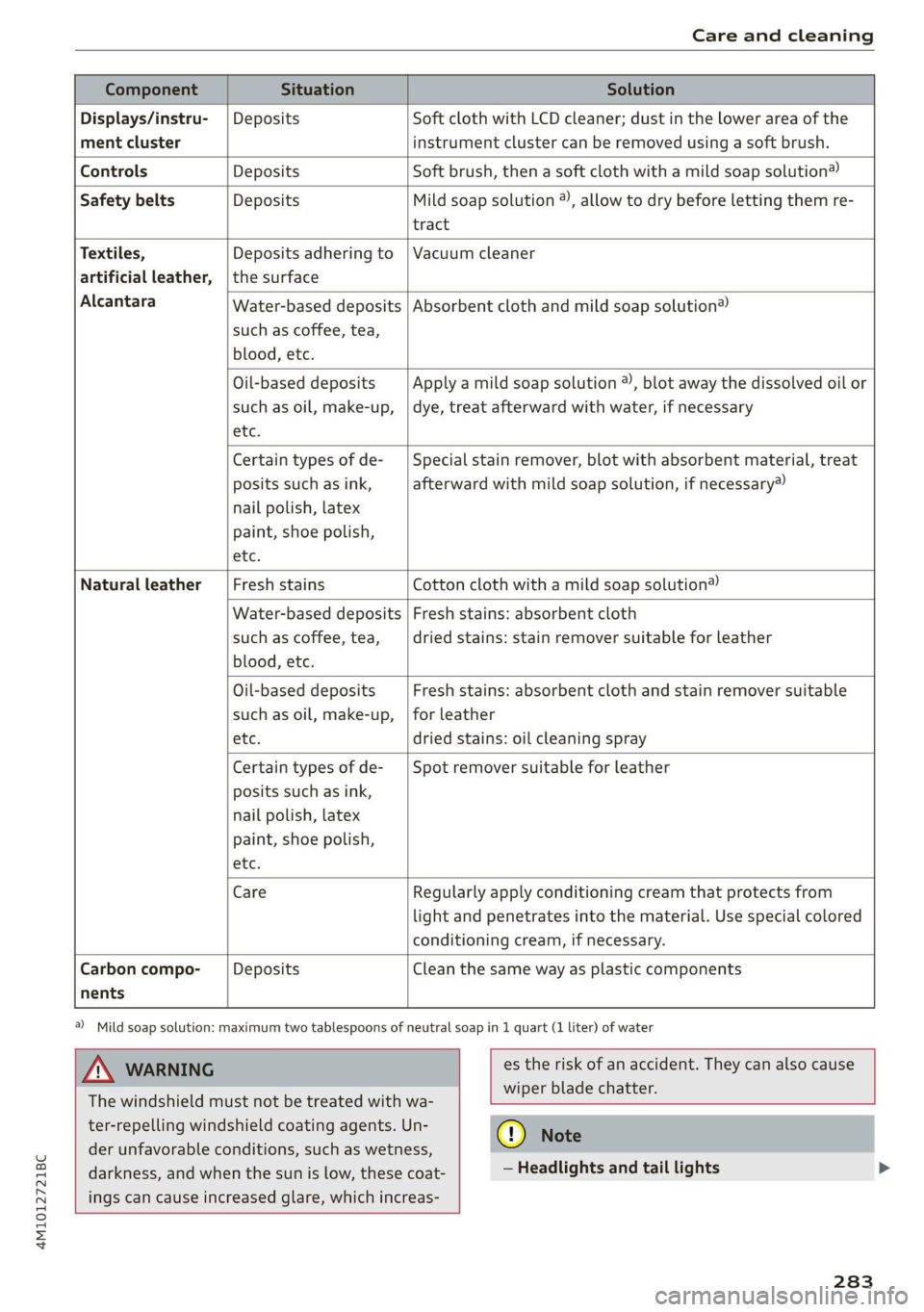
Component Situation Solution
Displays/instru- | Deposits Soft cloth with LCD cleaner; dust in the lower area of the
ment cluster instrument cluster can be removed using a soft brush.
Controls Deposits Soft brush, then a soft cloth with a mild soap solution®
Safety belts Deposits Mild soap solution ®), allow to dry before letting them re-
tract
Textiles, Deposits adhering to | Vacuum cleaner
artificial leather, |the surface
Alcantara Absorbent cloth and mild soap solution®
Oil-based deposits
such as oil, make-up,
etc.
Apply a mild soap solution ®), blot away the dissolved oil or
dye, treat afterward with water, if necessary
Certain types of de-
posits such as ink,
nail polish, latex
paint, shoe polish,
etc.
Special stain remover, blot with absorbent material, treat
afterward with mild soap solution, if necessary)
Natural leather Fresh stains Cotton cloth with a mild soap solution®
Water-based deposits
such as coffee, tea,
blood, etc.
Fresh stains: absorbent cloth
dried stains: stain remover suitable for leather
Oil-based deposits
such as oil, make-up,
etc.
Fresh stains: absorbent cloth and stain remover suitable
for leather
dried stains: oil cleaning spray
Certain types of de-
posits such as ink,
nail polish, latex
paint, shoe polish,
etc.
Spot remover suitable for leather
nents
Care Regularly apply conditioning cream that protects from
light and penetrates into the material. Use special colored
conditioning cream, if necessary.
Carbon compo- Deposits Clean the same way as plastic components
@) Mild soap solution: maximum two tablespoons of neutral soap in 1 quart (1 liter) of water
Z\ WARNING
The windshield must not be treated with wa-
ter-repelling windshield coating agents. Un-
der
unfavorable conditions, such as wetness,
darkness, and when the sun is low, these coat-
ings can cause increased glare, which increas-
es the risk of an accident. They can also cause
wiper blade chatter.
() Note
— Headlights and tail lights
283
Page 286 of 332

Care and cleaning
— Never clean the headlights or tail lights
with a dry cloth or sponge because the
lights could be damaged.
— Do not use any cleaning products that con-
tain alcohol, because they could cause
cracks to form.
— Wheels
— Never use any paint polish or other abra-
sive materials.
— Damage to the protective layer on the
rims, such as stone chips or scratches,
must be repaired immediately.
— Camera lenses
— Never use warm or hot water to remove
snow or ice from the camera lens. This
could cause the lens to crack.
— Never use abrasive cleaning materials or
alcohol to clean the camera lens. This
could cause scratches and cracks.
— Laser scanner
— Never use abrasive cleaning materials to
clean the laser scanner. This could cause
scratches and cracks.
— Door windows
— Remove snow and ice on windows and ex-
terior mirrors with a plastic scraper. To re-
duce the risk of scratches, move the scra-
per only in one direction and not back and
forth.
— Never remove snow or ice from door win-
dows and mirrors using warm or hot water
because this could cause cracks to form.
—To reduce the risk of damage to the rear
window defogger, do not apply any stick-
ers on the heating wires on the inside of
the window.
— Decorative parts and trim
— Never use chrome care or cleaning prod-
ucts.
— Paint
— To reduce the risk of scratches, the vehicle
must be free of dirt and dust before pol-
ishing or waxing.
—To prevent paint damage, do not polish or
wax the vehicle in direct sunlight.
—To reduce the risk of paint damage, do not
polish away rust spots.
284
— Remove cosmetics and sunscreen immedi-
ately because they could damage the
paint.
— Decorative decals
—To reduce the risk of damage, do not use
any rough powder or abrasive cleaning
products.
— To reduce the risk of damage, do not pol-
ish decorative decals that have a matte or
printed finish.
— Due to the risk of damage, do not use an
ice scraper to remove snow and ice on win-
dows with decorative decals on them.
— Displays and instrument cluster
— Make sure that the display and instrument
cluster are switched off and have cooled
down before cleaning. To switch off the
upper and lower display, select on the
MMI home screen: SETTINGS > Display &
brightness > MMI > Screen cleaning.
— Displays, the instrument cluster, and the
trim surrounding it must not be cleaned
with dry cleaning methods because they
could become scratched.
— Make sure no fluids enter the spaces be-
tween the instrument cluster and the
trim, because that could cause damage.
— Controls
— Make sure that no fluids enter the con-
trols, because this could cause damage.
— Safety belts
— Do not remove the safety belts to clean
them.
— Never clean safety belts or their compo-
nents with chemicals or with corrosive flu-
ids or solvents and never allow sharp ob-
jects to come into contact with the safety
belts. This could cause damage to the belt
webbing.
—If there is damage to the webbing, the
connections, the retractors, or the buck-
les, have them replaced by an authorized
Audi dealer or authorized Audi Service Fa-
cility.
— Textiles, artificial leather, and Alcantara
— Never treat artificial leather or Alcantara
with leather care products, solvents, floor >
Page 302 of 332

Fuses and bulbs
Fuse panel (d) (black)
No. | Equipment
Audi phone box
Climate control system, fragrance system
Head-up display
Audi music interface, USB input
Steering column lock
Upper/Lower display
W}OlN|/
Mm)
BR]
WIN
Instrument cluster
10 | DVD drive
11 | Light switch, switch panels
12 | Steering column electronics
13 | Volume control
14 | MMI Infotainment system control module
15 | Steering column adjustment
16 | Steering wheel heating
with plastic clip
Fig. 200 Left side of the luggage compartment: fuse panel
with plastic clip (plug-in hybrid drive*)
y 1 High-voltage heating, thermomanage-
ment
Air suspension/suspension control
6 |Automatic transmission control module
7 Rear seat heating, rear climate control sys-
tem controls
Third row seat adjustment
9 | Left tail light
10 | Front belt tensioner on driver's side
Luggage compartment lid central locking,
11 | fuel filler door, luggage compartment cov-
er
12 |Luggage compartment lid control module
Fuse panel @)
No. | Equipment
Fig. 199 Left side of the luggage compartment: fuse panel 1 | Rear climate control system blower
2 |Sound-amplifier
3 | Exhaust treatment, sound actuator
4 |Rear climate control system control panel
5 |Right trailer hitch light
300
Page 307 of 332

4M1012721BC
Data privacy
Exporting data
You can read out the data memory for autono-
mous driving and export this data to a USB stick.
The settings depend on the vehicle equipment.
Requirement: the vehicle must be stationary, the
automated systems must not be active, and the
ignition must be switched on. A USB stick must
be connected to the USB input.
» Applies to: MMI: Select on the home screen:
SETTINGS > Data management > Statistics.
> Follow the instructions in the MMI.
The export will be canceled if you switch menus,
for example.
Recorded data
— Driver interactions (such as the driver pressing
the brake pedal)
— Vehicle dynamics (such as speed)
— Status of automated systems
— Control requests
— Relevant measurements from monitoring the
surroundings
— Image data from monitoring the surroundings
— System status, timestamp, and vehicle location
when deactivating/activating park assist plus
You can find additional information in the MMI:
— Applies to: MMI: Select on the home screen:
SETTINGS > General > Legal notes > About the
data memory.
@) Tips
— The data is processed and stored locally in
the vehicle. It is not automatically transmit-
ted to Audi or other third parties, for exam-
ple through the cloud. The owner or driver is
responsible for the data. Audi does not have
access to it.
— For additional information and the evalua-
tion of data, please contact Audi Customer
Care.
Transmitted information
Data collection
Applies to: vehicles with data collection
Depending on the country, Audi may collect data
for the following purposes, for example: offer
and product optimization, public safety, provision
of Audi connect remote vehicle services, and
adaptation to customer expectations. For exam-
ple, various technical function data, environmen-
tal data, driving data, and usage data will be col-
lected for a specific purpose and forwarded to
Audi. The data will be sent from the vehicle at
the time the data was collected.
Applies to: MMI: You can find additional informa-
tion about data collection in the MMI. Select on
the home screen: SETTINGS > General > Legal
notes > About Audi connect.
If you would like to deny data transmission to
Audi, contact an authorized Audi dealer or au-
thorized Audi Service Facility for more informa-
tion. You also have the option to deactivate data
transmission within the privacy settings.
Privacy settings
Applies to: vehicles with Audi connect
> Applies to MMI: Select on the home screen:
SETTINGS > Privacy settings.
When using Audi connect services or during data
collection, data will be transmitted from the ve-
hicle.
> To display additional information about the pri-
vacy settings and the associated symbols in the
status bar, press @ in the MMI.
Requirement: the ignition must be switched on.
Setting the maximum privacy settings
When the Activate privacy mode function is
switched on, the data connection is deactivated
or sending of data is restricted, but all safety-re-
lated, legal, or contractually required Audi con-
nect
services remain activated. The majority of
the Audi connect services are deactivated.
305
Page 311 of 332
4M1012721BC
Accessories and technical changes
Usually maintenance and repair work requires
special tools, measuring devices, and other
equipment that is available to trained vehicle
technicians in order to help ensure that your vehi-
cle and all of its systems operate correctly, relia-
bly, and safely. Performing work on the vehicle
incorrectly can impair the operation and reliabili-
ty of your vehicle and may void one or more of
your vehicle's warranties.
Technical Modifications
Interference with electronic components, their
software, the wiring, and data transfer may cause
malfunctions. Because of the way electronic com-
ponents are interconnected, such malfunctions
can also impair systems that are not directly in-
volved. This means that you risk both a substan-
tial reduction in the operational safety of your ve-
hicle and increased wear of vehicle components.
Some convenience functions, such as the conven-
ience turn signal function, individual door open-
ing function, and displays, can be reprogrammed
using special workshop equipment. If functions
are reprogrammed, the information and descrip-
tions about these functions in this Owner's Man-
ual may no longer apply to the changed func-
tions. Audi recommends that an authorized Audi
dealer or authorized Audi Service Facility perform
and verify any reprogramming procedures.
— Never perform any work in the engine com-
partment unless you know exactly how to
carry out the job and have the correct tech-
nical information and the correct tools.
— If you are uncertain about what to do, have
the work performed by an authorized Audi
dealer, an authorized Audi Service Facility,
or another qualified workshop. Serious per-
sonal injury may result from improperly per-
formed work.
ZA WARNING
Maintenance work, repairs, or technical modi-
fications to the vehicle (such as installing ad-
ditional equipment) that is not performed
correctly can cause serious injuries and in-
crease the risk of an accident.
Z\ WARNING
The engine compartment in any motor vehicle
is a potentially dangerous area and can cause
serious personal injury.
— Always use extreme caution when doing any
work in the engine compartment. Always
follow commonly accepted safety practices
and use common sense. Never risk personal
injury.
@) Note
— Maintenance work, repairs, or technical
modifications to the vehicle (such as instal-
ling additional equipment) that is not per-
formed correctly can cause vehicle damage.
— If emergency repairs must be performed,
take your vehicle to an authorized Audi deal-
er or authorized Audi Service Facility as soon
as possible.
— Audi is not liable for damage to the vehicle
resulting from failure to comply with these
guidelines.
@) For the sake of the environment
— Regular maintenance can help protect the
environment.
— Technical modifications to the vehicle can
have a negative impact on fuel consumption
and vehicle emissions.
@) For the sake of the environment
Certain components in your vehicle such as
undeployed airbag modules, pretensioners
and remote control batteries may contain Per-
chlorate Material - special handling may ap-
ply, See www.dtsc.ca.gov/hazardouswaste/
perchlorate. When the vehicle or parts of the
restraint system including airbag modules
and safety belts with pretensioners are scrap-
ped, all applicable laws and regulations must
be observed. Your authorized Audi dealer is
familiar with these requirements and we rec-
ommend that you have your dealer perform
this service for you.
309
Page 318 of 332
Index
Battery
Charging (12 Volt vehicle battery)....... 256
Vehicle battery (12 Volt)............... 254
Winter operation (12 Volt vehicle battery) . 255
Blinds
refer to Panoramic glass roof............ 46
BlOGK TOUTE vcs + « crsanin © 5: cavemen © & oreo © wanes 208
Oe 94
Bluetooth
Audio player. .... 0.0.2... ee eee eee eee 223
Connecting a device...............00-- 238
Connecting a mobile phone............ 183
Deleting adevice...............00000- 239
Device overvieW.... 0.0.00. ee eee eee 238
Disconnecting a device................ 238
Displaying profiles.................... 239
Selecting adevice.................00. 238
Specifying a favorite.............0000- 239
BOOStss « : eens 2 y ses « e eee bo ees Go eee ee 15
Boost pressure indicator................. 15
Brake fluid
Checking the brake fluid level........... 253
Brak@Sisss 2 ¢ sews 5 ¢ cans + 0 eee fe ore eo ee 106
Brakesfluids cs season x amamna a x anime oo somnine 6 253)
Emergency braking function............ 109
HGtticra: 2 5 susan 3 8 aatam ¥ S RGIER 2 oe 3 eR 110
New brake pads « sec se ove oe sens sees 107
Bratids:s = seem: = = weeps & = eeeng © 4 eee G4 Ree 240
Break-in security feature................. 37
Breaking in
New brake pads « sess so sesou oo camer o coaans 107
ING WEIROSE: « « winzson s » crnnace 6 9 oxenene © 0 axniean 266
Browser
refer to Media center.................. 227
Business address.............2.22--0-- 208
Cc
California Proposition 65 Warning........ 246
Battery specific...............0.-.00. 255
Calllist.. 0... 2. eee eee eee eee 187
CameraS 0... eee 124
LOCAtIONS <5 « = seem 5 2 Rem FE eR SE oe g 125
Capacities
Fuelitank’: » soos 3 2 mews 2 2 awe 2 4 came + ne 314
Washer fluid reservoir................. 314
CargoPloor eno < csccose 2 v snevece a v exevene av enecene 2 3 91
316
CarQOiMe bien: « sows v seswens wo casicows 1 wt eamwses © vt ome 90
Carwash, . s wvvsa eo soni av anaes 4 ao insane wo ane 280
Catalytic converter... 0.0... cee eee e eens 244
Cell phone
refer to Telephone...........-..-++05- 183
Cell phone compartment
refer to Audi phone box............... 185
Central
lockingsec. « 2 ces 0 x moms + 6 same a 0 ate 34
Auto Lock... 0.6... eee eee es 34
Convenience key..........-.00 eee ee ee 39
Convenience opening and closing......... 46
Luggage compartment lid............... 42
Mechanically unlocking and locking....... 37
MESSAGES « secures so acsmes +o awewes vo exon v aeMN 36
Remote control key............2-..0005 39
SGUeING.< = x sea « = sees Fo eee Fe ees FP wee 35
Vehicle key sass
Geramic brakeSwoas + ¢ eayes ¢ x seme 2 x ees & 6 3 107
GentificatiOnin: « » axa: = wee 2 sme 2 eee 311
Charging
refer to Power sourceS.........--0 eee eee 86
Charging the battery
Mobileidevicesi. . . csisceuss «sania a a avesiue 0 ¥ ave 224
USB... eee 186
Wireless: « « arms s ¢ anes gs agus a 2 awe 2 6 186
Child safety lock
Climate control system controls in the rear. 44
Power windows............0 2.0000 eee 44
ReardGorsis« + s seus «a mame 2 AeS.8 & Gale aS 44
Child safety seats.............0..000 eee 80
Securing to the top tether anchor........ 84
Securing with a safety belt.............. 83
Securing with LATCH..............2-00. 82
Cleaning... 0.2... . cee eee eee eee 280
Cleaning Alcantara................0000. 283
Cleaning artificial leather............... 283
Cleaning carbon components........ 282, 283
Cleaning controls:s « sews s sews «esas x os 283
Cleaning decorative parts andtrim........ 282
Cleaning exhaust tail pipes.............. 282
Cleaning plastic parts.................. 282
Cleaning textiles...............00.000. 283
Climate control system...........--..0-- 93
Climate control system controls in the rear
Child safety lock..... 0... ccc cece eee eee 44
Page 319 of 332

4M1012721BC
Closing
Automatic luggage compartment lid...... 42
Convenience closing..........0...e5e0% 46
HOO « sisson sa cnamee ov atteoe a como eo ae vo 246
Luggage compartment lid............... 42
Luggage compartment lid with foot motion . 43
Panoramic glass:r00ficc:. «sien as nani we 6 cas 46
Sunshade (roof) .................000008 46
WINGGWS = scau 5 wae 5 § eee & 2 eS a 45
Closing aid (power closing doors).......... 34
Cockpit dimming....................008 55
Cockpit (overview) ............00 eee eee 6
(60) (0) 1-0: =) ee 313
Combustion engine sisi. «esses oe cave oo aoe 104
Coming home/Leaving home
refer to Entry/exit lighting.............. 53
Compartments’ » ween « « weonn + 4 weenie a 0 comes 87
Compass inthe mirror................0-. 61
Compliance. « seve ss seve sv wren 2 o exe ¥ os 311
ConferencerCallin.. ss agus sy eewe su ewe gay 189
Configuration wizard.............0...00 19
CONMECE as 2 news ¢ < Ree dB NOR FD Ree sD ae 194
Data plans: « secs os sew vs ewe v was wv 198
Data Privacy... .... eee cee cece 306
Emergency call.............-.-00000- 199
Infotainment: « s wees 2 & wees ss wae & owes 194
Infotainment services. ....... 000... 005 195
Online roadside assistance............. 200
Vehicle control services. .........0.0005 196
Connected devices
Device overview cc ss wine oo ween ov ewe 238
Connections
refer to Media.............000005 222,226
Consumer information..............0004 308
Consumption
Reducing... ... 2... cee eee eee eee eee 104
Consumption’ CUED) «cases oo russe ov seenere « sine 15
Contacts
Importing..............0-..0 000 eee ee 191,
Updating inthe: MMI a « « asa « paaws s nyen 191
also refer to Directory................. 188
Convenience keys. veces eevee meee soe 34
Convenience closing................... 46
also refer to Vehicle key..............05 38
Convenience opening and closing
Windows or panoramic glass roof........ 46
Coolant temperature display.............. 14
Cooling MOG etic. i = ssc se eocwere ve serene wv omen 94
Cooling system
Adding
coolant................-000 ee 252
Checking the coolant level............. 252
GOOlANE svc 2 x oes ov ewe eo a 2 o oe 251
Cornering lighti:; ¢ 2 aces > = awe yo ees ee ee 50
Cross traffic assist (intersection assistant) .. 159
Cruise control system............000005 136
Cup holders. ....... 0 cece eee eee eee 86
Current consumption.............-0 eens 15
D
Data module
Serial:number (IMED) ¢ esses ss casas canes 191
Data plans... 1... eee eee eee 198
Data Privacy...... 0... s cee cece eee 306
Date... eee eee LS
SOttiliG's s savy 3 ¥ HAY s 4 BaueS 4 E RaER & sae 236
Daytime running lights...............0-. 50
Declaration of compliance...........0005 311
DEF (instrument cluster) ...............4- 12
Demo mode
refer to Presentation mode............. 212
Destination onthe map...............4. 205
Details, . a ssc « sxaneus os stineoue oo omnis mo auncems 205
Determining correct load limit........... 273
Digitalicompass siavis « s sess oa saves o 8 suse a 3 61
DIM@NSIONS. « s ween « seems oy noes 6 2 ew & e 3:13
Dimming the exterior mirrors............. 56
Dimming the rearview mirror............. 56
Directory.......... 2.0.00. cece eee eee 188
Businessicatd cis ss aces so meas s eames s we 189
SOEGINGS
cscs « 2 mazes & aenseee « stems © 6 amt « 191
Display
Cleaning...........0 0. 283
Disposal..... 0.0.0... eee eee eee eee ee 308
DistamG@ sericea & ssseie ss owes so covnine oo creme @ os 15
Distance: warning csvevs © « sce vs sseoee wo senses 148
Doors
Child safety lock...................000. 44
DOOrCONntactSWitch » + ceau sv sees yc aeam a: 54
Mechanically unlocking and locking....... 37
Power closing/closing aid............... 34
Driver information system.............--. 13
317
Page 320 of 332
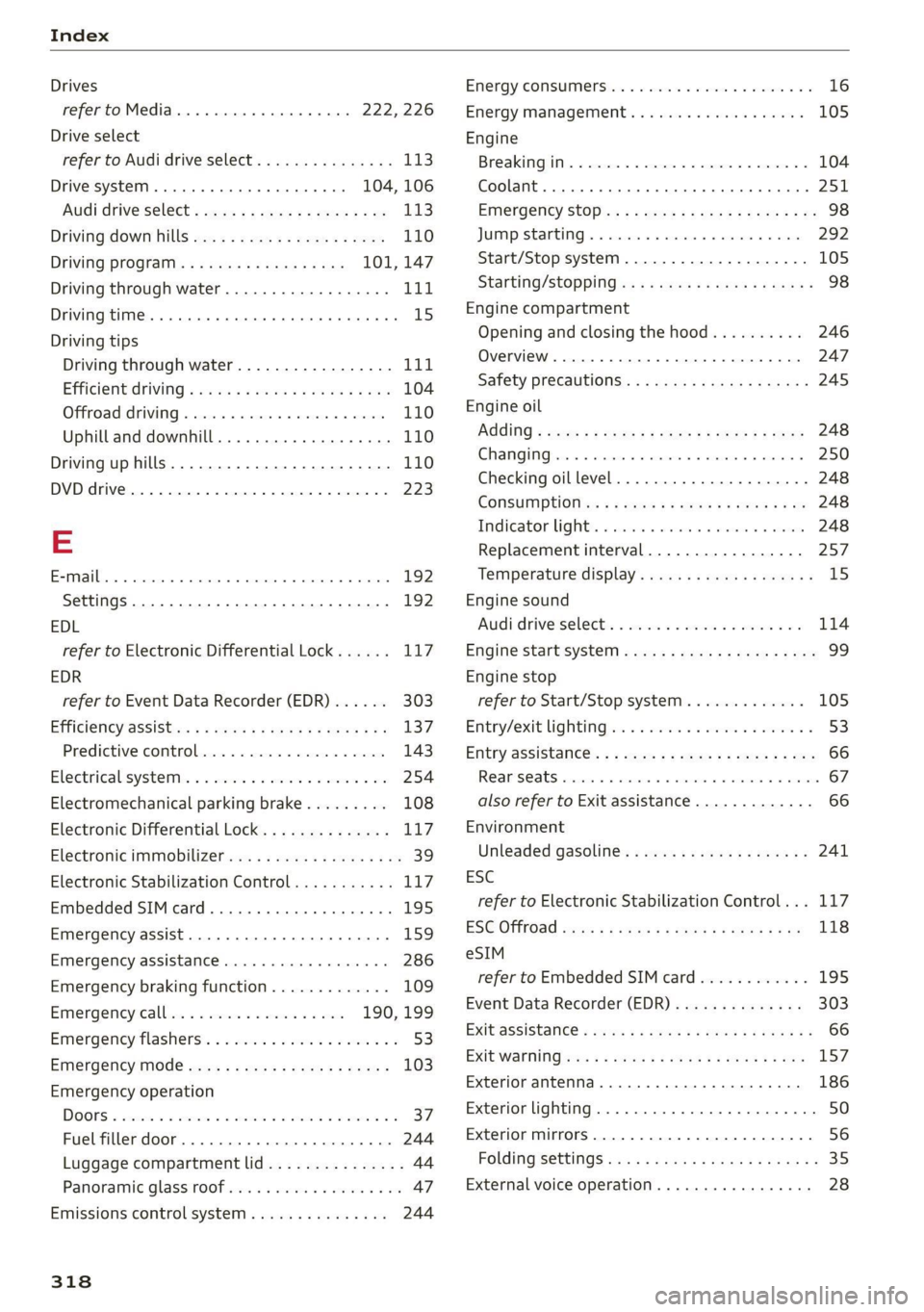
Index
Drives
refer to Media.............000 eee 222,226
Drive select
refer to Audi drive select............... 113
Drive systeM..... ee eee eee ee ee 104, 106
Audi drive Select s cso 2 ¢ cawe 2 2 gence a ee 113
Driving down hills...............-0.00- 110
Driving program..............0005 101, 147
Driving through water............-..005 111
Driving time... 6... eee eee eee 15
Driving tips
Driving through water................- 111
Efficientdriving ¢ wuss « ¢ cows se cows xe ea 104
Offroad driving............. cee eee eee 110
Uphill and downhill................00. 110
Driving uphills.................2..004. 110
DVD drive... . 2... eee eee eee eee eee 223
E
EPMA Cc ctienans a sxexsign oo someone oF 6 eaninn a 4 auata 192
Settings............. 0.000.002 0 02 192
EDL
refer to Electronic Differential Lock...... 117
EDR
refer to Event Data Recorder (EDR)...... 303
Efficiency'assist:«. « « swas ss saws ye ees soe 137
Predictive COMtOle:.c. oo snswse « oecase «4 suesecm 143
Electtical'system:. « «wes: 2 amie oe came 6 oe 254
Electromechanical parking brake......... 108
Electronic Differential Lock.............. Li?
Electronic immMobiliZetjewy: . ¢ wees 4 é wows sa ee 39
Electronic Stabilization Control........... 117
Embedded SIM card............0e0eeeee 195
Emergency assist...........000-00 ee eee 159
Emergency assistance..............000. 286
Emergency braking function............. 109
Emergemey calli: «oven se soesace es eons 190, 199
Emergency flashers..............--.00-5 53
Emergency mode..............---2ee0- 103
Emergency operation
DOORS a cess v x wasn + 5 cose 6H some ¥ shaaem FF
Fuel filler door
Luggage compartment lid............... 44
Panoramic glass roof..............0.005 47
Emissions control system..............% 244
318
EM@rgy CONSUIMENS ies & 0 csv wiemnes a ree wo 16
Energy Management. . . cw. seca ee enn 105
Engine
Breakingin.............. cece eee eee 104
Coolant... 6... ee eee eee eee eee 251
Emergency StOp ix : « wows ss wigs s nares se we 98
JUIMPISTAREIING » « canaeie ws awssins 6 # sense aw nn 292
Start/Stop system...........--0000005 105
StartinG/StOppiNG wx 2 = sew + v gems + 2 wes = 98
Engine compartment
Opening and closing the hood.......... 246
Overview .... 2... eee eee eee eee 247
Safety precautions............-0.ee0ee 245
Engine oil
AGOING « seven = ¢ eye + + seers 3 es Fc ees 248
CHANG IG psu: 1s + wausan 6 e tenses © cascan wx sanitene © 250
Checking oillevel..............--000-- 248
Consumption ss ¢ ssws « « sews se eee so 248
Tndicator light: « cas + sao e > waren @ macorn 248
Replacement interval................. 257
Temperature display................0-5 15
Engine sound
Audi drive’select« «isis +s css 2 a secu 2 0 3 114
Enigine’startsystem «css ¢ ees ss eee « x eee 99
Engine stop
refer to Start/Stop system............. 105
Entry/exit lighting oe. <2 sca se erwe ve owen a < 53
Enthy 4SSiStance:. « + aus + ¢ sqm 9 cease es 66
REAR SCALES cusses x cusses © w suenens oo mane wo oes 67
also refer to Exit assistance............. 66
Environment
Unleaded gasoline.............e eee eee 241
ESC
refer to Electronic Stabilization Control... 117
ESC OfffOad sours s = sqws & = nua ¢ 2 sates ee 118
eSIM
refer to Embedded SIMcard............ 195
Event Data Recorder (EDR).............. 303
EXHBSSSISTANGCE « ema 3 x new ¢ 2 eee 4 8 em ¥ ¥ 66
EXiIQWarnitiGhers: < = sas ¥ 2 eares 3 2 ecteN Eo ee 157
Exterior antenna..................000. 186
Exterior lighting.......... 0.0.0 e eee eee 50
Exterior mirrors. ..........0..0.00.0000. 56
Folding settings..............cceee vues 35
External voice operation................. 28