lock AUDI R8 SPYDER 2014 Owner's Manual
[x] Cancel search | Manufacturer: AUDI, Model Year: 2014, Model line: R8 SPYDER, Model: AUDI R8 SPYDER 2014Pages: 244, PDF Size: 61.06 MB
Page 43 of 244
Step 1: Retract the rear window
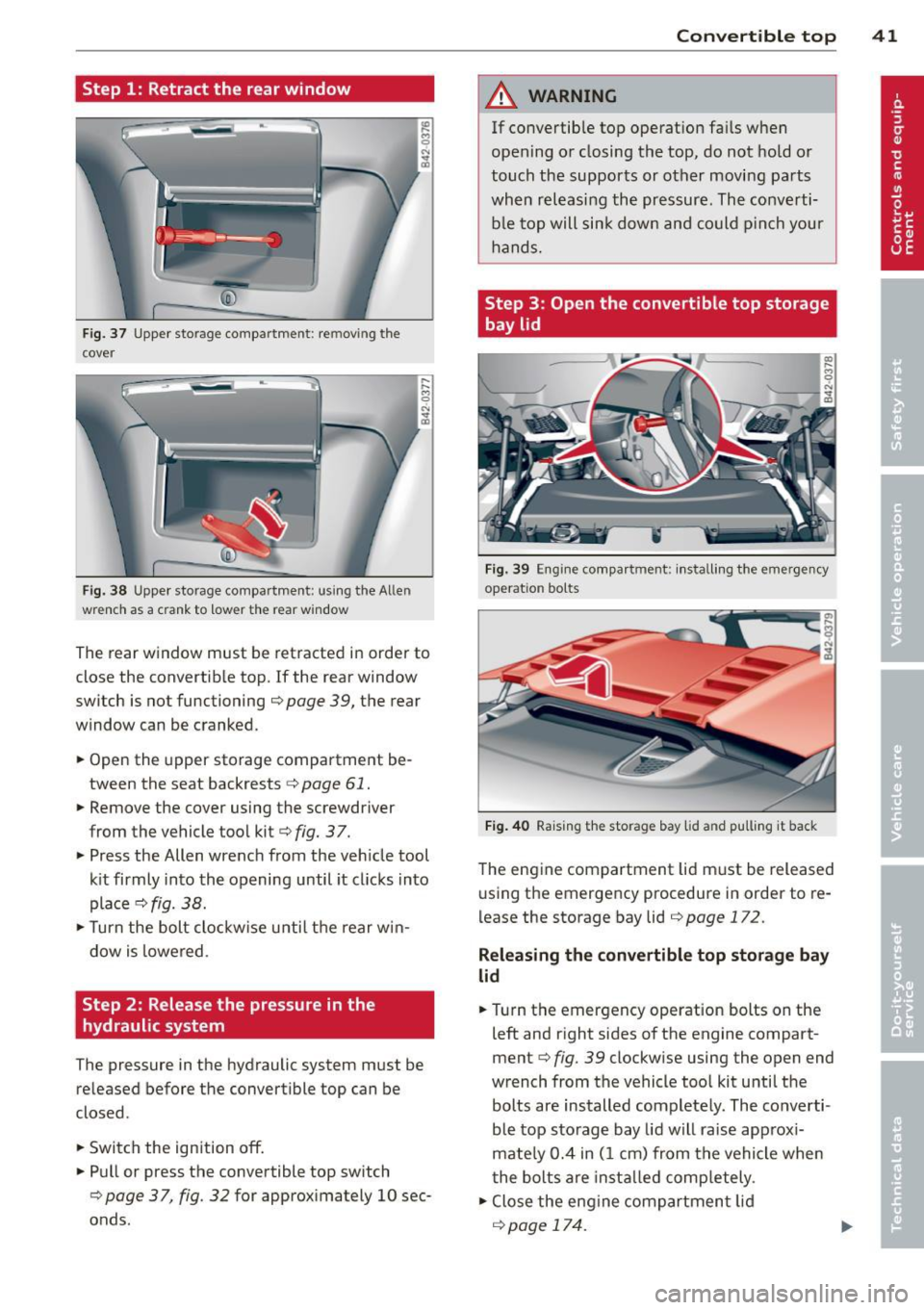
Fig. 37 Upper storage compartment: removing the
cover
Fig. 38 Upper storage compartment: using the Allen
wrenc h as a crank to lower the rear window
~ 0 N ... a,
,__ ,-. M C)
"' ... a,
The rear window must be retracted in order to
close the convertible top. If the rear window
switch is not functioning ¢
page 39, the rear
window can be cranked .
.. Open the upper storage compartment be
tween the seat backrests ¢
page 61 .
.. Remove the cover using the screwdriver
from the vehicle tool kit¢
fig. 37 .
.. Press the Allen wrench from the veh icle tool
k it firmly into the opening until it cl icks into
place¢
fig. 38.
.. Turn the bolt clockw ise until the rear win
dow is lowered.
Step 2: Release the pressure in the
hydraulic system
The pressure in the hydraulic system must be
released before the convertible top can be
closed.
.. Switch the ignition
off.
.. Pull or press the convertible top switch
¢page 37, fig. 32 for approximately 10 sec
onds.
Convertible top 41
A WARNING
If convertible top operat ion fa ils when
opening or closing the top, do not hold or
touch the supports or other moving parts
when releasing the pressure. The converti ble top will sink down and could pinch your
hands.
Step 3: Open the convertible top storage
bay lid
Fig. 39 Engine compartment: install ing the emergency
operation bolts
Fig. 40 Raising t he storage bay lid and pulling it back
The engine compartment lid must be released
using the emergency procedure in order to re
lease the storage bay lid
¢page 172 .
Releasing the convertible top storage bay
lid
.. Turn the emergency operation bolts on the
left and right sides of the engine compart
ment¢
fig. 39 clockwise using the open end
wrench from the vehicle too l kit until the
bolts are installed completely . The converti
ble top storage bay lid will raise approxi
mately 0.4 in (1 cm) from the vehicle when
the bolts are insta lled comp letely.
.. Close the engine compartment lid
¢page 174.
Page 45 of 244
.. Pull the convertible top all the way out in
the direction indicated @. Position the fins
upward at the same t ime.
.. Press the convertib le top as far forward to
ward the windshield frame as possible
Q fig. 44 .
Have a second person assist when positioning
the convertible top. That person should stand
on the opposite side of the vehicle and per
form the same steps.
_& WARNING
-When positioning the convertible top,
avo id contact with the supports or othe r
moving pa rts. O the rw ise you cou ld pinch
yo ur hands.
- Whe n pressing the convert ible top down
onto the windsh iel d frame, make s ure
that you do not pinch yoursel f or anyone
else .
Step 6: Secure the convertible top
-
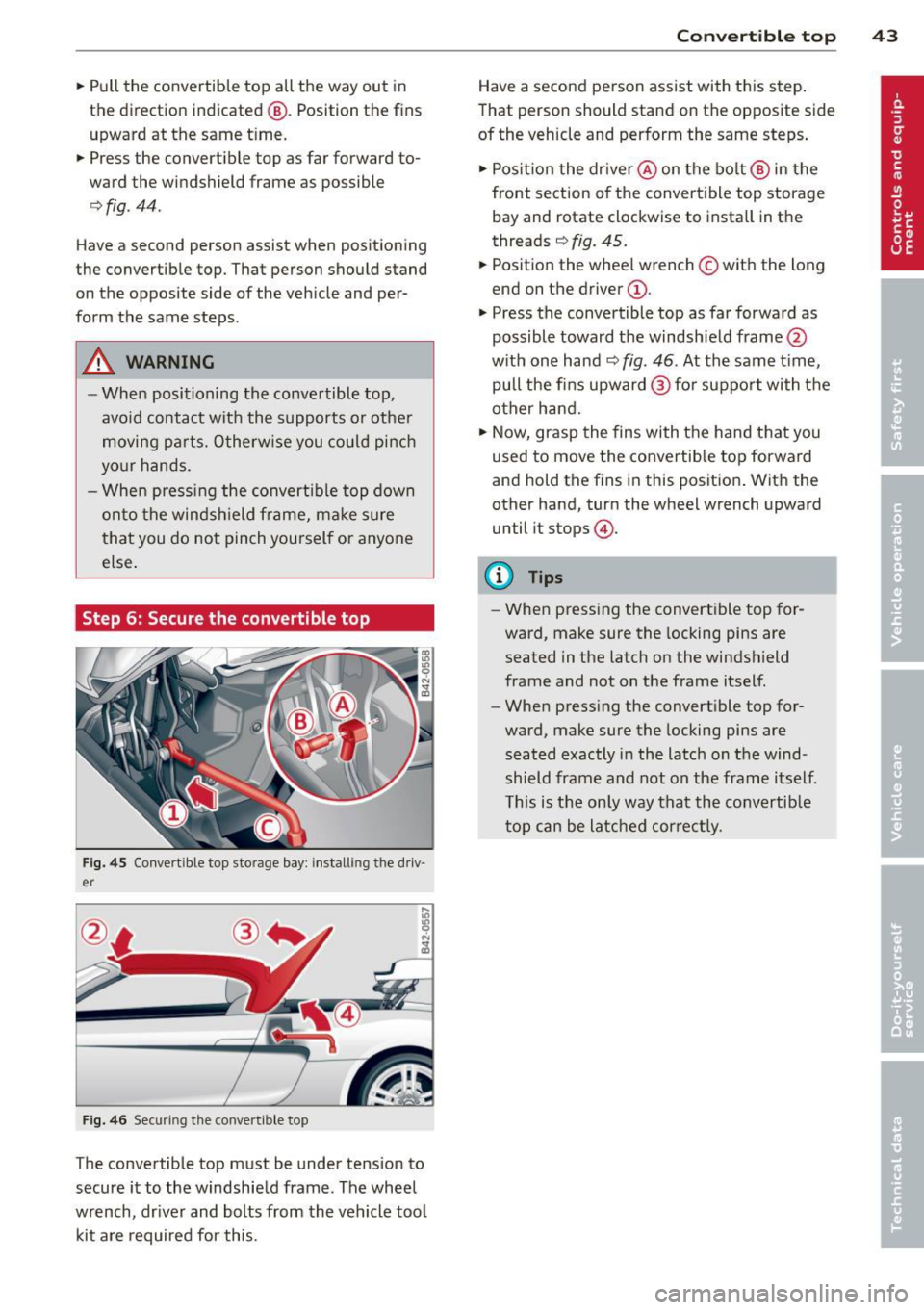
Fig . 4 5 Co nvertible top sto rage bay: installi ng the driv
er
F ig . 4 6 Securing th e convert ib le top
The convertible top must be under tension to
secure it to the windshie ld frame. The wheel
wrench, dr iver and bolts from the vehicle tool
kit a re required for this.
Con vert ible top 4 3
Have a second person assist with th is step .
That person should stand on the opposite side
of the vehicle and perform the same steps .
.. Posit ion the dr iver @ on the bo lt @ in the
front sect ion of the convert ible top storage
bay and rotate clockwise to insta ll in the
threads ~
fig. 45.
.. Posit ion the wheel wrench © with the long
end on the driver @.
.,. Press the convertible top as far forward as
possible toward the windshie ld frame @
w ith one hand~
fig. 46. At the same t ime,
pull the fins upward @for support with the
other hand.
.. Now, grasp the fins with the hand that you
used to move the convertib le top forward
and hold the fins in this position . Wit h the
other hand, turn the wheel wrench upward
until it stops @.
(D Tips
-When pressing the convertible top for
ward, make sure the locking pins are
seated in the latch o n the windshield
frame and not on the frame itself.
- When press ing the convert ible top for
ward, make sure the locking pins are
seated exactly i n the latch on t he wind
shield frame and not on the frame itself.
T his is t he on ly way that the convertib le
t op can be latched cor rect ly .
Page 46 of 244
44 Convertible top
Step 7: Lock the convertible top
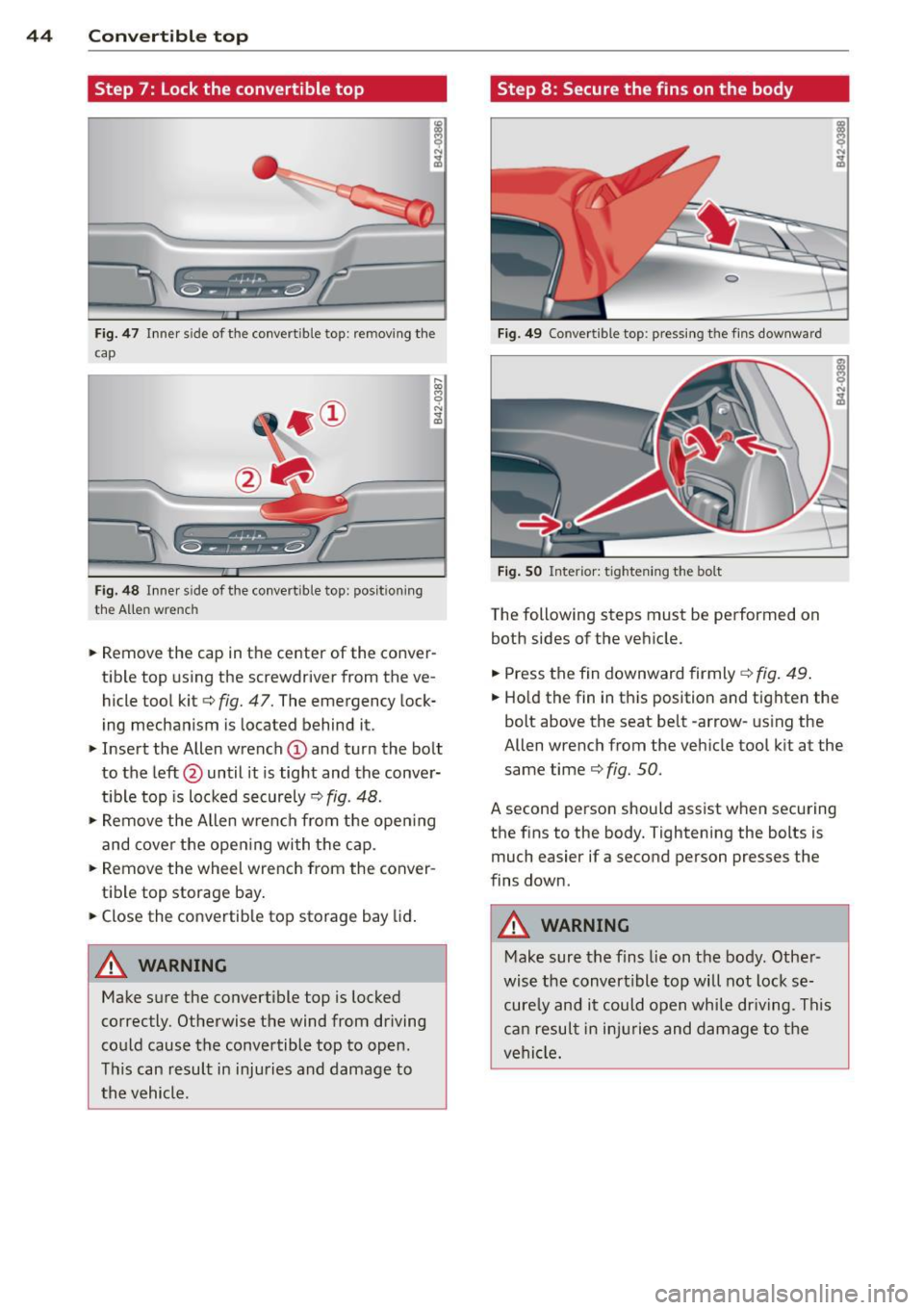
Fig . 47 Inner s ide of the convertible top : remov ing the
cap
F ig. 48 In ner s ide of the co nvertible top: pos it ion ing
the Allen wrench
... Remove the cap in the center of the conver
tible top using the screwdriver from the ve
hicle tool kit
c::> fig. 47. The emergency lock
ing mechanism is located behind it.
... Insert the Allen wrench
(D and turn the bolt
to the left @until it is tight and the conver
t ible top is locked securely
c::> fig. 48.
.,. Remove the Allen wrench from the open ing
and cover the open ing with the cap .
... Remove the wheel wrench from the conver
t ib le top storage bay .
... Close the convertib le top storage bay lid .
A WARNING
Make s ure the convert ible top is locked
correctly. Otherwise the wind from driving
could cause the convertible top to open.
This can result in inju ries and damage to
th e vehicle.
-
Step 8 : Secure the fins on the body
F ig . 4 9 Co nve rtib le top : press ing t he f ins downward
F ig . SO Inte rior: tightening the bo lt
The following steps must be performed on
both sides of the veh icle .
... Press the fin downward firmly
c::> fig . 49 .
.,. Ho ld the fin in th is position and tighten the
bolt above the seat belt -arrow-us ing the
Allen wrench from the vehicle tool k it at the
same time
c::> fig. 50.
A second person should assist when securing
the fins to the body. Tightening the bolts is much easier if a second person presses the
fins down .
A WARNING
-
Make sure the fins lie on the body. Other -
wise the convert ible top will not lock se
cure ly and it could open while driv ing. This
ca n resul t in in ju ries and d amage to the
vehicle.
-
Page 47 of 244
Step 9: Extend the rear window
~ 0 N ... a,
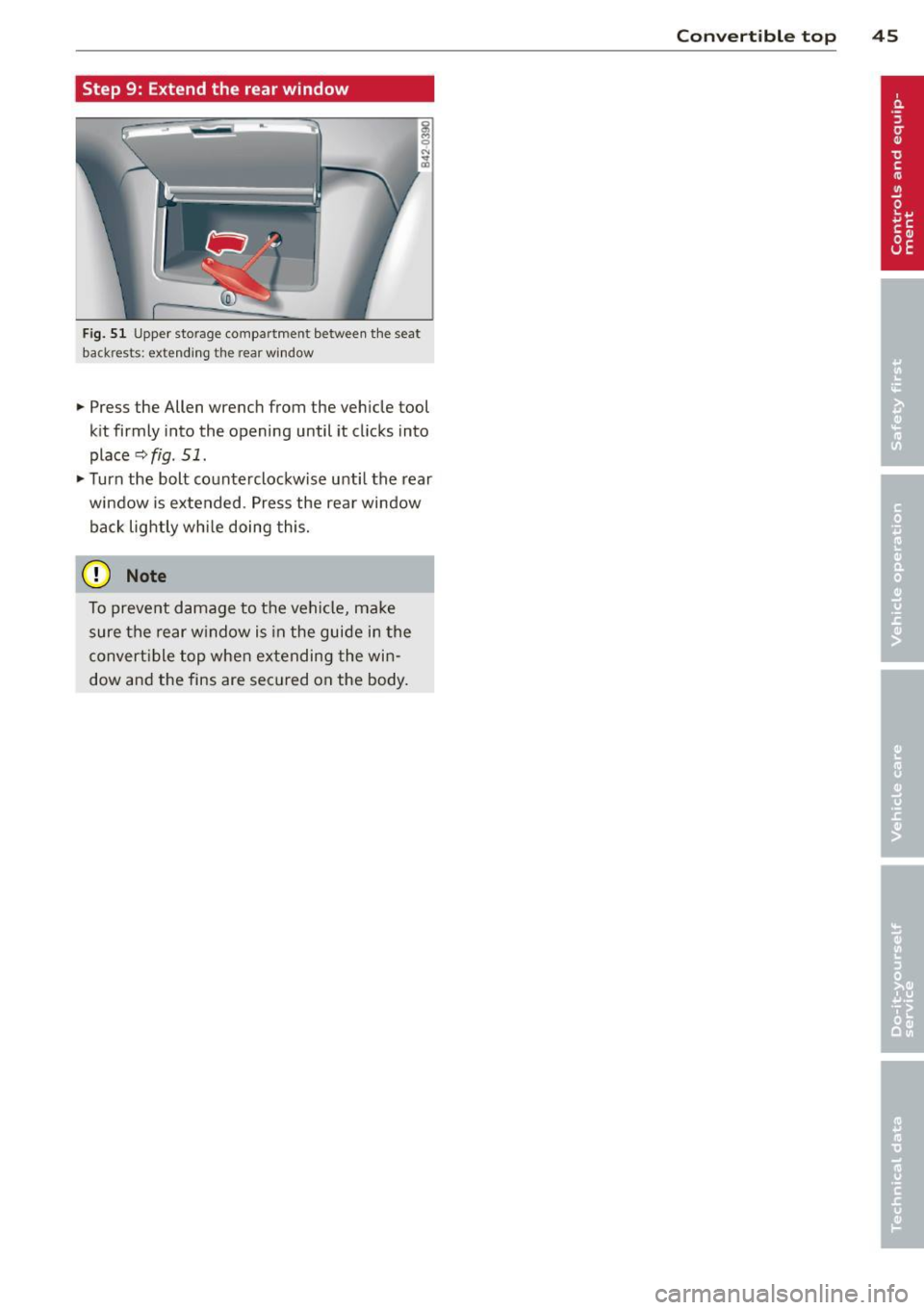
Fig. 51 Upper storage compartment between the seat
backrests: extending the rear w indow
... Press the Allen wrench from the vehicle tool
kit firmly into the opening until it clicks into
place
r::;, fig. 51 .
... Turn the bolt counterclockwise unti l the rear
window is extended. Press the rear window
back lightly whi le doing this.
(D Note
To prevent damage to the vehicle, make
sure the rear w indow is in the guide in the
convert ible top when extending the win
dow and the fins are secured on the body.
Con vert ible top 45
Page 48 of 244

46 Clear vision
Clear vision Lights
Switching the headlights on/off
F ig . 52 Instr ument pane l: light sw itch (automat ic
head· and ta illight control)
Switching on the side marker lights
• Turn the light switch to :oo:.
Switching on the headlights and high
beam
• Turn the light switch to ;D .
• Push the high beam lever forwa rd towards
the instrument panel~
page 47 .
Switching off the lights
• Turn the light switch to 0 .
Switching on automatic head -and
taillight control
• Turn the light switch to AUTO q fig. 52.
The headlights and taillights will come on au·
tomatically when the ignition is switched on
and the light switch is in the position AU TO
(on ly in nighttime conditions). When switch·
ing off the ignit ion, the headlights will go off
and only the side marker lights will remain lit.
Daytime running lights
USA models: The daytime running lights will
come on automatica lly when the ignition is
switched on and the light switch is in the posi·
tion
AUTO (only in daylight cond itions).
Canada models: The daytim e running lights
will come on automatically when the ignition
is switched on and the light switch is in the position
0
, AUTO (on ly in daylight condit ions)
or
:oo:.
Automatic head- and taillight control
In the switch position AUTO the automatic
head· and ta illight control is activated. Light
senso rs are located in the inside mirror hous
ing and constantly check the light conditions
surrounding the vehicle. If ambient bright·
ness falls below a factory set value (e.g. when
driv ing into a tunnel), the head- and taill ights
including the license plate illumination are
automat ically turned on. When amb ient
brightness increases aga in, the external lights
are turned off aga in
q ,&. . In the sw itch posi
t ion
AUTO , the low beams are turned off when
the ignition is switched off. The remaining
lights are turned off when the key is ta ken out
of the ignition lock.
With aut omat ic head- and taillight control,
the high-beam function is also available, but
with one restriction: If you have not switched
the high beams back to low beams during a u
tomat ic head light operation (for examp le, af
ter driving through a tunnel), on ly the low
beams come on the next time automatic
headlights are switched on. To use the high
beams, you first have to pull the h igh beam
lever back and then push the lever forward
again.
The side marker lights and headlights can be
switched on manually by turning the light
switch to the desired position .
Light sensor malfunction
If there is a light sensor ma lfunction, the
symbol
tal comes on in the display. For safety
reasons, the low beams are turned on perma
nently with the sw itch in
AUTO. However, you
can continue to turn the lights on and off us
ing the light switch. Have the light sensor
checked as soon as possible at an authorized
A udi dealer.
Coming home/leaving home function
The function is sw itched on when the sw itch is
i n the
AUTO position and the function is ...,
Page 49 of 244

shown as active in the driver information
system.
The
coming home function illuminates the
area around the vehicle when the ignition is
switched off and the driver 's door is opened.
The length of time the lights rema in on can be
set in the menu display
(Lights> Exterior
lights> coming home) .
The leaving home function illuminates the
area around the vehicle when unlock ing it.
A WARNING
- Never use daytime running lights to see
where you are going. They are not bright enough and will not let you see far
enough ahead for safety, especially at
dusk or when it is dark . Be aware of
changes in outside light conditions when
you are driving and respond by switching
on your low beams.
- Automatic head- and taillight control is
only intended to assist the driver. This
feature does not relieve the driver of his
responsibility to check the headlights
and to turn them on manually according
to the current light and visibility condi
tions. For example, fog and rain cannot
be detected by the light sensors. Conse
quently, always switch the headlights on
under these weather conditions and
when driving in the dark.
- Crashes can happen when you cannot see
the road ahead and when you cannot be
seen by other motorists .
-Always turn on the headlights so that you can see ahead and so that others can see your car from the back.
- Please observe legal regulations when
using the light ing systems descr ibed .
@ Tips
-Always observe the specific local regula
tions for your area when to use your
lights .
- Turn on low beams as evening ap
proaches or in conditions of poor visibili
ty. Clear vision 4
7
- Do not attach stickers to the windshield
in front of the sensors as this can disable
the automatic head- and taillight control
and the automatic glare-dimming of the
rearview mirror(s)*.
- If you remove the ignition from the igni
tion lock while the headlights are still
on, a buzzer will sound as long as the
driver's door is open to remind you to
turn off the lights .
- In the AUTO mode, the low beams are
turned off when the ignition is turned
off. The remaining lights are turned off
when the key is taken out of the ignition .
- In cool or damp weather conditions the
headlights may fog over temporarily on
the inside.
- The critical factor is the temperature
difference between the interior and the
exterior of the headlight Lens.
- With the main beams switched on, the
light-emitting area will be free of con
densation after a short time, however
the edges of the glass may still be fog
ged .
- This physical phenomenon has no ef
fect on the life of your vehicle's light
ing system .
Turn signals and high beam lever
The lever on the left side of the steering col
umn is used to operate the turn signals and the high beam as well as the headlight flash
er.
t
'
Fig. 53 Turn signal and high b eam lever
The turn signal and high beam lever has the
following functions: ..,.
Page 51 of 244

Interior lights
Interior lights
The interior lights include the reading lights
for the driver and the front passenger .
Fig. 55 Section from headliner : In terior lights
Activating door contact circu it
• Press the button @. The LED in the button
illuminates.
Deactivating do or contact circu it
• Press the button @. The LED in the button
goes out.
Fr ont re ad ing l ight s
~
• Press one of the switches ® to turn the
right or left reading light on/off .
"' l1l 0
With the door contact circuit, the interior
lights turn on as soon as you unlock the vehi
cle or open the doors. The interior lights are
also turned on when the ignition key is re
moved. The lights turn off about 30 seconds
after the doors are closed . When the vehicle is
locked or when the ignit ion is tu rned on, the
inte rior lights are turned off .
When a door is open, the interior lights are
turned off after about 10 m inutes to prevent
battery draining.
The brightness of the lights is controlled au
tomatically by a dimmer when they are
switched on/off.
Clear vi sion 49
Instrument panel illumination
The illumination of the instruments, displays
and the center console can be adjusted .
Fig . 56 Instrumen t pa nel illuminat ion
You regu late the brightness of the instr u
ments with the left thumbwheel
C1 ~ fig . 56 .
Ignition ON, light switch at @
With the ign ition switched ON, the glow of
in
strument needles
can be adjusted to appea r
brighter o r dimmer.
Ignition ON, light switch at
:oo~ or ~D.
With the lights switched on, the brightness of
instrument cluster (i.e. needles, gauges and
displays) and center conso le illuminat ion can
be adjusted .
(D Note
The instrument cluster and center conso le
ill umination (gauges and need les) comes
on when you sw itch on the ignition and the
v eh icle headlight s are off . Be awa re of the
fo llow ing difference be tween models bu ilt
to US or Canadian specifications:
- USA mo dels: illumination o f the i nstr u
ment cl uster (gauges and need les), dash
and center conso le around the gearshift
lever is controlled by a light sensor locat
ed in the instrument pane l. The instru
ment pa nel illuminat ion w ill automati
cally become dimmer as the daylight
fades away and eventually will go out completely when outs ide light is very
low. This is to remind you, the dr iver, to
switch o n the hea dlights before it ge ts
too d ark .
Page 61 of 244
you will be out of position. Always adjust
the driver's or front passenger seat when
the vehicle is not moving.
- Be careful when adjusting the seat
height. Check to see that no one is in the
way, or serious injury could result!
- Because the seats can be electrically ad justed with the ignition key removed, never leave children unattended in the
vehicle. Unsuperv ised use of the electr ic
seat adjustments may cause serious in
jury.
- To reduce the r isk of injury in the case of
sudden braking or accident, front pas
sengers must neve r ride in a moving ve
hicle wi th the seatback recl ined. Safety
belts and the airbag system offer maxi
mum protection on ly when the seatback
is upright and the safety belts are prop
erly posit ioned on the body. The more
the seatback is reclined, the greater the
risk of personal injury from an incorrect
seating pos ition and improperly posi
tioned safety belts!
- Always make sure the front seatbacks are
in the upright posit ion and securely
locked in place when dr iv ing .
Head restraints
Adjusting head restraints
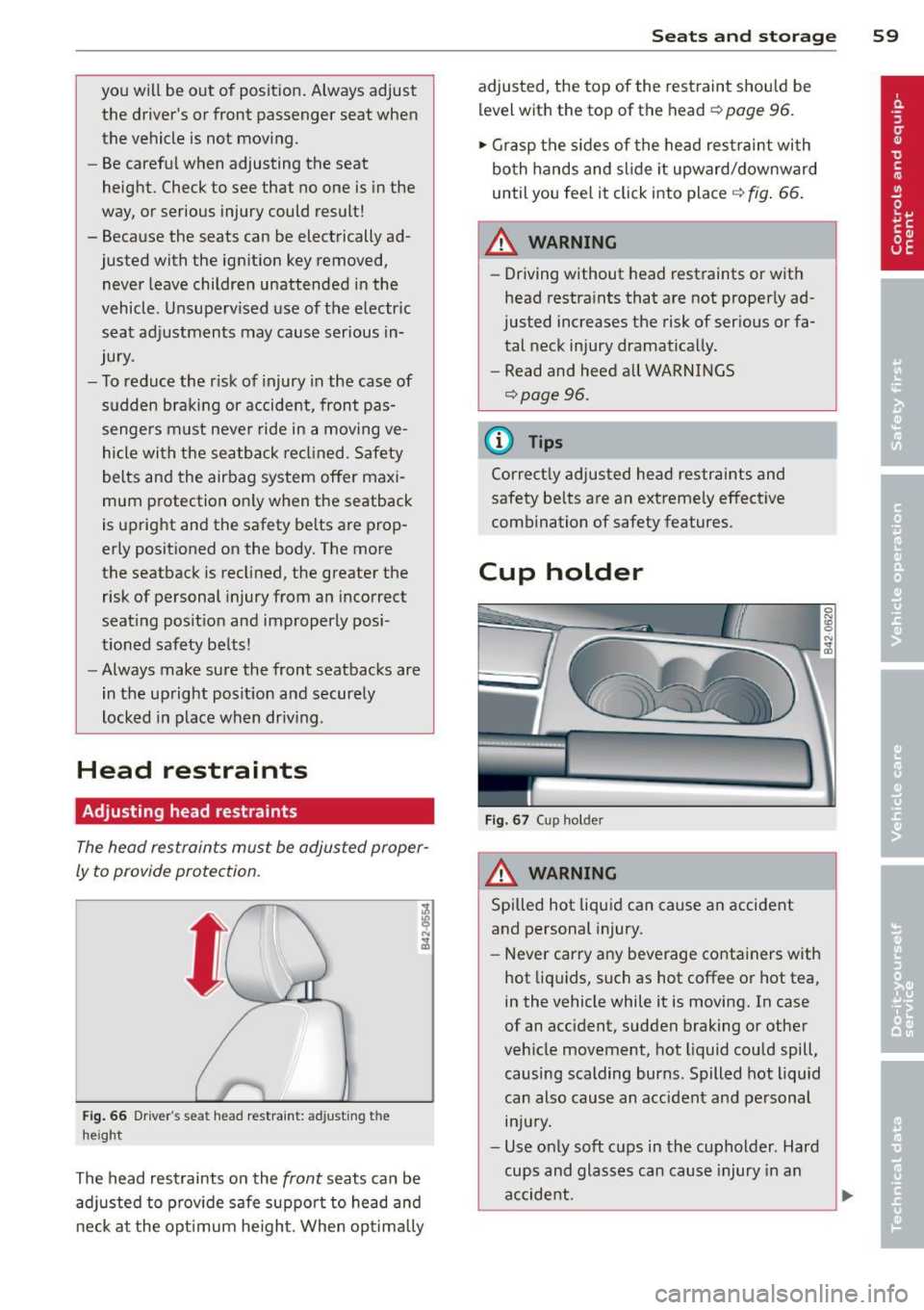
The head restraints must be adjusted proper
ly to provide protection.
Fig . 66 Drive r's seat head restraint: adjusting the
height
The head restraints on the front seats can be
adj usted to p rov ide safe support to head and
neck at the opt imum he ight. When opt imally
S ea ts a nd s to rage 59
adjusted, the top of the restraint should be
level with the top of the head
c::> page 96.
'" Grasp the s ides of the head restraint with
both hands and slide it upward/downward
until you fee l it click into place
c::> fig . 66.
& WARNING ~ -
- Driving without head restraints or with
head restra ints that are not properly ad
justed increases the risk of serious or fa
tal neck injury dramat ically.
- Read and heed all WARNINGS
<=:>page 96.
@ Tips
Correctly adjusted head restraints and
safety be lts are an extremely effective
combination of safety features.
Cup holder
F ig. 67 Cup holder
A WARNING
Spilled hot liquid can cause an accident
and personal injury.
-
- Never carry any beverage containers with
hot liq uids, such as hot coffee or hot tea,
in the vehicle while it is moving. In case
of an acc ident, sudden braking or other
veh icle movement, hot liquid could spill,
causing scalding burns. Spilled hot liquid
can also cause an accident and personal injury.
- Use only soft cups in the cupholder . Hard
cups and glasses can cause injury in an
accident.
Page 63 of 244
could slide around inside the vehicle
wh ile driving or when accelerating or
when applying the brakes or when driv
ing around a corner .
- When you are driving make sure that
anything you may have placed in the cen
ter console or other storage locations
cannot fa ll out into the footwells . In case
of sudden braking you would not be able
to brake, depress the clutch or acceler
ate.
- Any articles of cloth ing that you have
hung up must not interfere with the driv
er's v iew. The coat hooks are designed
only for lightweight clothing. Never hang
any clothing with hard, pointed or heavy
objects in the pockets on the coat hooks .
During sudden braking or in an accident -
especially if the airbag is deployed -
these objects could injure any passen
gers inside the veh icle .
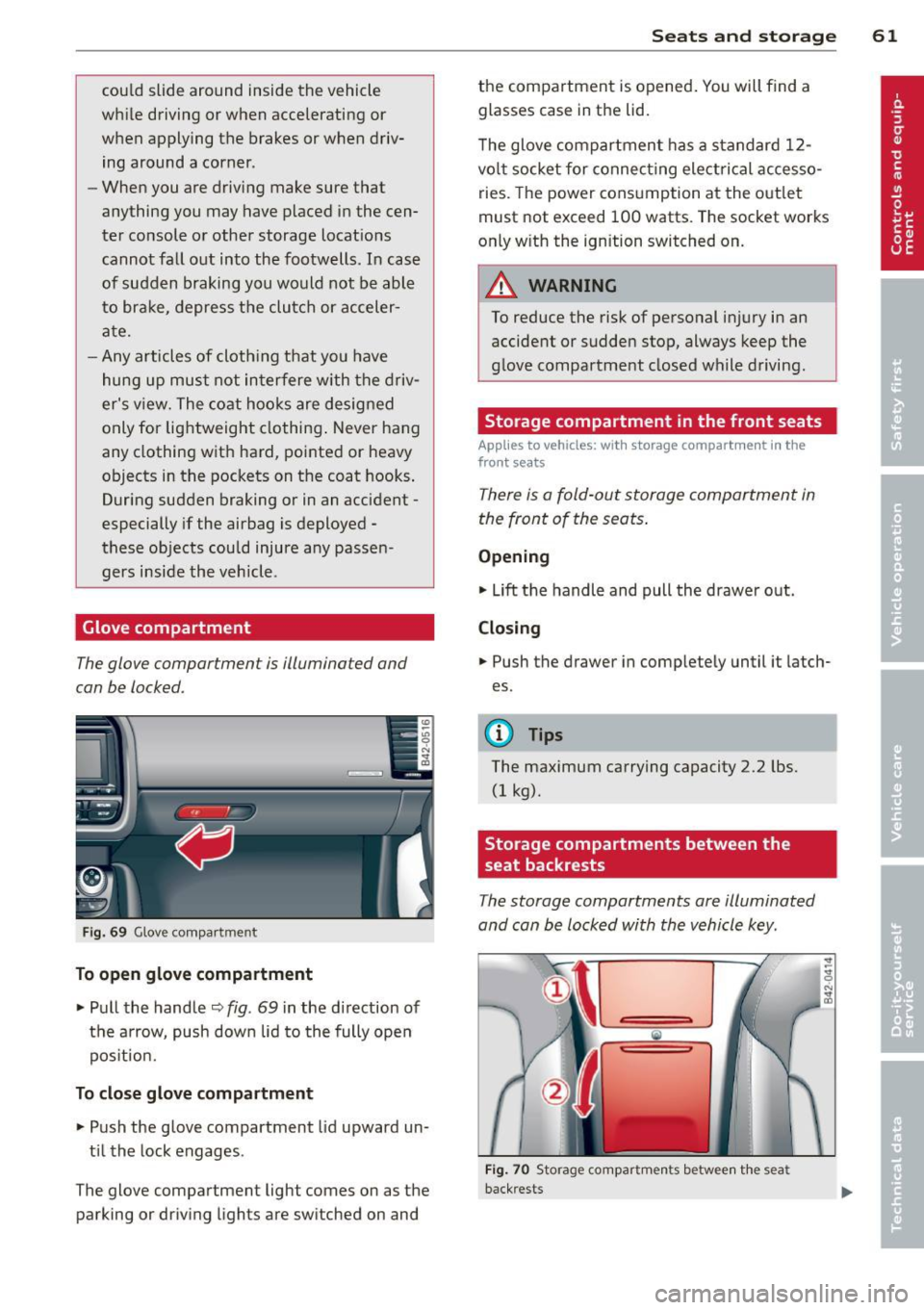
Glove compartment
The glove compartment is illuminated and
can be locked.
Fig. 69 Glove compar tme nt
To open glove compartment
• Pull the handle ~ fig . 69 in the direction of
the arrow, push down lid to the fully open
pos it ion .
To close glove compartment
• Push the glove compartment lid upward un
t il the lock engages .
The glove compartment light comes on as the parking or driving lights are switched on and
Seats and storage 61
the compartment is opened . You will find a
glasses case in the lid.
T he glove compartment has a standard
12-
volt socket for connecting electrical accesso
ries. The power consumption at the outlet
must not exceed 100 watts. The socket works
only w ith the ignition switched on.
_& WARNING
To reduce the risk of personal injury in an
accident or sudden stop, always keep the
g love compartment closed while driving.
Storage compartment in the front seats
Applies to vehicles: with storage compartment in the
front seats
There is a fold-out storage compartment in
the front of the seats .
Opening
• Lift the handle and pull the drawer out.
Closing
-
• Push the drawer in completely until it latch
es.
(D Tips
The maximum carrying capacity 2.2 lbs.
(1 kg).
Storage compartments between the
, seat backrests
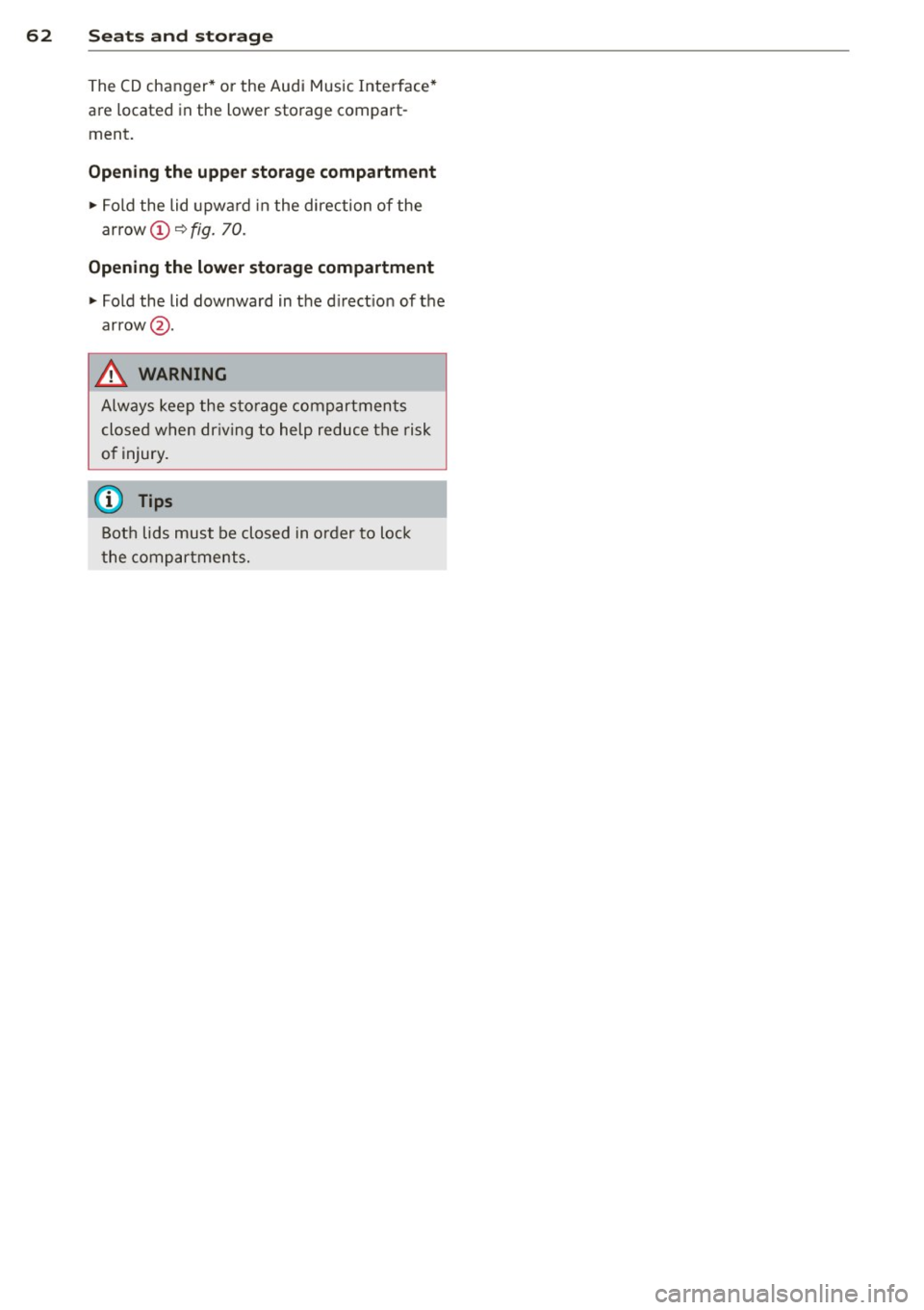
The storage compartments are illuminated
and can be locked with the vehicle key.
F ig . 70 Storage compartments betwee n the seat
back rests
Page 64 of 244
62 Seats and storage
The CD changer* or the Audi Music Interface*
are located in the lower storage compart
ment.
Opening the upper storage compartment
.,. Fold the lid upward in the direction of the
arrow @"*
fig. 70.
Opening the lower storage compartment
.,. Fold the lid downward in the d irect ion of the
arrow @.
A WARNING
Always keep the storage compartments
closed when driving to help reduce the risk
of injury.
(D Tips
Both lids must be closed in order to lock
the compartments.
-