lock AUDI R8 SPYDER 2014 Owner's Guide
[x] Cancel search | Manufacturer: AUDI, Model Year: 2014, Model line: R8 SPYDER, Model: AUDI R8 SPYDER 2014Pages: 244, PDF Size: 61.06 MB
Page 70 of 244
68 On th e road
On the road
Steering
Adjusting the steering wheel column
The steering wheel position can be continu
ously adjusted in height and distance .
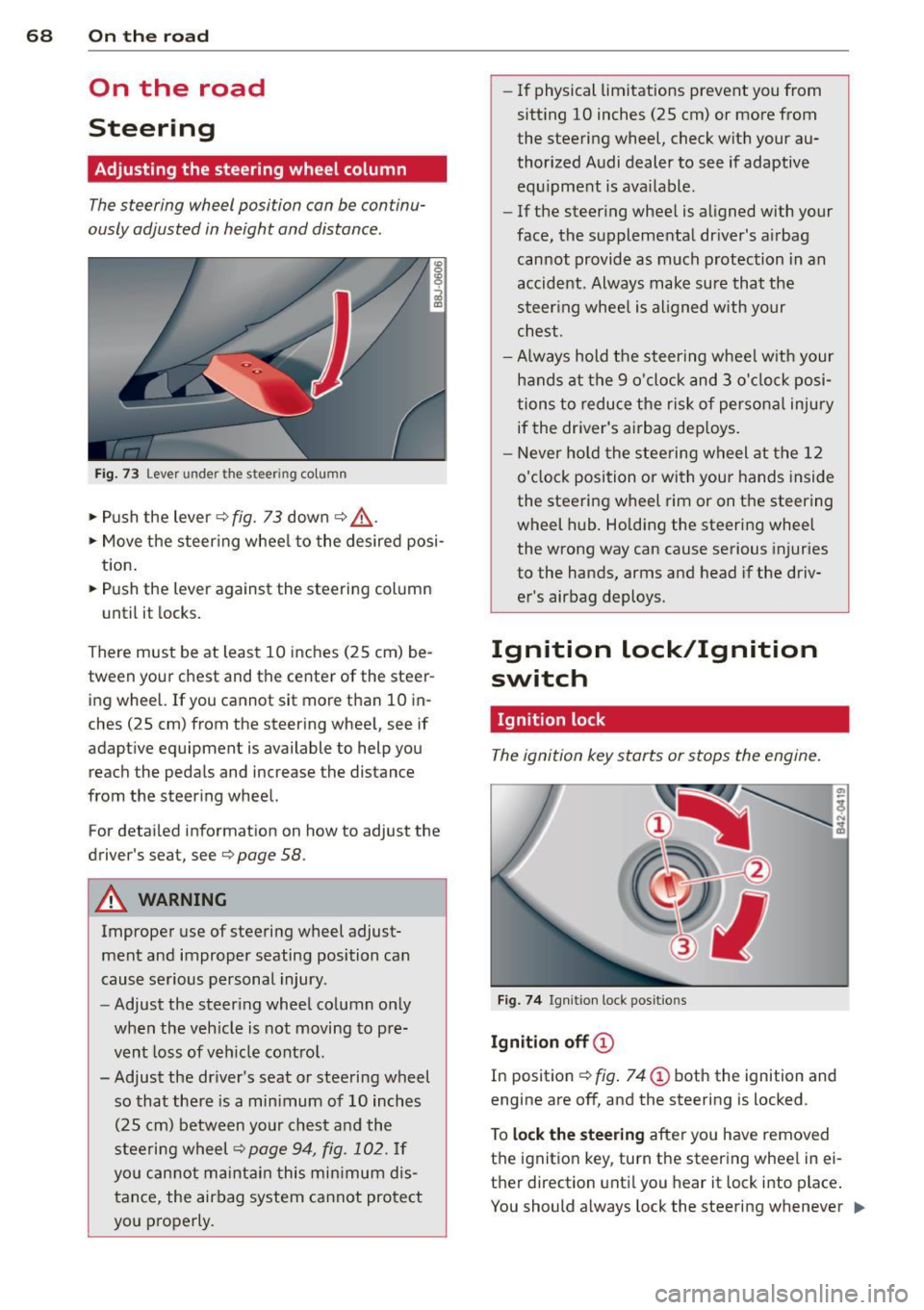
Fig. 73 Lever under the steering column
~ Push the lever Q fig. 73 down Q ,&..
~ Move the steer ing whee l to the desired posi
tion.
~ Push the lever against the steering column
until it locks.
There must be at least 10 inches (25 cm) be
tween your chest and the center of the steer ing wheel. If you cannot sit more than 10 in
ches (25 cm) from the steering wheel, see if
adaptive equipment is available to help you
reach the pedals and increase the distance
from the steer ing wheel.
For detai led informat ion on how to adjust the
driver's seat, see
Q page 58.
A WARNING
Improper use of steering wheel adjust
ment and improper seating position can
cause serious personal injury .
- Adjust the steer ing wheel column only
when the veh icle is not moving to pre
vent loss of veh icle cont rol.
-
- Adjust the driver's seat or steering wheel
so that there is a min imum of 10 inches
(25 cm) between your chest and the
steering wheel
Q page 94, fig . 102. If
yo u can not maintain this min imum dis
tance, the airbag system cannot protect
you properly.
- If physical limitations prevent you from
sitt ing 10 inches (25 cm) or more from
the steering wheel, check with your au
thorized Audi dealer to see if adaptive equ ipment is ava ilable .
- If the steering wheel is aligned with your
face, the supplemental driver's airbag cannot provide as much protection in an
accident. Always make sure that the
steer ing whee l is aligned with your
chest.
- Always hold the steering wheel w ith your
hands at the 9 o'clock and 3 o'clock posi
tions to reduce the risk of persona l injury
if the driver's airbag dep loys .
- Never ho ld the steering wheel at the 12
o'clock position or with your hands inside
the steering wheel rim or on the steering
wheel hub . Holding the steering wheel
the wrong way can cause serious injuries
to the hands, arms and head if the driv
er's airbag deploys.
Ignition lock/Ignition
switch
Ignition lock
The ignition key starts or stops the engine.
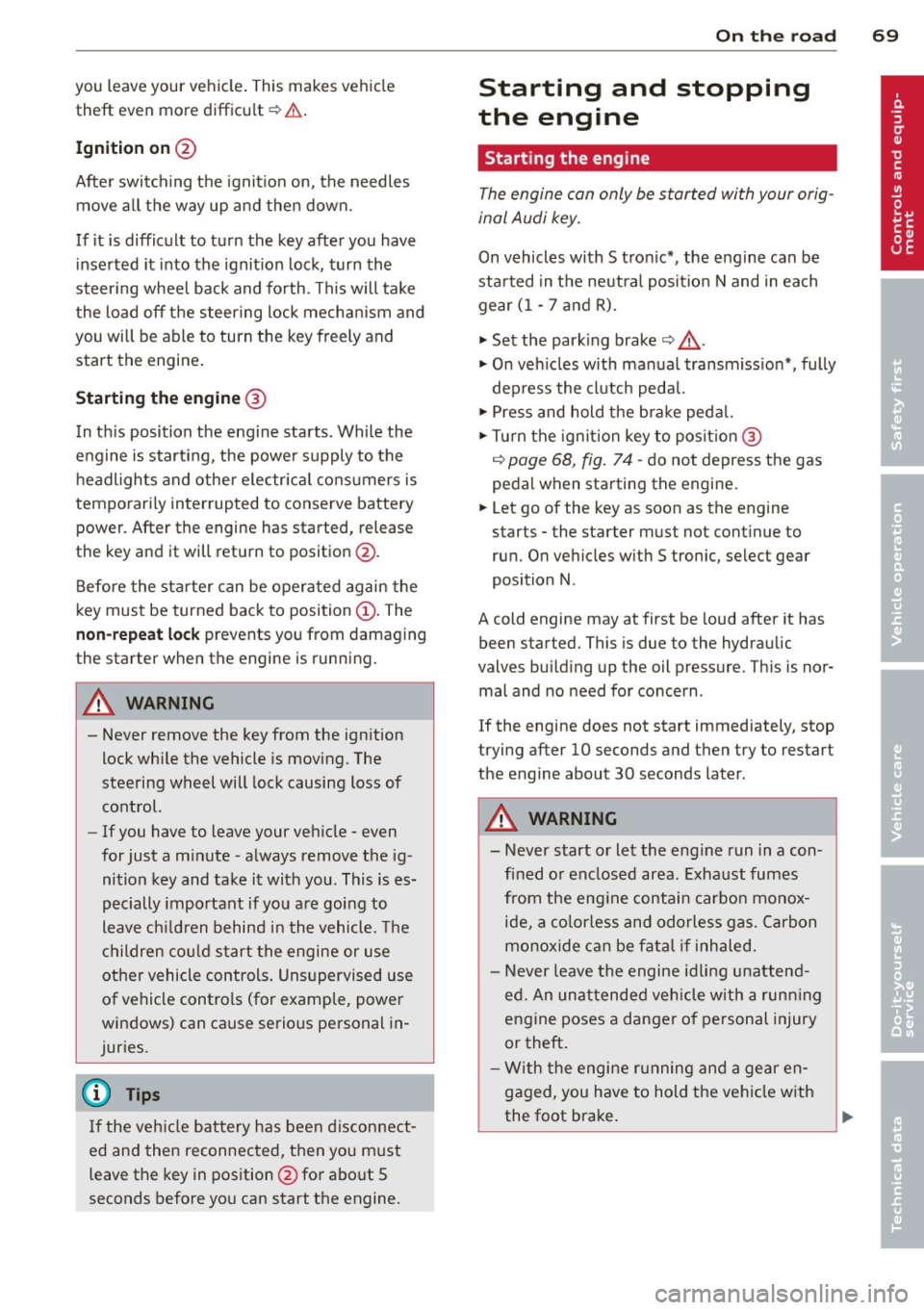
Fig . 7 4 Ign ition lock positions
Igniti on off @
In position Q fig. 74 @ both the ignition and
engine are off, and the steering is locked .
T o
lo ck th e steering after yo u have removed
the ignition key, turn the steer ing whee l in ei
ther direction unti l you hear it lock into place .
You should always lock the steering whenever
II>
Page 71 of 244
you leave your vehicle. This makes vehicle
theft even more difficu lt
r=:, .&. .
Ign ition on @
After switch ing the ignition on, the needles
move all the way up and then down.
If it is difficult to turn the key after you have inserted it into the ignit ion lock, turn the
steer ing whee l back and forth. This will take
the load
off the steering lock mechan ism and
you will be able to turn the key freely and start the engine .
Starting the engine @
In th is position the engine starts. While the
engine is start ing, the power supply to the
headlights and other e lectr ica l cons umers is
temporari ly inter rupted to conserve battery
power. After the engine has started, release
the key and it will return to position @.
Before the starter can be operated again the
key must be turned back to position
(D . The
non-repeat lock prevents you from damaging
the starter when the engine is running.
A WARNING
- Never remove the key from the ign ition
lock while the vehicle is moving. The
steering wheel will lock causing loss of
control.
- If you have to leave your veh icle - even
for just a m inute - a lways remove the ig
nition key and take it with you. This is es
pecially important if you a re going to
leave ch ildren behind i n the vehicle. The
children co uld s tart the engine or use
other vehicle controls . Unsupervised use
of vehicle controls (for example, power
windows) can cause serious personal in
juries.
@ Tips
I f the veh icle bat tery has been d isconnect
ed and then reconnected, then you must
leave the key in pos ition @for abo ut 5
seconds before you can start the engine.
-
On th e ro ad 69
Starting and stopping
the engine
Starting the engine
The engine can only be started with your orig
inal Audi key.
On vehicles with S tron ic*, the e ngine can be
sta rted in the neut ra l position N and in each
gear (1 - 7 a nd R).
" Set the park ing brake
r=:, & .
"On veh icles with manual transmiss ion*, fully
dep ress the clutch peda l.
" Press and hold the brake peda l.
" Tur n the igni tion key to pos it ion @
r=:> page 68, fig . 74 -do not depress the gas
peda l when sta rting the engine .
... Let go of the key as soon as the engine
starts - the starter m ust not cont inue to
run. On vehicles w ith S tronic, select gear
position N.
A cold engine may at first be loud after it has
been started. This is due to the hydraulic
valves bu ild ing up the oil p ressure . Th is is nor
mal and no need for concern .
If the engine does not start immediately, stop
trying after 10 seconds and then try to restart
the engine about 30 seconds later .
A WARNING
- Never start or let the engine run in a con
fined or enclosed area. Exhaust fumes
from the eng ine contain carbon mono x
ide, a co lor less and odorles s gas. Carbon
monox ide can be fata l if inh aled.
- Never leave the engine id ling una ttend
ed. An unat tended ve hicle with a runn ing
engine poses a danger of personal injury
or theft .
- With the engine r unning and a gear en
gaged, you have to hold the veh icle w ith
the foot bra ke.
Page 73 of 244
The parking brake warning comes on only af
ter you hav e drive n for longer than 3 seconds
and faster than 5 mph (5 km/h).
The parking b rake warning light _
(USA)/ . (CON) illuminates when the parking
brake is set and you switc h on the ignition .
A WARNING
Always release the parking brake com
pletely. A partially engaged brake will
overheat the rear brakes, reduce the ir ef
fectiveness and cause excess ive wear . This
could lead to brake failure and an accident .
On ly after the vehicle has come to com
plete stop, should you f irm ly set the park
ing brake and move the gearshift lever into
a gear.
Parking
Parking
"' Stop the vehicle using the brake pedal.
"' Set the parking brake firmly.
"' Swi tch off the e ngine .
"' Engage a gear
~ ,&. .
In addition on inclines and grad es
"' Turn the steer ing whee l so that your vehicle
will ro ll against the curb i n case it should
sta rt to move .
A WARNING
This is how yo u can reduce the risk of in
jury when leaving your veh icle.
- Never pa rk the vehicle whe re it can come
in contac t wi th dry grass, spille d fu el or
any othe r flammable materials.
- Never allow a nyone - especially small
children -to remain in the vehicle when
it is locked. Locked doors ma ke it mo re
difficult for rescuers to access the pas
senger compartment in the event of an emergency . Danger to life!
- Never leave c hildren unsupervised in the
vehicle . Children co uld re lease the park-
-
On th e ro ad 71
ing brake or move the gearsh ift leve r out
of gear. The vehicle could start to ro ll
away and cause an acc ident.
- No matter what the season is, the tem
perature in a parked ve hicle can reach
dangerous leve ls.
Starting on hills
App lies to vehicles : wi th hill ho ld assist
Hill ho ld assist makes it eas ier to start on
hill s.
The system is activated when the brake peda l
is depressed
for a few second s.
After releasing the brake ped al, the brake
power is held for a
brief moment t o p reven t
the ve hicle from rolling back when starting . A t
this time, you can easi ly begin to move your
vehicle.
A WARNING
- If you did not begin moving immed iate ly
after releasing the brake pedal, under
certa in circumstances, the vehicle would
begin to roll backwa rd . Dep ress the
brake peda l imm ediate ly o r engage the
hand b rake.
- Should t he eng in e sta ll, dep ress th e
bra ke peda l immediate ly o r engage the
ha nd br ake.
- In o rder to prevent the vehicl e from roll
ing back unintentionally whe n starti ng in
s top-and-go tr affic, keep the br ake ped al
depressed fo r a few seconds be fore driv
in g off .
(D Tips
You can find o ut if yo ur vehicle is equ ipped
wi th "Hi ll hold ass ist" at a n au thori ze d
A udi dealersh ip.
Page 75 of 244

indicate that the maximum speed has been
stored successfully. The maximum speed re mains stored until it is changed by pressing
the button again briefly or until it is deleted
by a lengthy push on the button.
Speed warning 2: setting a speed limit
Switches in the wiper arm ore used to operate warning threshold 2.
--------, @
Fig. 78 Controls
To store maximum speed
"'Turn off the ignition.
"'Br iefly press the button in the instrument
cluster
c::> page 72, fig. 77. The odometer
and the digital clock are now illuminated.
"' Press the button for at least 2 seconds. The
currently stored maximum speed appears in
the display
or the crossed out symbol for
warning threshold 2, if no maximum speed
was set previous ly.
"' Press the function selector switch in the
wiper lever @
c::> fig. 78 up or down to
change the set value . Values run up or down
in steps of 6 mph (10 km/h).
To delete maximum speed
"'Turn off the ignition.
"' Briefly press the button in the instrument
cluster
c::> page 72, fig. 77 . The odometer
and the digital clock are now illuminated.
"' Press the button for at least 2 seconds . The
currently stored maximum speed appears in
the display.
"' Press the
l"'R-=E =s =ET =I button in the wiper lever
® c::> fig . 78 until the crossed out speed
warning symbo l for warning threshold 2 ap
pears in the display.
On the road 73
A few seconds after the adjustment is com
pleted, the illumination for the odometer and
the d igital clock will go out.
(D Tips
This warning threshold can also be con
trolled through the trip computer
c::> page 23, Navigating the menu.
Cruise control
Switching the system on
The cruise control system makes it possible to
drive at a constant speed starting at 20 mph (30 km/h).
®-
Fig. 79 Control lever with set button
Fig. 80 D isplay: Se lected speed
"' Pull the lever to position (D c::> fig. 79 to
switch the system on.
"' Drive at the speed you wish to set.
"' Press button @ to set that speed.
T he disp lay
c::> fig. 80 will show the set speed.
The display may vary depending on the type of
display in your vehicle. The indicator light
M;W~1~ (US model) I. (Canadian model) will
also light up in the instrument cluster . .,..
Page 79 of 244
Transmission Manual transmission
Gearshift lever
App lies to vehicles: with manual transmission
The clutch pedal must be depressed all the
way before you can start the engine.
The manual transmission in your Audi is
equipped with an
interlock-feature.
• Depress the clutch pedal all the way.
• Start the engine with the gearshift lever in
Neutral and the clutch pedal depressed.
(D Note
Always depress the clutch pedal fully when
changing gears . Do not hold the vehicle on
a hill with the clutch pedal partially de
pressed. This may cause premature clutch
wear or damage .
@ Tips
-Resting your hand on the gearshift lever
knob while driving will cause premature
wear in the transmission.
- The back-up lights go on when you shift
into Reverse w ith the ignition on.
Gearshift pattern (6-speed manual
transmission)
Applies to vehicles: with 6-speed manual transmission
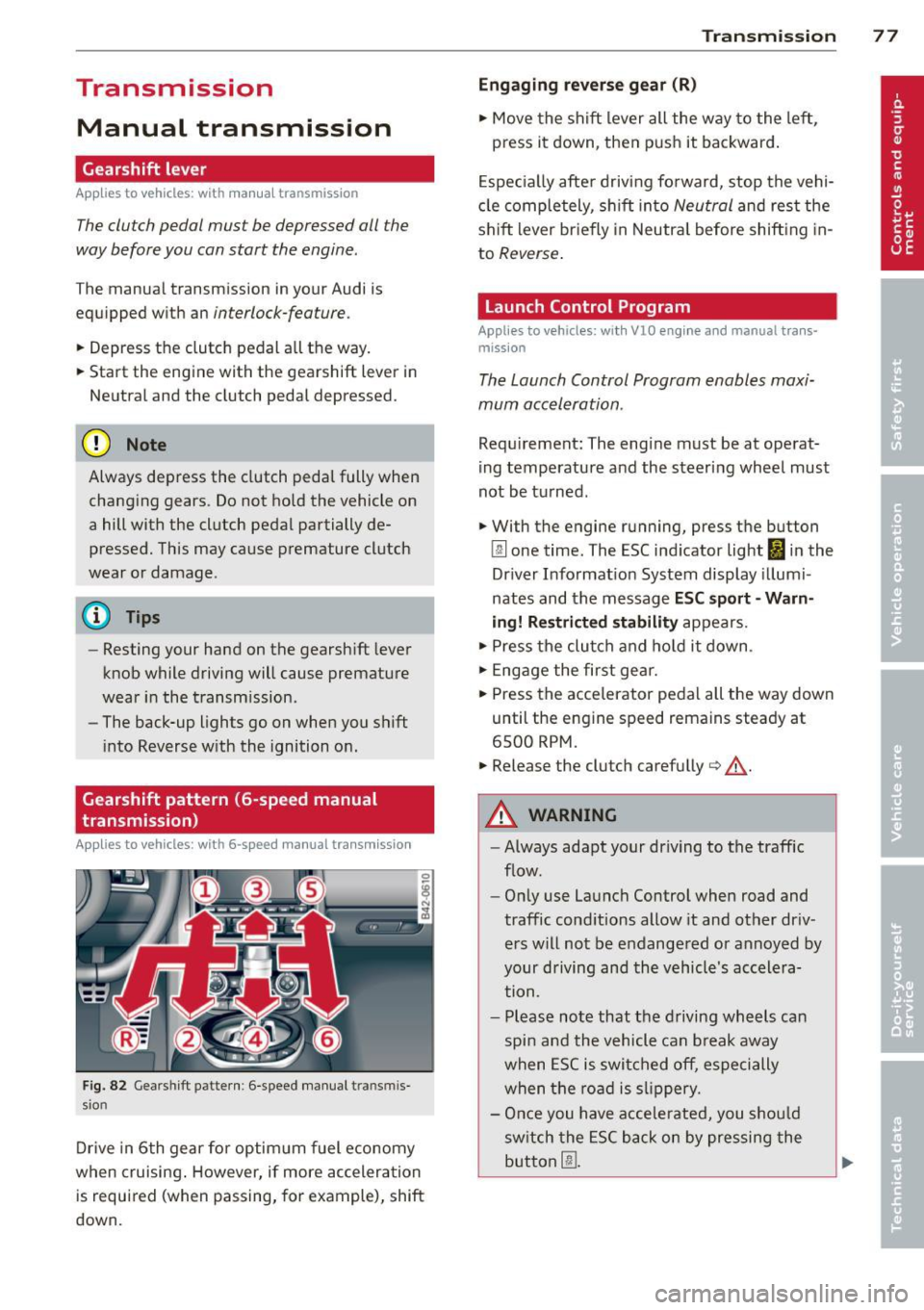
Fig. 82 Gears hift patte rn: 6 -speed manual tran smis
sion
Drive in 6th gear for optim um fuel economy
when cruising . However, if more acceleration
is required (when passing, for example), shift
down.
Transmission 77
Engaging reverse gear (R)
• Move the shift lever all the way to the left,
press it down , then push it backward.
Especially after driving forward, stop the vehi
cle completely, sh ift into
Neutral and rest the
shift lever br iefly in Neutra l before shift ing in
to
Reverse .
Launch Control Program
Applies to vehicles: with VlO eng ine and manual t ra ns·
miss ion
The Launch Control Program enables maxi
mum acceleration .
Requirement: The engine must be at operat
ing temperature and the steering wheel must
not be turned .
• With the engine running, press the button
[g] one time. The ESC indicator light I in the
Driver Informat ion System display illumi
nates and the message
ESC sport - Warn
ing! Restricted stability
appears.
• Press the clutch and hold it down .
• Engage the first gear.
• Press the accelerator pedal all the way down
until the engine speed remains steady at
6500 RPM.
• Release the clutch carefully¢.&, .
A WARNING
-Always adapt your dr iving to the traffic
flow.
- Only use Launch Control when road and
traffic conditions allow it and other dr iv
ers will not be endangered or annoyed by
your driving and the vehicle's accelera
tion .
- Please note that the driving wheels can
spin and the vehicle can break away
when ESC is switched off, especially
when the road is slippery.
- Once you have accelerated, you sho uld
sw itch the ESC back on by pressing the
button @.
Page 80 of 244
78 Transmission
@ Tips
-When accelerating using the Launch
Control program, all vehicle parts are
subject to heavy loads. This can result in
increased wear.
- The Launch Control Program only func
tions when the parking brake is released
and the vehicle speed is less than
3 mph
(5 km/h).
S tronic®
Description
Applies to vehicles: with S tronic
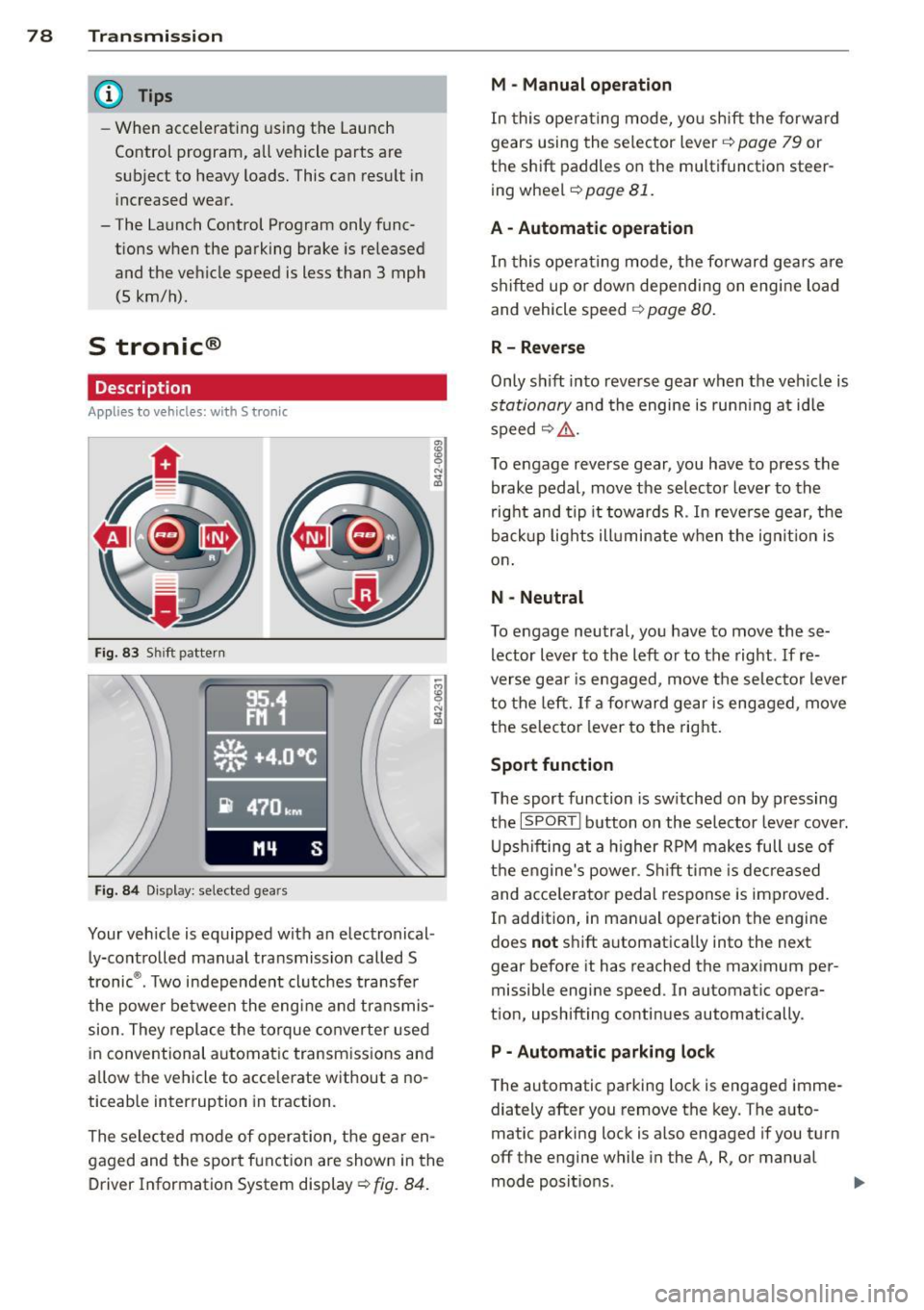
Fig. 83 Shift pattern
Fig. 84 Display: selected gears
Your vehicle is equipped with an electronical
ly-controlled manual transmission called S
tronic ®. Two independent clutches transfer
the powe r between the engine and transmis
sion. They replace the torque converter used
in conventional automatic transmissions and
allow the vehicle to accelerate without a no
ticeable interruption in traction.
The selected mode of operation, the gear en
gaged and the sport function are shown in the
Driver Information System display ¢
fig. 84.
M -Manual operation
In this operating mode, you shift the forward
gears using the selector lever ¢
page 79 or
the shift paddles on the multifunction steer
ing wheel¢
page 81.
A - Automatic operation
In this opera ting mode, the forward gears are
shifted up or down depending on engine load
and vehicle speed ¢
page 80.
R- Reverse
Only shift into reverse gear when the vehicle is
stationary and the engine is running at idle
speed~ ,&..
To engage reverse gear, you have to press the
brake pedal, move the selector lever to the
right and tip it towards R . In reverse gear, the
backup lights illuminate when the ignit ion is
on .
N -Neutral
To engage neutral, you have to move these
lector lever to the left or to the right.
If re
verse gear is engaged, move the selector lever
to the left.
If a forward gear is engaged, move
the selector lever to the right.
Sport function
The sport function is sw itched on by pressing
the
I SPOR T I button on the selector lever cover.
Upshifting at a higher RPM makes full use of
the engine's power. Shift time is decreased
and acce le rator pedal response is improved.
In addition, in manual operation the engine
does
not shift automatically into the next
gear before it has reached the maximum per
missible engine speed. In automatic opera
tion, upshifting continues automatically.
P - Automatic parking lock
The automatic parking lock is engaged imme
diately after you remove the key. The auto
matic parking lock is also engaged if you turn
off the engine while in the A, R, or manual
mode positions. .,..
Page 81 of 244
If you turn off the engine while in the N posi
ti on and leave the vehicle key in the ignition,
the transm ission remains in the N pos ition for
approximately 20 mi nutes an d then act ivates
th e automatic parking lock. If vehicle
move
ment is detected within tha t 20 minutes
based on rotat ion of the wh eels, th en the
time will increas e according ly.
A WARNING
- If a gear is engaged when the vehicle is
stationa ry, the acce lerator must not be
pressed inadvertently under any circum
stances. Otherwise the vehicle will im
med iately start to
move -sometimes
even if the parking brake is firmly ap
plied.
- Before you or other persons open the en
gine compartment lid and work on a ru n
ning eng ine, se lect neutral position
N
and firmly apply the handbrake. A lways
read and follow the applicable warn ings
¢ page 172, Working in the engine
compartment.
(i) Tips
- If you accidentally shifted into N while
driving, you can engage a gear in the nor mal way using the selecto r lever.
-An indicator light is displayed if a mal
funct ion occ urs while in S tronic. Refe r to
qpage 81.
Manual mode
Appl ies to vehicles : wit h S t ronic
S tronic allows the driver to shift gears man
ually.
Starting from a stop
.. Press and ho ld the brake pedal.
.. Move the selector lever to the left.
.,. Tap the selector lever forward
0 -
.. Re lease the brake pedal and press the accel
erato r peda l¢ ,& .
Tran sm iss ion 79
Shifting
.,. To shift up, tap the selec to r l ever forwa rd
0-
.. To shift down, tap the selector lever to the
rear Q.
Stopping temporarily
.. Press the b rake pedal to p revent the veh icle
from mov ing, fo r ex ample at tra ffic l ights.
Parking
.. Press and hold the brake pedal¢ ,& .
.. Act ivate the park ing brake .
.,. Tu rn off the ignition and remove the key.
Stopping on an incline
.. Always keep th e vehicle stat ionary using the
foot brake to prevent it from "rolling back"
¢ ,& . D o
not try to p revent the veh icle from
"rol ling back" when a gear is engaged by in
creasing e ng ine speed.
.. Ac tiva te the pa rk ing br ake.
Starting on a hill
.. With a gear engaged, remove your foot from
th e brake, accelerate and slowly release the
park ing brake.
When accelerat ing, S tronic sh ifts i nto the
next gear i n gears 1, 2, 3, 4, 5 and 6 shortly
before the max imum pe rm issib le eng ine
speed is reached.
If you have se lected a lowe r gear tha n the cur
r ent one, S tron ic will s hift down only when
the engine will not be
over- revved .
You can switch to automat ic operation at any
time
q page 80.
A WARNING
-Never leave your vehicle with the engine
ru nning while in gear . If you must leave
your veh icle w ith the engine r unning, set
the par king brake firm ly and engage neu
tral
N.
- W ith the engine r unning and a gear en
g aged, you have to hold the ve hicle with
the foot bra ke.
Page 84 of 244
![AUDI R8 SPYDER 2014 Owners Guide 82 Transmission [O] Risk of rolling! P not possible. Plea se set
the parking brake
- T he pa rking lock was released using the
eme rgency release
r=;, page 82. Or
- T he pa rking](/img/6/57641/w960_57641-83.png "AUDI R8 SPYDER 2014 Owners Guide 82 Transmission [O] Risk of rolling! P not possible. Plea se set
the parking brake
- T he pa rking lock was released using the
eme rgency release
r=;, page 82. Or
- T he pa rking")
82 Transmission [O] Risk of rolling! P not possible. Plea se set
the parking brake
- T he pa rking lock was released using the
eme rgency release
r=;, page 82. Or
- T he pa rking lock can no longer be engaged.
Drive to your authorized Audi dealer or
qualified repair facility immediately to have
the malfunction corrected.
• Transmission: System malfunction ! Stop
the vehicle
Do not cont inue driving. Turn off the ignition
and contact your nearest authorized Audi
dealer for assistance.
There is a serious system malfunction . Con
tinuing to drive could result in subsequent
damage.
0 Note
If S tronic has switched to emergency op
eration mode, you should have the mal
function corrected as soon as possible.
Parking lock emergency release
Appl ies to vehicles: with S tronic
The parking lock must be released using the
emergency release before towing the vehicle .
Fig. 86 Engine compartment: emergency release
Fig. 87 Engine compa rtment: pa rking lock emergency
r e lease
The emergency release is located in the en
gine compartment.
Releasing the parking lock using the
emergency release
.,. Turn the engine off.
.,. Set the parking brake to prevent the vehicle
from rolling unintentionally.
.,. Remove the removable plastic key from the
luggage compartment and extend the key to
its full length .
.,. Remove the cover over the emergency re
lease mechanism .
.,. Insert the plastic key into the emergency re
lease mechanism and turn it all the way to
the right
r=;, fig. 87.
Resetting the parking lock
.,. Tu rn the key all the way to the left .
.,. Install the cover.
The
[O] indicator light appears in the instru
ment cluster if the park ing lock was released
from P using the emergency release. The mes
sage
Risk of rolling! P not possible. Please
set the parking brake
also appears .
.&_ WARNING
- Only activate the emergency release
while on a level surface or a slight slope.
-If you release the parking lock using the
emergency release, secure you r vehicle
wit h the parking brake. The vehicle can
roll away if it is not secured and cause a
crash.
Page 85 of 244
@ Tips
The transmission cannot detect if the parking lock was re leased with the emergency
re lease. An error message appears in the
instrument cluster as soon as the trans
m iss ion requ ires the P posit ion but th is po
sition is not engaged .
Transm iss ion 83
Page 97 of 244
For detailed information on how to adjust the
driver's seat, see ¢
page 5 7, General recom
mendations.
A WARNING
Drivers who are unbelted, out of position
or too close to the airbag can be seriously
injured by an airbag as it deploys. To help
reduce the risk of serious personal injury:
- Always adjust the driver's seat and the
steering wheel so that there are at least
10 inches (25 cm) between your breast
bone and the steering wheel.
- Always adjust the driver's seat and the
steering wheel so that there are at least
4 inches (10 cm) between the knees and
the lower part of the instrument panel.
- Always hold the steering wheel on the
outside of the steering wheel rim with
your hands at the 9 o'clock and 3 o'clock
positions to help reduce the risk of per
sonal injury if the driver's airbag inflates.
- Never hold the steering wheel at the
12 o'clock position or with your hands at
other positions inside the steering wheel
rim or on the steering wheel hub. Hold
ing the steering wheel the wrong way
can cause serious injuries to the hands,
arms and head if the driver's airbag in
flates
- Pointing the steering wheel toward your
face decreases the ability of the supple mental driver's airbag to protect you in a
collision.
-Always sit in an upright position and nev
er lean against or place any part of your
body too close to the area where the air
bags are located.
- Before driving, always adjust the front
seats and head restraints properly and
make sure that all passengers are prop
erly restrained.
- Never adjust the seats while the vehicle
is moving. Your seat may move unexpect
edly and you could lose control of the ve
hicle.
- Never drive with the backrest reclined or
tilted far back! The farther the backrests
Driving Safely 95
are tilted back, the greater the risk of in
jury due to incorrect positioning of the
safety belt and improper seating posi
tion .
- Children must always ride in child seats
¢
page 132 . Special precautions apply
when installing a child seat on the front
passenger seat¢
page 111.
Proper seating position for the front
passenger
The proper front passenger seating position
is important for safe, relaxed driving.
For your own safety and to reduce the risk of
injury in the event of an accident, we recom
mend that you adjust the seat for the front
passenger to the following position:
"'Adjust the angle of the seatback so that it is
in an upright position and your back comes
in full contact with it whenever the vehicle is
moving.
"'Adjust the head restraint so the upper edge
is as even as possible with the top of your
head. If that is not possible, try to adjust
the head restraint
so that it is as close to
this position as possible ¢
page 96.
"' Keep both feet flat on the floor in front of
the front passenger seat.
"' Fasten and wear safety belts correctly .
For detailed information on how to adjust the
front passenger's seat, see ¢
page 5 7, Gener
al recommendations .
A WARNING
Front seat passengers who are unbelted,
out of position or too close to the airbag
can be seriously injured or killed by the air
bag as it deploys. To help reduce the risk of
serious personal injury:
- Passengers must always sit in an upright
position and never lean against or place
any part of their body too close to the
area where the airbags are located.
-
•
•