driver AUDI RS5 CABRIOLET 2015 Owner's Manual
[x] Cancel search | Manufacturer: AUDI, Model Year: 2015, Model line: RS5 CABRIOLET, Model: AUDI RS5 CABRIOLET 2015Pages: 284, PDF Size: 69.56 MB
Page 53 of 284

"' N
a: LL co
rl I.O
"' rl
"' rl
Clear vision Lights
Switching the lights on and off
F ig . 55 Instrument pane l: headlight control switch
Light switch ·'t/,·
i
Turn the switch c> fig . 55 to the correspond ing
position . When the lights are switched on, the
:oo: symbol turns on.
0 • The lights are off or the dayt ime running
lights are on:
- USA model s: The daytime running lights are
activated when the light sw itch
c> fig . 55 is
in the
O position or the AUTO position (only
in daylight conditions). The daytime running
lights function can be turned on and off in
the radio or MMI * menu
Exterior lighting
¢page 52, c> &_ .
-Canada model s: The daytime runn ing lights
are activated when the light sw itch ¢
fig. 55
is i n the O position, :oo: position or the AUTO
pos it io n (on ly in daylight cond itions) . The
daytime running lights function canno t be
turned off¢&. .
AUTO* -Au tomatic headlights switch on and
off depending on b rightness, fo r example in
tw ilight, during rain or in tunnels¢,& .
:oo: -Side marker lights
~D -Low beam headlights
Rear f og light (s)
Press the appropriate b utton c> fig. 55:
0$-Rear fog ligh t(s)
Clear vi sion 51
adaptive light*
When switched on, adap tive ligh t adapts to
curves in the road depend ing on the vehicle
speed and the steering ang le. This provides
better light ing through the curve. The system
operates at speeds between approximate ly
6 mph (10 km/h) and 68 mph (110 km/h).
Stati c corner ing light* (vehicles with adaptive
light) -the cornering light switches on at
speeds up to approximately 25 mph (40 km/
h) w hen a certain steering wheel angle is
reached o r when a turn signal is activated. The
area to the s ide of the vehicle is illuminated
bette r whe n turn ing .
The adaptive light and the cornering light only
functio n when the switch is in the AUTO posi
t ion (automatic headlights*) .
A WARNING
-Daytime r unning lights and automa tic
headlights* are only intended to ass ist
the driver . T hey do n ot relieve the driver
of his responsibili ty to che ck the head
lights and to t urn them on manua lly ac
cording to the current light and visibility
conditions. For examp le, fog cannot be
detected by the light sensors*. So a lways
sw itch on the headlights
~D under these
weather conditions and when driving in
the dar k.
- Cras hes can happen when you cannot see
the road ahead and when yo u cannot be
see n by other motoris ts. Always tu rn on
the head lights so that you can see ahead
a nd so that ot hers can see your car from
t he b ack.
- P lease obey all laws when using the
lig hting sys tems descr ibed here.
(D Note
The rear fog lights shou ld only be turned
on in acco rdance with t raff ic regu lation, as
the lights a re bright for following traffic. ..,.
Page 54 of 284

52 Clear vis ion
@ Tips
- The light sensor* for headlight control is
located in the rear view m irror mount.
You should therefore not apply any st ick
ers to the windsh ield in this area in order
to prevent malfunctions or failures.
- Some exterior lighting functions can be
adjusted
¢page 52.
- When you remove your key from the igni
tion while the vehicle's lights are turned
on, a buzzer sounds as long as the driv
er's door is open .
- In cool or damp weather, the ins ide of
the headlights, turn signals and tail lights can fog over due to the tempera
ture difference between the inside and
outside. They will clea r shor tly after
switching them on. This does not affect
the service life of the lighting.
- In the even t of a light sensor malfunc
tion, the driver is no tified in the instru
ment cluster disp lay¢
page 22.
Turn signals and high beam lever
The lever operates the turn signals, the high
beams and the headlight flasher .
Fig. 56 Tu rn s ig na l and hig h beam lever
Turn sign als ¢i ¢
The turn signals activate when you move the
l ever into a turn s ignal pos ition when the ign i
tion is switched on.
(D -right turn signal
@-left tur n signa l
The turn s ignal blinks three times if you just
tap the lever .
High be ams and headlight flasher [D
Move the lever to the correspon ding posit io n:
@ -high beams on
@ -high beams off or headlight flasher
The indicator light
ii in the instrument cl us
te r turns on .
Notes on thes e features
-The turn signals on ly wor k w ith the ignition
t ur ned on. The indicator ligh ts
Ct or a in
the instrument cluster also blink.
- After you have turned a co rner, the turn s ig
na l switches off au toma tically .
- The
high beam works on ly w hen the head
lights a re on. The ind icator ligh t
II in the
instrument cluster illuminates when the
high beams are on .
- The
headlight flasher works o nly as long as
you ho ld the lever -even if there a re no
lights switched on . The indicator light
II in
the instrument cluster illuminates when you
use the headlight flasher.
A WARNING
--
Do not use the h igh beam or headlight
flasher if you know that these could blind
oncom ing traffic.
Adjusting exterior lighting
The functions ore selected in the radio or
MMI" .
.,. Select: !CARI function button> Exte rior
light ing .
Or
.,. Select: !CARI function button > Car systems *
control button > Vehicle s etting s> Exterior
lighting .
Coming home (light when leav ing car }*,
Leav ing home (light when unlocking car )*
The coming home function illuminates the
area around the vehicle when the ignition is
switched off and th e dr ive r's door is open ed.
Depend ing on veh icle equ ipment, the function
can be switched on and off or the length of
time the lig hts remain on* can be ad justed . ..,.
Page 55 of 284

"' N
a: LL co
rl I.O
"' rl
"' rl
The leavin g home function i lluminates the
area around the vehicle when unlock ing it.
T his function can be switched on and off.
The
c o ming h om e and lea ving home func
tions on ly operate when it is dark and the
light switch is in the AUTO posit ion
¢ page 51 , fig. 55.
Auto headlight s*
When the light switch is in the A UTO
¢ page 51 position, the switch-on po int of the
lights can be changed in the automatic driving
light function.
Daytime running lights
USA m odel s:
You can switch the dayt ime run
ni ng lights
on and o ff .
Canada mod els:
The function cannot be
turned off .
It is activated a utomat ica lly each
time the ignition is switched on.
Travel mode*
T he headlight beam is asymmetrical. This pro
v ides stronger illum ination on the s ide of the
road on wh ich you are driving .
If you are driv
i ng in a country that d rives on the opposite
side of the road from your own country, th is
will cause glare for on coming drivers. To pre
vent glare:
- Trave l mode must be selected in vehicles
with Xenon headlights*.
- In veh icles with halogen headlights, ce rtain
areas of the head light lenses must be cov
ered with wate rproof adhesive covers that
prevent light from passing thro ugh. For
more informat ion, please see your author
i z ed Audi dea ler or author ized repa ir faci lity .
(D Tips
When trave l mode is activated, a display in
the driver information system indicates
this each time you switch the ignit io n on.
Clear vi sion 5 3
Emergency flashers
Fig. 5 7 Center co n sole : em erge ncy flasher sw itc h
The emergency flashers makes other moto
rists aware that you or your vehicle are in an
emergency situation .
.. Press the switch
Gil ¢ fig. 57 to turn the
emergency flashers on or off .
When the emergency f las hers are on, all four
turn s ignals b link at the same time. The turn
s ignal indicator lights .
1B in the instru
ment cluster, as well as the light in the emer
gency flasher switch ~ blink likewise.
You can indicate a lane change or a tu rn w hen
the emergency flashers are switched on by us
ing the turn signal lever. The emergency flash
ers stop temporarily .
T he emergency flashers also work when the
ign it ion is turned off .
T he emergency flashers w ill turn on a utomat i
ca lly if yo u are in an accident where the airbag
has deployed.
(D Tips
You sho uld turn on the emergency f lashers
when:
- yo u are the last veh icle standing in a t raf
fic jam so that any other vehi cles coming
can see you, or whe n
- your vehicle has bro ken down or you are
in an eme rgency s ituation, or when
- yo ur vehicle is be ing towed by a tow
truck or if you are tow ing another vehicle
beh ind you.
Page 57 of 284

"' N
a: LL co
rl I.O
"' rl
"' rl
Turn the knob to the desired position:
Q/ P -In this position , you can adjust the
driver's and front passenger's exterior mirrors by turning the knob in the desired direction.
(ijjl -The mirrors are heated depending on the
outside temperature.
Passenger exterior mirror tilt function*
To help you see the curb when backing into a parking space, the surface of the mirror tilts
slightly . The knob must be in the P posit ion
for this to happen .
You can adjus t the tilted mirror sur face by
turning the knob in the desired direction .
When you move out of reverse and into anoth
er gear, the new mirror position is stored and
assigned to the key you are using.
T he mirror goes back into its original position
once you drive forward faster than 9 mph (15 km/h) or switch the ignition off .
_& WARNING
Curved mirror surfaces (convex or spheri
cal*) increase your field of view. Remem
ber that vehicles or other objects will ap
pear smaller and farther away than when
seen in a flat mirror. If you use this mirror
to estimate distances of following vehicles
when changing lanes, you could estimate
incorrectly and cause an accident .
(D Note
- If you wash the vehicle in an automatic
car wash, you must fold the exterior mir
rors in to reduce the risk of damage to
the mirrors.
{!) Tips
- The exterior mirror settings are stored
with the memory function*
c:> page 63.
-If there should be a malfunction in the
electrical system, you can still adjust the
exterior mirrors by pressing the edge of
the mirror.
.
Clear vision 55
Dimming the mirrors
N
~
><
~===~=======~ ~
Fig. 62 Auto matic dimmin g rearv iew mirro r*
Manual dimming rearview mirror
.,. Pull the lever on the bottom of the mirror
back .
Automatic dimming rearview mirror*
.,. Press the button @c:>
fig. 62. The indicator
light @ turns on . The rearview and exterior*
mirrors dim automatically when light shines
on them, for example from headlights on a
vehicle to the rear .
_& WARNING
-
Electrolyte fluid can leak from automatic
dimming mirrors if the glass is broken .
Electrolyte fluid can irritate skin, eyes and
respiratory system.
- Repeated or prolonged exposure to elec
trolyte can cause irritation to the respira
tory system, especially among people
with asthma or other resp iratory condi
tions . Get fresh air immediately by leav
ing the vehicle or, if that is not possible,
open windows and doors all the way.
- If electrolyte gets into the eyes, flush
them thoroughly with large amounts of clean water for at least 15 minutes;
medical attention is recommended.
- If electrolyte contacts skin, flush affect
ed area with clean water for at least 15
minutes and then wash affected area
with soap and water; medical attention
is recommended. Thoroughly wash af
fected clothing and shoes before reuse .
.
Page 58 of 284

56 Clear vision
-If swallowed and person is conscious,
rinse mouth with water for at least 15
minutes. Do not induce vomiting unless
instructed to do so by medical professio
nal. Get medical attention immediately.
d) Note
Liquid electrolyte leaking from broken mir
ror glass will damage any plastic surfaces
it comes in contact with. Clean up spilled
electrolyte immediately with clean water
and a sponge.
@ Tips
- Switching off the dimming function of
the inside rear view mirror also deacti
vates the automatic dimming function of
the exterior mirrors.
-Automatic dimming for the mirror only
operates properly if the light striking the inside mirror is not hindered by other ob
jects.
- The automatic dimming mirrors do not
dim when the interior lighting is turned
on or the reverse gear is selected.
Sun visors
1--~---'
Fig. 63 Driver's side: sun visor
The sun visors for the driver and passenger
can be pulled out of their brackets in the cen
ter of the vehicle and turned towards the
doors @.
The mirror light switches on when the cover over the vanity mirror@ opens.
Wiper and washer
system
Switching the windshield wipers on
Fig. 64 W indshield w iper lever
Move the windshield wiper lever to the corre
sponding position:
@ -Windshield wiper off
@ -Interval mode. To extend/shorten the
wiper intervals, move the switch@ to the
left/right. In vehicles with a rain sensor* the
wipers turn on in the rain once the vehicle
speed exceeds approximately 2 mph (4 km/h).
The higher the sensitivity of the rain sensor* is
set (switch @ to the right), the earlier the
windshield wipers react to moisture on the
windshield. In some models, you can switch
rain sensor mode off and switch intermittent
mode on in the MMI*. Select:
!CARI function
button
> Car systems* control button > Driver
assist
> Rain sensor . In intermittent mode,
you can adjust the interval time using the@
switch.
@ -Slow wiping
@ -Fast wiping
@-Single wipe
® -Clean the windshield. To eliminate water
droplets, the windshield wiper performs one
afterwipe operation after several seconds
while driving . You can switch this function off
by moving the lever to position ® within 10
seconds of the afterwipe operation. The after
wipe function is reactivated the next time the
ignition is switched on.
Page 59 of 284

M N
er
u..
co ,...., \!) 1.1'1 ,...., 1.1'1 ,....,
Cleaning the headlights*. The headlight wash
er system* operates only when the headlights
are on. If you move the lever to position@,
the headlights a re washed in intervals .
_& WARNING
-The rain sensor is only intended to assist
the driver. The driver is still responsible
for manually switching the wipers on ac cording to the visibility conditions.
- The windshield may not be treated with
water-repelling windshield coating
agents. Unfavorable conditions, such as
wetness , darkness, low sun, can result in
increased glare. Wiper blade chatter is
also possible.
- Properly functioning windshield wiper
blades are required for a clear view and
safe driving ¢
page 57, Replacing
windshield wiper blades.
(D Note
- In the case of frost, check whether the
windshield wiper blades are frozen to
the windshield. Switching on the wind
shield wipers can damage the wiper blades!
- Prior to using a car wash, the windshield
wiper system must be switched
off (lever
in position @). This helps to prevent un
intentional switching on and damage to
the windshield wiper system .
- The windshield wipers are switched
off
when the ignition is turned off . Activate
the windshield wipers after the ignition is switched back on by moving the wind
shield wiper lever to any position.
- Worn or dirty windshield wiper blades result in streaking . This can affect the
rain sensor* function . Check your wind
shield wiper blades regularly.
- The washer fluid nozzles of the wind
shield washer system are heated at low
temperatures when the ignition is on.
- When stopping temporarily, (e.g . at a
traffic light) the set speed of the wind-
Clear vision 5 7
shield wipers is automatically reduced by
one speed.
· Cleaning windshield wiper blades
Clean the windshield wiper blades when they
begin to leave streaks. Use a soft cloth and
glass cleaner to clean the windshield wiper blades.
.. Place the windshield wiper arms in the se rv
ice position. Refer to¢
page 57.
.. Lift the wiper arm away from the front win
dow.
_& WARNING
Dirty windshield wiper blades can impair
your view. This can lead to accidents.
Replacing windshield wiper blades
Fig. 65 Remov ing w in d sh iel d w iper blade
Wiper service position/blade replacement
position
.. Switch the ignition off and move the wind
shield wiper lever to position©¢
page 56,
fig . 64.
The windshield wipers move into the
service position.
.. To bring the wipers back into the original
position, switch the ignition on and press
the windshield wiper lever.
You can also turn the service position on or
off
in the radio/MM!*:
.. Switch the windshield wipers
off (position
@ ¢page 56, fig. 64).
.. Select: !CAR ! function button > Windshield
wipers
> Service position > on/off . Or ..,_
Page 62 of 284
60 Seats and stor age
Seats and storage
General recommen
dations
Why is your seat adjustment so
important?
The safety belts and the airbag system can
only provide maximum protection if the front
seats are correctly adjusted.
There are various ways of adjusting the front
seats to provide safe and comfortable support
for the driver and the front passenger. Adjust
you r seat prope rly so that :
- you can easily and quickly reach all the
switches and controls in the instrument
panel
-your body is properly supported thus reduc
ing physical stress and fatigue
- the safety be lts and airbag system can offer
maximum protection
¢ page 131.
In the following sections, you will see exactly
how you can best adjust your seats .
There are special regulations and instructions
for installing a child safety seat on the front
passenger's seat. Always follow the informa
tion regarding child safety provided in
¢ page 152, Child Safety.
WARNING
Refer to¢ page 112, Driving Safely for
important information, tips, suggestions
and warnings that you should read and fol
low for your own safety and the safety of
your passengers.
A WARNING
, -
Incorrect seating position of the driver and
all other passengers can result in serious
personal injury .
- Always keep your feet on the floor when
the vehicle is in motion -never put your
feet on top of the instrument panel, out of the w indow or on top of the seat cush
ion. This applies especially to the passen- gers
. If your seating position is incorrect,
you increase the risk of injury in the case
of sudden braking or an accident. If the
airbag inflates and the seating position is incorrect, this could result in personal
injury or even death.
- It is important for both the driver and front passenger to keep a distance of at
least 10 inches (25 cm) between them
selves and the steering wheel and/or in
strument panel.
If you're sitting any
closer than this, the airbag system can
not protect you properly. In addition, the
front seats and head restraints must be
adjusted to your body height so that they
can give you maximum protection.
- Always try to keep as much distance as
possible between yourself and the steer
ing wheel or instrument panel.
- Do not adjust the driver's or front pas
senger 's seat while the vehicle is moving.
Your seat may move unexpectedly, caus
ing sudden loss of veh icle control and
personal injury. If you adjust your seat
while the veh icle is moving, you are out
of posit ion.
Driver's seat
The correct seat position is important for safe
and relaxed driving .
We recommend that you adjust the driver's
seat in the following manner :
.. Adjust the seat in fore and aft direction so
that you can easily push the pedals to the
floor wh ile keeping your knees slightly bent
o &. in Why is your seat adjustment so im
portant? on page
60 .
.,. Adjust the seatback so that when you sit
w ith your back against the seatback , you can
still grasp the top of the steering wheel.
.. Applies to vehicles with adjustable head re
straints: Adjust the head restraint so the up
per edge is as even as possible with the top
of your head. If that is not possible, try to
adjust the head restraint so that it is as .,.
Page 63 of 284

"' N
a: LL co
rl I.O
"' rl
"' rl
close to this position as possible
¢page 63.
A WARNING
Never place any objects in the driver's foot
well. An object could get into the pedal
area and interfere with pedal function. In
case of sudden braking or an accident, you
would not be able to brake or accelerate .
Front passenger's seat
Always move the front passenger seat into
the rearmost position .
To avoid contact with the airbag while it is de
ploying, do not sit any closer to the instru
ment panel than necessary and always wear
the three-point safety belt provided adjusted
correctly . We recommend that you adjust the
passenger's seat in the following manner:
.,. Bring the backrest up to an (almost) upright
position.
Do not ride with the seat reclined .
.,. Applies to vehicles with adjustable head re
stra ints: Adjust the head restraint so the up
per edge is as even as possible with the top
of your head. If that is not possible, try to
adjust the head restraint so that it is as
close to this position as possible
¢ page 63.
.,. Place your feet on the floor in front of the
passenger's seat .
Front seats
Power seat adjustment
Fig. 68 Front seats: power seat adjustment
Seats and storage 61
Controls
@-Adjusting the lumbar support*: press the
button in the corresponding position ¢
.&..
@ -Moving the seat up/down: press the but
ton up/down ¢ ,&. .
®-Moving the seat forward/back: press the
button forward/back¢ ,&..
©-Adjusting the backrest angle : press the
button forward/back ¢,&. .
©-Raising/lowering* the head restraints:
press the button up/down¢,&. .
@ -Lengthening/shortening the upper thigh
support* :
lift the handle. A spring moves the
front seat cushion forward ¢
.&..
A WARNING
--
- Never adjust the driver's or front pas
senger's seat while the vehicle is moving.
If you do this while the veh icle is moving,
you will be out of position. Always adjust
the dr iver's or front passenger's seat
when the vehicle is not mov ing.
- Be careful when adjusting the seat
he ight. Check to see that no one is in the
way, or ser ious injury could result!
- Because the seats can be electrically ad
justed with the ignition off or with the
ignit ion key removed, never leave chil
dren unattended in the vehicle. Unsuper
vised use of the electric seat adjust
ments may cause serious injury.
- To reduce the risk of injury in the case of
sudden braking or accident, front pas
sengers must never ride in a moving ve
hicle with the backrest reclined. Safety
belts and the airbag system only offer
maximum protection when the backrest
is upr ight and the safety belts are prop
erly positioned on the body. The more
the backrest is reclined, the greater the
risk of persona l injury from an incorrect
seating position and improperly posi
tioned safety belts.
Page 64 of 284
62 Seats and storage
Power easy entry function
The easy entry function makes it easier for
the rear passengers to enter and leave the ve
hicle .
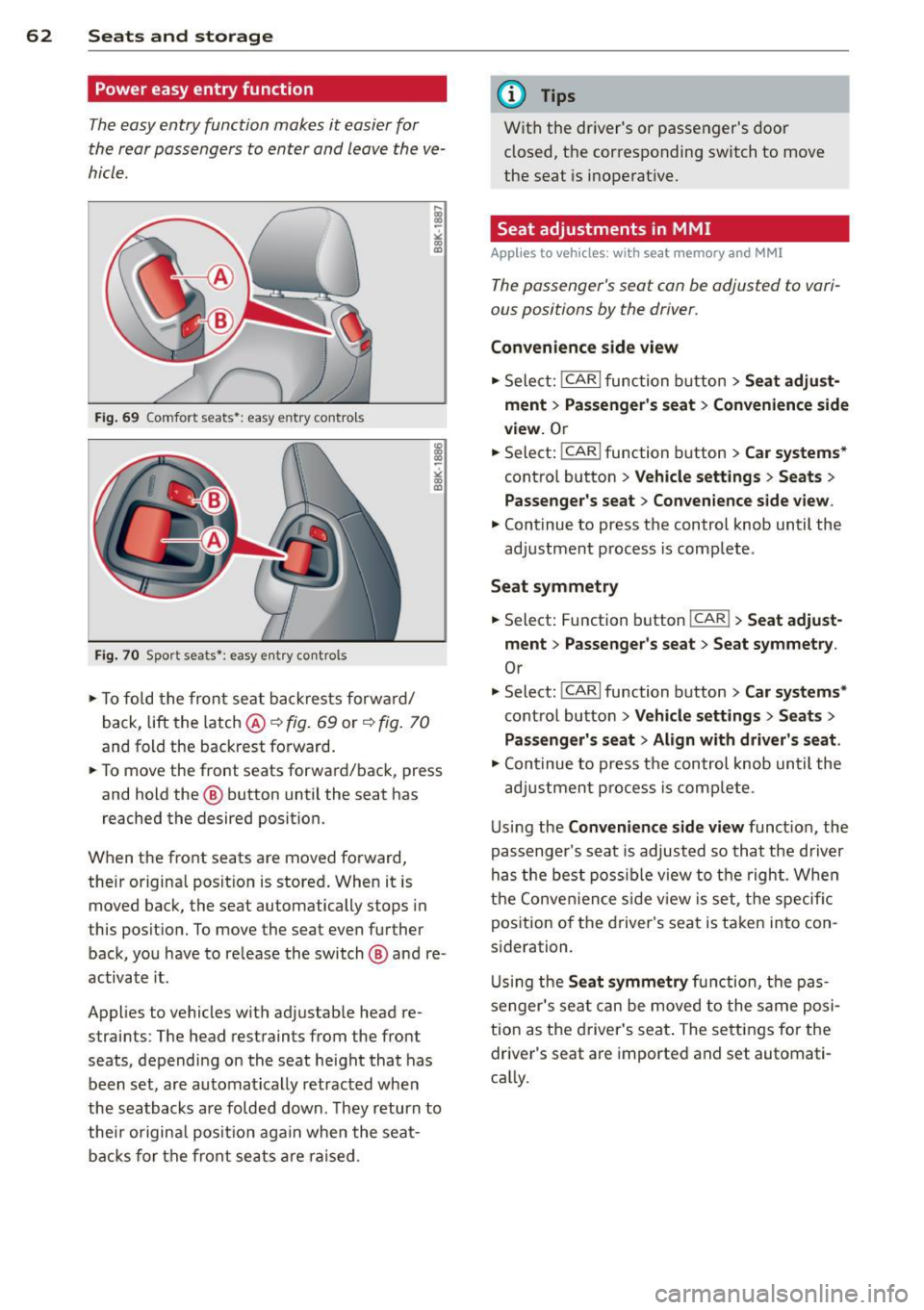
Fig. 69 Comfort seats•: easy entry contro ls
Fi g. 70 Spor t seats •: easy e ntry contro ls
• To fold the fron t seat backrests forwa rd/
back,
lift the latch @~ fig. 69 or~ fig. 70
and fold the backrest forward.
• To move the front seats forward/back, press
and hold the @ button until the seat has
reached the desired position.
When the front seats are moved forward,
their original pos it ion is stored . When it is
moved back, the seat automatically stops in
this position. To move the seat even further back, you have to re lease the switch @ and re
activate it.
Applies to vehicles w it h ad justab le head re
straints : The head restraints from the front
seats, depending on the seat height that has
been set, are automatically retracted when
the seatbacks are folded down . They return to
thei r o rigina l posit io n aga in when the sea t
bac ks for the front seats a re raised .
(D Tips
With the driver's or passenger's door
closed, the corresponding switch to move
the seat is inoperat ive.
Seat adjustments in MMI
Appl ies to vehicles: with seat memory and MMI
The passenger's seat can be adjusted to vari
ous positions by the driver.
Conven ience side view
• Select: !CAR I function button > Seat adju st
ment
> P ass enger' s se at > Con venience side
view.
O r
- -• Select: I CAR I function button > Ca r systems *
control button > Ve hicle s ettings > Seats >
Passenger 's seat > Convenience side view .
• Continue to press the control knob until the
adjustment process is complete.
Seat symmetry
• Select: Function button !CAR !> Seat adjust
ment > Passenger's seat > Seat s ymmetry .
Or
• Select: !CARI function button> Car systems *
control button > Vehicle s ettings > Se ats >
Pa sseng er's s eat > Align with driv er's seat.
• Cont inue to press the control knob until the
adj ustment p rocess is comp lete.
U sing the
Con veni ence side view funct ion, the
passenger 's seat is adjusted so that the driver
has the best poss ible view to the righ t. Whe n
the Conve nience s ide v iew is set, the specific
position of the driver's seat is taken into con
sideration.
U si ng the
Seat symm etry function, the pas
senger's seat can be moved to the same po si
tion as the driver 's seat . The settings for the
driver's seat are imported and set automati
ca lly.
Page 65 of 284
"' N
a: LL co
rl I.O
"' rl
"' rl
Center armrest
The center armrest can be adjusted to several
levels .
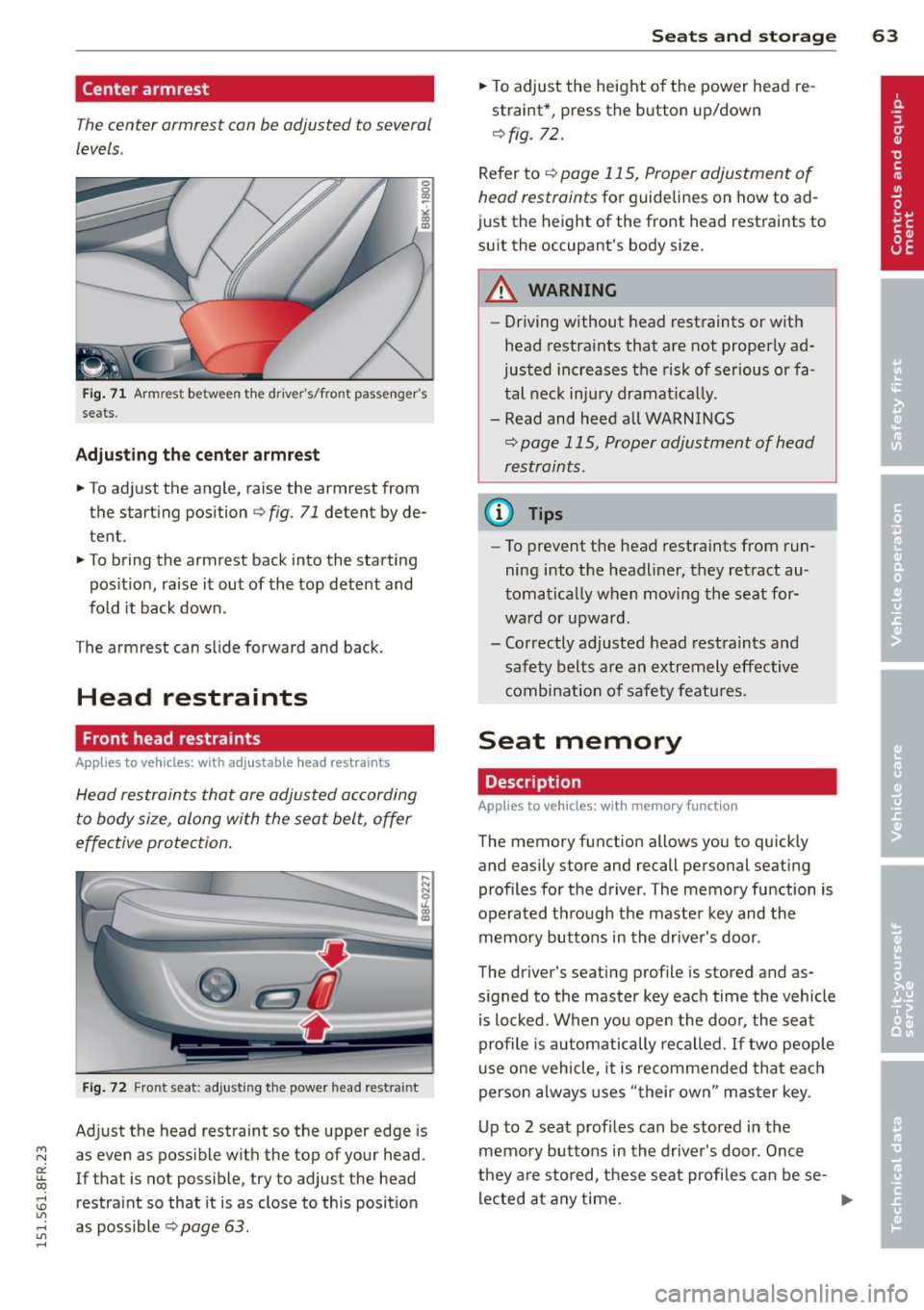
Fig. 71 Armrest between t he drive r's/front passenger's
seats.
Adjusting the center armrest
.. To adjust the angle, raise the armrest from
the starting position
r=:> fig. 71 detent by de
tent.
.. To bring the armrest back into the starting
pos ition, raise it out of the top detent and
fold it back down.
The arm rest can slide forward and back .
Head restraints
Front head restraints
Applies to vehicles: with ad justable head restraints
Head restraints that are adjusted according
to body size, along with the seat belt, offer
effective protection.
....
::::=;~~-..:.:::::~ I
Fig . 72 Fro nt seat: adjusting the power head restra int
Adjust the head restraint so the upper edge is
as even as possible with the top of your head.
If that is not possible, try to adjust the head
restra int so that it is as close to this position
as poss ible r=:>
page 63 .
Seats and storage 63
.. To adjust the height of the power head re
straint*, press the button up/down
<=:> fig. 72.
Refer to <=:> page 115, Proper adjustment of
head restraints
for guidelines on how to ad
just the height of the front head restraints to
suit the occupant's body size.
A WARNING
- Driving without head restraints or with
head restraints that are not properly ad
justed increases the risk of serious or fa
tal neck injury dramat ically.
- Read and heed all WARNINGS
<=:> page 115, Proper adjustment of head
restraints .
@ Tips
-To prevent the head restraints from run
ning into the headliner, they retract au
tomatically when moving the seat for
ward or upward.
- Correctly adjusted head restraints and
safety belts are an extremely effective
combinat ion of safety features.
Seat memory
Description
App lies to vehicles: wit h memo ry function
-
The memory fun ction allows you to quickly
and easily store and recall personal seating
profiles for the driver. The memory function is
operated t hrough the master key and the
memory buttons in the driver's door .
The driver's seating profile is stored and as
signed to the master key each time the vehicle
is locked. When you open the door, the seat
profile is automatically recalled . If two peop le
use one vehicle, it is recommended that each
person always uses "their own " master key.
Up to 2 seat profiles can be stored in the
memory buttons in the driver's door . Once
they a re stored, these seat profiles can be se-
lected at any time.
IJII,-