driver AUDI RS5 CABRIOLET 2015 Service Manual
[x] Cancel search | Manufacturer: AUDI, Model Year: 2015, Model line: RS5 CABRIOLET, Model: AUDI RS5 CABRIOLET 2015Pages: 284, PDF Size: 69.56 MB
Page 94 of 284

92 Audi adaptive cruise control and braking guard
Audi adaptive cruise
control
Description
Applies to vehicles: with Audi adap tive cruise co ntrol
Fig. 106 Detect ion range
What can Audi adaptive cruise control do?
The adaptive cruise control works in conjunc
tion with a radar sensor installed in the front
of the vehicle¢
page 90, fig . 103, which is
subject to designated system limits
¢page 92. Stationary objects are disregard
ed .
On open roads w ith no traffic, adaptive cruise
control works like a regular c ruise control sys
tem. The stored speed is maintained. When
approaching a moving vehicle detected up
ahead, the adaptive cruise control system au
tomatically slows down to match that vehi
cle's speed and then maintains the distance
that the driver previously stored . As soon as
the system does not detect a vehicle up
ahead, adaptive cruise control accelerates
back up to the stored speed.
Which functions can be controlled?
When you switch adaptive cruise contro l on,
you can set the current speed as the "control speed"
¢ page 92, Switching on and off.
When driving, you can stop cruise control
¢
page 94 or change the speed ¢ page 93
at any time.
You can also set the distance to the object
ahead and set the adaptive cruise control driv ing program
¢page 94.
Switching on and off
Applies to vehicles: with A udi adapt ive cruise contro l
Fig. 107 Selector lever : switc hing on/off
Fig. 108 Instrumen t cluster: Audi adaptive cruise con
tro l
You can set any speed between 20 mph and
95 mph (30 and 150 km/h).
Indicator lamps and messages in the instru
ment cluster disp lay inform you about the cur
rent system status and settings.
Switching Audi adaptive cruise control on
.,. Pull the lever towa rd you into position@
¢
fig. 107. ACC standby appears in the in
strument cluster display.
Setting the speed and activating
regulation
.,. To set the current speed, press the ISETI but-
ton ¢
page 11, fig. 4. The set speed is .,..
Page 95 of 284
Audi adaptive cruise control and braking guard 93
shown in the tachometer @and is also
shown briefly in the display @¢
fig. 108 .
Switching Audi adaptive cruise control off
~ Push the lever away from you into position
@ until it clicks into place. The message
ACC off appears.
@ Indicator lights
II-Adaptive cru ise control is switched on.
No vehicles are detected up ahead. The stored
speed is ma intained.
• -A moving vehicle is detected up ahead.
The adaptive cruise control system regulates
the speed and distance to the moving vehicle
ahead and acce lerates/brakes automatica lly.
• -When automatic braking is not able to
keep enough distance to a previously detected
mov ing vehicle up ahead, you must take con
trol and brake¢
page 95, Request for driver
intervention.
© Display
If adaptive cruise control is not shown in the
d isplay, you can call it up with the
I RESET I
button ¢ page 23.
Based on the symbols in the d isplay, you can
determine if the system is maintaining a dis
tance to the vehicle ahead and what that dis
tance is.
No vehicle -No vehicle ahead was detected.
White vehicle -A vehicle ahead was detected .
Red vehicle -Prompt for the driver to take ac
tion
~ page 95.
Both arrows on the scale © indicate the dis
tance to the vehicle ahead . No ar row appears
when the vehicle is on an open road and there
is no object ahead . If an object is detected
ahead, the arrow moves on the scale.
The green zone on the scale shows the stored
distance. For information on changing the
~ stored distance, refer to~ page 94. If the
a: ~ distance selected is too close or may soon be-
rl I.O
"' rl
"' rl
come too close, the arrows move into the red
zone on the scale .
A WARNING
Improper use of the adaptive cruise con
trol can cause collisions, other accidents
and serious personal injuries.
- Pressing the
!SET ! button when driv ing at
speeds below 20 mph (30 km/h), w ill au
tomatically accelerate the vehicle to
20 mph (30 km/h), which is the mini
mum speed that can be set.
@ Tips
-If you switch the ignit ion or the adaptive
cruise control off, the set speed is erased
from the system memory.
- The electronic stab ilizat ion control (ESC)
and the anti-slip-regulat ion (ASR) are au
tom atica lly turned on when the adaptive
cruise control is turned on. Both systems
cannot be turned off if the adaptive
cruise control is turned on .
Changing the speed
Applies to vehicles: with Aud i adapt ive cru ise control
0
f
jJ
0
Fig. 109 Selector lever: ch ang ing the speed
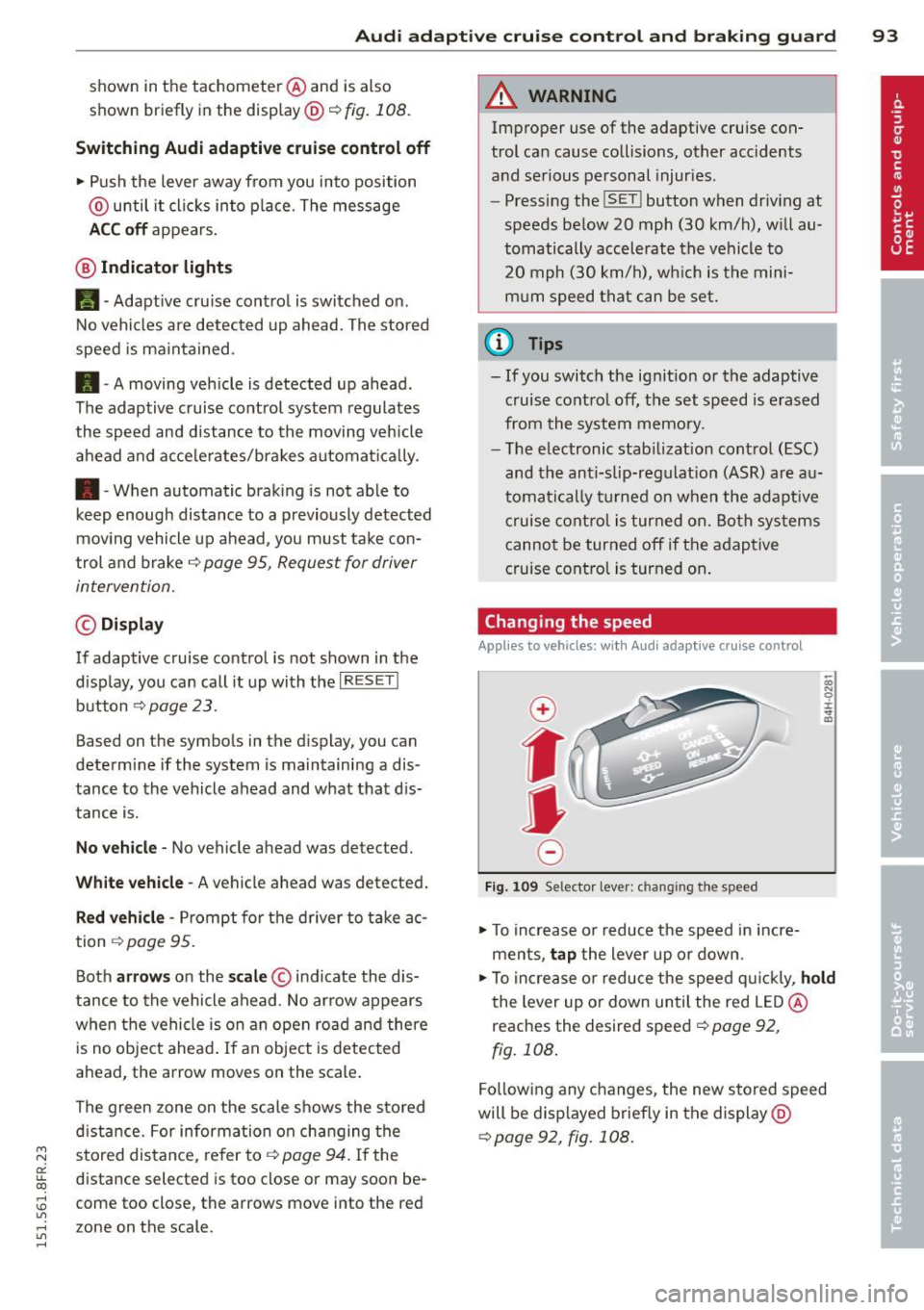
~ To increase or reduce the speed in incre
ments,
tap the lever up or down.
-0:, N 0 ± ... a)
~ To increase or reduce the speed quickly, hold
the lever up or down until the red LED@
reaches the desired speed ¢
page 92,
fig. 108.
Following any changes, the new stored speed
will be displayed briefly in the display@
~page 92, fig. 108.
Page 97 of 284
"' N
a: LL co
rl I.O
"' rl
"' rl
Audi adaptive cruise control and braking guard 95
~--- ~-Di stance 3: This setting corre
sponds to a distance of 164 feet/SO meters
when traveling at 62 mph (100 km/h), or a
time interva l of 1.8 seconds .
~---- ~ Distance 4: This setting corre
sponds to a distance of 210 feet/64 meters
when traveling at 62 mph (100 km/h), or a
time interva l of 2.3 seconds .
A WARNING
Following other vehicles too closely in
creases the risk of collisions and serious
personal injury.
- Setting short distances to the traffic
ahead reduces the time and distance
available to br ing your vehicle to a safe
stop and ma kes it
even more necessary
to pay close attention to traffic.
- Always obey applicable traffic laws, use
good judgment, and select a safe follow
ing distance for the traffic, road and
weather conditions .
¢j) Tips
- Distance 3
is set automatically each time
you switch the ignition on.
- Your standa rd settings are automatically
stored and assigned to the remote con
trol key being used.
Setting the driving program
Applies to vehicles: with Audi adaptive cruise control
Depending on the se lected driv ing program
and distance, driving behavior when accelerat
ing will
vary from dynamic to comfortab le .
Setting the driving program for vehicles
without Audi drive select*
~ In the radio/MMI*, select: !CAR !funct ion
button >
Adaptive cruise control > Driving
prog .
> comfort, standard or dynamic. Or
~ Select: !CARI function button> Car systems*
control button > Driver assist > Adaptive
cruise control
> Driving program* > Com
fort, Standard
or Dynamic. Setting the driving mode for
vehicles with
Audi drive select*
Refer to ¢ page 103.
(D Tips
Your settings are automatica lly stored and
assigned to the remote control key being
used.
Request for driver intervention
Applies to vehicles : with Audi adaptive cruise contro l
Fig. 112 Instrument d uste r: request for drive r inte r
ve ntion
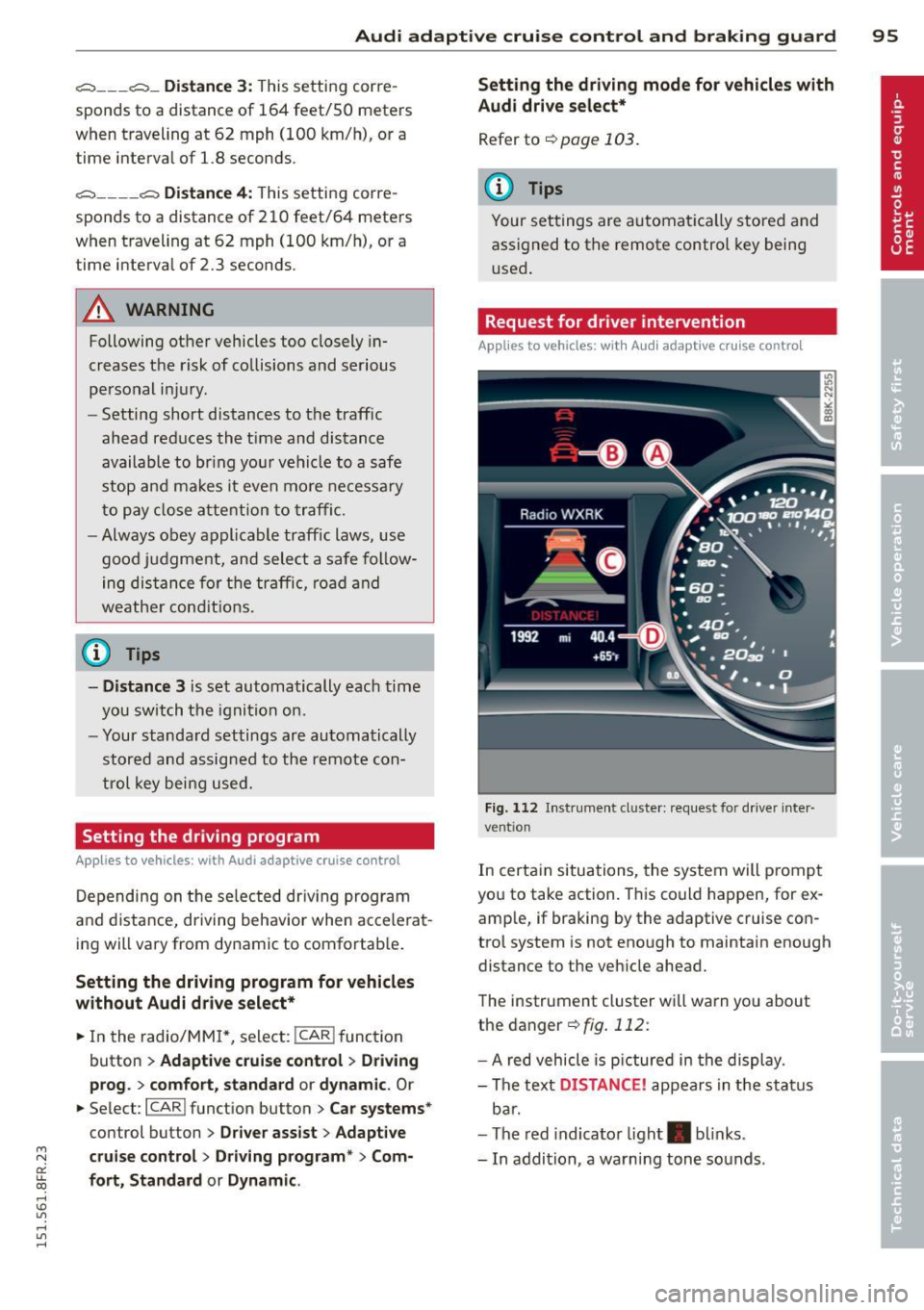
In certain situations, the system will p rompt
you to take action. This could happen, for ex
amp le, if braking by the adaptive cruise con
trol system is not enough to maintain enough
distance to the vehicle ahead.
The instrument cluster will warn you about
the danger ¢
fig. 112:
-A red vehicle is pictured in the display.
- The text
DISTANCE! appears in the status
bar.
- The red indicator light . blinks.
- In addition, a warning tone sounds .
Page 99 of 284

M N
er
u..
co ,...., \!) 1.1'1 ,...., 1.1'1 ,....,
Audi adaptive cru ise control and brakin g guar d 97
-Always remember that the radar sensor
for the braking guard works only within
defined detection and range limits that
may prevent the proper detection of oth
er vehicles.
- The radar sensor's function and range
can be reduced by rain, snow and heavy
spray. Moving vehicles up ahead may not be promptly detected or may not be de
tected at al l.
- Reflective surfaces includ ing crash barr i
ers or tunnel ent ran ces may impair the
function of the radar sensor.
- You can cance l the braking that is initiat
ed by the system by braking yourself, by
accelerating noticeab ly or by swerving.
- Bra king guard error messages
<> page 97.
-Keep in mind that braking guard can
brake u nexpectedly . Always secure any
ca rgo or objects that you are transport
i ng to reduce the risk of d amage or in
ju ry.
Settings in the radio/MM!
Applies to vehicles: with Audi adaptive cruise co ntrol
~ Se lect: ICARI f u nction button> Car system s*
control button > Dri ver assist > Audi brak
ing guard .
Or
~ Select : I CARI funct ion button > A udi braking
guard .
System -
Switch Audi braking g uard On and
Off . When you switch the ignition on, the
message
Aud i braking guard off appears if
the system is sw itched off .
Early warning -The distance and app roac h
warn ings in the display can be switched
On /
Off .
(D Tips
-Your settings are automatica lly stored
and ass igned to the remote control key
being used at the t imes the settings are
made. -
If you restrict or sw itch off the ESC, the
braking gua rd also switches itself off
<> page 173.
-Switch braking guard off when you a re
loading the vehicle onto a vehicle carrier,
train, ship or other type of transporta
tion. This can prevent undesired warn
ings from the braking guard system.
Messages
App lies to vehicles : wit h Audi ada ptive c ruise contro l
Braking guard : Off
This driver message appears if the system is
turned off via the radio/MMI *. Otherwise, if
the system is turned off, the informat ion ap
pears every t ime shortly after the start of the
trip.
The driver message a lso appears if the system
is not ava ilable d ue to a malfunct ion or if the
ESC is not switched
on <> page 173. If this is
the case, the system w ill not prov ide warnings
about a poss ible collision.
Braking guard : Acti vated
T h is dr iver message appears if sharp b rake
pressure was applied due to an acute warning.
•••
Three white dots appear if a sett ing cannot be
selected w ith the operating lever . For exam
ple, this happens if you want to raise/lower
the speed even thoug h there was no previous
l y saved speed.
ACC: S ensor blo cked
This message appears if the sensor v iew is ob
structed, for examp le by leaves, snow, heavy
spray or d irt. Clean the sensor<>
page 90,
fig. 103 .
ACC: not a vailable
The driver message appears if there is a mal
functio n. The adaptive cruise contro l tu rns off .
A chime sounds as a reminder . Have the sys
tem checked by an authori zed Aud i dea ler or
authorized Aud i Service Fac ility.
ACC: unavailable ll-
Page 100 of 284
98 Audi adaptive cruise control and bra king guard
The driver message appears i f, for example,
the brake temperature is too high. The adap
tive cruise control is temporar ily unavailab le .
A chime sounds as a reminder.
Shift lever position!
The drive r message appears if the selecto r lev
e r i s shifted to the N position. The adaptive
cr uise con trol is not available while in this po
sition .
Stabilization control (ESC )
This message appears if the electronic stabili
zation control (ESC) is taking action to stabi
lize the vehicle. The adapt ive cruise control
turns off. A chime sounds as a reminde r.
Speed too low
This message appears if the current speed is
too low
to set or to maintain the des ired
speed.
The speed being saved must be at least
20 mph (30 km/h) . The cruise control is
turned off for speeds lower than 12 mph
(20 km/h). The adapt ive cruise control re
mains turned on for speeds above 95 mph
(150 km/h) (overr ide) . It will stab ilize again at
95 mph (150 km/h) when the driver takes his
foot off of the gas pedal.
Parking brake!
The driver message appears when the park ing
brake is activated. Adaptive cru ise contro l is
turned off . A chime sounds as a reminder.
Page 102 of 284

100 Audi side assist
Side assist functions at speeds above approxi
mately 19 mph (30 km/h).
@ Vehicles that are approaching
In certain cases, a vehicle will be classified as
cr itica l for a lane change even if it is still
somewhat far away . The faster a vehicle ap
proaches, the sooner the display in the exteri
or mirror will turn on.
@ Vehicles traveling with you
Vehicles traveling with you are indicated in the
exterior m irror if they are classified as critica l
for a lane change. All vehicles detected by
side assist are indicated by the time they en
ter your "blind spot", at the latest.
© Vehicles left behind
If you slowly pass a vehicle that side assist has
detected (the difference in speed between the
vehicle and your vehicle is less than 9 mph
(15 km/h)), the disp lay in the exterior mirror
turns on as soon as the vehicle enters your blind spot.
The display will not turn on if you quickly pass
a vehicle that side assist has detected (the dif
ference in speed between the vehicle and your
vehicle is greater than 9 mph (15 km/h)).
Functional limitations
The radar sensors are designed to de tect the
l eft and right adjacent lanes when the road
lanes are the normal width. In certain situa
tions, the display in the exterior mirror may
turn on even though there is no vehicle locat
ed in the area that is critical for a lane change.
For example:
- if the lanes are narrow or if your are driving
on the edge of your lane. If this is the case,
the system may have detected the vehicle in
another lane that is
not adjacent to your
current lane.
- if you are driving through a curve. Side assist
may react to a veh icle that is one lane over
from the adjacent lane.
- if side assist reacts to other objects (such as
high or displaced guard ra ils). -
In poor weather conditions . The side assist
functions are limited.
Do not cover the rada r sensors
~ fig. 117 with
stickers, deposits, bicycle wheels or other ob
jects, because this will affect the function . For
information on cleaning, refer to ¢
page 184.
A WARNING
-
-Always pay attention to traffic and to the
area around your vehicle. Side assist can
not replace a driver's attention. The driv
er alone is always responsible for lane
changes and similar dr iving maneuvers .
- Improper reliance on the side assist sys
tem can cause coll is ions and serious per
sonal injury:
- Never rely on ly on side assist when
changing lanes.
- Always check rear view mirrors to make
sure that it is safe to change lanes.
- Side assist cannot detect all vehicles un
der all conditions- danger of accident!
- Please note that side assist indicates
there are approaching vehicles, or
vehicles in your blind spot, only after
your vehicle has reached a driving speed
of at least 19 mph (30 km/h).
- In certain sit uations, the system may not
function or its function may be limited.
For example:
- if vehicles are approach ing or being left
behind ve ry quickly. The d isp lay may
not turn on in time.
- in poor weather conditions such as
heavy rain, snow or heavy mist.
- on very wide lanes, in tight curves or if
there is a rise in the road surface.
Vehicles in the adjacent lane may not
be detected because they are outside
of the sensor range .
([) Note
The sensors can be displaced by impacts or
damage to the bumper, wheel housing and
u nderbody. This can affect the system. .,..
Page 103 of 284

"' N
a: LL co
rl I.O
"' rl
"' rl
Have your authorized Audi dealer or au
thorized Audi Service Facility check their
function.
@ Tips
- If the window glass in the driver's door
or front passenger's door has been tint
ed, the display in the exterior mirror may be misinterpreted .
- For Declaration of Compliance to United
States FCC and Industry Canada regula
tions
¢ page 267.
Activating and deactivating
Applies to vehicles: with Audi side assist
Fig. 118 Drive r's d oor : Sid e ass ist bu tton
.. Press the button ¢.&. in General informa
tion on page 100
to switch the system on/
off . The LED in the button turns on when
side assist is switched on.
Adjusting the display brightness
Applies to vehicles: with Audi side assist
The signal brightness can be set in the radio
orMMI* .
.. Select : ICARI function button> Audi side as
sist.
.. Select : I CARI function button > Car systems*
control button > Driver assist > Audi side
assist.
The display brightness adjusts automatically
to the brightness of the surroundings, both in
the information and in the warning stage. In
very dark or very bright surroundings, the dis play is already set to the minimum or maxi
mum level by the automatic adjustment. In
Audi side assist 101
such cases, you may notice no change when
adjusting the br ightness, or the change may
only be noticeable once the surroundings
change.
Adjust the brightness to a level where the dis
play in the information stage will not disrupt
your view forward. If you change the bright
ness, the display in the exterior mirror will
briefly show the brightness level in the infor
mation stage. The brightness of the warning
stage is linked to the brightness in the infor
mation stage and is adjusted along with the
information stage adjustment.
(D Tips
- Side assist is not active while you are
making the adjustment.
- Your settings are automatically stored
and assigned to the remote control key
being used.
Driver messages
Applies to vehicles: wit h Aud i side ass ist
If side assist switches off by itself, the LED in
the button turns off and a message will ap
pear in the instrument cluster display:
Audi side assist unavailable: Sensors blocked
The radar sensors' vision is affected . Do not
cover the area in front of the sensors with bike
wheels, stickers, dirt or other objects. Clean
the area in front of the sensors, if necessary
¢ page 99, fig. 117 .
Audi side assist: Currently unavailable
Side assist cannot be switched on temporarily
because there is a malfunction (for example,
the battery charge level may be too low) .
Audi side assist: System fault!
The system cannot guarantee that it will de
tect vehicles correctly and it is switched off.
The sensors have been displaced or are faulty.
Have the system checked by an authorized
Audi dealer or authorized Audi Service Facility
soon.
Page 104 of 284

102 Audi drive select
Audi drive select
Driving settings
Introduction
App lies to vehicles: with Audi drive select
Drive select provides the possib ility to exper i
e nce diffe ren t types of vehi cle sett ings in o ne
ve hicl e. For ins tance, us ing t he three
Com
fort , Auto and Dynamic modes, the driver can
switch from a sporty to a comfortab le drivi ng
mode with the press of a b utton.
A ddit ionally, in veh icles wi th MM I*, the vehi
cle setup for
Individual* mode can be c us
tom ized by you . This makes it possib le to
comb ine settings such as a sporty engine tun
ing with comfortable steering.
A WARNING
Improper use of the A udi d rive select can
cause collisions , ot her acc idents and se ri
ous pe rsonal injury .
Description
Applies to vehicles: with Audi drive select
The vehicle setup in each mode depends on
the veh icle's features . However, the engin e,
automa tic t ransmissio n and s teeri ng a re a l
ways involved.
-
Engine and automatic transmission
Depending on the mode , the e ng ine and the
automatic t ransm ission respond quicke r or i n
a more ba la nced manne r to a cce le rator pedal
move ments. In t he sporty dynam ic mode, the
a ut om at ic t ra nsmissio n shifts at h igher R PMs.
The engine sound is ad justed by open ing or
clos ing t he exhaust doors for the respective
mode .
Steering
The stee ring ada pts in te rms of stee ring effort
an d steer ing ra tios. In direc t steer ing t hat
moves easi ly, like the stee ring in comfort
mode , is best su ite d to long dr ives on a high
way. In contrast, dynam ic mode p rov ides
sporty, d irect steering. T
he following app lies to veh icles with dynamic
stee ring *: the steering rat io chan ges base d on
vehicle speed in order to ma inta in optim um
steering effort for the driver at all times. This
sets the steering to be less sens itive at higher
speeds in o rder to provide improved vehicle
co ntrol. At r educed speeds, howeve r, s teer ing
is mo re d irect in o rder to k eep th e stee ring ef
fo rt as minima l as poss ible whe n the drive r is
mane uveri ng the veh icle. At low and ave rage
s p eeds, dynamic steering ad dit iona lly pro
vides more responsive stee ring pe rformance .
Sport differential*
As a compone nt of the all whee l dr ive system
(qua ttro)
~ page 1 76 , the sp ort differential*
distributes the d riving power to the rear axle
depen ding on the si tuatio n. The dis trib ution
of power var ies depending on the mode se
l ected . The goal is a high level of agility and
ability to accelerate on curves . The vehicle is
very respons ive to steering.
Audi adaptive cruise control*
T he be hav io r when accelera ting can be adjus t
ed from comfortab le to sporty, de pendi ng on
t h e d rive select mode . Adaptive cru ise contro l
also responds to the driv ing behavior o f the
vehicle ahead in a more conservative or sporty man ner .
Engine sound*
The so und of the eng ine is adapte d to these
l ected mode and ranges from s ubt le to sporty .
(!) Tips
-In some mo dels, the maximum vehicle
spee d can only be reac hed in the
Auto
and Dynamic mo des .
- Selecting the
Dynamic mo de res ults in
sporty shifti ng cha racte ristics . T he 5
gear position engages aut omatically.
- In ve hicl es that have dynamic stee rin g* ,
operating noise is heard when start ing or
stopping the engine. This does not indi
cate a problem.
Page 105 of 284

"' N
a: LL co
rl I.O
"' rl
"' rl
Selecting the driving mode
Applies to vehicles: with Audi drive select
You can choose between Comfort , Auto , Dy
namic
and Indi vidua l* modes .
Fig. 1 19 Ce nter co nsole: Con tro l for Aud i d ri ve se lect
F ig . 120 MM I* : A udi drive se lect
,.. To set the mode, press the ~:i.l'c1 button
9 fig. 119 multiple t imes until the desired
mode is displayed in the instrument cluster.
Or
Adjusting the Individual mode
Appl ies to vehicles: wit h MMI and Audi drive select
Audi dri ve sele ct 103
,.. In the MMI*, select : ICARI function button >
Comfort , Au to , D ynamic or Indi vidual *.
In vehicles without the MMI*, the r:i.rc'i button
is found underneat h the selector lever .
You can change the driving mode whe n the ve
hicle is stationary or wh ile driving. If traffic
permits, after changing modes, briefly take
you r foot off the acce le rator pedal so that the
recently selected mode is a lso activated for
the engine and transmission .
Comf ort -prov ides a comfort-orie nted ve hicle
setup and is suited for long drives on high
ways .
Auto -provides an overall comfor table ye t dy
nam ic dr iving feel and is suited for every day
u se.
D ynamic -gives the driver a sporty d riving
feel and is suited to a spo rty dr iv ing style.
Ind ividual * -¢ page 103 .
A WARNING
Pay attention to traffic when operating
drive sele ct to prevent potential risk of an
accident.
-
You can personally specify the vehicle setup in the MMI".
,.. Select the ICAR I function button > Set indi
v idu al
control button . Once you select the
menu, you will automatically drive in the
i n
di vidual
mode .
System s Comfort
Engin e/Transmi ssion
ba lanced
S te ering comfortable
Dynamic st e ering * comfortable/ind ire ct
Spo rt d ifferent ial* balanced
Adaptiv e cruise c ontrol * comfortable
Engin e sound * subtle The equipment in your vehicle will determine
which sett
ings you can adjust. The following
table prov ides an overview of the characteris
t ics of each driving mode.
Auto Dynamic
balanced sporty
balanced sporty
balanced/direct sporty/direct agile sporty
balanced sporty
subtle sporty
Page 108 of 284

106 Park ass is t
Visu al display
Using the red segments, you can est ima te the
d istance to an object in front of or behind the
vehicle
c::> fig. 122. As your vehicle comes clos
er to the obstacle, the segments move closer
to the vehicle. At the latest the collision area
has been reached when the next to last seg
ment is displayed. Do not continue driving far
ther forward or in reverse
c::> A !
A WARNING
-The parking system cannot rep lace the
dr iver's attention. The driver is always re
sponsible for safety d uring parking and
f or all o ther maneuvers.
- Sensors and cameras have blind spots in
wh ich peop le and objec ts cannot be de
tected . Be especially cautious of small
children and animals .
- Always keep your eyes on the veh icle's
surroundings, using the rear view mirro r
as well.
(D Note
Low obstacles al ready signa led by a warn
ing can disappear from the system's detec
tion range as they are approached and will
not continue to be signa led . Objects such
as barrier chains, trailer draw bars, thin
pa inted vertical poles or fences may not be
detected by the system, posing risk of
damage.
@ Tips
- You can change the volume and pitch of
the signals as well as the display
c::>page 111.
-What appears in the display is time-de
l ayed.
Parking system plus
with rear view camera
· Introduction
Applies to vehicles : wi th parking sy stem plus with rea r
v iew camera
F ig. 123 Park ing mode 1: reverse parking
Fig . 12 4 Park ing mode 2: parallel parking
In add ition to parking system plus
c::> page 105, this parking system also has a
rear view camera.
You can choose between two modes to assist
you w ith parking. For example, you can use
"parking model" when parking in a parking
space or garage
c::> fig. 123. When you want to
park parallel to the edge of the street, select
"pa rking mode 2"
c::> fig. 124.
The rear acoustic park ass ist system is inte
grated in the rear of the vehicle and the rear
view camera is integrated in the rear lid
c::> page 108.
A WARNING
--The rear view camera has blind spots, in
which ob jects canno t be detec ted. Be es
pec ia lly careful to che ck for small chil
dren and anima ls before backing up .
Sma ll children and animals will not a l
ways be detected by the sensors.