door lock AUDI RS5 COUPE 2015 User Guide
[x] Cancel search | Manufacturer: AUDI, Model Year: 2015, Model line: RS5 COUPE, Model: AUDI RS5 COUPE 2015Pages: 254, PDF Size: 64.12 MB
Page 40 of 254
Open in g and cl osin g
"' Pull the switch briefly to the se con d sto p to au
tomatically close the window.
A WARNING
- When you leave your vehicle -even if only
briefly -always remove the ignition key. This
applies part icularly when children remain in
the vehicle. Otherwise the children could start the engine or operate electr ical equip
ment (e.g. power w indows). The power win
dows are functional until the driver's door o r
passenger's door has been opened.
- Pay close atten tion when closing the w in
dows to prevent pinch ing of hands or limbs.
- When locking the vehicle from outs ide, the
vehicle must be unoccupied since the win dows can no longer be opened in an emer
gency.
(I) Tips
- When you open the doo rs, the windows au
tomatically lower about 10 mm.
- After the ignition has been switched off, the
windows can st ill be opened or closed for
about 10 m inutes. The window regulators
are not switched until the dr iver's or pas
senger's door is opened .
Convenience opening/closing
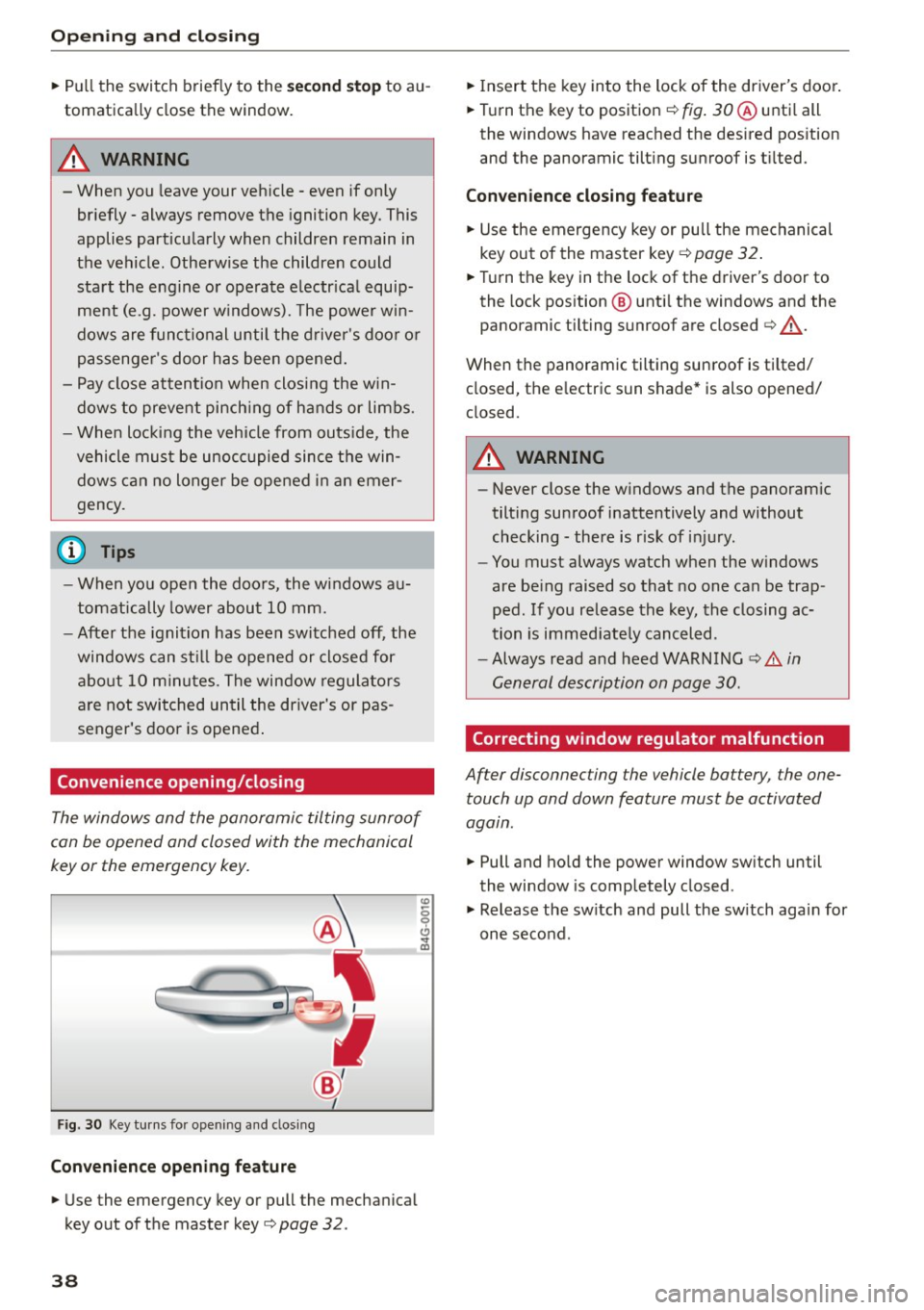
The windows and the panoramic tilting sunroof
can be opened and closed with the mechanical
key or the emergency key.
F ig. 30 Key turns fo r opening a nd clos ing
Conveni ence opening fe ature
"' Use the emergency key or pull the mechanical
key out of the master key
c> page 32 .
38
"'Insert the key into the lock of the driver's door .
"' Turn the key to position ¢
fig. 30 ® unti l all
the windows have reached the des ired pos ition
and the panoramic tilting sunroof is t ilted.
Con veni ence clo sing f eatur e
"'Use the emergency key or pull the mechanical
key out of the master key ¢
page 32.
"'Turn the key in the lock of the driver's door to
the lock position @ unti l the windows and the
panoramic tilting sunroof are closed
c> ,& .
When the panoramic tilting sunroof is tilted/
closed, the electric sun shade* is also opened/
closed.
A WARNING
- Never close the windows and the panoram ic
tilting sunroof inattentively and without
checking -there is risk of injury .
- You must always watch when the w indows
are be ing raised so that no one can be trap
ped. If you release the key, the closing ac
tion is immed iate ly canceled .
- Always read and heed WARN ING
c> A in
General description on page 30.
Correcting window regulator malfunction
After disconnecting the vehicle battery , the one
touch up and down feature must be activated
agatn.
"' Pull and ho ld the power window sw itch until
the window is completely closed .
"' Release the sw itch and pull the sw itch again for
one second .
Page 41 of 254
"' N
0:: loo
rl I.O
"' N
"' rl
Panorama roof
Operation
~,,,,,
G:;::r:) , •• ~. -r.=7' -.: ~
8(fj) G
o .. o
)
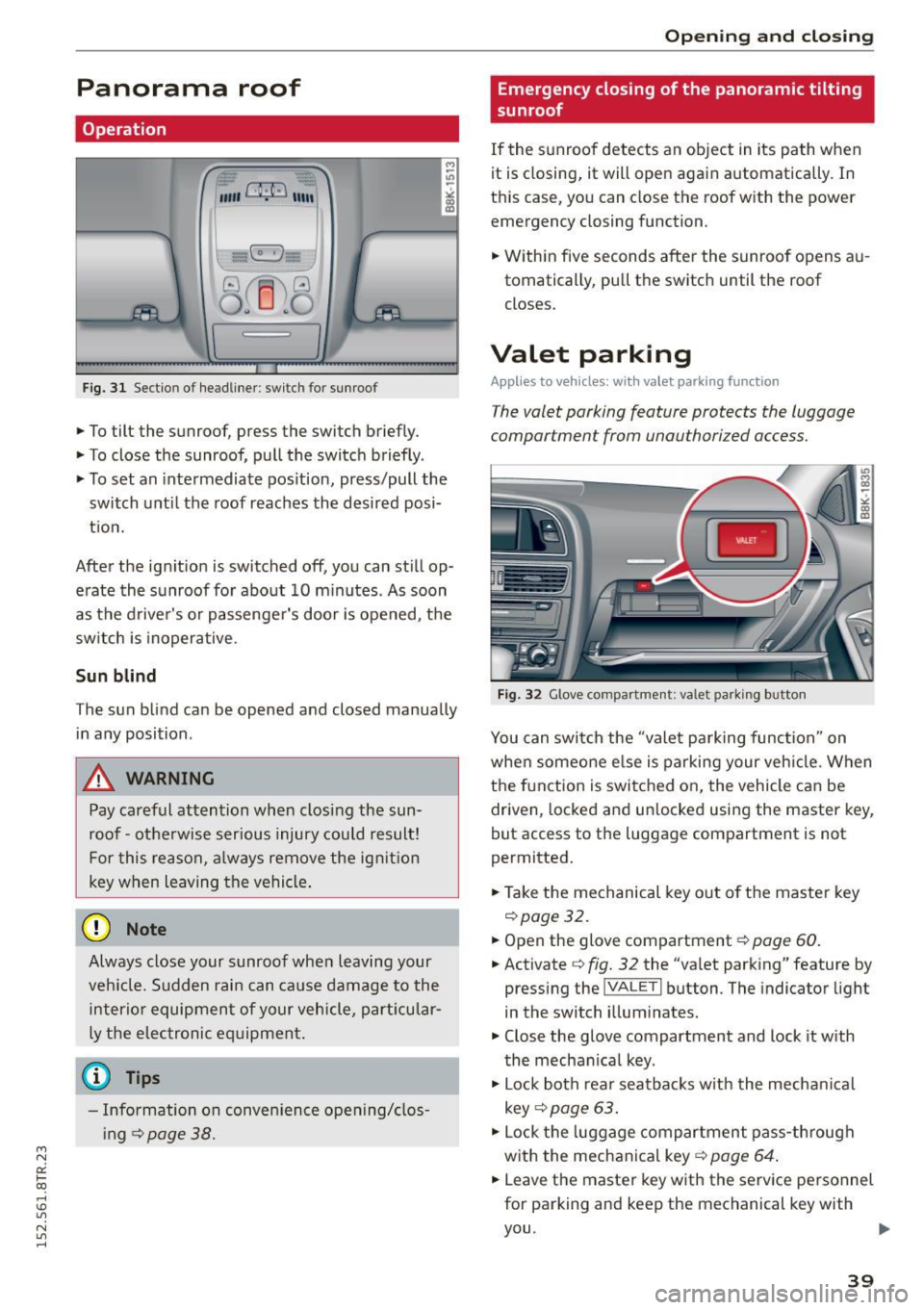
Fig. 31 Sect io n o f headliner : switc h for sunroo f
.,. To tilt the sunroof, press the switch briefly.
.,. To close the sunroof, pull the switch briefly .
.,. To set an intermediate pos ition, press/pull the
switch until the roof reaches the desired posi
t ion.
After the ignit ion is switched off , you can still op
erate the sunroof for about 10 m inutes . As soon
as the driver's or passenger's door is opened, the
switch is inoperative .
Sun blind
The sun blind can be opened and closed manually
in any position .
A WARNING
Pay careful attention when closing the sun
roof - otherwise ser ious injury could result!
For this reason, a lways remove the ign it ion
key when leaving the vehicle.
@ Note
Always close your sunroof whe n leaving your
ve hicle. Sudden rai n can ca use damage to the
interio r equipment of your vehicle, part icular
ly the elec tronic equipment.
(0 Tips
- Information on conven ience opening/clos
i ng
¢page 38.
-
Opening and clo sing
Emergency closing of the panoramic tilting
sunroof
If the s unroof detects an object in its path when
it is closing, it will open aga in a utomatically . In
th is case, you can close the roof with the power
emergency closing function .
.,. Within five seconds after the sunroo f opens au
tomatically , pu ll the switch until the roof
closes.
Valet parking
Appl ies to veh icles: w it h valet pa rking function
The valet parking feature protects the luggage
compartmen t from unauthorized access .
Fig . 32 G love co mpartme nt: valet parking b utton
You can switch the "valet parking function" on
whe n someone e lse is parking your veh icle . When
the f unction is switched o n, the vehicle can be
driven, locked and un locked usi ng the master key,
but access to the luggage compartment is not
perm itted.
.,. Take the mechanical key o ut of the maste r key
¢ page 32.
.,. Open the glove compartment¢ page 60.
.,. Activate ¢ fig. 32 the "va let pa rk ing" feature by
pressing the
jVA LETI but ton . The indicator light
in the switch illum inate s.
.,. Close the glove compartment and lock it w ith
the mechan ica l key .
.,. Lock both rear seatbacks w ith the mecha nical
key ¢
page 63.
.,. Lock the luggage compartment pass -through
with the mechanica l key ¢
page 64 .
.,. Leave the master key w ith the serv ice personnel
for parking and keep the mechanical key with
you .
39
Page 46 of 254
Lights and Vi sion
the windshield in this area in order to pre
vent malf unctions or failures.
- Some exterior lighting functions can be ad
ju sted
r::!> page 44.
-When yo u remove you r key fr om the igni tion
while the vehicle 's lights are turned on, a
b uzzer sounds as long as t he driver's door is
open .
- In cool or damp weather, the ins ide of the
headlights, tur n sig nals and tail lights can
fog over due to the temperat ure difference
between the inside and outside. They w ill
clear s hortly after switching them on. T his
does not affect t he se rvice life of the light
i ng .
- In the event of a light sensor malfunct ion,
the driver is not ified in the i nstr ument clus
ter dis play
r::!> page 21.
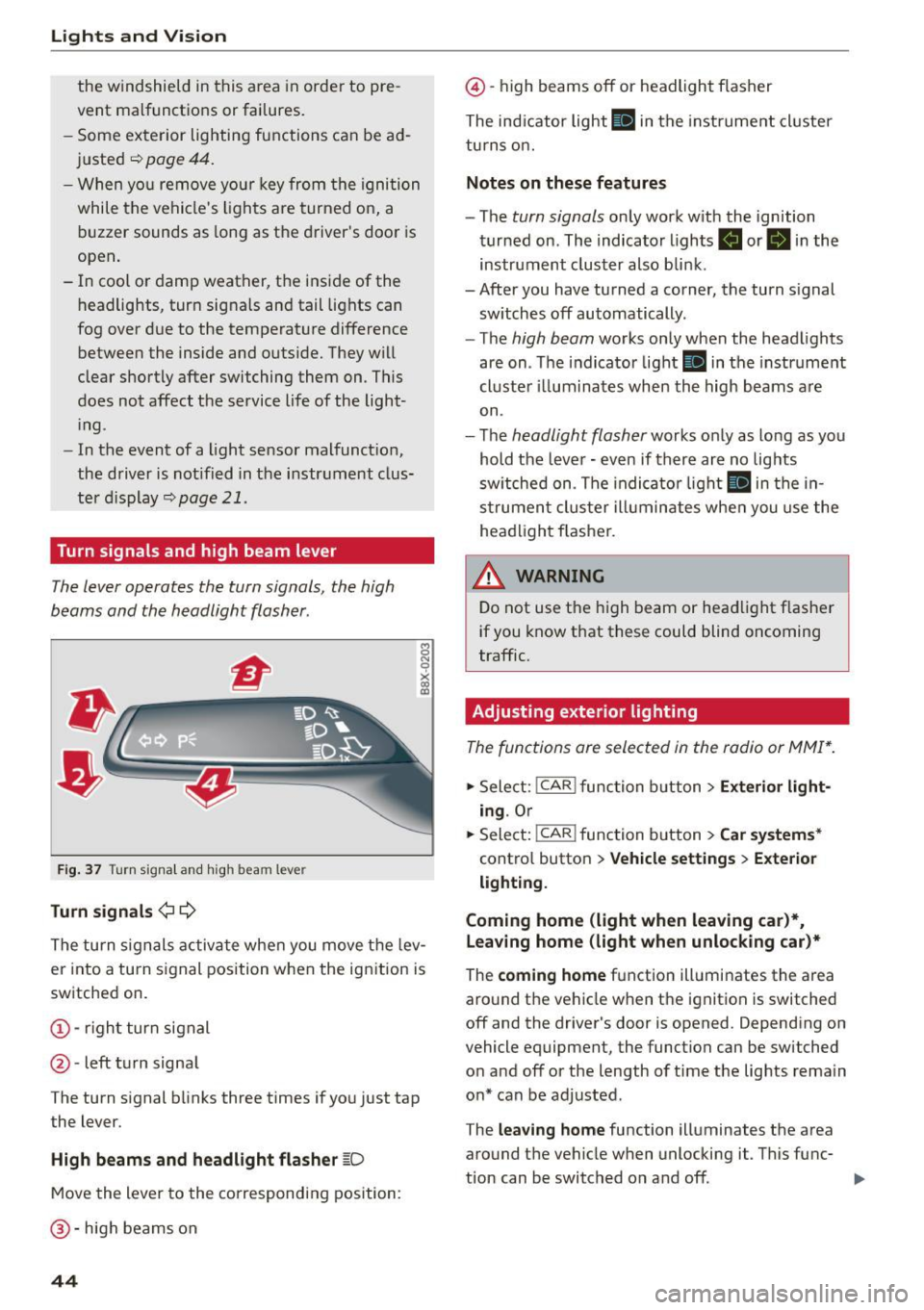
Turn signals and high beam lever
The Lever operates the turn signals , the high
beams and the headlight flasher .
Fig. 37 Tu rn signa l an d hi gh beam lever
Turn signals ¢¢
8 N 0
~ lD
The turn s ignals activa te whe n you move t he lev
er into a turn s ignal position when the ignition is
switched on.
@ -righ t turn signal
@ -left turn signa l
The turn s ignal blinks three times if yo u just tap
the lever.
High beams and headlight flasher ~D
M ove the lever to the correspondin g position:
@-hig h beams on
44
@ -high beams off or headlight f lasher
The ind icator light
II in t he instru ment cl uster
tu rn s on.
Notes on these features
- The turn signals only wor k w ith the ignition
tur ned on . The indicato r lights
B or II in the
instrument cluster also blin k.
-After you have tu rned a corner, the turn signal
sw itches off automatically.
- The
high beam works only when the head lights
are on . Th e indicator light
II in the instr ume nt
cl uste r ill umi nates when the high beams a re
on.
- T he
headlight flasher works o nly as lo ng as yo u
hold the leve r -even if there a re no lig hts
sw itched on . T he indi cato r light
II in the in
s t rume nt clus te r i llumin ates whe n you use the
head light fl asher.
&_ WARNING
D o not use t he h igh beam or hea dlight flashe r
i f you know that these could blind oncoming
traffic.
Adjusting exterior lighting
The func tions ore selected in the radio or MMI* .
.,. Sele ct: I CAR I func tion b utton > Exterior light
ing .
Or
.,. Sele ct : -1 C- A- R~i f unc tion b utton > Car systems *
contro l button > Vehicle setting s > Exterior
lighting.
Coming home (light when leaving car )*,
leaving home (light when unlocking car)*
The coming home f u nction ill umi nates the area
aro und t he veh icle when t he ignit ion is switched
off and the driver's door is opened. Depend ing on
vehicle equipment, the function can be switched
o n and off or the length o f time the lights remain
o n* can be adjusted .
The
leaving home function illuminates t he area
aro und th e vehicle when unlocki ng it. T his func-
t ion can be switched on and off. ..,.
Page 49 of 254
"' N
0:: loo
rl I.O
"' N
"' rl
Q/P -Adjusting the left/right exterior mirror.
Move the knob in the desired direction.
®-Heat ing the mirror g lass depending on the
ou tside temperature* .
8 -Folding exterior mirrors*. In the Infotain
ment system, you can select if the mirrors fold in
automatically when you lock the veh icle
¢page 35.
F ront p assen ger's ext erior mirror tilt
fun ction *
To help you see the cu rb when backing into a
parking space, the surface of the mi rror tilts
slightly. For this to happen, the knob must be in
the position for the front passenger 's outside
mirror .
You can adj ust the ti lted mirror surface by turn
ing the knob in the desired direction . When you
move out of reverse and into another gear, the
new mirror position is stored and assigned to the
key you are using.
The mirror goes back into its origina l position
once you drive forward faster than 9 mph
(15 km/h) or turn the ignition
off.
A WARNING
Curved mirror surfaces (convex or spherical*)
increase your field of view. Remember that
vehicles or other objects will appear smaller
and farther away than when seen in a flat mir
ror .
If you use this mirro r to estimate distan
ces of following veh icles when changing
lanes, you cou ld es timate incorrectly and
cause an accident .
(D Note
-If the mirror hous ing was moved by force
(fo r example, by running into an object
when maneuvering the vehicle), the m irror
must be folded all the way in using the pow
er folding function. The mirror housing
must not be moved back into place by hand
because this would impair the function of
the mirror mechanism.
- If you wash the vehicle in an automatic car
wash, you must fold the exterior mirrors in
Li ghts a nd Visio n
to reduce the risk of damage to the mirrors.
Never fold power fo lding exterior mirrors*
by hand . On ly fold them in and out us ing
the power controls.
@ Tips
- If the power adjusting function malfunc
tions, the glass in both mirrors can be ad
justed by pressing on the edge of it by hand.
- The exterior mirror settings are stored with
the memory function*¢
page 57.
Dimming the mirrors
N
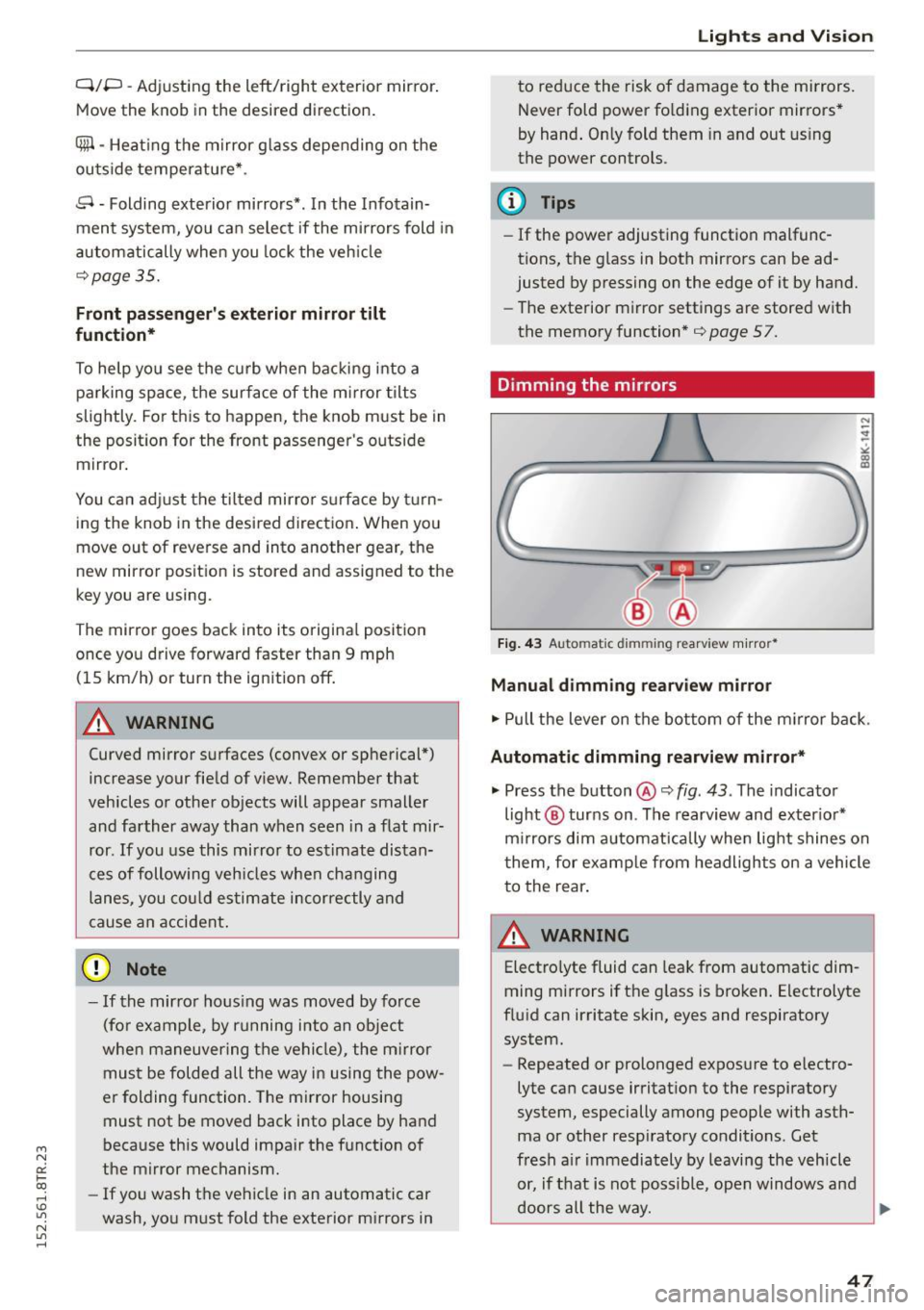
Fig. 43 Auto matic dimming rearview m irro r*
Manu al dim ming re arvi ew mirror
.. Pull the lever on the bot tom of the m irror back.
Automatic dimming r earvi ew mirror *
.. Press the button@¢ fig. 43 . The indicator
light @ turns on . The rearview and exter ior*
m irrors dim automatically when light shines on
them, for examp le from headlights on a vehicle
to the rear .
A WARNING
Electrolyte fluid can leak from automatic dim
ming mirrors if the g lass is broken. Electrolyte
flu id can irritate skin, eyes and respiratory
system.
- Repeated or prolonged exposure to e lectro
lyte can cause irritat ion to the respiratory
system, especially among people with asth
ma or other resp iratory conditions. Get
fresh a ir immediately by leaving the vehicle
or, if t hat is not possible, open windows and
doors all the way.
91>
47
Page 59 of 254
M N
0:: loo ,...., \!) 1.1'1
N 1.1'1 ,....,
Adjusting the head restr aint s
"'To move the head restraint up, hold it at the
sides with bot h hands and slide it upward until
yo u feel it click into place¢
A.
"'To move the head restraint down, press the
button ®¢
fig. 56 and slide the head restraint
downward.
R emoving th e head re straint s
"' Fold the backrest forward ¢ page 63.
"'Move the head restraint upward as far as it can
go.
"' Press the release @¢
fig. 57 with the mechan
ical key¢
page 32 and the button ® ¢ fig. 56.
Pull the head restraint out of the backrest at
the same time¢,& .
Install ing the head rest raint s
"'Slide the posts on the head restraint down into
the gu ides until you feel the posts click into
place.
"' Press the button®¢
fig. 56 and slide the head
restraint all the way down . You should not be
able to pull the head restraint out of the back
rest.
So that the driver can have a better v iew to the
rear, the head restra ints should be pushed down
completely when the rea r seats are not occupied .
_& WARNING
-Read and heed all WARNINGS¢ page 114,
Proper adjustment of head restraints.
- Only remove the rear seat head restraints
when necessa ry in order to install a chi ld
seat
¢ page 158. Install the head restra int
again immediate ly once the child seat is re
moved . Driving without head restraints or
with head restraints that are not properly adjusted increases the risk of serious or fa
tal neck injury dramatically.
- Vehicles with a pass through in the center console have seat ing for four. The long cen
ter console between the two rear seats is
not a seat ing pos ition. Therefo re, a safety
belt is not provided.
S eat s and stor age
{!) Tips
Correct ly adjusted head restraints and safety
belts are an extremely effective combination
of safety features.
Memory function
Description
Appl ies to vehicles: wi th memo ry fu nct io n
The memory f unct ion allows you to quickly and
easily store and recall personal seating profiles
for the driver . The memory function is operated
t h rough the master key and the memo ry buttons
in the driver 's door.
T he driver's seating p rofile is stored and assigned
to the master key each time the vehicle is locked.
When you open the door, the seat profile is auto matically reca lled. If two people use one vehicle,
it is recommended that each person always uses
"their own" ma ster key.
Up to 2 seat profi les can be stored in the memory
buttons in the driver's door. Once they are stored,
these seat profiles can be selected at any time.
In addition to the driver's seat settings, you can
also store and access the exterior mirror adjust
ment settings* using the remote contro l key or
memory bu tton.
Remote control key
App lies to vehicles: wit h seat memory
To assign the dr iver 's seat settings to the remote
control key when locking the veh icle, the function
must be activated in the radio or MMI*
"' Select:
!CAR I function button> Seat adjust-
ment > Driv er's seat > Remot e con trol k ey
>
on.Or
"' Select :
~ ,c~ A~R~I function button> Car sy stems *
contro l butto n > Vehicle s etting s> Seat s>
Driver 's seat > Remote control key > On .
(D Tips
If you do not want anothe r drive r's sett ings to
be assigned to the remote key, switch
off the
memory function usin g the rad io or MMI * or
the
ION/OF F I button ¢ page 58.
57
Page 65 of 254
"'
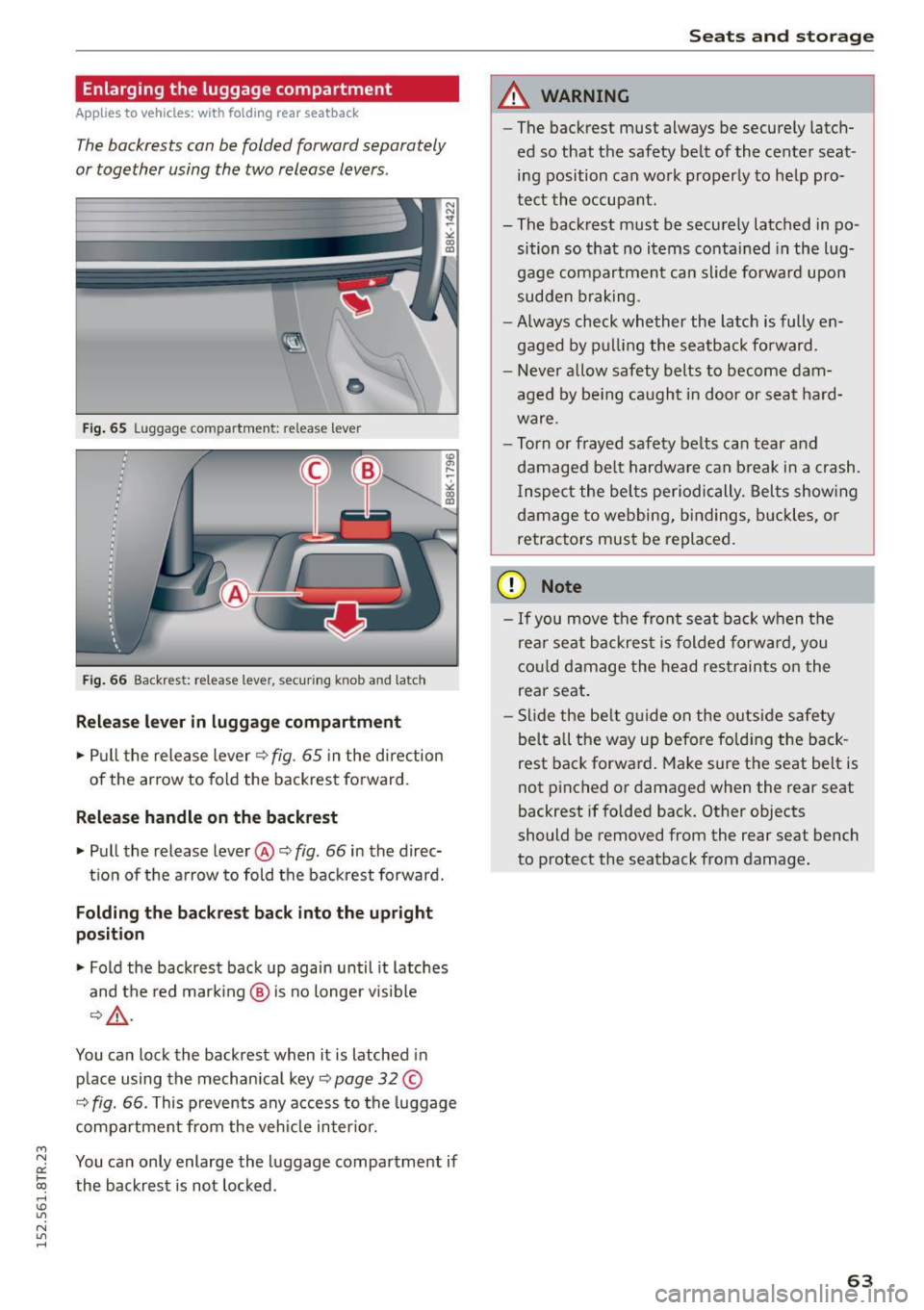
Enlarging the luggage compartment
Applies to vehicles: with fold ing rear seatback
The backrests can be folded forward separately
or together using the two release levers.
Fi g. 65 Luggage compartment: release lever
F ig. 66 Backrest: release lever, sec uring knob and latch
Release lever in luggage compartment
• Pull the release lever Q fig. 65 in the direction
of the arrow to fold the backrest forward.
Release handle on the backrest
• Pull the release lever@~ fig. 66 in the direc-
t io n of the arrow to fold the back rest forward.
Folding the backres t back into the upright
position
• Fold the backrest back up again until it latches
and the red mar king @ is no longer v isible
Q ,&. .
You can lock the backrest when it is latched in
p lace using the mechan ica l key
~page 32 ©
Q fig. 66. This prevents any acces s to the luggage
compartment from the veh icle in ter ior.
~ You can only enlarge the luggage compartment if
txi the backrest is not locked. rl I.O
"' N
"' rl
Seats and storage
A WARNING
-
-The backrest must always be secure ly latch-
ed so that the safety be lt of the center seat
ing position can wo rk properly to help pro
t e ct the occupant.
- The backrest must be securely latched in po
sition so that no items conta ined in the Lug
gage compartment can slide forward upon
sudden b rak ing.
- Always check whether the latch is fully en
gaged by p ulling the seatback fo rward.
- Never allow safety b elts to become dam
aged by be ing caught in door or seat ha rd
ware.
- Torn or frayed safety belts ca n tear qnd
damaged be lt hardware can b reak i n a crash.
I nspect the bel ts periodically. Belts show ing
damage to webbing, bind ings, b uckles, or
retractors mus t be replaced.
(D Note
- If you move the front seat back when t he
rea r seat b ackres t is folded forwa rd, you
co uld damage the head restraints on the
rear seat.
- Slide the be lt g uide on the o utside safety
bel t all the way up befo re fo ld ing the back
rest bac k forwa rd . Make sure the seat belt is
not pinched or damaged when the rear seat
backrest if folded back. Other objects
should be removed from the rear seat bench
to protect the seatback from damage.
63
Page 74 of 254
Driving
Sw itching the ignition on /off
If you would like to switch the ignition o n wit h
out starting the engine, fo llow these steps:
• Inse rt the key into the ignition lock.
• Press the key brief ly
wi thout p ress ing the b rake
pedal.
• To sw itch the ignition off , press the key again.
When starting the engine, major e lectr ica l loads
are sw itched off temporar ily.
You ca n only remove the key with the ignition
sw itched off .
If the engine should not start immedia tely , the
starti ng process is automatically stopped after a
short time . Repeat sta rting procedure .
A WARNING
-Never allow the engine to run in confined
spaces - dange r of asp hyxiation.
- Never remove the ignition key from the ign i
t ion loo k while the vehicle is moving . Other
wise, the steering lock cou ld sudden ly en
gage and you would not be able to steer the
vehicle.
- Always ta ke the key with yo u wheneve r you
leave your vehi cle. Otherwise, the engine
could be started or electrical eq uipment
s uch as the power windows cou ld be operat
ed . T his can lead to ser ious injury.
- Never leave ch ildren or persons requiring as
sistance unattended in the vehicle. The
doors can be locked using the remote trans
mitter, preventing peop le from escap ing
from the vehicle on their own in the event of an emergency . Depending on the time of
year, people inside the vehicle can be ex posed to very high o r very low tempe ra
t ur es.
([) Note
Avoid high engine rpm, full throttle and heavy
eng ine loads until the eng ine has reached op
erati ng temperature - otherwise you risk en
gine dam age.
72
-
@) For the sake of the env ironment
Do not let the engine run while pa rked to
warm up. Begin dr iv ing immediately. Th is re
d uces unnecessary em iss ions .
@ Tips
-If the key cannot be removed from the igni
t ion lock, you have to pu ll the mechan ica l
key out of the master key in order to be able
to lock the vehicle
c::, page 33.
- After starting a co ld engine, there may be a
br ief per iod of increased noise because the
oil pressure must first build up in the hy
draulic valve adjusters. This is norma l and
not a cause fo r concern .
- If you leave the veh icle with the ignition
switched on, the ig nition w ill switch off af
ter a ce rtain period of t ime . Pleas e note tha t
ele ct rical eq uipme nt such as e xterior lights
w ill switch off a s well when that hap pens.
Starting the vehicle with the emergency
key
Applies to vehicles: with ignition lock
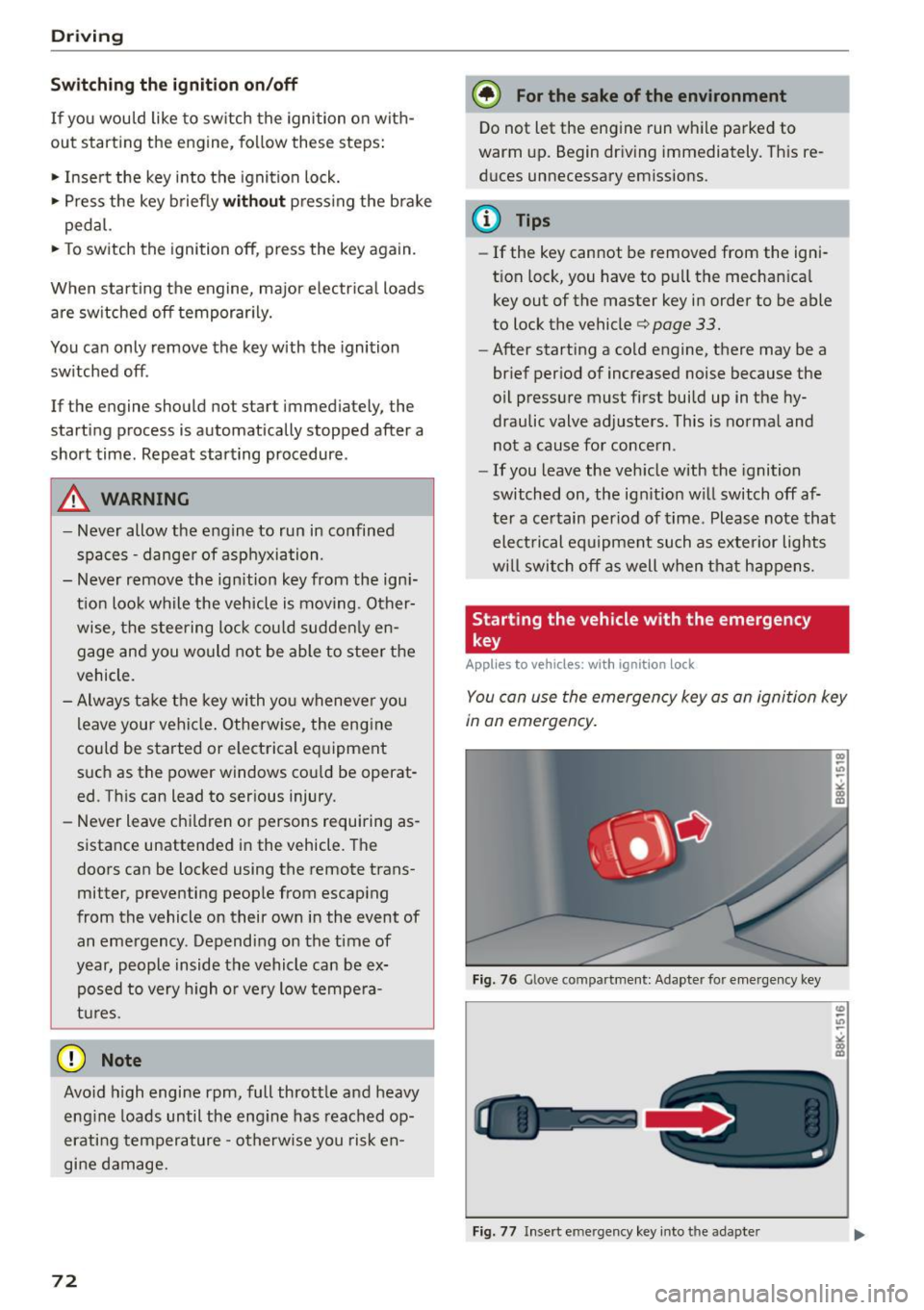
You can use the emergen cy key as an igni tion key
in an emergency.
F ig. 76 Glove co mp art men t: Adapte r fo r em erge ncy key
Fi g. 77 Insert e merg ency key into t he ad ap ter
Page 75 of 254
"' N
0:: loo
rl I.O
"' N
"' rl
.. Take the adapter for the emergency key out of
the glove compartment
r=:> fig. 76.
.. Push the emergency key
r=:> fig. 77fully into the
adapter. Make sure that the Audi rings are fac
ing up.
.. Press the emergency key in the adapter down
until it latches audibly.
.. Insert the adapter with the emergency key for
ward into the ignition switch. The engine can
now be started as usual.
Stopping the engine
Applies to vehicles: with ig ni tion lock
.. Bring the vehicle to a full stop.
.. Automatic transmission: Move the selector lev
er to the P or N position.
.. Press on the ignition key. The engine is turned
off .
.. You can now remove the key.
Steering lock
The steering locks when you remove the ignition
key. The locked steering helps prevent vehicle
theft.
Emergency off
If it is necessary in unusual circumstances, the
engine can be switched off while the vehicle is
moving. The engine will be switched off if you
press on the key for an extended period.
A WARNING
- Never turn off the engine before the vehicle
has come to a complete stop. The full func
tion of the brake booster and the power
steering is not guaranteed . You must use
more force to turn or brake if necessary. Be
cause you cannot steer and brake as you
usually would, this could lead to crashes
and serious injuries.
- For safety reasons, you should always park
your vehicle with the selector lever in P. Oth
erwise, the vehicle could inadvertently roll
away.
- The radiator fan can continue to run for up
to 10 minutes even after you have turned
off the engine and removed the ignition key.
Driving
The radiator fan can also turn on again if the
engine coolant heats up because of intense
sunlight or heat build-up in the engine com
partment.
- Always take the key with you whenever you
leave your vehicle. Otherwise, the engine
could be started or electrical equipment
such as the power windows could be operat
ed. This can lead to serious injury.
- Never leave children or persons requiring as
sistance unattended in the vehicle. The
doors can be locked using the remote trans
mitter, preventing people from escaping
from the veh icle on their own in the event of
an emergency. Depending on the time of
year, people inside the vehicle can be ex
posed to very high or very low tempera
tures.
(D Note
If the engine has been under heavy load for
an extended period, heat builds up in the en
gine compartment after the engine is switch
ed off -there is a risk of damaging the engine.
Allow the engine to run at idle for about two minutes before switching it off.
Convenience key
Starting the engine
Applies to vehicles: wi th convenience key
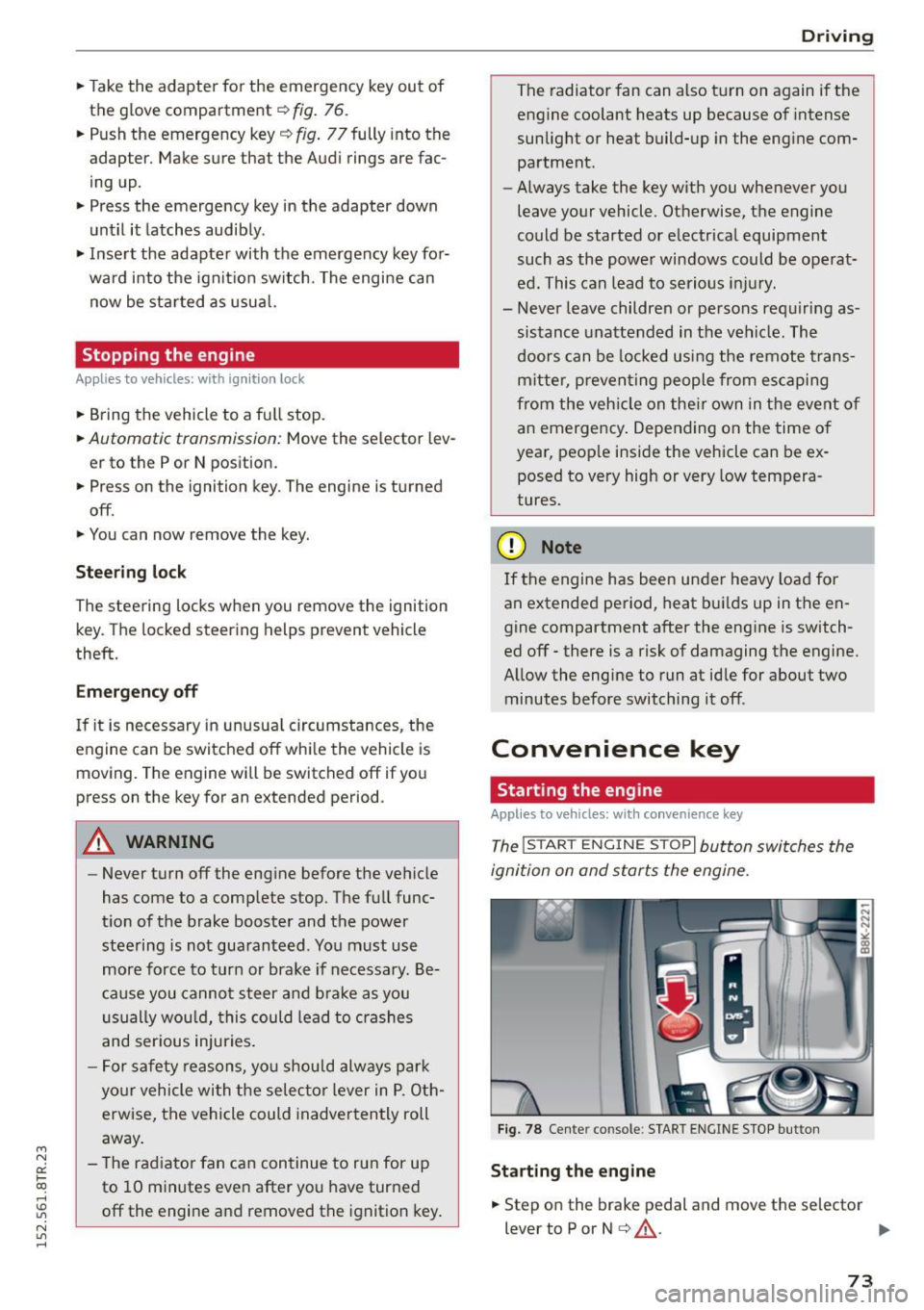
The !START ENGINE STOPI button switches the
ignition on and starts the engine.
Fig. 78 Center co nsole : START ENGINE STOP button
Starting the engine
.. Step on the brake pedal and move the selector
lever to P or N
¢ &_ . .,.
73
Page 77 of 254
"' N
0:: loo
rl I.O
"' N
"' rl
-For safety reasons, you should always park
your vehicle with the selector lever in P. Oth
erwise, the vehicle could inadvertently roll
away .
- The rad iator fan can continue to run for up
to 10 m inutes even after you have turned
off the engine and removed the ignition key .
The rad iator fan can also turn on aga in if the
engine coolant heats up be cause of intense
s u nlight or heat bui ld-up in the engine com
partment.
- Always ta ke t he key with you wheneve r you
leave your vehicle. Otherwise, the eng ine
cou ld be started or electrical eq uipment
s u ch as the power windows cou ld be operat
ed. This can lead to serious injury.
(D Note
If the e ng ine has been under heavy load for
an extended per iod, heat builds up in the en
gine compartment after the engine is swi tch
ed off -there is a risk of damag ing the engine.
Allow the engine to run at idle for about two
m inutes before switch ing it off.
Driver messages
Ignitio n is on
This message appears and a war ning tone sounds
if you open the driver's door when the ignition is
switched on.
No ke y ide ntifi ed
This message appears when the
I STAR T ENGIN E STOP I button is pressed if t here
i s no master key inside the vehicle o r if the sys
tem does not recogni ze it. For example, the mas
ter key ca nnot be recognized if it is covered by an
object (e .g . alum inum br ie f case) which
screens
the radio signal. Electronic devices such as cell
phones can also interfere w ith the rad io signa l.
Press br ake pedal to sta rt engine
This message appears if you do not press the
b rake peda l to s tart the engine.
Shift to N or P to start engine
Dr ivi ng
This message appears when attempt ing to start
t h e engine if the se lector lever for the automatic
transmission is not in the P or N position. The en
gine can on ly be started w ith the selector in
these positions.
El I s the key in the vehicle?
T his mess age appears if the mas ter key is re
moved from the vehicle wi th the e ngine runn ing .
If the master key is no longer in the ve hicle, you
cannot switch on the ignition after stopping the
engine and you also cannot start the engine
again . Moreover, you cannot lock the vehicle from
t h e outside with the key.
Shift to P otherwise vehicle can roll away . Door s
do not lo ck
if le ve r is not in P.
This message appears for safety reasons along
with a warning signal. It appea rs if the selector
lever for the automatic transmission is not in the
P position when switch ing off the ignition. Move
the selector lever to the P position, otherwise the
vehicle is not secured against rolling away. You
also cannot lock the vehicle us ing the locking
button* on the door handle o r us ing t he remote
key .
Convenience key defe cti ve! Use ign ition lock
This message appears if the engine must be
started or stopped using the ign ition key and not
the
I STAR T ENGINE ST OP ! button.
Electromechanical
parking brake
Operation
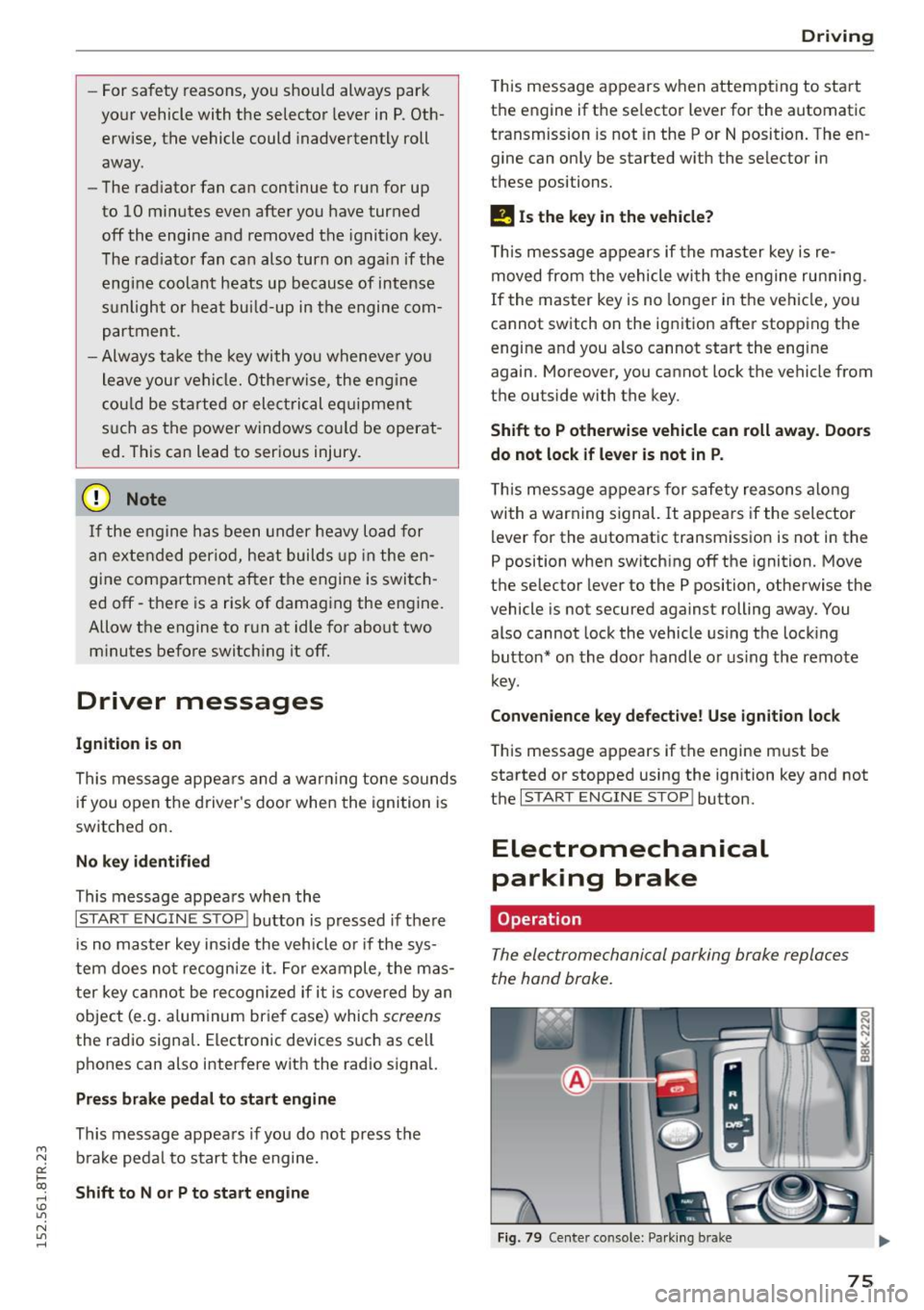
The electromechanical parking broke replaces
the hand broke.
Fig . 79 Center co nso le: Pa rk in g b ra ke
75
Page 78 of 254
Driving
"'Pu ll on the switch @ ¢fig. 79 to apply the
parking brake . The indicator lights in the switch
and . (USA models)/ . (Canada mode ls) in
the inst ru ment cluste r il lum inate.
"' With the ign ition switched on, step on the
brake pedal or the accelerator pedal and press
the switch @ at the same t ime to release the
parking b rake . The indicator lights in the switch
and . (USA models)/ . (Canada mode ls) in
the instr ument cluster go o ut.
Your veh icle is equipped w ith an electromechan i
cal parking b rake. The par king b rake is designed
to p revent the veh icle from rolling unintentional
ly and replaces the hand brake.
In addition to the norma l funct ions of a tradit ion
a l hand bra ke, the e lectromechan ical pa rking
b rake provides var ious convenience and safety
f u nctions.
When start ing f rom rest
- The integral starting assist helps you when
driv ing by automat ically releasing the parking
brake ¢
page 76, Starting from rest.
-When sta rting on inclines , the starting assist
prevents the vehicle from un intent ionally roll
ing back. The bra kin g for ce of the par kin g b rake
is no t released until sufficien t driv ing fo rce has
been built up at the wheels .
Emergency brake function
An emergency brake ensures that the vehicle ca n
be slowed down even if the
normal brakes fa il
¢ page 77, Emergency braking.
A WARNING
If a drive range is eng age d with the vehicle
stationary and the engine running, you mus t
in no instance accelerate careless ly . Otherwise
the vehicle will start to move immed iate ly
r isk of an accident.
(D Tips
- If the parking brake is applied with the igni
tion switched off, the indicator lights in the
switch and -(USA models) . (Cana
da models) in t he instrument cl uster will go
out after a certa in period of time.
76
- Occasional noises when the pa rking brake is
applied an d released a re norma l and are not
a cause for concern .
- Whe n the vehicle is pa rked, the park ing
brake goes through a self-test cycle at regu
lar intervals. Any associated noises are nor
ma l.
Parking
"'Press the brake pedal to stop the veh icle .
"' Pull the sw itch @¢
page 75, fig. 79 to set the
parking brake .
"' Move the se lector lever to P.
"' Tur n the engine off ¢_& .
"' When on inclines or de clines, turn the steering
wheel so that the veh icle will roll into the curb
if it begins to move.
A WARNING
-
- When you leave your vehicle -even if only
briefly - always remove the ignition key. This
applies pa rticularly when children remain in
the vehicle . Otherwise the ch ild ren could
start t he engine, release the parking b rake
or operate elect rical equipment (e.g. power
w indows). There is the risk of an acc ident.
- When the veh icle is locked, no one -part icu
larly no t chi ld ren shou ld remain in the ve hi
cle. Lo cked doors m ake it more d ifficul t for
emergency workers to get into the veh icle -
putting lives at risk.
Starting from rest
The star ting assist function ensures that the
parking brake is released automatically upon
starting .
Stopping and applying parking brake
"' Pull the sw itch @¢ page 75, fig. 79 to apply
the par kin g b rake.
Starting and automatically releasing the
parking brake
"' When you sta rt to dr ive as usual, the park ing
bra ke is automatically released and yo ur vehicle
beg ins to move. .,_