warning light AUDI RS7 SPORTBACK 2015 Workshop Manual
[x] Cancel search | Manufacturer: AUDI, Model Year: 2015, Model line: RS7 SPORTBACK, Model: AUDI RS7 SPORTBACK 2015Pages: 302, PDF Size: 74.76 MB
Page 99 of 302
"' N
a:: I.J "". rl I.O
"' rl
"' rl
ability to accelerate on curves. The vehicle is
very responsive to steering.
Curve light*
The curve light adapts to driv ing on curves.
The pivot ing action and the light ing are also
adapted to the mode.
Ad apti ve crui se contr ol*
The behavior when accelerat ing can be ad just
ed from comfortable to sporty, depending on
the dr ive se lect mode . Adaptive cruise control
also responds to the driving behav ior of the
veh icle ahead in a more conservative or sporty
manner .
Engine sound
The sound of the engine is adapted to these
l ected mode and ranges from subtle to sporty.
(D Note
-Make sure there is enough clearance
above and below the vehicle when park
i ng. The height of the vehicle can change
once it is parked d ue to temperature
fluctuations, changes to the load condi
tions and changes to the driving modes,
which can affect clearance.
- When transporting the vehicle on a car
carrier, train, ship or by other means, on
l y tie the veh icle down at the running
surface of the tires, which is the outer
circumference. Securing the vehicle at
the axle components, suspension struts
or tow ing eyes is not perm itted because
the p ressure in the air suspension struts
can change d uring transport. The vehicle
may not be se cured s uff ic ient ly if this
happens.
(D Tips
- In some models, the maxim um vehicle
speed can only be reached in the
Auto
and D ynamic modes.
- Se lecting the
Dynami c mode results in
spor ty sh ifting character istics. The S
gear position engages automatically .
Audi drive sele ct 97
- In ve hicles that have dynamic steering*,
operating noise is heard when starting or
stopping the engine. This does not indi
cate a problem.
Selecting the driving mode
You can choose between Comfort, Auto, Dy
namic and Individual.
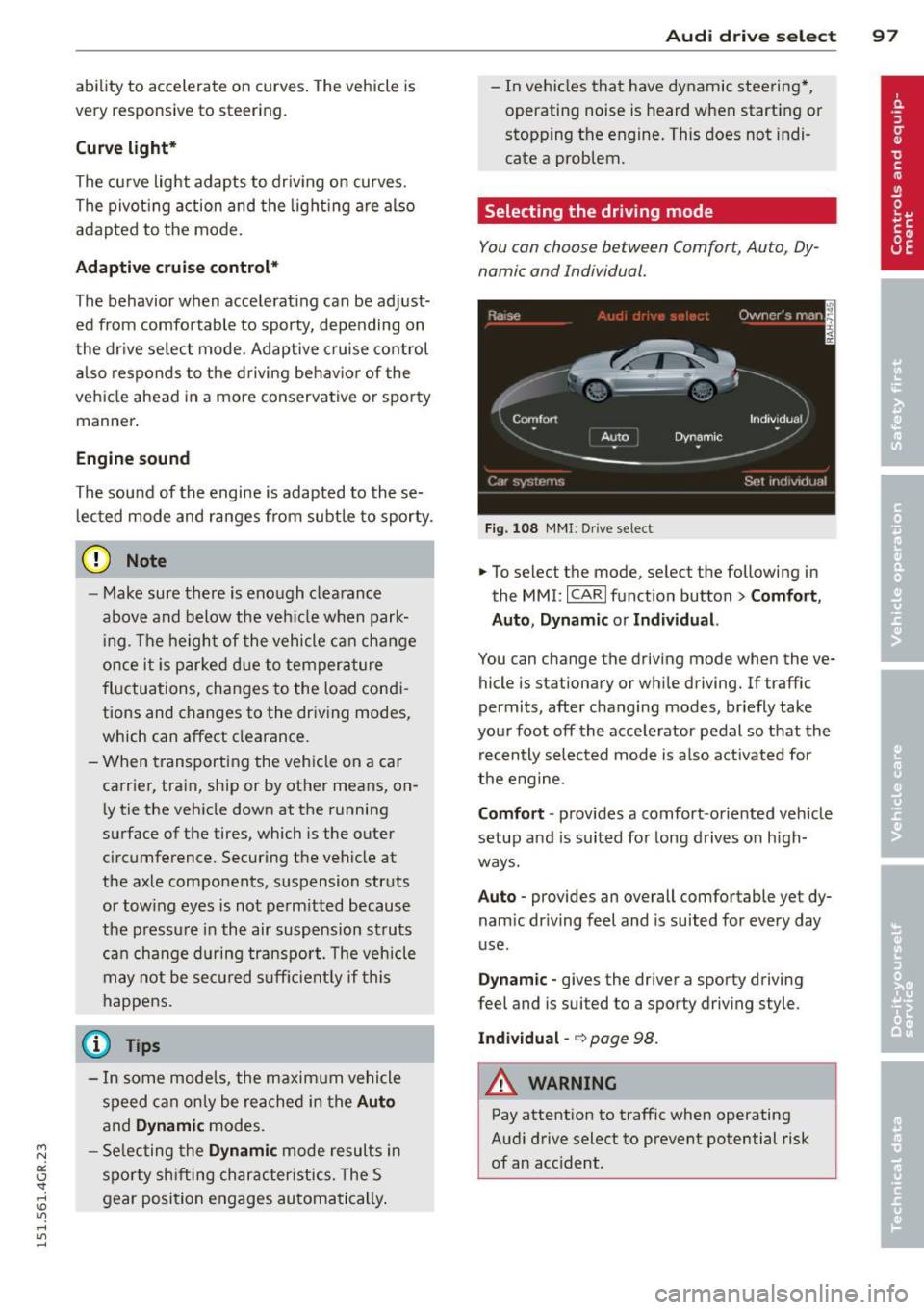
Fig. 108 M MI: Dr ive select
.,. To select the mode, select the following in
the
MMI: I CARI function button> Comfort ,
Auto , Dynamic or Individu al.
You can change the driving mode when the ve
hicle is stationary or while driving. If traffic
permits, after changing modes, br iefly take
your foot off the accele rator pedal so that the
recently selected mode is a lso activated for
the engine.
Comfo rt -prov ides a comfort-oriented veh icle
setup and is suited for long drives on h igh
ways.
Auto -provides an overall comfortable yet dy
nam ic dr iving feel and is suited for every day
use .
Dynam ic -gives the driver a sporty driving
feel and is suited to a sporty driving style.
Indi vidual -~page 98.
&_ WARNING
Pay attention to traffic when operating
Audi drive select to prevent potential risk
of an accident.
-
Page 102 of 302
100 Night visi on assis tant
Pedestrian warning
Applies to vehicles: with night vision assistant
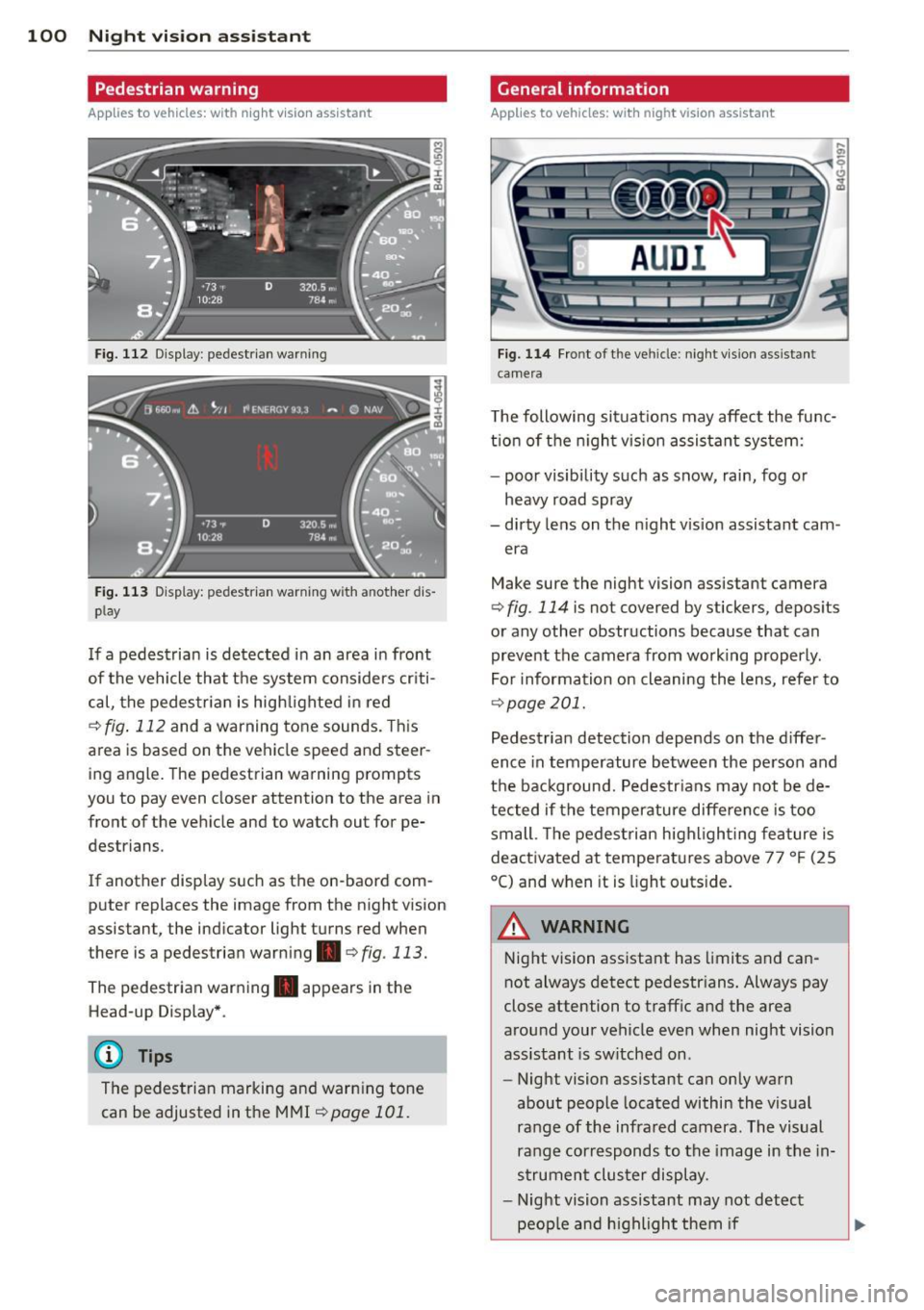
Fig. 112 Display : pedestrian warning
Fig . 113 D is p lay: pedestrian warning w ith a nother dis
p lay
I f a pedestrian is detected in an area in front
of the vehicle that the system considers criti
cal, the pedestrian is high lighted in red
Q fig . 112 and a warning tone sounds. This
area is based on the vehicle speed and steer
ing angle. The pedestrian warning prompts
you to pay even closer attention to the area in
front of the vehicle and to watch out for pe
destrians.
If another display s uch as the on-baord com
puter replaces the image from the n ight vision
assistant, the indicator light turns red when
there is a pedestrian warning .
qfig . 113.
The pedestrian warning . appears in the
Head-up Display *.
(D Tips
The pedestrian marking and warning tone
can be adjusted in the MMI
!:!) page 101.
General information
Applies to vehicles: with night vision assistant
Fig. 114 Fro nt of th e ve hicle: night v ision assistant
camera
T he following situat ions may affect the func
t ion of the n ight vision assistant system:
- poor visibility such as snow, rain, fog or
heavy road spray
- dirty lens on the n ight vis ion assistant cam -
era
Make sure the night vision assistant camera
q fig . 114 is not covered by stickers, deposits
or any other obstructions because that can
prevent the camera from working properly.
For information on cleaning the lens, refer to
Q page 201.
Pedestrian detection depends on the d iffer
ence in temperature between the person and
the background. Pedestr ians may not be de
tected if the temperature diffe rence is too
small . Th e pedestrian highl ighting feature is
deactivated at tempe ratures above 77 ° F (25
°C) and when it is light outs ide.
A WARNING
Night vision assistant has limits and can
not always detect pedestr ians. Always pay
close attention to traffic and the area
around your vehicle even when night vision
assistant is sw itched on .
- Night vision assistant can only warn
about people located within the visual
range of the infrared camera. The visual
range corresponds to the image in the in
strument cluster display .
- Night vision assistant may not detect
-
peop le and highlight them if .,.
Page 103 of 302
"' N
a:: I.J ""'. rl I.O
"' rl
"' rl
-they are not in an upright position, for
examp le if they are s itting, crouching
or lying down and/or
- if the outline in the display is incom
p lete or interrupted, for example be
cause the person is partially hidden by
a parked veh icle .
(D Tips
-Pedestrian detection and the pedestrian
warming are lim ited to objects that are
detected as pedestr ians. The system
does not detect animals . Even though
the shape and warmth radiated by each
object det ected is evaluated, the system
does have lim itations and it can give in
correct warnings.
- Fo r techn ical reasons , the image pauses
in split second i nterva ls.
Switching on and off
Appl ies to vehicles: with night vision assistant
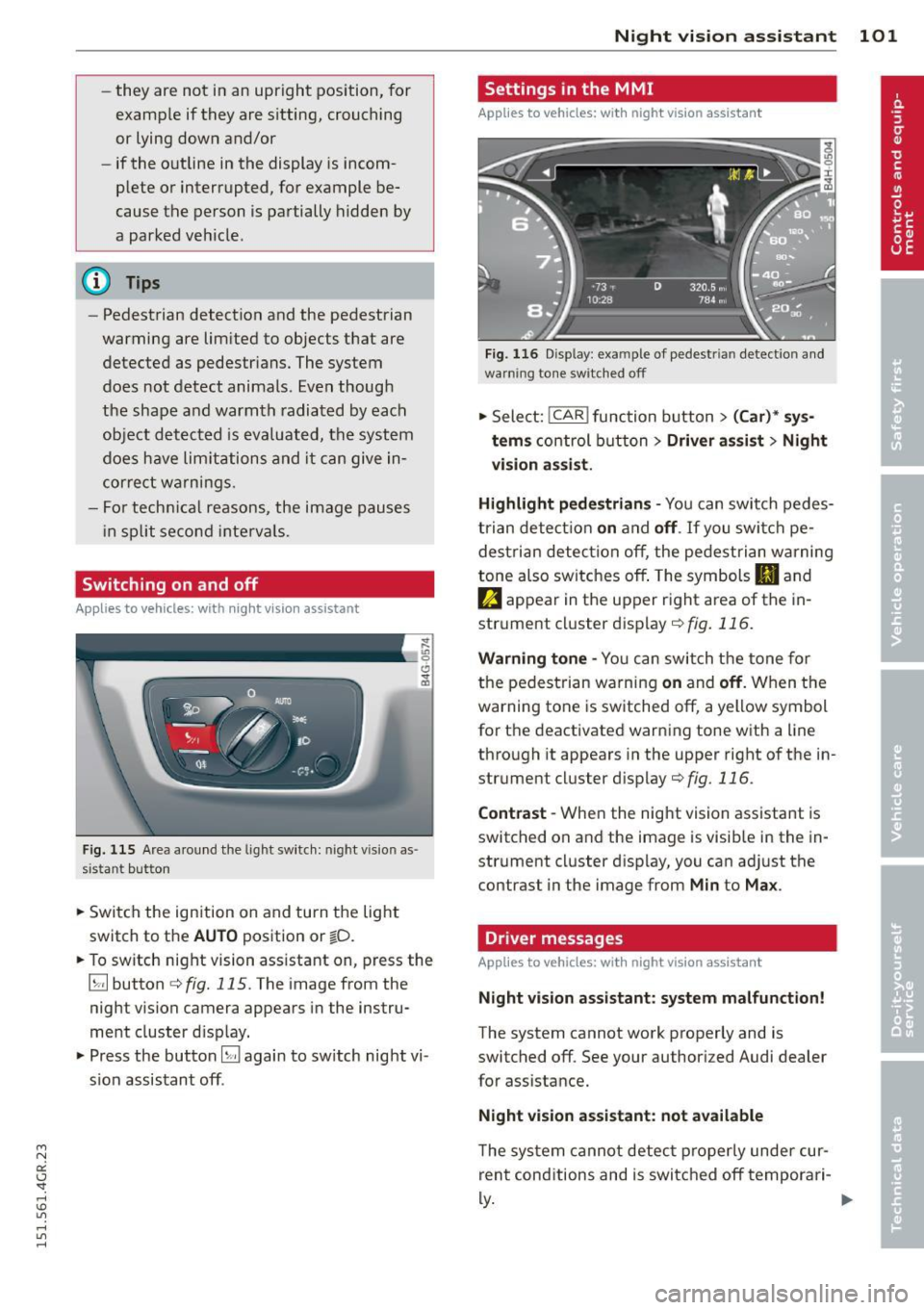
Fig . 115 Area a round the lig ht switch: night vis io n as
si st ant button
.. Switch the ignition on and turn the light
switch to the
AUTO position or io.
.. To switch night vision ass istant on, press the
~ button c::> fig. 11 S. T he image from the
night vision camera appears in the instru
ment cluster d isp lay.
.. Press the button~ again to sw itch night vi
s ion assistant off .
Night vision assistant 101
Settings in the MMI
Applies to vehicles: with night vision assistant
Fig. 116 Disp lay : exa mple of pedest rian detect io n and
warn ing to n e sw itched off
.. Select: !CAR ! function button> (Car)* sys
tems
co ntrol button > Driver assist > Night
vision assist.
Highlight pedestrians -
You can switch pedes
trian detec tion
on and off. If you switch pe
destrian detection off, the pedestrian warning
tone also switches off . The symbols
II and
e appear in the upper r ight area of the in
strument cluster display
r:!) fig. 116.
Warning tone -You can switch the tone for
the pedestrian warning
on and off. When the
warning tone is sw itched off, a yellow symbol
for the deactivated warning tone with a line
through it appears in the upper right of the in
strument cluster display¢
fig. 116.
Contrast -When the night vision assistant is
switched on and the image is visib le in the in
strument cluster display, you can adjust the
contrast in the image from
Min to Max .
Driver messages
Applies to vehicles: with night vision assistant
Night vision assistant: system malfunction!
The system cannot work properly and is
switched off. See your authorized Audi dealer
for assistance.
Night vision assistant: not available
The system cannot detect properly under cur
rent conditions and is switched off temporari-
~ ~
Page 107 of 302
"' N
a:: I.J "". rl I.O
"' rl
"' rl
lever is left in N (Neutral) for more than ap
proximately 2 second, without the brake ped
al being pressed .
Release button
The release button on the selector lever pre
vents the leve r from being accidentally shifted
into certa in positions. Depending on the direc
tion of the shift, the se lector lever locks at d if
ferent positions. The positions are highlighted in the illustration
c!> fig . 118.
Driving the automatic transmission
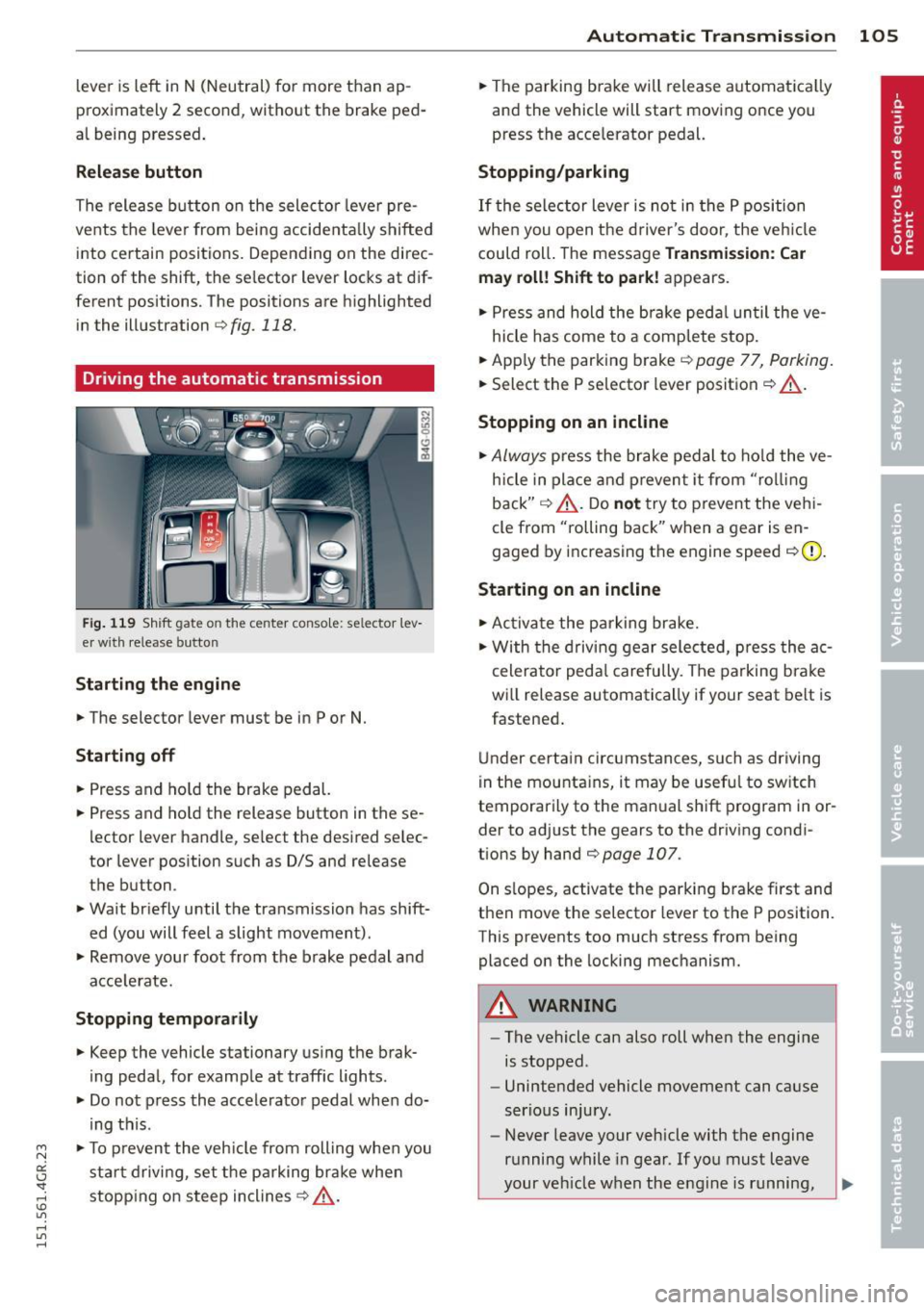
Fig. 119 Shift gate on the c ente r conso le: se lector le v
er with release button
Starting the engine
.,. The selector lever must be in P or N.
Starting off
.,. Press and hold the brake pedal.
.,. Press and hold the release button in these
l ector lever handle, se lect the desired se lec
tor lever position such as 0/5 and release
the button .
.,. Wait briefly until the transmission has shift
ed (you will feel a slight movement).
.,. Remove your foot from the brake pedal and
acce lerate.
Stopping temporarily
.,. Keep the vehicle stationary using the brak
ing pedal, for example at traffic lights .
.,. Do not press the accelerator pedal when do
ing this .
.,. To prevent the vehicle from rolling when you
start driving, set the parking brake when
stopping on steep inclines
c!> .&,.
Automatic Transmission 105
.,. The parking brake will release automatica lly
and the vehicle will start moving once you
press the acce lerator pedal.
Stopping/parking
If the selector lever is not in the P position
when you open the driver's door, the vehicle
could roll . The message
Transmission: Car
may roll! Shift to park!
appears .
.,. Press and hold the brake pedal un til the ve-
hicle has come to a complete stop .
.,. App ly the parking b rake
c::> page 77, Parking.
.,. Select the P selector lever position c::> .&,.
Stopping on an incline
.,. Always
press the brake pedal to hold the ve
hicle in place and prevent it from "rol ling
back"
c::> .&, . Do not try to prevent the vehi
cle from "rolling back" when a gear is en
gaged by increasing the engine speed
c::>(D.
Starting on an incline
.,. Activate the parking brake.
.,. With the driving gear selected, press the ac
celerator pedal carefully. The parking brake
wi ll release automatically if your seat belt is
fast ened .
Under certain circumstances, such as driving
in the mountains, it may be useful to switch
temporarily to the manual shift program in or
der to adjust the gears to the driving condi
tions by hand
c::>page 107.
On slopes, activate the parking brake first and
then move the selector lever to the P position.
This prevents too much stress from being placed on the locking mechanism.
A WARNING
-
- The vehicle can also roll when the engine
is stopped .
- Unintended vehicle movement can cause
serious injury.
- Never leave your vehicle with the engine
running while in gear . If you must leave
your veh icle when the engine is running,
Page 111 of 302
M N
0:: <.J "SI: ...... \!) 1.1"1
...... 1.1"1 ......
Parking systems
General information
Applies to vehicles: with parking system plus/rear view
camera/peripheral cameras
Depending on your vehicle's equipment, vari
ous parking aids w ill help you when parking
and maneuvering.
The
pa rking syste m plus assists you when
parking by audibly and visually indicating ob
jects detected
in front of and behind the vehi
cle
¢ page 110.
The rea r view c amera shows the area behind
the vehicle in the Infotainment disp lay . This
display assists you when you are cross or par
allel parking
¢ page 111 . In addit ion, you are
assisted by the functions from the parking
system plus¢
page 110.
The periph era l ca mera s assist you with park
i ng and maneuvering. You are aided by var ious
cameras depending on the vehicle equipment l eve l¢
page 114. In addition, you are assist
e d by the func tion s from th e parking sy stem
plus ¢page 110.
A WARNING
- Always look for traff ic and check the area
around your vehicle by looking at it di
rectly as well. The parking system cannot
replace the driver's attent ion. The dr iver
is always responsible for safety during
park ing and for all other maneuvers .
- Please note that some surfaces, such as
clothing, are not detected by the system.
- Sensors and cameras have blind spots in
wh ich peop le and objects cannot be de
tected. Be especially cautious of children and animals.
- T he sensors can be displaced by impacts
or damage to the radiator grille, bumper ,
wheel housing and the underbody. The parking systems may become impaired
as a result. Have your authorized Audi
dealer or qualified workshop check their
function.
Par king system s 109
-Make sure the sensors are not covered by
stickers, deposits or any other obstruc
tions as it may impair the sensor func
tion . For information on cleaning, refer
to ¢
page 201 .
(D Note
- Some objects are not detected by the
system under certain c ircumstances :
- Objects such as ba rrie r chains, trailer
draw bars, vertical po les or fences
- Objects above the sensors such as wall
extensions
- Objects w ith specific surfaces or st ruc
tures such as chain link fences or pow
der snow.
- If you continue driving closer to a low-ly
ing object, it may disappea r from the
sensor range. Note that you w ill no lon
ger be warned about this obstacle.
@ Tips
- T he system may provide a warning even
tho ugh there are no obstacles in the cov
erage area in some situations, such as:
- certain road surfaces or for long grass.
- externa l ultrasonic sources e.g. from
clean ing vehicles.
- heavy rain, snow or thick vehicle ex
ha ust.
- We recommend that you practice park
ing in a traff ic-free location or park ing
lot to become familiar w ith the system.
When doing this, there should be good light and weather cond itions .
- You can change the vo lume and pitch of
the s ignals as well as the display
¢ page 119 .
-What appears in the infotainment dis
play is somewhat time-delayed .
Page 122 of 302
120 Driving Saf ely
Driving Safely
General notes
Safe driving habits
Please remember -safety first!
This chapter contains important information,
tips, instructions and warnings that you need
to read and observe for your own safety, the
safety of your passengers and others . We have
summarized here what you need to know
about safety belts, a irbags, ch ild restra ints as
well as child safety. Your safety is for us
priori
ty number 1.
Always observe the info rmat ion
and warn ings in th is sect ion -fo r yo ur own
safety as well as that of your passengers .
The information in this se ction app lies to all
model ve rsions of your veh icle . Some of the
feat ures described in this sec tions may be
standard equipment on some models, or may
be optional equipment on others . If you are
not sure, ask your authorized Audi dealer.
A WARNING
- Always make sure that you follow the in
struct ions and heed the WARNINGS in
this Manual. It is in your interest and in
the inte rest of you r passengers.
- Always keep the complete Owner's Liter
ature in your Audi when you lend or sell
your vehicle so that this important info r
mation will always be ava ilable to the
dr iver and passengers.
- Always keep the Owner's literature handy
so that you can find i t eas ily if you have
ques tions.
Safety equipment
The safety features are part of the occupant
restraint system and work together to help
redu ce the risk of injury in a wide variety of
accident situations.
Your safety and the safety of your passenge rs
should not be left to chance. Advances in
technology have made a varie ty o f fea tures
avai la bl e to he lp re duce the risk of injury in an accident
. The following is a list of just a few of
the safety features in your Audi:
- sophis tic ated s afety be lts fo r drive r and a ll
passenger sea ting pos it ions,
- safety belt prete nsioners ,
- safety belt force lim iters fo r the front seats,
- safety belt he ight adjustment systems for
the front seats ,
- front airbags,
- knee airbags for the front seats *
- side airbags in the front seats a nd outer rear
seats*,
- side curtain airbags ,
- specia l LATCH anchorages for child re-
straints,
- hea d restr aints for each sea ting pos ition,
- ad justab le s teer ing colum n.
These ind iv idual safety features, can work to
ge ther as a system to help protect you and
you r passengers in a wide range of accidents .
T hese features canno t wo rk as a system if
they are not always cor re ct ly adjusted and co r
rect ly used.
Safety i s everybody' s respon sibility!
Important things to do before driving
Safety is everybody 's job! Vehicle and occu
pant safety always depends on the informed and careful driver .
For your safety and the safety of your passen
gers,
befor e driv ing always:
.. Make s ure that all lights and signals are op
erating correctly.
.. Make sure that the t ire pressure is correct .
.. Make s ure t hat all windows are clean and af
ford good vis ibility to the outs ide .
.. Sec ure all luggage a nd other items caref ully
q page 64, q page 61 .
.. Ma ke s ure t hat nothing can interfe re wi th
the peda ls .
.. Adjust front seat, head restraint and mirrors
correctly for your height.
.. Instruct passengers to adjust the head re-
straints according to the ir height . .,..
Page 123 of 302
"' N
a:: I.J "". rl I.O
"' rl
"' rl
.. Make sure to use the right child rest raint
correct ly to protect children
Q page 165,
Child Safety .
.. Sit properly in your seat and make sure that
your passengers do the same¢
page 53,
General recommendations .
.. Fasten your safety belt and wear it properly.
Also instruct your passengers to fasten their
safety belts properly ¢
page 130 .
What impairs driving safety?
Safe driving is directly related to the condi
tion of the vehicle, the driver as well as the
driver 's ability to concentrate on the road
without being distracted.
The driver is respons ible for the safety of the
veh icle and all of its occupants.
If your ability
to drive is impai red, safety r isks for everybody
in the vehicle increase and you also become a
hazard to everyone else on the road ¢
A.
Therefore:
.. Do not let yourself be distracted by passen
gers or by using a cellular telephone.
.. NEVER drive when your driving ability is im
paired (by medications, alcohol, drugs, etc.).
.. Observe all traffic laws, rules of the road
and speed limits and plain common sense .
.. ALWAYS adjust your speed to road, traff ic
and weather conditions .
.,. Take frequent breaks on long trips. Do not
drive for more than two hours at a stretch.
.. Do NOT drive when you are t ired, under
pressure or when you are stressed.
A WARNING
Impaired driving safety increases the risk
of serious personal injury and death when
ever a vehicle is being used.
Driving Safely 121
Proper occupant
seating positions
Proper seating position for the driver
The proper driver seating position is impor
tant for safe, relaxed driving .
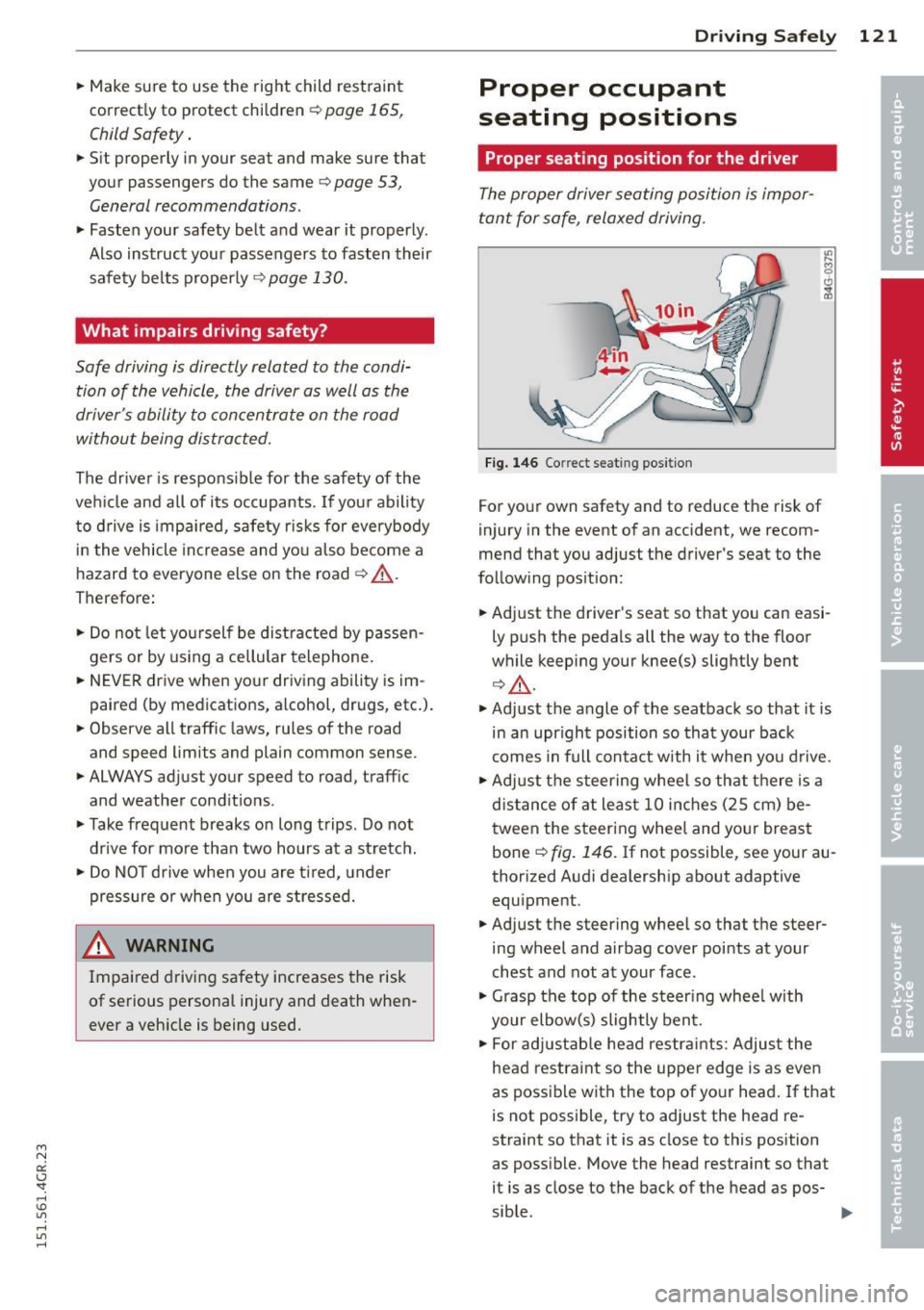
Fig. 146 Correct seat ing pos it ion
For your own safety and to reduce the risk of
injury in the event of an accident, we recom
mend that you adjust the driver's seat to the
follow ing position:
.. Adjust the driver's seat so that you can easi
ly push the pedals all the way to the floor
wh ile keeping your knee(s) slightly bent
¢.&_ .
.. Adjust the angle of the seatback so that it is
in an upr ight position so that your back
comes in full contact w ith it when you drive.
.. Adjust the steering wheel so that th ere is a
distance of at least 10 inches (25 cm) be
tween the steering wheel and yo ur breast
bone
Q fig. 146. If not possible, see your au
thorized Audi dealership about adaptive
equipment .
.. Adjust the steering wheel so that the steer
ing wheel and airbag cover points at your
chest and not at your face.
.,. Grasp the top of the steer ing whee l with
your elbow(s) slightly bent.
.. For adjustable head restra ints: Adjust the
head restraint so the upper edge is as even
as possible with the top of your head. If that
is not possible, try to adjust the head re
straint so that it is as close to this position
as poss ible. Move the head restraint so that
it is as close to the back of the head as pos-
sible . .,.
Page 132 of 302
130 Safety belts
Safety belts
General notes
Always wear safety belts!
Wearing safety belts correctly saves lives!
This chapter explains why safety be lts are nec
essary, how they work and how to adjust and
wear them correctly .
.. Read a ll the information that fo llows and
heed all of the instructions and WARNINGS.
A WARNING
Not wearing safety belts or wearing them
improperly increases the risk of ser ious
personal in jury and death .
- Safety belts are the sing le most effective
means avai lab le to reduce the risk of se
r ious injury and dea th in a utomob ile acci
dents. For your protection and that of
yo ur passenge rs, always co rrectly wear
safety belts when the vehicle is moving.
- Pregnant women, injured, or physically
im paired perso ns m ust also use safety
belts. Lik e all veh icle occup ants, they are
more like ly to be ser iously injured if they
do not wea r safety be lts . The best way to
protect a fetus is to protect the mother -
throughout the entire pregnancy.
Number of seats
Your Audi has a total of four seating positions: two in the front and two in the rear. Each seat
ing position has a safety belt .
A WARNING
Not wearing safety belts or weari ng them
improp erly increases th e risk of ser ious
pe rsonal i njury and deat h.
- Never st rap more than one pe rson, in
cl uding small ch ild ren, into any belt.
It is
e speci ally dange rous to pla ce a safety
belt over a child s itting on yo ur lap.
- N ever le t mo re people ride in the ve hicl e
than there are s afe ty be lts avail able. -
Be s ure everyone riding in the vehicle is
properly restrained w ith a separate safe
ty belt or child restra int.
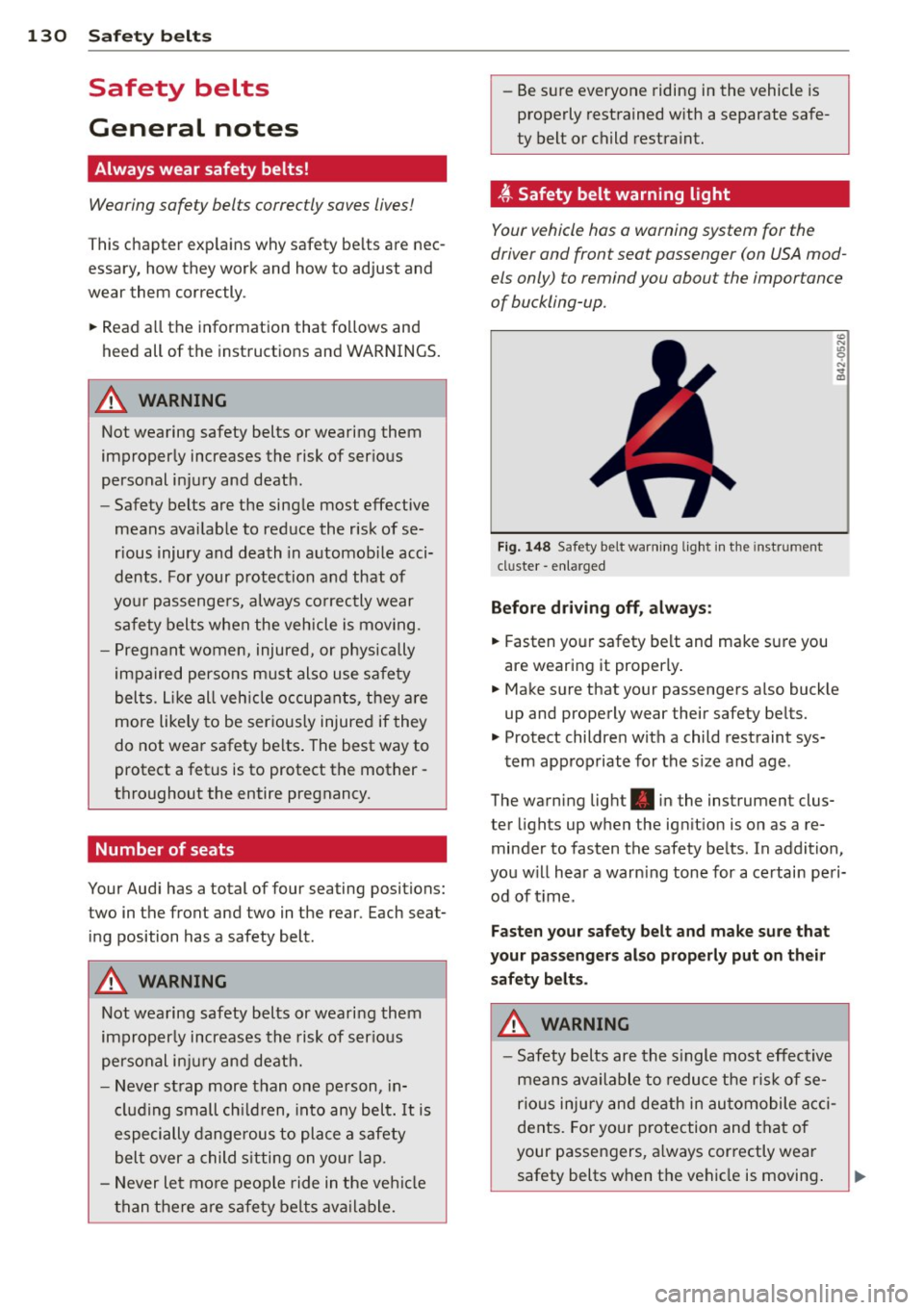
t Safety belt warning light
Your vehicle hos o warning system for the
driver and front seat passenger (on USA mod
els only) to remind you about the importance
of buckling-up .
Fi g. 14 8 Safety belt warni ng light in the instrument
cluster -en larged
Before driv ing off, alway s:
.. Fasten yo ur safety belt and make su re you
are wearing it properly .
.. Make s ure that your passengers also buck le
up and properly wear their safety be lts.
.. Protect childre n w ith a child restraint sys-
tem app ropriate for the s ize and age.
The warn ing light . in the instrument clus
ter lights up when the ign ition is on as a re
minder to fasten the safety be lts. In addition,
you w ill hear a warn ing tone for a ce rtai n pe ri
od of t ime.
Fasten you r safety belt and make sure that
your pass eng ers also properly put on the ir
s afety belt s.
A WARNING .....=-
-Safety b elts are the s ingle most eff ect ive
means avai lable to reduce t he ri sk of se
rio us inju ry and de ath in au tomobile a cci
dents. Fo r you r protection and that of
your passengers, a lways cor rectly wear
safety belts when t he vehicle is moving .
Page 133 of 302
"' N
a:: I.J '
"' rl
-Failure to pay attention to the warning
light that come on, could lead to person
al injury.
Why safety belts?
Frontal collisions and the law of physics
Frontal crashes create very strong forces for
people riding in vehicles .
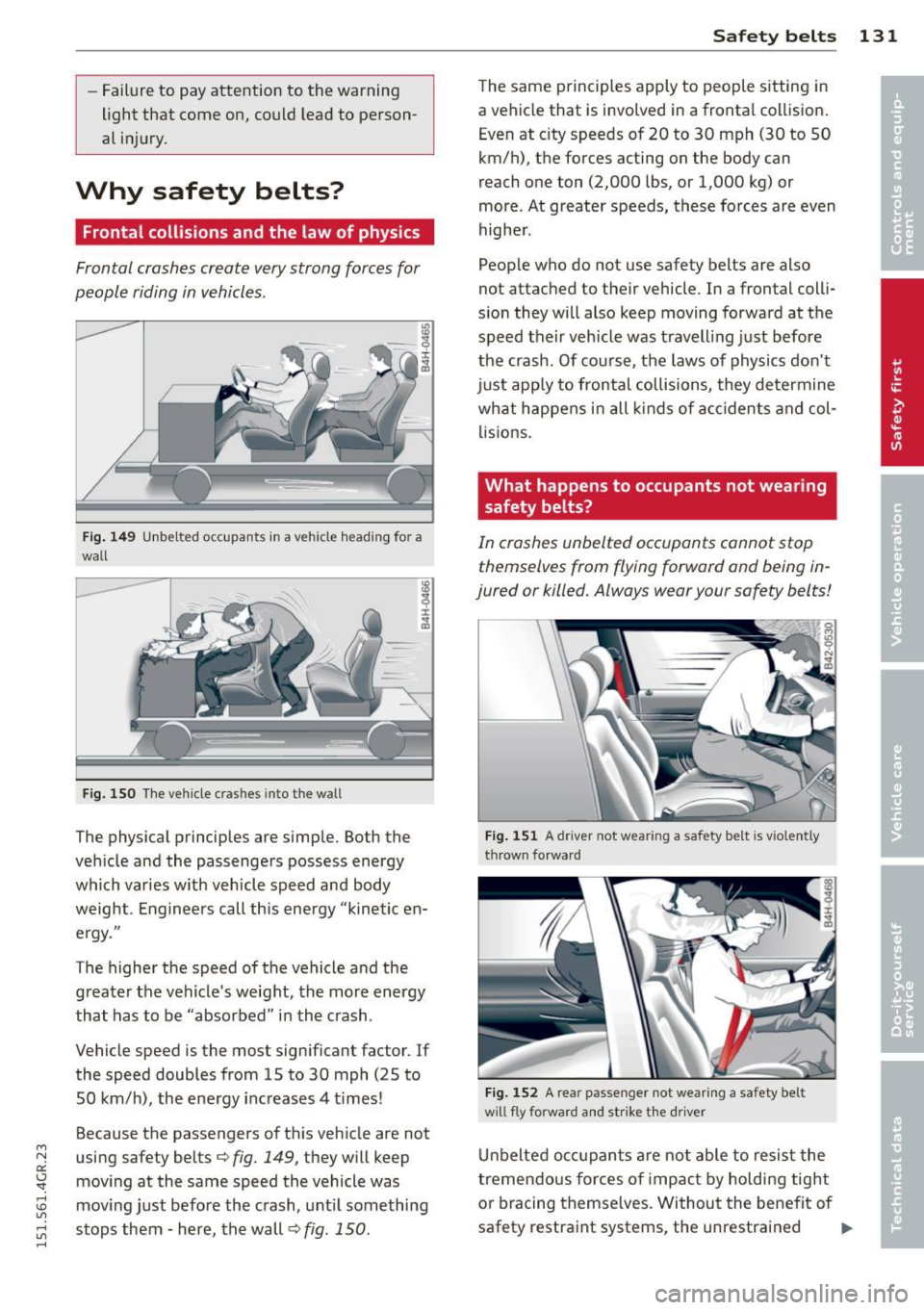
Fig. 149 Unbelted occupants in a ve hicle heading for a
wall
Fig. 150 The vehicle cras hes into the wall
The physical principles are simple. Both the
vehicle and the passengers possess energy
which varies w ith veh icle speed and body
weight . Engineers call this energy "kinetic en
ergy."
The higher the speed of the vehicle and the
greater the vehicle's weight, the more energy
that has to be "absorbed" in the crash.
Vehicle speed is the most significant factor . If
the speed doubles from 15 to 30 mph (25 to
50 km/h), the energy increases 4 t imes!
Because the passengers of this vehicle are not
using safety belts¢
fig. 149, they will keep
moving at the same speed the vehicle was
mov ing just before the crash, until something
stops them - here, the wall ¢
fig. 150.
Safety belts 131
The same principles apply to people sitting in
a vehicle that is involved in a frontal collision.
Even at city speeds of 20 to 30 mph (30 to 50
km/h), the forces acting on the body can
reach one ton (2,000 lbs, or 1,000 kg) or
more . At greater speeds, these forces are even
higher.
People who do not use safety belts are also
not attached to their vehicle . In a frontal colli
sion they will also keep moving forward at the
speed their vehicle was travelling just before
the crash . Of course, the laws of physics don't
just app ly to frontal collisions, they determine
what happens in all kinds of accidents and col
lisions.
What happens to occupants not wearing safety belts?
In crashes unbelted occupants cannot stop
themselves from flying forward and being in
jured or killed. Always wear your safety belts!
Fig. 151 A driver not wea ring a safety be lt is vio lently
th rown forward
Fig. 152 A rear passenger not wearing a safety belt
w ill fly forward and strike the driver
Unbelted occupants are not able to resist the
tremendous forces of impact by holding tight
or bracing themselves. Without the benefit of
safety restraint systems, the unrestrained .,..
Page 136 of 302
134 Safet y belt s
To provide maximum protection, safety belts
must always be positioned correctly on the
wearer 's body .
.,. Adjust the front seat and head restr aint
properly
c::, page 53, General recommenda
t ions .
.,. Make sure the seatback of the rear seat
bench is in an upright pos ition and securely
latched in place before using the belt
c::, .&, .
.,. Hold the be lt by the tongue and pull it even
ly across the chest and pelv is
c::, .&, .
.,. Inse rt the tongue into the correct buckl e of
yo ur sea t until you hea r it latc h securely
c::>fig. 154.
.,. Pull on the be lt to make sure that it is se-
curely latched in t he buckle.
Automatic safety belt retractors
Every safety belt is equipped w ith an automat
i c belt retracto r on the shoulder be lt. This fea
ture locks the be lt whe n the belt is pulled out
fast, dur ing hard braking and i n an accident.
The belt may also lock when you drive up or
down a steep hill or throug h a sharp curve.
During normal driv ing the belt lets you move
freely.
Safety belt pretensioners
The sa fety belts are equipped with a be lt pre
tensioner that helps to tighten the safety belt
and remove s lack when the pretensioner is ac
tivated ¢
page 136. The function of the pre
tensioner is mon it ored by a warning light
¢ page 18.
Convertible locking retractor
Every safety belt except the one on the driver
seat is eq uipped w ith a convertib le loc king re
tractor that
must be used when the safety
be lt is used to attach a child seat. Be su re to
read the important information about this
featu re
c::> page 176.
.,& WARNING
Imprope rly posit ioned safety belts can
cause se rious injury in an accident
c::> page 13 4, Safety bel t posi tion.
- Safety belts offer opt imum protection
only when the seatback is upr ight and
be lts are properly posit ioned o n the
body .
- If the rear seat backrest is not securely
latched, the passenger w ill move for
ward with the bac krest dur ing sudden
b ra ki ng, in a sudden maneuver and espe
cially in a cra sh.
- N ever attach t he safety belt to t he buck
le for another seat . Attaching the belt to
the wrong buckle will reduce s afety be lt
effec tiveness and can cause seri ous per
sonal injury .
- A passenger who is not prope rly restrain
e d ca n be seriously injured by the safe ty
be lt itse lf w hen it moves from the st ron
ge r parts of the body into cr itical areas
like the abdomen.
- A lways loc k the conve rtible locking re
tractor when you are secu ring a child
seat in t he veh icle
c::, page 178.
(D Tips
F o r i nforma tion on safe ty belt pre tension
e rs, refer to
c::, page 136.
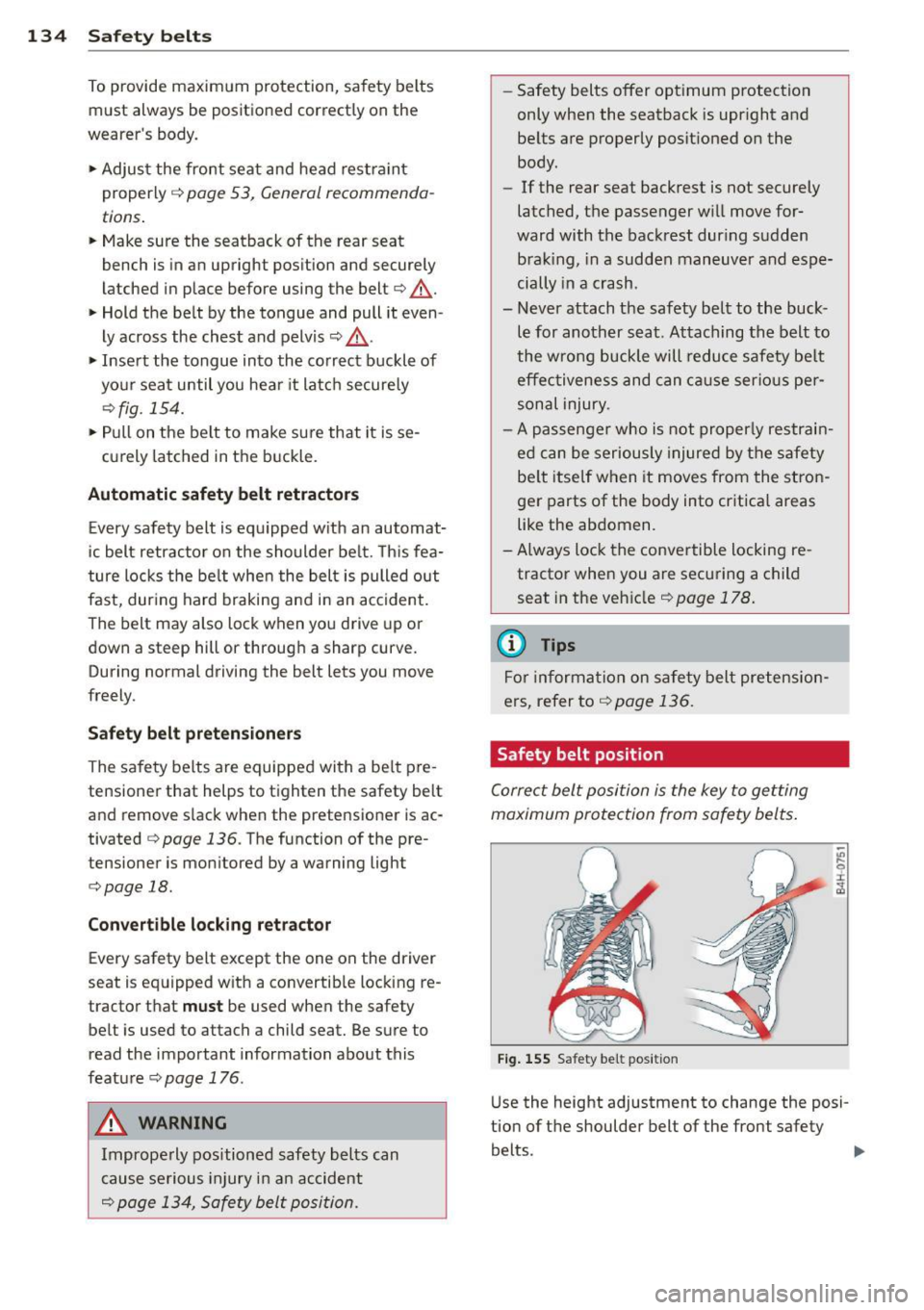
Safety belt position
Correc t belt position is the key to getting
maximum protection from safety belts .
Fig. 155 Sa fety belt pos it ion
U se the height adjustment to change the posi
tion of t he shoulder belt of the front safety
belts.
~