ESP AUDI S3 2010 User Guide
[x] Cancel search | Manufacturer: AUDI, Model Year: 2010, Model line: S3, Model: AUDI S3 2010Pages: 320, PDF Size: 75.34 MB
Page 22 of 320
Driver information display
Service interval display
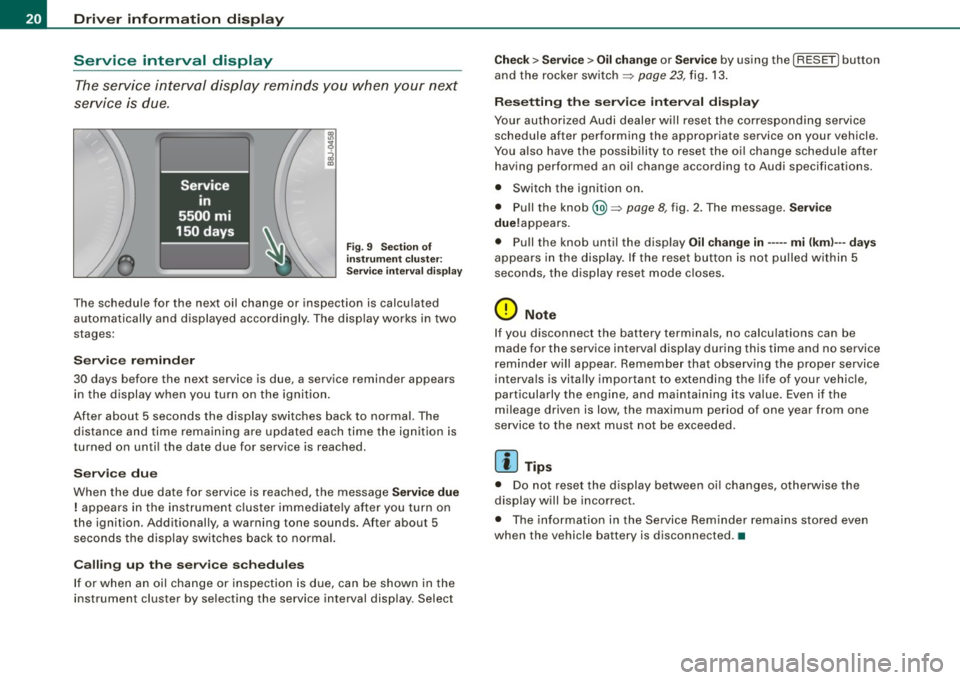
The service interval display reminds you when your next
service is due.
Fig. 9 Section of
instrument cluster:
Service interval display
The schedule for the next oil change or inspection is calculated
automatically and displayed accordingly. The display works in two
stages:
Service reminder
30 days before the next service is due, a service reminder appears in the display when you turn on the ignition.
After about 5 seconds the display switches back to normal. The distance and time remaining are updated each time the ignition is
turned on until the date due for service is reached.
Service due
When the due date for service is reached, the message Service due
! appears in the instrument cluster immediately after you turn on
the ignition. Additionally, a warning tone sounds. After about 5 seconds the display switches back to normal.
Calling up the service schedules
If or when an oil change or inspection is due, can be shown in the
instrument cluster by selecting the service interval display . Select
Check > Service > Oil change or Service by using the [ RESET! button
and the rocker switch =>
page 23, fig. 13.
Resetting the service interval display
Your authorized Audi dealer will reset the corresponding service
schedule after performing the appropriate service on your vehicle.
You also have the possibility to reset the oil change schedule after
having performed an oil change according to Audi specifications.
• Switch the ignition on.
• Pull the knob @=>
page 8, fig. 2. The message. Service
due!appears .
• Pull the knob until the display
Oil change in----- mi (kml---days
appears in the display . If the reset button is not pulled within 5
seconds, the display reset mode closes .
0 Note
If you disconnect the battery terminals, no calculations can be
made for the service interval display during this time and no service
reminder will appear. Remember that observing the proper service
intervals is vitally important to extending the life of your vehicle,
particularly the engine, and maintaining its value. Even if the
mileage driven is low, the maximum period of one year from one
service to the next must not be exceeded.
[ i] Tips
• Do not reset the display between oil changes, otherwise the
display will be incorrect.
• The information in the Service Reminder remains stored even
when the vehicle battery is disconnected .•
Page 25 of 320
Distance
The elapsed distance since the last time the memory was cleared
appears in the display. The maximum distance that can be recorded
is 9,999 .9 miles (9,999.9 kilometers).
[ i ) Tips
All stored values will be lost if the vehicle battery is disconnected. •
Operation
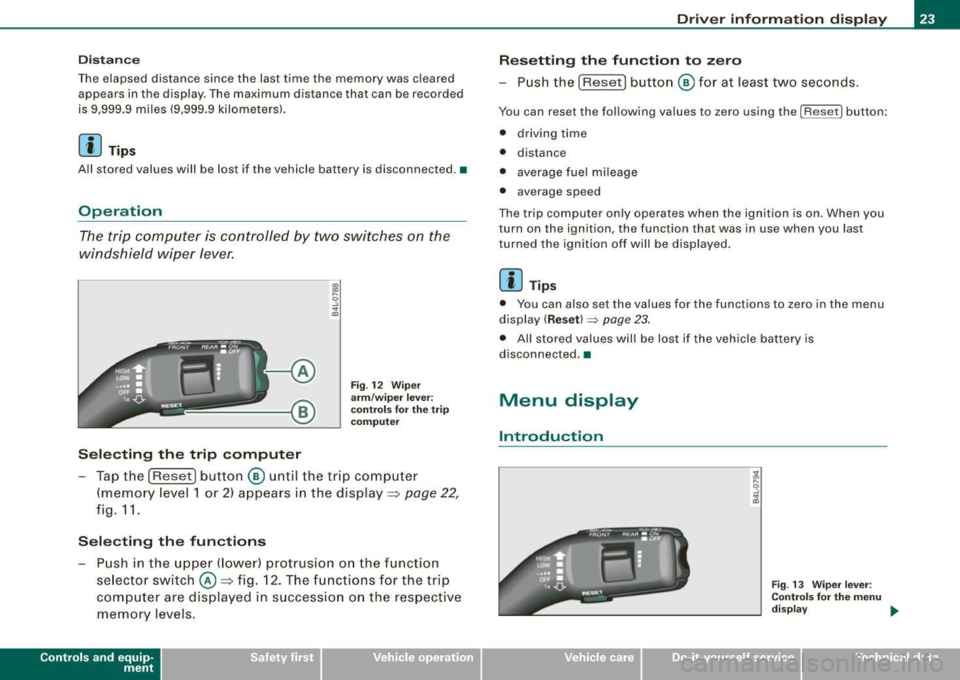
The trip computer is controlled by two switches on the
windshield wiper lever.
Selecting the trip computer
Fig. 12 Wiper
arm/wiper lever:
co ntr ols for the trip
co mputer
- Tap the [Reset) button © until the tr ip computer
(memory level 1 or 2) appears in the display =>
page 22,
fig. 11.
Selecting the functions
- Push in the upper (lower) protrusion on the functi on
se lector switch @=>fig . 12. The functions for the trip
computer are displayed in succession on the respective
memory levels.
Contro ls and eq uip
ment
Driver information display
Resetting the function to zero
- Push the
(Reset] button © for at least two seconds.
You can reset the following values to zero using the [Reset] button:
• driving time
• distance
• average fue l mi leage
• average speed
The trip computer only operates when the ignition is on. When you
turn on the ignition, the function that was in use when you last
tu rned the ignition off will be displayed.
[ i ) Tips
• You can also set the values for the functions to zero in the menu
display
( Reset) ~ page 23.
• All stored values will be lost if the vehicle battery is
disconnected .•
Menu display
Introduction
Fig . 13 Wiper lever:
Controls for the menu
di sp la y ..,
Vehicle care I I irechnical data
Page 34 of 320
![AUDI S3 2010 User Guide Driver information display
[ i ] Tips
• The engine oil p re ss ure symbol 9:::r. is not an indicator for a low
engine oil level. Do not rely on it . In stead , check the oil lev](/img/6/57545/w960_57545-33.png "AUDI S3 2010 User Guide Driver information display
[ i ] Tips
• The engine oil p re ss ure symbol 9:::r. is not an indicator for a low
engine oil level. Do not rely on it . In stead , check the oil lev")
Driver information display
[ i ] Tips
• The engine oil p re ss ure symbol 9:::r. is not an indicator for a low
engine oil level. Do not rely on it . In stead , check the oil level in your
engine at regular interval s, preferably each time you refuel , and
alway s before going on a l ong trip.
• The yellow oil level warning indication · require s oil refill or
workshop service w ithout delay . Do not wait until the red oil pres
s ure warning symbol
9:::r. s tarts to flash before you respond to the
l ow oil level warning . By then , yo ur engine may already have
s uffered serious damage. •
Fuel supply too low f
When the symbol illuminates, t his mea ns there are about 2.6
gallons (10 liters) of fuel left in the fuel tank. Time to refuel!
~ page 279.
If the symbol lights up, even when there is ample fuel in the tank,
and the te xt
Tank system malfunction! Please contact workshop
appears in the disp lay, there is a fault in the syste m. Contact a qual
ified workshop to have the fault rectified .•
App lies t o vehic les: with engine sp eed lim itat ion
Engine speed limitation I
I Engine speed ma ximum XXXX RPM
The . symbo l illuminates when there is an engine control malfunc
t ion. T he ind icat or l ight
'IC in the instrument cluste r also il lum i
nates . T he engine speed is limited to the speed displayed in the
driver in for mation sys tem . Keep in mind tha t the engi ne s peed wi ll
not exceed the va lue d isplayed in the driver information system, for
exam ple when downshifting.
P lease go to an authorized Audi deale r or other qua lified workshop
to have the malfunction repaired. •
Applies to vehicles: with diese l engi ne and d iesel particu late filte r
Diesel particulate filter clogged
Particulate filter ! See owner's manual
If the indicator light in the instrument c luster comes on, the
diesel particulate fi lte r has become blocked with soot as the resul t
of constant short -distance driving . When the symbol illumi -
nates, you can alte r yo ur driving style to assist the filter self
clean ing process. Drive for app roxi mately 15 m inutes in 4th or 5th
gea r (automatic transmission with the selector lever in the S posi
t ion) at a minimum s peed of 37 mph (60 km/h) and an e ngine speed
of approximately 2 ,000 R PM . T he temperature increase that wil l
r esu lt from this ca n burn o ff the soot in the fil te r. The symbo l w ill
switc h off when the cleaning is successful.
I f the sy mbo l d oes not swi tch off, see you r aut hor ized deale r or
other qua lif ied workshop to have the prob lem correc ted .
As long as the indicator light remains on (diesel particulate filter
plugged), you can e xpect i ncreased fue l co nsu mption a nd possibly
a lso a loss of engine performance.
A message may a lso be displayed in the ins tru me nt cluste r
informing you or prompting necessary act ion .
For more information on the diese l particulate filter, refer to
~ page 797.
& WARNING
Always adapt your speed to the current weather, road and traffic
conditions. You should never disobey traffic laws in order to follow
driving recommendation s. •
Checking the engine oil level ~
· Ple ase add max. 1 qt of engine oil!
Page 38 of 320
Opening and closing
Opening and closing
Keys
Key set
®
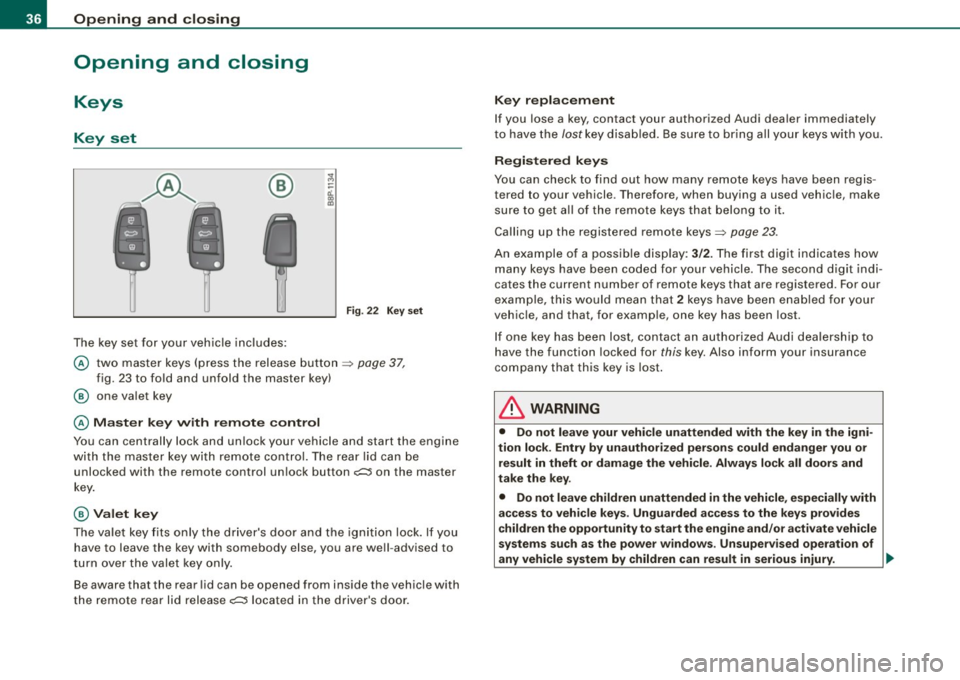
The key set for your vehicle includes:
Fig. 22 Key set
@ two master keys (press the release button => page 37,
fig. 23 to fold and unfold the master key)
@ one valet key
@ Master key with remote control
You can centrally lock and unlock your vehicle and start the engine
with the master key with remote control. The rear lid can be
unlocked with the remote control unlock button
c;:;::::5 on the master
key.
@ Valet key
The valet key fits only the driver's door and the ignition lock. If you
have to leave the key with somebody else, you are well -advised to
turn over the valet key only.
Be aware that the rear lid can be opened from inside the vehicle with
the remote rear lid release
c;:;::::5 located in the driver's door.
Key replacement
If you lose a key, contact your authorized Audi dealer immediately
to have the
lost key disabled. Be sure to bring all your keys with you.
Registered keys
You can check to find out how many remote keys have been regis
tered to your vehicle . Therefore, when buying a used vehicle, make
sure to get all of the remote keys that belong to it.
Calling up the registered remote keys=>
page 23.
An example of a possible display: 3/2. The first digit indicates how
many keys have been coded for your vehicle . The second digit indi
cates the current number of remote keys that are registered . For our
example, this would mean that
2 keys have been enabled for your
vehicle, and that, for example, one key has been lost.
If one key has been lost, contact an authorized Audi dealership to
have the function locked for
this key. Also inform your insurance
company that this key is lost.
& WARNING
• Do not leave your vehicle unattended with the key in the igni
tion lock . Entry by unauthorized persons could endanger you or
result in theft or damage the vehicle. Always lock all doors and
take the key.
• Do not leave children unattended
in the vehicle, especially with
access to vehicle keys . Unguarded access to the keys provides
children the opportunity to start the engine and/or activate vehicle
systems such as the power windows . Unsupervised operation of
any vehicle system by children can result in serious injury . ._
Page 41 of 320
• Remote control feature=> page 37.
• Anti -theft alarm system => page 46.
All the doors and the rear lid are locked by the central locking
sys tem when you lock the veh icle.
Unlo cking th e ve hicle
You can un lock the vehicle from outside either by using the remote
control
o r by inserting and turning the key in the driver's door lock.
When you
unlock your vehicle :
• The anti -theft alarm system is deactivated briefly .
• T he vehicle i nteri or lights illuminate fo r approxi mate ly 30
seconds .
• All tu rn signal lights will flash twice when t he car is unl ocked .
• After un locking the vehicle, you have 30 seconds to open a door
or the rear lid. After 30 seconds, t he vehicle automatically locks and
the anti-theft a larm system activates again.
The rear lid can be locked o r unlocked either by u sing the remote
control
or by inserting and turning the key in the driver's door lock.
Un loc king the vehicle with the remote control
c::::::::5 wi ll only unlock
the rear lid, to open it, the l id handle needs to be pressed.
Lo cking the vehi cle
You can lock the vehic le from outside either by using the remote
control
or by i nserting and tu rning the key in the drive rs's d oor l ock .
When you
lock the vehicle:
• All doors and the rear lid are locked .
• All turn signal lights w ill flash once when the car is locked .
• T he anti -theft alarm sys tem is activated. The horn of the anti
theft alarm system wi ll sound and the anti -theft alarm system readi
ness light, loca ted in the center of the instrument pane l below the
w indshie ld on the right side of the a ir vent, wil l start to b link.
• The ve hicle interior l ights tur n off .
Controls and equip
ment
Opening and clo sing
Automati c locking *
The a utoma tic locking feature l ocks all the vehicle do ors and t he
rear lid when you drive faster than 9 mph (15 km/h).
You can unlock the vehicle from the inside by :
• removi ng the key from the igniti on swi tch (the vehicle wil l a uto
matically un lock itself) or
• pressing the unlock part o f the power lock switch
l!:)) or
• pul ling the inside handle for that door (once -the front doo r is
unlocked and opened at the same time, twice to open the rear doo r).
I f you wish, you can have an authorized Audi dea ler convert your
p ower d oor lock system to auto matic l ocki ng .
& WARNING
• When you lock your vehicle from out side , nobody - especially
c hildren - should remain inside the vehi cle . Re member , when you
lock the vehicle from the out side the window s cannot be opened
from the inside .
• When you leave the vehicle , alway s remove the ignition key and
t a ke it with you . This will prevent passengers (children , for
example ) from accidentally being locked in the vehicle should they
accidentally press the po wer locking swit ch on the center c onsole .
• Do not leave children ins ide the vehicle unsupe rvised. In an
emergen cy it would be imposs ible to open the doors from the
out side without th e key.
[ i ] Tips
• I n the eve nt of a crash with airbag deployment all locked do ors
wi ll be automatically un locked to give access to the vehicle occu
p a nts from the outside.
• I f the power locking system should fail, you can still open the
f u el tank flap in an emergency =>
page 222 . ~
I • •
Page 46 of 320
Opening and closing
Closing the rear lid
- Pull it down and shut it firmly~&. There is a recess in
the interior trim of the lid to make it easier to pull down.
& WARNING
• After closing the rear lid, always pull up on it to make sure that
it is properly closed. Otherwise it could open suddenly when the
vehicle is moving.
• To help prevent poisonous exhaust gas from being drawn into
the vehicle , always keep the rear lid closed while driving. Never
transport objects larger than those fitting completely into the
luggage area, because then the rear lid cannot be fully closed.
• Never leave your vehicle unattended especially with the rear lid
left open. A child could crawl into the car through the luggage
compartment and pull the lid shut, becoming trapped and unable
to get out. To reduce the risk of personal injury, never let children play in or around your vehicle. Always keep the rear lid, as well as
the vehicle doors, closed when not in use.
[ i ) Tips
• If the rear lid is open or not properly locked when the ignition is
turned on, the door and rear lid warning appears in the instrument
cluster display.
• If the rear lid on a locked vehicle is unlocked with the middle
button
cs on the remote key , the rear lid is automatically locked
again immediately after closing. This is indicated by the turn signals
blinking. •
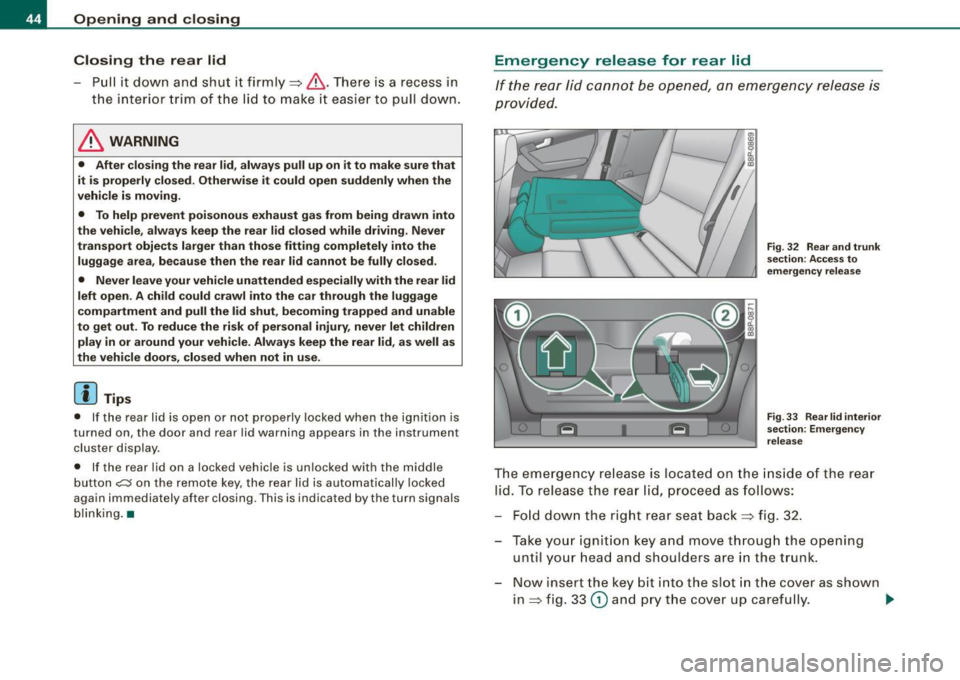
Emergency release for rear lid
If the rear lid cannot be opened, an emergency release is
provided.
Fig. 32 Rear and trunk
section: Access to
emergency release
Fig. 33 Rear lid interior
section: Emergency
release
The emergency release is located on the inside of the rear
lid. To release the rear lid, proceed as follows:
- Fold down the right rear seat back~ fig. 32.
- Take your ignition key and move through the opening until your head and shoulders are in the trunk.
- Now insert the key bit into the slot in the cover as shown
in ~ fig. 33
(D and pry the cover up carefully. ..,.
Page 49 of 320

Power windows
Controls
Fig. 37 Driver's door :
power window
switches
The switches are located in the driver's door. The front passenger's
door has a own power window switch of its own.
To open/close If the respective switch is pushed or pulled, the
window will , respectively.
Switches for front door windows
@ operates the window in the driver's door.
@ operates the window in the front passenger's door.
Switches for rear windows
© operates the left rear window.
@ operates the right rear window.
Safety switch
© Safety switch for rear window operation.
& WARNING
• Do not leave children unattended in the vehicle, especially with
access to vehicle keys. Unsupervised use of the keys can result in
Con tro ls and eq uip
ment
Opening and closing
& WARNING !continued)
starting of the engine and use of vehicle systems such as power
windows, etc. which could result in serious injury.
• Remember -you can still open or close the power windows for
about ten minutes after the ignition is switched off. Only when
either of the front doors are opened are the power windows
switched off.
• Be careful when closing the windows . Check to see that no one
is in the way, or serious injury could result!
• Always remove the ignition key whenever you leave your
vehicle.
• If you lock your vehicle from the outside, no one, especially chil
dren, should remain in the vehicle.
• Do not stick anything on the windows or the windshield that
may interfere with the driver's field of vision. •
Switches in the driver's door
The driver con operate all windows.
In addition to the switches in the driver 's door, there is a
separate switch in each door for the power w indow in that
door~ fig. 37. If the respective switch is pushed or pulled,
the window will open or close. The power window switches
have a
two -position function:
Opening the windows
Push the switch to the
first stop and hold it there until the
window has lowered to the desired position.
Push the switch briefly to the
second stop : the window
will automatically open all the way.
~
Vehicle care I I irechnical data
Page 52 of 320

Opening and closing
Closing completely
-Press the switch 0 => page 49, fig. 39 until the roof is
completely closed => & .
Closing partially
- Press the switch 0 => page 49, fig. 39 until the roof has
reached the desired position => & . If the roof is almost
closed and you interrupt the operation, the roof opens
automatically to a minimum setting; this is the smallest
possible opening that can be set.
If you park your vehicle in the sun, we recommend that you close the
sun blind. You should especially make certain that the panoramic
sliding sunroof is closed when the sun blind is closed when parked
or if there is a sudden rain shower.
The sun blind has two positions : completely open or completely
closed. The sun blind is manually operated.
& WARNING
Never close the panoramic sliding sunroof carelessly or without
watching -there is a risk of personal injury . For this reason , always
remove the ignition key when leaving the vehicle.
[ i J Tips
• When you park your vehicle, we generally recommend closing
the panoramic sliding sunroof and the sun blind.
• When the vehicle is parked, a wet roof should be dried lightly
with a soft cloth
before it is opened so that water does not drip into
the interior.
• In an emergency, the panoramic sliding sunroof can be closed
manually =>
page 50, "Emergency mechanical closing for the
panoramic sliding sunroof".•
Applies to vehicles: with panoramic sliding sunroof
Comfort closing
The open roof can also be closed from the outside.
-Hold the key in the driver's door lock in the lock position
until the roof is closed=>& .
& WARNING
Never close the panoramic sliding sunroof carelessly or without
watching -there is a risk of personal injury. •
Emergency mechanical closing for
the panoramic sliding sunroof
App lies to vehicles: with panoramic sliding sunroo f
Uncovering the light unit
In an emergency, the panoramic sliding sunroof can be
closed manually. Removal of the light unit requires some
dexterity.
Fig. 40 Light unit in
the headliner :
removing the glass
Page 56 of 320

Clear vision
The daytime running lights function cannot be turned off .
Automatic headlight control *
In the switch position AUTO the automatic he adlight contro l is
turned on . The low beams are turned o n automatically through a
light sensor as soon as ambient brightness (e .g. when driving into a
t unnel) falls below a value preset at the factory. When ambien t
brightness increases again, the low beams are turned off again
aut omatically ==>&, .
In the
AUTO position the low beams are switched off automatically
when the ignition is turned off.
Light S ensor M alfun ction *
In the even t of a light sensor malfunct ion, the driver is notified in the
instrument cluster display :
Automatic headlights /automati c w ipers defe ctive
For safety reasons the low beams are turned o n permanently w ith
the switch in AUTO *. However , you can continue to turn the lights
on and off us ing the l ight switch . Have the lig ht sens or checked as
soon as possib le at a dealership .
Coming home /leaving home function *
The function is switched on when the switch is in the AUTO* posi
tion and the f unction is shown as ac tive in t he d river info rmat ion
system .
The
c oming home function illuminates the area around the vehicle
when the ignition is switched off a nd the driver's door is opened.
The length of time the lights remain on can be set in the menu
display
(Illumination > Exterior lights > coming home ).
The leaving home function illuminates the area around the vehicle
whe n unlocking it .
& WARNING
• Nev er use daytime run ning light s to see whe re you are going .
They are not bright enough and will not let you see far enough
ahead for safety , espe cially at du sk or when it i s da rk . Al way s
s w itch on the low beam s at du sk or when it i s dark .
• Automatic headlight s are only intended to assist the driver .
They do not relieve the driver of hi s responsibility to check the
head light s and to turn them on manually according to the cu rrent
light and visibility conditions . For example , fog and rain cannot be
detected b y the l ight sen sor s. S o alwa ys switch on th e headl ight s
under these weather conditions and when driving in the dark
io.
• Cra she s c an happen when you cannot see the road ahead and
when you cannot be seen by other motor ists.
- Alway s turn on the hea dlight s so that you can see ahead a nd
so that other s can see your car from the ba ck.
[ i ] Tips
• With the swi tch in AUTO front fog ligh ts cannot be turned on in
addition.
• The light sensor for head light contr ol is located in the rear view
mirror mount. Do not apply any stickers to the windshie ld in this
area to p revent malfunctions or failures.
• Some exterior lighting functions can be adjusted in the driver
informa tion system
==> page 23.
• I f you remove the ignition from the ignition lock while the head
l ights are still on, a bu zzer w ill sound as long as the driver's door is
open to remind you to turn off the lights.
• Always observe t he specific local regulations for your area as to
when to use your lights.
• With automatic headl ights, the high -beam function is also avai l
able, but with one restriction : If you have not switched the high
bea ms back to low beams duri ng automatic headlight operation (for
example , after driving through a tunne l), on ly the low beams come .,,_
Page 70 of 320

Clear vision
Disabling auto dimming
-Press b utto n © => page 6 7, fig. 66 briefly, -th e gr ee n
i nd ica to r li ght @ goes out .
Activating/reactivating auto dimming
Press butto n© br iefly, -the gr een in dicator l ight®
goes on.
Automatic dimming function
The au tomat ic dim ming f uncti on is act iva ted every tim e th e ignit ion
i s tur ned on . The green indi cator light is lit to i ndicate auto dimming
i s ac tive.
When d immin g is activat ed, the inside m irror will darken automati
cally in re spo nse to th e am ount of li ght striki ng the m irror (suc h as
headlights from rearward approachin g vehicles). Even in dimm ing
mod e, the m irror su rface turns br ig ht whe n :
• the interior lig ht is swi tc he d on
• r eve rse gea r is en gage d.
& WARNING
Broken glass of automatic dimming mirror can cause electrolyte
fluid leakage . Electrolyte fluid can irritate skin , eyes , and respira
tory system .
• Repeated or prolonged exposure to electrolyte can cause irrita
tion to the respiratory system, especially among people with asthma or other respiratory conditions . Get fresh air immediately
by leaving the vehicle or , if that is not possible, open windows and
doors all the way.
• If electrolyte gets into the eyes , flush them thoroughly with
large amounts of clean water for at least 15 minutes; medical
attention is recommended .
• If electrolyte contacts skin, flush affected area with clean water
for at least 15 minutes and then wash affected area with soap and
& WARNING (continued)
water; medical attention is recommended . Thoroughly wash
affected clothing and shoes before reuse .
• If swallowed and person is conscious , rinse mouth with water
for at least 15 minutes . Do not induce vomiting unless instructed
to do so by med ical professional. Get medical attention immedi
ately.
0 Note
Liq uid ele ctro lyte leak ed fro m a broke n mirror g lass will d am ag e any
plastic surfaces i t com es in contact with. Clean up sp ill e d e lectroly te
im med iately wi th cle ar w ater and a spo nge.
[ i ] Tips
• If you switch off the automatic dimming function on the inside
mirror, automatic dimming of the outside mirrors will likewise be
disabled .
• Check to make sur e there are no ob jects preventin g light from
r ea ch in g th e insi de mirr or.
• Do not attach any stickers to the windshield in front of the light
s en sor , as this wou ld interfer e w ith th e aut om atic operatio n of t he
headlights and the automatic d imming of the insid e mirror.
• B e aware th at automa tic d imming of the in side mi rror ca n only
operate pro perly if the rea r w indow sun blind* is retracted. •