display AUDI S3 SEDAN 2015 User Guide
[x] Cancel search | Manufacturer: AUDI, Model Year: 2015, Model line: S3 SEDAN, Model: AUDI S3 SEDAN 2015Pages: 282, PDF Size: 71.14 MB
Page 29 of 282
....,
N
0 > co
rl I.O
"'
"'
"'
rl
Driver information
system
Overview
App lies to vehicles: with driver information syste m
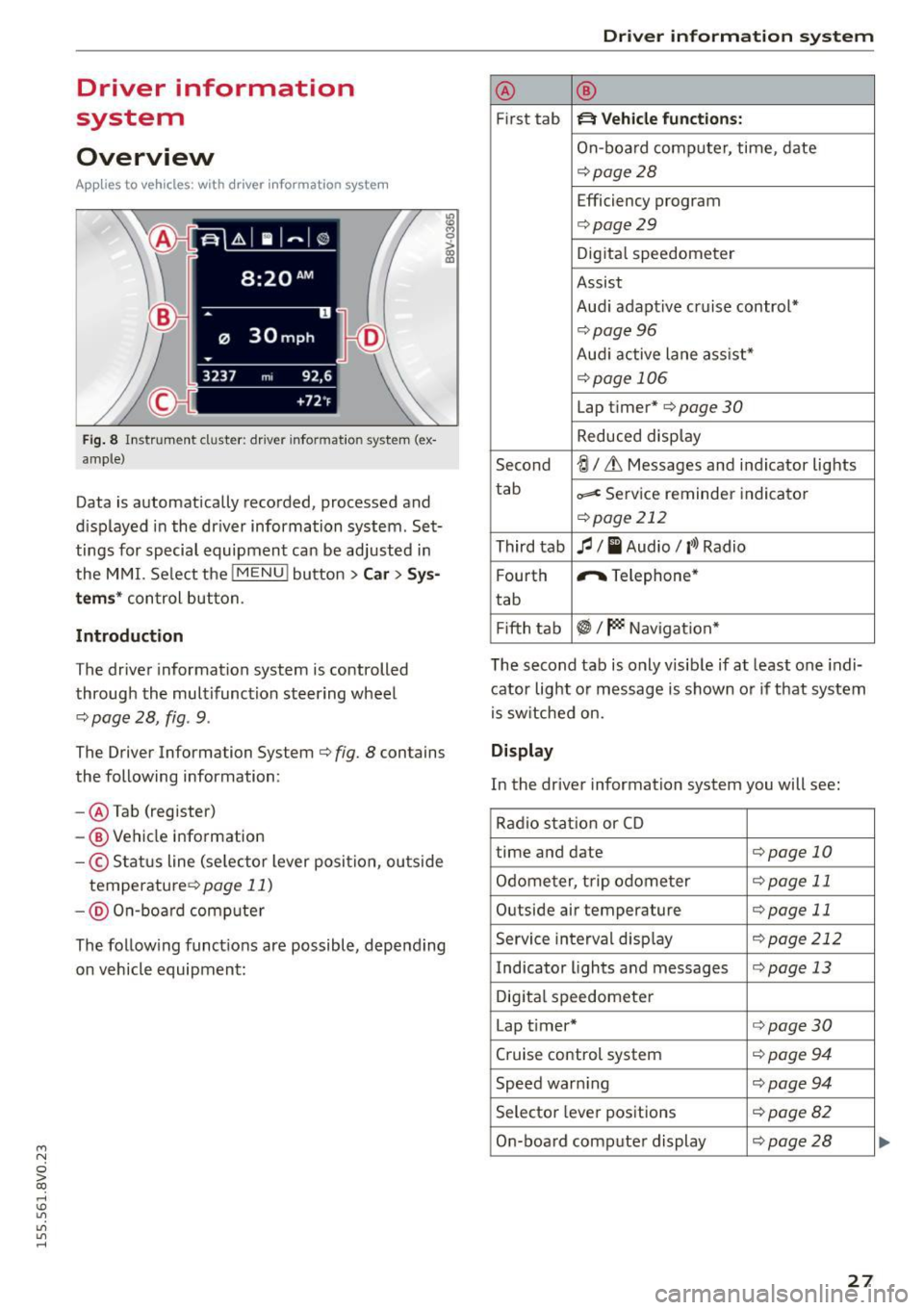
Fig. 8 Instr ument cluster : dr iver informat ion system (ex
a mp le}
Data is automatically recorded, processed and
d is played in the driver information system . Set
tings for special equipment can be adjusted in
the MMI. Select the
I MENU ! button >Car> Sys
tems* control button.
Introduction
The driver information system is controlled
through the multifunction steering wheel
¢ page 28, fig . 9.
The Driver Information System ¢ fig. 8 contains
the following information:
- @ Tab (register)
-® Vehicle information
-© S tatus line (se lector lever position, ou tside
temperature ¢
page 11)
- @ On-b oar d computer
~ M 0 :> CX) ID
The follow ing funct ions are possible, depending
on vehicle equipment:
Dri ver information system
@ ®
First tab ~ Vehicle functions:
On-board computer, time, date
¢page28
Efficiency program
¢page29
Digital speedometer
Assist
Aud i adaptive cruise control*
¢pag e 96
Audi active lane ass ist*
¢page 106
Lap timer* ¢page 30
Reduced display
Second
-!;1 / Lt Messages and indicator lights
tab
=< Service reminder indicator
¢page 212
Third tab fl I I Audio/ l'>l Radio
F ourth ,.,.
Telephone*
tab
Fifth tab
~I~ Navigation *
The second tab is only visib le if at least one indi
cator light or message is shown or if that system
is switched on.
Display
In the driver information system you will see:
Radio station or CD
time and date
¢page 10
Odometer, trip odometer ¢page 11
Outside air temperature ¢page 11
Service interval disp lay ¢ page 212
Indicator lights and messages ¢page 13
Digital speedometer
Lap t imer*
¢page30
Cruise control system ¢ page 94
Speed warn ing ¢page 94
Selector lever positions ¢page82
On-board computer display ¢page28
27
...
Page 30 of 282
Drive r in formation syste m
On-board comput er display
The on-boa rd comp uter display monitors the dif
ferent memory levels:
- Short-term memory (on-board computer 1)
- Long-term memory (on-board computer 2)
- Efficiency program
The follow ing information can be displayed in on
board computer 1 and 2 one after the other.
-Date
- Estimated range based on current fuel leve l
- Travel time
- Average consumption
- Average speed
- Distance
- Current fuel consumption
- Engine o il temperature indicator*
On -board computer
D (sho rt -term memory )
The short-term memory collects driving informa
tion from the time the ign it ion is switched on un
til it is switched off . If you continue driving with
in tw o ho ur s after sw itchi ng the ignition off, the
new values are included when calcu lating the c ur
rent trip information. If stopped for more the
two hours , the short term memory is automati
cally erased once you begin driving.
On-board com put er
fJ (long-t erm m emor y)
Unlike the short-te rm memory, the long-term
memory is not erased automat ica lly. You can se
lect the time period for evaluating trip informa
tion yourself.
E fficie ncy program
ii
The effic iency program can help you to use less
fuel ~page29.
(j) Tips
- The on-board computer is controlled by the
l eft button fields on the multifunction
steering wheel.
- For information on using the other b utton
fields, such as the audio, telephone* and navigation * functions, see the MM I owner's
manua l.
28
Operation
Applies to vehicles: with driver information system
The driver information system is controlled with
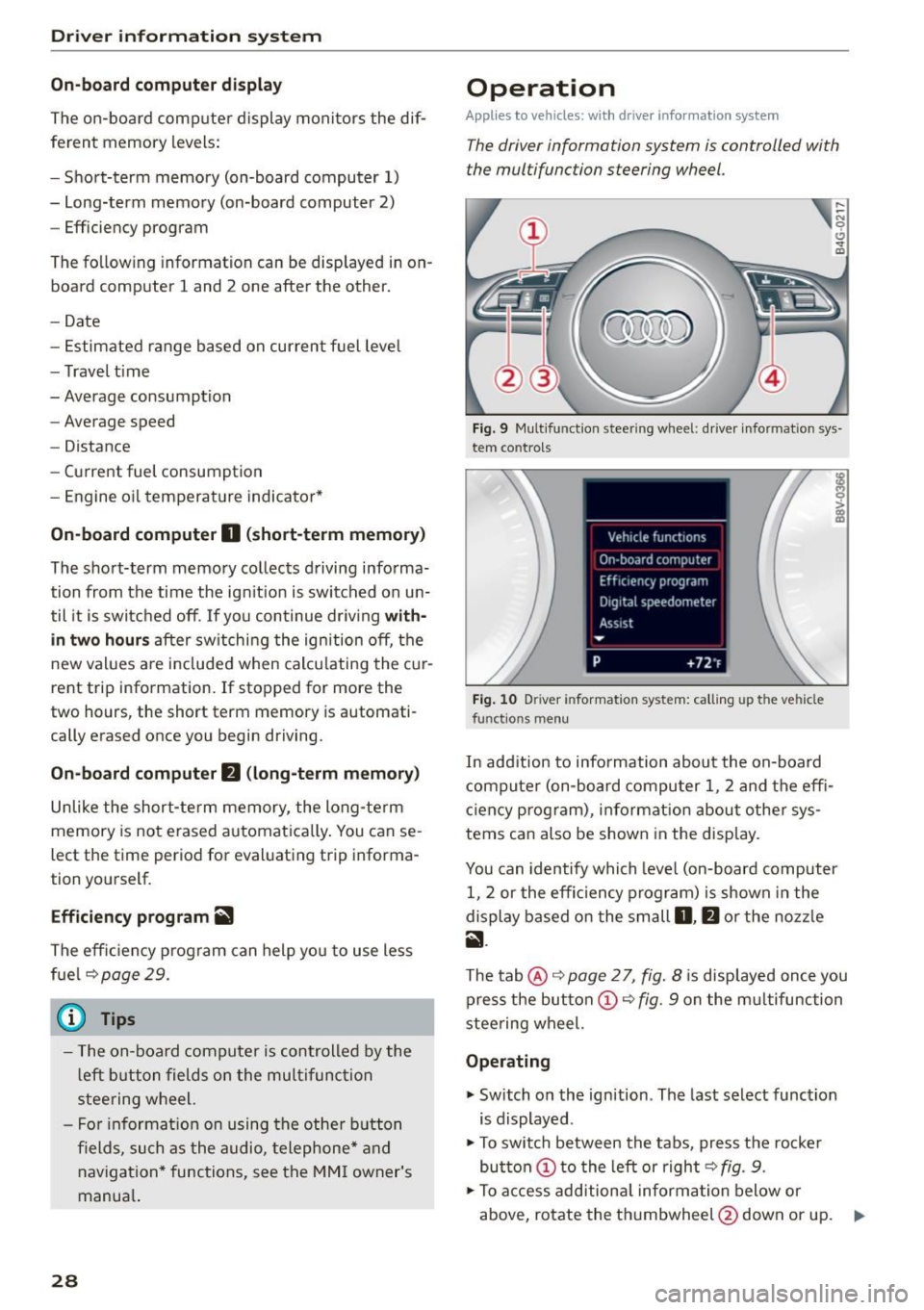
the multifunction steering wheel.
Fig. 9 Mult ifunction steering wheel: driver informat ion sys
tem contro ls
Fig . 10 Dr iver info rmation system: ca lling up the vehicle
functions menu
In addition to information about the on-board
computer (on-board compu ter 1 , 2 and the effi
c iency prog ram), information about othe r sys
tems can also be shown in the display .
You can identify which level (on-board computer
1, 2 or the effi ciency program) is shown in the
display based on the small
D , fJ or the nozz le
ii .
The tab@~ page 2 7, fig. 8 is displayed once you
press the button
(D ~ fig . 9 on the m ultifunction
stee ring wheel.
Operating
"' Switch on the ignition . The last select function
is displayed .
"' To switch between the tabs, press the rocke r
button
(D t o the left or right ~ fig. 9.
"'To access add itiona l informa tion below or
above, rotate the thumbwheel @down or up.
9"'
Page 31 of 282
....,
N
0 > co
rl I.O
"'
"'
"'
rl
.. To confirm a selection, press the thum bwheel
@ .
.. To se lect a function programmed to a steer ing
whee l button , press the button @. For addi
tiona l information, see c:>
page 29, Assigning
a function to a programmable steering wheel
button
Opening the Vehicle functions
.. Se lect the f irst tab w ith the button (!) .
.,. Press the button @. The
Veh icle functions
menu is displayed 9 fig. 10.
.. To select a menu item, turn and press the
t hu mbwheel @.
Resetting values to zero
.. In the Vehicle funct ions menu, select On-board
computer or Efficiency program .
.. Se lect a va lue in the desired trip computer or in
t h e efficie ncy prog ram .
.,. To reset t he val ues in a memo ry, press and hold
t h e thu mbw heel @for on e secon d.
Recalling indicator lights and messages
.. Press the button CD repeated ly until the Q tab
appea rs.
The
Q tab is only visibl e when there is a mal
f u nction.
Assigning a function to a programmable
steering wheel button
.. Se lect: the I MENU j button >Car > Systems *
control button > Vehicle settings > Steering
wheel button programming .
The Q tab is only visible when there is at lea st
one ind icat or light or message displayed.
(D Tips
- If the vehicle battery is discon nected , all
memo ry values a re erased.
- In form ation on the e fficiency pr ogra m
c:> pag e 29 .
-There is more inf orm atio n on the m ultifunc
t io n st eering wheel in the MMI* owner 's
manua l.
Driver information system
Boost indicator
Applies to vehicles: with boost pressure indicator
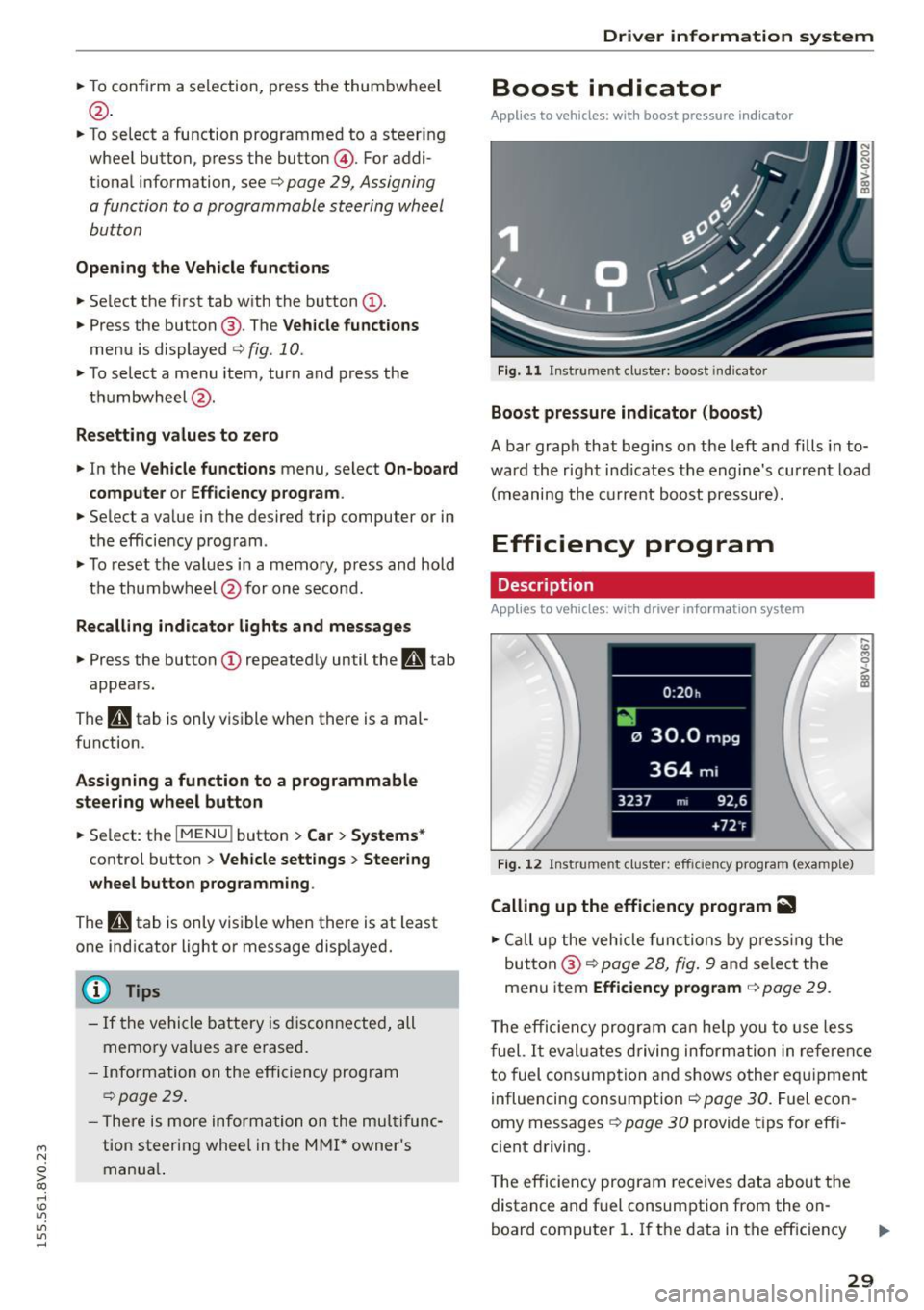
Fig. 11 Instrume nt cl ust e r: boost in dic ato r
Boost pressure indicator (boost)
A bar grap h that begins on the l eft and fills in t o
wa rd the righ t ind icates the engine's cu rrent load
( m eaning the cur rent b oost pressure).
Efficiency program
Description
App lies to vehicles: with driver info rmation system
Fig. 12 Inst rume nt clust er: effici ency p rogram (exa mple)
Calling up the efficiency program ii1
.. Call up the veh icle functio ns by pre ss in g the
but to n @ c:>
page 2 8, fig . 9 and se lec t the
menu item
Efficiency program c:> page 29.
,._
m
T he effi ciency pro gr am can he lp y ou to use le ss
f uel.
It eval uates driving inform ati on in ref ere nce
to fuel consump tion and shows o ther eq uipme nt
i nfluencing consumpt ion c:>
page 30 . Fue l econ
omy messages
c:> page 30 provide t ips for eff i
c ient driving .
T he efficiency program rece ives data abou t the
distance and f uel consumpt ion from the on
board compu ter
1. If the data in t he eff iciency
29
Page 32 of 282
Driver information system
program is deleted ¢page 29, the values in the
on-board computer 1 are also reset.
Other equipment
Applies to vehicles: with driver information system
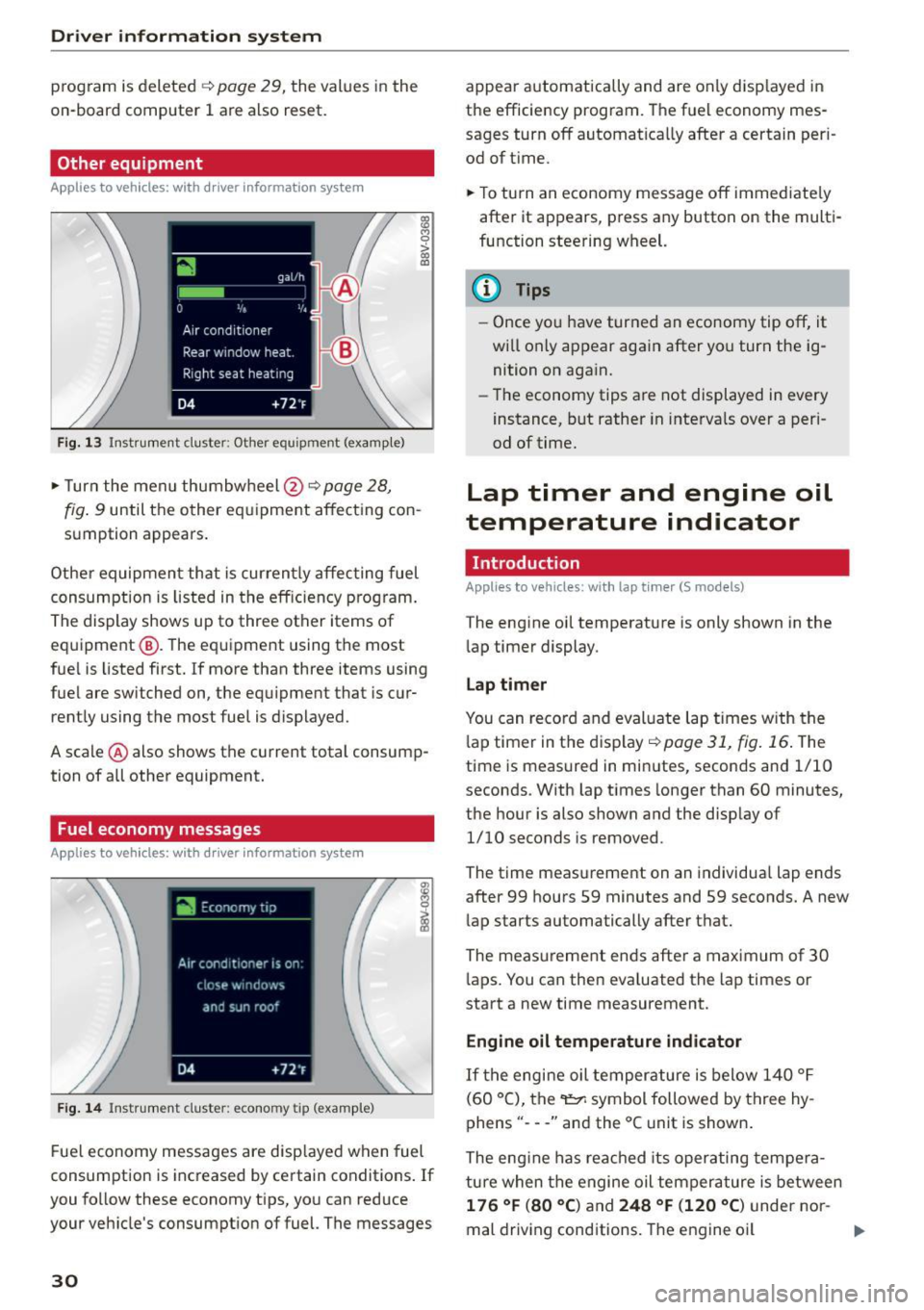
Fig. 13 Instrument cluster: Other equ ipment (examp le)
"'T urn the menu thumbwheel @ ¢ page 28,
l8 M 0
>
"' a,
fig. 9 until the other equipment affecting con
sumption appears.
Other equipment that is currently affecting fuel
consumption is listed in the efficiency prog ram.
The display shows up to three other items of
equipment @. The equipment using the most
fue l is listed first. If more than three items using
fuel are switched on, the equ ipment that is cur
rently using the most fuel is displayed.
A scale @ also shows the current total consump
tion of all other equipment.
Fuel economy messages
Applies to vehicles: with driver information system
Fig. 14 Instrument cluster: economy tip (example)
Fuel economy messages are disp layed when fuel
consumption is increased by certain conditions . If
you follow these economy tips, you can reduce
your veh icle's consumption of fuel. The messages
30
appear automatically and are only disp layed in
the efficiency program. The fuel economy mes
sages turn off automatically after a certain per i
od of t ime.
"'T o turn an economy message off immediate ly
after it appears, press any button on the multi
function steering wheel.
(D Tips
- Once you have turned an economy tip off, it
wi ll only appear again after you turn the ig
nition on again.
- The economy tips are not displayed in every
instance, but rather in intervals over a peri
od of time.
Lap timer and engine oil
temperature indicator
Introduction
Applies to veh icles: with lap tim er (S models)
The engine oil temperature is only shown in the
lap timer display.
Lap timer
You can record and evaluate lap times with the
l ap timer in the display¢
poge 31, fig. 16. The
time is measured in minutes, seconds and 1/10
seconds. With lap times longer than 60 minutes,
the hour is also shown and the display of
1/10 seconds is removed.
The time measurement on an individua l lap ends
after 99 hours 59 minutes and 59 seconds. A new
lap starts automatically after that.
The meas urement ends after a maximum of 30
laps. You can then eva luated the lap times or
start a new time measurement.
Engine oil temperature indicator
If the engine oil temperature is below 140 °F
(60 °C), the~ symbol followed by three hy
phens" ---" and the °C unit is shown .
The engine has reached its operating tempera
ture when the engine oil tempera ture is between
176 °F (80 °() and 248 °F (120 °C) under nor-
mal driving conditions. The engine oil
IJI>
Page 33 of 282
....,
N
0 > co
rl I.O
"'
"'
"'
rl
temperature may be higher if there is heavy en
gin e load and high temperatures outside. This is
not a cause for concern as long as the.
¢page 19 orllll ¢page23 indicator lights in the
display do not blink.
A WARNING
Your focus should always be on driving your
vehicle safely . As the dr iver, you have com
plete responsibility for safety in traffic . Only
use the functions such as the lap timer in such
a way that you a lways maintain complete con
trol over your vehicle in all traffic situations .
(D Tips
You can retr ieve information from the tr ip
computer while the lap timer stopwatch is
r u nning.
Opening the lap timer and measuring time
Applies to vehicles: with lap timer (5 models)
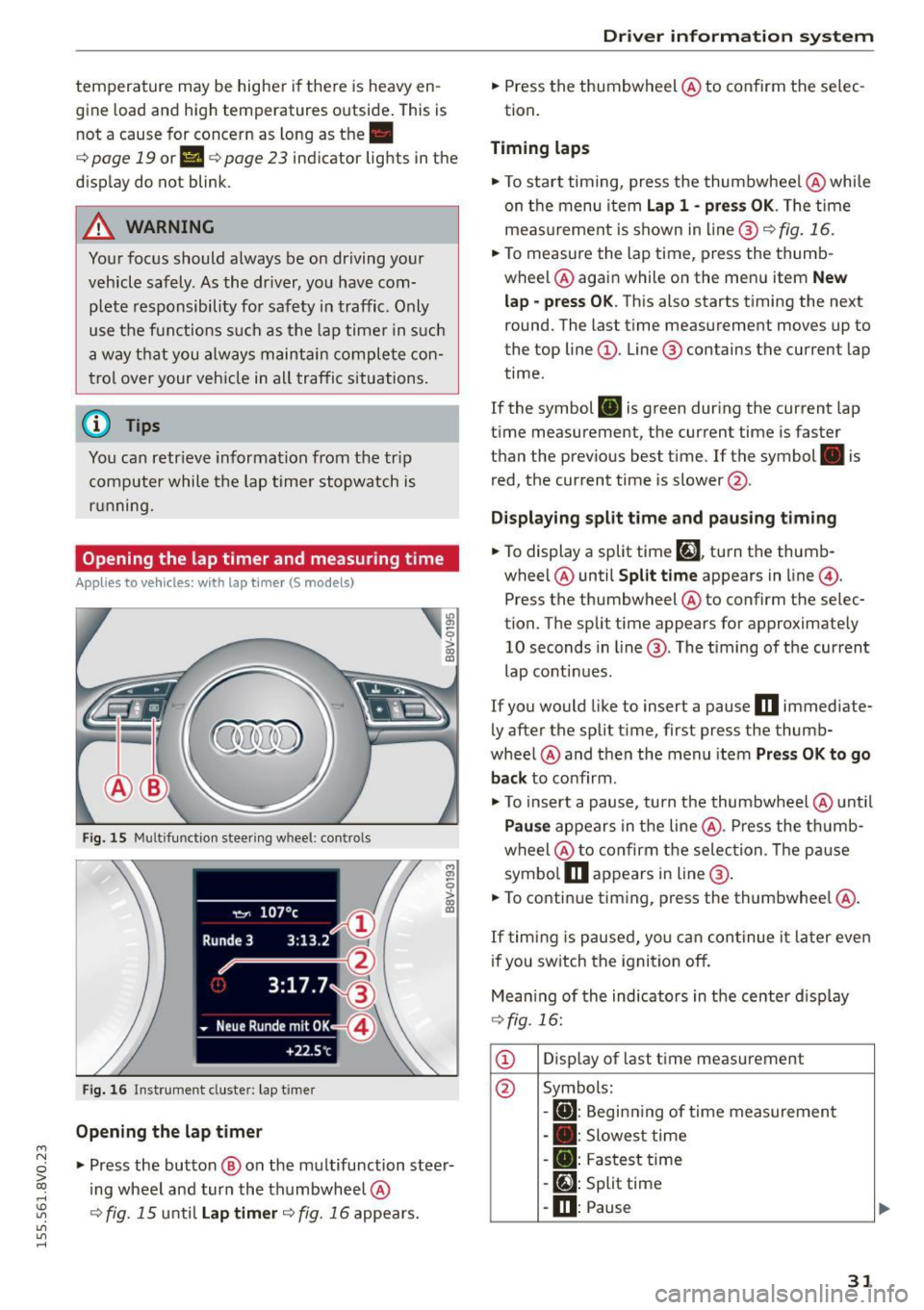
Fig. 15 Multifunction steer ing wheel: controls
Fig. 16 Instrument cluster: lap timer
Opening th e lap timer
-
"'Press the button @ on the multifunction steer
ing wheel and turn the thumbwheel @
¢fig. 15 unt il Lap timer ¢fig. 16 appea rs.
Dr iver inform atio n sy stem
.. Press the thumbwheel @ to confirm the selec
tion.
T im ing laps
"' To sta rt timing, press the thumbwheel @ while
on the menu item
Lap 1 - pre ss OK . The time
measurement is shown in line @
r=:> fig. 16.
.. To measure the lap time, press the thumb
wheel @ again while on the men u item
New
lap -pre ss O K. This also starts timing the next
round. The last time measurement moves up to
the top line
(D . Line ® contains the current lap
time .
If the symbol
ri) is green during the current lap
t ime measurement, the current time is faster
than the previous best time. If the symbol. is
red, the current time is slower @.
Displaying split time and pausing tim ing
.. To display a split time
[~l turn the thumb-
wheel @until
Split time appears in line @.
Press the thumbwheel @ to confirm the selec
tion. The split time appears for approximately 10 seconds in line @. The timing of the current
lap conti nues.
If you would like to insert a pause
m immediate
ly after the split t ime, first press the thumb
wheel @and then the menu item
Pr ess OK to go
back to confirm .
"' To insert a pause, turn the thumbwheel @ until
Pau se appears in the line @. Press the thumb
wheel @ to confirm the se lec tion . Th e pause
symbo l
m appears in line @ .
.. To continue timing, press the thumbwhee l@ .
If timing is paused , you can continue it la ter even
i f you sw itch the ignition off.
Mean ing of the indicators in the center d isp lay
¢ fig . 16:
CD Disp lay of last time measurement
@ Symbols:
-
[O]: Begin ning of time measuremen t
- . : Slowest time
- . : Fastest time
- [~]: Split time
-m : Pause
31
Page 48 of 282
Light and Vision
Canada models: This function can not be switch
ed off . They activate automatically each time the
ignit ion is switched on . Th is menu item is shown
with a "gray background".
Travel mode*
T he headlig ht beam is asymme trical. This p ro
vides stronger illum ination on the s ide of the
road on w hich you are drivi ng . In vehicles with
Xenon headlights* wit h turning light* or LED
headl ights* ,
you must adjust the headlights
when yo u are driving in a cou ntry whe re the traf
f ic direction is opposite from your own country .
Othe rwise, o ncom ing traff ic wi ll be blinded by
t he glare from th e headlights . An adjustm ent is
not needed in veh icles with Xenon he adlig hts
wi thout turni ng lig hts.
To prevent glare:
- Travel mode must be activated in vehicles with
Xenon headlig hts* and turning light* or LED
headlights*. Select: the
I M ENU I button> Car >
Sy stems *
contro l button > V ehicle settings >
Exterior lighting > Light for driving on left ,
for
example.
After you have adjusted the headlights, the fol
low ing message will appear:
II Headlight converter active for driving on
left. Range reduced!
(D Tips
When trave l mode is activated , a display in
the driver information system in dicates this
e ach t ime you switch the ignition on.
46
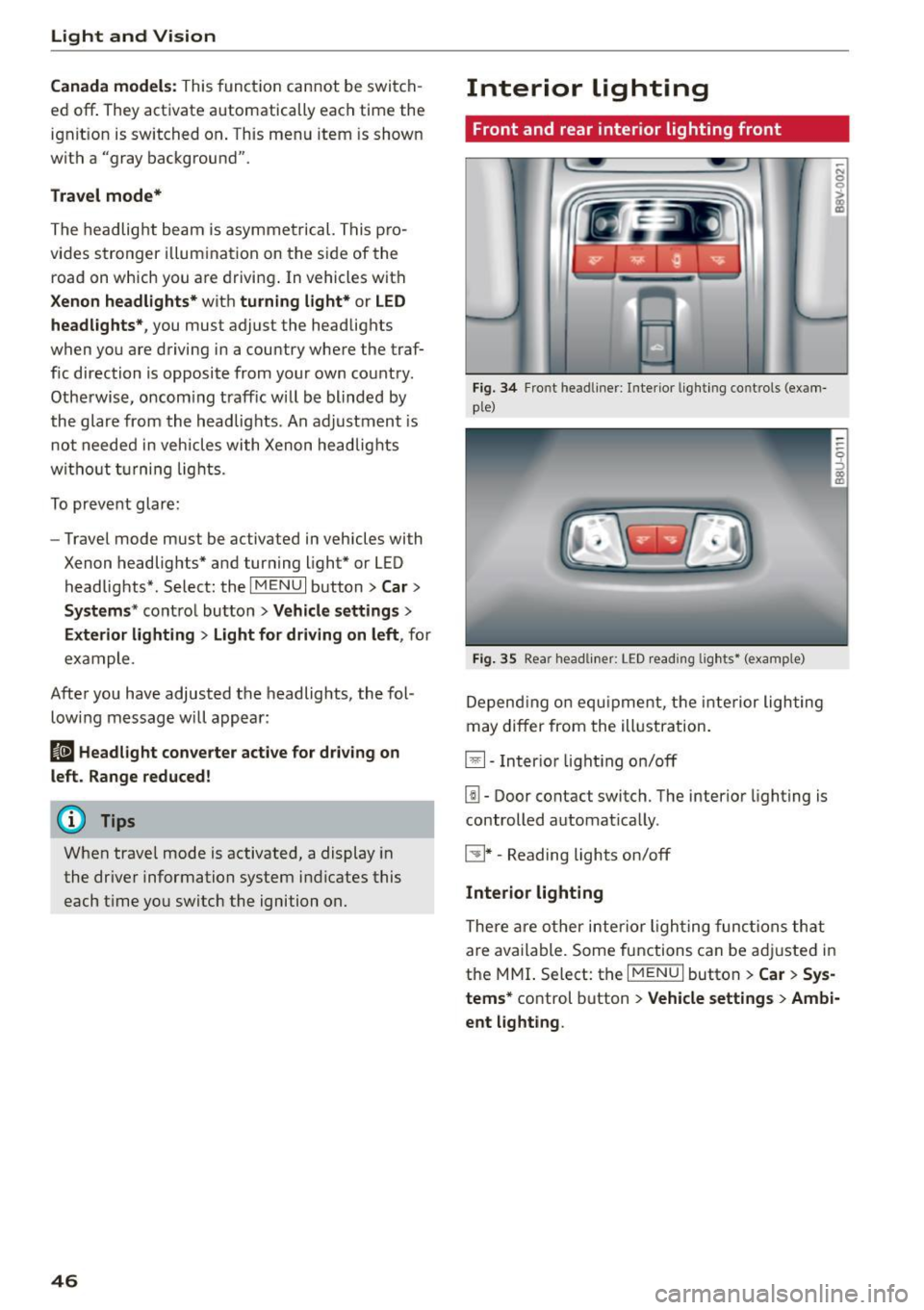
Interior lighting
Front and rear inter ior lighting front
Fi g. 34 Fro nt head liner : In te rior lig htin g co ntrols (exam
p le)
Fig. 35 Rear headli ner: L ED read ing lig hts • (examp le)
De pend ing o n equ ipme nt, th e interior ligh ting
m ay differ from the ill ustration.
El-Inter io r li ght ing on/off
[!I -Door contact switch. The interio r lighting is
controlled automat ica lly.
~ * -Reading lights on/off
Interior lighting
The re a re o ther inter ior ligh ting func tions th at
a re available. Some functions can be adju sted in
the MMI. S elect: th e
I MENU I button > Car > Sys
tems*
co ntrol button > Vehicle settings > Ambi·
ent light ing .
Page 53 of 282
....,
N
0 > co
rl I.O
"'
"'
"'
rl
-You should not drive your vehicle or press
the windshie ld wiper lever when the wiper
arms are folded away from the w indshield.
The windshield wipers would move back in
to their original position and could damage
the hood and windshield .
- To prevent damage to the windshield wash
er system, a lways loosen wiper blades that
have frozen to the windsh ield before turn
i ng the wipers on .
- To prevent damage to the wiper blades, do
not apply gasoline, petro leum, th inning
agents or other solvents on the wiper b lades or near them.
- To prevent damage to the wiper arms or
othe r components, do not try to move the
windsh ield wipers by hand.
@ Tips
- Commerc ial hot wax such as the types used
by car washe s make it more difficult t o clean
the w indshie ld.
- You can also use the service pos ition, for ex
ample, if you want to p rotect the w indshie ld
from i cing by us ing a cover.
- You cannot activate the service pos it ion
whe n the hood is open.
Digital compass
Switching the compass on and off
Ap plies to vehicles: w ith digi tal compass
Fig. 4 2 Rearview mirro r: Dig ital compass act ivated
... To turn the compass on or off, press the button
@ until the compass in the mirror appears or
disappears.
Light and Visio n
The dig ita l compass on ly works when the ignit ion
is turned on . The directions a re indicated with ab
breviations:
N (nort h), NE (northeast), E (east),
SE (southeast), S (south), SW (southwest), W
(west), NW (northwest).
You must recalibrate t he compass if it does not
display the correct direct ion
¢ page 52, Cali
brating the compass.
(D Tips
To prevent inaccurate compass readings, do not br ing any remote controls, electrical devi
ces or metallic objects near the mirror.
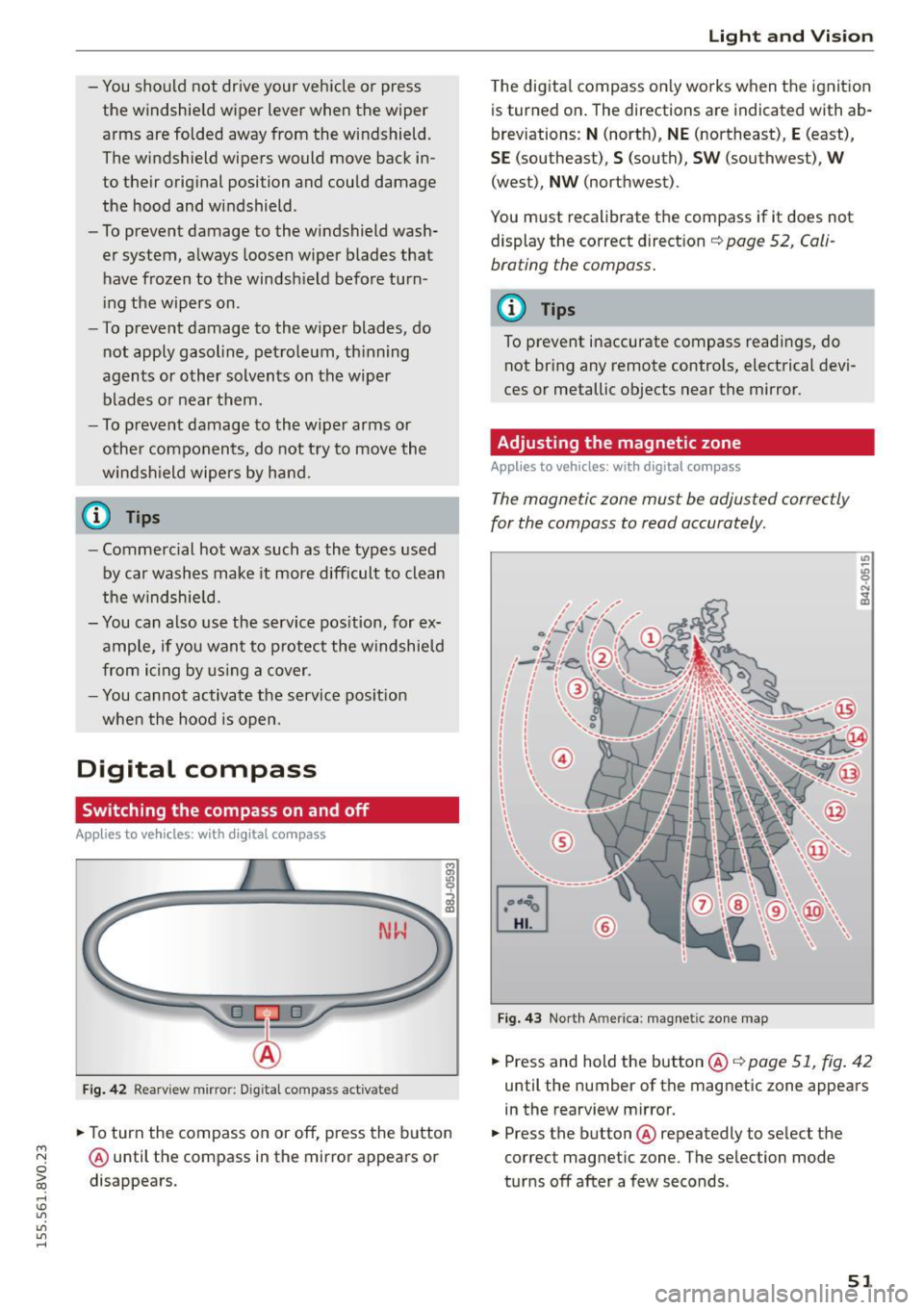
Adjusting the magnetic zone
Appl ies to vehicles: wit h digita l co mp ass
The magnetic zone must be adjusted correctly
for the compass to read accurately.
®
Fig. 4 3 Nor th Ameri ca: magnet ic zone map
... Press and hold the button @ ¢page 51, fig . 42
until the number of the mag netic zone appears
in the rearview mirror .
... Press the butt on @ repeatedly to select the
correct magnetic zone. The se lection mode
tur ns off after a few seconds .
51
Page 54 of 282
Light and Vi sion
Calibrating the compass
Appl ies to veh icles: w ith digital compass
You must recalibrate the compass if it does not
display the correct direction .
.,. Press and hold the button ® c:> page 51, fig. 42
until a C appears in the rearview mirror .
.,. Drive in a circle at about 5 mph (10 km/h) until
a d irect ion is displayed in the rearv iew m irror .
A WARNING
- To avoid endanger ing yourself and othe r
dr ivers, calibrate the compass in an area
where there is no traffic.
-
- T he dig ita l compass shou ld only be used as
an orientation aid .
If you want to check the
compass while driving, you must still pay at
tention to traffic, the road, the weather and any other possible hazards.
52
Page 79 of 282
....,
N
0 > co
rl I.O
"'
"'
"'
rl
more force to turn or brake if necessary. Be
cause you cannot steer and brake as you
usually would, this could lead to crashes
and serious injuries.
- Please note that the brake booster and pow
er steering only work when the engine is
running. When the engine off, you must use
more force to steer or brake the veh icle. Be
cause the usual steering and braking capa
bility is not avai lable, the risk of accidents or
injuries inc reases.
- Always take t he vehi cle key with you when
leaving the vehicle, even for a short period
of time. This applies partic ularly when chil
dren remain in the vehicle . Otherwise the
children could start the engine or operate
electrical equipment such as power win
dows.
- For safety reasons, always park the vehicle
with the selector lever in the P position.
Otherw ise, there is the risk that the veh icle
could roll.
- After the engine has been switched off, the radiator fan can continue to run for up to 10
minutes -even with the ignition switched
off.
It can also switch on again after some
t ime if the coolant temperature rises as the
result of heat bu ildup or if the eng ine com
partment is heated by the s un's rays and the
engine is hot .
(D Note
If the eng ine has been under heavy load for
an extended per iod of t ime, heat bu ilds up in
the eng ine comp artment after the engine is
sw itched off -there is a r isk of damaging the
engine. For this reason, let the engine run for
at idle for approximate ly two minutes before
shutting it off.
Dr iving
Starting the engine if there is a
malfunction
Applies to vehicles: with convenience key
It may not be possible to start the engine under
certain circumstances, for example if the battery
in the vehicle key is drained, if interference is af
fected the key or if there is a system malfunc
tion.
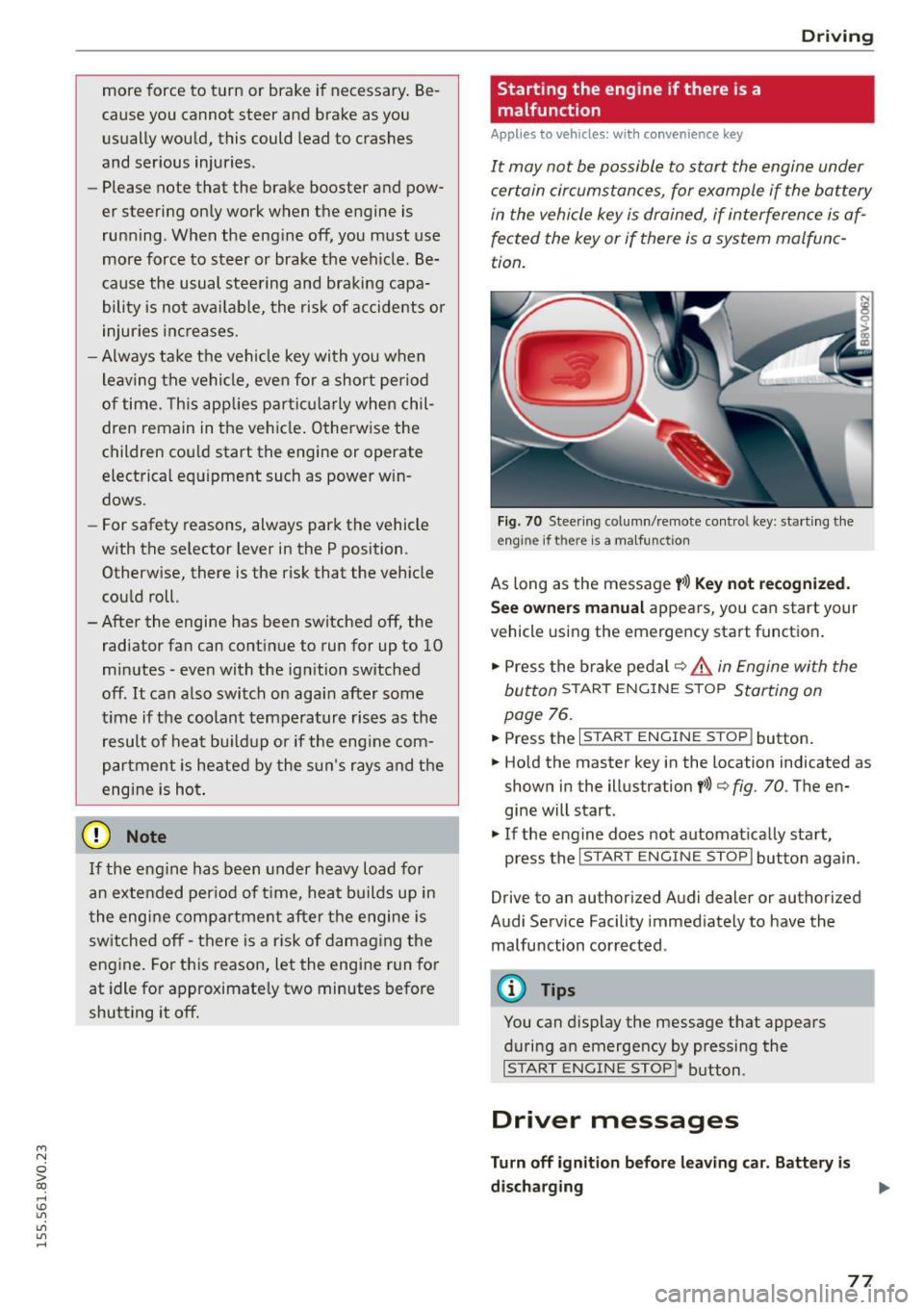
F ig. 70 Steer ing colum n/remote co ntrol key: start ing the
engine if there is a ma lfunction
As long as the message y >l) K ey not r ecognized .
Se e owne rs manual
appears, you can start your
vehicle using the emergency start function .
"' Press the brake pedal
c:::> .&. in Engine with the
button
START ENGINE STOP Starting on
page
76.
"' Press the ~ I s=T~A~R~T~E~N~G~IN~E~s=T~O~P~ I button.
"' Ho ld the master key in the location indicated as
shown in the illustration
y >>) c:::> fig. 70. The en
gine will start .
"' If the engine does not automat ically start,
press the
I START ENGINE STOP I button again.
Drive to an authorized Audi dealer or authorized
Audi Serv ice Facility immediately to have the
malfunction corrected.
@ Tips
You can display the message that appears
during an emergency by pressing the
I S TART ENGINE STOP!* button.
Driver messages
Turn off ignition befor e leavi ng car. Batt ery is
di schar ging
77
Page 80 of 282
Driving
This message appea rs and a warn ing tone sounds
if you open the driver's door when the ignit ion is
sw itched on. Switch the ign ition
off so that the
battery will not discharge.
Pressing st a rt /s to p button a gain will swit ch off
engine!
This message appears whe n you press the
I S TART ENGINE STOP !* button while driv ing
q page 76, Emergency off .
Engine start sy ste m malfunc tion . Pl ea se c on
ta ct Ser vice
The engine automatic start system has a mal
function . Drive to a n author ized Audi dealer or
author ized Audi Serv ice Facility immediately to
have the m alfunction correc ted . T o star t the en
g ine, press and hold the
I S TAR T ENGINE ST OP I
button.
DJ Ke y not r ecogniz ed. See owner 's manual
This message appears if there is no convenience
key inside the ve hicle or if the system does not
recogn ize the key . The convenience key may not
be recogn ized, for example , if it is covered by an
object that
disrupts the s ignal (such as a brief
case), or if the key battery is weak . E lectronic de
vices s uch as cell phones can also interfere w ith
the signa l.
To st ill be able to start or stop the eng ine, refer
to "Correcting a ma lfunction"
q page 77.
Ill Key not in vehicle?
The Ill indicator light turns on and this message
appears if the convenience key was removed from
the vehicle whe n the eng ine was runn ing.
If the
convenience key is no longer in the vehicle , you
cannot switch the ig nition on or start the eng ine
once yo u stop it . In add it io n, you ca nnot lock the
ve hicl e from the o utside.
Pr ess brake pedal
This message appears if you do not press the
brake peda l when starting the engine .
Please engage N or P
This message appea rs when starting or s topping
the engine if the selector leve r is not in the Nor P
position. The engine will not start/stop.
78
Shift to P, otherwi se vehicle can roll awa y.
Door s do n ot l ock
if le ver is not in P
This message appears for safety reasons a long
with a warning tone.
It appears if the selec to r
l ever for the a utomat ic transm iss ion is not in the
P position when switching the ignition
off with
the
I S TART ENGINE STOP I* button . Shift these
l ector lever to the P pos ition . Otherw ise, the vehi
cle co uld roll. You also cannot lock the vehicle us
ing the lock ing sensor o n the doo r hand le or us
i ng the conven ience key .
Electromechanical
parking brake
Operating
The electromechanical parking brake replaces
the hand brake.
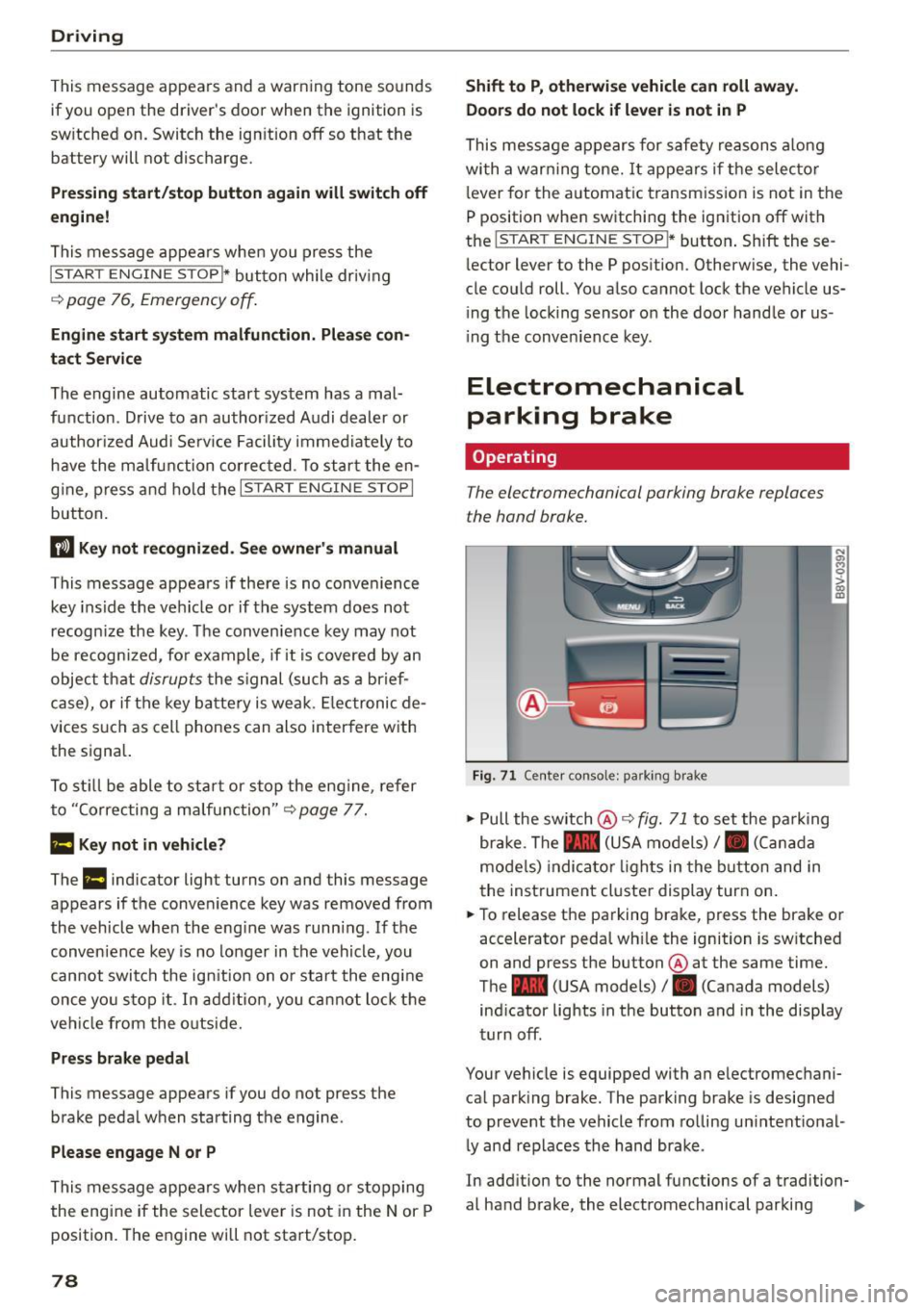
Fig. 71 C ente r consol e: pa rk in g b rake
.. Pull the sw itch @¢ fig. 71 to set the pa rking
br ake . The - (USA models)/ . (Can ada
mode ls) indica to r li ghts in the button and in
the inst rument cluste r display turn on .
.. To release the pa rking brake, press the brake or
accelerator pedal wh ile the ignition is sw itched
on and press the button @ at the same time.
The - (USA models)
I. (Canada models)
ind icator lights in the button and in the display
turn off .
Your vehicle is equipped with an e lectromechani
ca l park ing brake. The parking brake is designed
to prevent the vehicle from ro lling un intent ional
l y and replaces the hand brake .
In add ition to the normal functions of a tradition-
al hand brake, the electromechanical parking ..,_