ESP AUDI S6 2008 User Guide
[x] Cancel search | Manufacturer: AUDI, Model Year: 2008, Model line: S6, Model: AUDI S6 2008Pages: 390, PDF Size: 88.42 MB
Page 44 of 390
![AUDI S6 2008 User Guide Driver information display
In addition, all the values in the single -trip or the total -trip memory
can be deleted simultaneously.
[ i ] Tips
All stored values will be lost if the](/img/6/57596/w960_57596-43.png "AUDI S6 2008 User Guide Driver information display
In addition, all the values in the single -trip or the total -trip memory
can be deleted simultaneously.
[ i ] Tips
All stored values will be lost if the")
Driver information display
In addition, all the values in the single -trip or the total -trip memory
can be deleted simultaneously.
[ i ] Tips
All stored values will be lost if the vehicle battery is disconnected. •
MMI settings
Basic settings for the trip computer can be made in the
MM/.
Fig. 25 MMI display :
Trip computer
Setting values to zero
-Press the I CAR I function button.
- Select
Instrument cluster.
-Select Trip computer 1 or Trip computer 2.
-Select Reset to delete all the values in the memory
~ fig. 25.
Displaying and hiding driver information
-Press the I CAR I function button.
- Select
Instrument cluster.
- Selec t Trip computer 1 or Trip computer 2.
-Select, for example, Fuel range On to turn on the display
or
Off to turn the display off.
All values in the single-trip or the total-trip memory can be reset to
zero simu ltaneously in the MMI. In addition you can determine what
driving information from the trip computer shou ld be shown in the
instrument cluster display . If one of the pieces of driver information
is turned
off, that driver in formation will not be shown in the display.
The information will continue to be calculated by the trip computer
and can be turned back
on at any time. •
Tire pressure monitoring system
General notes
As an added safety feature, your vehicle has been equipped with a
tire pressure monitoring system (TPMS) that illuminates a low tire
pressure telltale when one or more of your tires is significantly
under-inflated . The TPMS on ly provides a low tire pressure warning
and does not reinflate your tires .
Accordingly, when the low tire pressure telltale illumin ates, you
should stop and check your tires as soon as possible, and inflate
them to the proper pressure. Driving on a significantly under
inflated tire causes the tire to overheat and can lead to tire failure.
Under -inflation also reduces fuel efficiency and tire tread life, and
may affect the vehicle's handling and stopping ability .
0 Note
• Please note that the TPMS is not a substitute for proper tire
maintenance, and it is the driver's responsibility to maintain correct
tire pressure, even if under-inflation has not reached the level to
trigger illumination of the TPMS low tire pressure telltale. .,,_
Page 46 of 390
![AUDI S6 2008 User Guide Driver inf ormati on displ ay
<£> For th e sak e of th e environm ent
Driving w ith under -inflated tires reduces fuel efficiency and tire
tread life.
[ i ] Tip s
• Each tire, inc](/img/6/57596/w960_57596-45.png "AUDI S6 2008 User Guide Driver inf ormati on displ ay
<£> For th e sak e of th e environm ent
Driving w ith under -inflated tires reduces fuel efficiency and tire
tread life.
[ i ] Tip s
• Each tire, inc")
Driver inf ormati on displ ay
<£> For th e sak e of th e environm ent
Driving w ith under -inflated tires reduces fuel efficiency and tire
tread life.
[ i ] Tip s
• Each tire, incl udin g the sp are, should be checked monthly when
cold and set to the recommended inflation pressure as specified on
the tire pressure label=>
page 317.
• The factory supplied spare whee l is equipped with a sensor for
the tire pressure monitoring system. As long as the spare whee l it
not mounted, the tire pressure of this tire will not be monitored.
• The tire pressure monitoring system he lps the driver to keep an
eye on t ire pressures. But the driver stil l has the responsibility for
maintaining the correct tire pressure.
• Tire pressure must only be adjusted when the temperature of the
tires is about the same as ambient air temperature .
• When tires are replaced, the sensors and valves shou ld not be
detached or exchanged. Only the valve core needs to be rep laced
and, i f necessary, the valve and the wheel electronics replaced.
• If you should put different wheels and tires on your vehicle (e.g.
winter wheels and tires), you must be certain that the wheels and
tires are compatible with the tire p ressure monitoring system.
Otherwise the system w ill register a ma lfunction and a fault
message will be displayed . For more information, contact your Audi
dea ler.
• Adjust the tire pressure and store the pressure in the tire pres
sure monitor ing system to the load you are carry ing. •
Significant loss of air pressure ft)
The yellow symbol appears in the event of a significant
loss of air pressure .
0
"' 8
i
Fig . 26 Disp lay: ye llow
s y mbo l w ith m essage
If the warni ng l ight in the i nstrument cluster comes on
and t hen the ' ) symbol appears in the display~ fig. 26,
press ure in at least one t ire is too low.
Stop driv ing as soo n as possible without endangeri ng
yourself and other drivers o n the road .
- Inspect all tires.
- Change the tire if necessary~
page 338.
The' warning ligh t in the instrument cluster comes on when the
tire is significantly underinflated.
In addition, the tire symbol appears in the display together with
the message
Pl ease check tir e pr ess ure::::> fig. 26 .
After a few seconds, the message disappears again. If you would
like to show the message again, press the [ CH ECK] button. _.,,
Page 48 of 390
Driver inf ormati on displ ay
• The tire pressure monitoring system helps the driver to keep an
eye on tire pressures. But the driver stil l has the responsibility for
maintaining the correct tire pressure .•
Wheel change
If a wheel is changed, the wheels that were exchanged
have to be re-programmed.
- Turn on the ignit ion.
- Pressthe!CARlfunction button.
- Select
Systems in the CAR menu.
- Selec t
Tire pre ssure monitoring .
Select Initialize wheel s.
Programming is necessary:
• after the tires have been rotated on the vehicle, or the spare tire
is used,
• if tires with new wheel sensors are used.
A ll pressure warning and system malfunction indicators in the
display will be canceled.
If a wheel change has been made, it is necessary to complete the
Initi alize w heel s function . After you have selected the function, the
new wheels are programmed and the actual pressures are stored.
This learning phase can take up to 20 minutes driving time.
During the learning process the tire pressure monitoring system is
not avai lable .•
Malfunctions :.r,,11~
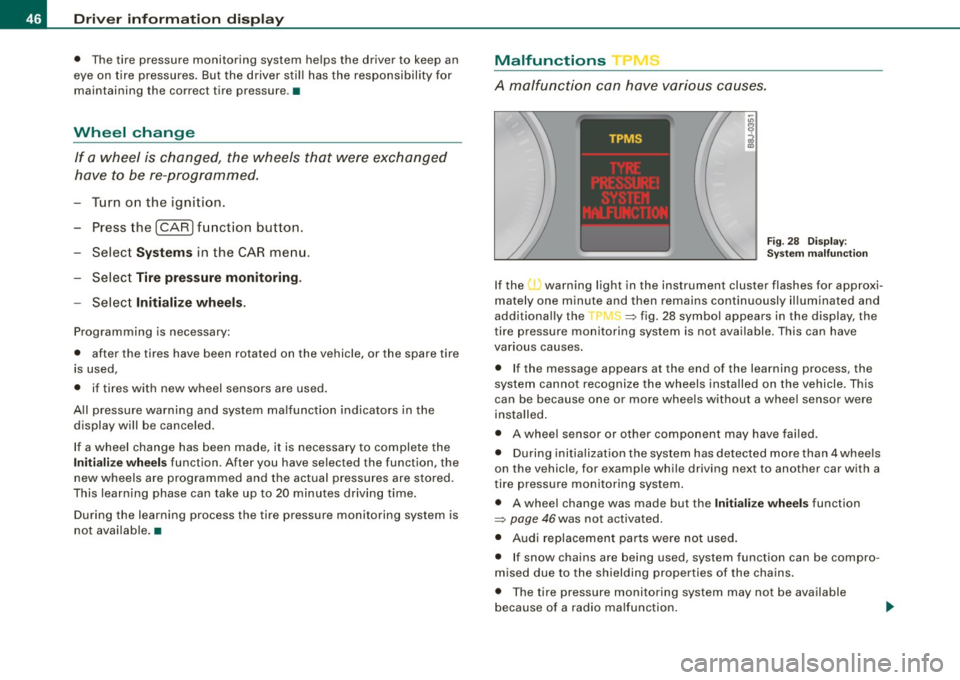
A malfunction can h ave various causes.
Fig . 28 Displ ay :
Syste m malfu nc tion
If the warning light in the instrument cluster flashes for approxi
mately one minute and then remains continuously il luminated and
additionally the
JIS => fig . 28 symbol appears in the display , the
tire pressure monitoring system is not available. This can have
various causes.
• If the message appears at the end of the learning process, the
system cannot recognize the wheels installed on the vehicle. This
can be because one or more wheels without a whee l sensor were
insta lled .
• A wheel sensor or other component may have failed .
• During initialization the system has detected more than 4 whee ls
on the vehicle, for examp le while driving next to another car with a
tire pressure monitoring system .
• A wheel change was made but the Initialize wheel s function
=> page 46was not activated.
• Audi replacement parts were not used .
• I f snow chains are being used , system function can be compro
m ised due to the shielding properties of the cha ins .
• T he tire pressure monitoring system may not be available
because of a radio ma lfunction.
Page 50 of 390
Opening and closing
Opening and closing
Keys
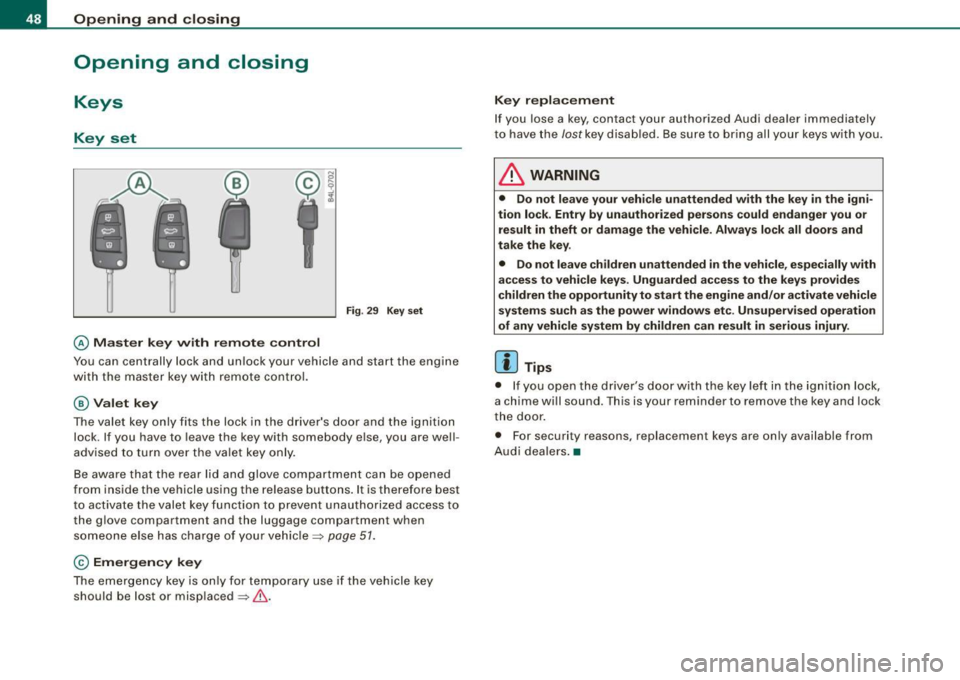
Key set
Fig . 29 Key s et
@ Ma ster key with remote control
You can centrally lock and unlock your vehicle and start the engine
with the master key with remote control.
@ Valet k ey
The valet key only fits the lock in the d river's door and the ignition
lock . If you have to leave the key with somebody else, you are well
advised to turn over the valet key only .
Be aware that the rear lid and glove compartment can be opened
from inside the vehicle using the release buttons . It is therefore best
t o activate the valet key func tion to prevent unauthorized access to
the g love compartment and the luggage compartment when
someone else has charge of your vehicle =>
page 57.
© Emergency key
The emergency key is on ly for temporary use i f the vehicle key
should be lost or misplaced =>& .
Key replacement
If you lose a key, contact your authorized Audi dea ler immediately
to have the
lost key disab led. Be sure to br ing all your keys w ith you .
& WARNING
• Do not leave your veh icle unattended w ith the key i n th e ig ni
tion lock . Entry by unauthori zed person s could endanger you or
re sult in theft or damage the vehicle. Alway s lock all door s and
take the ke y.
• Do not l eave child ren un attended
in the vehicle , especi ally w ith
acces s to vehi cle keys . Unguarded ac ce ss to the ke ys prov ide s
children the opportunity to st art the engine and /or a ctivate vehicle
systems such as the power windows et c. Unsupervi sed oper ation
of any vehicle system by children can re sult in seriou s injury.
[ i ] Tips
• If you open the driver's door with the key lef t in the ignitio n lock,
a chime will sound . T his is your reminder to remove the key and lock
the door .
• For security reasons, replacement keys are on ly available from
Audi dea lers .•
Page 54 of 390
Openin g a nd clo sin g
for using the rear lid release handle in conjunction with the
advanced key*.
For this reason, be sure to only hand over the
valet key to the person
who wil l take charge of your vehicle.
[ i ] Tip s
Be sure to activate the function before handing over the valet key to
someone else. The valet key only fits the lock in the driver's door and
the ignition lock. •
Certification
The remote control device comp lies with
• USA model s: Part 15 of the FCC Rules.
• Cana da mo dels: RSS -210 of Industry Canada.
Operation is subject to the following conditions:
• this device may not cause harmful interference, and
• this device must accept any interference received, inc luding
interference that may cause undesired operation .
0 Note
The manufacturer is not responsible for ANY RADIO OR TV interfer
ence caused by unauthor ized modifications to th is equipment .
Changes or modifications to this unit not express ly approved by the
party responsib le for comp liance could void the user's authority to
operate the equipment. •
Power locking system
General description
The power locking system locks or unlocks all doors and
the rear lid simultaneously.
T he power locking system in your vehic le incorporates the fol lowing
functions :
• Central locking function
• Selective unlock feature~
page 55
• Remote contro l feature ~ page 49
• Advanced Key*~ page 59
• Anti -theft alarm system ~ page 61
All the doors and the rear lid are locked by the central locking
system when you lock the vehicle . You can set whether genera lly
only the driver's door or all doors and the rear lid should be
unlocked when you open the v ehicle in th e MMI menu
Central
lo cking
to suit your individual desires~ page 55 .
Un loc king t he vehicle
You can un lock the vehic le from outside either by using the remo te
control
or by inserting and turning the key in th e driver's door lock.
When you
unlock your vehicle :
• The anti-theft alarm system is deactivated briefly.
• The vehicle interior lights illuminate for approximate ly 30
seconds .
• All turn signal lights will flash twice when the car is unlocked.
• After un locking the vehicle, you have 60 seconds to open a door
or the rear lid. After 60 seconds, the vehicle automatically loc ks and
the anti-theft a larm system activates again .
The rear lid can be locked or unlocked either by using the remote
control
o r by inserting and turning the key in the driver's door lock . _,,
Page 55 of 390
Unlocking the vehicle with the remote control wi ll only unlock the
rear lid, t o
open it, the lid handle needs to be pressed .
Locking the vehi cle
You can lock the vehicle from outside e ither by using the re mote
control
or by inserting and turning the key in the drivers 's door lock.
When you
l oc k th e vehicle:
• All doors and the rear lid are locked .
• All turn signal lights w ill flash once when the car i s locked.
• T he anti -theft alarm system is activated . The horn of the anti
t hef t alarm syste m wi ll sound and the an ti-the ft alarm sys tem readi
ness light, located in the upper part of the driver's door panel, wil l
sta rt to bl ink.
• T he vehicle interior lights turn off .
Unlocking and lo cking with Ad van ced Key *
On vehicles which a re equipped with the Advan ced Key * authoriza
tion system, the doors are unlocked
wi thout a key by means o f a
proximity sensor in the door hand le. The doors are simi lar ly locked
without a key usi ng t he locking button . Each door has a prox imity
sensor and a locking button .
Power side door closer*
The vehic le is equipped with a power side door closer. When c losing
a door, you simply need to gently push on the doo r. The door wil l
then automatica lly c lose by itself~
page 56.
Automatic lo cking
The automatic locking feature locks all the vehicle doors and the
rear lid when you drive fas ter than 9 mph (15 km/h) . This funct ion
can be turned on and off in the
MMI Central lo cking Menu
~ p age 55.
You can unlock the vehicle from the inside by :
• removing the key from the ignition switch (the vehicle will auto
matica lly un lock itself) or
Controls and equip
ment
Opening and clo sing
• pressing the unlock part of the power lock sw itch rw or
pull ing the door handle (twice to open the rear doo rs) .
& WARNING
• When you lock your veh icle from outside , nobody -especially
c hildren -should remain in side the vehi cle . Re membe r, when you
lock the vehicle from the out side the windows cannot be opened
from the in side .
• When you leave the vehicle, alway s remove the ignition key and
t ak e it with you . Th is will prevent passengers (children , for
example ) from accidentally being locked in the vehicle should they
accidentally p ress the po wer lock ing s witch in the front doors .
• Do not leave children ins ide the vehicle unsupervised. In an
emergen cy it would be impo ssible to open the doors from the
outside without the key.
[ i ] Tips
• I n the eve nt of a crash with airbag deploymen t all locked do ors
wi ll be automatically un locked to give access to the vehicle occu
pan ts from the ou tside.
• I f the power lock ing system should malfunction, you can lock
each door individua lly using the vehicle key~
page 57.
• If the power locking system should fail, you can still open the
fu el t ank flap in an emerg ency ~
pag e 295.
• You are well advised not to keep va luables inside an unattended
vehic le, visible o r not. Even a properly locke d veh ic le can not provide
the security of a safe .•
I • •
Page 59 of 390
• You cannot open the doors or the rear lid from the outside
(increased security, for example when you are stopped at a red
light).
• The diodes in the power locking switches illuminate when all the
doors and the rear lid are closed and locked.
• All diodes turn dark as soon as one of the doors has been
unlocked .
• You can unlock and open the doors from the inside by pulling on
the door handle.
• If the driver's door is opened (after you have locked the vehicle
from the inside using the power locking switch), the door will
remain unlocked to prevent you from locking yourself out of your
vehicle. After you close the door, you have to lock the driver's door
again.
• If you have a crash and the airbag is activated, the doors auto
matically unlock.
& WARNING
• If you use the power locking switch with the doors closed,
remember that all the vehicle doors will lock.
• Locking doors from the inside can help prevent inadvertent
door opening during an accident and can also prevent unwanted
entry from the outside . Locked doors can, however, delay assis
tance to vehicle occupants and hold up rescue efforts from the outside in an accident or other emergency. •
Con tro ls and eq uip
ment
Opening and closing
Emergency locking
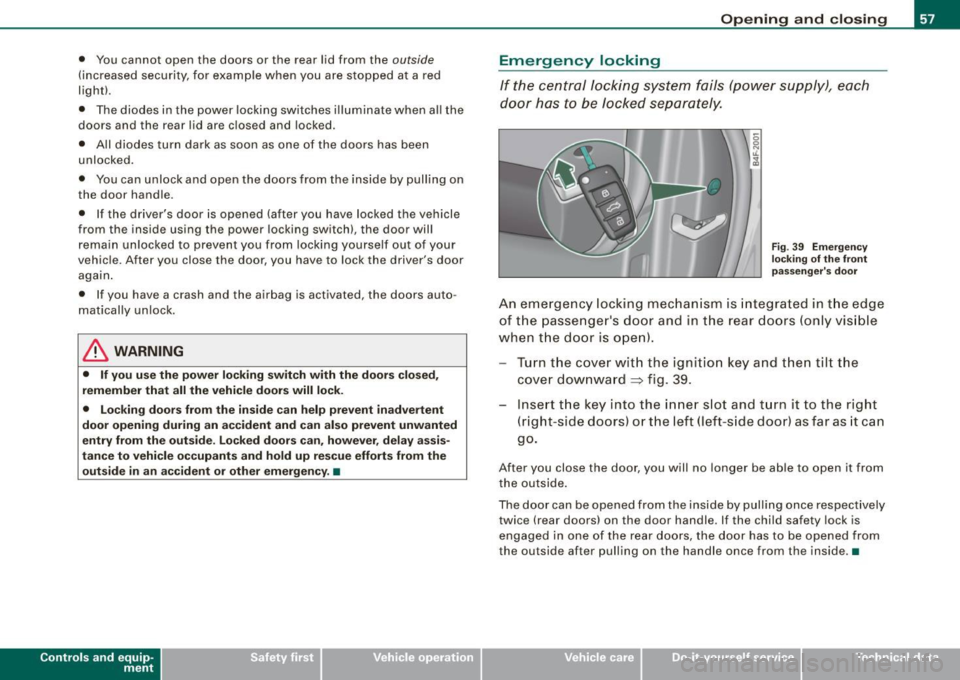
If the central locking system fails (power supply), each
door has to be locked separately.
Fig . 39 Emergency
locking of the front
passenger's door
An emergency locking mechanism is integrated in the edge
of the passenger 's door and in the rear doors (only visible
when the door is open).
Turn the cover with the ignition key and then tilt the
cover downward
=> fig. 39.
Insert the key into the inner slot and turn it to the right
(right-side doors) or the left (left -side door) as far as it can
go.
After you close the door, you will no longer be able to open it from
the outside.
The door can be opened from the inside by pulling once respectively
twice (rear doors) on the door handle. If the child safety lock is
engaged in one of the rear doors, the door has to be opened from
the outside after pulling on the handle once from the inside .•
Vehicle care I I irechnical data
Page 60 of 390
Opening and closing
Rear lid
Opening and closing rear lid
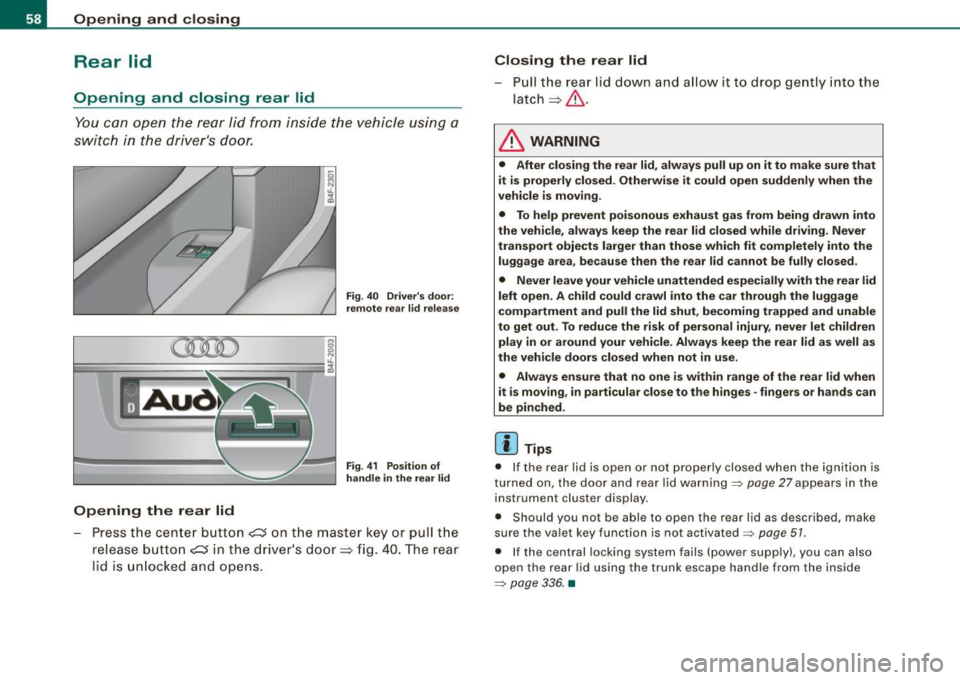
You can open the r ea r lid from ins ide the v ehicle using a
sw itc h in the dr iver 's door.
Opening the rear lid
Fig. 40 Driver's door :
remote rea r lid relea se
Fig . 41 Position of
handle in the re ar lid
- Pre ss the ce nte r butto n ~ on t he ma ste r key o r pull the
release butt on
~ in t he d river's door => fig. 40. T he rear
l id is unl ocked a nd opens.
Closing the rear lid
- Pull th e r ear lid dow n a nd a llow i t to drop gently into t he
latch=> &.
& WARNING
• After closing the rear lid , always pull up on it to make sure that
it is properly closed. Otherwise it could open suddenly when the
vehicle is moving.
• To help prevent poisonous exhaust gas from being drawn into
the vehicle, always keep the rear lid closed while driving . Never
transport objects larger than those which fit completely into the
luggage area, because then the rear lid cannot be fully closed.
• Never leave your vehicle unattended especially with the rear lid
left open . A child could crawl into the car through the luggage
compartment and pull the lid shut, becoming trapped and unable
to get out. To reduce the risk of personal injury , never let children
play in or around your vehicle. Always keep the rear lid as well as
the vehicle doors closed when not in use.
• Always ensure that no one is within range of the rear lid when
it is moving , in particular close to the hinges -fingers or hands can
be pinched.
[ i ] Tips
• I f the rear lid is open or not proper ly closed when the ignition is
t urne d on, t he doo r and r ear l id wa rning =>
pag e 27 appea rs in the
instrument cluster display .
• S hould you not be a ble to open t he rear l id as desc ribed, ma ke
s u re the va let key f unction is not activated~
page 51 .
• If the central lock ing syst em fa ils (power supp ly ), you can a lso
o pen the rea r lid usin g th e t runk es cape ha ndle fr om the ins ide
=>
pa ge 33 6. •
Page 61 of 390
Child safety lock
Power child safety lock for the rear doors t
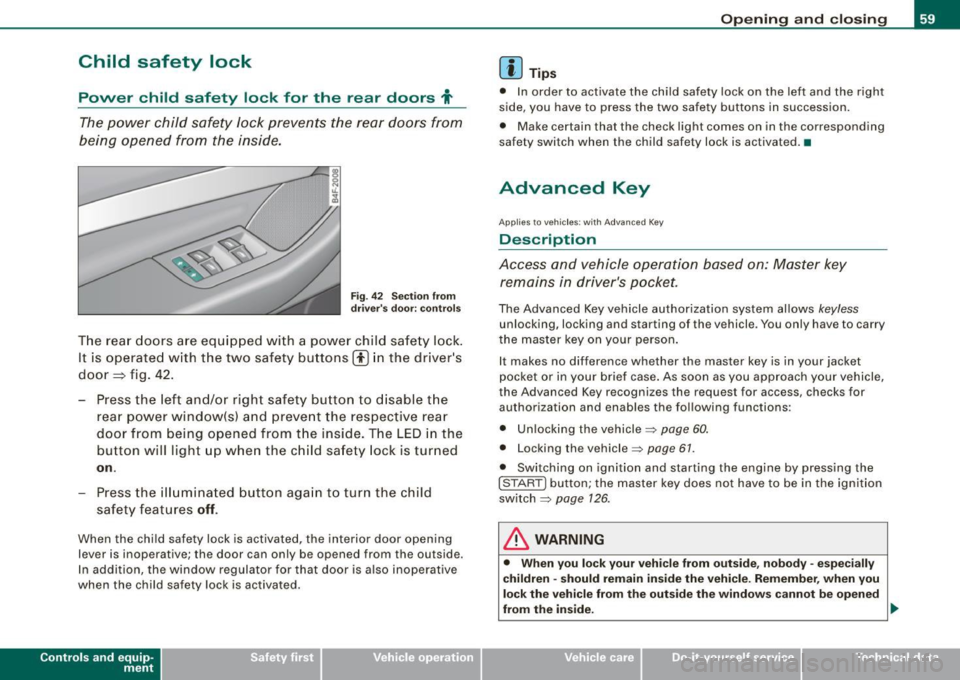
The power child safety lock prevents the rear doors from
being opened from the inside.
Fi g. 4 2 Sec tio n fro m
dr ive r's door: co ntrols
T he rear doors ar e equip ped with a power child safe ty lock .
It is operated with t he two safety buttons(!) in the driver's
door=} fig. 42 .
- Press the left and/or right safety button to disable t he
rear p ower window(sl and preve nt the respective rear
door from being opened from t he inside. The LED in the
button will light up when the chi ld safety lock is tur ned
on .
- Press the ill umina ted butt on aga in t o turn the child
safety f eatures
off .
When the chi ld safe ty lock is activated, the interior door opening
lever is inoperative; the door can only be opened from the ou tside .
In addi tion, the window regulator for that door is a lso inoperative
when the child safety lock is activated.
Con tro ls and eq uip
ment
Op ening and clo sing
[ i ] Tip s
• In order to activate the child safety lock on the left and the righ t
side, you have to press the two safety buttons in succession.
• Make certain that the check light comes on in the corresponding
safety switch when the child safety lock is activated. •
Advanced Key
Applies to veh ic les: wit h Ad vanced Key
Description
Access and vehicle operation based on: Master key remains in driver's pocket.
The Advanced Key vehicle authori zation system allows keyless
unlocking, locking and starting of the vehicle . You only have to carry
t he master key on your person .
It makes no difference whether the master key is in your jacket
pocket or in your brief case . As soon as you approach your vehicle ,
the Advanced Key recogni zes the request for access, checks for
authori zation and enab les th e following functions :
• Unlocking the vehicle:::::,
page 60.
• Locking th e vehicle :::::, page 61.
• Switching on ignition and starting the engine by pressing the
I STAR T] button; the master key does not have to be in the igni tion
sw itch:::::,
page 126 .
& WARNING
• Whe n you lock your veh icle from o uts id e, nobod y -espe cia lly
c hildren -sh ould re main in side the vehic le. Reme mber , when you
lock the vehicle fr om the out side th e windo ws cannot be open ed
from the inside. .,,.
Vehicle care
I I Technical data
Page 62 of 390
Opening and closing
& WARN ING (continued )
• When you leave the vehicle , alway s remove the ignition key and
take it w ith you . This will prevent pa ssenge rs (children , for
e x ample ) from accidentally being locked in the veh icle should they
accidentally pre ss the powe r locking switch in the front door s.
• Do not leave children inside the vehicle unsupervised. In an
emergency it would be impo ssible to open the doors from the
outs ide without the key .
[ i J Tips
• In order for Advanced Key to function, you must a lways carry the
mas ter key w ith you.
• In order to be ab le to un lock or lock the vehicle, the autho rized
master key must be within a range of about 1.5 meters from the
door or the rear lid.
• Of course, you can still unlock and lock your vehicle using the
button s on the maste r key . The se lector lever must be in the P
pos it ion .•
Ap plies to vehicles: w it h Ad vanced Key
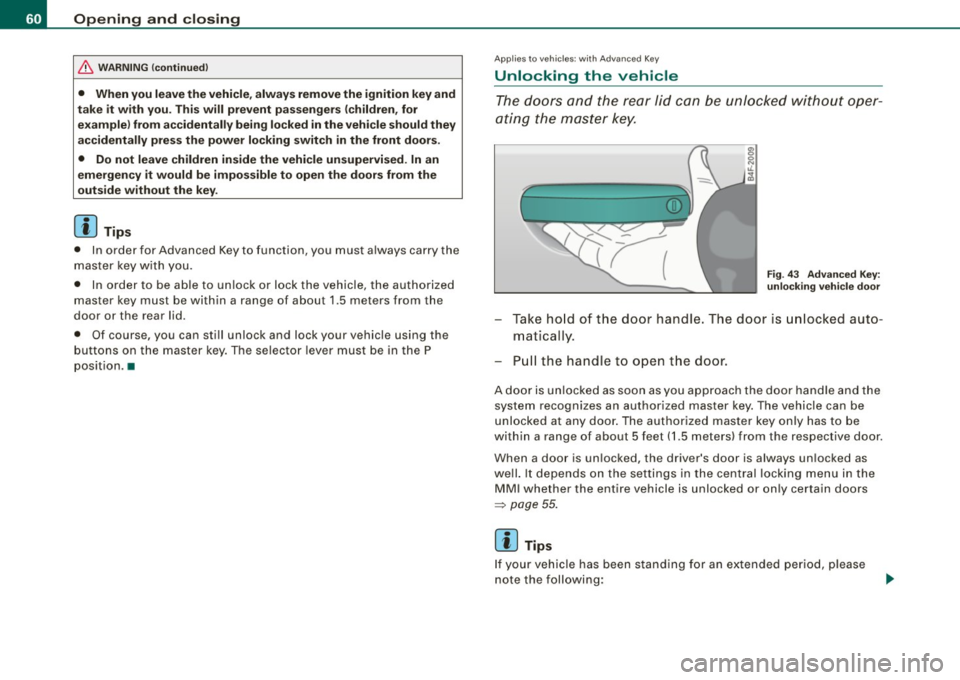
Unlocking the vehicle
T he d oo rs and the rear lid c an be unlo cked withou t oper
at ing the mas ter ke y.
F ig . 43 Adva nced Key :
unlocking vehi cle d oo r
- Take ho ld of t he door handle. The d oor is unlocked auto
maticall y.
- P ull the handle to o pen t he door .
A doo r is un lo cke d as soon as you app roach the door hand le and t he
system recogn izes an authorized master key. The vehicle can be
unlocked at any door . The authorized master key only has to be
with in a range of about 5 feet ( 1.5 meters) from the respective door .
When a door is un locked, the driver's door is always un loc ked as
we ll. It depends on th e settings in th e central locking menu i n the
M MI whether the entire vehicle is unlocked or on ly certa in doors
~ p age 55.
[ i J Tips
I f your vehic le has been s tanding f or an ex ten ded period , please
note the following :