cruise control AUDI S6 2009 User Guide
[x] Cancel search | Manufacturer: AUDI, Model Year: 2009, Model line: S6, Model: AUDI S6 2009Pages: 398, PDF Size: 43 MB
Page 132 of 398
• ..__A_ d_ a-:.. p_t _iv _ e_ C_r_ u_ i _s _ e_ C_ o_n_ t_ r_ o_ l _____________________________________________ _
toward you=> page 132, "Turning Adaptive Cruise Control off
t emporarily". •
Applies t o ve hicles: with Adapt ive Cruis e Control
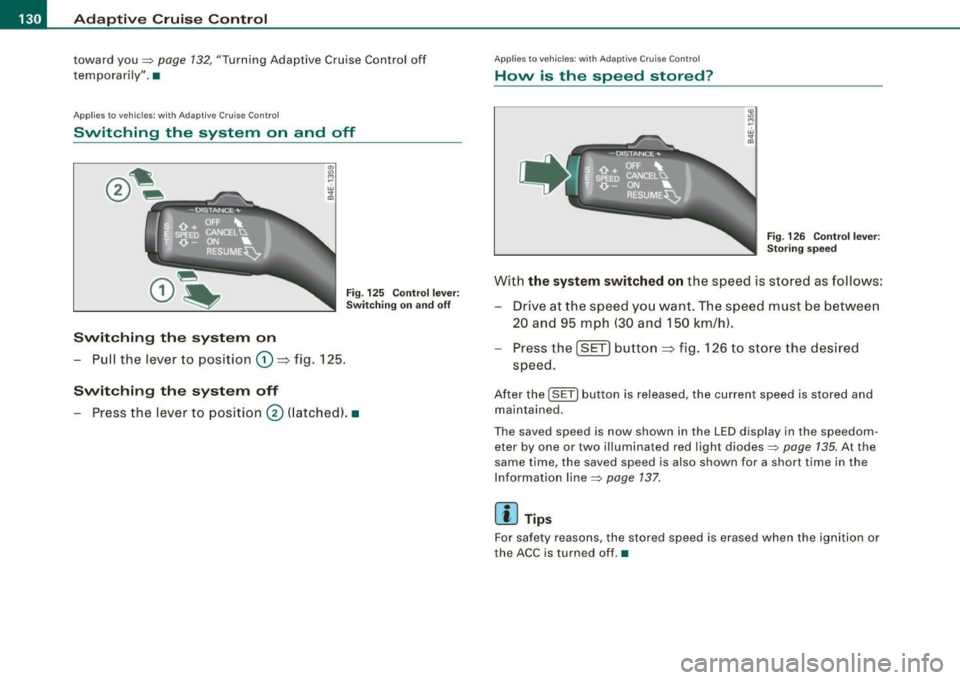
Switching the system on and off
Fig . 12 5 Con tro l l eve r:
Sw itchin g on and o ff
Swit ching th e sy stem on
- Pull the lever to position G) ~ fig. 125 .
Switching the s ystem off
- Press the lever to position 0 (latched). •
Applies to vehic les: with Adapt ive Cruise Contro l
How is the speed stored?
Fi g. 12 6 Contr ol l ever :
Stori ng sp ee d
With the system switched on the speed is stored as follows :
Drive at the speed you want . The speed must be between
20 and 95 mph (30 and 150 km/h) .
Pr ess the
I SETI button ~ fig. 126 to sto re the desired
speed .
After the I SETI button is released, the current speed is stored and
maintained .
The saved speed is now shown in the LED display in the speedom
eter by one or two illuminated red light diodes=>
page 135. At the
same time, the saved speed is also shown for a sho rt time in the
Information line=>
page 137.
[ i ] Tips
For sa fety reasons, the stored speed is erased when the igni tion or
the ACC is turned off. •
Page 133 of 398
Adaptive Cruise Control -
---------------=-------'
Applies to vehi cles: w it h Ada ptive Crui se Co nt rol
Changing stored speed
The speed can be changed without touching the acceler
ator or brake pedal .
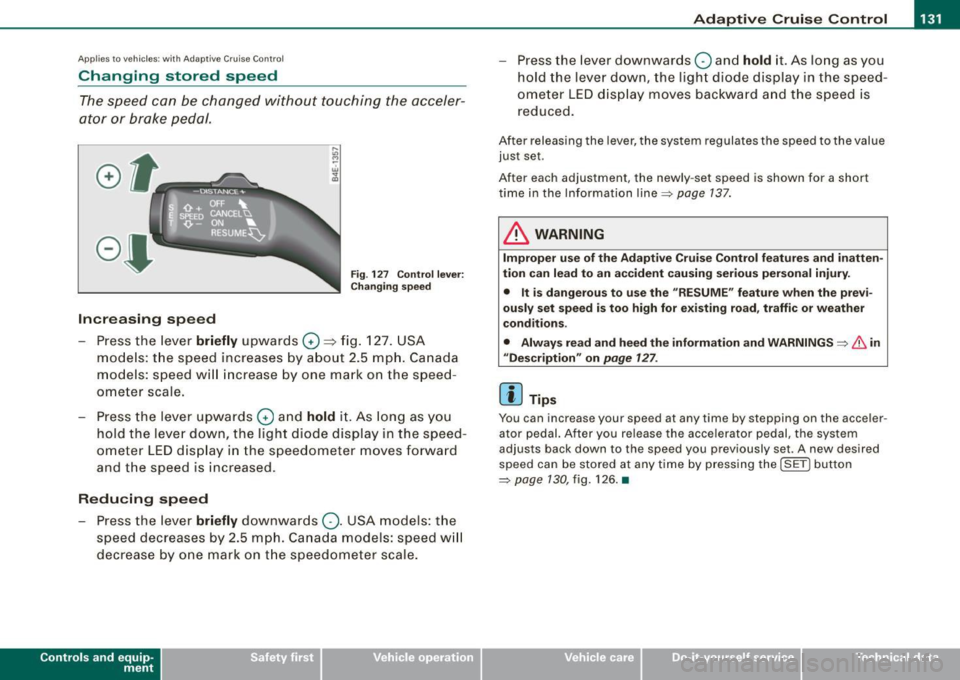
Fig. 127 Control lever:
Changing speed
Increasing speed
- Press the lever briefly upwards
G) ~ fig. 127. USA
models: the speed increases by about 2.5 mph. Canada
models: speed will increase by one mark on the speed
ometer scale.
- Press the lever upwards
G) and hold it. As long as you
hold the lever down, the light diode display in the speed
ometer LED display in the speedometer moves forward
and the speed is increased .
Reducing speed
- Press the lever briefly downwards
Q. USA models: the
speed decreases by 2.5 mph. Canada models: speed will
decrease by one mark on the speedometer scale.
Con tro ls and eq uip
ment
- Press the lever downwards Q and hold it. As long as you
hold the lever down, the light diode display in the speed
ometer LED display moves backward and the speed is
reduced.
After releasing the lever, the system regulates the speed to the value
just set .
After each adjustment, the newly -set speed is shown for a shor t
time in the Information line~ page
137.
& WARNING
Improper use of the Adaptive Cruise Control features and inatten
tion can lead to an accident causing serious personal injury.
• It is dangerous to use the "RESUME" feature when the previ
ously set speed is too high for existing road, traffic or weather
conditions.
• Always read and heed the information and WARNINGS ~
& in
"Description" on
page 127 .
[ i] Tips
You can inc rease your spe ed at any time by stepping on the ac celer
ator pedal. After you release the accelerator pedal, the system
adjust s back down to the speed you previously set . A new desired
speed can be stored at any time by pressing the !SET ) button
~ page 130 , fig. 126. •
Vehicle care I I irechnical data
Page 134 of 398
-Adaptive Cruise Control "----'-----------------
Ap
plies to ve hicles : w it h Ad aptive Crui se Co nt rol
Turning Adaptive Cruise Control off
temporarily
In some situations it makes sense to turn Adaptive Cruise
Control off temporarily.
Turning control off temporarily
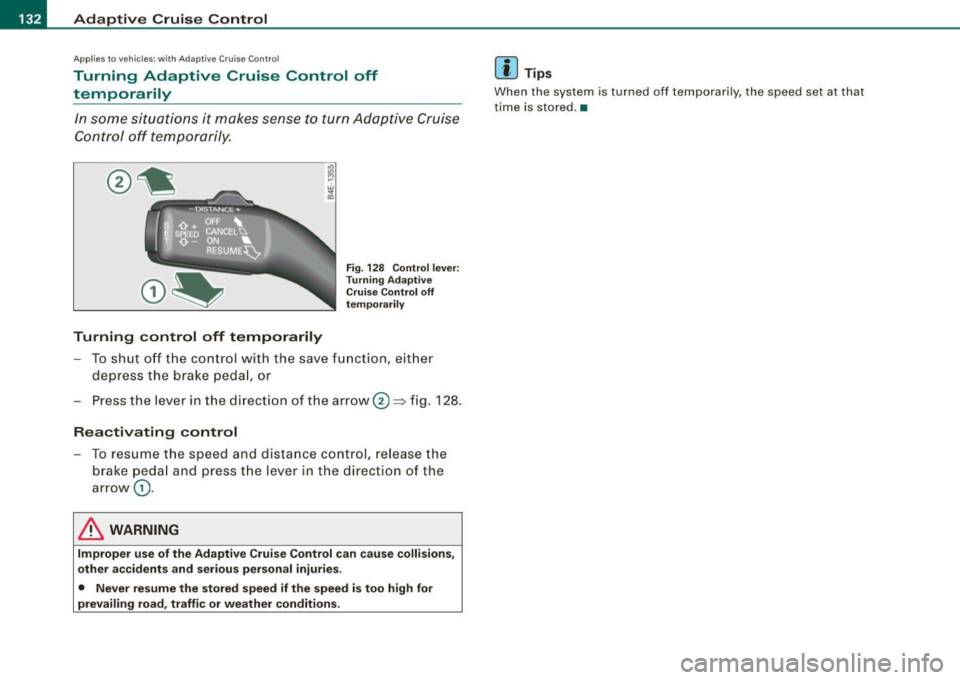
Fig. 128 Control lever:
Turning Adaptive
Cruise Control off
temporarily
- To shut off the control with the save function, either
depress the brake peda l, or
Press the lever in the direction of the arrow ®~ fig.
128 .
Reactivating control
-To resume the speed and distance control, release the
brake pedal and press th e lever in the direction of the
arrow
G) .
& WARNING
Improper use of the Adaptive Cruise Control can cause collisions,
other accidents and serious personal injuries.
• Never resume the stored speed if the speed is too high for
prevailing road, traffic or weather conditions .
[ i ] Tips
When the system is turned off temporarily, the speed set at that
time is stored. •
Page 135 of 398
Adaptive Cruise Control -
---------------=-------'
Applies to vehi cles: with Adaptive Cru ise Co nt rol
How is the distance (time interval) set?
Distance can be set in four stages.
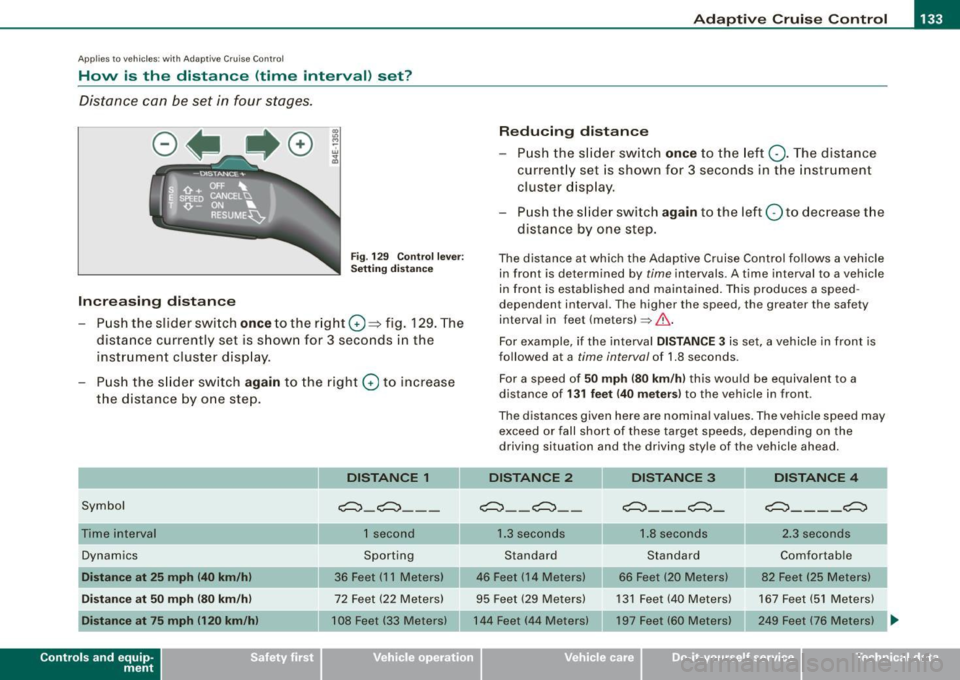
Fig . 129 Control lever:
Setting distance
Increasing distance
- Push the slider switch
once to the right G) ~ fig. 129. The
distance currently set is shown for 3 seconds in the
instrument cluster display.
- Push the slider switch
again to the right G) to increase
the distance by one step.
Symbol
Dynamics
Distance at 25 mph (40 km/h)
Distance at 50 mph (80 km/h)
Distance at 75 mph 1120 km/h)
Con tro ls and eq uip
ment
DISTANCE 1
~-~---
1 second
Sporting
36 Feet (11 Meters)
72 Feet (22 Meters)
108 Feet (33 Meters)
Reducing distance
Push the slider switch
once to the left Q. The distance
currently set is shown for 3 seconds in the instrument
cluster display.
Push the slider switch
again to the left Oto decrease the
distance by one step.
The distance at which the Adaptive Cruise Control follows a vehicle in front is determined by
time intervals. A time interval to a vehicle
in front is established and maintained. This produces a speed
dependen t interval. The higher the speed , the greater the safety
interval in feet (meters)
=> &..
For example, if the interval DISTANCE 3 is set, a vehicle in front is
followed at a
time interval of 1.8 seconds .
For a speed of
50 mph (80 km/h) this would be equivalent to a
distance of
131 feet (40 meters) to the vehicle in front.
The distances given here are nominal values. The vehicle speed may exceed or fall short of these target speeds, depending on the
driving situation and the driving style of the vehicle ahead.
DISTANCE 2 DISTANCE 3 DISTANCE 4
~--~--~---~- ~----~
1.3 seconds 1.8 seconds 2.3 seconds
Standard Standard Comfortable
46 Feet (14 Meters) 66 Feet (20 Meters) 82 Feet (25 Meters)
95 Feet (29 Meters) 131 Feet (40 Meters) 167 Feet (51 Meters)
144 Feet (44 Meters) 197 Feet (60 Meters) 249 Feet (76 Meters)
~
Vehicle care I I Technical data
Page 136 of 398

• .___A_ d_a_ p:- t_iv _ e_ C_ r_u _is _ e_C_ o_ n_ t_ r_ o_ l --------------------------------------------
How your vehicle responds when accelerating and fol lowing other
veh ic les w ith ACC operat ing can be a dapt ed to your persona l wishes
through different driving programs. Depending on which driving prog ram a nd whic h dis tance you choose, your vehicle will respond
Settings DISTANCE 1
Symbol for time interval
~ -~---
more dynamica lly or more comfortably when accelerating and
b raki ng. T he setting is selecte d throug h the MM I menu Adaptive
Cruise Control =>
page 139, "M M I settings".
DISTANCE 2 DISTANCE 3 DISTANCE4
~-- ~-- ~--- ~- ~---- ~
Support for: Bumper -to-bumper Bumper -to-bumper Bumper -to -bumper Secondary roads,
traffic, brisk driving
Response in "dynamic " driving program
1
Response in "standard " driving program 2
Response in "comfort " driving program 3
(dynamic) 1 ----2 ----- 3 ----- 4 ----- 5 (comfortable)
& WARNING
Following other veh icles too clo sely increases the risk of a crash
and serious personal injury .
• Following other vehicles too closely , parti cularly at h igher
speeds increases the risk of collisions and serious personal injury.
• Setting short distan ces to the traffic ahead reduces the time
and distance available to bring your vehicle to a safe stop and
makes it even more necessary to pay close attention to traffic .
• Always select a speed and distance to traffic ahead that is safe
and appropriate under the prevailing traffic , road , weather and
lighting conditions .
• Never rely on the distan ce control feature of ACC alone to
p revent rear-end collisions . Alw ays be prepared to brake and take
evasive action to avoid collisions and other accident situations.
• Never allow the closing speed between you and other vehicles
to be so high that the Adaptive Cruise Control may not be able to traf
fic, "keeping pace" traffic, "kee ping pace" trai ler operation
co mfortably comfortably
2
2 3
3 3 4
4 4
5
&, WARNING !continued )
slow your vehicle safely . If closing speed is too high, you must
apply the brakes your self to reduce the risk of a rear -end crash.
• Always select a greater following distance to the vehicle ahead
on wet road s than on dry roads.
• Always read and heed the information and WARNINGS =>
& in
" De script ion " on
page 127 .
[ i ] Tips
The distance setting is reset to the factory default DISTANCE 3 the
n ext t ime the ign ition is turne d on.•
Page 137 of 398
Adaptive Crui se Control Ill
---------------=-------'
Driver information
Ap plies to vehic les : with Ada ptive C ruise Cont rol
Displays in the instrument cluster
Depending on the driving situation, driver information is
d isplayed in the instrument cluster.
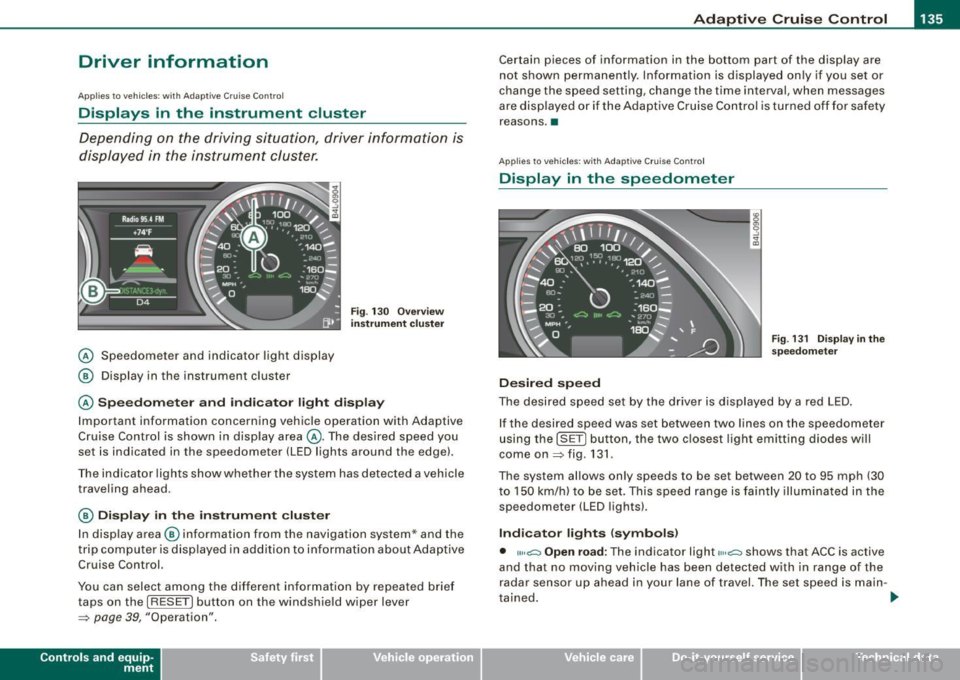
@ Speedometer and indicator light display
@ Display in the instrument cluster
Fig. 13 0 O verv ie w
instrument cluste r
@ Spe edom ete r and indi cat or light display
Important information concerning vehic le operation with Adaptive
Cruise Control is shown in display area @. The desired speed you
set is indicated in the speedometer (LED lights around the edge).
Th e in dicator lights sh ow whe ther the system has detected a vehicle
traveling ahead.
@ Display in the instrument cluster
I n disp lay area @ information from the navigation system* and the
t rip c omputer is disp layed in ad diti on to inf ormation about Adaptive
Cruise Control.
You can select among the differen t info rmation by repea ted brie f
taps on the [R ESET) button on the windshie ld w iper lever
~ page 39, "Operation".
Con tro ls and eq uip
ment
Certain pieces of information in the bottom part of the disp lay are
not shown permanent ly. Information is d isplayed on ly if you se t or
change the speed setting, change the time interval, when messages
are disp layed or if the Adaptive Cruise Control is turned off for safety
reasons .•
A pplies to veh ic les : with Ada ptive Cru is e Cont ro l
Display in the speedometer
Desired speed
Fig . 1 31 D isplay in th e
s pe edome ter
The desired speed set by the drive r is displayed by a red LED .
If the desired speed was set between two lines on the speedometer
using th e [SET) bu tton, the two c losest light emitting diodes will
come on
~ fig . 131 .
The system allows only speeds to be set between 20 to 95 mph (30
t o 150 km/h) to be set. This speed range is faintly illuminated in the
speedometer (LED lights).
Ind icator lights ( symbols )
• ""~ Open road : The indicator light""~ shows that ACC is active
and that no moving vehicle has been detected with in range of the
radar senso r up ahead in your lane of travel. The set speed is main -
t ained . .,
Vehicle care I I Technical data
Page 138 of 398
• ..__A_ d_a...: p:,..._ ti_v _ e_ C_ ru_ is_ e_ C_ o_n_ t_ r_ o _ l ___________________________________________ _
• <0111,c::::, Driv ing in traffi c: The indicator light '°"'''° shows that a
ve hicle moving in your lane of travel has been de tec ted up front in
your lane of travel. Your speed is adjusted according to the speed of
the vehic le up front . ACC accelerates and brakes automatically
within the system's capabilities.
• -011 ,,-0 Dr iv e r intervention prompt : The red flashing warning
light
-011 .. ~ means Request for dri ver to as sume contr ol. You as the
driver must slow the vehic le with the foot brake . The symbol
<0 1111<0
tel ls you that the Adaptive Cruise Control is not able to slow the
vehic le down enough to keep a enough distance to the vehicle in
front of you. A warning tone will also sound when the symbo l
appears . For more information about the driver intervention prompt
::;, page 138.
& WARNING
Improper use of the Adap tive Crui se Contro l features and inatten
tion can lead to an crash and serious personal injury .
• Never allow the closing speed betw een you and other veh icles
to be so high that the Adapt ive Cruise Control may not be able to
slow you r vehi cle saf ely . If clo sing speed is too high , you mu st
apply the brake s yourself to reduce the ri sk of a re ar-end cra sh .
• Always sele ct a greater follo wing dist ance to the vehi cle up
ahead on wet roads than on dry road s.
• Alway s re ad and heed the information and WARNINGS::;,
& in
"De scription " on
pag e 127 .
[ i ] Tips
• If you use the acce lerato r to go faster than the speed of the
vehicle ahead of you, the driver intervention prompt wi ll not be
accompanied by a warning tone.
• If the speed you previously set is exceeded , the indicator light in
the speedometer w ill sw itc h off. •
App lies to vehic les: w ith Ad apt ive Cruise Contro l
Display in the instrument cluster
Fig. 1 32 D isplay i n the
i n strum ent c lust er
Scroll through the availab le in formati on displays by briefly tapping
the (RESET] button at the end of the windshie ld wiper lever. You can
se lect information from the trip computer, navigation system* or
Adaptive Cruise Control.
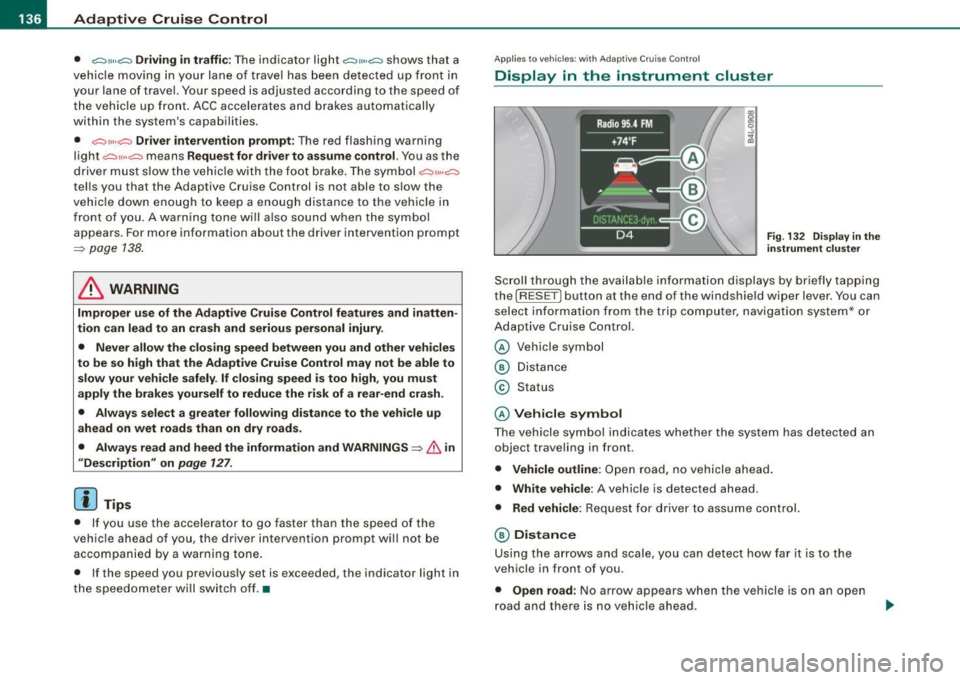
© Vehicle symbol
® Distance
© Status
© Vehi cle s ymbol
The vehicle symbo l indicates whether the system has detected an
object traveling in front .
• Vehicle outline : Open road, no vehicle ahead .
• Wh it e v ehi cle: A vehic le is detected ahead.
• Red vehicle: Request for driver to assume co ntrol.
® Distance
Using the arrows and scale, you can detect how far it is to the
vehic le in front of you.
• Open road : No arrow appears when the vehicle is on a n open
road and there is no vehic le ahead .
Page 139 of 398
_____________________________________________ A_ d_a ...: p_ t_ i_ v _e_ C_ ru_ is_ e_ C_ o_n _ t_ r_o _ l _ __._
• Driv in g i n t raff ic: If a vehicle is detected ahead, the arrow moves
on the scale. The green area represents the distance set . When
approaching slowly, the arrow moves from the
gray zone to the
green zone on the sca le .
• Driver int erv ention prompt : When approaching rapidly, the
arrow serves as an early warning signal. If the distance selected is
exceeded or possibly not reached, the arrow moves into the
red
zone on the scale. In certain driving situations, you as the driver wi ll
have to take actio n=>
page 138, "Driver interve ntion prompt" .
© Status
• The text ACC OFF appears in white letters when Adaptive Cru ise
Control is turned off.
• The text
ACC AVAILABLE appears in white letters when the
system is turned on but no desired speed has been set.
• The text
OVERRIDE appears in white letters when you exceed the
desired speed by accelerating .
• The text
DISTANCE ! appears in red letters when the interval to a
vehicle traveling ahead is too sh ort and you have t o slow your
vehicle additionally with the foot brake .
• The tex t messages
DISTANCE 1 to DISTANCE 4 appea r in green
letters to indicate the time interva l you have set and Adaptive Cruise
Control is in management mode .
• I f the driving program "standard" is replaced by "comfort" or
" d ynamic" usi ng the M MI, the above text message is supplemented
by an appropriate prompt, e.g.
DISTANCE 1 -dyn .. •
Con tro ls and eq uip
ment
Ap plies to veh icles: wi th Ada ptive Crui se Co ntro l
System status indicator
The text messages and symbols shown in this area of the
dis pla y are no t displaye d perm anen tly.
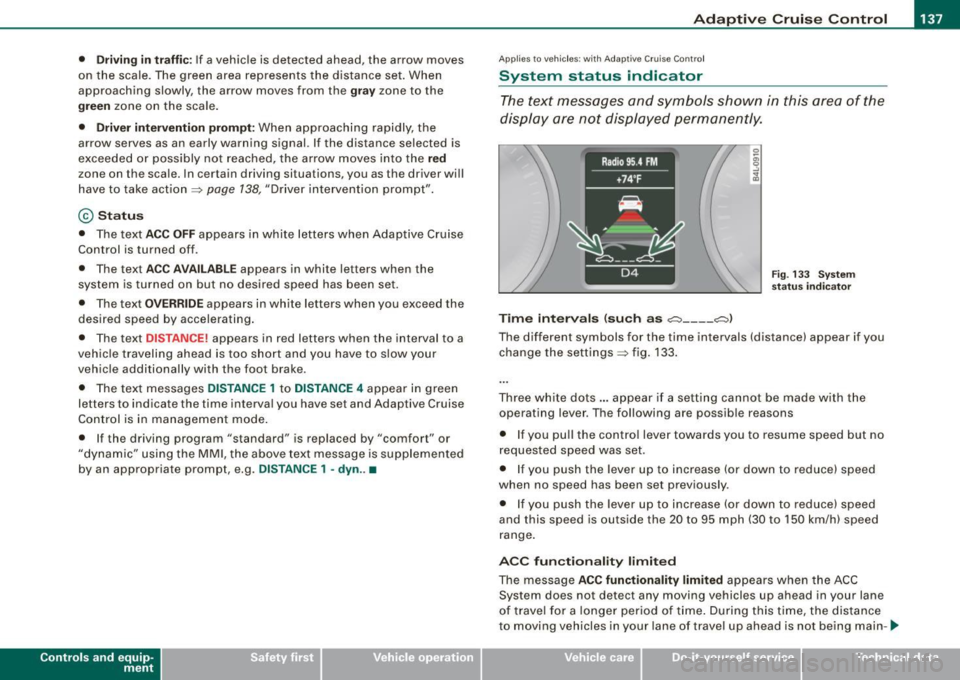
T ime intervals (such as c::::, ___ _ c::::,)
Fig. 133 S ystem
s ta tu s indi cator
The different symbols for the time intervals (distance) appear if you
change the settings=> fig. 133 .
Three wh ite do ts .. . appear if a setting cannot b e made with the
operating lever . The fol lowing are possib le reasons
• I f you pull the control lever towards you t o resume speed but no
requested speed was set.
• I f you push the lever up to increase (or down to reduce) speed
when no speed has been set previously .
• I f you push the lever up to increase (or d own to reduce) speed
and this speed is outside the 20 to 95 mph (30 to 1 50 km/h) speed
range .
ACC fun ction ality limited
The message ACC functionality limited appears when the ACC
System does not detect any moving vehicles up ahead in your lane
of trave l for a lo n ger period o f time . During this time, the dis tance
to moving vehicles in your lane of travel up ahead is not being main-~
Vehicle care I I irechnical data
Page 140 of 398
• ..__A_ d_a...: p:,..._ ti_v _ e_ C_ ru_ is_ e_ C_ o_n_ t_ r_ o _ l ___________________________________________ _
tained. The ACC system is not switched off, and increased attention
to the traffic situation is absolutely necessary. The following may be
reasons why the message
ACC functionality limited appears:
• The ACC sensor is dirty . The ACC system is not reacting, or is not
reacting correctly, to moving vehicles up ahead in your lane of
travel.
• There may be very light traffic on and there is nothing that marks
the side of the road (for example, guard rails, traffic signs, trees). As
soon as a moving vehicle up ahead is detected again, ACC becomes
active again and the message disappears .
The ACC sensor is located in the area under the front license plate.
If the ACC sensor is dirty or blocked, clean the area to restore system
operation.
ACC not available
The text message ACC not available appears, for example, if the
temperature of the brakes is excessive . Adaptive Cruise Control is
temporarily not available. A warning tone sounds as a reminder.
ACC not available!
The text message ACC not available! appears in the event of a
malfunction. Adaptive Cruise Control is turned off. A warning tone
sounds as a reminder. Have the system inspected by a qualified
dealership .
ACC sensor blocked !
The text message ACC sensor blocked ! appears when the ACC
System can no longer accurately detect vehicles moving up ahead
in your lane of travel. Adaptive Cruise Control is turned off. A
warning tone a lso sounds as a reminder.
To decide whether it is necessary to switch off the ACC (ACC sensor blocked
!) or if it is only a temporary condition (ACC Functionally
limited), the system will also takes into consideration the outside
temperature and/or the windshield wiper operation.
The ACC sensor is dirty or blocked (e.g. leaves, snow) . The
ACC sensor is located in the area under the front license plate .
If the ACC sensor is dirty or blocked, clean the area to restore system
operation.
EPB activation
Th e text message EPB activation appears if emergency braking was
manual ly initiated with the Electromechanical Parking Brake (EPB).
The Adaptive Cruise Con trol is turned off . This is accompanied by a
warning tone.
Speed
The set speed in mph (Canada km/h) always appears when saving or
changing the speed in Adaptive Cruise Control~
page 130 , "How is
the speed stored?" and~
page 131 , "Changing stored speed".
Selector lever position!
The text message Selector lever position! appears when the
selector lever is moved to position
N. In this position, Adaptive
Cruise Control is not available. •
Applies to vehicles : with Ada ptive Cruise Cont rol
Driver intervention prompt
The driver intervention prompt calls on the driver to take
over the situation.
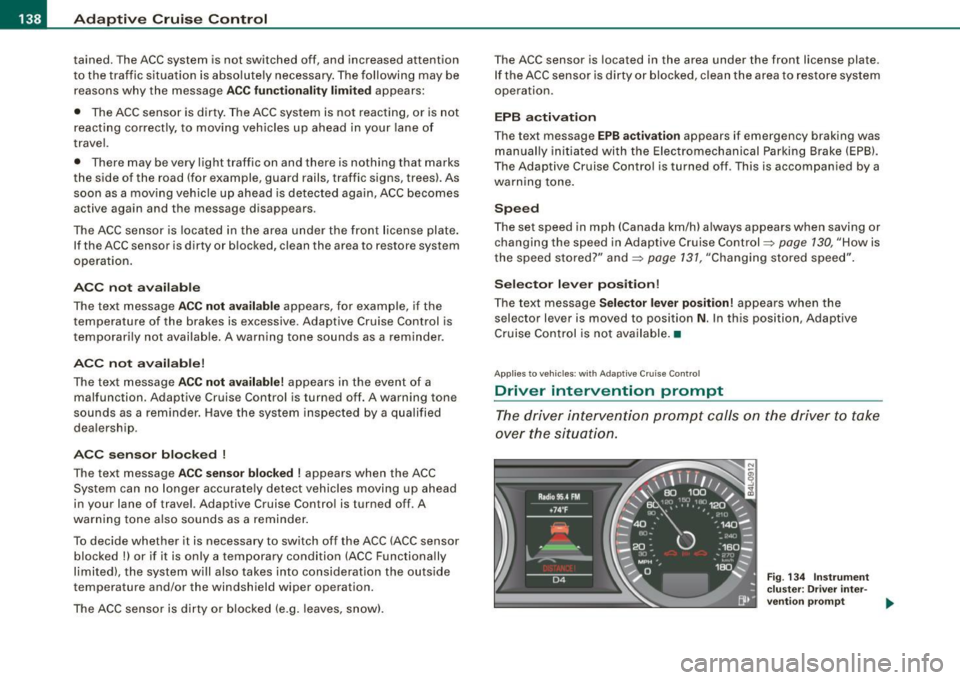
Fig . 134 Instrument
cluster: Driver inter-
vention prompt
~
Page 141 of 398
_____________________________________________ A_ d...;a..! p~ ti_v _ e---- C_ ru_ is_ e ___ C.::..: o;.:.n..:.. t.:.: r...; o:.. 1-----JIIII
In certain situations, the braking power of the Adaptive Cruise
Control is no t enough to maintain an adequate distance to the
vehicle up ahead . In these situations, the Adaptive Cruise Contro l
calls the driver to take action.
The
driv er in tervention pr omp t alerts you visually and audibly to
take over.
• A red vehicle is shown in the instrument c luster display
=>
page 138, fig. 134 .
• The text
DISTANCE! appears in the status line .
• The indicator light~'" '~ in the speedometer b links red.
• A warning tone sounds .
[ i J Tip s
• If the Adaptive cruise control initiates braking, the hydraulic
brake system is under pressure . Therefore, the brake peda l distance
is shorter and the pedal "fee ls" harder .
• Adaptive Cruise Contro l is switched off after pressing the foot
brake. The speed saved up this point can be resumed .
• To resume the saved speed, release the brake pedal and press
the control lever=>
page 132, "Turning Adaptive Cruise Cont ro l off
temporarily" .
• I f you use the accelerator to go faster than the speed of the
vehicle ahead of you, the
drive r inte rv e ntion prompt will not be
accompanied by a warning signal.
• If the speed you previously set is exceeded, the indicator light in
the speedometer wi ll switch off. •
Controls and equip
ment
Ap plies to veh ic les : w ith A dapt ive Crui se Co nt rol
MMI settings
Individual settings for Adap tive Cruise Control can be
selected in the
MM/ .
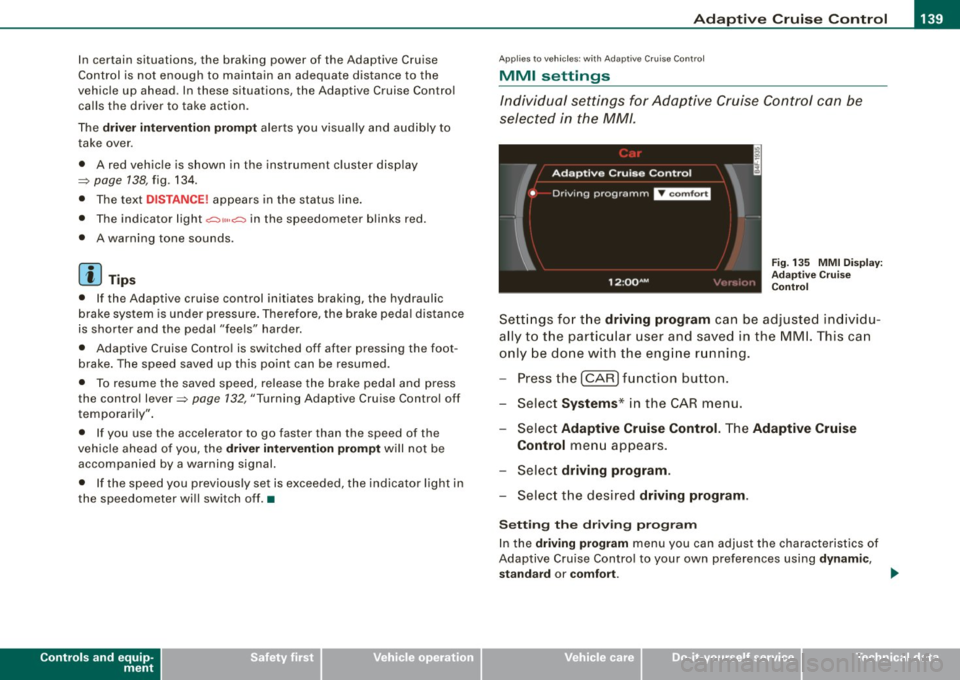
Fig. 135 MMI Disp lay :
Ad aptive C ruise
C ontrol
Sett ings fo r th e driving program can be adjusted individu
ally to the p artic ular user and saved in the MML This can
only be do ne with the eng ine r un ning.
Press the
I CAR] fu nction button.
Select
Systems * in the CAR menu .
Select
Adaptive Cruise Control . The Adaptive Cruise
Control
menu appears.
Selec t
driving program.
Select the desired driving program .
Sett ing th e dr iving pr ogram
In the driv ing prog ram menu you can adjust the characteristics of
Adaptive Cruise Contro l to your own preferences using
d ynami c,
s ta nd ard
or comf ort . _.,
I • •