seats AUDI S6 2009 Owner's Manual
[x] Cancel search | Manufacturer: AUDI, Model Year: 2009, Model line: S6, Model: AUDI S6 2009Pages: 398, PDF Size: 43 MB
Page 100 of 398
Seats and storage
The socket of the cigarette lighter may be used for 12 -volt appli
ances with maximum consumption of up to 100 wat ts, such as a
flash light, small vacuum cleaner, etc .
Before you purchase any accessories, always read and fo llow the
information in
=> page 374, "Addit ional accessories and parts
replacement".
& WARNING
Improper use of the cigarette lighter can cause serious injury or
start a fire.
• Be careful when using the cigarette lighter. If you do not pay
attention to what you are doing when you are using the cigarette
lighter you can burn yourself .
• The cigarette lighter and socket remain functional even if the
ignition is switched off or the ignition key is removed . Never leave
children inside the vehicle without supervision.
0 Note
• To avoid damaging the socket, only use p lugs that fit properly.
• Only use the cigarette lighter socket as a power source for elec
trical accessories for short durations . Use the sockets in the vehicle
when a power source is needed for longer durations .
[ i J Tips
When the engine is off and accessories are sti ll plugged in and are
on, the vehicle battery can st ill be drained. •
Outlet
The outlet in the front and rear center console may be
used for 12-volt appliances.
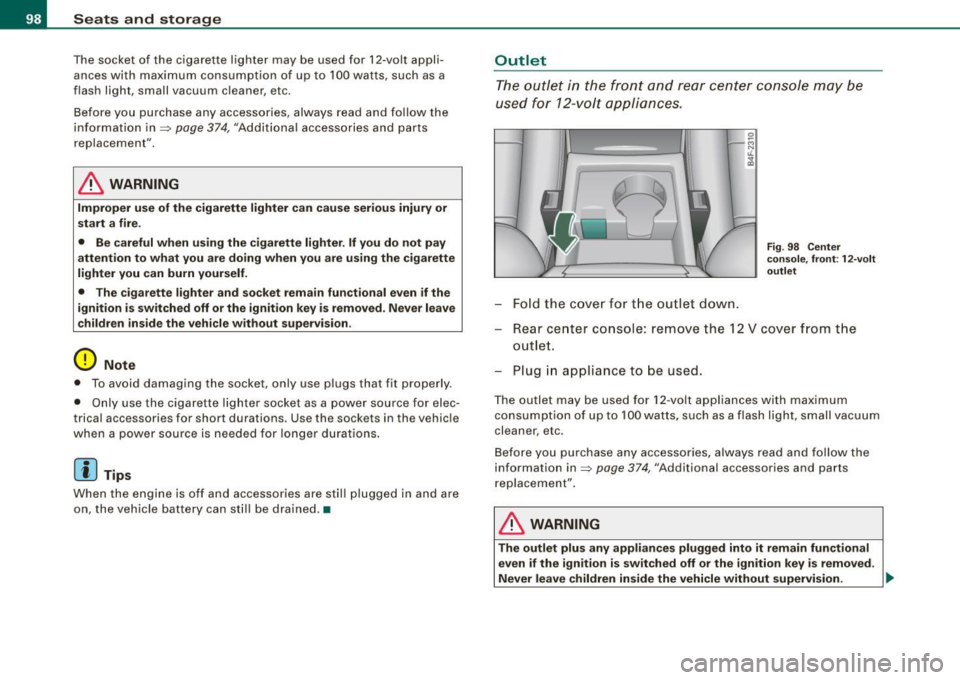
-Fold the cover for the outlet down.
Fi g. 98 Center
console, front: 12 -vo lt
outlet
Rear center console: remove the 12 V cover from the
outlet.
Plug in appliance to be used.
The outlet may be used for 12 -volt appliances with maximum
consumption of up to 100 watts, such as a flash light, small vacuum
cleaner, etc .
Before you purchase any accessories, always read and follow the
information in=>
page 374, "Additional accessories and parts
replacement" .
& WARNING
The outlet plus any appliances plugged into it remain functional
even if the ignition is switched off or the ignition key is removed.
Never leave children inside the vehicle without supervision. .,_
Page 101 of 398
![AUDI S6 2009 Owners Manual 0 Note
To avoid damaging the socket, only use plugs that fit properly.
[ i] Tips
When the engine is off and accessories are still plugged in and are
on, the vehicle battery](/img/6/57595/w960_57595-100.png "AUDI S6 2009 Owners Manual 0 Note
To avoid damaging the socket, only use plugs that fit properly.
[ i] Tips
When the engine is off and accessories are still plugged in and are
on, the vehicle battery")
0 Note
To avoid damaging the socket, only use plugs that fit properly.
[ i] Tips
When the engine is off and accessories are still plugged in and are
on, the vehicle battery can still be drained. •
Storage
General overview
There are numerous places to store items in your vehicle.
Glove compartment
Storage compartment in roof
Coat hooks
Storage compartment in the trunk
& WARNING
~ page 99
~ page 100
~ page 101
~ page 91
• Always remove objects from the instrument panel. Any items
not stored could slide around inside the vehicle while driving or
when accelerating or when applying the brakes or when driving
around a corner.
• When you are driving make sure that anything you may have
placed in the center console or other storage locations cannot fall
out into the footwells. In case of sudden braking you would not be
able to brake or accelerate.
• Any articles of clothing that you have hung up must not inter
fere with the driver's view. The coat hooks are designed only for
lightweight clothing. Never hang any clothing with hard, pointed
or heavy objects in the pockets on the coat hooks. During sudden
Con tro ls and eq uip
ment
Seats and storage
& WARNING !continued)
braking or in an accident -especially if the airbag is deployed -
these objects could injure any passengers inside the vehicle. •
Glove compartment
The media player is in the glove compartment.
To open glove compartment
Fig. 99 Unlocking
button for glove
compartment
Press the button ::V => fig. 99 (arrow) - the lid opens auto
matically.
To close glove compartment
Push the glove compartment lid up unt il the lock
engages.
In the glove compartmen t lid you will find a place to store a pen and
a pad of paper.
CD changer*
The CD changer for the radio system and the Navigation drive* is located in the glove compartment . How to change CDs is described
in the pertinent Owner's Manual.
tJ,,,
Vehicle care I I irechnical data
Page 106 of 398
_L--_W:....:....: a=- r:..: m..:..:....: a.:.;n..:. d=- c.::..:: o..:.ld =-------------------------------------------------
Controls
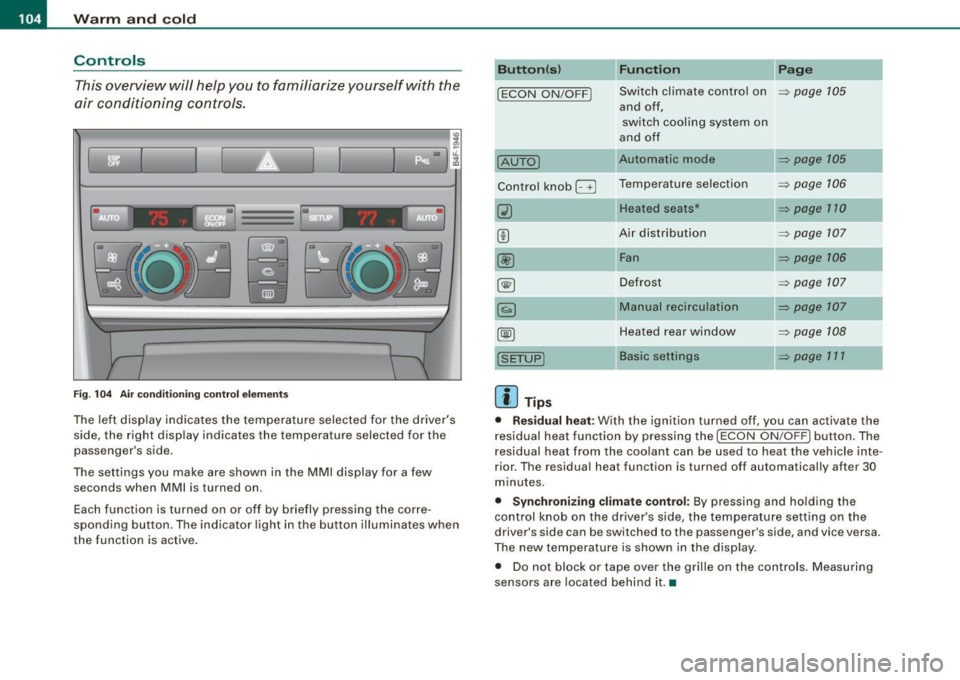
This overview will help y ou to familiarize yourself with the
air conditioning controls.
I I
Fig. 104 Air condit ionin g c ontrol el em ent s
The left dis play indicates the temperature selected for the d river's
side , the right display indicates the temperature selected for the
passenger 's side.
The settings you make are shown in the MMI disp lay for a few
seconds when MMI is turned on.
Each function is turned on or off by briefly pressing the corre
spond ing button . The indicator l ight in the button illumina tes when
the function is active .
Button(s ) Function Page
!ECON ON/OFF J Switch climate contro l on ~ page 105
and off,
switch coo ling system on
a nd off
IAUTOJ Automatic mode ~ page 105
Contro l kn ob G Temperatu re selec tion ~ page 106
Heated seats* ~ page 170
Air distribut ion ~ page 107
@ Fan ~ page 706
~ Defrost ~ page 107
Manual recirculation ~ page 107
Heated rear wi ndow ~ p age 108
Basic settings ~ page 171
[ i ] Tips
• Residual heat: With the ignition turned off, you can activate the
r esidual heat function by p ressing the
!ECON ON/O FFJ button. The
residual heat from the coo lant can be used to heat the vehicle inte
r ior. The residua l heat function is turned off automa tically after 30
minutes.
• Synchronizing climate control: By pressing and ho lding the
control knob on the driver's side, the temperature setting on the
driver's side can be switched to the passenger's side, and vice versa.
The new temperature is shown in the display .
• Do not block or tape over the grille on the contro ls . M easuring
se nsors a re located behind it. •
Page 111 of 398
_________________________________________________ w_ a_ r_ m __ a_n_ d_ c_ o_ld __ llfflll
© Air flows to driver/front passenger
© Air flows to driver/front passenger
© Air fl ows to footwell
The air outlets are actuated either automatically or manually depending on the operating mode selected.
[ i J Tip s
• When climate control is working, cooled air wi ll flow primarily
from out lets
G) and @. To assure adequate coo ling, outlets G) and
© should never be completely closed.
• The air flow coming from the vents © can be adjusted to be
colder or warmer than the selected set temperature. •
Air outlets in the rear
Outlets in the center console
- Rotate the thumb whee l located next to the outlet to
open or close it.
- To adjust the direction o f the airflow from the o utlet,
move the tab in the center of the outlet in the desired
direction. The direction of the air delive red from the
vents can be adjusted hor izontally and vertically.
Outl ets in the door pill ars
- Rotate the t humb whee l located next to the outlet to
open or close i t.
- To adjust the direction o f the air flow from the o utlet,
move the tab in t he cen ter of the o utlet in the desi red
direction . The direction of the air delive red from the
vents can be adjusted hor izonta lly and vertically .
Controls and equip
ment
The air outlets are actuated either automatically or manual ly
depending on the operati ng mode selected. Heated o r unheated
fresh air, or cooled air f lows from the vents .
The air outlets to heat the rear footwell are located under the front seats .
[ i J Tip s
If the climate control system is opera ting in cooling mode, air flows
primari ly from the out lets in the center console and in the door
pillars. To achieve adequate cooling, you should never close the
out lets comp letely. •
Using climate control economically
Using the climate controls prudently can hel p save fuel.
When you use the air condi tioner, engine power is reduced
and fuel c onsum ption increases. T o save fuel, you should
use the a ir condit io ner onl y when necessa ry. Also please
note the fo llow ing po ints:
If you want to save fuel, activate ECON.
- If you are going to drive with the windows open, use
ECO N.
- If the ve hicle is ext remely hot due to the heat of the sun,
brie fly open doors and windows.
'£> For the sake of the environment
By reducing the amount of fuel you use, you a lso reduce the amount
of pollutants emitted into the a ir. •
I • •
Page 112 of 398
• ..__w_ a_ r_m _ a_ n_d_ c_ o_ ld __________________________________________________ _
Applies to veh ic les : with electr ically heated seats
Heated seats ~
The seat cushion and the seat back of the front seats can
be heated electrically.
F ig. 10 9 Dis play:
H eated seats
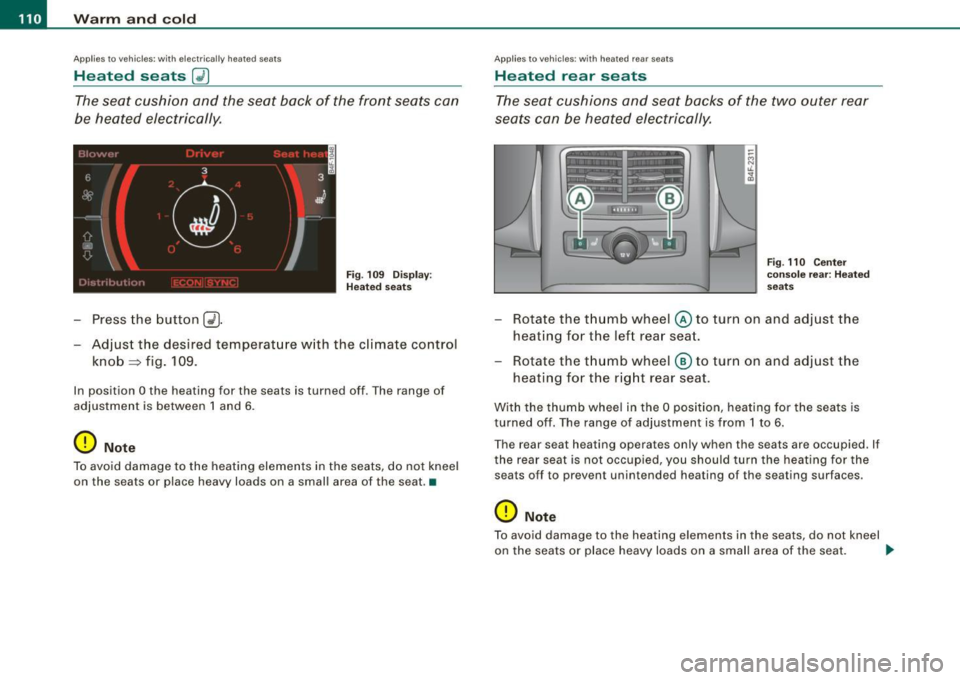
- Press the button C~J
-Adjust the desired temperature w ith the climate control
knob~ fig. 109.
In position O the heating for the seats is turned off . The range of
adjustment is between 1 and 6.
0 Note
To avoid damage to the heating elements in the seats, do not kneel
on the seats or place heavy loads on a small area of the seat. •
Applies to vehicles: with heated rear seats
Heated rear seats
The seat cushions and seat backs of the two outer rear
seats can be heated electrically.
Fig. 110 Cen ter
co nsole re ar: H ea ted
seats
- Rotate the thumb wheel© to turn on and adjust the
heating for the left rear seat.
- Rotate the thu mb wheel ® to turn on and adjust the
heating for the rig ht rear seat.
With the thumb whee l in the O position, heating for the seats is
turned off. The range of adjustment is from 1 to 6.
The rear seat heating operates only when the seats are occupied. If
the rear seat is not occupied, you should turn the heating for the
seats off to prevent unintended heating of the seating surfaces .
0 Note
To avoid damage to the heating e lements in the seats, do not kneel
on the seats or place heavy loads on a small area of the seat. .,.
Page 113 of 398
Warm and cold 1111
-------------------'
[ i J Tip s
Please note that objects p laced on the seats may be detected . If
these obj ects are heavy enough, the ir weight wil l cause the seat
heating to switch on .•
A pplies to veh icle s: w it h s tee rin g wh eel heat ing
Steering wheel heating ~
The steering wheel can be heated electrically.
Fig . 1 11 Mult ifun ctio n
s tee ring whee l: B utt on
for stee ring w hee l
hea ting
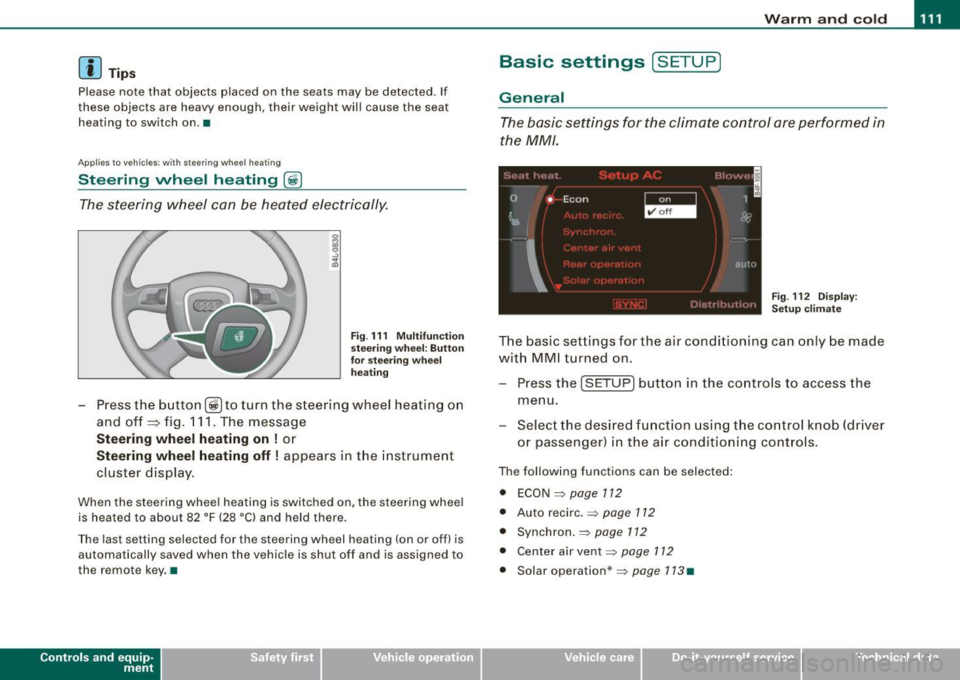
Press the button [~ )to turn the steering wheel heating on
and off
~ fig. 1 11 . The message
St eering wheel h eating on ! or
Steering wh eel heating off ! appears in the instrument
cluster display.
When the steering wheel heating is switched on, the steering wheel
is heated to about 82 °F (28 °Cl and held there .
The las t sett ing s ele ct ed for the steering wheel heating (on or o ff) is
automatically saved when the vehicle is shut off and is assigned to
the remot e key . •
Contro ls and eq uip
ment
Basic settings [ S ET UP )
General
The basic settings for the climate control are performed in
the
MM/.
'' I", I -
0 •
I Econ 1
~ &
I
aut{J
Fig . 112 Dis play:
Set up clim ate
The basic settings for t he air conditioning can only be made
w ith MMI turned on .
- Press the
(SETUP ] button in the controls to access the
menu.
- Select the des ired fu nction using the co ntrol knob (dr iver
or passenger) in the air conditioning cont rols .
The following functions can be selected :
• ECON =>
page 112
• Auto recirc . => page 712
• Synchron . => page 112
• Center air vent=:>
page 112
• Solar operation *=> page 113 •
Vehicle care
I I irechnical data
Page 114 of 398
-Warm
and cold --------------------
ECON
The ECON mode helps to save fuel.
The air conditioning is turned off in ECON mode. "ECON" means
"Economy". By switching off the air conditioning (compressor), you
save fuel.
Please note that vehicle interior temperature cannot be lower than
the outside temperature in the ECON mode. The air is not cooled or dehumidified.
If the vehicle interior becomes too hot or if the windows fog up,
ECON mode should be turned off. As soon as the
jAUTO I button in
the air conditioning controls is pressed, the system automatically leaves the ECON mode, and the air conditioning compressor is
turned on again. •
Automatic recirculation mode
An air quality sensor detects increased concentrations of
pollutants in the outside air and automatically switches
to recirculation mode.
We recommend that you always keep automatic air recirculation ON
to prevent polluted outside air from entering the vehicle interior.
If the
air quality sensor located in the air conditioning system
detects polluted outside air, the sensor decides whether the air
pollution can be reduced by the factory -installed pollutant filter or
whether it is necessary to switch to air recirculation. With heavy concentrations of pollutants, the air conditioning system is
switched automatically to recirculation mode and the supply of
outside air is blocked. As soon as the concentration of pollutants in
the outside air drops, fresh air is supplied to the vehicle interior
again.
In the event that the windows fog up during automatic air recircula
tion, you must press the® button immediately. Under certain operating conditions, automatic air recirculation is
switched off automatically. With outside temperatures below about
+ 10
°C, automatic air recirculation is limited to 30 seconds. With
outside temperatures below about -1 °C and in the ECON mode,
automatic air recirculation is limited to 15 seconds. •
Synchronization
One climate control setting for the passenger's and
driver's seats.
After Synchronization is set to on, all of the subsequent climate
control settings (except for seat heating*) for the driver are trans
ferred to the front passenger.
Synchronization is canceled when settings are adjusted on the front passenger's side. •
Center air vent
The temperature of the air leaving the center vents can be
changed to differ from the temperature setting.
Fig. 113 Display:
Center air vent
The air flow coming from the center vents can be adjusted to be
colder or warmer than the selected set temperature.
Page 196 of 398
........ _o_ r_iv _i_ n""' g::;._ S_ a_f _e _ly =---------------------------------------------------
Driving Safely
General notes
Safe driving habits
Please remember -safety first!
This chapter contains important information , tips, instructions and
warnings that you need to read and observe for your own safety, the
safety of your passengers and others. We have summarized here
what you need to know about safety belts, airbags, child restraints as well as child safety. Your safety is for us
priority number 1. Always
observe the information and warnings in this section -for your own
safety as well as that of your passengers.
The information in this section applies to all model versions of your
vehicle. Some of the features described in this sections may be
standard equipment on some models, or may be optional equip
ment on others. If you are not sure, ask your authorized Audi dealer.
& WARNING
• Always make sure that you follow the instructions and heed
the WARNINGS in this Manual. It is in your interest and in the interest of your passengers.
• Always keep the complete Owner's Literature in your Audi
when you lend or sell your vehicle so that this important informa
tion will always be available to the driver and passengers.
• Always keep the Owner's literature handy so that you can find
it easily if you have questions. •
Safety equipment
The safety features are part of the occupant restraint
system and work together to help reduce the risk of injury
in a wide variety of accident situations.
Your safety and the safety of your passengers should not be left to
chance. Advances in technology have made a variety of features
available to help reduce the risk of injury in an accident. The
following is a list of just a few of the safety features in your Audi:
• sophisticated safety belts for driver and all passenger seating
positions,
• safety belt pretensioners,
• safety belt force limiters for the front seats,
• safety belt height adjustment systems for the front seats,
• automatic safety belt height adjustment for the rear seats,
• front airbags,
• side airbags in the front seats and outer rear seats*,
• side curtain airbags,
• special LATCH anchorages for child restraints,
• head restraints for each seating position,
• adjustable steering column.
These individual safety features, can work together as a system to
help protect you and your passengers in a wide range of accidents.
These features cannot work as a system if they are not always correctly adjusted and correctly used.
Safety is everybody's responsibility! •
Page 199 of 398
________________________________________________ D_r_iv _ i _n_ g~ S_ a_ fe_ ly __ !II
& WARNING (continued)
to help reduce the risk of personal injury if the driver's airbag
inflates.
• Never hold the steering wheel at the 12 o'clock position or with
your hands at other positions inside the steering wheel rim or on
the steering wheel hub . Holding the steering wheel the wrong way
can cause serious injuries to the hands, arms and head if the
driver's airbag deploys .
• Pointing the steering wheel toward your face decreases the
ability of the supplemental driver's airbag to protect you in a colli
sion.
• Always sit in an upright position and never lean against or
place any part of your body too close to the area where the airbags
are located .
• Before driving, always adjust the front seats and head
restraints properly and make sure that all passengers are properly
restrained.
• Never adjust the seats while the vehicle is moving. Your seat
may move unexpectedly and you could lose control of the vehicle. • Never drive with the backrest reclined or tilted far back! The
farther the backrests are tilted back, the greater the risk of injury
due to incorrect positioning of the safety belt and improper
seating position.
• Children must always ride in child safety seats
=> page 238.
Special precautions apply when installing a child safety seat on
the front passenger seat
=> page 215. •
Controls and equip ment Safety first
Vehicle operation
Proper seating position for the front
passenger
The proper front passenger seating position is important
for safe, relaxed driving.
For your own safety and to reduce the risk of injury in the
event of an accident, we recommend that you adjust the
seat for the front passenger to the following pos ition:
- Move the front passenger seat back as far as possible.
There must be a minimum of 10 inches (25 cm) between
the breastbone and the instrument panel =>
&.
- Adjust the angle of the seatback so that it is in an upright
position and your back comes in full contact with it
whenever the vehicle is moving.
- Adjust the head restraint so that the upper edge is as
even with the top of your head as possible but not lower
than eye level and so that it is as close to the back of your
head as possible =>
page 199.
-Keep both feet flat on the floor in front of the front
passenger seat.
- Fasten and wear safety belts correctly=:>
page 209.
For detailed information on how to adjust the front passenger's
seat, see
=> page 80 .
& WARNING
Front seat passengers who are unbelted, out of position or too
close to the airbag can be seriously injured or killed by the airbag
as it unfolds. To help reduce the risk of serious personal injury : .,
Vehicle care Do-it-yourself service Technical data
Page 200 of 398
........ _o_ r_iv _i_ n""' g::;._ S_ a_f _e _ly =---------------------------------------------------
& WARNING (continued)
• Passengers must always sit in an upright position and never
lean against or place any part of their body too close to the area
where the airbags are located.
• Passengers who are unbelted, out of position or too close to the
airbag can be seriously injured by an airbag as it unfolds with
great force in the blink of an eye .
• Always make sure that there are at least 10 inches (25 cm)
between the front passenger's breastbone and the instrument
panel.
• Each passenger must always sit on a seat of their own and
properly fasten and wear the safety belt belonging to that seat.
• Before driving, always adjust the front passenger seat and
head restraint properly.
• Always keep your feet on the floor in front of the seat . Never
rest them on the seat, instrument panel, out of the window, etc.
The airbag system and safety belt will not be able to protect you properly and can even increase the risk of injury in a crash.
• Never drive with the backrest reclined or tilted far back! The
farther the backrests are tilted back, the greater the risk of injury due to incorrect positioning of the safety belt and improper
seating position.
• Children must always ride in child safety seats
~ page 238.
Special precautions apply when installing a child safety seat on
the front passenger seat
~ page 215. •
Proper seating positions for passengers in
rear seats
Rear seat passengers must sit upright with both feet on
the floor consistent with their physical size and be prop
erly restrained whenever the vehicle is in use.
To reduce the risk of injury caused by an incorrect seating
position in the event of a sudden braking maneuver or an
accident, your passengers on the rear bench seat must
always observe the following:
- Make sure that the seatback is securely latched in the
upright position~
page 88.
- Adjust the head restraint so that the upper edge is as
even with the top of your head as possible but no lower
than eye level~
page 199.
- Keep both feet flat in the footwell in front of the rear seat.
- Fasten and wear safety belts properly~
page 209.
-Make sure that children are always properly restrained in
a child restraint that is appropriate for their size and age
~ page 238.
L1}. WARNING
Passengers who are improperly seated on the rear seat can be
seriously injured in a crash.
• Each passenger must always sit on a seat of their own and
properly fasten and wear the safety belt belonging to that seat.
• Safety belts only offer maximum protection when the seatback
is securely latched in the upright position and the safety belts are
properly positioned on the body. By not sitting upright, a rear seat
passenger increases the risk of personal injury from improperly
positioned safety belts! .,_