ESP AUDI S6 2010 Service Manual
[x] Cancel search | Manufacturer: AUDI, Model Year: 2010, Model line: S6, Model: AUDI S6 2010Pages: 368, PDF Size: 86.82 MB
Page 140 of 368
lffll.___A_ u_ d_i_ s_ id_ e_ a_s _s_ i_ s _t _________________________________________________ _
Deactivating
- Press the button again . T he indicator light o n the b utton
goes out.
The system works at speeds faster tha n 19 mph (30 km/h) .
& WARNING
• Imp roper reliance on the side assist system can cause collisions
and seriou s per sonal injury:
- Never rely only on s ide ass ist when changing lanes.
- Alway s che ck rear view mirror s to m ake sure that it i s safe to
change lanes.
• Side a ssist cannot detect all vehicles under all condition s
danger of accident!
• Side a ssi st cannot detect vehicle s in time to alert you when
they approach from beh ind at very high speed, or fall drop back
very quickly .
• The radar sen sor's
v is ion can be reduced or entirely blocked by
rain , snow, and heavy spray . This can result in side as sis t not
adequately detecting vehicle s or , in some cases, not detecting
them at a ll. Alway s keep an eye on the dir ection you are traveling
and the rele vant area around the vehicle.
• Please note that side assist indicates there are approaching
vehicles , or vehicles in you r blind spot, only after you r vehicle has
reached a driving speed of at lea st 19 mph (30 km/h).
• Side assist signal doe s not work around t ight corners (turning
radius les s than 328 feet , or 100 m).
• Side assist is no replacement for the driver 's full attention . The
driver alone is respon sible for lane change s and s imilar driving
maneuvers. Always keep an eye on the direction you are traveling
and the relevant area around the vehicle.
0 Note
• T o ensure that you do not adversely affe ct s ide as sist , do not block
the area on the rear b umper where the radar sensors are located with
fo reign objects (such as st ic kers or b icycle ra cks).
• Make s ure that the signal light on the o utside mi rror is not
bloc ked by stic ke rs or othe r items.
[I) Tips
• Side ass ist automatica lly deac tivates if it detects that the radar
sensors are blocked=>
page 144. The indicator light on the button
goes out.
• Th e area on the bumper w he re the radar sensors are located must
c ons istent ly rema in free of snow, i ce, a nd he avy soiling so that s ide
assist can function properly. Follow the add itiona l notes on
=>
page 144.
• Add it iona l tinting on t he front side windows can ma ke it harder to
see and correctly u nders tand the s ig nal light on the outs ide mirro r.
• For Decla ration of Compliance to United States FCC and Industry
Canada regulations=>
page 347. •
Applies to vehicl es : w it h side ass ist
Sensor detection area
, D i
Fig. 131 S chem ati c
illustrat io n : S ensor
detection are a
~
Page 141 of 368

_________________________________________________ A_ u_d _ i_ s_i d_ e_ a_s _s_ i_s _t __ _
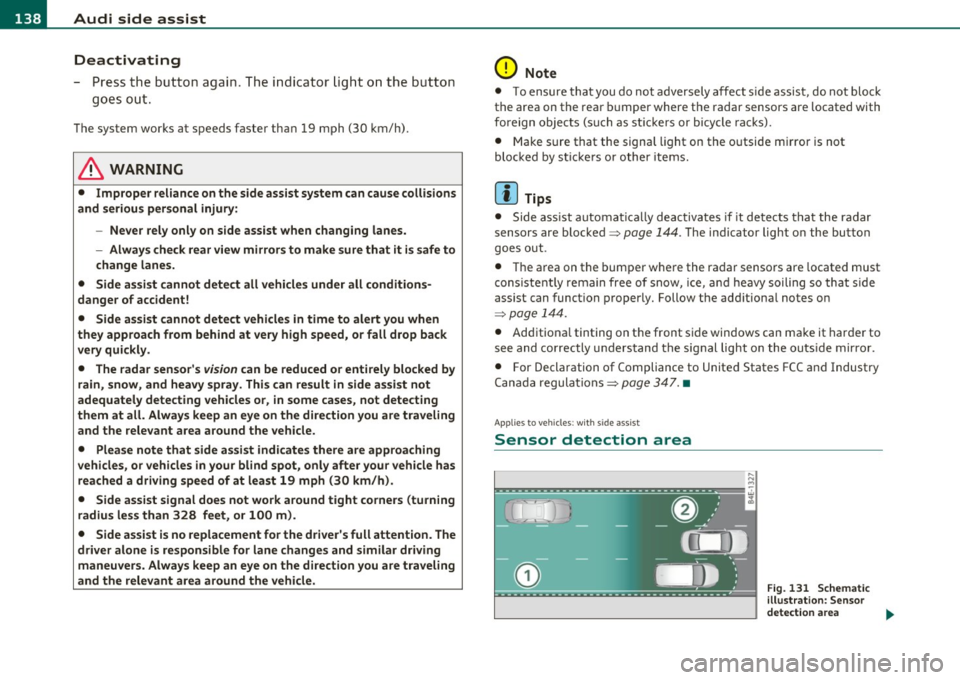
The detection~ page 138, fig. 131 of the radar sensor detection
area is made up of :
• the approach area (light green area)
(D, about 230 feet (70 m)
behind the vehicle, and
• the "blind spot" (dark green area)@.
The radar sensors cover the adjacent left and right lanes. Other lanes are
not cove red by the radar sensors.
rn Tip s
Side assist does not measure act ual lane width. The system assumes
a fixed lane w idth. Detection in the left and right lanes is based on
this assumed lane w idth. When driving on narrow roads or when
driving to the left or right of the center of a travel lane, it is possible
that vehicles will be detected that are
not in the lane next to the lane
you are using~
page 143. •
Applie s to ve hicl es: w ith s id e a ssist
Operation
Side assist compares the distance and difference in speed of detected
vehicles with the speed of your vehicle . Whenever the difference in
speed and distance is registered as notab le if you were to change
lanes, a signa l light appears on the respect ive m irror .
The signa l can light up if you are passed by a vehicle or if you are
passing another vehicle.
If you pass another vehicle slowly (d ifference in speed less than 9
mph, or 15 km/h) , the signa l light will come on as soon as the other
vehicle is in your blind spot and is detected by side ass ist . When the
difference in speed is greater, the signal light wi ll not come on. •
Controls and equip
ment Safety first
A
pp lies to ve hicles : w ith side assist
Informational and alert stage signals
S ide assis t has two signa l st ages:
• the informational stage signal, and
• t he ale rt stage signal.
S ide assist helps you by using the appropr iate s ignal stage,
depending on whether or not you have activated the turn signal, and
thus have indicated that you are or are not changing lanes .
Informat ional stage signal
As long as you have not activated the turn signal, side assist informs
you of detected vehicles that are registered as being in a notable loca
tion if you were to change lanes . Wheneve r the detected vehicle 's
difference in speed and distance is registered by side assist as
notable, the signal l ight on the respective m irror produces muted
illumination .
Th e br ightness of the info rmationa l stage signal is designed no t to be
as intense, so that it does not interfere w ith your v iew of the road
when you are driving and have no in tention of chang ing lanes. When
you look in the outside mirror, you can clearly see the informat ional
stage signal.
Alert stage signal
Whe n you act ivate the tu rn s ignal, a nd side assist has de tected a
vehicle in a notable location on that particular side, the signal light on
this side mirro r flashes b rightly. The repeated brief and bright
flash ing of the alert stage signal reminds you to carefully check
traffic to the rear in the outside mirror and over your shoulder, so t hat
you can safely complete the lane change~
& in "Safety tips" on
page 144.
rn Tips
The brightness of the signa l light on the outside mirrors can be
adjusted with the MMI
~ page 142. •
Vehicle care Technical data
Page 145 of 368
![AUDI S6 2010 Service Manual _________________________________________________ A_ u _ d_ i_ s_ id_ e_ a _ s_s _ i_s _t _ __._
(]] Tips
• Side assist is not active when the basic brightness is adjusted. The
signal](/img/6/57594/w960_57594-144.png "AUDI S6 2010 Service Manual _________________________________________________ A_ u _ d_ i_ s_ id_ e_ a _ s_s _ i_s _t _ __._
(]] Tips
• Side assist is not active when the basic brightness is adjusted. The
signal")
_________________________________________________ A_ u _ d_ i_ s_ id_ e_ a _ s_s _ i_s _t _ __._
(]] Tips
• Side assist is not active when the basic brightness is adjusted. The
signal light comes on br iefly to help you make the adjustment.
• Your settings are automat ically stored and assigned to the remote
control key being used .•
A ppli es to ve hicles : w it h s ide ass ist
General information
Side assist has limits and cannot detect vehicles under all road and
weather conditions . Please remember system limitations and n ever
re ly on the system, especially when :
• driving through curves=>
page 143,
• lanes are of different widths=> page 143. •
Ap plies to vehicles: w ith sid e assist
When driving through curves
Side assist cannot detect vehicles in curves with a turning radius of
less than 328 feet (100 m).
When driving through a curve, it is possible that side assist may
register a vehicle two lanes over, and the signal on the outside mirror
will light up.•
Con tro ls a nd e quip
m en t Vehicle
OP-eration
Applies to vehicles : with side assist
Lane width
Fig. 136 Lanes of a
n orma l width are in
detection area
Fig . 137 Narrow
lanes: Side assist may
detect vehicles two
lanes away
Side assist's detection area is designed to cover lanes of standard
w idth to the left and rig ht of your travel lane, depending on whether
you drive in the center of your lane or closer to the edge.
If you drive in narrow lanes, side assist's detection area may also
include other lanes -especially if you tend to drive on t he edge of your
lane => fig. 137. Under these conditions, vehicl es can also be
detected that are two lanes away, and side assist then could switch
between the informationa l and warning stage signals .
When driving in very wide lanes, vehicles in the adjacent lane may not
be detected because they are not inside the detection area .•
Vehicle care Do-it-yourselt service iTechnical data
Page 146 of 368
1111....__A_ u_ d_i_ s_id _e_ a_s _s_ i_ s _t _________________________________________________ _
Notes
Applies to v ehicl es : w it h sid e ass ist
Messages in instrument cluster display
I f si de ass ist tur ns off automatica lly, t he in dicator light on the butto n
w ill go out a nd you w ill s ee a m essag e in t he i nstrumen t cluste r
display:
Audi side assist not available: sensors blocked
Th e side ass is t se nsors ar e built i nto th e rear bump er on th e le ft and
r igh t (no t vis ib le o n the out sid e)=>
pag e 137, fig. 128 . To ensur e
that yo u do not a dve rsely affect t he way si de assist funct ions, foreign
obj ects (such as st ick ers or bicycle rac ks) should not b e atta ch ed t o
the area on t he rear bum per whe re t he sensors are located. If side
assi st funct ions a re adve rse ly aff ected, y ou wi ll see th is m essage in
the inst rument cl uster disp lay. R emove anyth ing that may b e
b locking t he sens ors .
If no ve hicl e is detect ed for a lo nger p eriod of t im e w hile driving , side
assist w ill also sw itc h
off automati ca lly .
Audi side ass ist currently not available
I f the re i s a t empora ry problem (s u ch as the vehicle 's battery char ge
b ein g low), s ide ass ist ca nnot b e act ivated t em porar ily .
Audi side assist: system fault
Have the system checked by an a utho riz ed Aud i dealer or qualified
wo rk shop. •
Applies to ve hicl es : w ith sid e ass is t
Safety tips
T he s ide assist detection may be limited w hen driving aro und narrow
str eet co rn ers, on hill y stree ts, and under p oor we ath er co nditions . It is possib
le that the radar senso rs may also detect other objects,
such a s high or st agg ere d gu ardr ails.
Side assis t does not measure ac tual lane wid th . T he sys tem assumes
a fixe d lane w idth . Detection in the le ft and rig ht lanes is based on
th is ass um ed lan e width . Wh en drivi ng on narrow ro ads or w hen
driv ing to t he left or r ight of t he cente r of a t ravel lane, it is possib le
that vehicles will be de te ct ed th at are
no t in th e lan e nex t to th e lane
you a re us ing.
& WARNING
• Improper reliance on the side assist system can cause collisions
and serious personal injury:
-Never rely only on side assist when changing lanes.
- Always check rear view mirrors to make sure that it is safe to
change lanes.
• Side assist cannot detect all vehicles under all conditions
danger of accident!
• Side assist cannot detect vehicles in time to alert you when
they approach from behind at very high speed , or fall drop back
very quickly.
• The radar sensor's
vision can be reduced or entirely blocked by
rain, snow, and heavy spray. This can result in side assist not
adequately detecting vehicles or, in some cases, not detecting
them at all . Always keep an eye on the direction you are traveling
and the relevant area around the vehicle .
• Please note that side assist indicates there are approaching
vehicles, or vehicles in your blind spot , only after your vehicle has
reached a driving speed of at least 19 mph (30 km/h).
• Side assist signal does not work around tight corners (turning
radius less than 328 feet, or 100 m) .
• Side assist is no replacement for the driver's full attention . The
driver alone is responsible for lane changes and similar driving
maneuvers. Always keep an eye on the direction you are traveling
and the relevant area around the vehicle.
~
Page 163 of 368

______________________________________________________ P_a _ r_ k_ a_ s_s _i _ s _t __ _
Sensor s in the bumper (C anada mo del s)
Sensors are located in the rear bumpers. If these detect an obstacle,
audib le and visual signals warn you. The range at which the sensors
beg in to measure is approximately:
T o the side
2 ft (0.60 m)
Center rear 5.2 ft (1.60 m)
Distance warning when reversing starts when an obstacle is detected
in the range of the parking ass ist system. As the d istance decreases,
the time interval between the audib le tones becomes shorter .
When the distance is less than 1ft
(0.30 m), the tone becomes
continuous. At this point you should stop backing up.
If the dis tance to an obstacle stays the same, the volume of the
distance signal chime is gradually reduced after about
4 seconds
(does not affect the continuous signal tone) . Approach ing another
obstacle w ill cause the distance signal to sound again at the normal
vol ume.
Rear view camera co verage area
The MM I display shows the area covered by the rea r view camera
=>
page 160, fig. 156 G) . Objects that are not in the area covered@
are not shown on the MMI display .
We recommend that you practice parking w ith the rear v iew camera
in a traffic-free location or parking lot to become fam iliar with the
system, the or ientat ion lines, and their function . When doing this,
there should be good light and weather cond itions.
In the MM I disp lay, objects or vehicles appea r closer or further away
if:
• you are dr iv ing in reverse gear from a level surface onto an incline,
or a downward slope,
• you are driving in reverse gear toward protruding objects,
• the vehicle is carrying too much load in the rear.
T he accuracy of the orientation lines and blue surfaces dimin ishes if :
Controls and equip
ment Safety first
•
the rear view camera does not provide a re liable image, fo r
ex am ple, in poor visib ility condi tions or if the lens is dirty,
• the image on the screen is not visible due to sun glare and reflec
t ion.
Caring for the rear view camera lens
T he rear view camera is located above the rear license plate b racket.
For the parking ass ist to operate, the lens=>
page 160, fig. 157 must
be kept clean:
• Dampen the lens with a household alcohol-based glass cleaner,
and clean the lens with a d ry cloth => 0 .
• Remove snow with a hand brush and ice preferab ly w ith a de- icing
spray =>0.
& WARNING
• The parking aid cannot repla ce th e driv er' s attention . The
dri ver alon e is respons ibl e for parking and sim ilar dri ving maneu •
vers .
• Sensors ha ve blind sp ots in which obje cts cannot be detected .
Pay special attention to small children and animals be cau se the
sen so rs cannot alwa ys detect them .
• Always ke ep your e yes on the v ehicle 's surr ounding s, u sing th e
rear view mi rro r as well.
• Do not allow yours elf t o be distracted from traffic by the rear
v iew camera pictures.
• If th e position and the in stallation angle of the camera has
changed , for e xample, after a rear end collision , do n ot continue
to use the s ystem for safety r eason s. Have it checked b y a qualified
dealer ship .
0 Note
• Low obstacles already signaled by a warning can disappear from
the system's detection ra nge as they a re approached and will not
~
Vehicle care Technical data
Page 164 of 368

1111...._ __ P_a _ r_ k_ a_ s_ s_is _ t ____________________________________________________ _
continue to be signaled. Objects such as barrier chains, trailer draw
bars, thin painted vertical poles or fences may not be detected by the
system, posing risk of damage .
• Never use warm or hot water to remove snow or ice from the rear
view camera lens - danger of crack formation on the lens!
• When cleaning the lens, never use products that are abrasive. •
Applies to veh icles: with park ing syste m (rear, with rear view camera)
Switching on/off
The rear view camera switches on automatically together
with the acoustic park assist* when you put the vehicle in
reverse .
Switching on
-Before parking with the rear view camera, the Adaptive Air
Suspension* comfort or automatic mode must be
switched on=>
page 16.
-Put the vehicle in reverse gear, the acoustic parking
system* with rear view camera is activated automatically.
Activation of the acoustic parking system is confirmed by a brief acknowledgement sound.*
Switching off
- Drive faster than 6 mph (10 km/h), or
- take the vehicle out of reverse gear. The acoustic parking
system* is immediately deactivated, and the rear view
camera picture is deactivated automatically after a period
of about 15 seconds, or
- switch off the ignition.
The delay in deactivating the camera prov ides an uninterrupted view
behind the vehicle especially when maneuvering in tight parking spaces and prevents the picture
from turning off the every time you
shift out of reverse.
If the warning message appears in the display but not the rear view
camera picture, read and confirm the warning message. The acoustic
distance signal is always active.*
If you press a function but ton on the MMI control console, the rear
view camera picture disappears. The rear view camera picture reap
pears the next time you park.
Further information on the warning message and the MMI control
console can be found in the MMI instruction booklet.
[I) Tips
• The rear view camera picture is available as soon as the MMI
Display or the MMI is switched on, or the start-up phase is completed.
• Keep the sensors in the rear bumper and the rear view came ra lens
clean and free of snow and ice, so that the parking system can work
properly . Please follow the additional notes on~
page 165. •
Applies to veh icles: with park ing syste m (rear, w ith rear vie w came ra)
Reverse Parking
Parking mode 1 can be used when parking in a garage or
parking space.
Fig. 158 MMI Display:
aiming at a parking
spot
~
Page 166 of 368
1111....__P_ a_r_ k_ a_s_ s_ i_ s _t __________________________________________________ _
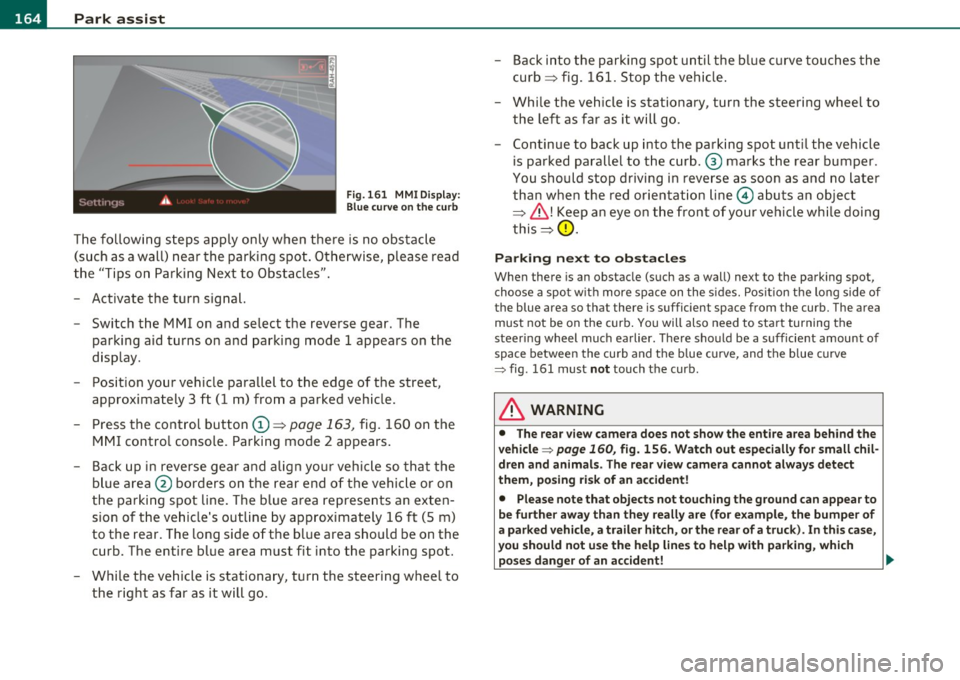
Fig.161 MMI Display:
Blue curve on the curb
The following steps apply only when there is no obstacle
(such as a wall) near the parking spot. Otherwise, please read
the "Tips on Parking Next to Obstacles".
- Activate the turn signal.
- Switch the MMI on and select the reverse gear. The
parking aid turns on and parking mode 1 appea rs on the
display.
- Position your vehicle parallel to the edge of the street,
approximately 3 ft (1 m) from a parked vehicle.
- Press the control button
(D => page 163, fig. 160 on the
MMI control console. Parking mode 2 appears.
- Back up in reverse gear and align your vehicle so that the
blue area ® borders on the rear end of the vehicle or on
the parking spot line. The blue area represents an exten
sion of the vehicle's outline by approximately 16 ft (5 m)
to the rear. The long side of the blue area should be on the
curb. The entire blue area must fit into the parking spot.
- While the vehicle is stationary, turn the steering wheel to
the right as far as it will go. -
Back into the parking spot until the blue curve touches the
curb => fig. 161. Stop the vehicle.
- While the vehicle is stationary , turn the steering wheel to
the left as far as it will go .
- Continue to back up into the parking spot until the vehicle
is parked parallel to the curb .® marks the rear bumper .
You should stop driving in reverse as soon as and no later
than when the red orientation line© abuts an object
=> & !Keep an eye on the front of your vehicle while doing
this =>
0.
Parking next to obstacles
When there is an obstacle (such as a wall) next to the parking spot,
choose a spot with more space on the sides. Position the long side of
the blue a rea so that the re is sufficient space from the curb. The area
must not be on the curb. You will also need to start turning the
steering wheel much earlier. There should be a sufficient amount of
space between the curb and the blue curve, and the blue curve
=> fig . 161 must not touch the curb.
& WARNING
• The rear view camera does not show the entire area behind the
vehicle => page
160, fig. 156. Watch out especially for small chil
dren and animals. The rear view camera cannot always detect
them, posing risk of an accident!
• Please note that objects not touching the ground can appear to
be further away than they really are (for example, the bumper of
a parked vehicle, a trailer hitch, or the rear of a truck). In this case,
you should not use the help lines to help with parking, which
poses danger of an accident! _,,,
Page 176 of 368
1111....__D_ r_iv _i_ n_, g=-- S_ a _ f_e _,Ly _ ______________________________________________ _
Driving Safely
General notes
Safe driving habits
Please remember -safety first!
Th is chapter contains important information, t ips, instructions and
warnings that you need to read an d observe fo r you r own safe ty, the
safety of you r passengers and others . We have summarized here
w hat you need to know about sa fety belts, airbags, child restra ints as
we ll as child safety . You r safety is for us
priority number 1. Always
observe the information and warnings in this section -for your own
safety as well as t hat of your passengers.
The informat ion in this section applies to all mode l versions of yo ur
veh icle . Some of the fe atures des cribed in this se ctions m ay be st an
dard equ ipment on some models, or may be optional eq uipment on
others. If you a re not sure, ask your a uth o rized Audi dealer.
& WARNING
• Always make sure that you follow the instructions and heed
the WARNINGS in th is Manual. It is in your interest and in the
intere st of your passengers.
• Always keep the complete Owner's Literatu re in your Audi
when you lend or sell your vehicle so that this important informa
tion will always be available to the driver and passengers .
• Always keep the Owner's literature handy so that you can find
it easily if you have questions . •
Safety equipment
The safety features are part of the occupant restraint
s y stem and wor k together to he lp reduce the ris k of injury
in a wide variety of accident situations.
Your sa fety and t he safety o f yo ur passenge rs shou ld no t be left to
chance . Adva nces in technology have made a variety of features avai l
a b le to help re duce the risk of injury in an a cc ident . The fo llow ing is a
list of jus t a few of the safety features in your Audi:
• sophisticated safety belts for driver and a ll passenger seating
p osi tion s,
• safety belt pretensioners,
• safety belt fo rce lim iters for the fro nt sea ts,
• safety belt he igh t adju stmen t sys tems for the fro nt sea ts,
• automatic safety be lt height adjustment for the rear seats,
• front ai rbags,
• side air bags in the front sea ts a nd ou ter rear seats*,
• side curtain airbags,
• special LATCH an chorages fo r ch ild restra in ts,
• head restraints fo r eac h seating position,
• adjustable steering co lumn .
These individual safety feat ures, can work together as a system to
he lp protect you and yo ur passengers in a wide range of accide nts .
T hese feat ures ca nnot work as a system if they are not a lways
c o rre ctly adjusted and co rre ct ly u sed .
Safety is everybody's responsibility! •
Page 177 of 368
Driving Safely ---------------------"~'---
Important things to do before driving
Safety is everybody's job! Vehicle and occupant safety
always depends on the informed and careful driver.
For your safety and the safety of your passengers, before
driving always:
- Make sure that all lights and signals are operating
correctly.
- Make sure that the tire pressure is correct.
- Make sure that all windows are clean and afford good visi-
bility to the outside.
- Secure all luggage and other items carefully::::>
page 93.
-Make sure that nothing can interfere with the pedals.
- Adjust front seat, head restraint and mirrors correctly for your height .
- Instruct passengers to adjust the head restraints according to their height.
- Make sure to use the right child restraint correctly to
protect children ::::,
page 217, "Child Safety".
- Sit properly in your seat and make sure that your passen gers do the same::::,
page 75, "General recommenda
tions".
- Fasten your safety belt and wear it properly. Also instruct
your passengers to fasten their safety belts properly
=:> page 185. •
Controls and equip
ment Safety first Vehicle operation
What impairs driving safety?
Safe driving is directly related to the condition of the
vehicle, the driver as well as the driver's ability to concen
trate on the road without being distracted .
The driver is responsible for the safety of the vehicle and all
of its occupants. If your ability to drive is impaired, safety
risks for everybody in the vehicle increase and you also
become a hazard to everyone else on the road::::,,& . There
fore:
Do not let yourself be distracted by passengers or by using
a cellular telephone.
NEVER drive when your driving ability is impaired (by
medications, alcohol, drugs, etc.).
- Observe all traffic laws, rules of the road and speed limits
and plain common sense .
- ALWAYS adjust your speed to road, traffic and weather
conditions.
- Take frequent breaks on long trips. Do not drive for more than two hours at a stretch.
- Do NOT drive when you are tired, under pressure or when
you are stressed .
& WARNING
Impaired driving safety increases the risk of serious personal
injury and death whenever a vehicle is being used.•
Vehicle care Do-it-yourself service Technical data
Page 181 of 368
______________________________________________ D_ ri_v _ i_n _,,g ,c.._ S_a_ f_ e_ l..:: y __ _
Proper adjustment of head restraints
Correctly adjusted head restraints are an important part
of your vehicle's occupant restraint system and can help to reduce the risk of injuries in accident situations.
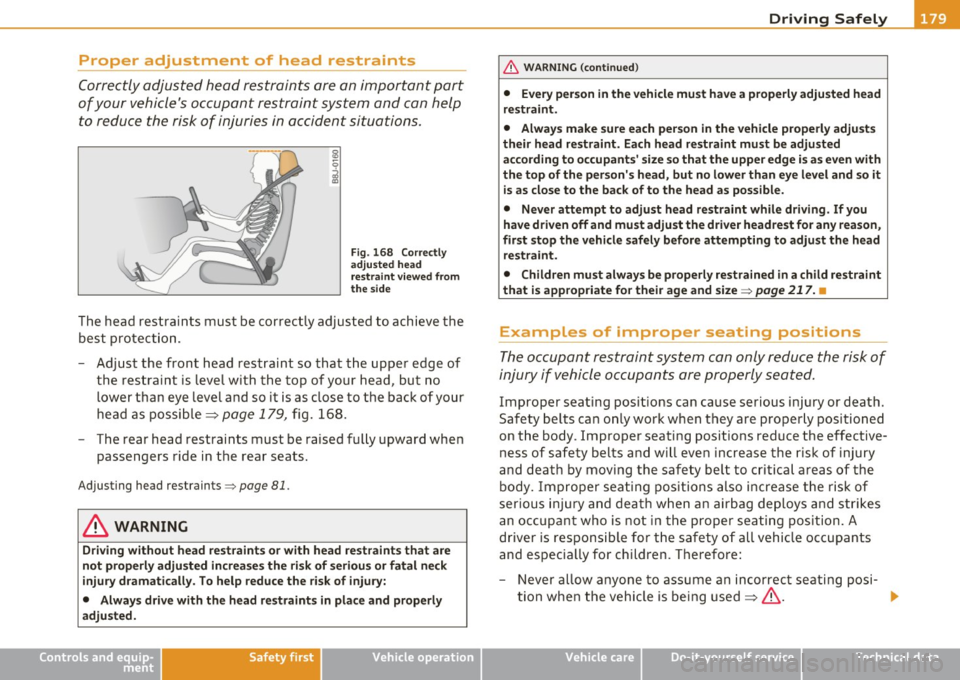
Fig . 168 Correctly
adjusted head
restraint viewed from
the side
The head restraints must be correctly adjusted to achieve the
best protection.
- Adjust the front head restraint so that the upper edge of
the restraint is level with the top of your head, but no
lower than eye level and so it is as close to the back of your
head as possible =>
page 179, fig. 168.
- The rear head restraints must be raised fully upward when
passengers ride in the rear seats.
Adjusting head restraints => page 81.
& WARNING
Driving without head restraints or with head restraints that are
not properly adjusted increases the risk of serious or fatal neck
injury dramatically. To help reduce the risk of injury:
• Always drive with the head restraints in place and properly
adjusted.
Controls and equip ment Safety first Vehicle operation
& WARNING (continued)
•
Every person in the vehicle must have a properly adjusted head
restraint.
• Always make sure each person in the vehicle properly adjusts
their head restraint. Each head restraint must be adjusted
according to occupants' size so that the upper edge is as even with
the top of the person's head, but no lower than eye level and so it
is as close to the back of to the head as possible.
• Never attempt to adjust head restraint while driving. If you
have driven off and must adjust the driver headrest for any reason,
first stop the vehicle safely before attempting to adjust the head
restraint.
• Children must always be properly restrained in a child restraint
that is appropriate for their age and size=>
page 217. •
Examples of improper seating positions
The occupant restraint system can only reduce the risk of
injury if vehicle occupants are properly seated.
Improper seating positions can cause serious injury or death.
Safety belts can only work when they are properly positioned
on the body . Improper seating positions reduce the effective
ness of safety belts and will even increase the risk of injury
and death by moving the safety belt to critical areas of the body. Improper seating positions also increase the risk of
serious injury and death when an airbag deploys and strikes
an occupant who is not in the proper seating position. A
driver is responsible for the safety of all vehicle occupants
and especially for children. Therefore:
- Never allow anyone to assume an incorrect seating posi-
tion when the vehicle is being used=>& . _,,,
Vehicle care Do-it-yourself service Technical data