ESP AUDI S8 2008 Owner's Manual
[x] Cancel search | Manufacturer: AUDI, Model Year: 2008, Model line: S8, Model: AUDI S8 2008Pages: 404, PDF Size: 52.7 MB
Page 60 of 404
Opening and closing
Child safety lock
Mechanical child safety lock in the rear doors
t
The child safety lock prevents the rear doors from being
opened from the inside.
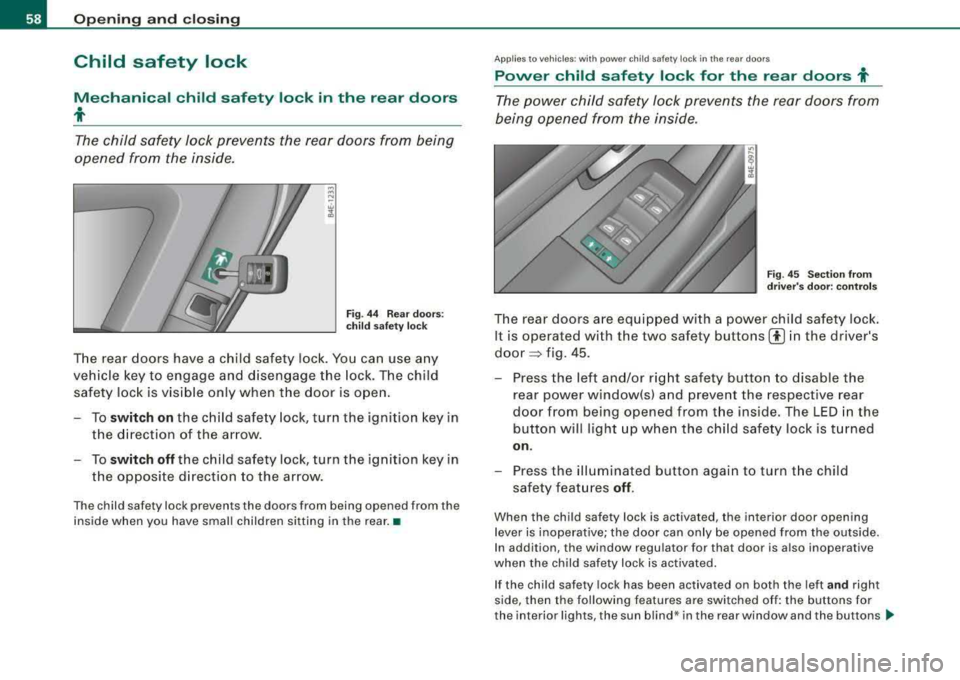
Fig . 44 Rear doors:
child safety lock
The rear doors have a child safety lock. You can use any
vehicle key to engage and disengage the lock. The child
safety lock is visible only when the door is open.
-To switch on the child safety lock, turn the ignition key in
the direction of the arrow.
-To switch off the child safety lock, turn the ignition key in
the opposite direction to the arrow.
The child safety lock prevents the doors from being opened from the
inside when you have small children sitting in the rear. •
App lies to vehi cles : wi th p ow er c hild sa fet y loc k in the rea r doors
Power child safety lock for the rear doors t
The power child safety lock prevents the rear doors from
being opened from the inside .
Fig. 45 Section from
driver's door: controls
The rear doors are equipped with a power child safety lock.
It is operated with the two safety buttons
00 in the driver's
door ~ fig. 45 .
-Press the left and/or right safety button to disable the
rear power window(sl and prevent the respective rear
door from being opened from the inside. The LED in the
button will light up when the child safety lock is turned
on.
-Press the illuminated button again to turn the child
safety features
off .
When the child safety lock is activated, the interior door opening
lever is inoperative; the door can only be opened from the outside.
In addition, the window regulator for that door is also inoperative
when the child safety lock is activated .
If the child safety lock has been activated on both the left
and right
side, then the following features are switched off: the buttons for
the interior lights , the sun blind * in the rear window and the buttons
~
Page 61 of 404
for the power sun blinds* in the side windows . In addition to this,
t he rear climate contro l* is set to the
PA SS IV E mode. This means
that the climate controls in the front adjust the heating and venti la
tion in the rear of the
ve hicle => page 125.
[ i ] Tips
• I n order to activate the child safety lock on the left and the right
s ide, you have to press the two safety buttons in succession.
• Make certa in that the indica tor light in the corresponding safety
button illuminates when the child safety lock is activated .•
Advanced Key
A pplies to vehicles : with Advance d Key
Description
Opening your vehicle and starting the engine with the key
still in your pocket.
T he Advanced Key features is a keyless system which gives you the
possibility to lock and unlock your vehic le, as wel l as to start the
engine without having to use your key.
It does not matter if you have your key in your jacket pocket or in
your briefcase. As soon as you get within a certain distance to the
vehic le, t he system senses that your are approaching, it makes a
quick check to see if you are "authorized" and then it does the
following:
• unlocks the
veh ic le => page 60 .
• locks the vehicle => page 60.
• switches on the ignition and starts the engine when you press
t he [ START] button. You do not have to insert your key into the ign i
tion
lock=> page 131.
Controls and equip ment
Openin g and clo sing
& WARNING
• When you lock your vehi cle from out side , nobod y -espe cially
c hildren - should remain in side the vehicle. Remembe r, when you
lock the vehi cle from the out side the windo ws cannot be opened
from the in side.
• Wh en yo u le ave the vehi cle , al ways remove the ignition ke y and
t ak e it with you. Thi s will prevent pa ssenger s (children , for
e x ample ) from accident ally bein g locked in th e vehicle should the y
accid entally pre ss the powe r lo cking swit ch in the door s.
• Do not l eav e children in side the vehi cle un super vis ed . In an
emerg ency it would be impo ssible to open the doors from the
out side without the key .
[ i ] Tip s
• For the Advanced Key to properly work, you must a lways have
your vehicle key with you .
• The vehic le will lock or un lock the doors only if an authorized key
comes within 5 ft (1 .5 meters) from one of the vehic le doors or the
rear lid .
• You can st ill lock or unlock your vehic le using the remote control
key buttons, however the se lector lever must in the P position .•
Page 62 of 404
Opening and clo sing
Ap plies to vehicles : wi th Adv anced Key
Unlocking the vehicle
You can unlock the doors and rear lid without using the
remote control.
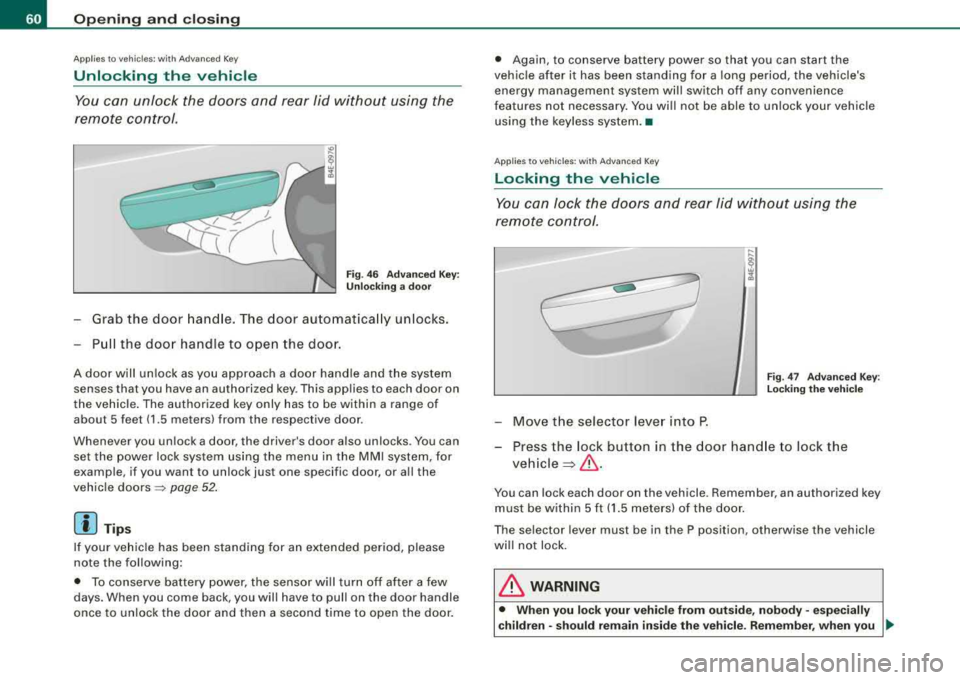
F ig . 46 Ad van ced Ke y:
Un locki ng a door
Grab the door hand le. The door automatica lly unlocks.
Pu ll the doo r handle to open the door.
A door will un lock as you approach a door hand le and the system
senses that you have an authorized key . This applies to each door on
the vehicle . The authorized key only has to be within a range of
about 5 feet (1 .5 meters) from the respective door .
Whenever you un lock a door, the driv er's door also unlocks . You can
set the power lock syste m using the menu in the MMI system, for
example , if you want to unlock just one specific door , or all the
vehic le doors
=> page 52 .
[ i J Tips
If your vehicle has been standing for an extended period, please
note the following:
• To conserve battery power, the sensor wil l turn off after a few
days. When you come back , you will have to pull on the doo r handle
once to unlock the door and then a second time to open the door . •
Again , to conserve battery power so that you can start the
vehic le after it has been standing for a long period, the vehicle's
energy management system will switch off any convenience
features not necessary . You wi ll not be able to unlock your vehicle
using the keyless system .•
A pplies to vehicles : with Adva nc ed Ke y
Locking the vehicle
You can lock the doors and rear lid without using the
remo te control.
F ig . 4 7 Advan ced Key:
L oc king th e vehic le
- Move the selector lever into P.
- Press the lock button in the door hand le to lock the
vehicle ~& -
You can lock each door on the vehicle . Remember, an authorized key
must be within 5 f t (1 .5 meters) of the doo r.
The selector lever must be in the P position , otherwise the vehicle
wi ll not lock.
& WARNING
• When you lo ck your veh icle from out side , nobody -espec ially
c hildren -should rem ain insid e the vehicle . R emember , when you
.,_
Page 64 of 404
![AUDI S8 2008 Owners Manual Opening and closing
anti-theft a larm switched on, the emergency flashe rs wi ll blink and
t he horn wil l so un d only a fter y ou have cl ose d t he do or or lid.
[ i ] Tips
For](/img/6/57619/w960_57619-63.png "AUDI S8 2008 Owners Manual Opening and closing
anti-theft a larm switched on, the emergency flashe rs wi ll blink and
t he horn wil l so un d only a fter y ou have cl ose d t he do or or lid.
[ i ] Tips
For")
Opening and closing
anti-theft a larm switched on, the emergency flashe rs wi ll blink and
t he horn wil l so un d only a fter y ou have cl ose d t he do or or lid.
[ i ] Tips
For t he anti -th eft a larm sy stem to func tion p roperl y, ma ke su re a ll
veh ic le doors and windows are closed before leaving the vehicle .•
Power windows
Controls
Fig . 48 Driver' s doo r:
power window
switches
Fig . 49 Driver' s door :
S w itches (veh icl es
with power child safety
lock )
Switches for front door windows
© opera tes the wi ndow in the driver 's d oor.
@ opera tes the windo w in the fr ont pass enger's door.
Switches for rear windows
© operates t he left rea r w in dow.
@ operates the r ight rear window.
Safety switch
© Safety switch for rear window operation .
& WARNING
• Do not leave children unattended in the vehicle , especially with
access to vehicle keys. Unsupervised use of the keys can result in
starting of the engine and use of vehicle systems such as power
windows , etc. which could result in serious injury.
• Remember -you can still open or close the power windows for
about ten minutes after the ignition is switched off . Only when
either of the front doors are opened are the power windows
switched off .
• Be careful when closing the windows. Check to see that no one
is in the way, or serious injury could result!
• Always remove the ignition key whenever you leave your
vehicle.
• If you lock your vehicle from the outside , no one , especially chil
dren , should remain in the vehicle.
• Do not stick anything on the windows or the windshield that
may interfere with the driver 's field of vision .
[ i] Tips
• I n addition to the switches in the driver 's door there is a separate
switch in each doo r fo r the powe r window in that
door => page 6 4,
fi g. 50 . ..
Page 65 of 404
• The driver can lower or raise the power side blinds * in the side
windows by using switches
© and @ . •
Switches in the driver's door
The driver can operate all windows.
If the respective switch is pus hed or pulled the window will
open or c lose. The power window switches have a
two-po si
tion fun ction :
Opening th e windows
- Pu sh the switch to the first stop and hold it the re until the
window has lowered to t he desired pos ition.
- Push the sw itch briefly to the
s e cond stop : the wi ndow
will aut omatical ly open a ll the way .
Closing th e windows
- Pull the switch up to the first stop and hold it t here until
the window has risen to the desired position.
- Pu ll the switch quick ly to the
se cond position: the
window will automatica lly close all the
way => & in
"Contro ls" on
page 62.
A cti vating /dea ctivating r ear windows
- Pus h the switch © => page 62, fig . 48 t o th e depressed
pos it ion to a ctivate the rear windows - the light i n the
sw itch wi ll go out .
- Brie fly press the switch © to
deactivate the rear
windows -the swi tch will return t o th e safety posi tion
and the
l ig ht ~ w ill illuminate.
Controls and equip
ment
Openin g and clo sing
Switching th e pow er t o th e re ar wind ows on or
off on v ehi cle s with pow er child s afe ty lo ck
- Press the left 00 button=> page 62, fig. 49 to swit ch off
the power window in the le ft door only. The LED in the
button illum inates .
- Press the right
00 button to switch off the power window
in t he
right door only. The LED in the button illum inates.
- Press the
00 button again to switch the power back on .
The LED in the button will go off.
By pressing the sa fet y swi tc h ® => page 62, fig. 48, the function of
some sw itches in the rear can be turned off . When
the ~ symbol in
the safety switch illuminates, the following functions are switched
off:
• The power windows in the rear doors.
• The buttons for t he interior lights.
• The buttons for the power sun b linds* in side windows .
• The button for the power sun bl ind* in the rear w indow.
• I n vehic les with rear climate contro l* the PASSIVE mode is acti
vated . In this mode the rear air conditioning can be operated only
from contro ls in the driver's
area => page 125 .
This feature has been provided for the safety of smal l ch ildren rid ing
in the rear of the vehic le.
On vehicles wit h the
powe r child saf ety lo ck* => page 62, fig. 49
these features can likewise be switched off . Both
CI) buttons ®
must be pressed.
• If
only the left CI) button is pressed, then only the re ar left door
power window is switched off and the door is locked.
• If
only th e right CI) button is pressed, then only the rear right
door
power window is switched off and the door is locked.
Page 69 of 404
-To tilt the roof down to any intermediate position pull and
hold
the switch until the roof reaches the desired posi
tion.
& WARNING
Improper use of the power sunroof can cause serious personal
injury.
• Be careful when closing the power sunroof. Not paying atten
tion could cause you or others to be trapped and injured as the
roof closes.
• Always take the key with you when you leave the vehicle to
prevent injuries caused by the roof closing
• Never leave children or persons requiring assistance alone in
the vehicle, especially when they could access the vehicle keys.
Unsupervised use of the keys can result in the engine being
started or use of vehicle systems such as the power windows, etc.
which could result in serious injury. The doors could be locked
with the remote key, delaying help in an emergency.
• The power sunroof will continue to operate until the ignition
key has been removed and one of the front doors has been
opened. •
Power emergency closing
The sunroof can still be closed electrically if for some
reason the overload protection function becomes acti
vated.
The power sunroof is equipped with an overload protection
feature. If, under normal conditions, the power sunroof will
not close, you can close it using this feature .
-Turn the rotary switch to position @=>page 65, fig. 53.
Controls and equip
ment
Opening and closing
-Now pull the switch and hold it in this position until the
power sunroof closes completely.
& WARNING
Improper use of the power sunroof can cause serious personal
injury.
• Be careful when closing the power sunroof. Not paying atten
tion could cause you or others to be trapped and injured as the
roof closes.
• Always take the key with you when you leave the vehicle to
prevent injuries caused by the roof closing
• Never leave children or persons requiring assistance alone in
the vehicle, especially when they could access the vehicle keys.
Unsupervised use of the keys can result in the engine being
started or use of vehicle systems such as the power windows, etc.
which could result in serious injury. The doors could be locked
with the remote key, delaying help in an emergency.
• The power sunroof will continue to operate until the ignition
key has been removed and one of the front doors has been
opened. •
Page 71 of 404
Clear vision
Lights
Switching the headlights on and off -'t/-·
In the "AUTO" position, a light sensor automatically
s w itches t he head- and taillights on and off in respo nse to
l igh t con ditions.
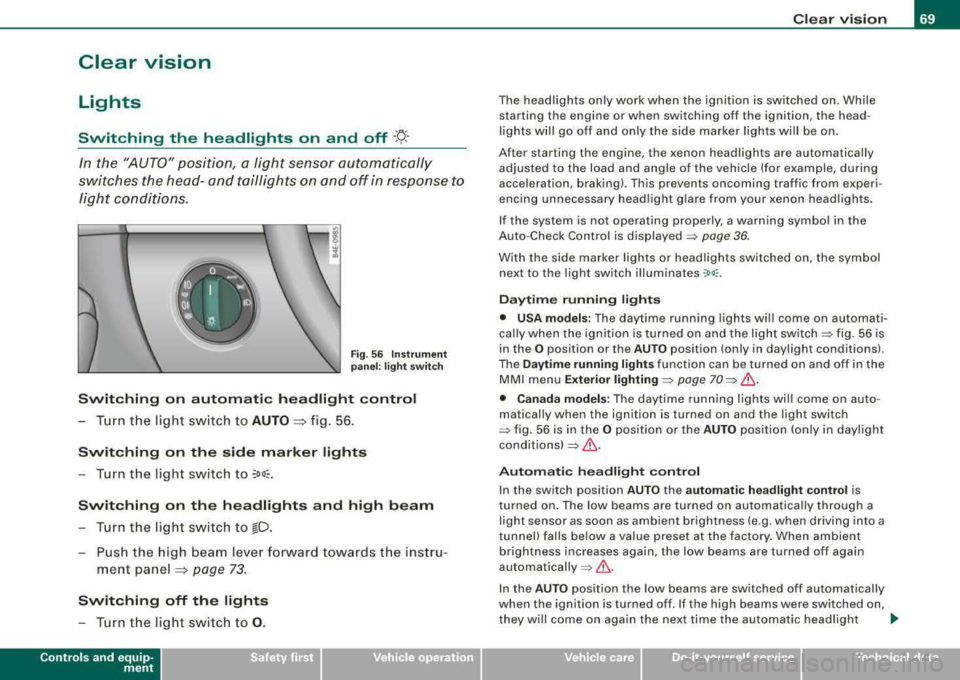
Fig . 56 In stru ment
pan el: lig ht sw itch
Switching on automatic headlight control
- T urn th e light switch to AUTO => fig. 56 .
Switching on the side marker lights
- Turn the light switch to ~oo~.
Switching on th e headlights and high beam
- T urn t he light swi tch to io.
- Push the high beam leve r forw ard towards t he instru -
me nt panel
=> page 73 .
Switching off the lights
- T urn t he light switch to 0 .
Contro ls a nd eq uip
ment
Clear vision
The head lights only work when the ignition is switched on . While
starting the engine or when switching off the ignition, the head
lights will go off and only the side marker lights will be on.
After starting the engine, the xenon headlights are automatically
adjus ted to the load and angle of the vehic le (for example, during
acceleration, braking) . This prevents oncoming traffic from experi
encing unnecessary headlig ht g lare from your xenon head ligh ts .
If the system is not operating properly, a warning symbol in the
Auto -Check Control is displayed
=> page 36.
With the side marker lights or head ligh ts switched on, the sym bol
next to the light switch illuminates
:oo: .
Daytime running lights
• USA models : The daytime running lights wi ll come on automati
ca lly when the ig nition is turned on and the ligh t
switch=> fig. 56 is
in the
O position or the AUTO position (only in day light conditions).
The
Daytime running lights function can be turned on and off in the
MMI menu
Exterior lighti ng => page 70 => & .
• Canada models: The dayti me ru nn ing lights wi ll come on auto
matically when the ignition is turned on and the light switch
::::> fig. 56 is in the O position or the AUTO p o siti on (only in daylight
conditions)
=> & .
Automati c headligh t control
In the switch position AUTO the a utomatic headligh t cont rol is
turned on . The low beams are turned on automa tica lly through a
light sensor as soon as ambient brightness (e.g . when driving into a
tunnel) fa lls below a value preset at the factory . When ambient
brightness increases again, the low beams are turned off again
automatically =>& .
In the AUTO pos it ion the low beams are switched off automatically
when the ignition is turned off. If the high beams were switched on,
they w ill come o n again the next time the automatic head ligh t
~
Vehicle care I I irechnical data
Page 72 of 404
Clear vision
control is activated. The high beam function must first be switched
on in the MMI
=> page 70 .
Light Sensor Malfunction
In the event of a light sensor mal fu n ct ion, the driver is notified i n the
instrument cluster display :
@ Automatic headlights/automatic wipers defe ctive
For safety reasons the low beams are turned on permanently with
the switch in
AUTO . However, you can continue to turn the lights on
and off us ing the light switch . Have the light sensor checked as soon
as possib le at a dealership .
& WARNING
• Never use dayt ime running lights to see where you are going .
The y are not bright enough and will not let you see f ar enough
ahead for s afet y, espe cially at du sk or when it is d ark. Alwa ys
switch on the low beams at dusk or when it is dark .
• Autom atic he adlight s are onl y intended to a ssist the dr iver.
The y do n ot relie ve the dri ver of his re spon sibility to che ck the
headlights and to turn them on manuall y according to the current
light and vi sibility condi tion s. For example , fog and rain cannot be
dete cted b y the l ight sen sors . S o alway s switch on the he adlights
under these wea the r condition s and when driving in the dark
gD .
• Cra shes can h appen when you c annot see the road ahead and
when you cannot be seen b y other motori sts .
- Alway s turn on the headlight s so that you can see ahead and
s o that others c an see your c ar from the ba ck.
[ i ] Tips
• With the switch in AUTO front fog lights and rear fog lights
cannot be turned on in addition. • I
f you remove the ignition from the ignition lock while the head
li ghts are s til l on, a bu zzer w ill sound as long as the driver's door is
open to remind you to turn off the lights .
• Always observe t he specific local regulations for your area as to
when to use your lights .•
Adjusting exterior lighting
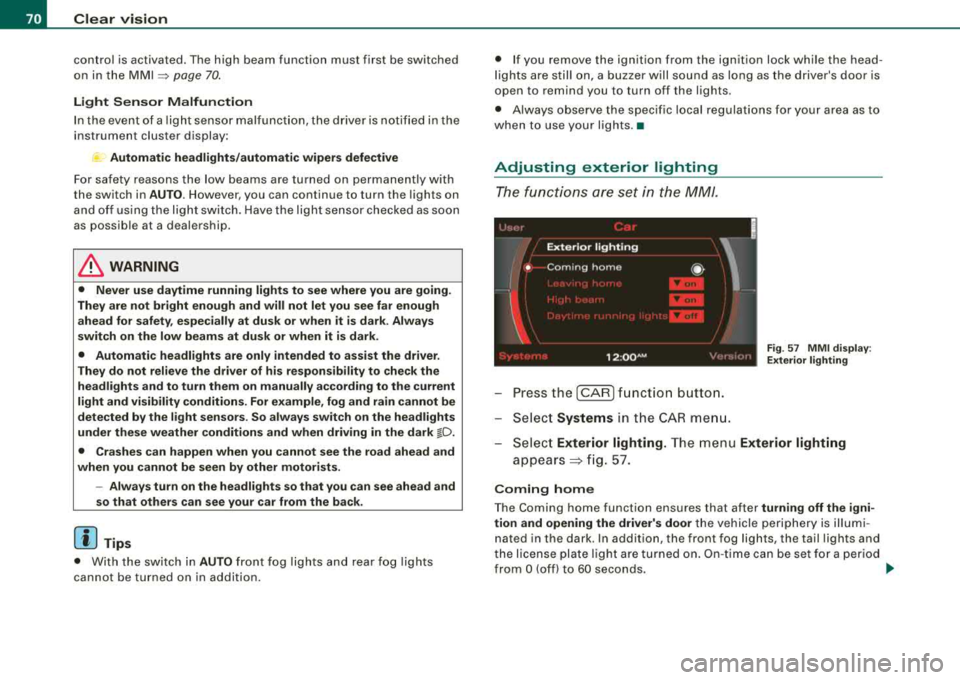
The functions are set in the MM/.
F ig . 57 MM I di spla y:
E xt eri or ligh ting
- Pressthe [CAR ]function button.
- Select
Systems in the CAR me nu.
- Selec t
Exterior lighting. The menu Exterior lighting
appears => fig. 57.
C oming home
The Coming home function ensures that after turning off the igni
tion and op ening the driv er's door
the vehicle periphery is il lum i
nated in the dark . In addition, the front fog lights, the tail lights and
t he license plate lig ht are turned on . O n-t ime can be set fo r a period
from
O (off) to 60 seconds. ~
Page 83 of 404
ture on the windshield. The rain sensor wiper intervals depend on
t he sensitivi ty setting as well as vehic le speed . Dur ing brief s tops,
wiper motion wil l adjust in re lation to the amount of rain on the
windshield .
During br ief stops, e.g. at a red light, wiper mot ion wil l auto mati
ca lly be reduced to the next lower speed . Wipers a lready turning at
low speed. change to i nterm ittent w ip ing.
When the ignition is turned on, the washer jets are heated .
With the low beam headlights switched on, p ull the wiper lever
towards you only briefly to clean the windshield. Ho ld ing the w iper
lever wou ld a lso engage the headlight washer system each time you
clean the w inds hie ld and wou ld dra in t he washer flu id reservoir
pr ematurely .
& WARNING
• Wiper bl ade s are cruc ial for safe driving! Only when they are in
good condition are they able to clear the window s properly to
provide uncompromising visibilit y. Worn or damaged wiper blades
are a safety hazard
::::> page 82 , "In stalling new wiper blade s"!
• The rain sensor is only designed to a ssist and support the
driver . It r em ains entirely th e driver' s respon sibility to monitor
outside weather condit ions and to manually activate the wipers as
s oon a s rain or drizzle reduces visibility through the windshield.
• The windshield mu st not be treated with water-repellent mate
rials . They c an in crea se gl are under poor visibility condition s such
as wetness , darkness , or when the sun is low on the horizon. In
addition , they can cau se the wind shield wipers to chatter.
0 Note
In free zing or near freezing conditions:
• Always check that the wiper b lades are not frozen to the glass
be fore you turn the w ipe rs on. Loosen a wiper b lade w hich is frozen
Controls and equip ment
Clea r vision
in place before operating the wipers to prevent damage to the wiper
bl ade or the wiper motor.
• Do not use the wipers to clear a frosted window. Using the
wipers as a conve nien t ice scraper will des troy the wiper blades .
• Before you take your vehic le to an automatic car wash, make sure
you have the w inds hield w iper system switched o ff (lever in p osition
O), otherwise the windshield wiper system could get damaged in the
car was h if it should suddenly come o n.
[ i ] Tips
• Make sure the washer flu id reservo ir in the engine compartmen t
is topped off before going on a long trip . Look
up:::> page 323 for
check ing and f illing the washer conta iner.
• I f you sw itch off the ignition with the windshield wiper lever st ill
in the inte rval wi pe pos ition and t hen com e back a wh ile la ter a nd
drive off, the rain sensor wil l reactivate itself after the vehicle speed
has e xceeded 4 mph (6 km/h) .
• Worn or dirty windshie ld wiper b lades cause smearing which
ca n affect t he opera tion of the ra in senso r. Check the condi tion of
your windshield wiper b lades regu lar ly . •
Headlight washer system
The he adlight washer sy stem cle ans the he adlig h ts.
-Oper ate the win dshiel d w ip er/was her sy stem G) wit h th e
hea dlights t urned o n by ho ld ing th e l ever fo r lo nge r than
on e seco nd ::::.,
page 80, fig. 76.
The washe r jets extend f orward out of the fron t bumper dr iven by
water pressure to spray the front head lights with water .
You should inspect the head lights regu lar ly (for examp le when refu -
e ling) a nd c lean o ff any sol id dirt or i nsects from the lenses.
~
Page 86 of 404
Clear vision
Outside mirrors
The ou tside mirrors are electrically adjusted.
Adjusting the outside mirrors
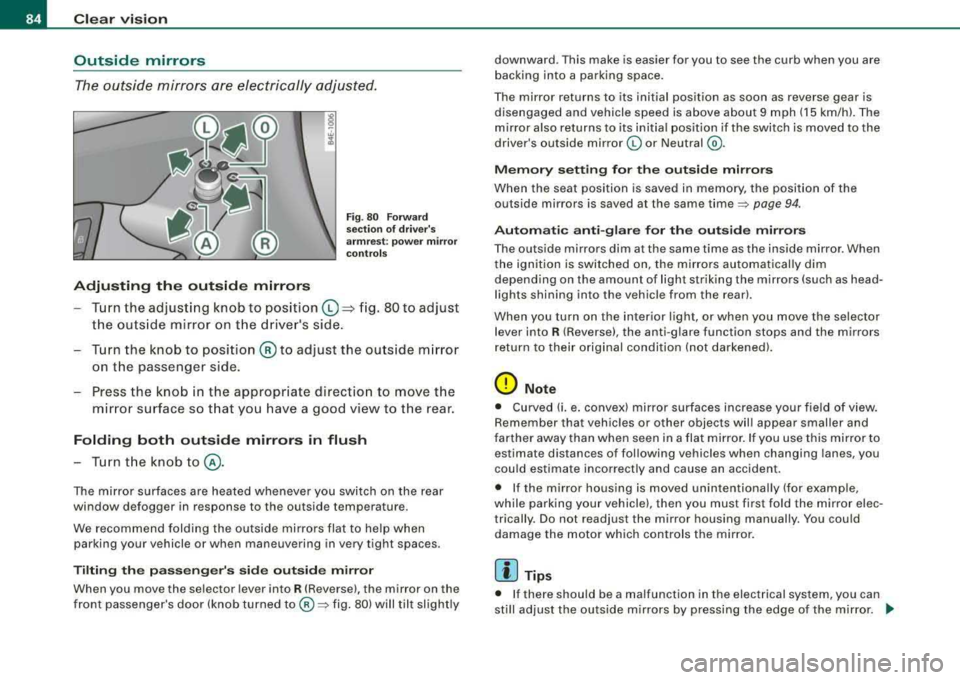
Fig . 8 0 F orw ard
s e ction of drive r's
a rmre st: powe r m irror
c ontr ols
Turn the adjusti ng knob to position ©~ fig. 80 to adjust
t h e ou ts ide mir ror on t he d river's side .
- Tu rn the knob to posi tion
@ to adjust the outs ide m irror
on the passenger side.
- Press th e kno b in the appropr iate direct io n to move the
m irror surface so t hat you have a good view to the rear.
Folding both outside mirrors in flush
- T urn t he knob
to @ .
The mirror surfaces a re heated whenever you switch on the rear
window defogger in response to the outside temperature .
We recommend folding the outside mirro rs flat t o help when
parking your vehicle or when maneuvering in very tight spaces .
Tilting the passenger's side out side mirror
When you move the se lector lever into R (Reverse), the mirror on the
front passenge r's doo r (knob turned
to @ => fig. 80) w ill til t slight ly downward
. This make is easier for you to see the curb when you are
b acking in to a parking space.
T he mirror returns to its ini tial position as soon as reverse gear is
disengaged and vehicle speed is above about 9 mph (15 km/h). The
m irror also returns to its initia l position if the switch is moved to the
driver's outside mirror
(0 or Neutral @.
Memory setting for the outside mirrors
When the seat posi tion is saved in memory, the position of the
outside mirrors is saved at the same time
=> page 94 .
Automatic anti -glare for the outside mirrors
T he outside mi rrors dim at the same time as the inside mirror . When
t h e ignition is switched on, the mir rors au tomatical ly dim
depending on the amount of light strik ing the mirrors (such as head
l ights shining into the vehicle from the rear).
When you turn on the interior l ight, or when y ou mo ve the se lect or
l ever into
R (Reverse), the anti -g lare function stops and the mirrors
r eturn to their original condi tion (n ot dar ken ed).
0 Note
• Curve d (i. e . convex) mirror sur faces increase your field of view.
Remember that vehic les or other objects w il l appear smaller and
farther away than when seen in a fla t mi rror . If you use this mirror to
estimate distances of fol lowing vehicles when changing lanes, you
cou ld estimate incorrectly and cause an accident .
• I f the mirror housing is moved unintentional ly (for example,
while park ing your vehicle), then you must fi rst fo ld the mirror elec
trically . Do not readjust the mirror housing manually. You could
damage the motor which controls the mirro r.
[ i ] Tips
• I f there should be a malfunction in the elect rical system, you can
st ill adjust the outside m irrors by pressing the edge of t he mirror .
~