instrument cluster AUDI S8 2009 Owner's Guide
[x] Cancel search | Manufacturer: AUDI, Model Year: 2009, Model line: S8, Model: AUDI S8 2009Pages: 408, PDF Size: 91.63 MB
Page 148 of 408

-Adaptive Crui se Control .._ _ ______,:,...._ _________________________________________ _
Driver information
App lies to veh icles: with Adapt ive Cruise Cont ro l
Displays in the instrument cluster
Depending on the driving situation, driver information is
displayed in the instrument cluster.
@ Primary display in the speedometer.
Fig. 158 Ove rv iew
instrument clu ste r
@ Supplementary display in the instrument c luster.
© Message in the instrument cluster display.
@ Prim ary display
Important information concerning vehic le operation with Adaptive
Cruise Control is shown in disp lay area @. T he desired speed yo u
set is highlighted in the speedometer and the warning lights show
whether adjustments are being made fo r an object ahead .
This information is always disp layed. Display area @is therefore
called the
primary display.
@ Supplementary disp lay
In display area@ infor mation fro m the navigation sys te m and the
trip computer is displayed in addition to information about Adaptive
Cruise Control. You can select among
the different information by repeated brief
t aps on the RESET b utto n on the w indshield wiper lever ~
page 40,
"Operation" .
P articularly on your first trips with Adaptive Cruise Control, the
supplementary display should be turned on.
@ Message
The information in area © is not d isp layed permanently. Informa
tion is displayed on ly if you change the time interva l, if there is a
malfunction or if the Adaptive Cruise Contro l is turned off. •
Applies to veh icles : w ith Adaptive Cruise Contro l
Primary display in the speedometer
Desir ed sp eed
Fig . 159 Primary
d is play in th e speed
omete r
The desired speed set by the driver is disp layed wi th a red LED .
The system al lows only speeds from 20 to 95 mph (30 to 150 km/h)
to be se t. This s peed range is fain tly i lluminated in the spee dometer.
Warning lights (symbols )
• ""c:::, Open road : Th e war ning lig ht ""c:::, sh ows that ACC is active
and that no moving vehicle has been detected with in range of the
ra dar senso r up ahead in yo ur l ane of travel. The se t speed is main -
tained. .,
Page 149 of 408
_____________________________________________ A_ d_a ...: p_ t_ i_ v _e_ C_ ru_ is_ e_ C_ o_n _ t_ r_o _ l _ __._
• "°" ""° D riv ing in traffi c: The warning light "°"""° shows that a
vehic le moving in your lane of travel has been de tected up front in
your lane of travel. Your speed is adjusted according to the speed of
the vehicle up front. ACC accelerates and brakes automatical ly
within the system's capabilities.
• "°" ""°
Reque st f or driver to a ssume control: The red flashing
warning light
G'.'.::> 1,.,<:Q means R equ est fo r d riv er to assume control.
You as the driver must slow the vehicle with the foot brake. The
symbo l "°""G'.'.::l tells you that the Adaptive Cruise Control is not able
to slow the vehicle down enough to keep a enough distance to the
vehicle in front of you . A warning tone signal wi ll also sound when
the symbol appears .
& WARNING
Improper use of the Adaptive Cruis e Control f eatures and inatten
ti on c an lead to an cra sh a nd s erio us per sonal injury .
• Never allo w the c losing speed between you and other v ehicles
to be so high t hat th e Adap tive Cru is e Control ma y not be abl e to
slow your vehi cle safel y. If closing speed i s too high , you must
apply the brake s yourself to r ed uc e the ri sk of a r ear-end cra sh .
• Alway s sele ct a greater follow ing di stance to th e vehi cle up
a he ad on w et ro ad s th an on dr y roa ds.
• Alway s read and he ed the inf ormation and WARNINGS~
& in
" De scription " on
pag e 139 .
[ i J Tips
• If the Adaptive Cruise Control initiates braking, the hydraulic
brake system is under pressure . Therefore, the brake peda l distance
is shorter and the pedal feels "harder".
• If you use the accelerator to go faster than the speed of the
vehicle ahead of you, the driver intervention prompt wi ll not be
accompanied by a warning tone.
• If the speed you previously set is exceeded, the indicator light in
the speedometer wi ll switch o ff.•
Con tro ls and eq uip
ment
Ap plies to vehi cle s: wi th Ad apt ive Crui se Co ntro l
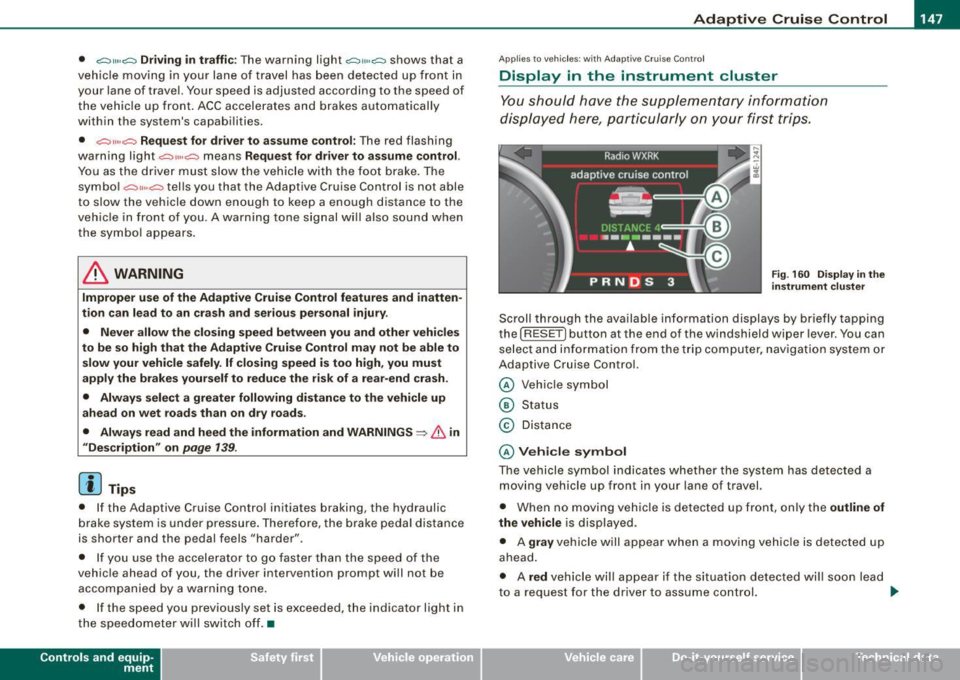
Display in the instrument cluster
You should hove the supplementary information
displayed here, p articularly on your first trips.
Fig. 160 D ispla y in th e
i n strum ent cl uste r
Scroll th rough the available information displays by briefly tapping
the ( RESET] button at the end of the windshield wiper lever . You can
se lect and information from the trip computer, naviga tion syste m or
Adaptive Cruise Control.
@ Veh icle symbol
@ Status
© Distance
@ V ehi cle sym bol
The vehicle symbol indicates whether the system has detected a
moving vehicle up front in your lane of travel.
• When no moving vehic le is detected up front, on ly the
outline of
the vehicle
is displayed.
• A
gra y vehicle will appear when a moving vehic le is detected up
ahead.
• A
red vehicle will appear i f the situation detected will soon lead
to a request for the driver to assume control. .,,_
Vehicle care I I irechnical data
Page 155 of 408
Audi lane ass is t -
-------------------------
Audi lane assist
Lane assist
Applies to veh icles : with lane assist
Description
Lane a ssist helps you keep y our vehicle in your lane .
Lane assist uses a camera to detect lane boundary lines. If the
system detects that your vehicle is about to leave a lane boundary
line, the steering wheel
vibrates to alert the driver. If lane assist
detects boundary lines on both sides of the vehicle's lane, the
system enters active standby mode, which is indicated by the green
indica tor light /: on the instrument cluster .
I f the system is in active standby mode and the turn signal is acti
vated before driving ov er the boundary line, the warning does not
occur since the sys tem allows for intenti onal lane changes.
The system is designed for driving on freeways and expanded high
ways and t hus works on ly at speeds of 40 mph (65 km/h) or mo re .
& WARNING
• Lane ass ist will not k eep your vehicle in your lane. The sy stem
only warns the d riv er w hen t he vehicle i s le av ing the lan e. The
driv er is alway s re spon sible for keeping the vehicle in the lane.
• The camera is not able to d ete ct all lane boundary lines and in
s o me cases might al so dete ct lane str ucture s or objects as
boundary lines . This c an le ad to in corre ct wa rning s or warnings
that fa il to go off at all .
• The camer a's visibili ty ca n be i mpaired by vehi cle s ahe ad of
you , for instan ce, or by rain , snow , h eavy spray or li ght shining into
th e cam era lens . Thi s can ca use lane as sis t to f ail to d ete ct
boundary line s. •
Con tro ls and eq uip
ment
Ap plies to vehi cles : wi th la ne assi st
Activating and deactivating
Fig . 1 70 Turn signal
l ev er: La ne assis t
butt on
F ig . 1 7 1 Win dshie ld:
L ane assist ca mera
v iewing win dow
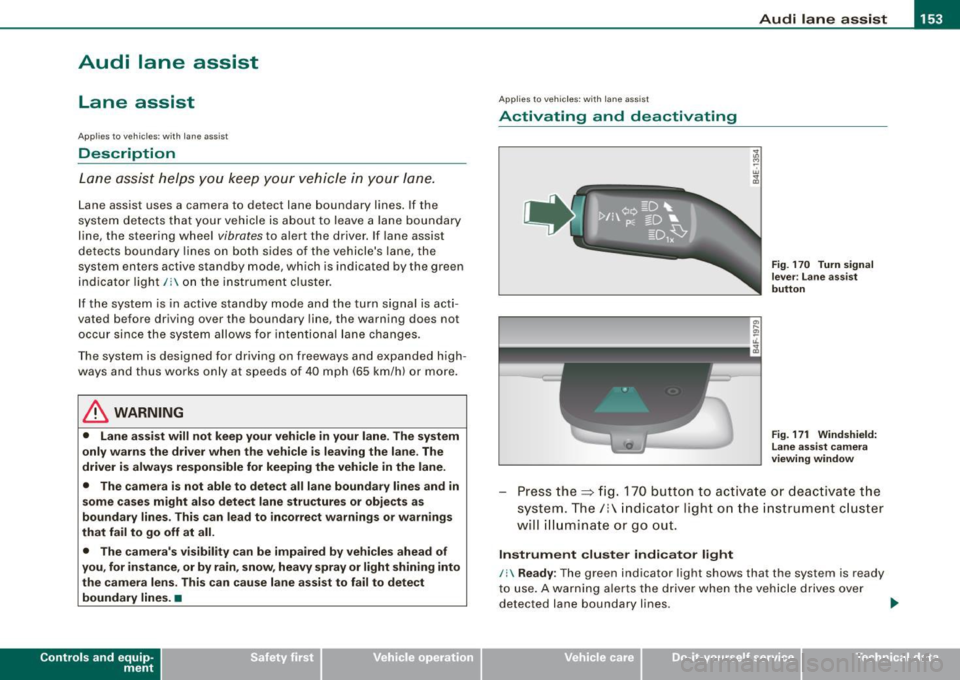
Press the :::> fig. 170 button to activa te or deactivate the
syst em . T he/ : in dica tor ligh t on t he i nstrument c luster
will illuminate or go out.
Instrument c lu ster indi ca tor light
/: Ready:
The green indicator light shows that the system is ready
to use . A warning a lerts the drive r when the veh icle drives over
dete cted lane boundary l ines. .,.
Vehicle care I I irechnical data
Page 156 of 408
• .___A_ u_ d _ i_l_a _n _ e_ a_ s_s _is _ t _________________________________________________ _
I Not ready: The yellow indicator light shows that the system is
turned on but unable to send a warn ing. This can be due to the
following:
• There are no boundary lines, or there is on ly one boundary line
present .
• The boundary lines are not detected (e.g. due to snow, dirt, wet
conditions or light shining into the camera lens).
• More than two boundary lines (such as at construction sites) are
located in the vehicle's lane.
• The vehicle's speed is below the speed needed to activate it,
which is about 40 mph (65 km/h).
• The lane is narrower than about 8 ft . (2.5 ml, or wider than about
16 ft. (5 ml.
• The curve is too sharp.
Notes on the instrument cluster display
When the lane assist turns off automatically, the instrument cluster
indicator goes out and one of the following messages appears on
the display:
Audi lane assist not available: Currently no sensor vision
This message appears when the camera can no longer function
because it cannot detect the boundary lines. This may be due to the
following :
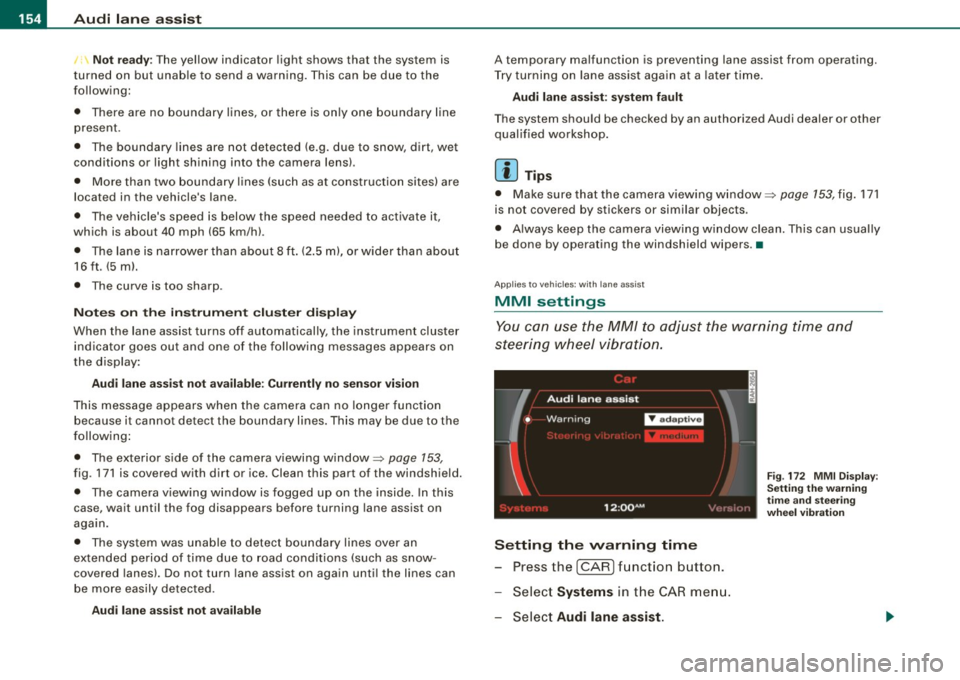
• The exterior s ide of the camera viewing window=>
page 153,
fig. 171 is covered with dirt or ice. Clean this part of the windshield.
• The camera v iewing window is fogged up on the inside. In this
case, wait until the fog disappears before turning lane assist on
again.
• The system was unable to detect boundary lines over an
extended period of time due to road conditions (such as snow
covered lanes). Do not turn lane assist on again until the lines can
be more easily detected.
Audi lane assist not available
A temporary malfunction is preventing lane assist from operating .
Try turning on lane assist again a t a later time.
Audi lane assist: system fault
The system should be checked by an authorized Audi dealer or other
qualified workshop .
[ i ] Tips
• Make sure that the camera viewing window:::> page 153, fig. 171
is not covered by stickers or similar objects .
• Always keep the camera viewing window clean. This can usually
be done by operating the windshield wipers. •
Applies to vehicles: with lane assist
MMI settings
You can use the MM/ to adjust the warning time and
steering wheel vibration.
Setting the warning time
Press the I CAR] function button.
- Select
Systems in the CAR menu.
- Select
Audi lane assist.
Fig. 172 MMI Display :
Setting the warning
time and stee ring
wheel vibration
Page 165 of 408
___________________________________________________ A_u_ d_i_ s_ id_e_ a_ s_s _i_s _t _ __.ffllll
Ap plies to vehicle s: with side assist
General information
Side assist has lim its and cannot detect vehic les under all road and
weather conditions. P lease remember system limitations and
never
rely on the system, especially when:
• driving through curves=>
page 763,
• lanes are of different widths=> page 163. •
Applie s to vehicles: with side ass ist
When dr iving through curves
Side assist cannot detect vehicles in curves with a turning radius of
less than 328 feet (100 m).
When driving through a curve , it is possible that side assist may
register a vehicle two lanes
over, and the signal on the outside
m irror will ligh t up .•
A pplies to vehicle s: with side ass is t
Lane width
Con tro ls and eq uip
ment
-
Fi g. 183 Lanes o f a
n orm al w idth are in
d etec tion a rea
Fig . 18 4 Narrow l anes:
Si de ass is t m ay d etec t
v ehicle s tw o la ne s
a w ay
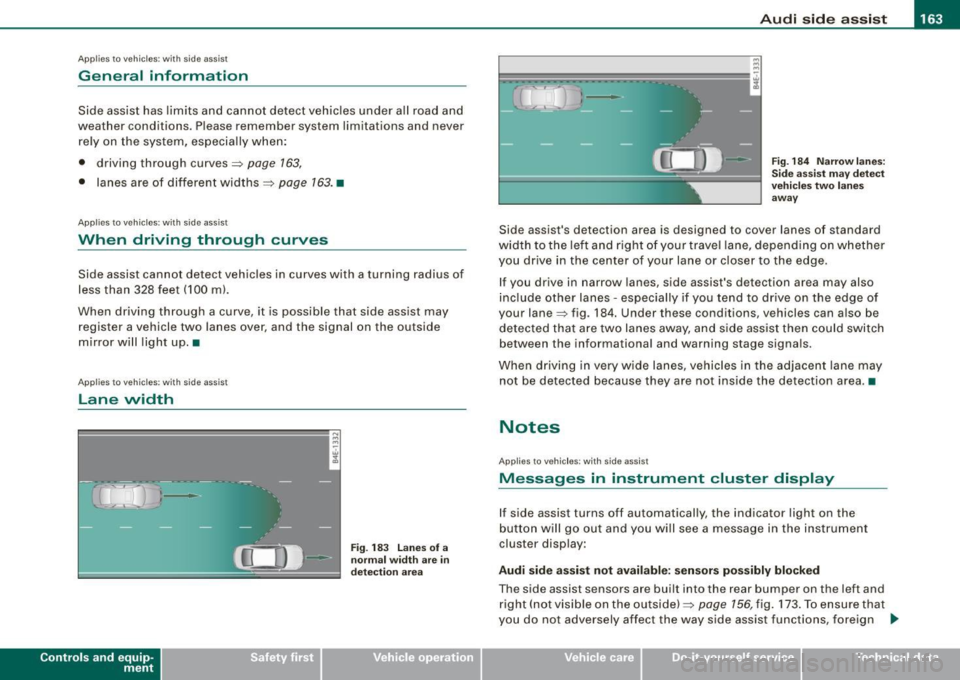
Side assist's detection area is designed to cover lanes of standard
width to the le ft and right o f your trave l lane, depending on whethe r
you drive in the center of your lane or c loser to the edge.
If you drive in narrow lanes, side assist's detection area may also
inc lude other lanes -especially if you tend to dr ive on the edge o f
your lane=> fig . 184. Under these conditions, vehicles can also be
de tected tha t are two lanes away, and s ide assist then could switch
between the informational and warning stage signa ls.
When d riving in
very wide lanes, vehicles in the adjacent lane may
not be detected because they are not inside the detection area. •
Notes
Applies to veh ic les : with s ide ass ist
Messages in instrument cluster display
If side assist turns off automatically, the indicator light on the
button will go out and you will see a message in the instr ument
cluster display:
Audi side a ssist not available : sensors po ssibly blocked
The side assist sensors are built into the rear bumper on the left and
right ( not visible on the outside) =>
page 156, fig. 173 . To ensure that
you do not adversely affect the way side assist functions, foreign .,_
Vehicle care I I irechnical data
Page 171 of 408
_______________________________________________ A_ u_t _o _ m_ a_ t _i_ c_ t_r _a _n _ s_ m __ is_s_ i _o _ n __ lfflll
Autom ati c selec to r l eve r lock
The se lector lever is locked in the P and N positions when the igni
tion is turned on. To move the lever from these positions the driver
must depress the brake pedal. As a reminder to the driver, the
follow ing warning appears in the instrument cluster disp lay when
the selector is in
P and N:
When stationary app ly foot brake while s electing gear
A time delay e lement prevents the selector lever from locking when
it is moved through the
N position (going from R to Dl. The locking
e lement will lock the selector lever if the lever is left in N (Neutral)
for more than approximately 1 second, without the brake peda l
being pressed.
At speeds above about 3 mph (5 km/h) the Automatic Shift Lock is
automatically deactivated in the
N posi tion .
Interl ock button
The lock button on the selector lever prevents the lever from being
accidentally shifted into certain positions. Pressing this button
deactivates the selector leve r lock. Dependi ng on the direction of
the shift, the selector lever locks at different positions. The positions
are highligh ted in the illus trati on =>
page 168, fig . 187.
Igniti on k ey saf ety in te rlo ck
The key canno t be removed from the ignition un less the selector
lever is in the
P park position. When the ignition key is removed, the
selector lever wil l be l ocked in the
P posi tion .•
Kick -down
T he kick-down feature allows the vehicle to genera te
maximum accelera tion.
When you press the acce lerator pedal beyond the resistance point
that is reached at ful l throttle, the transmission wi ll select a lower
gear ratio based on vehic le speed and engine RPM . The engine RPM
wil l be control led to produce maximum vehic le acceleration as long
Controls and equip
ment
as you continue to press the acce lerator pedal beyond this resis
t ance poin t.
& WARNING
Be careful when u sing the ki ck -down feature on slippery road s.
Rapid acceleration ma y cause the vehicle to skid . •
Dynamic shift program (DSP)
T he aut omatic tr ans mission is electro nically c ontrolle d.
The transmission is se lf adapting and will automaticall y select the
b est shi ft program su ited to the driving conditio ns and driving style.
The transmission will select one of the
e conomy programs when
you drive at a s teady speed or a g radually changing speed without
heavy acceleration. This achieves optimum fuel efficiency, with ear ly
upshifting and delayed downshifting .
The trans mission will au tomatically select the
sporty shift progra ms
when you drive at higher speeds, or with heavy acce leration and
frequent ly cha nging speeds . Upshifts ar e delayed t o make f ull use
of engine power . Downshifting takes place at higher engine speeds
than in t he ec onomy p rograms .
The selection of the most su itable shift program is a continuous,
automatic process . The driver can a lso make the transmission
sw itch to a sporty progra m by
quickly pressing down the gas peda l.
This causes the transmission to shift down to a lower gear to
achiev e rapid acc elerati on, e.g . fo r q uickly pass ing another vehicle .
You do not need to press the gas pedal into the kick-down range.
After the transm ission has upshifted, the original progra m is
selected according to your driving sty le.
An additiona l shift program allows the automatic transmission to
select the proper gear fo r uph ill and downhi ll gradients.
This prevents the transmission from upshifting and downshifting unnecessa rily o n hills . The transm ission wi ll shift down to a lower _,.
I • •
Page 191 of 408
____________________________________________ A_ d_a--' p=-- t_iv _e_ A_ ir_ S_u_ s-=- p_e _ n_ s _ io_ n __ JIIII
Chassis Controls
Four different driving modes can be set by the driver.
The automatic control processes are speed -and time -dependent.
For example, it is not possib le to raise the suspension to the lift
mode above certain speeds .
When a speed of about 75 mph ( 120 km/h) is exceeded for more than
30 seconds, the vehicle is automatically lowered approximately 1
inch (25 mm) to a level suitable for highway speeds, except in the
standard mode . Road holding is optim ized as a result of the lower
center of gravity and fue l consumption is reduced as a result of
reduced wind resistance .
Level adjustment
lift
automatic
dynamic
a utomati c Ground
clear ance
about 5 .7 inches (145 mm)
a bout 4.7 inches ( 120 mm)
about 4 .7 inches (120 mm)
about 3 .9 inches (100 mm)
Select the automatic mode if you prefer a suspension setting
e m phasizing comfort. Damping characteristics emphasizing
comfort are selected in this mode.
• Lower ing : When a speed of about 75 mph (120 km/h) is exceeded
for more than 30 seconds, the vehicle is automatically lowered by about 1 inch (25 mm) .
• Rais ing : The vehicle is automatically raised again if the speed
falls be low about 44 mph (70 km/h) for a period of 120 seconds. The
vehicle is raised immediately when speed falls below about 22 mph (35 km/h) .
dynami c
Select the sport mode if you prefer a sporty suspension setting. In
this mode, the vehic le is lowered whi le it is still stationary and
Controls and equip
ment
sporty damping characteristics are selected. The warning light ~
in the instrument cluster will come on for a few seconds just to
remind you of the reduced ground clearance .
I f you switch off the engine while the vehicle is in the dynamic mode
and then switch on the ignition once again, the~ warning light
wi ll also come on again for a few seconds.
• Lowering : When a speed of abou t 75 mph (120 km/h) is exceeded
for more than 30 seconds, the vehicle is automatically lowered by an addi tional 0 .2 in (5 mml.
• Raising : The vehicle is automatically raised again if the speed
falls bel ow about 44 mph (70 km/h) for a period o f 120 seconds . The
vehic le is raised immediately when speed falls below about 22 mph
(35 km/h).
s ta nd ard
Select the standard mode if you desire a suspension setting with a
special emphasis on comfort . In the standard mode there is
no
lowering o f the suspension. Even at high speeds, the veh icle stays
at the same level. Damping characteristics with a decided emphasis
on comfort are selected in this mode .
lift
Select the lift mode when you have to travel over poo r sections of
road (e .g . trai ls). In the lift mode, the vehic le is raised by 1 inch (25
mm) compared to norma l leve l while it is still stationary and
damping characteristics are adjusted to emphasize comfort.
The lift mode can be act ivated only at speeds be low 50 mph (80
km/h). When a speed of about 62 mph (100 km/h) is exceeded, the
system automatically leaves lift mode and the mode set previously
(standard, automa tic, dynamic) is activated again. •
I • •
Page 193 of 408
____________________________________________ A_ d_a--' p'-- t·_ ,v _e_ A_ ir_ S_u_ s_,_ p_e _n_ s_ io_ n _ __._
Setting the Driving Modes
The driving modes are set in MM/.
Fig . 212 MMI display:
Settings
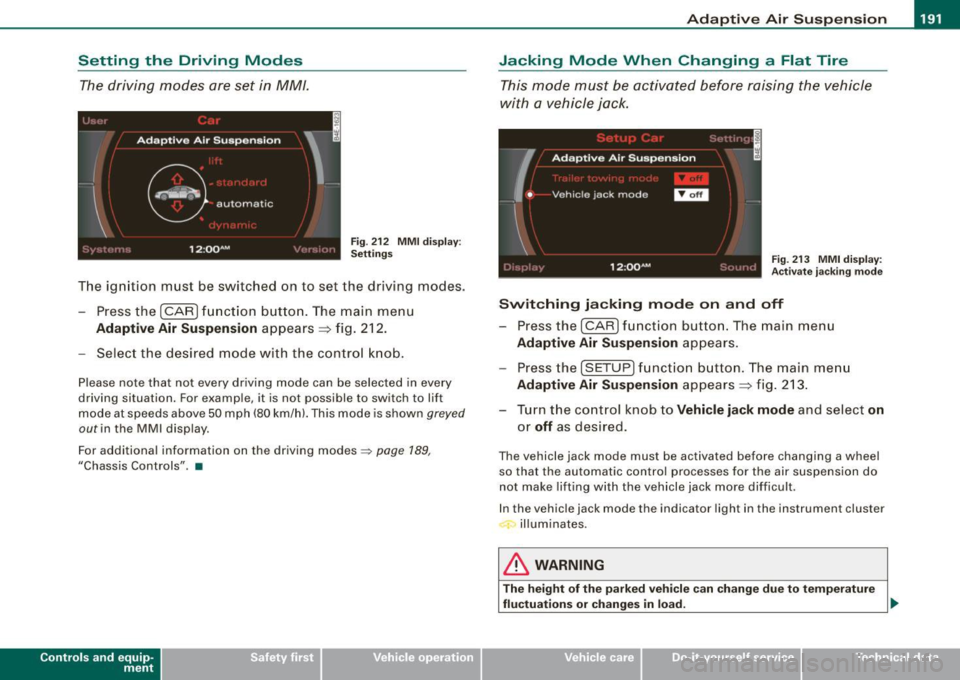
The ignition must be switched on to set the driv ing modes.
- Pressthe(CAR]fu nction button. The main menu
Adaptive Air Suspension appears => fig. 212.
- Select the desired mode with the control knob.
Please note that not every driving mode can be selected in every
driving situation. For example, it is not possible to switch to lift
mode at speeds above 50 mph (80 km/h). This mode is shown
greyed
out in the MMI display.
For additional information on the driving modes::;>
page 189,
"Chassis Controls" . •
Con tro ls and eq uip
ment
Jacking Mode When Changing a Flat Tire
This mode must be activated before raising the vehicle
with a vehicle jack.
Fig. 213 MMI display:
Activate jacking mode
Switching jacking mode on and off
- Press the (CAR] function button. The main menu
Adaptive Air Suspension appears.
Press the (SETUP) function button. The main menu
Adaptive Air Suspension appears => fig. 213.
- Turn the control knob to
Vehicle jack mode and select on
or off as desired.
The vehicle jack mode must be activated before changing a wheel
so that the automatic control processes for the air suspension do
not make lifting with the vehicle jack more difficult .
In the vehicle jack mode the indicator light in the instrument cluster
illuminates.
& WARNING
The height of the parked vehicle can change due to temperature
fluctuations or changes in load. _,,
Vehicle care I I irechnical data
Page 213 of 408
Safety belts -----------------=------
Safety belts
General notes
Always wear safety belts!
Wearing safety belts correctly saves lives!
This chapter explains why safety belts are necessary, how
they work and how to adjust and wear them correctly.
- Read all the information that follows and heed all of the
instructions and WARNINGS.
& WARNING
Not wearing safety belts or wearing them improperly increases
the risk of serious personal injury and death.
• Safety belts are the single most effective means available to
reduce the risk of serious injury and death in automobile acci
dents. For your protection and that of your passengers, always
correctly wear safety belts when the vehicle is moving.
• Pregnant women, injured, or physically impaired persons must
also use safety belts . Like all vehicle occupants, they are more
likely to be seriously injured if they do not wear safety belts. The
best way to protect a fetus is to protect the mother -throughout
the entire pregnancy. •
Number of seats
Your Audi has a total of five seating positions: two in the front and
three in the rear . Vehicles with power individual rear seats* have
seating for four: two in the front and two in the rear. Each seating
position has a safety belt.
Controls and equip ment Safety first
Vehicle operation
& WARNING
Not wearing safety belts or wearing them improperly increases
the risk of serious personal injury and death.
• Never strap more than one person, including small children,
into any belt. It is especially dangerous to place a safety belt over
a child sitting on your lap.
• Never let more people ride in the vehicle than there are safety
belts available.
• Be sure everyone riding in the vehicle is properly restrained
with a separate safety belt or child restraint. •
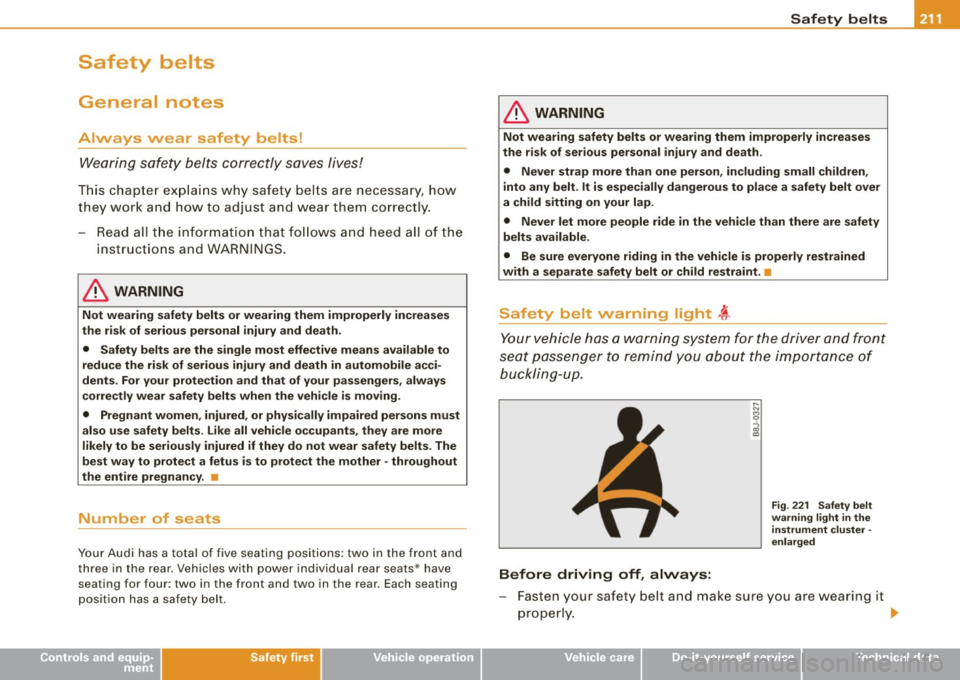
Safety belt warning light ~
Your vehicle has a warning system for the driver and front
seat passenger to remind you about the importance of
buck/ i ng-u p.
Before driving off, always:
Fig. 221 Safety belt
warning light in the
instrument cluster -
enlarged
- Fasten your safety belt and make sure you are wearing it
properly.
1J,,
Vehicle care Do-it-yourself service Technical data
Page 214 of 408
-S
afe ty b elts ----=-----------------
- Make sure that your passengers also b uckle up and prop
erly wea r th eir sa fety belts.
Protect children wit h a child restraint system appropriate
for the size and age.
The warning light i in the instrument cluster lights up when the
ignition is switched on as a reminder to fasten the safety belts. In
addition , you will hear a warning tone.
After the ignition is switched on, the warning light in the instrument cluster will a lways come on for about 6 seconds and if the driver has
not fastened the safety belt, a warning tone will also sound for
about 6 seconds . As soon as the driver has fastened the safety belt,
the warning tone will stop and the warning light will go out .
If the driver or front seat passenger have not buckled -up within
about 10 seconds after the warning tone has stopped and the
vehicle is moving faster than about 15 mph, the warning tone will
sound again for about 6 seconds and then stop for 24 seconds and
then repeat this reminder sequence for a maximum of 2 minutes. At
speeds be low 5 mph, the warning tone will not sound.
Fa sten your safe ty belt and m ake su re that your p assengers also
properl y put on th eir s afet y belts .
& WARNING
• Safety belt s are the single mo st effective mean s available to
reduce th e risk of ser ious injur y and death in a utomobile acci
dent s. For your prote ction and th at of your pas senger s, alwa ys
c orre ctl y we ar safety belt s when t he vehicle is moving .
• Failure t o pay att ention to th e warning light that co me on,
c ould lead to per sonal injury .•
Why safety belts?
Frontal co11isions and the law of physics
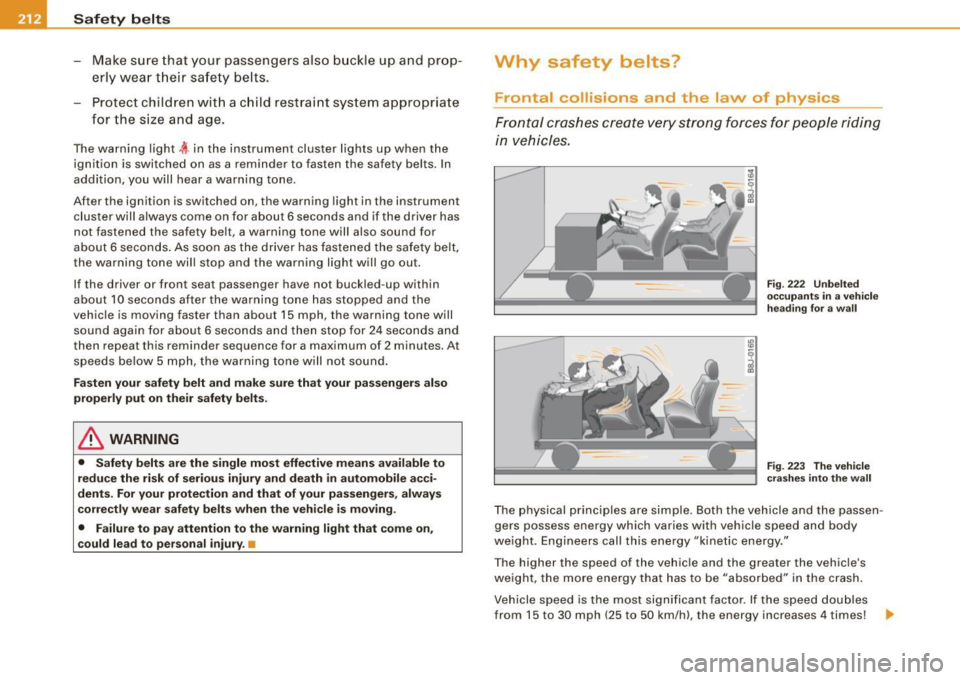
Front al crashes create very strong forces for pe ople riding
in vehicles.
F ig. 222 U nbel ted
o cc up ants i n a ve hicle
he ading for a wa ll
Fi g. 223 T he vehicle
c ras hes in to t he wa ll
The physical principles are simple. Both the vehicle and the passen
gers possess energy which varies with vehicle speed and body
we ight . Engineers cal l this energy "kinetic energy ."
T he higher the speed of the vehicle and the greater the vehic le's
we ight, the more energy that has to be "absorbed" in the crash .
Vehicle speed is the most significan t factor. If the speed doubles
from 15 to 30 mph (25 to 50 km/h), the energy increases 4 times! .,