lights AUDI S8 2010 User Guide
[x] Cancel search | Manufacturer: AUDI, Model Year: 2010, Model line: S8, Model: AUDI S8 2010Pages: 384, PDF Size: 90.95 MB
Page 21 of 384

Adaptive Air Suspension - Sport*, the check light does not come o n in
t his instance s in ce g round clea rance is ge ner ally reduced .
Thi s wa rning/indicator light has the following functions:
• It illuminates for a few seconds after the ignition is turned on as
fu nction check a nd then goe s out.
• If the wa rning/ind icator light flashes in conjunction with t he
c.:>
w ar ning/ind icator l igh t, y o u s hould not dr ive the vehicle immed iately
in order to prevent damage to the underbody. T he two wa rning/ind i
c ato r light s fl ashing together po ints to an ex tre me Lo w leve l. A ve ry
pronounced lowering of the ve hicle (extreme Low leve l) can result ,
for example, from a he avy load. A s so on a s the leve l h as r eturned to
normal, t he warning/indicator lights stop flashing, and you can drive
away .
0 Note
If the wa rni ng /ind icator light flashes in conjunction with the~ ~
warning/ind icator ligh t, you s hould not driv e the vehicle because low
lyin g vehicle pa rts can bottom out as you drive over uneven groun d
a nd be da maged as a result . •
Cruise control
CRUISE (USA models) / (?Jr) (Canada models)
The warn ing/ ind icator lig ht illuminates when the cruise contro l is
a ct ivated .•
Controls and equip
ment Safety first
Instruments and warning
/indicator lights
Anti-lock brake system (ABS)
A
.:> (USA models) / .... (Canada models)
This w arnin g/in dic ator light monitors the ABS and the
ele ctroni c diff ere n tial l ock (ED L).
Th e wa rning/indicator light w ill come on fo r a few second s when the
ignition is sw itche d on. The lig ht w ill go ou t after a n automat ic check
sequence is comp leted .
There is a malfunction in the ABS when:
• Th e warnin g/i ndi ca tor lig ht doe s not illumin ate whe n you swit ch
on th e ig nitio n.
• Th e warn ing /indicator l ight doe s not go out aft er a f ew seconds .
• The warning/in dicator lig ht i llu minates while d riving .
Th e ESP indic at or lig ht als o illu min ates if there is a malfunctio n in the
A BS. The message
ESP / ABS fault! See owner's manual also appears
in t he i nstr ument cluster d isp lay and a war ning to ne sounds .
The brake system will still respond even without the assistance of
the ABS system. See your authorized Audi dealer as soon as
possible to restore full braking performance.
F o r mo re inform ation
rega rding the ABS=>
page 256.
The ABS warning light and the brake warning light come on
together. The ABS will not work and you will notice a change in
braking response and performance.
Malfunction in the brake system
If t he b rake war ning ligh t=> page 20 and the A BS war ning ill umin ate
tog eth er ther e may be a malfu nction in t he A BS , a nd there may a lso
be a mal fun ction in the bra ke system itself => & .
I n t he ev en t of a
malfunction in the brake system the warn ing/ indi
cator light
BRAKE (USA models)/ {(D) (Canada models) in the instr ument
clu ster flashes. B y p res sing the [
CHECK ! button, yo u ca n brin g up a
dr ive r message w hich expla ins the malfunction in more deta il. Please
no te =>
page 28. _..
Vehicle care Technical data
Page 22 of 384

Instruments and warning/indicator lights
Malfunction in the electronic differential lock (EDL)
The ED L works toge ther w ith the ABS. The ABS warn ing lig ht w ill
come on if there is a mal func tion in the EDL system=>
page 253 . See
your authorized A udi dea le r as soon as poss ible .
& WARNING
• If the .. (USA models )/ ...,. (Canada models ) wa rning light
does not go out , or if it comes on while driving, the ABS system is
not working properly. The vehicle can then be stopped only with
the standard brakes (without ABS ). You will not have the p rotec
tion ABS provide s. Contact you r Audi dealer as soon as pos sible .
• USA models: If the BRAKE warning light , the ., warning light
and the warning light come on together , the rear wheel s
could lock up first under hard braking . Rear wheel lock-up can
c ause loss of vehicle control and an accident. Have you r vehicle
repaired immediate ly by your authorized Audi dealer or a qualified
workshop. Drive slowly and avoid sudden, hard brake applica
tions .
• Canada models: If the brake warning light «D>, the wa rning
light and the ABS warning light come on together, the rear
wheels could lock up first under hard braking. Rear wheel lock-up
can cause los s of vehicle control and an accident . Have your vehicle
repaired immediately by your authorized Aud i dealer or a qualified
workshop . Drive slowly and avoid sudden, hard brake
applic ations. •
Electromechanical parking brake
::E {USA models) / (®) {Canada models)
The warning/indicator light monit ors the electromechan
ical parking broke .
With the pa rking bra ke app lied and the ignition t urned on, the
wa rning/ind icator light illuminates. Afte r the ign it ion has been
t u rne d off, the wa rning/indicator light continues to illuminate for about 30 seconds.
If the park
ing brake is applied w ith the ign ition
tur ned off, the w arning/ind ic a tor ligh t illumi nates fo r abo ut 3 0
seconds.
Th e warning/ind icator light will go out when the parking brake is
re lease d.
If the war ning/ indicator lig ht flashes cont inuous ly
after applying the
p ar king bra ke, bra king fo rce is no t sufficien t to prevent the vehicle
from rolling unintentionally . T his can happe n if the brakes become
too hot. P lease note the fo llowi ng:
• If the slope of the ground is too s teep to par k the ve hicl e, th e addi
tional drive message appea rs
Caution: Vehicle parked too steep .
• In the event of a pa rking brake mal func tion, the yellow • symbol
appea rs in the instrument cluste r display and the driver message
Parking brake malfunction! is d isplayed. Have t he ma lf u n ct io n
re paire d as soon as possib le by a q ualified Audi dealership .•
Brake system BRAKE (USA
models)
/ (CD) {Canada models)
The warning/indicator ligh t flashes if brak e fluid l eve l is
low, if there is an A BS system malfunction or a parking
brake malfunction.
Th e light illum ina tes when the igni tion is t urned o n. It goes out after
the engine has been started . This indicates that t he brake warn ing
light is fu nctioni ng p roperly.
If the brake warning light does not light up when the engine is
cranking , there may be a malfunction in the electrical system. In
this case, contact your Audi dealer.
If the brake system wa rning/indicator light flashes, there is a brake
system malfunc tion . By press ing the
I C H ECK ] button, you can b ring
up a driver message which explains the malfunction in mo re detail
=>
page 28. ~
Page 23 of 384

If the ABS, ESP and brake force distribution fail, the ABS indicator
li ght (U SA mode ls)/ ( Can ad a models) and the ESP indica to r
light come on alo ng w it h the brake system malfu nction light
BRAKE (U SA models) /(Ci) (Ca nada models) . The message Brake fault!
Drive carefully to nearest workshop appears in the inst rument
cl uster disp lay and three consecut ive warning tones sound =>& .
(USA models): If the w arning lig ht
BRAKE and the wa rn in g light illu
minate together, immediately contact your author ized Audi dealer or
qu alifie d wo rkshop to h ave all bra ke p ads in spec ted =>
page 32.
When the light comes on, an a udible war ning s ignal is also given .
& WARNING
• USA models : If the BRAKE warning light, the.,. warn ing light
and the~ S warning light come on together , the rear wheel s
could lock up first under hard braking. Rear wheel lock-up can
cause loss of vehicle control and an accident. Have your vehicle
repaired immediately by your authorized Audi dealer or a qualified
workshop. Drive slowly and avoid sudden , hard brake appli ca
tions.
• Canada models: If the brake warning light ID, the • warning
light and the ABS warning light
"'1 come on together, the rear
wheels could lock up first under hard braking. Rear wheel lock-up
can cause loss of vehicle control and an accident. Have your vehicle
repaired immediately by your authorized Audi dealer or a qualified
workshop. Drive slowly and avoid sudden, hard brake applica
tions.
• If the brake warning /indicator light doe s not go out after
a few
second s and the parking brake released, or l ights up while you are
driving, the fluid level in the brake fluid reservoir i s too low. If you
believe that it is safe to do so, proceed immediately at low speed
to the neare st authorized Audi dealer or qualified repair facility
and have the brake system inspected.
• Always keep in mind that after several brake applications, you
will need greater p ressu re on the brake pedal to stop your vehicle .
Do not rely on strained brakes to re spond with maximum stopping
Controls and equip
ment Safety first
Instruments and warning
/indicator lights
& WARNING (co ntinued )
power in critical situations . You must allow fo r increased braking
distan ce s. The extra distance used up by fading brakes could lead
to an accident. •
Vehicle care Technical data
Page 27 of 384
& WARNING (co ntinued )
• Wo rk with due care when handling the high-voltage section of
gas di scharge (xenon) lights. Failure to do so could result in death
or ser ious injury.
[ i ] Tips
Have the bulb rep laced or the connection repaired by your autho rized
Audi Se rvice departmen t.•
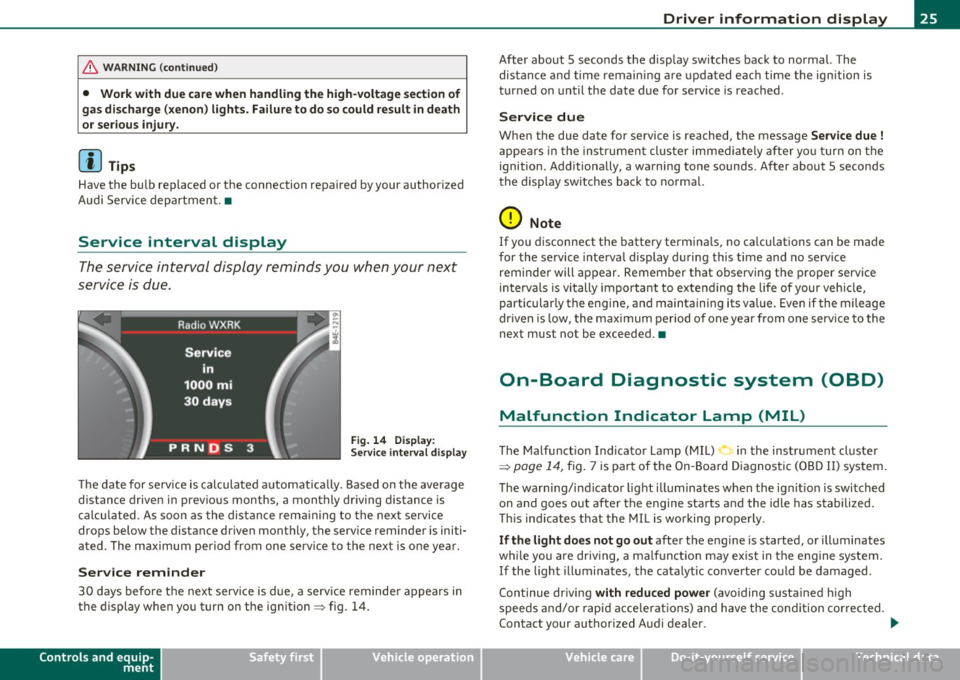
Service interval display
The service interval display reminds you when your next
service is due.
Fig . 14 D ispl ay :
Service inte rval disp la y
Th e date for serv ice is ca lculated automat ica lly . B ased on t he average
distance driven in previous months, a monthly driving distance is
c al cul ated. As soon as the dis tan ce rem aining to the nex t se rvi ce
drops below the distance dr iven mont hly, the serv ice reminder is initi
a ted. The m aximum pe riod from one se rvi ce to the ne xt is one ye ar.
Service reminder
30 day s befo re th e nex t serv ice i s du e, a serv ice reminde r appears in
the display when yo u turn on t he ignit ion~ fig. 14 .
Controls and equip
ment Safety first
Driver information display
After about 5 seconds the disp
lay switches back to norma l. The
dis tan ce and tim e rema ining a re up dat ed ea ch time the ign ition is
t urned on until the date due for service is reached .
Service due
When the due date for service is reached, t he message Service due !
appe ars in t he inst rume nt cluster immedi ately after yo u turn on t he
ignition . Additionally, a wa rning tone sounds . After about 5 seconds
t he disp lay sw itches ba ck to no rm al.
0 Note
If you d isconnect the batte ry termina ls, no ca lculations can be made
for the service in terva l display during this time and no serv ice
reminder will appear. Remember that observing t he p roper service
in terva ls is vi tally im portant to exte nd ing the life of your veh icle,
particular ly the e ngine, and maintainin g its va lue. Eve n if the mileage
dr ive n is low, the max im um per io d of o ne year from one serv ice to the
next must not be exceeded. •
On-Board Diagnostic system (OBD)
Malfunction Indicator Lamp (MIL)
The Ma lf u nc tion Indica tor Lamp ( MIL) in the ins trument cl uster
~ page 14, fig . 7 i s pa rt of t he On-B oard D iagnost ic (O BD II) system.
Th e warn ing/i nd ica to r lig ht ill umi nates when the ig nition is swi tched
on and goes out after the engine starts and the idle has stabilized.
Thi s ind ic at es that the MIL i s working prope rly .
If the light does not go out afte r th e e ngine is started, or ill uminates
w hil e you a re dr iv in g, a malf unct io n may e xis t in t he engine system.
If the light illum ina tes, the ca talytic conve rter co uld be damaged .
Continue driving
with reduced power (avo iding susta ined high
s peeds and/or rapi d acc elera tions) and h ave the con dition cor rec ted.
Contact your authorized A ud i dea le r. .,_
Vehicle care Technical data
Page 32 of 384
Driver information display
is too low. An additional driver message can also be displayed
by pressing the [CHECK) button:
Switch off engine and check coolant level
-Pull off the road .
- Stop the vehicle.
- Turn off the engine.
- Check coolant level=>
page 297.
-Add coolant if necessary=> page 298.
-Continue driving only after the engine coolant
warning/indicator light goes out.
- Contact your authorized Audi dealer for assistance if
necessary.
If the engine coolant level is correct, then the radiator fan may be the
cause of the malfunction.
If the generator warning/indicator light should also illuminate
=>
page 16, then the fan belt may be damaged .
& WARNING
• If your vehicle should break down for mechanical or other
reasons, park at a safe distance from moving traffic, turn off the
engine and turn on the hazard warning lights=>
page 63, "Emer
gency flasher A".
• Never open the hood if you see or hear steam or coolant
escaping from the engine compartment -you risk being scalded.
Wait until you can no longer see or hear steam or coolant
escaping.
• The engine compartment of any vehicle is a dangerous area.
Before you perform any work in the engine compartment, turn of
& WARNING (continued)
the engine and allow it to cool. Follow the warning stickers
=> page 281, "Engine compartment".
0 Note
Do not continue driving if the -~-symbol illuminates. There is a
malfunction in the engine cooling system -you could damage your
engine. •
Engine oil pressure malfunction "t':::7':
The red engine oil pressure warning symbol requires
immediate service or repair. Driving with a low-oil-pres
sure indication is likely to inflict severe damage to the
engine.
If the ~ symbol appears in the display and blinks, the oil
pressure is too low. An additional driver message can also be
displayed by pressing the [CHECK] button:
Switch off engine and check oil level
Immediate actions
-Pull off the road .
- Stop the vehicle.
- Turn off the engine .
-Check the engine oil level with the dipstick=> page 293.
Dipstick readings checks too low
- Top off oil to the proper level=> page 294.
Page 36 of 384
Driver information display
Battery voltage
1 ~
If the battery's state of charge is not in the optimal range, the <--..J
symbol is shown in the display and the dr iver message Low battery
charge: battery will be charged whil e dri ving
appears.
While this driver notification is displayed, you have to be prepared for limited starting capability .
Driver message appears and goes out again
If this driver message appears after the ignition is turned o n or wh ile
dr iving and it goes o ut aga in afte r a while , the ba ttery has been
adeq uate ly recharged .
Driver message appears and does not go out again
If this dr iver notification appears after the ignition is turned o n or
w hile driving and does no t go ou t agai n, the battery 's s ta te o f ch arge
is no t in the opt imal range . S tarting capabili ty is restr icted . Have t he
bat tery checked at a dealersh ip as soon as possib le .•
A ppli es to ve hicles : wit h Conve nie n ce k ey
Key not in vehicle
Key not in vehicle
Th is message appears together w it h the -. symbo l whe n the remote
cont rol key is remov ed from the v ehicl e wh ile the engine is runni ng.
Th is is to remind yo u that you should not cont inue you r trip without
your key.
If the remo te control key is no longer in the vehicle, you wi ll not be
able to start the engine again a fter yo u have swi tched off the igni tion .
In addit ion to t his, you will no t be a ble to lock the vehicle from the
outs ide .•
A pplie s to vehicles : with Adaptive Light
Adaptive Light defective •
.. c Adaptive light defective
When th is symbol .., illuminates, it means that Adaptive Light is
defective . Go to an authorized dealersh ip to have the head lights or
the contro l unit for the Adaptive Light repa ired .•
Headlight range control defective '">
T<. Headlight range control defective !
If the symbo l ill uminates, the dynamic head light range contro l is no
longer wo rking prope rly. Have t he sys tem check ed and repaired at
your Audi dealer. •
Defective light/rain sensor ...>
.... Automatic headlights/automatic wipers defective
If the symb ol ill umina te s, the lig ht/r ain sensor has failed. F or sa fety
reasons the low beams are t urned on permane ntly w ith the sw itch in
AUTO . Howeve r, you ca n con tinue to turn the lig hts o n and off using
the light sw itch. If the ra in se nsor fa ils , the functions of the wind
shield wiper leve r will still wor k. Contact your aut horized Audi dea ler
as soon as possible to have the prob lem cor rected .•
Page 43 of 384

Battery operation in the master key is monitored by a check light . The
check light flashes when one of the buttons on the master key is
pressed. If the check light does not flash, the battery is dead and has
to be replaced .
In add ition , when the battery is dead the ..: symbol appears in the
instrument cluster display as well as the message:
Please change key battery
We recommend having the battery changed by an Audi Dealer .•
Electronic immobilizer
The immobilizer helps to prevent unauthorized use of
your vehicle.
A computer chip inside your key automatically deactivates the elec
tronic immobilizer when you insert the key in the ignition lock, or on
vehicles with Convenience key*, when the key is inside the vehicle.
When you remove the key from the ign it ion lock , or on veh icles with
Convenience key, when you remove the key from the vehicle, the elec
tronic immobilizer is automatically activated once again.
& WARNING
Always take the key with you when you leave the vehicle. The key
can disarm the electronic engine immobilizer and permit an unau
thorized person to start the engine and enable operation of the
vehicle systems such as power window or power sunroof leading
to serious personal injury .
(I) Tips
• The immobilizer prevents unauthorized use of the vehicle. The
vehicle cannot be sta rted if an unauthorized key is used. The vehicle
may not start if another radio device such as a key for another vehicle
or a transponder is located on the key ring.
Controls and equip
ment Safety first
Opening and closing
•
For Declaration of Compliance to United States FCC and Industry
Canada regulations=>
page 364. •
Power locking system
General description
The power locking system locks or unlocks all doors and
the rear lid simultaneously.
The power locking system in your vehicle incorporates the following
functions:
• Central locking function
• Selective unlock feature~
page 44
• Remote control feature ~ page 40
• Convenience key*=> page 50
• Anti -theft alarm system ~ page 52
All the doors and the rear lid are locked by the central locking system
when you lock the veh icle. You can set whether generally only the
dr iver's door or all doors and the rear lid should be unlocked when you
open the vehicle in the MMI menu
Central locking to suit your indi
vidual desires~
page 44.
Unlocking the vehicle
You can unlock the vehicle from outside either by using the remote
control
or by turning the key inside the driver's door lock. When you
unlock your vehicle:
• The anti-theft alarm system is deactivated briefly .
• The vehicle interior lights illuminate for approximately 30
seconds.
• All turn signal lights will flash twice when the car is unlocked .
• After un locking the vehicle, you have 60 seconds to open a door or
the rear lid. After 60 seconds, the vehicle automatically locks and the
anti-theft alarm system activates again. ..,
Vehicle care Technical data
Page 44 of 384

Opening and closing
The rear lid can be locked or unlocked either by using the remote
con trol
or by turning the key inside the dr ive r's door loc k. Unl ocking
the vehicle w ith the remote control will only
unlock the rear lid, to
open it, the lid handle needs to be pressed.
Lock ing the vehicle
You c an lock t he veh icle from o uts ide eithe r by using the remote
control
or by turning t he key inside the drivers's door lock . When you
lock the vehicle :
• All doors and the rear lid are locked.
• All turn signa l lights will flash once when the car is locked .
• The anti-theft alarm system is activated . The horn of the anti
t heft ala rm system w ill sound and the a nti -t heft alarm system readi
ness lig ht, located in the upper part of the dr iver's door panel, w ill
start to blink.
• The veh icle inter ior lights turn off.
Unlocking and locking the vehicle using the
Convenience key*
Th e Convenience key * feature is a keyless system wh ich all ows yo u to
unlock the vehicle via sensors in the door handle. Loc king is likewise
keyless using a lock b utton. Each door is equipped w it h a sensor and
lock button.
Power side door closer*
The ve hicle is equipped with a power side door closer. When closing a
door, yo u simp ly need to gen tly push on the door. The door wi ll the n
automatically close by itself~
page 45.
Automatic locking
The automat ic lock ing feature locks all the vehicle doors and the rear
lid when you d rive faste r than 9 mph (15 km/h). This fun ction can be
turned on and off in the MMI
Central locking Menu~ page 44.
Yo u can unlock the vehicle from the ins ide by :
• removing the key from the ignit ion sw itch (the ve hicle w ill au to
matically un lock itself) or •
pressi ng the unloc k part of the power lock sw itch @or
pulling t he door handle (once to open the door).
& WARNING
• When you lock your vehicle from outside, nobody -especially
children -should remain inside the vehicle . Remember, when you
lo ck the vehicle from the out side the windows cannot be opened
from the inside .
• When you leave the vehicle, always remove the ignition key
and tak e it with you. This will prevent passenge rs (children, for
example) from accidentally being locked in the vehicle should
they accidentally pre ss the power lo cking switch in the doors .
• Do not leave children ins ide the vehicle unsupervised . In an
emergency it would be impossible to open the doors from the
out side without the key .
[ i ] Tips
• In the event of a crash w it h ai rbag deployme nt all locked doo rs
w ill be automat ically u nlocked to give access to the vehicle occupants
from the outside.
• If the powe r lock ing system s hou ld malfunction, you ca n lock each
door indiv idually using the ve hicl e key ~
page 46.
• If the power locking system should fail, yo u can still open the fuel
t ank flap in an emergen cy ~
page 287 .
• You are well advised not to keep valuables ins ide an unattended
veh icle, v is ib le or no t. Even a prope rly loc ked vehi cle c anno t provide
the security of a safe .•
Page 45 of 384

Unlocking and locking the vehicle with the
remote control
How the remote control works.
Fig. 26 Remot e
con trol: fu ncti on
butt ons
Whether only th e driver's door or the entire vehicle is
unlocked when the opening button @ is pr essed once,
de pends on the settings in the MMI
Central locking menu
=:> page 44 .
To unlock the vehicle 0
- Press button @.
- Press button @
two times within two seconds to unlock
all doors and the rear lid .
To lock the vehicle 6
- Press button@=:> & in "Ge neral descr ipt ion" on
page 41 .
- Watch that all turn signal lights flash once .
To unlock rear lid only c:5
-Press button @for approximately one second.
Con tro ls a nd e quip
m en t Vehicle
OP-eration
Opening and closing
PANIC Button
- Push the red button @to activate the panic function. The
horn sounds and the turn signa ls flash .
- Push the button @ again to deactivate t he panic f unction.
On vehicles equipped with the Conven ience key* features, the
selector leve r must be in the P position, othe rwise the vehicle will not
lock .
& WARNING
Read and follow all WARNINGS=> & in "General de sc ription " on
page 41.
(I] Tips
• In orde r to make sure the locking func tion is wor king , you shou ld
always keep your eye on the vehicle to ma ke sure it is properly locked .
• Do not use the remote control if you are ins ide the car, otherwise
you may unintentionally lock the vehicle, and then yo u would set off
the ant i-theft alarm when you try to start the eng ine or open a door.
I n case this happens any how, push the unlock button
0.
• Use the panic function o nly if you are in an emergency situat ion. •
Vehicle care Do-it-yourselt service iTechnical data
Page 52 of 384

Open ing and closing
- To swi tch on the child safety lock, turn the ignition key in
the direction of the arrow .
- To
switch off the child safety lock, turn the ignition key in
the opposite direc tion to the arrow.
The child safety lock prevents the doors from be ing opened from the
inside when you have small children sitting in the rear. •
Appli es to ve hicles : with pow er child safety loc k in th e rea r d oo rs
Power child safety lock for the rear doors t
The power child safety lock prevents the rear doors from
being opened from the inside.
F ig. 38 Section from
driver's door: controls
The rear doors are equipped with a power child safety lock . It
is operated with the two safety buttons(!) in the driver's door
~ fig. 38.
-Press the left and/or right safety button to disable the
rear power window(s) and prevent the respective rear door
from being opened from the ins ide . The LED in the button
will light up when the child safety lock is turned
o n .
- Press the illuminated button again to turn the child safety
features
off.
When the child safety lock is activated, the interior door opening
lever is inope ra tive; the door can only be opened from the o utside. In
addition, the window regulator for that door is also inoperative when
the chi ld safety lock is activated .
If the child safety lock has been activated on both the left and r ight
side, then the following features are switched off : the buttons for the
inter io r lights, the sun blind* in the rea r window and the buttons for
the power sun blinds* in the side windows. In addition to this, the
rear climate contro l* is set to the
PAS SIVE mode. Th is means that the
climate controls in the front adjust the heating and ventilat ion in the
rear of the vehicle=>
page 114.
[ i ] Tips
• In order to activate the child safety lock on the left and the right
side, you have to press the two safety buttons in succession.
• Make certain that the indicator light in the corresponding sa fety
button illum inates when the ch ild safety lock is activated .•
Convenience key
A pplies to veh icles : with Conven ience key
Description
Opening your vehicle and starting the engine with the key
still in your pocket.
The Convenience key features is a keyless system which gives you the
possibility to lock and un lock your veh icle, as well as to start the
eng ine without having to use your key.
It does not matte r if you have your key in your jacket pocket or in your
briefcase . As soon as you get within a certain distance to the vehicle,
the system senses that your are approaching, it makes a quick check
to see if you are "authorized" and then it does the following:
• unlocks the vehicle =>
page 51. .,