lights AUDI S8 2010 Owner's Manual
[x] Cancel search | Manufacturer: AUDI, Model Year: 2010, Model line: S8, Model: AUDI S8 2010Pages: 384, PDF Size: 90.95 MB
Page 54 of 384
Opening and closing
• Agai n, to conserve battery power so t hat you can start the veh icle
a fter it has b een standin g for a long perio d, th e veh icle's e ne rgy
ma nageme nt system will switch off any convenie nce f eatures not
necessary . Yo u will not be a ble to un lock your ve hicle using the
keyless system. •
Applies to veh icles: w ith Conven ience key
Locking the vehicle
You c an l ock t he doors and rear lid wit h ou t usin g th e
rem ote cont ro l.
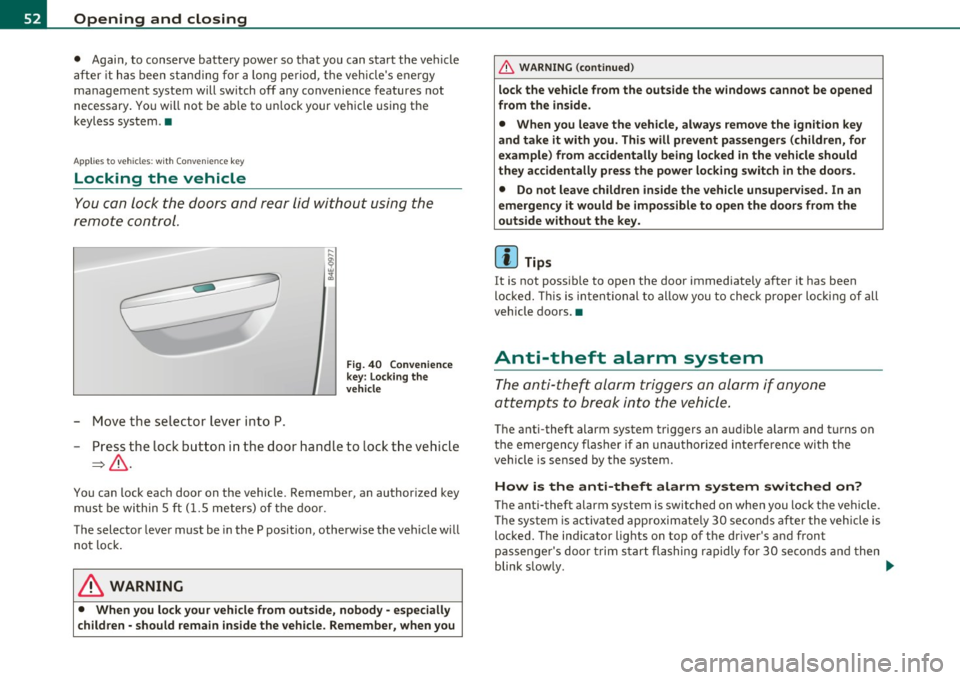
- Mo ve th e selec tor lev er in to P.
Fig . 40 Conven ience
key : Lo cking the
vehicle
- Press t he loc k b utton i n th e door hand le to loc k th e ve hicle
=>& .
You can lock eac h door on the vehicle. Remembe r, a n author ized key
mu st b e wi thi n 5 ft
(1. 5 me ters) o f th e door .
T he selecto r leve r must be in th e P position, othe rw is e t he vehi cle will
n ot l ock .
& WARNING
• When you lock your vehicle from outside, nobody -especially
children -should remain inside the vehicle. Remember , when you
& WARNING (co ntinued )
lock the vehicle from the outside the windows cannot be opened
from the inside.
• When you leave the vehicle, always remove the ignition key
and take it with you. This will prevent pa ssengers (children, for
example) from accidentally being locked in the vehicle should
they accidentally pre ss the power lo cking switch in the doors.
• Do not leave children inside the vehicle unsupervised . In an
emergency it would be impossible to open the doors from the
outside without the key.
[ i ] Tips
It is not poss ible to open the door immediately a fter it has been
lo cke d. T his i s int entional to allow y ou to c heck prop er lo cking o f all
vehicle doors. •
Anti-theft alarm system
The anti-t heft al arm t rig g er s an ala rm if an yone
att empts to bre ak into th e vehic le .
T he anti-theft alarm system triggers an a ud ible a larm and t urns on
th e e mergen cy fla sh er i f an u nau th oriz ed int erf eren ce wi th th e
veh icle is sensed by the system.
How is the anti-theft alarm system switched on?
T he anti-theft alarm system is switched on when you lock the veh icle.
Th e sy st em i s activ at ed app roxima te ly 30 secon ds a fter the ve hicle i s
loc ked. T he ind icator lights on top of t he dr iver's and front
pa ssenge r's door trim s ta rt fla shing rapidly fo r 30 s eco nds and t hen
blink s low ly. ._
Page 57 of 384

Switching the power to the rear windows on
or off on vehicles with power child safety lock
-Press the left 00 button~ page 53, fig. 42 to switch off
the power window in the left door only. The LED in the
button illuminates .
- Press the right 00 button to
switch off the power window
in the
right door only . The LED in the button illuminates.
- Press the00button again to switch the power back on. The
LED in the button will go off.
By pressing the safety switch ®=> page 53, fig. 41, the function of
some switches in the rear can be turned off. When the / symbol in
the safety switch illuminates, the following functions are switched
off:
• The power w indows in the rear doors .
• Th e buttons for the interior lights.
• The buttons for the power sun blinds* in side windows.
• Th e button fo r the power sun blind* in the rear window.
• In veh icles with rear climate control * the
PASSIVE mode is acti
vated . In this mode the rear air conditioning can be operated only
from contro ls in the driver's area=>
page 114.
This feature has been prov ided for the safety of small children riding
in the rear of the vehicle.
On vehicles with the
power child safety lock*=> page 53, fig . 42
these features can likewise be switched off . Both
00 buttons ® must
be pressed.
• If
only the left (I) button is pressed, then only the rear left door
power window is switched off and the door is locked.
• If
only the right 00 button is pressed, then only the rear right
door
power window is sw itched off and the door is locked.
Controls and equip
ment Safety first
Opening and closing
(I] Tips
• Th
e windows can st ill be opened and closed for about ten minutes
after the ignition has been turned off . The power windows are not
shut off until one of the front doors is opened.
• To switch on the child safety lock in both rear doors, you must
press both ch ild safety switches . Make sure the LEDs in the switches
are illuminated .•
Switch in the front passenger 's door and on
the rear doors
Fig. 43 Switch loca
tion front passengers door
The power window switch has a two-position function:
Opening the windows
- Press the switch to the first position and hold it unt il you
have opened the window as far as you want .
- Press the switch quickly to the
second position and the
window will automatically open all the way.
Closing the windows
-Pull the switch to the first position and hold it until you
have closed the window as far as you want. ..,_
Vehicle care Technical data
Page 62 of 384

Clear vision
Clear vision
Lights
Switching the headlights on and off ·"ti-·
In the "AUTO" position, a light sensor automatically
switches the head- and taillights on and off in response to light condi tions.
Fig . 48 In st rum ent
p ane l: light switch
Switching on automatic headlight control
- Tur n the lig ht sw itch to AUTO => fig. 48 .
Switching on the side marker Lights
-Turn the lig ht sw itch to ;oo~.
Switching on the headlights and high beam
- Tur n th e lig ht sw itch to fD.
- Push th e high beam leve r forward towards the instrument
panel =>
page 64.
Switching off the Lights
- Tur n the lig ht sw itch to 0.
The headligh ts only work when the ignition is switched on. Whi le
starting the engine or when switc hing off the ignition, the headlights
w ill go off and o nly the s ide mar ker lights will be on.
After start ing the eng ine, the xenon headlights are automatically
ad jus ted to the load an d ang le of the vehicle (for examp le, during
acceleration, braking). T his prevents oncom ing traff ic from experi
encing unnecessary head ligh t glare from your xe non headlights .
If the system is not operat ing properly, a warning symbol in the Auto
Check Control is displayed~
page 34.
With the side marker lights o r headligh ts swi tche d on, the symbol
next to the light switch i llum inates
oooc .
Daytime running lights
• USA model s: The daytime running lights will come on automati
cally when the ign it ion is turned on and the light switch ~ fig . 48 is
in the
O position or the AUTO pos ition (only in daylight conditions).
T he
Daytime running lights f u nction can be turned on and off in the
M MI menu
Exterior lighting~ page 61 ~ /.1.
• Canada model s: The day time ru nning l igh ts wi ll come o n auto
matically when the ignit ion is turned on and the light switch~ fig. 48
is in the
O position or the AUTO position (on ly in dayligh t conditions)
~ & -
Automatic headlight control
In the switch pos ition AUTO t h e automat ic headlight cont ro l is
tu rn ed on. The low beams are tu rned o n automa tically th rough a light
sensor as soon as ambient bright ness (e .g . when driving into a
tunnel) falls be low a val ue preset at the factory . When ambient
brigh tness increases again, the low beams are t urned off again auto
matically ~
/.1.
In the AUTO pos ition t he low beams a re switched off automa tically
w hen the ign it ion is turned off. If the h igh beams were sw itched on,
th ey will come on again the nex t time the au tom atic headlight .,,_.
Page 63 of 384
control is activated. The high beam function must first be sw itched on
in the MMI
~ page 61.
Light Sensor Malfunction
In the event of a light sensor malfunct ion, the driver is notified in the
instrument cluster display:
~- Automatic headlights/automatic wipers defective
For safety reasons the low beams are turned on permanently with the
switch in
AUTO. However, you can continue to turn the lights on and
off using the light switch. Have the light sensor checked as soon as
possible at a dealership.
& WARNING
• Never use daytime running lights to see where you are going.
They are not bright enough and will not let you see far enough
ahead for safety, especially at dusk or when it is dark . Always
switch on the low beams at dusk
or when it is dark.
• Automatic headlights are only intended to assist the driver .
They do not relieve the driver of h is responsibility to check the
headlights and to turn them on manually according to the current
light and visibility conditions. For example, fog and rain cannot be
detected by the light sensors. So always switch on the headlights
under the se weather conditions and when driving in the dark
io.
• Crashes can happen when you cannot see the road ahead and
when you cannot be seen by other motorists.
- Always turn on the headlights so that you can see ahead and
so that others can see your car from the back.
[I) Tips
• With the switch in AUTO front fog lights and rear fog l ights cannot
be turned on in addition.
Controls and equip
ment Safety first
Clear vision
•
If you remove the ignition from the ign ition lock wh ile the head
ligh ts are still on, a buzzer will sound as long as the driver's door is
open to remind you to turn off the lights.
• Always observe the specific local regulations for you r area as to
when to use your lights .•
Adjusting exterior Lighting
The functions are set in the MMI.
-Select: Function button [CAR]> Systems > Exterior
lighting.
Coming home
The Com ing home function ensures that after turning off the igni
tion and opening the driver's door
the vehicle periphery is illum i
nated in the dark . In addition, the front fog lights, the tail lights and
the license plate light are turned on . On-time can be set for a per iod
from O (off) to 60 seconds .
Leaving home
The Leaving home functions ensures that when unlocking the vehicle
periphery is illuminated in the dark. In addi tion, the front fog lights,
the tail lights and the license plate light are turned on. This function
can be turned on and off.
High beam
With the switch in the AUTO position, the high beams can be t urned
on o nly if the function is turned
on .
Daytime running lights
USA models: The daytime runn ing lights can be turned on or off using
this function.
Canada models: The function cannot be turned off. It is act ivated
automatically each time the ignition is t urned on. This men u item is
shown "g reyed out". •
Vehicle care Technical data
Page 64 of 384
Clear vision Front fog Lights
}O
Fi g. 49 Ins trume nt
p an el: li gh t s witch
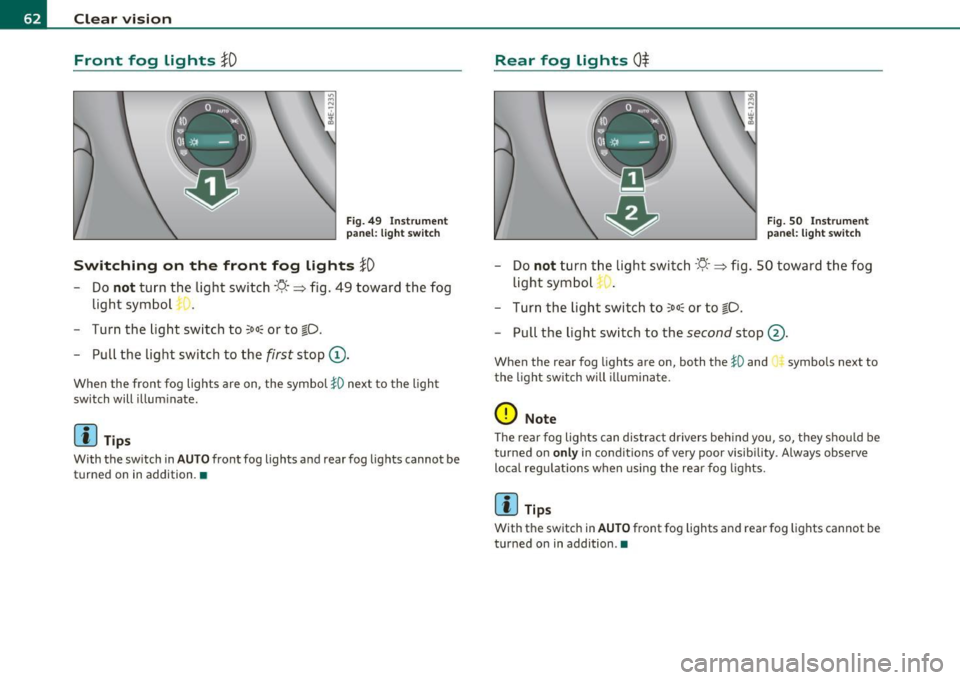
Switching on the front fog lights }D
- Do not turn the light switch ·'t/.· => fig. 49 toward the fog
light sym bol
- Turn the light switch to
;oo~ or to ~D .
- Pull the light switch to the first stop (D.
When the fron t fog lights are on, the symbo l }0 next to the ligh t
switch will i llum inate.
(I} Tips
With the sw itch in AUTO front fog lights and rear fog lights cannot be
turned on in addition. •
Rear fog Lights 0$
Fig. SO Ins tru men t
p an el: l ight sw itc h
- Do not turn th e ligh t switch ·'t/. · => fig. 50 t owar d th e fog
ligh t sym bo l
- Turn th e light switch to
~oo~ or t o ~D.
Pull the light switch to the second stop @.
When the rear fog lights are on, both the }D and symbols next to
t he light sw itch will il luminate.
0 Note
T he rear fog lights can distract drivers be hind yo u, so, they shou ld be
turned on
only in condit ions of very poor visib ility . A lways observe
loca l reg ulations w hen usin g the rear fog lights.
(I) Tips
With the sw itch in AUTO front fog lights and rear fog lights cannot be
tu rned on in addition.•
Page 66 of 384
Clear vision
(I) Tips
You should t urn on the emergency flashe rs when:
• you are the last vehicle standing in a traffic jam so that any other
vehicles coming can see you, or when
• your vehicle has broken down or yo u are in an emergency situa
tion, or when
• your vehicle is being towed by a tow truck or if you are towing
another vehicle behind you. •
Turn signal ¢¢ and high beam ~D Lever
The lever on the left side of the steering column is used to
operate the turn signals and the high beam as well as the
headlight flasher.
F ig. 53 Turn s ig nal
a n d hig h beam le ve r
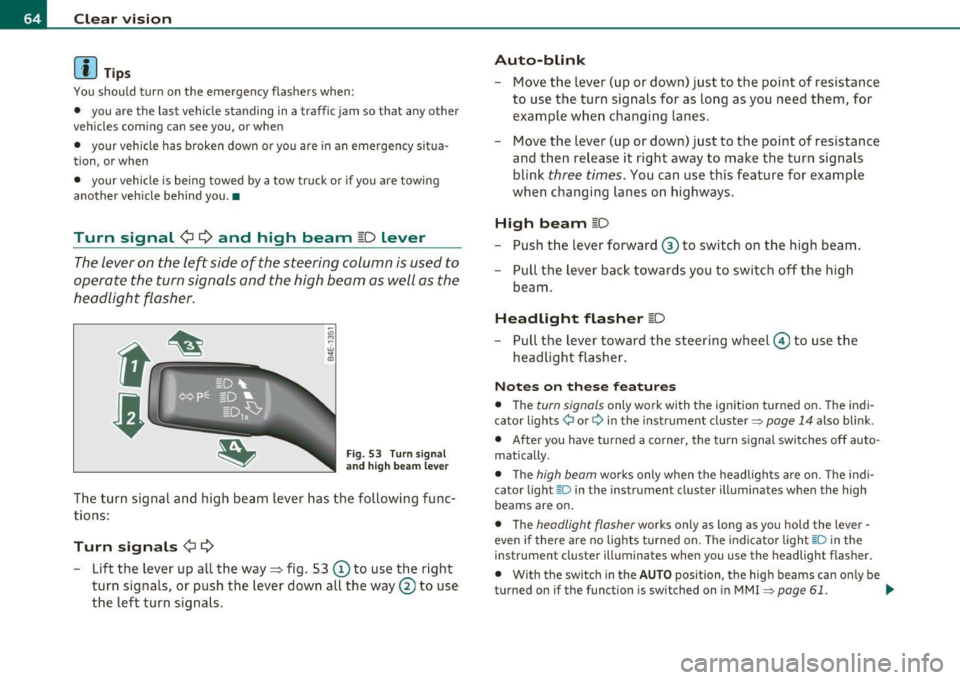
The turn signa l and high beam lever has the following fu nc
tions:
Turn signals ¢¢
-Lift the lever up all the way~ fig. 53 © to use the right
turn signals, or push the lever down all the way
0 to use
the left turn signals.
Auto -blink
- Move the lever (up or down) just to the point o f resistance
to use the turn signa ls for as long as you need them, for
example wh en changi ng lanes.
- Move the lever (up or down) just to the point of resistance
and then release it right away to make the turn signals
blink
three times . You can use this feature for example
when changing lanes on highways.
High beam [D
- Push t he lever forward ® to switch on the high beam .
- Pull the lever back towards you to switch off the high
beam .
Headlight flasher [D
Pull the lever toward the steeri ng w heel © to use t he
headlight flasher.
Not es on these feature s
• The turn signals only work with the ignition turned on. T he indi
cator lights ¢ or¢ in the inst rument cluster~
page 14 also blink .
• After you have t urned a co rner, the tu rn s ignal switc hes off auto
matically.
• T he
high beam works only when the headligh ts ar e o n. Th e indi
cator light [D in the instrument cluster illuminates when the high
beams are on .
• The
headlight flasher works only as long as you hold the lever -
even if there are no lights turned on. The indi cato r light aD in the
instrument cluster illuminates when you use the headlight flasher.
• With the swi tc h in the
AUTO posi tion, the high beams can o nly be
turned on if the funct ion is switched on in MMI
~ page 61. ..,_
Page 67 of 384

0 Note
Do not use the high beam or headlight flasher if you know that these
could blind oncoming traffic. •
Interior lights
Front interior Lights
The interior lights include reading lights for both the
driver and the front passenger.
11111111
I
\ 10
1
111111111
0
Con trol s and equ ip
m ent
111 i -~ -
--
•l l i'1~
rol ,
l I
111111111
i8 M
-w
"' a,
' '
111111111
0 Fig. 54 Rooflining:
Front interior lights
Fig. 55 Rooflining:
Front reading lights:
Vehicle OP-eration
Clear vision
Interior lights
- Press the@) button to turn off the interior lights
~ fig. 54. If you press the button a second time, the inte
rior lights in the rear are also turned off.
- Press the
(ID button to turn on the door contact circuit.
Press the button a second time to turn on the door contact
circuit for the rear doors .
- Press the
(I) button to turn on the interior lights. If you
press the button a second time, the interior lights in the
rear are also turned on .
Reading lights '-<~
-Press the switch to turn the right or left reading light on
or off ~ fig. 55.
With the door contact circuit, (ID the interior lights turn on as soon as
you unlock the vehicle or open the doors. The in terior lights are also
turned on when the ignition key is removed. The light goes out about
2 minutes after the doors are closed . When the vehicle is locked or
when the ignition is turned on, the interior lights are turned off .
When a door is open, the interior lights are turned off after about 10
minutes to preven t draining the battery.
[ i] Tips
The interior lights can be dimmed by holding the(!) swit ch pressed
down. If the interior lights in the rear were turned on by pressing the
switch twice, the rear interior lights are also dimmed .•
Vehicle care Do-it-yourselt service iTechnical data
Page 68 of 384
Clear vision Rear Interior Lights
The rear interior lights also contain reading lights for
rear-seat passengers .
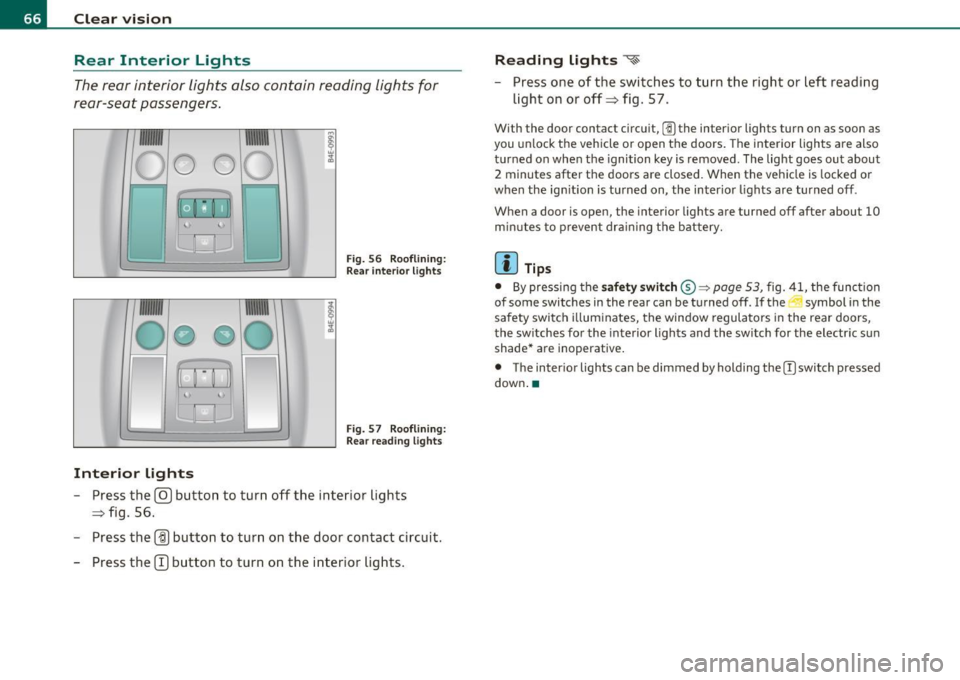
Fig. 56 Roo flin ing :
Rear in te rior lig hts
'
Fig . 57 Roo flining :
Re ar read ing lights
Interior lights
- Press the@ button to turn o ff the inte rior lights
=> fig . 56.
- Press the
(ID button to turn on the door contact circuit.
- Press the
CT) button to turn on the inter ior lights .
Reading lights ~
- Press one of t he switches to turn the right or left reading
light on or off=> fig. 57.
With the door contact circuit, [])the inter ior lights tu rn on as soon as
you un lock t he veh icle or open the doors . The interior lights a re also
t u rned on when the ignition key is removed . The light goes out about
2 minutes after the doors are closed. When the vehicle is locked or
when the ig nition is turned on, the inter io r li ghts are turned off.
When a door is open, the interior lights are turned off after about
10
m inu tes to p revent dra ining the battery.
(I) Tips
• By pressing the safety switch ®~ page 53, fig. 41, the func tion
of some switches in the rear can be turned off.
If the ._J symbol in the
safety swi tch i llum inates, the window regula tors in the rea r doors,
the sw itches fo r the interior lights and the sw itch for the electr ic s un
shade* are inoperative .
• The inter ior lights can be dimmed by holding the [)switch pressed
down .•
Page 73 of 384

Intermittent wiping ~l (acti vating rain
sensor )
- Move the lever up to position (D.
- Move switch @up or down , to adjust the sensitivity of the
rain sensor.
Low wip er sp eed
- Move the lever up to position@.
High wiper speed
- Move the lever up to position ®·
One-touch wiping
- Move the lever to position@, when you want to wipe the
windshield
briefly .
Automatic wiper /washer
- Pull the lever to position © (toward the steering wheel)
and hold.
- Release the lever . The washer stops and the wipers keep
going for about four seconds.
Turning off the wipers
- Move the lever back to positio n@ .
The windshield wipe rs and washer only work when the ignition is
turned on.
T he rain sensor is only activated with the wiper leve r set to position
@ . When i t starts to rain, the rain sensor will automatically activate
the intermittent wiping mode .
T o red uce the sensit iv ity of the senso r, move sw itch @down. To
increase the sensitivity, move the switch up . The higher you adjust the
Controls and equip
ment Safety first
Clear v
ision
sensitivity, the faster the sensor will react when it senses mo isture on
t he windsh ie ld. T he rain senso r wiper inte rvals depend on the sensi
tiv ity setting as well as vehicle speed . During brief stops, w iper
motion will adj ust in relation to the amount of rain on the winds hield.
Dur ing b rief stops, e .g . at a red light , w iper motion will automatically
be reduced to the next lower speed. Wipers already turn ing at low
speed. c hange to intermittent w iping.
When the ign ition is turned on, the washer jets are heated.
With the low beam headlights switched on, pull the wiper lever
towards you o nly
briefly to clean the w indshield . Holding the wiper
lever would also engage the headlight washer system each time you
clean the w indshield and would d rain the washer fluid rese rvoir
prematurely .
& WARNING
• Wiper bl ade s a re cruci al for safe dri ving! Only when the y are in
good condition are th ey able to clear the wind ows properly to
pro vide uncompr omi sing visibilit y. Worn or damaged wipe r
blade s ar e a safet y hazard =>
pag e 73, "In stalling new wiper
blades "!
• The rain sensor i s only des igned t o assist and support the
dri ver. It rem ain s entirely the d river's re spon sibility to m onito r
out side weather condition s and to manually a ctivate the wipers as
soon a s rain or dr izzle reduce s visibil ity th rough the windshield.
• The win dshield mu st not be treated with wat er- re pellent
m aterial s. They c an in crease gla re under po or visibilit y condit ions
s u ch as wetn ess, darkne ss, or when the sun i s low on the horizon .
In addition , they can cause the wi ndshield wipers to chatter.
0 Note
In freezing or near freezing conditions:
• Always check that the wiper blades a re not frozen to the glass
before you turn the wipers on. Loosen a wiper blade which is fro zen in ..,
Vehicle care Technical data
Page 74 of 384

Clear vision
place before operating the wipers to prevent damage to the wiper
blade o r th e wiper motor.
• Do not use the wipers to clear a frosted window. Us ing the wipers
as a convenie nt ice scraper wi ll dest roy the w iper blades .
• Before you take your vehicle to an automatic car wash, make sure
you have the w ind shield wipe r sys tem sw itched off (lever in posi tion
0), otherw ise the windshie ld wiper system cou ld get damaged in the
car w ash if i t shou ld sudden ly come on.
[ i ] Tips
• Make s ure the washe r flu id reservoir in the eng ine compa rtment is
topped off before going on a long trip . Look up~
page 305 for
check ing and filling the washer conta iner.
• If you switch off the ignition with the w indshield wiper lever still
in the inte rval wipe posit io n and then come bac k a w hile la ter and
dr ive off, the rain sensor will reactivate itself afte r the ve hicle speed
has exceeded 4 mph (6 km/h).
• Worn or d irty windshield w iper blades cause smear ing which can
affect the operation o f the rain senso r. Check the cond it io n of your
w indshield wiper b lades regularly .•
Headlight washer system
The headlight washer system cleans the headlights.
- Operate the wi ndsh ield wip er/was her syst em ® with the
headlig hts turned on by hold ing the lever for lo nger than
one second=>
page 70, fig. 67 .
The washer je ts extend fo rwa rd o ut of the front bumper driven by
water pressure to spray the front headlights w ith water .
You should inspect the headlights regu larly (for example when refu
eling) and clean off a ny solid dirt o r insects from the lenses. To ensure the system works properly in winter, keep the washer jets
free o
f snow and remove any ice using a de- ic ing spray. •
Service position
The wiper blades can only be changed in the service posi
tion.
- At below freezing outside temperatures, make sure first
that the wiper blades are not frozen to the windshield .
- Select: Function b utt on
I CAR ]> System s > Windshield
wipers .
- Select Serv ice position on t o tu rn th e service position on
or
off to return t he windsh ield w iper to its or ig inal pos i
tion.
You must only attempt to change the wiper b lades when the service
position is act ivated. This way, when you are working on the wind
shield wipe rs, you can avoid damaging the paint on the engine hood.
[ i ] Tips
• You can also turn on the se rvice position, for examp le, if you want
to protect the windshield from ic ing, using a cover .
• T he service position t urns itself
off , whenever yo u use the w ind
shield wiper lever .•