warning lights AUDI S8 2010 Owner's Manual
[x] Cancel search | Manufacturer: AUDI, Model Year: 2010, Model line: S8, Model: AUDI S8 2010Pages: 384, PDF Size: 90.95 MB
Page 63 of 384
control is activated. The high beam function must first be sw itched on
in the MMI
~ page 61.
Light Sensor Malfunction
In the event of a light sensor malfunct ion, the driver is notified in the
instrument cluster display:
~- Automatic headlights/automatic wipers defective
For safety reasons the low beams are turned on permanently with the
switch in
AUTO. However, you can continue to turn the lights on and
off using the light switch. Have the light sensor checked as soon as
possible at a dealership.
& WARNING
• Never use daytime running lights to see where you are going.
They are not bright enough and will not let you see far enough
ahead for safety, especially at dusk or when it is dark . Always
switch on the low beams at dusk
or when it is dark.
• Automatic headlights are only intended to assist the driver .
They do not relieve the driver of h is responsibility to check the
headlights and to turn them on manually according to the current
light and visibility conditions. For example, fog and rain cannot be
detected by the light sensors. So always switch on the headlights
under the se weather conditions and when driving in the dark
io.
• Crashes can happen when you cannot see the road ahead and
when you cannot be seen by other motorists.
- Always turn on the headlights so that you can see ahead and
so that others can see your car from the back.
[I) Tips
• With the switch in AUTO front fog lights and rear fog l ights cannot
be turned on in addition.
Controls and equip
ment Safety first
Clear vision
•
If you remove the ignition from the ign ition lock wh ile the head
ligh ts are still on, a buzzer will sound as long as the driver's door is
open to remind you to turn off the lights.
• Always observe the specific local regulations for you r area as to
when to use your lights .•
Adjusting exterior Lighting
The functions are set in the MMI.
-Select: Function button [CAR]> Systems > Exterior
lighting.
Coming home
The Com ing home function ensures that after turning off the igni
tion and opening the driver's door
the vehicle periphery is illum i
nated in the dark . In addition, the front fog lights, the tail lights and
the license plate light are turned on . On-time can be set for a per iod
from O (off) to 60 seconds .
Leaving home
The Leaving home functions ensures that when unlocking the vehicle
periphery is illuminated in the dark. In addi tion, the front fog lights,
the tail lights and the license plate light are turned on. This function
can be turned on and off.
High beam
With the switch in the AUTO position, the high beams can be t urned
on o nly if the function is turned
on .
Daytime running lights
USA models: The daytime runn ing lights can be turned on or off using
this function.
Canada models: The function cannot be turned off. It is act ivated
automatically each time the ignition is t urned on. This men u item is
shown "g reyed out". •
Vehicle care Technical data
Page 73 of 384

Intermittent wiping ~l (acti vating rain
sensor )
- Move the lever up to position (D.
- Move switch @up or down , to adjust the sensitivity of the
rain sensor.
Low wip er sp eed
- Move the lever up to position@.
High wiper speed
- Move the lever up to position ®·
One-touch wiping
- Move the lever to position@, when you want to wipe the
windshield
briefly .
Automatic wiper /washer
- Pull the lever to position © (toward the steering wheel)
and hold.
- Release the lever . The washer stops and the wipers keep
going for about four seconds.
Turning off the wipers
- Move the lever back to positio n@ .
The windshield wipe rs and washer only work when the ignition is
turned on.
T he rain sensor is only activated with the wiper leve r set to position
@ . When i t starts to rain, the rain sensor will automatically activate
the intermittent wiping mode .
T o red uce the sensit iv ity of the senso r, move sw itch @down. To
increase the sensitivity, move the switch up . The higher you adjust the
Controls and equip
ment Safety first
Clear v
ision
sensitivity, the faster the sensor will react when it senses mo isture on
t he windsh ie ld. T he rain senso r wiper inte rvals depend on the sensi
tiv ity setting as well as vehicle speed . During brief stops, w iper
motion will adj ust in relation to the amount of rain on the winds hield.
Dur ing b rief stops, e .g . at a red light , w iper motion will automatically
be reduced to the next lower speed. Wipers already turn ing at low
speed. c hange to intermittent w iping.
When the ign ition is turned on, the washer jets are heated.
With the low beam headlights switched on, pull the wiper lever
towards you o nly
briefly to clean the w indshield . Holding the wiper
lever would also engage the headlight washer system each time you
clean the w indshield and would d rain the washer fluid rese rvoir
prematurely .
& WARNING
• Wiper bl ade s a re cruci al for safe dri ving! Only when the y are in
good condition are th ey able to clear the wind ows properly to
pro vide uncompr omi sing visibilit y. Worn or damaged wipe r
blade s ar e a safet y hazard =>
pag e 73, "In stalling new wiper
blades "!
• The rain sensor i s only des igned t o assist and support the
dri ver. It rem ain s entirely the d river's re spon sibility to m onito r
out side weather condition s and to manually a ctivate the wipers as
soon a s rain or dr izzle reduce s visibil ity th rough the windshield.
• The win dshield mu st not be treated with wat er- re pellent
m aterial s. They c an in crease gla re under po or visibilit y condit ions
s u ch as wetn ess, darkne ss, or when the sun i s low on the horizon .
In addition , they can cause the wi ndshield wipers to chatter.
0 Note
In freezing or near freezing conditions:
• Always check that the wiper blades a re not frozen to the glass
before you turn the wipers on. Loosen a wiper blade which is fro zen in ..,
Vehicle care Technical data
Page 76 of 384
Clear vision
Mirrors
Rear view mirror
When the ignition is on, t he interior m irro r will darken automatically
depending on t he amo unt of light strik ing the m irro r (such as head
lights shin ing into the veh icle from the rear) . The mirro r will retu rn to
the o rigi na l state (anti -glare off) when yo u move the manua l gear
shift/gear se lector lever into
Reverse or w he n you turn o n the in te rior
lights .
& WARNING
Broken glass of automatic dimming mirror can cause electrolyte
fluid l eakage . Electrolyte fluid can irritate skin, eyes, and respira
tory system .
• Repeated or prolonged exposure to electrolyte can cause irrita
tion to the respiratory system , especially among people with
asthma or other respiratory conditions . Get fresh air immediately
by leaving the vehicle or , if that is not possible , open windows and
doors all the way .
• If electrolyte gets into the eyes , flush them thoroughly with
large amounts of clean water for at least 15 minutes; medical
attention is recommended.
• If electrolyte contacts skin, flush affected area with clean
water for at least 15 minutes and then wash affected area with
soap and water; medical attention is recommended. Thoroughly
wash affected clothing and shoes before reuse.
• If swallowed and person is conscious, rinse mouth with water
for at least 15 minutes. Do not induce vomiting unless instructed
to do so by medical professional. Get medi cal attention immedi
ately.
[I] Tips
T he au tomati c anti-glare feature on the mi rro r will not operate prop
erly if the lig ht shini ng on the inside mir ror is blocked by othe r
objec ts. •
Outside mirrors
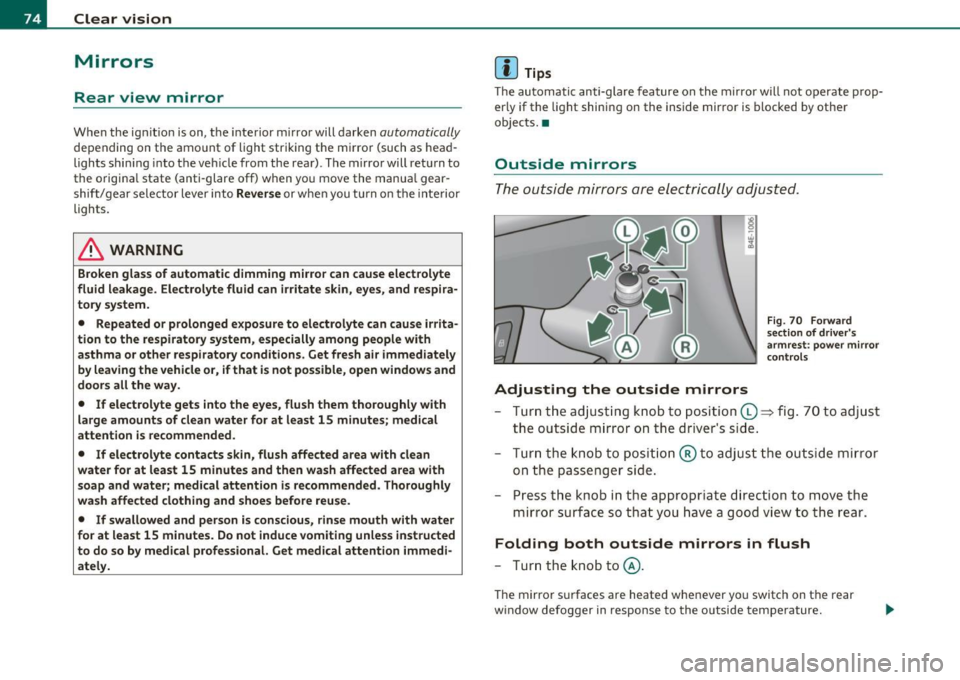
The outside mirrors are elec trically a djust ed.
Adjusting the outside mirrors
Fig . 70 F orw ard
section of d river 's
armrest : power mi rro r
c on trols
- Tur n th e ad jus ting k nob to posi tion (0 ~ fig. 7 0 to ad just
the outside m irror on the drive r's s ide.
- Tur n the k nob to posit io n ® to adjust t he out side mirror
on the passe nger side.
- Pr ess t he knob i n th e ap propriate direc tion to move t he
mirror s urf a ce so tha t you have a goo d view to the r ear .
Folding both outside mirrors in flush
- Turn the knob to@ .
The m irro r sur faces are heated whe never you switch on the rear
w indow defogger in re sponse to the o utside temperature.
Page 77 of 384

You are well-advised to fold the outside mirrors in when maneuvering in tight spaces or w hen leaving t he car pa rked close to othe r vehicles.
Tilting the passenger's side outside mirror
When yo u move the se lecto r lever in to R (Reve rse), the mi rror on the
front passenger's door (knob turned to® =>
page 74, fig . 70) w ill tilt
sligh tly downw ard. This make is easier for you to see the curb when
you are back ing into a parking space .
The mirror returns to its initial position as soon as reverse gear is disengaged and vehicle speed is above about 9 mph (15 km/h). The
mirror also returns to its initia l position if the switch is moved to the
dr iver's ou ts ide mir ror © or Neutral @ .
Memory setting for the outside mirrors
When the seat position is saved in memo ry, t he position of the
outs ide mirrors is saved at the same time=>
page 84.
Automatic anti-glare for the outsid e mirro rs
The o utside mir rors dim at the same time as the inside mirro r. When
the ign ition is sw itched on, the mirrors automatically dim depend ing
on the amo unt of light strik ing the m irro rs (such as head lights
shini ng into the veh icle from t he rear) .
When you turn on the inter ior light, or when you move the se lector
lever in to R (Reve rse), the anti-glare f unct ion s tops and the mir rors
return to their orig inal condition (not darkened) .
& WARNING
Broken glass of automatic dimming mir ro r can cause electrolyte
fluid leakage . Electrolyte fluid c an irritat e skin, eye s, and respira
tory system.
• Repeated or prolonged e xposure to electrolyte can cause irrita
tion to the resp iratory system, especially among people w ith
asthma or other re spiratory condition s. Get fresh air immediately
by leaving the vehicle or, if that is not possible , open windows and
door s all the way.
Controls and equip
ment Safety first
Clear v
ision
& WARNING (co ntinued )
• If electrolyte get s into the eye s, flu sh them thoroughly with
large amount s of clean water for at l east 15 minut es; medical
attention i s re commended .
• If electrolyte contact s skin, flush affected area w ith clean
water for at least 15 minute s and then wash affe cted area with
soap and water; medical attention is recommend ed . Thoroughly
wash affected clothing and shoes befo re reu se.
• If swa llowed and person is consciou s, rinse mouth with water
for at least 15 minutes. Do not induce vomiting unle ss instructed
to do so by medical prof essional. Get medi cal attention immedi
atel y.
0 Note
• Curved (i.e. convex) mirror surfaces increase yo ur field of v iew .
Remembe r th at vehicles or o ther objects will appea r smalle r and
farther away than when seen in a flat mirror. If you use this mirror to es tima te dist ances of following veh icles whe n chang ing lanes, yo u
cou ld estimate incorrectly and cause an acc ident .
• If the mirror ho using is moved un intent io na lly (for examp le, w hile
parking your ve hicle), then you must first fold the mirror electr ically.
Do not read just the mirro r ho using manually. Yo u could damage the
motor w hich controls the mirror .
[ i ] Tips
• If
there should be a malfunction in the electrical system, you can
sti ll adjust the outs ide mir rors by pressing the edge of the mirror .
• The au tomatic anti-glare feature on the mirror will not operate
prope rly if the light sh ining on the i nside m irro r is bloc ked by ot her
objects .•
Vehicle care Technical data
Page 125 of 384

On the road -
----------------
Electromechanical parking brake
Operation
The electromechanical parking brake replaces the hand
brake.
Fig. 135 Center
console: Parking brake
- Pull the switch to apply the parking brake~ fig. 135. The
indicator light in the switch will come on.
- Step on the brake pedal or the accelerator pedal and press
the switch at the same time to release the parking brake.
The indicator light in the switch will go out.
Your vehicle is equipped with an electromechanical parking brake
which replaces the handbrake. The parking brake is designed to
prevent the vehicle from rolling unintentionally.
In addition to the normal functions of a traditional hand brake, the
electromechanical parking brake provides various convenience and
safety functions.
Emergency brake
An emergency brake ensures that the vehicle can be slowed even if
the normal brakes fail~ page 125, "Emergency braking".
Controls and equip
ment Safety first
Indicator lights
•
If the parking brake is applied with the ignition turned on, the
indicator light in the instrument cluster (U.S. models:=.., Canadian
models: ©) and in the switch
«el) will come on.
• If the parking brake is applied with the ignition turned off, the
indicator light in the instrument cluster (U.S. models:=., Canadian
models: ©) and in the switch
«fl) will come on for about 30 seconds
and then go out.
& WARNING
If the vehicle is stationary and the transmission is engaged with
the engine running, the engine should not be speeded up (e.g.
manually from under the hood). Otherwise the vehicle will start to
move -you run the risk of an accident.
0 Note
If the warning/indicator light (U.S . models: BRAKE, Canadian models:
«I» ) flashes in the instrument cluster, there is a brake system
malfunction . By pressing the [CHECK! button, you can bring up a
driver message which explains the malfunction in more detail. If the
message
Parking brake ! Please contact workshop appears, there is
a parking brake malfunction which you should have repaired immedi
ately by an authorized dealership~ page 28.
[ i] Tips
• You can apply the parking brake at any time -even with the igni
tion turned off . The ignition must be turned on in order to release the
parking brake.
• Occasional noises when the parking brake is applied and released
are normal and are not a cause for concern.
• The parking brake goes through a self-test cycle at regular inter
vals -when the vehicle is parked. Any associated noises are normal. •
Vehicle care Technical data
Page 129 of 384

_________________________________________________ O_ n_t_ h _ e_ ro_ a_d __ ffllll
& WARNING (continued)
• Please note that inadvertently "resting" your foot on the accel
erator pedal causes the cruise control not to brake. This is because
the cruise control is overridden by the driver's acceleration.
[ i] Tips
The brake lights illuminate as soon as the brakes decelerate automatically. •
Changing speed
-Press lever in the
0 or O direction=> page 126, fig. 136
to increase or decrease your speed.
- Release the lever to save that speed.
Change speed in increments of 1 mph (1 km/h) by lightly pressing the
lever. If you keep the lever pressed down, you will alter your speed in
S mph (10 km/h) increments.
You can also press the accelerator pedal down to increase your speed,
e.g. if you want to pass someone. The speed you saved earlier will
resume as soon as you release the accelerator pedal.
If, however, you exceed your saved speed by S mph (10 km/h) for
longer than S minutes, the cruise control will turn off temporarily .
The green symbol in the display~
page 126, fig. 13 7 is replaced with
a white symbol. The saved speed remains the same.•
Presetting your speed
You can preset your desired speed while the vehicle is not
moving .
-Turn on the ignition.
Controls and equip
ment Safety first
- Pull lever
into position ©=> page 126, fig. 136.
- Press the lever in the
0 or O direction to increase or
decrease your speed.
- Release the lever to save that speed .
This function makes it possible, for example, to save the speed you
want before driving on the highway. Once on the highway, activate
the cruise control by pulling the lever toward
(D . •
Switching the system off
Temporary deactivation
- Press the brake pedal, or
- Press the lever into position@ (not clicked into place)
=> page 126, fig. 136, or
- Drive for longer than 5 minutes at more than 5 mph
(10 km/h) above the stored speed.
Switching off completely
- Press lever into position @ (clicked into place), or
- Switch the ignition off .
The system retains the saved speed if you deactivate the cruise
control temporarily. To resume the saved speed, release the brake
pedal and pull the lever to position
(D.
Switching the ignition off erases the saved speed.
& WARNING
You should only return to the saved speed if it is not too fast for
the current traffic conditions -risk of an accident! •
Vehicle care Technical data
Page 137 of 384

--------------------------------------------=A~ d:..: a=. p !::...: t~iv .:.. e =-- C=-=- r=u :.:.is =-:: e_C=.:: o:.:n..:. t.:: r:..: o:::.:. L _..J_
Driver information
Applies to veh icles: with A daptive C ruise Cont ro l
Displays in the instrument cluster
Depending on the driving situation, driver information is
displayed in the instrument cluster .
@ Primary d isp lay in the speedometer .
Fig. 145 O vervi ew
in strume nt clu ster
@ Supplementary display in the instrument cluster .
© Message in the instrument cluster d isp lay.
@ Primary display
Important information concerning vehicle operation with Adaptive
C rui se Con trol i s shown in display area @ . T he desired speed you set
is highlighted in the speedometer and the warning lights show
whet her adjustments are being made for an object ahe ad.
T hi s information is always displayed. Display area@ is the refore
called the
primary di splay.
@ Supplementary display
In d isp lay area @ information from the navigation system a nd the
trip computer is displayed in addit ion to information about Adapt ive
Cru ise Control.
Con tro ls a nd e quip ·
m en t Vehicle
OP-eration
You can select among the different information by repeated brief
ta ps o n the R ES ET button on the windshield wiper lever =>
page 38,
"Operatio n".
Particularly on your first trips with Adaptive Cruise Control, the
s upplementar y display should be tur ned on .
© Message
The information in a rea © is not displayed permanently . Informat ion
is displayed on ly if you c hange the time interval, if there is a malfunc
tion or if the Adapt ive Cru ise Contro l is turned off .•
A p plies to v ehicles : wi th Adaptive C ru ise Cont ro l
Primary display in the speedometer
Desired speed
Fi g. 14 6 Pr im ary
d is p lay
i n the spe ed ·
o m et er
Th e desi red speed set by the d river is displayed wi th a red L ED .
T he system a llows only speeds from 20 to 95 mph (30 to 150 km/h)
to be set . This speed range is faint ly illumina ted in the speedometer.
Warning lights (symbols)
• ""c::;, Open road: T he wa rning lig ht ""c::;, shows that AC C is active
and that no moving vehicle has been detected with in range of the
ra dar senso r up ahead in your lane of travel. The set speed is main-
tained . _,,,
Vehicle care Do-it-yourselt service iTechnical data
Page 158 of 384
1111....__A_ u_ t_o _m_ a_ t_ic _ t_ r_ a_ n_s _m_ i _s_ s_ i_ o_ n ____________________________________________ _
Select R only when the vehicle is at a full stop and the engine is
running at id le speed =>
& in "Driving the automatic transmission"
on
page 154.
Before you move the selector lever to R , press both the button in the
hand le of the selector lever
and the brake pedal at the same time.
When the ignition is on, the backup lights illuminate when the
selector lever is moved into
R .
N -Neutral
The transmission is in neutral in this position. Shift to this position
for standing with the brakes applied =>
page 156.
When the vehicle is stationary or at speeds be low 3 mph (5 km/h),
you must always apply the footbrake before and while mov ing the
lever out of
N.
D -Normal position for driving forward
Posit ion Dis fo r normal city and highway driving . It ranges from zero
to top speed and all six gears shift automatically, depending on
engine load, driving speed and automat ica lly se lected shift
programs.
When the vehicle is stationary or at speeds below 3 mph (5 km/h),
you must always apply the foot bra ke before and while moving the
lever to
D out of N .
In certa in circumstances it may be advantageous to temporarily
switch to the manual sh ift program to manually select gear ratios to
match specific driving conditions =>
page 158.
S -Sport position
Select this position for sportie r performance. In this position, the
transmission will not upshift as soon, allowing the vehicle to use the
increased power available at higher engine speeds to achieve livelier
acceleration .
When the vehicle is stationary or at speeds be low 3 mph (5 km/h),
you must always apply the foot bra ke before and while moving the
lever to
S out of N .
& WARNING
Read and follow all WARNINGS=> & in "Driving the automatic
transmi ssion" on
page 154.
0 Note
Coasting downhill with the transmission in N and the engine not
running will result in damage to the automatic transmission and
possibly the catalytic converter. •
Automatic Shift Lock (ASL)
Automatic shift lock prevents you from accidentally
shifting into a forward gear or into reverse, thus causing
the vehicle to move unintentionally.
0
Fig . 170 Shift gate
se lector lever lock posi
tions and interlock
button highlighted
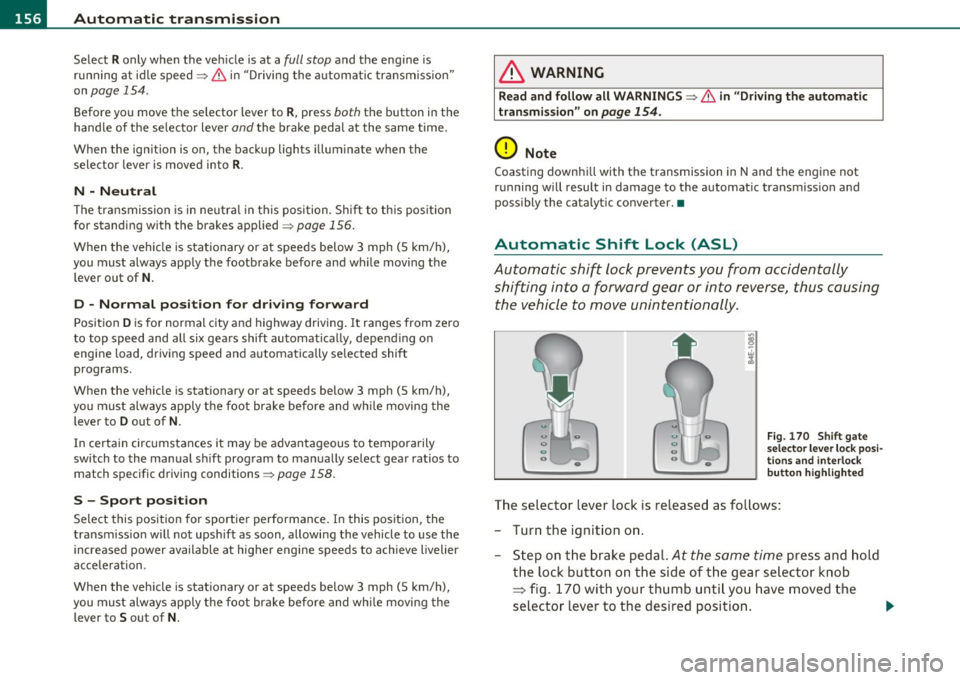
The selector lever lock is released as follows:
- Turn the ignition on .
- Step on the brake pedal.
At the same time press and hold
the lock button on the side of the gear selector knob
=:> fig. 170 with your thumb until you have moved the
selector lever to the desired position. .,_
Page 164 of 384

IIII.___A_ d_v_ a_ n _ c_e _d _ P_ a_ rk_ in--= g'-S -=- y_s_t_ e_ m _________________________________________ _
- Press the switch P1JJ! in the center console=:, page 161,
fig. 177 to activate the Audi parking system manually.
Activation of the acoustic parking system is confirmed by
a brief acknowledgement sound. The indicator light in the
switch lights up.
Deactivation
- If you drive forwards faster than approx. 6 mph (10 km/h), or
- if you switch the ignition off, the entire acoustic parking
assist is automatically deactivated, or
- you can press the switch
Pw! in the center console
=:, page 161, fig. 177 to deactivate the Audi parking
system. The indicator light in the switch goes out.
You have to turn on the acoustic parking assist manually if you wish
to park the vehicle forwards or if you wish to approach an obstacle
forwards and want a distance warning.
The range at which the sensors start to measure is
about :
Front
Rear
Warning tones
side
center
side
center 3 ft (0.90 m)
4 ft (1.20 m)
2 ft (0.60 m)
5.2 ft (1.60 m)
Distance warning is given by chimes which are generated by a signal
generator . The volume and the pitch of the chimes can be adjusted in
the MMI =>
page 171.
Mute
In the case of vehicles with automatic transmission, an acoustic
distance warning is discontinued when the transmission selector lever is moved to the P position
. However, the system remains active.
As soon as the selector lever is moved from the
P position and the
vehicle approaches an obstacle, the acoustic distance warning
resumes.
Driving forward/backward
Distance warning when driving forward/backward is based on detec
tion of an obstacle in the range of the parking assist . As the distance
decreases, the time interval between the audible tones becomes
shorter.
When the distance is less than approx. 1 ft (0.30 m), the tone
becomes continuous. At this point you should stop backing up or
driving forward .
If the distance to an obstacle remains the same, the volume of the
distance warning is gradually reduced after about
4 seconds (does
not apply to the zone for the continuous tone). If you start to
approach the detected obstacle again, the distance warning will
sound at the normal volume again.
Parking
When you select another gear when parking (e.g. reverse/forward),
the warning tones are temporarily suppressed, but the visual display
remains on the MMI display. If you start approaching a detected
obstacle again, the distance warning will sound at the normal volume
again.
Visual display
The segments on the MMI display indicate a change in the distance
between the vehicle and an obstacle . The number of segments
displayed depends on the obstacles in front of or behind the vehicle.
The closer the vehicle comes to the obstacle, the closer the segments
approach the vehicle=>
page 161, fig. 178. When the segment
before last is displayed, the vehicle has reached the collision zone. At
this point you should stop backing up or driving forward=>& .
The image in the visual display can be switched off on the MMI display
=>
page 173 . The acoustic distance warning remains active. .,,
Page 189 of 384

______________________________________________ D_ ri_v _ i_n _,,g ,c.._ S_a_ f_ e_ l..:: y __ __
Important things to do before driving
Safety is everybody's job! Vehicle and occupant safety always depends on the informed and careful driver.
For your safety and the safety of your passengers, before
driving always:
- Make sure that all lights and signals are operating
correctly.
- Make sure that the tire pressure is correct.
- Make sure that all windows are clean and afford good visi-
bility to the outside.
- Secure all luggage and other items carefully::::>
page 98.
-Make sure that nothing can interfere with the pedals.
- Adjust front seat, head restraint and mirrors correctly for your height .
- Instruct passengers to adjust the head restraints according to their height.
- Make sure to use the right child restraint correctly to
protect children ::::,
page 231, "Child Safety".
- Sit properly in your seat and make sure that your passen gers do the same::::,
page 76, "General recommenda
tions".
- Fasten your safety belt and wear it properly. Also instruct
your passengers to fasten their safety belts properly
=:> page 197. •
Controls and equip
ment Safety first Vehicle operation
What impairs driving safety?
Safe driving is directly related to the condition of the
vehicle, the driver as well as the driver's ability to concen
trate on the road without being distracted .
The driver is responsible for the safety of the vehicle and all
of its occupants. If your ability to drive is impaired, safety
risks for everybody in the vehicle increase and you also
become a hazard to everyone else on the road::::,,& . There
fore:
Do not let yourself be distracted by passengers or by using
a cellular telephone.
NEVER drive when your driving ability is impaired (by
medications, alcohol, drugs, etc.).
- Observe all traffic laws, rules of the road and speed limits
and plain common sense .
- ALWAYS adjust your speed to road, traffic and weather
conditions.
- Take frequent breaks on long trips. Do not drive for more than two hours at a stretch.
- Do NOT drive when you are tired, under pressure or when
you are stressed .
& WARNING
Impaired driving safety increases the risk of serious personal
injury and death whenever a vehicle is being used.•
Vehicle care Do-it-yourself service Technical data