lock AUDI S8 2010 Owner's Guide
[x] Cancel search | Manufacturer: AUDI, Model Year: 2010, Model line: S8, Model: AUDI S8 2010Pages: 384, PDF Size: 90.95 MB
Page 59 of 384

Sliding/tilting power sunroof
How the power sunroof works
Fig. 45 Sect ion of the
h ea dli ner: s unroof
sw itch positions
The roof will slide open or t ilt up at the rear as requ ired. When the
ignition is on, you can slide the roof open or close it to the desired
position by turning the rota ry control sw itch located ove rhead next to
the interior light. The roof is tilted open or closed by pressing or
pulling the contro l switch at position@~ fig. 45.
You can still close or open the sunroof for up to ten minutes after you
have switched off the ignition with the key remaining in the ignition
lock. If either door is opened, powered operation of the sunroof will
be deactivated.
S olar roof*
The solar cells in the roof provide energy to operate the ventilation
system for the climate control. It is activated automatically after the
vehicle is parked. Depending on solar irradiation, the interior temper
ature of the vehicle is lowered in the summer, in the winter the inte
r ior is dehumidif ied.
Sola r prot ection with sliding gl ass sun roof
The sliding glass sun roof is equipped with an adjustab le sunshade to
reduce the effects of strong sunlight. The solar protection can be
moved at the recessed handle to open and close it. To prevent the
Con tro ls a nd e quip
m en t Vehicle
OP-eration
Opening and closing
vehicle interior from heat ing up, you shou ld close the solar protection
when you park your vehicle in the s un .
When the roof is
s lid open , the sunshade is opened a utomat ically .
When the roof is closed, the sunshade can be closed manually.
When the roof is
t ilte d op en , the closed s unshade is also ra ised at the
rear edge . But it can still be slid open or closed.
0 Note
You should always closed the sliding/t ilting sunroof when you leave
your vehicle. Sudde n rain can drench the interior equipment a nd
damage the electronic conven ience features in your vehicle.
(I] Tips
If you park your vehicle in the sun, we recommend that you close the
s u nshade .•
Sliding/tilting the power sunroof open
Tilting the roof open
- Turn the rotary switch to position ®·
- In position @, briefly
press th e control to tilt the roof up
completely.
- To tilt the roof open to any intermediate position
press
and hold the sw itch until the roof reaches the desired
position .
Sliding the roof open
-Turn the switch to position © to open the roof all the way.
- Turn the switch to any other position to open the roof to
any intermediate position . ._
Vehicle care Do-it-yourselt service iTechnical data
Page 60 of 384

Opening and closing
When the glass roof opens, the su n visor , wh ic h is des igned to ward
o ff str ong sunligh t, op ens along w ith i t. T he v iso r ca n be clo sed
ma nua lly w hen the sunroof is closed .
[I] Tips
• Be awa re t hat the sunroof may actually be ope n whe n the sun visor
is close d. Chec k an d make sure t hat the sun roof is shut when parkin g
the ca r o r i f it sudde nly sta rts raining.
• If the s unroof is not f ully close d but you have pressed and he ld the
switch for the t ilt pos ition, the sunroof will not t ilt.•
Closing the power sunroof
Sliding the roof shut
- Turn the rota ry swi tc h to positio n@ => page 5 7, fig. 45
=> & .
Tilting the roof shut
-Briefly pull t h e rota ry switch to c lose t he roof .
To t ilt th e ro of down t o any in termed iat e po sitio n
pull and
h ol d
th e switc h until t he ro of reac hes th e de sired p osition.
& WARNING
Improper u se of the power sunroof can cause serious per sonal
injury.
• Be careful when closing the power sunroof . Not paying atten
tion could cause you or others to be trapped and injured as the roof
close s.
• Always take the key with you when you leave the vehicle to
prevent injurie s caused by the roof closing.
& WARNING (co ntinued )
• Never leave children or persons requiring as sistan ce alone in
the vehicle, especially when they could access the vehicle keys. Unsupervised use of the keys can result in the engine being started
or use of vehicle systems such as the power windows, etc. which
could result in serious injury. The doors could be locked with the
remote key, delaying help in an emergency.
• The power sunroof will continue to operate until the ignition
key has been removed and one of the front doors has been
opened. •
Power emergency closing
The s unr oo f can still be closed electrically if for some
reason the overload pro tection func tion b ecomes acti
vat ed.
The power sunroof is e quipped w ith an overload protection
f eatu re . If, u nder nor mal conditions , the power sun roof wi ll
n ot close, yo u ca n close it usi ng t his feat ure.
- Tu rn the ro tary switch to position @=>
page 5 7, fig. 45.
- Now pu ll the s witch
and hold it in this position u ntil the
power sun roof closes com plete ly .
& WARNING
Improper use of the power sunroof can cause serious personal
i njury.
• Be careful when closing the power sunroof. Not paying atten
tion could cause you or others to be trapped and injured as the roof
clo ses.
• Always take the key w ith you when you leave the vehicle to
prevent injuries caused by the roof clo sing .,,_
Page 61 of 384

& WARNING (continued)
• Never leave children or persons requiring assistance alone in
the vehicle, especially when they could access the vehicle keys.
Unsupervised use of the keys can result in the engine being started
or use of vehicle systems such as the power windows, etc. which
could result in serious injury. The doors could be locked with the
remote key, delaying help in an emergency.
• The power sunroof will continue to operate until the ignition
key has been removed and one of the front doors has been
opened. a
Emergency closing by hand
The sunroof can be closed by hand in case of a power
failure.
Con tro ls a nd e quip
m en t
Fig. 46 Section from
headliner: Where to
place the screwdriver
Vehicle OP-eration
Removing the cover
Opening and closing
Fig. 47 Section from
headliner: Crank for
emergency operation
- Insert the flat side of the screwdriver (found in the vehicle
tool kit) at the rear edge of the lens as indicated by the
-arrows- ::::> fig. 46.
- Carefully pry the clear lens cover open and remove it.
Retrieving the crank for emergency closing
-Use the ignition key or a screwdriver to carefully pry the
cover off the left end of the instrument panel
=> page 342, fig. 276. The crank is stored next to the fuse
carrier.
Closing the roof
- Push the crank ©::::> fig. 47 into the hex socket@ until
you can feel the crank engage. Start turning, maintaining
a steady pressure on the crank to keep it from slipping off.
- After you have closed the sunroof, remove the crank and
replace the dome light lens.
[ i] Tips
If you are unable to close the roof manually, contact the nearest
authorized Audi dealer for assistance. •
Vehicle care Do-it-yourselt service iTechnical data
Page 63 of 384
control is activated. The high beam function must first be sw itched on
in the MMI
~ page 61.
Light Sensor Malfunction
In the event of a light sensor malfunct ion, the driver is notified in the
instrument cluster display:
~- Automatic headlights/automatic wipers defective
For safety reasons the low beams are turned on permanently with the
switch in
AUTO. However, you can continue to turn the lights on and
off using the light switch. Have the light sensor checked as soon as
possible at a dealership.
& WARNING
• Never use daytime running lights to see where you are going.
They are not bright enough and will not let you see far enough
ahead for safety, especially at dusk or when it is dark . Always
switch on the low beams at dusk
or when it is dark.
• Automatic headlights are only intended to assist the driver .
They do not relieve the driver of h is responsibility to check the
headlights and to turn them on manually according to the current
light and visibility conditions. For example, fog and rain cannot be
detected by the light sensors. So always switch on the headlights
under the se weather conditions and when driving in the dark
io.
• Crashes can happen when you cannot see the road ahead and
when you cannot be seen by other motorists.
- Always turn on the headlights so that you can see ahead and
so that others can see your car from the back.
[I) Tips
• With the switch in AUTO front fog lights and rear fog l ights cannot
be turned on in addition.
Controls and equip
ment Safety first
Clear vision
•
If you remove the ignition from the ign ition lock wh ile the head
ligh ts are still on, a buzzer will sound as long as the driver's door is
open to remind you to turn off the lights.
• Always observe the specific local regulations for you r area as to
when to use your lights .•
Adjusting exterior Lighting
The functions are set in the MMI.
-Select: Function button [CAR]> Systems > Exterior
lighting.
Coming home
The Com ing home function ensures that after turning off the igni
tion and opening the driver's door
the vehicle periphery is illum i
nated in the dark . In addition, the front fog lights, the tail lights and
the license plate light are turned on . On-time can be set for a per iod
from O (off) to 60 seconds .
Leaving home
The Leaving home functions ensures that when unlocking the vehicle
periphery is illuminated in the dark. In addi tion, the front fog lights,
the tail lights and the license plate light are turned on. This function
can be turned on and off.
High beam
With the switch in the AUTO position, the high beams can be t urned
on o nly if the function is turned
on .
Daytime running lights
USA models: The daytime runn ing lights can be turned on or off using
this function.
Canada models: The function cannot be turned off. It is act ivated
automatically each time the ignition is t urned on. This men u item is
shown "g reyed out". •
Vehicle care Technical data
Page 67 of 384

0 Note
Do not use the high beam or headlight flasher if you know that these
could blind oncoming traffic. •
Interior lights
Front interior Lights
The interior lights include reading lights for both the
driver and the front passenger.
11111111
I
\ 10
1
111111111
0
Con trol s and equ ip
m ent
111 i -~ -
--
•l l i'1~
rol ,
l I
111111111
i8 M
-w
"' a,
' '
111111111
0 Fig. 54 Rooflining:
Front interior lights
Fig. 55 Rooflining:
Front reading lights:
Vehicle OP-eration
Clear vision
Interior lights
- Press the@) button to turn off the interior lights
~ fig. 54. If you press the button a second time, the inte
rior lights in the rear are also turned off.
- Press the
(ID button to turn on the door contact circuit.
Press the button a second time to turn on the door contact
circuit for the rear doors .
- Press the
(I) button to turn on the interior lights. If you
press the button a second time, the interior lights in the
rear are also turned on .
Reading lights '-<~
-Press the switch to turn the right or left reading light on
or off ~ fig. 55.
With the door contact circuit, (ID the interior lights turn on as soon as
you unlock the vehicle or open the doors. The in terior lights are also
turned on when the ignition key is removed. The light goes out about
2 minutes after the doors are closed . When the vehicle is locked or
when the ignition is turned on, the interior lights are turned off .
When a door is open, the interior lights are turned off after about 10
minutes to preven t draining the battery.
[ i] Tips
The interior lights can be dimmed by holding the(!) swit ch pressed
down. If the interior lights in the rear were turned on by pressing the
switch twice, the rear interior lights are also dimmed .•
Vehicle care Do-it-yourselt service iTechnical data
Page 68 of 384
Clear vision Rear Interior Lights
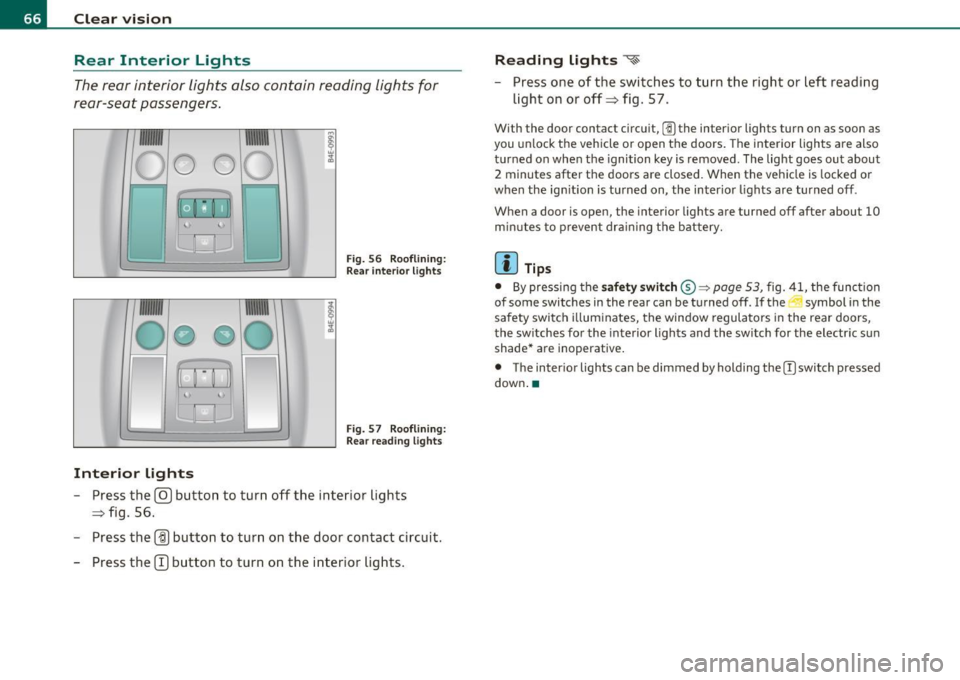
The rear interior lights also contain reading lights for
rear-seat passengers .
Fig. 56 Roo flin ing :
Rear in te rior lig hts
'
Fig . 57 Roo flining :
Re ar read ing lights
Interior lights
- Press the@ button to turn o ff the inte rior lights
=> fig . 56.
- Press the
(ID button to turn on the door contact circuit.
- Press the
CT) button to turn on the inter ior lights .
Reading lights ~
- Press one of t he switches to turn the right or left reading
light on or off=> fig. 57.
With the door contact circuit, [])the inter ior lights tu rn on as soon as
you un lock t he veh icle or open the doors . The interior lights a re also
t u rned on when the ignition key is removed . The light goes out about
2 minutes after the doors are closed. When the vehicle is locked or
when the ig nition is turned on, the inter io r li ghts are turned off.
When a door is open, the interior lights are turned off after about
10
m inu tes to p revent dra ining the battery.
(I) Tips
• By pressing the safety switch ®~ page 53, fig. 41, the func tion
of some switches in the rear can be turned off.
If the ._J symbol in the
safety swi tch i llum inates, the window regula tors in the rea r doors,
the sw itches fo r the interior lights and the sw itch for the electr ic s un
shade* are inoperative .
• The inter ior lights can be dimmed by holding the [)switch pressed
down .•
Page 69 of 384

Applies to vehicles: with background lighting
Background lighting
Four different lighting profiles for the interior lighting
con be selected and dimme d through the
MMI.
111111111
0
{m\ \1-=---.=J
~ "'"""
~o
Fig. 58 MMI di splay:
B ac kg round lighting
Fig . 59 Roo f mod ule
c ut out: Ligh t prof ile
s wit ch
-Press the Systems control but ton in the car menu .
- Selec t
Background lighting .
-Select a lighti ng profile => fig . 58 or select Off to deact i-
vate the lighting profile.
- Press the co ntrol knob to activate the des ired lig hting
profile.
Con tro ls a nd e quip
m en t Vehicle
OP-eration
Clear vision
- Rotate the control knob clockwise to increas e the bright
ness, and
- Rotate the control knob
counterclockwise to reduce the
brigh tness.
Whe n the vehicle is unlocked, the sta ndard lighting turns on a uto
matically and dims after approx. 2 minutes, and when the ignition is
turned on i t sw itches off immediate ly.
A background lighting prof ile can be switched on manually us ing the
ligh t profile switch => fig. 59. This w ill turn off a utomat ica lly aft er 30
m inutes when the ig nitio n is off . To reactivate, press the lighting
profile sw itch .
L ighting profi les that were selected while driving rema in act ive
dur ing the course of travel.
The following lighting profil es can be adjusted and
dimmed in the MMI:
Lighting profile Highway City Cockpit Rear
Drive r's side footwell X
Passenger's side foot-X X well
Rear footwell
X X
Front door trim panel X X X
Rear door trim panel X X X X
F ront int erior lighting X X
Rear interior light ing X X
II) Tips
Lighting profiles are stored on the remote control key being used .•
Vehicle care Do-it-yourselt service iTechnical data
Page 75 of 384

Installing new wiper blades
Wiper blades in good condition help keep the windshield
clear .
Removing a wiper blade
Fig. 68 Rem ov in g th e
wi per bla des
F ig . 69 Installi ng
wip er b lad es
- Bring the windshield wipers to the se rvice posi tion
~ page 72.
- Lift the wiper arm away from the windshield .
- Push the locking piece on the wiper blade in the direct ion
of t he arrow @~ fig . 68 . Ho ld the wipe r blade firmly.
- Remove the w iper blade@.
Con tro ls a nd e quip
m en t Vehicle
OP-eration
Clear vision
Installing wiper blade
- Place the new wiper b lade in th e retaine r on the wiper arm
@ ~fig. 69.
- Push the locking piece on the wiper blade in the direction
o f the arrow ® until you feel it click into place on the
wrper arm.
Clean your wiper blades regular ly with a windshie ld washer so lution
to p revent streaking.
If the b lades are very dirty, for example wi th
insects, carefu lly clean the blades with a sponge or a soft brush .
If the w iper blades begin to streak the w indshield, this could be
caused by res idue left on the windsh ie ld by au tomatic car washes .
Fill the windshie ld washer container with a specia l solution availab le
a t you r author ized A udi dealer to remove the res idue.
& WARNING
Be sur e to in spe ct the conditi on of your wiper blades regularly . See
your authorized Audi de ale r for replacement blades .
0 Note
To prevent damage to the wiper system:
• Always loosen blades wh ich are frozen to the wi ndshield before
operating wipers.
• Do not use gasoline , ke rosene, paint th inner, or ot her solvents on
or near the wiper blades .
• Do not at tempt to move the w ipers by hand.
[I] Tips
Commercial hot waxes applied by automatic car washes affect the
cleanability of the windshield. •
Vehicle care Do-it-yourselt service iTechnical data
Page 76 of 384
Clear vision
Mirrors
Rear view mirror
When the ignition is on, t he interior m irro r will darken automatically
depending on t he amo unt of light strik ing the m irro r (such as head
lights shin ing into the veh icle from the rear) . The mirro r will retu rn to
the o rigi na l state (anti -glare off) when yo u move the manua l gear
shift/gear se lector lever into
Reverse or w he n you turn o n the in te rior
lights .
& WARNING
Broken glass of automatic dimming mirror can cause electrolyte
fluid l eakage . Electrolyte fluid can irritate skin, eyes, and respira
tory system .
• Repeated or prolonged exposure to electrolyte can cause irrita
tion to the respiratory system , especially among people with
asthma or other respiratory conditions . Get fresh air immediately
by leaving the vehicle or , if that is not possible , open windows and
doors all the way .
• If electrolyte gets into the eyes , flush them thoroughly with
large amounts of clean water for at least 15 minutes; medical
attention is recommended.
• If electrolyte contacts skin, flush affected area with clean
water for at least 15 minutes and then wash affected area with
soap and water; medical attention is recommended. Thoroughly
wash affected clothing and shoes before reuse.
• If swallowed and person is conscious, rinse mouth with water
for at least 15 minutes. Do not induce vomiting unless instructed
to do so by medical professional. Get medi cal attention immedi
ately.
[I] Tips
T he au tomati c anti-glare feature on the mi rro r will not operate prop
erly if the lig ht shini ng on the inside mir ror is blocked by othe r
objec ts. •
Outside mirrors
The outside mirrors are elec trically a djust ed.
Adjusting the outside mirrors
Fig . 70 F orw ard
section of d river 's
armrest : power mi rro r
c on trols
- Tur n th e ad jus ting k nob to posi tion (0 ~ fig. 7 0 to ad just
the outside m irror on the drive r's s ide.
- Tur n the k nob to posit io n ® to adjust t he out side mirror
on the passe nger side.
- Pr ess t he knob i n th e ap propriate direc tion to move t he
mirror s urf a ce so tha t you have a goo d view to the r ear .
Folding both outside mirrors in flush
- Turn the knob to@ .
The m irro r sur faces are heated whe never you switch on the rear
w indow defogger in re sponse to the o utside temperature.
Page 85 of 384

Fig. 82 Center rear
head restraint:
adjusting the height
- Push the head restraint upward until it locks in the desired
position=>
page 82, fig. 81.
- To lower it, push on the knob located on the side
=> fig. 82.
The height of the center head restraint is adjustable . It should be
adjusted to the occupant's body size. Correctly adjusted head
restraints and safety belts are an extremely effective safety feature
~ page 191 .
& WARNING
• Vehicles with power individual rear seats* have seating for
four. The long center console between the two rear seats is not a seating position. For this reason, a safety belt and an adjustable
head restraint are not provided.
• Read and heed all WARNINGS ~
page 191, "Proper adjust
ment of head restraints". •
Con trol s and equ ip
m ent Vehicle
OP-eration
Seats and storage
Armrest
The armrests for the driver and passenger can be
adjusted to several positions and contain a storage
compartment.
Fig. 83 Arm rests for
driver and passenger
Adjusting the armrest
-To adjust the armrest angle, pivot the armrest fully down.
- Lift the armrest detent by detent until the desired posi-
tion is reached .
Opening storage compartment
-Press the release lever=> fig. 83.
Please note that the driver's arm movements may be restricted with
th e armrest folded down. For this reason, the armrest should not be
folded down when driving in city traffic. •
Vehicle care Do-it-yourselt service iTechnical data