lock AUDI S8 2010 Workshop Manual
[x] Cancel search | Manufacturer: AUDI, Model Year: 2010, Model line: S8, Model: AUDI S8 2010Pages: 384, PDF Size: 90.95 MB
Page 126 of 384

1111....__0_ n_ t_h_ e_ r_ o_ a _ d _________________________________________________ _
Parking
To p revent a parked vehicle from rolling away, there are
a fe w things you should do.
When you park your vehicle , do the following
- Stop t he veh icle us ing the bra ke pedal.
- Pull the switch to apply t he electromechanica l parking
brake .
- Move th e se lector lev er in to the
P position ~& .
- Switch off the e ngine and remove the ignition key from
the ignition lock.
When you park your vehicle on hills, do the
following
- Stop the veh icle us ing the bra ke pedal.
- Pull the switch to apply t he e lectromechanica l parking
brake .
- I f you a re parkin g h eaded
downhill , turn the front w heels
toward th e curb .
- I f you are parking headed
uphill , turn t he fro nt wh eels
away from t he curb.
- M ove the selector lever into the
P position.
- Switch off the e ngine and remove the ign it ion key from
the ignition lock.
& WARNING
Thi s is how you can reduce the risk of injury when lea ving your
vehicle.
& W ARNING (continued )
• Never park the vehicle where it can come in contact with dry
grass , spilled fuel or any other flammable material s.
• When parking on hills, always turn the wheel s so that the front
wheel s will fir st roll into the curb, if the vehicle should start to
roll.
• Never allow anyone · especially small children· to remain in
the vehicle when it i s locked. Locked door s make it more difficult
fo r rescu ers to acce ss the passenger compartment in the event of
an emergency. Danger to life!
• Never leave children unsuperv ised in the vehicle. Ch ildren
could relea se the parking brake or move the gear shift lever out of
gear. The vehicle could start to roll away and cau se an accident .
• No matter what the season i s, the temperature
in a parked
v ehicle can reach dangero us le vels .
0 Note
• Please exercise care when you pa rk your veh icle in parking areas
w ith park ing barriers o r cur bs. Parking barriers and curbs vary in
he ight and could damage your bumpe r and related components as
the front of your vehicle moves over a ba rrier or curb that is too high,
as you park or as you back out of a pa rking spot. In order to be sure
that no such damage can occur, yo u may wish to stop short of having
t he fro nt t ires of you r car touch t he p arking bar rie r or curb.
• Please a lso exerc ise except iona l care when you drive up or down
steep ramps or drive over curbs or o ther obstacles, for which the
vehicle is not des igned, because components of the vehicle close to
t he ground, s uch as bumpe r covers, spoilers and suspension and
exhaust system components, may become damaged. •
Page 127 of 384

On the road ---------------~:..:.....__
Starting off with a trailer
To prevent rolling back unintentionally on an incline, do
the following:
- Keep the switch pulled and depress the accelerator. The
parking brake stays applied and p reve nts the vehicle from
rolling backward .
- You can release t he switch once you are sure t hat you are
deve loping enough forward momentum at the whee ls as
you depress the acce lerator .
Depending on the we ight of the rig (vehicle and trailer) and the
severity of the incline, yo u may roll backwards as you start. You can
prevent rol ling backwards by holding the park ing bra ke sw itch pulled
out and accelerating -just as you wou ld when starting on a hill with a
conventional hand brake .•
Emergency braking
In the event that the conventional brake system fails or
locks.
- P ull the swi tch and cont inue to pull it to s low your veh icle
with the parking brake in an emergency .
- As soon as you re lease the sw itc h or accelerate, the
braking process stops .
If you pull the switch and hold it above a speed of abou t 5 mp h (8
km/h), the emergency braking function is init iated. The vehicle is
bra ked at all fou r wheels by activat ing the hydraulic b rake system.
Brake performance is s imilar to making an emergency stop~,&.
So that emergency braking is not activated by mistake, an audible
warning tone (buzzer) sounds when the switch is pulled . As soon as
Controls and equip
ment Safety first
the switch is released, or the accelerator pedal is depressed, emer
gency braking s tops.
& WARNING
Em erg ency braking should only be u sed in an emergen cy, wh en
the no rmal foot brake ha s failed o r the brake pedal i s obstructed.
U sing the park ing b rake to perform emerg ency braking will slow
your vehicl e as if you had made a full brake application . The laws
of phy sic s c annot be su spen ded even wi th ESP and it s ass ociated
c omponents (ABS, ASR , ED S). In corn ers and when r oad or
weather condit ion s are bad , a full brake application can cause the
ve hicl e to sk id or the rear end to br eak away- r isking an accid ent .•
Driver messages in the instrument cluster
C aution : Vehicle park ed too steep
Th is message appears when the pa rking brake is applied on an incline
that exceeds abo ut 30%.
In this case the braking power of the parking brake may
not be
adequate
t o p revent the vehicle from rolling un intentionally.
Plea se release parking b rake
Thi s message appears, when a gear is se lected and the accelerato r
pedal is depressed -release the parking brake.
Pre ss brake p edal to relea se park ing brake
T his driver message appea rs when the switch to release the parking
bra ke was pressed. The par king brake can only be released if you press
the brake or accelerator pedal and press the switch at the same time.
.1 Par king bra ke mal funct ion !
T his driver message appears together w ith the yellow symbol
when there is a parking brake malfunct ion.
Vehicle care Technical data
Page 140 of 384
lffll.___A_ d_ a_,_ p_t _i_ v _e _ C_r_ u_ i_ s_ e_ C_ o_ n_ t_ r_ o_ l __________________________________________ _
ACC not available
The text message ACC not available appea rs, fo r example, if the
t empe ra ture of the b rakes is excessive . Adaptive Cru ise Contro l is
tempo rar ily not ava ilab le. A war ning tone sounds as a reminder.
ACC not available!
T he text message ACC not available! appears in the event o f a
ma lf u nction . Adaptive Cru ise Contro l is tur ned off . A warn ing tone
sounds as a remi nder. Have the system inspected by a qualifie d dea l
ers hip.
ACC sensor blocked
The text message ACC sensor blocked appears when the ACC System
does not detect a ny objects over an extended t ime per iod . For the
time being, the distance to ve hicles up ahead is not being con trolled .
T he ACC system is not switched
off, so increased alertness is require d.
Th e fo llow ing m ay be reasons fo r the text m essag e ACC senso r
blocked:
• The ACC se nsor is di rty. T he AC( syst em is no t reacti ng, or is not
reacting correctly, to vehicles traveling ahead .
• It is possib le tha t you are dr iv ing on a ro ad wit h ve ry lig ht tra ffic
without anything at the s ide of the road (e.g. gua rd rails, traff ic s igns,
tr ees). A s so on as a vehicle i s de te ct ed b y the sys tem ag ain, it ret urns
to its contro l range a nd the text message disappears.
T he ACC sensor is located in the area unde r the front license p late . If
there is a loss of op eration d ue to heavy co ntam inat ion, this a rea
sho uld cleane d to resto re prope r o peration.
ACC sensor blocked!
T he text message ACC sen sor blocked! a pp ears w hen the A CC System
can no longer accurately detect vehicles movi ng up ahead in your lane
of t ravel. A daptive C ruise Cont ro l i s tu rned off . A warning tone a lso
so unds as a re mi nder.
To decide whether it is necessary to switch off t he ACC (ACC sensor
blo cked !) o r if it is o nly a te mporary c ond ition (ACC se nsor blo cke d), the system will also takes
into cons ideration the outs ide temperature
and/or the windshie ld wiper o per ation.
Th e ACC sensor is d irty or b locked (e .g . leaves, snow) .
The ACC senso r is located in the area under the front license plate. If
th e A CC sensor is dir ty or bloc ke d , clean t he ar ea to res tore sy stem
operat ion.
EPB act ivation
T he text message EPB activation appears i f eme rgency braking was
initi ated wi th the Elec tro mecha ni cal Pa rkin g Bra ke ( EPB). A dapti ve
Cr uise Contro l is turned off. A gong sounds as a reminder.
ESP activation
T he text message ESP activation appears if the E lectron ic Stabi liza
tion Prog ram ( ESP) has inte rven ed to ta ke co ntrol in a criti cal d riving
sit uat io n. In this case Adaptive C ruise Contro l is automatically turned
off. A gong s ounds a s a rem inder.
Speed range
The te xt message Speed range ap pears if the cur rent speed is too low
to set or to hold the requested speed.
W hen setti ng a desired speed, it m ust be at least 2 0 mp h (30 km/h).
At speeds be low 17 mph (25 km/ h), the cruise contro l is turned off.
Shift lever position!
T he text message Shift lever position! appears w hen the sh ift select
lever is move d to po siti on
N . In t his p osition, Ad aptive C ruise Con trol
is not available. •
App lies to veh icles : w ith Adaptive Cruise Control
Settings in MMI
The time int erval can b e se t in fvf fvfl.
Se ttings in t he Adaptive Cruise Control me nu are poss ible
only with the eng ine ru nning a nd t he ve hicle s tat ionary . _,,,
Page 148 of 384
lffll.___A_ u_ d_i_ s_ id_ e_ a_s _s_ i_ s _t _________________________________________________ _
Deactivating
- Press the button again . T he indicator light o n the b utton
goes out.
The system works at speeds faster tha n 19 mph (30 km/h) .
& WARNING
• Imp roper reliance on the side assist system can cause collisions
and seriou s per sonal injury:
- Never rely only on s ide ass ist when changing lanes.
- Alway s che ck rear view mirror s to m ake sure that it i s safe to
change lanes.
• Side a ssist cannot detect all vehicles under all condition s
danger of accident!
• Side a ssi st cannot detect vehicle s in time to alert you when
they approach from beh ind at very high speed, or fall drop back
very quickly .
• The radar sen sor's
v is ion can be reduced or entirely blocked by
rain , snow, and heavy spray . This can result in side as sis t not
adequately detecting vehicle s or , in some cases, not detecting
them at a ll. Alway s keep an eye on the dir ection you are traveling
and the rele vant area around the vehicle.
• Please note that side assist indicates there are approaching
vehicles , or vehicles in you r blind spot, only after you r vehicle has
reached a driving speed of at lea st 19 mph (30 km/h).
• Side assist signal doe s not work around t ight corners (turning
radius less than 328 feet or 100 m ).
• Side assist is no replacement for the driver 's full attention . The
driver alone is respon sible for lane change s and s imilar driving
maneuvers. Always keep an eye on the direction you are traveling
and the relevant area around the vehicle.
0 Note
• T o ensure that you do not adversely affe ct s ide as sist , do not block
the area on the rear b umper where the radar sensors are located with
fo reign objects (such as st ic kers or b icycle ra cks).
• Make s ure that the signal light on the o utside mi rror is not
bloc ked by stic ke rs or othe r items.
[I) Tips
• Side ass ist automatica lly deac tivates if it detects that the radar
sensors are blocked=>
page 152. The indicator light on the button
goes out.
• Th e area on the bumper w he re the radar sensors are located must
c ons istent ly rema in free of snow, i ce, a nd he avy soiling so that s ide
assist can function properly. Follow the add itiona l notes on
=>page 1 5 2.
• Add it iona l tinting on t he front side windows can ma ke it harder to
see and correctly u nders tand the s ig nal light on the outs ide mirro r.
• For Decla ration of Compliance to United States FCC and Industry
Canada regulations=>
page 364. •
Applies to vehicl es : w it h side ass ist
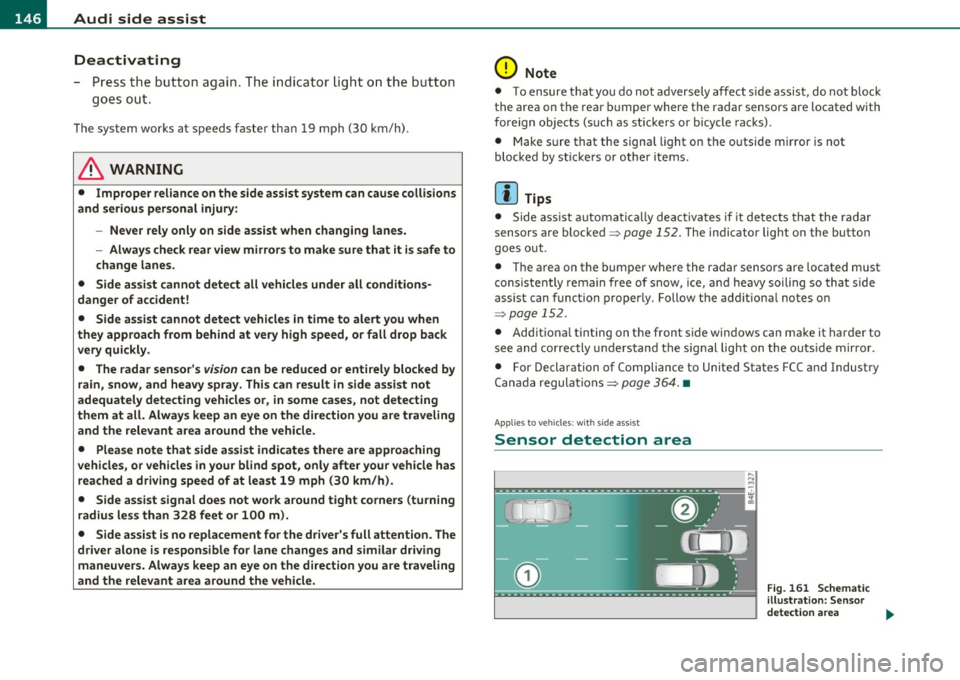
Sensor detection area
, D i
Fig. 161 S chem ati c
illustrat io n : S ensor
detection are a
~
Page 154 of 384

-Audi side assist •m ___________________ _
Notes
Applies to vehicles: w it h side ass ist
Messages in instrument cluster display
If side assist turns off automatically, the indicator light on the button
w ill go out and you w ill see a message in the instrument cluster
display:
Audi s ide ass ist not available: sensors possibly blocked
T he side ass ist senso rs a re bu ilt into the rear bumpe r on the left and
r ight (not v is ible on the outside)=>
page 145, fig. 158 . To ensu re
that yo u do not adversely affect the way side assist functions, foreign
objects (such as st ickers or bicycle racks) should not be attached to
the area on t he rear bumper whe re the sensors are located. If side
ass ist f unctions are adve rsely affec ted, you will see this mes sage in
the instrument cluster d isp lay. Remove anyth ing that may be
blo ckin g the sensors .
If no vehicle is detected for a longer period of t ime w hile driving, side
assist w ill also sw itch
off automatica lly .
Audi s ide ass ist currently not available
If the re is a tempo rary p ro blem (such as the vehicle 's ba tte ry c har ge
being low), s ide assist ca nnot be act ivated temporar ily .
Audi side a ssist: system fault
Have the system checked by an authori zed Audi dealer or qualified
work sho p.•
Ap plies to ve hicles : w it h sid e ass ist
Safety tips
The s ide assist detection may be limited when driving aro und narrow
s tr eet corners, on hilly st ree ts, an d un der poo r wea ther condit ions. It is possib
le that the radar sensors may also detect other objects,
s uch a s high or s taggere d guardrails.
Side assis t does not measure ac tual lane wid th . The system assumes
a fixed la ne w idth . Detection in the left and rig ht lanes is based on
th is assu m ed lane w id th . W hen drivi ng on nar row ro ads or w hen
driving to the left or r ight of the cente r of a t ravel lane, it is possib le
th at vehicles will be de te ct ed tha t are
no t in the la ne next to t he lane
you are us ing.
& WARNING
• Improper reliance on the side assist system can cause collisions
and serious personal injury:
-Never rely only on s ide assist when changing lanes.
- Always check rear view mirrors to make sure that it is safe to
change lanes.
• Side assist cannot detect all vehicles under all conditions
danger of accident!
• Side assist cannot detect vehicles in time to alert you when
they approach from behind at very high speed , or fall drop back
very quickly .
• The radar sensor's
vision can be reduced or entirely blocked by
rain, snow, and heavy spray. This can result in side assist not
adequately detecting vehicles or, in some cases , not detecting
them at all . Always keep an eye on the direction you are traveling
and the relevant area around the vehicle .
• Please note that side assist indicates there are approaching
vehicles , or vehicles in your blind spot , only after your vehicle has
reached a driving speed of at least 19 mph (30 km/h) .
• Side assist signal does not work around tight corners (turning
radius less than 328 feet, or 100 m) .
• Side assist is no replacement for the driver's full attention . The
driv er alone is responsible for lane changes and similar driving
maneuvers . Always keep an eye on the direction you are traveling
and the relevant area around the vehicle .
~
Page 155 of 384

Audi side assist Ill
----------------
0 Note
To ensure that side assist is not adversely affected, you should not
block the area on the rear bumper where the radar sensors are
located w it h foreig n objects (such as w ith stickers or bicycle racks).
W Tips
If the posit ions of the radar sensors have been changed as a result of
a rear end-collision, for instance, have side assist checked by an
authorized Audi dealer for safety reasons. •
Controls and equip
ment Safety first
Vehicle care Technical data
Page 157 of 384

Automatic transmission Ill
----------------
The selector lever must be in Nor P . If one o f the dr iv in g positions is
e n gag ed a saf ety s witch will prev ent th e engin e from b eing sta rt e d.
S ee also~
page 119.
Be fore you move t he se lecto r lever from t he P position , yo u m ust
a lw ay s a ppl y the b rake pedal before and while depr ess ing the bu tton
in t he handle of the selector lever.
_& WARNING
• Unintended vehicle movement can cause serious injury.
- When the selector lever is
in a driving position, the vehicle
may creep, even at idle speed. Therefore do not release the
parking brake or foot brake until you are ready to move,
because power is transmitted to the wheels as soon as a driving
position is engaged.
- Do not accelerate while selecting a driving position. At this
time the engine must be at idle speed so that undue stress is
not placed on the clutches in the transmission.
- Remember : · even when stopped briefly with the automatic
transmission in "D" or "R", engine power is being transmitted
to the wheels. Your vehicle could "creep " forward or backward.
When stopped, keep the brake pedal fully depressed and use
the parking brake if necessary to keep the vehicle from rolling.
• If the selector lever is unintentionally moved into N while you
are driving, take your foot off the accelerator pedal and wait for
the engine to return to idle speed before selecting a driving posi
tion .
• Never shift into "R" or "P" when the vehicle is in motion.
• Never get out of the driver's seat when the engine is running.
• If you must get out of the vehicle , move the selector lever
securely into the P position and apply the parking brake firmly.
• If the engine must remain running, never have any driving
position engaged when checking under the hood. Make sure the
selector lever has securely engaged and is locked in "P" with the
parking brake firmly set~
page 281, "Engine compartment ".
Controls and equip
ment Safety first
& WARNING
(cont inued)
Otherwise, any increase in engine speed may set the vehicle in
motion, even with the parking brake applied. •
Selector lever positions
This section descr ibes the select or lever posi tions and
dr iv ing ranges .
Fig. 169 Display in
the instrument cl uster :
selector lever
in posi
tion D
Th e sele cto r lever p osition eng ag ed a ppe ars n ext to t he se le cto r lever
as well as in the i nstr ument cluster display. A lso, the cur rent gear
en gage d is s hown i n positions D a nd 5.
P -Park
In t his se le cto r lever p osit io n th e tran smi ssion i s m ec hanicall y
loc ked. Engage
P o nly when the vehicle is completely stopped~ &
in "Driving the autom ati c transmis sion " on page 154.
To shift in o r o ut of position P , yo u must first pre ss and hold the brake
peda l
and then press t he release button in t he se lecto r leve r hand le
while moving the sel ecto r le v e r to or fro m
P. Y ou ca n shift out of this
posit ion on ly with t he i gnit io n on .
R -Reverse
Th e transm ission wi ll automat ica lly se lect t he lowest gear ratio w hen
you s hift in to reverse . ..,_
Vehicle care Technical data
Page 158 of 384
1111....__A_ u_ t_o _m_ a_ t_ic _ t_ r_ a_ n_s _m_ i _s_ s_ i_ o_ n ____________________________________________ _
Select R only when the vehicle is at a full stop and the engine is
running at id le speed =>
& in "Driving the automatic transmission"
on
page 154.
Before you move the selector lever to R , press both the button in the
hand le of the selector lever
and the brake pedal at the same time.
When the ignition is on, the backup lights illuminate when the
selector lever is moved into
R .
N -Neutral
The transmission is in neutral in this position. Shift to this position
for standing with the brakes applied =>
page 156.
When the vehicle is stationary or at speeds be low 3 mph (5 km/h),
you must always apply the footbrake before and while mov ing the
lever out of
N.
D -Normal position for driving forward
Posit ion Dis fo r normal city and highway driving . It ranges from zero
to top speed and all six gears shift automatically, depending on
engine load, driving speed and automat ica lly se lected shift
programs.
When the vehicle is stationary or at speeds below 3 mph (5 km/h),
you must always apply the foot bra ke before and while moving the
lever to
D out of N .
In certa in circumstances it may be advantageous to temporarily
switch to the manual sh ift program to manually select gear ratios to
match specific driving conditions =>
page 158.
S -Sport position
Select this position for sportie r performance. In this position, the
transmission will not upshift as soon, allowing the vehicle to use the
increased power available at higher engine speeds to achieve livelier
acceleration .
When the vehicle is stationary or at speeds be low 3 mph (5 km/h),
you must always apply the foot bra ke before and while moving the
lever to
S out of N .
& WARNING
Read and follow all WARNINGS=> & in "Driving the automatic
transmi ssion" on
page 154.
0 Note
Coasting downhill with the transmission in N and the engine not
running will result in damage to the automatic transmission and
possibly the catalytic converter. •
Automatic Shift Lock (ASL)
Automatic shift lock prevents you from accidentally
shifting into a forward gear or into reverse, thus causing
the vehicle to move unintentionally.
0
Fig . 170 Shift gate
se lector lever lock posi
tions and interlock
button highlighted
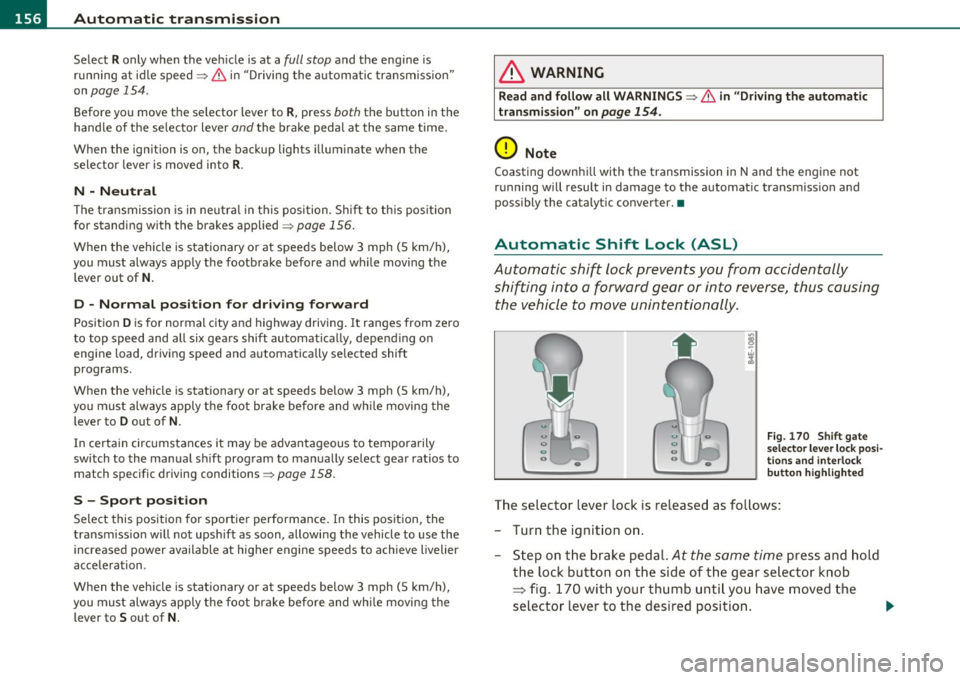
The selector lever lock is released as follows:
- Turn the ignition on .
- Step on the brake pedal.
At the same time press and hold
the lock button on the side of the gear selector knob
=:> fig. 170 with your thumb until you have moved the
selector lever to the desired position. .,_
Page 159 of 384

______________________________________________ A_ u_ t_ o _ m_ a_ t_ ic_ t_r_a _ n_ s_m_ i_ s _s_ i_ o _ n __ ffllll
Automatic selector lever lock
The se lector lever is locked in the P and N positions when the ignition
is turned on. To move the lever from these posit ions the driver must
depress the brake pedal. As a reminder to the driver, the following
warning appears in the instrument cluster display when the selector
is in
P and N:
When stationary apply foot brake while selecting gear
A time delay element prevents the selector lever from lock ing when
it is moved through the
N position (going from R to D). The locking
element will lock the selector lever if the lever is left in N (Neutra l) for
more than approximately
l second, w ithout the brake pedal being
pressed.
At speeds above about 3 mph (5 km/h) the Automat ic Shift Lock is
automatically deactivated in the
N position.
Interlock button
The lock button o n the selector lever prevents the lever from being
accidentally shifted into certain positions. Pressing this button deac
tivates the selector lever lock . Depending on the direction of the
shift, the selector lever locks at different positions . The pos itions are
highlighted in the illustration ~
page 156, fig. 170.
Ignition key safety interlock
The key cannot be removed from the ignition un less the selector lever
is in the
P park position. When the ignition key is removed, the
selector lever will be locked in the
P position.•
Kick-down
The kick-down feature allows the vehicle to generate
maximum acceleration.
When you press the accelerator pedal beyond the resistance point
that is reached at full throttle, the transmission will select a lower
gear ratio based on vehicle speed and engine RPM. The engine RPM
will be controlled to produce maximum vehicle acceleration as long
Controls and equip
ment Safety first
as you cont
inue to press the accelerator pedal beyond this resistance
point.
& WARNING
Be careful when using the kick -down feature on slippery roads.
Rapid acceleration may cause the vehicle to skid. •
Dynamic shift program (DSP)
The automatic transmission is electronically controlled.
The transmission is self adapting and will automatically select the
best sh ift p rogram su ited to the driv ing cond it ions and driving style.
The transmission will select one of the
economy programs when you
drive at a steady speed or a gradually changing speed without heavy
acceleration . This ach ieves optimum fuel efficiency, with early
upshifting and delayed downshifting.
Th e transmission will automatically select the
sporty shift programs
when you dr ive at higher speeds, or w ith heavy acceleration and
frequently changing speeds. Upshifts are delayed to make full use of
engine power . Downshifting takes place at higher engine speeds than
in the economy programs .
The select ion of the most suitable shift program is a cont inuous,
automatic p rocess. The driver can also make the transmission switch
t o a spo rty program by
quickly pressing down the gas pedal.
Th is causes the transmission to shift down to a lower gear to achieve
rap id acceleration, e.g . for quickly passing another vehicle. Yo u do
not need to press the gas pedal into the kick -down range . After the
transmission has upshifted, the original program is selected
according to your driving style.
An additional shift program allows the automatic transmission to select the proper gear for uph ill and downhill gradients.
Th is prevents the transmission from upshifting and downshifting
unnecessari ly on hills. The transmission will shift down to a lower _,.
Vehicle care Technical data
Page 161 of 384

______________________________________________ A_ u_ t_ o_ m_ a_ t_ ic_ t_r _a _n_ s_m _ i_s _s_ i_o _n _ ___._
Appli es to ve hic les : wi th tip tro nic -st ee rin g w he el
Steering wheel with tiptronic ®
The shift buttons on the steering wheel allow the driver to
shift gears manually.
Fig. 173 Steering
wheel: S hift buttons
-To downshift, touch the button on the left 0-
- To upshift, touch the button on the right G).
The shift b uttons are activated when the selector lever is in D, Sor in
the manual shi ft program (tiptronic) .
Of course, you can continue to use the manual shift program with the
selector lever on the center console .•
Fail-safe mode
If tiptronic® suffers a malfunction, the foil-safe mode
maintains minimum driveobility .
In the event of particular system malfunctions, the automatic trans
mission switches to the fail-safe mode. This is signalled by all the
segments in the display illuminating or going out.
You can continue to move the selector lever to all positions . The
man ual shift prog ram (tiptronic) is switched off in the fail-safe mode.
Con tro ls a nd e quip
m en t Vehicle
OP-eration
In selector lever positions D and Sand in the manual shift program,
the t ransm ission remains in 3rd gea r if 1st, 2nd or 3rd gear was
engaged previously. The transm ission remains in 5th gear, if 4th, 5th
or 6th gear was engaged previously.
T he next time you dr ive off or start the engine, 3rd gear is engaged.
You can cont inue to use reverse gear . But the electronic lockout for
reve rse gear is turned off.
0 Note
If the transmission switches to fail -safe mode, you should take the
vehicle to an authorized Audi dealership as soon as possible to have
the cond ition corrected .•
Emergency release for selecto r Lever
If the vehicle's power supply foils, the selector lever con
be released in on emergency .
Fig. 174 Remo ve the
as htray inse rt
~
Vehicle care Do-it-yourselt service iTechnical data