warning AUDI S8 2010 Manual PDF
[x] Cancel search | Manufacturer: AUDI, Model Year: 2010, Model line: S8, Model: AUDI S8 2010Pages: 384, PDF Size: 90.95 MB
Page 101 of 384

& WARNING (continued)
when accelerating or when applying the brakes or when driving
around a corner.
• When you are driving make sure that anything you may have
placed in the center console or other storage locations cannot fall
out into the footwells. In case of sudden braking you would not be
able to brake or accelerate.
• Any articles of clothing that you have hung up must not inter
fere with the driver's view. The coat hooks are designed only for
lightweight clothing. Never hang any clothing with hard, pointed
or heavy objects in the pockets on the coat hooks. During sudden
braking or in an accident -especially if the airbag is deployed -
these objects could injure any passengers inside the vehicle. •
Glove compartment
Your Owner's Literature and the media player are stored
in the lockable glove compartment.
i-----..,--------- l
i
Contro ls a nd e quip
m en t
Fig . 106 Glove
compartment
Vehicle OP-eration
Seats and storage
-- -- ·· - - -J
-
-
To open glove compartment
Fig. 107 Glove
compartment: CD
changer
- Pull the handle in the direction of the arrow and swing the
cover down to open =:> fig. 106.
To close glove compartment
-Push the glove compartment lid up until the lock engages.
In the glove compartment lid you will find a place to store a pen and
a pad of paper.
& WARNING
To reduce the risk of personal injury in an accident or sudden stop,
always keep the glove compartment closed while driving. •
Vehicle care Do-it-yourselt service iTechnical data
Page 102 of 384
n,.,___S_ e _ a_t _s _ a_n_ d_ s_ t_o _r _a _,g:.- e ______________________________________________ _
Storage compartment
Cg
Fig . 108 Center
console: storage
compartment
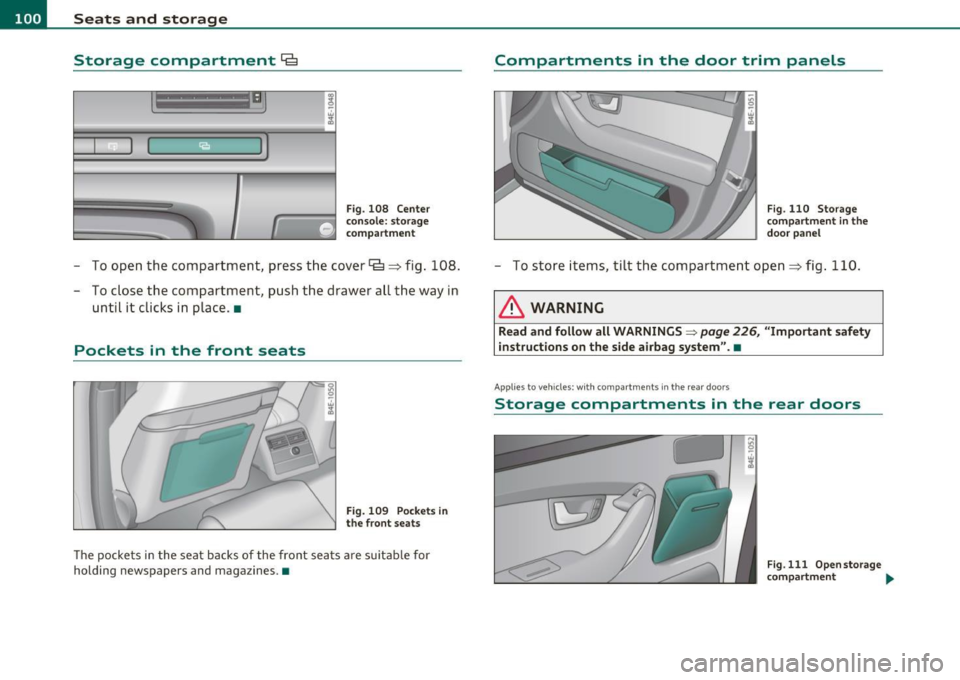
- To open the compartment, press the cover~=> fig . 108.
- To close the compartment, push the drawer all the way in
until it clicks in place .•
Pockets in the front seats
Fig . 109 Pockets in
the front seats
The pockets in the seat backs of the front seats are suitable for
holding newspapers and magazines. •
Compartments in the door trim panels
Fig. 110 Storage
compartment in the
door panel
- To sto re items, tilt th e compartment open=> fig . 110.
& WARNING
Read and follow all WARNINGS => page 226, "Important safety
instructions on the side airbag system ".•
App lies to veh icles: w ith compa rtments in the rear doors
Storage compartments in the rear doors
Fig.111 Openstorage
compartment ....
Page 103 of 384

_______________________________________________ S_ e_ a_t _s_ a_n_ d_ s_ t_ o _ r_a """g::;. e _ __._
Fig. 112 Inserting
storage compartment
The storage compartment is suitable for holding small
objects, such as eye glasses.
Opening
- To open, touch the compartment at the front edge
=>
page 100, fig. 111.
Removing and inserting storage
compartment
- Open the storage compartment.
- Grasp the sides of the storage compartment with both
hands and pull it straight out toward you.
- To insert the storage compartment again, hold it at a
slight angle and push the lower part into the retainer until
it latches=> fig. 112.
- Close the storage compartment. •
Contro ls a nd e quip
m en t Vehicle
OP-eration
Coat hooks
if. 0 '7 w iii
Fig. 113 Coat hook
above left rear seat
There are fold-out coat hooks over each rear door.
- To open, touch the top of the coat hook=> fig. 113.
& WARNING
• Hang clothes in such a way that they do not impair the driver's
vision.
• The coat hooks must only be used for lightweight clothing. Do
not leave any heavy or sharp edged objects in the pockets which
may interfere with the side curtain airbag deployment and can
cause personal injury in a crash.
• Do not use coat hangers for hanging clothing on the coat hooks
as this can interfere with proper deployment of the side curtain
airbags in an accident .
• Do not hang heavy objects on the coat hooks, as they could
cause personal injury in a sudden stop.•
Vehicle care Do-it-yourselt service iTechnical data
Page 106 of 384
1111....__w __ a _r_ m __ a_n_ d_ c_ o _ l_d _______________________________________________ _
energy are temporarily cut bac k or sw itched off~ page 258. Hea ting
s ys te m s in p artic ula r re quir e a gre at d eal o f energy. If yo u not ic e, f or
example, t hat the s eat *, w indshield* or r ear w indow heat ing is not
heating, they have been temporar ily c ut back or sw itche d off by
energy management. These systems ar e available again as soon as
the e ner gy ba la nce has been restore d.
& WARNING
Reduced visibility is dangerous and can cause accidents.
• For safe driving it is very important that all windows be free of
ice, snow and condensation.
• Completely familiarize yourself with the proper use and func
tion of the heating and ventilation system and especially how to
defog and defrost the windows.
• Never use the windshield wiper/washer system in freezing
weather until you have warmed the windshield first, using the
heating and ventilation sy stem. The washer solution may freeze
on the windshield and reduce visibility.
0 Note
• If yo u su spect that the air cond itio ner has bee n damaged, turn on
ECON and co nta ct an aut horized Audi d eale r t o h ave t he sy st em
inspected.
• Rep airs to th e Audi air con dition er re qu ire speci al te chnical k now l
edge and special tools. Co ntact a n au thor ized A udi dealer for assis
t an ce.
[ i ] Tips
• Keep the a ir in take slots (in fron t of the w ind shield) free from ice,
snow and debris i n order to ma inta in the pro per function of the
climate contro l system. •
Air escapes t hrough vents under t he rear w indow. Whe n placing
i t e m s of cl othi ng on t he lug ga ge c ompartm ent c ove r, ensure th at t he
open ings are not cove red .
• Clima te cont rol w orks mos t effe ctively i f th e wind ow s a nd t he
power roof are closed . H owever, if the inter io r of a par ked ve hicle is
ex trem ely ho t from th e sun' s ra ys, briefly o pening t he windows c an
speed up t he cooling process .•
Page 112 of 384
lffl!l.___w __ a _r_ m __ a_n_ d_ c_ o _ l_d _______________________________________________ _
In the air recirculat ion mode, the air in the passenger compartment
is re ci rcula ted to preven t exhaus t fu mes and othe r po llution from
enter ing the veh icle. We recommend that you use the manual air
recirc ulation under the following conditions:
• when d riving throug h tunnels
• in a traffic jam .
& WARNING
Do not use this setting for extended period s of time . The window s
c ould fog up sin ce no fr esh air can enter the vehicle.
If the
windows fog up, pre ss the air recir culation button again immedi
ately to switch off the air recirculation function or sel ec t d efrost .•
Page 119 of 384
_________________________________________________ O_ n_ t_ h_ e_ r _o_ a_d _ __.fflll
On the road
Steering
Adjusting steering wheel position
The steering wheel position can be adjusted for height
and reach.
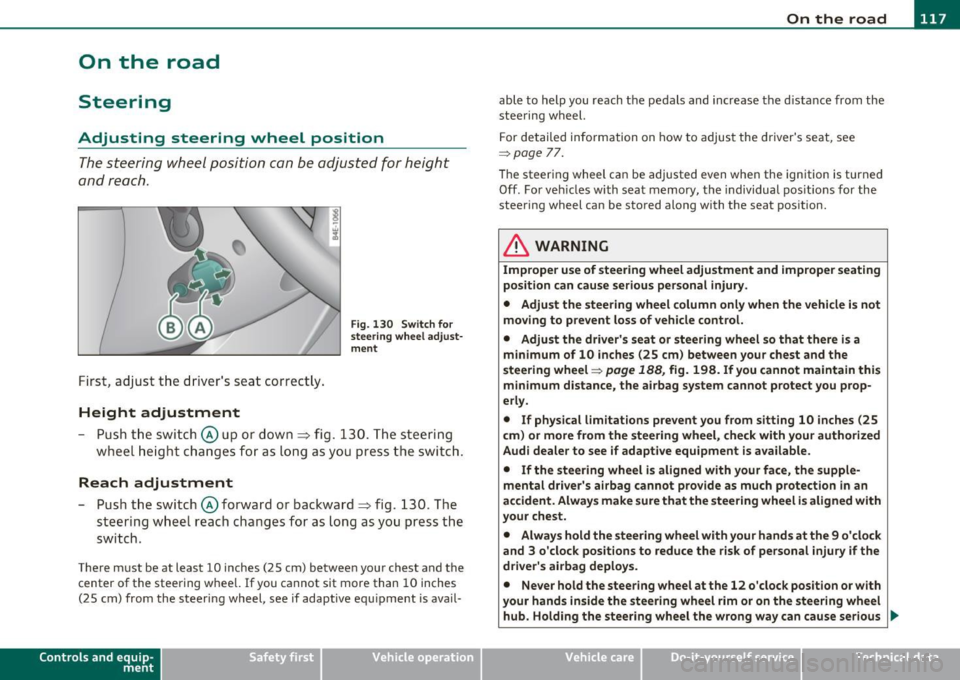
First, adjust t he driver's se at correct ly.
Height adjustment
Fig . 13 0 Swit ch f or
steering whee l adjust
m ent
- P ush t he swi tch © up or down ~ fig. 130. The st e e ring
whe el h eig ht chang es f or as l ong as y ou press t he swi tch .
Reach adjustment
- Push the switc h@ forward or backward~ fig. 130 . T he
steering w heel reach changes for as long as you press the
switch .
There m ust be at least 10 inches (25 cm) between your chest and the
center of the steering whee l.
If you cannot sit more than 10 inches
(25 cm) from the steer ing wheel, see if adaptive equ ipment is ava il-
Cont rols a nd e quip
m en t Vehicle
OP-eration
able to help you reach the pedals and increase the d istanc e from the
stee ring wheel.
F or detailed info rmation on how to adjus t the d river' s se at, see
~ page 77.
Th e stee ring wheel ca n be adjusted even when the ign ition is turned
Off . For veh icles with seat memory, the individual pos it io ns for the
steering wheel can be stored along with the seat pos ition.
& WARNING
Improper use of steering wheel adjustment and improper seating
position can cause serious personal injury .
• Adjust the steering wheel column only when the vehicle is not
moving to prevent loss of vehicle control. • Adjust the driver 's seat or steering wheel so that th ere is a
minimum of 10 inches (25 cm ) between your chest and the
steering wheel~
page 188, fig. 198. If you cannot maintain this
m inimum distance, the airbag system cannot protect you prop
erly.
• If physical l imitations p revent you from sitting 10 inches (25
c m ) or more from the steering wheel, che ck with your authorized
Audi dealer to see if adapt ive equipment is a vailable.
• If the steering wheel is aligned with your face, the supp le
mental dri ver 's ai rbag cannot prov ide as much protection in an
accident . Always make sure that the steering wheel i s aligned with
your chest.
• Always hold the steering wheel with your hands at the 9 o 'clock
and 3 o 'clock posit ions to reduce the risk of personal injury if the
driver's airbag deploys .
• Never hold the steering wheel at the 12 o'clock position or with
your hands inside the steering wheel rim or on the steering wheel
hub. Holding the stee ring wheel the wrong way can cause serious
~
Vehicle care Do-it-yourselt service iTechnical data
Page 120 of 384

llffl..__O_ n_ t_h _e_ r_o _ a_ d _________________________________________________ _
& WARN ING (con tinu ed)
inju ries to the hands, arms and head if the d river 's airbag
deploy s.•
Easy entry feature
The easy entry feature makes it easier to enter and exit
the vehicle by autom atically adjusting the steering
w heel .
Press the button @=> page 11 7, fig. 130 to turn t he easy
en try featur e on or off.
W hen the easy entry fea ture is tu rned on ( button depre ssed) , the
steering wheel moves up to the parked position w hen the ignition is
tu rned off. After you ente r the vehicle, the steerin g wheel moves to
the stored pos ition as soon as you turn on the ign ition .•
Ignition Lock and ignition switch
Ignition key positions
The e ngine can be started or turned off with the ignition
key .
Fig . 131 Ig nition
swit ch posit ions
Position @
The ig nit io n key can be inserted into the ignition switc h in this posi
ti on . This automatically unloc ks the steer ing co lumn lock. When the
ig nition key is removed, the steer ing colum n lock is a utomat ically
locked~ &-
Ignition on (D
Turn t he ignit ion key to this position and re lease it.
Starting the engine@
The engine starts w ith the key in this position . Major electr ical loads
are te mpora rily tur ned off .
Ignition off 0
Turn the ignit ion key to this position and re lease i t.
& WARNING
• Never remove the key from the ignition lock while the vehicle
is moving . The steering wheel will lock , causing loss of control.
• If you have to leave your vehicle, even for just a minute, always
remove the ignition key and take it with you. This is especially
important if you are going to leave children unattended in the
vehicle. The children could start the engine or use other vehicle
controls . Unsupervised use of vehicle controls (for example, power
windows ) can cause serious personal injuries.
(D Note
• If the i symbol in the display blinks, there is a mal function in t he
elec tronic s tee ring co lumn lock. Follow the in struc tions in
~ page 31 , "Steer ing malfunction~" .
• If th e ~ sy m bol in the d is pla y blink s, t here i s a m alf unc tion in the
electronic ignition lock. Follow t he inst ru ctions in =>
page 31, "Igni-
t io n lock mal fu nctio n
.:2.". .,
Page 121 of 384
![AUDI S8 2010 Manual PDF _________________________________________________ O_ n_ t_ h_ e_ r _o_ a_d _ __.lftI
(]] Tips
• If you release the ignition key in posit ions G) , @ or@, the key
automatically returns t](/img/6/57617/w960_57617-120.png "AUDI S8 2010 Manual PDF _________________________________________________ O_ n_ t_ h_ e_ r _o_ a_d _ __.lftI
(]] Tips
• If you release the ignition key in posit ions G) , @ or@, the key
automatically returns t")
_________________________________________________ O_ n_ t_ h_ e_ r _o_ a_d _ __.lft'I
(]] Tips
• If you release the ignition key in posit ions G) , @ or@, the key
automatically returns to position @.
• If you open the driver's door when the ignition is switched on, a
buzzer sounds and the message
Ignition is on appears in the instru
ment cluster display. Please switch the ignition off.•
Ignition key safety lock
The ignition key can only be removed when the selector
lever is in the "P" (Park) position.
After turning off the ignition, the ign ition key can only be removed
from the ignition lock when the se lector lever is in the "P" (Park) posi
tion . After you have removed the key, the selector lever is locked and
cannot be moved. •
Starting and stopping the engine
Starting the engine
The engine can only be started with your original Audi
key.
Con tro ls a nd e quip
m en t
Fig. 132 Ignition key
positions
Vehicle OP-eration
-Step on the brake.
- Move the selector lever into P or N
~ &.
- Turn the ignition key to position @~ fig. 132 -do not
depress the gas pedal when starting the engine.
A cold engine may sound loud after it has been started. This is due to
the hydraulic valves building up oil pressure. This is normal and is not
a need for concern.
If the engine does not start immediately, stop trying after 10 seconds
and then try to restart the engine about 30 seconds later .
& WARNING
Never start or let the engine run in a confined or enclosed area.
Exhaust fumes from the engine contain carbon monoxide , a color
less and odorless gas. Carbon monoxide can be fatal if inhaled.
• Never leave the engine idling unattended. An unattended
vehicle with a running engine poses a danger of personal injury or
theft .
0 Note
• Avoid high eng ine speeds, fast accelerat io n or heavy engine loads
wh ile the engine is still cold. This could damage the engine.
• The engine cannot be started by push ing or towing the vehicle.
~ For the sake of the environment
To avoid unnecessary engine wear and to reduce exhaust emissions,
do not let your vehicle stand and warm up. Be ready to drive off imme
diately after starting your vehicle. Maintain moderate speed unti l the
engine is completely warm. Remember, the engine performs best at
operating temperature .•
Vehicle care Do-it-yourselt service iTechnical data
Page 122 of 384

1111..__0_ n_ t_h _e_ r_o _ a_ d _________________________________________________ _
Stopping the engine
-Turn the ignition key to position @::::} page 119, fig. 132.
& WARNING
• Never turn off the engine until the vehicle has come to a
complete stop.
• The brake booster and servotronic only work when the engine
is running. With the ignition turned off, you have to apply more
force when steering or braking. Since you cannot steer and stop
normally, this can lead to accidents and serious injuries.
• The radiator fan can continue to run for up to 10 minutes even
after you have turned off the engine and removed the ignition key.
The radiator fan can also turn on again if the engine coolant heats up because of intense sunlight or heat build-up in the engine
compartment.
0 Note
Do not stop the engine immediate ly after hard or extended driving .
Keep the engine running for approximately two minutes to prevent
excessive heat build-up. •
Starting and stopping the engine
using the Convenience key
Applies to veh icles: with Conven ience ke y
Starting the engine using the [START]
button
Using this button, you can switch on the ignition and start
the engine.
C,
0
Fig. 133 Convenience
key :
START button
The [ST ART] button has a two position feature. ::::} fig . 133.
Switching on the ignition
- Press the [ST ART ) button to the first position. Only the
ignition switches on.
Starting the engine
- Depress the foot brake.
- Move the selector lever into the P or N position ~,& .
- Press the
[ST ART ) button to the second position. The
engine starts.
Page 123 of 384

On the road -
----------------
When starting a cold engine , the eng ine may be a b it no isy for a short
w hil e. T his is bec ause the hy dra ulic va lves are w orking to br ing up the
oil p ressure . This is normal and no cause for conce rn .
If the engine does not start immediately, stop c ranking the engi ne
a fter 1 0 seconds . Wai t 30 secon ds, then try to re start the e ngine.
& WARNING
Never start the engine in an enclosed area such as in your garage
with the garage door closed. The exhaust fumes are poisonou s!
0 Note
• Avoid high engine speeds, full gas or heavy eng ine loads if the
eng ine has not war med up to its operat ing te mperatu re. You cou ld
damage the eng ine.
• Do not try to start the eng ine by pu lling or pushing.
~ For the sake of the environment
Do not let your v ehicle stand and war m up . Be r eady to drive off r ig ht
away . This way, you prevent unnecessary exhaust emiss io ns.
[ i ] Tips
If you open the driver 's doo r when the ignition is sw itched on, a
bu zzer sounds and t he message
Ignition is on appea rs in t he ins tru
ment cl uster d isplay . Please switch the ignition off. •
Controls and equip
ment Safety first
A
pp lies to ve hicles : w ith Conve nie nc e key
Stopping the engine using the (STO P)
button
0
Fig. 134 Convenie nce
key : STOP butto n
-Bring t he ve hicle to a co mplete stop .
- Move t he sele cto r in to the P or N p osit ion .
- Press th e
[STOP] b ut ton => fig. 134.
Pressing the !STO P I button o nce sw itches off the engine and t he ign i
t ion. I f yo u press the
[STOP ) button again fo r approximately 2
seconds, the stee ring w ill be loc ked , p rovided t hat the se lec tor leve r
is in the P pos ition ~& .
Emergency OFF function
If necessa ry, the eng ine ca n be switched off with the se lecto r lever in
t he R, Dor S positions . T o do so, s tep on the foo t brake and p ress and
hold t he
[STOP ) button (ve hicle speed must be be low 6 mph/ 10
km/ h).
& WARNING
• Never stop the engine until the vehicle has come to a complete
stop. _,,,,
Vehicle care Technical data