warning AUDI S8 2010 Owners Manual
[x] Cancel search | Manufacturer: AUDI, Model Year: 2010, Model line: S8, Model: AUDI S8 2010Pages: 384, PDF Size: 90.95 MB
Page 136 of 384
1111....__A_ d_ a_,_ p_t _i_ v _e _ C_r_ u_ i_ s_ e_ C_ o_ n_ t_ r_ o_ l __________________________________________ _
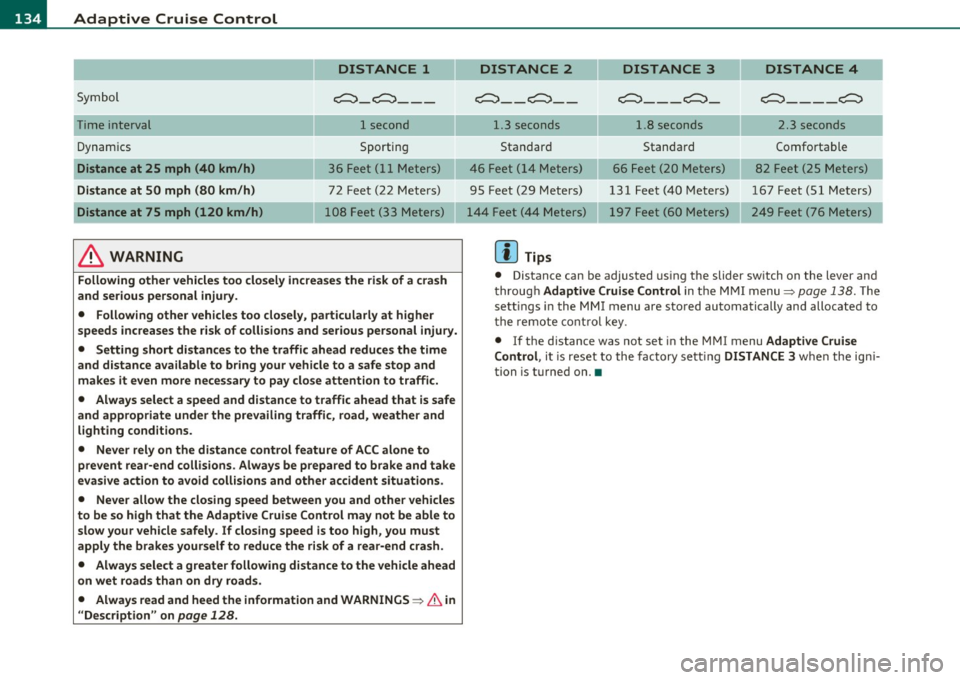
DISTANCE 1
Symbol ~-~---
Time interval 1 second
Dynamics Sporting
Distance at 25 mph (40 km/h ) 36 Feet (11 Meters)
Distance at SO mph (80 km /h ) 72 Feet (22 Meters)
Distance at 75 mph (120 km /h) 108 Feet (33 Meters)
& WARNING
Following other vehicles too closely increase s the risk of a crash
and ser ious personal injury.
• Following other vehicles too closely, particularly at higher
speeds inc reases the r isk of collisions and serious personal injury.
• Setting short distances to the traffic ahead redu ce s the time
and d istance available to br ing your vehicle to a safe stop and
make s it even more ne ce ss ary to pay clo se attention to traffi c.
• Always select a speed and distance to traffic ahead that is safe
and appropriate under the prevailing traffi c, road, weather and
lighting cond itions.
• Never rely on the distance control feature of ACC alone to
prevent rear -end collisions . Always be prepared to b rake and take
ev asive action to avoid collisions and other accident situ ations .
• Never allow the closing speed between you and other vehicles
to be so high that the Adaptive Cruise Contr ol may not be able to
slow your vehicle safely . If closing speed is too high , you must
apply the brake s yourself to reduce the ri sk of a rear -end cra sh.
• Always select a g reate r following di stance to the vehicle ahead
on wet road s than on dry road s.
• Always read and heed the information and WARNINGS~
& in
" Description " on
page 128 .
DISTANCE 2 DISTANCE 3 DISTANCE 4
c::::::> __ c::::::> __ ~---~- ~----~
1.3 seconds 1.8 seconds 2.3 seconds
Standard Standard Comfortable
46 Feet ( 14 Meters) 66 Feet (20 Meters) 82 Feet (25 Meters)
95 Feet (29 Meters) 131 Feet (40 Meters) 167 Feet (51 Meters) 197 Feet (60 Meters) 249 Feet (76 Meters)
[ i ] Tips
• Distance can be adjusted us ing the slider sw itch on the leve r and
throug h Adaptive Crui se Control in the M MI menu~
page 138. The
sett ings in the MMI menu are sto red automatically and allocated to
t he remote cont ro l key .
• If the distance was not set in the MMI menu Adapt ive Cruise
Control , it is reset to the factory sett ing DISTANCE 3 when the ign i
tion is turned on. •
Page 137 of 384

--------------------------------------------=A~ d:..: a=. p !::...: t~iv .:.. e =-- C=-=- r=u :.:.is =-:: e_C=.:: o:.:n..:. t.:: r:..: o:::.:. L _..J_
Driver information
Applies to veh icles: with A daptive C ruise Cont ro l
Displays in the instrument cluster
Depending on the driving situation, driver information is
displayed in the instrument cluster .
@ Primary d isp lay in the speedometer .
Fig. 145 O vervi ew
in strume nt clu ster
@ Supplementary display in the instrument cluster .
© Message in the instrument cluster d isp lay.
@ Primary display
Important information concerning vehicle operation with Adaptive
C rui se Con trol i s shown in display area @ . T he desired speed you set
is highlighted in the speedometer and the warning lights show
whet her adjustments are being made for an object ahe ad.
T hi s information is always displayed. Display area@ is the refore
called the
primary di splay.
@ Supplementary display
In d isp lay area @ information from the navigation system a nd the
trip computer is displayed in addit ion to information about Adapt ive
Cru ise Control.
Con tro ls a nd e quip ·
m en t Vehicle
OP-eration
You can select among the different information by repeated brief
ta ps o n the R ES ET button on the windshield wiper lever =>
page 38,
"Operatio n".
Particularly on your first trips with Adaptive Cruise Control, the
s upplementar y display should be tur ned on .
© Message
The information in a rea © is not displayed permanently . Informat ion
is displayed on ly if you c hange the time interval, if there is a malfunc
tion or if the Adapt ive Cru ise Contro l is turned off .•
A p plies to v ehicles : wi th Adaptive C ru ise Cont ro l
Primary display in the speedometer
Desired speed
Fi g. 14 6 Pr im ary
d is p lay
i n the spe ed ·
o m et er
Th e desi red speed set by the d river is displayed wi th a red L ED .
T he system a llows only speeds from 20 to 95 mph (30 to 150 km/h)
to be set . This speed range is faint ly illumina ted in the speedometer.
Warning lights (symbols)
• ""c::;, Open road: T he wa rning lig ht ""c::;, shows that AC C is active
and that no moving vehicle has been detected with in range of the
ra dar senso r up ahead in your lane of travel. The set speed is main-
tained . _,,,
Vehicle care Do-it-yourselt service iTechnical data
Page 138 of 384

lffll..__A_ d_a_ p,__ t_iv _ e_ C_r _u _ i_ s _e _ C_ o_ n_t _ r_ o _ L ___________________________________________ _
• -0,11,c::::, Driving in tr affic: The warning light c:::::,11 .. -::::::, shows that a
vehicle moving in yo ur lane of travel h as been de tecte d up fron t in
your lane o f travel. Your speed is adjusted accord ing to the speed of
the vehicle up front. ACC accelerates an d brakes automat ically within
the system's capabil ities .
• -011 ,,-0 Request for driver to assume control : The re d flashing
warning light
c:::::, 11 .. c::::, means Request for driver to assume control.
Yo u as the driver must slow the vehicle with the foot brake . T he
symbo l
-::::::,11,, c::::, t el ls you that the Adapt ive Cr uise Contro l is not able
to slow the vehicle down e nough to keep a enoug h distance to the
vehicle in front of you. A wa rning to ne signa l will a lso sound w hen the
symbol appears .
& WARNING
Improper use of the Adaptive Cruise Control features and inatten
tion can lead to an crash and serious personal injury.
• Never allow the closing speed between you and other vehicles
to be so high that the Adaptive Cruise Control may not be able to
slow your vehicle safely. If closing speed is too high , you must
apply the brakes yourself to reduce th e risk of a rear-end crash.
• Always sele ct a greater following di stance to the vehicle up
ah ead on w et roads than on dry roads.
• Always read and heed the information and WARNINGS~
& in
" Description " on
page 128.
[ i J Tips
• If the Adapt ive Cruise Control in itiates braking, the hydraulic
bra ke system is under pressure . Therefore, t he b rake pedal distance
is shorter and the pedal feels "harde r" .
• If yo u use the acceler ator to go f aster th an the speed o f the
vehicle ahead of yo u, the d river intervention prompt will not be
accompanied by a warning to ne.
• If the speed you previously set is exceeded, t he indicato r light in
t he speedomete r will sw itch o ff. •
A ppli es to veh icles : w ith Adaptive Cruise Co ntrol
Display in the instrument cluster
You should hav e the supplementary information
displayed here, p articularly on your first trips .
Fig. 147 Displ ay i n
t he in strument clu ste r
Scr oll throug h the av ail able inform ation dis plays by br ie fl y t appi ng
the (RESE T) button at the end of the windshield w iper lever . You can
sele ct a nd information from the trip comp ute r, navigation sys tem or
Adaptiv e Cr uise Control.
© Vehicle sy mbol
® St atu s
© Distan ce
© Vehicle symbol
Th e veh icle symbol indicates whe ther the sy stem has de te cted a
moving veh icle up front in your lane of travel.
• When no moving ve hicle is detected up fro nt, only the
outline of
the vehicle
is d isp laye d.
• A
gray vehicle wi ll appear when a moving vehicle is de tected up
ahead .
• A
red vehicle will appea r if th e s itua tio n de te cted will s oo n l ead to
a requ est for the driver to assume contro l. .._
Page 139 of 384

__________________________________________ A_ d_a""" p:....- t_iv _ e_ C_ r_ u _is _ e_C_ o_n_ t_ r_ o_ L_....Jfflll
If Adaptive Cruise Control is turned off or no speed is set, no vehicle
is shown.
@ Status
• Th e text OFF appears in white letters when Adaptive Cruise
Control is turned off .
• The text
AVAILABLE appears in white lett ers when the system is
turned on but no requested speed has been set .
• The text
OVERRIDE appears in white letters when you exceed the
requested speed by accelerating.
• The text
DISTANCE! appears in red letters when the interval to a
vehicle traveling ahead is too short and you also have to slow your
vehicle with the foot brake .
• Th e text messages
DISTANCE 1, DISTANCE 2, DISTANCE 3 or
DISTANCE 4
appear in green letters to indicate the time interva l
(distance) you have set and ACC is active.
© Distance
A pointer (arrow) is shown in this area. When slowly approaching a
moving vehicle detected ahead in your lane of travel, th is pointer
represents the distance to that vehicle . When approaching that
vehicle rapidly, it serves as early warning of an impending request for
the driver to assume full veh icle control. The pointer moves on a scale
from right to left.
Open road: With an open road and no moving vehicle detected up
ahead, no pointer is shown.
Driving in traffic: If a vehicle t raveling up ahead in your lane of travel
is detected, the pointer moves to the center area of the scale. This
area represents the time interval (distance) set.
It is shown in green
to make it easier to see .
Driver intervention prompt: Whenever the selected time interval
(distance) to the vehicle moving up ahead in your lane of travel is less
than the time inte rval (distance) set, the poin ter moves into the
red
area of the display . When the pointer reaches the farthest position on
the left, the driver in te rvention prompt is displayed to indicate that
Contro ls a nd e quip
m en t Vehicle
OP-eration
the driver must now assume full vehicle control in order to prevent a
collision .•
App lies to ve hicle s: w ith Adapti ve Cru ise Cont rol
Messages
The text messages and symbols shown in this area of the
display are not displayed permanently.
Time intervals
Fig. 148 Information
line
Th e different symbols for the time interva ls (distance) appear if you
change the settings::::> fig. 148. In addition, there is a display if the
gong (audible warning signal) is turned off.
Three white dots ... appear if a setting cannot be made w ith the oper
ating lever . The following are possible reasons
• If you pull the control lever forward to resume speed but no
requested speed was set.
• If you push the lever up to increase (or down to reduce) speed
when no speed has been set previously.
• If you push the lever up to increase (or down to reduce) speed and
this speed is outside the 20 to 95 mph (30 to 150 km/h) speed range . ..,
Vehicle care Do-it-yourselt service Technical data
Page 140 of 384
lffll.___A_ d_ a_,_ p_t _i_ v _e _ C_r_ u_ i_ s_ e_ C_ o_ n_ t_ r_ o_ l __________________________________________ _
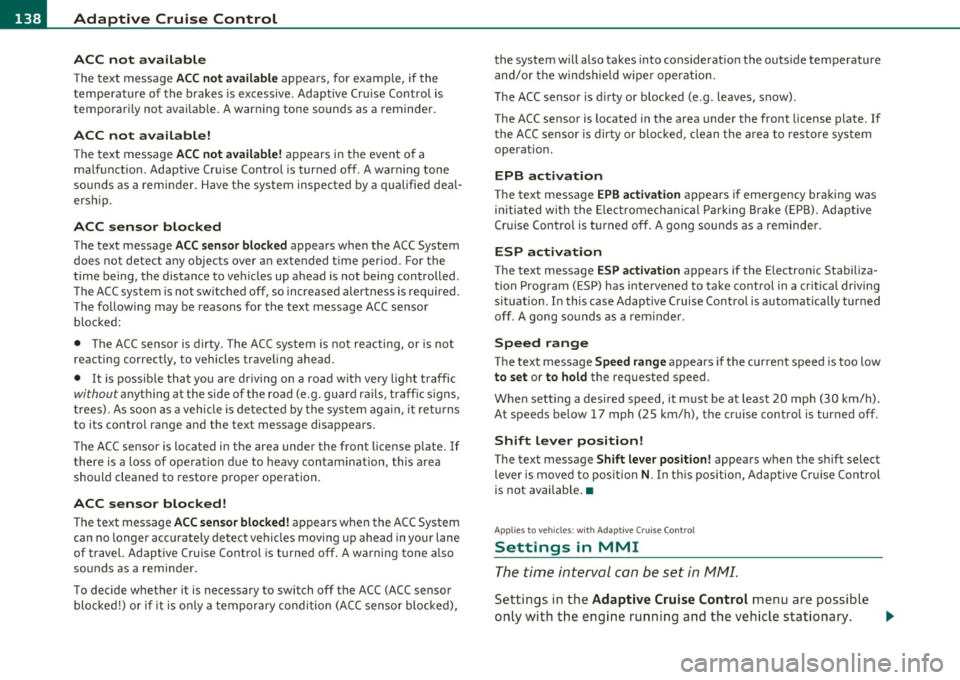
ACC not available
The text message ACC not available appea rs, fo r example, if the
t empe ra ture of the b rakes is excessive . Adaptive Cru ise Contro l is
tempo rar ily not ava ilab le. A war ning tone sounds as a reminder.
ACC not available!
T he text message ACC not available! appears in the event o f a
ma lf u nction . Adaptive Cru ise Contro l is tur ned off . A warn ing tone
sounds as a remi nder. Have the system inspected by a qualifie d dea l
ers hip.
ACC sensor blocked
The text message ACC sensor blocked appears when the ACC System
does not detect a ny objects over an extended t ime per iod . For the
time being, the distance to ve hicles up ahead is not being con trolled .
T he ACC system is not switched
off, so increased alertness is require d.
Th e fo llow ing m ay be reasons fo r the text m essag e ACC senso r
blocked:
• The ACC se nsor is di rty. T he AC( syst em is no t reacti ng, or is not
reacting correctly, to vehicles traveling ahead .
• It is possib le tha t you are dr iv ing on a ro ad wit h ve ry lig ht tra ffic
without anything at the s ide of the road (e.g. gua rd rails, traff ic s igns,
tr ees). A s so on as a vehicle i s de te ct ed b y the sys tem ag ain, it ret urns
to its contro l range a nd the text message disappears.
T he ACC sensor is located in the area unde r the front license p late . If
there is a loss of op eration d ue to heavy co ntam inat ion, this a rea
sho uld cleane d to resto re prope r o peration.
ACC sensor blocked!
T he text message ACC sen sor blocked! a pp ears w hen the A CC System
can no longer accurately detect vehicles movi ng up ahead in your lane
of t ravel. A daptive C ruise Cont ro l i s tu rned off . A warning tone a lso
so unds as a re mi nder.
To decide whether it is necessary to switch off t he ACC (ACC sensor
blo cked !) o r if it is o nly a te mporary c ond ition (ACC se nsor blo cke d), the system will also takes
into cons ideration the outs ide temperature
and/or the windshie ld wiper o per ation.
Th e ACC sensor is d irty or b locked (e .g . leaves, snow) .
The ACC senso r is located in the area under the front license plate. If
th e A CC sensor is dir ty or bloc ke d , clean t he ar ea to res tore sy stem
operat ion.
EPB act ivation
T he text message EPB activation appears i f eme rgency braking was
initi ated wi th the Elec tro mecha ni cal Pa rkin g Bra ke ( EPB). A dapti ve
Cr uise Contro l is turned off. A gong sounds as a reminder.
ESP activation
T he text message ESP activation appears if the E lectron ic Stabi liza
tion Prog ram ( ESP) has inte rven ed to ta ke co ntrol in a criti cal d riving
sit uat io n. In this case Adaptive C ruise Contro l is automatically turned
off. A gong s ounds a s a rem inder.
Speed range
The te xt message Speed range ap pears if the cur rent speed is too low
to set or to hold the requested speed.
W hen setti ng a desired speed, it m ust be at least 2 0 mp h (30 km/h).
At speeds be low 17 mph (25 km/ h), the cruise contro l is turned off.
Shift lever position!
T he text message Shift lever position! appears w hen the sh ift select
lever is move d to po siti on
N . In t his p osition, Ad aptive C ruise Con trol
is not available. •
App lies to veh icles : w ith Adaptive Cruise Control
Settings in MMI
The time int erval can b e se t in fvf fvfl.
Se ttings in t he Adaptive Cruise Control me nu are poss ible
only with the eng ine ru nning a nd t he ve hicle s tat ionary . _,,,
Page 141 of 384
![AUDI S8 2010 Owners Manual __________________________________________ A_ d_a""" p:....- t_iv _ e_ C_ r_ u _is _ e_C_ o_n_ t_ r_ o_ L_....J_
- Select: Function button I CAR]> Systems > Adaptive
Cruise Control
> Default se](/img/6/57617/w960_57617-140.png "AUDI S8 2010 Owners Manual __________________________________________ A_ d_a\"\"\" p:....- t_iv _ e_ C_ r_ u _is _ e_C_ o_n_ t_ r_ o_ L_....J_
- Select: Function button I CAR]> Systems > Adaptive
Cruise Control
> Default se")
__________________________________________ A_ d_a""" p:....- t_iv _ e_ C_ r_ u _is _ e_C_ o_n_ t_ r_ o_ L_....J_
- Select: Function button I CAR]> Systems > Adaptive
Cruise Control
> Default setting > distance.
Setting Distance
In the Basic setting menu you can set the distance (time interval)
using
distance 1 , distance 2 , distance 3 or distance 4 that Adap tive
Cruise Control is to maintain to a preceding vehicle when in manage
ment mode .
Storing settings
Your individua l settings are automatically stored and allocated to the
remote control key being used (remote key perso nalizat io n). •
System Limitations
Applies to veh icles: with Adaptive C ruise Cont ro l
General information
The radar sensor has limits that the driver must know to
be able to use ACC properly.
The Adaptive Cruise Control works within limits that are also related
to radar sensor range and sight distance. In some situations ACC may
react unusually or late from the driver's point of v iew. Therefore,
always be attentive to what is happe ning around you and always be
ready to intervene, if necessary:
• when driving around curves=>
page 139.
• when vehicles up front are not in line with your vehicle
=>
page 140 .
• when other vehicles are changing lanes=> page 140.
• when other vehicles are difficult to detect=> page 140 .
• when vehicles up ahead are no t moving or obstacles are in your
travel lane=>
page 141.
Con tro ls a nd e quip
m en t Vehicle
OP-eration
& WARNING
The radar sensor's function and range can be reduced by rain, snow
and heavy spray. Moving vehicles up ahead may not be promptly
detected or may not be detected at all .
• Alway s pay careful attention to the traffic situation and be
ready to intervene and be ready to take complete control when
ever necessary .•
A pp lies to ve hicle s: with Ad aptive Cru is e Con tro l
When driving around curves
k::==;:;;:.::: ======== =,~
~
Fig. 149 Vehicle
entering a curve
Fig. 150 Vehicle
leaving a curve
Vehicle care Do-it-yourselt service iTechnical data
Page 144 of 384
lll'L_!_A~u~d~i~l!:!a~n~e '...:a~s~s:!:is~t ~--------------------------------------------
Aud i Lane assist
Lane assist
Applies to veh icles : w ith lane assist
Description
Lane assist helps you keep your vehicle in your lane.
Lane assist uses a camera to detect lane boundary lines. If the system
detects that your vehicle is about to leave a lane boundary line, the
steering wheel
vibrates to alert the driver. If lane assist detects
boundary lines on both sides o f the veh icle's lane, the system enters
act ive standby mode, which is indicated by t he gree n indicator light
/: on the instrument cluster .
If the system is in active standby mode and the turn signal is acti
vated before driving over the boundary line , the warning does not
occur sinc e th e system allows for in tention al lane changes.
The system is designed for driving on freeways and expanded high
ways and th us works only at speeds of 40 mph (65 km/h) or more.
& WARNING
• Lane assist will not keep your vehicle in your lane. The system
only warns the driver when the vehicle is leaving the lane. The
driver is always responsible for keeping the vehicle in the lane.
• The camera is not able to detect all lane boundary lines and in
some cases might also detect lane structures or objects as
boundary lines. This can lead to incorrect warnings or warnings
that fail to go off at all.
• The camera's visibility can be impaired by vehicles ahead of
you, for instance, or by rain, snow, heavy spray or light shining
into the camera lens. This can cause lane assist to fail to detect
boundary lines. •
Applies to veh icles: wit h lane assist
Activating and deactivating
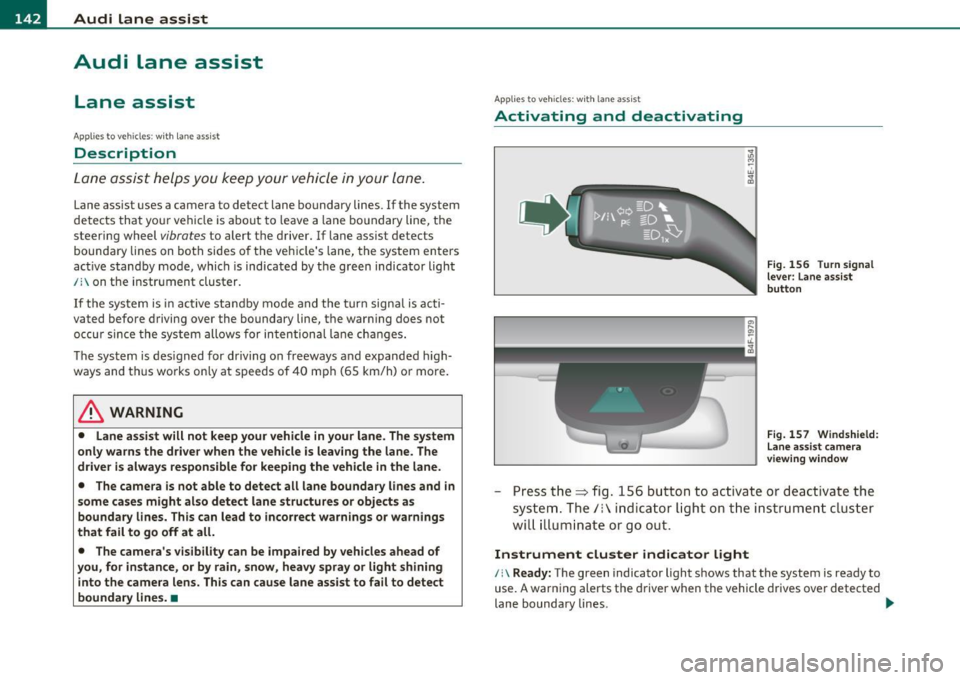
Fig. 156 Turn signal
lever: Lane assist
button
Fig. 157 Windshield:
Lane assist camera
viewing window
-Press the=> fig . 156 button to act ivate or deactivate the
system. The/: ind icator light o n the instrument cluster
will illumi nate or go out.
Instrument cluster indicator light
/:\Ready: The green indicator light shows that the system is ready to
use. A warning alerts the driver when the vehicle drives over detected
lane boundary lines . -.,
Page 145 of 384

_________________________________________________ A_u_ d_i_ l_ a_ n_ e_ a_s _s_ i_s _t __ _
Not read y: The yellow indicator light shows that the system is
turned on but unable to send a warning. T his can be due to the
following:
• T here are no boundary lines, or there is only one boundary line
present.
• The boundary lines are not detected (e .g . due to snow, dirt, wet
conditions or light shining into the camera lens) .
• More than two boundary lines (such as at const ruct ion sites) are
located in the vehicle's lane .
• T he veh icle's speed is below the speed needed to ac tivate it, which
is about 40 mph (65 km/h) .
• T he lane is narrowe r than about 8
ft . (2.5 m), or wider than about
16 ft. (5 m).
• Th e curve is too sharp.
Note s on the in strum ent clust er displa y
When the lane assist turns off automat ica lly, the instrument cluster
indicator goes out and one of the fo llowing messages appears on the
display :
Aud i lane ass is t not av ailable: Cur rentl y n o sens or v ision
T his message appears when the camera can no longer function
because it cannot detect the boundary lines. This may be due to the
following:
• T he exte rior side of the came ra viewing window =>
page 142,
fig. 157 is covered with dirt or ice. Clean this part of the windsh ield.
• Th e came ra viewing window is fogged up on the inside. In this
case, wait until the fog d isappears before turning lane assist on
again.
• T he system was unable to detect bo undary lines over an extended
period of time due to road co nd it ions (such as snow-cove red lanes) .
Do not turn lane assist on aga in until the lines can be more easily
detected .
Aud i lane a ssist n ot availabl e
Controls and equip
ment Safety first
A temporary malfunction is preventing lane assist from operating
.
Tr y turning on lane assist aga in at a later time.
Au di l ane a ssist: system fault
The system shou ld be checked by an authorized Audi dealer or other
qualified wo rkshop.
[ i ] Tips
• Make su re that the camera view ing window => page 142, fig. 157
is not covered by stickers or similar objects .
• Always keep the came ra v iewing w indow clean. This can us ually be
done by operating the windshie ld wipers .•
App lies to vehic les : wi th la ne ass ist
MMI settings
You can use the fv1fv1I to adjust the warning time and
steering wheel vibration .
Setting the warning time
Select: Function button I CAR]> Sy stems > Audi lane ass ist>
Warning early , adaptive or late .
Setting th e st eering wheel vibration
Select : Function button I CAR ]> Systems > Audi lane ass ist >
Steering vibration weak , medium or strong .
Setting the w arning tim e
Earl y: This setting wa rns the dr iver befo re a wheel touches the
detected lane boundary line . The warning depends on the veh icle 's
angle as it approaches the boundary line . If you app roach a bounda ry
line gradually, the warn ing will occur earlier . If you approach the
boundary line at a very sharp angle, the warning will occur just before
a whee l touches the li ne . .,._
Vehicle care Technical data
Page 146 of 384
1111....__A_ u_ d_i_ l_ a_ n_ e_ a_s_ s_ is_t _________________________________________________ _
Adaptive: In this sett ing, the warning time ad justs to the characte r
is tic s of th e road and t he ve hicle speed. The w arning oc curs lat er fo r
cu rves and occurs ear lier for stra ight st retches of road . The warning
occurs later on narrow roads than on wide roads.
Late : This sett ing warns the drive r whe n a whee l dr ives over the
detected lane boundary line .
Setting the steering wheel vibration
When a dju sti ng the steering wheel v ibration, the steer ing whee l
vibrates so that you can check the in tensi ty you have set.
rn Tips
• When mak ing t he a dju stme nt, lane assis t is not a ct iva ted. The
steer ing wheel v ibrates briefly only to ass ist you in chang ing the
s e tt ing.
• Your settings a re automatically stored and assigned to the remote
c ont rol key being used .•
Page 148 of 384
lffll.___A_ u_ d_i_ s_ id_ e_ a_s _s_ i_ s _t _________________________________________________ _
Deactivating
- Press the button again . T he indicator light o n the b utton
goes out.
The system works at speeds faster tha n 19 mph (30 km/h) .
& WARNING
• Imp roper reliance on the side assist system can cause collisions
and seriou s per sonal injury:
- Never rely only on s ide ass ist when changing lanes.
- Alway s che ck rear view mirror s to m ake sure that it i s safe to
change lanes.
• Side a ssist cannot detect all vehicles under all condition s
danger of accident!
• Side a ssi st cannot detect vehicle s in time to alert you when
they approach from beh ind at very high speed, or fall drop back
very quickly .
• The radar sen sor's
v is ion can be reduced or entirely blocked by
rain , snow, and heavy spray . This can result in side as sis t not
adequately detecting vehicle s or , in some cases, not detecting
them at a ll. Alway s keep an eye on the dir ection you are traveling
and the rele vant area around the vehicle.
• Please note that side assist indicates there are approaching
vehicles , or vehicles in you r blind spot, only after you r vehicle has
reached a driving speed of at lea st 19 mph (30 km/h).
• Side assist signal doe s not work around t ight corners (turning
radius less than 328 feet or 100 m ).
• Side assist is no replacement for the driver 's full attention . The
driver alone is respon sible for lane change s and s imilar driving
maneuvers. Always keep an eye on the direction you are traveling
and the relevant area around the vehicle.
0 Note
• T o ensure that you do not adversely affe ct s ide as sist , do not block
the area on the rear b umper where the radar sensors are located with
fo reign objects (such as st ic kers or b icycle ra cks).
• Make s ure that the signal light on the o utside mi rror is not
bloc ked by stic ke rs or othe r items.
[I) Tips
• Side ass ist automatica lly deac tivates if it detects that the radar
sensors are blocked=>
page 152. The indicator light on the button
goes out.
• Th e area on the bumper w he re the radar sensors are located must
c ons istent ly rema in free of snow, i ce, a nd he avy soiling so that s ide
assist can function properly. Follow the add itiona l notes on
=>page 1 5 2.
• Add it iona l tinting on t he front side windows can ma ke it harder to
see and correctly u nders tand the s ig nal light on the outs ide mirro r.
• For Decla ration of Compliance to United States FCC and Industry
Canada regulations=>
page 364. •
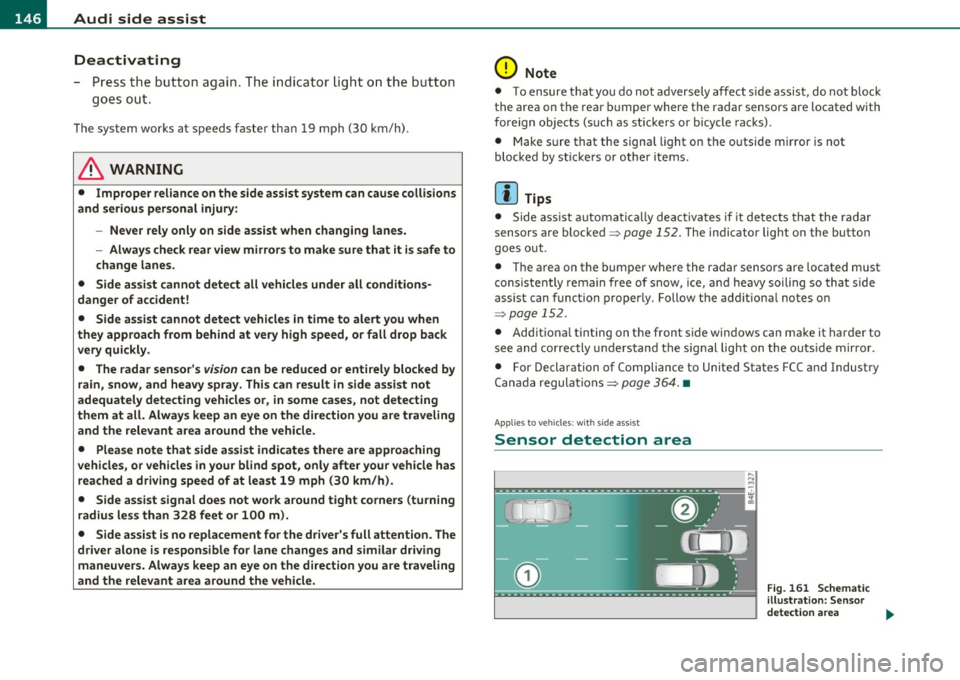
Applies to vehicl es : w it h side ass ist
Sensor detection area
, D i
Fig. 161 S chem ati c
illustrat io n : S ensor
detection are a
~