warning AUDI S8 2010 Manual Online
[x] Cancel search | Manufacturer: AUDI, Model Year: 2010, Model line: S8, Model: AUDI S8 2010Pages: 384, PDF Size: 90.95 MB
Page 124 of 384
-On the road •m ___________________ _
& WARNING (continued)
• The brake booster and the servotronic only work when the
engine is running. If you turn off the engine, more force will be
required to steer or brake the vehicle. If you are not prepared, this
could result in a collision and serious personal injury.
• For your safety, move the selector lever to the P position, then
turn off the engine. Otherwise the vehicle could inadvertently roll
away.
• After turning off the engine, the radiator fan can come on and
run for up to 10 minutes -even if the ignition is switched off. Like
wise, the fan could come on if the temperature in the engine
compartment raises due to heat build up or if you leave the vehicle
standing in direct sunlight.
0 Note
After driving at high engine load, heat can build up in the engine
compartment after you have turned off the engine. This can damage
t he engine. Let the vehicl e stand and run in idl e for about 2 minutes
before turning off the engine. •
App lies to ve hicles : w ith Conve nie nc e key
Driver's messages in the instrument
cluster
Messages appear in the instrument cluster to let the
driver know if something is missing or if something must
be done.
No key identified
This message appears when you press the [START) button, but there
is no remote contro l key inside the vehicle or if the system does not
recognize the key. For example, if your key is
shielded by an object or
encased, i .e . in side an aluminum briefcase, the signal from the key cannot be detected
. Electron ic devices such as cell phones can also
in terfere w ith the radio signal.
Press brake pedal to start engine
This message appears when you press the !S T ART ) butto n when
starting the engine but you have not depressed the brake pedal.
Engage N or P to start engine
This message appears when you start the engine but the selector
lever is not in the P or N position . The engine can be started only if the
selector lever is in one of these two positions .
Key not in vehicle
This message appears together with the 7 symbol when the remote
control key is removed from the vehicle while the engi ne is running.
Th is is to remind you that you should not cont inue your tr ip without
your key.
If the key is no longer inside the vehicle when you turn off the engine,
you will not be able to switch on the ignition or restart the engine.
Also, you will not be able to lock the vehicle from the outs ide .
Shift to P, otherwise vehicle can roll away. Doors do not lock if lever
is not in P.
Thi s message appears for your safety together with an audible
warning signal when you press the
[STOP) button but the selector
lever is not in the P position and you open the driver's door. Move the
selector leve r in to P, otherwise the vehicle could roll away. I n addi
tion, you will not be able to lock the ve hicle with either the lock
button located on the door hand le or the remote control.
To engage steering lock, press and hold STOP button
Th is message appears for your personal safety if you switch off the
engine and the ignition by pressing the
[STOP) button and then open
the driver's door. In this case, the steering will still not be locked. The
steering wheel will lock:
• If you press the
I STO P I button for longer than 1 second.
• If you lock the vehicle from the outside .•
Page 125 of 384

On the road -
----------------
Electromechanical parking brake
Operation
The electromechanical parking brake replaces the hand
brake.
Fig. 135 Center
console: Parking brake
- Pull the switch to apply the parking brake~ fig. 135. The
indicator light in the switch will come on.
- Step on the brake pedal or the accelerator pedal and press
the switch at the same time to release the parking brake.
The indicator light in the switch will go out.
Your vehicle is equipped with an electromechanical parking brake
which replaces the handbrake. The parking brake is designed to
prevent the vehicle from rolling unintentionally.
In addition to the normal functions of a traditional hand brake, the
electromechanical parking brake provides various convenience and
safety functions.
Emergency brake
An emergency brake ensures that the vehicle can be slowed even if
the normal brakes fail~ page 125, "Emergency braking".
Controls and equip
ment Safety first
Indicator lights
•
If the parking brake is applied with the ignition turned on, the
indicator light in the instrument cluster (U.S. models:=.., Canadian
models: ©) and in the switch
«el) will come on.
• If the parking brake is applied with the ignition turned off, the
indicator light in the instrument cluster (U.S. models:=., Canadian
models: ©) and in the switch
«fl) will come on for about 30 seconds
and then go out.
& WARNING
If the vehicle is stationary and the transmission is engaged with
the engine running, the engine should not be speeded up (e.g.
manually from under the hood). Otherwise the vehicle will start to
move -you run the risk of an accident.
0 Note
If the warning/indicator light (U.S . models: BRAKE, Canadian models:
«I» ) flashes in the instrument cluster, there is a brake system
malfunction . By pressing the [CHECK! button, you can bring up a
driver message which explains the malfunction in more detail. If the
message
Parking brake ! Please contact workshop appears, there is
a parking brake malfunction which you should have repaired immedi
ately by an authorized dealership~ page 28.
[ i] Tips
• You can apply the parking brake at any time -even with the igni
tion turned off . The ignition must be turned on in order to release the
parking brake.
• Occasional noises when the parking brake is applied and released
are normal and are not a cause for concern.
• The parking brake goes through a self-test cycle at regular inter
vals -when the vehicle is parked. Any associated noises are normal. •
Vehicle care Technical data
Page 126 of 384

1111....__0_ n_ t_h_ e_ r_ o_ a _ d _________________________________________________ _
Parking
To p revent a parked vehicle from rolling away, there are
a fe w things you should do.
When you park your vehicle , do the following
- Stop t he veh icle us ing the bra ke pedal.
- Pull the switch to apply t he electromechanica l parking
brake .
- Move th e se lector lev er in to the
P position ~& .
- Switch off the e ngine and remove the ignition key from
the ignition lock.
When you park your vehicle on hills, do the
following
- Stop the veh icle us ing the bra ke pedal.
- Pull the switch to apply t he e lectromechanica l parking
brake .
- I f you a re parkin g h eaded
downhill , turn the front w heels
toward th e curb .
- I f you are parking headed
uphill , turn t he fro nt wh eels
away from t he curb.
- M ove the selector lever into the
P position.
- Switch off the e ngine and remove the ign it ion key from
the ignition lock.
& WARNING
Thi s is how you can reduce the risk of injury when lea ving your
vehicle.
& W ARNING (continued )
• Never park the vehicle where it can come in contact with dry
grass , spilled fuel or any other flammable material s.
• When parking on hills, always turn the wheel s so that the front
wheel s will fir st roll into the curb, if the vehicle should start to
roll.
• Never allow anyone · especially small children· to remain in
the vehicle when it i s locked. Locked door s make it more difficult
fo r rescu ers to acce ss the passenger compartment in the event of
an emergency. Danger to life!
• Never leave children unsuperv ised in the vehicle. Ch ildren
could relea se the parking brake or move the gear shift lever out of
gear. The vehicle could start to roll away and cau se an accident .
• No matter what the season i s, the temperature
in a parked
v ehicle can reach dangero us le vels .
0 Note
• Please exercise care when you pa rk your veh icle in parking areas
w ith park ing barriers o r cur bs. Parking barriers and curbs vary in
he ight and could damage your bumpe r and related components as
the front of your vehicle moves over a ba rrier or curb that is too high,
as you park or as you back out of a pa rking spot. In order to be sure
that no such damage can occur, yo u may wish to stop short of having
t he fro nt t ires of you r car touch t he p arking bar rie r or curb.
• Please a lso exerc ise except iona l care when you drive up or down
steep ramps or drive over curbs or o ther obstacles, for which the
vehicle is not des igned, because components of the vehicle close to
t he ground, s uch as bumpe r covers, spoilers and suspension and
exhaust system components, may become damaged. •
Page 127 of 384

On the road ---------------~:..:.....__
Starting off with a trailer
To prevent rolling back unintentionally on an incline, do
the following:
- Keep the switch pulled and depress the accelerator. The
parking brake stays applied and p reve nts the vehicle from
rolling backward .
- You can release t he switch once you are sure t hat you are
deve loping enough forward momentum at the whee ls as
you depress the acce lerator .
Depending on the we ight of the rig (vehicle and trailer) and the
severity of the incline, yo u may roll backwards as you start. You can
prevent rol ling backwards by holding the park ing bra ke sw itch pulled
out and accelerating -just as you wou ld when starting on a hill with a
conventional hand brake .•
Emergency braking
In the event that the conventional brake system fails or
locks.
- P ull the swi tch and cont inue to pull it to s low your veh icle
with the parking brake in an emergency .
- As soon as you re lease the sw itc h or accelerate, the
braking process stops .
If you pull the switch and hold it above a speed of abou t 5 mp h (8
km/h), the emergency braking function is init iated. The vehicle is
bra ked at all fou r wheels by activat ing the hydraulic b rake system.
Brake performance is s imilar to making an emergency stop~,&.
So that emergency braking is not activated by mistake, an audible
warning tone (buzzer) sounds when the switch is pulled . As soon as
Controls and equip
ment Safety first
the switch is released, or the accelerator pedal is depressed, emer
gency braking s tops.
& WARNING
Em erg ency braking should only be u sed in an emergen cy, wh en
the no rmal foot brake ha s failed o r the brake pedal i s obstructed.
U sing the park ing b rake to perform emerg ency braking will slow
your vehicl e as if you had made a full brake application . The laws
of phy sic s c annot be su spen ded even wi th ESP and it s ass ociated
c omponents (ABS, ASR , ED S). In corn ers and when r oad or
weather condit ion s are bad , a full brake application can cause the
ve hicl e to sk id or the rear end to br eak away- r isking an accid ent .•
Driver messages in the instrument cluster
C aution : Vehicle park ed too steep
Th is message appears when the pa rking brake is applied on an incline
that exceeds abo ut 30%.
In this case the braking power of the parking brake may
not be
adequate
t o p revent the vehicle from rolling un intentionally.
Plea se release parking b rake
Thi s message appears, when a gear is se lected and the accelerato r
pedal is depressed -release the parking brake.
Pre ss brake p edal to relea se park ing brake
T his driver message appea rs when the switch to release the parking
bra ke was pressed. The par king brake can only be released if you press
the brake or accelerator pedal and press the switch at the same time.
.1 Par king bra ke mal funct ion !
T his driver message appears together w ith the yellow symbol
when there is a parking brake malfunct ion.
Vehicle care Technical data
Page 128 of 384

1111..__0_ n_ t_h _e_ r_o _ a_ d _________________________________________________ _
0 Note
If the warn in g/i nd icator lig ht ( U.S . models: BRAKE , Canadia n mode ls:
«D> ) flashes in the instrument cluster, t here is a b rake system
ma lf u nct ion. By p ress ing t he [
C H E CK i button, yo u can br ing up a
dr iver message which explains the ma lfunction in more detail. If the
mes sage
Parking brake ! Please conta ct work shop appe ars, there is
a park ing brake ma lfunction which you s hou ld have repaired immedi
a tely by an au thor ized deale rship =>
page 28. •
Cruise control
Switching the system on
The cruise contr ol syst em makes it possib le to drive at a
constant speed starting at 2 0 m ph ( 30 km/h).
Fig. 136 Co ntrol lever
w ith set button Fig. 137 D
ispl ay:
Se lec ted speed
- Pull the lev er to positio n (D ~ fig. 136 to switc h th e
syst em on.
- Drive at th e speed you wis h to s et.
- Press button
© to set t hat speed .
The display => fig. 137 will show the set speed. The d isp lay may vary
depe nding on the ty p e of displa y in yo ur vehicle. The indica to r li gh t
CRUISE (US mode l)/ 0 (Canadian mode l) wi ll also light up in the
in st rumen t clu ste r.
T he speed is kept constant via an eng ine output adjustment or act ive
brake intervention.
& WARNING
• Alway s pay attention to traffic even when the cruise control i s
switched on. You are always responsible for your speed and the
di stan ce between your vehicle and other vehicles.
• For safety r easons , the cruise control should not be used in the
city, in stop-and-go traffic , on twisting roads and when road
conditions are poor ( such as ice , fog, gravel, heavy rain and hydro
planing ) -risk of accident .
• Turn off the cruise control temporarily when enter ing turn
lanes , highway exit lane s or in construction zone s.
Page 129 of 384

_________________________________________________ O_ n_t_ h _ e_ ro_ a_d __ ffllll
& WARNING (continued)
• Please note that inadvertently "resting" your foot on the accel
erator pedal causes the cruise control not to brake. This is because
the cruise control is overridden by the driver's acceleration.
[ i] Tips
The brake lights illuminate as soon as the brakes decelerate automatically. •
Changing speed
-Press lever in the
0 or O direction=> page 126, fig. 136
to increase or decrease your speed.
- Release the lever to save that speed.
Change speed in increments of 1 mph (1 km/h) by lightly pressing the
lever. If you keep the lever pressed down, you will alter your speed in
S mph (10 km/h) increments.
You can also press the accelerator pedal down to increase your speed,
e.g. if you want to pass someone. The speed you saved earlier will
resume as soon as you release the accelerator pedal.
If, however, you exceed your saved speed by S mph (10 km/h) for
longer than S minutes, the cruise control will turn off temporarily .
The green symbol in the display~
page 126, fig. 13 7 is replaced with
a white symbol. The saved speed remains the same.•
Presetting your speed
You can preset your desired speed while the vehicle is not
moving .
-Turn on the ignition.
Controls and equip
ment Safety first
- Pull lever
into position ©=> page 126, fig. 136.
- Press the lever in the
0 or O direction to increase or
decrease your speed.
- Release the lever to save that speed .
This function makes it possible, for example, to save the speed you
want before driving on the highway. Once on the highway, activate
the cruise control by pulling the lever toward
(D . •
Switching the system off
Temporary deactivation
- Press the brake pedal, or
- Press the lever into position@ (not clicked into place)
=> page 126, fig. 136, or
- Drive for longer than 5 minutes at more than 5 mph
(10 km/h) above the stored speed.
Switching off completely
- Press lever into position @ (clicked into place), or
- Switch the ignition off .
The system retains the saved speed if you deactivate the cruise
control temporarily. To resume the saved speed, release the brake
pedal and pull the lever to position
(D.
Switching the ignition off erases the saved speed.
& WARNING
You should only return to the saved speed if it is not too fast for
the current traffic conditions -risk of an accident! •
Vehicle care Technical data
Page 130 of 384
"" Adaptive Cruise Control .._ _ ____:.. ___ __::_....::...:;..:...:....:.:-=...:.. ____________________________ _
Adaptive Cruise Control
Speed and distance control system
Applies to veh icles : w it h Adap tive Cru ise Cont ro l
Description
Th e Adaptiv e Cruis e Control driver a ssistanc e program is
a co mbine d speed and d istan ce contr ol s ys tem.
Fig . 138 Front
bumper: Po sition of
rada r sensor
Adaptive Cru ise Cont rol can h elp ma ke driving mo re relaxed and less
t iri ng , par ticularly d uring lon g trips on i nte rs t a tes o r oth er hig hways
that a re generally st raig ht.
Set ACC to maintain a constan t, lega l travel spee d between 20 and 95
m ph (3 0 · 150 k m/h) t hat is approp riat e f or preva iling traf fic co ndi
tions. Select a following distance to t he ve hicle ahead and ACC w ill
adjus t your speed to maintai n that d istance.
Adaptive Cruise Control has technica l limitations that you must k now,
so p le a se read this sectio n carefully, understa nd how the sy stem
works and use it p ro p erly at all ti mes.
How does it work?
You ca n op erate the Adaptive Cruise Control usi ng the lever on the
s teer ing wheel column ~
page 13 1, " H ow is the speed sto red?" and
~ page 133, " H ow is the distance set?" .
Driver information
Important information is bro ught up in the s peedometer and in the
i nst rumen t clust er displa y as the ve hicl e is be ing drive n~
pa ge 135,
"Driver informat io n".
What is important for you to know
T here are limits to what Adaptive Cr uise Contro l can do as the vehicle
is being drive n~
page 139 , "Sys tem lim itations".
& WARNING
Improper use of the Adaptive Cruise Control can cause collisions,
other accidents and serious personal injury.
• Always remember that the Adaptive Cruise Control has limits -
it will not slow the vehicle down or maintain the set distance when
you drive towards an obstacle or something on or near the road
that is not moving, such as vehicles stopped in a traffic jam , a
stalled or disabled vehicle.
• Always remember that the Adaptive Cruise Control cannot
detect a vehicle that is driving towards you in your traffic lane and
that it cannot detect nar row vehicles such as motorcycles and bicy
cles.
• Never drive at speeds that are too fast for traffic, road and
weather conditions.
• The Adaptive Cruise Control cannot slow
or brake the vehicle
safely when you follow another vehicle too closely. Always
remember that the Adaptive Cruise Control has a braking power
that is only about 30% of the vehicle 's maximum braking ability .
Always be prepared to brake and take ev asive action to avoid colli·
sions and other accident situations.
• Never allow the closing speed between you and other vehicles
to be so high that the Adaptive Crui se Control may not be able to .,
Page 131 of 384

__________________________________________ A_ d_ a_,_ p_t _iv _ e_C_ r_u _i _ s _e _C_ o_n_ t_ r_ o_ l __ _
& WARNING (continued)
slow your veh icle safely. If clos ing speed is too high , you must
apply the brake s your self to reduc e the ri sk of a rear-end cra sh .
• Never re st you r foot on the accelerator pedal , especially when
the Adaptive Cruise Control is being used. Pressure on the acceler
ato r will override the ACC braking function and prevent the brakes
from being applied when ACC detects a situation when the brakes
must be applied.
• Never use Adaptive Cruise Control when you cannot drive safely
at a steady speed, including on city st reets , on winding roads or
when road conditions are poor (for example , on ice, gravel , in fog,
heavy rain or on wet roads that increase the ris k of hydroplaning ).
• The radar sensor's
vision can be reduc ed by rain, snow and
heavy road spray . These and similar conditions can prevent vehi
cle s up ahead from being accurately detected and in some cases
they may not be detected at all . Do not use ACC when the radar
sen sors cannot ac curately detect vehicles moving ahead of you in
traffic .
• Alway s turn off Adaptive Crui se Control when entering turn
lanes , exit lanes and construction zones o r in similar situat ions
because the vehicle will automatically ac celerate to the stored
speed when the road ahead is clear .
• To prevent unintended operation , always switch ACC off when
it is not being used .
[ i] Tips
• For safety reasons, the stored speed is deleted when the ignition
i s turned o ff.
• When Adapt ive Cruise Control is switched on, the Electronic Stabi
li zation Program ( ESP) is also automa tica lly activ ated.
• Damage caused by accidents and some minor collisions can affect
th e rad ar senso r se ttings and ca use the syste m to m alfunction o r
switch off completely.
Controls and equip
ment Safety first
•
In winter conditions, you should check the radar sensor cover
be fore drivi ng to m ake su re it is free of i ce and s now. If ne cessa ry,
clean the area near the radar sensor carefully=>
page 128, fig. 138 .
• T o ensure th at the radar sensor is not blo cked, fore ign objects
(e .g . stickers, larger license plate mo unts, add-on parts) mus t not
c ove r th e ar ea ne ar the ra dar sensor =>
page 12 8, fi g. 13 8. T he area
near the radar sensor must not be painted, e ither.
• F or Declar ation o f Compliance to United Sta tes FCC and I ndus try
Canada regulations=>
page 364 . •
App lies to vehicles: with Adapt ive Cru is e Co ntr ol
How does Adaptive Cruise Control work?
Vehicl es traveling ahead are d etected with th e aid of the
radar sensor.
Fig. 139 Radar sen sor
m easur em ent range
Adaptive C ruise Con trol uses a radar se nsor in t he front o f the vehi cle
=> fig . 139 . The system has limitations=>
page 139. Things that are
not moving in your lane and in yo ur direction o f travel will no t be
detected . The sensor measures the distance to reflective su rfaces
that m ust have a certain s ize. The system responds only after the
distance measu remen t has been made . If a measurement is not
poss ible, the system cannot res pond and w ill not react to a vehicle or
s o me thing el se up ah ead. .,_
Vehicle care Technical data
Page 132 of 384
1111....__A_ d_ a_,_ p_t _i_ v _e _ C_r_ u_ i_ s_ e_ C_ o_ n_ t_ r_ o_ l __________________________________________ _
Vehicles moving in your direction can be detected up to a distance of
about 140 yards (130 meters) but the Adaptive Cruise Control cannot
detect vehicles that are stopped or stalled, obstacles that do not
move or narrow vehicles like motorcycles and bicycles .
Open road
When the road is clear, Adaptive Cruise Contro l works like cruise
control. It maintains a constant target speed specified by the driver.
Driving in traffic
If a slower vehicle driving ahead is detected, the Adaptive Cruise
Control decelerates (within the limits of the system) =>
page 139 to
its speed and after adjusting, tries to maintain the set distance from
the vehicle ahead. The vehicle may temporarily drive slower than the
set speed while adjusting=>
& in ''Description " on page 128 .
If the vehicle in front accelerates, Adaptive Cruise Control a lso acce l
erates up to the speed that you have set.
Situations requiring driver intervention
In some situat ions you will have to use the foot brake and slow the
vehicle down in order to keep a safe distance from vehicle in front of
you or to avoid a rear-end co llision . In this situation, a symbo l
appears and a warning tone sounds =>
page 135.
Passing another vehicle
If you move into the passing lane and no vehicle is detected ahead,
Adaptive Cruise Contro l accelerates to the speed you have set and
maintains it.
Overriding ACC
You can increase your speed at any time by stepping on the acceler
ator pedal. After you release the accelerator pedal, the system
adjusts back down to the speed you previously set.
& WARNING
• Never rely on the distance control feature of ACC alone to
prevent rear-end collisions . Always be prepared to brake and take
evasive action to avoid collisions and other accident situations.
• Never allow the closing speed between you and other vehicles
to be so high that the Adaptive Cruise Control may not be able to
slow your vehicle safely. If closing speed is too high, you must
apply the brakes yourself to reduce the risk of a rear-end crash.
(I] Tips
Please note that the amount of acceleration the Adapt ive Cru ise
Control uses depends on the Distance setting selected. DISTANCE 1
gives you acceleration that is dynam ic and sporty. DISTANCE 4, on the
other hand, gives more moderate acce leration. For more information
about the time intervals =>
page 133, "Ho w is the distance set?". •
Applies t o ve hicles: w ith Ad ap tiv e Cr uise Contr ol
Switching the system on and off
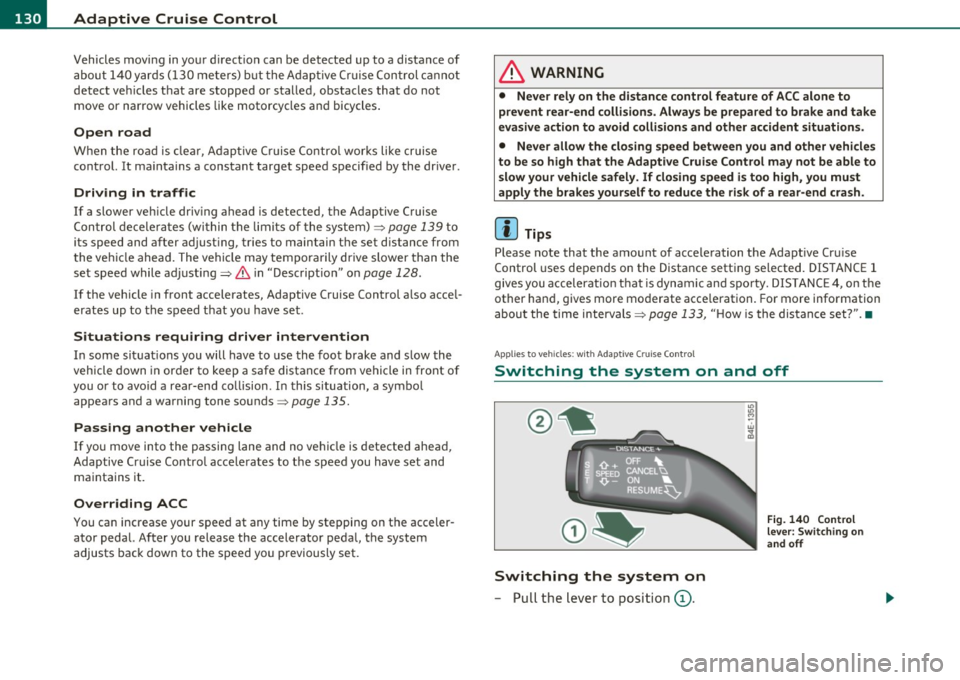
Switching the system on
-Pull the lever to position (D.
"' "' M ~ w
" m
Fig. 140 Control
lever: Switching on
and off
Page 134 of 384
Ill Adaptive Cruise Control ..__..,____ _____________ _
After re leasing the co ntrol switc h, the system regu lates t he speed to
t he val ue jus t set.
& WARNING
Improper use of the Adaptive Cruise Control features and inatten
tion can lead to an accident causing serious personal injury .
• It is dangerous to use the "RESUME " feature when the previ
ously set speed is too high for e xisting road , traffic or weather
conditions.
• Always read and heed the information and WARNINGS=>
& in
" Description " on
page 128.
(I) Tips
You c an in crease y our spee d at a ny tim e by st ep ping on the acceler
ator peda l. After you release the accelerator peda l, the system auto
mat ically adjusts b ack dow n to the spee d you prev iousl y set. A new
desi red speed can be stored at any time by pressing the [ SE TI but ton
=> p age 13 1, fig. 141. •
Appli es to veh icles : w ith Adapt ive C ruise Co ntrol
Turning Adaptive Cruise Control off
temporarily
In some si tuations i t ma kes sense to turn Ada ptive Cruise
Co ntr ol off te m po rari ly.
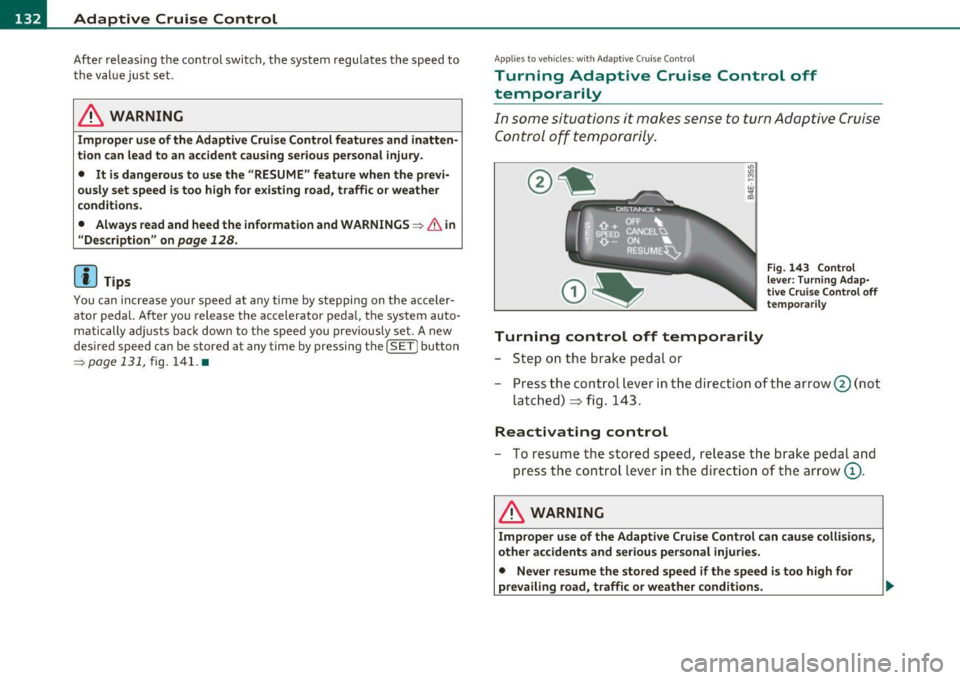
Turning control off temporarily
- Step on t he b rake peda l or
Fig. 143 Control
le ver: Turni ng Adap·
tive Crui se Control off
temp orarily
-Press the cont rol le ve r in t he dir ection of th e arrow @(n ot
la tc h ed)
=> fi g. 14 3.
Reactivating control
- To res ume t he store d sp eed , release t he b rak e ped al and
p ress t he cont ro l lever i n th e dire ctio n of the arrow
(D .
& WARNING
Improper use of the Adaptive Cruise Control can cause collisions ,
other accidents and serious personal injuries.
• Never resume the stored speed if the speed is too high for
prevailing road, traffic or weather condition s. ..,