brakes AUDI S8 2010 Owners Manual
[x] Cancel search | Manufacturer: AUDI, Model Year: 2010, Model line: S8, Model: AUDI S8 2010Pages: 384, PDF Size: 90.95 MB
Page 22 of 384

Instruments and warning/indicator lights
Malfunction in the electronic differential lock (EDL)
The ED L works toge ther w ith the ABS. The ABS warn ing lig ht w ill
come on if there is a mal func tion in the EDL system=>
page 253 . See
your authorized A udi dea le r as soon as poss ible .
& WARNING
• If the .. (USA models )/ ...,. (Canada models ) wa rning light
does not go out , or if it comes on while driving, the ABS system is
not working properly. The vehicle can then be stopped only with
the standard brakes (without ABS ). You will not have the p rotec
tion ABS provide s. Contact you r Audi dealer as soon as pos sible .
• USA models: If the BRAKE warning light , the ., warning light
and the warning light come on together , the rear wheel s
could lock up first under hard braking . Rear wheel lock-up can
c ause loss of vehicle control and an accident. Have you r vehicle
repaired immediate ly by your authorized Audi dealer or a qualified
workshop. Drive slowly and avoid sudden, hard brake applica
tions .
• Canada models: If the brake warning light «D>, the wa rning
light and the ABS warning light come on together, the rear
wheels could lock up first under hard braking. Rear wheel lock-up
can cause los s of vehicle control and an accident . Have your vehicle
repaired immediately by your authorized Aud i dealer or a qualified
workshop . Drive slowly and avoid sudden, hard brake
applic ations. •
Electromechanical parking brake
::E {USA models) / (®) {Canada models)
The warning/indicator light monit ors the electromechan
ical parking broke .
With the pa rking bra ke app lied and the ignition t urned on, the
wa rning/ind icator light illuminates. Afte r the ign it ion has been
t u rne d off, the wa rning/indicator light continues to illuminate for about 30 seconds.
If the park
ing brake is applied w ith the ign ition
tur ned off, the w arning/ind ic a tor ligh t illumi nates fo r abo ut 3 0
seconds.
Th e warning/ind icator light will go out when the parking brake is
re lease d.
If the war ning/ indicator lig ht flashes cont inuous ly
after applying the
p ar king bra ke, bra king fo rce is no t sufficien t to prevent the vehicle
from rolling unintentionally . T his can happe n if the brakes become
too hot. P lease note the fo llowi ng:
• If the slope of the ground is too s teep to par k the ve hicl e, th e addi
tional drive message appea rs
Caution: Vehicle parked too steep .
• In the event of a pa rking brake mal func tion, the yellow • symbol
appea rs in the instrument cluste r display and the driver message
Parking brake malfunction! is d isplayed. Have t he ma lf u n ct io n
re paire d as soon as possib le by a q ualified Audi dealership .•
Brake system BRAKE (USA
models)
/ (CD) {Canada models)
The warning/indicator ligh t flashes if brak e fluid l eve l is
low, if there is an A BS system malfunction or a parking
brake malfunction.
Th e light illum ina tes when the igni tion is t urned o n. It goes out after
the engine has been started . This indicates that t he brake warn ing
light is fu nctioni ng p roperly.
If the brake warning light does not light up when the engine is
cranking , there may be a malfunction in the electrical system. In
this case, contact your Audi dealer.
If the brake system wa rning/indicator light flashes, there is a brake
system malfunc tion . By press ing the
I C H ECK ] button, you can b ring
up a driver message which explains the malfunction in mo re detail
=>
page 28. ~
Page 23 of 384

If the ABS, ESP and brake force distribution fail, the ABS indicator
li ght (U SA mode ls)/ ( Can ad a models) and the ESP indica to r
light come on alo ng w it h the brake system malfu nction light
BRAKE (U SA models) /(Ci) (Ca nada models) . The message Brake fault!
Drive carefully to nearest workshop appears in the inst rument
cl uster disp lay and three consecut ive warning tones sound =>& .
(USA models): If the w arning lig ht
BRAKE and the wa rn in g light illu
minate together, immediately contact your author ized Audi dealer or
qu alifie d wo rkshop to h ave all bra ke p ads in spec ted =>
page 32.
When the light comes on, an a udible war ning s ignal is also given .
& WARNING
• USA models : If the BRAKE warning light, the.,. warn ing light
and the~ S warning light come on together , the rear wheel s
could lock up first under hard braking. Rear wheel lock-up can
cause loss of vehicle control and an accident. Have your vehicle
repaired immediately by your authorized Audi dealer or a qualified
workshop. Drive slowly and avoid sudden , hard brake appli ca
tions.
• Canada models: If the brake warning light ID, the • warning
light and the ABS warning light
"'1 come on together, the rear
wheels could lock up first under hard braking. Rear wheel lock-up
can cause loss of vehicle control and an accident. Have your vehicle
repaired immediately by your authorized Audi dealer or a qualified
workshop. Drive slowly and avoid sudden, hard brake applica
tions.
• If the brake warning /indicator light doe s not go out after
a few
second s and the parking brake released, or l ights up while you are
driving, the fluid level in the brake fluid reservoir i s too low. If you
believe that it is safe to do so, proceed immediately at low speed
to the neare st authorized Audi dealer or qualified repair facility
and have the brake system inspected.
• Always keep in mind that after several brake applications, you
will need greater p ressu re on the brake pedal to stop your vehicle .
Do not rely on strained brakes to re spond with maximum stopping
Controls and equip
ment Safety first
Instruments and warning
/indicator lights
& WARNING (co ntinued )
power in critical situations . You must allow fo r increased braking
distan ce s. The extra distance used up by fading brakes could lead
to an accident. •
Vehicle care Technical data
Page 35 of 384
If the warning light illum inates, immediately contact your authorized
Audi dea ler or qu alified wor kshop to h ave all b rake pads insp ecte d.
On USA mode ls the warn ing light comes on together w it h the
warning light
BRAKE . Both sets of brake pads on an axle must a lways
be rep laced at the same time.
& WARNING
Driving w ith bad brakes can cause a collision and serious personal
injury .
• If the w arning light
ii and the warning light BRAKE1> with the
me ssage Brake pads! com es on in the in strument clu ster di splay,
immediately contact your author ized Aud i dealer or qualified
workshop t o have all brake pads che cked or replaced if
necessary. •
Checking the engine oil level ~
.... ,. Pleas e check oil level
W hen the symbol i lluminates, check the engine oi l level as soon as
poss ible=>
page 293. Add oil if necessary=> page 294. •
Engine oil sensor defective
~ Oil level ! sensor d efective
If the symbo l illuminates, contact your authorized Audi dealer and
have t he o il senso r in spec ted . U ntil yo u have this do ne, check the oil
level each time you refue l just to be on the safe side=>
page 293. •
ll BRAKE: USA mode ls on ly
Controls and equip
ment Safety first
Driver information display
A
pp lies to vehi cles : w ith engine s peed lim it a tion
Engine speed limitation
!.-• Engine speed maximum XXXX RPM
The symbol illuminates whe n there is an engine co ntrol malfunc
tion. The in dicator light in the instrument cluste r a lso i lluminates .
T he engi ne speed is limited to the speed d isp layed in the driver infor
mation system . Keep in mind that t he engine speed will not exceed
t he va lue disp layed in the d rive r in format ion sys tem, for example
when downshifting .
P lease go to an a uthor ized A udi deale r o r ot her qualifie d wo rk shop to
have the malfunction repa ired .•
Fuel supply too low w
A Please refuel
When the symbol illuminates, th is means there are about 2.4 ga llons
(9 litres) of fuel left in the fuel tank . Time to refuel.=>
page 284.
If
the symbol lig hts up, even when there is ample fue l in the tank, and
t he text
Tank sy stem m alfunction! Contact workshop appears in t he
display, there is a fa ult in the system. Con tact a qual ified workshop to
h ave the fault re ctified. •
Windshield washer fluid level too low ;>
Please top up washer fluid
If the symbo l illuminates, add windshield washe r fluid to the washer
system and a lso to the headlig ht washe r system =>
page 305. •
Vehicle care Technical data
Page 101 of 384

& WARNING (continued)
when accelerating or when applying the brakes or when driving
around a corner.
• When you are driving make sure that anything you may have
placed in the center console or other storage locations cannot fall
out into the footwells. In case of sudden braking you would not be
able to brake or accelerate.
• Any articles of clothing that you have hung up must not inter
fere with the driver's view. The coat hooks are designed only for
lightweight clothing. Never hang any clothing with hard, pointed
or heavy objects in the pockets on the coat hooks. During sudden
braking or in an accident -especially if the airbag is deployed -
these objects could injure any passengers inside the vehicle. •
Glove compartment
Your Owner's Literature and the media player are stored
in the lockable glove compartment.
i-----..,--------- l
i
Contro ls a nd e quip
m en t
Fig . 106 Glove
compartment
Vehicle OP-eration
Seats and storage
-- -- ·· - - -J
-
-
To open glove compartment
Fig. 107 Glove
compartment: CD
changer
- Pull the handle in the direction of the arrow and swing the
cover down to open =:> fig. 106.
To close glove compartment
-Push the glove compartment lid up until the lock engages.
In the glove compartment lid you will find a place to store a pen and
a pad of paper.
& WARNING
To reduce the risk of personal injury in an accident or sudden stop,
always keep the glove compartment closed while driving. •
Vehicle care Do-it-yourselt service iTechnical data
Page 125 of 384

On the road -
----------------
Electromechanical parking brake
Operation
The electromechanical parking brake replaces the hand
brake.
Fig. 135 Center
console: Parking brake
- Pull the switch to apply the parking brake~ fig. 135. The
indicator light in the switch will come on.
- Step on the brake pedal or the accelerator pedal and press
the switch at the same time to release the parking brake.
The indicator light in the switch will go out.
Your vehicle is equipped with an electromechanical parking brake
which replaces the handbrake. The parking brake is designed to
prevent the vehicle from rolling unintentionally.
In addition to the normal functions of a traditional hand brake, the
electromechanical parking brake provides various convenience and
safety functions.
Emergency brake
An emergency brake ensures that the vehicle can be slowed even if
the normal brakes fail~ page 125, "Emergency braking".
Controls and equip
ment Safety first
Indicator lights
•
If the parking brake is applied with the ignition turned on, the
indicator light in the instrument cluster (U.S. models:=.., Canadian
models: ©) and in the switch
«el) will come on.
• If the parking brake is applied with the ignition turned off, the
indicator light in the instrument cluster (U.S. models:=., Canadian
models: ©) and in the switch
«fl) will come on for about 30 seconds
and then go out.
& WARNING
If the vehicle is stationary and the transmission is engaged with
the engine running, the engine should not be speeded up (e.g.
manually from under the hood). Otherwise the vehicle will start to
move -you run the risk of an accident.
0 Note
If the warning/indicator light (U.S . models: BRAKE, Canadian models:
«I» ) flashes in the instrument cluster, there is a brake system
malfunction . By pressing the [CHECK! button, you can bring up a
driver message which explains the malfunction in more detail. If the
message
Parking brake ! Please contact workshop appears, there is
a parking brake malfunction which you should have repaired immedi
ately by an authorized dealership~ page 28.
[ i] Tips
• You can apply the parking brake at any time -even with the igni
tion turned off . The ignition must be turned on in order to release the
parking brake.
• Occasional noises when the parking brake is applied and released
are normal and are not a cause for concern.
• The parking brake goes through a self-test cycle at regular inter
vals -when the vehicle is parked. Any associated noises are normal. •
Vehicle care Technical data
Page 129 of 384

_________________________________________________ O_ n_t_ h _ e_ ro_ a_d __ ffllll
& WARNING (continued)
• Please note that inadvertently "resting" your foot on the accel
erator pedal causes the cruise control not to brake. This is because
the cruise control is overridden by the driver's acceleration.
[ i] Tips
The brake lights illuminate as soon as the brakes decelerate automatically. •
Changing speed
-Press lever in the
0 or O direction=> page 126, fig. 136
to increase or decrease your speed.
- Release the lever to save that speed.
Change speed in increments of 1 mph (1 km/h) by lightly pressing the
lever. If you keep the lever pressed down, you will alter your speed in
S mph (10 km/h) increments.
You can also press the accelerator pedal down to increase your speed,
e.g. if you want to pass someone. The speed you saved earlier will
resume as soon as you release the accelerator pedal.
If, however, you exceed your saved speed by S mph (10 km/h) for
longer than S minutes, the cruise control will turn off temporarily .
The green symbol in the display~
page 126, fig. 13 7 is replaced with
a white symbol. The saved speed remains the same.•
Presetting your speed
You can preset your desired speed while the vehicle is not
moving .
-Turn on the ignition.
Controls and equip
ment Safety first
- Pull lever
into position ©=> page 126, fig. 136.
- Press the lever in the
0 or O direction to increase or
decrease your speed.
- Release the lever to save that speed .
This function makes it possible, for example, to save the speed you
want before driving on the highway. Once on the highway, activate
the cruise control by pulling the lever toward
(D . •
Switching the system off
Temporary deactivation
- Press the brake pedal, or
- Press the lever into position@ (not clicked into place)
=> page 126, fig. 136, or
- Drive for longer than 5 minutes at more than 5 mph
(10 km/h) above the stored speed.
Switching off completely
- Press lever into position @ (clicked into place), or
- Switch the ignition off .
The system retains the saved speed if you deactivate the cruise
control temporarily. To resume the saved speed, release the brake
pedal and pull the lever to position
(D.
Switching the ignition off erases the saved speed.
& WARNING
You should only return to the saved speed if it is not too fast for
the current traffic conditions -risk of an accident! •
Vehicle care Technical data
Page 131 of 384

__________________________________________ A_ d_ a_,_ p_t _iv _ e_C_ r_u _i _ s _e _C_ o_n_ t_ r_ o_ l __ _
& WARNING (continued)
slow your veh icle safely. If clos ing speed is too high , you must
apply the brake s your self to reduc e the ri sk of a rear-end cra sh .
• Never re st you r foot on the accelerator pedal , especially when
the Adaptive Cruise Control is being used. Pressure on the acceler
ato r will override the ACC braking function and prevent the brakes
from being applied when ACC detects a situation when the brakes
must be applied.
• Never use Adaptive Cruise Control when you cannot drive safely
at a steady speed, including on city st reets , on winding roads or
when road conditions are poor (for example , on ice, gravel , in fog,
heavy rain or on wet roads that increase the ris k of hydroplaning ).
• The radar sensor's
vision can be reduc ed by rain, snow and
heavy road spray . These and similar conditions can prevent vehi
cle s up ahead from being accurately detected and in some cases
they may not be detected at all . Do not use ACC when the radar
sen sors cannot ac curately detect vehicles moving ahead of you in
traffic .
• Alway s turn off Adaptive Crui se Control when entering turn
lanes , exit lanes and construction zones o r in similar situat ions
because the vehicle will automatically ac celerate to the stored
speed when the road ahead is clear .
• To prevent unintended operation , always switch ACC off when
it is not being used .
[ i] Tips
• For safety reasons, the stored speed is deleted when the ignition
i s turned o ff.
• When Adapt ive Cruise Control is switched on, the Electronic Stabi
li zation Program ( ESP) is also automa tica lly activ ated.
• Damage caused by accidents and some minor collisions can affect
th e rad ar senso r se ttings and ca use the syste m to m alfunction o r
switch off completely.
Controls and equip
ment Safety first
•
In winter conditions, you should check the radar sensor cover
be fore drivi ng to m ake su re it is free of i ce and s now. If ne cessa ry,
clean the area near the radar sensor carefully=>
page 128, fig. 138 .
• T o ensure th at the radar sensor is not blo cked, fore ign objects
(e .g . stickers, larger license plate mo unts, add-on parts) mus t not
c ove r th e ar ea ne ar the ra dar sensor =>
page 12 8, fi g. 13 8. T he area
near the radar sensor must not be painted, e ither.
• F or Declar ation o f Compliance to United Sta tes FCC and I ndus try
Canada regulations=>
page 364 . •
App lies to vehicles: with Adapt ive Cru is e Co ntr ol
How does Adaptive Cruise Control work?
Vehicl es traveling ahead are d etected with th e aid of the
radar sensor.
Fig. 139 Radar sen sor
m easur em ent range
Adaptive C ruise Con trol uses a radar se nsor in t he front o f the vehi cle
=> fig . 139 . The system has limitations=>
page 139. Things that are
not moving in your lane and in yo ur direction o f travel will no t be
detected . The sensor measures the distance to reflective su rfaces
that m ust have a certain s ize. The system responds only after the
distance measu remen t has been made . If a measurement is not
poss ible, the system cannot res pond and w ill not react to a vehicle or
s o me thing el se up ah ead. .,_
Vehicle care Technical data
Page 132 of 384
1111....__A_ d_ a_,_ p_t _i_ v _e _ C_r_ u_ i_ s_ e_ C_ o_ n_ t_ r_ o_ l __________________________________________ _
Vehicles moving in your direction can be detected up to a distance of
about 140 yards (130 meters) but the Adaptive Cruise Control cannot
detect vehicles that are stopped or stalled, obstacles that do not
move or narrow vehicles like motorcycles and bicycles .
Open road
When the road is clear, Adaptive Cruise Contro l works like cruise
control. It maintains a constant target speed specified by the driver.
Driving in traffic
If a slower vehicle driving ahead is detected, the Adaptive Cruise
Control decelerates (within the limits of the system) =>
page 139 to
its speed and after adjusting, tries to maintain the set distance from
the vehicle ahead. The vehicle may temporarily drive slower than the
set speed while adjusting=>
& in ''Description " on page 128 .
If the vehicle in front accelerates, Adaptive Cruise Control a lso acce l
erates up to the speed that you have set.
Situations requiring driver intervention
In some situat ions you will have to use the foot brake and slow the
vehicle down in order to keep a safe distance from vehicle in front of
you or to avoid a rear-end co llision . In this situation, a symbo l
appears and a warning tone sounds =>
page 135.
Passing another vehicle
If you move into the passing lane and no vehicle is detected ahead,
Adaptive Cruise Contro l accelerates to the speed you have set and
maintains it.
Overriding ACC
You can increase your speed at any time by stepping on the acceler
ator pedal. After you release the accelerator pedal, the system
adjusts back down to the speed you previously set.
& WARNING
• Never rely on the distance control feature of ACC alone to
prevent rear-end collisions . Always be prepared to brake and take
evasive action to avoid collisions and other accident situations.
• Never allow the closing speed between you and other vehicles
to be so high that the Adaptive Cruise Control may not be able to
slow your vehicle safely. If closing speed is too high, you must
apply the brakes yourself to reduce the risk of a rear-end crash.
(I] Tips
Please note that the amount of acceleration the Adapt ive Cru ise
Control uses depends on the Distance setting selected. DISTANCE 1
gives you acceleration that is dynam ic and sporty. DISTANCE 4, on the
other hand, gives more moderate acce leration. For more information
about the time intervals =>
page 133, "Ho w is the distance set?". •
Applies t o ve hicles: w ith Ad ap tiv e Cr uise Contr ol
Switching the system on and off
Switching the system on
-Pull the lever to position (D.
"' "' M ~ w
" m
Fig. 140 Control
lever: Switching on
and off
Page 138 of 384

lffll..__A_ d_a_ p,__ t_iv _ e_ C_r _u _ i_ s _e _ C_ o_ n_t _ r_ o _ L ___________________________________________ _
• -0,11,c::::, Driving in tr affic: The warning light c:::::,11 .. -::::::, shows that a
vehicle moving in yo ur lane of travel h as been de tecte d up fron t in
your lane o f travel. Your speed is adjusted accord ing to the speed of
the vehicle up front. ACC accelerates an d brakes automat ically within
the system's capabil ities .
• -011 ,,-0 Request for driver to assume control : The re d flashing
warning light
c:::::, 11 .. c::::, means Request for driver to assume control.
Yo u as the driver must slow the vehicle with the foot brake . T he
symbo l
-::::::,11,, c::::, t el ls you that the Adapt ive Cr uise Contro l is not able
to slow the vehicle down e nough to keep a enoug h distance to the
vehicle in front of you. A wa rning to ne signa l will a lso sound w hen the
symbol appears .
& WARNING
Improper use of the Adaptive Cruise Control features and inatten
tion can lead to an crash and serious personal injury.
• Never allow the closing speed between you and other vehicles
to be so high that the Adaptive Cruise Control may not be able to
slow your vehicle safely. If closing speed is too high , you must
apply the brakes yourself to reduce th e risk of a rear-end crash.
• Always sele ct a greater following di stance to the vehicle up
ah ead on w et roads than on dry roads.
• Always read and heed the information and WARNINGS~
& in
" Description " on
page 128.
[ i J Tips
• If the Adapt ive Cruise Control in itiates braking, the hydraulic
bra ke system is under pressure . Therefore, t he b rake pedal distance
is shorter and the pedal feels "harde r" .
• If yo u use the acceler ator to go f aster th an the speed o f the
vehicle ahead of yo u, the d river intervention prompt will not be
accompanied by a warning to ne.
• If the speed you previously set is exceeded, t he indicato r light in
t he speedomete r will sw itch o ff. •
A ppli es to veh icles : w ith Adaptive Cruise Co ntrol
Display in the instrument cluster
You should hav e the supplementary information
displayed here, p articularly on your first trips .
Fig. 147 Displ ay i n
t he in strument clu ste r
Scr oll throug h the av ail able inform ation dis plays by br ie fl y t appi ng
the (RESE T) button at the end of the windshield w iper lever . You can
sele ct a nd information from the trip comp ute r, navigation sys tem or
Adaptiv e Cr uise Control.
© Vehicle sy mbol
® St atu s
© Distan ce
© Vehicle symbol
Th e veh icle symbol indicates whe ther the sy stem has de te cted a
moving veh icle up front in your lane of travel.
• When no moving ve hicle is detected up fro nt, only the
outline of
the vehicle
is d isp laye d.
• A
gray vehicle wi ll appear when a moving vehicle is de tected up
ahead .
• A
red vehicle will appea r if th e s itua tio n de te cted will s oo n l ead to
a requ est for the driver to assume contro l. .._
Page 142 of 384
IIII..__A_ d_a_ p,__ t_iv _ e_ C_r _u _ i_ s _e _ C_ o_ n_t _ r_ o _ L ___________________________________________ _
Entering a curve
When entering a curve, the Adaptive cruise control may react to a
vehicle in the next lane and apply the brakes in your vehicle
=>
page 139, fig. 149. The braking action can be overridden by
depressing the accelerator pedal.
Leaving a curve
At the end of very long curves, ACC's predictive lane reading can cause
ACC to react to another vehicle in the next lane and apply the brakes
on your vehicle=>
page 139, fig. 150. The braking action can be over
ridden by depressing the accelerator pedal. •
Applies to veh icles : w ith Adaptive Cru ise Con tro l
Vehicles offset to one side
I ,L
F===============;~
Fig. 151 Vehicle trav
eling ahead outside
the detection range of
the radar sensor
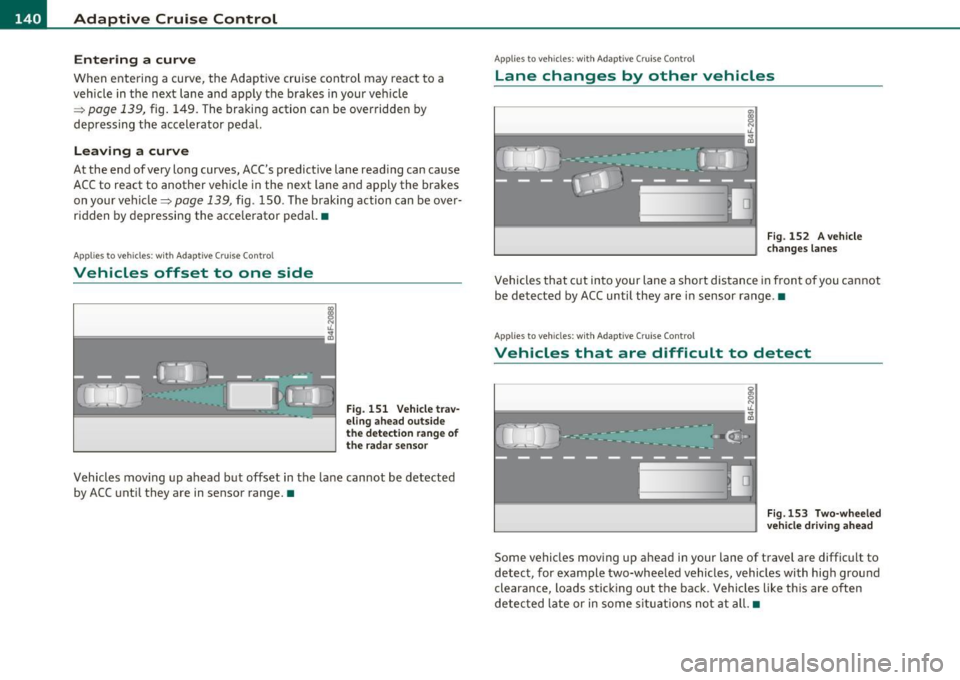
Vehicles moving up ahead but offset in the lane cannot be detected
by ACC until they are in sensor range. •
Applies to veh icles : w ith Ada ptive Cruise Control
Lane changes by other vehicles
Fig. 152 A vehicle
changes lanes
Vehicles that cut into your lane a short distance in front of you cannot
be detected by ACC until they are in sensor range .•
Applies to veh icles: w ith Ada ptiv e Cruise Contro l
Vehicles that are difficult to detect
Fig.153 Two-wheeled
vehicle driving ahead
Some vehicles moving up ahead in your lane of travel are difficult to
detect, for example two-wheeled vehicles, vehicles with high ground
clearance, loads sticking out the back. Vehicles like this are often
detected late or in some situations not at all. •