ignition AUDI S8 2016 Owner's Manual
[x] Cancel search | Manufacturer: AUDI, Model Year: 2016, Model line: S8, Model: AUDI S8 2016Pages: 302, PDF Size: 75.68 MB
Page 50 of 302
Lights and Vision
Autom atic headli ghts
You can adjust the follow ing settings in the Au
tomatic headlight s
menu:
Headlights activation time -You can adjust if the
headligh ts switch on
Early , M ed . or Late accord
i n g to the sensitivity of the light se nsor.
Audi adaptive light * -You can switch adaptive
light
On and Off .
Autom atic high beams *
You can switch the high beam ass ist on and off .
Daytime running lights
USA models:
You can switch the daytime r unning
lights
on and off .
Canada m odels:
The function ca nnot be tu rned
off.
It is activ ated au tomatically each time the ig
n ition is switched on . This menu item is shown
"greyed out" .
Coming home, Leaving home
The com ing home func tion illum ina tes the area
ou tside the ve hicle when yo u sw itch the igni tion
off and ope n the driver's door . To tu rn the f unc
t ion on, select
Lights when leaving car > On .
The leav ing home function illuminates the area
ou tside the ve hicl e when yo u un lock the vehicle .
T o tur n the function on, select
Lights when un
locking car > On.
The com ing home and le aving home f unctions
only operate w hen it is dark and the lig ht sw itch
is in t he
AUTO position.
48
Turn signal and high beam lever
The lever on the left side of the steering column
is used to operate the turn signals and the high
beam as well as the headlight flasher .
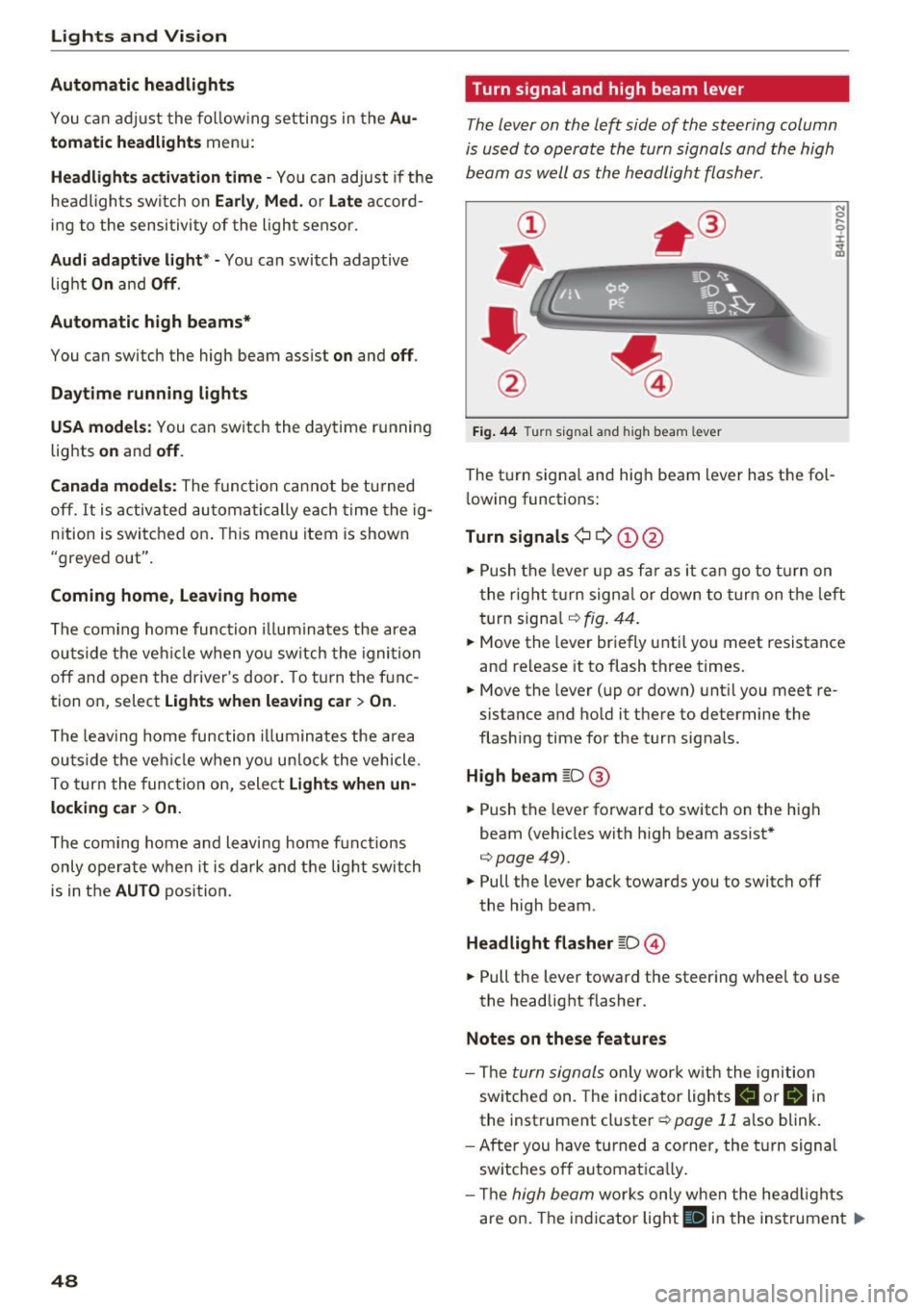
Fig. 44 T urn signa l an d hi gh beam lev er
The turn signa l and hig h beam lever has the fol
l owing functions:
Turn signals¢ Q ©@
N 0
9 :I:
~
.,. Push the leve r up as f ar as it ca n go to t urn on
t he rig ht tu rn signa l or down to tur n on t he left
turn signa l
r:!>fig. 44 .
.,. Move th e lever br ie fly u ntil yo u meet r esistance
and release it to flash three times.
.,. Move the lever (up or down) unt il y ou meet re
sistance and ho ld it there to determine the
flashing time for the turn sig nals .
High beam gD@
.,. Push the lever fo rward to sw itch on the high
beam (vehicles wit h high beam assist*
r:!> page49).
.,. Pull the lever back towards you to switch off
the high beam .
Headlight fla sher gD ©
.,. Pull the lever toward the steering whee l to use
the headlight flasher.
Notes on these features
- The turn signals on ly wor k w it h the ignition
sw itc hed on. The ind icator lights
II or H in
the instrument cluster ¢ page 11 also blink.
- After you h ave t urned a corner, the turn signa l
sw itches o ff automat ica lly.
- Th e
high beam works only when the head ligh ts
are on. The ind icator light
Bl in the instrumen t Iii>
Page 51 of 302

.... N
cluster illuminates when the high beams are
on.
- The
headlight flash er works only as long as you
hold the lever -even if there are no lights
turned on. The indicator light
& in the instru
ment cluster illum inates when you use the
headlight flasher.
A WARNING
Do not use the high beam or headlight flasher
if you know that these could bl ind oncoming
traffic.
High beam assist
App lies to: vehicles with high beam assist
The high beam assist automatically switches the
high beams on or off, depending on the sur
roundings and traffic conditions.
Fig. 45 Turn s ignal and h igh bea m lever : Turning on and
off the high beam assist
Activating high beam assist g
,.._ 0 ± .,. a,
Requirement:
The light switch must be in the AU
TO pos ition, the low beam headlights must be on
and the high beam assist must be switched on in
the Infota inment ~
page 47 .
.. Press the lever forwards (Din order to activate
the high beam assist. The indicator light
II
turns on in the instrument cluster display and
the high beams switch on or off automatically.
T he ind icator light
B turns on if the high
beams were switched on.
Switching the high beams on/off manually
a Requirement: High beam ass ist is activated . J:
'SI: ....
If the high beams did not switch on/off automat
ica lly when expected, you may instead switch
them on/off manually:
.. To switch the high beams on manually, press
the lever forwards (D. The indicator light
II
turns on.
.. To switch the high beams off manually, pull the
lever backwards @. The high beam assist is de
activated.
Operating the headlight flasher
.. To operate the flashers while the high beam as
sist is active and the high beams are switched
off, pull the lever into position@. The high
beam ass ist will remain active.
Messages in the instrument cluster display
Headlight assist: System fault
Drive to your authorized Audi dealer immediate ly
to have the malfunction corrected. You can still
switch the high beams on or off manually .
Headlight assist: Unavailable . No camera view
The camera view is blocked, for example by a
sticker or debris.
The sensor is located between the interior rear
view m irror and the windshield. Therefore, do not
place any stickers in this area on the windshield .
Service setting
There is a different sensitivity setting for servic
ing. This setting can be activated by pressing and
ho lding the button on the interior rearview mir
ror for more than 18 seconds. The LED next to
the button blinks three times. If you have acci dentally selected th is service function, the origi
nal sens itiv ity will be automat ically restored the
next t ime you sw itch the ignition on.
A WARNING
High beam assist is only intended to assist
the driver. The driver is still responsible for
controlling the headlights and switching the
high beams on and off manua lly depending
on traffic, lighting and visibility conditions.
Fail ure to intervene manually may lead to r isk
Ill>-
49
Page 52 of 302

Lights and Vision
of accident . It may be necessary to operate
the high beams manually in the following sit
uations, e.g.:
- For adverse weather conditions such as fog,
heavy ra in, blow ing snow or spraying water.
- On roads where oncoming traffic may be
partially obscured such as expressways.
- If there are individuals on the road with no
lighting or poor light ing, s uch as cyclists.
- In tight curves and on steep slopes .
- In poorly lit areas .
- Wi th stro ng reflecto rs such as signs.
- If the area of the windsh ield near the sensor
is fogged ove r, dirty, icy or covered with a
s ticker.
(D Tips
- The high beam ass ist is active above a speed
of app rox.
25 mph (40 km/h).
- If after activation, your speed fa lls below
approx.
15 mph (24 km/h), the hig h beams
will automatically be switched off.
Interior lighting
Front and rear interior lighting
Fig. 46 Headliner : Front interior lights
Fig. 47 Rear headli ner: Read ing light
50
Press the appropriate button ~ fig. 46:
§]-Inter io r l ight ing on/off
~ -Door contact switch on/off . The inter io r li ght
i ng is controlled automatically.
~ -Reading lights on/off
~ -Switching the rear readi ng lig hts on/off from
the cockpit .
I REAR MODEi* -Sw itch ing the rear reading lights
on/off from the co ckpit: press the I REAR MODE!
button and then the approp ria te button ~ in the
cockpit.
Ambience lighting
Applies to: vehicles with ambience lighting
You can select a color prof ile and brightness for
the ambience lighting in various areas of the ve
hicle, called zones.
Turning ambience lighting on
.. Select in the MM I: ICAR !fu nction button> Car
sy stems
control button > Vehicle settings > In
terior light ing
> On .
Adjusting /turn ing off the brightness
.. Select in t he M MI: ICAR !f unc tion bu tton > Ca r
sys tems
control button > Vehicle settings > In
terior light ing
> Brightness .
.. Turn the knob to the desired vehicle area and
press the knob. The bar that appears indicates
the selected brightness .
.. To increase or reduce the brightness, turn the
knob and press it .
Selecting a color profile*
.. Select in the MMI: ICAR ! function button > Car
systems
control button > Vehicle settings > In
terior lighting > Color p rofile .
The ambience lighting tu rns o n when the fu nc
tion is activated in the MMI and when you turn
the headlights on while the ignition is switched
on.
Page 53 of 302
Adjusting the brightness
You can adj ust the brigh tness for the four zones
Front top , Front f ootwell , Rea r top and Rear
footwell
or for All area s at the same time.
Selecting a color profile
You can se lect from the Ivory , Polar and Rub y/
Polar
color profi les.
@ Tips
The settings are automatically stored and as
sig ned to the remo te control key that is in
use .
Instrument illumination
You can adjust the brightness of the instrument
and display illumination as well as the Head-up
Display* .
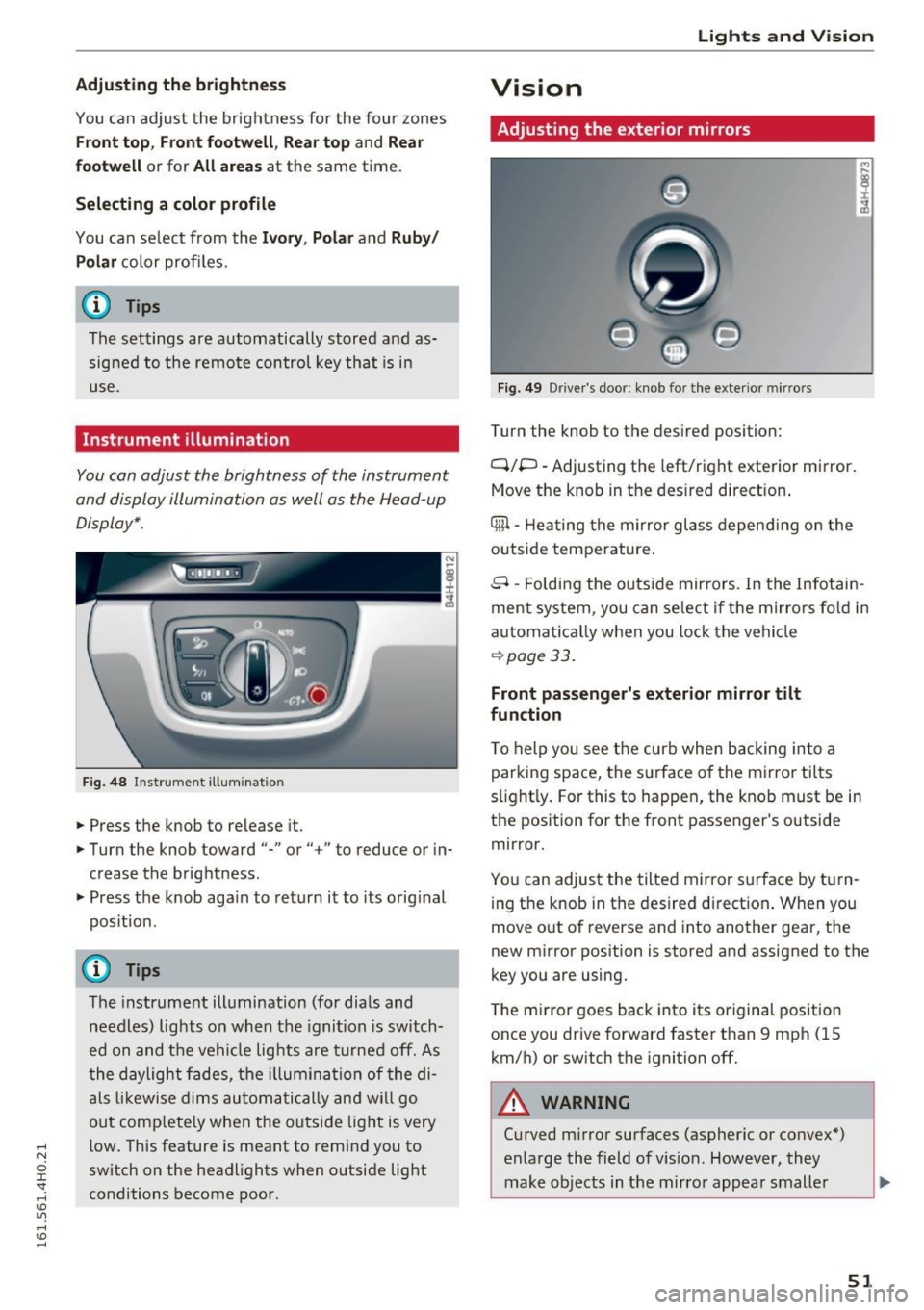
Fig . 4 8 Instr ument ill um ination
.. Press the knob to release it.
.. Turn the knob toward"-" or"+" to reduce or in
crease the brightness .
.. Press the knob aga in to return it to its orig inal
pos itio n.
(D Tips
The instrument ill umination (for dia ls and
needles) lights o n when the igni tion is switch
ed on and t he ve hicle lights are tu rned off. As
t he daylight fade s, the illum ina tion of the di
a ls likewi se dims au tom atic ally a nd w ill go
ou t comp lete ly when the outsi de light is very
low. This feature is meant to rem ind you to
sw itch on the head lights when o utside light
conditions become poor.
Lights and V ision
Vision
Adjusting the exterior mirrors
Fig. 4 9 Driver 's doo r: knob fo r the exte rio r mirr ors
Turn the knob to the des ired position:
Q/P -Adjusting the left/right e xterior mirror.
Move the knob in t he des ired direct ion .
Qill -Hea ting the mir ror glass depend ing o n the
outside tempe rature .
8 -Foldi ng the o utside mir ro rs . In the Infotai n
ment system , you can se le ct if t he m irro rs fo ld in
a utomat ically when you lock the vehi cle
~ page 33.
Front passenger 's exterior mirror tilt
function
T o help you see the curb when backing into a
parking space, the su rface o f the mirro r tilts
s li ght ly . For this to happen, the knob must be in
the position for the front passenger's outside
mirror .
Yo u can adjus t the tilted mir ro r sur face by turn
i ng the knob in the desired d irect ion . When you
move out of reverse and into another gea r, the
new m irror position is stored and assigned to the
key you are using.
T he m irror goes back into its or iginal pos ition
once you drive forward faster t han 9 mph (15
km/h) or sw itch the ignition off.
A WARNING
-Cu rved m irror surfaces (aspher ic or convex *)
enlarge the field of v is ion . However, they
make objects in the mirro r appea r small er
51
Page 57 of 302
..... N
0 J:
'SI: .....
the windshield wipers to chatter.
- Properly functioning windshield wiper
blades are required for a clear view and safe
driving
c=> page 55, Replacing windshield
wiper blades.
- In the case of frost, check whether the
windshield wiper blades are frozen to the
windshield. Switching on the windshield
wipers can damage the wiper blades!
- Prior to using a car wash, the windshield wiper system must be switched off (lever in
position @). This helps to prevent uninten
tional switching on and damage to the
windsh ield wiper system.
- Do not use the wipers to clear a frosted win dow . Using the wipers as a convenient ice
scraper will destroy the wiper blades.
@ Tips
- The windshield wipers are switched off
when the ignition is off. Activate the w ind
sh ield wipers afte r the ignit ion is switched
back on by moving the windshield wiper lev
er to any position.
- Worn or dirty windshield wipe r blades result
in streaking . This can affect the rain sensor
function. Check your windshield wipe r
blades regu larly .
- The washer fluid nozzles of the windshield
washer system are heated at low tempera
tures when the ignition is on.
- When stopping temporarily, e.g. at a traffic
light, the set speed of the windshield wipers
is automatically reduced by one speed.
Cleaning windshield wiper blades
Clean the windshield wiper blades when they be
gin to leave streaks. Use a soft cloth and glass
cleaner to clean the windshield wiper blades.
.,. Place the windshield wiper arms in the service
position. Refer to
c=> page 55.
.,. lift the wiper arm away from the front window .
Lights and Vision
A WARNING
Dirty windshield wiper blades can impair your
view. This can lead to accidents .
Replacing windshield wiper blades
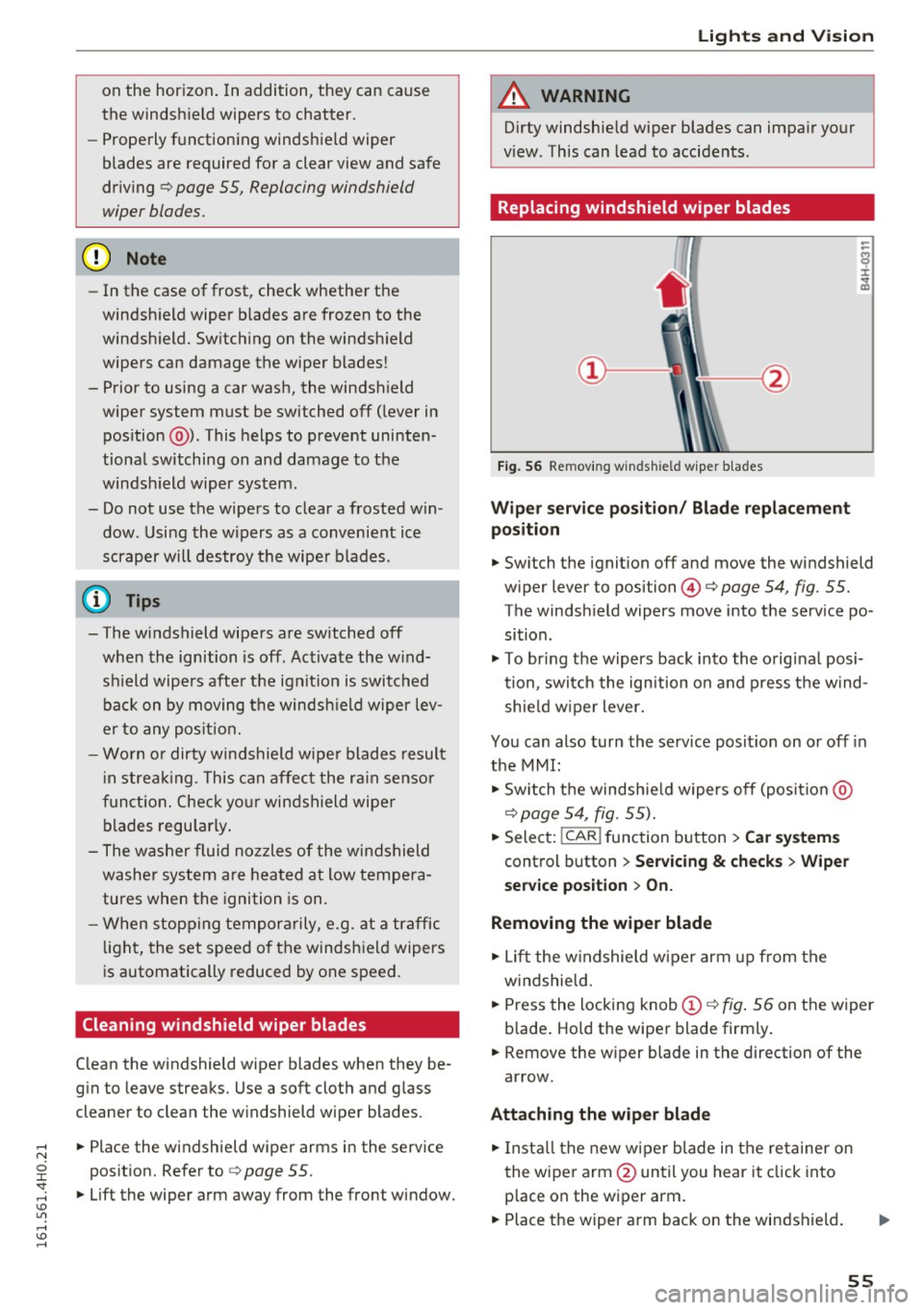
Fig. 56 Remov ing w indsh ield wiper blades
Wiper service position/ Blade replacement
position
.,. Switch the ignition off and move the windshield
wiper lever to position@¢
page 54, fig. 55.
The windsh ield wipers move into the service po
sition .
.,. To bring the wipers back into the original posi
tion, switch the ignition on and press the wind
shie ld wiper lever.
You can also turn the service posit ion on or off in
the MMI:
.,. Switch the windshie ld wipers off (posit io n @
c=> page 54, fig. 55).
.,. Select: !CAR ! function button > Car systems
control button > Servicing & checks > Wiper
service position > On.
Removing the wiper blade
.,. Lift the windshie ld wiper arm up from the
w indshie ld .
.,. Press the locking knob
(D c=> fig. 56 on the wiper
b lade . Hold the wiper blade firmly .
.,. Remove the w iper blade in the direction of the
arrow.
Attaching the wiper blade
.,. Install the new wiper blade in the re tainer on
the wiper arm @until you hear it click into
p lace on the wiper arm .
.,. Place the wiper arm back on the windshield. ..,.
55
Page 61 of 302
Front passenger's seat
Always move the front pas senger seat into the
rearmost position .
To avoid contact with the airbag while it is de
ploying, do not sit any closer to the instrument
panel than necessary and always wear the three
point safety belt provided adjusted correctly . We
recommend that you adjust the passenger's seat
in the following manner:
.. Bring the backrest up to an (almost) upright
posit ion .
Do not ride with the seat reclined .
.. Adjust the head restraint so the upper edge is
as even as possible with the top of your head.
If
that is not possible, try to adjust the head re
straint so that it is as close to this position as
possible
c::> page 64.
.. Place your feet on the floor in front of the pas
senger's seat .
Front seats
Controls
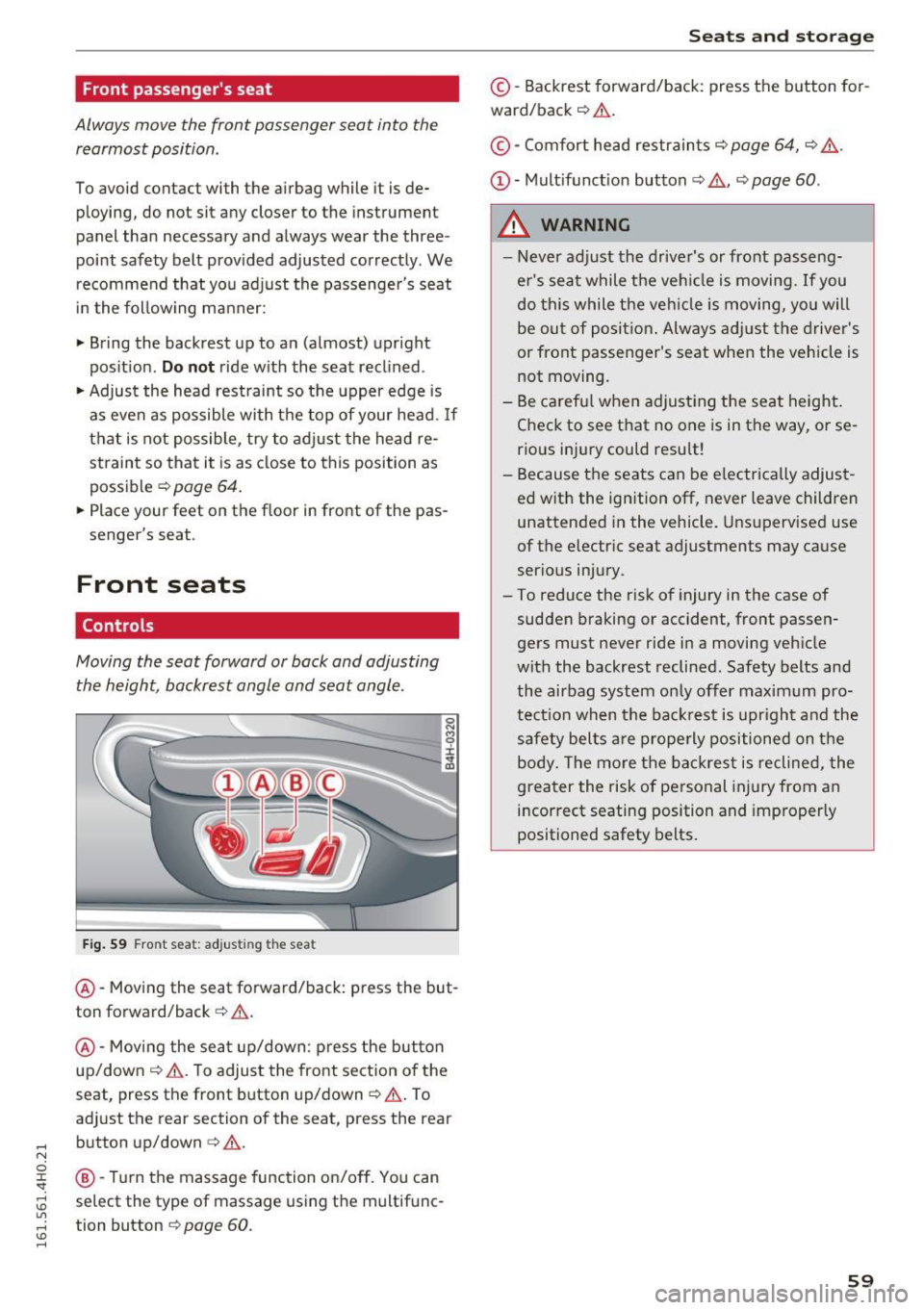
Moving the seat forward or back and adjusting
the height , backrest angle and seat angle.
Fig. 59 Front s eat : adjus ting the sea t
®-Moving the seat forward/back: press the but
ton forward/back
c::> & .
@ -Moving the seat up/down: press the button
up/down
c::> & . To adjust the front section of the
seat, press the front button up/down
c::> & . To
adjust th e rear section of the seat, press the rear
button up/down
c:> &.
@ -
Turn the massage function on/off. You can
select the type of massage using the multifunc
tion button
¢ page 60.
Seats and storage
© -Backrest forward/back : press the button for
ward/back
c::> .&. .
©-Comfort head restraints¢ page 64, c::> ,&.
(D -Multifunction button c:;, .&., c::> page 60 .
A WARNING
--Never adjust the driver's or front passeng
er's seat while the vehicle is moving. If you
do this while the veh icle is moving, you will
be out of position. Always adjust the driver's
or front passenger 's seat when the vehicle is
not moving .
- Be careful when adjusting the seat height .
Check to see that no one is in the way, or se
rious injury could result!
- Because the seats can be electrically adjust
ed with the ignition off, never leave children
unattended in the vehicle. Unsupervised use
of the electric seat adjustments may cause
serious injury .
- To reduce the risk of injury in the case of sudden braking or accident, front passen
gers must never ride in a moving vehicle
with the backrest reclined. Safety belts and
the airbag system only offer maximum pro
tection when the backrest is upright and the
safety belts are properly positioned on the
body. The more the backrest is reclined, the
greater the risk of personal injury from an
incorrect seating position and improperly positioned safety belts.
59
Page 62 of 302
Sea ts and stor age
Multifunction button
Applies to: ve hicles w ith memory funct ion
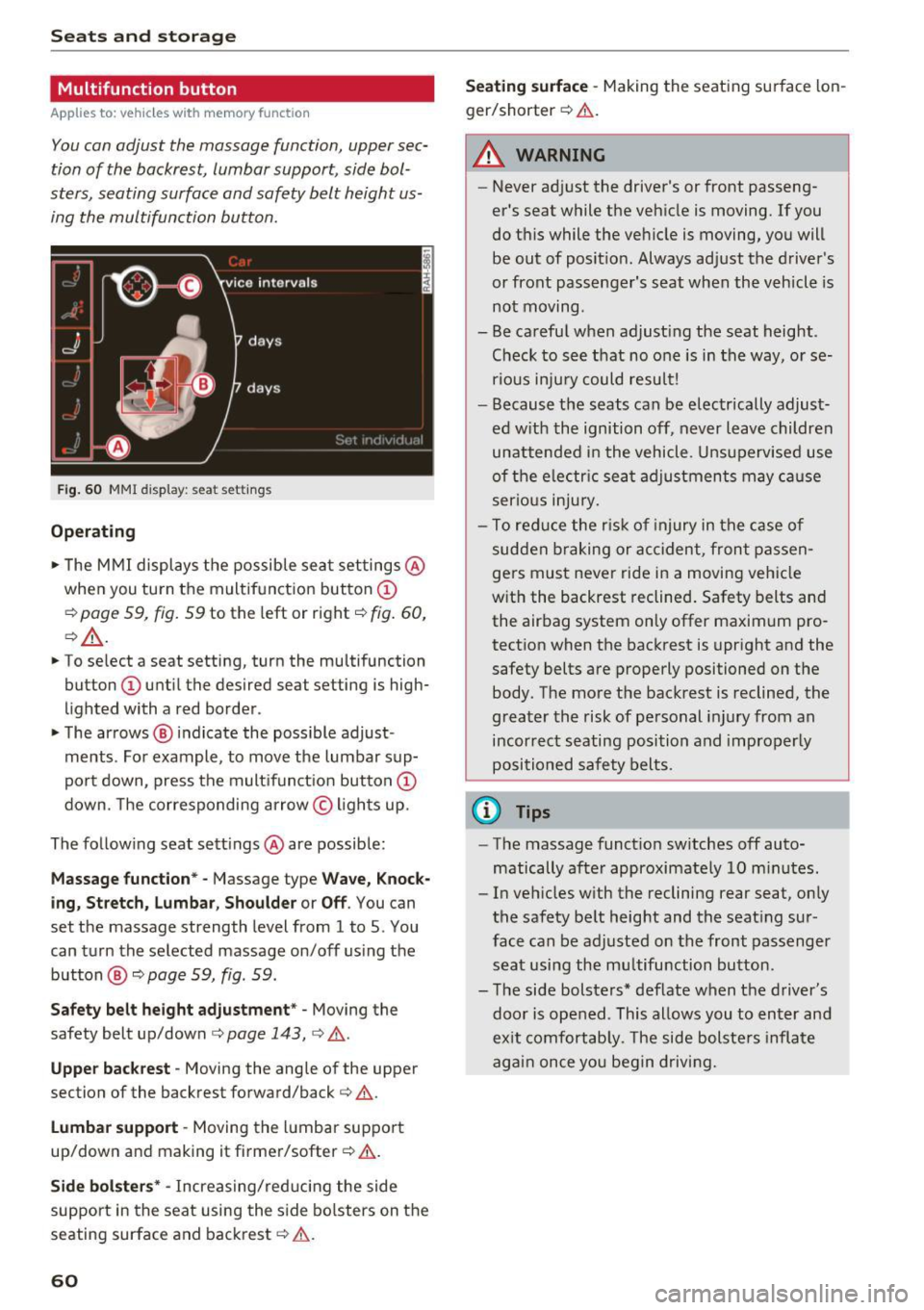
You con adjust the massage function, upper sec
tion of the backrest, lumbar support, side bol
sters, seating surface and safety belt height us
ing the multifunction button.
F ig . 60 MMI display: seat settings
Operat ing
,.. The M MI displays the possible sea t set tings @
when you tu rn the multifunct ion button @
c::> page 59, fig . 59 to the left or right c::> fig. 60,
c::> _&. .
,.. To select a seat setting, turn the multifunction
button
(I) until the desired seat setting is high
lighted with a red border .
• The arrows ® indicate the possible adjust
ments . Fo r example, to move the lumbar sup
po rt down, press the mult ifunct ion button @
down. The corresponding arrow © ligh ts up.
The follow ing seat sett ings @are possible:
Massage func tion * -Massage type Wave, Kno ck
ing , Stre tch, Lumbar , S houlder or Off .
You can
set the massage strength level from 1 to 5. You
can turn the selected massage on/off us ing the
button @
c::> page 59, fig . 59.
Safe ty belt height adju stm ent * -Moving the
safety belt up/down
c::> page 143, c::> &.
Uppe r back rest -Moving the angle of the upper
section of the backrest forward/back
c::> &.
Lumb ar support -Moving the l umbar support
up/down and making it firmer/softer
c::> & .
Side bolst ers* -Increas ing/red ucing the side
support in the seat using the s ide bo lsters on the
seating surface and backrest
c::> .&. .
60
Seating surface -Making the seating surface lon
ger/shorter
c::> & .
A WARNING
-Never ad just the driver's or front passeng
er 's seat while the vehicle is moving. If you
do this while the vehicle is moving, you will
be out of posit io n. Always adjust the driver's
or front passenger's seat when the vehicle is
not moving .
- Be careful when adjust ing the seat height .
Check to see that no o ne is in the way, or se
rious inju ry could result!
- Because the seats can be electr ically adjust
ed w ith the ignition off, never leave children
unattended i n the vehicle. Uns upervised use
of the e lectr ic sea t adjustments may ca use
serious in ju ry.
- To reduce the r is k of injury in the case of
sudden b raking or accident, front pa ssen
gers must never ride in a moving vehicle
w ith the backrest reclined . Safety belts and
the airbag system on ly offer maximum pro
tection when the backrest is upright and the
safety belts are properly positioned on the
body. The more the backrest is reclined, the
greater the risk of pe rsonal injury from an
incorrect seating position and improperly
positioned safety belts.
@ Tips
- The massage funct ion sw itches off auto
matically after approximately 10 m inutes.
- In vehicles w ith the reclining rear seat, on ly
the safety be lt height and the seat ing sur
face can be adjusted on the front passenger
seat using the mu ltifunction bu tton.
- The side bolsters* deflate when the driver's
door is ope ned . This allows you to enter and
ex it comfortab ly. The side bolste rs infla te
again once yo u begin driving.
-
Page 64 of 302
Seat s and sto rage
Adju st ing th e seat po sition
.,. To adjust the seat forwa rd/bac k, press the but
ton © forward/back .
.,. To move the seat up/down, press the button ©
upward/downward .
Adjusting th e massage function*
.,. To adjust the "p ulsating"/"wave" massage
funct ion, press the butto n© to the left/r ight.
The massage f unction is at its strongest level
when three LEDs in the button turn on .
.,. To reduce the massage level, press the © but
ton again .
.,. To switch the massage function off, press the
button repeatedly until the LED turns off.
Adju st ing th e re clining p osition
.,. To adjust the reclining position, press and hold
the button ® until the seat reaches its end po
s ition .
.,. Applies to vehicles with reclining seat*: If you
select the reclining position, the front passeng
er's seat moves forward and the backrest re
cl ines. Depending on the last setting, the leg
support may fold out at the same t ime. The
front passenger 's seat can no longer be used in
the recl ining position¢ _&.. You can adjust the
l eg support or fold the display fo rward in the
reclining position.
Selecting the standard seat position
.,. To adjust the standard seat pos ition, press and
hold the bu tton (D unt il the seat reaches its
end position .
.,. Applies to vehicles with reclining seat*: If you
select the standard seat position, the front pas
senger's seat is moved back into the starting
pos ition, the head restra int is moved to the up
rig ht posit ion a nd the leg support is folded in
ward ¢_& .
Adju st ing th e di splay*
.,. To tilt the disp lay forward/back, press and hold
the left/right button @ unt il the display reach
es the desired pos ition.
.,. Applies to vehicles with reclining seat*: To
maintain a clear view of the road when the seat
is in the reclining position, press and hold the
62
right button @ until the disp lay has folded for
ward. Make sure the driver has a clear view of the exter ior mirrors. If so, confirm the quest ion
in the Infotainment system with
Yes . If you an
swer
No or do not respond to the quest ion, the
disp lay w ill return to the upright pos ition.
Adju sting the leg support (vehicles with
reclining seat*)
Requirement: The reclining pos it ion must be se
lected ¢
page 62.
.,. To fold the leg support o ut/in, press and hold
the left/r ight button @ until the leg support
reaches the desired pos it ion.
.,. To angle the leg support so that it is more up
r ight/more reclined or to move it forward/back,
adjusting the front passenger's seat accord ing
ly.
Adjusting the front pa ssenger 's seat
.,. Make sure that the front passenger's seat ad
justment is switched on in the Infotainment
system
¢ page 64 .
.,. To act ivate the front passenger's seat adjust
ment, press the button ®·
.,. To adjust the front p assenger's se at forward/
back, press the button © forward/back .
.,. To move the front passenger's seat up/down,
press the button © upward/downward .
.,. To adjust the front passenger's seat backrest so
that is more upright/more recl ined, press the
button @ forward/back .
.,. Applies to veh icles with reclin ing seat*: To ad
just the reclin ing/standa rd seat position, press
and hold the button@/(D unt il the seat reach
es its end position.
~ WARNING
-
- The power ad justment for the ind iv idual
seats a lso works with the ignition. For this
reason, children sho uld never be left unat
tended in the vehicle -they could be injured!
- Exercise caution when adjust ing the seats.
Unsupervised or careless seat adjustment
can pinch fingers or hands ca us ing injur ies .
Page 65 of 302
-Vehicles with a pass through in the center
console have seating for four. The long cen
ter console between the two rear seats is
not a seating position . Therefore, a safety
belt is not provided .
- Applies to vehicles with reclining rear seat*:
- Do not use the front passenger's seat for
seating when it is in the reclining position.
This increases the risk of serious injury or
death .
- Never adjust the reclining position when
the front passenger 's seat is occupied .
This increases the risk of injury.
- Do not tilt the display if the driver's view
of the right exterior mirror will be ob
structed .
- Make sure the area between the leg sup
port and the front passenger's seat back
rest is clear before folding the leg support in so that you are not pinched.
(D Note
If a child seat is attached to one of the rear
seats, this seat must not be adjusted using
the power controls under any circumstances.
The easy entry function for this seat must also
be deactivated in the MMI
c:> page 64. The
child seat as well as the rear seat can be dam
aged by the adjustment process .
(!) Tips
The massage function switches off automati
cally after approximately
10 minutes .
- If you cannot move the front passenger seat
or the reclining rear seat, it may be because
- the front passenger's seat memory func
tion is switched off¢
page 66 or
- the child safety lock is switched on (the~
button ¢
page 40 or the right T button
c::> page 40 lights up in the driver's door),
or
- the front passenger seat adjustment is
switched off in the MMI
c:> page 64.
Seats and storage
Massage function remote control
Applies to: vehicles with reclining rear seat and massage
functio n
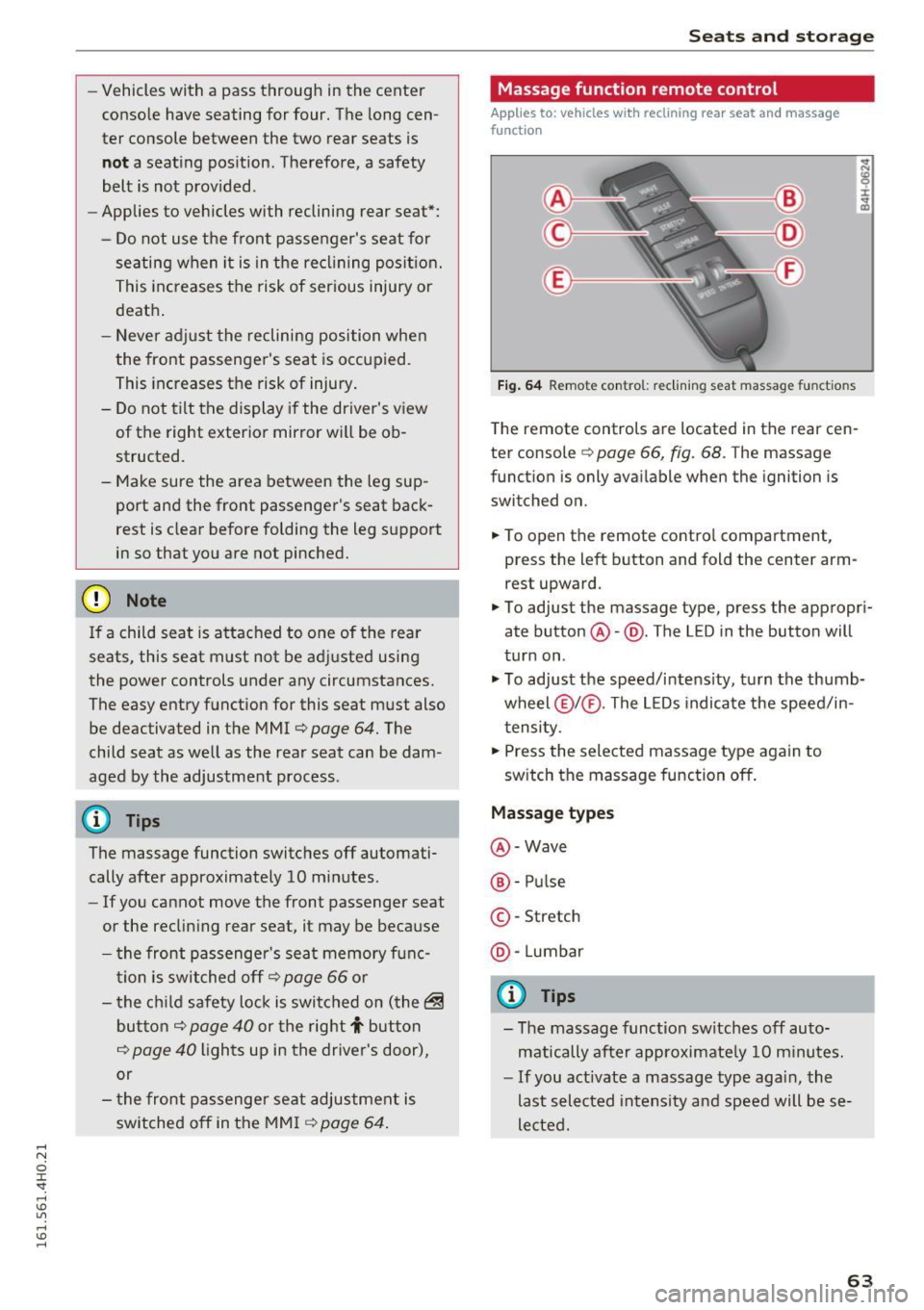
Fig. 64 Remote con trol: re clining seat massag e functions
The remote controls are located in the rear cen
ter console
c::> page 66, fig. 68. T he massage
function is only available when the ignition is
switched on.
.,. To open the remote control compartment,
press the left button and fold the center arm rest upward.
.,. To adjust the massage type, press the appropri
ate button @-@ . The L ED in the button will
turn on .
.,. To adjust the speed/intensity, turn the thumb
wheel @I® . The LEDs indicate the speed/in
tensity.
.,. Press the selected massage type again to
switch the massage function off.
Massage types
@-Wave
®-Pulse
©-Stretch
@ -Lumbar
@ Tips
- The massage function switches off auto
matically after approximate ly
10 minutes.
- If you act ivate a massage type again, the
last selected intensity and speed will be se
lected.
63
Page 68 of 302
Seats and storage
Memory buttons
Applies to: vehicles w ith memory funct ion
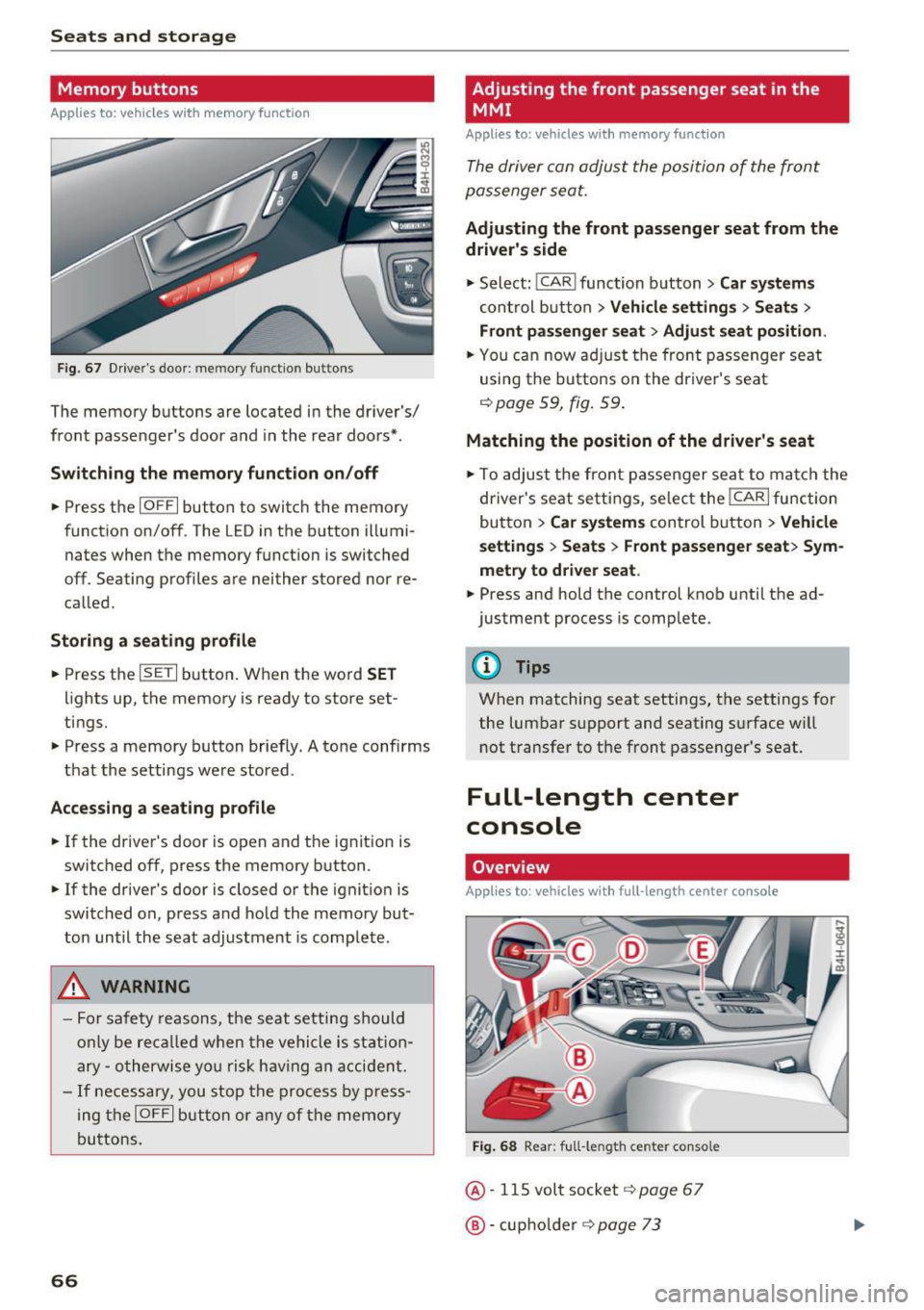
F ig. 67 Driver's door: memory function buttons
The memory buttons are located in the driver's/
front passenger's door and in the rear doors*.
Switch ing the memory function on /off
• Press the IOFFI button to switch the memory
function on/off. The LED in the button illumi
nates when the memory funct ion is switched
off. Seating profiles are neither stored nor re
called .
Storing a seating profile
• Press the ISETI button . When the word SET
lights up, the memory is ready to store set
tings.
• Press a memory button briefly. A tone confirms
that the settings were stored .
Accessing a seating profile
• If the driver's door is open and the ignit ion is
switched off, press the memory button .
• If the driver's door is closed or the ignition is
switched on, press and hold the memory but
ton until the seat adjustment is complete.
A WARNING
-For safety reasons, the seat setting should
only be recalled when the vehicle is station
ary -otherwise you r isk having an accident.
- If necessary, you stop the process by press
ing the
IOFF I button or any of the memory
buttons.
66
Adjusting the front passenger seat in the
MMI
Appl ies to : vehicles wi th memo ry funct ion
The driver con adjust the position of the front
passenger seat.
Adjusting the front passenger seat from the
driver's side
• Select: I CAR I function button > Car systems
control button > Vehicle settings > Seats >
Front passenger seat> Adjust seat position .
• You can now adjust the front passenger seat
using the buttons on the driver's seat
¢page 59, fig. 59 .
Matching the position of the driver's seat
• To adjust the front passenger seat to match the
driver's seat settings, select the
I CAR I function
button
> Car systems control button > Vehicle
settings > Seats > Front passenger seat> Sym
metry to driver seat.
• Press and hold the control knob unti l the ad
justment process is complete.
@ Tips
When matching seat settings, the settings for
the lumbar support and seating surface w ill
not transfer to the front passenger's seat.
Full-Length center
console
Overview
Applies to: vehicles wit h ful l- length center co nsole
Fig. 68 Rear: full-le ngth center console
@· 115 volt socket i=> page 67
@·cup holder i=> page 73