ignition AUDI S8 2016 Owner's Guide
[x] Cancel search | Manufacturer: AUDI, Model Year: 2016, Model line: S8, Model: AUDI S8 2016Pages: 302, PDF Size: 75.68 MB
Page 69 of 302

© -12 volt socket c:> page 72
@ -Folding table c:> page 68
©-center armrest and storage compartments:
to open the deep compartment, press the rig ht
button and fold the center armrest upward . To
open the compartment fo r the massage funct ion
r emo te contro l*
c:> page 63 and for the tele
phone*, press the left button and fo ld the center
armrest upward .
115-volt socket
Applies to: vehicles with 115-volt socket
The 115-vo lt socket can only be used when the
engine is running
c:> & . When you push the con
nector all the way into the socket, the ch ild safe
ty mechan ism releases and current flows through
the socket .
Equ ipment th at can be conn ect ed
Electrical devices can be connected to the 1 15
volt socket in the vehicle. Power consumption at
the 115-volt socket must not exceed 150 watts
(300 watts peak) . Check the power consumpt ion
of the equipment on the model plate .
LED on the socke t
-The socket is ready for use when the LED is
green.
- If the LED blinks red, there is a malfunction .
The socket will switch off automatically due to overcurrent or overheating. The socket will
switch on again automatically after a cool
down period . Any devices that are connected
and switched on will activate again automati ca lly
c:> ,& .
A WARNING
- T he so ckets and the electrical accesso ries
conne cted to them operate only when the
ignition is switched on . Incorrect usage can
lead to serious injuries or burns. To reduce
the risk of injuries, never leave children un
attended in the vehicle w ith the vehicle key.
- Heavy eq uipment or plugs with integrated
power supply units can damage the socket
and lead to injuries.
-
Seat s and sto rage
-Store all connected equipment securely
while the veh icle is moving so that they can
not be thrown through the vehicle in the
event of a braking maneuver or an accident.
- Never sp ill any liquids on the socket . If any
mo isture gets into the socket, make certain
that all the moisture has dried up before us
ing the socket again .
- Equipment that is connected to the vehicle
socket can heat up more than it does when
connected to the public grid .
- When us ing adapters and extens ion cords,
the child safety for the 115-volt socket is
disabled and the socket is live.
- Never insert anyth ing other than the plug of
an app ropr iate electrical accessory into the
soc ket, especially th ings that conduct ele c
tr icity, e.g. metal pens, knitting need les,
etc. into the contacts of the 115 -vol t sock
et .
- Turn the electrical equ ipment off if the
socket has switched off because of over
heating.
(D Note
- Always follow the manufacture r's i nstruc
tions for a ll electrical accessories yo u wan t
t o use with the e lectr ica l socket!
- Do not connect lamps tha t con tain a neon
t u be. Fo r tech nica l reasons the lamp may be
damaged.
- Do not connect any 230-volt equipment to
t he 115-vo lt socket . The equipment may be
damaged. If necessa ry , check the permiss i
ble vo ltage for the equipment on the mode l
label.
- In the case of some power packs, e.g. for a
laptop computer , the bui lt-in ove rcurrent
shutoff prevents it from being switched on
because of excessive start-up current. In
this case, disconnect the power pack from the consumer and reconnect it after abo ut
1 0 seconds .
(D Tips
-Unshielded equ ipment may cause interfer
ence in the radio and the vehicle electronics .
67
Page 80 of 302
Warm and cold
IAUTO ! Switching auto matic mode on
Automatic mode ma intains a constant tempera
ture inside the vehicle. Air temperature, airflow
and air distribution are cont rolled automatically.
Adjusting th e tempe rature
Tempe ratures between 60 °F (+16 °C) and 84 °F
(+28 °C) can be set. Outside of this range,
l o or hi
will appear in the climate control system disp lay.
At both of these settings, the climate control sys
tem runs continuously at maximum cooling or
heating power . There is no temperature regula
tion .
~ Adjust ing th e airflo w
You can adjust the airf low manually to suit your
needs . To have the airflow regulated automati
cally, press the
IAU TO I button.
~ Adjusting the air distribution
You can manually se lect the vents where the a ir
will flow. To have the a ir dist ribution reg ulated
automatically, press the
IAU TO I button.
[ti /~ * Adjusting Seat h eating /v entil ation *
Pressing the button switches the seat heating/
venti lation on at the h ighest setting (level 3) . The
L EDs indicate the temperature level. To reduce
the tempera ture, press the button aga in. To
switch the seat heating/ventilation off, press the
button repeated ly until the LED turns off.
Afte r 10 minutes, the seat heating/ventilation
automatically switches from level 3 to level 2 .
In vehicles without the four zone automat ic cl i
mate control*, buttons in the rear center console
control the seat hea ting for both outer rear
seats*.
I @ FRONT I Switch th e defroster on /off
The windsh ield and s ide windows are defrosted
or cleared of condensation as qu ickly as possible .
The max imum amo unt of air flows ma inly from
the vents below the w indshield. Recircu lation
mode switches off. The temperature shou ld be
set to approximate ly 72 ° F (22 °C).
The
IAU TOI button switches the defroster off.
78
lliil REAR I Switch ing rear window he ater on /
off
The rear window heater only operates when the
engine is running . It switches off automatically
after 10 to 20 minutes, depending on the outside
temperature.
To prevent the rear window heater from switch
i ng off automatica lly, press and hold the
ICiJ REARI
button for more than 2 seconds. This rema ins
stored until the ignition is sw itched off.
I SYNC ! Synchroni zation *
When synchronization is switched on, the set
tings for the driver's side are applied to the front
passenger's side (except for seat heating/venti la
tion*). The rear seat is also synchroni zed in
vehicles with the 4-zone deluxe automatic cli mate control system*. Synchron izat ion sw itches
off if the sett ings a re adjusted on the front pas
senger's s ide or in the rear*.
You can synchronize the sett ings in a row by
pressing and holding a knob . For example, to ap
ply the settings for the front passenger's side to
the d river's s ide, press and hold the knob o n the
front passenger 's side.
Air vents
You can open or close the center and rear vents in
the cockpit and the vents in the rear center con
so le and doo r pillars us ing the ridged thumb
whee ls. The levers adj ust the direction of the air
flow from the vents.
_&. WARNING
- Do not use the rec irculat ion mode for ex
tended periods of time . The windows could
fog up since no fresh air can enter the vehi cle. If the windows fog up, press the air re
circulation button again immed iate ly to
sw itch off the a ir recircu lation function or
select defrost.
- Individuals w ith reduced sensit iv ity to pa in
or temperature could develop burns when
using the seat heating funct ion. To reduce
the risk of injury, these individuals should not use seat heating.
-
Page 81 of 302
(D Note
To avoid damage to the heating elements in
the seats, do not kneel on the seats or place
heavy loads on a small area of the seat.
Setup
The climate control system setup is accessed
through the MMI.
.. Select : I CARI function button> Car systems
control button > A/C .
Rear cabin settings*
When this function is selec ted, a ll sett ings for
t he rear can be adjusted through the climate con
trol system in the cockpit . T he climate control
system settings cannot be adjusted in the rear
seat at the same time. This function switches off
after a certain period of time or when one of the
dials in the cockpit is pressed.
Auto recirculation*
The sensit ivity level of the automatic recircula
tion mode can be set at various leve ls from
off to
sensitive . The recirculation mode l""' I is controlled
on automatically. You must press the
I~ FRONT I
button if fog forms on the w indows .
Footwell temperature
You can adjust the footwell temperature so that
it is cooler or warmer.
Windshield heat*
When the defroster I@ FRONT I is switched on and
the
Auto setting is selected, the windshield de
froster is con trolled automatically .
Supplementary heater*
The supplementary heater warms the interior of
veh icles with diese l engines* more quickly . The
supp lementary heate r is controlled automat ically
in the
Auto setting.
Solar roof*
Parking ventilation is controlled automatically in
the
auto setting .
Warm and cold
When the ignition is off, so lar-powered parking
ventilation may switch on, as long as
- t here is sufficient sunlight ,
- the outside temperature is not too low,
- the sunroof is closed or tilted and
-auto (MMI) is selected.
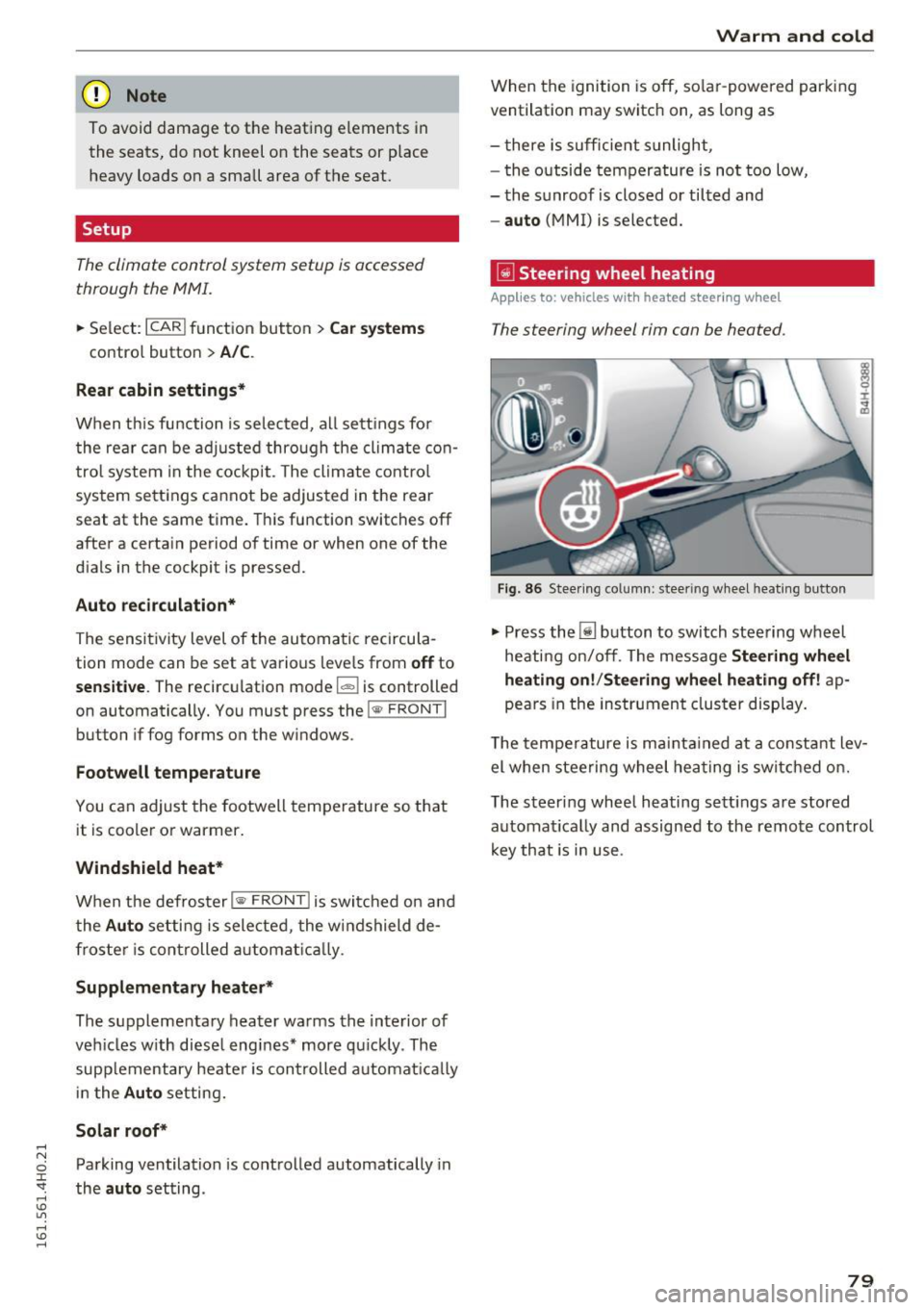
~ Steer ing wheel heating
Applies to: vehicles with heated steering wheel
T he steering wheel rim can be heated .
Fig. 86 Stee ring co lumn: steer ing wheel heating bu tton
.,. Press the [j] button to switch steering wheel
heating on/off. The message
Steering wheel
heating on!/Steering wheel heating off!
ap
pears in the instrument cluster display.
T he temperature is maintained at a constant lev
el when steering wheel heating is switched on.
The steering wheel heating sett ings are stored
automat ically and assigned to the remote control
key that is in use .
79
Page 82 of 302
Driving
Driving
Steering
Adjusting steering wheel position
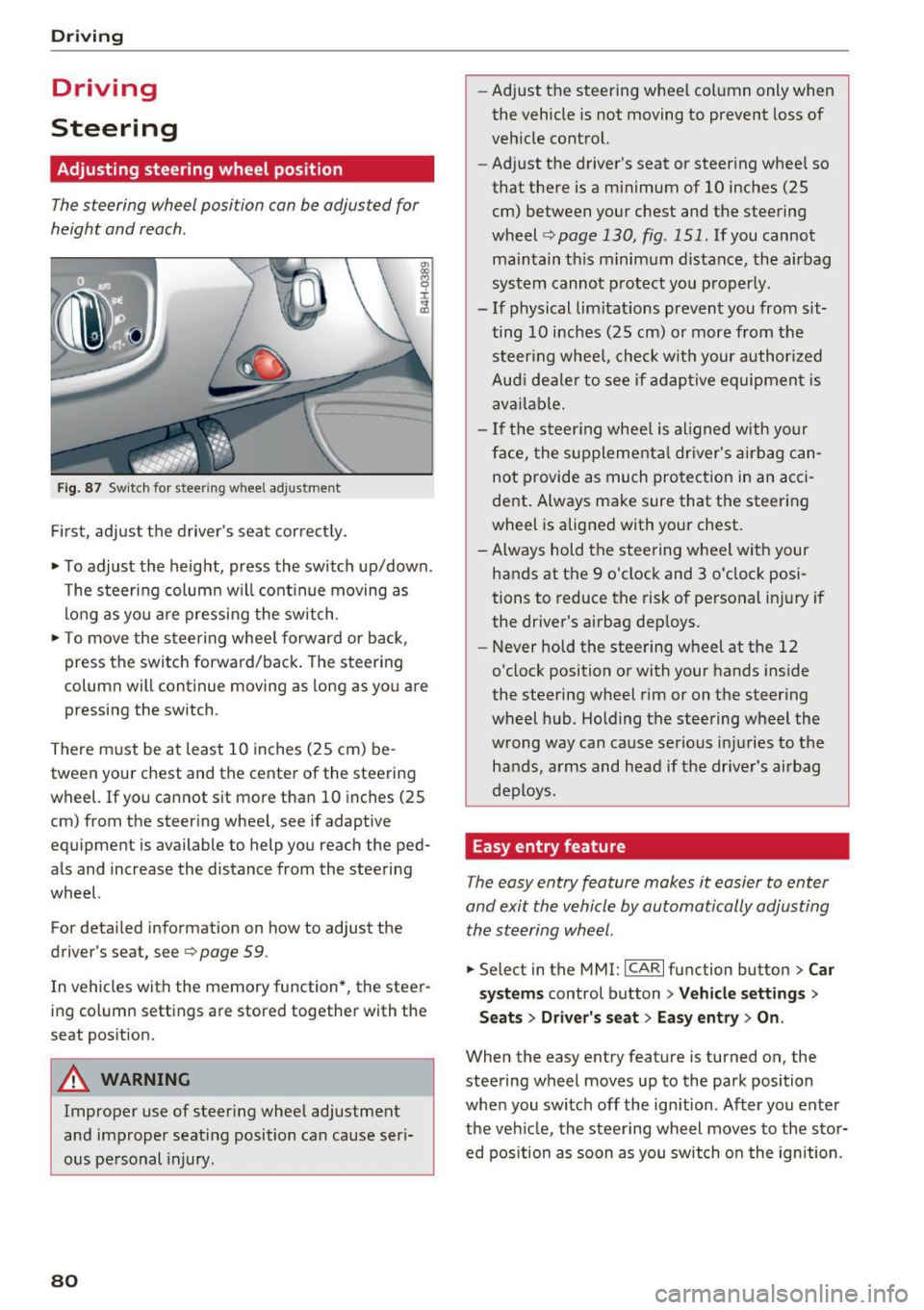
The steering wheel position can be adjusted for
height and reach .
Fig. 87 Sw it ch for steering wheel adjustme nt
Fi rst, adjust t he driver 's seat cor rect ly.
• To adjust the height, press the switch up/down.
The steer ing column w ill cont inue moving as
lo ng as yo u are pressing the sw itch .
• To move the steering whee l forward or back,
press the switch forward/back. The steering
column will continue moving as long as you are pressing the switch .
There m ust be at least 10 inches (25 cm) be
tween your chest and the center of the steering
wheel. If you cannot sit more than 10 inches (25
cm) from the steering whee l, see if adaptive
equipment is available to help you reach the ped
als and increase the distance from the steering
wheel.
For detai led information on how to adjust the
driver's seat, see
9 page 59 .
In vehicles with the memory function*, the steer
ing column settings are stored together with the
seat pos ition.
A WARNING
Improper use of steer ing whee l adjustment
and improper seating position can cause seri
ous personal injury.
80
-
- Ad just the steering wheel col umn only when
the vehicle is not moving to prevent loss of
vehicle control.
- Adjust the driver's seat or steering whee l so
that there is a minimum of 10 inches (25
cm) between your chest and the steering
wheel <=>
page 130, fig . 151. If you cannot
maintain th is minimum distance, the airbag
sys tem cannot p rotect yo u properly.
- If physical limitations prevent you from sit
ting 10 inches (25 cm) o r more from the
steer ing whee l, che ck wit h your author ized
Aud i dea le r to see if adap tive equipmen t is
ava ilable.
- If the steer ing whee l is aligned w ith yo ur
face, the s upplementa l dr iver's a irbag can
not provide as much protection in an acci
dent . Always make sure that the steering
wheel is alig ned with your chest.
- Always hold the steering wheel with your
hands at the 9 o'clock and 3 o'clock posi
tions to reduce the risk of personal in jury if
the dr iver's airbag dep loys.
- Never hold the stee ring wheel at the 12
o'clock position or with your hands inside
the steering wheel rim or on the steering
wheel hub . Holding the steering wheel the
wrong way can cause serious inj uries to the
hands, a rms and head if the drive r's airbag
deploys.
Easy entry feature
The easy entry feature makes it easier to enter
and exit the vehicle by automatically adjusting the ste ering wheel.
• Select in the MMI: ICAR lfu nction button> Car
s ys tems
control button > Vehicle settings >
Seats> Driver 's seat > Easy entr y> On.
When the easy entry feature is turned on, the
steering wheel moves up to the park position
whe n you switch off the ign ition . Af ter you enter
the veh icle, the steering wheel moves to the stor
ed pos ition as soon as you switch o n the ignition .
Page 83 of 302
Starting and stopping
the engine
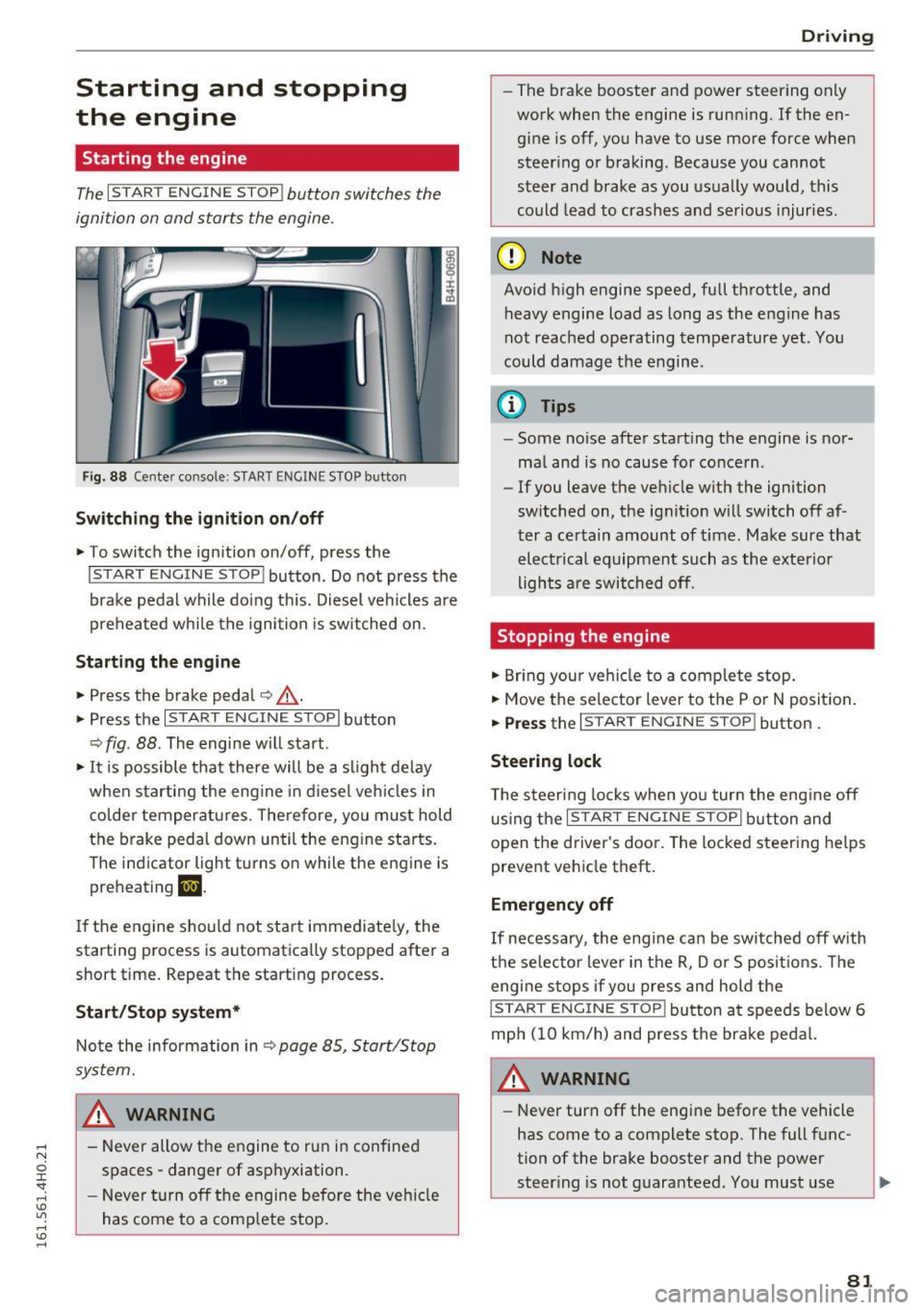
Starting the engine
The I S TAR T ENGIN E ST OP ! button switches the
ignition on and starts the engine.
Fig. 88 Cente r co nsole: S TART ENG IN E STOP b utton
Switching the ignition on /off
.,. To switch the ign ition on/off, press the
I START E NGIN E STOP ! button. Do not press the
brake pedal while do ing th is . Diesel vehicles a re
preheated while the ignition is sw itched on .
Starting the engine
~ Press the brake peda l c:> _&.
.,. Press the I START E NG IN E ST OPI button
c:> fig . 88 . The engi ne w ill s tart.
.,. It is possible that there will be a slight delay
when starting the eng ine in d iesel veh icles in
colder temperatures . There fore, you mus t hold
t h e brake pedal down un til the eng ine starts .
The ind icator light turns o n while the engine is
preh eating
m.
If the engine sho uld not start immed iate ly, the
starting process is automatica lly stopped after a
short time. Repeat the start ing process .
Start/Stop system*
Note the infor mation in c:> page 85, Start/Stop
system.
_& WARNING
- Never allow the engine to run in confine d
spaces - danger of asphyxiation.
- Never t urn off the engine before the ve hicle
has come to a comp lete stop .
Drivi ng
-The brake booster and power steer ing only
work when the engine is runn ing . If the en
g ine is off, yo u have to use more force when
steer ing o r braking . Because you cannot
steer a nd b rake as you usu ally would, this
could lead to crashes and serious injuries .
(D Note
Avoid h igh engine speed, full th rottle, and
heavy engine load as long as the eng ine has
not reached ope rating temperature yet . You
could damage the e ng ine .
© Tips
-Some noise after start ing the engine is nor
ma l and is no cause for co nce rn .
- If you leave the ve hicle w ith the ignition
switched on, the ig nit ion w ill switch off af
t er a ce rtain amount of time. Ma ke sure that
el ec trical equipment such as the exte rior
ligh ts a re swi tched off .
Stopping the engine
.,. Bring you r vehi cle to a complete stop.
.,. Move the selector lever to the P o r N posit ion .
.,. Press the I ST AR T EN GINE ST OP ! button.
Steering lock
The steer ing locks when yo u tur n the eng ine off
u sing the
I S TART ENG INE S TOPI bu tton and
o pen t he d river 's doo r. T he locked steering help s
prevent vehicle theft.
Emergency off
If necessary , the eng ine ca n be switched off w ith
t h e selec tor lever in the R, Do r S posit io ns. Th e
engine s tops if you press and hold the
!S TAR T EN GINE ST OP ! button a t speed s below 6
mph ( 10 km/h) and press the bra ke peda l.
_& WARNING
-Never turn off the engine be fore the vehicle
has come to a complete stop . The full func
tion of the brake booster and the power
steer ing is not guara nteed. You must use ..,.
81
Page 84 of 302
Driving
more force to turn or brake if necessary. Be
cause you cannot steer and brake as you
usually would, this could lead to crashes
and serious injur ies.
- For safety reasons, you should a lways park
yo ur vehicle with the selector lever in P.
O therwise, the ve hicle co uld inadverte ntly
r oll away.
- After the engine has been sw itched off , the
rad iator fan can con tinue to ru n for up to 10
mi nutes -even with the ig nition switched
off.
It ca n also swi tc h on again after some
t ime if t he coolant te mperature ris es as th e
resul t of a he at bu ildup o r if the eng ine is
hot an d the engine compartme nt is addi
t iona lly heated by the sun's rays.
([) Note
Do not s top the e ngine immed ia te ly after
h ard o r ex tende d driving. Keep the engine
r u nning for approxima tely two m in utes to
prevent excessive heat b uild- up.
Driver message in the instrument cluster
display
Turn off ignition before leaving car
This message appears and a warn ing tone sounds
if you open the driver's door when the ignition is
sw itched on.
Press brake pedal to start engine
T his message appea rs if you press the
I START ENGI NE STOP I butt on to st art the engine
and do not depress the brake pedal. The eng ine
can only be started if the bra ke pe dal is de
pressed.
Ill Is key in the vehicle ?
If the i nd icator light t urns on and the message
appears, the remote co ntro l key was removed
from the vehicle while the eng ine was ru nning. If
the ignition key is no t in the vehicle yo u w ill not
be ab le to sw itch on the ign ition or restart the
engine after it has been switched off . You will a l
so not be able to lock the ve hicle from the out
side.
82
Shift to P, othe rwi se vehicle can roll away.
Door s do not lock if lever is not in P.
This dr ive r mess age ap pears for safety re a sons if
the tra nsmission has not been shifted to the P
p os it ion when you switch the ignition off . Move
the se lecto r lever to the P position. Otherwise the
vehicle is not p rotected from rol ling and cannot
be locked .
fl Key is not recognized. Hold back of key
against marked area. See owner 's manual.
If the indic ator ligh t turns on and this mes sage
appea rs, there is a ma lfunction
¢page 83 .
Turn off ignition before leaving car . Battery is
discharging
This message appears if the driver's door is
opened wh ile the ign ition is sw itched on. Always
swi tch off the ignition if yo u are leav ing the ve hi
cl e. See a lso
¢ page 87.
Shift to P and turn off ignition before leaving
car, otherwise vehicle can roll away
This message appears if the driver's door is
opened wh ile the ignition is switched on and the
selector lever is not in the P position . S hi ft the
selector lever i nto the P posit io n and sw itch off
t h e ign it io n when yo u exit the vehicle . Otherwise
t h e ve hicle co uld ro ll. See a lso
¢ page 87.
Page 85 of 302
Starting the engine if there is a
malfunction
It may n ot be possible to start the engine under
certain circumstances, for example if the battery
in the vehicle key is drained, if interference hos
affected the key or if there is a system malfunc
tion .
i:;
~ ___ ____ !
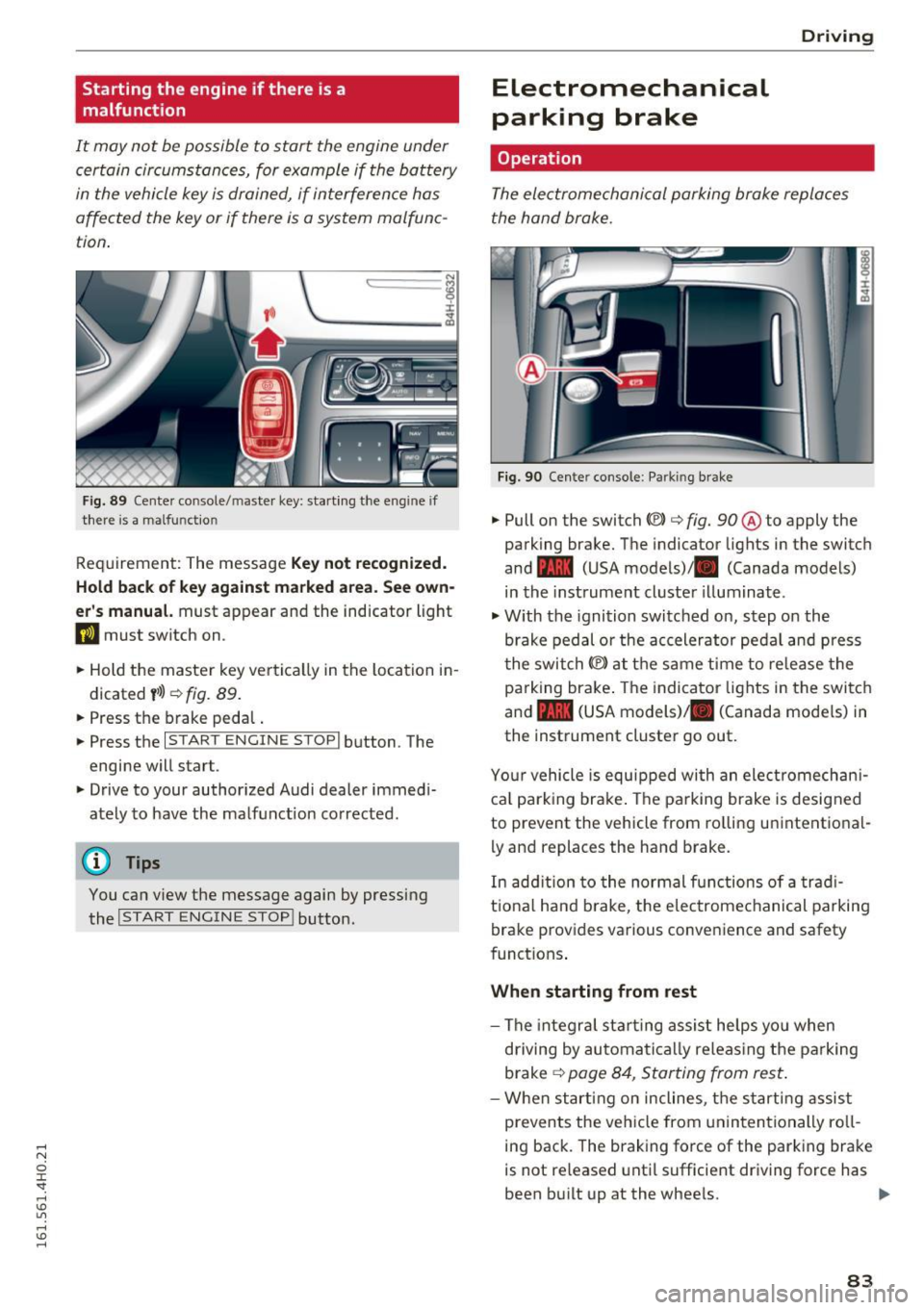
F ig . 89 Cen te r co nsole/ maste r key: start ing the e ng in e if
ther e is a malfu nct io n
Req uirement: The message Key not re cognized.
Hold back of key against marked area. See own
er' s manual.
must appear and the indicator light
DJ must switch on .
.. Hold the master key ve rtica lly in the location i n
d icated
y >l) ¢ fig. 89 .
.. Press the brake peda l.
.. Press the
I STAR T ENGINE STOP I button . The
engine will star t.
.. Drive to your author ized Audi dealer immed i
ately to have the malf unct ion corrected .
(D Tips
You can view the message again by pressing
the
I START ENGINE STOP ! button.
Electromechanical
parking brake
Operation D
rivi ng
The electromechanical parking broke replaces
t he hand broke.
Fig . 9 0 Cen te r conso le : Parkin g brake
.. Pull on the switch «vl c:> fig. 90 ® to apply the
parking brake. The indicator lights in the switch
and - (USA models)/ . (Canada models)
in the instrument cluster illuminate .
.,. With the ignition switched on, step o n the
brake pedal or the accelerator ped al and press
t he swi tch(® at the same time to re lease the
pa rking bra ke . The indicator lights in the swi tc h
and - (USA models)/ . (Canada mode ls) in
the instrument cluster go out .
Yo ur vehicle is equ ipped wi th an ele ct romechan i
ca l park ing brake . The parking brake is designed
to prevent the vehicle from ro lling unintentional
ly and replac es the hand brake.
In add ition to the normal functions of a trad i
t io na l h and brake, t he e lectrome chanical pa rking
brake provides va rious conveni ence and safety
funct ions .
When starting from rest
-The integra l st art ing assis t he lps yo u when
driving by automa tic a lly releas ing the pa rking
brake
¢ page 8 4, Star ting from res t.
-W hen start ing on incline s, t he s tarting assist
prevents the vehicle from unin ten tionally ro ll
ing back . The braking force of the parking bra ke
is not re leased unti l sufficient driv ing force has
been b uilt up at the wheels. .,.
83
Page 86 of 302
Driving
E m erg ency b ra ke function
An emergency b rake ensures that the veh icle can
be slowed down even if the
normal brakes fai l
¢ page 85, Emergency broking.
.&_ WARNING
-
Do not press the accelerator pedal inadver
tently if the vehicle is stationary but the en
gine is runn ing and a gear is selected. Other
w ise the vehicle will start to move immediate
ly and could result in a crash.
(D Tips
- If the parking brake is app lied with the igni
tion switched off, the indicator lights in the
switch and -(USA models)/ . (Cana-
da models) in the instrument cluster will go
out after a ce rtain per iod of t ime.
- Occasional noises when the parking brake is applied and released are normal and are not
a cause for conce rn.
- When the vehicle is parked, the park ing
brake goes thro ugh a self-test cycle at regu
l a r i ntervals. Any associa ted noises a re nor
mal.
Parking
" Press the brake ped al to stop the vehicle.
" Pull the switch
«el} to set the parking brake .
" Se lect the P selector lever position
c:> poge 112.
"Turn the eng ine off c> &_ .
"When on incl ines or declines, turn the steering
wheel so that your vehicle will roll into the c urb
if it beg ins to move .
.&_ WARNING
-When you leave your vehi cle -even if on ly
br iefly -always ta ke the ignition key with
yo u. This applies par ticularly when children
remain in the vehicle . Otherwise the chil
dren could start the engine, release the
parking b rake o r operate elect rical eq uip
ment (e.g . power windows). There is the r isk
of an accident.
84
-
- When the veh icle is locked, no one -pa rtic u
larly not chi ldren should rema in in the vehi
cle. Locked doors make it more d ifficult for
emergency workers to get into the vehicle -
putting lives at risk .
Starting from rest
The starting assist function ensures that the
parking broke is released automatically upon starting.
Stopping and applying park ing brake
" Pull the switch
C®l to apply the parking brake .
Starting and automatically releasing the
park ing bra ke
" When you sta rt to drive as usua l, the par king
brake is automatically released and your vehicle
beg ins to move.
When stopping at a traffic signa l or stopping in
city traffic, the parking brake can be applied. The
vehicle does not have to be held with the foot
brake . The parking brake eliminates the tendency
to creep w ith a dr ive range engaged. As soon as
you drive off as usual, the parking brake is re
leased a utomat ically and the vehicle starts to
move .
Starting on slopes
When starting on incl ines, the sta rting assist pre
vents the vehicle from un intent iona lly rolling
back. The braking force of t he parking brake is
not released u nti l sufficient dr iv ing force has
been built up at t he wheels .
(D Tips
Fo r safety reasons, the park ing brake is re
l eased automatically only when the driver's
safety be lt is e ngaged in the b uck le.
Page 89 of 302
-The windshield is being defrosted~ page 79.
-The brake pedal is pressed sever al t imes in a
row .
- T he battery charge level becomes too low .
- High power cons umption .
Switching the ignition off automa tic ally
To prevent the battery from dra ining, the ignition
will sw itch off
auto mati call y when all of the fol
lowing cond itions have been met:
- The vehicle has already been driven.
- The eng ine has been turned
off by the Start-
Stop -System*.
- The driver's door is opened .
- The driver's seat bel t is removed.
- The brake pedal is not p ressed down.
- The veh icle is stationary.
In this case, the activated low beam will be re
p laced by the s ide marker lights. The side marker
lights will switch
off after appro ximately 30 mi
nutes or when you lock the veh icle.
If the Start-Stop System has
not turned off the
engine or if you have sw itched the Start-Stop sys
tem
off manually , the ignition will not be auto
mat ica lly switched
off and the engine w ill contin
ue to run~& .
& WARNING
Never allow the engine to r un in confi ned
spaces - da nger o f as phyxia tio n.
(D Tips
-
If you shift in to the D, Nor S posit ions after
shifti ng into reve rse, the veh icle must be driv
en faster th an 6 mph (10 km/h) in order for
t he eng ine to swi tc h
off aga in.
D rivi ng
Switching the Start-Stop-System on/off
manually
Applies to: vehicles with Start-Stop-System
If you do not wish to use th e system, you can
switch it off manually.
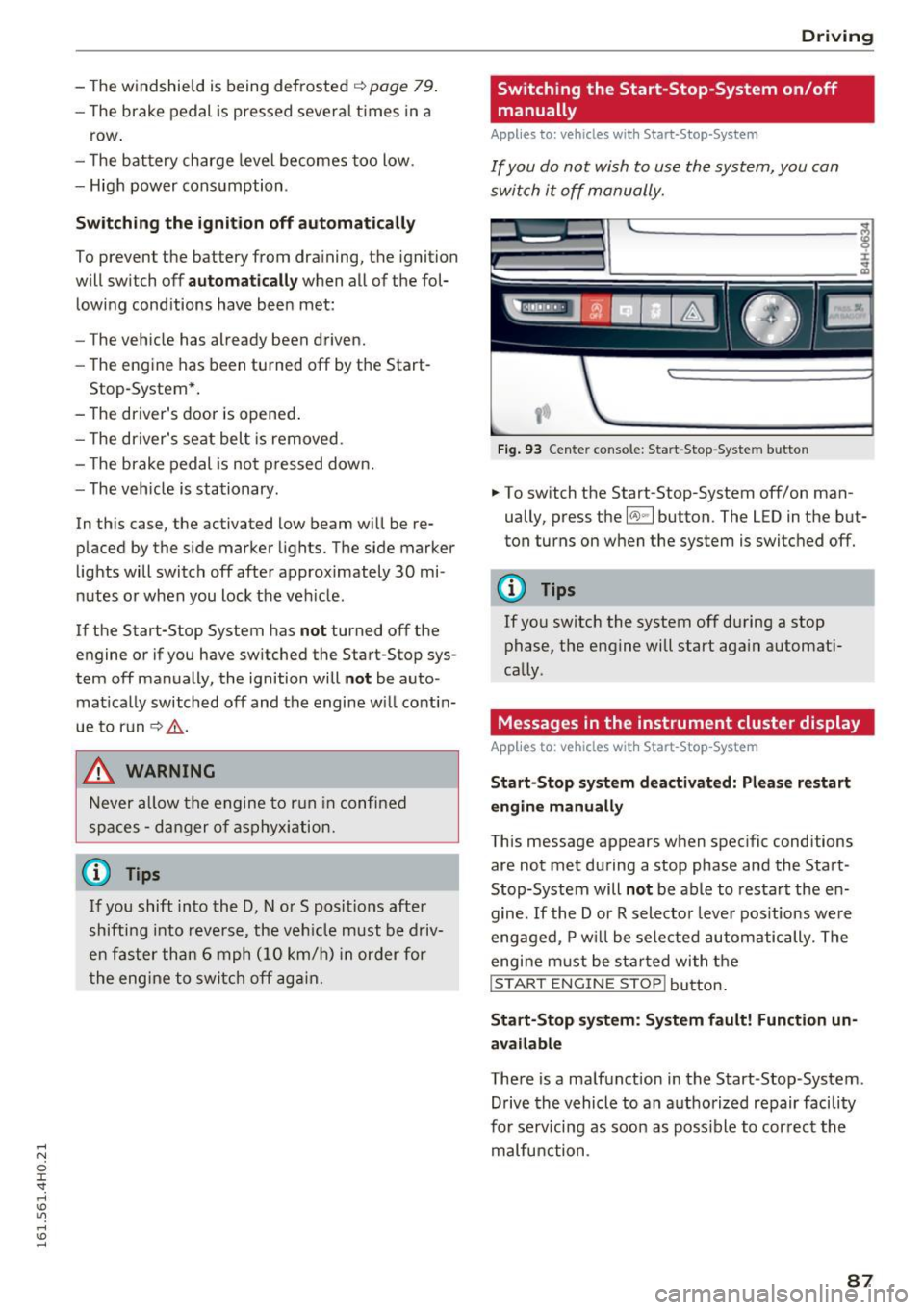
Fi g. 93 Center console: Start-Stop -System button
.. To switch the Start-Stop-System off/on man
ually, press the
l(A) ~ I button. The LED in the but
ton turns on when the system is switc hed
off.
(D Tips
If you sw itch the system off during a stop
phase, the engine will start aga in automati
cally .
Messages in the instrument cluster display
Applies to: vehicles with Start-Stop -System
Start-Stop system deactiv ated: Plea se restart
engin e manually
This message appears when spec ific conditions
are not met during a stop phase and the Start
Stop-System will
not be able to resta rt the en
gine.
If the Dor R selector leve r pos itions we re
engaged, P w ill be sele cted automatically. The
engi ne m ust be st arted wi th t he
I START ENGINE STOP! button .
Start-Stop s yst em : S y stem fault! Function un
available
There is a malfunction in the Start-Stop-System.
Drive the vehicle to an a uthorized repair facility
for serv icing as soo n as poss ible to cor rec t the
malfunction .
87
Page 91 of 302
...,
A WARNING ,~ -
- Always pay attention to traffic even when
the cruise control is sw itched on. You are al
ways respons ible for your speed and the dis
tance between your vehicle and other
vehicles.
- For safety reasons, the cruise control should
not be used in the city, in stop-and-go traf
fic, on twisting roads and when road condi
tions are poor (such as ice, fog, gravel,
heavy ra in and hydroplaning) -risk of acci
dent.
- T urn off the cruise control temporar ily when
entering turn lanes, highway exit lanes or in
construction zones.
- Please note that inadvertently "resting"
your foot on the accelerator pedal causes
the cruise control not to brake. This is be
cause the cruise control is overridden by the
driver's acceleration.
- If a brake system ma lfunction such as over
heating occurs when the cruise control sys
tem is switched on, the braking function in
the system may be switched off. The other
cruise control functions remain active as
long as the indicator light
mI!Jm (US mod
els)
;ii (Canadian models) is on.
The brake lights illum inate as soon as the
brakes decelerate automatically.
Changing speed
.,. To increase/decrease the speed in increments,
tap the lever in the
010 direction Q page 88,
fig. 94.
.,. To increase/decrease the speed quickly, hold
the lever in the
010 direction until the de
sired speed is displayed.
You can a lso press the accelerator pedal down to
increase your speed, e.g. if you want to pass
someone . The speed you saved earlier will re-
"' sume as soon as you release the accelerator ped-
o
~ al. .... oJ) Lil
.... oJ) ....
Driving
If, however, you exceed your saved speed by
6 mph (10 km/h) for longer than S minutes, the
cruise control w ill turn off temporarily. The green
symbol
AiW~1~ (US models) ! l'I in the display is
rep laced with a white symbol. The saved speed
remains the same .
Presetting your speed
You can preset your desired speed while the vehi
cle is not moving.
... Switch on the ignition.
.,. Pull lever into position
(D q page 88, fig. 94.
.,. Press the lever in the 0 or 0 direction to in-
crease or decrease your speed .
.,. Release the lever to save that speed.
This function makes it possible, for example, to
save the speed you want before driving on the highway . Once on the highway, activate the
cruise control by pulling the lever toward
(D.
Switching the system off
Temporary deactivation
.,. Press the brake pedal, or
.,. Press the lever into position@ (not clicked into
place)
q page 88, fig. 94, or
.,. Dr ive for longer than S min utes a t more than
S mph (10 km/h) above the stored speed.
Switching off completely
.,. Press lever into pos it ion @ (clicked into p lace),
or
.,. Switch the ignition off .
The system retains the saved speed if you deacti
vate the cruise control temporarily. To resume
the saved speed, release the b rake pedal and pull
the leve r to position (!).
Switching the ignition off erases the saved speed.
A WARNING
You should only return to the saved speed ifit
i s not too fast for the current traffic condi
tions - risk of an accident!
89