fuel AUDI TT 2013 Owner´s Manual
[x] Cancel search | Manufacturer: AUDI, Model Year: 2013, Model line: TT, Model: AUDI TT 2013Pages: 262, PDF Size: 65.91 MB
Page 27 of 262
Each display type in the Start menu cont ains a
submenu with additional options.
Set Clock ¢ page 26
Compu ter ¢page 26
Acoust ic park assist*
¢page 78
Speed warning ¢ page 76
Language¢
page 26
Units (distance, fuel consump
tion, temperature) ¢
page 26
Tire pressure monitoring
¢page 214
Lap timer *¢ page 29
Lighting* ¢ page 42
Wiper (service position)
¢page SO
Window¢ page 40
Doors (unlocking and locking
mode, for example Auto-lock)
¢ page 34, ¢ page 34
Check Service ¢ page 2 8
Chassis number ¢page 238
Engine oil temperature*
¢ page 26, ¢ page 28
Registered keys ¢ page 32
Menu off All of the messages shown in
veh icles without menu display
appear on the disp lay s creen.
Navigating the menu
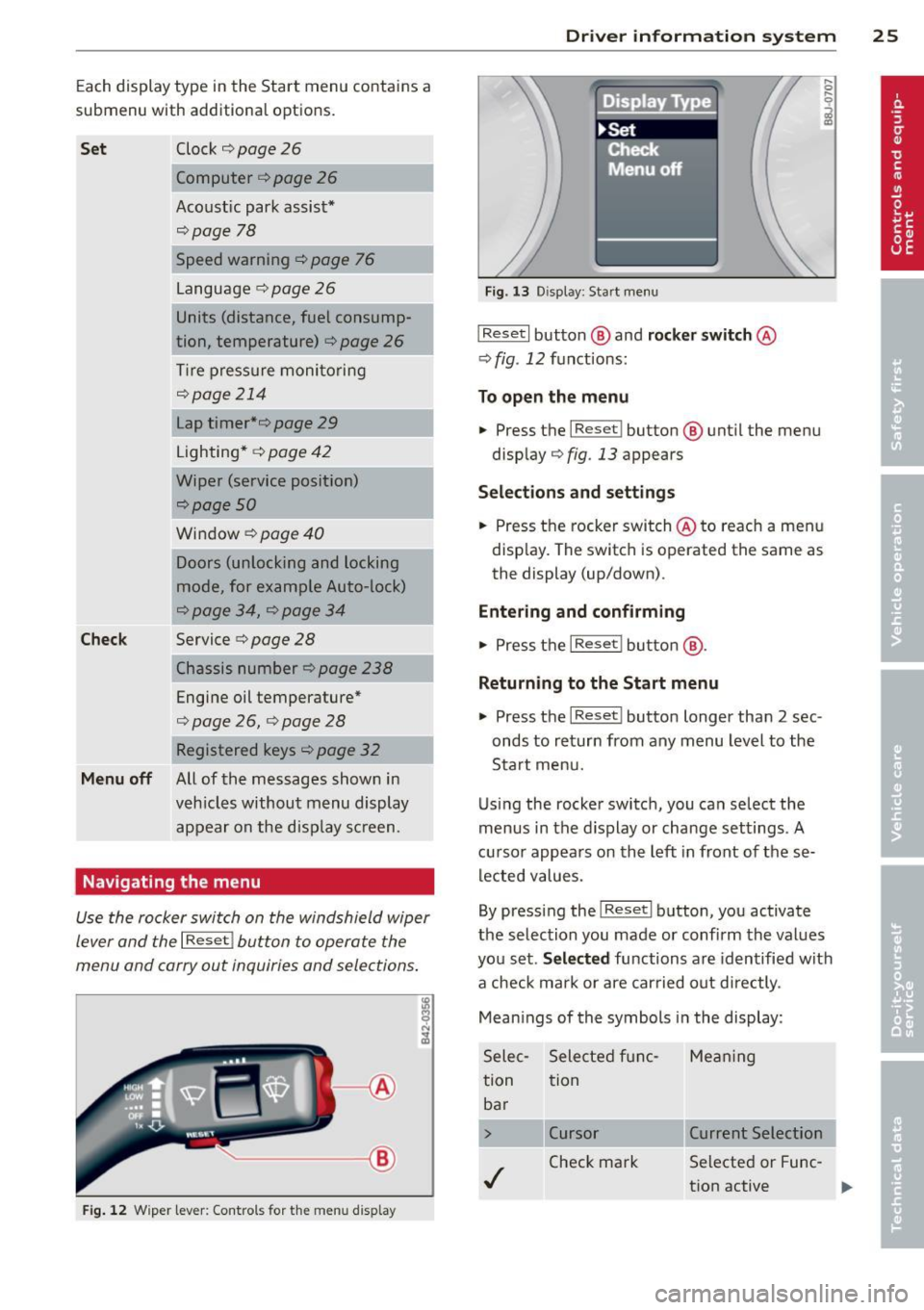
Use the rocker switch on the windshield wiper
lever and the
I Reset ! button to operate the
menu and carry out inquiries and selections .
l8
~ ;A
®
Fig. 12 W iper lever: Cont rols fo r th e me nu display
Dr iver in formation system 25
Fig. 13 D isplay: Start menu
I Reset I button @ and rocker switch @
¢ fig. 12 fu nctions:
To open the menu
.. Press t he I Reset I button @ until the menu
disp lay¢
fig . 13 appears
Sel ections and sett ing s
.. Press the rocker switch @to reac h a men u
disp lay. The switch is operated the same as
the display (up/down) .
Entering and confirming
.. Press t he I Reset ! butto n@ .
Returning to the Start menu
.. Press the I Reset I button longer than 2 sec
onds to return from any menu level to the
Start menu.
Using the rocker switc h, you can se lect the
menus in the d is p lay or change settings. A
cu rso r appears on th e left in front of these
lec ted values.
By pressing the
I Reset I button, you activate
the selection you made or confi rm the values
you set.
Selected functions are identified with
a check ma rk or are carried out d irectly .
Mean ings of the symbols in the display:
Sele c- Selected f unc- Me an ing
tion tion
ba r
> Cursor Current Selection
./
Check mark Selected or Fune
-
t ion active
...
Page 29 of 262
The efficiency program can help you to use
less fuel.
It eva luates driving information in
reference to fuel consumption and shows oth
er equipment influencing consumption as we ll
as shift recommendations. Fuel economy
messages
c> page 2 7 prov ide tips for effi
cient dr iv ing .
The efficiency program uses distance and con
sumption data from trip computer
1. If the
data are deleted in the efficiency program,
those values are also reset in trip computer
1.
Other equipment
Applies to vehicles: with trip computer with efficiency
program
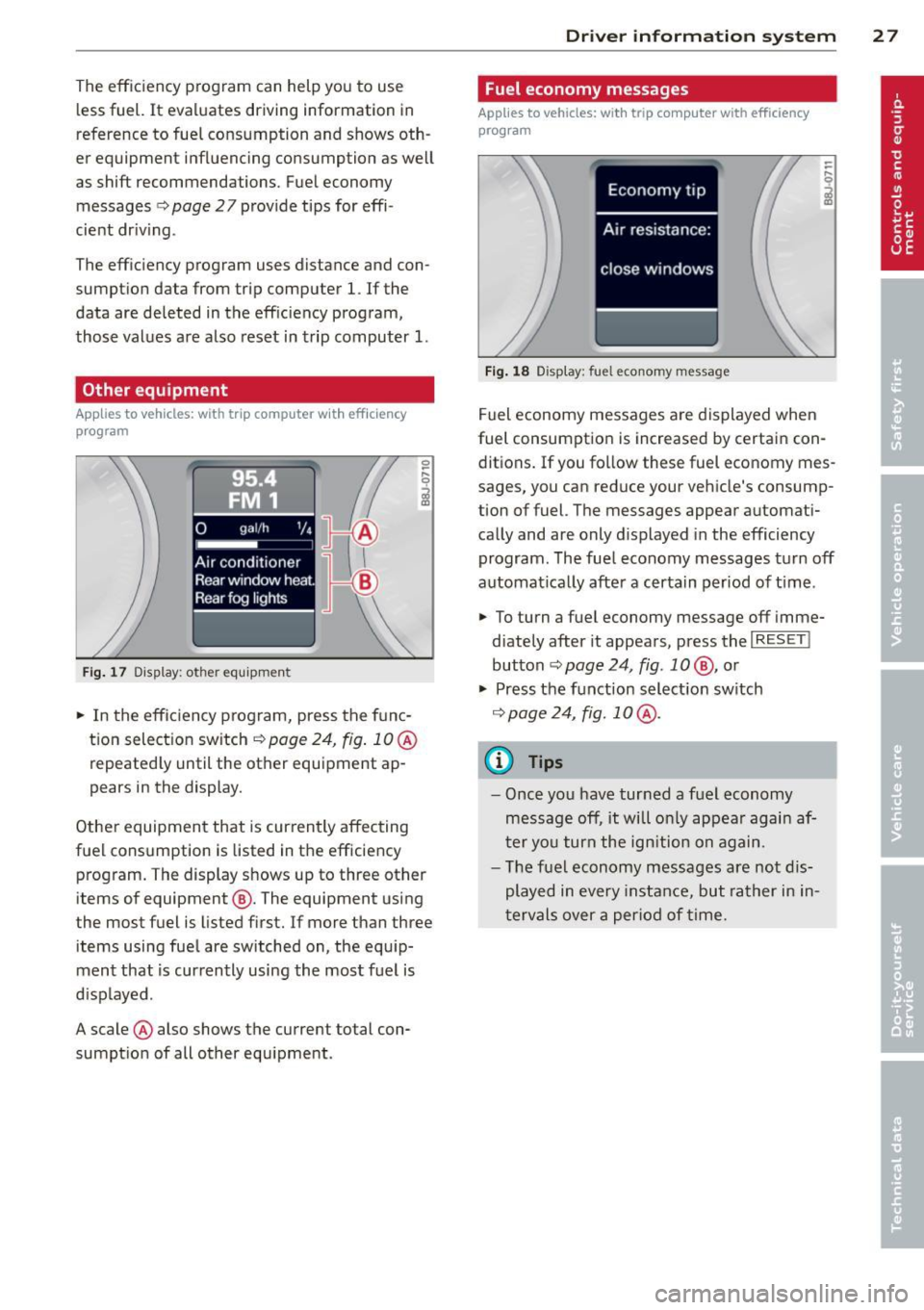
Fig. 17 Display: other equ ipment
.. In the effic iency program, press the func
tion select ion switch
c> page 24, fig . 10 @
repeatedly until the other equipment ap
pears in the display.
Other equipment that is currently affecting
fuel consumption is listed in the efficiency
program. The display shows up to three other
items of equipment @. The equipment using
the most fuel is listed first. If more than three
items using fuel are switched on, the equip
ment that is currently using the most fuel is
displayed .
A scale @also shows the current total con
sumption of all other equipment.
Driver in format ion syste m 2 7
Fuel economy messages
Applies to vehicles: with trip computer with efficiency
program
Fig. 18 Display: fuel economy message
Fuel economy messages are displayed when
fuel consumption is increased by certain con
ditions. If you follow these fuel economy mes
sages, you can reduce your vehicle's consump
tion of fuel. The messages appear automati
cally and are only displayed in the efficiency
program. The fuel economy messages turn off
automat ically after a certain period of time .
.. To turn a fuel economy message off imme-
diately after it appears, press the
I RESET !
button ¢ page 24, fig. 1 0 @ , or
.. Press the function selection switch
c> page 24, fig. 10 @ .
@ Tips
-Once you have turned a fuel economy
message off, it will only appear again af
ter you turn the ign ition on again.
- The fuel economy messages are not dis
played in every instance, but rather in in
tervals over a period of time.
Page 32 of 262
30 Driver information system
Displaying intermediate time and pausing
timing
• To disp lay an intermediate time, press the
l ower section of the wiper switch @. The in
termediate time appears in line
CD and is
marked with*.
• To pause timing, press the lower section of
the wiper switch @again.
• To continue timing, press the upper section
of the w iper switch @.
If t iming is paused, you can conti nue it later
even if you switch the ign it ion off.
Evaluating times and continuing or
resetting timing
Appl ies to vehicles: with lap timer
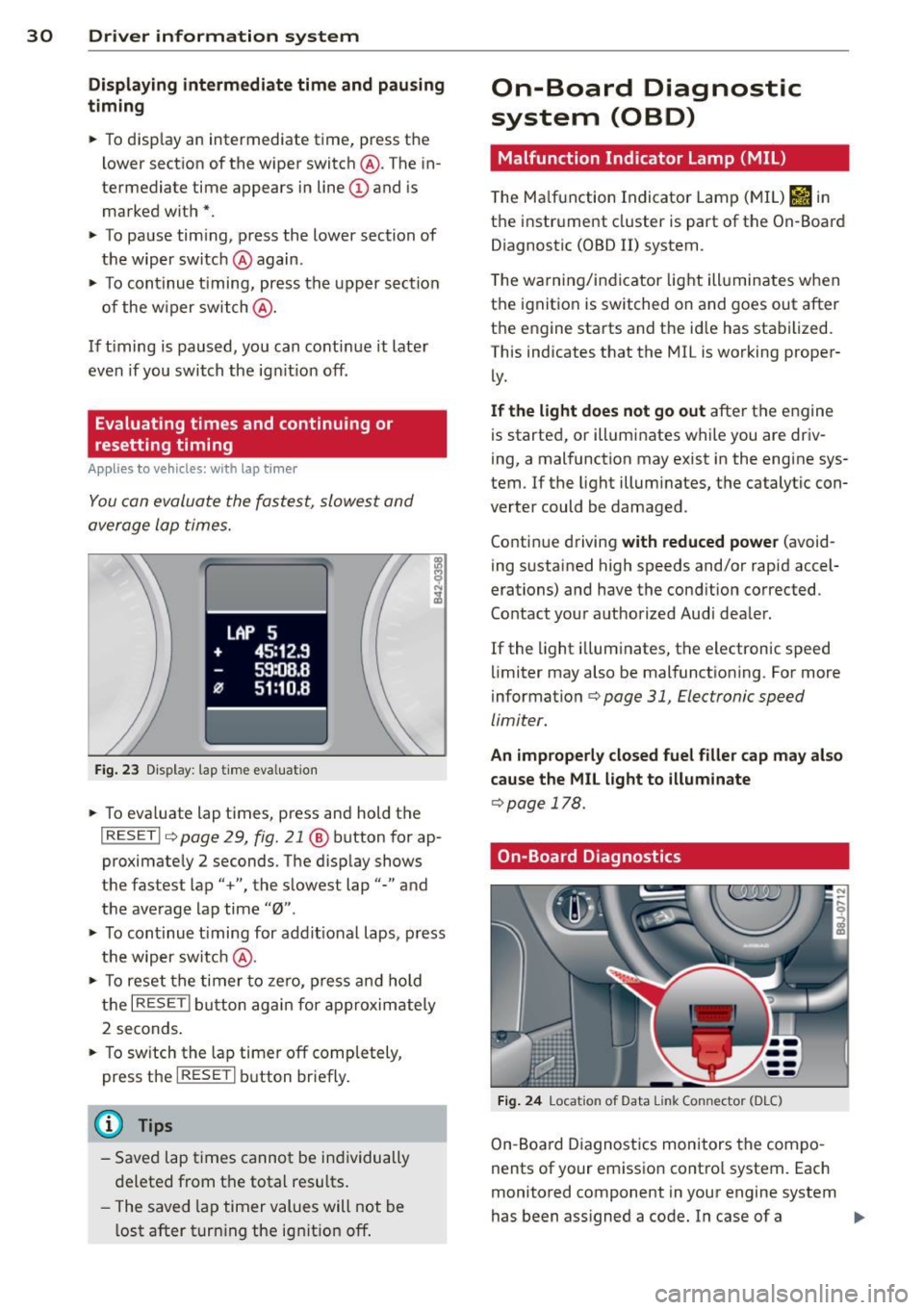
You can evaluate the fastest, slowest and
average lap times.
LAP 5
+ 45:12.9
59:08.B
flJ 51 :10.B
Fig. 23 Display: lap time evaluation
• To eva luate lap times, press and hold the
I RESET I ¢ page 29, fig. 21 @ button for ap
proximately 2 seconds. The display shows
the fastest lap"+", the slowest lap"-" and
the average lap time "0".
• To continue t iming for addit ional laps, press
the wiper switch @.
• To reset th e timer to zero, press and hold
the
I RESET I button again for approximate ly
2 seconds.
• To switch the lap timer off completely,
press the
I RESET I button briefly.
@ Tips
-Saved lap times cannot be individually
deleted from the total results.
- The saved lap timer values will not be
l ost after turning the ignit ion off .
On-Board Diagnostic
system (OBD)
Malfunction Indicator Lamp (MIL)
The Malfunction Indicator Lamp (MIL) &ii in
the instrument cluster is part of the On-Board
Diagnostic (OBD II) system.
T he warning/indicator light ill uminates when
the ignition is switched on and goes out after
the engine starts and the id le has stabilized.
This indicates that the MIL is working proper
ly.
If the light does not go out after the engine
is started, or illuminates while you are driv
ing, a malfunction may exist in the engine sys
tem .
If the light illuminates, the catalytic con
verter could be damaged .
Continue driving
with reduced power (avoid
ing sustained high speeds and/or rapid accel
erations) and have the condition corrected.
Contact your authorized Audi dealer.
If the light il luminates, the electronic speed
limiter may also be malfunctioning. For more
information¢
page 31, Electronic speed
limiter.
An improperly closed fuel filler cap may also
cause the MIL light to illuminate
¢page 178.
On-Board Diagnostics
Fig. 24 Location of Data Link Con nector (O LC)
On-Boa rd Diagnostics monitors the compo
nents of your emission contro l system. Each
monitored component in your engine system
has been assigned a code. In case of a .,.
Page 33 of 262
malfunction, the component will be identified
and the fault stored as a code in the control module memory.
The MI L light may a lso illuminate if there is a
l eak in the on-board fue l vapor recovery sys
tem . If the light illuminates after a refuelling,
stop the veh icle and make sure the fue l filler
cap is properly closed ¢
page 178.
In o rder to make an accurate diagnosis, the
stored data can only be displayed using spe
cial diagnostic equipment (gener ic scan tool
for OBD).
I n o rder to connect the special diagnostic
equipment, push the plug into the Data Link
Connector (DLC) . The DLC is located to the
right of the hood release ¢
fig. 24.
Your authorized Audi dealer or a qualified
service station can interpret the code and per
form the necessary repair .
A WARNING
Do not use the diagnostic connector for
personal use. Incorrect usage can cause
malfunctions, which can increase the risk
of a coll is ion!
Electronic speed limiter
-
Your veh icle may be factory equipped with
tires that are rated for a maximum speed of
130 mph (210 km/h) . T his is less than the
maximum speed o f yo ur vehicle. To reduce the
risk of s udden tire failure and loss o f control if
the vehicle is operated at excessive speeds,
your vehicle also has an electronic speed limit
er. The electronic speed limiter prevents your
veh icle from going faster than the tire speed
rating. For more informat ion ¢
page 207 .
If the engine control unit rece ives fau lty vehi
cle roadspeed signa ls, the Ma lfunction Indica
tor Light (MIL)
(ii w ill illuminate. If this oc
curs, contact the nearest author ized Audi
deale r for assistance .
Driver in formati on sys tem 3 1
S models
Your vehicle's top speed is elect ronically limit
ed to 155 mph (250 km/h) .
If the engine control unit receives faulty veh i
cle roadspeed signals, the Malfunction Ind ica
tor Lamp (MIL)
¢"4 will illumina te . If this oc
curs, contact the nearest authorized Audi
dealer for assistance.
RS model s
Your vehicle's top speed is electron ically limit
ed to 175 mph (280 km/h).
If the engine control unit receives faulty vehi
cle roadspeed signals, the Malfunction Ind ica
tor Lamp (MIL)
¢"4 will illuminate . If this oc
cu rs, contact the nearest authorized Audi
dealer for assistance.
A WARNING
-
A lways observe the posted speed lim its
and adjust your speed to suit prevailing road, traffic and weather conditions. Never
drive your vehicle faster than the maxi
mum speed rating of the tires installed.
Page 63 of 262
When should the roof rack be removed?
-Before going through an automatic car wash
(it is best to ask the car wash operator for
advice).
- When not in use, to reduce fuel consump
tion, wind noise and to guard against theft.
_& WARNING
- Use of an unapproved roof rack or incor
rect mounting of an approved roof rack
can cause the roof rack or the items at
tached to it to fall off the roof onto the road .
- Objects falling from the roof of a vehicle
can cause a crash and personal injury .
- Only mount the system between the
markings shown in
¢ page 61, fig. 62.
- The roof rack system must be installed
exactly according to the instructions pro
vided.
(D Note
- Your vehicle warranty does not cover any
damages to the vehicle caused by using
roof racks or mounting structures not
approved by Audi for your vehicle. The
same applies to damage resulting from
i ncorrect roof rack installation.
- Always check the roof rack mountings
and hardware before each trip and dur
ing a trip to make sure everything is se
curely tightened.
If necessary, retighten
the mount ings and check the entire sys
tem from time to time.
- After mounting a roof rack system, or
whe n you transport objects on the roof
of your vehicle, the height of the vehicle
is naturally increased. Be careful when
driving under low br idges or in parking
garages for example. This could cause
damage to the load and even the vehicle
i tself .
Seats and storage 61
Mounting locations
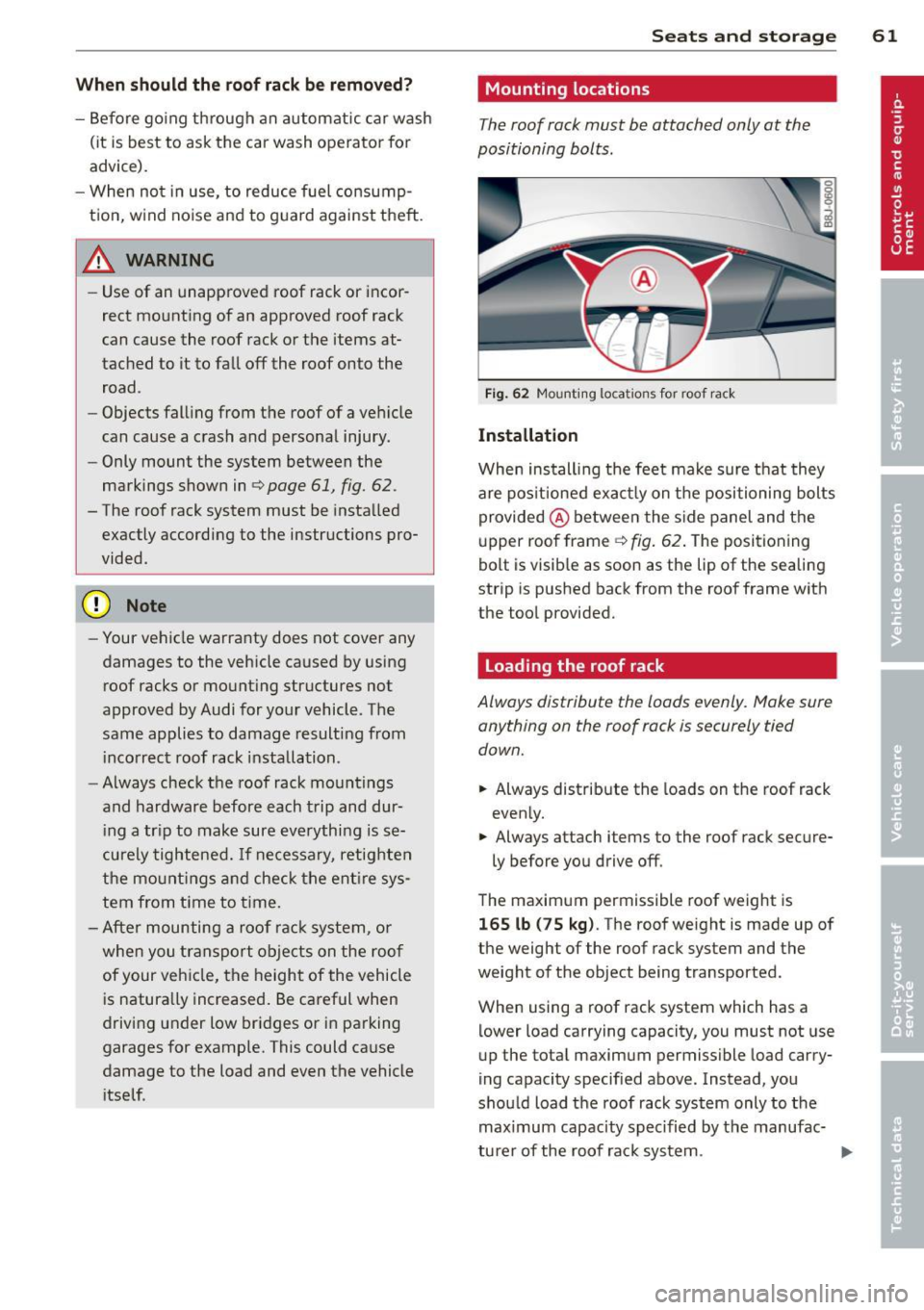
The roof rack must be attached only at the
positioning bolts.
Fig. 62 Mounting locat ions for roof rac k
Installation
When installing the feet make sure that they
are pos itioned exact ly on the positioning bolts
provided @ between the side panel and the
upper roof frame ¢
fig. 62. The positioning
bolt is visib le as soon as the lip of the sealing
strip is pushed back from the roof frame with
the tool provided.
Loading the roof rack
Always distribute the loads evenly. Make sure anything on the roof rack is securely tied
down.
.,. Always distribute the loads on the roof rack
evenly.
.,. Always attach items to the roof rack secure-
ly before you drive off .
The maximum permissible roof weight is
165 lb (75 kg). The roof weight is made up of
the weight of the roof rack system and the
weight of the object being transported.
When using a roof rack system which has a
lower load carrying capacity, you must not use
up the total maximum permissible load carry
ing capacity specified above. Instead, you
should load the roof rack system only to the maximum capacity spec ified by the manufac-
turer of the roof rack system . ..,.
Page 71 of 262
Defrost~
The windshield and side windows ore defrost
ed or cleared of condensation as quickly as
possible .
.,. To turn on the defogger/defroster, press the
~button <=>
page 66, fig. 68 .
.,. To turn the defogger/defroster off, press
the ~ button aga in, or the
! AUTO ! button.
T emperature is controlled automatically . T he
maximum amount of a ir flows mainly from
vents 1
¢ page 68 .
A small amoun t of air flows from vents 2 -if
they are open <=>
page 68.
Pressing the~ button switches off recircula
tion mode.
Automatic operation ~
Standard operating mode at all times of the
year.
Turnin g on autom atic operation
.,. Set the temperature you want .
.,. Press the
!AUTO I button <=> page 66, fig. 68 .
Automatic operation ensu res constant tem
perat ures in the inter ior and dehum idifies the
air inside the vehicle . Air temperature, vol
ume , and distribution are controlled automat
ically to reach or maintain the desired interior
temperature as quickly as possib le. Fluctua
tions in exterior temperature and the effects
of temperature from the posi tion o f the sun
are compensated for automat ically.
Manual air recirculation mode~
The recirculation mode prevent s polluted out
side air from entering the vehicle interior .
Swit c hi ng on air r ecircu lat ion
.,. Press the button~<=> page 66, fig. 68
¢ _&. .
Sw itching off air r ecir culation
.,. Press the but ton ~ again, or
.,. Press the
!AUTO I button, or
Warm and c old 69
.,. Press the~ button .
In recircu lation mode, air is drawn from the
vehicle interior, filtered, and recirculated . We
recommend that yo u se lect reci rculation
mode
briefly <=>.& under the fo llowing condi
tions:
When dr iv ing thro ugh a tunnel or in a traffic
jam so that exhaust fumes and odors cannot enter the vehicle interior .
_&. WARNING ~
You should not use the recirculation mode
for an extended period s ince no fresh air is
drawn in, and with the air condit ioning
switched off the windows can fog up -th is
increases the r isk of an accident!
A/C operation ~
Switching on A /C
.,. Press the !A/Cl button <=> page 66, fig. 68 .
Switching A/C off
.,. Press the IA/C l butto n again .
T he air is not coo led and humidity is not re
moved when cooling mode is switched off.
This can cause fog on the windows. Cooling mode switches off automatically when the
outside temperature is be low zero .
(D Tips
If the LED in the switch stays on after A/C
ope ration has been switched off(= switch
i ng the A/C off), there is a fault in an air
cond itioning component. Please consult
an authorized Audi dealer when there is an
operat ing problem.
Using the climate controls economically
Economical use of the clima te controls helps
to save fuel .
When climate control is working in cooling
mode, engine performance is reduced and
fuel consumpt ion is affected . To keep the time.,.
Page 72 of 262
70 Warm and cold
the air conditioning is on as short as possible,
you should do the fo llowing:
... If you wo uld like to save f uel , sw itch the air
cond ition ing off .
... If you open the windows whi le driving,
switch the air conditioning off .
... If the vehicle is extremely hot due to the
heat of the sun, brief ly open doors and win
dows.
@) For the sake of the environment
When you save fuel, you reduce emissions
from the vehicle.
Rear window defogger
The rear window defogger clears the rear win
dow of condensation .
... Press the [iii) button c:> page 66, fig. 68 to
turn the rear window defogger on and off.
The rear window defogger works only when
the eng ine is running. The indicator light in
the button illuminates when t he rear window
defogger is turned on.
The rear window defogger is switched off au
tomatically after 10 to 20 minutes, depend ing on the outside temperature.
At very low outside temperatures, the rear
window defogger can be switched on continu
ously by pushing the
[iii) button for more than
2 seconds. This remains stored unt il the igni
tion is sw itched off. A rear window defogger
that was switched on also remains stored for
15 minutes after the ignition is switched off .
If the engine is restarted within these 15 mi
nutes, the rear window defogger is act ivated
for 10 to 20 minutes, depend ing on outs ide
temperature . With a vehicle that is parked for
a short time, the rear w indow defogge r does
not need to be ma nually activated again.
@, For the sake of the environment
As soon as the rear window is clear, you
should switch the rear window defogger off.
The reduced power consumption has a
beneficial effect on fuel consumption .
Heated seats
Applies to vehicles : w ith hea ted seats
The seat cushion and the seatback of the
front seats can be heated electrically.
... Press the heated seats button I-J + I
c:> page 66, fig. 68 to set the level of heating
desired.
The range of cont ro ls goes from 1 to 3. Th e
heat setting selected is shown by LEDs above
the button.
A WARNING
-Indiv iduals with reduced sens itivity to pain
or temperature could develop burns when
using the seat heating function . To reduce
the r isk of injury, these ind ividuals should
not use seat heating.
~ Note
To avoid damage to the heating elements
in the seats, do not kneel on the seats or
place heavy loads on a small area of the
seat.
Page 76 of 262
74 On the road
Only afte r the vehic le has come to com
p lete stop, should you f irm ly set the park
ing brake and either move the gearshift
lever into 1st. gear (manual transm iss ion)
or move the selector lever into "P" (Auto
mat ic transm ission).
Parking
Parking
.,. Stop the veh icle using the brake pedal.
.,. Set the parking brake firmly .
.,. Switc h off the eng ine.
.,. Move t he selecto r lever in to the P position
(autom atic tr an smi ssio n) or move the gear
shift lever into 1st . gear
(manual t ransmi s
sion ).
.,. Remove the ign ition key from the ignit ion
lock.
In addition on incline s and grad es
.,. Turn the steering whee l so that your vehicle
wi ll ro ll against the curb in case it should
start to move.
A WARNING
This is how you can reduce the risk of in
jury when leaving your veh icle.
- Never park the vehicle where it can come in contact with dry grass, sp illed fuel or
any other flammable mater ials .
- Never allow anyone - especially small
children -to remain in the vehicle when
it is locked. Locked doors make it more
difficult for rescuers to access the pas
senger compartment in the event of an
emergency. Danger to life!
- Never leave children unsupervised in the
vehicle. Children could re lease the park
ing brake o r move the gea rshift lever out
of gear. The vehicle could start to roll
away and cause an accident .
- No matter what the season is, the tem
perature in a parked vehicle can reach
dangerous levels .
Starting on hills
Applies to vehicles: wi th hill hold assist
Hill ho ld assist makes it easier to start on
hills.
T he system is activated when the bra ke peda l
is depressed
for a few sec ond s.
After releasing the brake pedal, the brake
power is held for a
brief moment to p reven t
the vehi cle from rolling back when s tarti ng. At
th is time, you can easi ly beg in to move your
vehicle .
A WARNING
- If you did not begin moving immediate ly
after releasing the brake pedal, under
certain circumstances, the vehicle would
begin to roll backward. Depress the
brake peda l immediately or engage the
hand brake.
- Should the engine stall, depress the
brake peda l immediately or engage the
hand brake .
- In order to prevent the vehicle from roll ing back unintentionally when starting in
stop-and-go traffic, keep the brake pedal
depressed for a few seconds before driv
i n g off.
@ Tips
You can find o ut if yo ur vehicle is equ ipped
with "Hill hold ass ist" at an authorized
Audi dealersh ip.
Speed warning system
Overview
The speed warning system helps you to keep
your driving speed below a set speed limit.
The speed warning system warns the driver if
he exceeds a previous ly stored maximum
speed. A warning tone will so und as soon as
the vehicle speed exceeds the set speed by
about 3 mph (3 km/h). At the same time, a
warning symbol appears in the display. .,,.
Page 82 of 262
80 Transmi ssion
Transmission
Manual transmission
Gearshift lever
Applies to vehicles: with manual transmission
The clutch pedal must be depressed all the
way before you can start the engine.
The manual transmission in your Audi is
equipped with an
interlock-feature.
• Depress the clutch pedal a ll the way.
• Start the engine with the gearshift lever in
Neutral and the clutch pedal depressed.
(D Note
Always depress the clutch peda l fully when
changing gears. Do not ho ld the vehicle on
a hill with the clutch pedal partially de
pressed. This may cause premature clutch
wear or damage.
@ Tips
- Resting your hand on the gearsh ift lever
knob while driving will cause premature
wear in the transm ission.
- The back-up lights go on when you sh ift
i nto Reverse w ith the ignition on.
Gearshift pattern (6-speed manual
transmission)
Applies to vehicles: with 6-speed manual transmission
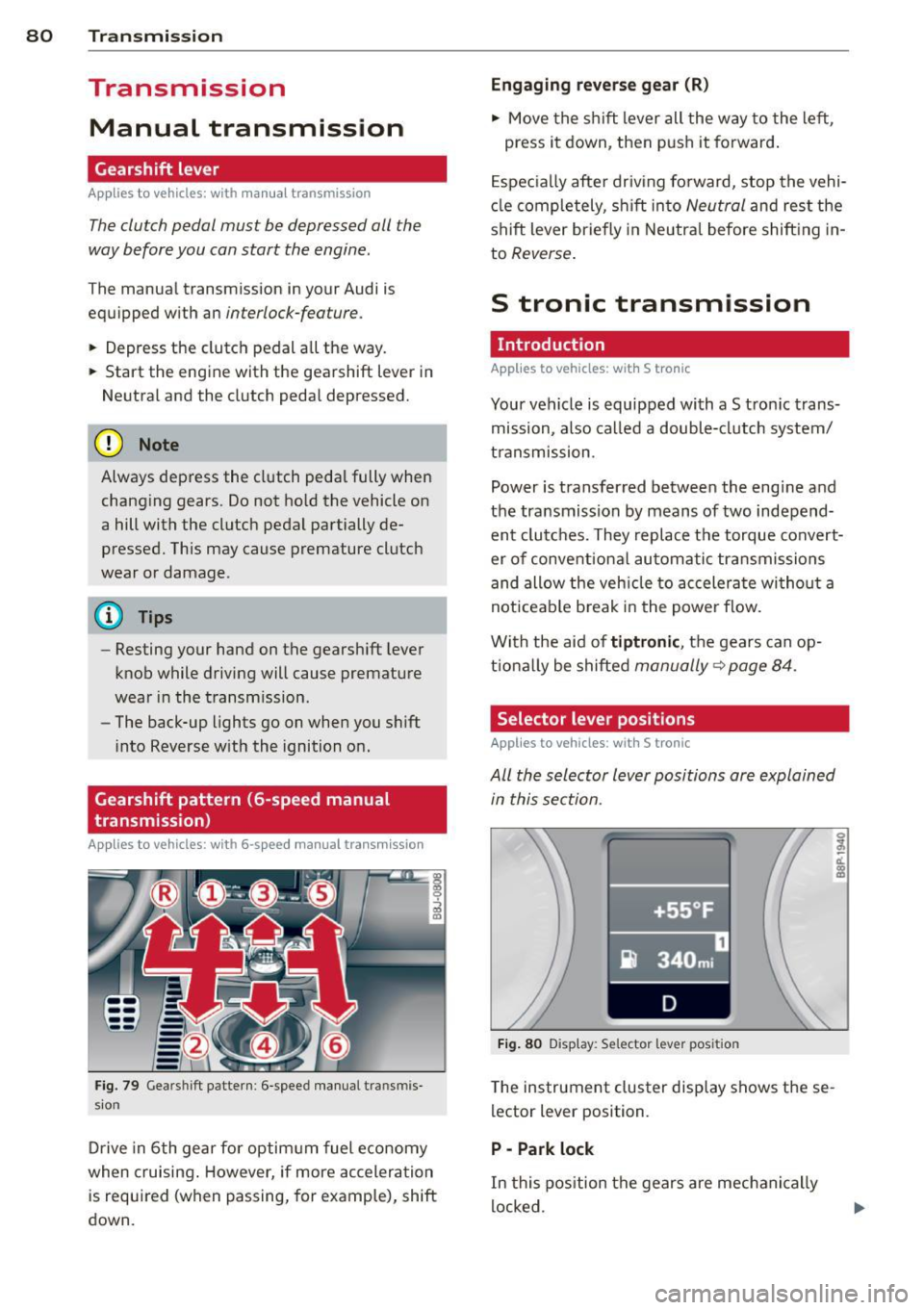
Fig. 79 Gearshift pattern: 6 -speed manual transm is
sion
D rive in 6th gear for optim um fuel economy
when cruising . However, if more accelera tion
is required (when passing, for example), shift
down.
Eng aging rev erse gear (R )
• Move the shift lever all the way to the left,
press it down, then push it forward.
E spec ia lly after driv ing forward, stop the vehi
cl e completely, shift into
Neutral and rest the
shift lever briefly in Neutral before shift ing in
to
Reverse .
S tronic transmission
· Introduction
Applies to vehicles: with S tronic
Your vehicle is equipped with a S tron ic trans
mission, also called a double-clutch system/
t ransmission .
Power is transferred between the engine and
the transmission by means of two independ ent clutches. They replace the torque convert
er of conventiona l au tomatic transmissions
and allow the veh icle to accelerate wi thout a
noticeab le b reak i n the power flow.
With the aid of
tiptr onic , the gears can op
t ional ly be shifted
manually~ page 84.
Selector lever positions
Applies to vehicles: with S tronic
All the selector lever positions are explained
in this section.
~-. -·~•-~ _ .. _....,-l
•+55 °F '
i} 340 mi
D
Fig . 80 Display: Selector lever pos it ion
T he instrument cluster display shows these
lector lever position.
P -Park lock
In this pos ition the gears are mechanically
locked.
Page 162 of 262
160 Driving and en vironm ent
Avoid damaging the
vehicle
When you are driving on poor roads, or over
curbs, steep ramps, etc ., make certain that
low-lying parts such as spoilers and exhaust
system parts do not bottom out and get dam
aged.
This is especially true for vehicles with low
slung chassis (sports chassis) and fully loaded
vehicles .
Driving through water
on roads
Note the following to avoid vehicle damage
when driving through water, for example on
flooded roads:
- T he water must not be any highe r tha n the
bottom of the vehi cle body.
- Do no t drive faster than wa lking speed.
_& WARNING
After d riving through water, m ud, slush,
etc., the brakes may be slow to take effect
because o f wet brake ro tors and pads . Dry
the brakes fi rst by braking carefully to re
store the full braking effect.
(]) Note
Vehicle components such as the engine,
transmiss ion, suspension or electrical sys
tem can be severely damaged by driving
through water.
- Check the depth o f the water before driv
ing through it.
- Do not stop the veh icle, dr ive in reverse
or switch the engine
off when driving
through water.
- Keep in mind that oncoming vehicles may c reate waves that raise the water
l evel and make it too deep for your vehi
cle to drive through safely.
- Avoid driving thro ugh salt water because
it can ca use corrosion.
-
Catalytic converter
It is very important that your emission con
trol system (catalytic converter) is function
ing properly to ensure that your vehicle is run
ning in an environmentally sound manner.
.,. Always use lead-free gasoline ¢ page 176,
Fuel supply .
.,. Never run the tank down all the way to
empty .
.,. Never put too much motor o il in your en-
gine ¢
page 185, Adding engine oil 'l::r. .
.,. Never try to push- or tow-sta rt you r vehicle.
The catalyt ic converter is an efficient "clean
u p" dev ice buil t into the exhaust system of
t h e vehi cle. The cata lytic conve rter bu rns
many of t he pollu tan ts in the exha ust gas be
f ore they are re leased into the atmosphere.
T he exclusive use of unleaded fuel is critica lly
important for the life of the catalyt ic convert
er and prope r fu nct ion ing of the engine.
A WARNING
- Do not park or operate the vehicle in
areas where the hot exha ust system may
come in contact with dry g rass, brush,
fue l spill or other material wh ich can
cause a fire.
- Do not app ly additiona l undercoating or
rustproofing on or near the exhaust
manifold, exhaust pipes, catalytic con
verter or heat sh ields. Dur ing driv ing, the
substance used fo r undercoating could
overheat and cause a fire.
(D Note
- Be aware that just one tank filling with
leaded fuel will already ser iously de-
grade the performance of the catalytic
converte r.
- Do not exceed the correct engi ne oil level
¢page 185.
-Do not drive until the fuel tank becomes
completely empty . The engine co uld mis-
fire. Unburned fuel could also get into ..,.