tow AUDI TT 2013 Owner´s Manual
[x] Cancel search | Manufacturer: AUDI, Model Year: 2013, Model line: TT, Model: AUDI TT 2013Pages: 262, PDF Size: 65.91 MB
Page 70 of 262
68 Warm and cold
• Turn the knob@c:> page 66, fig. 68 to the
l eft to switch the climate contro l system off.
T he LED next to the word OFF comes on .
Setting fan speed ~
• Turn the knob@c:> page 66, fig. 68 to the
setting you want to adjust fan speed (ai r
quantity).
I n automat ic mode the cl imate control sys
tem automatically regulates fan speed de
pending on interior temperature . You can ad-
Air distribution
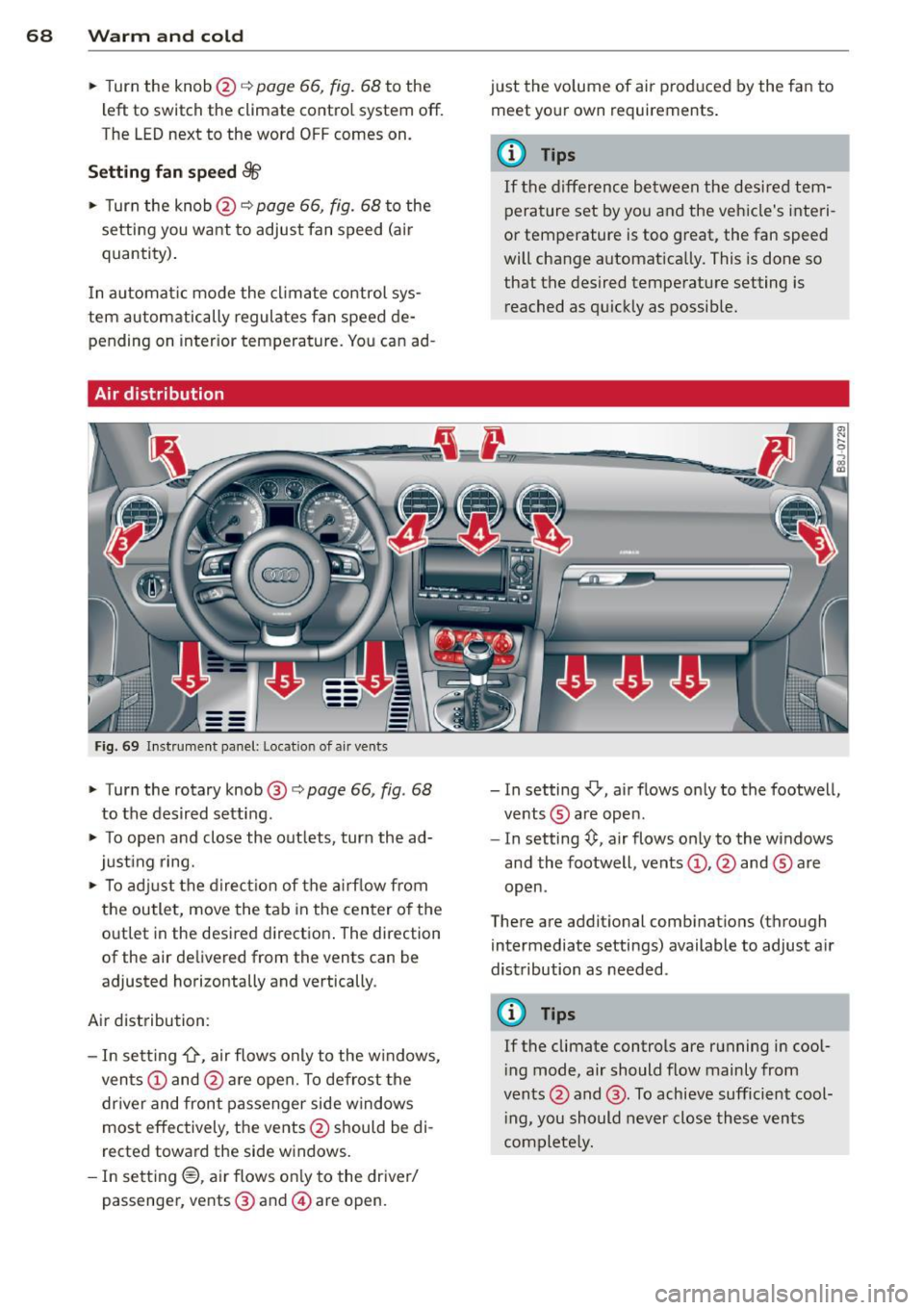
F ig. 6 9 In st ru m ent panel: Locat io n of air ven ts
• Turn the rotary knob @ c:> page 66, fig . 68
to the desired setting.
• To open and close the out lets, turn the ad
just ing ring.
• To adj ust the direct ion of the a irf low from
the outlet, move the tab in the center o f the
outlet in the desired d irection . The direction
of the air delivered from the vents can be
adjusted horizontally and vertically .
Air distribution:
- In sett ing
-0-, air flows only to the w indows,
ven ts @ and @are open. To defrost the
dr iver and front passenger side windows
most effectively, the vents @should be di
rected toward the side w indows.
- In sett ing®, ai r flows on ly to the dr iver/
passenger , vents @ and @are open. just the volume of air produced by the fan to
meet your own requirements .
(D Tips
If the d ifference between the desired tem
pera ture set by you and the vehicle's interi
or temperature is too great, the fan speed
will change automat ically. This is done so
that the desired temperature setting is
reached as quickly as possib le.
- In setting
-0, air flows only to the footwell,
ve nts ® are open.
- In setting~. air flows only to the windows
and the footwell , vents @, @ and ® are
open .
There are additional comb inations (through
intermediate settings) available to adjust a ir
distribution as needed .
(D Tips
If the climate controls are running in cool
i ng mode, air should flow mainly from
vents @and @. To achieve sufficient cool
i ng, you should never close these vents
complete ly.
Page 75 of 262
CD Note
-Avoid high engine speeds, fast accelera
tion or heavy engine loads whi le the en
gine is still cold. This could damage the
engine.
- The engine cannot be started by pushing or towing the veh icle.
@) For the sake of the environment
To avoid unnecessary engine wear and to
reduce exhaust emissions, do not let your
veh icle stand and warm up. Be ready to
drive off immediately after starting your
veh icle. Maintain moderate speed until the
eng ine is completely warm . Remember,
the engine performs best at operating
temperature .
Stopping the engine
~ Turn the ign ition key to position @
~page 71, fig. 71.
_& WARNING
-Never turn off the engine before the ve
hicle has come to a complete stop. The
full function of the brake booster and the
power steering is not guaranteed . You
must use more force to turn or brake if
necessary. Because you cannot steer and
brake as you usually would, this could
lead to crashes and serious injur ies.
- The radiator fan can continue to run for
up to 10 minutes even after you have
turned
off the engine and removed the
ignition key . The radiator fan can also
turn on again if the engine coolant heats
up because of intense sunlight or heat
build-up in the engine compartment.
CD Note
Do not stop the engine immed iate ly after
hard or extended driving. Keep the engine
running for approximately two minutes to
prevent excessive heat build-up.
On the road 73
Parking brake
Parking brake
When the parking brake is set, it prevents the
vehicle from rolling away unintentionally .
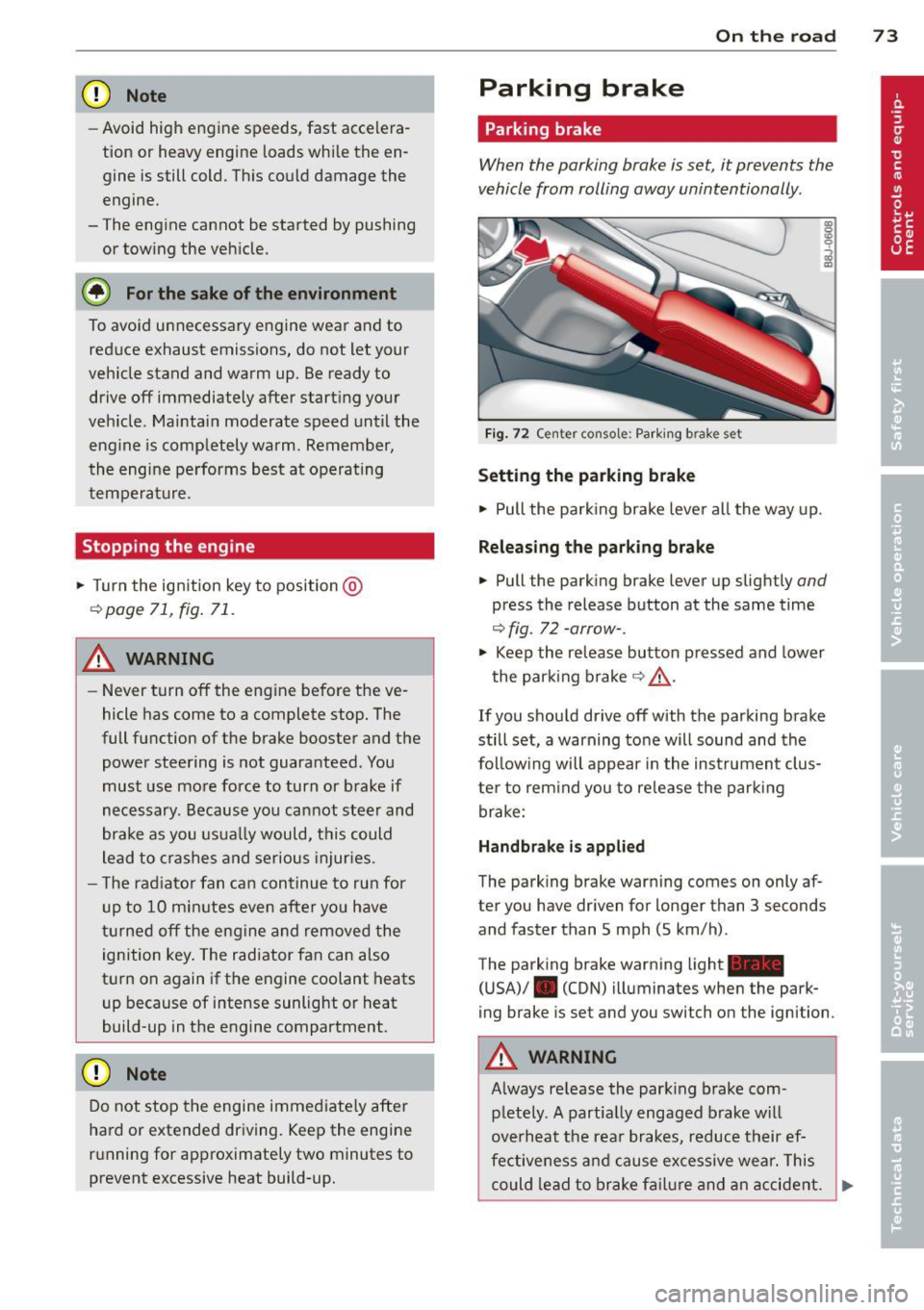
Fig. 72 Center console: Parki ng b rake set
Setting the parking brake
~ Pull the park ing brake lever all the way up.
Releasing the parking brake
~ Pull the parking brake lever up slightly and
press the release button at the same time
~ fig. 72 -arrow-.
~ Keep the release button pressed and lower
the parking brake~&_ .
If you should drive
off with the parking brake
still set, a warning tone will sound and the
follow ing will appear in the instrument clus
ter to rem ind you to release the parking
brake:
Handbrake is applied
The parking brake warning comes on only af
ter you have driven for longer than 3 seconds
and faster than 5 mph (5 km/h) .
The parking brake warning light_
(USA)/ . (CON) illuminates when the park
ing brake is set and you switch on the ignition .
A WARNING
Always re lease the park ing brake com -
pletely. A partially engaged brake will
overheat the rear brakes, reduce their ef
fectiveness and cause excessive wear. This
could lead to brake failure and an accident. .,.
Page 79 of 262
the distance between your vehicle and
other vehicles.
- For safety reasons, the cruise control
should not be used in the city, in stop
and-go traff ic, on twisting roads and
when road conditions are poor (such as
ice, fog, grave l, heavy rain and hydro
planing) -risk of acc ident .
- Turn off the cruise control temporari ly
when entering turn lanes, highway exit
lanes or in construction zones .
- Please note that inadvertent ly "rest ing"
yo ur foot on the accelerator peda l causes
the cruise control not to brake. This is
because t he cr uise con trol is overridden
by the driver's acce lerat ion.
(D Tips
- Vehicles with manual t ransmission: You
can attain the set speed only if the cur
r ently e ngaged gear a llows i t and the en
gine i s not stressed. Shift ing to a h igher
or lower gear p romp tly will allow t he en
gine to run smoothly.
- The cruise cont ro l cannot main tain a
constant speed when driving downhill.
The vehicle will accelerate unde r its own
weig ht. Downsh ift to a lower gear or use
the brakes to slow down.
Changing speed
"' Press lever in the 0 or 0 direction
i=> page 76, fig . 75 to increase or decrease
you r speed .
"' Re lease the lever to save that speed.
You can a lso press the accelerator pedal down
to inc rease your speed, e.g . if yo u want to
pass someone . The speed you saved ea rlier
will resume as soon as you release the acceler
ator peda l.
If , however, you exceed your saved speed by
5 mph ( 10 km/h) for longe r than 5 minutes,
the cruise cont ro l w ill tu rn off tempora rily .
The symbol will go o ut but the saved speed
will be retained .
On the ro ad 77
Presetting your speed
You can preset your desired speed while the
vehicle is not moving.
"' Turn on the ignition.
"' Pull lever into position
(D c:> page 76,
fig . 75.
"' Press the leve r in the 0 or 0 direction to
increase or decrease your speed.
"' Re~asethelevertosave thatspeed.
This function makes it possible, for example,
to save the speed you want before dr iving on
the highway. Once on the h ighway, act ivate
t h e cr uise con trol by pulling the lever toward
(D .
Switching the system off
Temporary deactivat ion
"' Press the brake pedal, or
"' Keep the cl utch pedal pressed down longer ,
or
"' Press the lever into position @(not clicked
into place)
¢page 76, fig . 75, or
"' Drive for longer than 5 minutes at more
than 5 mph (10 km/h) above the stored
speed.
Switching off completely
"' Press lever into position @(clicked into
place), or
"' Switch the ignit io n off.
The system retains the saved speed if you de
activate the cruise control temporar ily. To re
sume the saved speed, re lease the brake or
clutch pedal and pull the lever to position
(D.
Switching the ignit ion off erases the saved
speed.
A WARNING
You shou ld only return to the saved speed
if it is not too fast for the current traffic
conditions -ris k of an accident!
Page 86 of 262
84 Transmission
tiptronic operation
Applies to vehicles: with S tron ic
Tiptronic allows the driver to shift gears man
ually.
--
-
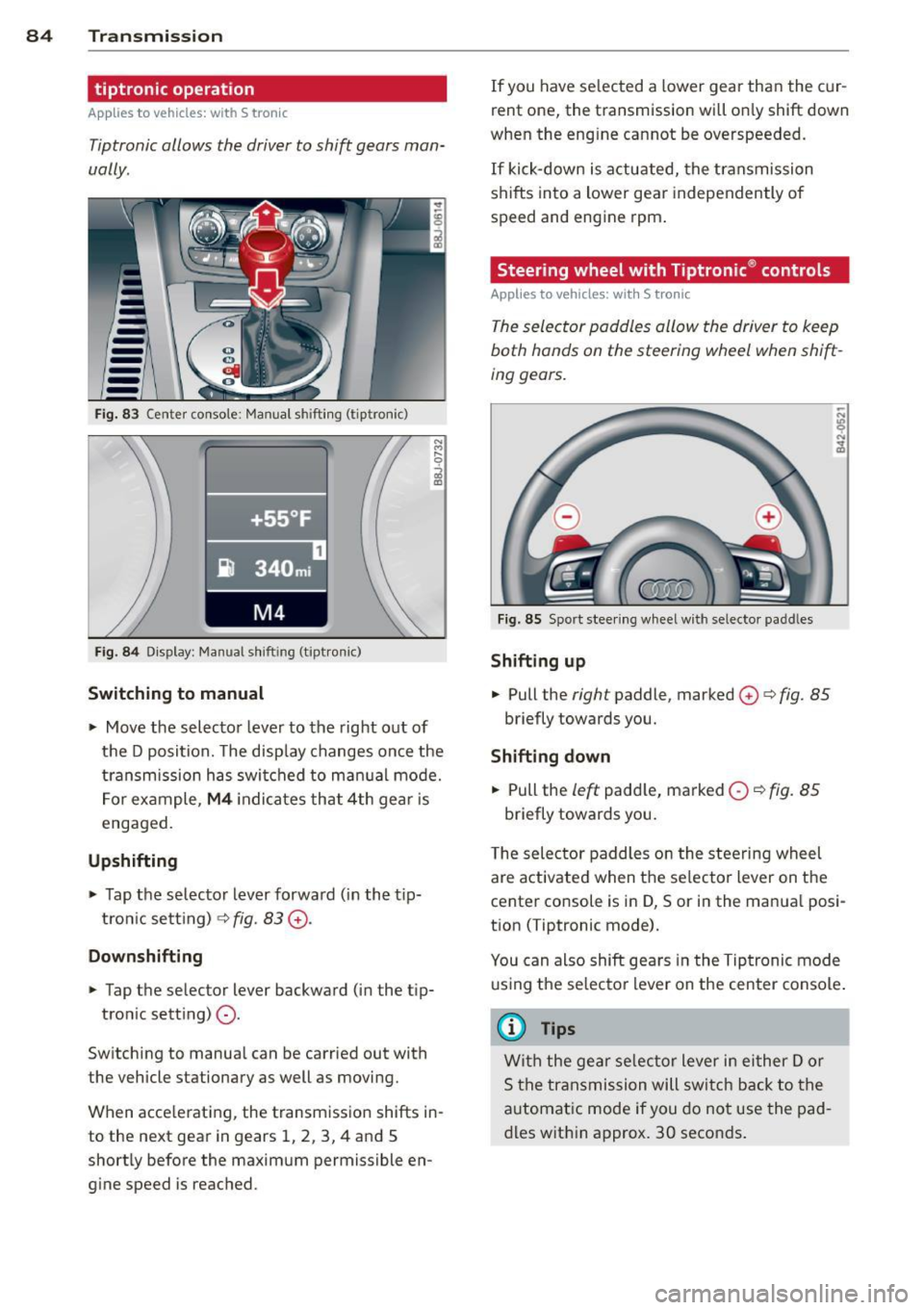
Fig. 83 Center conso le : Manual shift in g (tiptronic)
Fig . 84 Display : Manual sh ift ing (tipt ron ic)
Switching to manual
.,. Move the selector lever to the right out of
the D position. The disp lay changes once the
transmission has switched to manual mode.
For example,
M4 indicates that 4th gear is
engaged.
Upshifting
.,. Tap the selecto r lever forward (in the tip
tron ic setting)
¢ fig. 83 G).
Downshifting
.,. Tap the selector lever backward (in the t ip-
tron ic sett ing)
0-
Switching to manual can be carried out with
the vehicle stationary as well as moving.
When accelerat ing, the transmission shifts in
to the next gear in gears 1, 2, 3, 4 and 5
shortly before the maximum permissible en
gine speed is reached. If
you have selected a lower gear than the cur
rent one, the transmission will only shift down
when the eng ine cannot be overspeeded.
If kick-down is act uated, the transmission
shifts into a lower gear independently of
speed and engine rpm.
Steering wheel with Tiptronic ® controls
Applies to vehicles: with S tronic
The selector paddles allow the driver to keep
both hands on the steering wheel when shift
ing gears.
Fig . 85 Sport steering wheel with selecto r padd les
Shifting up
.,. Pull the right paddle, marked 0 ¢ fig. 85
briefly towards you .
Shifting down
.,. Pull the left padd le, marked 0 ~ fig. 85
briefly towards you.
T he selector paddles on the steering wheel
are activated when the se lecto r lever on the
center co nsole is in D, Sor in the manua l posi
tion (Tiptronic mode).
You can also shift gears in the Tiptronic mode
using the selector lever on the center console .
@ Tips
With the gear selector lever in either Dor
S the transmission will switch back to the
automatic mode if you do not use the pad
dles within approx. 30 seconds.
Page 88 of 262
86 Transmis sion
qualified repair facility for assistance. Other
wise serious transmission damage could re
sult . Once the indicator light has turned off,
drive to your authori zed Audi dealer or quali
fied repair facility immediately to have the malfunction corrected .
Selector lever emergency release
Applies to vehicles: with S tro nic
If the vehicle's power supply fails, the selec
tor lever can be released in an emergency.
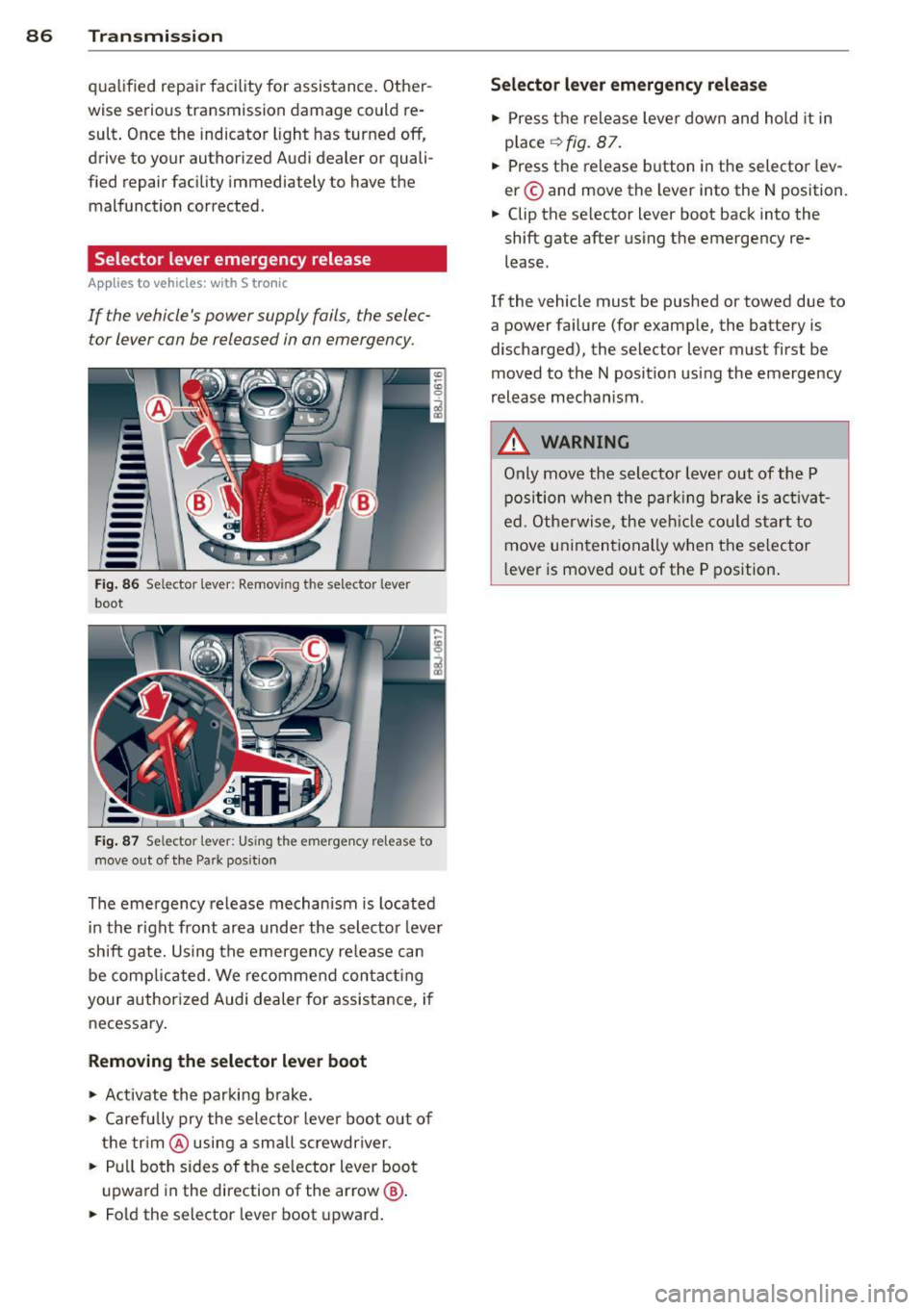
-----Fig. 86 Se lector lever : Remov ing th e selector lever
boot
Fig. 87 Se lector lever: Using the eme rgency re lease to
move out of the Park pos ition
The emergency release mechanism is located
in the right front area under the selector lever
shift gate. Using the emergency release can
be comp licated. We recommend contacting
your authorized Audi dealer for assistance, if
necessary.
Removing the selector lever boot
.,. Activate the parking brake .
.,. Carefully pry the selector lever boot out of
the trim @using a small screwdriver .
.,. Pull both sides of the selector lever boot
upward in the direction of the arrow @ .
.,. Fold the selector lever boot upward.
Selector lever emergency release
.,. Press the release lever down and hold it in
p lace
¢ fig. 87.
.,. Press the release button in the selector lev
er © and move the lever into the N position.
.,. Clip the selector lever boot back into the
shift gate after using the emergency re
lease .
If the vehicle must be pushed or towed due to
a power failure (for example, the battery is
discharged), the selector lever must first be
moved to the N position using the emergency
release mechanism .
A WARNING
-Only move the selector lever out of the P
position when the park ing brake is activat
ed. Otherwise, the veh icle could start to
move unintentionally when the selector
lever is moved out of the P position.
Page 94 of 262
92 Driving Safely
• Always keep both feet in the footwell so
that you are in control of the vehicle at all
times.
For detailed information on how to adjust the
driver's seat, see
c::> page 55.
A WARNING
Drivers who are unbelted, out of position
or too close to the airbag can be seriously
injured by an airbag as it deploys. To help
reduce the risk of serious personal injury:
- Always adjust the driver's seat and the
steering wheel so that there are at least
10 inches (25 cm) between your breast
bone and the steering wheel.
- Always adjust the driver's seat and the
steering wheel so that there are at least
4 inches (10 cm) between the knees and
the lower part of the instrument panel.
- Always hold the steering wheel on the
outside of the steering wheel rim with
your hands at the 9 o'clock and 3 o'clock positions to help reduce the risk of per
sonal injury if the driver's airbag inflates.
- Never hold the steering wheel at the
12 o'clock position or with your hands at
other positions inside the steering wheel
rim or on the steering wheel hub. Hold
ing the steering wheel the wrong way
can cause serious injuries to the hands,
arms and head if the driver's airbag in
flates
- Pointing the steering wheel toward your
face decreases the ability of the supple
mental driver's airbag to protect you in a
collision.
- Always sit in an upright position and nev
er lean against or place any part of your
body too close to the area where the air
bags are located.
- Before driving, always adjust the front
seats and head restraints properly and
make sure that all passengers are prop
erly restrained.
- Never adjust the seats while the vehicle
is moving. Your seat may move unexpect- edly and you could lose control of the ve
hicle .
- Never drive with the backrest reclined or
tilted far back! The farther the backrests
are tilted back, the greater the risk of in
jury due to incorrect positioning of the safety belt and improper seating posi
tion .
- Children must always ride in child seats
c::> page 130. Special precautions apply
when installing a child seat on the front passenger seat¢
page 108.
Proper seating position for the front
passenger
The proper front passenger seating position
is important for safe, relaxed driving .
For your own safety and to reduce the risk of
injury in the event of an accident, we recom
mend that you adjust the seat for the front
passenger to the following position :
• Adjust the angle of the seatback so that it is
in an upright position and your back comes in full contact with it whenever the vehicle is
moving.
• Adjust the head restraint so that the upper
edge is as even with the top of your head as
possible but not lower than eye level and so
that it is as close to the back of your head as
possible
c::> page 94.
• Keep both feet flat on the floor in front of
the front passenger seat.
• Fasten and wear safety belts correctly
c::>page 104.
For detailed information on how to adjust the
front passenger's seat, see
c::> page 54 .
A WARNING
-
Front seat passengers who are unbelted,
out of position or too close to the airbag
can be seriously injured or killed by the air
bag as it unfolds. To help reduce the risk of
serious personal injury:
Page 98 of 262
96 Driving Safely
Floor mats used in your vehicle must be at
tached to these fasteners. Properly securing
the floor mats will prevent them from sliding into positions that could interfere with the
pedals or impair safe operation of your vehicle
in other ways .
A WARNING
Pedals that cannot move freely can result
in a loss of vehicle control and increase the
risk of serious personal injury .
- Always make sure that floor mats are
properly secured.
- Never place or install floor mats or other
floor coverings in the vehicle that cannot
be properly secured in place to prevent
them from slipping and interfering with
the pedals or the ability to control the
vehicle.
- Never place or install floor mats or other
floor coverings on top of already instal
led floor mats. Additional floor mats and
other coverings will reduce the size of
the pedal area and interfere with the pedals.
- Always properly reinstall and secure floor
mats that have been taken out for clean
ing.
- Always make sure that objects cannot
fall into the driver footwell while the ve
hicle is moving. Objects can become
trapped under the brake pedal and accel
erator pedal causing a loss of vehicle
control.
Stowing luggage
Loading the luggage compartment
All luggage and other objects must be prop
erly stowed and secured in the luggage com
partment.
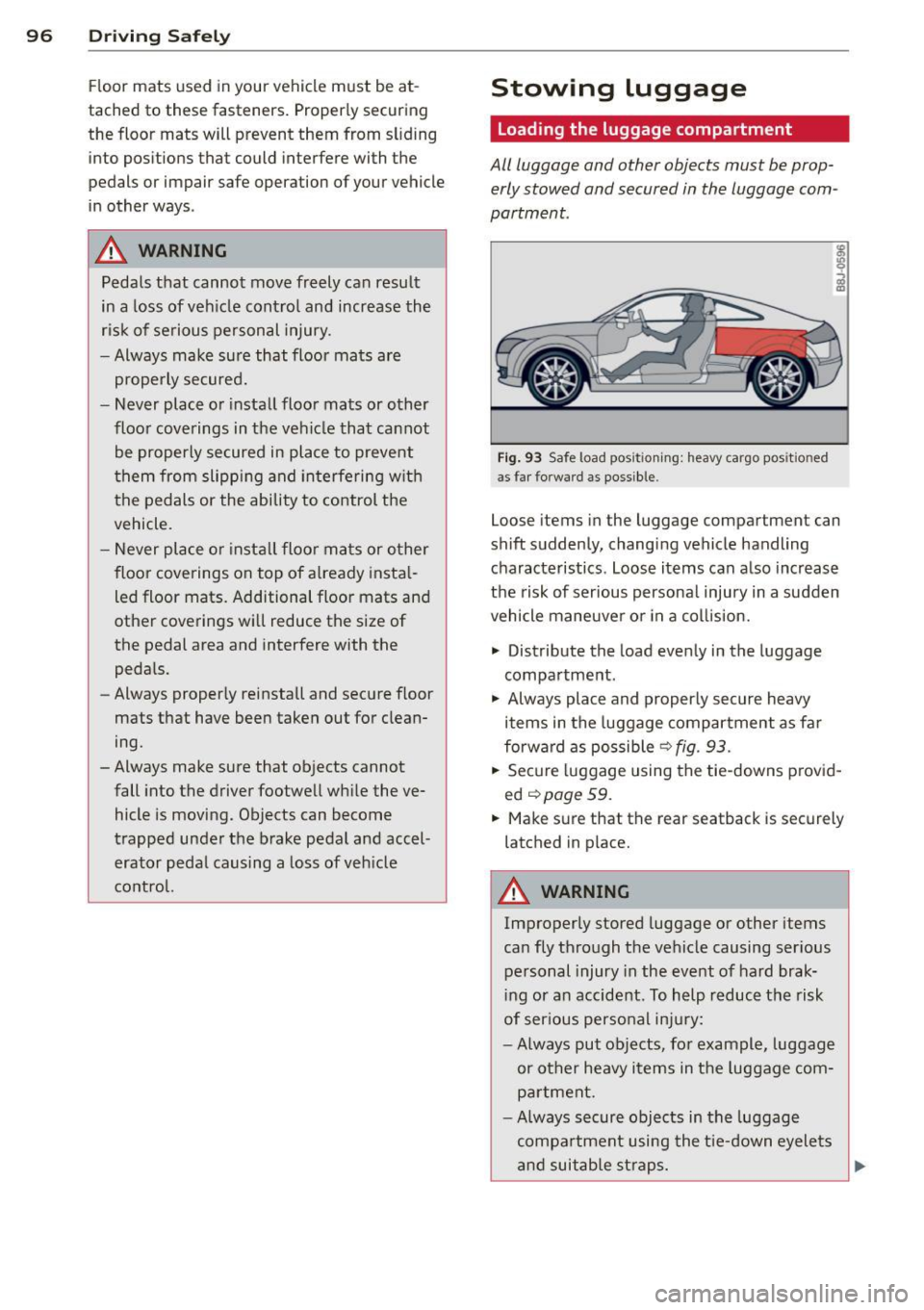
Fig. 93 Safe load posi tioning: heavy ca rgo pos it io ned
as far forwar d as possible.
Loose items in the luggage compartment can
shift suddenly, changing vehicle handling characteristics. Loose items can also increase
the risk of serious personal injury in a sudden
vehicle maneuver or in a collision.
.., Distribute the load evenly in the luggage
compartment.
.., Always place and properly secure heavy
items in the luggage compartment as far
forward as possible
r:::>fig . 93.
.,. Secure luggage using the tie-downs provid
ed
<:!) page 59.
... Make sure that the rear seatback is securely
latched in place.
A WARNING
-Improperly stored luggage or other items
can fly through the vehicle causing serious
personal injury in the event of hard brak
ing or an accident. To help reduce the risk
of serious personal injury:
- Always put objects, for example , luggage
or other heavy items in the luggage com
partment.
- Always secure objects in the luggage
compartment using the tie-down eyelets
and suitable straps.
~
Page 108 of 262
106 Safety belts
Unfastening safety belts
Unbuckle the safety belt with the red release
button only after the vehicle has stopped .
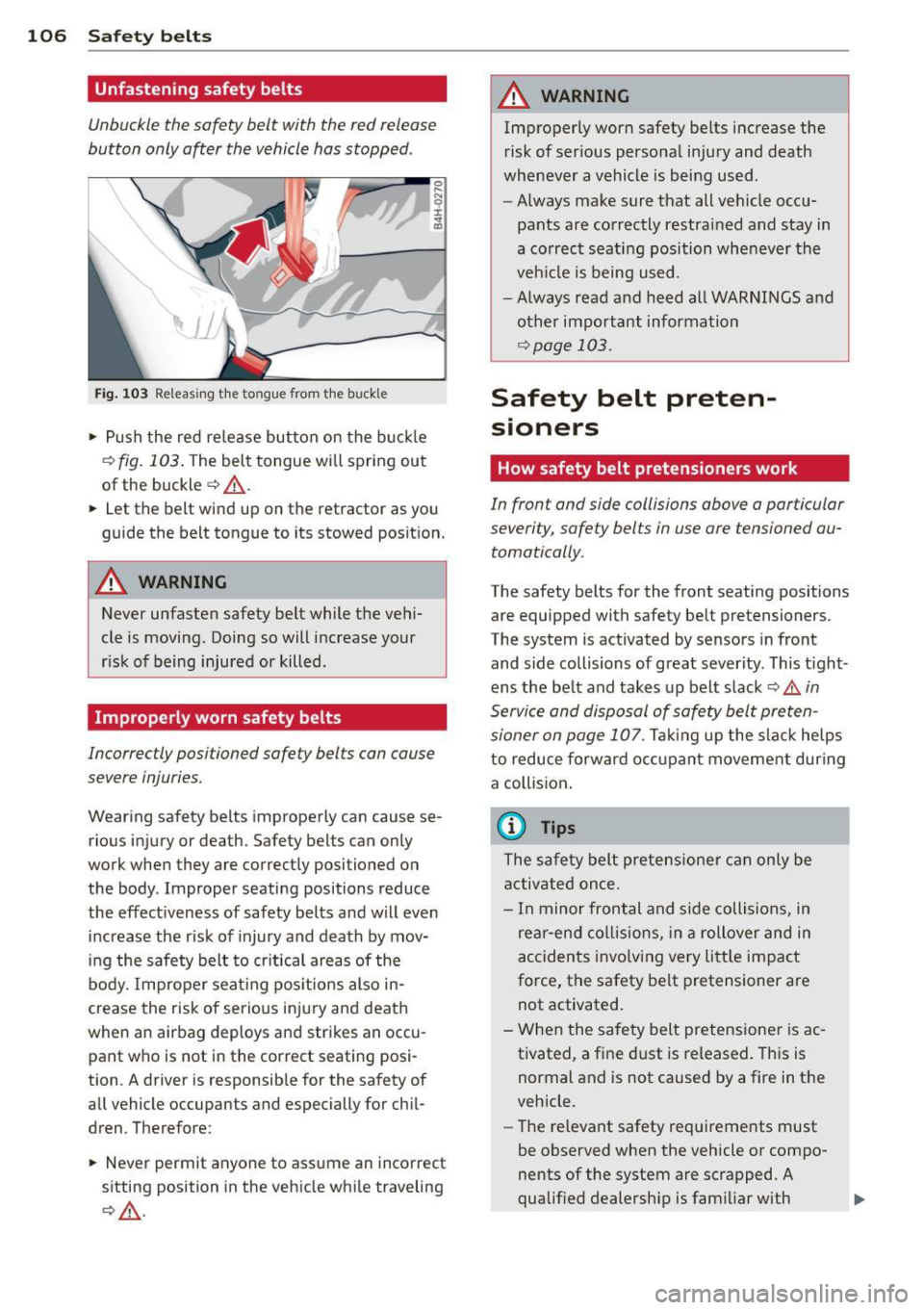
Fig. 103 Releasing the tongue from the buckle
• Push the red release button on the buckle
c> fig. 103. The belt tongue will spring out
of the buckle ~
,A.
0 r-N 0 ±.
"' a,
• Let the belt wind up on the retractor as you
guide the belt tongue to its stowed position.
A WARNING
Never unfasten safety belt while the vehi
cle is moving . Doing so will increase your
r isk of being injured or killed .
Improperly worn safety belts
Incorrectly positioned safety belts can cause
severe injuries.
Wearing safety belts improperly can cause se
rious injury or death. Safety belts can only
work when they are correctly positioned on the body . Improper seating positions reduce
the effectiveness of safety belts and will even
increase the risk of injury and death by mov
ing the safety belt to critical areas of the
body. Improper seating positions also in
crease the risk of serious injury and death
when an airbag deploys and strikes an occu
pant who is not in the correct seating posi
tion . A driver is responsible for the safety of
all vehicle occupants and especially for chil
dren. Therefore:
• Never permit anyone to assume an incorrect
sitting position in the vehicle while traveling
c>,&. .
A WARNING
-Improperly worn safety belts increase the
risk of ser ious personal injury and death
whenever a vehicle is being used.
- Always make sure that all vehicle occu
pants are correctly restrained and stay in
a correct seating position whenever the
veh icle is being used.
- Always read and heed all WARNINGS and
other important information
~ page 103.
Safety belt preten
sioners
How safety belt pretensioners work
In front and side collisions above a particular
severity, safety belts in use are tensioned au
tomatically .
The safety belts for the front seating positions
are equipped with safety belt pretensioners .
The system is activated by sensors in front
and side collisions of great severity. This tight
ens the belt and takes up belt slack
c> .&. in
Service and disposal of safety belt preten
sioner on page 107.
Taking up the slack helps
to reduce forward occupant movement during
a collision.
(D Tips
The safety belt pretensioner can only be
activated once .
- In minor frontal and side collisions, in
rear -end collisions, in a rollover and in
accidents involving very little impact
force, the safety belt pretensioner are
not activated.
- When the safety belt pretensioner is ac
tivated, a fine dust is released. This is normal and is not caused by a fire in the
vehicle.
- The relevant safety requirements must
be observed when the vehicle or compo
nents of the system are scrapped. A
qualified dealership is familiar with
II>
Page 118 of 262
116 Airbag system
-Never remove the front passenger or
driver seat from the vehicle.
- Never remove the upholstery from the
front passenger seat.
- Never disassemble or remove parts from
the seat or disconnect wires from it.
- Never carry sharp objects in your pockets
or place them on the seat. If the weight
sensing mat in the passenger seat is
punctured it cannot work properly.
- Never carry things on your lap or carry
objects on the passenger seat. Such
items can increase the weight registered
by the weight-sensing mat and send the
wrong information to the airbag control unit.
- Never store items under the front pas
senger seat. Parts of the Advanced Air bag System under the passenger seat
could be damaged, preventing them and
the airbag system from working proper
ly.
- Never place seat covers or replacement
upholstery that have not been specifical
ly approved by Audi on the front seats.
- Seat covers can prevent the Advanced
Airbag System from recognizing child re
straints or occupants on the front pas
senger seat and prevent the side airbag
in the seat backrest from deploying prop
erly.
- Never use cushions, pillows, blankets or
similar items on the front passenger
seat. The additional padding will prevent
the weight-sensing mat in the seat from
accurately registering the child restraint
or person on the seat and prevent the
Advanced Airbag System from function
ing properly.
- If you must use a child restraint on the
front passenger seat and the child re
straint manufacturer's instructions re
quire the use of a towel, foam cushion or
something else to properly position the
child restraint, make certain that the
PASSENGER AIR BAG OFF light comes
on and stays on whenever the child re- straint is installed on the front passen
ger seat.
- If the
PASSENGER AIR BAG OFF light
does not come on and stay on, immedi
ately install child restraint in a rear seat
ing position and have the airbag system
inspected by your Audi dealer.
How the Advanced Airbag System
components work together
The front Advanced Airbag System and the
side airbags supplement the protection of
fer ed by the front three-point safety belts
with pretensioners and load limiters and the
adjustable head restraints to help reduce the
risk of injury in a wide range of accident and
crash situations. Be sure to read the impor
tant information about safety and heed the
WARNINGS in this chapter.
Deployment of the Adv a need Airbag System
and the activation of the safety belt preten
s ioners depend on the deceleration measured
by the crash sensors and registered by the
electronic control unit. Crash severity depends
on speed and deceleration as well as the mass
and stiffness of the vehicle or object involved
in the crash.
When the electronic control unit registers a low severity crash and the safety belt is being
used , the airbag will not deploy.
If the safety
belt is not being used, the first stage deploys,
follow ed by the second stage after a much lat
er time in t he crash sequence.
If the electronic control unit registers a crash
of medium severity, the first stage of the air
bag deploys followed by the second stage at a
much later time in the crash sequence -re
gardless of whether the safety belt is being
u sed or not . In higher severity crashes as reg
istered by the electronic control unit, both the
first and second stages deploy almost at the
same time.
On the passenger side, regardless of safety
belt use, the airbag will be turned off if the
weight on the passenger seat is less than the
amount programmed in the electronic control
Ill-
Page 145 of 262
Deactivating the convertible locking
retractor
The convertible locking retractor for child re
straints will be deactivated automatically when the belt is wound all the way back into the retractor.
" Press the red button on the safety be lt
buck le. The belt tongue will pop out of the
buck le .
" Guide the safety belt all the way back into
its stowed pos ition .
A lways let the safety belt retract complete ly
into its stowed pos ition . The sa fety belt can
now be used as an ordinary safety belt with
out the convertib le locking retractor for child
rest raints .
If the convertible locking retractor shou ld be
activated inadvertently , the safety belt must
be unfastened and guided completely back in
to its stowed position to deactivate this fea
t ure. If the conver tible locking retractor is not
deactivated, the safety belt will gradually be
come tighter and uncomfortable to wear .
A WARNING
Improperly insta lled child safety seats in
crease the risk of ser ious personal injury
and death in a collision.
- Never unfasten the safety belt to deacti
vate the convert ible lock ing ret ractor for
child restraints while the vehicle is mov
ing. You would not be rest rained and
cou ld be seriously injured in an accident.
- Always read and heed all WARN INGS
whenever using a child restrained in ave
hicle is being used
¢page 130. Special
precautions apply when installing a chi ld
safety seat on the front passenger seat
¢ page 110, Child restraints on the front
seat -some important things to know .
Child Safet y 143
LATCH Lower
anchorages and tethers
for children
Child Restraint System anchors and how
are they related to child safety
To prov ide a simpler and more practicable way
to attach the child restraint on the vehicle
seat, Federal regulat ions requ ire spec ial lower
anchorages in vehicles and devices on new
child restraints to attach to the vehicle ancho
rages.
T he combination of the tether anchorages and
the lower anchorages is now generally ca lled
the
LATCH system for " Lower Anchorages and
T ethers for Chil dren." In Canada, the terms
"top tether" with "lower universal anchorag
es" (or "lower universal anchorage bars") are
used to describe the system.
Forward-facing chi ld restraints manufactured
after September 1, 1999, are required by U.S.
federal regulations to comply with new child
head movement performance requirements .
These new performance requirements make a
tether necessary on most new child seats.
Installing a child restraint that requires a top
tether wi thout one can seriously impair the
performance of the child restraint and its abil
ity to protect the child in a coll is ion. Installing
a child restraint that requires a top tether
without the top tether may be a violat ion of
state law.
Child restraint manufacturers offer LATCH
lower anchorages on their child seats w ith
hook-on or push-on connectors attached to
adjustable straps.
In add ition to the LATCH lower anchorages,
these child restraint systems usua lly require
the use of tether straps to help keep the chi ld
restraint firmly in place.
A WARNING
Improper installation of child restraints
will increase the risk of injury and death in
a crash.
-
•
•