warning AUDI TT COUPE 2014 Service Manual
[x] Cancel search | Manufacturer: AUDI, Model Year: 2014, Model line: TT COUPE, Model: AUDI TT COUPE 2014Pages: 284, PDF Size: 34.42 MB
Page 53 of 284
Downloaded from www.Manualslib.com manuals search engine 0
N
co
....
\D L/'l
N
L/'l
.... Extending
the luggage compartment
The two sections of the backrest can be folded
forwards either together or separately to in
crease the capacity of the luggage compart
ment.
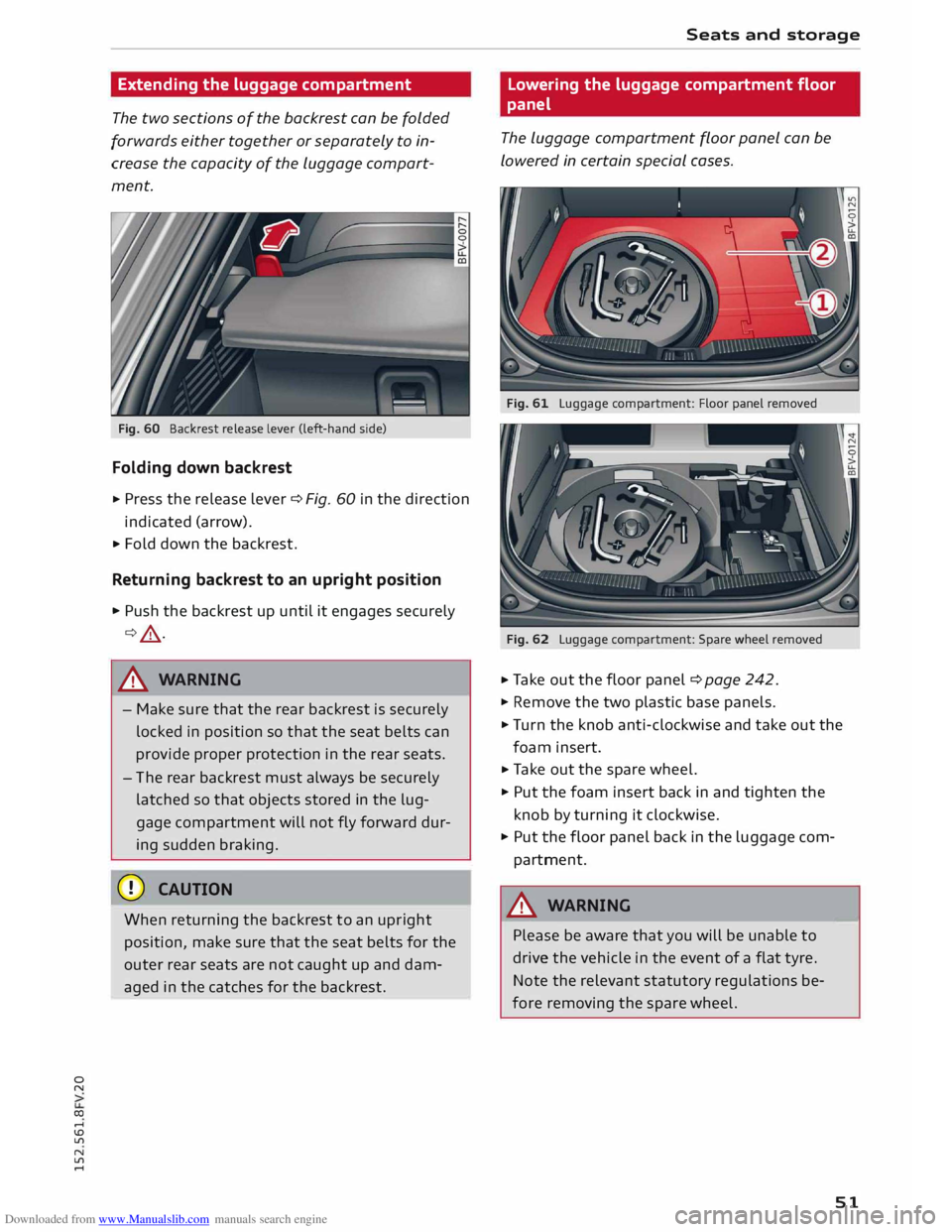
Fig. 60 Backrest release lever (left-hand side)
Folding down backrest
"' Press
the release lever
¢ Fig.
60 in the direction
indicated (arrow).
> Fold down the backrest.
Returning backrest to an upright position
> Push the backrest up until it engages securely
¢ &_ .
,8. WARNING
- Make sure that the rear backrest is securely
locked in position so that the seat belts can
provide proper protection in the rear seats.
- Th e rear backrest must always be securely
latched so that objects stored in the lug
gage compartment will not fly forward dur
ing sudden braking.
CD CAUTION
When returning the backrest to an upright
position, make sure that the seat belts for the
outer rear seats are not caught up and dam
aged in the catches for the backrest. Seats
and storage
Lowering the luggage compartment floor
panel
The luggage compartment floor panel can be
lowered in certain special cases.
Fig. 61 Luggage compartment: Floor panel removed
Fig. 62 Luggage compartment: Spare wheel removed
.. Take out the floor panel ¢ page 242.
"' Remove the two plastic base panels.
"' Turn the knob anti-clockwise and take out the
foam insert.
.. Take out the spare wheel.
"' Put the foam insert back in and tighten the
knob by turning it clockwise.
"' Put the floor panel back in the luggage com
partment.
,8. WARNING
Please be aware that you will be unable to
drive the vehicle in the event of a flat tyre.
Note the relevant statutory regulations be
fore removing the spare wheel. -
51
Page 54 of 284
Downloaded from www.Manualslib.com manuals search engine Seats
and storage
Roof carrier
The roof carrier must be attached only in the
area of the Locating pins.
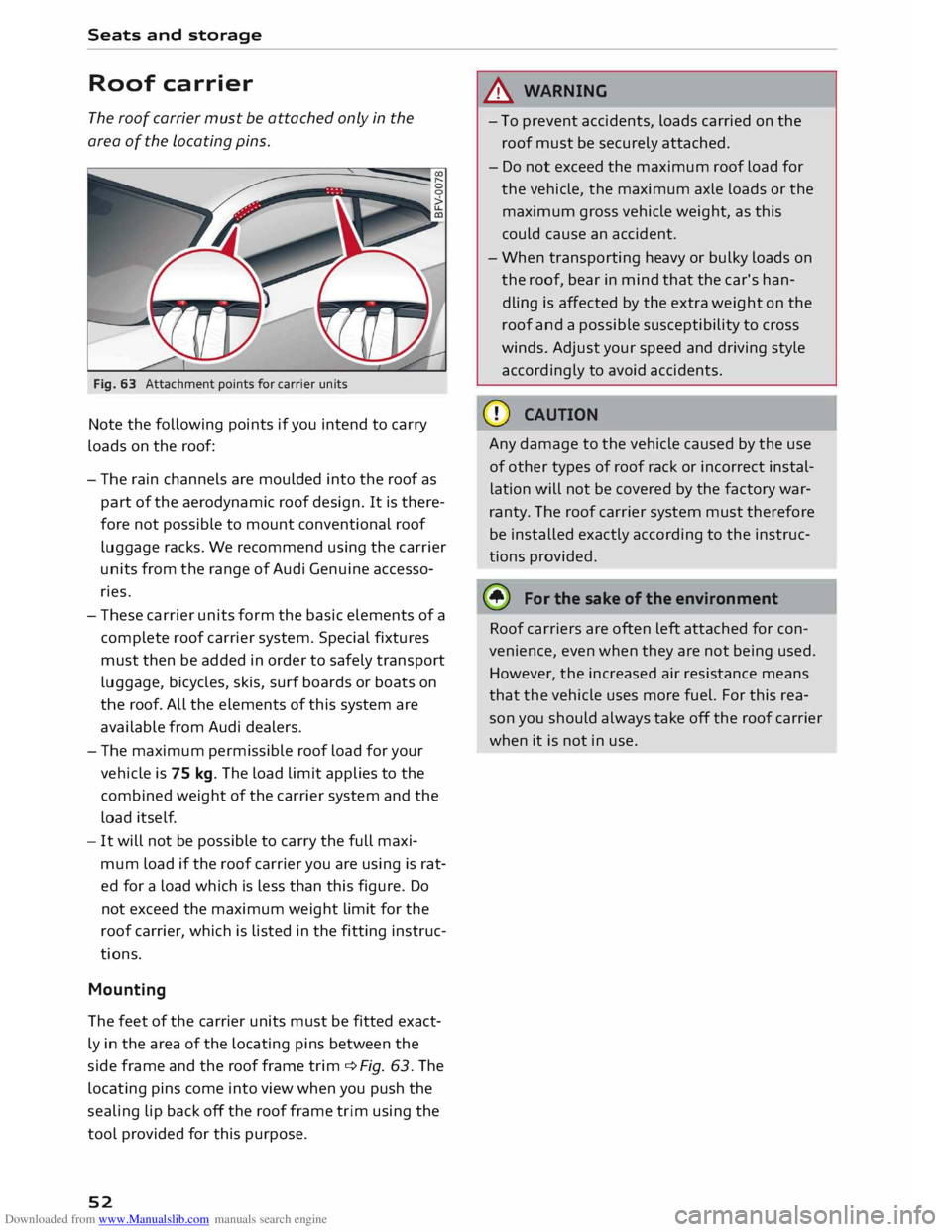
Fig. 63 Attachment points for carrier units
Note the following points if you intend to carry
loads on the roof:
- The rain channels are moulded into the roof as
part of the aerodynamic roof design. It is there
fore not possible to mount conventional roof
luggage racks. We recommend using the carrier
units from the range of Audi Genuine accesso
ries.
- These carrier units form the basic elements of a
complete roof carrier system. Special fixtures
must then be added in order to safely transport
luggage, bicycles, skis, surf boards or boats on
the roof. All the elements of this system are
available from Audi dealers.
- The maximum permissible roof load for your
vehicle is 75 kg. The load limit applies to the
combined weight of the carrier system and the
load itself.
- It will not be possible to carry the full maxi
mum load if the roof carrier you are using is rat
ed for a load which is less than this figure. Do
not exceed the maximum weight limit for the
roof carrier, which is listed in the fitting instruc
tions.
Mounting
The feet of the carrier units must be fitted exact
ly in the area of the locating pins between the
side frame and the roof frame trim qfig. 63. The
locating pins come into view when you push the
sealing lip back off the roof frame trim using the
tool provided for this purpose.
52 &
WARNING
- To prevent accidents, loads carried on the
roof must be securely attached.
- Do not exceed the maximum roof load for
the vehicle, the maximum axle loads or the
maximum gross vehicle weight, as this
could cause an accident.
- When transporting heavy or bulky loads on
the roof, bear in mind that the car's han
dling is affected by the extra weight on the
roof and a possible susceptibility to cross
winds. Adjust your speed and driving style
accordingly to avoid accidents.
Any damage to the vehicle caused by the use
of other types of roof rack or incorrect instal
lation will not be covered by the factory war
ranty. The roof carrier system must therefore
be installed exactly according to the instruc
tions provided.
it!) For the sake of the environment
Roof carriers are often left attached for con
venience, even when they are not being used.
However, the increased air resistance means
that the vehicle uses more fuel. For this rea
son you should always take off the roof carrier
when it is not in use.
Page 56 of 284
Downloaded from www.Manualslib.com manuals search engine Heating
and cooling
windows from misting up. To demist the win
dows, we recommend that you increase the blow
er speed and set control @ to�-
IAJC! Switching
air cooling on/off
The air cooling system only works when the blow
er is switched on. When the air cooling is switch
ed off, the air is neither cooled nor dehumidified.
The windows may mist up as a result. The air
cooling is switched off automatically at low out
side temperatures (below zero).
I• I •I
Adjusting the temperature
The rotary control @ can be used to adjust the
temperature in small steps.
Adjusting the air distribution
The rotary control @ can be used to adjust the
air distribution.
At the� setting, the windscreen and side win
dows are defrosted or demisted. The air recircula
tion is switched off, but can be switched on again
manually by pressing the� button.
The round air outlets in the dashboard can be ad
justed ¢ page 56.
To prevent the front side windows from misting
up in wet weather, it's a good idea to open the
side air outlets and point them to the side.
G;l Switching air recirculation on/off
In air recirculation mode, the air from the interior
of the vehicle is filtered and recirculated. This
54 setting
prevents fumes etc. from entering the in
terior. We recommend switching on the air recir
culation mode when driving through a tunnel or
in traffic queues ¢,&..
The air recirculation mode is switched off when
the control is in the defrost position�-
I@ REAR!
Switching rear window heating on/
off
If rear window heating is activated with the igni
tion switched on, the battery management deter
mines whether or not the battery charge level is
sufficient for the rear window heating to be
switched on. Otherwise the rear window heating
operates when the engine is running, and
switches off automatically after about
10 -20 minutes, depending on the outside tem
perature.
To switch on the rear window heating permanent
ly, press and hold the llllil REAR! button for at least
two seconds. This setting will be stored for ap
proximately 15 minutes after the ignition is
switched off.
_&. WARNING
For reasons of safety you should not leave the
air recirculation switched on for too long. This
mode prevents fresh air from entering the ve
hicle, so the windows can mist over if the air
cooling is switched off. Bad visibility can cause
an accident.
Page 58 of 284
Downloaded from www.Manualslib.com manuals search engine Heating
and cooling
To prevent the front side windows from misting
up in wet weather, it's a good idea to open the
side air outlets and point them to the side.
� Switching air recirculation on/off
The air recirculation mode can be switched on
manually or automatically*.
- To switch the manual air recirculation mode on/
off, press the G;J button.
- The automatic* air recirculation function must
be activated on the infotainment system. Se
lect the following on the infotainment system:
I MENU I
button > Car > Left control button > Ve
hicle settings > A/C > Auto recirculation. The
air quality sensor, which is designed for the de
tec tion of diesel and petrol exhaust fumes, au
tomatically switches the air recirculation mode
on or off depending on the Level of pollution in
the outside air.
In air recirculation mode, the air from the interior
of the vehicle is filtered and recirculated. This
setting prevents fumes etc. from entering the in
terior. We recommend switching on the air recir
culation mode when driving through a tunnel or
in traffic
queues ¢ A.
The air recirculation mode is switched off when
the G;J or I AUTO
I or I
� M
AX
I button is pressed.
Iii) MAXI Switching
the defroster on/off
The windscreen and side windows are defrosted
or demisted as quickly as possible. Most of the
air comes out of the outlets below the wind
screen. The air recirculation mode is deactivated.
The temperature is regulated automatically.
The defroster is switched off when the !AUTO!
button is pressed.
!Clill RE
AR!
Switching the rear window heating
on/off
If rear window heating is activated with the igni
tion switched on, the battery management deter
mines whether or not the battery charge Level is
sufficient for the rear window heating to be
switched on. Otherwise the rear window heating
operates when the engine is running, and
switches off automatically after about
56 10
-20 minutes, depending on the outside tem
perature.
To switch on the rear window heating permanent
ly, press and hold the Imo RE A
R! button for at Least
two seconds. This setting will be stored for ap
proximately 15 minutes after the ignition is
switched off.
A WARNING
For reasons of safety you should not Leave the
air recirculation switched on for too Long. This
mode prevents fresh air from entering the ve
hicle, so the windows can mist over if the air
cooling is switched off. Bad visibility can cause
an accident.
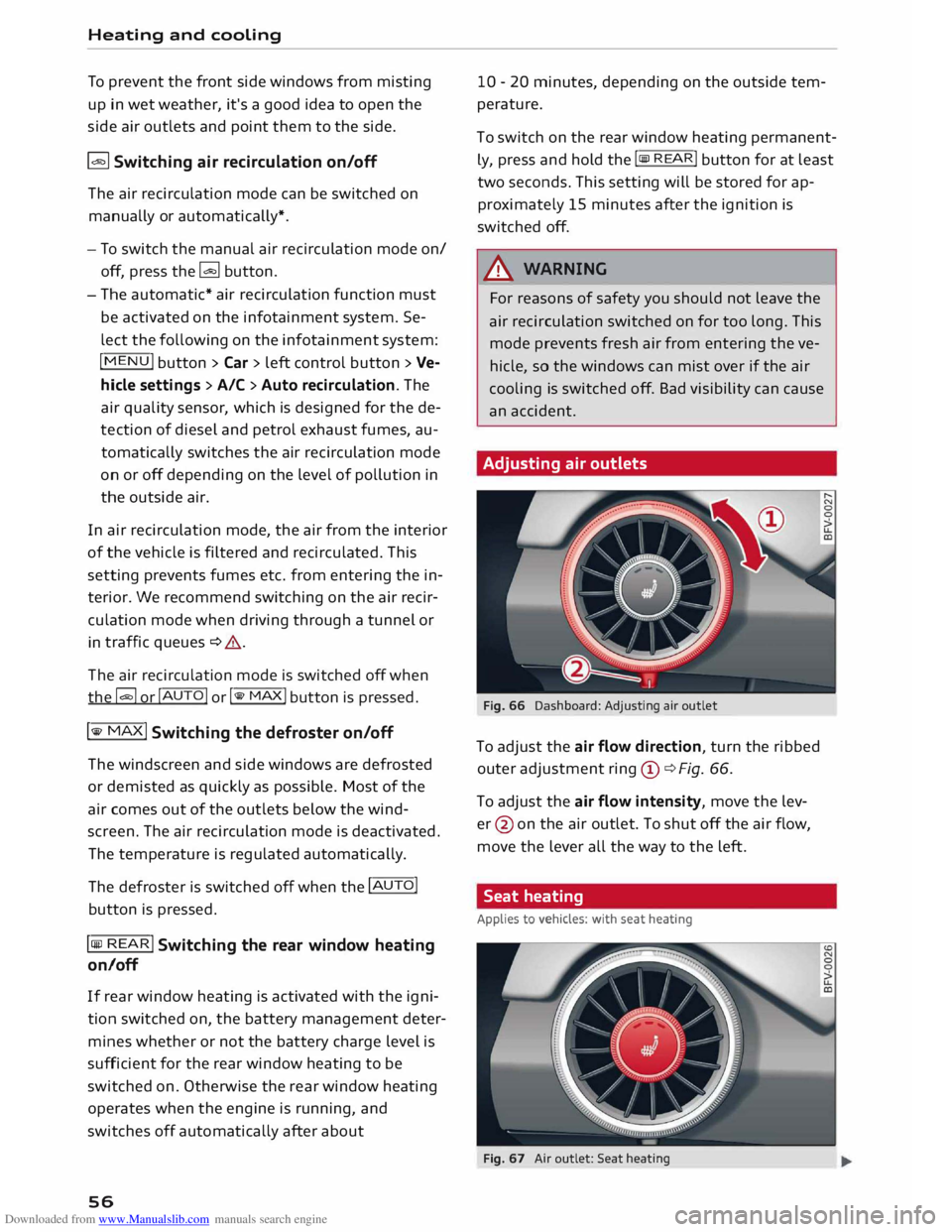
Adjusting air outlets
Fig. 66 Dashboard: Adjusting air outlet
To adjust the air flow direction, turn the ribbed
outer adjustment ring©¢ Fig. 66.
To adjust the air flow intensity, move the Lev
er @ on the air outlet. To shut off the air flow,
move the Lever all the way to the Left.
Seat heating
Applies to vehicles: with seat heating
Fig. 67 Air outlet: Seat heating
Page 59 of 284
Downloaded from www.Manualslib.com manuals search engine 0
N
co
.-I
\D U'l
N
U'l
.-I The
seat heating has three levels. The heat level
is indicated by an LED.
,. To switch on the seat heating, press the� but
ton once.
,. To reduce the level, press the� button again.
,. To switch off the seat heating, press the [tJ but-
ton repeatedly until all the LEDs have gone out.
The seat heating automatically switches from
level 3 to level 2 after about 10 minutes.
When not to switch on the seat heating
Do not switch on the seat heating in the follow
ing situations:
- Seat is unused
- A protective cover is fitted on the seat
- A child seat is fitted on the seat
- The seat is damp or wet
_&. WARNING
People with limited capacity to feel pain or
sense temperature could burn themselves
when using the seat heating. These people
must not use the seat heating -risk of injury!
CD CAUTION
To avoid damaging the heating elements of
the seat heating, please do not kneel on the
seat or apply sharp pressure at a single point.
(I)) Note
- The setting for the driver's seat heating is
assigned to the key in use.
- If the front passenger's seat heating was on
when you last switched off the ignition, it
will be switched on automatically only if the
ignition is switched on again within 10 mi
nutes.
Supplementary heater
Applies to vehicles: with diesel engine
On cold days, the interior of the vehicle warms up
more quickly with the supplementary electric
heater. The supplementary heater is switched on
automatically as required, depending on the set
ting on the vehicle heating system. Heating
and cooling
The "supplementary heater" function can be
switched on or off as required. Select the follow
ing on the infotainment system: I MENU
I button >
Car > left control button > Vehicle settings > A/C
> Auto supplementary heater.
57
Page 60 of 284
Downloaded from www.Manualslib.com manuals search engine Driving
Driving
General notes
Running in
A new vehicle should be run in over a distance of
1,500 km. For the first 1,000 km the engine
speed should not exceed 2/3 of the maximum
per missible engine speed -do not use full throt
tle. From 1,000 to 1,500 km you can gradually
increase the engine rpm and road speed.
During its first few hours of running, the internal
friction in the engine is greater than later on
when all the moving parts have bedded down.
How the vehicle is driven for the first 1,500 km
also influences the engine quality. After this peri
od you should continue driving at moderate en
gine speeds, in particular when the engine is
cold. This helps to reduce wear and tear on the
engine and increases the potential mileage which
can be covered by the engine.
You should also avoid driving with the engine
speed too Low. Change down to a lower gear
when the engine no longer runs "smoothly". Ex
cessively high engine speeds are prevented by an
automatic rev limiter.
Driving through water on roads
Please note the following in order to prevent
damage to the vehicle when driving through wa
ter (e.g. on flooded roads):
- The water level must not be higher than the ve
hicle's underbody.
- Do not drive faster than walking pace.
A WARNING
After driving through water, mud, sludge,
etc., the braking effect can be delayed slightly
due to moisture on the discs and brake pads.
Applying the brakes carefully several times
will remove the moisture and restore the full
braking effect.
58 CD
CAUTION
Parts of the vehicle (e.g. engine, gearbox, run
ning gear or electrical components) can be
badly damaged when driving through water.
ij} Note
- It is advisable to check the depth at the
deepest point before approaching the wa-
ter.
- Do NOT stop the vehicle, drive in reverse or
switch off the engine before you are out of
the water.
- Bear in mind that waves created by oncom
ing traffic could exceed the permissible
wading depth of your vehicle.
- Avoid driving through salt water (corrosion).
How to improve economy and minimise
pollution
Fuel econom y, environmental impact and wear
on the engine, brakes and tyres depend largely
on the way you drive the vehicle. By adopting an
economical driving style and anticipating the
traffic situation ahead, you can reduce fuel con
sumption by 10-15%. The following section gives
you some tips on lessening the impact on the en
vironment and reducing your operating costs at
the same time.
Anticipate well in advance
A car uses most fuel when accelerating. If you an
ticipate hazards and speed changes well in ad
vance, you will need to brake less and thus accel
erate less. Wherever possible, let the car slow
down gradually with a gear engaged, for in
stance when you can see that the next traffic
lights are red.
Change gear early to save fuel
An effective way of saving fuel is to change up
quickly through the gears. Running the engine at
high rpm in the lower gears uses an unnecessary
amount offuel. Press the accelerator slowly and
avoid using the "kick-down" feature.
...,
Page 62 of 284
Downloaded from www.Manualslib.com manuals search engine Driving
Steering Adjusting the steering wheel position
The height and reach of the steering wheel can
be adjusted as required to suit the driver.
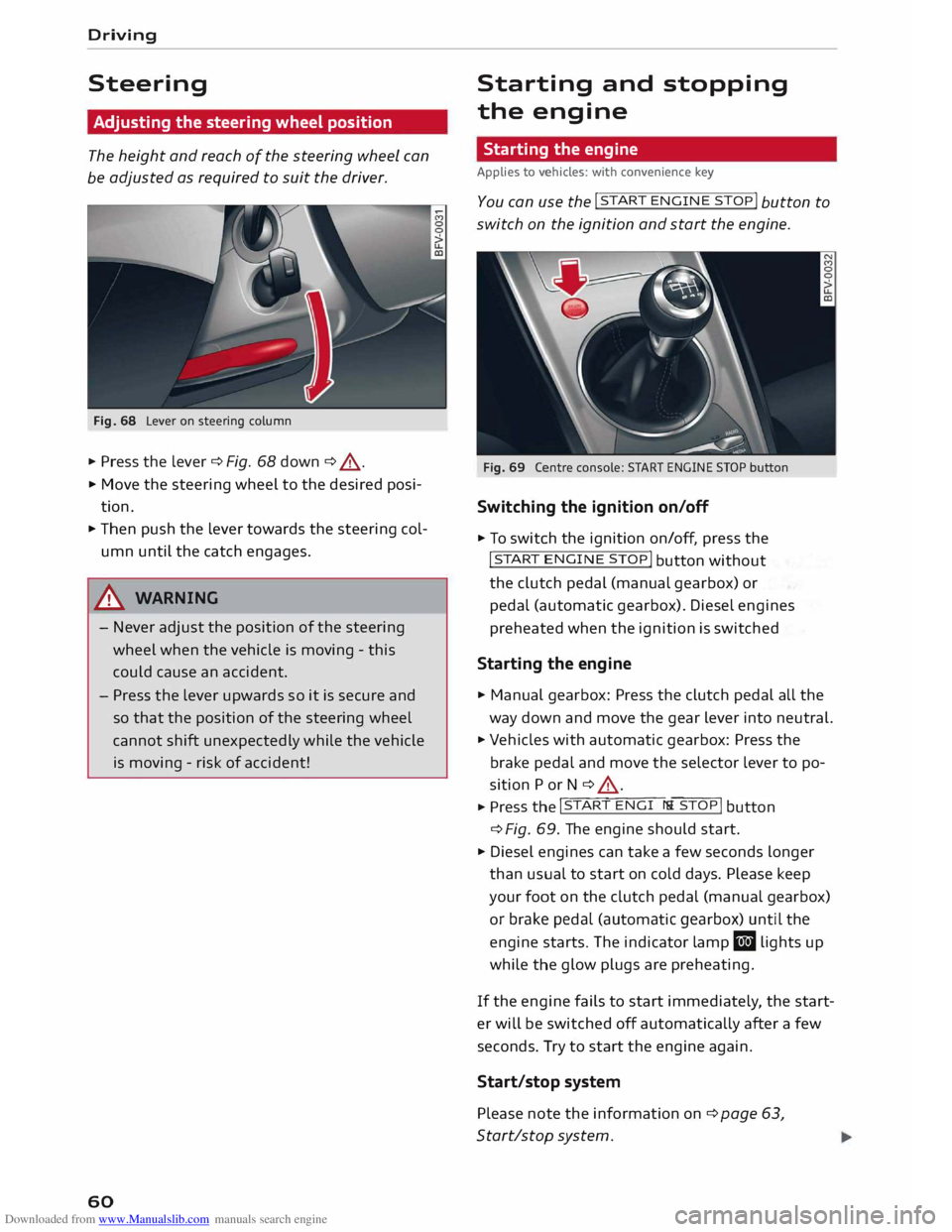
Fig. 68 Lever on steering column
... Press the lever ¢ Fig. 68 down ¢ &_
.
... Move the steering wheel to the desired posi
tion .
... Then push the lever towards the steering col
umn until the catch engages.
& WARNING
- Never adjust the position of the steering
wheel when the vehicle is moving -this
could cause an accident.
- Press the lever upwards so it is secure and
so that the position of the steering wheel
cannot shift unexpectedly while the vehicle
is moving -risk of accident!
60 Starting
and stopping
the engine
Starting the engine
Applies to vehicles: with convenience key
Y ou can u
se the !START
ENGINE STOP!
button to
switch on the ignition and start the engine.
Fig. 69 Centre console: START ENGINE STOP button
Switching the ignition on/off
... To switch the ignition on/off, press the
!START ENGIN
E STOP!
button without
the clutch pedal (manual gearbox) or
pedal (automatic gearbox). Diesel engines
preheated when the ignition is switched
Starting the engine
... Manual gearbox: Press the clutch pedal all the
way down and move the gear lever into neutral.
... Vehicles with automatic gearbox: Press the
brake pedal and move the selector lever to po
sition P or N ¢ &_
. ... Press th
e l�
S�
T_
A_R_T_ E_N�G_I _N_
E_S� T -
O �
P �I button
¢ Fig.
69. The engine should start .
... Diesel engines can take a few seconds longer
than usual to start on cold days. Please keep
your foot on the clutch pedal (manual gearbox)
or brake pedal (automatic gearbox) until the
engine starts. The indicator lamp El lights up
while the glow plugs are preheating.
If the engine fails to start immediately, the start
er will be switched off automatically after a few
seconds. Try to start the engine again.
Start/stop system
Please note the information on ¢ page 63,
Start/stop system.
Page 63 of 284
Downloaded from www.Manualslib.com manuals search engine 0
N
co
....
\D L/'l A
WARNING
- Never run the engine in confined spaces.
The exhaust gases are toxic -risk of poison
ing!
- Never switch off the engine until the vehicle
is stationary.
- The brake servo and the power steering sys
tem work only when the engine is running.
You need more strength to steer and brake
the vehicle when the engine is switched off.
This would mean a greater risk of accidents
and serious injury, because you cannot steer
and brake in the normal manner.
Avoid high engine speeds, full throttle and ex
treme load conditions until the engine has
reached its normal operating temperature;
otherwise this can damage the engine.
{:!)) Note
- When starting from cold the engine may be
a little noisy for the first few seconds until
oil pressure has built up in the hydraulic
tappets. This is quite normal and no cause
for concern.
- If you leave the vehicle with the ignition
switched on, it will be switched off auto
matically after a while. Please note that
electrical equipment such as the exterior
lighting will also be switched off.
Switching off the engine
Applies to vehicles: with convenience key
• Stop the vehicle .
• Press the rel
s=
Tc-c
A -,c
R=
T,,..
E=
N�G =
I c-c
N -=
E ,....,
S=
T=
o=-c
P�I button
¢ page 60, Fig. 69.
Steering lockl
)
The steering will be locked if you switch off the
engine with the !STA
R
T E NGI N
E STOP!
button ,
move the selector lever to position P (on vehicles
with automatic gearbox*) and open the driv er's
door.
N
� l
l
This function is not available on all export versions. Driving
The steering will be locked if you switch off the
engine with the !S
T
A RT
ENGINE ST
O P
!
button
and open the driver's door. The steering lock acts
as a theft deterrent.
Emergency Off function
If necessary in an emergency, the engine can be
switched off while the vehicle is still moving.
Press the !STA
RT
ENGI
NE
STOP!
button twice in
quick succession or hold it in for longer than two
seconds.
A WARNING
- Never switch off the engine until the vehicle
is stationary . Otherwise you may not have
the full benefit of the brake servo and power
steering. You may need more strength to
steer and brake the vehicle than you nor
mally would. This would mean a greater risk
of accidents and serious injury, because you
cannot steer and brake in the normal man
ner.
-Always take the key with you when you leave
the vehicle. Otherwise the engine can be
started or power-operated equipment such
as the electric windows can be used. This
could result in serious injury.
CD CAUTION
If the engine has been working hard for a long
time, there is a risk of heat building up in the
engine compartment after the engine has
been switched off; this could cause engine
damage. For this reason, you should leave the
engine idling for about 2 minutes before
switching it off.
(1'> Note
After the engine is stopped the radiator fan
may run on for up to 10 minutes, even if the
ignition is switched off. The fan may also start
running again after some time if the coolant
temperature rises due to a build-up of heat,
llll-
61
Page 64 of 284
Downloaded from www.Manualslib.com manuals search engine Driving
or if the engine is hot and the engine com
par tment is heated up further by direct
sunlight.
Driver messages
Switch off ignition before leaving car. Battery is
being discharged
This message appears and the buzzer sounds if
you open the driver's door while the ignition is
switched on. Switch off the ignition to prevent
the battery from being discharged.
Pressing start/stop button again will switch off
engine.
This message appears if you press the
!START ENGINE STOP!
button while the vehicle is
moving.
Engine start system: fault. Please contact work
shop
A fault has occurred when starting the engine au
tomatically (automatic start function). Drive to a
qualified workshop soon and have the fault recti
fied. Press
and hold
the !S
TA RT
ENGINE STOP I
button to start the engine.
II Remote control key: hold back of key
against marked area. See owner's manual
This message appears if there is no convenience
key inside the vehicle or if the system cannot de
tect or identify the key. This can happen, for ex
ample, if the radio signal from the key is obstruc
ted by a metal briefcase or similar, or if the key
battery is weak. Electronic equipment, such as
mobile phones, can also interfere with the radio
signal from the key.
If you encounter any problems starting or stop
ping the engine, please refer to "What to do if
the "START ENGINE STOP" button is inoperation
al" ¢page 63.
Ill Remote control key: key not recognis ed. Is
key still in vehicle?
If the indicator lamp Ill Lights up and the mes
sage appears, the convenience key was removed
from the vehicle while the engine was running. If
the convenience key is not in the vehicle you will
62 not
be able to switch on the ignition or restart
the engine after it has been switched off. You will
also not be able to lock the vehicle from the out
side.
Please press brake pedal
This message appears on vehicles with an auto
matic gearbox if you try to start the engine with
out first pressing the brake pedal.
Please press clutch pedal
This message appears on vehicles with a manual
gearbox if you try to start the engine without
first pressing the clutch pedal. The engine will
only start if you press the clutch pedal.
Please engage N or P
This message will appear if you try to start or
switch off the engine when the selector lever is
not in Nor P. The engine can then not be started
or switched off.
Shift to P, otherwise vehicle can roll away.
Doors do not lock if lever is not in P
For safety reasons, this message will appear and
a warning buzzer will sound if the selector lever
of the automatic gearbox is not in position P
when you switch off the ignition with the
!START ENGINE STOP!
button. Put the selector
lever in position P; otherwise the vehicle can roll
away. If the lever is not in position P you will not
be able to Lock the vehicle using the locking sen
sor on the door handle or the convenience key.
Page 65 of 284
Downloaded from www.Manualslib.com manuals search engine 0
N
co
....
\D Lfl
N
Lfl
.... Starting
the engine after a malfunction
If the remote control key battery is exhausted or
if radio interference or a system malfunction oc
curs, extra steps may be necessary in order to
start the engine.
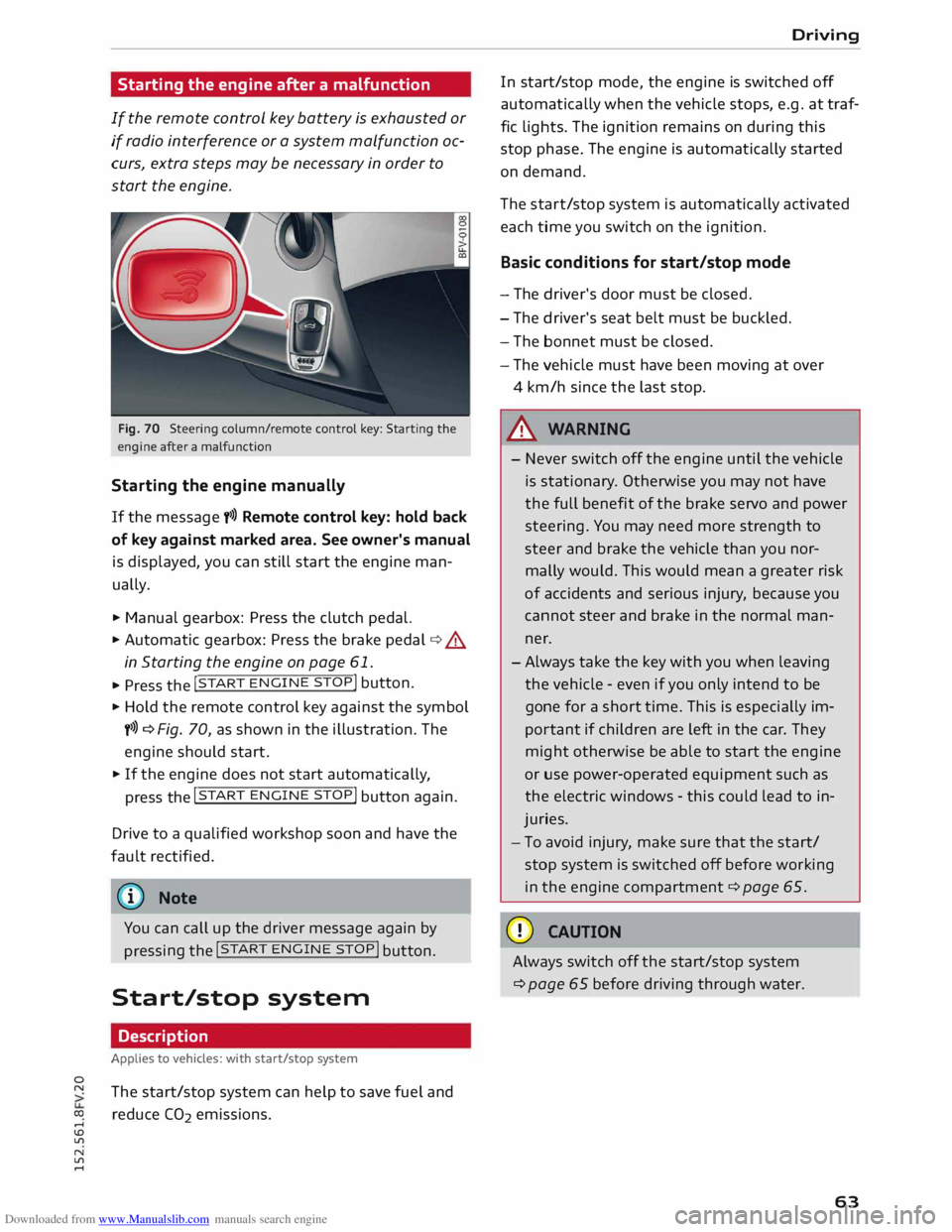
Fig. 70 Steering column/rem ote control key: Starting the
engine after a malfunction
Starting the engine manually
If the message y>>) Remote control key: hold back
of key against marked area. See owner's manual
is displayed, you can still start the engine man
ually.
.,.. Manual gearbox: Press the clutch pedal.
.,.. Automatic gearbox:
Press the brake pedal¢.&
in Starting the engine on page 61 .
... Press the !
START ENGINE
STOP!
button.
.,.. Hold the remote control key against the symbol
y>>) ¢ Fig. 70, as shown in the illustration. The
engine should start .
.,.. If the engine does not start automatically,
press the !START
ENGINE
STOP!
button again.
Drive to a qualified workshop soon and have the
fault rectified.
{D Note
You can call up the driver message again by pressing
the !START
ENG
INE
STOP! button.
Start/stop system
Description
Applies to vehicles: with start/stop system
The start/stop system can help to save fuel and
reduce CO2 emissions. Driving
In start/stop mode, the engine is switched off
automatically when the vehicle stops, e.g. at traf
fic lights. The ignition remains on during this
stop phase. The engine is automatically started
on demand.
The start/stop system is automatically activated
each time you switch on the ignition.
Basic conditions for start/stop mode
- The driver's door must be closed.
- The driver's seat belt must be buckled.
- The bonnet must be closed.
- The vehicle must have been moving at over
4 km/h since the last stop .
.&, WARNING
- Never switch off the engine until the vehicle
is stationary . Otherwise you may not have
the full benefit of the brake servo and power
steering. You may need more strength to
steer and brake the vehicle than you nor
mally would. This would mean a greater risk
of accidents and serious injury, because you
cannot steer and brake in the normal man
ner.
-Always take the key with you when leaving
the vehicle -even if you only intend to be
gone for a short time. This is especially im
portant if children are left in the car. They
might otherwise be able to start the engine
or use power-operated equipment such as
the electric windows -this could lead to in
juries.
- To avoid injury, make sure that the start/
stop system is switched off before working
in the engine compartment ¢ page 65.
CD CAUTION
Always switch off the start/stop system
¢page 65 before driving through water.
63