light AUDI TT COUPE 2020 Manual Online
[x] Cancel search | Manufacturer: AUDI, Model Year: 2020, Model line: TT COUPE, Model: AUDI TT COUPE 2020Pages: 280, PDF Size: 98.79 MB
Page 242 of 280
Care and cleaning
— Do not turn on the seat heating* to dry
the seat.
— Objects with sharp edges, such as zippers
or rivets on clothing or belts, can cause
damage to the surface.
— Open hook and loop fasteners, for exam-
ple on clothing, can damage seat covers.
Make sure hook and loop fasteners are
closed.
— Natural leather
— Never treat leather with solvents, floor
polish, shoe polish, spot remover or simi-
lar products.
— Objects with sharp edges, such as zippers
or rivets on clothing or belts, can cause
damage to the surface.
— Never use steam cleaners, brushes, hard
sponges, etc. when cleaning.
— Do not turn on the seat heating” to dry
the seat.
—To help prevent the leather from fading,
do not leave the vehicle in direct sunlight
for long periods of time. If leaving the ve-
hicle parked for long periods of time, you
should cover the leather to protect it from
direct sunlight.
@ Tips
— Insects are easier to remove from paint that
has been freshly waxed.
— Regular waxing can prevent rust spots from
forming.
— Decorative decals can age due to environ-
mental conditions, which can result in dam-
age such as brittleness. The color may fade
if exposed to excessive sunlight.
Taking your vehicle out
of service
If you would like to take your vehicle out of serv-
ice for a long period of time, contact an author-
ized Audi dealer or authorized Audi Service Facili-
ty. They will advise you of important measures,
such as corrosion protection, service, and storage
procedures. Also follow the information about
the vehicle battery > page 209.
240
Page 247 of 280

8S1012721BB
Emergency assistance
> Slide the wheel wrench from the vehicle tool kit
all the way onto the wheel bolt).
> Turn the wheel bolt approximately one turn to
the left. To achieve the required torque, hold
the end of the wheel wrench. If the wheel bolt
will not loosen, press carefully on the wheel
wrench with your foot. Hold onto the vehicle se-
curely while doing this and make sure your foot-
ing is stable.
ZA WARNING
To reduce the risk of an accident, only loosen
the wheel bolts gently one turn before raising
the vehicle with the vehicle jack*.
Raising the vehicle
Applies to: vehicles with vehicle jack
A_,
BFv-0094
BFV-0265
Fig. 190 Sill: positioning the vehicle jack
> Place the vehicle jack from the vehicle tool kit
ona firm surface. Use a flat, stable support if
necessary. On a slippery surface such as tile,
you should use a non-slip pad such as a rubber
mat > /A\.
D_ You need the matching adapter in order to loosen and
tighten anti-theft wheel bolts* > page 244.
> Find the marking on the sill that is closest to
the tire that will be changed > fig. 189. Behind
the marking, there is a lifting point on the side
sill for the vehicle jack.
> Turn the vehicle jack located under the mount-
ing point on the sill to raise the jack until its
arm @) ° fig. 190 is located under the desig-
nated mounting point.
> Align the vehicle jack so the arm (@) engages in
the designated mounting point in the side sill
and the base (2) lies flat on the ground. The
base (2) must be directly under the mounting
point @.
> Continue raising the vehicle jack until the wheel
lifts off the ground slightly.
ZA WARNING
—To reduce the risk of injury, make sure no
one is in the vehicle before raising it.
— Make sure the vehicle jack is stable. The risk
of injury is increased when the ground is
slippery or soft, because the vehicle jack
could slide or sink.
— Only raise your vehicle with the vehicle jack
provided by the factory. If you use a vehicle
jack designed for another vehicle, your vehi-
cle could slip and cause injury.
— Position the vehicle jack only at the desig-
nated mounting points on the side sill and
align the jack. Otherwise, the vehicle jack
could slip and cause an injury if it does not
have sufficient hold on the vehicle.
—To reduce the risk of injury, do not raise any
other vehicles or other loads using the vehi-
cle jack provided by the factory.
—To reduce the risk of an accident, never start
the engine when the vehicle is raised.
—To reduce the risk of injury, no work should
be performed under the vehicle while it is
raised.
@) Note
Do not lift the vehicle by the sill. Position the
vehicle jack only at the designated mounting
245
>
Page 251 of 280

8S1012721BB
Emergency assistance
4. Attach the other end of the negative cable
(black) to the jump start connection @) on
the vehicle.
Starting the engine
> Start the engine in the vehicle giving the charge
and let it run at idle.
> Now start the engine in your vehicle, which has
the
drained battery.
> If the engine does not start: Stop the starting
procedure after 10 seconds and then repeat it
after approximately 30 seconds.
> Turn on the rear window defogger in your vehi-
cle in order to reduce any voltage peaks that
may occur when disconnecting the jump start
cables. The headlights must be switched off.
> With the engines running, remove the cables in
reverse order of the way they were installed.
> Close the red cover on the positive terminal.
Z\ WARNING
— Never connect the jump start cable directly
to your vehicle battery. Only use the connec-
tions in the engine compartment.
— Do not touch the non-insulated parts of the
terminal clamps. The cable must also not
come into contact with vehicle components
that conduct electricity when it is connected
to the positive vehicle battery terminal. This
can cause a short circuit.
— The locking bolts on the battery cells must
be tightened securely.
— Keep ignition sources (open flames, burning
cigarettes, etc.) away from the vehicle bat-
teries to reduce the risk of an explosion.
— Route the jump start cables so they cannot
get caught in the moving parts in the other
vehicle's engine compartment.
@) Note
Please note that the connecting process previ-
ously described for the jump start cables is in-
tended for when your vehicle is being jump
started.
@) Tips
Make sure that the connected jump start ca-
bles have sufficient contact with metal.
Towing
General information
You should only perform the steps that follow if
you have the necessary tools and technical ex-
pertise.
Towing requires a certain amount of practice.
Audi recommends contacting a towing company
to have the vehicle transported.
You should only have your vehicle towed by an-
other vehicle when disabled in exceptional cir-
cumstances. Inexperienced drivers should not
tow.
Notes on towing
When the engine is stopped, the transmission
will not be sufficiently lubricated if traveling at
high speeds and long distances:
— The maximum permitted towing speed is 30
mph (50 km/h).
— The maximum permitted towing distance is 30
miles (50 km).
Additional information on towing with a tow
truck
The vehicle may only be towed with the front axle
raised. Do not wrap any chains or cables around
the brake lines.
If the vehicle should be towed with the axle
raised, then the ignition must be switched off to
reduce the risk of damage to the drivetrain.
Tow bar and towing cable
The vehicle can be towed with a tow bar or tow-
ing cable. Both drivers should be familiar with
the special considerations when towing, especial-
ly when using a towing cable.
Always make sure the traction force does not ex-
ceed the permitted level and there are no shock
loading conditions. There is always the risk of the >
249
Page 254 of 280

Fuses and bulbs
Fuses and bulbs > Remove the fuse panel cover > fig. 199.
> Remove the plastic clip from the fuse panel
Fuses cover > fig. 199.
ae > Remove the fuse using the clip.
> Replace the blown fuse only with a fuse that
has the same amp rating.
Fuse color identification
Color Current rating
in amps
Black 1
Purple 3
Light brown 5
Brown 7:5
Red 10
Blue 15
Yellow 20
White or transparent [25
Green 30
Orange 40
Z\ WARNING
Fig. 199 Left side of the engine compartment: fuse cover Do not repair fuses and never replace a blown
fuse with one that has a higher amp rating.
A fuse that has blown will have metal strips that This can cause damage to the electrical sys-
have burned through. The fuses are located in the tem and a fire.
interior and in the engine compartment.
@) Note
If a new fuse burns out again shortly after you
Fuses in the interior
> Switch the ignition and all electrical equipment have installed it, have the electrical system
off. checked as soon as possible by an authorized
» Check the following table to see which fuse be- Audi dealer or authorized Audi Service Facili-
longs to the equipment > page 253. ty.
> Remove the cover > fig. 198.
> Remove the plastic clip from the fuse panel Gi) Tips
cover in the engine compartment © fig. 199.
> Remove the fuse using the clip.
> Replace the blown fuse only with a fuse that
has the same amp rating.
> Install the cover.
— The following table does not list fuse loca-
tions that are not used.
— Some of the equipment listed in the follow-
ing tables applies only to certain model ver-
sions or certain optional equipment.
Fuses in the engine compartment
> Switch the ignition and all electrical equipment
off > A\.
> Check the following table to see which fuse be-
longs to the equipment > page 254.
252
Page 255 of 280

8S1012721BB
Fuses and bulbs
fuse assignme
No. | Equipment
RAZ-0795)
PO ee
15°16°17-18 19 20 21
Pr ily ip y ips :}
3839 |4142
32°33:34 35:36 37
40 49
74
F20 | Power lumbar support adjustment
Front passenger's side neck heating (Road-
F22
ster)
Right vehicle electrical system control
F24
module
F25 | Driver side door
F26 | Seat heating
Vehicle electrical system control module
bad (terminal 30)
F28 | AMI High media port
F29 | Vehicle electrical system control module
F32 | Driver assistance systems
F33 | Airbag
Sockets, interior sound, tail light switch,
F34 | temperature sensor, oil level sensor, neck
heating, garage door opener
Fig. 200 Vehicle interior: fuse assignment
No. Equipment
Diagnosis, headlight range control, air
quality sensor, automatic dimming rear-
view mirror, center instrument panel
switch module
F35
F4 Central computer processor (MIB-2) F36 | Right cornering light / right LED headlight
FS: Gateway (diagnostics) F37 | Left cornering light / left LED headlight
Fo Selector lever (automatic transmission)
F7
Climate control system controls, rear win-
dow defogger, tire pressure monitoring
Engine control module, ESC control mod-
F38
ule
F39 | Front passenger side door
F8
Switch for the electromechanical parking
brake, light switch, rain/light sensor, inte-
rior lighting, diagnostic connector, roof
electronics F40
| Cigarette lighter, sockets
F41 | Fuel tank diagnosis
F42 | Central locking area
FQ Steering column switch module
F44 | All wheel drive clutch control module
F10 Vehicle positioning
F45 | Power adjustable driver's side seat
Fil
All wheel drive clutch, left vehicle electri-
cal system control module
F46 | Driver's side neck heating (Roadster)
F49 | Engine start, clutch sensor
FI2 Infotainment components
F52 | Control module for suspension control
F1l4 Climate control system blower fan
F53 | Rear window defogger
Fis Electronic steering column lock
F16
Infotainment system components, safety
belt microphone
PL? Instrument cluster
F18 Rearview camera
F19
Convenience access control module
The power seats* are protected via circuit break-
ers that automatically switch on after a few sec-
onds after the overload has been reduced.
253
Page 256 of 280

Fuses and bulbs
Left engine compartment fuse assignment
=
3
3}
7
6
Ly
vy
<1
RAZ-0794)
ment
F3
Fig. 201 Left side of engine compartment: fuse assign-
Engine control module
F4
Engine components, engine cooling, sec-
ondary air pump
FS Engine components, tank system
Fo Brake light switch
F7 Engine components
F8 Heat oxygen sensor
F9 Engine components, exhaust door
F10 Fuel injectors, fuel control module
F13 Transmission fluid pump
F15 Horn
F16 Ignition coils
F17 Suppressor
F18
Diagnostic interface, battery monitoring,
garage door opener antenna
F19 Windshield wipers
F20 Anti-theft alarm system
F201: Automatic transmission control module
F22
Terminal 50 diagnosis (engine control
module)
254
F23 Engine start
F31
Engine components (5-cylinder)
Bulbs
Your vehicle is equipped with maintenance-free
headlights and tail lights. However, if a light bulb
needs to be replaced, please contact an author-
ized Audi dealer or authorized Audi Service Facili-
ty.
Page 265 of 280
851012721BB
Technical data
ler} lahat)
Fuel tank 14.5 gal (55 L)
Windshield and headlight washer system* 4.0 qt (3.8L)
Weights
[= Le
TAMA AA ON
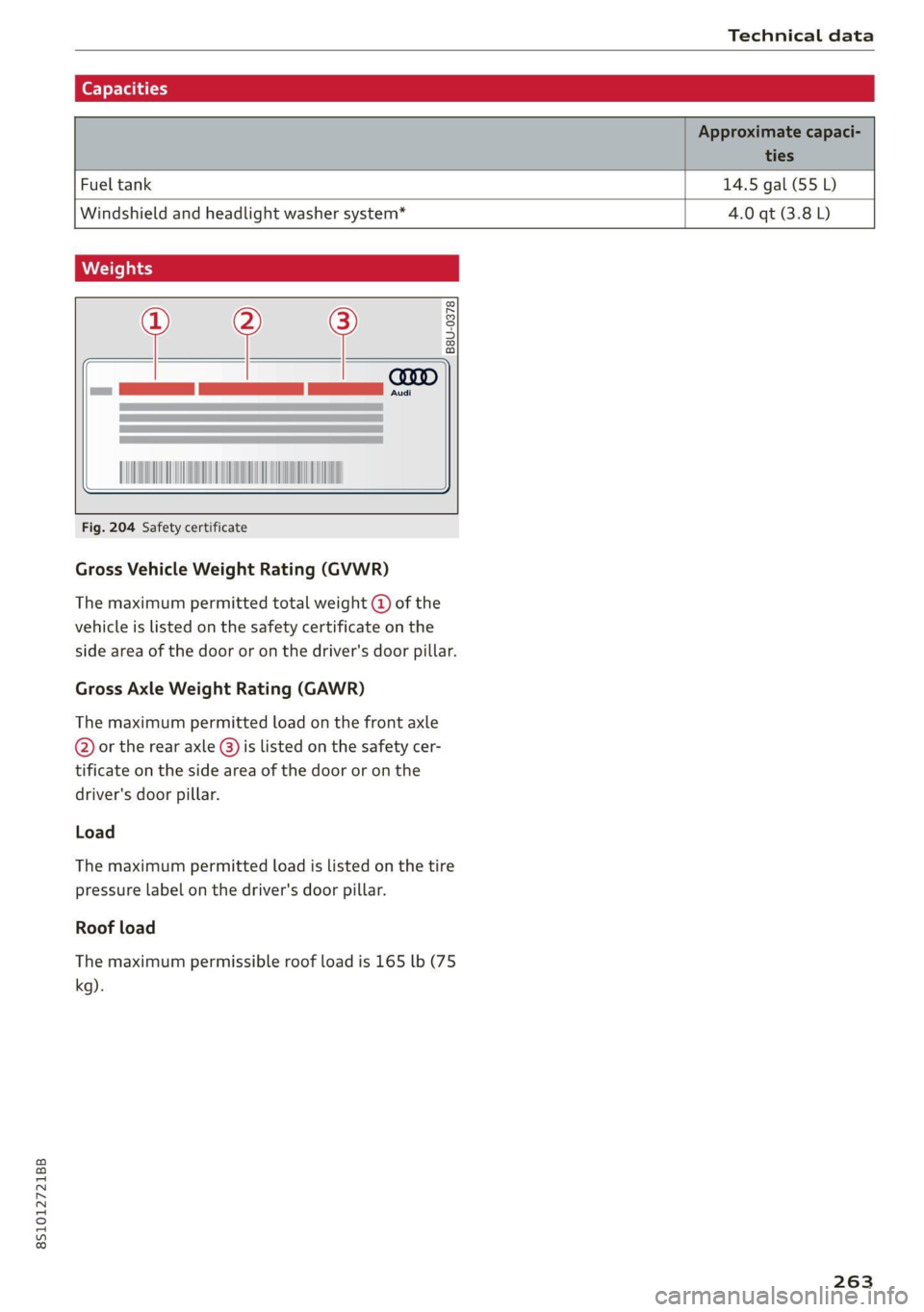
Fig. 204 Safety certificate
Gross Vehicle Weight Rating (GVWR)
The maximum permitted total weight @ of the
vehicle is listed on the safety certificate on the
side area of the door or on the driver's door pillar.
Gross Axle Weight Rating (GAWR)
The maximum permitted load on the front axle
@ or the rear axle @) is listed on the safety cer-
tificate on the side area of the door or on the
driver's door pillar.
Load
The maximum permitted load is listed on the tire
pressure label on the driver's door pillar.
Roof load
The maximum permissible roof load is 165 lb (75
kg).
263
Page 266 of 280

Index
A
A/C (climate control system) .............. 70
ACCESSOFIES .. 0... eee 63, 259
Active lame'assistyes « . serie so sucesso emmice 2 0 89
Activating vibration warning............. 91
Adjusting steering time................. 91
Cleaning the camera area.............. 236
Indicator light.......... 2.0.00 ee eee eee 90
M@SSAGES eeews » « sous & 5 see Y & ewe e Bees 90
Switching ON/OFF. « essere so ana + vor ve ow 90
Adaptive light « eis: . sisin as nae a 6 came oo as 96
Adjusting the additional display........... 14
Adjusting the air distribution............. 70
Adjusting the center console lighting....... 39
Adjusting the sound..............-..00- 193
Adjusting the temperature............... 70
Adjusting the vents..............--.000- 71
Airbag system... .. eee eee eee 52
Alarm system
refer to Anti-theft alarm system.......... 24
Alignment pin (tire change) .............. 241
All-weather lights.................00000- 36
ALL:S@aSON TNeS iiss so comers oe veausin & asennes a e ae 228
All Whee lOrive soon so ioe « a asus ¥ & amines 109
Alternative
routes . cscs scan ei cae ee bere 156
AMbISntliGhting!s « = sess = = mews ov sows « 2 ee 39
AMI
refer to Audi music interface........... 176
Android Auto
refer to Audi smartphone interface...... 187
Announcements (settings)
refer to Voice guidance. ...........0005 157
Anti-freeze
Windshield washer system............. 211
Anti-lock braking system (ABS)........... 105
Anti-Slip Regulation.................05. 105
Anti-theft alarm system............000008 24
Anti-theft wheel bolts.................. 244
Apple CarPlay
refer to Audi smartphone interface...... 187
APIMIROSE. csconere « 0 ccusece 0 © sonsee a 0 anesera «oi miaeern « » 47
Aspect ratio (Video) ...... 6... cece eee eee 181
ASR
refer to Anti-Slip Regulation............ 105
264
Audi connect
refer toconnect....... 0. eee eee eee eee 142
Audi connect Infotainment
Personal hotspot.............e0ee cece 143
Services overview. ............0000005 145
Audi magnetic ride
refer to Suspension control.............. 96
Audi music interface. .............0000- 176
Audi music stream
refer to Wi-Fi...............00 ee 147,174
Audiosiles, coves «x suncaws x x sane w a ctayave « erenene 178
Audio player
Bluetooth audio player................ 173
Wi-Fi audio players.: ss esses eesse specs 174
Audio track. ...... 0. cece eee eee eee 181
Audi phone box.............-.000 eee 131
Audi smartphone interface.......... 187,191
Audi virtual cockpit
refer to Instrument cluster.............. 10
AUTO
Automatic climate control system........ 70
Automatic headlights.................. 36
Auto Lock (central locking) ............... 18
Automatic climate control system
refer to Climate control system (automatic) . 70
Automatic post-collision braking system... 105
Automatic transmission............-...5- 79
Driving tips..... 6... 0. cee eee eee eee 81
Emergency mode............-...000005 85
Hilldeseent control spews x 2 cxwn 2 a wows « was 83
KKIGKSG OWN sczssis 0 oncies «a openius « syescem 2 cnerte 84
Malfunction... 0.0... 0... eee e eee 81
Selector lever emergency release......... 86
Selector: lever LOK scazee + x sesinae + 6 sevens a 6 ssn 81
Selector lever positions................. 79
ShIPEING MANUALLY’: asus « ¢ neues a e eee & ex 83
Steering wheel with shift paddles........ 83
tiptronic.. 2... eee eee eee 83
Automatic wiper/washer system........... 41
Automatic zoom (navigation) ............ 160
AUXANPUE « swcsinn o ceswae ¥ eames as eM ao auDe 176
Average fuel consumption..............05 15
Average speed .... cs ec ccc eee cc eens ees 15
B
BACK button ; « exes s news s + Baws =v eee 9 ve 111
Page 267 of 280

8S1012721BB
Balanice:(SOUNG), swasi = sisvine se wv wecius ws erases oo 193
Band
refer to Frequency band............... 165
Bassi(SOunad), cus 5 2 semsere © x srens 2 seme a 0 om 193
Battenyisicas wv exsweue 3 x wisueee 3 v cmsamus 2 0 muses 2 a « 209
Charging ........ 6.0. c cece cece eens 210
WinterOperation s ava: « x sews « 2 eews 2 ewe 209
Better route (navigation)................ 163
Blower... 2.2... cece cece ee eee eee eee 70
Bluetooth
Audio playét occ <2 seus 3 e ees ge een ees 173
Connecting acellphone............... 129
Settings........... 00.02 ee eee eee 192
BOOSt:. « ciwseis 6 6 cease 0 0, oramne wo aoncaiie ww antes 8 8 15
Boost pressure indicator................. 15
Brake fluid
Checking the brake fluid level........... 208
BrakeStass oo ssc: a 3 aise so coc 6 comees 3 eee 107
Brake assist... 2.0... 0. eee eee ee eee 105
Brake assist systeM.............0--005 105
Brake fllid....... ee eee eee eee 208
Electromechanical parking brake......... 77
Emergency braking function............. 77
New brake pads cass cee es omen ao cee 107
Break-in security feature..............0.. 24
Breaking in
New brake pads................-.00-- 107
Newtires......... 0.00.00. cece eee eee 220
Browser
refer to Media center .............0000- 179
Bulbireplacenienith: s « accu s © mews 3 ¢ mere sve 254
Buttons
Control.panel (MMI) ws « sews ss wows so 4 111,
Cc
Cable (USB adapter/AUX connector cable).. 176
California Proposition 65 Warning........ 201
Battery specific:. = 2 csevs se sewn 2s wewe 2 os 209
Calllist vous: » x sagem 5 2 que og AWE Ye ee 133
Cal
OpeOnSic: « « sees x o mew se eee 2 eee 140
Capacities
Fuebtankia coccass oo comms «a verve wo suena @ 2 oe 263
Washer fluid reservoir............00005 263
Gar keys + « snes % « snes © o arava © ¥ onenemn © o seoo 19
Garwash s icca ss mews + wai vv owen we ee 235
Catalytic‘converter « cess 2 wees 2 2 wewe es wes 199
CD drive (media drives) ...........0..006 172
Cell phone
Playing music.............. 0c eee eee 173
also refer to Telephone................ 129
Cell phone compartment
refer to Audi phone box............... 131
Centerartiirests: « 2 wes s 2 ewes 2 o oe ¢ » ees 47
Céftral lOCKING’: s = secs s 5 eaves & ¥ ace & eee 18
AULO LOK « ccinss 2 o seen 2 sens 2 o eerie 2 wees 18
Convenience key.......... 0.00 eee eee 21
Convenience opening and closing......... 27
Mechanically unlocking and locking....... 23
Remote control key.............--000-5 21
Setting... 6.6... e cece 23
Central locking switch.................-. 22
Ceramic brakes. 1.1... . cee eee ee eee ee 107
Gentifications s « sucscm oo snawere wo mene so oma 5 260
Changing light bulbs................... 254
Charging
refer to Power sourceS...... 0.0.00 0 eee 63
Charging the battery (mobile devices). 131, 176
Child -safety‘seats:. . nw 6c eve ae eee ee eee 58
Securing to the top tether anchor........ 62
Securing with a safety belt.............. 60
Securing with LATCH .........0ceeeeveee 60
ClaSSIOVIEW is ¢ » nawin = 2 news + awn ws Wane 8 & 13
GLEAMING sows « « sew 5 2 Rou: ae ee ee wR 235
Cleaning Alcantara.............-.00005. 238
Cleaning artificial leather............... 238
Cleaning carbon components........ 237, 238
Cleaning controls.................2.00. 238
Cleaning decorative parts andtrim........ 237
Cleaning exhaust tail pipes.............. 236
Cleaning plastic parts.................. 238
Cleaning taiblights's s ces x s may ao ewe oo: 236
Cleaning textiles = cars + & exes s = aces s ¢ ees 238
Cleaning the wind deflector............. 237
Climate control system (automatic)........ 70
Drive SQlCCEcsis x says 5 2 ones x 2 owes 3 2 gare 96
GLOGK sim < nan 3 5 pemR aE REE & x OEE
Closing
Convenience closing..............-+.-. 27
HOOd ... eee eee eee 201
Luggage compartment lid............... 24
WINKOWS!. 2 cscs: 2 iorsm ou aamewe oo eee a 288 26
Cockpit (OVERVIEW): « sss 2 seme 2 gems = ee 6
Page 268 of 280
Index
ColOmmumber's « o esisne xe cunccis w o sccweme x a sesame 262
COMING NOME sic: e esivs x 6 mies ao see a» Hers 38
Commands (voice recognition system) ..... 123
COMPArtiMenitSies « x eews 5 e caw 5 o ewe ov eR 63
Compass inthe Mitr: ¢ cess se cams st ews § 43
Compliance........ 6.0... c cece eee ee eee 260
Conference call...................2000. 134
CONNECE. ee eee ee 142
Data Privacy ss ¢ ¢ #2eu ss wenn so eae 5 3 res 256
TiifotainmentQex. 6 2 sesso so semis so sons oo on 142
Infotainment services............00005 144
Connection MaMager’s wise a © swiss x 6 cima as 190
Connections
refer to Media..............0000- 170, 178
Connection settingS............... 0. ee 190
Consumer information.................. 257
Consumption
Reducing........-. cece eee ee eee eee 74
Consumption (U!D) . aiccas seo ssaeie ao winzaoe e « aie 15)
COMPACTS seisse sc a aac aw esauius a x auoRTNE © a AnaKiK® 138
Additional directory.............-..00. 191
Importing/exporting.............ee eee 139
Memoryicapacityscis «+ sssss 6 & cavsves v 6 socewss 140
Searching........... 26 eee eee eee 139
Showing détails: s css sv sees vv heen seve 139
Storingias:destinationien « wivsuis « wevem ao ow 155
Gontrol bUttONS wie 2 wee 2 wes oe ewe 2 oon 13
Control buttons (operating the MMI)...... 112
Control knob with joystick function........ 116
Convenience key..........0--0 eee eee eee 19
Indicatorlight » meu < » mews 2 ewooy 5 won a 5 76
Unlocking and locking...............005 21
Convenience opening and closing
Setting. ........ 0.00... 27
WINGOWS's « cmos § 5 aaeae aE aROw § mee 4 YES 27.
EGOlING MOE: « x sass 5 & mens Fa ee xe 70
Cooling system
Adding coolants ese. = enve se seen ye oes 207
Checking the coolant level............. 207
Coolant........ 20... c ee eee eee eee eee 206
Coolant
temperature indicator........... 10
Crank (power top emergency operation)..... 34
Crosshairs... 0.2.0... 00. c cece eee eee ee 151
Cruise control system .............22-008- 87
Cup holders. ... 2... cc cece eee eee ee eee 63
Current fuel consumption................ 15
266
D
Data Privacy............... 0.00.0 0.00. 256
Date... . cece eee cee 189
Date display.............. 0... e eee eee 189
Daytime running light................00. 36
Declaration of compliance............... 260
Defrosting (Windows) ........0 000s seen uues ZL
DEF (instrument cluster) . « cen. se eee cs eas 10
Deluxe automatic climate control
refer to Climate control system (automatic) . 70
Determining correct load limit........... 227
Digital COMPASS « xa se esau 2 eases a Rew as 43
Digital Rights Management.............. 170
Dimensions ............ 000 cece eee eee 262
Dimming the rearview mirror............. 40
Directory
referto Contacts cs ss cees sb ews sf eee 138
Display
Cl@aNiNG es = « sewe s eee se eee ss ewe ees 238
DispOSdlees ¢ = sees » meen < ¥ eee s Fee ee 257
DISTANCE CHIVEN « sav ¢ @ secon oF RaeR 4B aa 8 15
Doors
Mechanically unlocking and locking....... 23
Driver information system................ 12
Energy CONSUMENS wai so wes oo eer oe EW 1S
On-board computer...............00--- 15
SWItCHING VIEWS: « sawe ¢ x mecns 2 3 Sees gb 13
Drives
referto Media.......0..eceeeeeee 170,178
DrivGiSGlects « « wear 2 x eews 4 s Queen ao eee ea: 96
Driving through water.............ee eee 74
Driving time... 1.6... cece eee is
Driving tips
Driving through water..............0005 74
Efficient. Giving « «cosa 2 a sais vw anne a 6 wos 74
Driving tracks. sxcos 2 ¢ awn 2 2 seen ooo eis © 2 oe 79
Dust filter
refer to Pollutant filter..............00. 69
DVD drive (media drives)................ 171
Dynamic volume
refer to System volume............00-5 193
E
EP railisas ss x vocasne a a cantons w senstene © © veowene a ot eas 136
Economicalroute ss snus ¢ seasons a ¢ ween eo sree 156