ECO mode AUDI TT ROADSTER 2011 Owner's Manual
[x] Cancel search | Manufacturer: AUDI, Model Year: 2011, Model line: TT ROADSTER, Model: AUDI TT ROADSTER 2011Pages: 260, PDF Size: 64.11 MB
Page 84 of 260
82 On the road
@ For the sake of the environment
To avoid unnecessary e ngine wea r and to
reduce exhaust emissions, do not let your
veh icle stand and warm up. Be ready to
drive off immediately after start ing your
veh icle . Maintain moderate speed until the
engine is comp letely warm . Remember,
the engine performs best at operating
temperature .
Stopping the engine
• Turn the ig nition key to position ©
<=> page 80, fig. 90.
&_ WARNING
- Never turn off the eng ine unti l th e vehi
cle has come to a complete stop.
- The brake booster and servotronic on ly
work when the engine is running . With
the ignition turned off, yo u have to apply
more force when steering or braking.
S ince you cannot steer and stop norma l
ly, this can lead to accidents and ser ious
injuries .
-The radiator fan can continue to run for up to 10 min utes eve n after yo u have
turned off the eng ine and rem oved the
ign iti on key. The r ad iator fa n can also
t u rn on again if th e e ngine coola nt hea ts
up because of inte nse sunlight or hea t
build -up in t he engine compartment.
(D Note
Do not stop the engi ne immed iate ly afte r
hard or extended driving . K eep the eng ine
r u nning for app rox imately two minu tes to
prevent e xcessive heat build-up .
Parking brake
Parking brake
When the parking brake is set , it prevents the
vehicle from rolling away unintentionally .
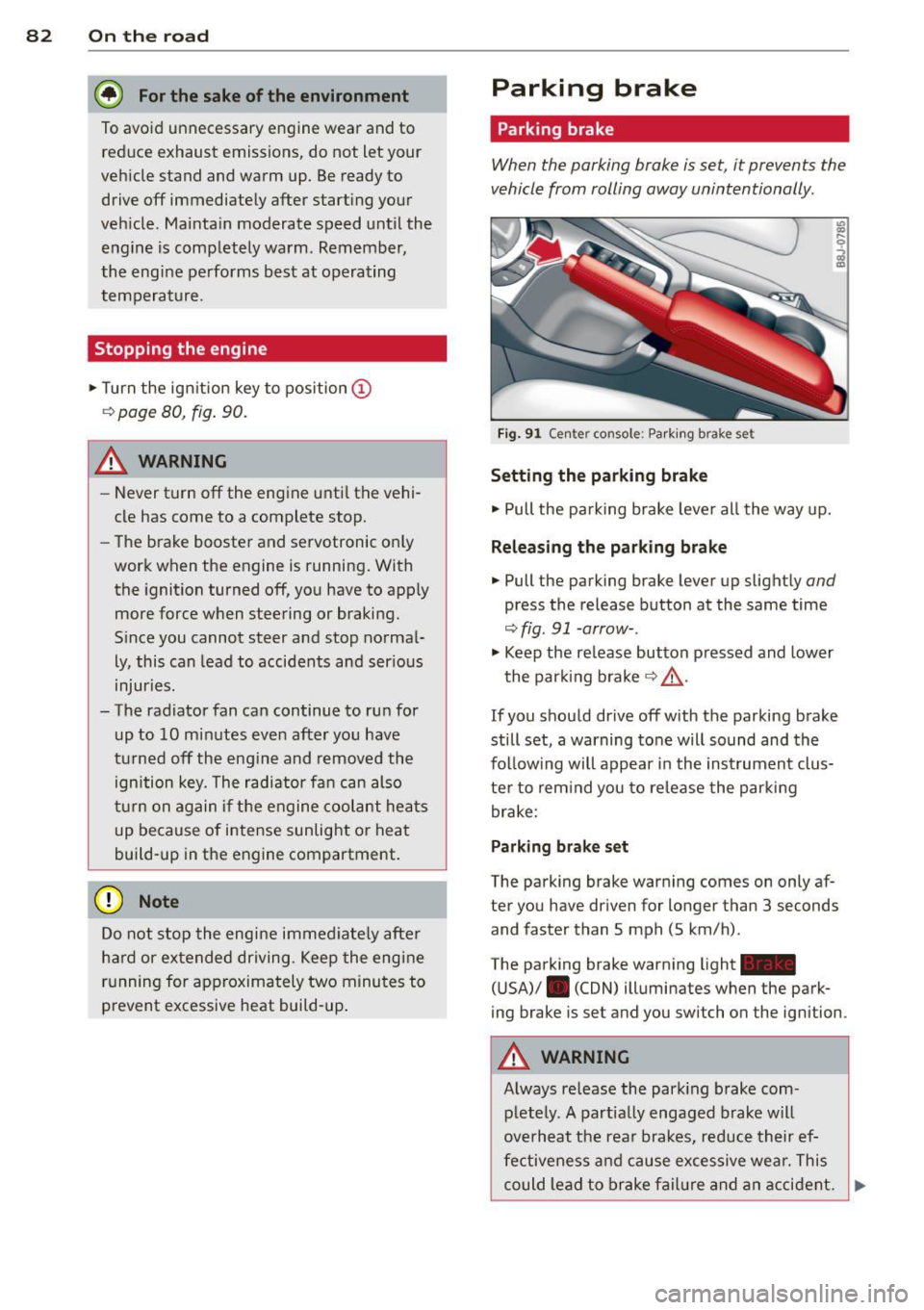
Fig. 9 1 Ce nte r co nso le: P ark ing b rak e s et
Setting the parking brake
• Pull the pa rking brake leve r all the way up.
Releasing the parking brake
• Pull the p arking brake lever up slight ly and
press the release button at the same time
<=> fig. 91 -arrow- .
• Keep the re lease button p ressed and lower
the par kin g brake <=>.&, .
If you should drive off with the parking brake
still set, a warning tone will sound and the
fol low ing will appear in the instrument clus
te r to rem ind you to re lease the par kin g
brake:
Parking brake set
The parking brake war ning comes on only af
ter you have dr iven for longer than 3 seconds
and faster than S mph (5 km/h) .
The parking brake warning light -
( U SA)/ . (CON) illuminates when the park
ing brake is set and you switch on the igni tion .
&_ WARNING
Always re lease the park ing b rake com -
plete ly. A part ially engaged brake w ill
overheat the rea r brakes, reduce their ef
fe ctive ne ss and cau se excessive wea r. This
could lead to brake f ailur e and an accident. .,..
Page 86 of 260
84 On the road
Potenti al malfunction s
If a warn ing buzzer sounds for a few seconds
when the ignition is switched on, there is a
system malf unction with the acoustic park as
sist. If the malfunction persists until the igni
tion is switched off, there will be no acoustic
warning at the next attempt to activate the
system. Have the problem corrected.
There is no confirmation tone when reverse
gear is engaged if there is a system malfunc
tion.
For the parking assist to operate, the sensors
must be kept clean and free of ice .
A WARNING
-Sensors have blind spots in which objects
cannot be detected. Pay special attention
to sma ll children and animals. They can
not always be detected by the sensors -
danger of an accident!
- The parking assist cannot replace the dr iver's attention. The d river alone is re
sponsible for parking and s imilar driving
maneuvers. A lways watc h where you a re
dr iv ing.
(D Note
Low obstacles al ready signalled by a warn
ing can disappear from the system's det ec
t ion range as they are approached and will
no t continue to be sign alled. Objects such
as barrier cha ins, trailer draw ba rs, thin
pa inted vertical poles, or fences may not
be detected by the system -risk of dam
age .
For the parking ass ist to operate, the sen
sors must be kept clea n and free of snow
and ice.
Cruise control
Switching the system on
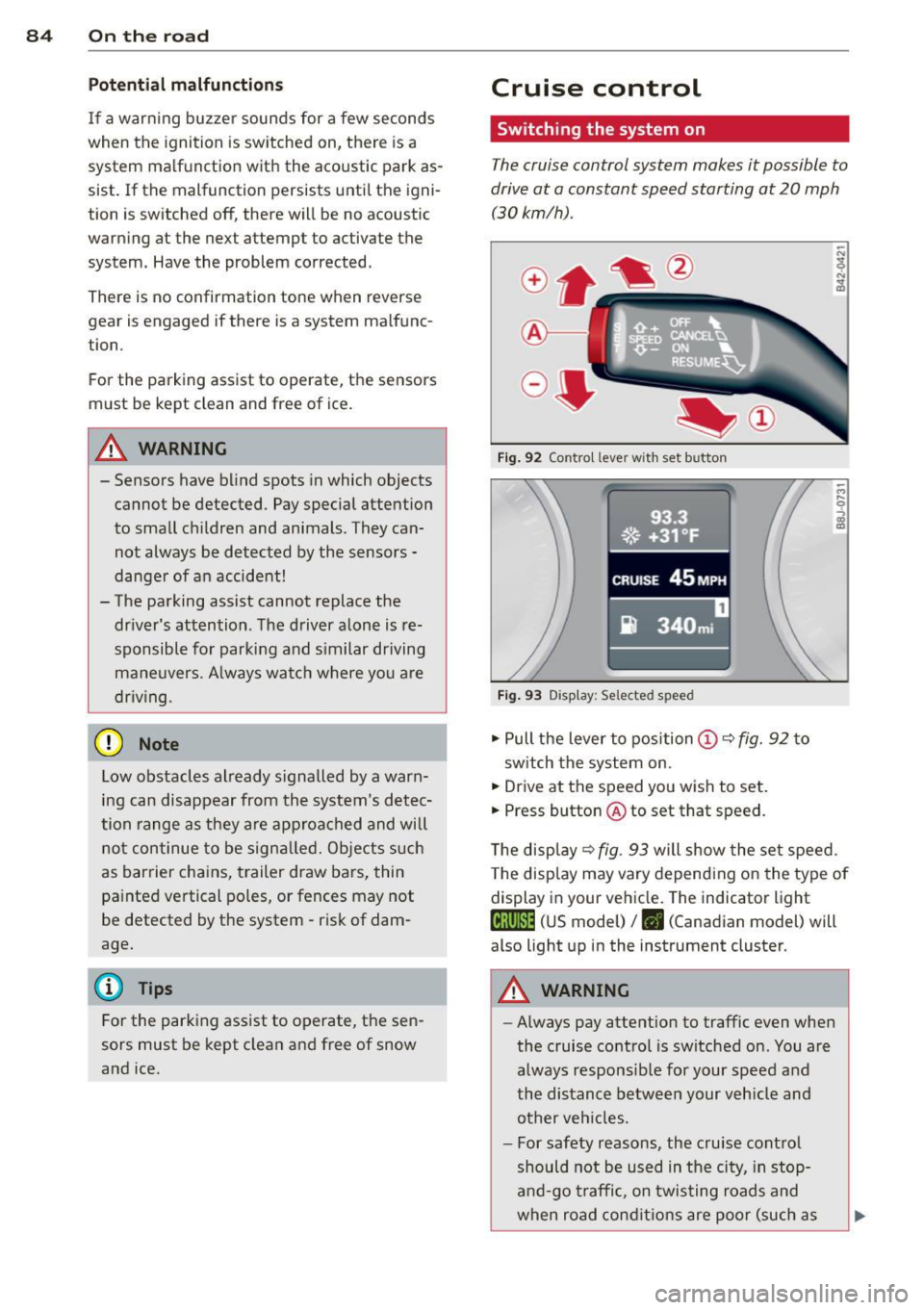
The cruise control system makes it possible to
drive at a constant speed starting at 20 mph
(30kmlh).
®-
Fig . 9 2 Contro l lever wit h set button
93.3
. ®' ~.+31, ~F; ,
II .~~ .. . • , -,.::.._-.--~.I-~-
CRUISE 45 MPH
iR 340m i
Fig. 9 3 Display: Selected speed
.,. Pull the lever to position (D c::> fig. 92 to
sw itch the system on.
.,. Drive at the speed you wish to set.
.,. Press button @ to set that speed.
T he disp lay
c::> fig . 93 will show the se t speed.
T he disp lay may vary depend ing on the type of
display in your ve hicle. The indicator light
te;(Q~i~ (US model) /. (Canadian model) will
also light up in the instrument cluster.
A WARNING
--Always pay attention to traffic even whe n
the cruise contro l is switched on. You are
always respons ib le for your speed and
the distance between your veh icle and
other ve hicles.
- For safety reasons, the cru ise cont ro l
should not be used in the city, in stop
an d-go t raffic, on twis ting road s and
when road cond itio ns are poor (such as
Page 93 of 260
If you have selected a lower gear than the cur
rent one, the transmission w ill only shift down
when the engine cannot be overspeeded .
If kick-down is actuated, the transmission
shifts into a lower gear independent ly of
speed and engine rpm .
Steering wheel with Tiptronic ® controls
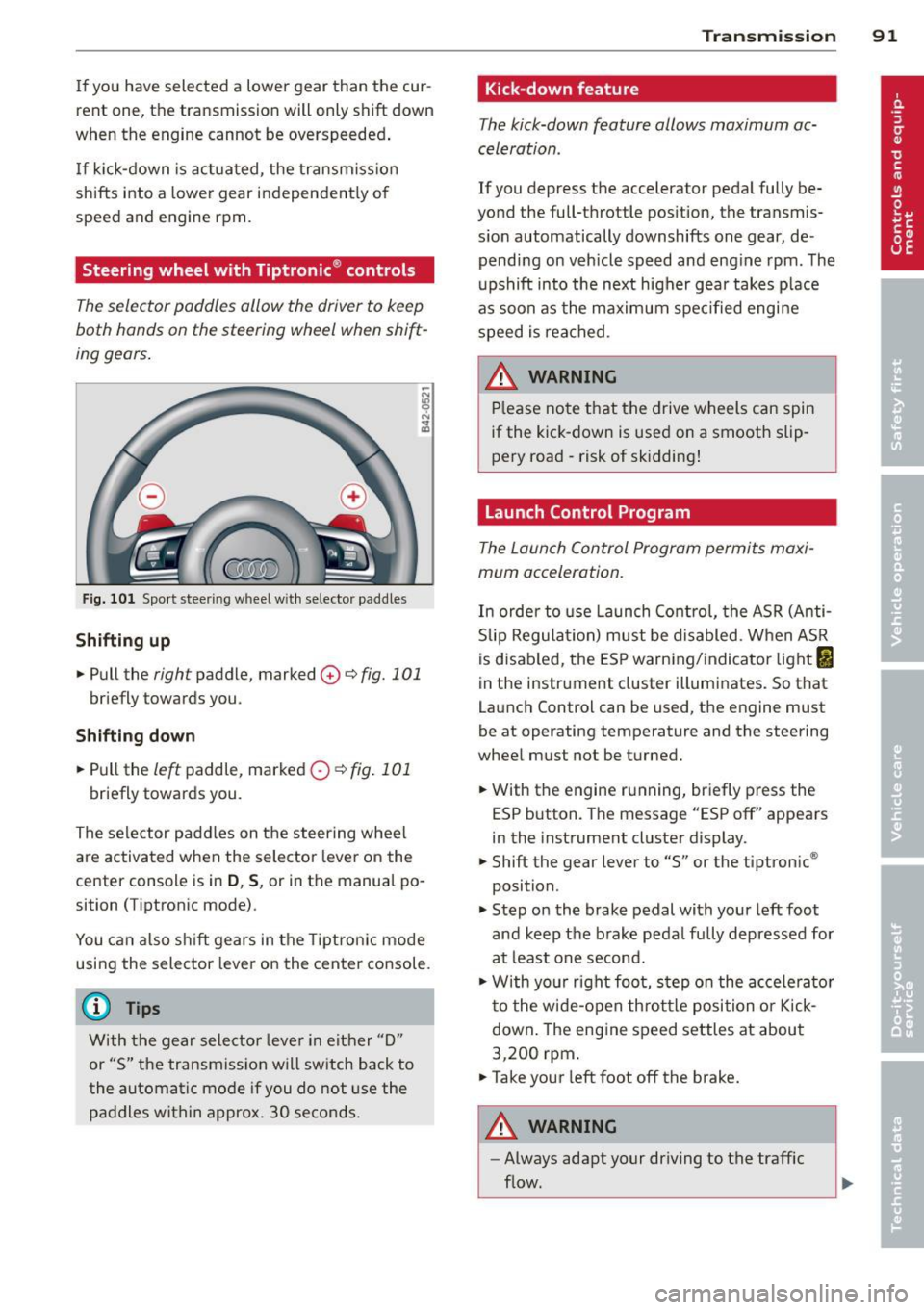
The selector paddl es allow the driver to keep
both hands on the steering wheel when shift
ing gears.
Fig. 101 Sport steer ing wheel w ith selector paddle s
Shifting up
.. Pull the right paddle, marked 0 ¢ fig. 101
briefly towards you .
Shifting down
.. Pull the left paddle, marked 0 ¢fig. 101
briefly towards you.
The selector paddles on the steering wheel
are activated when the selector lever on the
center console is in
D , S, or in the manual po
sition (Tiptronic mode) .
You can also shift gears in the Tiptronic mode
using the selector lever on the center console.
@ Tips
With the gear selector lever in either "D"
or "S" the transmission will switch back to
the automatic mode if you do not use the
paddles within approx. 30 seconds.
Transmission 91
Kick-down feature
The kick-down feature allows maximum ac
celeration .
If you depress the accelerator pedal fully be
yond the full-throttle position, the transmis
s ion automatically downshifts one gear, de
pending on vehicle speed and engine rpm. The
upshift into the next higher gear takes place
as soon as the maximum specified engine
speed is reached.
_&. WARNING
Please note that the drive wheels can spin
if the kick-down is used on a smooth slip
pery road -risk of sk idding!
Launch Control Program
The Launch Control Program permits maxi
mum acceleration.
In order to use Launch Control, the ASR (Anti
Slip Regulation) must be disabled. When ASR
is disabled, the ESP warning/indicator light
I
in the instrument cluster illuminates. So that
Launch Control can be used, the engine must
be at operating temperature and the steering
wheel must not be turned .
.. With the engine running, briefly press the
ESP button. The message "ESP off" appears
in the instrument cluster display.
.. Shift the gear lever to "S" or the tiptronic ®
position.
.. Step on the brake pedal with your left foot
and keep the brake pedal fully depressed for
at least one second.
.. W ith your right foot, step on the accelerator
to the wide-open throttle position or Kick
down. The engine speed settles at about
3,200 rpm.
.. Take your left foot off the brake.
&_ WARNING
-
-Always adapt your driving to the traffic
flow.
Page 94 of 260
92 Transmission
-Only use Launch Control when road and
traffic conditions allow it and other driv
ers will not be endangered or annoyed by
your driving and the acceleration of the
vehicle.
- Make sure that ESP remains enabled.
With the ESP disabled, the vehicle could
brake away, particularly on a slick and
slippery road -risk of skidding!
- Once acceleration is finished, switch ASR
on again by briefly pushing the ESP but
ton.
Back -up program
In the event of a system malfunction, there is
an back-up program .
In the event of system malfunction, the auto
matic transmission switches to the fail-safe
mode . All of the selector lever position dis
plays for the automatic transmission are high
lighted with a light background in the instru
ment cluster display . In some cases you can
not use reverse gear any more.
If the transmission switches to fail-safe
mode, you should take the vehicle to an au
thorized Audi dealership as soon as possible
to have the condition corrected.
Clutch is overheating
• Clutch is overheating! Please stop vehi
cle!
If the symbols are illuminated, the clutch is
overheating and could be damaged if you con
tinue to drive . Stop the vehicle and allow the
transmission to cool with the selector lever in
the
P position while the engine runs at idle. If
the warning does not turn off, do not continue
driving. See your authorized Audi dealer or
qualified repair facility for assistance. Other
wise serious transmission damage could re
sult. Once the indicator light has turned off,
drive to your authorized Audi dealer or quali
fied repair facility immediately to have the
malfunction corrected.
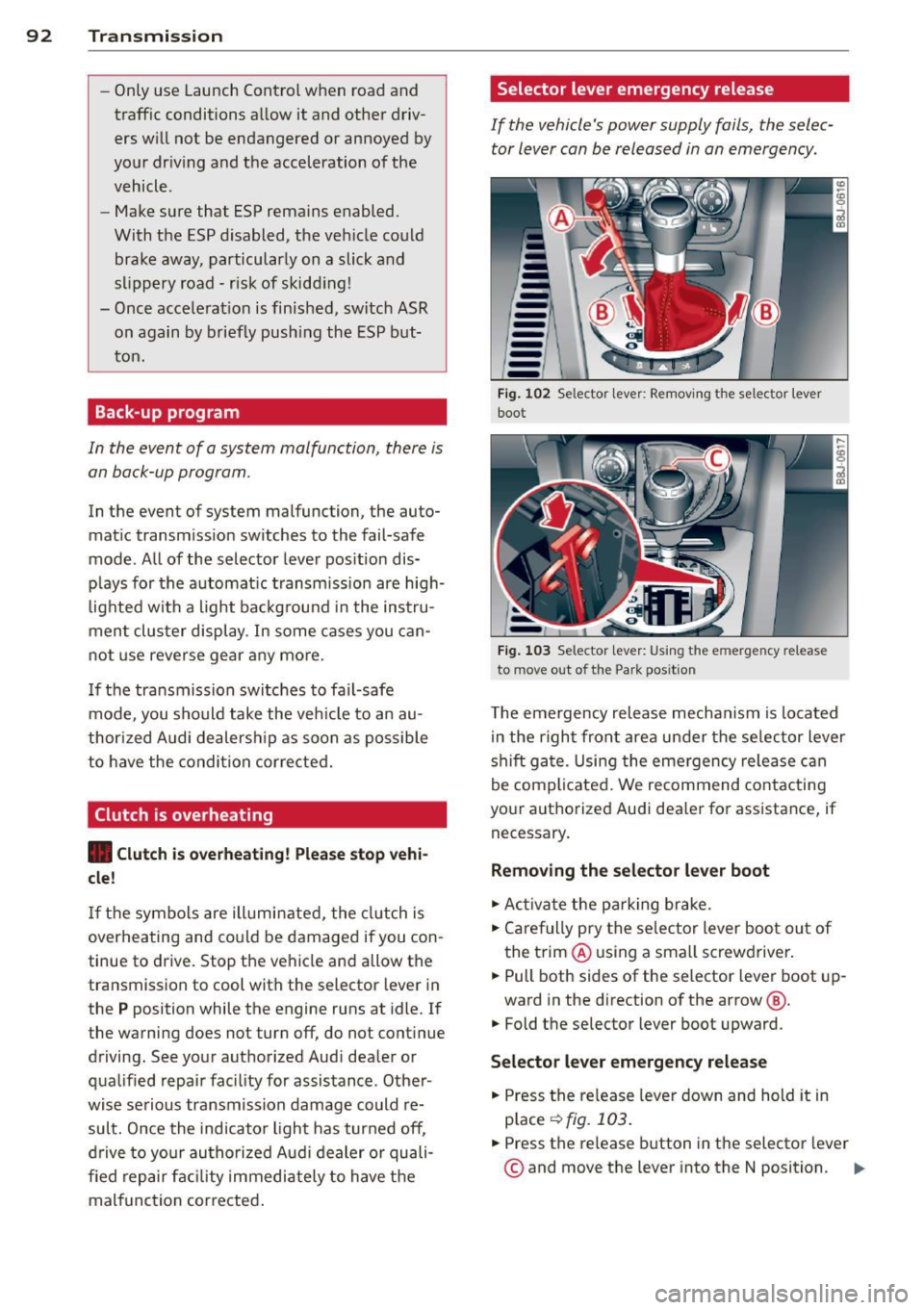
Selector lever emergency release
If the vehicle 's power supply fails, the selec
tor lever can be released in an emergency.
-
-
-
-
-
-
---Fig. 102 Selector lever: Removing t he selector lever
boot
Fig. 103 Selector lever: Using the e merge ncy release
to move o ut of the Park pos it ion
The emergency release mechanism is located
in the right front area under the selector lever
shift gate. Using the emergency release can
be complicated. We recommend contacting
your authorized Audi dealer for assistance, if necessary .
Removing the selector lever boot
.. Activate the parking brake.
.. Carefully pry the selector lever boot out of
the trim @ using a small screwdriver .
.. Pull both sides of the selector lever boot up-
ward in the direction of the arrow @.
.. Fold the selector lever boot upward.
Selector lever emergency release
.. Press the release lever down and hold it in
place
~ fig . 103 .
.. Press the release button in the selector lever
© and move the lever into the N position. Iii>
Page 96 of 260
94 Homelin k®
Homelink ®
Universal remote
control
General information
The Homelink ® feature can learn up to three
radio frequency codes for most current trans
mitters used for operating garage doors, es tate gates, home or outdoor lighting sys
tems , and other devices.
You must first program the Homelink ® trans
mitter before you can use the system
¢ page 95, Programming the HomeLink ®
transmitter.
In order to program the Home Link ® transmit
ter for devices utilizing rolling code, a second person on a ladder who can safely reach the
garage door opener motor is recommended.
It is also necessary to locate the "learn" but
ton on your garage door opener motor . Refer
to the operating instructions for the opener,
as the location and color of this button may
vary by manufacturer .
You can still use the original remote control
for the device at any time.
A WARNING -
- Never use the Homelink® transmitter
with any garage door opener that does
have not the safety stop and reverse fea
ture as requ ired by federal safety stand
ards. This includes any garage door open
er mode l manufactured before April 1,
1982.
- A garage door opener which cannot de
tect an object, signaling the door to stop
and reverse does not meet current feder
al safety standards. Using a garage door
opener without these features increases
risk of serious injury or death.
- For safety reasons never release the
parking brake or start the engine while
anyone is standing in front of the vehicle .
- A garage door or an estate gate may
sometimes be set in motion when the Homelink
® remote control is being pro
grammed. If the device is repeatedly ac
tivated, this can overstrain motor and
damage its electrical components -an
overheated motor is a fire hazard!
- To avoid possible injuries or property
damage, please always make absolutely
certain that no persons or objects are lo
cated in the range of motion of any
equ ipment being operated.
0) Tips
- If you would like more information on
Homelink®, where to purchase the
Homelink ® compatible products, or
would like to purchase the Homelink ®
Home Lighting Package, please call toll
free: 1-800-355-3515.
- For Declaration of Comp liance to United
States FCC and Industry Canada regula
tions ¢
page 244.
Page 97 of 260
Programming the Homelink®
transmitter
The transmitter is programmed in two phas
es. For rolling code transmitters, a third
phase is also necessary.
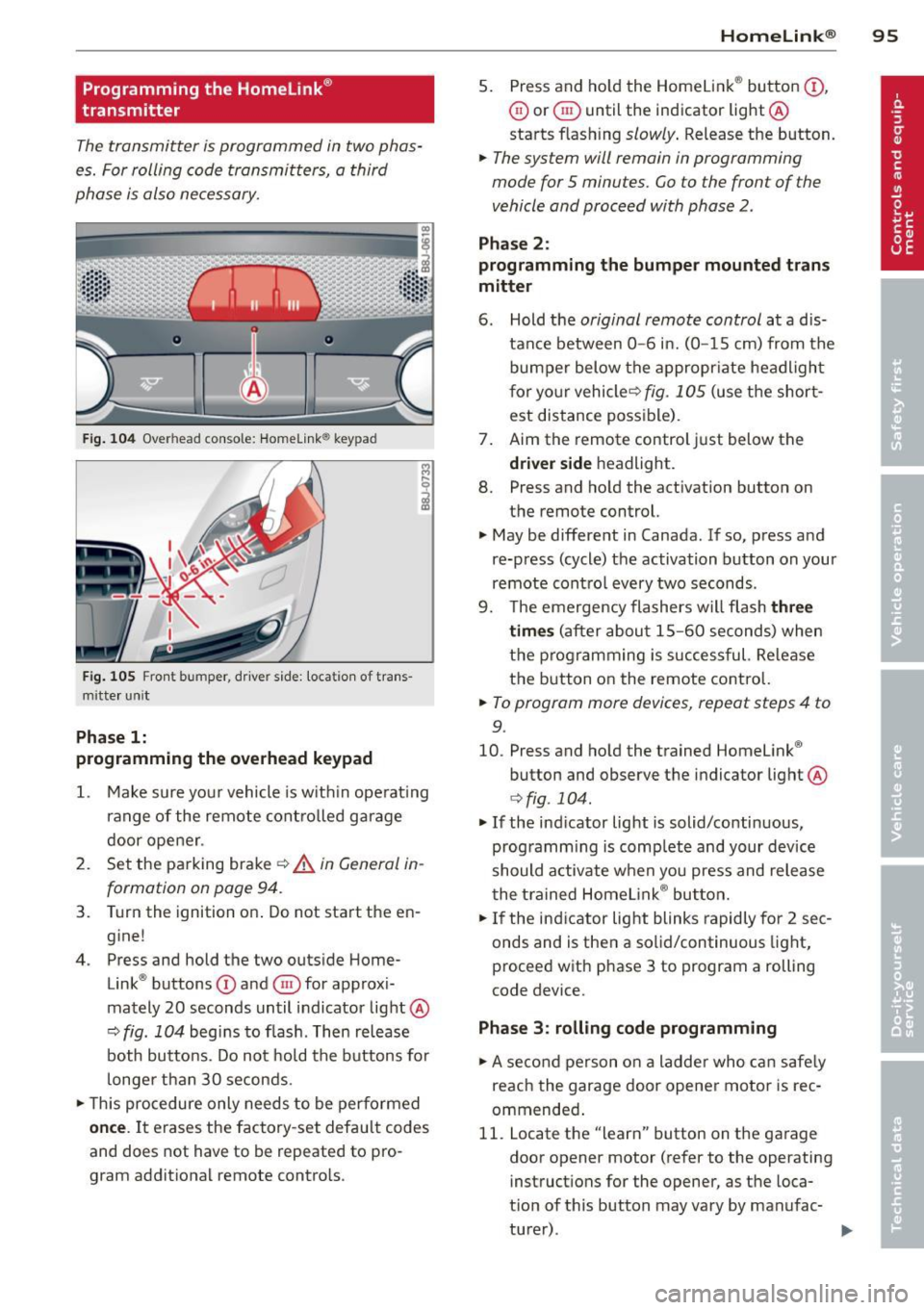
F ig . 104 Overhead console: Homelink ® keypad
Fig. 105 Front bumper, driver side: locat ion of trans
mitte r unit
Phase 1:
programming the overhead keypad
1. Make sure your vehicle is w ith in operat ing
ra nge of the remote controlled garage
door opener .
2. Set the parking brake~&.
in General in
formation on page 94.
3. Turn the ignition on . Do not start the en
g ine!
4 . Press and hold the two outside Home
Link ® buttons
(D and @for approxi
mately 20 seconds until indicator light@
~ fig. 104 begins to flash . Then release
both buttons . Do not hold the buttons for
longer than 30 seconds.
.. This procedure only needs to be performed
once. It erases the factory-set default codes
and does not have to be repeated to pro
gram additional remote controls .
Homelin k® 95
5. Press and ho ld the Homelink ® button (D ,
@ or§ until the indicator light@
starts flashing
slowly . Release the button.
.. The system will remain in programming
mode for 5 minutes.
Go to the front of the
vehicle and proceed with phase 2 .
Phase 2:
programming the bumper mounted trans
mitter
6. Hold the original remote control at a d is
tance between
0 -6 in. (0 -15 cm) from the
bumper below the appropr iate headlight
for your vehicleQ
fig . 105 (use the short
est distance possible) .
7. Aim the remote control just below the
driver side headligh t.
8. Press and hold the activation button on
the remote control.
.. May be different in Canada . If so, press and
re-press (cycle) the activation button on your
remote control every two seconds .
9. The emergency flashers will flash
three
times
(after about 15-60 seconds) when
the programming is successful. Re lease
the button on the remote control.
.. To program more devices, repeat steps 4 to
9.
10. Press and hold the trained Homelink ®
button and observe the indicator light @
Qfig . 104.
.. If the indicator light is solid/continuous,
programm ing is complete and your device
should activate when you press and release
the trained Homelink ® button.
.. If the indicator light blinks rapidly for 2 sec
onds and is then a solid/continuous light,
proceed w ith phase 3 to program a rolling
code device.
Phase 3: rolling code programming
.. A second person on a ladder who can safely
reach the garage door opener motor is rec
ommended .
11. Locate the "learn" button on the garage
door opener motor (refer to the operating
instructions for the opener, as the loca
tion of this button may vary by manufac
turer) .
Page 100 of 260
98 Driving Safel y
Driving Safely
General notes
Safe driving habits
Please remember -safety first!
This chapter contains important information,
tips, instructions and warnings that you need
to read and observe for your own safety, the
safety of your passengers and others . We have
summarized here what you need to know
about safety belts, a irbags, ch ild restra ints as
well as child safety. Your safety is for us
priori
ty number 1.
Always observe the info rmat ion
and warn ings in th is sect ion -fo r yo ur own
safety as well as for that of your passengers.
The information in this se ction app lies to all
model ve rsions of your veh icle . Some of the
feat ures desc ribed in this sec tions may be
standa rd equipment on some models, or may
be optional equipment on others . If you are
not sure, ask your authorized Aud i dealer.
A WARNING
- Make certain that you follow the instruc
t ions and heed the WARNINGS in this
Manual. It is in your interest and in the
interest of your passengers .
- Always keep the complete Owner's Liter
ature in your Audi when you lend or sell
yo ur vehicle so that this important info r
mation will a lways be ava ilable to the
dr iver and passenge rs.
- Always keep the Owner's literature handy
so that you can find i t eas ily if yo u have
ques tions.
Safety equipment
The safety features are part of the occupant
restraint system and work together to help
reduce the risk of injury in a wide variety of
accident situations.
Your safety and the safety of your passenge rs
should not be left to chance. Advances in
technology have made a varie ty o f fea tures
avai la bl e to he lp re duce the risk of injury in an accident
. The following is a lis ting o f just a
few of the safety features in your Audi:
- sophis tic ated s afety be lts fo r drive r and a ll
passenger sea ting pos it ions,
- safety belt pre-tensione rs,
- fro nt airbags,
- knee airbags for the front seats,
- side airbags in the front seats,
- LATCH anchorages for child restraints,
- ad justab le steering column .
T hese ind iv idual safety features can wor k to
ge ther as a sys tem to he lp p rotec t you and
you r passengers in a wide range of accidents.
These features cannot wo rk as a system if
they are not always p roper ly adjusted and
properly used!
Safet y is everybody's re sponsibilit y!
Important things to do before driving
Safety is everybody's job! Vehicle and occu
pant safety always depends on the informed and careful driver.
For yo ur safe ty and the safety of you r passen
gers,
befor e driving alwa ys:
"' Make s ure that all lights and signa ls are op
erati ng correctly .
"' Ma ke su re t hat the t ire p ressu re is co rrec t.
"' Mak e su re that all windows are clean and a f
ford good vis ibility to the outs ide.
"' Sec ure all luggage and other items caref ully
I:!) page 7 3.
"'Make sure that nothing can interfere with
the pedals.
"' Adjust front seat, head restraint and mirrors
correctly for your height .
"' Inst ruct passe ngers to adjust the head re
st raints accord ing to the ir height .
"' Ma ke sur e to use the r igh t chi ld restraint
correc tly to protect c hild ren
¢ page 136,
Child Safety .
"'Sit properly in your seat and make sure that
your passengers do the same
I:!) page 66,
General recommendations. .,_
Page 131 of 260
equipment, cellular telephones and CB
radios, etc.) must be performed by a
qualified technician who has the training
and special equipment necessary.
- For any work on the airbag system, we
strongly recommend that you see your authorized Audi dealer or qualified work
shop.
- Never modify the front bumper or parts
of the vehicle body .
- Always make sure that the side airbag
can inflate without interference:
- Never install seat covers or replace
ment upholstery over the front seat
backs that have not been specifically
approved by Audi.
- Never use additional seat cushions that cover the areas where the side airbags inflate.
- Damage to the original seat covers or
to the seam in the area of the side air
bag module must always be repaired
immediately by an authorized Audi
dealer.
- The airbag system can be activated only once. After an airbag has inflated, it
must be replaced by an authorized Audi
dealer or qualified technician who has
the technical information, training and special equipment necessary.
- The airbag system can be deployed only
once. After an airbag has been deployed,
it must be replaced with new replace
ment parts designed and approved espe
cially for your Audi model version. Re
placement of complete airbag systems
or airbag components must be per
formed by qualified workshops only .
Make sure that any airbag service action
is entered in your Audi Warranty
& Main
tenance booklet under
AIRBAG REPLACE
MENT RECORD.
-For safety reasons in severe accidents,
the alternator and starter are separated
from the vehicle battery with a pyrotech nic circuit interrupter.
Airbag system 129
-Work on the pyrotechnic circuit inter
rupter must only be performed by a
qualified dealer - risk of an accident!
- If the vehicle or the circuit interrupter
is scrapped, all applicable safety pre
cautions must be followed.
Other things that can affect Advanced
Airbag performance
Changing the vehicle's suspension system can
change the way that the Advanced Airbag Sys
tem performs in a crash. For example, using
tire-rim combinations not approved by Audi,
lowering the vehicle, changing the stiffness of
the suspension, including the springs, suspen
sion struts, shock absorbers etc. can change
the forces that are measu red by the airbag
sensors and sent to the electronic control unit. Some suspension changes can, for exam
ple, increase the force levels measured by the
sensors and make the airbag system deploy in
crashes in which it would not deploy if the
changes had not been made. Other kinds of
changes may reduce the force levels meas
ured by the sensors and prevent the airbag
from deploying when it should .
The sensors in the safety belt buckle for the
driver and front passenger seat tell the elec
tronic control module if the safety belt is
latched or not. If the safety belt is being used,
the front airbag will deploy at a slightly high-
er rate of vehicle deceleration than if the safe-
ty belt is not being used . Therefore, in a par
ticular collision, it is possible that an airbag
will not deploy at a seating position where the
safety belt is being used but will inflate at the
position where the safety belt is not being
used.
It is important that nothing interfere
with the safety belt buckles so that the sen-
sors can send the correct information about
safety belt use to the electronic control unit. ..,.
•
•
Page 140 of 260

138 Child Safety
The tension on the safety be lt for the front
passenger seat will be different for an ad ult
who is properly using the safety belt as com
pared to the tension on the be lt when it is
used to attach a child restraint to the seat.
The sensor below the latch for the safety belt
for the front seat passenger measu res the
Child restraints and Advanced Airbags
Regard less of the ch ild restraint t hat you use,
make sure tha t it has been ce rtified to mee t
United States Fede ral Motor Vehicle S afety
Standar ds and has been certified by i ts manu
facture r fo r u se with an ai rbag . If in excep
tional c ircu mstances you m ust use it on the
fro nt passenge r seat, caref ully read all of the
information on c hild safety and Advanced A ir
bags a nd heed a ll of the applicable WARN
INGS . Make certa in that t he child restraint is
correctly recognized by the w eig ht-sens ing
mat i nside the front passenge r seat, that the
fro nt passenger air bag is tur ned off and tha t
the airbag st atus is al ways correc tly signaled
by the
PASSENGER AIR BAG O FF light.
M any types and mo dels of ch ild rest ra ints
have been availab le over the years, new mo d
e ls are in trodu ced regularly incorporat ing new
and improved designs an d older models a re
taken out of p ro du ction. Child restraints a re
Subpart A -Car bed child restraints
Model
Ange l Guard Ange l Ride AA2 403 FO F
Subpart B -Rear-facing child restraints
Model
C en tury SmartFit 4543
Cosco Arriva 22-013PAW and base 22-999W HO
Evenflo D iscovery Adjus t Right 2 12
Evenflo First Cho ice 204
Graco Infant 8457
Graco Snugrid e
Peg Perego Primo V iaggio SIP IMUN00 US tens
ion on the belt. The input from th is sen
sor is then used with t he weight to "decide",
whethe r the re is a child restra int with a typical
1 year-old chi ld on the front passenger seat
and whether or not the airbag must be turned
off .
not standard ized . Child rest rain ts of the same
ty pe typ ically have diffe rent weights and sizes
and differe nt 'foo tpr ints,' the si ze and shape
of the bo ttom of the ch ild restra int tha t sits
on the seat, when they are insta lled on a vehi
cle seat. These diffe rences make it virtually
impossible to certify compliance with the re
quirements for advanced airbags with eac h
and every ch ild restra int that has eve r been
sold in the past or wi ll be so ld over the course
of the useful l ife of your veh icle .
Fo r thi s reason, the United States National
Hig hway T raffic Safety Adm inistrat ion has
published a list of spec ific type, makes and
models of chi ld restraints that must be used
to ce rtify comp lian ce of the Advanced Airbag
System i n your veh icle w ith the su ppression
r equirements of Fe d eral Motor Vehicle Safe ty
Stan dard 208. These chi ld res traints are:
Manufactured on or after
September 2 5, 2 007
Manufactured on or after
December 1, 19 99
September 25, 2 007
D ecember 1, 1999
D ecembe r 1, 1999
D ecember 1, 1999
September 25, 2 007
September 25, 2007
Page 161 of 260
the exhaust system and this could cause
the catalytic converter to overheat.
- Do not turn off the ignition while the ve
hicle is moving .
- Do not con tinue to operate yo ur vehicle
under these conditions, as otherwise fuel
can reac h the cata lytic converter . This
could result in overheating of the con
verter, requ iring its replacement.
- To assure efficient operation of the Emis
sion Control System:
- Have your veh icle ma inta ined properly
and in acco rdance with the service rec
ommendations in your Wa rranty
&
Ma intenance booklet.
- La ck of proper maintenance as well as
improper use of the vehicle will impa ir
t he funct ion of the emission control
system and cou ld lead to damage.
@ For the sake of the environment
Even when the Emission Contro l System is
operating p roperly, t he exhaus t gas can
have a s ulfu r- like exhaust gas smell under
some operating states. This depends on
the s ulfur content o f the fue l being used.
Using a different brand of fuel may help,
or filling the tank w ith lead-free super
grade gasoline .
Operate your vehicle
economically and
minimize pollution
General
Your personal style of driving will determine
the economy of your vehicle, as well as ex
haust and noise levels .
Fuel economy, environmental impact, and
wear on your engine, brakes and t ires largely
depend on three factors :
- your persona l driving style
- operating conditions
- technical lim itations
I f you anticipate w hat you need to do nex t and
d rive economically, you can eas ily cut your
Dri vin g and en vironm ent 159
fuel consumption by 10 -15 percent. This sec
tion w ill give yo u some tips on how you can
help the env ironment and your pocketbook .
(D Tips
The cons umption estimates as publishe d
by ENVIRONME NTAL PROTEC TION AGENCY
(EPA) and Transport Canada may not corre
spond to your actual consumption on the road, which will vary depending upon vehi
cle load and speed, road and weather con
dit ions, trip length, etc.
Drive smoothly and keep a lookout
ahead
Vehicles use the most fuel when they are ac
celerating.
Avoid unnecessary accelerat ing and braking .
Vehicles use the most fuel when they are ac
ce lerat ing . If you anticipate what is going to
happe n next, you will need to brake less and,
th us, accele rate less . Let the vehicle coast
whenever possible -for examp le when you see
that the next t raff ic light is red.
Avoid full throttle
Driving at moderate speeds saves fuel and
improves your mileage.
"' Try and keep well below your car's maximum
speed.
Acce lerat ing gently reduces fue l consump
tion, eng ine wear, and does not disturb the
environment.
Fuel consumpt ion, exhaust emiss ions and en
gine noise increase disproportionately at high
speeds. If you drive at app roximately three
quarte rs of top speed, fuel consumption w ill
be reduced by one half. Nev er drive faster
t h an the posted speed limit and weathe r con
ditions perm it.
•
•