ECO mode AUDI TT ROADSTER 2011 User Guide
[x] Cancel search | Manufacturer: AUDI, Model Year: 2011, Model line: TT ROADSTER, Model: AUDI TT ROADSTER 2011Pages: 260, PDF Size: 64.11 MB
Page 31 of 260
If the engine control unit receives fau lty vehi
cle roadspeed signa ls , the Ma lfunction Indica
tor Light (MIL)
Ill will illum inate . If th is oc
curs, contact the nearest authori zed Audi
dealer for assistance.
S mod els
Your vehicle 's top speed is e lectronically limit
ed to 155 mph (250 km/h).
If the engine control unit rece ives fa ulty vehi
cle roadspeed signa ls , the Ma lfunction Indica
tor Lamp (MIU ¢• will i lluminate. If this oc
curs, contact the nearest authorized Audi
dea ler for assistance.
A WARNING
-
Always observe the posted speed limits
and adjust your speed to suit prevailing
road, traff ic and weather conditions. Never
drive your vehicle faster than the maxi
mum speed rating of the tires insta lled.
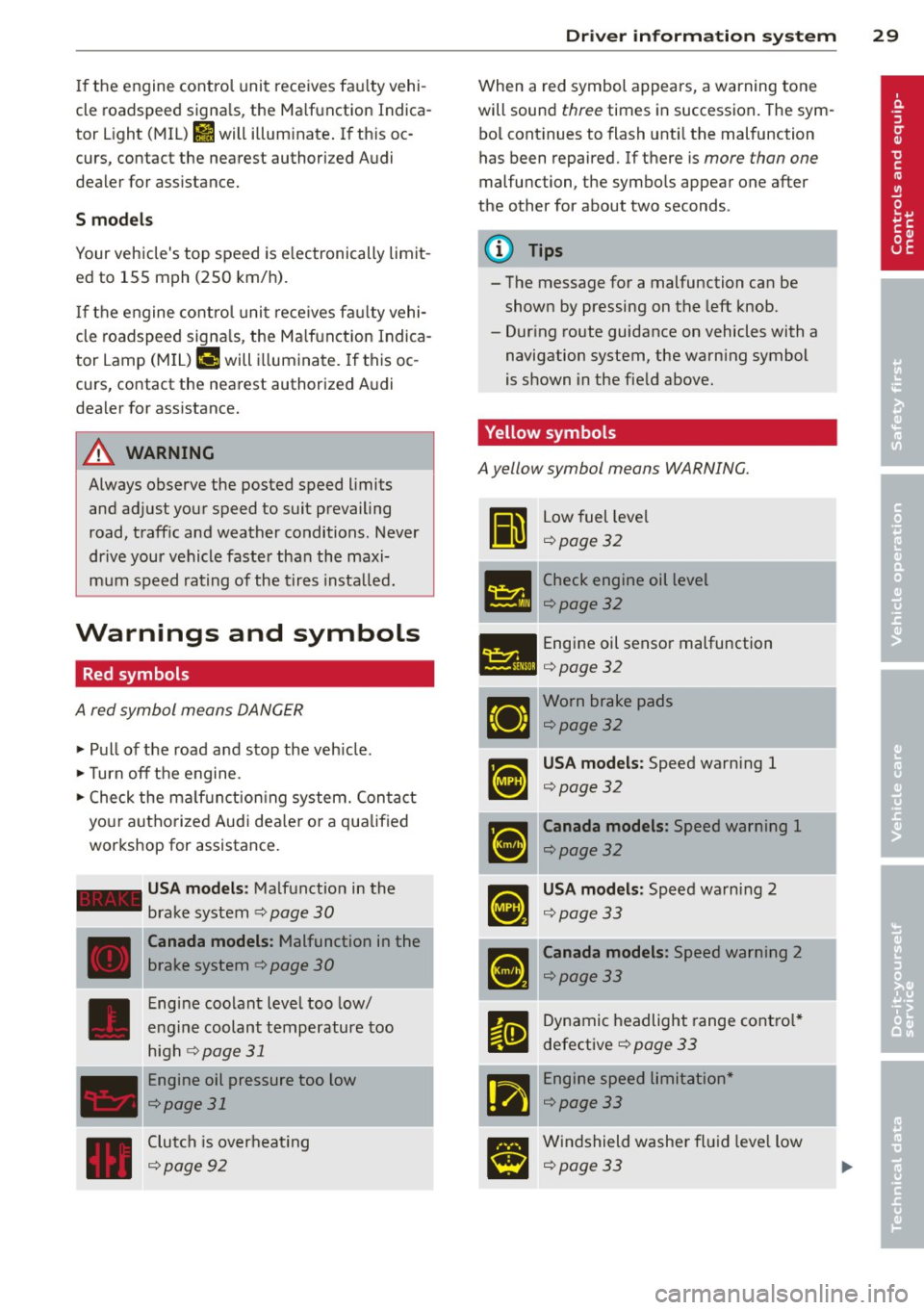
Warnings and symbols
Red symbols
A red symbol means DANGER
" Pull of the road and stop the veh icle .
"T urn off the engine.
" Check the ma lf u nction ing system. Contact
your autho rized Audi dea le r o r a qualified
workshop for assistance.
- USA models : Malfunction in the
brake system ¢
page 30
---·--
D
Canada models : Malfunction in the
brake system ¢
page 30
Engine coolant level too low/
engine coolant temperature too
high
r:1;> page 31
Engine oil pressure too low
¢page 31
Clutch is overheat ing
c:1;> page 92
Dr iver in formati on sys tem 29
When a red symbol appears, a warning tone
will sound
three times in succession . The sym
bo l cont inues to flash unti l the malfunction
has been repaired. If there is
more than one
malfunc tion, the symbo ls appear one after
the other for about two seconds .
(D Tips
- The message for a malfunction can be
shown by pressing on the left knob.
- Dur ing route guidance on vehicles with a
navigation system, the warn ing symbol
is shown in the field above.
Yellow symbols
A yellow symbol means WARNING.
Ii
Low fuel leve l
¢page32
- -- Check engine oil level
151!1 ¢page 32
- Engine oil sensor malfunction
l:ill ¢ page 32
Worn brake pads
¢page32
USA models : Speed warning 1
c:1;> page 3 2
Canada models : Speed warning 1
¢page32
USA models: Speed warning 2
c:1;> page 3 3
Canada models: Speed warning 2
c:1;> page 33
Dynamic headlight range contro l*
defective
¢ page 33
-Engine speed limitation *
c:1;> page 33
Windshield washer fl ui d leve l low
c:1;> page 33
Page 32 of 260

30 Driv e r in formation sy stem
Battery voltage too high or too low
¢page33
Defective light bu lb
Qpage 33
USA models: Defective brake light
Qpage33
Canada models: Defective brake
light
Q page 33
Light/rain sensor defective (automat
ic headlights) * defective
Q page 3 4
Adaptive Light* defective
¢page34
Tire pressure monitoring system
¢page212
When a yellow symbol appears, a warning
tone will sound
once. Check the d isp layed
f u nction as soon as possib le. If
more than one
malfunction is detected, a ll symbols will ap
pear one after the other for abou t two sec
onds.
Driver information
In addition to th e warning/indicator lights
a nd the symbols in the inst rument cluster dis
play, driver information is displayed.
F ig . 2 6 Section of instrument cluster: Set/Check b ut
ton
Driver information appea rs in the disp lay
when a defec tive l ight bu lb is reported by the
defect ive light bulb warning¢
page 33,
when the brake p ads are wo rn and before you
engage a gear. In add
ition, driver information may appear
whe n a red symbo l flashes in the driver dis
play .
To display Driver information
As an examp le, the . symbo l appears in the
display. If yo u now p ress the button¢
fig. 26,
the following driver message appears in the display:
Switch off engine and che ck oil level
The driver message in the display goes out af
te r about 5 seconds. Yo u can display t he drive r
message aga in by briefly pres sing the button.
BRAKE /(©) Brake system
The indicator light flashes if the brake fluid
level is too low, if there is a malfunction in
t he ABS sys tem o r when the parking brake is
engaged.
If the - (USA models),1111 (Canada
model s) symbo l flashes in the d isplay w it h t he
par king brake rele ase d, there is a mal func tion
in the brake system. In ad dition to the sym
bo l, one o f two messages appears in the dis
play :
STOP V ehicle and check brake fluid
ABS fault! See Owner's manual
.,. Pull off the road a nd stop the veh icle .
.,. Obtain profess iona l assistance.
USA models: if t here is a ma lf u nction in the
ABS system, the
mES warning/indicator light
illuminates along with the -system
malfu nction warning/ind icator light
Q .&. .
Canada models: if there is a mal function in
the ABS system, the
ti] warning/ indicator
light illum inates together with the . brake
system mal function warn ing/indicator light
Q .&_ .
Parking brake set
The parking brake war ning light -·
(Canada mode ls) illum inates when the park
i ng brake is set. In addition, a warn ing tone
will sound after yo u have driven for longer
Page 35 of 260
![AUDI TT ROADSTER 2011 User Guide 0/0, Speed warning 2
If the ti] (USA models)l [i] (Canada models)
symbol illuminates, this means you have dr iv
en faster than the second set vehicle speed.
Slowdown!
¢page 26.
~[](/img/6/57666/w960_57666-34.png "AUDI TT ROADSTER 2011 User Guide 0/0, Speed warning 2
If the ti] (USA models)l [i] (Canada models)
symbol illuminates, this means you have dr iv
en faster than the second set vehicle speed.
Slowdown!
¢page 26.
~[")
0/0, Speed warning 2
If the ti] (USA models)l [i] (Canada models)
symbol illuminates, this means you have dr iv
en faster than the second set vehicle speed.
Slowdown!
¢page 26.
~[) Headlight range control defective
Appl ie s to veh icles: w ith dynamic hea dli ght range a djust
m ent
If the II ill uminates, the dynamic headlight
range control is no longer working properly.
Have the system checked and repaired at your
authorized Audi dealer.
! ?) Engine speed limitation
A pp lies to veh icles: with e ngine spee d limitat io n
(Pl Do not exceed max. engine speed of XXXX
rpm
The II! symbol illuminates when there is an
engine control malfunction. The indicator
light ~ in the instrument cluster also illumi
nates . The engine speed is limited to the
speed displayed in the driver information sys
tem . Keep in mind that the eng ine speed will
not exceed the va lue disp layed in the driver in
fo rmation system , fo r example when down
shifting.
Please go to an authorized Aud i dealer or oth
er qualified workshop to have the malfunction
r epaired.
O Windshield washer fluid level too low
If the (-J '>ymbol illuminates, add windshield
washer fluid to the washer system
¢page 192.
D Battery voltage low
If the (•i symbol illuminates, contact your au
thor iz ed Audi dealer and have the following
components inspected:
- drive be lt
- battery charge
Driver information system 33
Also see if the generator warning/indicator
light illuminates
¢page 16.
® Defective light bulb warning
The defective light bulb warning tells you
when o vehicle light bulb hos become defec
tive.
If a defective bulb has been detected by the
system or a light bulb burns out, the
II sym
bo l with a message appears in the display to
te ll you which bulb is burnt out and where it is
located. For example :
Rear left turn signal
After S seconds, the message disappears. If
you want to recall the message into the dis
play, p ress the CHECK button
¢page 10,
fig . 3 @ .
The re are three reasons why the defective
bulb message would appear in the disp lay:
- The light bulb has burnt out¢
page 230 .
-The fuse is "blown" ¢ page 22 7, Replacing
fuses .
-The wire connect ion to the light bulb is de-
fective.
Have the bulb replaced or the connection re
paired by your authorized Audi Service depart
ment .
.&, WARNING
-Light bulbs are pressurized and could ex
plode wh ile they are being changed caus
ing serious pe rsonal injury.
- Work with due care when handling the
high-voltage sect ion of gas discharge
(xenon) lamps. Failing to do so could re
sult in death or serious injury!
BRAKE LIGHT!< ®> Brake light defective
In case of a malfunction or component fail-
ur e, the symbo l (USA models)/
l1J (Canada models) can appear. The follow
ing electrical components should be checked,
repaired or replaced, as necessary:
Page 39 of 260
electronic immob ilizer is a utomat ically acti
vated once again.
A WARNING -
Always take the key with you when you
leave the ve hicle. The key can disarm the
elect ronic engine immobilizer and pe rm it
an unauthor ized person to start the engine
an d ena ble ope rat io n of t he vehicle sys
t ems s uch as powe r wi nd ow or pow er to p
leadi ng to se rious pe rsonal injury.
@ Tips
- The vehicle ca nnot be s tarted if an unau
thoriz ed key is used . The ve hicle may not
star t if another radio device such as a key
fo r anot her vehicle o r a transpo nder is
l oc ated on the key ring.
- Fo r D ecl arat io n of Compliance to United
Sta tes FCC a nd Indus try C anada regul a
tions¢
page 244.
Power locking system
General description
The power locking system locks or unlocks all
doors simultaneously.
The power locking system i n your ve hicle in
corporates the fo llow ing functions :
- C entral lo ck ing func tion
- Remote contro l feature ~
page 35.
- Ant i-Theft Alarm System ¢ page 42.
All the doors and the rear lid are locked by the
centra l locking system when you lock the vehi
cle .
The unlocking and lock ing mode * can be
changed in the driver i nformation system
¢page 21.
Unlocking the vehicle
You can un lock the vehicle from outsi de either
by using the remote control
or by inserting
and turning the key in the driver's door lock.
When you
unlock your ve hicle:
Opening and clo sin g 37
- The ant i-theft a larm system is deactivated
briefly.
- The vehi cle i nterior ligh ts illum inate for ap
proximately 3 0 seconds.
- All turn s ignal lights w ill fla sh twice when
the ca r is u nlocked .
- Aft er u nlocking the vehicle, you have 30 sec
onds to open a door or the rear lid . After 3 0
seconds, the vehicle a utomat ica lly locks and
the anti-theft a la rm system activates aga in .
T he re ar lid can be locked or unlocked e ither
by using the remote cont ro l
or by inse rting
and tu rning the key in the drive r's door lock.
U nlocking the vehicle with the remote cont ro l
,;::::::5 will on ly unlock the rear lid, to open it, the
li d handle needs to be pressed.
Locking the vehicle
You can lock the veh icle from outs ide either by
u sing the remote control
or by inse rting and
turning the key in the drive rs's door lock.
When you
lock the veh icle:
- All doors an d the rear lid are loc ked .
- All turn s ignal lig hts will flash o nce w hen
t he ca r is lo ck ed .
- The ant i-theft a la rm sys tem is ac tiva ted.
The ho rn of the anti- theft alarm sys tem w ill
so und and the an ti-the ft ala rm system read
iness light, located in the center of the in
st rument panel be low the w indshield on the
r ight side of the a ir vent , will start to blin k.
- The vehicle interior lights turn off .
Automatic locking*
The au toma tic lo cking fea ture locks a ll the ve
hicle doors and the re ar lid w hen you drive
faste r than
9 mph (15 km/ h).
You can unlock t he veh icle from the inside by:
- removing the key from the ignition switc h
(t he vehicle w ill automatically un lock itself)
or
- pressing the unlock part of the power lock
sw itch
€1) or
pull ing the door handle (to open the door).
Page 59 of 260

locked or when the ignition is turned on, the
interior lights are turned off.
When a door is open, the interior l igh ts are
turned off afte r abo ut 10 m inu tes to p reven t
battery draining.
The brightness of the lights is controlled au
t om atically by a dimmer when they are
sw itched on and off.
Instrument panel illumination
The illumination of the instruments, displays
and the cen ter console can be adjusted .
Fig . 64 Instr ument pane l illu min at io n
i a:. .. a,
You regulate the brightness of the instru
ments with the left thumbwheel
Co/¢ fig. 64 .
Ign ition ON, light switch at @.
Wit h t he igni tion swi tched ON, the glow o f in
strument needles
can be adjusted to a ppear
b righter or dimmer.
Ignition ON , light switch at ~oQ: or ~D .
With the l igh ts sw itched on, the brightness of
i nstr ument cluster (i.e. needles, gauges and
d isp lays) and center console i llumination can
be ad justed .
(D Note
The instrument cluster and cente r console
illumination (ga uges and needles) comes
on when you switch on the ignition and the
vehicle headlights are off. Be aware of t he
following difference between mode ls built
to US or Ca nadian specifications:
- USA models: illumination of the instru
ment cluster (gauge s and needles),
dash and cente r console around the
Clear vi sion 5 7
gearshift lever is controlled by a light
sensor located in the in strument panel.
The in strument panel illumination will
automatically become dimmer as the
daylight fades away and eventuall y will
go out completely when outside light is
very low . This i s to remind you, the driv
er, to switch on the headlights before it
get s too dark.
- Canada models: in strument pan el illu
min ation w ill stay bright r egardless of
the intensit y of ambient light . Alwa ys
be aware of changes in out side light
conditions while you are dri ving. Re·
s pond in time to fading daylight by
turning the light switch to position
~D
(or "AUTO" if your car is equipped with
this feature)
to turn on you r headlights.
luggage compartment light
The light is located on the right side of the
luggage compartment.
These lights come on automatically when t he
rear lid is opened . The lights turn off automat
ical ly if the lid is left open for more then 10
minutes .
Vision
Sun visors
Using the sun visors make s driving safer .
Fig. 65 Sun visor
- ~ ---------.ttr -···---=-=---------~=--·-·----- -·-==:. - · =-~-----
The vanity mirrors in the sun visors are equip
ped with lids. Push lid in direct ion of arrow to
open.
Page 60 of 260

58 Clear vis ion
Mirrors
Manual glare dimming
Standard sett ing
.,. Move the small lever (located on the bottom
edge of the mirror) to the front .
Anti-glare setting
.,. Move the small lever (located on the bottom
edge of the mirror) to the rear.
Automatically dimming inside mirror
App lies to vehicles: with automat ically dimming inside
rearview mirror
The automatic dimming function con be
turned on and off if required.
Fig. 66 Inside rea rvi ew mir ror, d ig ita l compass ac tivat
ed: a uto dimmin g on/off b utt o n an d indicator ligh t
Disabling auto dimming
.,. Press button @briefly, -the gree n indicator
l ight @ goes out .
Activating /reactivating auto dimming
.,. Press button @briefly, -the green indicator
light @goes on.
Automatic dimming function
The a utomatic dimming function is activated
every time the ignition is turned on. The green indicator light is lit to indicate auto dimming
is active .
When dimming is activated, the inside mirror
will darken
automa tically in response to the
amount of light str ik ing the m irror (such as
headlights from rearwa rd approaching veh i
cles) . Even in dimming mode, the mirror su r
face turns bright when: -
the interior lig ht is switched on
- reve rse ge ar is engaged.
Sensors for automatic headlights*
With the he lp of the se nsors i n the mir ror,
whe n the light switch is in the
AUTO posit ion,
t h e low beams a re sw itc hed on an d off auto
matically de pending on the ambient light co n
di tions
q page 53 .
.&_ WARNING
Broken g lass o f aut oma tic dimm ing mir ror
ca n cause electrolyte f luid lea kage . Elec
trolyte f luid can irritate skin, eyes , and res
pirato ry system.
- Repeated or prolonged ex posu re to e lec
trolyte can cause irritation to the respira
tory system , especially among people
wit h asthma or other resp iratory condi
tions . Get fresh air immediately by leav
i n g the veh icle o r, if that is no t possib le,
op en w indows and doo rs all the way.
- If electroly te gets into the eyes, flus h
them thorough ly with large amounts of
clean water fo r at least 15 minu tes;
m edical attenti on is recom mend ed.
- I f electrolyte contac ts skin, fl ush affect
e d area w ith clean wate r fo r at lea st 15
minu tes and t hen wa sh affected area
wit h soap an d wate r; medical atte ntion
is recommended . Thoro ughly wash af
fected clothi ng and shoes before re use .
-If swallowed and person is conscious,
rinse mout h with water for at least 15
m inutes . Do not induce vomiting unless
instr ucted to do so by medica l professio
na l. Get medical attention immediately.
(D Note
Liq uid electrolyte leaked from a broke n
mir ro r glass w ill damage any plastic s urfa
ces it comes in contact with. Clean up sp il
l ed e lectrolyte immed iate ly w ith clear wa
ter and a sponge .
(!} Tips
-If you switch off the automatic dim
ming funct ion on the inside mirror ,
Page 66 of 260
64 Clear vis ion
- To he lp prevent damage to the wiper sys
tem, a lways loosen blades which are fro
z en to the windsh ie ld before operat ing
wipers.
- To he lp prevent damage to w iper blades,
do not use gasoline , kerosene, pa int
thinner, or other solvents on or near t he
wiper blades .
- To he lp prevent damage to the wiper
arms or other comp onents, do not at
tempt to move the wipers by hand .
(D Tips
-Commercial hot waxes applied by auto
matic car washes affect the cleanability
of the glass surface .
- The front wipe r blades are different
l engths; the blade on the driver's s ide is
l onger .
Digital compass
Activating or deactivating the compass
Applies to vehicles: with digital compass
The direction is displayed on the interior rear
view mirror.
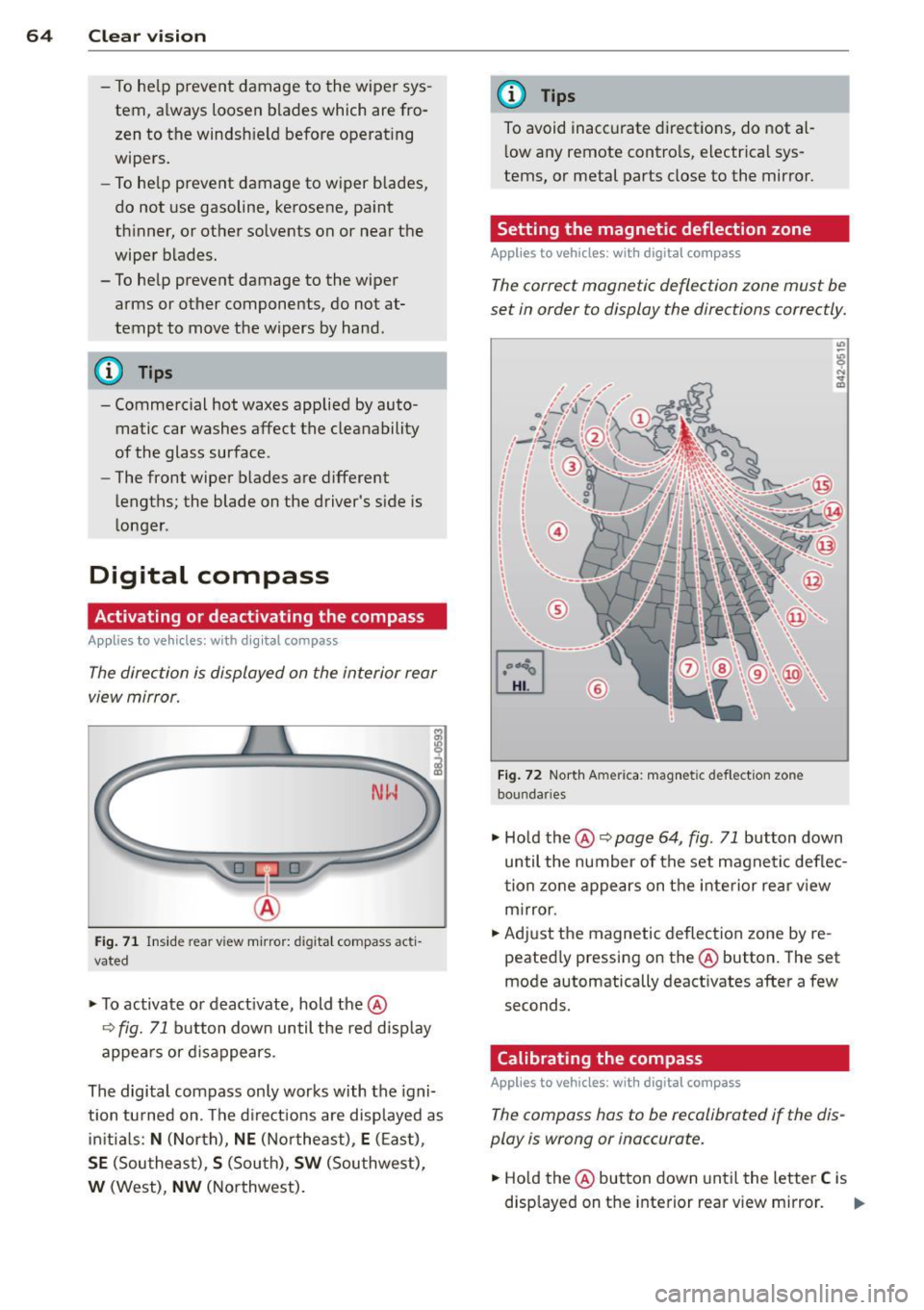
Fi g. 71 In side rea r view m irro r: di gita l compass acti
vated
.. To activate o r deact ivate, hold the@
¢ fig. 71 button down until the re d disp lay
appe ars or d is a ppears.
The digital compass only works with the igni
tion tu rned on . Th e d irect io ns are displayed as
ini tial s:
N (Nor th), NE (N ort he ast), E (E as t),
SE (Southe ast), S (Sou th), SW (Sou thwest),
W (West), NW (No rthwest).
(D Tips
To avoid inacc urate dir ections, do not a l
l ow any remote contro ls, electr ica l sys
tems , or metal parts close to the mirror.
Setting the magnetic deflection zone
Appl ies to vehicles: with digita l compass
The correct magnetic deflection zone must be
set in order to display the directions correctly.
©
Fi g. 72 Nort h Am eric a: mag neti c def le ction zone
bo un dar ies
" Ho ld the @ ~ page 64, fig . 71 button down
until the number of the set magne tic deflec
t ion zo ne appe ars on t he inte rior re ar v iew
m irror.
.. Adjust the magnetic deflec tion zone by re
peated ly pressing on the @button . The set
mode automatically deact ivates afte r a few
seconds.
Calibrating the compass
Applies to vehicles: with digita l compass
The compass hos to be recalibrated if the dis
play is wrong or inaccurate.
.. Ho ld the @button down until the letter C is
disp layed on t he interior rear v iew mirror. ..,.
Page 69 of 260
Front passenger's seat
Always move the front passenger seat into the rearmost position .
To avoid contact with the airbag while it is de
p loying, do not sit any closer to the instru
ment panel than necessary and always wear
the three-point safety belt provided adjusted
correctly . We recommend that you adjust the
passenger's seat in the following manner:
.,. Move the front passenger seat into the rear
most position of the fore and aft adjustment
range
c:::> &. in Why is your seat adjustment
so important? on page
66.
.,. Bring the backrest up to an (almost) upright
position.
Do not ride with the seat reclined .
.,. The idea l position for the head restraint is
with the upper edge of the restraint leve l
with the top of your head
c:::> page 70. You
shou ld
not lower the top of the restra int be
low the level of your eyes .
.,. Place your feet on the floor in front of the
passenge r's seat .
Adjusting front seats
manually
Adjustment controls
App lies to vehicles: with manual seat adjustment
Various controls on the manual seats provide
a wide range for individual adjustments .
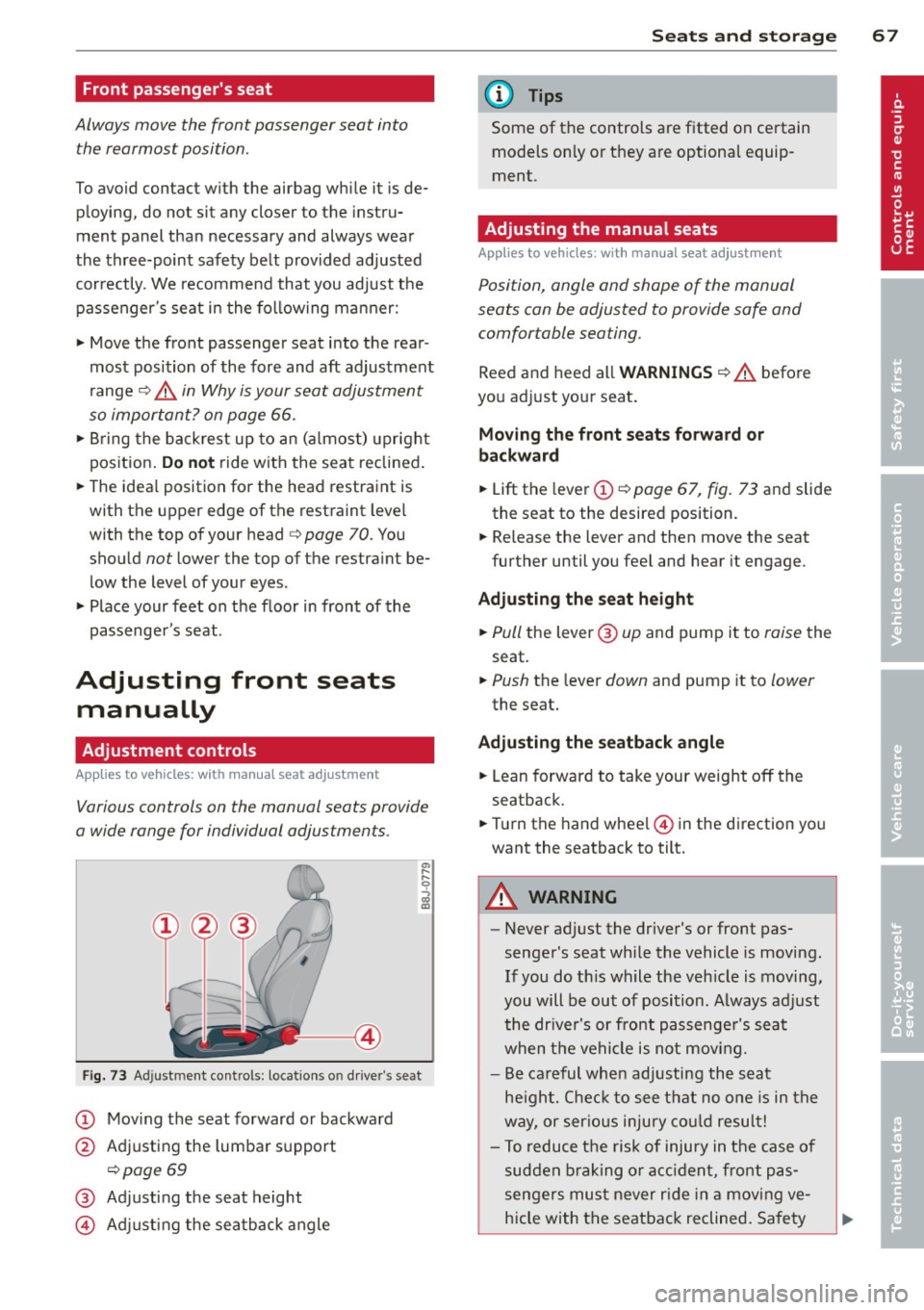
Fig. 73 Adjustment contro ls: loca tions o n dr iver's seat
CD Moving the seat forward or backward
@ Adjusting the lumbar support
c:::> page 69
@ Adjusting the seat height
© Adjusting the seatback angle
Seats and storage 67
(D Tips
Some of the controls are fitted on certain
models on ly or they are optional equip
ment .
Adjusting the manual seats
Applies to vehicles : wit h manual seat adjustment
Position, angle and shape of the manual
seats can be adjusted to provide safe and
comfortable seating .
Reed and heed all WARNINGS c:::> A before
you adjust your seat .
Moving the front seats forward or
backward
... Lift the lever CD c:::> page 67, fig. 73 and slide
the seat to the desired position.
.,. Release the lever and then move the seat
further until you feel and hear it engage.
Adjusting the seat height
.,. Pull the lever @ up and pump it to raise the
seat.
... Push the lever down and pump it to lower
the seat.
Adjusting the seatback angle
.,. Lean forward to take your weight off the
seatback.
... Turn the hand wheel © in the direction yo u
want the seatback to tilt.
A WARNING
-
- Never adjust the driver's or front pas
senger's seat whi le the vehicle is moving.
If you do th is while the vehicle is moving,
you will be out of position. Always adjust
the driver's or front passenger's seat
when the vehicle is not moving.
- Be careful when adjusting the seat
height. Check to see that no one is in the
way, or serious injury could result!
- To reduce the risk of injury in the case of
sudden braking or accident, front pas
sengers must never rid e in a moving ve
hicle with the seatback reclined . Safety
Page 77 of 260
Warm and cold Climate controls
Controls
W arm and cold 7 5
The air conditioning automatically maintains the selected temperature in the vehicleinterior
throughout each season .
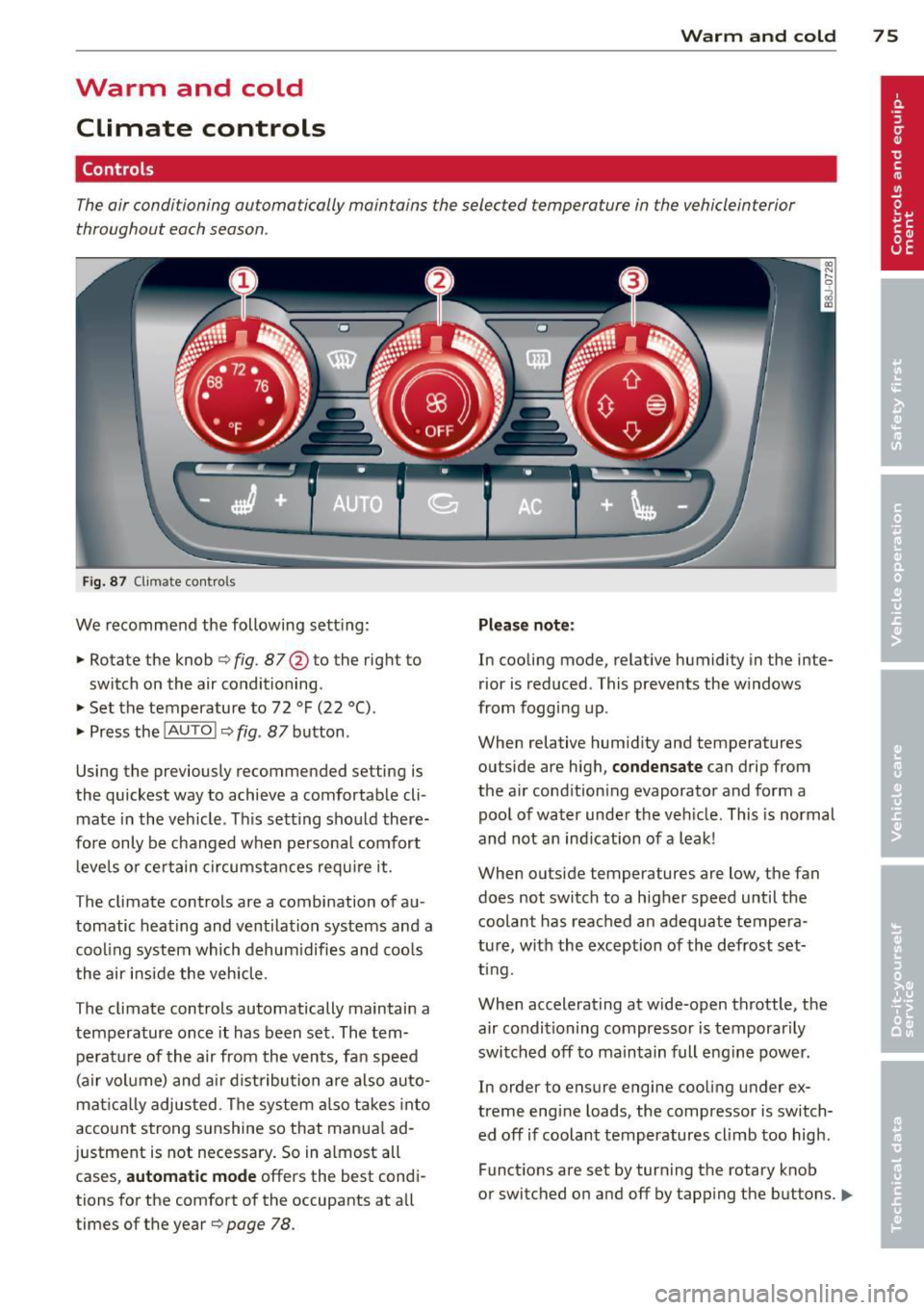
Fig. 87 Climate contro ls
We recommend the following sett ing :
• Rotate the knob
Q fig . 87 @ to the right to
switch on the air conditioning .
• Set the temperature to 72 °F (22 °() .
• Press the
!AUTO ! Q fig. 87 button .
Using the previously recommended setting is
the quickest way to achieve a comfortable cli
mate in the vehicle . Th is setting should there
fore only be changed when persona l comfort
l eve ls o r certain circumstances requ ire it .
The climate controls are a combination of au
tomatic heating and ventilation systems and a
cooling system which dehum idifies and coo ls
the air inside the vehicle .
The climate controls automatically maintain a temperature once it has been set. The tempe rat ure of the air from the v ents, fan speed
(air vo lume) and ai r distribu tion are also auto
mat ica lly adjusted . The system a lso takes into
account strong sunshine so that manua l ad
justment is not necessary . So in almost all
cases,
a utomatic mode offers the best cond i
tions for the comfort of the occupants at all
times of the year
Q page 78 .
Plea se not e:
In cooling mode, relative humidity in the inte
rior is reduced . This prevents the w indows
from fogg ing up .
When relative hum idity and temperatures
outside are high,
condensate can drip from
the a ir cond ition ing evaporator and form a
poo l of water under the veh icle. This is normal
and not an ind ication of a leak!
When outside temperatures are low, the fan
does not switch to a higher speed until the coolant has reached an adequate tempera
tu re , with the exception of the defrost set
t ing.
When accelerating at wide-open throttle, the
air condit ioning compressor is temporar ily
switched off to maintain full engine power.
In order to ensure engine cooling under ex
treme engine loads, the compressor is switch
ed off if coolant temperatures cl imb too high .
Funct ions are set by turn ing the rotary knob
or switched o n and off by tapping the buttons.
1111-
Page 80 of 260
78 Warm and cold
Defrost ~
The windshield and side windows ore defrost
ed or cleared of condensation as quickly as
possible .
• To turn on the defogger/defroster, press the
~ button ¢page 75, fig . 87 .
• To turn the defogger/defroster off, press the
~ button again, o r the IAUTOI button.
Temperature is controlled automatically . The
maximum amount of a ir flows mainly from
vents 1 ¢
page 77.
A small amount of air flows from vents 2 - if
they are open ¢
page 77.
Pressing the~ button switches off recircu la
tion mode.
Automatic operation ~
Standard operating mode at all times of the
year.
Turning on automatic operation
• Set the temperature you want .
• Press the
!AUTO ! button ¢ page 75, fig. 87 .
Automatic opera tion ens ures constant tem
perat ures in the inter ior and dehum idifies the
a ir i nside the vehicle . Air temperature, vol
ume, and distribution are controlled automat
ica lly to reach or maintain the desired interio r
temperature as quickly as possib le. Fluct ua
tions in exterior temperature and the effects
of temperature from the position of the sun
are compensated for automatica lly.
Manual air recirculation mode~
The recirculation mode prevents polluted out
side air from entering the vehicle interior.
Sw itching on air recirculation
• Press the button~¢ page 75, fig. 87
¢,&. .
Switching off air recirculation
• Press the button ~ again, o r
• Press the
!AU TO ! bu tton, or •
Press the~ button .
In recirc ulation mode, air is drawn from t he
vehicle interior, filtered, and recircula ted . We
recommend that you se lect rec irculat ion
mode
briefly ¢.&. under the following condi
tions:
When driving thro ugh a tunnel or in a traff ic
jam so that exhaust fumes and odors canno t
enter the vehicle interior.
A WARNING
You sho uld not use the recirculation mode
for an extended period s ince no fresh air is
drawn in, and with the air co ndit ioning
switched off the windows can fog up - this
i nc reases the r isk of an accident!
A/C operation ~
Switching on A /C
• Press the IAC ! button ¢ page 75, fig. 87.
Switching A /C off
• Press the IAC ! button aga in .
T he cooli ng sys tem is swi tched on d uring A/C
opera tion -the heat ing and ven tilat ion sys tem
is contro lled automatically.
@ Tips
If the L ED in the sw itch stays on a fter A/C
operation has been switched off( = sw itch
ing the A/C off), there is a fault in an air
conditioning component. P lease cons ult
an authorized Audi dealer when there is an
operating problem.
Using the climate controls economically
E conomical use of the climate controls helps
to save fuel.
When climate control is wo rking in cooling
mode, engine performance is reduced and
fuel consumpt ion is affected. To keep the time
the air cond ition ing is on as short as poss ible,
you should do the following: .,,_