change time AUDI TT ROADSTER 2011 Owners Manual
[x] Cancel search | Manufacturer: AUDI, Model Year: 2011, Model line: TT ROADSTER, Model: AUDI TT ROADSTER 2011Pages: 260, PDF Size: 64.11 MB
Page 22 of 260
20 Driv e r in formation sy stem
Trip computer
Introduction
The trip computer gives you information on
current and average fuel mileage, average
speed, fuel range and driving time .
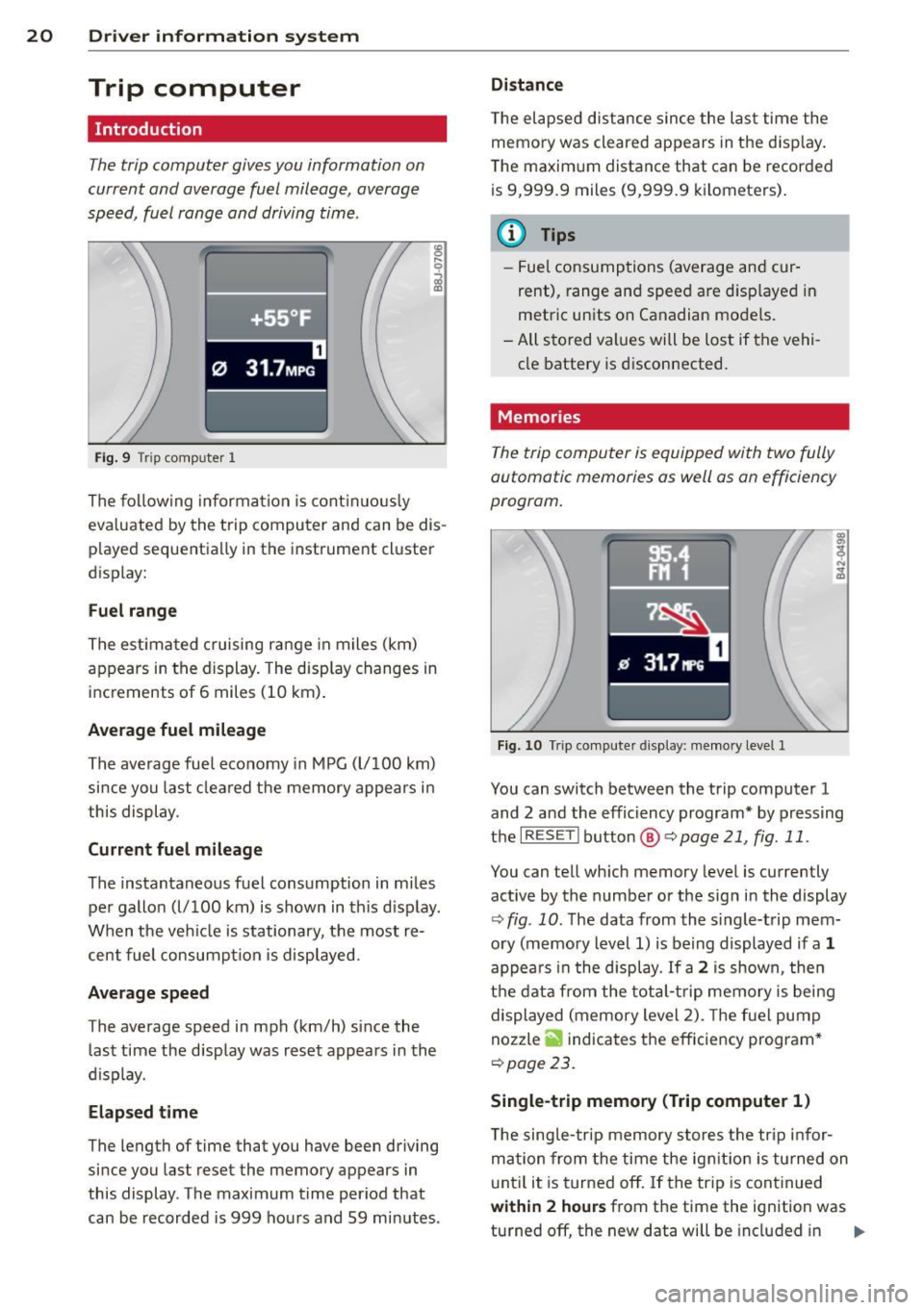
f ·+ss ~F .
0 31.7MP G
Fig. 9 Tri p comp uter 1
The follow ing information is cont in uo usly
eva luated by the trip computer and can be dis
p layed sequentially in the instrument cluster
display:
F u el range
The estimated c ruising range in miles (km)
appears in the display. The disp lay changes in
increments of 6 miles (10 km) .
Average fuel mileage
The average fuel economy in MPG (l/100 km)
since you last cleared the memory appears in
this display .
Current fuel mileage
The instantaneous fuel consumption in miles
pe r gallon (l/100 km) is shown in this d isp lay.
When the veh icle is stationary, the most re
cent fuel consumpt ion is displayed .
Average speed
The average speed in mph (km/h) since the
last time the display was reset appears in the
d isplay.
Elapsed time
The length of time that you have been driving
since you last rese t the memory appears in
this display . The maximum time period that
can be recorded is 999 hou rs and 59 minutes .
Distance
T he elapsed dis tance s ince the last time the
memo ry was cleared appears in the d isp lay .
The maxim um distance that can be recorded
is 9,999 .9 miles (9,999.9 kilometers) .
a) Tips
-Fuel consumptions (average and cur
rent), range and speed are d isp layed in
metric units on Canadian mode ls.
- All stored values will be lost if the vehi
cle battery is d isconnected.
Memories
The trip computer is equipped with two fully
automatic memories as well as an efficiency
program.
Fig . 10 Tr ip compute r d isplay: me mory level 1
You can switch between the trip computer 1
and 2 and the effic iency program* by pressing
the
IRES ET I button @ Qpage 21, fig . 11 .
You can tell wh ich memory level is currently
active by the number o r the sig n in the display
¢ fig . 10 . The data from the s ingle-t rip mem
ory (memory level 1) is being displayed if a
1
appea rs i n the display . If a 2 is shown, then
t h e dat a from the tota l-t rip memory is being
displayed (memory level 2). The f ue l pump
nozzle
ii indicates the efficiency program *
¢page 23.
Single-trip memory (Trip computer 1 )
The sing le- trip memory stores the tr ip infor
mation from the time the ign it ion is tu rned on
u nt il it is turned off.
If t he trip is cont inued
with in 2 hour s from the time the ignition was
turned off, the new data will be included in ..,.
Page 24 of 260
22 Driv e r in formation sy stem
Each display type in the Start menu contains a
submenu with additional options.
Set Clock
c;:,page23
Computer
c;:,page23
Acoust ic par k assist*
¢page83
Speed alarm (speed warning)
c;:,page27
Language (6 languages)
c:;>page23
Units (distance, fuel consump-
tion, temperature)
c;:,page23
Tire pressure monitoring
c;:,page 212
Lap timer *
c;:,page 25
Lighting*
c;:,page53
Wiper (service position)
c;:,page62
Window
¢page44
Doors (unlocking and locking
mode, for example Auto-lock)
c;:,page 37, c:;>page 37
Check Service
c;:,page24
Chassis number *
c;:, page 23 7
Engine oil temperature*
Registered keys
c:;>page35
Menu off All of the messages show n in ve-
hides without menu display a p-
pear on the display screen.
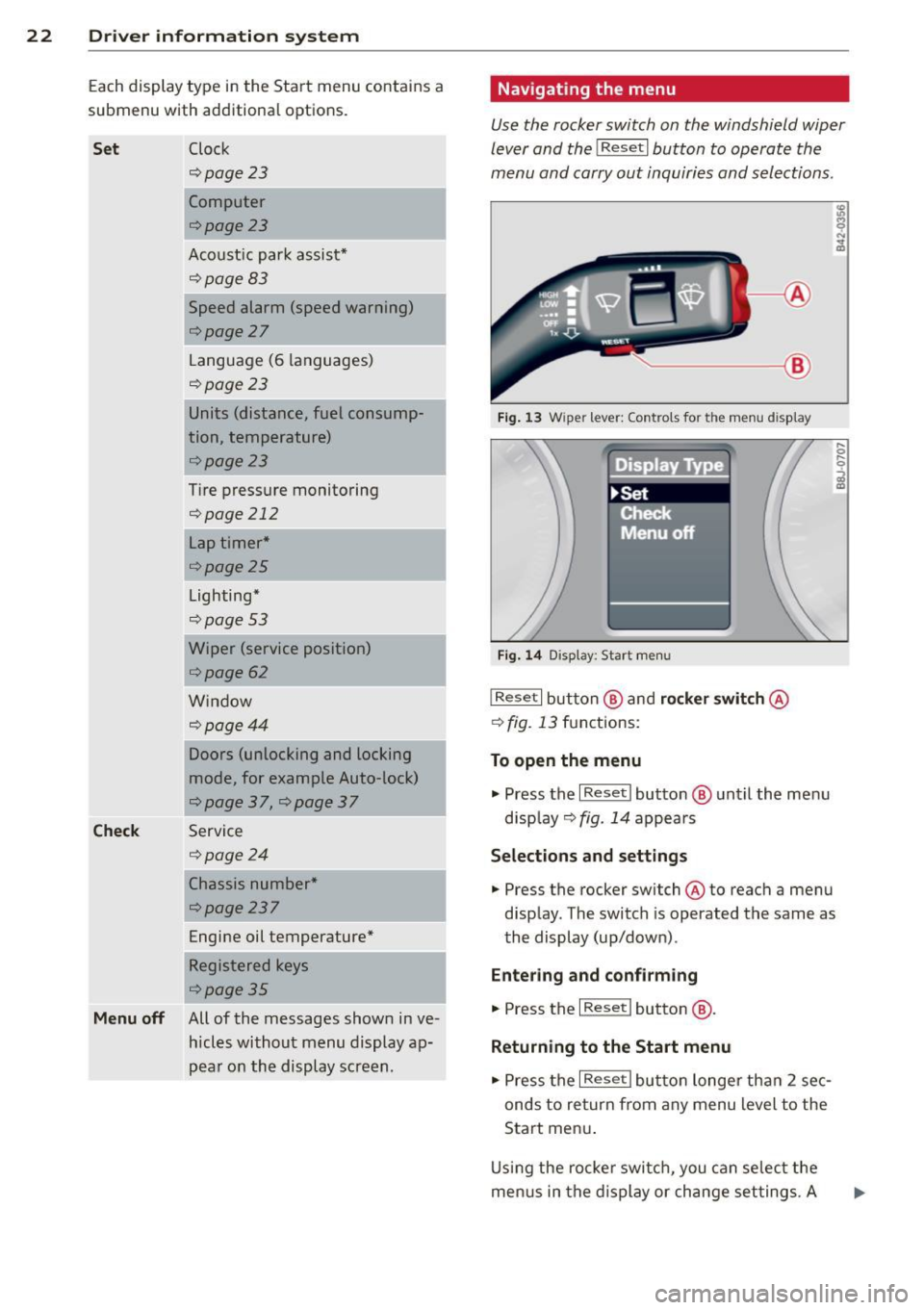
Navigating the menu
Use the rocker switch on the windshield wiper
lever and the
I Reset I button to operate the
menu and carry out inquiri es and selections.
~-- @
Fig. 1 3 Wiper lever: Controls for the men u display
Fi g. 14 Display: Start menu
I Reset I button @ and rocker switch @
c:;> fig. 13 functions:
To open the menu
.,. Press the I Reset I button @ until the me nu
d isp lay¢
fig. 14 appears
Selections and settings
.,. Press the rocker switch @to reach a menu
disp lay. The switch is operated the same as
the display (up/down) .
Entering and c onfirm ing
.,. Press the I Reset I button @.
Returning to the Start menu
.,. Press the I Reset I butto n longe r tha n 2 sec
onds to return from any menu level to the
Start men u.
U sing the rocke r swi tch , you can se lec t the
me nus in the display or change set tings. A
Page 26 of 260
24 Driver information system
Other equipment
Applies to vehicles: with trip computer w ith eff iciency
program
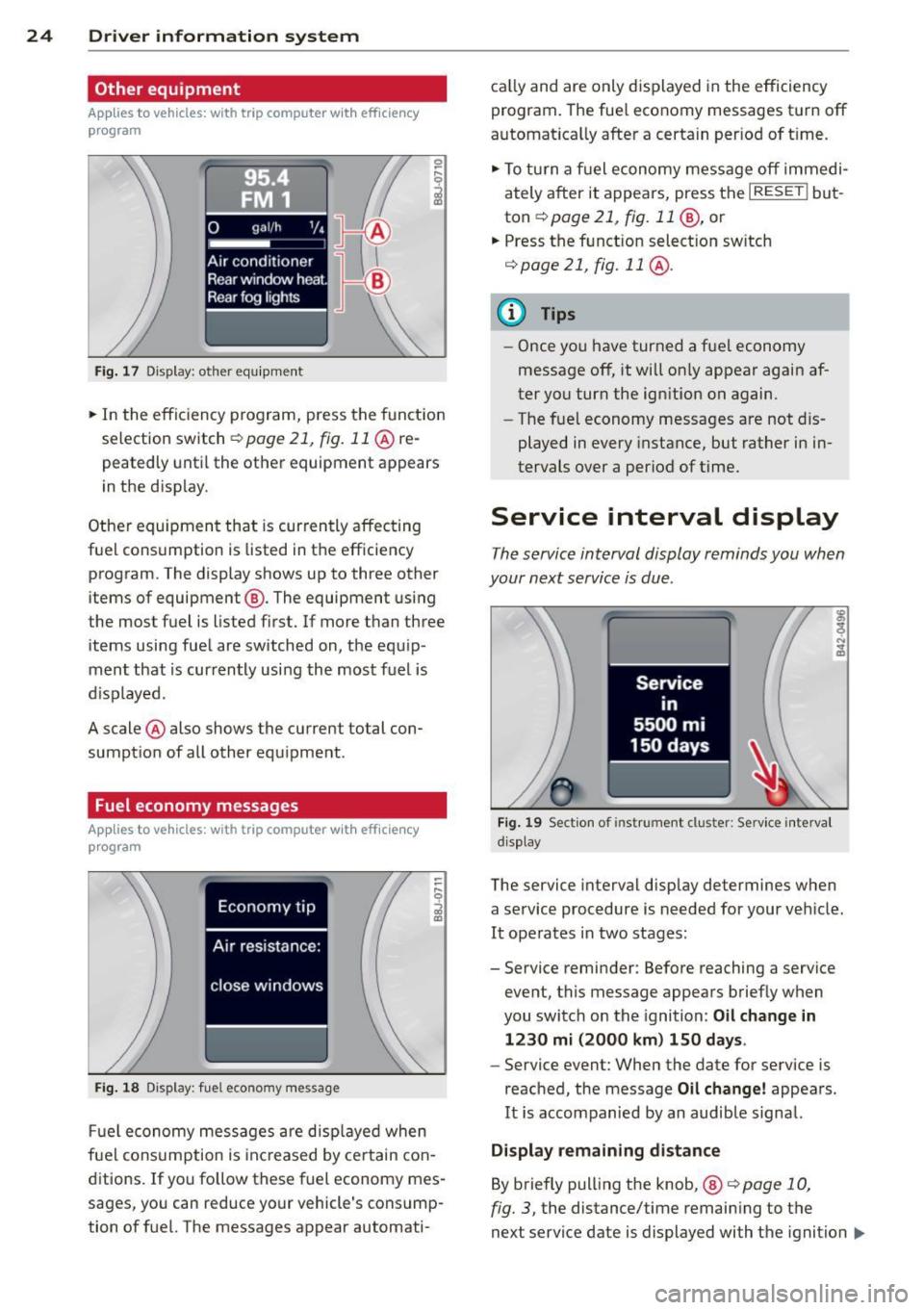
Fig. 17 Dis pl ay : o th er equ ipm ent
• In the effic iency program, press the funct ion
selection switch
r::;, page 21, fig. 11 @ re
peatedly until the other equipment appears
in the disp lay.
Other equipment that is currently affecting
fuel consumption is listed in the efficiency program . The display shows up to three other
items of equipment ®· The equipment using
the most fuel is listed first. If more than three
items using fuel are switched on, the equip
ment that is currently using the most fuel is
d isplayed .
A scale @also shows the current total con
sumption of all other equipment .
Fuel economy messages
Applies to vehicles: with trip computer with efficiency
program
Fig. 18 Dis play: fuel eco nomy message
Fuel economy messages are displayed when
fuel consumption is inc reased by certain con
ditions. If you follow these fuel economy mes
sages, you can reduce your vehicle's consump
tion of fuel. The messages appear automati- cal
ly and are only d isplayed in the efficiency
program. The fuel economy messages turn off
automat ica lly after a certain per iod of t ime.
• To turn a fuel economy message off immedi
ately after it appears, press the
I RESET ! but
ton
r::;, page 21 , fig. 11 @, or
.. Press the funct ion select ion sw itch
r::;, page 21, fig. 11 @ .
@ Tips
- Once you have turned a fuel economy
message off, it will on ly appear again af
ter you turn the ignition on again.
- The fue l economy messages are not dis
played in every instance, but rather in in
tervals over a period of time.
Service interval display
The service interval display reminds you when
your next service is due .
Fig. 19 Section of instrument clus ter: Se rv ice interva l
d isplay
The service interval display determines when
a service procedure is needed for your veh icle .
It operates in two stages:
- Service reminder: Before reaching a service
event, this message appears briefly when
you switch on the ignition: Oil change in
1230 mi (2000 km) 150 days.
- Service event: When the date for service is
reached, the message Oil change! appears.
It is accompanied by an audible signal.
Display remaining distance
By briefly pulling the knob, ®
<=>page 10,
fig. 3, the distance/time remaining to the
next service date is displayed with the ignition
IIJ,-
Page 27 of 260
on. The distance/time remaining is updated
every 300 mi les (500 km).
I f the d istance/ time remaining is called up on
new vehicles or after service has been per
formed, the due date is always shown in the
disp lay with
Oil change in----- m i (km)- -
d ay s
within the first 300 miles (500 km).
To reset the display
The dealersh ip perfo rming the service resets
the disp lay whe n the service has been com
p leted . The display is resets as follows :
- Switch the ignition on.
- Pull the knob @
Q page 10, fig. 3, this mes-
sage appears:
Oil chang e!
- Pull the knob u ntil t he d isplay O il change in
--- --mi (km )··· day s
appears in the display.
If the reset button is not p ulled within
5
seconds, the display reset mode closes .
(D Tips
-If a malfunction is p resen t (red symbol),
the distance remaining cannot be ca lled
u p.
- Do not reset the display between service
intervals . Do ing so will res ult in an in co r
r ect displ ay.
- If the batte ry is d iscon nected, the Serv
i ce Interval Disp lay val ues are ret ained .
-If service was not performed at the co r
re ct time or the service interval display
w as not reset a fter service w as per
fo rmed, the add itiona l mi leage driven or
the elapsed days wi ll be shown as nega
tive numbers.
Lap timer
Introduction
App lies to vehicles: with lap timer
You ca n record and evaluate lap times with
the lap timer in the display
¢page 25,
fig . 21 . The time is measu red in minutes, sec
onds and 1/10 seconds. The hou rs a re also
shown when the lap time exceeds 60 minutes .
The maximum individual measurement is 99
hours.
Dr iver in formation system 25
A WARNING
Please devote your full attention to driv
i ng. As the driver, you have complete re
spons ib ility for safety in traffic. Only use
the functions in such a way that you a lways
maintai n comple te control over you r ve hi
cle in a ll traffic situations.
(D Tips
When the lap time r stopwatch is running ,
you can ca ll up the tr ip comp ute r informa
tion with the
I RESET I but to n.
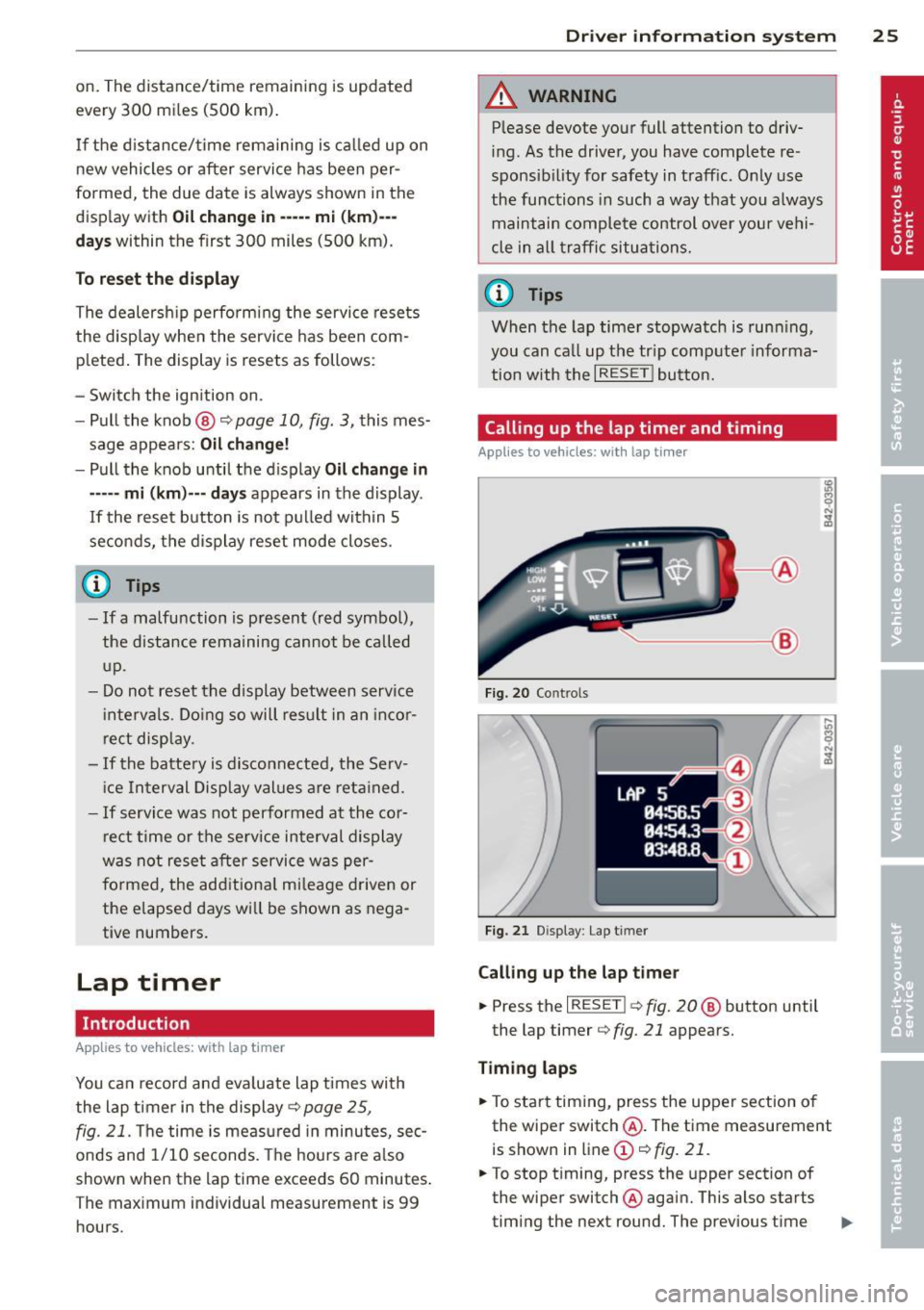
Calling up the lap timer and timing
Applies to vehicles: wi th lap timer
---- @
Fig. 20 Co ntrols
F ig. 21 Display : Lap t imer
Calling up the lap t imer
... Press the I RESET !¢ fig . 20 @ button until
the lap timer ¢
fig. 21 appears.
Timing laps
.,. To start timing, press the upper section o f
the wiper switch @. The time measurement
is shown in line
(D ¢ fig. 21.
.,. To stop timing, press the upper section of
the wiper switch @again. This also starts
timing the next round. The previous time ..,_
Page 28 of 260
26 Driver information system
moves one line up, first to line @ and then
to line @. Line @) shows the current lap
number , for example LAP 5.
Displaying intermediate time and pausing
timing
• To display an intermediate time, press the
lower section of the wiper switch @. T he in
termediate time appears in line
(D and is
marked with".
• To pause tim ing, pres s the lower section of
the wiper switch @again .
• To continue t iming, press the upper section
of the wiper switch @.
If timing is paused, you can co ntinue it later
even if you switch the ign it ion off .
Evaluating times and continuing or
resetting timing
Applies to vehicles: with lap timer
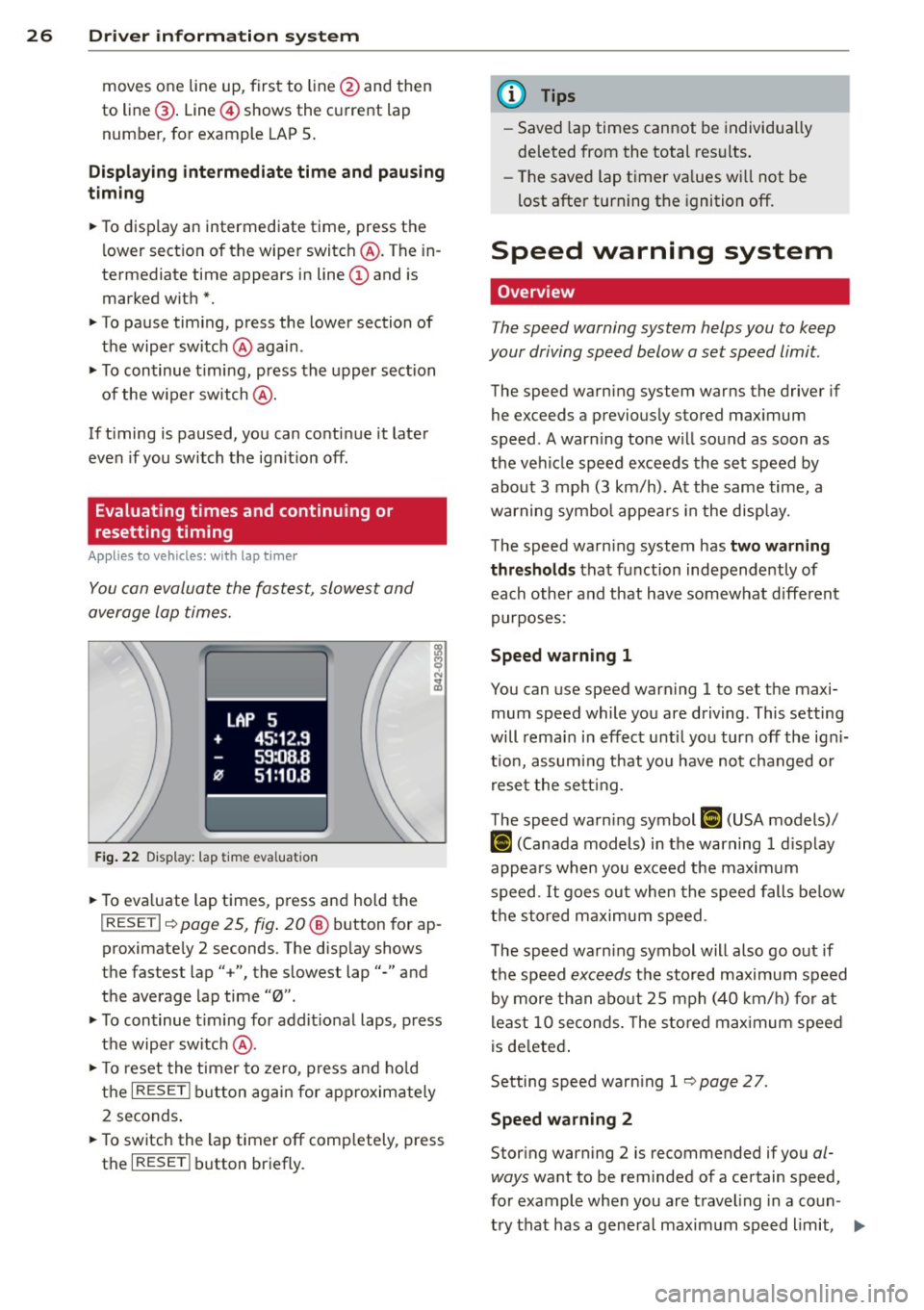
You can evaluate the fastest, slowest and
average lap times.
LAP 5
+ 45:12.9
59:08.B
0 51:10.B
Fig. 22 Dis play : lap time eva lua tion
• To eva luate lap times, press and hold the
I RESE T I~ page 25, fig . 20 @ button for ap
proximate ly 2 seconds. The disp lay shows
the fastest lap" +", the slowest lap"-" and
the average lap time "0".
• To continue t iming for add itional laps, press
the wiper switch @.
• To reset the timer to zero , press and hold
the
I RESE T! button again for approximately
2 seconds .
• To switch the lap timer off comp letely, press
the
I RESE T! button briefly.
(D Tips
-Saved lap times cannot be individually
de leted from the total results.
- The saved lap t imer va lues wi ll not be
lost after turning the ignition off.
Speed warning system
Overview
The speed warning system helps you to keep
your driving speed below a set speed limit.
The speed warning system warns the driver if
he exceeds a previously stored maximum
speed . A warning tone will sound as soon as
the vehicle speed exceeds the set speed by
about 3 mph (3 km/h). At the same time, a
warning symbol appears in the display.
The speed warning system has
two warning
thresholds that function independently of
each other and that have somewhat different
purposes:
Speed warning 1
You can use speed warning 1 to set the maxi
mum speed while you are driving . This setting
will remain in effect until you turn off the ign i
t io n, assuming that you have not changed o r
reset the setting.
The speed warn ing symbol
[i (USA models)/
IDl (Canada models) in the warning 1 display
appears when you exceed the maximum
speed.
It goes out when the speed falls below
the stored maximum speed .
The speed warn ing symbol will also go out if
the speed
exceeds the stored maximum speed
by more than about 25 mph (40 km/h) for at
least 10 seconds. The stored maximum speed
is deleted.
Setting speed warning 1
~page 27 .
Speed warning 2
Storing warning 2 is recommended if you al
ways
want to be rem inded of a certain speed,
for example when you are travel ing in a coun
try that has a general maximum speed limit, .,..
Page 57 of 260
The benefit o f adaptive light is that the curve
and the edg e of th e road are better i lluminat
ed
c::> fig . 59. T he adaptive light is controlled
automatically , depend ing on veh icle speed
and steering wheel ang le.
When driving a round bends, the head lights
are contro lled according to steer ing wheel an
g le. So that there is no black area ahead of the
ve hicle, the two main beams pivo t at different
angles.
(D Tips
T he system works above a speed of about
6 mph (10 km/h) .
Front fog lights
Use the light switch to turn on the front fog
lights.
0 0
"' -ci. a) a,
F ig . 6 0 Fog l ig ht activat ion : ligh t switc h pos it io n on ve ·
hides WIT HO UT s ensor lig ht
Switching on the f ront fog lights }0
• Do not turn the light swi tch -'ti--c::> fig . 60 to -
ward the fog light symbol
}D .
• Turn the light switch to ~oo; or to tD .
• Pull the light switch to the first stop @.
When t he front fog lights are on, the symbo l
iD next to the lig ht switch will illuminate .
Clear vision 55
Turn signals and high beam lever
The lever on the left side of the steering col
umn is used to operate the turn signals and
the high beam as well as the h eadlight flash
er.
t
'
Fi g. 61 Tu rn signal and high beam lever
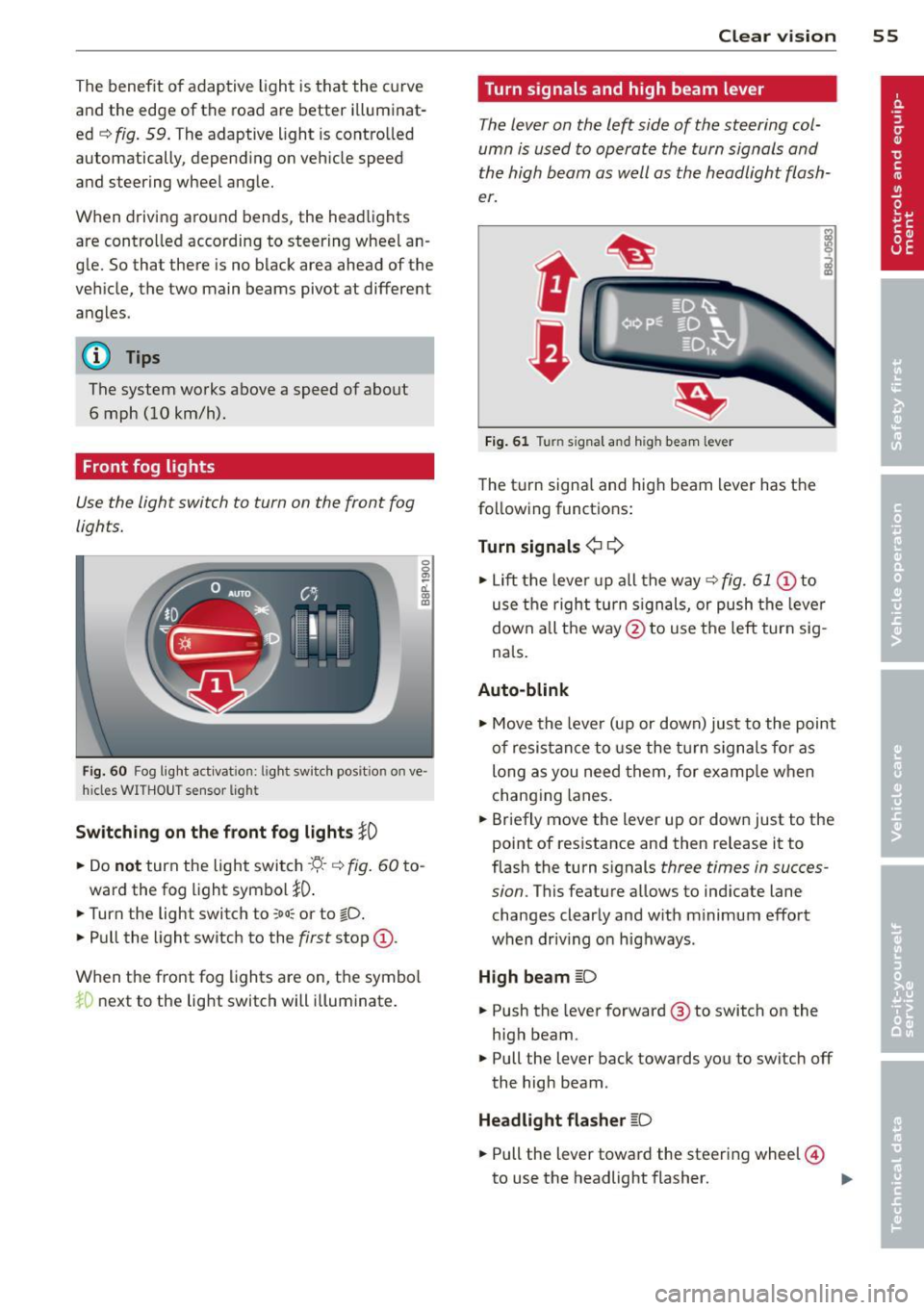
The turn signa l and high beam lever has t he
following functions:
Turn signals ¢
9
• Lift the leve r up a ll the way c::> fig. 61 @ to
use t he right turn s ignals, or push the leve r
down all the way@to use t he left tur n sig
na ls .
Auto -blink
• Move the leve r (up or down) just to the point
of resistan ce to use the turn signa ls fo r as
long as you need them, for e xamp le w hen
chang ing lanes.
• Briefly move the lever up or down just to the
point of resistance and then release it to
flash the turn s ignals
three times in succes
sion .
This featu re allows to ind icate lane
changes clearly and w ith m inimum effort
when driv ing o n highways .
High beam
~D
• Push the lever forward @ to switch on the
high beam .
.. Pull the lever back towards you to switch off
the high beam .
Headlight flasher
~D
• Pull the lever toward the steering wheel@
to use the headlight flasher. ..,.
Page 59 of 260

locked or when the ignition is turned on, the
interior lights are turned off.
When a door is open, the interior l igh ts are
turned off afte r abo ut 10 m inu tes to p reven t
battery draining.
The brightness of the lights is controlled au
t om atically by a dimmer when they are
sw itched on and off.
Instrument panel illumination
The illumination of the instruments, displays
and the cen ter console can be adjusted .
Fig . 64 Instr ument pane l illu min at io n
i a:. .. a,
You regulate the brightness of the instru
ments with the left thumbwheel
Co/¢ fig. 64 .
Ign ition ON, light switch at @.
Wit h t he igni tion swi tched ON, the glow o f in
strument needles
can be adjusted to a ppear
b righter or dimmer.
Ignition ON , light switch at ~oQ: or ~D .
With the l igh ts sw itched on, the brightness of
i nstr ument cluster (i.e. needles, gauges and
d isp lays) and center console i llumination can
be ad justed .
(D Note
The instrument cluster and cente r console
illumination (ga uges and needles) comes
on when you switch on the ignition and the
vehicle headlights are off. Be aware of t he
following difference between mode ls built
to US or Ca nadian specifications:
- USA models: illumination of the instru
ment cluster (gauge s and needles),
dash and cente r console around the
Clear vi sion 5 7
gearshift lever is controlled by a light
sensor located in the in strument panel.
The in strument panel illumination will
automatically become dimmer as the
daylight fades away and eventuall y will
go out completely when outside light is
very low . This i s to remind you, the driv
er, to switch on the headlights before it
get s too dark.
- Canada models: in strument pan el illu
min ation w ill stay bright r egardless of
the intensit y of ambient light . Alwa ys
be aware of changes in out side light
conditions while you are dri ving. Re·
s pond in time to fading daylight by
turning the light switch to position
~D
(or "AUTO" if your car is equipped with
this feature)
to turn on you r headlights.
luggage compartment light
The light is located on the right side of the
luggage compartment.
These lights come on automatically when t he
rear lid is opened . The lights turn off automat
ical ly if the lid is left open for more then 10
minutes .
Vision
Sun visors
Using the sun visors make s driving safer .
Fig. 65 Sun visor
- ~ ---------.ttr -···---=-=---------~=--·-·----- -·-==:. - · =-~-----
The vanity mirrors in the sun visors are equip
ped with lids. Push lid in direct ion of arrow to
open.
Page 77 of 260
Warm and cold Climate controls
Controls
W arm and cold 7 5
The air conditioning automatically maintains the selected temperature in the vehicleinterior
throughout each season .
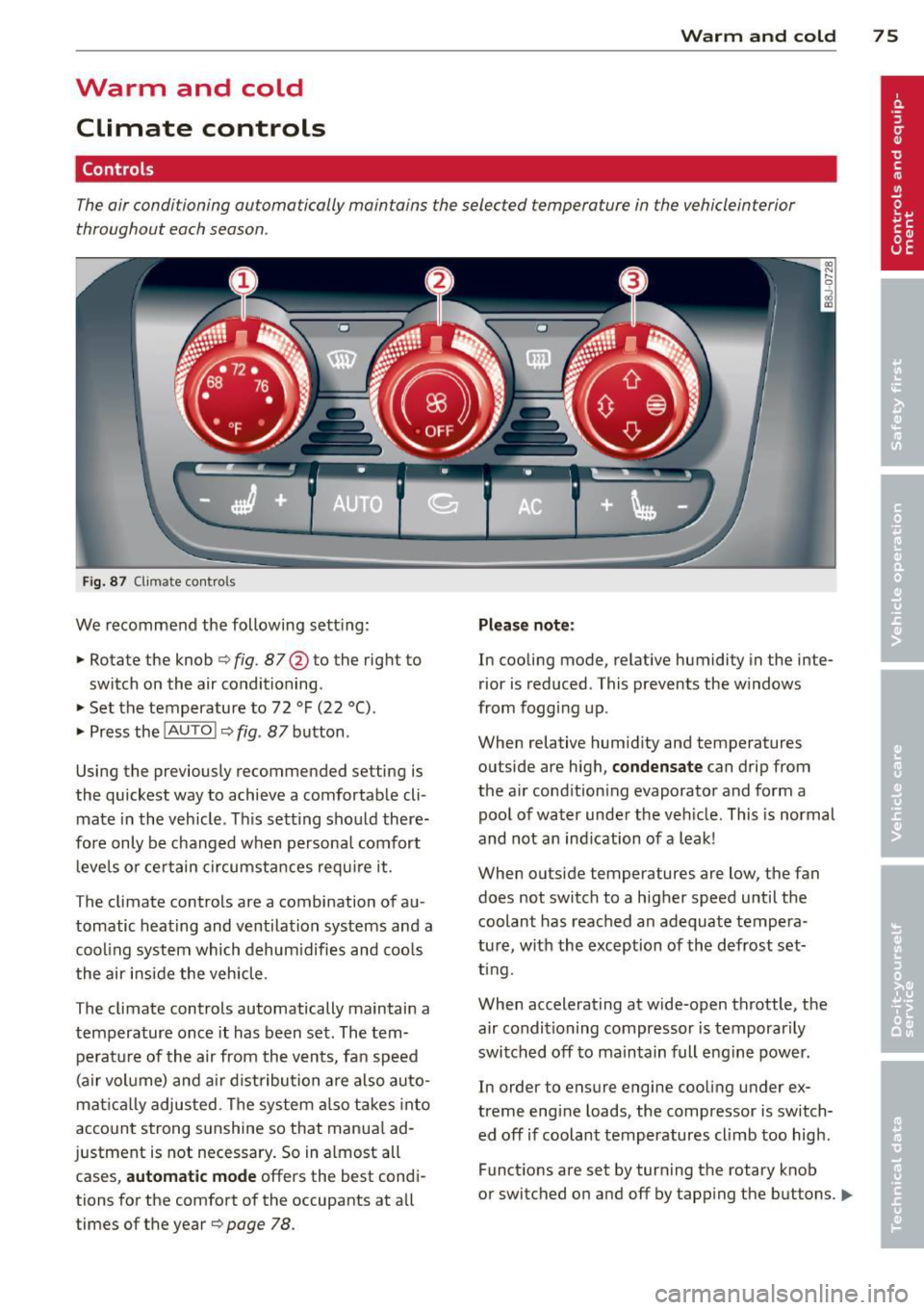
Fig. 87 Climate contro ls
We recommend the following sett ing :
• Rotate the knob
Q fig . 87 @ to the right to
switch on the air conditioning .
• Set the temperature to 72 °F (22 °() .
• Press the
!AUTO ! Q fig. 87 button .
Using the previously recommended setting is
the quickest way to achieve a comfortable cli
mate in the vehicle . Th is setting should there
fore only be changed when persona l comfort
l eve ls o r certain circumstances requ ire it .
The climate controls are a combination of au
tomatic heating and ventilation systems and a
cooling system which dehum idifies and coo ls
the air inside the vehicle .
The climate controls automatically maintain a temperature once it has been set. The tempe rat ure of the air from the v ents, fan speed
(air vo lume) and ai r distribu tion are also auto
mat ica lly adjusted . The system a lso takes into
account strong sunshine so that manua l ad
justment is not necessary . So in almost all
cases,
a utomatic mode offers the best cond i
tions for the comfort of the occupants at all
times of the year
Q page 78 .
Plea se not e:
In cooling mode, relative humidity in the inte
rior is reduced . This prevents the w indows
from fogg ing up .
When relative hum idity and temperatures
outside are high,
condensate can drip from
the a ir cond ition ing evaporator and form a
poo l of water under the veh icle. This is normal
and not an ind ication of a leak!
When outside temperatures are low, the fan
does not switch to a higher speed until the coolant has reached an adequate tempera
tu re , with the exception of the defrost set
t ing.
When accelerating at wide-open throttle, the
air condit ioning compressor is temporar ily
switched off to maintain full engine power.
In order to ensure engine cooling under ex
treme engine loads, the compressor is switch
ed off if coolant temperatures cl imb too high .
Funct ions are set by turn ing the rotary knob
or switched o n and off by tapping the buttons.
1111-
Page 130 of 260
128 Airbag system
-Even though your vehicle is equipped
with an Advanced Airbag System, make
certain that all children, especially 12
years and younger, always ride on the
back seat properly restrained for their
age and size.
- If you must install a rearward-facing
child safety seat on the front passenger
seat because of exceptional circumstan
ces and the
PASSENGER AIR BAG OFF
light does not appear and stay on, imme
diately install the rear-facing child safety
seat in a rear seating position and have the airbag system inspected by your Audi
dealer.
- A tight tether or other strap on a rear
ward-facing child restraint attached to
the front passenger seat can put too
much pressure on the weight-sensing
mat in the seat and register more weight
than is actually on the seat. The heavier
weight registered can make the system
work as though an adult were on the seat
and deploy the Advanced Airbag when it
must be suppressed causing serious or
even fatal injury to the child.
- If, in exceptional circumstances, you
must install a forward-facing child re
straint on the front passenger seat, al
ways move the seat into its rearmost po
sition in the seat's fore and aft adjust
ment range, as far away from the airbag
as possible. The backrest must be adjust
ed to an upright position . Make sure that
the
PASSENGER AIR BAG OFF light
comes on and stays on all the time when
ever the ignition is switched on.
A WARNING
- If the PASSENGER AIR BAG OFF light
does not go out when an adult is sitting
on the front passenger seat after taking
the steps described above, have the air
bag system inspected by your Audi deal
er before transporting anyone on the
front passenger seat.
-
(!) Tips
If the weight-sensing mat in the front pas
senger seat detects an empty seat, the
front airbag on the passenger side will be
turned
off, and PASSENGER AIR BAG OFF
will stay on.
Repair , care and disposal of the airbags
Parts of the airbag system are installed at
many different places on your Audi. Installing,
removing, servicing or repairing a part in an
area of the vehicle can damage a part of an
airbag system and prevent that system from
working properly in a collision.
There are some important things you have to
know to make sure that the effectiveness of
the system will not be impaired and that dis
carded components do not cause injury or pol
lute the environment.
A WARNING
-Improper care, servicing and repair proce-
dures can increase the risk of personal in
jury and death by preventing an airbag from deploying when needed or deploying
an airbag unexpectedly:
- Never cover, obstruct, or change the
steering wheel horn pad or airbag cover
or the instrument panel or modify them
in any way.
- Never attach any objects such as cup
holders or telephone mountings to the
surfaces covering the airbag units.
- For cleaning the horn pad or instrument
panel, use only a soft, dry cloth or one
moistened with plain water. Solvents or
cleaners could damage the airbag cover
or change the stiffness or strength of the material so that the airbag cannot de
ploy and protect properly.
- Never repair, adjust, or change any parts
of the airbag system.
- All work on the steering wheel, instru
ment panel, front seats or electrical sys-
tem (including the installation of audio
II),
Page 171 of 260
(D Note
To avoid scratching the display, you should never clean it dry.
Aluminum trim
Use only neutr al- pH products to remove spots
and depos its from alum inum surfaces.
Chrome care products and alkaline cleaners
will attack alum inum su rfaces and can dam
age them over time.
A WARNING
Always read and heed a ll WARNINGS and
t he information<=>
page 162.
Fabrics and fabric coverings
Fabrics and fabric coverings (e .g. seats, door
trim panels, etc.) should be cleaned at regular
interva ls with a vacuum cleaner. T his removes
surface dirt particles which could become em
bedded in the fabr ic through use. Steam
cleaners should not be used, because the
steam tends to push the dirt deeper into the
fabric and lock it there.
Norm al cleaning
Generally, we recommend using a soft sponge
or a lint-free microfiber cloth to the clean fab
ric. Brushes should only be used for carpets
and floor mats, s ince other fabric surfaces
could be harmed by b rushes .
Normal surface sta ins can be cleaned using a
commercially available foam cleaner . Spread
the foam on the surface of the fabric with a
soft sponge and work it in gently . Do not satu
rate the fabric. Then pat the foam d ry using
absorbent, dry cloths (e.g. microfibe r clo th)
and vacuum it afte r it has dr ied comp lete ly.
Cl eaning stains
Stains caused by beve rages (e .g. coffee, fruit
juice, etc.) can be t reated with a mild deter
gent solution. App ly the dete rgent so lution
wi th a sponge. In the case of s tubbor n stains,
a detergent paste can be applied directly to
Cleaning and protec tion 169
the stain and worked into the fabric. After
wards, use copious amounts of clean water to
remove the rema in ing detergent. Apply the
water with a damp cloth or sponge and pat
the fabric dry with an absorbent, dry cloth.
Stains from choco late or makeup should have
detergent paste (e.g . ox-gall soap) rubbed in
to them. Afterwards, remove the soap with
water (damp sponge).
A lcohol can be used to treat stains from
grease, o il, lipstick or a ballpoint pen. Melted
grease or dye must be patted off using ab
sorbent mater ial. It may be necessary to re
treat the areas with detergent paste and wa
te r.
In the case of genera l soiling of the uphols
tery and cover material, we recommend hir ing
a specia list that has the equipment to clean
t h e seat covers and othe r fabr ic surfaces by
shampooing and spray extraction .
A WARNING
Always read and heed all WARNINGS and
the info rmation
<=> page 162.
@ Tips
Open Velcro fasteners on your clothing can
damage the seat cover. Please make sure
that Ve lcro fasteners are closed.
Plastic parts and instrument panel
A lways use a clean clo th moistened in clea r
water to clean these areas . For pe rsistent d irt
u se an Aud i approved
solvent-free p lastic
clea ner/protectant.
A WARNING
Solvents can change the properties of
some plastics and make it harder for the
a irbag to deploy.
-
- Never clean the instrument panel or the
surface of Airbag modu les with cleaning
products that co nta in solvents .
- Products containing solvents will make
the surface of this part porous. •
•