warning AUDI TT ROADSTER 2016 Owners Manual
[x] Cancel search | Manufacturer: AUDI, Model Year: 2016, Model line: TT ROADSTER, Model: AUDI TT ROADSTER 2016Pages: 306, PDF Size: 31.82 MB
Page 117 of 306
Downloaded from www.Manualslib.com manuals search engine 0
N
,.....
N
......
0
,.....
Vl
CX) A
WARNING
You should switch on the sport mode or
switch off the ESC/traction control system
(ASR) only if your driving ability and the traf
fic conditions allow you to do so safely -dan
ger of skidding!
- The stabilising function is restricted when
sport mode is switched on. The driven
wheels may start to spin, causing the vehi
cle to lose grip, in particular on slippery or
wet roads.
- When the ESC/traction control system
(ASR) is switched off, the vehicle will not be
stabilised.
@ Note
- The ESC/traction control system (ASR) can
not be switched off and the sport mode can
not be switched on when the cruise control
system* is on.
- In the event of a malfunction in the rear
spoiler system or the Audi magnetic ride, it
may not be possible to switch off the ESC/
ASR or switch on the sport mode.
Brakes
New brake pads
New brake pads do not give full braking effect for
the first 400 km, they must first be "bedded in".
However, you can compensate for the slightly re
duced braking effect by applying more pressure
on the brake pedal. Avoid placing a heavy load on
the brakes during the running-in period.
Wear
The rate of wear on the brake pads depends a
great deal on how you drive and the conditions in
which the vehicle is operated. Negative factors
are, for instance, city traffic, frequent short trips
or hard driving with abrupt starts and stops.
Noises
Brake noise may develop in certain situations, de
pending on the speed, braking force and ambient
conditions (such as temperature and relative hu
midity). Intelligent
technology
Effect of moisture and salt
In certain conditions, such as in heavy rain, early
morning dew, or after washing the car or driving
through water, the full braking effect can be de
layed by moisture (or in winter by ice) on the
discs and brake pads. The brakes should be
"dried" by pressing the pedal to restore full brak
ing effect.
When you are driving at higher speeds with the
windscreen wipers on, the brake pads are very
briefly brought into contact with the brake discs.
This automatic process which goes unnoticed by
the driver is carried out at regular intervals and is
intended to improve braking response in wet con
ditions.
The effectiveness of the brakes can also be tem
porarily reduced if the car is driven for some dis
tance without using the brakes when there is a
lot of salt on the road in winter. The layer of salt
that accumulates on the discs and pads can be
removed with a few cautious brake applications.
Corrosion
There may be a tendency for dirt to build up on
the brake pads and corrosion to form on the discs
if the car is used infrequently, or if you only drive
low mileages without using the brakes very
much.
If the brakes are not used frequently, or if corro
sion has formed on the discs, it is advisable to
clean off the pads and discs by braking firmly a
few times from a moderately high speed ¢ A.
Faults in the brake system
If the brake pedal travel should ever increase
suddenly, this may mean that one of the two
brake circuits has failed. Drive immediately to the
nearest qualified workshop and have the fault
rectified. On the way to the dealer, be prepared
to use more pressure on the brake pedal and al
low for longer stopping distances.
Low brake fluid level
Malfunctions can occur in the brake system if the
brake fluid level is too low. The brake fluid level
is monitored electronically.
llll-
115
Page 118 of 306
Downloaded from www.Manualslib.com manuals search engine Intelligent
technology
Brake servo
The brake servo amplifies the pressure you apply
to the brake pedal.
A WARNING
- When applying the brakes to clean off de
posits on the pads and discs, select a clear,
dry road. Be sure not to inconvenience or en
danger other road users; do not risk an acci
dent.
- Never let the car coast with the engine
switched off (this can cause accidents).
CD CAUTION
- Never let the brakes "drag" by leaving your
foot on the pedal
when
you do not really in
tend to brake. This overheats the brakes, re
sulting in longer stopping distances and
greater wear.
- Before driving down a long, steep gradient,
it is advisable to reduce speed and select a
lower gear. In this way you will make use of
the engine braking effect and relieve the
load on the brakes. If you still have to use
the brakes, it is better to brake firmly at in
tervals than to apply the brakes continuous
ly.
� Note
-If the brake servo is out of action, you must
apply considerably more pressure to the
brake pedal than you normally would.
- If you wish to equip the car with accessories
such as a front spoiler or wheel covers, it is
important that the flow of air to the front
wheels is not obstructed, otherwise the
brakes can overheat.
Electro-mechanical
power steering
Electro-mechanical power steering assists the
driver when steering.
The degree of power assistance is adapted elec
tronically, depending on the speed.
116 Warning/indicator
lamps and driver
messages
• Steering: fault. Please stop vehicle
If the warning lamp Lights up permanently and
the message appears, there may be a power
steering failure.
Stop the vehicle in a safe place as soon as possi
ble. Do NOT drive on. Obtain professional assis
tance.
� Steering: fault. You can continue driving
If the indicator lamp lights up, the steering re
sponse may be heavier or Lighter than usual. In
addition, it is possible that the steering wheel
will be off centre when driving in a straight Line.
Drive slowly to a qualified workshop and have the
fault rectified.
('!)) Note
You can drive on if the warning/indicator
lamp . or� Lights up only briefly.
Four-wheel drive
(quattro)
Applies to: vehicles with four-wheel drive
On quattro models the engine power is distrib
uted to all four wheels.
General notes
On four-wheel drive vehicles, the engine power is
distributed to all four wheels. The distribution of
power is controlled automatically according to
your driving style and the road conditions. Also
refer to¢ page 113, Electronic stabilisation con
trol (ESC).
The four-wheel drive is specially designed to
complement the superior engine power of your
Audi. This combination gives the car exceptional
handling and performance capabilities -both on
normal roads and in more difficult conditions,
such as snow and ice. Even so (or perhaps espe
cially for this reason), it is important to observe
certain safety points¢&.
�
Page 119 of 306
Downloaded from www.Manualslib.com manuals search engine 0
N
,.....
N
....
0
,.....
Vl
CX) Winter
tyres
Thanks to its four-wheel drive, your car will have
plenty of traction in winter conditions, even with
the standard tyres. Nevertheless, we still recom
mend that winter tyres or all-season tyres should
be fitted on all four wheels when winter road
conditions are expected, mainly because this will
give a better braking response.
Snow chains
On roads where snow chains are mandatory, this
also applies to cars with four-wheel drive
¢ page 2 5 7, Snow chains.
Replacing tyres
On vehicles with four-wheel drive, all four tyres
must have the same rolling circumference. Also
avoid using tyres with varying tread depths
¢ page 254, New wheels or tyres.
Off-roader?
Your Audi does not have enough ground clear
ance to be used as an off-road vehicle. It is there
fore best to avoid rough tracks and uneven ter
rain as much as possible.
A WARNING
- Even with four-wheel drive, you should al
ways adjust your speed to suit the condi
tions. Do not Let the extra safety provided
tempt you into taking any risks when driving
- this can cause accidents.
- The braking ability of your car is limited by
the grip of the tyres. In this respect, your
car is no different from a car without four
wheel drive. So do not be tempted to drive
too fast on icy or slippery roads just because
the car still has good acceleration in these
conditions -risk of accident!
- On wet roads bear in mind that the front
wheels may start to "aquaplane" and Lose
contact with the road if the car is driven too
fast. If this should happen, there will be no
sudden increase in engine speed to warn the
driver, as with a front-wheel drive car. So do
not drive too fast in the wet: adjust your
speed to suit the conditions (accident risk). Intelligent
technology
Rear spoiler
Applies to: vehicles with automatic rear spoiler
The automatic rear spoiler increases the car's
stability.
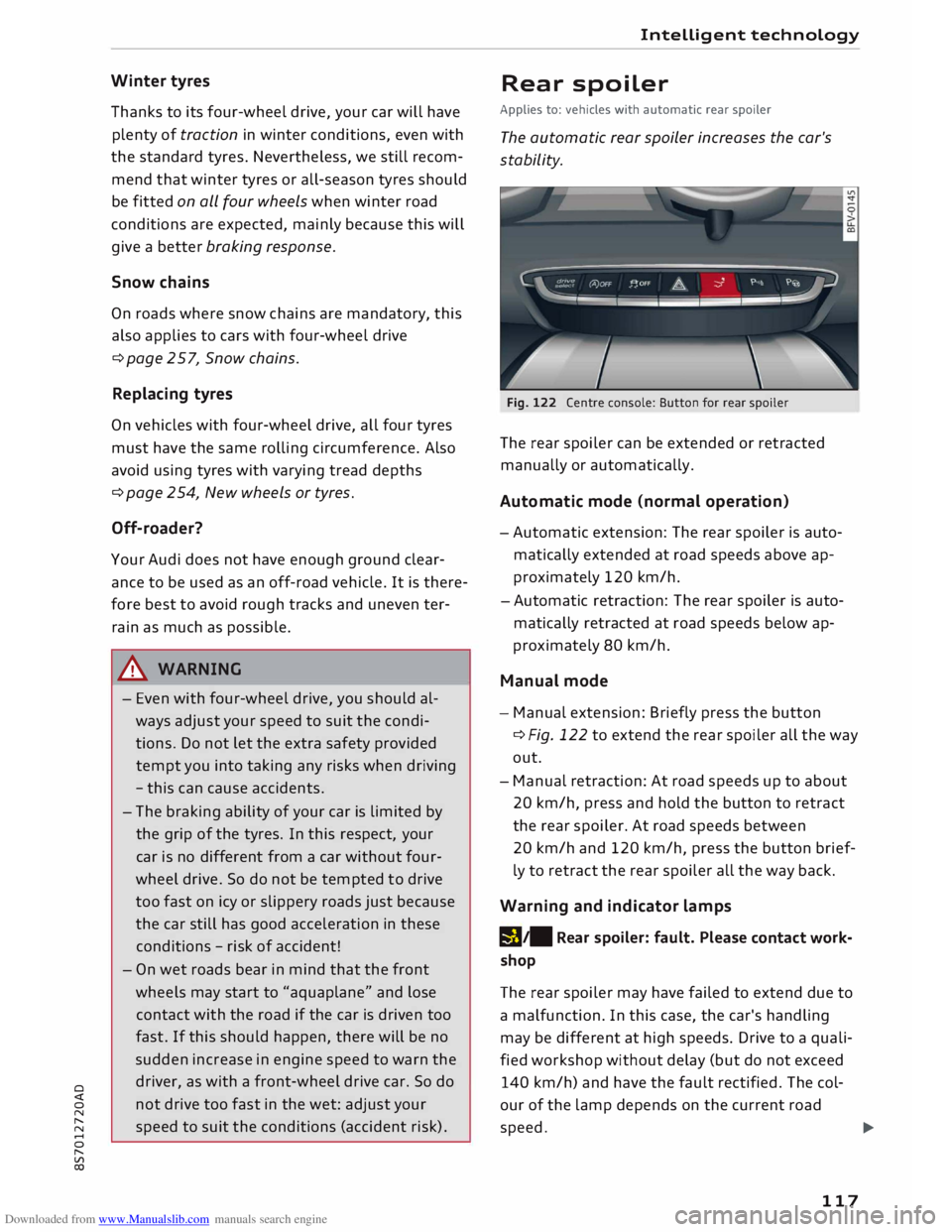
Fig. 122 Centre console: Button for rear spoiler
The rear spoiler can be extended or retracted
manually or automatically.
Automatic mode (normal operation)
- Automatic extension: The rear spoiler is auto
matically extended at road speeds above ap
proximately 120 km/h.
-Automatic retraction: The rear spoiler is auto
matically retracted at road speeds below ap
proximately 80 km/h.
Manual mode
- Manual extension: Briefly press the button
¢Fig. 122 to extend the rear spoiler all the way
out.
- Manual retraction: At road speeds up to about
20 km/h, press and hold the button to retract
the rear spoiler. At road speeds between
20 km/h and 120 km/h, press the button brief
ly to retract the rear spoiler all the way back.
Warning and indicator lamps
1!1 !1111
R
ear
spoiler: fault. Please contact work
shop
The rear spoiler may have failed to extend due to
a malfunction. In this case, the car's handling
may be different at high speeds. Drive to a quali
fied workshop without delay (but do not exceed
140 km/h) and have the fault rectified. The col
our of the Lamp depends on the current road
speed. l)IJ,,
117
Page 120 of 306
Downloaded from www.Manualslib.com manuals search engine Intelligent
technology
A WARNING
When extending or retracting the rear spoiler,
please make sure that no persons or objects
are close to the moving spoiler -risk of injury!
CD CAUTION
- If you need to push the vehicle, never put
your weight on the rear spoiler -Risk of
damage!
- To avoid damage to the rear spoiler, you
should not lean on it or apply any other type
of pressure.
- Do not operate the rear spoiler manually
when the boot lid is open or any moving
parts of the automatic rear spoiler are ob
structed -risk of damage!
Note
Clean the rear spoiler housing every 2 to 3
months. The rear spoiler housing must be
free of ice, snow and leaves in order to oper
ate correctly.
Power management
This system helps to ensure reliable
starting
The power management controls the distribu
tion of electrical energy and thus helps to ensure
that there is always enough power available to
start the engine.
If a vehicle with a conventional electrical system
is left parked for a long time, the vehicle battery
will gradually lose its charge because certain
electrical equipment (such as the immobiliser)
continues to draw current even when the ignition
is off. In some cases there may not be enough
power available to start the engine.
Your vehicle is equipped with an intelligent pow
er management system to control the distribu
tion of electrical energy. This significantly im
proves reliability when starting the engine, and
also prolongs the life of the vehicle battery.
The main functions incorporated in the power
management system are battery diagnosis, re-
118 sidual
current management and dynamic power
management.
Battery diagnosis
The battery diagnosis function constantly regis
ters the condition of the vehicle battery. Sensors
detect the battery voltage, battery current and
battery temperature. This enables the system to
calculate the current power level and charge con
dition of the vehicle battery.
Residu al current management
The residual current management reduces power
consumption while the vehicle is parked. It con
trols the supply of power to the various electrical
components while the ignition is switched off.
The system takes the battery diagnosis data into
consideration.
Depending on the power level of the vehicle bat
tery, the individual electrical components are
switched off one after the other to prevent the
vehicle battery from losing too much charge and
to ensure that the engine can be started reliably.
Dynamic power management
While the vehicle is moving, this function distrib
utes the available power to the various electrical
components and systems according to their re
quirements. It ensures that on-board systems do
not consume more electrical power than is being
generated, and thus maintains the maximum
possible vehicle battery power level.
.
1 Note
- The power management system is not able
to overcome the given physical limits.
Please remember that the power and life of
the vehicle battery are limited.
- If the indicator lamp ri'.J ¢ page 15 appears,
the starting ability may be impaired.
Points to remember
Starting ability has first priority.
Short trips, city traffic and low temperatures all
place a heavy load on the vehicle battery. In
these conditions a large amount of power is
Page 121 of 306
Downloaded from www.Manualslib.com manuals search engine 0
N
,.....
N
......
0
,.....
Vl
CX) consumed,
but only a small amount is supplied.
The situation is also critical if electrical equip
ment is in use when the engine is not running. In
this case power is consumed when none is being
generated.
In these situations you will be aware that the
power management system is intervening to con
trol the distribution of electrical power.
When the vehicle is parked for long periods
If you do not drive your vehicle for a period of
several days or weeks, the power management
will gradually shut off the on-board systems one
by one, or reduce the amount of current they are
using. This limits the amount of power consumed
and helps to ensure reliable starting even after a
long period. Certain convenience features, such
as remote control unlocking, may not be availa
ble. These functions will be restored when you
switch on the ignition and start the engine.
With the engine switched off
If you listen to the radio or use the other info
tainment functions when the engine is not run
ning, this will discharge the vehicle battery.
The infotainment display will show a warning
message before the battery power drops to a lev
el where the starting ability is impaired. This
message warns you that the system you are using
will soon be switched off automatically. You
should therefore start the engine if you wish to
continue using the system.
When the engine is running
Although the alternator generates electrical
power, the vehicle battery can still become dis
charged while the vehicle is being driven. This can
occur when a lot of power is being consumed but
only a small amount supplied, especially if the
vehicle battery is not fully charged initially.
To restore the necessary energy balance, the sys
tem will then temporarily shut off the electrical
components that are using a lot of power, or re
duce the current they are consuming. Heating
systems in particular use a large amount of elec
trical power. If you notice, for instance, that the
seat heating* or the rear window heater is not Intelligent
technology
working, they may have been temporarily switch
ed off or regulated to a lower heat output. These
systems will be available again as soon as suffi
cient electrical power is available.
You may also notice that the engine runs at a
slightly faster idling speed. This is quite normal,
and no cause for concern. The increased idling
speed allows the alternator to meet the greater
power requirement and charge the vehicle bat
tery at the same time.
Information saved in the
control units
The vehicle is fitted in the factory with electronic
control units that, among other things, control
the engine and the gearbox. The control units al
so monitor the exhaust system and the airbags.
The control units continually analyse data rele
vant to the vehicle while you are driving. In the
event of faults or anomalies in the vehicle data,
only these data are saved. As a rule, faults are
shown by the warning lamps in the instrument
cluster.
Data saved in the control units can only be read
and analysed with special equipment.
A qualified workshop is only able to recognise
and deal with faults by using the relevant saved
data. Among other things, the saved data may
contain the following information:
- Data relating to the engine and the gearbox
-Speed
- Direction of travel
- Braking force
- Seat belt warning system data
The control units installed will not under any cir
cumstances record conversations in the vehicle.
Event data recorder
Your vehicle is not equipped with an event data
recorder.
In an event data recorder, information about
the
vehicle is temporarily saved. In the event of an
accident, you can therefore obtain detailed infor-
mation about the course of events. On vehicles ...,.
119
Page 122 of 306
Downloaded from www.Manualslib.com manuals search engine Intelligent
technology
with an airbag system, accident-related data
such as impact speed, seat belt status, seat posi
tions and trigger times can be saved. The exact
information saved depends on the manufacturer.
The installation of an event data recorder is sub
ject to the agreement of the vehicle's owner. This
process is governed by legislation in some coun
tries.
Reprogramming control units
All data for controlling components are saved in
the control units. Some convenience features,
such as one-touch signalling, single door unlock
ing and display messages can be reprogrammed
using special workshop equipment. If any con
venience features are reprogrammed, the infor
mation in this Owner's Manual will no longer be
accurate for the features that have been
changed. We recommend having the reprogram
ming approved.
Your Audi dealer will be able to provide you with
information about possible reprogramming op
tions.
Event memory
There is a diagnostic connection for reading out
the event memory located in the footwell on the
driver's side of the vehicle. Information regard
ing the operation and status of the vehicle's elec
tronic control units is stored in the event memo
ry. The event memory should only be read out
and erased by a qualified workshop.
A WARNING
The diagnostic connection must not be used
for other purposes. Incorrect use can cause
malfunctions -risk of accident!
120
Page 123 of 306
Downloaded from www.Manualslib.com manuals search engine Multi
Media Interface
Notes on traffic safety
You should only use certain infotainment system
functions, e.g. enter a navigation destination,
while the vehicle is stationary. Always be pre
pared to stop operating the infotainment system
in the interest of your own safety and that of oth
er road users.
A WARNING
Only operate the infotainment system when
the traffic conditions allow you to do so safely
and when you can maintain proper control of
your vehicle -risk of accident!
(©) Note
Certain functions are not available while the
vehicle is in motion.
Introduction The Multi Media Interface (MMI) combines dif
ferent communication, navigation* and enter
tainment systems in your Audi. You can operate
your MMI system via the MMI control console,
the multi-function steering wheel or the speech
dialogue system*.
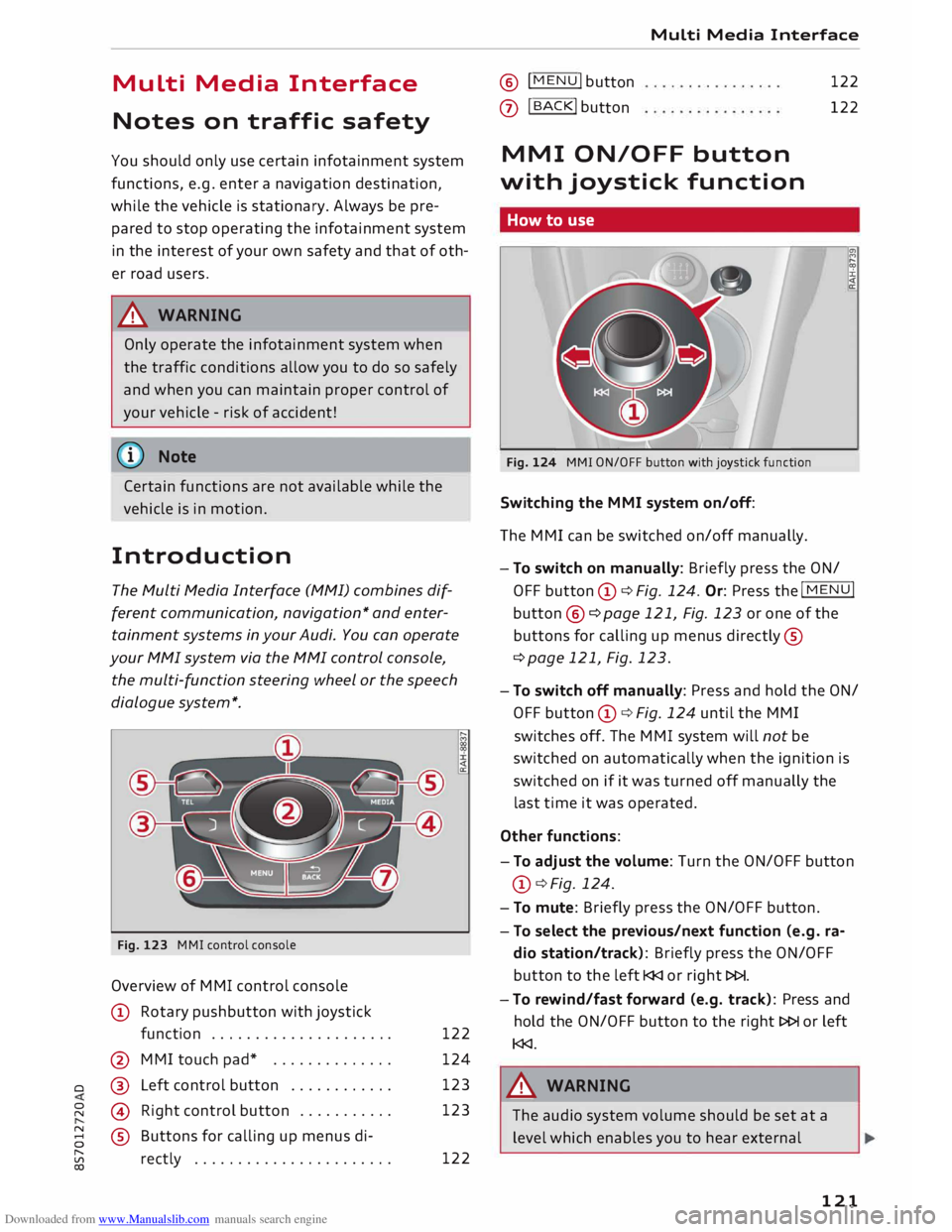
Fig. 123 MMI control console
Overview of MMI control console
CD Rotary pushbutton with joystick
function .................... .
@ MMI touch pad* ............. .
o @
Left control button ........... . 122
124
123
123
� @
Right control button .......... .
8 ®
Buttons for calling up menus di-
� rectly ...................... . 122 Multi
Media Interface ® !
MENU! button
0
I BACK! button
122
122
MMI ON/OFF button
with joystick function
How to use
Fig. 124 MMI ON/OFF button with joystick function
Switching the MMI system on/off:
The MMI can be switched on/off manually. l?l
:;;
:i:
<(
a:
- To switch on manually: Briefly press the ON/
OFF button CD¢ Fig. 124. Or: Press the I
MENU!
button ®
¢page 121, Fig. 123 or one of the
buttons for calling up menus directly ®
¢ page 121, Fig. 123.
- To switch off manually: Press and hold the ON/
OFF button CD¢ Fig. 124 until the MMI
switches off. The MMI system will not be
switched on automatically when the ignition is
switched on if it was turned off manually the
last time it was operated.
Other functions:
- To adjust the volume: Turn the ON/OFF button
CD ¢ Fig. 124.
- To mute: Briefly press the ON/OFF button.
- To select the previous/next function (e.g. ra-
dio station/track): Briefly press the ON/OFF
button to the left l
- To rewind/fast forward (e.g. track): Press and
hold the ON/OFF button to the right l>l>I or left
l
The audio system volume should be set at a
level which enables you to hear external
121
Page 135 of 306
Downloaded from www.Manualslib.com manuals search engine 0
N
,.....
N
....
0
,.....
Vl
CX) Speech
dialogue system
How to use the speech
dialogue system
Applies to: vehicles with speech dialogue system
You can operate many infotainment functions
conveniently by voice.
Important: The ignition and the MMI system
must be switched on, you must not be talking on
the phone, and the parking aid must not be ac
tive.
� To switch on: Briefly press the [2!l button @ on
the multi-function steering wheel¢ page 23,
Fig. 10 and give a spoken command after the
beep signal.
� To switch off: Press and hold the [2!l button for
several seconds. Or: Say the command Cancel.
� To pause: Say the command Pause. To end the
pause, press the [2!l button.
� To make a correction: Press the� button once
® ¢page 21, Fig. 8. Or: Say the command Cor
rection.
Input help
The system guides you through the input routine
with cues and messages.
- Input help messages on screen: After the
speech dialogue system is switched on, a selec
tion of possible commands will be shown. The
command display can be switched on/off via
IM ENU I
> Settings > left control button > MMI
settings > Speech dialogue system.
- Spoken input help cues: To have the system
play the commands currently possible, press
the [2!l button on the multi-function steering
wheel and say Help.
How to help the system understand you
Speak clearly in a normal volume. Speak louder if
you are driving fast.
Speak in a normal tone without long pauses.
Avoid speaking when the speech dialogue system
is saying a cue. Speech
dialogue system
Close doors and windows and soft top* to reduce
background noise. Make sure that passengers are
not talking when you say a command.
Keep the air outlets of the air distribution system
pointed away from the microphone, which is fit
ted in the vicinity of the front interior lights in
the headliner/on the driver's seat belt*. For more
information about the seat belt microphone, re
fer to¢ page 157.
The system should only be operated by the driv
er, since the handsfree microphone is directed
towards the driver.
Other settings
Refer to¢ page 218, Speech dialogue system.
&_ WARNING
- Please direct your full attention to the road
at all times! As the driver, you have full re
sponsibility for the safety of the vehicle and
other road users. For this reason, you should
only use the functions in a manner that al
lows you to maintain control of the vehicle
in all situations -accident risk!
- The speech dialogue system must not be
used in cases of emergency, since the voice
changes in stressful situations. This could
result in a failed or delayed telephone con
nection. Always dial emergency numbers
manually!
(@ Note
- The dialogue is paused when an incoming
telephone call is received; you can continue
the dialogue by ignoring the call. If you an
swer the call, the dialogue will be cancelled.
- No navigation cues* or traffic announce
ments* are played when a dialogue is active.
- You can select an entry from a list both via
the speech dialogue system and using the
rotary pushbutton.
- The speech dialogue system does not sup
port commands in Arabic, Norwegian or
Hungarian.
133
Page 143 of 306
Downloaded from www.Manualslib.com manuals search engine 0
N
,.....
N
......
0
,.....
Vl
CX) Telephone
Introduction
Applies to: vehicles with telephone
You have different options for making calls in
your vehicle via the MMI; this depends on your
vehicle's equipment and the features of your mo
bile phone.
Handsfree operation
After connecting your mobile phone to the MMI
system via Bluetooth, you can operate the hands
free system and the telephone functions conven
iently via the MMI. Your phone calls will be made
via the antenna of your mobile phone.
With the Audi phone box*, you can use the vehi
cle's external aerial to make calls. The use of the
external aerial reduces radiation in the vehicle
and also ensures better reception quality
¢page 146.
Car phone d
)
As part of Audi connect*, the Audi phone box* in
cludes a car telephone function which can be
used via a separate mini SIM card in the SIM card
reader* or an rSAP 2
>-enabled mobile phone. With
the car telephone function, you can use the vehi
cle's external aerial to make calls. The use of the
external aerial reduces radiation in the vehicle
and also ensures better reception quality
¢page 146.
Once a connection has been established success
fully, you can also change the profiles at a later
time. Refer to¢ page 213, Connection manag
er.
A WARNING
- According to health organisations, mobile
phones may interfere with the function of
pacemakers. A minimum distance of 20 cm
should be kept between the mobile phone
aerial and the pacemaker.
l) Not available in all markets. On vehicles with Audi con
nect* and Audi phone box*
2 > Remote SIM Access Profile Telephone
- Do not carry a mobile phone in your breast
pocket directly over the pacemaker when
the phone is switched on.
- If you suspect interference, switch the
mobile phone off immediately.
- The speech dialogue system*¢ page 133
must not be used in cases of emergency,
since the voice changes in stressful situa
tions. This could result in a failed or delayed
telephone connection. Always dial emergen
cy numbers manually!
- Switch off your mobile phones in all areas
where there may be a risk of explosion. Re
member that these areas may not always be
adequately marked. Such places are filling
stations, fuel and chemical storage facilities
or transport vehicles and other places where
fumes, chemicals (e.g. from leaking pro
pane or fuel vapours in vehicles or build
ings) or large quantities of dust particles
(e.g. from flour, wood or metal) could accu
mulate in the air. This warning also applies
to all other places where you would normal
ly switch off your engine.
- Today's driving conditions require the full
attention of drivers. Please always note the
information in the chapter ¢page 121,
Notes on traffic safety.
CD CAUTION
Please always observe the information ¢(Din
Wi-Fi hotspot on page 166.
- For information regarding which Bluetooth
connections and functions your mobile
phone supports, contact your mobile net
work
service
provider or consult the mobile
device database at www.audi.com/blue
tooth.
- The maximum range of the Bluetooth con
nection is limited to the interior of the vehi
cle. The connection can be susceptible to in-
terference from other electronic devices.
..,.
141
Page 148 of 306
Downloaded from www.Manualslib.com manuals search engine Telephone
Using the Audi phone
box
Applies to: vehicles with Audi phone box
You can use the Audi phone box to charge your
mobile phone's battery. You can use the vehicle's
external aerial* to make calls, which reduces ra
diation in the vehicle and also ensures better re
ception quality.
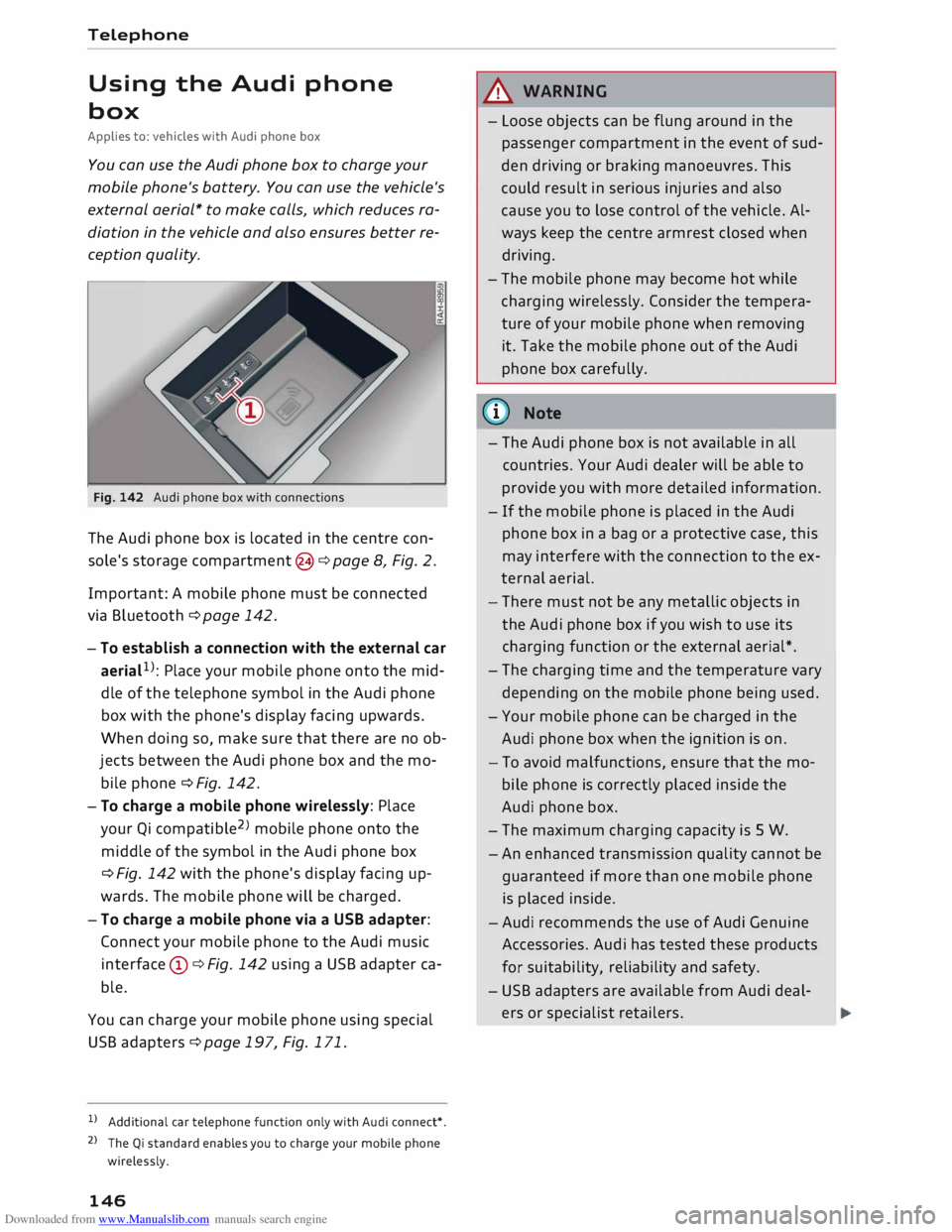
Fig. 142 Audi phone box with connections
The Audi phone box is located in the centre con
sole's storage compartment @¢ page 8, Fig. 2.
Important: A mobile phone must be connected
via Bluetooth ¢page 142.
- To establish a connection with the external car
aeriaL 1
>: Place your mobile phone onto the mid
dle of the telephone symbol in the Audi phone
box with the phone's display facing upwards.
When doing so, make sure that there are no ob
jects between the Audi phone box and the mo
bile phone¢ Fig. 142.
- To charge a mobile phone wirelessly: Place
your Qi compatible 2
>
mobile phone onto the
middle of the symbol in the Audi phone box
¢ Fig. 142 with the phone's display facing up
wards. The mobile phone will be charged.
- To charge a mobile phone via a USB adapter:
Connect your mobile phone to the Audi music
interface (D ¢ Fig. 142 using a USB adapter ca
ble.
You can charge your mobile phone using special
USB adapters ¢page 197, Fig. 171.
l) Additional car telephone function only with Audi connect*.
2 > The Qi standard enables you to charge your mobile phone
wirelessly.
146 A
WARNING
- Loose objects can be flung around in the
passenger compartment in the event of sud
den driving or braking manoeuvres. This
could result in serious injuries and also
cause you to lose control of the vehicle. Al
ways keep the centre armrest closed when
driving.
- The mobile phone may become hot while
charging wirelessly. Consider the tempera
ture of your mobile phone when removing
it. Take the mobile phone out of the Audi
phone box carefully.
countries. Your Audi dealer will be able to
provide you with more detailed information.
- If the mobile phone is placed in the Audi
phone box in a bag or a protective case, this
may interfere with the connection to the ex
ternal aerial.
- There must not be any metallic objects in
the Audi phone box if you wish to use its
charging function or the external aerial*.
- The charging time and the temperature vary
depending on the mobile phone being used.
- Your mobile phone can be charged in the
Audi phone box when the ignition is on.
- To avoid malfunctions, ensure that the mo
bile phone is correctly placed inside the
Audi phone box.
- The maximum charging capacity is 5 W.
-An enhanced transmission quality cannot be
guaranteed if more than one mobile phone
is placed inside.
-Audi recommends the use of Audi Genuine
Accessories. Audi has tested these products
for suitability, reliability and safety.
- USB adapters are available from Audi deal
ers or specialist retailers.