reset AUDI TT ROADSTER 2016 User Guide
[x] Cancel search | Manufacturer: AUDI, Model Year: 2016, Model line: TT ROADSTER, Model: AUDI TT ROADSTER 2016Pages: 306, PDF Size: 31.82 MB
Page 196 of 306
Downloaded from www.Manualslib.com manuals search engine Media
Important: Copying must be in progress in the
background.
- To display the copy procedure: Select: right
control button > Active copy procedure.
During the copying procedure, the audio files are
automatically sorted according to the categories
in the media centre based on the metadata stor
ed for the files ¢ page 201. The video files cop
ied can be found in the Videos category of the
media centre.
Playing from the jukebox
Important: The jukebox must contain audio/vid
eo files ¢ page 193, Filling the Jukebox.
The jukebox is called up and operated via the
MMI (D¢page200, Fig.174.
Di splaying the jukebox memory capacity
Select: right control button> Jukebox memory
capacity. Information on the jukebox memory ca
pacity and the number of stored tracks will be
displayed.
Deleting tracks from the jukebox 1
)
Important: The jukebox must contain audio/vid
eo files.
- Delete entry: Select an entry from the juke
box's media centre. Select: right control button
> Delete from jukebox > This entry or Entire
list.
- The status of the deletion process will be
shown on the MMI. During the deletion process
the playback of the jukebox is interrupted; it is
started again automatically once the deletion
process has been completed.
CD CAUTION
Only copy audio/video files while the engine is
running; otherwise the vehicle battery will be
discharged.
Note
- For legal reasons it is not possible to copy
tracks from audio CDs onto the jukebox.
l l
Not in the Playback view.
194 -
Files that have already been copied are de
tected automatically and cannot be copied
to the jukebox again.
- It is not possible to play audio/video files*
in the CD/DVD* drive while they are being
copied.
- For legal reasons there is no export function
for the jukebox.
- Files or tracks that do not include stored
metadata are listed as Unknown. Audi rec
ommends that you mark the audio files with
the corresponding metadata (e.g. ID3 tags).
- When handing over your vehicle e.g. to a
new buyer, reset the jukebox to the factory
settings ¢ page 213.
Bluetooth audio player
Applies to: vehicles with Bluetooth
You can use the Bluetooth audio player to play
music from your Bluetooth-enabled device (e.g.
smartphone) wirelessly via the MMI.
Important: To connect a Bluetooth device, the
vehicle must be stationary and the Bluetooth
function of your Bluetooth device and the Blue
tooth audio player ¢ page 215 function of the
MMI system must be switched on.
- To connect a Bluetooth device: Press the
I MEDIA!
button. Press the left control button
repeatedly until the source overview is dis
played. Select and confirm Bluetooth audio
player @¢page200, Fig. 175.
- You may need to select and confirm Not con
nected > Connect Bluetooth audio player. The
system will start searching for Bluetooth devi
ces. Follow the instructions given by the MMI.
- Select and confirm the desired Bluetooth de
vice from the list. The MMI will generate a PIN
to establish the connection.
- Select and confirm Yes.
- Enter the PIN on your Bluetooth device to es-
tablish a connection. Or: If the PIN is already
being displayed on your Bluetooth device,
please confirm it on the device. You have about
30 seconds to enter the PIN.
�
Page 201 of 306
Downloaded from www.Manualslib.com manuals search engine 0
N
,.....
N
....
0
,.....
Vl
CX) which
must be connected via a USB adapter
(¢ page 197) to the Audi music interface;
this could cause performance issues.
- The AUX adapter cable is available from
Audi dealers or specialist retailers.
- It cannot be guaranteed that mobile devices
which do not meet the specification USB 2.0
will function properly.
- USB hubs are not supported.
- Some iPod versions (e.g. iPod shuffle) can-
not be connected with the USB adapter for
devices with Apple dock connector. You can
connect these devices using the AUX adapt
er cable.
- Video playback via the Audi music interface
is only supported if the system detects that
the device connected is a USB storage device
(e.g. a USB stick). Apple or MTP devices (e.g.
smartphones) are not recognised as USB
storage devices.
- iPod/iPhone malfunctions also affect opera
tion of the device via the MMI. In this case,
please reset your iPod/iPhone.
- Please refer to the iPod/iPhone operating
instructions for important information on
how to use your iPod/iPhone. We recom
mend that you use the most up-to-date
iPod/iPhone software possible.
- For more information on the Audi music in
terface and on which devices are supported,
please see the Audi mobile device database
at www.audi.com/mp3 or contact an Audi
dealer. Media
AUX input/USB charging socket
Applies to: vehicles with AUX input/USB charging socket
You can charge the batteries of your mobile devi
ces using the USB charging socket. You can con
nect mobile devices using the analogue AUX in
terface.
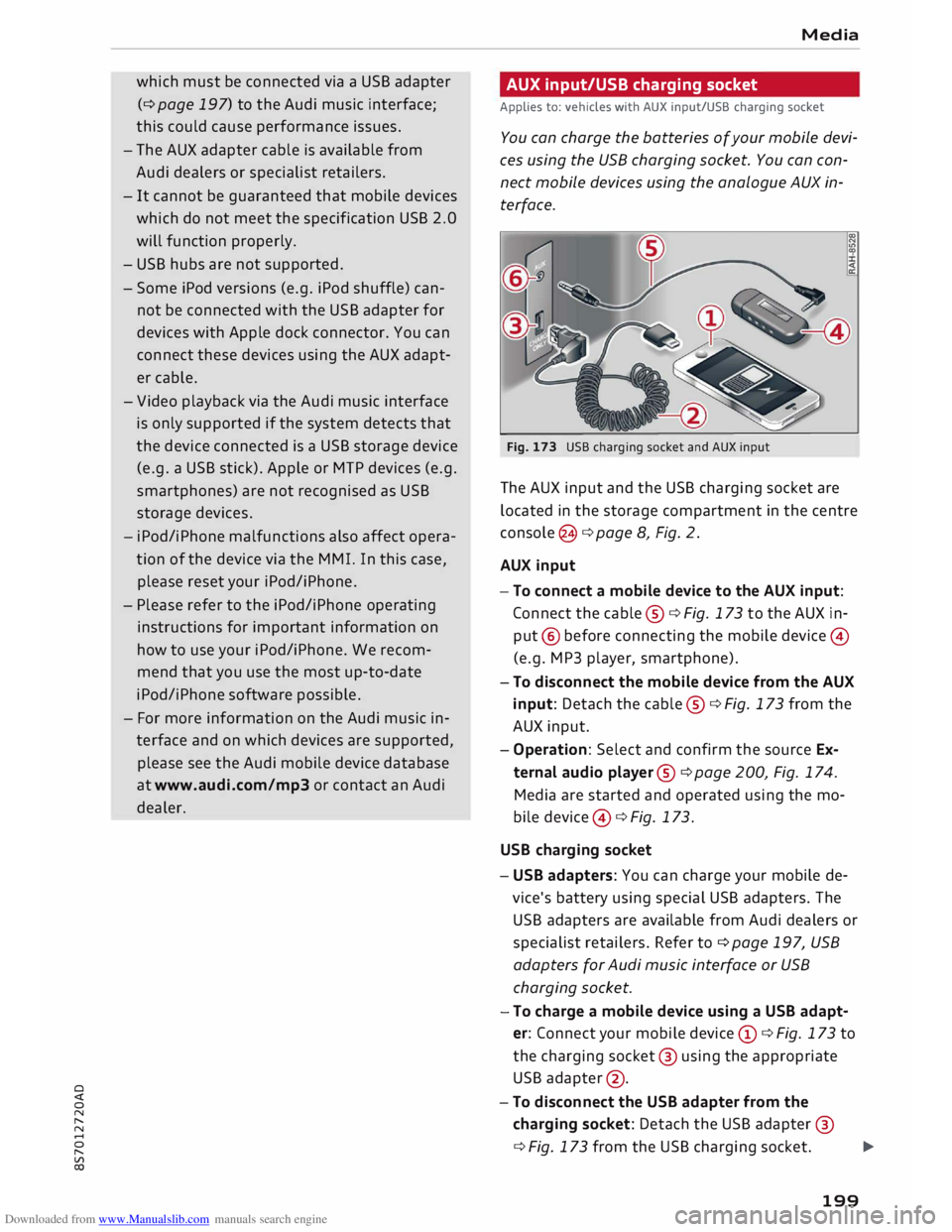
Fig. 173 USB charging socket and AUX input
The AUX input and the USB charging socket are
located in the storage compartment in the centre
console @¢ page 8, Fig. 2.
AUX input
-To connect a mobile device to the AUX input:
Connect the cable ®¢ Fig. 173 to the AUX in
put @ before connecting the mobile device©
(e.g. MP3 player, smartphone).
- To disconnect the mobile device from the AUX
input: Detach the cable ®¢ Fig. 173 from the
AUX input.
- Operation: Select and confirm the source Ex
ternal audio player@¢ page 200, Fig. 174.
Media are started and operated using the mo
bile device @¢ Fig. 173.
USB charging socket
- USB adapters: You can charge your mobile de
vice's battery using special USB adapters. The
USB adapters are available from Audi dealers or
specialist retailers. Refer to¢ page 197, USB
adapters for Audi music interface or USB
charging socket.
-To charge a mobile device using a USB adapt
er: Connect your mobile device (D ¢ Fig. 173 to
the charging socket@ using the appropriate
USB adapter @.
- To disconnect the USB adapter from the
charging socket: Detach the USB adapter @
¢ Fig. 173 from the USB charging socket.
...,.
199
Page 207 of 306
Downloaded from www.Manualslib.com manuals search engine 0
N
,.....
N Display
DVD menu
To select a menu option: Select and confirm a
menu option. Or: Move your finger on the MMI
touch pad* and press the rotary pushbutton.
Audio track1
)
You can adjust the audio track (language and au
dio format) manually. It depends on the video
DVD whether different Languages and audio for
mats are available.
Subtitles 1
>
You can select subtitles manually. It depends on
the video DVD whether different languages are
available.
Picture format
We recommend using the automatic setting for
the picture format. Depending on the active file
or source (e.g. video file*, DVD*), you may be able
to adjust the picture format.
Picture for-Information
mat
automatic The
MMI detects the picture for-
mat of the source and displays the
picture using the best possible
width-to-height ratio. Depending
on the source format and the info-
tainment display installed, black
bars may be displayed on the edges
of the picture.
zoom The picture is enlarged to fill the
infotainment display. Switch this
function off if the picture is distor-
ted.
8 1}May not be possible during playback (depends on the
,.....
� DVD). Media
Picture for-
Information
mat
cinema- Use
this setting for films in the cin-
scope ema format 21:9. Black bars will
be shown on the upper and Lower
edges of the infotainment display.
original The picture will be displayed using
the picture ratio of the source for-
mat. Select this option if the pie-
ture shown with auto selected is
distorted or partially cut off.
4:3 The
picture is set to a width-to-
height ratio of 4:3. Black bars will
be shown on the edges of the info-
tainment display.
16:9 The
picture is set to a width-to-
height ratio of 16:9. Black bars will
be shown on the upper and Lower
edges of the infotainment display.
(© Note
- Not all video DVDs have a child lock feature.
- The child lock safety levels comply with the
US standards of the Motion Picture Associa
tion of America (MPAA). Please note that
age ratings for DVDs may vary between dif
ferent European countries.
- If you enter the wrong child Lock password
three times in a row, you will not be able to
enter a password for approximately one mi
nute. The password can only be reset by an
Audi workshop.
205
Page 215 of 306
Downloaded from www.Manualslib.com manuals search engine 0
N
,.....
N
......
0
,.....
Vl
CX) -
spoken: The reminder signal is spoken by the
system.
Reminder signal volume: You can adjust the vol
ume of the reminder signal by turning the rotary
pushbutton.
Switch off pop-up: This function is switched off
at the factory. When this function is switched on
� , the messages about the charging status of
the mobile phone in the Audi phone box* on the
infotainment display will not appear. The re
minder not to forget the mobile phone when
leaving the vehicle will also be switched off.
Usage tips
Your MMI displays usage tips when this function
is switched on�
. They will appear less often as
time goes by. You can switch the usage tips off at
any time.
Speech dialogue system
Applies to: vehicles with speech dialogue system
Command display: The MMI displays possible
voice commands in the corresponding menu
when this function is switched on�
. You can
switch this function off at any time.
Short dialogue: When this function is switched
on �
, the spoken cues are shortened. You can
switch this function off at any time.
Speech dialogue system volume: You can adjust
the volume of the spoken cues by turning the ro
tary pushbutton.
Individual speech training (only possible when
the vehicle is stationary): You can use the individ
ual speech training to adapt the speech dialogue
system to your voice or pronunciation so that the
speech dialogue system can then better recog
nise what you are saying. The individual speech
training prompts you to repeat 20 spoken phra
ses that consist of certain commands and blocks
of digits. If you would like to delete the stored
speech training setup, you can use the function
Reset individual speech training.
Factory settings
You can reset the following functions to the fac
tory settings: System
settings
- Sound settings
- Radio
- Media settings
-Jukebox*
- Directory*
- Telephone*
- Bluetooth and Wi-Fi*
- Navigation settings*
- Navigation and online memory*
- Speech dialogue system*
- Message settings*
-Apps*
- Usage tips
-Audi connect*
You can select the desired options individually or
mark Select all entries. Select and confirm Re
store factory settings.
ijj) Note
- Please note that not only settings will be
deleted when you do this; saved data may
also be erased.
- If you set Navigation and on line memory*
or Audi connect* to the factory settings, the
system will restart after approx. 20 sec
onds. During the restart, the infotainment
display
will
be black for a few minutes.
- Please note that the speech dialogue sys
tem* is not available as a factory option for
Cabriolet models without a seat belt micro
phone.
Connection manager
Introduction
The connection manager gives you an overview
of your connected devices and their connection
status.
.., Select: I MENU I button > Settings > left control
button > MMI settings > Connection manager.
.., Select and confirm a menu option.
If a mobile device has already been connected
and you then select and confirm the correspond
ing menu item, the device's name and connection
mode is displayed under this menu item.
...,.
213
Page 217 of 306
Downloaded from www.Manualslib.com manuals search engine 0
N
,.....
N
......
0
,.....
Vl
CX) Audi
smartphone
Applies to: vehicles with Audi smartphone interface
- Connect your mobile phone to the Audi music
interface ¢page 198via a USB adapter
¢page 197, Fig. 171.
- Select your mobile phone from the list of mo
bile phones already connected.
Further options
Further options may be available in the connec
tion manager via the right control button de
pending on the function selected.
Bluetooth settings
- Bluetooth: Select and confirm a discoverability
setting for the Bluetooth connection. Select
visible to make the MMI visible to other devi
ces. Select invisible to make the MMI invisible
to other devices. Devices which have already
been bonded can connect via Bluetooth even
when discoverability is deactivated. Select off
to switch discoverability off. It is then not pos
sible to establish a Bluetooth connection.
- Bluetooth audio player: When this function is
switched on�, the Bluetooth audio player is
available as a source in the Media menu.
- Delete Bluetooth device: The selected mobile
phone/device is disconnected from the MMI.
- Display Bluetooth profiles: You can Connect or
Disconnect the Handsfree, Car phone and Di
rectory/contacts profiles individually.
- Bluetooth audio player: Switch this function on
� to be able to use the Bluetooth audio player
as a source in the media menu.
- Bluetooth name: The Bluetooth name of the
MMI system (e.g. "AUDI MMI 2017") is dis
played and can be changed.
When this function is on �. the symbol @
¢page 130, Fig. 137 will appear on the infotain
ment display.
Online settings*
- Data connection settings: Refer to ¢ page 166,
Configuring the data connection
- Data usage meter: The number of the data
packets sent/received via the MMI system is System
settings
displayed. Select Reset data meter to reset the
usage statistics to zero.
- Connection status: The mobile network provid
er for data services and the network status are
displayed.
Wi-Fi settings*
Refer to ¢ page 165, Wi-Fi hotspot.
SIM PIN settings*
-Automatic PIN entry: When this function is
switched on�, the SIM PIN is stored in the
MMI after it has been entered for the first time.
You can save the PIN codes of four different
SIM cards on the MMI. If this function is
switched off, the PIN currently stored in the
MMI will be deleted. If the automatic PIN entry
function is activated, the system does not ask
you to enter your SIM PIN explicitly.
- Deactivate PIN query: The system does not ask
for the SIM PIN when you switch it on. The au
tomatic PIN entry function is ignored in this
case.
- Change PIN: You can change the PIN code for
your SIM card. First enter the existing PIN code
for your SIM card. The SIM PIN code can only
consist of numbers from Oto 9. The new SIM
PIN code has to be entered twice, as a precau
tionary measure, and is stored on the SIM card.
Network settings*
- Registration: To dial into your service provid
er's mobile network automatically or to select a
network manually from the list of available
networks.
- Network selection: You can use this function to
select the available networks for the current
position of the vehicle. This function is only
available when the manual setting is activated
for registration.
Apple CarPlay sound settings/Android Auto
sound settings
Applies to: vehicles with Audi smartphone interface
Refer to ¢ page 217.
215
Page 218 of 306
Downloaded from www.Manualslib.com manuals search engine System
settings
Ab out Appl e CarPla y/About Android Auto
Applies to: vehicles with Audi smartphone interface
Here you will find legal information about using
Apple CarPlay/Android Auto and information
about data transfer for specific devices.
Delete CarPlay device/Delete Android Auto
device
Applies to: vehicles with Audi smartphone interface
Important: Your mobile phone must no longer be
connected to the Audi music interface via a USB
adapter.
Select: Audi smartphone > a device from the list
> right control button.
To remove your mobile phone from the list of
mobile phones already connected, select and
confirm Delete CarPlay device or Delete Android
Auto device.
� Note
Some SIM cards do not allow the SIM PIN
query to be deactivated.
System update ..,
Sele
ct:
!MENU! button > Settings > left control
button > System maintenance.
- System update: Insert the storage medium
with the update data into the appropriate drive
¢page 192. Select and confirm the appropri
ate drive > Start update. The duration of this
process depends on the size of the update.
- Reset driver installation: The media driver
package selected is reset to the factory de
faults.
- Version information: Information on the soft
ware version of the M MI and the navigation da
tabase* is displayed. In addition, you can use
the Software information function to display
information on the MMI's software and licence
conditions.
216 On-board
Handbook
Applies to: vehicles with On-board Handbook
The On-board Handbook includes the Owner's
Manual for your vehicle.
Insta lling/u pdating the On-board Handbook
Important: The storage medium on which the
On-board Handbook is stored must have been in
serted into the relevant drive ¢page 192.
.., Select: I MEN
U
I button >Settings > left control
button > System maintenance > System up
date> SD card 1, SD card 2, CD/DVD* or USB*.
.., Follow the instructions given by the system.
Starting the Handbook
Important: The Handbook must have been instal
led previously.
.., Select: I MENU
I button >Car> left control but-
ton > Handbo ok.
The On-board Handbook will automatically load
in the language that is set under the option Menu
language in the MMI ¢page 212.
Using the On-board Handbook
The following functions are available when you
are operating the On-board Handbook using the
rotary pushbutton:
- Select and confirm an entry: Turn the rotary
pushbutton to the entry you require and press
the rotary pushbutton.
- Show a picture in full size: Turn the rotary
pushbutton to the desired picture and press the
rotary pushbutton.
- Call up the options menu: You can use the
right control button to return to the Home
page, Refresh the content in the On-board
Handbook, Cancel refresh of the content and
open the Index.
A WARNING
You should only use the On-board Handbook
when the traffic conditions allow you to do so
safely and when you can maintain proper con-
trol of your vehicle -risk of injury.
�
Page 219 of 306
Downloaded from www.Manualslib.com manuals search engine 0
N
,.....
N
......
0
,.....
Vl
CX) Note
- The On-board Handbook is not available in
all countries. Your Audi dealer will be able
to provide you with more detailed informa
tion.
- Switch off the ignition while you are instal
ling/updating the On-board Handbook.
- Please note that the On-board Handbook is
not a substitute for the printed Owner's
Manual.
Sound settings
You can adjust the sound and volume of the MMI
individually. The settings depend on the equip
ment fitted in your vehicle.
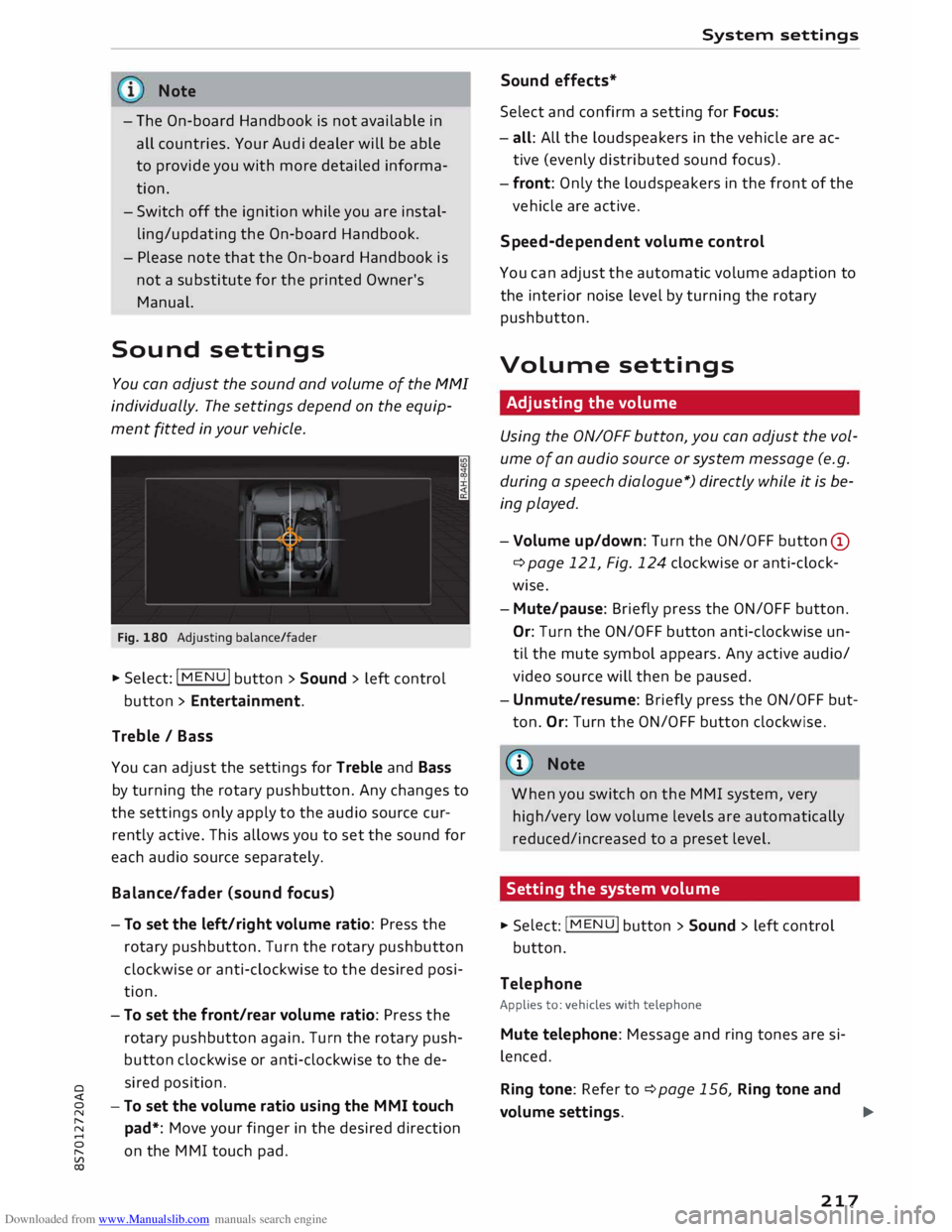
Fig. 180 Adjusting balance/fader
� Select: IM
E
N
u I button > Sound > left control
button > Entertainment.
Treble / Bass
You can adjust the settings for Treble and Bass
by turning the rotary pushbutton. Any changes to
the settings only apply to the audio source cur
rently active. This allows you to set the sound for
each audio source separately.
Bala nce/fader (sound focus)
- To set the left/right volume ratio: Press the
rotary pushbutton. Turn the rotary pushbutton
clockwise or anti-clockwise to the desired posi
tion.
- To set the front/rear volume ratio: Press the
rotary pushbutton again. Turn the rotary push
button clockwise or anti-clockwise to the de
sired position.
-To set the volume ratio using the MMI touch
pad*: Move your finger in the desired direction
on the MMI touch pad. System
settings
Sound effects*
Select and confirm a setting for Focus:
- all: All the loudspeakers in the vehicle are ac
tive (evenly distributed sound focus).
- front: Only the loudspeakers in the front of the
vehicle are active.
Speed-d ependent volume control
You can adjust the automatic volume adaption to
the interior noise level by turning the rotary
pushbutton.
Volume settings
Adjusting the volume
Using the ON/OFF button, you can adjust the vol
ume of an audio source or system message (e.g.
during a speech dialogue*) directly while it is be
ing played.
- Volume up/down: Turn the ON/OFF button (D
¢ page 121, Fig. 124 clockwise or anti-clock
wise.
- Mute/pause: Briefly press the ON/OFF button.
Or: Turn the ON/OFF button anti-clockwise un
til the mute symbol appears. Any active audio/
video source will then be paused.
- Unmute/resume: Briefly press the ON/OFF but
ton. Or: Turn the ON/OFF button clockwise.
{a)) Note
When you switch on the MMI system, very
high/very low volume levels are automatically
reduced/increased to a preset level.
Setting the system volume � Sele
ct:
IMENU! button > Sound > left control
button.
Telephone
Applies to: vehicles with telephone
Mute telephone: Message and ring tones are si
lenced.
Ring tone: Refer to ¢page 156, Ring tone and
volume settings.
..,.
217
Page 220 of 306
Downloaded from www.Manualslib.com manuals search engine System
settings
Ring tone volume: You can adjust the volume of
the ring tone currently selected by turning the ro
tary pushbutton.
Message volume: You can adjust the volume of
the tone informing you of a new text message by
turning the rotary pushbutton.
Microphone input Level: You can adjust the vol
ume during a call by turning the rotary pushbut
ton.
Navigation
Applies to: vehicles with navigation system
Voice guidance: Refer to ¢ page 177, Voice guid
ance.
Voice guidance during calls: Refer to
¢ page 177, Voice guidance.
Volume of spoken cues: You can adjust the vol
ume of the spoken cues while route guidance is
active by turning the rotary pushbutton.
Entertainment fader: This option allows the vol
ume of the current audio source to be temporari
ly reduced when the parking aid is active or while
a navigation cue is being played.
Announ cements
Traffic announcements: Refer to¢ page 186.
DAB announcements*: Refer to¢ page 186.
Volume of announcements: You can adjust the
volume of traffic announcements by turning the
rotary pushbutton.
Speech dialogue system
Applies to: vehicles with speech dialogue system
Short dialogue: This option can be switched on/
off. When it is activated, the spoken cues played
by the system are shortened.
Speech dialogue system volume: You can adjust
the volume of the spoken cues by turning the ro
tary pushbutton.
Parking aid*
Turn the rotary pushbutton to adjust the volume
of the beeps.
- To adjust the front volume: Select and confirm
high, medium or Low.
218 -
To adjust the rear volume: Select and confirm
high, medium or Low.
MMI touch volume*
You can adjust the volume of the M MI touch*
spoken cues by turning the rotary pushbutton.
Audi heartbeat
You can adjust the volume of the Audi heartbeat
by turning the rotary pushbutton.
� Note
Please note that the speech dialogue system*
is not available as a factory option for Cabrio
let models without a seat belt microphone.
Restarting the MMI
system (Reset)
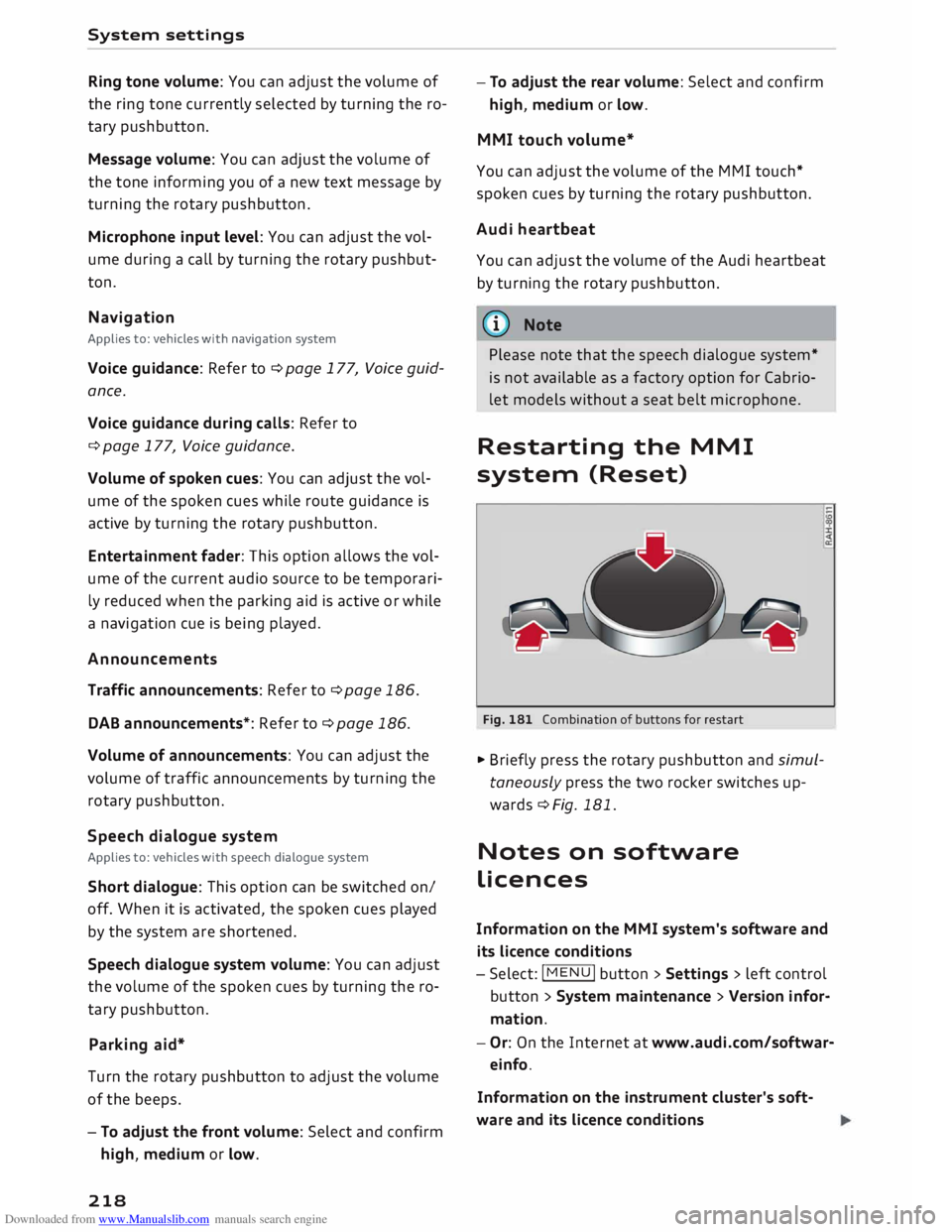
Fig. 181 Combination of buttons for restart
.,. Briefly press the rotary pushbutton and simul
taneously press the two rocker switches up
wards¢ Fig. 181.
Notes on software
licences
Information on the MMI system's software and
its Licence conditions
- Select: I MENU
I button
>Settings > left control
button > System maintenance > Version infor
mation.
- Or: On the Internet at www.audi.com/softwar
einfo.
Information on the instrument cluster's soft
ware and its Licence conditions
Page 221 of 306

Downloaded from www.Manualslib.com manuals search engine 0
N
,.....
N
......
0
,.....
Vl
CX) Press
the reset button I o.o I� page 24, Fig. 12
twice in the first five seconds after switching on
the ignition. System
settings
219
Page 255 of 306
Downloaded from www.Manualslib.com manuals search engine 0
N
,.....
N
......
0
,.....
Vl
CX) You
cannot check the service interval on a new
vehicle until it has been driven for about 500 km.
Qualified workshops reset the service interval af
ter the oil is changed. The distance to the next oil
change is initially displayed based on the driving
profile prior to the oil change. Your own personal
driving profile is used subsequently to calculate
the remaining distance. Frequent cold starts or
short trips place extra demands on the engine oil
with the result that the oil has to be changed
more often.
Resetting the display
Your qualified workshop resets the service inter
val display after each service.
It is very important that you reset the oil change
display if you change the oil yourself. The next oil
change will be due after a fixed service interval.
To reset the display, select the following on the
infotainment system: !MENU! button> Car > left
control button > Servicing & checks > Service in
tervals > Reset oil change interval.
CD CAUTION
- Do not reset the oil change interval display
unless you have changed the oil.
- Keeping to the correct service intervals is
most important for the service life and re
sidual value of the vehicle (and especially
for the life of the engine). Services must al
ways be carried out promptly, even if the
mileage is low. Checking
and topping up fluids
253